
Design Data Import, Sanity Checks and Export: a judged first database
Why this chapter matters in a real project
The previous chapter gave you a session that starts as intended. A session is not a design. Before anyone starts the floorplan, somebody must say, with evidence, which design was loaded. They must also say from which files, under which timing assumptions, and how far that claim can be trusted.
A project hands you a package. A netlist comes from the synthesis team and libraries from the technology provider. Constraint files come from the block owner, and an email says "the usual corners". You are asked to bring it into Innovus and confirm that it is ready for floorplanning.
Every later stage inherits the database that the import creates. Suppose the import loaded the wrong top module, an incomplete library or the wrong timing views. The floorplan will still look plausible. The cost appears much later, when it is expensive to undo.
So the question is not "how do I run init_design". It is this: what must be true about the inputs, the configuration and the imported database before floorplanning can begin? And how do we find out? The command is one line. The judgment around it is the skill.
Prerequisites
- Understanding the Innovus Environment and Session: you can start a known session, keep a log, and tell a request from an observation.
- Basic Linux: a terminal, Bash, a text editor and file permissions.
- You do not need to know static timing analysis in depth. This chapter teaches just enough to judge a constraint set.
- You do not need a licensed tool for the teaching sections or the evidence-reading exercises. Only the lab needs one.
Learning objectives
- Explain what each input of an import contributes, what it leaves undescribed, and who owns it.
- Review a design handoff before launch and decide, with a reason, whether to proceed or stop.
- Reconcile the netlist, the physical library and the timing library for the same cell.
- Read a small constraint set and a multi-mode multi-corner (MMMC) configuration, and trace each analysis view back to its source files.
- Explain every line of an
init_designconfiguration and tell the alternative initialization routes apart. - Interpret representative post-import evidence, choose an action, and state what a clean report still leaves unproven.
- Tell a native checkpoint from exported files, and say what each one can and cannot hand to the next person.
Figure 1 shows the whole chapter on one page. Come back to it whenever you lose your place.
Two short names appear in it and in the table that follows. LEF (Library Exchange Format) holds the physical cell data. RC (resistance and capacitance) data lets the tool estimate wire delay.
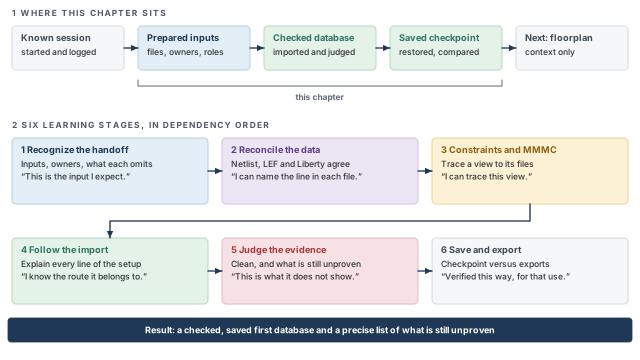
What to notice: Each stage ends with a sentence you should be able to say before moving on. Judging the evidence (stage 5) only means something against what stages 1 to 4 said the inputs should be.
1 What this chapter is for, and how it is organized
The chapter stops before floorplanning. Later stages appear only as context, never as products of a first import. The top row of Figure 1 shows this position: a known session comes in, and a checked, saved first database goes out.
1.1 The learning roadmap
The six stages are ordered by dependency. Each one needs the understanding built by the one before it. The table below, Table 1, lists what each stage teaches and the milestone sentence that closes it.
| Stage | What you learn | Why it comes here | You can continue when you can say |
|---|---|---|---|
| 1. Recognize the handoff | Which inputs exist, what each contributes, who owns it | Nothing later can be judged without knowing what was supposed to arrive | "This is the input I expect, this is who supplies it, and this is what it does not tell me." |
| 2. Reconcile logical, physical and timing data | How the netlist, LEF and Liberty describe the same cell, and how they disagree | Most import failures are disagreements between these three | "For this cell I can name the line in each file, and I know what a matching name does not prove." |
| 3. Understand constraints and MMMC | What constraints assert, and how modes, corners and views connect to files | The configuration in stage 4 refers to these objects by name | "For this view I can trace the libraries, the RC data and the constraint files it uses." |
| 4. Follow the import flow | What each setting does, and what init_design consumes and produces | Only now can a configuration be read line by line | "I can explain every line of this configuration and the route it belongs to." |
| 5. Interpret post-import evidence | What each check asks, how to read it, and what to do when it is wrong | Evidence is meaningful only against the intended configuration | "This report is clean, and this is what it still does not show." |
| 6. Save, restore and export | What a checkpoint preserves, and what each exported file is for | A handoff is a claim; the claim must match what the file can carry | "This checkpoint was verified in this way, and this export is only for that purpose." |
The roadmap gives the learning order. The lab follows the operational order. Stages 1 to 3 need no tool. Performing stages 4 and 5 on real data needs a licensed tool and approved inputs.
1.2 Two ways to read this chapter
The chapter has two parts. Part I is the teaching, from this section up to "Saving, restoring and exporting". Part II is a short lab, a set of evidence-reading exercises and a troubleshooting table.
- Concepts and evidence, no tool. Read Part I, then work the evidence-reading exercises. The examples are small, and the evidence is shown as short excerpts you can read by eye.
- Optional execution. Read the teaching first, then do the lab with an approved package. The lab teaches nothing new. It applies the configuration and the judgment to data that can disagree with you.
Real execution needs a licensed Innovus in the Legacy UI, the original Innovus command set. Understanding the Innovus Environment and Session teaches it. You also need an approved design, library and technology package. This chapter does not provide either.
1.3 How examples are labeled
Each code block says in its header which kind of material it holds.
- Commands. Innovus terminal lines (prompt
innovus>) and Linux lines (prompt$). They were checked by reading, not executed on a licensed tool. - Teaching excerpts. Blocks headed
FILEshow fragments of Verilog, LEF, Liberty, SDC (Synopsys Design Constraints) or Tcl files. Names and numbers are invented, and they are not runnable technology files. - Illustrative output. Blocks headed
ILLUSTRATIVE OUTPUTimitate a report so that you can practice reading. They are not tool transcripts. Real wording, ordering and numbers depend on your release and design.
One invented design runs through all examples: demo_top. It has two registers and three instances of a small module alu_slice; the third instance is a bypass path. It also has its own libraries, files, modes and corners.
Takeaway The command is one line; the chapter teaches the judgment around it, in dependency order.
2 Reading a design handoff
A handoff is a set of promises made by different people. Before you launch anything, you read the promises and decide which ones you can check. If you cannot say who delivered an input and what it describes, you cannot tell which one to suspect later.
2.1 A realistic arrival
The synthesis engineer sends demo_top.v. The library team points to a release directory. It holds a technology LEF, a standard-cell LEF, a memory-macro LEF and Liberty libraries at two corners. The block owner sends func.sdc and test.sdc.
One email lists the supplies as VDD and VSS. Another says the scan chains are not stitched yet. Someone mentions that the memory vendor "re-released" the macro last week.
Each fact matters and none is verified. The first job is not to launch. It is to record, for each item, what it is meant to be and who owns it. Also record how you will inspect it. The dependencies between these deliveries appear in Figure 2.
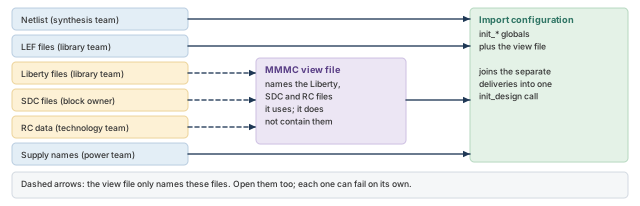
What to notice: Some inputs name other files. Access to the top-level file does not guarantee access to the files it refers to.
2.2 What must be established before launch
Before the first command, answer these questions from the package and from the people who delivered it.
- Which design revision, and which top module? A netlist directory may hold several versions and several candidate tops. The revision and the top name come from the design owner, not from a guess.
- Which technology and library release? Use the combination your project has approved as compatible. A LEF from one release and Liberty files from another can each be valid and still disagree.
- Which modes does the design need? A functional mode and a test mode, or one mode? The answer decides how many constraint files you should see.
- Which corners are approved for analysis? The project, not the tool, picks the corners. "The usual corners" is not an answer you can check.
- Which macros are present, and does each have both a physical and a timing model? A macro with a LEF abstract and no timing model is a classic gap.
- What are the power and ground net names, and how do they map? The tool needs the global supply names at import. Unmapped names make power connectivity fail later, in a way that looks unrelated.
- Which conditional inputs apply? An I/O assignment file, scan information, power intent, or none. A missing conditional input is not a defect unless the project requires it.
- Who owns each input, and who do you ask when it looks wrong? The owner of a netlist is not the owner of a library or of constraints.
- Are there nested dependencies, and can you read them? An MMMC file lists Liberty and SDC paths. An SDC file may source another. Permission to read the top file says nothing about those.
For question 6, the names must agree across the netlist, the LEF power pins and your configuration. None of these questions needs a licensed tool. Asking them first moves the discovery of a mistake from "after a ninety-minute import" to "before the launch".
2.3 The inputs at a glance
Table 2 lists each input, its owner, what Innovus takes from it, and the section that teaches it.
| Input | Provided by | What Innovus takes from it | Taught in |
|---|---|---|---|
| Gate-level Verilog netlist | Synthesis or design team | Modules, cell instances, nets, connectivity, the top module | The gate-level netlist |
| Technology LEF | Technology or library team | Layers, vias, sites, routing rules | Physical library data |
| Standard-cell LEF | Library team | Size, site, pin shapes and obstructions of each cell | Physical library data |
| Macro LEF | Macro provider | The same, for a large block | Physical library data |
| Liberty timing libraries | Library team | Function, pin capacitance and timing arcs, for one condition each | Timing libraries, RC data, supply names |
| RC technology information | Technology team | How wire resistance and capacitance are estimated | Timing libraries, RC data, supply names |
| Power and ground names | Design or power team | Which nets are global supplies | Timing libraries, RC data, supply names |
| SDC constraints | Block owner | Clocks, I/O timing, exceptions, per mode | Constraints |
| MMMC configuration | Physical-design engineer, with the project | Libraries, RC data and constraints combined into views | MMMC, command by command |
| I/O file, scan, power intent, OpenAccess (OA) | Project, when required | Pin positions, scan chains, power domains, OA flow | Conditional inputs |
2.4 Six meanings of "OK"
"The inputs are fine" can mean six different things, and they are not equivalent. Table 3 separates them.
| The statement | What it establishes | What it leaves open |
|---|---|---|
| The file is present | A name resolves to something on disk | That you can read it, or that it is the right file |
| The file is readable | Your account may open it and it has content | That the content is valid |
| The files are mutually consistent | Names, cells and units line up across files | That this is the design you intended |
| The intended design was loaded | The top and the views are the ones you asked for | That its data is complete |
| The checks passed | The questions you asked had acceptable answers | That you asked every question that matters |
| The design is good | Placement, timing and routing are sound | Settled in later stages, not here |
Successful initialization establishes that the tool built a database. By itself, it does not establish the intended top, revision or views. Nor does it establish model completeness, constraint correctness or readiness. It is the start of the evidence, not the end. The ladder in Figure 3 makes the point: each rung needs its own evidence.
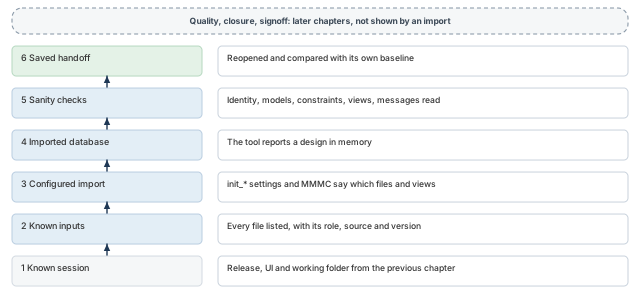
What to notice: Each rung needs its own evidence. Quality, closure and signoff sit above the ladder, in later chapters.
A colleague writes in a status note: "init_design completed with no errors, so the design is ready for floorplanning." Which of the six meanings does that sentence establish, and which does it leave open?
Answer. It shows that the tool built a database. It does not show that the files agree, or that the intended top and revision loaded. Nor does it show the intended views, constraints that describe the design, or that anyone read a check. Each needs its own evidence, taught in the sections that follow.
Takeaway Record what each input is, who owns it and how you will inspect it, before you launch anything.
3 The gate-level netlist
The netlist decides what "the design" is. Two mistakes cost the most time. One is loading the wrong top module. The other is discovering late that modules are shared when they must be independent.
3.1 What a netlist is, and who provides it
A gate-level Verilog netlist describes how standard cells and larger blocks are connected. A synthesis tool normally produces it, and the synthesis or design team owns it.
- Answers: which modules exist, what each contains, how pins connect through nets, and which module is the top.
- Does not answer: where anything is placed, how large a cell is, or how fast it is. The physical and timing libraries answer those.
- Does not guarantee: that the cells it names exist anywhere. A netlist only names cells, and the libraries must define them. This explains most import failures.
3.2 Reading a netlist: module, instance, cell master
The excerpt below is a teaching fragment, not a complete netlist.
// A sub-module: two standard cells connected in series.
module alu_slice (a, b, y);
  input a, b;
  output y;
  wire n1;
  NAND2_X1 u_nand (.A(a), .B(b), .Y(n1));
  INV_X1   u_inv  (.A(n1), .Y(y));
endmodule
// The top module: a register, three copies of alu_slice, a register.
module demo_top (clk, din, sel, dout, ybyp);
  input clk, din, sel;
  output dout, ybyp;
  wire q0, y0, y1;
  DFF_X1    u_reg0 (.D(din), .CK(clk), .Q(q0));
  alu_slice u_alu0 (.a(q0),  .b(sel), .y(y0));
  alu_slice u_alu1 (.a(y0),  .b(sel), .y(y1));
  alu_slice u_alu2 (.a(din), .b(sel), .y(ybyp));
  DFF_X1    u_reg1 (.D(y1), .CK(clk), .Q(dout));
endmodule
Three terms are easy to blur.
- Module: a definition, declared once with a list of ports.
alu_sliceanddemo_topare modules. - Instance: a use of a module or cell inside another module.
u_alu0,u_alu1andu_alu2are three instances ofalu_slice. - Cell master: the library definition that a leaf-cell instance refers to. The netlist only names
NAND2_X1. The physical library must contain an abstract of that name, and the timing library a timing model of that name.
Named connections such as .A(a) connect the cell pin A to the net a. The pin name must match the library definition. A netlist that says .A1 where the library says A disagrees about the interface, however similar the names look. The hierarchy of the excerpt is drawn in Figure 4.
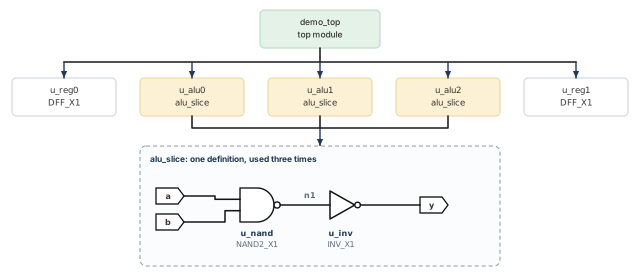
demo_top instantiates two flip-flops and three copies of alu_slice, which is one NAND2 followed by an inverter.What to notice: alu_slice is defined once and used three times. Whether the three copies stay shared is the question of uniquification, below.
3.3 One file or many
A larger design usually has many files, one per module or block, and the importer takes a list. Check three things about the list:
- every file is accessible;
- the set defines every module the top needs;
- no module is defined twice in conflicting ways.
3.4 Choosing the top
The top module is the root of the hierarchy that Innovus builds. Two settings control how it is chosen.
init_design_settop= 1 (the default): you name the top ininit_top_cell.init_design_settop= 0: the tool determines the top automatically.
Automatic discovery suits a set with one obvious root. It is a poor choice when the set contains test benches, alternate versions or several blocks. In that case the tool may pick a module you did not mean. For a first import, name the top. A wrong name then fails visibly instead of loading something else quietly.
3.5 What can be wrong with a netlist
Each problem below has a recognizable consequence.
A module or cell with no definition. If u_alu0 refers to alu_slice and no file defines it, the reference is unresolved.
- Usual cause: a file missing from the list.
- Black box: sometimes the block is deliberately empty, for example because another team has not delivered it. That is acceptable when it was chosen and recorded. It is an accident when nobody noticed.
- Consequence: the import may complete either way. The difference is in your record: did you decide, or did the tool decide for you?
A port mismatch. The module declares ports (a, b, y) and an instance connects .a, .b and .z.
- Default behavior: the reader reports an error.
init_verilog_tolerate_port_mismatch: default 0. When set, the reader adds the missing port and continues with warnings. It is intended for prototyping with unclean netlists.- Consequence: a clean-looking import can hide a mismatch if that global was set. Check whether it is set, and read the warnings if it is.
Constants, unconnected pins and multiple drivers. Each means something different, and the post-import checks show the reports that list them.
- A pin tied to a constant such as
1'b0is often intended. - An unconnected pin is intended on some cells and a bug on others.
- A net driven by two outputs is usually a bug.
A netlist can be syntactically valid and still contain connections that a reviewer must look at.
3.6 Why a text search is not proof
Searching the files for a line that starts with module demo_top shows that some file defines a module of that name. It is a heuristic, for three reasons.
- A text search is not elaboration. It does not follow instances, so it cannot show that the module is reachable.
- Compressed or preprocessed files cannot be searched the same way.
- A name that is a prefix of another name, or that sits inside a comment, also matches.
A text hit is a reason to expect the import to succeed. The decisive evidence is what the tool reports after loading. Likewise, readable files prove only that they can be opened. They do not prove that they elaborate into the design you meant.
3.7 Uniquification: why identical modules may need to become different
Return to the three copies of alu_slice. The netlist has one definition and three instances, so a change to the definition would change every instance. That is efficient, and it is how hierarchy is normally written.
Implementation does not stay uniform. One copy may need a bigger cell on its critical path, and another a different buffer. A clock tree may add buffers in some instances only. If all three share one definition, any such change applies to all three, which is wrong.
To change instances independently, the tool needs a unique representation. Each instance gets its own module definition, usually with a derived name. This process is uniquification. Figure 5 compares the two states.
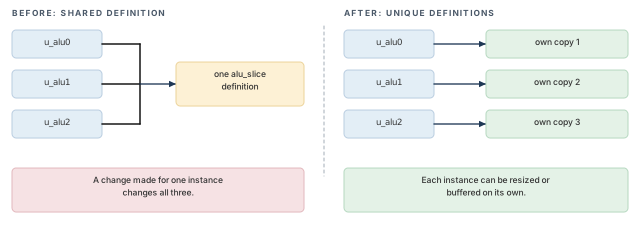
alu_slice its own definition.What to notice: The purpose is independent definitions. The new names are a by-product.
The global init_design_uniquify controls whether the design is uniquified while it is read and flattened.
- Value: 1 uniquifies. The default is 0.
- Use 1 when: the flow will run clock tree synthesis, scan reorder or timing optimization. These need a unique netlist, and optimization is not allowed on a non-unique design.
- Use 0 when: a master-and-clone partitioning flow depends on clones sharing their master.
- Do not assume a value. Forcing 1 everywhere is wrong for the master-and-clone flow. Decide for your flow and record the value with the rest of the configuration.
The effective value is whatever the session holds when init_design runs. A startup script may have changed it, and omitting it from your configuration does not reset it. The general rule for defaults and effective settings is in "The init_design import flow".
Accepting any text hit for the top name, or leaving init_design_uniquify out and assuming its value from memory. Compare whole names, confirm the loaded top after import, and print the globals you depend on.
3.8 Before you import: inspecting the netlist
Table 4 turns the section into a short checklist you can work through with a terminal and an editor.
| Question | How you can look | What a surprise means |
|---|---|---|
| Are all listed files readable? | List them with a long listing; open the first lines | A path is wrong, or a permission is missing |
| Is the top defined somewhere in the set? | Search whole-word for the module name | The top name is wrong, or a file is missing from the list |
| Does the set define every module the top uses? | Compare instantiated module names with defined module names, by eye or script | An unresolved reference exists; decide black box or missing file |
| Is the revision the intended one? | Compare the file header, date or tag with the handoff notes | You are looking at an old or different netlist |
| Does this flow need unique modules? | Read the project's flow notes, then decide init_design_uniquify | The value will be chosen by accident |
Let us consider a representative failure. The library team re-releases INV_X1 with the pin renamed from A to I. The earlier netlist still says .A(n1).
- Everything is readable, the top is present, and the cell exists in both the LEF and the Liberty files.
- The mismatch is in the interface. It appears at import as a pin error, or as a warning if the tolerance global was set.
- The first three rows of Table 4 would not have caught it. Comparing pin names would have.
Takeaway Name the top yourself, decide uniquification for your flow, and compare pin names, not only cell names.
4 Physical library data: technology LEF, cell LEF and macro LEF
The tool must know what a cell looks like before it can place it. It must know what a layer allows before it can route over it. The physical library answers both, in a format called LEF.
4.1 What LEF is
LEF is a text format for the physical abstract of building blocks and for the technology they sit on.
- Abstract: an outline of a cell. It holds the size, the pin locations and the regions routing must avoid. It holds no transistors and no internal wiring.
- Technology: design rules for placement and routing, plus interconnect data.
- Usual split in this chapter: one technology LEF and one or more cell LEF files. The LEF format does not itself forbid mixing them, so follow the delivery your project defines.
4.2 Technology LEF
- Provided by: the technology or library team.
- Contains: layers, vias, the placement site and basic routing rules.
- Does not contain: any cell.
- Innovus uses it to understand the routing grid and the legal direction of each layer. It also learns the layer and site names that cell LEF files refer to.
UNITS
  DATABASE MICRONS 1000 ;
END UNITS
LAYER M1
  TYPE ROUTING ;
  DIRECTION HORIZONTAL ;
  PITCH 0.20 ;
  WIDTH 0.10 ;
  SPACING 0.10 ;
END M1
LAYER M2
  TYPE ROUTING ;
  DIRECTION VERTICAL ;
  PITCH 0.20 ;
  WIDTH 0.10 ;
  SPACING 0.10 ;
END M2
SITE core_site
  CLASS CORE ;
  SIZE 0.20 BY 1.60 ;
END core_site
Reading the excerpt:
UNITSgives the database units per micron, so every other number can be converted.- Each
LAYERnames a routing layer with its direction, pitch (the repeat distance of wires), width and spacing. SITEis the smallest placement grid cell. Here it is 0.20 wide and 1.60 high.- So the standard cells of this example are single-height, 1.60 tall, with widths in multiples of 0.20. Real libraries can also contain multi-height cells.
Put the technology LEF first in init_lef_file. The cell LEF files refer to layer and site names that must already be known. Follow your project's own instructions on order.
- Inspect: the file exists and declares the layers the cell LEF uses. Its units are the ones your library team expects. It belongs to the release set your project approved with the cell LEF.
- Representative failure: the technology LEF is listed after the cell LEF. The reader complains about unknown
M1andcore_site, and everything that depends on them is incomplete. - Does not establish: whether any cell exists, or what a wire's resistance is.
4.3 Standard-cell LEF
A standard-cell LEF has one MACRO block per cell. In LEF, MACRO means "a library cell definition", so a two-input NAND gate is a MACRO. Project vocabulary also uses "macro" for large blocks such as memories, and the two uses collide.
MACRO NAND2_X1
  CLASS CORE ;
  ORIGIN 0 0 ;
  SIZE 0.60 BY 1.60 ;
  SYMMETRY X Y ;
  SITE core_site ;
  PIN A
    DIRECTION INPUT ;
    USE SIGNAL ;
    PORT
      LAYER M1 ;
        RECT 0.10 0.50 0.20 0.90 ;
    END
END A PIN Y
DIRECTION OUTPUT ;
USE SIGNAL ;
PORT
LAYER M1 ;
RECT 0.40 0.40 0.50 1.00 ;
END
END Y
OBS
LAYER M1 ;
RECT 0.00 0.00 0.60 0.20 ;
END
END NAND2_X1The excerpt leaves out pin B and the power pins; a real cell has them. Each part answers a question for the tool. Figure 6 draws the cell on its site with the numbers from both excerpts.
SIZE 0.60 BY 1.60: three sites wide and one row high, so the cell fits a row.SITE core_site: ties the cell to the site the technology LEF defined.PIN: a name, a direction and rectangles where the router may connect. The names must match the netlist's.A(...)and.Y(...).OBS: an obstruction, shapes that routing must not cross.
- Inspect: every cell master in the netlist has a
MACROof exactly that name, with the pins the netlist connects. - Representative failure: a cell is missing from the LEF because an update dropped or renamed it. The tool cannot bind the instance.
- Does not establish: the cell's function, its timing, or whether the abstract matches the real layout.
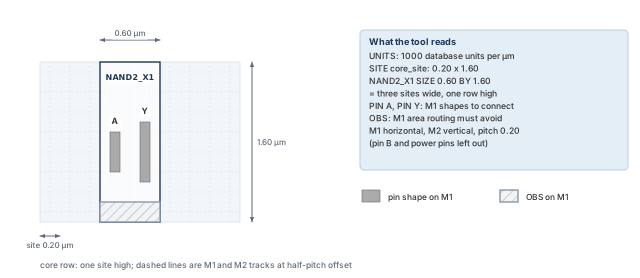
NAND2_X1 occupies three 0.20 µm sites of a 1.60 µm row; pins A and Y are M1 rectangles and the bottom strip is an M1 obstruction.What to notice: The pin rectangles sit exactly at the RECT coordinates of the excerpt. The track pitch equals the site width here, which is a property of this teaching example. With no OFFSET in the excerpt, the tracks sit at half a pitch (0.10, 0.30 ... µm), not on the site edges.
4.4 Macro LEF
A memory or analog block is also a MACRO in LEF, usually with CLASS BLOCK. The structure matches a standard cell, but the abstract is larger and the pins sit on its edges. A different team or vendor usually provides it, often with its own timing library. So it is the cell most likely to arrive with one model and not the other. Table 5 lists the three cases.
| Models present | Consequence |
|---|---|
| LEF abstract and Liberty model | Placeable and analyzable, if the model is sound |
| LEF abstract only | Placeable; timing that depends on the macro is incomplete |
| Liberty model only | Cannot be placed |
Large blocks are delivered late and in pieces, so gaps appear there. Let us consider a representative failure with the SRAM (static RAM) macro SRAM_64X8. It has a LEF in the release, but the vendor's Liberty file was never added to the library set. The import may complete. The post-import checks are how you see that the macro has no timing entry.
In the baseline demo_top no instance uses a macro. Treat SRAM_64X8 throughout this chapter as an extension scenario, used to practice the missing-model case.
4.5 Abstract versus layout
A physical abstract is not the layout. Pin rectangles may be simplified, and internal wiring becomes obstructions. The real geometry lives in the layout database of the foundry flow. Finding a cell in the LEF means it can be treated as a placed object. It does not mean the size or the timing is right.
The LEF examples come from general knowledge of the format, not from a real technology. The LEF/DEF (Library and Design Exchange Format) language reference is the authority for LEF syntax. Innovus also parses some syntax that it then ignores or rejects. Check the syntax reference before assuming a LEF file is wrong.
Takeaway Technology LEF first, then cell and macro LEF. A cell found in the LEF is placeable, not proven correct.
5 Timing libraries, RC technology data, and power and ground names
Liberty libraries provide cell behavior, RC data provides the cost of wires, and supply names tell the tool which nets are global. Each is easy to deliver, and each can quietly disagree with the others.
5.1 Liberty timing libraries
A Liberty library, usually a .lib file, describes what each cell does and how fast it is, for one operating condition.
- Corner: the process, voltage and temperature condition a library describes.
- One library per corner: a chip must work at several conditions, so a project provides several libraries for the same cells.
- Reading: the software reads this format directly, without a separate translation step.
library (stdcells_slow) {
  time_unit : "1ns";
  capacitive_load_unit (1, pf);
  cell (NAND2_X1) {
    area : 0.96;
    pin (A) { direction : input; capacitance : 0.0021; }
pin (B) { direction : input; capacitance : 0.0021; } pin (Y) {
direction : output;
function : "!(A & B)";
timing () {
related_pin : "A";
timing_sense : negative_unate;
cell_rise (delay_template_3x3) {
index_1 ("0.01, 0.05, 0.20"); /* input transition */
index_2 ("0.001, 0.005, 0.02"); /* output load */
values ("0.04, 0.05, 0.09", \
"0.05, 0.06, 0.10", \
"0.08, 0.09, 0.13");
}
}
}
}
}Let us read the excerpt from the outside in.
- The library declares its units: nanoseconds and picofarads.
- The cell name matches the netlist and LEF master.
- Each pin has a direction. Inputs carry a capacitance that the previous stage must drive. The output has a
function. - A
timinggroup is one timing arc, here fromAtoY. The excerpt has nowhencondition. The arc matters when the other inputBis 1, because only then canAswitchY. - Negative unate means that, with
B= 1, a risingAproduces a fallingY, and a fallingAproduces a risingY. - The excerpt shows only
cell_rise: the delay whenYrises, which corresponds to a fallingA. Thecell_falltable for a risingA, and the output transition tables, are left out.
Three quantities are different. The rows of the table are indexed by the transition time at the input A. The columns are indexed by the load on Y. The transition of Y itself has its own table.
Three consequences matter at import.
- A cell definition is not an arc.
cell (NAND2_X1)can exist without the arc fromBtoY. Binding by name succeeds, and paths throughBhave no characterized arc. - Units are part of the data. Picosecond and nanosecond libraries can both be correct. The tool converts consistently, so reason with the declared units. Compare the quantity a unit string describes, not the string.
- A library describes one corner. The slow and fast libraries both define
NAND2_X1with different numbers. The MMMC section shows how the tool is told which belongs where. A library at the wrong corner can load without a corner-intent error and give plausible, wrong timing.
What to check, and what goes wrong:
- Inspect: the library name and declared conditions match the intended corner, and the units are as expected. Every cell master from the netlist, including macros, has a
cellblock. - Representative failure:
sram_slow.libis listed under the fast corner. It can load without a corner-intent error, because the tool cannot judge project intent from the file. Other messages may still appear. If it goes unnoticed, hold analysis later uses slow numbers for the memory. - Does not establish: physical shape, or that the characterization behind the numbers is correct.
5.2 RC technology information
Wires add resistance and capacitance, and so delay. Before routing, the tool estimates wire delay from RC data that the technology team provides. In the Legacy UI that data attaches to an RC corner.
- Components: a capacitance table, a technology file for an extraction engine, or both, plus optional scaling factors. The project's technology and extraction engine decide which applies.
- Must match: the technology of the libraries and the LEF. A corner pointing at another process node can load without an intent error and give wrong wire estimates.
- Not extraction: no wire exists yet, so nothing is extracted. The data only prepares the tool to estimate.
5.3 Power and ground names
init_pwr_net and init_gnd_net name the global supply nets.
- Value: a list of net names, for example
VDDandVSS. - Relationship: the flow must map these names to the LEF power pins and, where the netlist has them, its power connections. Which mapping applies depends on the project's power flow.
- What goes wrong: the netlist says
VDDand the LEF saysvdd, or several supplies exist and only one is listed. This rarely errors at import. It appears when the power grid is built or checked, so record the names at import.
5.4 One cell across three files
Figure 7, below, puts the three descriptions of u_nand side by side.
For u_nand, the netlist names NAND2_X1 with pins A, B and Y on named nets. The LEF needs MACRO NAND2_X1 with those pins and a whole number of sites. The Liberty file needs cell (NAND2_X1) with the same pins, a function, and an arc from each input to Y.
- All three exist: the name is bound everywhere.
- One missing: the reference is unresolved in that view.
- All exist but pins differ: the disagreement is quiet, and the post-import checks find it only partly.
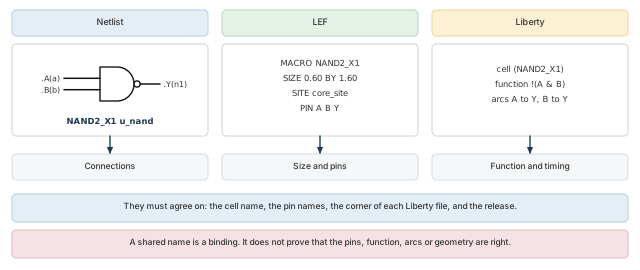
NAND2_X1.What to notice: A shared name is a binding, not proof that pins, function, arcs or geometry agree.
| File | What it says about NAND2_X1 | What it does not say |
|---|---|---|
| Netlist | It exists, with pins A, B, Y connected to these nets | How big, how fast, where |
| LEF | It is 0.60 by 1.60, on core_site, with pins at these shapes | What it computes, or how long it takes |
| Liberty | It computes !(A & B) with these arcs at this corner | Where it sits, or what it looks like |
A report lists RAM_A as bound in the physical library but with no entry in the timing library. Which of the three descriptions is missing, and which stages would it affect?
Answer. The timing model is missing.
- Effect: the macro can be placed. It has no characterized timing model for the analysis. Paths and checks that depend on that model are incomplete, unmodeled, or not meaningfully analyzed, depending on the tool's treatment.
- This is not a claim that the physical macro has zero delay.
- Likely cause: a Liberty file missing from the library set for that corner.
- Owner to ask: the macro or library provider.
Takeaway Liberty gives function and timing for one corner, RC data gives wire estimates, and supply names must map to LEF pins.
6 Constraints: telling the tool what "correct timing" means
A timing tool measures what it has been told to measure. The netlist and libraries say what the circuit is. The constraints say what it must achieve: how fast the clock runs, and when input data arrives and output data is needed. A constraint file that loads without a message is not the same claim as a constraint file that is right.
Constraints are written in SDC, a Tcl-based format. This section covers enough SDC to judge whether a constraint set is ready for import. It is not a full treatment of static timing analysis.
6.1 Where constraints come from, and what they assume
An SDC file expresses design intent that the netlist cannot provide.
- Describes: which signals are clocks, when data arrives at each input, when it must leave each output, and which paths are exceptions.
- Written by: the block owner or the chip-level timing owner.
- Flow note: produce constraints with the write commands of the synthesis or analysis tools, so that variable substitution leaves nothing ambiguous. Read only one constraint format in a session.
6.2 The four classes of path
Every timing path starts at a startpoint and ends at an endpoint. The constraints that matter depend on both ends. Four classes cover most designs, and Figure 8 marks each one in demo_top.
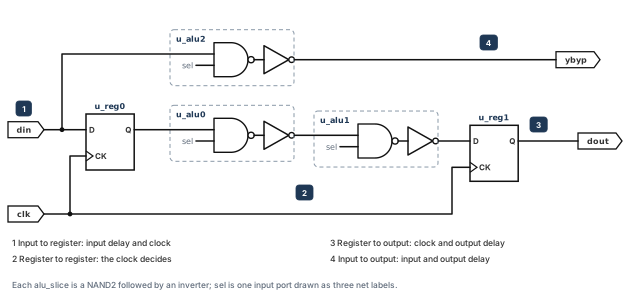
demo_top: input to register (1), register to register (2), register to output (3) and input to output (4).What to notice: A clock constrains the register-based classes. Input and output delays describe the world outside the block.
| Class | Path in demo_top | What provides the missing information |
|---|---|---|
| 1. Input to register | din to u_reg0/D | An input delay and a clock reference, because the tool cannot know when data leaves the outside world |
| 2. Register to register | u_reg0 through u_alu0, u_alu1 to u_reg1/D | The clock definition, since both ends belong to clocks |
| 3. Register to output | u_reg1/Q to dout | An output delay, because the tool cannot know how much time the outside world needs |
| 4. Input to output | din through u_alu2 to ybyp | Both delays, each relative to a clock that tells the tool which reference to use |
6.3 A small constraint file, read line by line
The excerpt is a teaching excerpt for the functional mode of demo_top. Each command is explained after it.
# Primary clock: 10 ns period, rising edge at 0, falling edge at 5.
create_clock -name clk -period 10 -waveform {0 5} [get_ports clk]
# Data arrives 2 ns after the clock edge at these inputs.
set_input_delay 2.0 -clock clk [get_ports {din sel}]
# Outside logic needs 3 ns before the next clock edge at these outputs.
set_output_delay 3.0 -clock clk [get_ports {dout ybyp}]
# Assumed input slew and output load at the block boundary.
set_input_transition 0.2 [get_ports {din sel}]
set_load 0.05 [get_ports {dout ybyp}]
create_clock creates a clock object.
- Purpose: define a clock and its source.
- Arguments used:
-name clknames it for later commands.-period 10sets the period in the library time unit (assumed nanoseconds). -waveform {0 5}gives the rise and fall times, so the clock rises at 0 and falls at 5.[get_ports clk]is the source, the port where the clock enters.- Optional: with a name and no source, a virtual clock is created. It has no pin in the design and serves as a reference for input and output delays.
- A second clock on the same source replaces the first unless
-addis used. - Inspect: the clock list shows the name, period, waveform and source.
get_ports selects ports from the design. {din sel} is a Tcl list of two names, so one command constrains both. get_pins selects instance pins such as u_reg0/CK.
- Limit: a selection that matches nothing may only print a warning and leave the constraint attached to nothing. A constraint review reads the log for this.
set_input_delay states when data arrives at an input, relative to a clock edge.
- Arguments used: 2.0 is the delay.
-clock clkis the reference clock. The port list names the inputs. - Defaults: without
-clockthe delay is relative to time zero. An input with no input delay is assumed to have zero delay. - Optional:
-minand-maxgive separate early and late values, and-clock_fallrefers to the falling edge. -add_delaykeeps an earlier delay on the same port. Without-add_delay, the last statement for a port stays.
set_output_delay states the time the outside world needs after data leaves the block.
- Argument that matters:
-clock. A statement without it is accepted and then ignored in analysis. It loads cleanly and does nothing.
set_input_transition gives the slew (how quickly the signal changes) at an input.
- Effect: it changes the transition seen by the first cell on the path, and so that cell's delay. It does not change arrival time.
- Limit: for an input with a driving-cell assertion, the driving cell takes precedence.
set_load gives the capacitance on an output port or net, in the library capacitance unit.
- Effect: the output cell's delay depends on its load. Without it, the boundary delay uses a default.
6.4 Clocks derived from clocks
A cell that changes the frequency or waveform of a clock, such as a divider, produces a new clock. You declare it with create_generated_clock. A simple gating cell that passes the clock with the same waveform does not automatically need one. Whether a gated clock needs its own definition depends on the cell and your flow's rules. Follow the project's constraint guidelines.
create_generated_clock -name clk_div2 -source [get_ports clk] \
-divide_by 2 [get_pins u_div/Q]- Arguments used:
-namenames the new clock.-sourcenames the pin where the master clock is found. -divide_by 2halves the frequency. The pinu_div/Qis where the new clock appears.- Optional:
-multiply_byfor a faster clock, and-edgesto list which source edges form the waveform. - Limit: if the master clock never reaches the
-sourcepin, the generated clock cannot be built. - If several clocks reach it, the tool chooses the master in a defined order unless you name it with
-master_clock.
6.5 Constants and exceptions
set_case_analysis fixes a pin or port to a constant for timing only.
- Values:
0,1and transition-based forms. - Effect: valid during timing analysis, and the netlist is unchanged.
- Use when: a functional-mode file holds a test-enable input at 0, so that test logic is not timed as if active.
set_case_analysis 0 [get_ports test_mode]
Exceptions change what the tool checks on selected paths.
set_false_path: removes the timing requirement for the selected paths.set_multicycle_path: changes the allowed edge relationship, for example by giving a path more than one cycle. The path is still timed.- Selection: both take
-from,-throughand-to, and-setupand-holdflags. - Risk: each exception makes a claim about design intent. A false path claims the requirement does not apply. A multicycle path claims a different edge relationship. A wrong claim hides a real violation.
# Claim: this path has two cycles for setup.
set_multicycle_path 2 -setup -from [get_pins u_reg0/CK] \
    -to [get_pins u_reg1/D]
The claim needs the design to hold u_reg0's data stable for two cycles, and u_reg1 to capture only every second cycle. Nothing in the file proves that. A setup multicycle is usually paired with a hold assertion, because moving the setup relationship also moves the hold check. Check your project's convention.
6.6 The arithmetic of setup and hold
These are teaching assumptions, not project values. The period is 10 ns, the launch edge is at 0 ns and the capture edge at 10 ns. Figure 9 draws all three calculations on one time axis.
Setup (register to register). Setup asks whether the latest data arrives early enough.
- The latest data reaches the capture register's data pin 6.0 ns after launch.
- The register needs the data 0.2 ns before the capture edge, so it is required by 10 − 0.2 = 9.8 ns.
- Setup slack = 9.8 − 6.0 = 3.8 ns.
Hold (register to register). Hold asks whether the earliest new data arrives late enough. The capture register, clocked by the same edge, must still see its old data for the hold time.
- The earliest data arrives 0.8 ns after launch.
- The register needs the data stable for 0.1 ns after that edge.
- Hold slack = 0.8 − 0.1 = 0.7 ns.
Setup (bypass, input to output).
- Data reaches
ybypat 2.0 (input delay) + 2.0 (path throughu_alu2) = 4.0 ns. - The output delay of 3.0 ns makes the data required at 10 − 3.0 = 7.0 ns.
- Slack = 7.0 − 4.0 = 3.0 ns. The two boundary delays consume 5.0 ns of the period before any gate is counted. That is what a boundary constraint is for.
This is a sketch. It assumes zero skew, no uncertainty margin, no on-chip-variation derating, no common-path correction and a single-cycle clock relationship. A real report includes all of those. Use the arithmetic to understand the report, and use the report to decide.
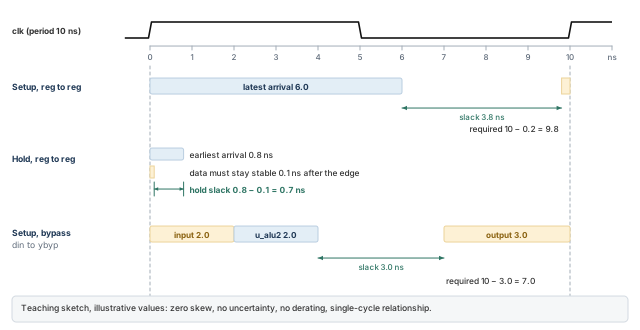
What to notice: On the bypass row the two amber boundary delays take 5.0 ns of the 10 ns period before the gate delay of u_alu2 is counted.
6.7 What goes wrong: three cases
Each case below can pass without stopping the import. Depending on the statements and the release, you may get a warning, an error, an ignored constraint or an unintended virtual clock. So the log and the clock report must be read. For each case, we state what the tool does, what you would see and what you conclude.
A missing or unattached clock. Three situations look alike and are different.
- The
create_clockline is gone: there is no clock object. - Its source selection matches nothing, for example
[get_ports CLK]when the port isclk. - The clock was created with no source on purpose: a virtual clock.
Effect, by situation:
- No clock object: the registers have no clock, and boundary delays name a clock that does not exist.
- Unmatched source selection: the clock object exists but reaches nothing, so the registers are unclocked.
- Unintended virtual clock: a valid clock exists and boundary delays can refer to it, while the registers still have none.
A valid virtual clock is a different thing. It has a name and no source in the design. It can legitimately describe boundary timing for input and output delays. It does not by itself provide a clock to internal registers.
- A source selection that matches nothing is a fault, and so is a virtual clock nobody intended.
- The clock name and the source port name are different things: a clock named
tclkis valid. - Qualified statement: a missing intended clock compromises every clocked path that depends on it.
- Other statements, such as a
set_max_delaybudget on a combinational path, do not repair that. They can still apply to paths without a clock. - See: the clock list should show
clk. The coverage report lists clock-related reasons for untested checks.
A wrong period. The file says -period 100 where the specification says 10 ns. The value is ten times too large. It is a wrong value, not a unit mismatch (ns versus ps would be a factor of 1000).
- Effect: the period is ten times too long. Setup results for paths that depend on this clock can look artificially easier.
- This does not describe every path, and exceptions and boundary delays are separate matters.
- See: a clock list showing period 100 where the specification says 10.
- Defense: compare the clock list with the specification, as the post-import checks do.
An inappropriate exception. Someone adds set_false_path -from [get_clocks clk] -to [get_clocks clk] to silence a violation.
- Effect: every register-to-register path in the single clock domain leaves the analysis. The violation vanishes, and so does the checking of the design's core.
- See: coverage collapses into untested checks with the reason
false_path. - Decision: legitimate false paths exist, so an untested check is not automatically a problem. Every reason must be defended against design intent.
- For the intended active functional demo, this broad exception is unjustified unless specific design intent proves otherwise.
- The lesson: do not suppress required functional timing with an unexplained broad exception.
6.8 What early slack does and does not tell you
Early slack is informative, and a path with large negative slack deserves attention. But early slack is not closure, because nothing is placed or routed and wires are estimates. It is not proof of coverage either. Slack is reported only for constrained paths, and an unconstrained path looks the same as one with no problem.
A constraint review therefore asks three questions.
- Are the intended clocks all there, with the right period and waveform?
- Are the boundaries constrained?
- Are the untested checks untested for reasons we can defend?
Favorable slack answers none of them.
func.sdc contains set_output_delay 3.0 [get_ports dout] and no -clock. The tool reports no error. What happens to the register-to-output path to dout?
Answer. Such a constraint is accepted and ignored in analysis.
- Effect: the path to
doutbehaves as if it had no output delay. - Evidence: a report of unconstrained endpoints, or a coverage report listing the output as untested.
- Action: the constraint owner adds
-clock clk.
Takeaway A constraint that loads is not a constraint that is right; check clocks, boundaries and the reasons behind untested checks.
7 MMMC, command by command
An MMMC configuration looks like a list of commands. Read it as a small graph in which every object is created from objects made earlier. Once you can trace one view down to its files, missing objects, wrong pairings and dropped views become easy to see.
The objects and what points at what are drawn in Figure 10. The terms are defined just below it.
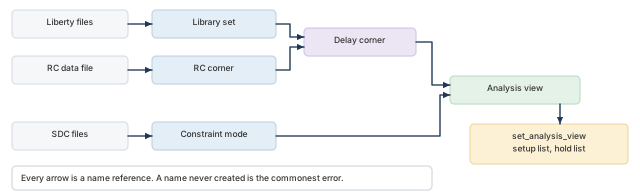
set_analysis_view selects views for setup and hold.What to notice: Every arrow is a name reference, and a name that was never created is the commonest MMMC error.
MMMC stands for multi-mode multi-corner.
- Mode: an operating mode, such as functional or test.
- Corner: an operating condition, such as slow and hot or fast and cold.
- View: one mode seen at one corner. Two modes and three corners allow up to six views, and you define only the ones you need.
The Legacy UI builds the description from five kinds of object and one activation step. Each object is made by one command, in dependency order.
7.1 A consistent example
Two modes (func, test) and two corners (slow, fast) give three defined views in Table 8. The choice of corners is illustrative, since the real choice depends on the project and technology.
| View | Constraint mode | Delay corner | Library set | RC corner | Constraint file |
|---|---|---|---|---|---|
func_slow | func | slow | libs_slow | rc_slow | func.sdc |
func_fast | func | fast | libs_fast | rc_fast | func.sdc |
test_slow | test | slow | libs_slow | rc_slow | test.sdc |
func_slow and test_slow share a delay corner, and func_slow and func_fast share a constraint mode. That sharing is the point: define each corner and mode once, then combine them.
The memory libraries appear in each library set so that the trace has two libraries per corner. The baseline demo_top does not instantiate the memory, so the macro scenario is an extension.
7.2 Step 1: create_library_set
innovus> create_library_set -name libs_slow \
    -timing [list data/stdcells_slow.lib data/sram_slow.lib] ;# slow-corner libs
A library set is a named group of timing libraries.
- Purpose: let later steps refer to several Liberty files as one object.
- Arguments:
-name libs_slownames it.-timingtakes a Tcl list of Liberty files, built withlistso each file stays a separate element. - Order matters: the first library is the master, and each later one has lower priority.
- Scope: it refers to files only. It is created first because delay corners need it. A second command makes
libs_fast. - Verify: the active-view report lists each library set with its files.
- Wrong reference:
data/sram_fast.liblisted underlibs_slowcan load without a corner-intent error. The tool cannot judge project intent from a file name. - The library report shows the path, which is where a reviewer sees it. Other messages may appear.
7.3 Step 2: create_rc_corner
innovus> create_rc_corner -name rc_slow -cap_table data/rc_slow.captbl ;# wire RC data
An RC corner holds the information for estimating wire resistance and capacitance.
- Arguments:
-namenames it.-cap_tablepoints to a capacitance table. - Optional: an extraction-engine technology file (
-qx_tech_file), scaling factors and a temperature (-T). The project's technology decides which apply. - Relationship: it describes interconnect, not cells, and is independent of the library set. That is why the two are separate objects.
7.4 Step 3: create_delay_corner
innovus> create_delay_corner -name slow -library_set libs_slow \
    -rc_corner rc_slow ;# delay corner slow
A delay corner pairs one library set with one RC corner. Together they define what the tool needs to compute delay at one condition.
- Arguments:
-library_set libs_slowand-rc_corner rc_slowrefer to objects made in the previous two steps. - Order: naming an object that does not exist yet is an error, so create the library set and RC corner first.
- Optional: early and late library sets for on-chip variation, operating conditions and other extensions. They do not change the shape of the model.
- Do not use early and late sets as substitutes for best and worst corners.
7.5 Step 4: create_constraint_mode
innovus> create_constraint_mode -name func -sdc_files [list data/func.sdc] ;# func mode
innovus> create_constraint_mode -name test -sdc_files [list data/test.sdc] ;# test mode
A constraint mode groups SDC files into one named mode.
- Arguments:
-namenames it.-sdc_filestakes a Tcl list. - Relationship: the same SDC file can serve several modes, and one mode can serve several views.
- This links MMMC to the constraints section:
func.sdcbelongs to a mode, and that mode belongs to views.
7.6 Step 5: create_analysis_view
# The fast corner objects follow the pattern of the slow ones;
# the complete file below shows them.
innovus> create_analysis_view -name func_slow -constraint_mode func \
    -delay_corner slow ;# functional mode, slow corner
innovus> create_analysis_view -name func_fast -constraint_mode func \
    -delay_corner fast ;# functional mode, fast corner
innovus> create_analysis_view -name test_slow -constraint_mode test \
    -delay_corner slow ;# test mode, slow corner
An analysis view pairs one constraint mode with one delay corner.
- Constraint mode: provides the timing constraints.
- Delay corner: selects the timing-library and RC configuration.
- Arguments:
-name,-constraint_modeand-delay_cornerare all required. Create the view after the modes and delay corners. - Activation: a defined view is used only when it is assigned to setup analysis, hold analysis or both (Step 6).
Figure 11 traces one view, func_slow, down to the files it uses.
Tracing func_slow:
- Constraint branch:
func_slowuses constraint modefunc, which usesdata/func.sdc. - Corner branch:
func_slowuses delay cornerslow, which uses library setlibs_slowand RC cornerrc_slow. - The library set uses
data/stdcells_slow.libanddata/sram_slow.lib. The RC corner usesdata/rc_slow.captbl.
Four kinds of file support one view, and checking each of them is the review. Diagnose a missing or wrong view by walking this trace. Find the first name that does not resolve, or the first file that is not the intended one.
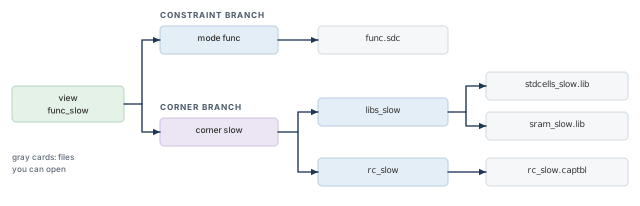
func_slow reaches func.sdc through mode func, and two Liberty files and one capacitance table through corner slow.What to notice: Every gray leaf is a file you can open, and the review of a view ends there.
7.7 Step 6: set_analysis_view
innovus> set_analysis_view -setup {func_slow test_slow} \
    -hold {func_fast} ;# the first view in each list is the default
Defining a view does not use it. set_analysis_view chooses the active views, separately for setup and hold.
- Arguments:
-setupand-holdeach take a list. At least one setup and one hold view must be defined. - Order: the first view in each list is the default view. It provides library data during initialization. It also tells parts of the tool that are not MMMC-aware which view to use.
Three terms are easy to blur. The tables in Figure 12 show all three, before and after a narrower second call.
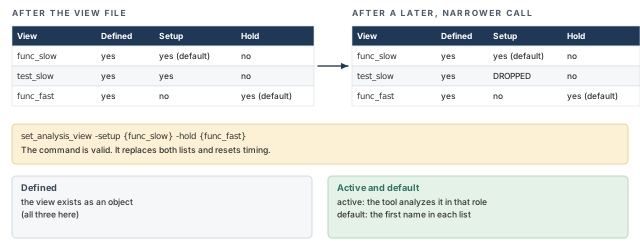
set_analysis_view with only func_slow for setup drops test_slow from the setup list, although it stays defined.What to notice: The defaults (the first name in each list) did not change, so a check of the defaults alone would miss the dropped view.
- Defined: the view exists as an object. All three of ours are defined.
- Active: the tool analyzes it.
func_slowandtest_sloware active for setup, andfunc_fastfor hold.test_slowis not active for hold. - Default: the first in each list, here
func_slowfor setup andfunc_fastfor hold.
set_default_view can change the default among already active views without a timing reset, but it is rarely needed. A sorted membership comparison cannot show which view is the default. There is no query for the default itself. Establish it from the activation statement (the first name in each list) and from the absence of a later set_default_view. Then compare it with the project's intent.
Setup and hold are separate lists. Setup is often checked at the slow corner and hold at the fast one. That is where each check tends to fail. That is a tendency, not a rule. The project chooses from the technology and signoff plan. A hold list that repeats the setup views is not wrong, but it is a decision to confirm.
Our hold list has no test view. Hold in test mode is therefore not checked, because no active hold view uses the test mode. Whether that is acceptable is the project's call, and the review must make sure someone made it.
The call is not incremental. Each call must carry the full specification of every active view, and it causes a full timing reset. The right-hand table of Figure 12 shows the effect.
- Example: later, someone runs
set_analysis_view -setup {func_slow} -hold {func_fast}to focus on one mode. - Result:
test_slowis silently dropped. The command is valid, but a view you meant to analyze is no longer analyzed, and earlier results are recomputed. - Action: after any call, run the report again and compare it with your intent.
7.8 The complete example file
The file below is complete for its scope: two corners, two modes, three views, activated. It assumes the named files exist.
# Library sets: one per corner, each holding every library that corner needs.
create_library_set -name libs_slow \
    -timing [list data/stdcells_slow.lib data/sram_slow.lib]
create_library_set -name libs_fast \
    -timing [list data/stdcells_fast.lib data/sram_fast.lib]
# RC corners: wire estimates for each corner.
create_rc_corner -name rc_slow -cap_table data/rc_slow.captbl
create_rc_corner -name rc_fast -cap_table data/rc_fast.captbl
# Delay corners: one library set plus one RC corner.
create_delay_corner -name slow -library_set libs_slow -rc_corner rc_slow
create_delay_corner -name fast -library_set libs_fast -rc_corner rc_fast
# Constraint modes: one per mode, each naming its SDC file.
create_constraint_mode -name func -sdc_files [list data/func.sdc]
create_constraint_mode -name test -sdc_files [list data/test.sdc]
# Analysis views: one mode seen at one corner.
create_analysis_view -name func_slow -constraint_mode func -delay_corner slow
create_analysis_view -name func_fast -constraint_mode func -delay_corner fast
create_analysis_view -name test_slow -constraint_mode test -delay_corner slow
# Activation: setup views first, then hold views.
set_analysis_view -setup {func_slow test_slow} -hold {func_fast}
Relative names such as data/func.sdc resolve from the session's working directory. Use absolute paths when in doubt, and record the launch directory, as the previous chapter taught.
7.9 Verifying the relationships: report_analysis_views
innovus> report_analysis_views -type active ;# active views and the objects they use
report_analysis_views is a hierarchical report of the MMMC configuration.
-type:all(the default, including defined but inactive views),setup,holdoractive.- Structure: it mirrors our trace. It shows a view, then its delay corner, then the RC corner and library sets with their files.
- Inspect: names match your intent, file paths match your manifest, and the setup and hold lists match your decision.
- Compare the setup and hold lists separately, since a combined list can hide a role mismatch.
all_analysis_views -type setup and -type hold return the same lists as Tcl lists for scripting. Comparing them after sorting proves the memberships match. It does not prove the intended default views, because the sort discards order. The post-import checks return to this report as the most direct evidence that the configuration says what you meant.
A script defines four analysis views and ends. The report of active views is empty. What is missing?
Answer. Activation is missing. Defining views creates objects. set_analysis_view chooses the active ones. The inline route is Path B, taught in "The init_design import flow". There the -setup and -hold options of init_design do that job instead.
Takeaway Read MMMC as a graph of name references, trace each view to its files, and re-check the lists after every activation.
8 Conditional inputs, alternatives, and reviewing a package
Not every design uses every input. Recognizing the alternatives avoids two mistakes: demanding an input that does not apply, and missing one that does.
8.1 Conditional inputs
I/O assignment file. A rule-based file that organizes pads, pins and bumps by position, spacing and ordering. It is passed through init_io_file.
- Use when: the project has defined pin or pad positions at import.
- If not required: I/Os are then assigned randomly. You can load a DEF file after import to set placement.
- Record: which you chose.
Scan information. A separate input for later steps. At import you only need to know whether the chains are stitched. That changes what the constraints should say about the test mode.
Power intent. A design with several power domains describes them in a separate format. One route derives the MMMC configuration from a Common Power Format (CPF) file through init_cpf_file. Use it only if your project requires it.
OpenAccess. A project may store libraries and design in OpenAccess instead of LEF and Verilog. The import then uses OA-specific settings, including init_design_netlisttype set to OA. This chapter does not develop that route.
A missing conditional input is not a defect. A conditional input the project requires and nobody delivered is.
8.2 Reviewing an input package: a worked example
The invented package in Table 9 is reviewed as you would before launching, with a decision for each item. Read the findings as the notes you would write.
| Item | What was found | Decision | Reason and owner |
|---|---|---|---|
Netlist demo_top.v | Readable. module demo_top appears once. alu_slice is defined. All instantiated cell names appear in the library lists. | Proceed | The top and the sub-module are defined. The cells are checked against libraries below. |
| Technology LEF | Readable. Layers M1 and M2 declared. Units 1000 per micron. | Proceed | Listed first in the LEF order. |
| Cell LEF | Defines NAND2_X1, INV_X1, DFF_X1. | Proceed | Every standard cell used by the netlist is present. |
| Macro LEF | Present for SRAM_64X8. | Hold | The netlist does not instantiate SRAM_64X8, but the handoff mail says it will in the next release. Ask the design owner whether the macro belongs to this import. |
| Liberty, slow corner | Defines the three standard cells. No cell named SRAM_64X8. | Proceed | Sufficient for the baseline demo_top. In the macro extension, this library set would be incomplete. |
| Liberty, fast corner | Defines the three standard cells. No cell named SRAM_64X8. | Proceed | Same reasoning as the slow corner. The two corners are treated alike. |
func.sdc | One clock clk, period 10. Input delays on din and sel. | Proceed | Matches the specification of the clock. |
test.sdc | create_clock -name tclk -period 10 [get_ports tclk] (10 is an illustrative value). | Stop | The name tclk is valid. The source selection matches nothing, because the design has no port tclk. A virtual clock would be written without a source. Ask the constraint owner which is intended. |
| Power and ground names | VDD, VSS in the email. The LEF pins use VDD, VSS. | Proceed | Names agree. |
| Corners | The email says "the usual corners". | Stop | There is no list to check against. Ask the project for the approved corners, then write them down. |
Several of these items could have been waved through. Each stop or hold would have become a confusing problem after the import. You reached all of them without a tool, by reading files, comparing names and asking questions.
Do not write a stand-in Liberty file for SRAM_64X8 to silence the missing-model message. Models come from your project or training environment. A hand-made model that only makes a message disappear hides a problem instead of fixing it.
Takeaway A missing conditional input is fine; a required one that nobody delivered is a stop, found before launch.
9 The init_design import flow
init_design is one command, but everything it needs is set beforehand through global settings and a view definition. If you can say what each setting selects, you can read any import script. You will also know which setting to suspect when the result is wrong.
9.1 Before, during and after
After the Legacy UI starts, the tool is running and no design is loaded: no netlist, no library, no timing views. The import configuration describes what to load.
- Configuration: Tcl global variables whose names begin with
init_, plus, for a timing-enabled import, a source of MMMC information. - Record: all
init_*globals have help, can be queried, and are stored in the saved design's globals file. So a saved design remembers how it was imported. - Then:
init_designconsumes the configuration, reads the files and builds the database.
Figure 13 compares the session before and after the command.
Afterwards there is a design in memory. It has a top module, instances linked to library cells, loaded physical and timing libraries, active views and a default floorplan. Nearly everything that matters is still unverified: the loaded top, the model binding of every cell, the clocks and the active views.
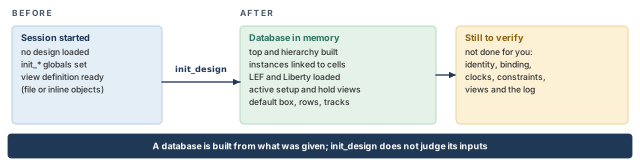
init_design turns the configured globals and view definition into a database in memory, with a default box, rows and tracks.What to notice: The amber card is everything the command does not verify. The post-import checks exist for that list.
9.2 The Tcl you need to read the configuration
The configuration is Tcl. The rules below decide what the lines mean. You can try them in a plain Tcl shell (tclsh), whose prompt is %.
% set top_name demo_top ;# assign a value: the text after the name
% puts "the top is $top_name" ;# $top_name is replaced by its value
% set lef_files [list data/tech.lef data/stdcells.lef] ;# brackets run list
% set files [list {data/my file.v} data/b.v] ;# braces group a path with a space
% puts [llength $files] ;# prints 2: two elements
% set literal {$top_name stays as typed} ;# braces: no substitution
% puts $literal ;# prints the dollar sign as typed
% puts [llength $lef_files] ;# llength counts list elements
% set long_list [list data/a.lib \
    data/b.lib] ;# a trailing backslash continues the command
% if {[info exists never_set]} { puts "set" } else { puts "not set" } ;# test
set name value: creates or changes a variable. Everyinit_setting is made this way.$name: inserts the value. It is substituted inside double quotes and not inside braces. That is why{$top_name stays as typed}prints the dollar sign.[ ... ]: runs the command inside and inserts its result.list: each argument becomes one element. It does not group an unquoted multiword path by itself.- So
[list data/my file.v]yields two elements, while[list {data/my file.v}]yields one. - Braces and quotes: a braced group is literal and a quoted group allows substitution. Braces are the safe habit for hand-typed paths.
source file: runs a file's commands in the current session. The view definition file is used this way.puts: prints text, which is how a script writes a value into the log.- Grouping and newlines: braces group text and may contain newlines. Square brackets evaluate a Tcl script, so a newline inside brackets can end one command and begin another.
- Trailing backslash: a backslash immediately followed by a newline joins the physical lines into one command. A space after the backslash breaks it, because the backslash then escapes the space.
info exists name: tells whether a variable exists, so a script can report a value without raising an error.
A multiline list needs the backslash. Without it, the second line is read as a new command.
# Works: the backslash joins the two physical lines.
set long_list [list data/a.lib \
    data/b.lib]
# Fails: the newline ends the command inside the brackets, and
# the second line is read as a command named data/b.lib.
set long_list [list data/a.lib
    data/b.lib]
9.3 Defaults, effective settings and optional globals
Three principles apply to every setting below. They are stated once here.
- A default is not the effective value. The effective value is what the session holds when
init_designruns. A startup script or earlier command may have changed it. Omitting a setting from your script does not reset it, so print the settings you depend on. - Optional globals have three distinct states: not set in this script; confirmed absent in the session; inherited from startup configuration. Omission from a script guarantees neither of the last two.
- Do not clear inherited settings blindly. Decide the required effective state from the project's flow, then confirm it by printing.
9.4 The settings, one at a time
Each entry gives the meaning first. Observe every setting by printing it, as the script in this section does. They are collected in Table 10.
| Global | Meaning and value | Important note |
|---|---|---|
init_design_netlisttype | Selects the netlist source, Verilog or OpenAccess. One word; Verilog is the default. Always set it explicitly, because that records the choice. | A value that does not match your data means the netlist is not read as intended. |
init_verilog | Lists the gate-level netlist files to read. A Tcl list, one element per file; use list and brace any path with a space. The default is empty. | A wrong path stops the import. A readable but wrong file list is worse: a missing file leaves unresolved modules, and an extra one may bring a conflicting definition. An encrypted netlist with the suffix .vp is allowed. |
init_design_settop | Chooses who selects the top: 1 if you name it, 0 if the tool determines it. The default is 1. | With 1, init_top_cell must be set. With 0, compare the chosen top with your intent. |
init_top_cell | Names the top module, spelled exactly as in the Verilog. It comes from the design owner. | Used only when reading Verilog. A missing name is an error. A name that exists but is the wrong block loads quietly, so check the loaded top after import. |
init_lef_file | Lists the LEF files: technology LEF first, then standard-cell and macro LEF files. | It cannot be used with init_oa_ref_lib, the OpenAccess route. A missing LEF leaves cells unplaceable, and a wrong order leaves later files unable to resolve layer or site names. |
init_pwr_net, init_gnd_net | Name the global power and ground nets, for example VDD and VSS. | The flow must map them to the LEF power pins and the netlist's power connections. A mismatch rarely errors at import and appears later, so record the values. |
init_design_uniquify | Uniquifies the design during read and flatten when set to 1. The default is 0. | See the netlist section for when to use each value. Print the effective value. |
init_io_file | An optional I/O assignment file for pin or pad positions; one file path. | Use it when the project provides one. If not required, confirm that no unintended file is active, and record the effective setting before import. |
init_mmmc_file | Names a Tcl script that creates the MMMC objects and activates the views (Path A, the view-file route described below). One file name. | It must include set_analysis_view and initialize the setup view, with timing library information at a minimum. A missing path, or a file naming missing files, is an error. A file that activates the wrong views is not, so read the active-view report. |
9.5 The configuration in small readable blocks
We build the configuration for demo_top one concern at a time, then assemble it. These lines run on the Innovus terminal in the Legacy UI. A script is used because a script is a record.
innovus> set init_design_netlisttype Verilog ;# state the netlist source explicitly
innovus> set init_verilog [list data/demo_top.v] ;# one netlist file, one element
innovus> set init_design_settop 1 ;# 1: we name the top ourselves
innovus> set init_top_cell demo_top ;# spelled exactly as in the Verilog
innovus> set init_lef_file [list data/tech.lef data/stdcells.lef \
    data/sram.lef] ;# technology LEF first, then cell, then macro
innovus> set init_pwr_net VDD ;# global power name; must agree with LEF and netlist
innovus> set init_gnd_net VSS ;# global ground name
# 1: uniquify while reading. Chosen because this flow will run clock tree synthesis and
# optimization on one design. A master-and-clone flow would use 0.
innovus> set init_design_uniquify 1 ;# uniquify during read
innovus> set init_mmmc_file data/viewDefinition.tcl ;# the view definition file
9.6 The complete configuration for Path A
The blocks above plus an evidence loop make one script, the Path A configuration. It prints each setting it depends on. So the log records the effective configuration, not only the intended one.
# Record the release the session is running (the command returns a value).
puts "release: [getVersion]"
# What to read.
set init_design_netlisttype Verilog
set init_verilog [list data/demo_top.v]
set init_design_settop 1
set init_top_cell demo_top
set init_lef_file [list data/tech.lef data/stdcells.lef data/sram.lef]
# Supplies and uniqueness.
set init_pwr_net VDD
set init_gnd_net VSS
set init_design_uniquify 1
# Timing configuration: the view definition file.
set init_mmmc_file data/viewDefinition.tcl
# Record the effective configuration before importing.
foreach g {init_design_netlisttype init_verilog init_design_settop \
           init_top_cell init_lef_file init_pwr_net init_gnd_net \
           init_design_uniquify init_mmmc_file init_io_file} {
    if {[info exists $g]} {
        puts "$g = [set $g]"
    } else {
        puts "$g is not set"
    }
}
# Build the database.
init_design
The evidence loop works as follows.
foreach g {...}runs the body once per name, withgholding the name.info exists $gasks whether a variable of that name exists, and[set $g]reads it.init_io_fileis listed on purpose, although this script does not set it. If the variable is absent from the session, the loop prints "not set".- If startup configuration set it, the loop prints that inherited value, which is the state the import will use.
getVersionreturns its value without printing it, so the script prints it withputs.
Block by block, the script records the release, sets the configuration, prints the effective settings, then imports.
9.7 Path B: creating the MMMC objects inline
Path B creates the MMMC objects in the import script, with no view file. That creates a circular dependency. set_analysis_view cannot be issued until the design is initialized, and init_design needs the active views. The way out is to pass the lists to init_design with -setup and -hold, and not to call set_analysis_view first.
On Path B, leaving init_mmmc_file out of the script is not proof that no inherited view file is active. Print init_mmmc_file with the same loop and confirm the required effective state. Do not blindly unset an approved project setting. Select one initialization route per session. On Path A, init_design sources the view file. So its set_analysis_view runs as part of the import, not before it. Figure 14 compares the routes.
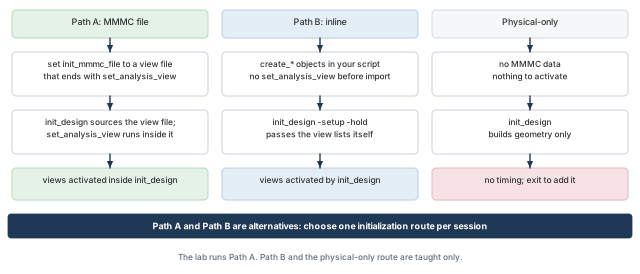
init_design sources the view file and its set_analysis_view runs inside the import; Path B passes the view lists to init_design; the physical-only route has no timing system at all.What to notice: No route calls set_analysis_view before init_design. On Path A it runs inside the import, and on Path B the view lists travel with the command itself.
# Same data settings as Path A, except no init_mmmc_file.
set init_design_netlisttype Verilog
set init_verilog [list data/demo_top.v]
set init_design_settop 1
set init_top_cell demo_top
set init_lef_file [list data/tech.lef data/stdcells.lef data/sram.lef]
set init_pwr_net VDD
set init_gnd_net VSS
set init_design_uniquify 1# The MMMC objects, created inline in dependency order. create_library_set -name libs_slow \ -timing [list data/stdcells_slow.lib data/sram_slow.lib] create_library_set -name libs_fast \ -timing [list data/stdcells_fast.lib data/sram_fast.lib] create_rc_corner -name rc_slow -cap_table data/rc_slow.captbl create_rc_corner -name rc_fast -cap_table data/rc_fast.captbl create_delay_corner -name slow -library_set libs_slow -rc_corner rc_slow create_delay_corner -name fast -library_set libs_fast -rc_corner rc_fast create_constraint_mode -name func -sdc_files [list data/func.sdc] create_constraint_mode -name test -sdc_files [list data/test.sdc] create_analysis_view -name func_slow -constraint_mode func -delay_corner slow create_analysis_view -name func_fast -constraint_mode func -delay_corner fast create_analysis_view -name test_slow -constraint_mode test -delay_corner slow # Activation happens here, through init_design. init_design -setup {func_slow test_slow} -hold {func_fast}
The tool's behavior when views are named in two places:
- Conflict: if a view file and
init_design -setup/-holdname different active views, the tool reports the conflict. It uses the views in theinit_designcall. - View file without MMMC mode, and no
-setup/-hold: the command returns an error. - Path B without
-setup/-hold: a warning that no active views were provided. Timing commands cannot run until at least one setup and one hold view are declared.
| Path A: MMMC file | Path B: inline | |
|---|---|---|
| Where the objects are created | In the file named by init_mmmc_file | In your script, before init_design |
| How views become active | set_analysis_view at the end of the file | -setup and -hold of init_design |
| What you keep as the record | The view file, which can be reviewed on its own | The script |
| The mistake to avoid | A file that creates objects and forgets to activate | Calling set_analysis_view before init_design |
Two more routes exist and are not developed here. A CPF-based route derives the MMMC configuration through init_cpf_file, for designs with power intent. You can also source a saved globals file and then call init_design, provided that file is configured for MMMC.
9.8 Start clean, and do not repair by calling it again
init_design can be called only when design and library information is not already loaded.
- Tempting move: change a global and call
init_designagain after a failed or unwelcome first attempt. - Why not: the session may hold partly loaded state, so the call is refused or mixes new settings with old data.
- Sound repair: start a new session with the corrected configuration, in a new run folder. Keep the failed run's log so you can explain what changed.
init_design also does not repair inputs. A missing cell is reported or stops the import, and no model is substituted.
9.9 Timing-enabled versus physical-only
With no MMMC configuration at all, the Legacy UI initializes into physical-only mode. This mode gives no access to the timing part of the system, and reinitializing requires exiting the software. You cannot add timing to the same session.
A physical-only import still has uses. You can inspect geometry, check how a netlist binds to the LEF files, or work on a floorplan without timing libraries. Its inputs are typically the netlist, the top, the LEF files and the supply names. Table 12 compares the two imports.
| Timing-enabled import | Physical-only import | |
|---|---|---|
| Purpose | Begin a flow that must be timed | Inspect or edit geometry without timing |
| Typical inputs | Netlist, top, LEF, MMMC configuration with libraries and constraints | Netlist, top, LEF; no timing data |
| What you can observe | Identity, views, constraints, coverage, timing models | Identity, binding to LEF, floorplan data |
| Checks that do not apply | None of the timing ones | check_timing, the report_analysis_* commands, timing-library checks |
| What it can establish | That the database and the timing setup are consistent | That the geometry data loaded |
| What it cannot establish | Quality, closure, signoff | Anything about timing |
In a physical-only import, call the timing checks "not applicable to this branch", not "skipped". Skipped means a possible check was not done. And never describe a physical-only import as timing-ready.
9.10 The default geometry is not a floorplan
After a successful import, init_design also creates:
- a default bounding box, square at 70 percent utilization;
- default rows, with a site chosen from the height of the cells in the netlist;
- tracks derived from the technology LEF.
These make the database complete. They are not an approved floorplan. Die size, aspect ratio, macro positions and pin placement belong to the next stage. A die and rows after import say nothing about your project's target.
9.11 What happens during the import, as concepts
The log order and wording vary with the release and the data. So the phases below are concepts, not a fixed trace.
- Settings are read. The tool takes the
init_settings. For Path A, it sources the view definition file, which creates the MMMC objects and activates the views. - Physical libraries load. The LEF files are read in the order given. Layers, sites and cell abstracts are created.
- Timing libraries load. The libraries referenced by the active views are loaded.
- The netlist is read and linked. Modules are built, instances are bound to library cells, and the top is set. If requested, the design is uniquified.
- Constraints are read. The SDC files of the constraint modes are processed. Messages appear for any command the tool could not apply.
- Default geometry is created. The bounding box, rows and tracks appear.
Use these phases as headings when you read the log. A warning in the netlist phase and one in the constraints phase have different owners.
Fixing a failed import by editing a global and running init_design again in the same session. The session already holds partial state. Exit, correct the configuration, and start a new run in a new folder.
Your script creates the MMMC objects inline and then calls set_analysis_view -setup {func_slow} -hold {func_fast} before init_design. Is this order allowed, and what is the alternative?
Answer. No. set_analysis_view cannot be issued before the design is initialized, and init_design needs the active views. Leave set_analysis_view out and pass the lists to init_design: init_design -setup {func_slow} -hold {func_fast}.
Takeaway Set and print every init_ global and pick one route per session. A failed import calls for a new session.
10 Judging the imported database: post-import sanity checks
An import ends and the tool is quiet. You must now decide whether to trust what is in memory. The skill is reading reports against what you intended. You judge whether the evidence is enough, and you know what to do when it is not.
10.1 A way to think about every check
Every check follows one investigation, drawn in Figure 15.
- Concern: something that could be wrong.
- Command: a command that can show evidence about it.
- Evidence compared with intent: the configuration and manifest you wrote before launch.
- Decision: accept, investigate or stop. Investigation ends in accept or stop.
If the decision is not accept, name the likely cause, the owner and the fix. The fix goes into the inputs or configuration for a new run, never into the database under judgment.
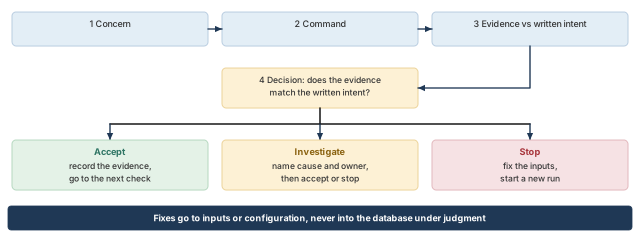
What to notice: The comparison with a written intent turns a report into a judgment. Fixes go back to the inputs and start a new run.
Two limits apply to every check. A passed check says only what that command can see. And evidence has a scope and a date. A report from an earlier run, for a different view, or cut short is not evidence about this database (check I).
10.2 The checking commands are not aliases
Similar names ask different questions.
setCheckMode / getCheckMode
- Purpose: choose, and query, which data checks the software runs automatically, such as
-netlistand-library. - Behavior: when a check finds missing or incorrect data, the software does not proceed with the affected function and issues an error.
- Set it immediately before importing. The netlist and library checks are on by default.
- Limit: these are settings, not results. A printout showing the library check enabled says nothing about whether it found anything.
checkDesign
- Purpose: check for missing or inconsistent library and design data.
- Arguments: option groups for I/O, netlist, physical library, timing library, power and ground, tie cells, floorplan and placement.
- By default it writes HTML and text reports. With
-noHtml,-outfilenames the text file.
checkNetlist
- Purpose: report design summary, statistics, I/O pad summary and design-rule checks on the netlist.
- Arguments:
-outfile, and-includeSubModuleto check submodule port definitions. - Inspect: findings are marked inside the report lines (check C).
check_design
- Purpose: the flow's prerequisites check.
-typeselects a category whose preconditions are tested. - Behavior: if it identifies errors, the current script stops.
-out_fileis Tcl-formatted. Sourcing it creates a Tcl dictionary of the violations, so it is data as well as a report.
check_timing
- Purpose: check the consistency and completeness of the timing constraints.
- Arguments:
-verbosefor detail and-viewfor scope. Redirect its output to a file.
Table 13 compares the five.
| Command | Question it answers | When | What it does not tell you |
|---|---|---|---|
setCheckMode, getCheckMode | What will the tool check on its own? | Before the import; query to record | Whether any check found anything |
checkDesign | Is library and design data missing or inconsistent? | After the import, for the data classes you ask for | Whether timing arcs are correct |
checkNetlist | Is the netlist well formed, and what is in it? | After the import | Whether the logic does what you intend |
check_design -type | Are the preconditions of this flow step met? | Before the step that the category guards | Anything outside the chosen categories |
check_timing | Are the constraints consistent and complete? | Before timing analysis | Whether the constraints are right |
10.3 Which check_design categories fit this stage
check_design has many -type categories, each guarding a later operation. Three fit the end of a first import.
library: every instance binds to a library cell. Cells with only a physical or only a timing description are flagged.netlist: netlist integrity, including undriven, multiply driven, unloaded, constant and feedthrough connections, and empty modules.timing: integrity of the timing setup.check_timingremains the tool for the more exhaustive timing checks.
Do not use -type all to feel thorough. Categories for placement, optimization, clock tree synthesis, routing and signoff check preconditions for stages that have not started. A freshly imported design fails them for reasons that are not problems yet.
The checks below are labeled A to I, from "what is this database" to "can I trust the evidence". The evidence blocks are illustrative imitations for practicing reading, not tool transcripts.
10.4 A. Is the loaded design the one I meant, and is its content plausible?
Concern. The import may have loaded the wrong top, or a hierarchy much smaller or larger than intended.
Command. Ask the database for its top name and compare it with the name you declared.
innovus> puts [dbGet top.name] ;# print the top module the database holds
dbGet top.name returns the top design's name, and puts prints it, since a script does not print a returned value on its own.
Inspect. The name equals init_top_cell and the manifest. The size is plausible against the synthesis report. The netlist report's design statistics give counts to compare.
Faulty evidence.
declared top : demo_top
loaded top   : demo_top_v2
A different module was loaded, or the evidence does not come from the session you think it does.
Cause. Investigate in this order.
- Read the effective
init_top_cellandinit_design_settopvalues your script printed, and any startup configuration that could have changed them. - Read the initialization log for the top it reports.
- Confirm that the evidence came from the intended session and database. Look for a later database or configuration action.
If settop was 0, the tool chose the top itself. An older netlist in the list that defines both demo_top and demo_top_v2 can explain wrong contents or a wrong revision. It does not by itself explain why an explicit top selection was ignored. The owners are you (configuration) and the design owner.
Decision. A name mismatch is a stop: fix the configuration and start a new run. A matching name with an implausible size is an investigation, since black boxes shrink a design and extra test-bench files enlarge it.
Limit. A matching name is not a matching netlist revision, a plausible hierarchy, or a correct design. Each is a separate question.
10.5 B. Is every cell bound to a physical and a timing model?
Concern. An instance may refer to a cell with no LEF abstract, no timing model, or neither.
innovus> checkDesign -physicalLibrary -timingLibrary -noHtml \
    -outfile checkdesign.rpt ;# physical and timing binding, one text report
innovus> check_design -type library \
    -out_file check_design_library.tcl ;# binding as a prerequisite, as Tcl data
-physicalLibrary: cells have LEF views. It reports cells not defined in LEF, missing dimensions, and pins without direction or geometry. It also reports cell dimensions that are not a multiple of the core site.-timingLibrary: cells used in the design are defined in the timing library.-noHtml: text report only.-outfilenames it and is allowed only with-noHtml.check_design -type library: binding of all instances to library cells, and cells present in only one of the physical and logical descriptions. Keep the-out_fileas data.
Inspect. No cell used by the design is undefined in either library, and every reported difference can be explained.
Faulty evidence.
checkDesign -timingLibrary
  cell SRAM_64X8 used by 1 instance: not defined in any timing library
check_design -type library
  libcell SRAM_64X8: LEF view present, no .lib view
This is the macro extension scenario, since the baseline demo_top does not instantiate SRAM_64X8. Both commands report one finding: a physical model and no timing model. The likely cause is a Liberty file missing from a library set. The owner is the library or macro provider. The fix is to provide the file and rebuild the configuration.
Physical-only cells. Fillers, tap cells and decoupling cells have physical views and often no timing model.
checkDesign -timingLibraryexcludes physical cells from its check.check_design -type libraryflags cells with only a physical view, so it may list them, and listing is expected.- Decide, cell by cell, whether it is physical-only by design. Waive those with a reason and chase the rest. Do not broadly waive missing timing models.
Limit. A passed binding check says names were found. It does not show that every arc exists, that the function is right, or that the characterization is correct.
10.6 C. Is the netlist well formed?
Concern. The netlist may contain connections that deserve review: floating ports, unconnected pins, multiple drivers, constants, empty modules.
innovus> checkNetlist -outfile checknetlist.rpt ;# summary, statistics, rule checks
innovus> checkNetlist -includeSubModule \
    -outfile checknetlist_sub.rpt ;# also check submodule port definitions
innovus> set uniq [checkUnique -verbose] ;# capture the return value
innovus> set fp [open checkunique_return.txt w] ;# open a record file
innovus> puts $fp "checkUnique returned $uniq" ;# write the return value
innovus> close $fp ;# close the record file
innovus> redirect checkunique_verbose.txt {checkUnique -verbose} ;# shared-module list
checkNetlist -outfile: writes the report. Without a name it useschecknetlist.rpt.checkUnique: returns 1 if every non-leaf module is instantiated only once, otherwise 0.-verboselists modules instantiated more than once.- Record the return value explicitly. Redirected text does not necessarily contain it, so the script stores it in
checkunique_return.txt. - Link to the netlist section: with
init_design_uniquifyat 1, expect 1. A 0 withalu_slicelisted means the three instances still share a definition.
Markers. An asterisk marks an error condition, and a question mark marks a warning or possible error. The mark sits inside the line, after the label and before the colon. So a search for lines that start with a marker finds nothing.
Number of Floating Ports *: 1
Number of undefined Floating Pins ?: 2
Number of Ports Connect to Core Cells *: 0
Investigate. The first line says one port floats. Find its name in the report body. Ask whether it is an input nothing uses, an output nothing drives, or a port the netlist forgot to connect. A floating input of a spare function is expected. A floating output that should carry ybyp is a netlist bug.
Decision. The netlist owner answers. An unexplained marked statistic is a stop. An explained one is an accept with a note.
Limit. The report shows structural properties. It does not show that the logic is correct, and it is not an equivalence check.
10.7 D. Are the MMMC relationships and the active roles what I intended?
Concern. A view may point to the wrong library, RC corner or constraint file. A view you meant to activate may be inactive or in the wrong role.
innovus> redirect views_setup.rpt {report_analysis_views -type setup} ;# setup views
innovus> redirect views_hold.rpt {report_analysis_views -type hold} ;# hold views
innovus> redirect views_all.rpt {report_analysis_views -type all} ;# every defined view
innovus> puts "setup: [lsort [all_analysis_views -type setup]]" ;# setup names
innovus> puts "hold: [lsort [all_analysis_views -type hold]]" ;# hold names
redirectruns the command in braces and sends its output to the file.report_analysis_views -type setupand-type hold: for each view in that role, its delay corner, then the RC corner and library sets with their files.all_analysis_views -type setupand-type hold: the names for each role.- Compare setup and hold separately with the manifest. One combined list cannot show that a view sits in the wrong role.
- What the sorted comparison proves: the required setup and hold memberships match. It does not establish the intended default views, because sorting discards the order.
Inspect. For each view, follow the tree traced in the MMMC section. Check the name and the constraint mode with its SDC files. Then check the library set and the RC corner, each with its files.
SETUP views
  view func_slow
    delay corner slow
      rc corner rc_slow : data/rc_slow.captbl
      library set libs_slow
        data/stdcells_slow.lib
        data/sram_slow.lib
constraint mode func : data/func.sdcHOLD views
view func_fast
delay corner fast
rc corner rc_fast : data/rc_fast.captbl
library set libs_fast
data/stdcells_fast.lib
data/sram_fast.lib
constraint mode func : data/func.sdcReading it. Each listed view traces to the right files, and the setup list holds one view. The manifest requires test_slow for setup as well, and it is missing.
- This is the dropped-view case of Figure 12. A later
set_analysis_viewwith onlyfunc_slowreplaced the earlier list, since the call is not incremental. views_all.rptstill liststest_slowas defined but not active.
Defaults. Review the defaults separately, because there is no query for the default itself. Read the activation statement that ran: the first view in each list is the default. Confirm that no later set_default_view call changed it. Compare the result with the project's intent.
Decision. The role lists must have the manifest's membership. Here they do not, so this is a stop. Find the second activation, usually a script sourced after the view file. Correct it and run again.
Limit. The report shows that the configuration says what you meant, not that the corners are right for the technology.
10.8 E. Are the clocks the ones I intended?
Concern. A clock may be missing, have the wrong period or waveform, or be defined in the wrong mode.
innovus> report_clocks -view func_slow > clocks_func_slow.rpt ;# clocks of one view
innovus> report_clocks -view test_slow > clocks_test_slow.rpt ;# clocks of the test view
report_clocks lists clocks created by create_clock and create_generated_clock, with waveforms, arrival points and uncertainties. -view limits it to one view. Generated clocks are reported by default.
Inspect. For each clock: the name, the period, the waveform and the source. For a generated clock, also the master and the relationship to it.
view func_slow
  clock clk   period 100   waveform {0 50}   source port clk
The period is 100 where the specification says 10. This is the wrong-period case from the constraints section, a factor-of-ten error in the value. It need not stop the import, and the evidence is a number you compare with the specification.
Scope. A clock exists within a constraint mode. A clock in func.sdc appears in the functional views. It does not appear in the test mode unless test.sdc defines it too. So "the clock is listed" must be followed by "in which views?" The per-view reports answer that.
Generated clocks. A listed clk_div2 shows only that the clock exists. Compare its period and waveform with what the divider should produce. A wrong master, ratio or source pin gives a plausible name and a wrong waveform.
Decision. A missing, misattached or wrongly timed intended clock is a stop, owned by the constraint owner. An unexpected extra clock is an investigation.
Limit. The report lists defined clocks. It does not prove that a clock reaches every register it should.
10.9 F. Are the constraints consistent with each other and with the netlist?
Concern. A constraint file may load and still leave inputs unconstrained or clocks missing where registers need them. It may also refer to objects that do not exist.
innovus> check_timing -verbose -view func_slow \
    > check_timing_func_slow.rpt ;# one view, output to a file
-verbose gives the detail behind each warning, and -view scopes it to one view. Warnings are grouped by type, and by default only violations are reported.
- clocks: for example
clock_expected,no_gen_clock_source,master_clk_edge_not_reaching. - endpoints: for example
uncons_endpoint. - inputs: for example
no_input_delay,partial_input_delay,no_drive,missing_drive. - Also: loops, and clock clipping and gating checks.
A worked investigation. Suppose the report holds two warnings.
warning no_input_delay  : port sel has no input delay
warning uncons_endpoint : port dout has no constraint
We read the two warnings independently, because the example does not establish that one causes the other.
Warning 1: no_input_delay on sel.
- In this faulty variant of
func.sdc, the input delay names onlydin, notsel. - An input without an input delay is assumed to have zero. So the paths from
selare still timed, with an assumed arrival of zero. - That can be optimistic for the latest-arrival (setup) analysis when the real maximum external delay is positive.
- For the earliest-arrival (hold) analysis, a zero minimum delay can be optimistic or pessimistic, depending on the interface.
- Ask whether that is intended. A static configuration input is better described with
set_case_analysisor a recorded exception. Ifselreally switches, the constraint owner left out the delay.
Warning 2: uncons_endpoint on dout.
- This is a different kind of finding: the check at that endpoint is not performed.
- Compare the SDC. One cause is the exercise case: an output delay without
-clockis accepted and ignored.
Decision. Neither warning is accepted until the constraint owner explains it. The early and late values come from the interface specification. Fixes go into func.sdc, then a new run. After each fix, run check_timing again in the new run.
The distinction to keep: an optimistic assumption still produces a number, and an unperformed check produces none.
Limit. A clean check_timing means the checks it performs found nothing, not that the constraints are right. Warnings do not stop the script, so no stop is not a pass.
10.10 G. How much of the design is actually analyzed?
Concern. With clocks and delays defined, some timing checks may still not be performed. They are reported as untested, and untested checks are where hidden problems live.
innovus> report_analysis_coverage -view func_slow \
    > coverage_func_slow.rpt ;# met, violated or untested, per check type
innovus> report_analysis_coverage -view func_slow -verbose untested \
    -sort reason > untested_func_slow.rpt ;# untested checks grouped by reason
- Report: per check type, how many checks are met, violated or untested. Details give the signal pin, reference pin, check type, slack and reason.
-view: scopes to one view, in multi-mode multi-corner analysis only.-verbose untested: details for untested checks only.-sort reason: groups by reason.- Reading a row: a tested check shows a slack number and no reason. An untested one shows
UNTESTEDin the slack column and a reason.
Reading the reasons. Each reason is a question to ask the design.
no_endpoint_clock,no_startpoint_clock: no clock where one should be. The clock was never defined, sits on the wrong pin, or does not reach the register. Rarely acceptable.const: a constant blocks the check. Intended if, for example,set_case_analysisholds a mode pin. An accident if a tie-off was connected wrongly.false_path: an exception disabled it. Read the exception in the SDC file first.user_disable: an arc was disabled withset_disable_timing. The same defense applies.unknown: no reason could be named. Not an accepted state. Investigate or escalate.
A reason is a prompt for a question, not a justification. false_path says a path was excluded, not that excluding it was correct. For each group of untested checks, find the SDC line or netlist feature behind it. Then ask the owner whether the design needs that.
view test_slow   (active for setup in this case; counts illustrative)
check type   met   violated   untested
setup        0     0          2
untested checks (signal pin, reference pin, check, reason):
  u_reg0/D   u_reg0/CK   setup   no_endpoint_clock
  u_reg1/D   u_reg1/CK   setup   no_endpoint_clock
The setup checks in this view are untested, for a missing-clock reason. This matches the package review: test.sdc creates tclk with a source selection that matches no port. So the clock is not attached, and the registers carry no clock in the test mode. The checks that depend on one are not performed.
The illustration shows a setup row only. In the baseline configuration, test_slow is not an active hold view. So this report is no evidence about test-mode hold. How a coverage report treats a view that is not active in a role is not defined. So this chapter does not show one.
- Reporting limits: console output may be limited by the tool's message display limit. For
check_designthe complete list goes to-out_file. Treat the file as the record. - Views: an unscoped report does not prove every view was analyzed. Run each report for each required view:
func_slow,func_fastandtest_slow, not just the first. - Limit: coverage counts the checks that exist. Only a comparison with the design's structure and intent shows that a missing check should have existed.
10.11 H. What did the import log say?
Concern. The log holds warnings and errors that no report repeats, such as unreadable constraint lines, ignored syntax and library problems.
Method. Read the log from the top, using the import phases as headings. For each warning or error, ask which phase produced it, what it affects and who owns the cause.
- If your release prints a message summary by severity, identifier and count, start there. Then read the lines behind the largest counts.
- Message identifiers depend on the release, so use the ones in your log.
Decision. Classify each distinct warning and record the classification with the log.
- Expected and explained: for example, physical-only cells.
- Unexplained: needs an owner and an answer.
- Blocking: the database should not be used.
A warning is a question, and the record shows it was answered. A good import is not required to have none.
Limit. The log contains what was logged. A condition that raised no message does not appear.
10.12 I. Is the evidence fresh and in scope?
Concern. A report may be old, describe a different view, or be cut so short that it hides the problem.
- Freshness. Write every report into the current run's folder, after the import, from the session being judged. A file with the right name from an earlier run proves nothing about this one.
- The danger is greatest when the earlier run was clean. Compare each report's modification time with the log. Never write into a shared folder where old reports sit under the same names.
- Scope. Each report should name its view, through
-viewor its header. An unscoped report covers whatever the current context covers, so read the header or rerun with an explicit view. - Completeness. A keyword search or truncated output is for navigation, not acceptance. Finding no line with "error" does not show there is no error, since markers and words differ between reports.
- Read the report to the end, or use a filter whose behavior you understand.
Limit. Freshness and scope are properties of how you ran the checks, so your process answers them.
10.13 A worked review: clean-looking, but not acceptable
After a Path A import of demo_top, the reviewer reads each report.
- A. The loaded top is
demo_top, equal to the declared top. Passes. - B.
checkDesignreports no undefined cells (the macro is not instantiated). Passes. - C.
checkNetlistshows no marked statistic, andcheckUniquereturned 1. Passes. - D. The active-view report lists
func_slowfor setup andfunc_fastfor hold. The manifest requiresfunc_slowandtest_slowfor setup andfunc_fastfor hold. So this fails:test_slowis missing. - E, F, G. Clocks,
check_timingand coverage all look clean. But they were run without-view test_slow, so they describe only the functional views.
The comparison with the manifest at check D already exposes the failure. The other reports look clean because they never looked at the missing view.
Trace.
- Compare
views_all.rptwithviews_setup.rptandviews_hold.rpt:test_slowis defined and not active. - Search the scripts that ran after the view file for a second activation.
- A site setup script sourced after
init_designcallsset_analysis_view -setup {func_slow} -hold {func_fast}, and the call is not incremental. - After the activation is corrected and
test_slowis active for setup, run the three reports for it. - Read its coverage report: it shows the picture of Case G1.
- These reports are not run before the fix, because their behavior for an inactive view is not defined.
- A second, independent fault appears:
test.sdccreatestclkwith a source selection that matches no port.
- Decision: not accepted.
- Owners: you for the activation, the constraint owner for
test.sdc. - Fix: a corrected activation and a corrected
test.sdc, then a new run in a new folder. Nothing is repaired in the session under judgment.
10.14 The acceptance decision
For each concern, record the evidence, the intent it was compared with, and a result. The result is one of: accepted, accepted with a recorded explanation, investigate, or stop.
- Accepted import: none of the nine is left at investigate or stop.
- The closing statement lists what remains unproven. That includes arcs and characterization, and the correctness of constraints and corners. It also includes everything that belongs to later stages.
- Better handoff wording: "all nine checks accepted; timing arcs, constraint correctness and corner choice are not established", not "checks passed".
Table 14 is the acceptance table for the nine checks.
| Check | Evidence needed to accept | Typical stop |
|---|---|---|
| A. Identity | Loaded top equals the declared top; counts plausible | Name mismatch |
| B. Binding | No unexplained unbound cell in either library | A macro without a timing model |
| C. Netlist | Every marked statistic explained; the recorded checkUnique value agrees with the uniquify choice | An unexplained floating port or multiple driver |
| D. MMMC | Setup list and hold list each have the manifest's membership; the default views match intent; every file path as intended | A missing or dropped view, or an unintended default |
| E. Clocks | Every intended clock, with the specified period and waveform, in every required view | A missing or wrongly timed clock |
| F. Constraints | Every check_timing warning explained | An unexplained unconstrained input |
| G. Coverage | Untested reasons defended against intent, per required view | no_*_clock or unknown untested checks |
| H. Log | Every warning classified | An unexplained blocking message |
| I. Evidence | Reports fresh, scoped and complete | Reports from a different run or view |
Running every check, seeing that none stopped the script, and calling the import verified. check_timing warnings do not stop anything, and checkDesign writes a report nobody has to open. No stop is not a pass.
Your coverage report for func_slow lists 12 untested checks, all with the reason false_path. What do you do before accepting?
Answer.
- Find: the
set_false_pathstatements in thefuncmode's SDC files, and what they exclude. - Ask: the constraint owner, for each group, whether the paths are truly never needed. They may, for example, cross asynchronous domains handled elsewhere.
- Reject: a broad exception such as clock to the same clock. It is unjustified for this intended active functional demo, unless specific design intent proves otherwise.
- Do not suppress required functional timing with an unexplained broad exception.
- Record: the owner's answer next to each group.
Takeaway Compare every report with a written intent, per required view, from this run; a quiet tool is not a verdict.
11 Saving, restoring and exporting
The imported database lives in memory and disappears with the session. Saving, restoring and exporting are different acts for different readers. Mixing them up is how a team hands over a netlist and believes it handed over a design.
11.1 Five things that are easy to confuse
Figure 16 shows the database in memory and the four things you can write from it.
- Initial import. Builds a database from source files and a configuration. It is reproducible only if both are kept.
- Native checkpoint (
saveDesign). Writes the database in Innovus's own format, so that a later session can continue from it. - Native restore (
restoreDesign). Reads a checkpoint back in a fresh session. - Interchange exports (
saveNetlist,defOut,writeTimingCon). Write parts of the database in standard formats for other tools or for review. - Layout stream-out. Belongs to a late stage. It is mentioned only for context.
For every artifact, ask the same questions. What does it contain and omit? Who reads it? What does it depend on? How is the write verified? What can still not be inferred from it?
The native checkpoint is the intended way to continue work in Innovus. It is not the only artifact Innovus can read, and the exports below have their own readers.
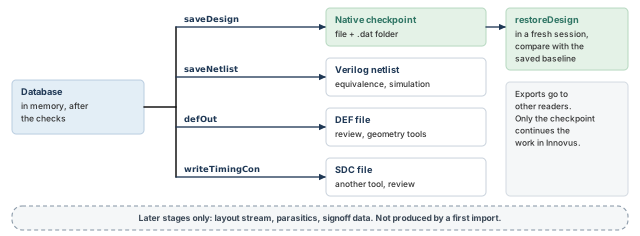
saveDesign writes the native checkpoint that restoreDesign reads in a fresh session; saveNetlist, defOut and writeTimingCon write exports for other readers.What to notice: Only the checkpoint is meant to continue the work in Innovus. A layout stream is a later-stage product.
11.2 Saving a checkpoint: saveDesign
saveDesign writes the database in the native format under a name you choose.
innovus> saveDesign accepted.enc ;# native format, under a deliberate name
- Purpose. A restart point for the next session.
- Arguments. The name, here
accepted.enc. Optional-user_pathstores external references as you entered them. Optional-libscopies library files into the saved directory. - Optional
-tconcopies the SDC files. Optional-timingGraphincludes the timing graph.-rcincludes extraction data, which does not exist at this stage. - Contains. The database, plus references to the LEF, Liberty and SDC files it was built from.
- Depends on. Those external files. By default, external references such as library files are stored as absolute paths without symbolic links.
- So the checkpoint is portable anywhere on the same network where those paths are accessible. The spelling you typed in the import scripts is not necessarily the spelling the checkpoint keeps.
- With
-libsor-tcon, a later restore and save refers to the copies. So the saved directory must be kept for as long as anything refers to it. - Does not replace. A judgment of the database. A save of a bad import is a bad checkpoint.
- Verify. Restore it in a fresh session and compare facts (below).
- Limit. A completed save is not automatically self-contained. The checkpoint directory and its actual dependencies must stay intact.
- What a restore brings back depends on what was saved, so some timing or extraction results may have to be repeated.
The name becomes a small file containing a restoreDesign command. The .dat extension is appended to name a directory with the database files.
accepted.enc         small file containing a restoreDesign command
accepted.enc.dat/    directory with the saved database files
A directory listing shows that something was written. It does not show that the save completed, that every dependency is reachable, or that a restore will work. The saved contents should not be edited by hand. Saving to the location you restored from overwrites the data there.
Debug saves and accepted saves. Save a failing state when someone else needs to see it. Give the two kinds different names, such as debug_before_fix.enc and accepted.enc. The name is a policy, not a property of the format. It stops a debug state being mistaken for an approved handoff. It also stops a later save from silently replacing the accepted one.
Three facts, not one. Keep these apart.
- The save was attempted: you ran the command.
- The save completed: the command returned without error in a live session, and the files are present with content.
- The handoff was verified: a restore in a fresh session reproduced the identity and the views.
Only the third supports "this checkpoint is ready for the next stage". A saved checkpoint does not establish a successful restore.
11.3 Restoring: restoreDesign
restoreDesign loads a database written by saveDesign.
innovus> restoreDesign accepted.enc.dat demo_top ;# saved directory, then the top cell
- Purpose. Bring a saved database into a session.
- Arguments. The
.datdirectory, then the top cell. An OpenAccess database uses-cellviewinstead. - Inspect. The top name, the views and the log of the restore.
- Limit. Innovus does not support loading another database while a design is in memory, so restore in a fresh session.
What decides whether a restore means what you want:
- Self-checking folder.
restore_db_file_checkdefaults to true, so an edited, renamed or deleted file inside the saved directory gives an error. restore_db_stop_at_design_in_memorydefaults to 1, so a secondrestoreDesignin one session stops with an error. Settings from the first database may linger, which is why restoring twice is not recommended.- Release. A design saved with a newer major version does not load in an older one. The minor version does not affect compatibility. Restore with the release that saved it, or one your project approves.
Three different things. Keep these apart.
- (A) Source configuration paths: the strings in the original netlist, LEF, view and constraint configuration.
- (B) Saved checkpoint references: which the save options decide.
- (C) Restore working directory: the current directory of the new process.
By default, B holds absolute references, so C matters little for them. The original spelling in A is not necessarily what B retains. A source path that is relative to the import folder need not be re-resolved as written from the restore folder.
Preserved relative paths are a separate case. With -user_path, references are stored as entered, relative paths included. Then run restoreDesign in the same directory as the save, or in one with the same directory structure.
setImportMode -syncRelativePath trueinstead synchronizes the relative paths in the saved.globalsfile to the current working directory. That lets you restore without first changing to the saved directory.- It does not copy files, repair files that are unavailable, or change what any Bash test sees.
Reproducibility is a separate claim. Re-running the original import needs the original source inputs at their approved revisions. Restoring the checkpoint needs the checkpoint directory and its retained references. Each is a claim of its own.
- What was saved. Repeat extraction or timing analysis if that data was not saved.
- Saved baseline against today's configuration. The restored database carries the configuration it was saved with. Compare it with the baseline recorded by the saving session, not with a configuration file that may have been edited since.
Inspecting the dependencies. Do not edit anything inside the saved directory. A read-only look at the .globals file in it shows which file references the checkpoint retained. Its layout is release-specific. The restore log is the evidence of which dependencies actually resolved, so read it after every restore, together with the comparison below.
Verifying a restore. The comparison is between facts from two sessions.
- In the saving session, after the checks and before the save, write the baseline to files. Record the top name from
dbGet top.name. - Also record the setup views from
report_analysis_views -type setupand the hold views fromreport_analysis_views -type hold. - In a fresh session and a fresh folder, restore and write the same three outputs.
- Read the restore log, then compare the top, the setup list and the hold list separately.
Setup and hold lists are compared separately. One combined active list cannot show that a view moved from one role to the other. Write each attempt's evidence into a new folder. A file left by an earlier attempt can look like a match. A stale match after a failed restore is more dangerous than no evidence.
A restore without an error is necessary, not sufficient. A matching top and matching view lists are stronger. They still do not prove that every library, constraint file and database detail came back as before.
11.4 Exporting a logical netlist: saveNetlist
saveNetlist writes the logical netlist of the database as Verilog.
innovus> saveNetlist demo_top_export.v ;# logical netlist as Verilog
- Purpose. Connectivity for other tools or for review.
- Arguments. The file name. The default is hierarchical Verilog, from the top down.
-flatflattens it.-topCellsaves one module with its submodules. -includePhysicalInst,-includePowerGroundand-physadd physical content for consumers such as layout-versus-schematic checks.- A
-physnetlist should not be read back into Innovus. None of these options are used at this stage. - Contains. Hierarchy, cell masters, instances and nets.
- Does not replace. The checkpoint. It has no positions, routing, constraints or timing.
- Verify. Quick inspection: the file is not empty, is not cut off, and the module names are those you expect.
Limit. Text can differ from the input netlist with no logical difference: module order, formatting, escaped names, uniquified module names and constants. A textual match does not prove equivalence either.
- Formal equivalence checking is the appropriate stronger validation of logical preservation. Quick file inspection is not that validation.
- Opening the file, reading its start and finding the closing statement are useful checks, not proof.
- A full disk leaves a file that exists and is truncated. A Verilog file may begin with comments or other statements before its first module. So do not require the first line to be a module statement.
- After placement, clock tree synthesis, scan reordering or optimization, the netlist changes. Save it again then.
11.5 Exporting floorplan data: defOut
DEF is a text description of the physical design: die area, rows, tracks, component instances and, later, routing. defOut writes the parts you select.
innovus> defOut -floorplan -netlist -unplaced \
    demo_top_import.def ;# floorplan and the still unplaced netlist
- Purpose. Hand geometry and connectivity to a review or another tool.
- Arguments.
-floorplanwrites rows, chip size, pad and block instances.-netlistwrites connectivity and is typically used after placement. - So on an unplaced design
-netlistis paired with-unplaced, which writes the unplaced standard cells. - Other options select routing, special nets and scan chains. Some produce a DEF that cannot be read back into Innovus.
- Contains. After a first import, the default die, rows and tracks, plus unplaced components and nets. The physical library abstracts are already in use.
- Does not replace. The checkpoint. There is no timing setup, library or constraint.
- Verify. Quick inspection: a header, a
DESIGNstatement with the top name, die area, rows and tracks, and unplaced components. - Limit. The first import has no approved placed or routed implementation and no extracted parasitics. The DEF is a record of default geometry, not an approved floorplan.
Bringing a DEF back. The two readers are different workflows.
defInloads a DEF file into an existing database, for a saved floorplan, scan chain information, or placement and routing.loadDefFilebuilds an in-memory database from a DEF netlist and needs the library information loaded first.- That flow can floorplan, place without timing, route, edit wires and verify.
- It cannot be used effectively for extraction, delay calculation or timing-driven work. DEF names do not properly match the Verilog names that constraints use.
- It is not a drop-in replacement for the timing-enabled Verilog and MMMC initialization of this chapter.
11.6 Exporting constraints: writeTimingCon
writeTimingCon writes the constraints of the database in Design Compiler format.
innovus> writeTimingCon func_slow_out.sdc -view func_slow ;# one view to an SDC file
- Purpose. Review what the tool applied, or feed another tool.
- Arguments. The file name, then
-viewnaming the view. Naming the view is a good habit in a multi-mode configuration. - Optional switches select clocks, pins and commands, and leave out annotated delays, checks or transitions.
- Contains. The constraints as the database holds them, not the source text. Order, comments and style can change.
- Does not replace. The source SDC, or a check that the source was right.
- Verify. Write one file per view. Then compare each exported view with its own source constraint set. For example, compare a
funcview withfunc.sdcand atestview withtest.sdc. - Compare meaning, not text order: effective clocks, periods and waveforms, boundary delays, exceptions, case analysis and the files sourced.
- Limit. A difference may be a change of form, or evidence that a statement was dropped or ignored. Understand it before accepting it.
11.7 Later-stage outputs, as context
Layout streams belong to later stages, for example GDSII (Graphic Design System) and OASIS (Open Artwork System Interchange Standard). So do parasitic files and signoff artifacts. A first import has no layout, routing or extraction to write, so none of them is run here.
11.8 Summary of the artifacts
Neither an exported netlist nor a DEF file is "the design". The checkpoint is the intended handoff, and the exports are views of it. Table 15 summarizes them.
| Artifact | Contains | Omits | Read by | How to verify |
|---|---|---|---|---|
| Native checkpoint | The database and references to libraries and constraints | Optional analysis data not selected for saving; external dependencies may remain external | Innovus, in a fresh session | Restore; compare setup and hold views |
| Logical netlist | Connectivity, hierarchy, cell masters | Positions, constraints, timing | Equivalence, simulation, review | Quick inspection; formal equivalence for logic |
| DEF, early import | Default die, rows, unplaced components, nets | Timing, libraries, constraints | Review; geometry tools | Quick inspection of header and rows |
| Constraint file | Constraints of one view | Original text and comments | Another tool; review | Compare meaning with that view's own source SDC |
A teammate sends you accepted.enc.dat and says "it saved fine". What facts are missing, and how do you get them?
Answer.
- Conclusion. The save was attempted and probably completed. It is unverified.
- Reason. A directory listing does not show that a restore works.
- Evidence needed. Restore in a fresh folder with the saving release, with the checkpoint directory and the files it refers to reachable. Read the restore log.
- Then compare the top, the setup views and the hold views with the saving session's baseline.
Takeaway Save only an accepted database, verify the save by a fresh restore, and treat every export as a view for one reader.
12 Lab: one controlled import, judged, saved, restored and exported
Part I taught the reasoning. This lab applies it to real inputs, which can disagree with you. It teaches nothing new. It is deliberately short, and every step refers back to a section you have already read.
Goal. Review an approved input package and import it once through one timing-enabled route. Judge the result with the nine checks. Save an accepted checkpoint only if the judgment allows it. Restore it in a fresh session, compare it with the saving run, and try the three small exports.
What you need. A Linux host with Bash and an editor, and a licensed Innovus (Legacy UI). You also need an approved set of inputs from your project or training environment:
- a netlist with a known top;
- LEF files;
- a view definition file that names timing libraries and SDC files;
- the supply net names.
12.1 Where each thing runs
Four places appear in the lab, and mixing them up is the commonest early mistake. They are listed in Table 16. The step-by-step use of each place is drawn in Figure 17.
| Place | What it is | How long it lives |
|---|---|---|
| Launch terminal | A Linux terminal with Bash. You start Innovus here, and its prompt appears here. | Until you type exit |
| Innovus prompt | The Tcl prompt of the running session, in the launch terminal. Commands typed here go to the tool. | Until Innovus exits |
| Source files | Text files you create in an editor: here import.tcl and restore.tcl. They are content, not typed commands. | They stay on disk |
| Reading terminal | A second Linux terminal in the same run folder, for reading reports while the session is open. | As long as you keep it |
This chapter provides teaching material and an example configuration. It does not provide a licensed Innovus installation, a process design kit (PDK), proprietary libraries, or a complete runnable design. Obtain an approved input set from your project or training environment. If you have no tool or inputs, skip the lab and work the evidence-reading exercises.
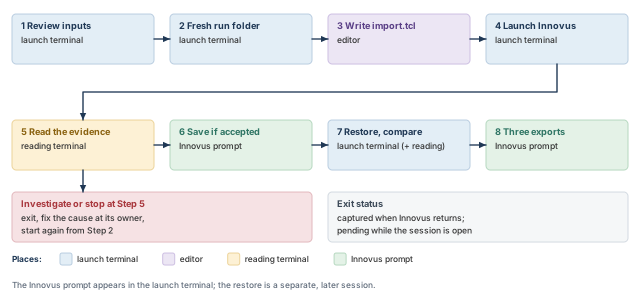
What to notice: A check left at investigate or stop sends you back to Step 2, in a new folder, not forward to the save.
The restore is a separate, fresh session, started later in a new folder. When Innovus runs interactively, the exit status of the process is not available until the process ends. While the session is open, its status is pending, which is not a failure. The launch commands below capture it automatically when the process returns.
Path policy for this lab. Use approved absolute, resolved input paths throughout. That includes the file references used by the view configuration and any sourced constraint files. The exception is a project that provides an explicit working-directory convention.
- Making only
init_mmmc_fileabsolute does not make every nested reference absolute. A relative path inside a Tcl or SDC file needs its own valid resolution convention. - Do not casually rewrite approved project configuration to silence a path failure.
- If your project uses a controlled root-directory convention, record and preserve it instead of this policy.
Steps 1 to 4 run in one Bash session, the launch terminal, so the variables set in Step 1 stay available. The reading terminal is a separate shell and needs none of them.
12.2 Step 1. Review the inputs
This is the package review from "Conditional inputs, alternatives, and reviewing a package", applied to your package. The paths below are examples. Replace them with your own absolute paths, then run the block in the launch terminal. A path that contains spaces needs quotes in Bash and braces in Tcl.
$ TOP="demo_top"   # example top name; use yours
$ NETLIST="/proj/demo/inputs/demo_top.v"   # example absolute netlist path
$ VIEWFILE="/proj/demo/inputs/viewDefinition.tcl"   # the view definition file
$ LEFS=("/proj/demo/inputs/tech.lef" "/proj/demo/inputs/stdcells.lef")   # tech first
$ D=/proj/demo/inputs   # the example input folder
$ NESTED=("$D/stdcells_slow.lib" "$D/stdcells_fast.lib")   # Liberty files
$ NESTED+=("$D/sram_slow.lib" "$D/sram_fast.lib")   # macro Liberty files
$ NESTED+=("$D/rc_slow.captbl" "$D/rc_fast.captbl")   # RC data
$ NESTED+=("$D/func.sdc" "$D/test.sdc")   # constraint files
$ unusable=0   # count of inputs that fail the check
$ for f in "$NETLIST" "${LEFS[@]}" "$VIEWFILE" "${NESTED[@]}"; do   # check each input
    if [ -f "$f" ] && [ -r "$f" ] && [ -s "$f" ]; then
      echo "ok       $f"
    else
      echo "UNUSABLE $f"; unusable=$((unusable+1))
    fi
  done
$ echo "unusable inputs: $unusable"   # must print 0
$ for f in "$NETLIST" "$VIEWFILE"; do echo "== $f"; head -n 3 "$f"; done   # first lines
$ grep -n -w "module $TOP" "$NETLIST"   # hint only: possible top definitions
$ grep -n -E "sdc_files|timing|cap_table|qx_tech_file" "$VIEWFILE"   # hint: references
NESTEDholds every file named inside the view file and the SDC files. Here that is four Liberty files, two capacitance tables and two SDC files. Add yours, and add an I/O file if your project has one, so that each gets the same check.- If the count is not 0, or any line says
UNUSABLE, do not continue. Fix the input with its owner. - The macro LEF is left out of
LEFSbecause the package review held it (Table 9). Its Liberty files stay in the library sets.
What the file check proves: each path resolves to a regular file, the account can read it, and it is nonempty. It does not prove correct syntax, the correct revision, a correct model, mutual consistency, or that Innovus parses it. A directory or an empty file fails the check, which a plain -r or -s test alone would not catch.
The two grep commands are navigation aids, not dependency extractors. A Tcl reference can span lines or be built from a variable or list. It can also come from a file that the view file sources.
- Read the effective configuration and every nested reference yourself, and list each nested file in
NESTED. - A directory listing is not a substitute for opening a file.
- The grep for the top is a hint, as the netlist section explained, not a verdict.
12.3 Step 2. Make a fresh run folder
Every attempt gets its own folder, and a failed attempt keeps its folder. The block refuses to reuse a name. If it prints STOP, do not continue to the next step.
$ RUN="$HOME/import_run_$(date +%Y%m%d_%H%M%S)"   # a new name from date and time
$ if [ -e "$RUN" ]; then   # refuse to reuse an existing folder
    echo "STOP: $RUN exists; wait a second and run this block again"
  elif mkdir "$RUN" && cd "$RUN"; then
    echo "working in $(pwd)"
  else
    echo "STOP: could not create $RUN"
  fi
12.4 Step 3. Write the import script
Create import.tcl in the run folder with your editor. The configuration is Path A from "The init_design import flow". Only the lines between the EDIT markers change. The values must be the same absolute paths that Step 1 checked. The paths and view names below are examples.
If you start from a project template, its values are written as REPLACE_NETLIST_PATH and similar. The guard and the grep below catch any you forgot to edit. With the example values shown here, both find nothing.
The script has seven blocks, shown in seven parts. Read it once as a reviewer, block by block.
- Configuration. The Path A settings with your values. Setup and hold views are listed separately because the roles are separate.
# ---- EDIT: values from your approved handoff, absolute paths ----
set init_design_netlisttype Verilog
set init_verilog [list /proj/demo/inputs/demo_top.v]
set init_design_settop 1
set init_top_cell demo_top
set init_lef_file [list /proj/demo/inputs/tech.lef /proj/demo/inputs/stdcells.lef]
set init_pwr_net VDD
set init_gnd_net VSS
set init_design_uniquify 1
set init_mmmc_file /proj/demo/inputs/viewDefinition.tcl
# If your project has an I/O file, add: set init_io_file /proj/demo/inputs/demo.io
# The views the manifest says must be active, by role.
set want_setup [list func_slow test_slow]
set want_hold [list func_fast]
# ---- END EDIT ----
# Refuse to run with a template marker left in any setting.
foreach g {init_verilog init_top_cell init_lef_file init_pwr_net \
           init_gnd_net init_mmmc_file init_io_file \
           want_setup want_hold} {
    if {[info exists $g] && [string match {*[R]EPLACE_*} [set $g]]} {
        error "placeholder left in $g"
    }
}
# Policy check: every input path, including an I/O file, must be absolute.
set path_list [concat $init_verilog $init_lef_file [list $init_mmmc_file]]
# An optional I/O file, set here or inherited, gets the same check.
if {[info exists init_io_file] && $init_io_file ne ""} {
    lappend path_list $init_io_file
}
foreach f $path_list {
    if {[file pathtype $f] ne "absolute"} {
        error "relative input path: $f"
    }
}
- Guards. Stop before
init_designif a template marker such asREPLACE_survives in any setting, or if an input path is relative. The path check also covers an optionalinit_io_file, whether you set it or the session inherited it. An inherited value is not cleared; it is reported and checked. The first letter of the marker pattern is in square brackets. That way the guard line itself does not match the search below.
# Record the release and the effective configuration.
puts "release: [getVersion]"
foreach g {init_design_netlisttype init_verilog init_design_settop \
           init_top_cell init_lef_file init_pwr_net init_gnd_net \
           init_design_uniquify init_mmmc_file init_io_file} {
    if {[info exists $g]} {
        puts "$g = [set $g]"
    } else {
        puts "$g is not set"
    }
}
# Record the check settings the import runs with.
getCheckMode -netlist -library
# Build the database.
init_design
- Effective configuration. Prints what the session will use, including the uniquify choice and the I/O file state.
getVersionreturns its value, soputslogs it. - Import.
getCheckModerecords the check settings, theninit_designbuilds the database.
# Baseline: the identity and views this run actually holds.
set fp [open baseline_top.txt w]
puts $fp [dbGet top.name]
close $fp
redirect views_setup.rpt {report_analysis_views -type setup}
redirect views_hold.rpt {report_analysis_views -type hold}
redirect views_all.rpt {report_analysis_views -type all}
# Compare setup and hold membership separately with the manifest.
set got_s [lsort [all_analysis_views -type setup]]
set got_h [lsort [all_analysis_views -type hold]]
set fp [open views_match.txt w]
foreach {role got want} [list setup $got_s $want_setup \
                             hold $got_h $want_hold] {
    if {$got eq [lsort $want]} {
        puts $fp "MATCH-MEMBERS $role $got"
    } else {
        puts $fp "MISMATCH $role active=$got wanted=[lsort $want]"
    }
}
close $fp
- Baseline. Records the top and the setup and hold lists of this run.
views_match.txtsays whether the membership of each role matches the manifest. It does not establish the default, because the lists are sorted first.
# Library, netlist and uniqueness evidence.
checkDesign -physicalLibrary -timingLibrary -noHtml \
    -outfile checkdesign.rpt
checkNetlist -outfile checknetlist.rpt
set uniq [checkUnique -verbose]
set fp [open checkunique_return.txt w]
puts $fp "checkUnique returned $uniq"
close $fp
redirect checkunique_verbose.txt {checkUnique -verbose}# Per-view clock, constraint and coverage evidence.
set active_all [concat $got_s $got_h]
foreach v [lsort -unique [concat $want_setup $want_hold]] {
if {$v ni $active_all} {
puts "SKIPPED $v: not active, see views_match.txt"
continue
}
redirect clocks_$v.rpt "report_clocks -view $v"
redirect timing_$v.rpt "check_timing -verbose -view $v"
redirect coverage_$v.rpt "report_analysis_coverage -view $v"
redirect untested_$v.rpt \
"report_analysis_coverage -view $v -verbose untested -sort reason"
}# Prerequisite checks last: errors found here stop the script.
check_design -type {library netlist timing} -out_file check_design.tcl
puts "evidence written to [pwd]"- Last check.
check_designruns last, because errors found there stop the script.
- Evidence. Checks B to G, one file per view where the check is view-scoped. The
checkUniquereturn value goes in its own file. A required view that is not active is skipped with a message, because the per-view reports are not defined for it.views_match.txtrecords the mismatch, which is a stop.
Confirm in the Linux terminal that no template marker is left.
$ grep -n REPLACE_ import.tcl # prints any line still holding a marker; expect none
If lines print, edit them. If a wanted view is not created by your view definition, views_match.txt will say so.
12.5 Step 4. Launch Innovus
$ if command -v innovus; then   # launch only if the executable is found
    # Record the launch context for the run.
    echo "cwd=$(pwd)" > launch_record.txt
    echo "date=$(date)" >> launch_record.txt
    echo "tmpdir=${TMPDIR:-unset}" >> launch_record.txt
    # Start the Legacy UI without the GUI; capture the exit status.
    innovus -legacy_ui -no_gui -abort_on_error -log import \
      -files import.tcl; rc=$?; printf '%s\n' "$rc" > import_exit_status.txt
  else
    echo "STOP: innovus not found; nothing was launched"
  fi
-legacy_uiselects the Legacy UI, which must not be mixed with Common UI commands (the newer command set).-no_guiruns without the window.-log importnames the log.-files import.tclruns the script after startup.-abort_on_errormakes the process exit if an applicable error occurs. That includes a Tcl error that reaches the top level, not only the script.- The status capture sits on the same command line, so that pasted lines are not typed into the Innovus prompt.
- Bash waits while the process is open. The capture runs when the process returns, by exit or by an error.
There are two paths from here.
- Success. There is no
-batch, so the session stays open at its prompt when the script ends. You can read the evidence and, if the checks allow it, save, in the same session. - Failure. An applicable error ends the process, and no prompt remains. Keep the run folder. Read
import.log,import_exit_status.txtand any partial evidence. Fix the cause at its owner, and start again from Step 2.
The tool creates a temporary directory per session. When TMPDIR is set, the directory goes inside it. Otherwise it goes in the current directory if writable, else in /tmp. The launch record above notes TMPDIR. Other tools may use a different order, so do not carry this rule over.
12.6 Step 5. Read the evidence
Open the reading terminal and change to the run folder; the launch terminal's pwd shows its path. Do not type into the Innovus prompt yet. Work through the nine checks with the files the script wrote, listed in Table 17.
$ ls -l --time-style=full-iso   # every file should be from this run
$ cat baseline_top.txt views_match.txt checkunique_return.txt   # baseline facts
| Check | Files to read |
|---|---|
| A. Identity | baseline_top.txt, the configuration lines in import.log |
| B. Library binding | checkdesign.rpt, check_design.tcl |
| C. Netlist | checknetlist.rpt, checkunique_return.txt, checkunique_verbose.txt |
| D. Views | views_match.txt, views_setup.rpt, views_hold.rpt, views_all.rpt, and the activation statements for the defaults |
| E. Clocks | clocks_func_slow.rpt and the other clocks_ files, one per view |
| F. Constraints | timing_func_slow.rpt and the other timing_ files |
| G. Coverage | coverage_ and untested_ files, one of each per view |
| H. Log | import.log |
| I. Freshness | Modification times of the files above, compared with the log |
For each check, write the evidence, your intent and a decision, as in Table 14. For check D, also compare the first view of each activation list with the defaults your project intends. A keyword search through import.log helps you find where to read. It does not replace reading.
If a check is at investigate or stop, do not save an accepted checkpoint. A deliberately named debug checkpoint is a separate, project-approved action. It is not always possible after an aborting error. Exit, fix the cause at its owner, and begin again from Step 2 in a new folder.
12.7 Step 6. Save the checkpoint, only if the checks allow it
At the Innovus prompt, in the launch terminal:
innovus> saveDesign accepted.enc ;# save the accepted database under a deliberate name
innovus> exit ;# end the session; the launch command then records the status
When exit returns you to the Bash prompt, the launch command has already written the status. Read it, and look at the checkpoint items.
$ cat import_exit_status.txt   # the status of the Innovus process
$ ls -l accepted.enc   # the small restore file; not proof the save worked
$ ls accepted.enc.dat | head   # the saved directory, first entries
A zero status is necessary and is not proof of an accepted import. A nonzero status needs an explanation before you rely on any evidence. The listing shows that something was written. The checkpoint is attempted, and it is not yet verified.
12.8 Step 7. Restore in a fresh session and compare
Make a new attempt folder inside the run folder. Earlier evidence stays untouched.
$ if mkdir restore_try1 && cd restore_try1; then   # a new, empty folder
    echo "restoring from $(pwd)"
  else
    echo "STOP: could not create restore_try1"
  fi
Where the saved references point. Under the path policy, the default saveDesign stored absolute external references. So the restore folder's location does not matter for them. The checkpoint's real dependencies are what the save retained, not the strings typed in Step 1. Look at them read-only, without editing anything.
$ ls ../accepted.enc.dat   # list the saved directory; edit nothing inside it
$ grep -n -i -E "lef|lib|sdc" ../accepted.enc.dat/*.globals | head -n 20   # references
The .globals layout is release-specific, so this look is a hint. The restore log is the evidence of which dependencies resolved.
Your project may instead keep relative paths under a working-directory convention. That is a different, separately defined procedure. Save with -user_path and restore from a directory with the same structure. Or use setImportMode -syncRelativePath true, which synchronizes the relative paths in the saved .globals file to the current directory. It copies nothing and repairs nothing, so read the restore log afterwards. This lab does not use that branch.
Create restore.tcl in this folder. It reads the top from the saving run's baseline, not from today's configuration. It writes evidence from this attempt only.
# The saving run is the folder above this one.
set saved_run [file dirname [pwd]]
# The baseline recorded by the saving run is the source of intent.
set fp [open $saved_run/baseline_top.txt r]
set top [string trim [read $fp]]
close $fp
puts "restoring $saved_run/accepted.enc.dat as $top"
restoreDesign $saved_run/accepted.enc.dat $top
# Evidence from this attempt only.
set fp [open restored_top.txt w]
puts $fp [dbGet top.name]
close $fp
redirect restored_setup.rpt {report_analysis_views -type setup}
redirect restored_hold.rpt {report_analysis_views -type hold}
puts "restore evidence written to [pwd]"
$ innovus -legacy_ui -no_gui -abort_on_error -log restore \
    -files restore.tcl; rc=$?; printf '%s\n' "$rc" > restore_exit_status.txt   # status
The same two paths apply. On success the session stays open at its prompt, and Step 8 uses it. On failure the process has ended, so keep the folder and read restore.log first. Do not compare leftover files.
With the session open, read the log and then compare, in the reading terminal, from the restore folder.
$ head -n 40 restore.log   # read the log from the top
$ grep -n -i -E "error|warn" restore.log | head -n 20   # helps you find where to read
Setup and hold are compared as separate pairs, as drawn in Figure 18. The command diff ends with 0 if the files are the same and 1 if they differ. It ends with 2 or more if it could not do its job.
$ for pair in "baseline_top.txt restored_top.txt" \
    "views_setup.rpt restored_setup.rpt" \
    "views_hold.rpt restored_hold.rpt"; do   # three separate pairs
    set -- $pair
    if [ -s "../$1" ] && [ -s "$2" ]; then
      diff "../$1" "$2" > "diff_${2%.*}.txt"
      rc=$?
      echo "$1 vs $2: diff status $rc (0 same, 1 differs, 2+ error)"
    else
      echo "UNKNOWN: $1 or $2 is missing or empty"
    fi
  done
Read the three results.
- All 0. The restored database has the same top, setup views and hold views as the saving run. That supports identity and activation. It does not prove that every library and constraint came back as before, so the log still has to be read.
- Any 1. Read
diff_*.txt. A changed time or path may be harmless. A changed view list is not. - Any 2 or UNKNOWN. The comparison did not happen, which is not a match.
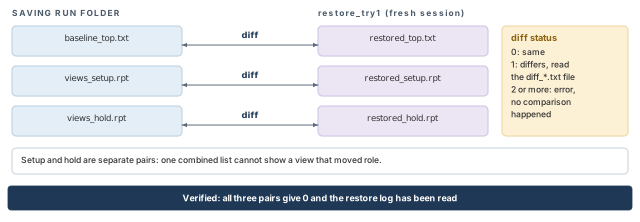
diff.What to notice: A status of 2 or a missing file means no comparison happened, which is not a match.
12.9 Step 8. Try the three exports
Still in the restored session, at the Innovus prompt, write one of each into the restore folder. The view name func_slow is an example; use one of your own view names.
innovus> saveNetlist export_netlist.v ;# logical netlist, as Verilog
innovus> defOut -floorplan -netlist -unplaced \
    export_early.def ;# floorplan and unplaced netlist
innovus> writeTimingCon export_func_slow.sdc -view func_slow ;# constraints of one view
innovus> exit ;# end the session; the launch command then records the status
When the process returns, restore_exit_status.txt holds its status. A zero is necessary and not proof that the restore was verified. Then take a quick look at each file, as the export sections describe. This is inspection, not validation.
$ cat restore_exit_status.txt   # the status of the restore session
$ head -n 5 export_netlist.v   # netlist: not empty
$ tail -n 3 export_netlist.v   # netlist: not cut off
$ grep -n -w "module" export_netlist.v | head   # module statements appear somewhere
$ grep -n -E "^DESIGN|^ROW|^UNITS" export_early.def | head   # DEF: design and rows
$ tail -n 3 export_early.def   # DEF: the end text
$ grep -n -E "create_clock|set_input_delay|set_output_delay" \
    export_*.sdc   # constraints: clocks and boundary delays
For each file, ask what the look lets you conclude and what it cannot. A header or a closing statement is useful and is not proof.
- The netlist needs formal equivalence checking for a claim about logic.
- The exported constraints are compared by meaning with the source set of the same view. So a
funcview is compared withfunc.sdc, and atestview withtest.sdc. - None of the three is the handoff. The checkpoint is.
12.10 What the lab does not establish
The lab does not show timing closure, routability, power connectivity or signoff readiness. It does not show that the constraints, corners or libraries are right. It does not run floorplanning, placement, clock tree synthesis, routing, extraction or signoff.
When you report the result, say which claim you earned. The claims are: inputs reviewed; import observed and judged; checkpoint saved; checkpoint restored and compared. Each is a different claim.
Takeaway One run per folder, evidence before the save, and a fresh restore compared file by file before anyone says "verified".
13 Evidence-reading exercises, with answers
These exercises need no tool. Each gives a short piece of illustrative evidence, like the ones in the post-import checks, and asks for a judgment. Cover the answer and decide first. The answers give a conclusion, a reason and the action or evidence needed.
13.1 Exercise 1: a package review
The handoff for demo_top has these notes.
- Netlist: top
demo_top, definesalu_slice. - LEF files:
tech.lef,stdcells.lef. - Liberty files:
stdcells_slow.libonly. - View file: creates
libs_slowandlibs_fast.libs_fastlistsstdcells_fast.lib, which is not in the delivery folder. - Constraints:
func.sdcwith one clock of period 10.
Proceed or stop?
- Conclusion. Stop.
- Reason. The view file refers to a library that was not delivered. So the fast library set cannot load, and any fast-corner view fails or is incomplete.
- One missing nested file is enough to stop the launch. The top, the LEF order and the clock are fine.
- Action. Ask the library team for
stdcells_fast.lib, or ask whether the fast corner belongs in this import at all.
13.2 Exercise 2: reading a configuration
What is wrong with each of these lines, and what would you check?
set init_verilog [list data/demo_top.v]
set init_design_settop 0
set init_top_cell demo_top
set init_lef_file [list data/stdcells.lef data/tech.lef]
create_library_set -name libs_slow -timing [list data/stdcells_slow.lib]
create_delay_corner -name slow -library_set libs_slow \
    -rc_corner rc_slow
create_analysis_view -name func_slow \
    -constraint_mode func -delay_corner slow
set_analysis_view -setup {func_slow} -hold {func_slow}
init_designThere are four faults, plus one decision to confirm.
settopis 0. The tool chooses the top, andinit_top_cellis not used as the author thinks. Setinit_design_settop 1to name the top.- LEF order. The cell LEF comes before the technology LEF, so layers and sites may be unknown when it is read.
- Missing objects.
create_delay_cornerrefers torc_slow, andcreate_analysis_viewrefers to the constraint modefunc. Neither object was created. - The delay corner owns the RC reference, and the analysis view owns the constraint-mode reference.
- Activation before import.
set_analysis_viewruns beforeinit_design, which is not allowed. The inline route passes the lists toinit_design -setup ... -hold .... - To confirm. The same view is listed for setup and hold. Ask whether that is intended.
13.3 Exercise 3: identity and views
declared top   : demo_top
loaded top     : demo_top
manifest setup : func_slow test_slow
manifest hold  : func_fast
active setup   : func_slow
active hold    : func_fast
defined views  : func_slow func_fast test_slow
Can you accept this database for the functional mode? For the test mode?
- Functional mode. Identity is correct, and the mode appears covered, subject to the other checks.
- Test mode. Not accepted.
test_slowis defined, required by the manifest, and absent from the active setup list. - Action. Look for a later
set_analysis_viewthat left it out. Since the manifest asks for both modes, the database as a whole is not accepted.
13.4 Exercise 4: a coverage report
view func_slow   (rows illustrative)
signal pin   reference pin   check   reason
u_reg1/D     u_reg1/CK       setup   const
u_reg0/D     u_reg0/CK       hold    false_path
u_reg0/D     u_reg0/CK       setup   no_startpoint_clock
Each row is one untested timing check. It gives the data pin, the clock pin it is checked against, the check type and the reason. For each reason, say what you would ask and of whom.
const. A constant condition reaches the data pinu_reg1/Dand disables its setup check. Ask the design owner whether that is intended. Look for aset_case_analysisthat propagates to it. A constant from a wrong tie-off is a netlist problem.false_path. Read theset_false_pathstatements infunc.sdc. Ask the constraint owner why hold checks atu_reg0/Dare excluded.
no_startpoint_clock. Take this one most seriously: the launch side of the path reaching this check has no clock in this view. In the baseline,u_reg0/Dis driven bydin. So inspect the input-delay clock association and the effective boundary constraints. Check that the clock the input delay names exists, with a source that matches a real port or pin. A virtual clock is valid but has no source in the design.u_reg0/CKis the capture and reference clock pin of this check. A missing clock there is the separateno_endpoint_clockreason.- Decision. None of the three is accepted just because it has a reason.
13.5 Exercise 5: a restore comparison
After a restore attempt, diff of the top names ends with status 0. The diff of a view report prints "No such file" and ends with status 2. A colleague says "the restore matched". Is that right?
- Conclusion. No. Only the top name was compared.
- Reason. Status 2 means
diffcould not do its job, which is not a match. - Evidence needed. Find out from
restore.logwhy the restored report is missing. The script may have stopped, or the restore may have failed. - Compare the setup and hold lists separately with the baseline. A leftover file from an older attempt must not stand in.
13.6 Exercise 6: choosing an artifact
Match each request to the artifact.
- (a) Hand the team a design they can continue from.
- (b) Give the formal team the logical connectivity.
- (c) Show a reviewer the default die and rows.
- (d) Give another tool the constraints the database applied to one view.
- (a) The native checkpoint from
saveDesign, verified by a restore. - (b)
saveNetlist. - (c)
defOut, with the caveat that it is default geometry and not an approved floorplan. - (d)
writeTimingConwith-view. - Limit. None of (b), (c) or (d) can stand in for (a).
14 Troubleshooting and common mistakes
Look first, then change one thing at a time, and ask the right owner. The first-observation column of Table 18 only inspects. The fix column changes something, and it belongs after you have written the first observation down. A failed run keeps its folder.
| Symptom | Likely causes | First observation | Fix | Owner |
|---|---|---|---|---|
| An input is unusable | Wrong path, file not delivered, no permission | Step 1 output | Obtain the file or access; start a new run | Project |
init_design refuses to start | Design or library already loaded in the session | The error text; whether this is a fresh session | Exit; start a new session | You |
| The wrong top loaded | Wrong init_top_cell, or settop 0 chose another | baseline_top.txt against the declared top | Correct the setting; new run | You |
| Unresolved cells | Missing LEF or timing entry, name or release mismatch | checkdesign.rpt, check_design.tcl | Provide the library; new run | Library owner |
| A macro is placed but not timed | Its Liberty file is not in the library set | The timing-library check | Add the model to the right library set | Macro owner |
| A required view is missing | Defined but not activated, or a later activation dropped it | views_match.txt (setup and hold lines), views_all.rpt | Correct the activation; new run | You |
| No clock, or poor coverage | Clock missing, its source selection matches nothing, or it is defined in a different mode | clocks_ and untested_ files for that view | Correct the constraints | Constraint owner |
| Modules not unique after import | init_design_uniquify not set as intended | checkunique_return.txt, checkunique_verbose.txt | Set it deliberately; new run | You |
| Process ended before the prompt, or nonzero status | -abort_on_error ended the process on an applicable error, a crash, or a signal | import_exit_status.txt, the last lines of import.log | Keep the folder; explain it; new run | You |
| Save did not complete | No space, no permission, session ended | The save log lines; a listing is only a first hint | Free space; save in a live session; verify by restore | You |
| Restore fails or differs | Different release, unresolved relative paths, moved inputs, a changed file in the saved folder | restore.log and the references it reports, the diff_*.txt files | Restore with the saving release; never edit the saved folder | You |
Nothing in this chapter was run on a licensed Innovus. The Bash blocks and the Tcl script logic were exercised only with stand-in programs and fixture files. Example output is illustrative. Exact message text, report layouts, and whether getCheckMode answers before init_design remain release-dependent. So do the treatment of a missing timing model and the reports for an inactive view. Where your release differs, your release is right.
Takeaway Inspect first, change one thing per run, and send each fix to the owner of the input that caused it.
15 Interview preparation
init_design finished with no errors. Is the design ready for floorplanning?No: a clean init_design shows only that the tool built a database.
- It does not show the intended top, revision or views, model completeness, or constraint correctness.
- Each needs its own evidence from the post-import checks.
NAND2_X1. What must the LEF and the Liberty file provide for it?The LEF needs a matching MACRO NAND2_X1, and the Liberty file needs cell (NAND2_X1) with the same pins, a function and arcs.
- The LEF macro must have the same pins and a whole number of sites.
- A shared name is a binding, not proof that pins, function, arcs or geometry agree.
- A renamed pin, such as
AtoI, breaks the interface even when the cell name matches.
init_lef_file?Because cell LEF files refer to layer and site names that the technology LEF defines.
- Listed after the cell LEF, the reader complains about unknown layers and sites such as
M1andcore_site.
init_design_uniquify to 1, and when to 0?Set 1 when the flow will run clock tree synthesis, scan reorder or timing optimization; keep 0 for a master-and-clone flow.
- Optimization is not allowed on a non-unique design.
- The default is 0, and a startup script may have changed it, so print the effective value.
checkUniquereturning 1 confirms each non-leaf module is instantiated once.
Library set and RC corner, then delay corner, then constraint mode, then analysis view, then activation with set_analysis_view.
- A delay corner pairs one library set with one RC corner.
- An analysis view pairs one constraint mode with one delay corner.
- Every reference is by name, and a name never created is the commonest error.
Defined means the object exists; active means the tool analyzes it in a role; default is the first name in each list.
set_analysis_viewactivates views separately for setup and hold.- There is no query for the default itself, so read the activation statement and look for a later
set_default_view.
set_analysis_view -setup {func_slow} -hold {func_fast} after the view file. What happens?test_slow is silently dropped from the setup list, because the call is not incremental.
- The command is valid and causes a full timing reset.
views_all.rptstill liststest_slowas defined but not active.- Compare the setup and hold lists separately with the manifest after every call.
Path A activates them with set_analysis_view at the end of the view file; Path B passes them to init_design -setup ... -hold ....
- On Path B,
set_analysis_viewcannot run before the design is initialized. - If a view file and
init_designname different views, the tool reports the conflict and uses theinit_designlists.
init_design again?No: start a new session in a new run folder with the corrected configuration.
init_designruns only when no design or library data is loaded.- The old session may hold partial state, so a second call is refused or mixes old and new data.
- Keep the failed run's log to explain what changed.
func.sdc has set_output_delay 3.0 [get_ports dout] with no -clock, and nothing complains. What is the effect?The constraint is accepted and ignored, so the path to dout behaves as if it had no output delay.
- Evidence: an unconstrained endpoint in
check_timing, or an untested check in the coverage report. - Fix: the constraint owner adds
-clock clk, then a new run.
false_path. Do you accept them?Not yet: a reason is a prompt for a question, not a justification.
- Find the
set_false_pathstatements that exclude those paths. - Ask the constraint owner whether each group is truly never needed.
- Reject a broad clock-to-same-clock exception in the functional mode unless design intent proves it.
checkUnique return, and why record the value in its own file?It returns 1 if every non-leaf module is instantiated only once, otherwise 0.
- Redirected text does not necessarily contain the return value.
- So the script writes it to
checkunique_return.txt, beside the verbose list of shared modules.
saveDesign worked, the folder is there". What do you still need?A restore in a fresh session, a read restore log, and a comparison with the saving run's baseline.
- Compare the top, the setup list and the hold list separately.
- Attempted, completed and verified are three different facts.
- A directory listing does not show that a restore works.
Each export is a view of the database for one reader, and omits most of it.
- The netlist has no positions, routing, constraints or timing.
- The early DEF has no timing setup, libraries or constraints, and shows only default geometry.
- Only the native checkpoint continues the work in Innovus.
16 Chapter close
Compact glossary
| Term | Meaning |
|---|---|
| Handoff | The delivered set of inputs, each a promise from a different owner |
| Gate-level netlist | Verilog that lists modules, cell instances and the nets connecting them |
| Module | A definition with ports, declared once, such as alu_slice |
| Instance | One use of a module or cell inside another module, such as u_alu0 |
| Cell master | The library definition a leaf instance refers to, such as NAND2_X1 |
| Uniquification | Giving each instance its own module definition, so it can change alone |
| LEF | Text format for cell abstracts and technology rules |
| Abstract | A cell outline with size, pin shapes and obstructions; not the layout |
| Site | The smallest placement grid unit; here 0.20 by 1.60 µm |
| Liberty | Text format for cell function and timing at one corner |
| Timing arc | One input-to-output timing relationship in a Liberty cell |
| Corner | One process, voltage and temperature condition |
| RC corner | The wire resistance and capacitance data for one corner |
| SDC | The constraint format that declares clocks, boundary delays and exceptions |
| Virtual clock | A clock with a name and no source in the design, used for boundary delays |
| Exception | A constraint that removes or changes a check on selected paths |
| MMMC | Multi-mode multi-corner: modes and corners combined into analysis views |
| Delay corner | A library set paired with an RC corner |
| Constraint mode | A named group of SDC files for one operating mode |
| Analysis view | One constraint mode paired with one delay corner |
| Active view | A view the tool analyzes for setup, hold or both |
| Physical-only mode | An import with no MMMC data and no timing system |
| Untested check | A timing check that is not performed, reported with a reason |
| Native checkpoint | The database saved by saveDesign and read back by restoreDesign |
One-page summary
Figure 1 at the start of the chapter is the whole chapter on one page. The summary below puts it in words.
Purpose. This chapter takes a delivered design package to a first checkpoint you can defend. It teaches what each input contributes and how the netlist, LEF and Liberty descriptions of a cell must agree. It shows how constraints and MMMC views are built and traced, and how the import is configured and followed. It closes with judging the database, and with what a checkpoint and each export can carry.
Workflow map.
- Handoff reviewed → three descriptions reconciled → constraints and MMMC understood.
- Import configured (Path A or Path B) → import followed → nine checks read against intent → decision.
- Checkpoint saved → restored in a fresh session and compared with the saving run's baseline.
- Exports made for specific readers.
Key concepts.
- A successful import is the first rung of readiness, not proof of quality, closure or signoff.
- A bound name is not a correct model. Liberty cell presence is not arc correctness.
- LEF
MACROis a library cell definition, large or small, and an abstract is not a layout. - Uniquification makes definitions independent, so implementation can change one instance without changing the others.
- Parsed SDC is not correct SDC. A listed clock needs its period, waveform and relationships checked.
- Defined, active and default views are three different things, and
set_analysis_viewis not incremental. - Path A activates views in the view file. Path B activates them through
init_design -setup -hold. - A physical-only import has no timing system. Adding timing means a new session.
- The check commands are not aliases, and a settings query is not a result.
- A checkpoint is the handoff. Exports are views of it for other readers.
Common mistakes.
- Reading "no errors" as "ready".
- Accepting a text hit for the top name, or assuming a global's value without printing it.
- Calling
init_designa second time to repair the first. - Treating an untested reason as a justification.
- Trusting an unscoped or stale report.
- Comparing a restore with today's configuration, or setup and hold as one combined list.
- Handing over an exported netlist or DEF as if it were the design, or reading a directory listing as a verified save.
Readiness questions.
- Can I say who provides each input, and what it does not tell me?
- Can I trace each required view to its SDC, library and RC files?
- Can I explain every line of my import configuration, and name its route?
- Did I compare each check's evidence with a written intent?
- Do the clocks and coverage exist for every required view?
- Was the checkpoint restored in a fresh session and compared with its baseline?
One-page command cheat sheet
Legacy UI only. One initialization route per session. Each block below is a separate act. The file names are short examples.
innovus> set init_verilog [list a.v b.v] ;# netlist files
innovus> set init_design_settop 1 ;# we name the top
innovus> set init_top_cell demo_top ;# the top module
innovus> set init_lef_file [list tech.lef cells.lef] ;# technology LEF first
innovus> set init_pwr_net VDD ;# global power net
innovus> set init_gnd_net VSS ;# global ground net
innovus> set init_design_uniquify 1 ;# uniquify while reading
innovus> set init_mmmc_file view.tcl ;# Path A: the view file activates views
innovus> init_design ;# build the database
# Path B instead (abbreviated): objects created first, then
# init_design -setup {func_slow} -hold {func_fast}
innovus> puts [dbGet top.name] ;# identity
innovus> report_analysis_views -type setup ;# setup views
innovus> report_analysis_views -type hold ;# hold views
innovus> checkDesign -physicalLibrary -timingLibrary -noHtml \
    -outfile a.rpt ;# library binding
innovus> checkNetlist -outfile b.rpt ;# netlist structure
innovus> redirect c.rpt {check_timing -verbose -view func_slow} ;# per-view check
innovus> saveDesign accepted.enc ;# only after the evidence is read
innovus> restoreDesign accepted.enc.dat demo_top ;# then compare top, setup, hold
innovus> saveNetlist n.v ;# logical netlist
innovus> defOut -floorplan -netlist -unplaced e.def ;# default geometry
innovus> writeTimingCon c.sdc -view func_slow ;# constraints of one view
Rules. Use a new session for every retry. Print the globals you depend on. Read each report for its view and run. Save only after the checks are read. Call the save verified only after a fresh restore matches.
Where the next chapter goes, and why
You now hold a checked, saved first database and a precise list of what it does not prove. Its die, rows and tracks are only defaults from init_design. Floorplanning replaces them with deliberate choices: die and core size, aspect ratio, macro positions and pin placement. Those choices only make sense on a database whose identity, models, views and constraints you have already judged. That is why this chapter comes first.