
Floorplanning: Planning, Creation, Checks and Handoff
Why this chapter matters in a real project
Placement, power planning, clock tree synthesis and routing all inherit the geometry you choose here. A floorplan can be wrong in a quiet way. A macro may face the wrong direction, or a channel may be too narrow. Nothing complains at once.
The trouble shows up much later, as congestion or timing failures, when it is expensive to undo. A wrong core size means every later stage fights for room. A macro facing away from its logic means hundreds of wires detour around it.
The opposite mistake costs too. A core that is far too large makes every net longer than it needs to be. A clean floorplan check can also hide a poor arrangement, because the checks test consistency, not quality. This chapter teaches you to tell those apart.
Prerequisites
- Understanding the Innovus Environment and Session: you can start a session, type at the
innovus>prompt and keep the session log. - Design Data Preparation, Import, Sanity Checks and Export: you hold a restored database whose design name, libraries and analysis views were checked.
- You do not need to know how to write Tcl procedures. The few optional helpers are collected in one section near the end.
- You do not need to know placement or routing algorithms. The trial placement here is used only as feedback.
Learning objectives
- Explain what a floorplan decides, who depends on it, and what a floorplan check cannot show.
- Read an existing floorplan: die, core, rows, sites, macros, pins, halos, channels and blockages.
- Turn requirements and connectivity into candidate macro arrangements, and compare them with a simple calculation.
- State which area you divide by before you quote a utilization, and size the core from declared inputs.
- Create a floorplan, read back what was actually made, and check it.
- Place and orient macros, and tell halos, channels and blockages apart.
- Decide when module constraints and pin or pad planning are needed.
- Run the first checks, sort each finding into the right class, and decide what to do.
- Use a trial placement and a rough routing estimate as feedback, and say what they cannot show.
- Save and hand off a floorplan together with the evidence behind it.
Figure 1 shows the whole chapter on one page. Come back to it whenever you lose your place.
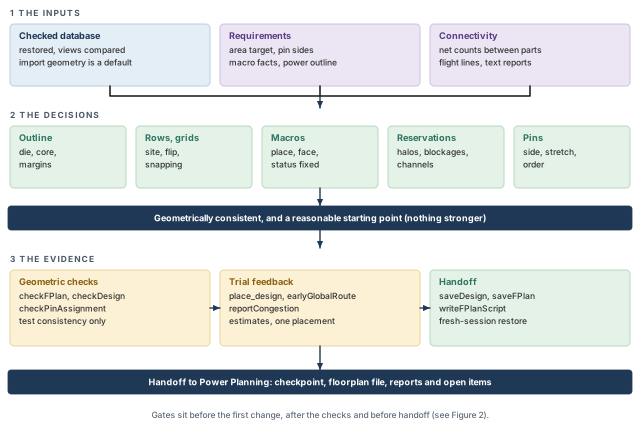
What to notice: The first navy bar is the strongest claim this chapter allows. It says "consistent and a reasonable start", never "good".
- Dimensions and coordinates are in µm, and areas in µm² or mm² (1 mm² = 1,000,000 µm²). Inside code and printed output the same units are written
umandum2. - This chapter teaches. It has no lab, no exercise and no complete script.
- Nothing here was run on a licensed Innovus. Commands were checked without running the tool, and every tool output shown is invented and labeled illustrative.
- The plain Tcl arithmetic was run with
tclsh, a plain Tcl interpreter. - If the tool's own help (
-help) disagrees with a command here, the tool's help wins for your installation. Write the difference down.
1 What floorplanning does
1.1 Where we start
Design Data Preparation, Import, Sanity Checks and Export ended with a restored design. Its top module, libraries and analysis views had been compared with a baseline. The import also gave the database a boundary and some rows, so that the database is complete. That boundary is a default. It is not a plan.
Floorplanning is where the plan is made. The import told us the design is loaded and consistent. It did not tell us how large the block should be. It did not say where the large blocks should sit, or which edge each signal should use. Those are the questions of this chapter.
Think of a floorplan as the furniture plan for an empty house. You fix the walls, place the heavy pieces first, keep the doorways clear and leave corridors. The small items arrive later, during placement.
- Furniture can be moved next week. A macro, once its neighbors are built around it, is expensive to move.
- A house plan is judged by eye. A floorplan is judged by numbers: density, track supply and congestion.
- Corridors in a house carry people in any direction. Routing channels carry wires only on the layers and tracks that exist there.
1.2 What a floorplan decides
Each item below is taught in its own section.
- The outline. The die, the core inside it, and the margins between them (Sections 5 and 6).
- The legal sites for standard cells. Rows, and the site that sets each row's width and height. Also the grids objects sit on, and the row orientations (Section 7).
- The big objects. Where each hard macro sits, which way it faces, and whether it may move later (Section 8).
- The reserved space. Halos, channels and blockages that keep cells and wires away from trouble spots (Section 9).
- Optional structure. Guides, regions and fences that tie a module or a group of cells to an area (Section 10).
- The boundary connections. Where pins or pads sit on the edge (Section 11).
- The room the power grid will need. Not the grid itself, only the space it will want (Sections 3 and 9).
1.3 Who depends on the floorplan
Table 1 lists who takes what from the floorplan, and what goes wrong for each when it is poor.
| Consumer | What it takes | What goes wrong when the floorplan is poor |
|---|---|---|
| Placement | Rows and sites, fixed macros, blockages, fences | Cells crowd into the room that is left; wires get long |
| Power planning | Core and macro edges, reserved space | Rings and stripes have no room, or cut through pin areas |
| Routing | Pin positions, channels, halos | Wires pile up in narrow gaps and cannot reach macro pins |
| Timing | Distances between connected objects | Paths stretch and miss the clock period |
| Later reviews | The record of what was decided | Nobody can say why a macro sits where it does |
1.4 What a floorplan check does not show
A floorplan check is a geometry check. A clean result does not show that the design will place without congestion, meet timing, or route. It does not show that the power grid will meet its voltage-drop limits. Nor does it show that the arrangement is the best one, or even a good one.
Those questions need placement, routing estimates and analysis. Section 13 introduces them in a limited way. This chapter trains you to say "the floorplan is geometrically consistent and is a reasonable starting point", and nothing stronger.
1.5 The rhythm used throughout
Every decision follows the same loop.
- Understand what the step is for and what it needs first.
- Check what is already there, with a command or a view.
- Decide what to change, and write down why.
- Make the change, only if the decision calls for it.
- Read back the result with the same command, and compare.
- Check for problems with the tool that fits the claim.
- Decide what to do next: continue, repair, or stop.
The loop repeats. The early steps are cheap because they only look.
Takeaway A clean floorplan check is a statement about consistency. It is never a statement about quality.
Figure 2 shows the order of the stages and the gates between them. Use this order to build and check a floorplan:
- Import, and study the connectivity.
- Make a minimum floorplan.
- Place, and estimate global routes to look at congestion.
- Resize if needed.
- Place the blocks, refine the macro positions, and place again.
This chapter follows that order. It treats the trial loop briefly, because placement methods are outside its scope.
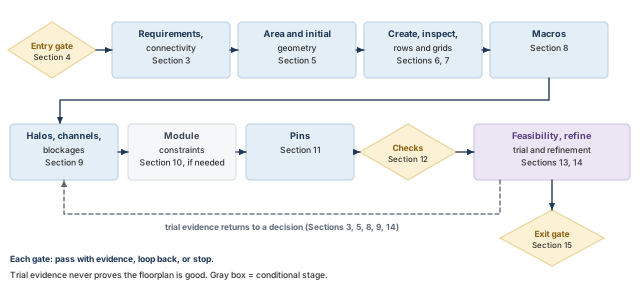
What to notice: The entry gate (Section 4) comes before any change, and the exit gate (Section 15) comes after the checks. The dashed arrow carries trial evidence back to a decision: an earlier one (Sections 3, 5, 8, 9) or a resize (Section 14). The arrow is drawn to one box for space; it stands for all five destinations. It never proves the floorplan is good.
1.6 How to read the evidence in this chapter
Three kinds of material appear in this chapter. Each one is labeled where it appears, as Table 2 shows.
| Kind | What it is | Example |
|---|---|---|
| Calculated | Arithmetic on declared, invented inputs, run with plain Tcl | The four utilization values in Section 5 |
| Illustrative | Invented data, shown so you can practice reading it | The check report in Section 12 |
| Judgment | Engineering practice, not a tool rule | A 10 µm halo is a placeholder |
Each code block has a header that says what it is for. A header that says inspection only reads. A header that says modifies the design changes the database. A header that says writes files saves data to disk and leaves the design unchanged. Every command carries a comment in plain words.
1.7 Check what is already there: identity and floorplan
Before any change, confirm which design is loaded and what geometry it has. All four commands only read.
innovus> dbGet top.name ;# print the name of the top cell
innovus> dbGet top.numInsts ;# print how many instances the database holds
innovus> dbGet top.fplan.coreBox ;# show the core box of the current floorplan
innovus> dbGet top.fplan.? ;# list the attribute names this object offers
dbGet top.namereturns the top cell name.dbGet top.numInstsreturns the instance count, including hard macros. It says nothing about whether they are placed.dbGet top.fplan.coreBoxreturns the core box as four numbers: lower-left x and y, then upper-right x and y, in µm. If your installation prints extra braces around it, unwrap one level. The helperbox_ofin Optional teaching helpers (Section 17) shows how.dbGet top.fplan.?lists the attribute names of an object. It is how you find out what your installation offers.
One result or several. dbGet returns a list. A single value is a list of one, and Tcl shows it as the bare value. If nothing is found, you get 0x0. Treat 0x0 as "nothing found", never as a coordinate or a count. A missing design is an error, not 0x0.
Where to find the result. At the prompt, each command prints its value. Inside a script, nothing prints unless the script calls puts.
The next block is invented. It shows how to read such answers for our running design, which Section 3 introduces.
innovus> dbGet top.name
stream_acc
innovus> dbGet top.numInsts
196214
innovus> dbGet top.fplan.coreBox
{10.0 10.0 1210.0 710.0}
innovus> dbGet top.fplan.?
(attribute names; they vary by installation)
- Shows. The top is the one we expect, and the database has instances. The import left a core of 1200 × 700 µm, which is 0.8400 mm².
- Does not show. That this core is the right size. Section 5 shows the design needs about 1.0 mm². The import geometry is a default.
- Stop if. The top name is not the intended one. Go back to Design Data Preparation, Import, Sanity Checks and Export.
2 Read a floorplan before creating one
You cannot judge a floorplan you cannot read. This section names the objects and shows how to see each one. After it, a floorplan stops being a picture. It becomes a set of boxes with relationships.
2.1 The vocabulary, drawn once
Figure 3, below, draws one corner of an invented floorplan with every object named.
Here are short definitions. The first eight follow the numbers in the figure; the last four are used later in the chapter.
- Die. The outer boundary of the chip or block.
- Core. The region inside the die that holds rows and standard cells.
- Halo. A margin around a macro that keeps cells out, so wires can reach the macro pins.
- Macro. A large block, such as a RAM, whose internal layout is already fixed.
- Channel. The free gap between two objects.
- Blockage. A rectangle, placed on purpose, that stops cell placement or routing.
- Pins. The metal shapes on the boundary where signals enter and leave.
- Row. A strip of sites. Standard cells sit in rows and nowhere else.
- Standard cell. A small library cell (gate, flip-flop, buffer) that is placed in rows.
- Site. The smallest legal footprint of a standard cell: a fixed width and height from the library.
- Routing track. One of the evenly spaced lines on which a router puts a wire.
- LEF and DEF. Library Exchange Format and Design Exchange Format: text files that describe library cells and a design's physical layout.
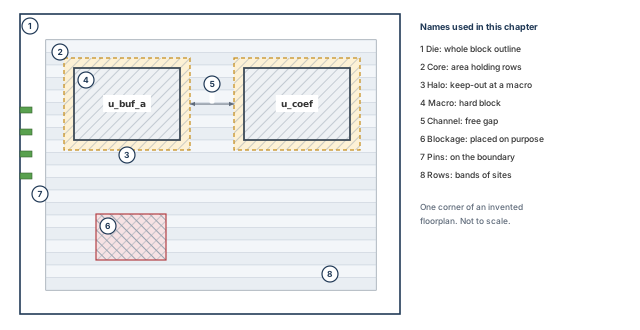
What to notice: The die (1) contains the core (2). Rows (8) exist only inside the core. A halo (3) belongs to a macro (4) and moves with it. A channel (5) is the free gap between two objects. A blockage (6) is a rectangle placed on purpose.
2.2 How to see each object
There is one way to see each object, in the display or with a command. The outline, rows and macros are in Table 3. Pins, constraints and reservations follow in Table 4.
| Object | How to see it |
|---|---|
| Die | Display; a defOut -floorplan file |
| I/O box | Display; the floorPlan -b form |
| Core | dbGet top.fplan.coreBox |
| Row | Display; ROW lines in a DEF file |
| Site | The library site definition; row ticks in the display |
| Hard macro | dbGet top.insts.cell.subClass block -p2 |
| Object | How to see it |
|---|---|
| Pin | dbGet top.terms.name; checkDesign -floorplan |
| Pad cell | dbGet top.insts.cell.baseClass pad -p2 |
| Constraint | Display; selectInst then reportSelect |
| Halo | addHaloToBlock sets it; the display shows it |
| Channel | report_narrow_channel |
| Blockage | Display; createPlaceBlockage, createRouteBlk |
Two limits apply.
- No attribute name for the die box, the I/O box or the rows could be confirmed. So this chapter reads them from the display, or from a DEF file written with
defOut -floorplan. It does not guess a name. - The
ROWline layout in a DEF file is defined by the DEF format, which this chapter does not cover.
2.3 Three boxes, not one
Tell three boundaries apart: the die, the I/O box and the core. The margin between the core and the I/O boundary is where I/O pad cells sit when pads are used. When there are no pads, power rings and pin routing share that room.
The two common size forms of floorPlan describe different boxes:
- In
floorPlan -s {W H Left Bottom Right Top}, W and H describe the core, and the four margins surround it. - In
floorPlan -d {W H ...}, the first two numbers describe the die.
Mixing the two forms gives a floorplan that is wrong by exactly the margin.
Mistaking the die for the core. A designer asks for 1000 × 1000 µm. They receive a die of 1080 × 1080 µm around a 1000 × 1000 µm core, or the other way round. Both are correct answers to different questions. Read the argument form before you read the number, and confirm the result in the display.
2.4 A reading routine for any floorplan
When someone hands you a floorplan, read it in this order. Each step explains the next.
- Identity. Which top, how many instances (Section 1).
- Outline. Die, I/O box and core, and their margins.
- Rows. Site, height, orientation pattern and extent.
- Macros. Position, orientation, status, and what faces what.
- Spacing. Halos, channels and blockages.
- Boundary. Pins or pads, their sides and their status.
- Constraints. Guides, regions and fences.
- Checks already run. Which ones, with which settings.
In the display, a selected macro shows its pins and the lines to the objects it connects to. These are flight lines. They show which objects connect, and by how many connections. That is what you need to judge macro direction. They are straight lines, so they say nothing about the route a wire will take. Section 3 teaches how to read them, step by step.
Read before you touch. Ten minutes spent reading an inherited floorplan often saves an hour, because the oddest feature is usually deliberate.
3 Requirements and connectivity
Every floorplan answer starts as a question that someone else owns. How large may the block be? Which edge do the signals use? Which blocks talk to which? If you have not collected those answers, the macro arrangement becomes a matter of taste. This section collects them for one invented design that the rest of the chapter reuses.
3.1 What must be known first
Collect these before moving anything. Each has an owner, and a guess is not an answer.
- The area target. Either a die size from the chip plan, or a target utilization and a shape. Owner: the chip or block owner.
- Which signals use each edge. Which interfaces exist, which edge each should use, and how many pins each has. Owner: the chip integrator.
- The macro facts. Size, the pin side at the default orientation, and the allowed orientations. Also any keep-out the macro provider demands. Owner: the macro provider.
- The connectivity. Which macros connect to which logic and ports, and by how many nets. Owner: the netlist, which you can read.
- The power plan outline. Whether there are separate power domains, and how much space the grid will want. Owner: the power team.
- The site and the routing grid. Owner: the library, which you can read.
3.2 The running design
The whole chapter uses one invented block called stream_acc. It is not the tiny demo_top used in Design Data Preparation, Import, Sanity Checks and Export. Every number is invented for teaching. Nothing comes from a real netlist or library. Its facts are in Table 5 and Table 6.
| Item | Value |
|---|---|
| Standard-cell area | 0.3916 mm² |
Hard macro u_buf_a | RAM, 420 × 300 µm |
Hard macro u_buf_b | RAM, 420 × 300 µm |
Hard macro u_coef | ROM, 240 × 160 µm |
| Macro pin side | East edge at the default orientation (R0) |
| Core site | core_site, 0.2 × 1.4 µm |
| Routing track pitch | 0.2 µm, both directions |
| Item | Value |
|---|---|
| Halo (placeholder) | 10 µm on every side |
| Core margin (placeholder) | 40 µm on every side |
Input interface in_* | 64 pins, to enter on the left edge |
Output interface out_* | 64 pins, to leave on the right edge |
Configuration interface cfg_* | 24 pins, on the top edge |
| Single pins | clk and rst_n on the bottom edge, irq on the top edge |
The block is a small streaming accumulator. Data arrives on in_* and passes through input registers. It then goes into one of two RAM buffers, u_buf_a or u_buf_b. The two take turns, so that one fills while the other is read. The input registers reach u_buf_b through the logic block, so its 96 nets are all counted as logic-to-RAM. Logic combines the buffered data with coefficients from the ROM u_coef. The result leaves on out_*. The cfg_* pins load settings into configuration registers. Those registers feed the logic. The parts and their net counts are drawn in Figure 4.
The connection counts in Table 7 matter most for macro placement.
| Connection | Nets | What it tells us |
|---|---|---|
in_* pins to input registers | 64 | The left edge needs a clear approach |
Logic and input registers to u_buf_a (coarse level) | 96 | Heavy, so the RAM wants to be near the logic |
Logic to u_buf_b | 96 | Heavy, same reasoning |
Logic to u_coef | 40 | Lighter, but each read is time-critical |
Logic to out_* pins | 64 | The right edge needs a clear approach |
cfg_* pins to configuration registers | 24 | Light, top edge |
| Configuration registers to logic | 32 | Light, no edge needed |
u_buf_a to u_buf_b | 0 | No reason to put them together |
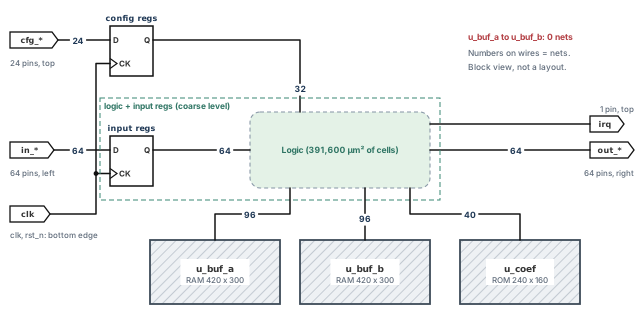
stream_acc with the net counts between its parts. The register banks are drawn as flip-flop symbols clocked by clk; the dashed outline is the coarse-level group of logic and input registers. rst_n (bottom edge) is not drawn. All values are invented.What to notice: Both RAMs and the ROM talk mostly to the logic, not to each other. The input and output interfaces sit on opposite edges, so the logic wants to lie between them.
3.3 Read the connections with flight lines
A flight line is a straight line the display draws between two connected objects. It shows that they connect and how many nets join them. It is not a wire. Use the steps below on any macro, in this order.
- Select one macro or module. Open the Floorplan view and select
u_buf_a. Its pins and its flight lines appear. - Find the pin bank. Note which edge carries the pins. At R0 the bank is on the east edge.
- Follow the lines to the destinations. Read the connection count on each line. Do not judge by how long the line looks. A long line with 2 nets matters less than a short line with 96.
- Set the hierarchy level. A coarse view can hide the real destination. One line to a big module may be three different blocks. Show a finer level until each line ends at something you can name.
- Compare relationships. Which counts go to logic, which to I/O ports, which to other macros? The macro belongs next to the largest count that it can reach.
- Try the legal orientations. Turn the macro and watch where the pin bank lands. Aim the bank at the open space that leads to its destinations. Only turn a macro to an orientation the library allows.
- Check the candidate afterwards. Flight lines choose candidates. Placement and a global-routing estimate (Section 13) test them.
At the coarse level the input registers sit inside the logic block. The dashed outline in Figure 4 marks that coarse group. So the figure shows one 96-net link to u_buf_a. Steps 3 and 4 for our running design are in Figure 5. Step 6 is in Figure 6. Why step 7 is needed is in Figure 7.
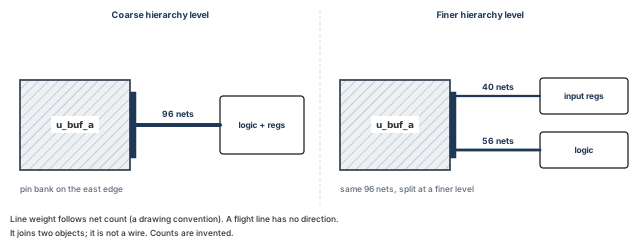
u_buf_a, shown at two hierarchy levels. Counts are invented, and no arrowheads are drawn because a flight line has no direction.What to notice: At the coarse level one line carries 96 nets. At the finer level the same nets split into 40 to the input registers and 56 to the logic. The count on a line, not its length, tells you which destination matters.
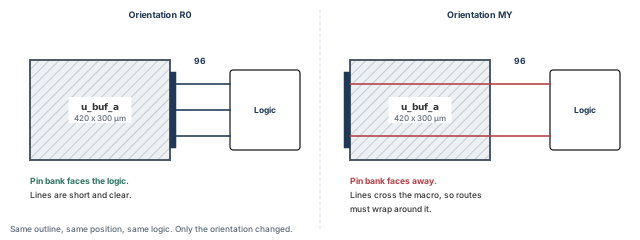
u_buf_a at R0 and at MY. The macro outline, its position and the logic did not change; only the pin bank moved.What to notice: At R0 the pin bank faces the logic, so the flight lines are short. At MY the bank faces the die edge, and the same lines cross the macro, so routes must wrap around it. MY is legal only if the macro provider allows it.
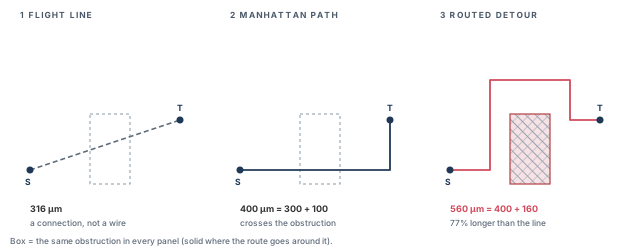
What to notice: The straight line is 316 µm and ignores the obstruction. A simple Manhattan path is 400 µm and would cross the obstruction. The routed detour is 560 µm, which is 560 / 316 = 1.77, so 77% longer than the line.
What the lines do not tell you:
- Apparent length is not routed length. The detour in Figure 7 is 77% longer than the line.
- A connection count is not routing capacity. Ninety-six nets need room to run. The count does not say whether the room exists.
- A connection count is not timing criticality. The ROM
u_coefhas only 40 nets, yet its reads are time-critical. - Not every orientation is legal. The library and the technology decide.
Treating a flight line as a route. The line is a straight segment between two objects. It shows that objects connect, and by how many nets. It does not show where a wire can go, how many wires fit, or how long a route will be.
The same information is available as text. Use it when you need a record.
innovus> report_obj_connectivity -insts u_buf_a \
    -file conn_u_buf_a.rpt ;# what u_buf_a connects to, to a file
innovus> report_obj_connectivity -insts u_coef -to_ports \
    -file conn_u_coef_ports.rpt ;# which ports u_coef reaches, to its own file
- Before you start. A design is in memory, and the instance names exist. A name that does not exist is an error, not an empty report.
- Options.
-instsnames the macros.-to_portsreports the connections from the selected objects to I/O ports.-filenames the report. The default name is the top module name with the extension.tmcrpt. - Trace depth.
-levelsets a trace depth from 1 to 10, with 5 as the default. Do not read a level as a number of hops. Run one report, compare it with the display, and only then rely on a level. - What else changes. A file is written. The design is not changed.
- Where to find the result. In the report file. Treat the file as the evidence, and do not write a script that expects a return value.
- Next. Read the file once before you build anything that parses it. Its layout is not covered here.
The block below is a neutral teaching table. It shows what such a report must let you read. It is not the tool's format.
object    connects to   nets   direction
u_buf_a   logic           96   both
u_buf_a   in_* pins        0   -
u_coef    logic           40   both
u_coef    cfg_* pins       0   -
3.4 Compare two candidate arrangements
We compare two arrangements of the macros inside a 1000 × 1000 µm core. The core's lower-left corner is at (40, 40). Coordinates in Table 8 are lower-left corners in die coordinates, in µm. Later sections create and check these same positions.
| Candidate | u_buf_a | u_buf_b | u_coef |
|---|---|---|---|
| P, stacked on the left edge | (40, 40), R0 | (40, 340), MY | (40, 640), R0 |
| C, around a clear left band | (100, 90), R0 | (100, 690), R0 | (590, 800), MY |
R0 leaves a macro's pins on its east edge. MY mirrors the macro about a vertical axis, so its pins move to the west edge.
- In candidate P,
u_buf_bis mirrored, so its pins point at the die edge instead of at the logic. - In candidate C,
u_coefis mirrored on purpose. Its pins then sit on its west edge, the edge nearest the assumed logic centroid (640, 500).
Figure 8 draws both candidates to scale.
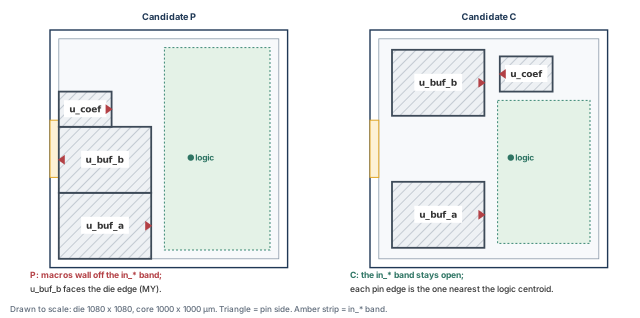
What to notice: In P, the macros wall off the left edge where in_* must enter, u_buf_a and u_buf_b touch, and u_buf_b faces away from the logic. In C, the left band stays open, each RAM has room on both sides, and each macro's pin edge is the one nearest the logic centroid.
To compare them without pretending to route, use a crude indicator:
- For each macro, take the midpoint of the edge that carries its pins.
- Measure the Manhattan distance (horizontal plus vertical distance) to an assumed logic centroid at (640, 500).
- Multiply by the number of nets.
The centroid is a guess. We use the same one for both candidates, so only the macro positions differ.
Formula: weighted distance = nets × (|x − 640| + |y − 500|), in net·µm.
| Candidate | Macro | Nets | Pin-edge midpoint (µm) | Distance (µm) | Weighted (net·µm) |
|---|---|---|---|---|---|
| C | u_buf_a | 96 | (520, 240) | 380 | 36,480 |
| C | u_buf_b | 96 | (520, 840) | 460 | 44,160 |
| C | u_coef | 40 | (590, 880) | 430 | 17,200 |
| C | total | 97,840 |
| Candidate | Macro | Nets | Pin-edge midpoint (µm) | Distance (µm) | Weighted (net·µm) |
|---|---|---|---|---|---|
| P | u_buf_a | 96 | (460, 190) | 490 | 47,040 |
| P | u_buf_b | 96 | (40, 490) | 610 | 58,560 |
| P | u_coef | 40 | (280, 720) | 580 | 23,200 |
| P | total | 128,800 |
P scores 128,800 / 97,840 = 1.32 times C's score (32% higher). The biggest single cause is that u_buf_b faces west in P.
- Shows. For these assumed positions, C puts the pin edges closer to the logic.
- Does not show. That P would route 32% worse, or that C routes at all. The indicator ignores channel width, pin spread, blockages and congestion. The centroid is a guess that placement will replace.
Carry C forward. C is the starting candidate for the rest of the chapter. P is kept because Sections 8 and 9 use it as the problem case. Neither is called best. A floorplan stays a candidate until placement evidence supports it.
4 Pre-floorplan readiness gate
Floorplanning on top of a bad database wastes the time you spend on it. This gate asks a short list of questions. Each has named evidence and a clear condition to stop. It reuses the identity checks made at import instead of repeating them.
4.1 What the gate is, and what it is not
The gate asks whether the database is fit to accept a floorplan. It is not a timing check, and it does not need the design to be placed.
- Unplaced standard cells are normal now. A floorplan comes before placement.
- Unplaced macros are normal too, until Section 8. What matters is that we know where each one stands.
- Analysis views are not needed to create geometry. They are needed for any timing statement in Section 13. If they are missing, the geometry work can go on. However, the timing step of Section 13 is then NOT RUN, and no timing claim may be made. Write down the omission and what it costs.
Each row below ends in one of three results: met, blocks (stop until it is fixed), or not needed yet (with the later section that needs it).
Every row except Views is mandatory. A mandatory row must be met before sizing. A mandatory check that applies cannot be skipped quietly.
4.2 The gate table
The table is split in two so that the text stays readable. The purpose and command of each check are in Table 11. Its evidence and stop condition are in Table 12.
| Check | Purpose | Command or observation |
|---|---|---|
| Identity | The right design is loaded | dbGet top.name, top.numInsts |
| Import and restore log | The load had no hidden failure | Read the log |
| Physical library | Every cell has a usable footprint | checkDesign -physicalLibrary |
| Macro inventory | We know every macro and its status | dbGet top.insts.cell.subClass block -p2, or the helper macro_inventory |
| Standard-cell area | Sizing has a number with units | report_area |
| Site and grid | Rows will use the intended site | Library site; get_snap_grid_info |
| Requirements | Decisions have an owner | The plan document |
| Views present | Timing evidence in Section 13 is meaningful | The view check made at import |
| Check | Evidence | Blocks when | Owner |
|---|---|---|---|
| Identity | Same top and count as the import baseline | Different top or count | Importer |
| Log | No errors; warnings explained | Unexplained error | Importer |
| Physical library | Report shows no missing or malformed cell | Any finding not explained by the library owner | Library team |
| Macro inventory | Count equals the macro list in the plan | Missing or extra macro | Block owner |
| Standard-cell area | One area figure, units known | No figure, or units unknown | Block owner |
| Site and grid | Site name and size match the plan | Wrong or missing site | Library team |
| Requirements | Area target, pin sides and macro rules written down | Any of them unknown | Chip integrator |
| Views | Views exist and were compared at import | Not needed yet; required before any timing claim in Section 13 | Importer |
A row with no evidence is open. It is not "assumed fine".
4.3 Check the physical library
Check the physical library before you make any floorplan decision. It is the one gate row that no earlier chapter ran for this purpose.
innovus> checkDesign -physicalLibrary -noHtml \
    -outfile pre_fp_physlib.rpt ;# check the physical library, text report to a file
- Options used.
-physicalLibraryselects the check group.-noHtmlwrites text only.-outfilenames the text report and is allowed only together with-noHtml. Without-noHtml, the command writes both an HTML and a text report under default names. - What this check catches. Cells not defined in the LEF; cells with missing dimensions; pins with missing direction; pins with missing geometry. It also catches cell sizes that are not a whole multiple of the core site, and a macro without fully covered obstruction. For fixed-mask blocks, it reports pins that are not colored.
- What else changes. A file is written. The design is not changed.
- Where to find the result. In the report file. If the command fails, the check did not run, and a silent log is not a pass.
The report layout varies, so the block below is a neutral teaching table, not the tool's format.
finding                          count   action
cell with no LEF                     0   none needed
cell with missing dimensions         0   none needed
pin with missing direction           0   none needed
pin with missing geometry            0   none needed
size not a site multiple             0   none needed
macro without full obstruction       0   none needed
- Shows. The listed problem classes were not reported for the loaded library data.
- Does not show. That the library is correct. A cell can have a valid footprint and a wrong pin position. It also says nothing about the timing library.
- Stop if. Any finding appears that the library owner has not explained. A macro without full obstruction coverage needs a decision from the library owner. Either the abstract is wrong, or routing over that macro is intended on some layers. Do not floorplan around it until that is settled.
4.4 The macro inventory
We need every macro, its master cell, and whether it is placed. To list the hard-macro instances, use dbGet top.insts.cell.subClass block -p2. Check each instance's name, master cell, placement status and box. The optional helper macro_inventory prints one line per macro (see Optional teaching helpers (Section 17)).
Treat "none found", "unplaced" and "could not be read" as three different outcomes. For our design the result at this stage is:
instance cell     status    box
u_buf_a  RAM_A    unplaced  n/a: unplaced
u_buf_b  RAM_A    unplaced  n/a: unplaced
u_coef   ROM_C    unplaced  n/a: unplaced
Three macros, all unplaced, as the plan says. That is the right starting state. A script must keep three answers apart: no macros found, macro unplaced (no box yet), and box could not be read. None of them is a zero.
4.5 Standard-cell area
Sizing needs a number with units.
innovus> report_area -detail -out_file pre_fp_area.rpt ;# area by cell type, to a file
- Options used.
-detailsplits the area into types such as buffer, inverter, combinational, flop, latch, clock gate, macro and physical.-out_filenames the output. By default only logical cells are reported.-include_physicaladds physical cells. - Units. The units depend on the library. Confirm them before you use the number in Section 5.
- If the number looks wrong. Check whether macros are in the total. The standard-cell area used for sizing excludes macros, because we add them separately.
- Alternative.
reportGateCount -stdCellOnlyreports a gate count. That is area divided by an assumed gate size, so it is a different quantity.
Stop if the area cannot be obtained, the units are unknown, or the macro count is not what the plan states. Do not size a core from a remembered number.
4.6 The gate record
When every row has its evidence, write the record. Table 13 is invented.
| Check | Result for stream_acc | Result |
|---|---|---|
| Identity | stream_acc, 196,214 instances, same as the baseline | Met |
| Log | No errors; two warnings, explained in the import notes | Met |
| Physical library | No finding reported | Met |
| Macros | Three, all unplaced, as planned | Met |
| Standard-cell area | 0.3916 mm², library units confirmed | Met |
| Site and grid | core_site, 0.2 × 1.4 µm | Met |
| Requirements | Pin sides and area target stated by the chip integrator | Met |
| Views | Present; required before any timing claim in Section 13 | Not needed yet |
Gate result: proceed to sizing. Every geometry row is met, and the views row is not needed until Section 13. The unplaced cells and macros are expected.
5 Estimate area and choose initial geometry
The first size you pick sets the density of everything that follows. If it is too small, placement packs cells until wires cannot get through. If it is too large, every net is longer than it needs to be.
The method matters more than the number. Write down the inputs, and state which area each ratio divides by. Show the arithmetic, so that someone else can redo it.
5.1 Two ways to arrive at a size
- Flexible outline. The area target is open. You size the core from the area the design needs and a target density, and the die follows. Utilization is an input.
- Fixed outline. The die is given by the chip plan or the package. You fit the design inside it. Utilization is now a result, and your job is to see whether it is acceptable.
Both lead to the same question: how much of the core is taken, and what does that ratio mean? That question has several answers.
5.2 State which area you divide by
"Utilization" is not one number. Before you compare two values, write down the areas included in each formula. The running design has the areas in Table 14.
| Quantity | Value | How it is found |
|---|---|---|
| Standard cells | 0.3916 mm² | report_area (Section 4) |
| Macros | 0.2904 mm² | 420 × 300 + 420 × 300 + 240 × 160 = 290,400 µm² |
| Halo area | 0.0380 mm² | See below |
| Core | 1.0000 mm² | 1000 × 1000 µm |
The halo area is the ring of width h = 10 µm around each macro. For a macro w wide and H high, the ring is (w + 2h)(H + 2h) − w × H.
- For
u_buf_athat is 440 × 320 − 126,000 = 14,800 µm². - The same for
u_buf_bgives 14,800 µm². u_coefgives 260 × 180 − 38,400 = 8,400 µm².
The sum is 38,000 µm² = 0.0380 mm². A 10 µm halo is a width. The 0.0380 mm² is the area it takes.
This chapter uses four area ratios, listed in Table 15. Each one answers a different question.
| Name | Formula | What it measures | Includes halo? |
|---|---|---|---|
| D1, core utilization | (cells + macros + halo) / core | How full the core is, counting halo room as taken | Yes |
| D2, row density | (cells + macros) / core | Cells and macros against the whole core | No |
| D3, cell density | cells / (core − macros) | Cells against what the macros leave over | No |
| D4, free-area density | cells / (core − macros − halo) | Cells against the free area after macros and halos | Yes |
Substituting the values, all in mm², gives Table 16.
| Ratio | Substituted | Result |
|---|---|---|
| D1 | (0.3916 + 0.2904 + 0.0380) / 1.0000 | 72.0% |
| D2 | (0.3916 + 0.2904) / 1.0000 | 68.2% |
| D3 | 0.3916 / (1.0000 − 0.2904) | 55.2% |
| D4 | 0.3916 / (1.0000 − 0.2904 − 0.0380) | 58.3% |
The same floorplan is "72%", "68%", "55%" or "58%" full, depending on who asks. None is wrong. Each answers a different question. The optional check below runs the same arithmetic in plain Tcl, at the % prompt of tclsh.
% set std 0.3916 ;# declared standard-cell area, mm2 (invented)
% set macro 0.2904 ;# declared macro area, mm2
% set halo 0.0380 ;# declared halo area, mm2
% set core 1.0000 ;# declared core area, mm2
# D1 and D2 share the core as denominator but include different areas.
# D3 and D4 divide by the area that the macros leave free.
% puts [format "D1 = %.4f" [expr {($std+$macro+$halo)/$core}]] ;# core utilization
% puts [format "D2 = %.4f" [expr {($std+$macro)/$core}]] ;# row density
% puts [format "D3 = %.4f" [expr {$std/($core-$macro)}]] ;# cell density
% puts [format "D4 = %.4f" [expr {$std/($core-$macro-$halo)}]] ;# free-area density
D1 = 0.7200
D2 = 0.6820
D3 = 0.5519
D4 = 0.5831
- One core-size formula counts the halo. The definitions of the
-rand-suforms offloorPlando not. - This chapter does not decide which one your installation uses. When you give a density to
floorPlan, use the definition of the form you gave. - When you quote a density to someone else, name the areas. The tool's own help for
floorPlandecides for your installation. floorPlantakes some densities as fractions: 0.72 in a command means 72%.
The tool reports its own figures too. checkFPlan -reportUtil prints target utilization (TU) and effective utilization (EU) for the design, and for fences and regions.
- TU is the standard-cell plus hard-macro area divided by the module area, ignoring blockages.
- EU also accounts for blockages, partition cuts and similar. It is not updated automatically.
Treat TU and EU as the tool's numbers and D1 to D4 as yours. Do not mix them.
Quoting one number for all purposes. "We are at 70%" is not a statement until the areas are named. Two people can agree on the figure and still mean areas that differ by a third.
5.3 No universal percentage
No density suits every design. The right target depends on routing resources, macro pin density, the power grid and timing pressure. It also depends on how much later stages will add. Use the history of similar blocks in the same technology, the chip plan, and the evidence from Section 13. A target taken from a book is a starting guess.
The standard-cell area you sized from is also a lower bound. After floorplanning, the flow adds buffers, repeaters, clock cells, tap cells and later fillers. The room for them must come from the density you choose now. That is a judgment, not a rule, so keep the number visible and revisit it.
5.4 From a target to a size
With a target D1 of 72%, the core area is the sum of the three areas divided by 0.72:
core area = 0.7200 mm² / 0.72 = 1.0000 mm² = 1,000,000 µm².
The shape then follows from the aspect ratio, which is height divided by width. A ratio of 1.0 is square, and 2.0 is twice as tall as wide.
Candidate C stacks two RAMs with their halos and leaves a 300 µm band for pins. It needs a core at least 2 × (300 + 2 × 10) + 300 = 940 µm tall. Three shapes with the same 1,000,000 µm² area are compared in Table 17 and drawn in Figure 9.
| Aspect ratio | Core (µm) | Die with 40 µm margins (µm) | Height needed: 940 µm | Result |
|---|---|---|---|---|
| 1.0 | 1000 × 1000 | 1080 × 1080 | 1000 ≥ 940 | Height ok, 60 µm spare |
| 0.64 | 1250 × 800 | 1330 × 880 | 800 < 940 | Short by 140 µm |
| 1.5625 | 800 × 1250 | 880 × 1330 | 1250 ≥ 940 | Height ok, 310 µm spare |
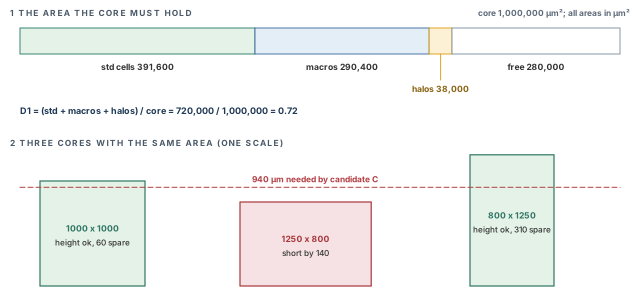
What to notice: All three shapes hold the same area. Only the square and the tall shape reach the dashed 940 µm line. The wide shape cannot hold the two stacked RAMs and the pin band.
- Shows. The square core (1000 × 1000 µm) and the tall core (800 × 1250 µm) can hold candidate C's height. The wide core (1250 × 800 µm) is 140 µm short.
- Does not show. The test checks one dimension. Width has to be checked too, and the real arrangement is judged in Sections 8 and 9.
Initial geometry: a square core of 1000 × 1000 µm, with a placeholder margin of 40 µm on every side. That gives a die of 1080 × 1080 µm. The inputs are declared, the areas are named, and the shape was tested against the arrangement it must hold. The target density stays open to revision after Section 13.
Figure 10 shows the requested outline with its three boxes.
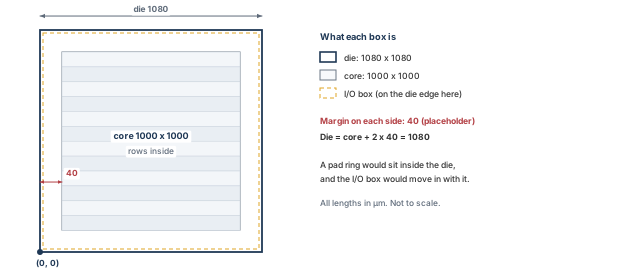
stream_acc. The margin is drawn wider than to scale so that it is visible.What to notice: The core is 1000 × 1000 µm. The 40 µm margin on each side brings the die to 1080 × 1080 µm. With no pad ring, the I/O box is drawn on the die edge. In a pad-ring design it sits inside.
6 Create and inspect the initial floorplan
Now we change the design for the first time. The aim is a floorplan whose outline you can read back and check. Its differences from what you asked for must be visible.
Every modifying example in this chapter follows the same five steps:
- A. Check what is already there.
- B. Make the change.
- C. Read back the result.
- D. Check for problems.
- E. Decide what to do next.
These are steps 2 and 4 to 7 of the loop in Section 1.5. Steps 1 and 3 are the prose before each block.
6.1 A. Check what is already there
The starting state is the import geometry from Section 1: a core of 1200 × 700 µm, which is too small. Record it, together with the placement grid.
innovus> dbGet top.fplan.coreBox ;# record the core box before any change
innovus> get_snap_grid_info -type placement -origin -pitch_x \
    -pitch_y ;# record the placement grid: origin, x pitch, y pitch
innovus> defOut -floorplan stream_acc_fp0.def ;# write current geometry as DEF text
get_snap_grid_inforeturns a list of named pairs, such as{origin {0.0,0.0}} {pitch_x 0.66} {pitch_y 0.56}(values from another library; yours will differ). The origin holds both coordinates joined by a comma. Without the three flags you cannot tell which pairs will appear, so name the ones you need.defOut -floorplanwrites the floorplan portion of the database as DEF to a file. It does not change the design. Keep the file as the "before" record.
6.2 B. Create the core and rows
# Core 1000 x 1000 um, 40 um from the die edge on all sides.
innovus> floorPlan -site core_site -s {1000 1000 40 40 40 40} \
    -coreMarginsBy die ;# create the floorplan
- Before you start. The Section 4 gate is met. The site
core_siteexists in the loaded LEF, spelled exactly as there. - Options.
-sitenames the core row site.-s {W H L B R T}gives the core width and height, then the left, bottom, right and top margins, in µm. - Margins.
-coreMarginsBy diemeasures those margins from the die edge. The default is to measure from the I/O boundary. The two coincide only when there is no I/O ring, so we state the choice. - What else changes. It initializes the floorplan and calls
add_tracks. By default,add_trackscomputes its own track spacing and ignores the pitch in the technology LEF. Existing blocks, fixed standard cells, fixed pre-routes or blockages are adjusted proportionally with the new outline. In our case none exist. - Where to find the result. Do not rely on a return value. Messages go to the console and the session log, so keep the log. To capture one command's output in its own file, wrap it:
redirect floorplan_create.log {floorPlan -site core_site -s {1000 1000 40 40 40 40} -coreMarginsBy die}. - If it fails. An unknown site is an error, and nothing is created. The command also checks that the I/O and core boxes lie inside the die box.
6.3 C. Read back the result
innovus> dbGet top.fplan.coreBox ;# read back the core box
innovus> defOut -floorplan stream_acc_fp1.def ;# write the new geometry as DEF text
Compare the request with what came back, as in Table 18. A short helper, compare_box, is in Optional teaching helpers (Section 17). Reading the two boxes by eye also works.
| Item | Requested | What you read back | Same? |
|---|---|---|---|
| Core box (µm) | 40 40 1040 1040 | dbGet top.fplan.coreBox | Compare each of the four numbers |
| Die (µm) | 0 0 1080 1080 | The display | Compare |
| Rows | Rows of core_site across the core | The ROW lines in the DEF file, and the display | Count, read the first and last row |
Now the rows. The core is 1000 µm tall and a row is 1.4 µm high, so 1000 / 1.4 = 714.29. Only 714 whole rows fit, and they cover 714 × 1.4 = 999.6 µm.
This chapter does not settle how floorPlan treats the 0.4 µm remainder, so do not assume. Read the actual core box and the actual row extents. Note which of them differs from the request. Whatever the tool did, the lesson is the same. The requested value is not the effective value until you have read it back.
$ grep -c "^ *ROW " stream_acc_fp1.def # count the ROW statements in the record
$ grep "^ *ROW " stream_acc_fp1.def | head -n 2 # show the first two rows
DEF row syntax is outside this chapter, so confirm the line layout against the DEF format your tools write. The next block is invented and shows one possible outcome. The numbers assume 1000 database units per µm, so 40000 means 40 µm.
714
ROW core_row_0 core_site 40000 40000 N DO 5000 BY 1 STEP 200 0 ;
ROW core_row_1 core_site 40000 41400 FS DO 5000 BY 1 STEP 200 0 ;
The orientation alternates between N and FS, which Section 7 explains. A count of 714 is what whole-row arithmetic predicts. However, a row count alone does not prove the rows are right. Check the extents too.
6.4 D. Check for problems
First, record the settings that the checks will use. A restored session does not necessarily have the defaults.
innovus> getFPlanMode -checkTypes ;# the check types checkFPlan will run
innovus> getFPlanMode -narrowChannelThreshold ;# used only if that type is on
innovus> getFPlanMode -snapBlockGrid ;# the grid macros snap to
innovus> getFPlanMode -snapCoreGrid ;# the grid the core snaps to
Write the printed values next to every report you keep. A report is only reproducible together with the settings that produced it. Now run the checks.
innovus> checkFPlan -outFile fp1_check.rpt -reportUtil ;# check; details and utilization
innovus> checkDesign -floorplan -noHtml \
    -outfile fp1_checkdesign.rpt ;# floorplan-related data, text only
- What each one is for.
checkFPlanchecks the quality of the floorplan before it goes to other tools.checkDesign -floorplanreports off-grid tracks, instances not snapped to a row site, unplaced I/O pins, and off-grid or off-track pre-routes. - Options.
checkFPlan -outFile(capital F) names a detail file.-reportUtiladds target and effective utilization.checkDesign -noHtml -outfilewrites text to a named file. - What else changes. Violation markers appear in the display. Files are written. The design is unchanged.
- Expected now. Unplaced I/O pins are reported, because pins come in Section 11. Unplaced macros are not a floorplan-check failure at this stage.
6.5 E. Decide what to do next
Table 19 collects the before, requested and read-back states.
| Item | Before | Requested | Read back |
|---|---|---|---|
| Core box (µm) | 10 10 1210 710 | 40 40 1040 1040 | Compare with the request |
| Die (µm) | not recorded | 0 0 1080 1080 | Compare with the request |
| Rows | import default | whole rows of 1.4 µm | Count and extents in the DEF record |
| Unplaced pins | reported | reported | Expected until Section 11 |
- Shows. The tool accepted the command, and the outline and rows exist in the form the read-back shows. The checks found no violation, if that is what their reports say.
- Does not show. That the outline is right, that the arrangement of Section 3 fits it, or that placement will succeed. These are geometric consistency checks only.
- Stop if. The read-back differs from the request by more than a site or a track, and you cannot say why.
7 Legal rows, sites and grids
Standard cells can only sit on legal sites, in legal orientations, on legal grids. Rows make a floorplan a place where cells can go. If the rows or grids are wrong, nothing downstream corrects them silently. The checks then complain in ways that are hard to read, unless you know why the rule exists.
7.1 Site, row and orientation
- Site. The smallest legal footprint for a standard cell, defined in the LEF by its width and height. Our
core_siteis 0.2 × 1.4 µm. Every standard cell is a whole number of sites wide. The physical-library check of Section 4 reports cells whose size is not a whole multiple of the site. - Row. A strip of sites placed side by side.
- Orientation. Neighboring rows are normally mirrored about a horizontal axis. Then the power rail between two rows is shared. Every second row carries its cells upside-down relative to the first. LEF and DEF call these orientations
NandFS. Innovus commands call themR0andMX.
The three rows and their shared rails are drawn in Figure 11, at the end of this subsection.
floorPlan has a -flip option that says which bottom rows flip.
- With
f, the first row flips, counting from the bottom up. - With
s, the second row flips. - With
n, none does.
The default is not stated here, so read the result. The first two ROW lines of the DEF record in Section 6 show the pattern you actually got.
checkFPlan can check that a row's orientation is correct against the site's symmetry definition. It also flags a missing Y symmetry on the core site in the technology LEF. If the LEF says nothing about symmetry, the tool cannot know that a mirrored row is legal.
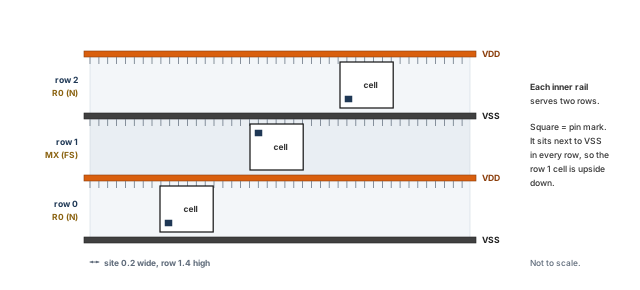
What to notice: Row 0 is R0 (N), row 1 is MX (FS), row 2 is R0 again. VDD and VSS rails fall between rows, so each inner rail serves two rows. The pin mark sits next to VSS in every row, so the row 1 cell is upside down.
7.2 The grids
Several grids exist, and each constrains different objects. Table 20 lists them with the query for each.
| Grid | What sits on it | How to query |
|---|---|---|
| Manufacturing grid | All geometry in the layout | get_snap_grid_info -type manufacturing |
| Placement grid | Standard cell origins | get_snap_grid_info -type placement |
| Instance grid | Instance origins | get_snap_grid_info -type inst |
| Layer-track grid | Routing tracks of a layer | get_snap_grid_info -type layertrack |
| User-defined grid | Whatever you set | get_snap_grid_info -type userdefine |
| FinFET grids | Objects in FinFET technologies | finfetInst, finfetManufacturing, finfetPlacement |
setFPlanMode takes -snapBlockGrid, -snapCoreGrid, -snapDieGrid, -snapIoGrid and related options. They choose which grid each kind of object snaps to. They matter when a macro's pins must line up with the routing grid. checkFPlan verifies macro pins only when the block grid is the layer-track grid.
Figure 12 shows what snapping does to one requested coordinate.
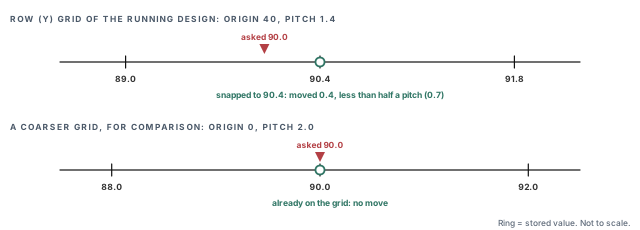
What to notice: Snapping moves an object by at most half a pitch, toward the nearest grid point. On the site grid of the running design, 90.0 becomes 90.4. The same request lands unchanged on a coarser grid of pitch 2.0.
7.3 Snapping, worked by hand
placeInstance snaps an instance to the site whose lower-left corner is nearest to the requested location. The rule is:
new value = origin + round((request − origin) / pitch) × pitch.
Our grid origin is (40, 40), the site is 0.2 µm wide and the row is 1.4 µm high. The rule is worked for candidate C in Table 21.
| Macro | Request (µm) | Axis | (request − 40) / pitch | Rounded | Snapped (µm) |
|---|---|---|---|---|---|
u_buf_a | 100, 90 | x | 60 / 0.2 = 300.0 | 300 | 100.0 |
u_buf_a | 100, 90 | y | 50 / 1.4 = 35.71 | 36 | 90.4 |
u_buf_b | 100, 690 | y | 650 / 1.4 = 464.29 | 464 | 689.6 |
u_coef | 590, 800 | x | 550 / 0.2 = 2750.0 | 2750 | 590.0 |
u_coef | 590, 800 | y | 760 / 1.4 = 542.86 | 543 | 800.2 |
The x requests already sit on the 0.2 µm grid. The y requests move by up to 0.7 µm, because 1.4 does not divide the distance from the core origin evenly. So the placed macro is not exactly where we ask. Halos in Section 9 should have room for the shift. The helper snap in Optional teaching helpers (Section 17) repeats this arithmetic.
This shows only the rule for this grid. It does not show that macros snap to this grid in your installation. Macros may follow -snapBlockGrid, which is a separate choice. So always read the placed location back, as Section 8 does.
The same family of commands can snap objects after the fact.
snapFPlansnaps floorplan objects to the grid.snapFPlanIOdoes it for I/O.reportUnsnapBlocksreports blocks that are off the grid defined by the snap preferences.
Use the report first. Snap only if the report finds something.
7.4 Editing rows, and when not to
Table 22 lists the commands that edit rows.
| Command | What it does | Use only if |
|---|---|---|
createRow | Adds rows of a named site, optionally in an area, with spacing and flip options | You need rows the floorplan did not make |
cutRow | Cuts rows that intersect macros and placement blockages by default, or in a given area | Macros or blockages are placed and rows must not run under them |
deleteRow | Removes rows by name, site, selection or all | You are rebuilding rows on purpose |
initCoreRow | Regenerates rows from the current row parameters | A parameter changed and rows must follow |
setFPlanRowSpacingAndType | Sets a standard row spacing for every row or every other row | The technology demands spaced rows |
Manual row edits may be lost when floorPlan, resizeFloorplan or initCoreRow regenerates the rows. So make row decisions after the outline is final. Do not repair rows by hand if the cause is a wrong parameter.
Fixing a row problem with row edits. A mirrored row that fails the orientation check rarely means a missing row. It usually points to the site definition or the -flip choice. Deleting and recreating rows hides the cause. The edit is also lost the next time floorPlan runs.
7.5 Conditional: vertical, multiple-height and hybrid rows
These are advanced topics. Skip them unless your technology needs them.
Rows can run vertically in a beta feature that a global variable switches on. In that mode createRow, cutRow and stretchRows are not available. Vertical rows are not placed inside power domains. Do not use it for a first floorplan.
The LEF may define sites that are whole multiples of the single height. An example is a triple-height site of 86.4 µm against a 28.8 µm single height. When the netlist uses them, rows for them are generated automatically. Non-integer multiple-height rows exist only inside power domains, and each power domain holds one such height. If cells fail the site-multiple check, check the site definitions first.
Hybrid rows follow a row pattern defined in the LEF. They are set up with setFPlanMode -defaultRowPatternSite and related options for the first and last row index. Edge row constraints control the row height multiples at the boundary. They need a technology that defines a row pattern, and they are outside a first pass.
Stop if cells fail the site-multiple check, or the site has no Y symmetry in the technology LEF while rows alternate. Stop too if the grid information does not match the plan. These are library or technology questions, not floorplan edits.
8 Plan and position macros
Hard macros are the largest objects and the least forgiving. They cannot be reshaped. They block cells and most routing, and their pins sit on fixed edges. Where a macro goes, and which way it faces, decides how many wires have to detour around it. A good macro arrangement is the cheapest congestion fix there is. A poor one is the most expensive to repair later.
8.1 What we are trying to achieve
- Each macro's pins face the logic and ports it talks to most.
- The edges where signals enter or leave stay approachable.
- Macros do not overlap each other, the core edge or reserved space.
- Every macro has a deliberate status, so later tools do not move it by accident.
- The result sits on the grid it will be judged against.
8.2 What must be known first
From Section 3: the pin side of each macro at R0, the net counts, and the pin edges of the block. From the macro provider: which orientations are legal. Many macros allow only a few. Mirroring or rotating one that does not allow it is not a design choice. If you do not know, ask before you place.
8.3 Orientation, with one worked rule
A macro in the running design has its pins on the east edge at R0. Some orientations mirror the macro, and one turns it by half a turn. Where the pin side ends up for each is in Table 23.
| Orientation | What happens | Pin side for an east-pin macro |
|---|---|---|
| R0 | As delivered | East |
| MY | Mirrored about a vertical axis (left and right swap) | West |
| MX | Mirrored about a horizontal axis (top and bottom swap) | East, upside-down |
| R180 | Turned by half a turn | West, upside-down |
The names R90, R270, MX90 and MY90 also exist. They turn the pin side by a quarter turn. They apply only if the macro allows them, so look at the display after using one.
The rule to remember: MY and R180 move east pins to the west. MX keeps them east, but swaps which pin is on top. Whether top-to-bottom pin order matters depends on the connection. That is why you look at the flight lines after every change. Figure 13 draws all four.
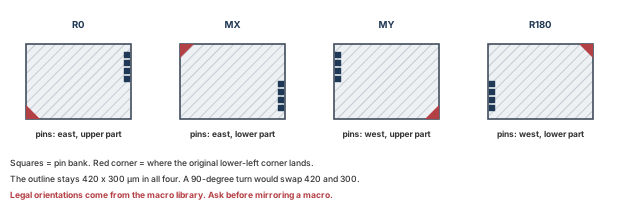
What to notice: R0 keeps the pin bank on the east edge. MY and R180 move it to the west edge. MX keeps it east and swaps top and bottom. Which of these are legal is a macro-library decision, not a floorplan choice.
8.4 Status: who may move a macro afterwards
Table 24 lists the placement status values and who may move an instance with each.
| Status | Meaning |
|---|---|
unplaced | No location |
placed | Has a location. Automatic tools and interactive commands may move it |
softFixed | Global placement will not move it. Legalization of detail placement may, and optimization may upsize it |
fixed | Has a location. Automatic tools will not move it. Interactive commands can |
cover | Has a location. Neither automatic tools nor interactive commands can move it |
placeInstance gives the instance the status fixed unless you pass -placed or -softFixed. The command snaps the instance to the nearest site. It takes the lower-left corner of the placed box as its location.
It does not check legality. The instance can overlap other boxes and can sit inside blockages, so check afterwards. check_design -type place also reports macros that are not fixed. A macro that is not fixed can be moved by placement. So fix the macros before placement runs, once you are satisfied with them.
8.5 A trial arrangement: candidate P
We begin with the arrangement that is quick to type and poor to live with: P from Section 3.
A. Check what is already there. We expect three macros, all unplaced. The inventory (the optional helper macro_inventory) looks like this.
instance cell     status    box
u_buf_a  RAM_A    unplaced  n/a: unplaced
u_buf_b  RAM_A    unplaced  n/a: unplaced
u_coef   ROM_C    unplaced  n/a: unplaced
B. Place the macros for trial P.
innovus> placeInstance u_buf_a 40 40 R0 -placed ;# movable, pins east
innovus> placeInstance u_buf_b 40 340 MY -placed ;# movable, mirrored: pins west
innovus> placeInstance u_coef 40 640 R0 -placed ;# movable, pins east
- Arguments. Instance name, then lower-left x and y in µm, then the orientation, then the status flag. Orientation comes before the status.
- What else changes. Each instance is snapped to the nearest site. The y requests of 340 and 640 are not whole row heights (1.4 µm) from the core origin, so they move. (340 − 40) / 1.4 = 214.29 rounds to 214, which gives y = 339.6 µm. Likewise 640 gives 640.6 µm.
- The consequence. If macros snap to this grid,
u_buf_bstarts 0.4 µm below the top edge ofu_buf_a(at 340 µm). Two macros that were meant to touch now overlap by 0.4 µm. Stacking macros edge to edge on round numbers is fragile for exactly this reason. - Where to find the result. Do not rely on a return value. Read the boxes back.
- If it fails. An unknown instance name is an error, and an instance that was not placed stays unplaced.
C. Read back the result. Read the boxes from the inventory, and ask the tool which blocks are off the grid.
innovus> reportUnsnapBlocks ;# blocks off the grid defined by the snap preferences
instance cell     status   box (um)
u_buf_a  RAM_A    placed   40.0  40.0  460.0 340.0
u_buf_b  RAM_A    placed   40.0 339.6  460.0 639.6
u_coef   ROM_C    placed   40.0 640.6  280.0 800.6
D. Check for problems.
innovus> checkDesign -place -noHtml -outfile trialP_place.rpt ;# placement data, text
innovus> checkFPlan -outFile trialP_fplan.rpt ;# floorplan, check types in force
checkDesign -placereports the number of instances with placement violations. It lists instances outside the core, overlapping other instances, and overlapping placement blockages. Suppose the snap arithmetic applies. Then the 0.4 µm overlap ofu_buf_aandu_buf_bis exactly what it exists to report.checkFPlanis a geometric quality check with the check types in force. Record them first, as in Section 6.
E. Decide what to do next. The place where the two RAMs meet is magnified in Figure 14. The figure also separates the two problems that P shows.
The overlap is an actual violation, so it must be repaired, not noted. Knowing that snapping may have caused it does not make it acceptable. Repairing the overlap would still leave the arrangement poor.
Two different problems appear in P, and they need different treatment.
- The MY orientation of
u_buf_bis an orientation problem. If the macro library does not allow MY, it is an error. If MY is allowed, it is a legal choice that points the pin bank at the die edge. That is a poor pin-facing choice. - The overlap is a geometry problem. The figure below magnifies it.
No geometric check reports "this macro faces the wrong way" or "the input edge is blocked". Only a person who reads the pin sides and the connections sees those problems. A clean or nearly clean check is a statement about consistency, not about quality.
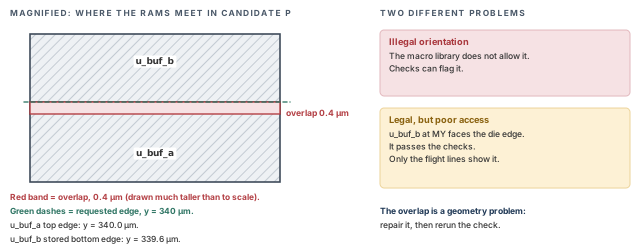
u_buf_a and u_buf_b meet in candidate P, with the overlap drawn much taller than to scale, beside the two different problems that P shows.What to notice: The overlap is a geometry problem that a check reports. The orientation of u_buf_b is a different problem. If MY is illegal, a check can flag it. If MY is legal, only the flight lines show the poor access.
8.6 The revised arrangement: candidate C
We move to C. The macros are movable, so placeInstance can place them again.
innovus> placeInstance u_buf_a 100 90 R0 -placed ;# lower RAM, pins east
innovus> placeInstance u_buf_b 100 690 R0 -placed ;# upper RAM, pins east
innovus> placeInstance u_coef 590 800 MY -placed ;# ROM mirrored: pins face west
By the snapping rule of Section 7, the x values stay and the y values become 90.4, 689.6 and 800.2 µm. A possible read-back:
instance cell     status   box (um)
u_buf_a  RAM_A    placed   100.0  90.4  520.0 390.4
u_buf_b  RAM_A    placed   100.0 689.6  520.0 989.6
u_coef   ROM_C    placed   590.0 800.2  830.0 960.2
The gap between u_buf_b and u_coef is 70 µm (590 − 520). The two RAMs are 689.6 − 390.4 = 299.2 µm apart, not the 300 µm we asked for. Rerun the checks of step D on this arrangement. They should report no overlaps and no instance outside the core.
Now fix the macros, so that placement cannot move them, and confirm that every macro changed.
innovus> setInstancePlacementStatus -allHardMacros -status fixed ;# all macros fixed
- Effect.
fixedmeans automatic tools will not move the macros, and you can still move them by hand. Usecoveronly if you also want them locked against interactive moves. - Completeness gate. Read the inventory again. All three macros must show
fixed. A singleplacedis an unfinished job, and no later step should start while one remains.
8.7 Rows under macros
Rows still run under the macros. cutRow with no object argument cuts the rows that intersect macros and placement blockages. Cells inside a cut row are unplaced unless -keepCell is given, and there are none yet. The effect on one macro is in Figure 15, after the commands.
innovus> cutRow ;# cut the rows that run through the macros
innovus> defOut -floorplan stream_acc_fp3.def ;# new record, to compare with fp1
- What to expect. Each row that crosses a macro should be split around it. So the DEF record should show more
ROWstatements than before. That is an expectation, not a known count. - Reading the count. A count that does not rise suggests the cut did not take effect. A count that rose does not by itself prove the cut is right. A previous cut, or a row removed entirely, also changes the count.
- Read back the geometry. Look at the display around each macro. Rows should stop at the macro edge and resume on the other side.
- Then check. Run
checkDesign -floorplanandcheckDesign -placeagain. Confirm that no instance sits on a cut row. Confirm that no macro lies over a legal site that should have been cut.
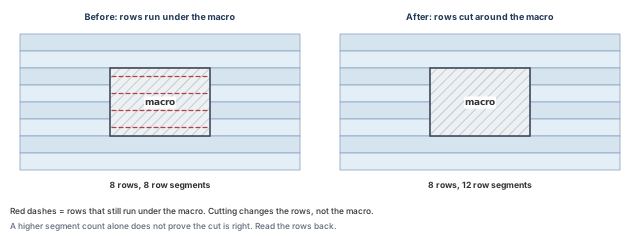
What to notice: Cutting changes the rows, not the macro. Each of the four rows that crossed the macro becomes two pieces, so 8 segments become 12. A rise in the count alone does not prove the cut is right.
Cutting rows before the macros are final. A cut is a record of where the macros were. Move a macro afterwards and the old cut stays behind. Cut once, when the arrangement has settled. Or delete and recreate the rows with initCoreRow, remembering that manual edits may not survive other floorplan commands.
- Shows. The three macros are placed inside the core, with the status
fixedthat the inventory reports. The checks found no overlap or out-of-core instance, if that is what their reports say. - Does not show. That the arrangement routes. The pin sides face the logic and the left band is open. However, nothing here measures congestion or wire length. The indicator of Section 3 is a guide.
- Stop if. An orientation you used is not allowed for the macro. Stop too if the provider requires a keep-out that the halos of Section 9 do not meet.
set_macro_place_constraint with refine_macro_place legalizes macros against halo, blockage and spacing constraints. checkMacroLLOnTrack checks that macro lower-left corners sit on routing-track intersections. They suit larger macro counts. The manual path above teaches the reasoning they automate.
9 Reserve channels, halos and blockages
Between and around the macros there is free space. What you put into it decides whether wires and cells use it well. Five different things are called halo, blockage or channel, and they are easy to confuse. Each blocks something different. This section separates them. It then shows why reserving space is not the same as having enough routing room.
9.1 Five things, five meanings
Table 25 separates the five.
| Thing | What creates it | What it blocks | Attached to |
|---|---|---|---|
| Placement halo | addHaloToBlock | Blocks and standard cells within the halo distance | A macro; moves with it |
| Routing halo | addRoutingHalo | Signal routing on chosen layers, treated as very high cost | A macro |
| Placement blockage | createPlaceBlockage | Cell placement, by type | An area |
| Routing blockage | createRouteBlk | Routing on the listed layers | An area |
| Channel | Nothing creates it | Nothing | The free gap between objects |
Notes on the table:
- Halo values are given for R0, and they rotate or flip with the macro.
- A routing halo accepts perpendicular and straight-to-pin routing. The special router does not honor it.
- A placement blockage is cut off at the die, and at the core unless
-noCutByCoreis given. - To block special routing, use routing blockages.
Read the table by asking what each one is for.
- A placement halo keeps cells away from macro pins so wires can reach them. It follows the macro if you move it. It is a cell-placement reservation. It is not automatically a routing blockage.
- A routing halo discourages long wires beside a macro on the layers you name. It is a cost, not a wall.
- A placement blockage reserves an area from cells. Its type decides how strict it is.
- A routing blockage reserves routing layers in an area.
- A channel is what is left. You measure it, you do not draw it.
Figure 16 shows the same two macros in three views.
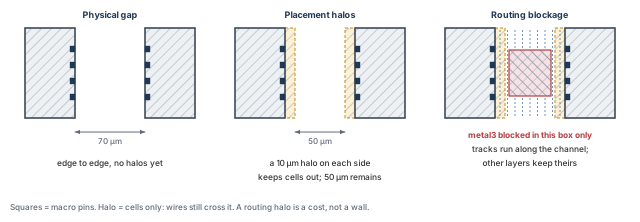
What to notice: Placement halos keep cells out of 10 µm beside each macro, so wires can reach the pins; tracks still cross the halos. The 50 µm left over can still hold cells and wires. A routing blockage on one layer removes only that layer's tracks. Gap width and track supply are different measures, so a width alone never says how many wires fit.
9.2 Four channel measures
When someone says "the channel is 50 µm wide", ask which measure. Four different quantities are in use, listed in Table 26, and they do not share a unit.
| Measure | What it is | Unit | Example |
|---|---|---|---|
| Physical gap | Macro edge to macro edge | µm | 70 |
| Gap outside the placement halos | The gap minus both placement halos. Cells stay out of the halos. The remaining gap can hold cells unless another constraint excludes them | µm | 50 |
| Screening width | What report_narrow_channel measures. By default the objects are the core, macros, macro halos and hard blockages, so halos count as walls | µm | 50 |
| Routing supply | How many wires fit on each routing layer, after pin escape, power stripes and rules | tracks per layer | Not known at floorplan time |
The first three are lengths. The last one is a count, and it is what routing needs. No floorplan check measures it.
9.3 Placement blockage types
Table 27 lists what each placement blockage type allows.
| Type | What it allows |
|---|---|
| hard (default) | Neither standard cells nor macros |
| soft | Only buffers, inverters, isolation cells, clock gates, tie cells and level shifters |
| partial | Cells up to the density given with -density, in steps of 5 from 5 to 100 percent |
| macroOnly | Keeps macros out and lets standard cells in as if there were no blockage |
The last type is spelled macroOnly in some places and macro_only in others. Use the tool's own help to confirm the spelling in your installation.
9.4 Avoid double counting
Space can be reserved by a halo, a blockage and the gap itself at once. If you add them up carelessly, the same area is subtracted several times. Candidate P shows it. Its halo boxes are each macro grown by 10 µm on every side, at the requested positions. They are listed in Table 28 and drawn in Figure 17.
| Box | Corners (µm) | Area (µm²) |
|---|---|---|
| Macro A | (40, 40) to (460, 340) | 126,000 |
| Macro B | (40, 340) to (460, 640) | 126,000 |
| Halo box A | (30, 30) to (470, 350) | 140,800 |
| Halo box B | (30, 330) to (470, 650) | 140,800 |
- The halo boxes overlap each other. The overlap is 440 × 20 = 8,800 µm².
- Each halo reaches into the neighboring macro. Halo box A covers 420 × 10 = 4,200 µm² of macro B. That area is already macro, so counting it as halo counts it twice.
- Part of each halo box lies outside the core, which starts at 40 µm. Box A has 7,500 µm² outside, and box B has 3,200 µm². Whether a halo that leaves the core consumes core area is a question for the display and the checks, not an assumption.
Rule. When you subtract reserved space, work with the union of the regions. Or use individual regions only where they do not overlap. The helpers overlap and grow in Optional teaching helpers (Section 17) reproduce these numbers.
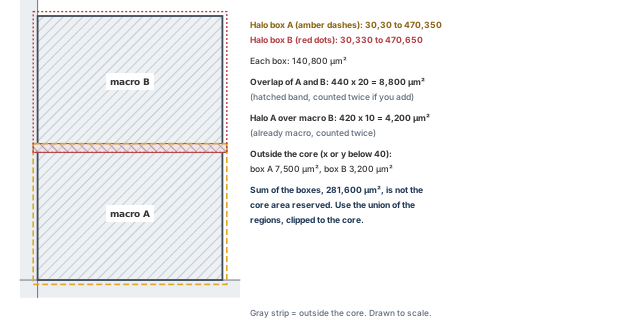
What to notice: The halo boxes overlap each other and reach into the neighboring macro, and part of each lies outside the core. Adding the two 140,800 µm² boxes counts the overlap twice and counts area that is not core. Use the union, clipped to the core.
9.5 A halo does not show that the channel is wide enough
A halo says "keep cells out". It does not say "wires fit". Whether the free channel carries the wires that must cross it is a counting question. Here is a toy version for the channel between u_buf_b and u_coef in candidate C. It is a planning approximation, not a router result.
- Inputs (invented): 136 nets cross the channel (96 from
u_buf_band 40 fromu_coef). Two routing layers run along it. The physical gap is 70 µm. The routing pitch is 0.2 µm, or 0.4 µm as a coarser case. - Judgment: only half the tracks are usable, after power, vias and detours.
- Rough formula: tracks per layer = width / pitch, and supply = layers × tracks × 0.5.
Placement halos keep cells out. They do not by themselves stop wires. So the first row of each pair in Table 29 uses the full physical gap.
The second row is a cautious case: 20 µm of the gap is unusable for routing, for any reason. A routing blockage, a pin-escape area or power stripes could cause it. A placement halo does not create that loss. A routing halo is a cost, not a wall, so it does not remove tracks either. The second row is an assumption you would have to justify.
| Pitch (µm) | Width used (µm) | Tracks per layer | Supply (2 layers × 0.5) | Demand | Result |
|---|---|---|---|---|---|
| 0.2 | 70 (full gap) | 350 | 350 | 136 | Fits |
| 0.2 | 50 (20 µm unusable) | 250 | 250 | 136 | Fits |
| 0.4 | 70 (full gap) | 175 | 175 | 136 | Fits |
| 0.4 | 50 (20 µm unusable) | 125 | 125 | 136 | Does not fit |
The width needed is 136 × pitch / (2 × 0.5). At 0.2 µm that is 27.2 µm, and at 0.4 µm it is 54.4 µm.
- What the numbers show. The fit depends on the pitch, and on how much of the gap you can really use. Only the last row fails.
- What to do about a failure. Do not remove the halo as a generic cure. The halo may be what keeps cells away from macro pins. Removing it may crowd cells where wires must reach the macro, and make routing worse. First find the real bottleneck: the pitch actually available, any routing halo or blockage, and the pin escape area. Keep any clearance that the macro provider requires.
- What the toy leaves out. Pin escape patterns, via landing, blocked tracks, power stripes in the channel, and congestion from outside.
Treating the halo as the channel width. "We have a 10 µm halo on every side" says where cells stay out. It does not say how wide the usable channel is, or how many wires fit. The halo is a reservation. The channel is what you measure, and its capacity is a count of tracks.
9.6 Add placement halos
A. Check what is already there. The macros are placed and fixed, and no halo exists. We screen with a width of 65 µm, deliberately above any requirement, so that every candidate channel is listed.
# Keep the returned channel boxes in a variable.
innovus> set before [report_narrow_channel -width 65 -direction x \
    -quiet] ;# horizontal channels narrower than 65 um
innovus> puts "channels before halos: {$before}" ;# an empty answer shows as {}
- Options.
-widthis required and is the channel width to check.-direction xchecks the x direction only.-quietkeeps the list out of the log and screen.-active_objectsselects what counts as a wall. The default is the core, macros, macro halos and hard blockages. - Where to find the result. The command returns the channel boxes as a Tcl value. With
-quietnothing is printed, so we capture the value in a variable. - Empty or failed? The
putsshows the braces, so an empty list prints as{}. An error would stop the script before theputs.
B. Add placement halos.
innovus> addHaloToBlock 10 10 10 10 -allMacro ;# 10 um halo on all four sides
- Arguments. Four halo widths in the order left, bottom, right, top, in µm. They are given for an R0 block and turned with the macro. Our four values are equal, so orientation does not matter here.
-allMacroselects every hard macro. - What else changes. Cells and macros are kept out of the halos. The halos are attached to the macros.
deleteHaloFromBlockremoves them. Read the halos back in the display.
C. Read back the result.
innovus> set after [report_narrow_channel -width 65 -direction x \
    -quiet] ;# same screen, now with halos
innovus> puts "channels after halos: {$after}" ;# print what came back
channel                      before halos          after halos
left strip beside u_buf_a    width 60  listed      width 50  listed
left strip beside u_buf_b    width 60  listed      width 50  listed
u_buf_b to u_coef            width 70  not listed  width 50  listed
D. Check for problems. The halos are now floorplan objects, and an overlapping halo can matter. Run checkFPlan and checkDesign -place again, with the recorded settings.
E. Decide what to do next. The halos created no violation. However, they made the middle channel appear in the screening list, because halos count as walls in that screen.
- The screening width is 50 µm after halos. The toy count needs about 27 µm of routable width at 0.2 µm pitch.
- The two left strips lie between each RAM and the core edge. They are not crossing paths for these nets.
- So we accept the 10 µm halos for now, and revisit the middle channel with the evidence of Section 13.
Accept the 10 µm halos as a starting reservation. The reason is the channel count, not the halo itself. The value stays a placeholder until the macro provider's keep-out is checked and the trial of Section 13 is read.
9.7 Placement blockage, routing blockage and routing halo
These three are listed as commands, with what to check before using each. The examples use the running design only to show the syntax.
# Cap standard-cell density at 30 percent in the strip left of u_buf_a.
innovus> createPlaceBlockage -type partial -density 30 \
    -box {40 90.4 90 390.4} ;# partial placement blockage
# Keep signal routing out of one layer over the same strip (LEF layer name).
innovus> createRouteBlk -box {40 90.4 90 390.4} -layers metal3 ;# routing blockage
# Discourage long signal routes beside the ROM, on the layers its pins use.
innovus> addRoutingHalo -inst u_coef -space {5 5 5 5} -bottom auto \
    -top auto ;# routing halo around u_coef
createPlaceBlockage.-type partial -density 30allows up to 30% density in the box.-boxtakes lower-left then upper-right, in µm. The blockage is cut off at the die and, by default, at the core. It does not move with a macro.createRouteBlk.-layersnames layers by their LEF names; heremetal3is invented. If-layersis omitted, the default layers come fromsetRouteBlkDefaultLayer, or else from a count-based default. So name them.addRoutingHalo.-spacetakes left, bottom, right, top.-bottom auto -top autolets the tool take the layers from the macro's pins. Only the signal router honors it. For special routing, use routing blockages.- How to see them. No verified text query lists blockages or halos. The display and the DEF record are the records; a routing halo is written as
ROUTEHALO.writeFPlanScript -sectionswithplaceBlockagesorrouteBlockagesis another. Read that file once to learn its layout before parsing it. - Check.
checkFPlanandcheckDesign -placeapply. No floorplan check tests whether a routing halo helped. That evidence belongs to routing.
Stop if a channel that carries many nets is narrower than the requirement. Stop too if a halo, blockage and gap together leave less room than the toy count says is needed. Change the arrangement, not the number.
10 Module constraints (conditional)
Sometimes a group of logic should live in a particular place. A configuration block might need to sit near the pins it serves. A module might need to stay out of another module's area. Module constraints say so. They are optional, and they add rules the placer must satisfy. So use them when you have a reason you can state.
This section is conditional. A design with no placement preference needs none of it. It is not about structured data paths, which this chapter does not cover.
10.1 What can be constrained
Two kinds of object can take a constraint:
- A module that the netlist keeps as a hierarchy level. If synthesis flattened it, there is no module to name.
- A group that you create.
createInstGroupmakes an instance group.addInstToInstGroupadds instances, hierarchical instances or other groups to it. A flat design can use groups, so flat does not mean unconstrainable.
10.2 The constraint types
Table 30 lists the types. In the running design, the configuration registers form one module, u_cfg. Figure 18 draws that module under each constraint type.
| Type | Behavior | Command |
|---|---|---|
| None | The object is unconstrained | – |
| Guide | Soft. Preplaced. Snaps to a row vertically and to the M2 (metal 2) pitch horizontally by default | createGuide |
| Fence | Hard. Only the object's own instances may be inside, and others are excluded | createFence |
| Region | Like a fence, except that instances of other modules may also be inside | createRegion |
| Soft guide | No fixed location; the placer clusters the object | createSoftGuide |
The creation commands are used after importing the design. unplaceGuide removes guides, fences and regions. A hierarchical instance declared as a partition becomes a fence.
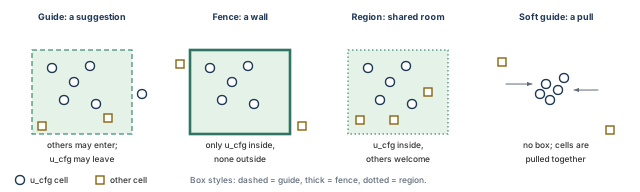
u_cfg under each constraint, with the area it claims. Not to scale.What to notice: The guide is a suggestion: other cells enter and one u_cfg cell has left. The fence is a wall. The region lets other logic in. The soft guide has no box at all, only a pull toward the module's own cells.
10.3 Before you start
- The module or group must exist in the database.
- If the same module is instantiated more than once and shared, the uniquify decisions made at import matter.
- Constraints may lie outside the core, but they must lie inside the die.
10.4 Fit before you fence
A fence or region holds a fixed area. Whether it holds the object depends on the ratio of the object's area to the fence area.
- Target utilization (TU) is the standard-cell and macro area divided by the module area, ignoring blockages.
- Effective utilization (EU) also accounts for blockages and cuts.
- Placement changes a fence or region to a guide if EU reaches 100%. A tight fence quietly stops being a fence.
Table 31 is a planning calculation of your own, not the tool's. Module u_cfg holds 9,000 µm² of standard cells (invented), and the blockage area is invented too. Utilization has no unit: it is an area divided by an area.
| Case | Fence area (µm²) | Blockage (µm²) | TU = 9,000 / fence | EU = 9,000 / (fence − blockage) | Reading |
|---|---|---|---|---|---|
| roomy | 30,400 | 0 | 0.296 | 0.296 | Comfortable |
| with blockage | 30,400 | 6,000 | 0.296 | 0.369 | Comfortable |
| tight | 8,000 | 0 | 1.125 | 1.125 | EU above 1.0: placement turns it into a guide |
EU here is a simplified reading. The tool's own accounting also includes partition cuts, and it is not updated automatically. checkFPlan -reportUtil reports utilization for the design and for fences and regions. It shows no utilization row for a soft guide, so do not plan around one. For a guide, use the planning calculation above.
10.5 Create a guide for u_cfg
The configuration registers belong near the cfg_* pins on the top edge. We reserve the corner to the right of the ROM, clear of the ROM halo, which ends at x = 840 µm.
A. Check what is already there.
innovus> selectInst u_cfg ;# select the module
innovus> queryFPlanObject ;# print the properties of the selection
innovus> deselectAll ;# clear the selection afterwards
selectInstandqueryFPlanObject. The query prints the properties of the selected instances or modules. It supports only instances and modules. The printout layout varies, so read it once before relying on it.- If it fails. A name that is not in the database is an error. A module that exists but has no constraint should show as unconstrained.
B. Create the guide.
innovus> createGuide u_cfg 850 880 1040 1040 ;# guide box: llx lly urx ury, in um
- Arguments. The module or group name, then the box as lower-left x and y, upper-right x and y, in µm. Write the four numbers without braces.
- What else changes. By default the guide snaps to a row vertically and to the M2 pitch horizontally. So its edges move slightly.
- Area. 190 × 160 = 30,400 µm², the "roomy" case above.
C. Read back the result. Repeat step A, and look at the display. The guide appears as an outline in the corner. The queryFPlanObject printout should now show the constraint.
D. Check for problems. Run the floorplan check with the settings you recorded in Section 6.
innovus> checkFPlan -outFile guide_check.rpt ;# check types already in force
A guide is soft. A fence check type would test fences, so a clean fence result says little about a guide. If you decide to change the check types, remember that setFPlanMode -checkTypes sets the list. It does not add to it. Read the current list first with getFPlanMode -checkTypes. Write the full list you want, and put the old list back afterwards.
E. Decide what to do next. Compare the read-back with the plan. The guide exists, it sits in the corner, and the box matches. Then test the guide size.
- Divide the actual module area by the guide area, 30,400 µm². Compare that dimensionless utilization with the planned 0.296.
- For example, a real module of 15,200 µm² gives 15,200 / 30,400 = 0.500.
- That is well above 0.296. The module is larger than planned, so redo the fit calculation with the real area before deciding whether the guide must grow.
- Shows. The constraint exists and its box matches the request.
- Does not show. That the placer will keep the module in the guide, since a guide is soft. It does not show that the module has enough room, or that its connections to the pins are short.
Region groups can cause overlaps that cannot be corrected. Prefer a guide or a fence unless a region is needed.
Stop if you cannot say why the module needs a place. A constraint with no reason is a rule that the placer must obey and that someone must maintain.
11 Floorplan-level I/O
The pins or pads of a block are where its signals enter and leave. Their positions pull the logic toward them, and set the paths signals follow across macros. They must also stay out of the way of the power grid.
You do not need a perfect pin plan at floorplan time. You do need to decide which side each interface uses, and whether its pins can physically sit there.
11.1 Two different situations
Table 32 separates a block with pins from a chip with pad cells.
| Block with pins | Chip with pad cells | |
|---|---|---|
| What carries the signal | A metal pin shape on the block boundary | An I/O cell (pad) that connects to the outside |
| Where it sits | On the die edge, on a routing layer | In I/O rows or an I/O ring between the die edge and the core |
| Typical owner | The block team | The chip integrator |
| This chapter | The running design, in full | A conditional sidebar |
stream_acc is a block, so its interfaces are pins.
11.2 What to decide, and from what
For each interface the plan needs a side, a stretch of that side, a layer, a spacing and an order. The inputs are:
- the interface agreement from the chip integrator,
- the macro positions, so pins do not end up behind a wall of macros,
- the connectivity, so pins sit near the logic that uses them.
Table 33 is the plan for the running design.
| Interface | Pins | Side | Stretch (invented, µm) | Reason |
|---|---|---|---|---|
in_* | 64 | Left | y from 410 to 670 | Opens onto the clear left band of candidate C |
out_* | 64 | Right | y from 100 to 900 | Logic lies against the right edge |
cfg_* | 24 | Top | x from 860 to 1030 | Beside the u_cfg guide |
clk, rst_n | 2 | Bottom | – | Single pins |
irq | 1 | Top | – | Single pin |
Pin order. Decide the order along each stretch. For in_*, we choose in_0 to in_63 from bottom to top. Do not trust the order in which a query happens to list the names. Build the list yourself, in the order you want, and read the positions back.
11.3 Do the pins fit?
A pin needs a legal position: on a track, away from other pins and from blockages. Dividing the stretch by the pin count gives a rough budget, as in Table 34. It is not the real spacing.
| Group | Pins | Stretch (µm) | Rough budget: length / pins (µm) | Nominal adjacent spacing: length / (pins − 1) (µm) |
|---|---|---|---|---|
in_* | 64 | 410 to 670 = 260 | 4.06 | 4.13 |
out_* | 64 | 100 to 900 = 800 | 12.50 | 12.70 |
cfg_* | 24 | 860 to 1030 = 170 | 7.08 | 7.39 |
If both end pins sit on the ends of the stretch, there are (pins − 1) gaps. So the last column is the nominal spacing between neighbors. The real spacing depends on the track origin and on whether the end tracks are used. The pin shapes and spacing rules matter too.
At a 0.2 µm track pitch these stretches hold roughly 1300, 4000 and 850 track positions. That is far more than the pins. So the plan is not obviously impossible. That is all this arithmetic can say. The tool decides the exact positions, and checkPinAssignment judges them.
The calculation does not show that the pins have clear approach routes. It also does not show that wires leaving them avoid the halos and channels of Section 9. The plan is drawn on candidate C in Figure 19.
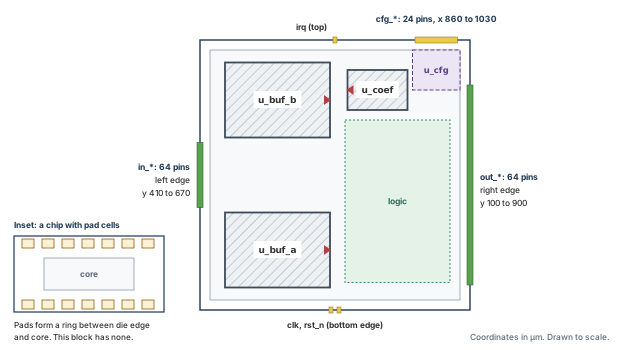
What to notice: in_* enters through the open band, not against a macro. out_* has the longest stretch because the logic is nearest that edge. cfg_* sits beside the guide of u_cfg. This block has no pad ring.
Pin pitch and pin clearance are different numbers. Four pins have three center-to-center intervals. Each interval minus the pin width is the edge clearance, as Figure 20 shows.
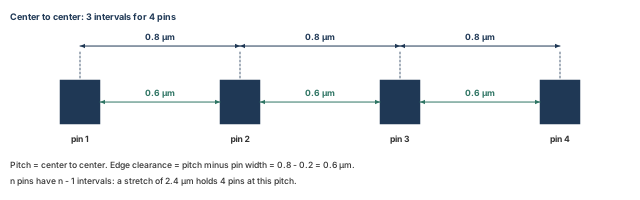
What to notice: n pins give n − 1 intervals, so the spacing arithmetic above divides by (pins − 1). A pitch that meets a track rule can still leave too little clearance if the pin is wide.
11.4 Place the input pins
A. Check what is already there. Build the ordered list of input pin names. Then compare it with the top-level ports the design actually has, so that a wrong name is caught before editPin runs. The helper names_missing is defined in Optional teaching helpers (Section 17). Finally, report floorplan data, including unplaced pins.
innovus> set in_pins {} ;# start an empty list
innovus> for {set i 0} {$i < 64} {incr i} { lappend in_pins in_$i } ;# in_0 ... in_63
innovus> set ports [dbGet top.terms.name] ;# the real top-level port names
innovus> set bad [names_missing $in_pins $ports] ;# wanted names that are not ports
innovus> puts "input names that are not ports: [llength $bad] $bad" ;# must print 0
innovus> checkDesign -floorplan -noHtml \
    -outfile pins_before.rpt ;# floorplan data, including unplaced I/O pins
- Before you start. The port names must match. If your ports are bus bits such as
in[0], change the name pattern to match. The count printed byputsmust be 0. If it is not, fix the list first. Do not runeditPinwith names that are not ports. - What the first lines do. The loop gives
$in_pinsexactly 64 names in a known order.dbGet top.terms.namelists the real port names, andnames_missingreturns the wanted names that are absent. Repeat this check for each group in the next subsection, with that group's list.
B. Place the pins.
innovus> editPin -pin $in_pins -side LEFT -layer metal4 -spreadType RANGE \
    -start {0 410} -end {0 670} ;# 64 pins evenly from y = 410 to 670 um
- Options.
-pintakes a name or a list. It does not support wildcards, which is why we built the list.-sideisTOP,BOTTOM,LEFTorRIGHT.-layernames the pin layer by its LEF name or index; heremetal4is invented. - Spreading.
-spreadType RANGEspreads pins evenly between-startand-end, and the pin editor decides the spacing. The last coordinates become the position of the last pin. - Status. The default pin status is placed, so the pins can still move.
-fixedPinwould lock them. - Defaults to know. Pins snap to layer tracks by default. Width and depth come from the LEF minimum width and minimum-area rule unless you give them. Values are not remembered between runs, so each call must state what it needs. Do not assume that the order of the
-pinlist becomes the order along the stretch. Read the positions back. - What else changes. The pin shapes are created or moved.
loadIoFile, another route to pin placement, can change the die size by default. So this chapter does not use it after the floorplan is made. - If it fails. An unknown layer name gives an error or a warning. So does a stretch that cannot hold the pins. Read the log.
C. Read back the result. Report floorplan data again, to a second file. Compare the counts and positions with the first. This is a partial state: only the in_* group is placed, so the report still lists the other 91 pins as unplaced.
innovus> checkDesign -floorplan -noHtml \
    -outfile pins_after.rpt ;# report floorplan data again, to a second file
D. Check for problems.
innovus> checkPinAssignment -outFile pins_check.rpt ;# layer, track, spacing, size
- What it checks. Pins on the proper layer for the side, and within the permitted layer range. One pin per location, on the routing track. Valid spacing from blockages and power pins, and a valid size and minimum area.
- What else changes. A report is written. Pins are not moved.
11.5 Close every group
The input group is one of five. The others need the same steps, and the chapter does not leave them open. Build each list, check it against the ports with names_missing, then place it. The layer names are placeholders to take from your technology.
# $out_pins and $cfg_pins are built like $in_pins.
innovus> editPin -pin $out_pins -side RIGHT -layer metal4 -spreadType RANGE \
    -start {1080 100} -end {1080 900} ;# outputs, right edge, y = 100 to 900 um
innovus> editPin -pin $cfg_pins -side TOP -layer metal5 -spreadType RANGE \
    -start {860 1080} -end {1030 1080} ;# config pins, top edge, x = 860 to 1030 um
innovus> editPin -pin {clk rst_n} -side BOTTOM -layer metal5 \
    -spreadType CENTER ;# clock and reset, centered on the bottom edge
innovus> editPin -pin irq -side TOP -layer metal5 -spreadType CENTER ;# irq, top center
Now every group is placed, so run the checks again. Evidence from before this point is a partial state and does not count.
innovus> checkDesign -floorplan -noHtml -outfile pins_final.rpt ;# unplaced count
innovus> checkPinAssignment -outFile pins_final_check.rpt ;# pin legality
Then read each group back from those two reports. The block below is invented. It shows the state the handoff requires.
group      expected  placed  position check (um)
in_*             64      64  read back, within y 410-670
out_*            64      64  read back, within y 100-900
cfg_*            24      24  read back, within x 860-1030
clk,rst_n         2       2  read back, bottom edge
irq               1       1  read back, top edge
total unplaced I/O pins: 0 (was 155 before any pin was placed)
checkPinAssignment violations: 0
After the first group alone, the same count would have read 155 − 64 = 91 unplaced. That is a normal partial state, not a fault. 155 is every port of the block: 64 + 64 + 24 + 3. Keep the partial reports and the final reports as separate files. Show only the final ones as acceptance evidence.
- Shows. All 155 pins are placed on a valid layer, track and spacing, within the planned stretches, as of the final reports.
- Does not show. That the pins are well placed for the logic. That is a judgment that needs the connectivity of Section 3 and the trial of Section 13.
Treating "unplaced I/O pins" as a failure too early. It is a normal entry in the check until every group is placed. A report that says it halfway through is expected. A report that still says it at the end blocks the handoff.
11.6 Conditional: pad cells and I/O rows
A chip with pad cells uses an I/O row flow that is off by default.
- It is switched on with
setIoFlowFlagand read withgetIoFlowFlag. - It builds rows with
createIoRow, withsetIoRowMarginfor the margin. snapFPlanIOsnaps pads,spaceIoInstspaces them, andaddIoRowFillerfills gaps.
The flow needs an I/O site and a PAD class in the LEF. The gap between die and core must exceed the largest I/O site. Otherwise a warning is issued and no I/O rows are made. Innovus does not enlarge the core or die for you.
These commands change the geometry heavily and depend on cell data that this chapter does not have. So none of them is used on the running design. If you meet a pad flow, check the die-to-core gap first. Then check the pad cells' sites, then the order in the I/O file.
Stop if an interface has no side agreed with the chip integrator, or the stretch you plan cannot hold its pins. Pin sides are an agreement between teams. Changing one later moves other teams' work.
12 First-pass post-floorplan checks
Before anyone builds on a floorplan, a short set of checks should confirm that it is geometrically consistent. This section sets out which check answers which question, and how to capture its output. It shows how to sort each finding, and what to do next. It also keeps the checks in their place: they test consistency, not quality.
12.1 Three levels of checking
- Entry. The gate of Section 4 asks whether the database is fit to receive a floorplan.
- Intermediate. After each change, as in Sections 6 to 11, we run the check that fits that change.
- Final. Before handoff in Section 15, we run the full set once, with the settings recorded.
The tool has many check families. They include bus guide, routing grid, placement, pins, power domains, partition clone alignment, feedthrough insertion and narrow channel. We cover the ones that apply to a flat block.
12.2 The checking matrix
Table 35 lists each check, the question it answers and what it does not test. Figure 21 then shows four common violations.
| Check | Question it answers | Needs | Does not test |
|---|---|---|---|
checkFPlan (basic) | Is the floorplan data consistent? | A floorplan | Quality, congestion, timing |
checkFPlan -reportUtil | What utilization does the tool compute? | A floorplan | Whether the target is right |
checkDesign -floorplan | Off-grid tracks, instances off row sites, unplaced pins, off-grid pre-routes | A floorplan | Placement quality |
checkDesign -place | Instances outside the core, overlaps, overlaps with blockages | Placed instances | Whether the placement is good |
check_design -type place | Are the macros fixed before placement? | Macros | Where they are |
report_narrow_channel | Which gaps are narrower than a width | A width you choose | Whether the gap is enough |
checkFPlanSpace -trackUtil | Estimated minimum channel width against actual, for given track utilization | Technology data and track values | Real routing |
reportUnsnapBlocks | Blocks off the snap grid | Snap preferences | Anything else |
checkPinAssignment | Are pins on valid layers, tracks and spacings | Placed pins | Pin placement quality |
Four kinds of violation come up again and again in a floorplan. Learn the picture in Figure 21 and the check that reports each one.
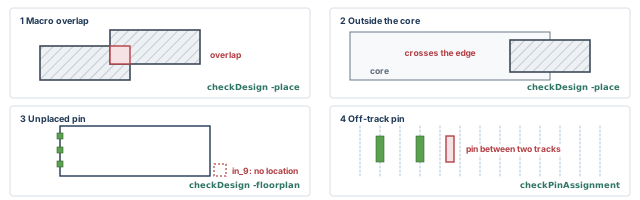
What to notice: Each violation has its own report. A clean result from one check says nothing about the other three, and a check that did not run says nothing at all. A violation is repaired and rechecked, not explained away.
12.3 Record the settings first
The setFPlanMode -checkTypes setting controls what checkFPlan does. The default is basic. Other types include fence, macroPin, narrowChannel, place, powerDomain, blockOnly and all. Two conditions matter.
macroPinverifies macro pins only when the block snap grid is the layer-track grid (setFPlanMode -snapBlockGrid LayerTrack).narrowChannelneeds a threshold set with-narrowChannelThreshold.
A check type that is switched on but cannot run does not give a clean result. It gives no result.
A restored session does not necessarily have the defaults. So read the settings that affect the checks before you run them.
innovus> getFPlanMode -checkTypes ;# which check types checkFPlan will run
innovus> getFPlanMode -narrowChannelThreshold ;# which narrow-channel threshold is set
innovus> getFPlanMode -snapBlockGrid ;# grid that blocks snap to
innovus> getFPlanMode -snapCoreGrid ;# grid that the core snaps to
innovus> getFPlanMode -snapDieGrid ;# grid that the die snaps to
innovus> getFPlanMode -snapIoGrid ;# grid that I/O snaps to
Write the printed values next to every report. setFPlanMode -checkTypes with a new list replaces the list. It does not append. So if you change it, write the whole list you want, and put the old list back when you are done. Do not reset the snap settings to an assumed default. Put back what you recorded.
12.4 Capture the output correctly
The commands do not share an output convention, as Table 36 shows. The spelling differs even between neighbors.
| Command | How to capture | Spelling to watch |
|---|---|---|
checkFPlan | -outFile file, for the detailed information | Capital F |
checkDesign | -noHtml -outfile file, for text. Without -noHtml, an HTML and a text report are written under default names | -outfile is allowed only with -noHtml |
checkFPlanSpace | -outfile file | Lower-case f |
report_narrow_channel | The channel boxes are the return value. -quiet hides the printed list | Capture with set, then puts it |
report_obj_connectivity | -file file; the default is the top name plus .tmcrpt | -file |
| Anything without a file option | redirect file {command} | Braces around the command |
Messages also go to the session log, which you already keep. A file that exists is not necessarily complete. So look at its end, and note its time, before relying on it.
12.5 Sort each finding
A finding names something. Your job is to put it in a class, and each class has a different next step, as Table 37 shows. Knowing why a finding exists does not make it acceptable.
| Class | What it means | What you do |
|---|---|---|
| Expected, temporary | True now, and a named later step closes it | Write down the closing step. Recheck at that step |
| Nonblocking observation | A fact that breaks no rule, with a stated reason | Write the reason and owner. Revisit when the evidence changes |
| Actual violation | A rule is broken | Repair, then rerun the same check |
| Approved waiver | A rule is broken on purpose | Needs an owner, a reason, a scope and an approval. A waiver is a decision, not a note |
| Unresolved or not run | The check could not run, or the cause is unknown | Investigate. If an input is missing, stop. Do not count it as a pass |
A mandatory input that is missing, such as a library or a requirement, blocks the gate. Recording that it is missing is not enough. The same holds for a mandatory check that did not run. Only an optional assessment may be recorded as NOT RUN. Timing, when clocks or constraints are not yet available, is the example. Then make no timing claim. Figure 22 turns the table into a flow.
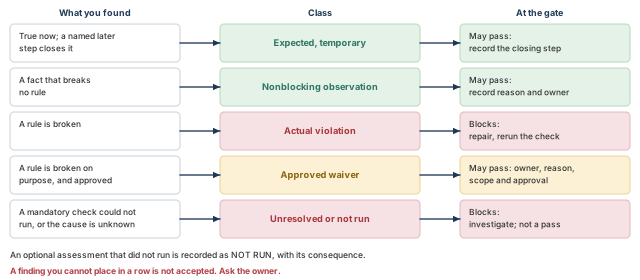
What to notice: A violation is repaired, not explained away. A waiver needs an owner and a reason. A check that did not run is not a pass. Only expected conditions with a closing step, justified observations and approved waivers may travel forward.
The block below is a neutral teaching illustration, not the tool's format. The findings are invented, and they come from different moments, shown in the last column.
id  finding                        where          stage
1   unplaced I/O pins: 91          top ports      after in_* group
2   macro overlap: 1 (0.4 um)      u_buf_a/b      after Section 8, cand. P
3   channels under 65 um: 3        x channels     after Section 9, cand. C
    (50 um each)
4   macroPin check                 NOT RUN        grid not layer-track
Table 38 sorts them.
| Id | Class | Reading | Next step |
|---|---|---|---|
| 1 | Expected, temporary | Four of five pin groups are still open | Closing step: "Close every group" in Section 11. Recheck there |
| 2 | Actual violation | An overlap is a violation whatever its cause. Here the 0.4 µm comes from rounding to the grid in the invented example. The stored and requested edges in Section 8 show it. Do not guess the cause from the size alone | Repair by moving to candidate C, or by leaving a gap of at least one grid step. Rerun checkDesign -place |
| 3 | Nonblocking observation | Three channels, 50 µm wide outside the halos. 65 µm is an example screening threshold, not a project rule. The toy count of Section 9 needs about 27 µm | Record the reason and the owner. Revisit with Section 13 |
| 4 | Unresolved (NOT RUN) | The type cannot verify, so there is no result. This is a mandatory check, so it is not a pass | Either set the block grid to the layer-track grid, with the library owner's agreement, and run it. Or obtain an approved waiver. Until then, the item is open |
12.6 Before and after, for the running design
The same checks on both candidates show how little they tell you about the choice. Table 39 compares them.
| Question | Candidate P | Candidate C |
|---|---|---|
| Instance outside the core? | None | None |
| Macro overlap? | One, 0.4 µm, if Section 8 rounding applies | None |
| Channels under 65 µm? | Not meaningful: the RAMs touch | Three, 50 µm each outside the halos |
Clear approach for in_*? | No, and no check says so | Yes |
u_buf_b faces its logic? | No, and no check says so | Yes |
The two rows in bold matter most, and no check on the list tests them. They come from reading, from the connectivity of Section 3, and from the trial of Section 13.
12.7 The decision
- Pass when every finding is an expected, temporary condition with a closing step, a justified nonblocking observation, or an approved waiver.
- Repair each actual violation, then rerun the same check.
- Investigate an unexplained finding. Do not edit until you know the cause.
- Stop when a finding points at the inputs (library, netlist, requirements). Stop too when a check cannot run, or a finding cannot be classified.
- Shows. The floorplan objects are consistent with one another and with the grids and rules checked. That holds under the recorded settings.
- Does not show. That the floorplan places, routes, closes timing or meets power targets. It also does not show that a check which printed nothing ran. Look for the line that says it ran.
13 Try placement and a rough routing check, then improve the floorplan
A floorplan can pass every check of Section 12 and still be unusable. Two macros can sit exactly where no wire can pass between them, with no rule broken. The cheapest time to learn this is now, before power planning and clocking are built on top of it.
Sections 5 to 12 asked whether the floorplan is consistent with itself. This section asks a different question: can the rest of the flow work with it? No geometric check can answer that. A trial placement and a rough global route can give a first hint, and a hint is all they give.
13.1 The questions, in order
- What are we trying to achieve? A first, rough answer to one question. Does this arrangement place and route sensibly? It is a feedback signal, not a result.
- What must be known first? The geometry has passed Section 12. A full design checkpoint exists (see below), so we can come back. Power-grid construction has not been done here. A later stage that reserves tracks for power will change the picture.
- What do we inspect? Congestion, density, channel supply and, only if the inputs support it, timing.
- What do we decide? Accept the floorplan, or adjust it locally (Section 9). Or change its size or shape (Section 14), or revisit Sections 3, 5 or 8.
- When do we stop? When the evidence is not meaningful. A missing clock, an absent view or a library without models makes timing numbers empty. An empty report is not a good report.
Figure 23 shows the loop.
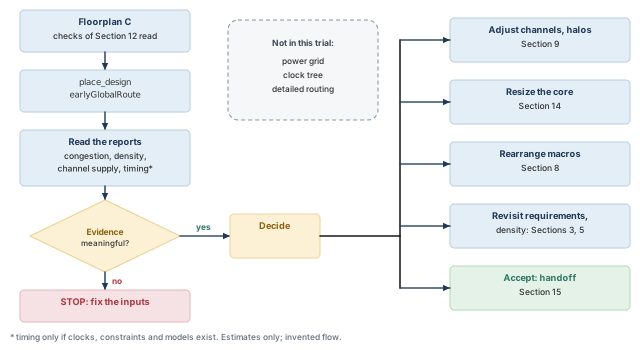
What to notice: The loop does not end in a pass. It ends in a decision, and every route back names the section where that decision was made. The dashed box lists things this trial does not include.
13.2 What each command does, and does not answer
Their reports are for a person to read. None returns a verdict. The placement and congestion commands are in Table 40. The channel and timing commands are in Table 41.
| Command | Question it answers | What it needs first | What it does not answer |
|---|---|---|---|
place_design | Where would the standard cells go in this floorplan? | A loaded floorplan | Whether the result is good enough to keep |
earlyGlobalRoute | Roughly where would wires go, and how crowded is it? | Placement | Whether detailed routing will succeed. It is a global-routing estimate, and its routes are not guaranteed clean |
reportCongestion | How much overflow, and where are the hotspots? | A route estimate. Run the route step first | Why the overflow exists |
reportDensityMap | Where is placement dense? | Placement | Whether the density is a problem for routing |
| Command | Question it answers | What it needs first | What it does not answer |
|---|---|---|---|
adjustFPlanChannel -reportOnly | Which channels are short of track supply, and by how much? | Placement and early global route | What to do about a channel you may not widen |
timeDesign -prePlace | A baseline before placement. It ignores the net load while building the timing graph | Clocks, constraints and models | Anything about wires from the trial placement |
timeDesign -preCTS | A timing view after placement, before clock tree synthesis (CTS). It runs early global route, default extraction and timing analysis | Placement, clocks, constraints, views and models | Whether timing closes. Clocks are treated as ideal in this mode |
Two timing modes, two different questions. Do not read a -prePlace result as "timing with the trial wires". It was made without any net load.
13.3 What place_design actually does
place_design is not a command that only writes positions.
- It places standard cells based on the global settings for placement, resistance-capacitance (RC) extraction, timing analysis and early global routing.
- It also relieves congestion and reorders scan cells.
- It performs pre-placement optimization, scan tracing and scan reordering, and placement optimization during placement.
- By default it places in timing-driven mode. If there are no timing constraints, it assumes non-timing-driven mode.
- The option
-noPrePlaceOptexists for the pre-placement optimization.
So the result depends on settings you did not give to the command. Record them before you run it.
innovus> getPlaceMode -place_global_timing_effort ;# record this placement setting
innovus> getPlaceMode -place_global_reorder_scan ;# record the scan-reorder setting
innovus> getAnalysisMode -clockPropagation ;# record the clock propagation setting
innovus> getAnalysisMode -checkType ;# record the analysis check type
innovus> getExtractRCMode -effortLevel ;# record the extraction effort
innovus> getRouteMode -earlyGlobalEffortLevel ;# record the early global route effort
Write the printed values with the reports. Add the optimization settings your flow uses (getOptMode with the parameter names you care about). Without them nobody can reproduce, or fairly compare, the trial.
Reading a clean report as a good floorplan. A congestion report says what the estimate found, under the placement it was given. A different placement of the same floorplan gives a different report. Keep the settings next to the numbers.
13.4 Run a trial placement and a rough route
A. Check what is already there, and protect the starting point. Candidate C passed Section 12 except finding 4, the macroPin check. That finding stays open and recorded. It must be closed before handoff, by running the check on the layer-track grid or by an approved waiver. No standard cell is placed, so a placement-based report has nothing to read yet. Confirm that all three macros are fixed (the inventory of Section 8). Then save a full design checkpoint before the trial.
innovus> saveDesign fp_before_trial.enc ;# complete checkpoint; this is the way back
innovus> saveFPlan fp_before_trial.fp ;# floorplan objects, a second smaller record
- Why two files.
saveDesignwrites the whole database: netlist, library references, constraints and floorplan. It is the real rollback point.saveFPlanwrites only floorplan objects. It is extra evidence, not a replacement. - Where to find the result. Do not rely on a return value. Check that
fp_before_trial.encand its.datfolder exist, and read the log for the save message. Existing files show that a save was attempted. The restore test in Section 15 shows whether it is usable. - What the trial will write. Standard-cell positions, any pre-placement and placement optimization changes, and route estimates all go into the database. That is trial data. This chapter's policy is that it does not travel into the accepted floorplan (see Section 15).
B. Place and estimate routes.
innovus> place_design ;# place the standard cells in the current floorplan
innovus> earlyGlobalRoute ;# estimate global routes for congestion and parasitics
- What else changes.
place_designchanges cell positions and, as described above, may optimize.earlyGlobalRoutewrites route estimates. The hard macros are fixed and do not move. Both commands take real time on a real design. - Before you start. Run
earlyGlobalRouteafter placement, andadjustFPlanChannelafter both. For timing-driven placement, constraints must be loaded. - Where to find the result. Messages go to the log. Read the log first. A message about a missing library cell, a missing view or an unplaced macro points at the inputs, not at the commands.
C. Read back the result. The trial in step B ran on candidate C. The candidate P column comes from a second, comparable trial. That trial applied P's arrangement to the restored fp_before_trial.enc checkpoint (Section 13.5). Both columns are invented.
innovus> redirect fp_cong.rpt {reportCongestion -overflow -hotSpot} ;# summary, hotspots
innovus> redirect fp_dens.rpt {reportDensityMap} ;# density map; default threshold 0.75
reportCongestion -overflow -hotSpot.-overflowreports horizontal and vertical overflow.-hotSpotreports the local hotspot score: the largest contiguous area of grid cells with overflow, and the total. A maximum score below 100 typically indicates a routable design. That is a rule of thumb, not a project limit.reportDensityMap. Without options it measures the map in row heights and reports bins above 0.75.-gridInMicron,-gridInRow,-threshold,-ignoreBlockand-ignoreFillerchange this.- Where to find the result. We capture with
redirectfile{command}, so the files appear in the working directory. Look at the end of each file to confirm it is complete.
                          candidate P            candidate C
overflow (H / V)          high / high            low / low
largest hotspot score     reported high          below 100
where it sits             left band, near in_*   none large
bins above density 0.75   clustered at macros    spread, few
A dense region and a congested region are different things. Density counts cell area in a bin. Congestion compares the wires the router wants with the tracks available. Figure 24 shows the difference.
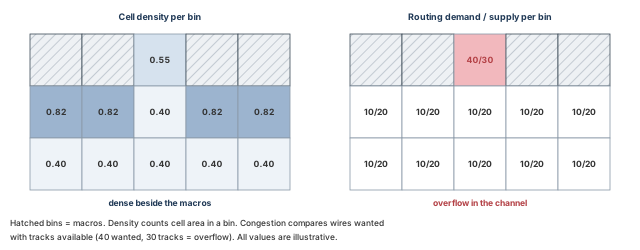
What to notice: The bins beside the macros are dense (0.82) yet within supply (10/20). The channel bin between the macros has moderate density (0.55) yet overflows (40/30). Read both reports before concluding.
D. Check for problems. The trial moved standard cells, so the geometric checks that look at placement must run again. A core boundary that did not change does not mean the placement state did not change.
innovus> checkDesign -place -noHtml -outfile trial_place.rpt ;# outside core, overlaps
innovus> check_design -type place ;# are the macros still fixed?
innovus> checkFPlan -outFile trial_fplan.rpt ;# floorplan, recorded check types
The clocks, constraints, views and libraries may have been confirmed at import and in Section 4. If so, you may also read timing with timeDesign -preCTS. If they were not, mark the timing step NOT RUN, and make no timing statement. A missing timing input is not a zero or a pass.
E. Decide what to do next. The table is invented, but the reasoning is the point.
- In P, the macros wall off the left band where
in_*enters. A congested left band is what the connectivity of Section 3 predicted. The evidence agrees with the earlier reading and strengthens the case against P. - In C, no large hotspot is reported. This does not show that C is good. It shows no large problem under this placement and this estimate.
- A density cluster at the macros is expected, since cells prefer to sit near their macros. Compare it with the macro halo of Section 9 before calling it a problem.
13.5 A second trial is a new run
Reading the same reports again from the same database is not another trial. Running a report twice gives the same numbers. A meaningful comparison needs a new placement. In words, the sequence is:
- Restore the pre-trial checkpoint, in a fresh session, so both trials start from the same state.
- Change one thing: a placement setting, a halo, or the arrangement.
- Record the new settings (the six
getcommands above). - Run
place_designandearlyGlobalRouteagain. - Run the same reports and the same placement checks.
- Compare the two sets of numbers, each next to its own settings.
If the picture holds across two comparable trials, you can trust it a little more. One run is one sample.
13.6 Channel supply and demand
The channel report is the nearest thing to a floorplan-specific answer, because it speaks about the gaps between objects. It reports the congestion in each channel, the targeted adjustment, and the final adjustment.
innovus> adjustFPlanChannel -reportOnly -report fp_chan.rpt ;# report, do not adjust
- Options.
-reportOnlyreports without adjusting.-reportnames the output file; the default name istopcell.channel.-typelimits the report to types such asmacroToMacroormacroToCore.-report_low_utilized_channelsalso lists channels below a threshold between 0 and 1. - What else changes. Nothing with
-reportOnly. Markers can appear in the display, andcheckFPlanSpace -clearMarkerremoves them. - What the report holds. For each channel: its box and the objects on each side. Also a demand-over-supply fraction with a percentage, and the expected width increase. The block below imitates the content for candidate C and is invented.
channel  between               demand / supply  direction
c1       u_buf_a and core      22 / 20          vertical
c2       u_buf_a and u_buf_b   14 / 18          horizontal
c3       u_buf_b and u_coef    40 / 30          vertical
c4       u_coef and core        8 / 0           vertical
The percentage is demand divided by supply. Table 42 works it for the invented rows.
| Channel | Demand | Supply | Ratio | Reading |
|---|---|---|---|---|
| c1 | 22 | 20 | 22 / 20 = 110% | Short of supply |
| c2 | 14 | 18 | 14 / 18 = 78% | Within supply |
| c3 | 40 | 30 | 40 / 30 = 133% | Short of supply |
| c4 | 8 | 0 | undefined | No supply at all. Not zero percent, not a pass |
A channel at 110% may be a real problem, or a hot spot in the estimate. The demand comes from the router's estimate under one placement.
Now apply the acceptance box below to candidate C. Channels c1 and c3 fall short for a local cause, so adjust them (Section 9). Channel c4 has no supply at all, so investigate it before any other change. In this invented example a routing blockage and the power-stripe reservation cover that strip.
- Accept when the evidence is meaningful and the hotspots are small or explained. The channels must be within supply and the placement checks clean. Record the settings.
- Adjust when one or two channels fall short and the cause is local. Return to Section 9: widen the gap or move a macro. Remove a halo only if it is not needed for pin access and no provider clearance applies. Do not remove it just to make a number look better.
- Resize when many places fall short together. The core is too tight. Go to Section 14 and revisit the density target of Section 5.
- Return to Section 3 or Section 8 when a pattern repeats around one macro, because the arrangement itself may be wrong.
- Stop when the evidence is not meaningful: no clocks, missing models, or a log that reports errors.
- Shows. For this placement and this estimate, the reported hotspots and channel ratios are what they are.
- Does not show. That the design routes, that timing closes, or that power delivery fits. Early global route gives a global-routing estimate that does not prove detailed-routing success. The power grid, clock tree and detailed routing all take space that this trial does not include.
14 Advanced refinement (conditional)
Everything in this section is optional. Come here when Section 13 has told you what is wrong, and Sections 8 and 9 are not enough. Each topic starts with the problem it solves, so that you do not use a tool just because it exists.
Read each topic's last line first. If it does not describe your situation, skip it. The basic path of this chapter does not depend on anything below.
14.1 Relative floorplanning: keep relationships when sizes change
The problem. In Section 8 we placed macros at absolute coordinates. If the core grows by 40 µm, every coordinate must be redone by hand. A relative floorplan records a relationship instead: "this object is 300 µm above that one, left edges aligned". The command captures the placement relationship of objects independently of their coordinates. Figure 25 shows one such relationship.
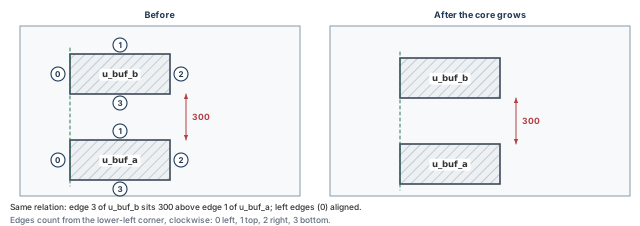
What to notice: The circled numbers are edge indices, counted from the lower-left corner, clockwise: even indices are vertical edges, odd ones horizontal. The 300 offset and the aligned left edges survive the change of core size.
Edge numbering. Edges are numbered 0, 1, 2, 3 and so on, from the lower-left corner, clockwise. For a plain rectangle, 0 is the left edge, 1 the top, 2 the right and 3 the bottom. An even number is a vertical edge and an odd number a horizontal one. The offset between edges is signed.
Stack u_buf_b on u_buf_a
A. Check what is already there. Read the placed boxes with the macro inventory. Write the relative-floorplan section to a file, to see whether any relationship exists.
innovus> writeFPlanScript -fileName rel_before.tcl \
    -sections relativefplan ;# write only the relative floorplan section
Where to find the result. The file rel_before.tcl. An empty section and a failed write are different findings, so look at the file and at the log.
B. Create the relationship.
innovus> create_relative_floorplan -place u_buf_b -ref_type object -ref u_buf_a \
    -horizontal_edge_separate {1 300 3} \
    -vertical_edge_separate {0 0 0} ;# record the relationship and place the target
- Option meanings.
-placenames the object to place.-ref_type objectand-ref u_buf_amakeu_buf_athe reference. -horizontal_edge_separate {1 300 3}reads: reference edge 1 (its top), offset 300 µm, object edge 3 (its bottom).-vertical_edge_separate {0 0 0}reads: reference edge 0 (its left), offset 0, object edge 0 (its left).- Sign of the offset. The offset is the signed spacing between the two edges. We read a positive offset as higher. Confirm the sign in your installation by reading the boxes back.
- Does it move the macro? The command records the relationship and places the target. Whether the object moves at that moment is not certain, so read the box back.
- What else changes. A relationship is added to the database, and arrows show in the display.
delete_relative_floorplan u_buf_bremoves the constraints for that object.delete_relative_floorplan -allremoves all of them.
C. Read back the result. Read the macro boxes again, and write the section again.
innovus> writeFPlanScript -fileName rel_after.tcl \
    -sections relativefplan ;# the same section, to a second file
$ diff rel_before.tcl rel_after.tcl # lines that appeared in the exported section
D. Check for problems. Run the geometric checks of Section 12 again, with the recorded settings. A relationship does not guarantee legality. The resulting box may sit off the grid or overlap a halo.
E. Decide what to do next. Success has three parts. The box moved or did not, the section holds the relationship, and the checks are clean.
- If the box did not move but the section holds the relationship, the relationship is recorded and still has to be applied.
- If the section is empty, the command did not take effect, and the log says why.
Using a relationship to avoid thinking. A relationship keeps two objects apart by a number. It does not know why the number was chosen. When you resize the core, check that 300 µm still leaves what the connectivity of Section 3 wanted.
Use this when the floorplan will change size more than once and you want the macro relationships to survive. Skip it when the floorplan is fixed by the chip plan.
14.2 Resize: change the floorplan and keep its shape
The problem. Section 13 says the core is a little too small or too large. We want to change the size without redoing Section 8. resizeFloorplan resizes the floorplan while keeping the relative locations of the existing objects. Typical uses are to reduce the die on a finished floorplan, or to expand or shrink it based on full-chip placement results.
There are three modes, each set with setResizeFPlanMode:
- Proportional distributes the space among objects in proportion. It cannot adjust prerouted wires.
- Shift-based, the default, moves objects on one side of a resize line and leaves the rest. You may place lines with
setResizeLine. Without a line, the lines are derived automatically. - Congestion-aware estimates congestion and chooses where to draw the line, so as to avoid congested areas.
A shift-based shrink of candidate C is drawn in Figure 26, using the snapped values worked out below.
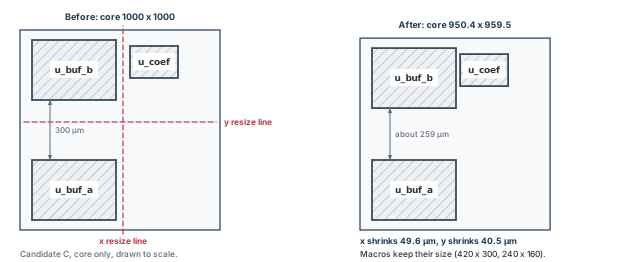
What to notice: Only the gaps that contain a resize line change. Both RAMs keep their 420 × 300 µm size and u_coef keeps 240 × 160 µm. u_coef moved left and down; u_buf_b moved down; u_buf_a did not move. The band between the RAMs falls from 300 to about 259 µm, below what the plan assumed; step E must catch this.
The snapping rule changes your number
-snapToTrack is true by default. A resize value is snapped to a multiple of the metal pitch. The x value snaps to the first vertical layer pitch, and the y value to the first horizontal layer pitch. For example, a request of 8 becomes 7.84 for a pitch of 1.568. Our invented pitches of 1.6 µm (x) and 1.5 µm (y) are used in Table 43.
| Request | Pitch (µm) | Request / pitch | Rounded | Snapped (µm) |
|---|---|---|---|---|
| 50 in x | 1.6 | 31.25 | 31 | 49.6 |
| 40 in y | 1.5 | 26.67 | 27 | 40.5 |
Assume, for this arithmetic only, that the snapped values shrink the core. Whether the core or the die changes is not certain, so read the outline back. Then:
- the core becomes (1000 − 49.6) × (1000 − 40.5) = 950.4 × 959.5 = 911,908.8 µm² ≈ 911,909 µm² ≈ 0.9119 mm²;
- the planned areas stay at 0.7200 mm², so D1 rises from 0.7200 to 0.7200 / 0.9119 ≈ 0.7896, about 79%.
A shrink of about 5% in x and 4% in y raises D1 by 7 points, from 72% to 79%. Whether 79% is acceptable is judged against the evidence of Section 13 and the target you set in Section 5.
Shrink by a small amount
A. Check what is already there, and protect the starting point.
innovus> getResizeFPlanMode ;# defaults and user changes are both reported
innovus> saveDesign fp_before_resize.enc ;# a known starting point for the change
Where to find the result. getResizeFPlanMode reports each parameter with its current value, its type and whether you set it. With -quiet it returns a Tcl list only. Without arguments it covers all parameters.
B. Resize the floorplan.
# Keep halos intact, keep I/O pins proportionally spaced, snap to track.
innovus> setResizeFPlanMode -honorHalo true -ioProportional true \
    -snapToTrack true ;# resize settings
innovus> resizeFloorplan -xSize -50 -ySize -40 ;# shrink 50 um in x, 40 um in y
- Option meanings.
-honorHalo true(the default) preserves halo spacing, so halos that did not overlap before do not overlap after.-ioProportional true(the default) distributes I/O in proportion to the original spacing. - Sizes.
-xSizeand-ySizeare in µm. A positive value expands and a negative value shrinks. This is not a promise that every halo, channel or pin clearance survives, so run the checks again. - Percentages.
-xPercent 5means 5%. A fractional value such as 0.05 is not what the command expects. - Order. If both sizes are given, they are applied in the order written.
- Unmet target. By default the floorplan is not resized if the target cannot be met.
-forceResizeforces it as near as possible, but only with shift-based mode. We do not use it here. - Undo.
resizeFloorplan -undoreverts to the floorplan before the command ran. The checkpoint saved above is a second way back.
C. Read back the result.
innovus> defOut -floorplan fp_after_resize.def ;# the outline as DEF text
innovus> dbGet top.fplan.coreBox ;# the core box
innovus> checkDesign -floorplan -noHtml \
    -outfile resize_check.rpt ;# floorplan data, including pins, after the move
Read the macro boxes with the inventory too.
D. Check for problems. Run checkFPlan and checkDesign -floorplan with the recorded settings, as in Section 12. After a resize, three things can go wrong that a basic check also catches:
- instances not snapped to a row site,
- off-grid tracks,
- pins that no longer sit on the boundary.
E. Decide what to do next. Compare the new outline, the macro boxes and the pin positions with the old ones. The macros keep their sizes, and the gaps change only where the resize line was. Here the band between u_buf_a and u_buf_b drops from 299.2 to about 258.7 µm. That is below the 300 µm assumed in Section 5, so decide whether it is acceptable or move the resize line. If a channel that was acceptable in Section 13 is now narrower, the resize did not honor your intent. Go back to the checkpoint and use a resize line.
Use this when the floorplan is right in shape and wrong in size. Skip it when the problem is the arrangement, not the size.
14.3 Technology specifics: grids that come from the library
Some technologies define grids that are stricter than rows and sites. Some technologies need FinFET grid support. If the technology LEF defines a fin pitch, the tool sets the placement grid from it by default. Every placeable object (I/O pads, macros and standard-cell rows) must then be on that grid. Its height must also be a multiple of the pitch.
- What to inspect. Whether the technology defines such a grid. The usual form is a property in the technology LEF. We run no query for it, because this chapter has no verified one. We do not claim that our running design uses it.
- Commands that support it.
snapFPlansnaps blocks, I/O pads and standard cells to the grid.checkFPlanandcheckDesign -floorplanreport objects not aligned to it. - Related controls.
setFPlanMode -snapBlockGridselects the block snap grid. Its choices includefinfetInst,finfetManufacturingandfinfetPlacement. Choose with a library fact in hand.
The running design is not described as a FinFET design, so there is no fin-grid example. If your technology has one, list the fin grid among the grids of Section 7, and rerun the checks of Section 12.
14.4 Unified floorplan constraints: rules, checked and fixed
The problem. A project may hold rules that a floorplan must meet: spacing, density, halo and area rules, among others. Unified floorplan constraints (UFC) define such rules in a file. The tool checks them, reports violations with rule names and severities, and fixes some of them automatically. The usage model has four steps:
- Load the design.
- Create a UFC file.
- Run
check_ufc. - Fix reported violations with
fix_floorplan.
innovus> check_ufc project_rules.ufc -report_file ufc_report.rpt \
    -report_unplaced_block ;# check the rules; summary to a file
- Purpose. Check the floorplan against the rules in a file you did not write. The file name
project_rules.ufcis an example; use your project's own. - Options.
-report_filenames the summary file.-report_unplaced_blockadds the number of unplaced macros to the summary.-include_all_rulessummarizes all rules.-selected_ruleslimits the check to named rules. - Row behavior. Row rules are evaluated on the current row shape unless
setFPlanMode -no_cut_row trueis set. Cut the rows around instances and blockages first (Section 8). Without that, many wrong violations can appear. - What else changes. Violations can be seen in the violation browser. The design is not changed.
innovus> fix_floorplan -file project_rules.ufc -type ufc \
    -report_file ufc_fix.rpt ;# fix from the same rules file
- What it can change. It fixes violations by adding routing blockages around macros, snapping macro locations, or re-shaping the core. It does not fix die-size or core-size violations. Conflicting rules can give imperfect results, and
-break_at_conflictstops when a conflict is met. - Why this is last. It changes the floorplan. Save a checkpoint first, and read what changed. Then repeat
check_ufcand the checks of Section 12. Never treat the fix report as the final word.
A UFC file's syntax is outside this chapter, and no example rule is given. Read the rule syntax with your project's own rule set.
- Shows. The floorplan satisfies the rules in the file, for the rules the tool ran. A rule that was excluded or not supported is not checked.
- Does not show. That the rules are the right ones. A rule file is a decision somebody made.
15 Final acceptance, saving and handoff
The next stage will use the floorplan as an input and will not question it. An off-grid macro, a missing halo or a skipped check may travel forward. It will then be found later, at a higher price, by a person who does not know where it came from.
A floorplan is not finished when you stop editing it. It is finished when someone else, or you next week, can pick it up and know three things. They must know exactly what was accepted, on what evidence, and what was left open.
15.1 Final acceptance: the exit gate
Run the full set of checks once, with the settings recorded, and read them against the entry gate of Section 4. The exit gate has three kinds of evidence, listed in Table 44.
| Kind | Source | Question |
|---|---|---|
| Geometric | checkFPlan, checkDesign -floorplan, checkDesign -place, checkPinAssignment; checkFPlanSpace if your flow uses it (listed in Section 12, not demonstrated here) | Is the floorplan consistent? |
| Trial | The Section 13 reports | Did the estimate show a problem? |
| Decision | The notes from Sections 5 to 11 | Is every open item recorded with an owner? |
The first two are evidence. The third is a record. A floorplan with clean checks and no record of its open items is not ready.
Every finding must be in a class from Section 12. The gate passes only if all of these hold:
- there is no unrepaired actual violation,
- there is no unresolved or not-run mandatory check,
- there is no missing mandatory input,
- every waiver has an owner and a reason.
An optional assessment that was not run is recorded as NOT RUN, with its consequence. Timing without clocks and constraints is the example, and then no timing claim is made.
Table 45 maps each item that leaves the floorplan stage to the evidence that backs it.
| Item | Carried by | Evidence that counts | Does not show |
|---|---|---|---|
| Accepted checkpoint | saveDesign | Fresh-session restore, external files reachable, objects match | State outside what was compared |
| Floorplan file | saveFPlan | Destination loads it with its prerequisites; objects match | Completeness of a file that exists |
| Readable script | writeFPlanScript | diff exit status 0 on the sections compared | Halos, special routing, timing |
| Check reports | -outfile, redirect | Settings recorded; each mandatory check said it ran | Quality or feasibility |
| Feasibility reports | redirect | Settings recorded next to the numbers; one placement | Routing success, timing closure |
| Decisions and gaps | Notes, Sections 3 to 11 | An owner named for each open item | That it is the right floorplan |
Left open on purpose: whether the floorplan is the right one, whether it routes, and whether timing closes. No file in this table proves those. A readable file proves only that a file was written. The evidence that counts is that the destination can load it, and that the relevant objects match.
15.2 Two things people call "saved"
- Floorplan data is written with
saveFPlanand read withloadFPlan. The file holds floorplan objects: macros, pins, boundaries, special routes and pin constraints. It does not hold the netlist, libraries or constraints. - A design checkpoint is written with
saveDesignand read withrestoreDesign. It holds the complete database in its native format.
They answer different questions. One transfers a floorplan between designs or versions. The other returns a whole session to a point.
15.3 saveFPlan and loadFPlan
innovus> saveFPlan fp_accepted ;# the command adds the extension .fp
- Purpose. A portable record of the floorplan objects.
- Options.
-objTypelimits the saved section to one ofmacro,pin,bndry,special_routeorpin_constraint.-noNameleaves object names out. - What else changes. It creates a general
.fpfile and a power-route data file with the extension.fp.spr. It saves net attributes and user-specified seed information. It honors blockage, track and pin shape data. - Where to find the result. Check that the files exist and are not empty, and read the log.
innovus> loadFPlan fp_accepted.fp ;# only in an initialized design; replaces it all
- Caution.
loadFPlanremoves any existing floorplan information and reads in the new. Blocks and instances loaded with it are set as preplaced. Run it only afterinit_design, never to "see what is inside". - Partial load.
loadFPlan fp_accepted.fp -objType {pin_constraint}updates only pin constraints and leaves other floorplan objects unchanged.
15.4 writeFPlanScript: a file you can read
innovus> writeFPlanScript -fileName fp_accepted.tcl -legacy ;# whole floorplan as Tcl
- Purpose. A readable record of the floorplan. The file can be reviewed, edited and sourced after
init_design. It writes all supported sections by default. The list includes the boundary, rows, blocks (placement and orientation), pins, constraints, and place and route blockages. - Options.
-legacywrites legacy commands, and-common_uithe other form. The two are mutually exclusive.-sectionslimits the output to the named sections.-appendToFileappends.-compactRowshortens row commands.-no_snap_to_gridkeeps locations from snapping when the script is sourced. - Differences from
saveFPlan. It does not include special routing such as power routing.defOutBySection -specialNetRoutingwrites that, which is outside this chapter. - Why we use it. The file lists the commands that would rebuild the floorplan. A reviewer who never saw your session can read it. It also gives us something to compare after a restore.
Handing over a floorplan file without the design behind it. A .fp file refers to instance names. Loaded into a netlist where the names differ, it either fails or places the wrong objects. Record the netlist version it was saved against.
15.5 saveDesign and restoreDesign
The save works as in Design Data Preparation, Import, Sanity Checks and Export. We repeat only what the floorplan stage adds.
What goes in the accepted checkpoint. This chapter's policy is that the accepted checkpoint contains the accepted floorplan and no trial placement. The trial of Section 13 wrote cell positions and route estimates into the database. So take the accepted checkpoint from a state that has none of them:
- Run
restoreDesign fp_before_trial.enc.dat stream_accin a fresh session. - Apply the decisions the trial led to, for example a changed halo.
- Repeat the checks of Section 12, and save from there.
If your project decides to carry the trial state forward, label that checkpoint as such. Record the settings that produced it.
innovus> writeFPlanScript -fileName fp_saved.tcl -legacy ;# readable floorplan record
innovus> saveDesign fp_accepted.enc ;# the accepted checkpoint
- Contents and limits. The database in native format, with references to the library, view and constraint files it was built from. Those files must remain reachable, and they are not inside the checkpoint.
- Portability. External file references are stored in a portable form. So the
.datfolder can be copied to another place on the same network where the full paths are still valid. The name becomes a small file that holds arestoreDesigncommand. - Do not edit. The saved folder must not be modified by hand. Saving to the location you restored from overwrites it.
- Four facts, not one. Save attempted. Save completed. Restore completed. Relevant state equivalent. Each needs its own evidence. A readable script is a record, not a complete checkpoint.
- Restore.
restoreDesign fp_accepted.enc.dat stream_accloads the checkpoint in a fresh session; the last argument is the top cell name. Innovus does not support loading another database while a design is in memory. A design saved with a newer major version does not load in an older one.
15.6 Compare the saved state with the restored state
A file that is readable or dated does not show that the floorplan is portable. Portability is shown by two things together:
- the destination can load the file with its prerequisites present,
- the relevant objects match after loading.
A restored top name and core box alone do not show that the whole floorplan came back. So compare a small fingerprint, saved before and read after the restore. Table 46 lists it.
| Property | Where the saved value comes from | Where the restored value comes from | Match? |
|---|---|---|---|
| Top name and instance count | dbGet top.name, top.numInsts | The same commands | Same values |
| Core box | dbGet top.fplan.coreBox | The same command | Same numbers |
| Rows and site | writeFPlanScript sections boundary and row | The same section after the restore | diff exit status 0 |
| Macros: name, master, box, orientation | The macro inventory, and section blocks | The same | diff exit status 0 |
| Macro status | The macro inventory | The same | All fixed |
| Pins: count, unplaced count, positions | checkDesign -floorplan, section pins | The same | Zero unplaced, same positions |
| Placement and routing blockages | Sections placeBlockages and routeBlockages | The same | diff exit status 0 |
| Halos | The halo of each macro, read separately in the display. No export section is established to cover halos | The same | Same size on every side of every macro |
| Module constraints | Section constraints | The same | diff exit status 0 |
| Inputs the checkpoint refers to | The list of library, view and constraint files | Reachable from the restoring session | All found |
| Checks | The Section 12 reports with their settings | The same checks rerun | Same findings |
# Read the restore log first, then:
innovus> dbGet top.name ;# restored top name
innovus> dbGet top.fplan.coreBox ;# restored core box
innovus> writeFPlanScript -fileName fp_restored.tcl -legacy ;# same record, new name
$ diff fp_saved.tcl fp_restored.tcl ; echo "diff exit status: $?" # compare files
- Where to find the result.
dbGetreturns values. The script goes to its file. - Read
diffby its exit status. 0 means the files are identical, and 1 means they differ. Above 1 meansdiffitself failed, for example on a missing file. No printed lines do not prove equality, because an error can be lost in a long log. - Reading a difference. A line that differs is not automatically a physical difference. Ordering, comments, headers and number formatting can differ while the floorplan is the same. Open each difference and decide which kind it is.
- What the comparison leaves out. Special routing, anything not in the script's sections, halos, and timing data. Check those with their own commands if they matter to your handoff.
Restoring a checkpoint and transferring a floorplan are different operations. Each has its own prerequisites and its own proof, as Figure 27 shows.
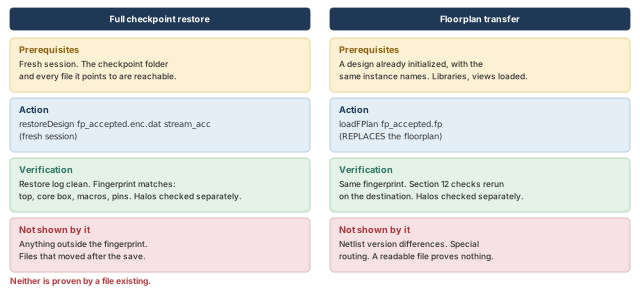
What to notice: Restore needs the checkpoint and every external file it references, in a fresh session. Transfer needs an initialized design with matching instance names. Neither is proven by a file existing.
15.7 DEF, as a second view
defOut -floorplan writes the floorplan as DEF text. We used it in Section 6 to read geometry. It is a useful second view for a person. It does not replace either save above. DEF syntax is outside this chapter, so we do not list line-by-line meanings.
15.8 What the handoff package contains
Table 47 lists the handoff package.
| Item | Why | Produced by |
|---|---|---|
| Accepted checkpoint, with no trial state | The full state | saveDesign |
| Floorplan file | The objects, portable | saveFPlan |
| Readable script | Review copy and comparison base | writeFPlanScript |
| Check reports with their settings | Evidence that the checks ran | Section 12 |
| Trial reports and settings | Evidence of the trial view | Section 13 |
| Decisions, waivers, open items (owners) | What was chosen, what remains | Notes, Sections 3 to 11 |
| References to inputs | Libraries, views, constraints needed | The import record |
| Unverified list | What we could not confirm | Section 16 |
- Accept the floorplan for handoff when every row above exists, and the checks ran with recorded settings. No actual violation or not-run check may remain. Every waiver and open item must have an owner. A fresh-session restore must have matched the fingerprint above, including the separately checked halos.
- Hold when any of these is missing.
- Return when a check or a trial reading points at a decision that has not been revised.
- Shows. A specific set of files exists, and a restore reproduced the recorded facts for the properties compared.
- Does not show. That the floorplan is the right one. That is a judgment, made with the connectivity of Section 3, the budget of Section 5 and the trial of Section 13.
16 Troubleshooting: common mistakes and how to catch them
This section collects what to do when a step goes wrong, and what this chapter could not confirm. Start from what you see. Each symptom below has likely causes to test and the evidence to look at first. It also has the fix to make if the evidence supports a cause. A cause stays a hypothesis until the evidence agrees with it.
16.1 Rows and grids
| Symptom | Likely cause, and where to look first | Fix, then recheck |
|---|---|---|
| No rows, or fewer than expected | Core smaller than a row; wrong site name; rows removed by cuts. Look first: defOut -floorplan, read the ROW lines | Correct the site or the size and recreate. Recheck: checkFPlan |
| Row count differs from the calculation | Height is not a whole number of rows; the leftover is handled in a way you did not expect. Look first: compare core height with the row height | Use a height that is a whole number of rows, or read the actual remainder back. Recheck: checkDesign -floorplan |
| Instance not on a row site | Coordinate off the site grid; a different snap grid applied. Look first: reportUnsnapBlocks, or checkDesign -floorplan | Pick a coordinate on the grid, or accept the snapped value after a read-back. Recheck: the same check |
| Macro pins off track | Block grid is not the layer-track grid; the pin check did not run. Look first: getFPlanMode -checkTypes and the block-grid setting | Set the grid from a library fact, with the library owner. No result is not a pass. Recheck: checkFPlan |
16.2 Macros, channels and halos
| Symptom | Likely cause, and where to look first | Fix, then recheck |
|---|---|---|
| Macros overlap by a small amount | Rounding to a grid; a typing error; a halo or blockage mismatch. The size alone does not tell. Look first: requested and stored boxes (compare_box, macro_inventory) | Correct the typing error, or leave a gap of at least one grid step if rounding caused it. Recheck: checkFPlan and checkDesign -place |
| Narrow channel listed | The physical gap is small; halos take part of it; the threshold is only a screen. Look first: set r [report_narrow_channel -width 65 -direction x -quiet], then puts $r | Compare the gap with the project requirement. Widen it, or accept it with a note. Recheck: report_narrow_channel again |
| Channel congested in Section 13 | Too few tracks between objects; blockages on the layer; pin access; an estimate artifact. Look first: adjustFPlanChannel -reportOnly, blockages by layer | Move a macro, resize, or revisit the arrangement. Reduce a halo only if no pin access or provider clearance needs it. Recheck: place and reportCongestion again |
| Hotspot on the input side | Macros crowd the pin band; pin placement or access; blockages; another constraint. Look first: reportCongestion -hotSpot, pin positions, macro boxes | Change only what the evidence points at. Go back to Section 8 if the arrangement is the cause. Recheck: repeat Section 13 |
16.3 Pins, checks and records
| Symptom | Likely cause, and where to look first | Fix, then recheck |
|---|---|---|
| Pins unplaced | Pin step not done; names do not match the ports; the constraint misses them. Look first: checkDesign -floorplan, names_missing | Expected before Section 11, a finding after it. Place the pins and check names, layer, side and range. Recheck: the same checks |
| Pin on a wrong layer or off track | The layer or range request is wrong; track origin; pin size. Look first: checkPinAssignment -outFile | Correct the request the report names. Recheck: the check again |
| A fence or guide is ignored | The object type or hierarchy is not as assumed. Look first: queryFPlanObject, then checkFPlan | Recreate it with the right object and size. Recheck: the same check |
| A check printed nothing | The type is off; a prerequisite is missing; the output went elsewhere. Look first: getFPlanMode -checkTypes, and the end of the report file | Silence is not a pass. Switch the type on and set its prerequisite. Recheck: look for the line that says it ran |
| Resize gave another value | Snapping to the track pitch, if the difference is below one pitch. Look first: getResizeFPlanMode | Use the rounded value in the plan. Recheck: read the box back |
| Restore differs from the save | A different software release; moved inputs; an edited folder; a format-only difference. Look first: the restore log, the diff exit status, the box read-back | Restore in a fresh session with the saving release, then redo the Section 15 comparison. Recheck: the fingerprint table |
A finding you cannot classify is not accepted. Stop and ask the owner of the input.
16.4 How each claim in this chapter was established
Table 51 names the five kinds of claim and where each appears.
| Class | Meaning | In this chapter |
|---|---|---|
| Checked without running | Syntax and options checked without running the tool; confirm with -help in your installation | The commands and their effects |
| Calculated | Plain Tcl with declared inputs, run in a plain interpreter | The calculations and the helpers. They test arithmetic and control flow only |
| Illustrative | Invented values or drawings that show how to read evidence | The report tables and the schematic figures, labeled as not tool output |
| Judgment | A choice that depends on the project | Densities, halo sizes, channel needs |
| Run in Innovus | A licensed tool ran and was read | None |
16.5 What this chapter could not confirm
Each item in Table 52 is a gap that could not be settled without running the tool. Confirm each with -help in your installation. The chapter did not fill any of them with invented syntax.
| Gap | How the chapter handled it |
|---|---|
| Database attributes for the die box, I/O box, rows and halos | No verified query. The chapter uses the display, DEF text, writeFPlanScript -sections and the check reports |
| DEF row syntax | Not explained line by line |
Report formats of report_obj_connectivity and the checks | Neutral teaching tables are used |
| Flight-line menu path and controls | View → Set Preference → Flightline is the expected path; confirm it in your installation. No Tcl enabling command is given |
| Whether the halo is inside the core-size formula | Both readings are stated. The density discussion names which is used |
macroOnly versus macro_only | Both names are given, with the advice to check the tool's own help |
Whether placeInstance snaps macros to the site grid or the block grid | Both outcomes are shown. The read-back decides |
Row remainder behavior of floorPlan | Not settled. Read the core box and row extents back |
-level of report_obj_connectivity | Not interpreted. Read the report file |
Offset sign of create_relative_floorplan | Inferred from one example. Confirm by read-back |
| Whether the resize applies to the core or the die | Stated as an assumption in the calculation |
Which properties writeFPlanScript leaves out, and whether any export section covers halos | The accepted checkpoint is saveDesign. Halos are checked separately |
| Differences in your installation | Not checked. Use the tool's own help |
| A licensed Innovus run | None. Every command was checked without running the tool |
17 Optional teaching helpers
Nothing in the main lesson needs these. They exist so that you can read a database answer as numbers without a failed read turning into a zero.
- Each helper is plain Tcl. A helper that calls
dbGetcan run only inside Innovus. The others ran intclshwith the invented inputs shown. - Keep them in one file and source it in the order shown, because later helpers call earlier ones.
- They are teaching helpers, not tool commands.
17.1 Read a box, and compare two boxes
box_of accepts one box, or a list that holds one box. It checks that it received four finite numbers, with the lower corner below and left of the upper corner. Infinity (Inf, -Inf) and not-a-number (NaN) are numbers to Tcl, so the helper tests for them explicitly. It does not know whether the box came from a die, a core or a macro. The database's "nothing found" answer, 0x0, is rejected.
# Return four numbers {llx lly urx ury}, or raise an error.
proc box_of {value} {
    if {[llength $value] == 1} { set value [lindex $value 0] }
    if {[llength $value] != 4} { return -code error "not a box: $value" }
    foreach v $value {
        if {![string is double -strict $v]} {
            return -code error "not a number: $v"
        }
        if {!($v == $v) || abs($v) == Inf} {
            return -code error "not finite: $v"
        }
    }
    lassign $value llx lly urx ury
    if {$llx >= $urx || $lly >= $ury} {
        return -code error "corners not ordered: $value"
    }
    return $value
}
The tests below feed box_of one good box and nine bad answers.
puts "wrapped : [box_of {{10.0 10.0 1210.0 710.0}}]"
puts "bare    : [box_of {10.0 10.0 1210.0 710.0}]"
# Print "ok", or the error message, for one test input.
# Named try_box, not try: Tcl 8.6 already has a built-in try command.
proc try_box {label v} {
    set bad [catch {box_of $v} m]
    puts [format "%-8s: %s" $label [expr {$bad ? "err: $m" : "ok"}]]
}
try_box empty   0x0
try_box flipped {5 5 1 1}
try_box badword {1 1 x 9}
try_box short   {1 1 9}
try_box blank   {}
try_box Inf     {0 0 Inf 10}
try_box InfY    {0 0 10 Inf}
try_box -Inf    {-Inf 0 10 10}
try_box NaN {0 0 NaN 10}wrapped : 10.0 10.0 1210.0 710.0 bare : 10.0 10.0 1210.0 710.0 empty : err: not a box: 0x0 flipped : err: corners not ordered: 5 5 1 1 badword : err: not a number: x short : err: not a box: 1 1 9 blank : err: not a box: Inf : err: not finite: Inf InfY : err: not finite: Inf -Inf : err: not finite: -Inf NaN : err: not finite: NaN
compare_box reports the difference between a requested box and a box read back.
# Compare a requested box with the box that was read back.
proc compare_box {requested actual {tol 0.001}} {
    if {[catch {box_of $actual} act]} {
        return "could not be read ($act)"
    }
    set diffs {}
    foreach n {llx lly urx ury} r $requested a $act {
        set d [expr {$a - $r}]
        if {abs($d) > $tol} { lappend diffs [format "%s %+.3f" $n $d] }
    }
    if {[llength $diffs] == 0} { return "matches within $tol" }
    return "differs: [join $diffs {, }]"
}
Three test cases: a match, a 0.4 µm difference and a failed read.
set req {40 40 1040 1040}
puts "case 1: [compare_box $req {{40.0 40.0 1040.0 1040.0}}]"
puts "case 2: [compare_box $req {{40.0 40.0 1040.0 1039.6}}]"
puts "case 3: [compare_box $req 0x0]"case 1: matches within 0.001 case 2: differs: ury -0.400 case 3: could not be read (not a box: 0x0)
17.2 List the macros
This helper needs box_of. It selects instances whose master-cell subclass is block. It says none found, n/a: unplaced and could not be read in separate words, because they mean different things. It runs only inside Innovus.
# Needs box_of. Prints one line per hard macro.
proc macro_inventory {} {
    set ptrs [dbGet top.insts.cell.subClass block -p2]
    if {$ptrs eq "0x0"} {
        puts "macros: none found"
        return 0
    }
    foreach p $ptrs {
        set stat [dbGet $p.pStatus]
        if {$stat eq "unplaced"} {
            set box "n/a: unplaced"
        } elseif {[catch {box_of [dbGet $p.box]} box]} {
            set box "could not be read"
        }
        puts [format "%-8s %-8s %-9s %s" \
            [dbGet $p.name] [dbGet $p.cell.name] $stat $box]
    }
    return [llength $ptrs]
}
macro_inventory
The helper compares the status with the word unplaced. Check on the first run that your installation prints that word.
17.3 Snap a value to a grid
# new value = origin + round((request - origin) / pitch) * pitch
proc snap {v origin pitch} {
    set steps [expr {round(($v - $origin) / $pitch)}]
    return [expr {$origin + $steps * $pitch}]
}
# Rows of the snapping table in Section 7: axis, request, pitch (origin 40).
set cases {x 100 0.2 y 90 1.4 y 690 1.4 x 590 0.2 y 800 1.4}
foreach {axis req pitch} $cases {
    puts [format "%s %5.1f -> %6.1f" $axis $req [snap $req 40 $pitch]]
}
x 100.0 ->  100.0
y  90.0 ->   90.4
y 690.0 ->  689.6
x 590.0 ->  590.0
y 800.0 ->  800.2
Print with format, and compare with a tolerance, as compare_box does. Decimal results can carry rounding noise.
17.4 Overlap and growth of boxes
# Overlap area of two boxes {llx lly urx ury}. Zero if they do not meet.
proc overlap {a b} {
    lassign $a ax1 ay1 ax2 ay2
    lassign $b bx1 by1 bx2 by2
    set w [expr {min($ax2, $bx2) - max($ax1, $bx1)}]
    set h [expr {min($ay2, $by2) - max($ay1, $by1)}]
    if {$w <= 0 || $h <= 0} { return 0.0 }
    return [expr {double($w) * $h}]
}
# Grow a box by d on every side.
proc grow {box d} {
    lassign $box x1 y1 x2 y2
    return [list [expr {$x1 - $d}] [expr {$y1 - $d}] \
                 [expr {$x2 + $d}] [expr {$y2 + $d}]]
}
# Candidate P, requested positions, 10 um halo on each macro.
set a {40 40 460 340}
set b {40 340 460 640}
set core {40 40 1040 1040}
set ha [grow $a 10]
set hb [grow $b 10]
puts "halo boxes overlap  : [overlap $ha $hb] um2"
puts "halo A into macro B : [overlap $ha $b] um2"
foreach {n box} [list A $ha B $hb] {
    lassign $box x1 y1 x2 y2
    set whole [expr {double($x2 - $x1) * ($y2 - $y1)}]
    set inside [overlap $box $core]
    puts [format "halo box %s: %.0f total, %.0f outside the core" \
        $n $whole [expr {$whole - $inside}]]
}halo boxes overlap : 8800.0 um2 halo A into macro B : 4200.0 um2 halo box A: 140800 total, 7500 outside the core halo box B: 140800 total, 3200 outside the core
17.5 Pick pins by prefix, and find missing names
# Keep the names that start with a prefix. 0x0 means nothing was found.
proc pins_with_prefix {names prefix} {
    if {$names eq "0x0"} { return {} }
    set out {}
    foreach n $names {
        if {[string first $prefix $n] == 0} { lappend out $n }
    }
    return $out
}
# Return the wanted names that are not in the actual list.
# 0x0 means the database found nothing.
proc names_missing {wanted actual} {
    if {$actual eq "0x0"} { set actual {} }
    set out {}
    foreach n $wanted {
        if {[lsearch -exact $actual $n] < 0} { lappend out $n }
    }
    return $out
}
puts "found   : [pins_with_prefix {in_0 in_1 out_0 clk in_2} in_]"
puts "none    : {[pins_with_prefix {out_0 clk} in_]}"
puts "nothing : {[pins_with_prefix 0x0 in_]}"
puts "missing : [names_missing {in_0 in_1 in_9} {in_0 in_1 clk}]"
puts "all gone: [names_missing {in_0 in_1} 0x0]"
found   : in_0 in_1 in_2
none    : {}
nothing : {}
missing : in_9
all gone: in_0 in_1
18 Interview preparation
It proves geometric consistency under the recorded settings, and nothing more.
- It does not show that the design places without congestion, meets timing, meets voltage-drop limits or routes.
- It does not show that the arrangement is good. Candidate P had a blocked input edge that no check reported.
You used the core form, floorPlan -s, with 40 µm margins; the die is the core plus the margins.
- In
-s {W H L B R T}, W and H describe the core. In-d {W H ...}, they describe the die. - Read the argument form before the number, and confirm the result in the display.
Because utilization depends on which areas are in the numerator and the denominator.
- For the running design the same floorplan is 72% (D1), 68.2% (D2), 55.2% (D3) or 58.3% (D4).
- The tool's TU and EU are different numbers again. Name the areas before you compare.
It shows that two objects connect and by how many nets; it is not a wire.
- Its length is not routed length: a 316 µm line needed a 560 µm detour.
- Its count is neither routing capacity nor timing criticality:
u_coefhas only 40 nets but time-critical reads.
placeInstance snapped it to the nearest site on the 1.4 µm row grid from origin 40.
- (340 − 40) / 1.4 = 214.29 rounds to 214, giving 339.6 µm.
- In candidate P that made
u_buf_boverlapu_buf_aby 0.4 µm. The overlap is an actual violation, whatever its cause.
Because its real problems are ones no geometric check reports.
- The macros wall off the left band where
in_*enters. u_buf_bat MY faces the die edge. If MY is legal, only the flight lines show the poor access.- Its weighted distance, 128,800 net·µm, is 1.32 times candidate C's score (32% higher).
They block different things, and only the channel is measured rather than created.
- A placement halo keeps cells away from a macro. A routing halo is a routing cost, not a wall.
- A routing blockage removes listed layers in an area. A channel is the free gap you measure.
- A placement halo moves with its macro and is not automatically a routing blockage.
- The special router does not honor a routing halo, so use routing blockages to block special routing.
Supply is 50 / 0.4 × 2 × 0.5 = 125 tracks, below the demand of 136, so it does not fit.
- Do not remove the halo as a generic cure. It may be what keeps cells away from the macro pins.
- Find the real bottleneck first: the available pitch, any routing blockage or halo, and the pin escape area.
Placement changes it into a guide, so a tight fence quietly stops being a fence.
u_cfgwith 9,000 µm² of cells in an 8,000 µm² fence gives EU = 1.125.- Check the fit with your own calculation before you fence.
editPin?Because editPin -pin does not support wildcards, and you need a known order and verified names.
- The loop builds
in_0toin_63in the order you want. names_missingagainstdbGet top.terms.namemust return zero names beforeeditPinruns.
No. Silence is not a pass. Find the line that says the check ran, then read its findings.
- The check type may be off, or a prerequisite missing.
macroPinneeds the block grid to be the layer-track grid. - A check that cannot run gives no result, and a mandatory one stays open.
The trial writes cell positions, optimization changes and route estimates into the database.
saveDesign fp_before_trial.encis the way back, and the start of any second trial.- The accepted checkpoint is saved from the restored pre-trial state, plus the decisions the trial led to.
Restore it in a fresh session and compare a fingerprint, reading diff by its exit status.
- Compare top name, instance count, core box, rows, macros, pins, blockages and constraints. Read the halos separately.
- Exit status 0 means identical, 1 means different, above 1 means
difffailed. A file that exists proves only that it was written.
19 Chapter close
Compact glossary
| Term | Meaning |
|---|---|
| Die | The outer boundary of the chip or block, for example 1080 × 1080 µm |
| Core | The region inside the die that holds rows and standard cells, for example 1000 × 1000 µm |
| I/O box | The I/O boundary. When pads are used, they sit in the margin between it and the core |
| Site | The smallest legal standard-cell footprint, for example 0.2 × 1.4 µm |
| Row | A strip of sites; neighboring rows are mirrored (N and FS, or R0 and MX) |
| Macro | A large block with fixed internal layout, such as a 420 × 300 µm RAM |
| Placement halo | A keep-out around a macro for cells; it moves with the macro |
| Routing halo | A high routing cost beside a macro on chosen layers; a cost, not a wall |
| Placement blockage | An area reserved from cells: hard, soft, partial or macroOnly |
| Routing blockage | An area where the listed routing layers are reserved |
| Channel | The free gap between objects; you measure it, you do not draw it |
| Routing supply | How many wires fit on each layer in a channel; a count of tracks |
| Term | Meaning |
|---|---|
| Flight line | A straight display line showing that two objects connect, and by how many nets |
| Aspect ratio | Core height divided by width; 1.0 is square |
| D1 (core utilization) | (cells + macros + halo) / core; 72% for the running design |
| TU and EU | The tool's target and effective utilization; EU also counts blockages and cuts |
| Snapping | Moving a coordinate to the nearest grid point, by at most half a pitch |
| Orientation | R0, MX, MY, R180 and others; it moves the pin bank, not the outline |
| Placement status | unplaced, placed, softFixed, fixed or cover: who may move an instance |
| Guide, fence, region | Soft suggestion, hard wall, and shared area for a module or group |
| Overflow | Routing demand above track supply in a bin or channel |
| Checkpoint and floorplan file | The whole database (saveDesign, restoreDesign) versus floorplan objects only (saveFPlan, loadFPlan) |
| Fingerprint | A small set of properties compared before a save and after a restore |
One-page summary
Purpose. This chapter takes the accepted database from import and turns it into a floorplan you can defend. It covers boundaries, rows, macros, channels, blockages, module regions and pins. They are checked for consistency and given a first look at feasibility. Figure 1 is the same story as a picture.
Workflow map.
- Entry gate, then requirements and connectivity.
- Area and geometry, then create and inspect.
- Rows, sites and grids, then macros.
- Channels, halos and blockages, then module constraints if needed.
- Pins, then the first checks.
- Trial placement and refinement.
- Acceptance, save and handoff.
Key concepts.
- A floorplan decision is a trade: area for routability, access for compactness.
- Connectivity guides arrangement. A flight line shows a connection and a count, not a route, a capacity or a timing priority.
- A density figure needs its denominator named. D1 to D4 give different numbers for one design.
- A site is the placement unit. A row is a run of sites. Orientation decides which way a macro faces.
- Grids snap coordinates. A requested value and a stored value can differ.
- A halo is a reservation. A channel is the evidence of room.
- Geometric checks test consistency. They do not test feasibility.
- A check that printed nothing has not passed.
- Trial results are estimates, tied to one placement and its settings.
- Save floorplan data and a design checkpoint separately. Verify by restoring in a fresh session.
Common mistakes.
- Choosing a core from one density without naming the denominator.
- Placing macros at round coordinates and letting snapping create overlaps.
- Reading a channel report as if the halo were the channel, or a placement halo as a routing blockage.
- Reading a flight line as a wire, or its length as routed length.
- Reading silence from a check as success.
- Treating a clean set of first-pass checks as feasibility.
- Using a rule of thumb as a project limit.
- Saving a trial placement as the accepted floorplan, or handing over a floorplan file without its netlist.
Acceptance questions.
- Is every mandatory input present, and every omitted optional item recorded with its consequence?
- Is the core derived from a stated density, with every area named?
- Do rows, sites and grids match the library facts?
- Does each macro face its logic, with access on the needed sides?
- Is every channel compared with a requirement?
- Did each mandatory check run, with settings recorded, and rerun after the last pin group?
- Was the trial picture confirmed by a second, comparable trial (Section 13.5)?
- Did a fresh restore reproduce the recorded facts, with halos checked separately and
diffread by exit status?
Where the next chapter goes, and why
This chapter reserved room for the power grid but did not build it. The trial placement also ran without any power stripes, so its congestion picture is optimistic.
Power Planning builds the rings and stripes in the room this floorplan left. That room lies in the core margin, beside the macros and in the channels. It comes next because the grid takes routing tracks. Every channel count and congestion reading from this chapter must be read again once the grid exists. It starts from the accepted checkpoint you saved in Section 15. It uses the same habit: inspect, change, read back, check, decide.
One-page command cheat sheet
Commands in the form used throughout this chapter. Each card stands alone, so read its prerequisite first. None was run in Innovus.
# Prerequisite: design restored, site name known from the library.
innovus> floorPlan -site core_site -s {1000 1000 40 40 40 40} \
    -coreMarginsBy die ;# core 1000 x 1000, 40 um margins from the die
# Then: read the boxes back and run the first checks.
innovus> checkFPlan -outFile fp1_check.rpt -reportUtil ;# check, with utilization
# Prerequisite: grids known (Section 7). y = 90.4 is on the 1.4 um row grid.
innovus> placeInstance u_buf_a 100 90.4 R0 -placed ;# movable, pins east
# Then: read the location back (macro_inventory).
# Prerequisite: macros placed. 65 um is an example threshold only.
innovus> set r [report_narrow_channel -width 65 -direction x -quiet] ;# capture
innovus> puts $r ;# print the channel boxes
# Then: compare each gap with the project requirement.
# Prerequisite: names are real ports (dbGet top.terms.name).
innovus> editPin -pin {clk rst_n} -side BOTTOM -layer metal5 \
    -spreadType CENTER ;# clock and reset, bottom center
# Then: after ALL groups are placed, rerun the pin checks.
innovus> checkPinAssignment -outFile pins_check.rpt ;# pin legality
# Prerequisite: macros fixed and the Section 12 checks read.
innovus> saveDesign fp_before_trial.enc ;# the way back
innovus> place_design ;# trial placement
innovus> earlyGlobalRoute ;# rough route for the congestion reports
# Then: the design changed. Restore before the next trial.
# Prerequisite: no trial state; mandatory inputs and checks done.
innovus> saveDesign fp_accepted.enc ;# accepted checkpoint
innovus> saveFPlan fp_accepted ;# floorplan file, .fp added
# Then: restore fresh, compare the fingerprint, check halos separately.
Rules: inspect first. A silent check is not a pass. Restore before you call a handoff verified.