
Power Planning: Connectivity, Grid Creation, Checks and Handoff
Why this chapter matters in a real project
A power grid is the first large piece of metal in the design. Every later stage routes around it, so a grid is expensive to move.
The danger is not a missing command. It is a grid that looks finished and is not. A ring with no source carries no current, yet every geometry check passes. A macro pin tied to the wrong supply is a real failure, and a pin-type check can stay quiet about it. Those are missed real violations, and they surface late, as an expensive engineering change order (ECO) or a failed silicon test.
The opposite error costs time. Open-pin findings before the cuts exist are expected, not failures. Chasing them as false violations wastes runs.
This chapter teaches one habit for both. For each claim, we name the object and the command that made it. Then we name the readback that shows it and the check that proves it.
Prerequisites
- Floorplanning: you hold an accepted floorplan with die, core, rows, three fixed macros and a halo.
- Design Data Preparation, Import, Sanity Checks and Export: you know where the Library Exchange Format (LEF) files come from.
- Understanding the Innovus Environment and Session: you can run commands at the
innovus>prompt and read the log. - You do not need to know how to write a power-intent file.
- You do not need to know how to set up or run rail analysis.
Learning objectives
- Follow supply from a source terminal to a cell pin, and name the object, command and check for each hop.
- Separate command acceptance, object creation, logical correctness, physical connectivity, design-rule correctness and power-integrity adequacy.
- Map library power and ground (PG) pins to supply nets. Explain why a blanket mapping is safe only for a single-supply ledger.
- Create a ring, stripes, row rails, macro connections and vias, and read back the stored geometry instead of the request.
- Select the check that fits each claim, and record its scope, settings, limits and result.
- Calculate a current, a resistance and a voltage drop by hand, and state what the toy model cannot show.
- Diagnose a wrong supply, a missing via and a floating grid from a symptom, a first query and a next check.
- Save, restore in a fresh session, and hand over the grid with its evidence and its open items.
The whole chapter fits on one page in Figure 1. Come back to it whenever you lose your place.
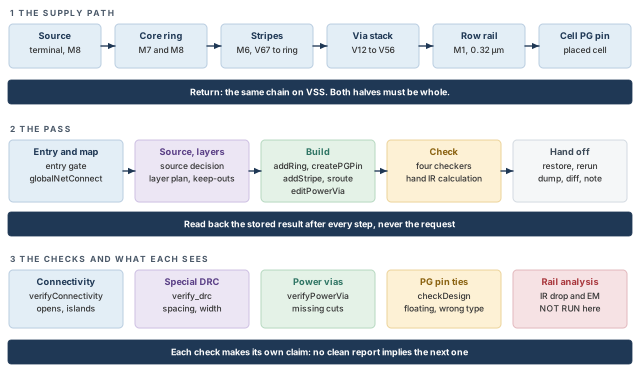
What to notice: Each hop of the path is a different object made by a different command. The checks row shows that no single check covers every claim.
- The worked example. One invented single-domain block carries every example: a core 1000 µm square and three fixed macros.
- Units. Dimensions are in µm, areas in µm², sheet resistance in Ω/sq, resistance in Ω, current in mA and power in mW. Code writes µm as
um. The library database unit is 1000 per µm. - Execution status. Nothing here was run in a licensed Innovus session. Drawings and numbers are invented and labeled. Numbers called "expected" come from arithmetic, not from a tool log.
- Interface. Every command is a Legacy UI command: the classic Innovus command set used throughout this guide. Where your installed help differs, the installed help wins. Write the difference down.
- No helper script. Every query is a plain
dbGetrecipe you can paste. A query that returns nothing is an error to explain, never a zero.
1 The complete power path
Why this matters. A power grid is not a picture of metal. It is a chain of connections that must all hold. The links are a supply, a net, a pin, a route, a cut between layers, and a return. Each link is made by a different command and read by a different check. If you treat the chain as one thing, a break in the middle hides behind clean reports on either side.
1.1 Terms and how they are used
Each term keeps one meaning throughout the chapter. Read the table once, and come back when a later section leans on a word.
| Term | Meaning here | Why it matters |
|---|---|---|
| PG | Power and ground. A PG net is a supply net, such as VDD or VSS. A PG pin is a cell or macro pin that must be tied to one. | PG pins are tied by name, and the tie is not metal. |
| Supply net | A net that carries one supply value. In the example, VDD at 0.8 V and VSS at 0 V. | The grid must put each net only on pins that belong to it. |
| Supply domain | A part of the design powered from one supply arrangement. A block with its own switch or voltage is a separate domain. | Ownership decides which net a pin may be tied to. The example has one domain. |
| Source terminal | A pin shape on the block boundary or on the ring that stands for the external supply. Current enters the grid there. | A grid with no source has no power, however complete it looks. |
| Ring | A closed loop of power wires around the core or a block. | It feeds the stripes and gives them a common edge. |
| Stripe | A long straight power wire, usually on a high metal layer, repeated across the core. | Stripes carry the bulk of the current across the block. |
| Mesh | The grid formed where stripes on one layer cross stripes or rings on another and are joined by vias. | Current has many paths, so one weak spot matters less. |
| Followpin (row rail) | A power wire on the lowest layer that follows each standard-cell row, so cells meet it. | Cells draw their current from rails. |
| Cut layer (via layer) | The layer between two metals. A cut is the small square of conductor that joins them. | Two overlapping wires on different layers are not joined until a cut sits in the overlap. |
| Enclosure | The amount of metal that must extend past a cut on each side. | Enclosure sets how big a cut array can be in a given overlap. |
| IR drop | The voltage lost along the grid: current times resistance. | It lowers the supply that reaches a cell. |
| EM | Electromigration: slow movement of metal atoms under current, which wears wires and cuts. | It limits the current per wire or cut, by a limit the project owns. |
1.2 The path in one picture
Let us follow one milliampere. Current leaves the supply and enters at a source terminal. It runs round the ring and along a stripe. It drops through a stack of cuts to the row rail and reaches the pin of a cell. It returns the same way on the other supply net. Both halves must be whole.
Every metal figure in this chapter uses one color key, shown in Figure 2. The colors are a teaching convention, not the Innovus GUI colors.
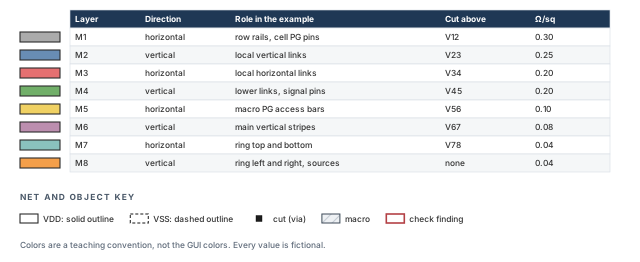
What to notice: Odd layers run horizontal and even layers vertical. Sheet resistance falls as the layers get thicker toward the top.
Figure 3 draws the whole loop. Each box is a different object, checked by a different command.
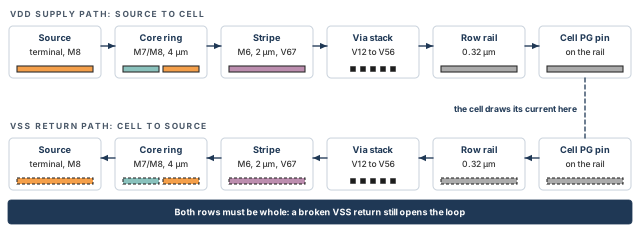
What to notice: The loop is complete only when both rows are. A continuous VDD path with a broken VSS return still fails.
1.3 Six different results
A power-planning command can succeed in six different senses. Only the last three say whether the grid works. Table 2 lists them.
| Result | What it says | Typical evidence | What it does not say |
|---|---|---|---|
| Command accepted | The tool parsed the command and ran it. | No error at the prompt; a line in the log | That anything was made |
| Object created | Wires, vias or pins exist in the database. | A readback of counts and boxes | That they touch, or belong to the right net |
| Logically correct | Each PG pin is tied to the intended net. | Terminal-to-net readback, checkDesign -powerGround | That any metal reaches the pin |
| Physically connected | A path of metal and cuts joins a source to the pin on the right net. | verifyConnectivity, cut readback | That the path obeys design rules |
| Design-rule correct | The shapes obey spacing and width rules. | verify_drc on the special routes | That the path is connected |
| Power-integrity adequate | Voltage drop and current density stay inside project limits. | Rail analysis with models and limits | Anything about geometry |
Thus, a clean design-rule check (DRC) report, a clean connectivity report and a clean power-integrity report each answer a different question. None implies the next.
Think of a building's water supply. The street main is the source. A ring main runs round the basement, risers climb each wall, and floor pipes feed each tap.
- A label is not a pipe. A mapped pin is like a tap labeled "cold". The label says which pipe it should join. It does not say a pipe reaches it.
- Pipes on different floors do not join by crossing. In the grid, two layers join only where a cut sits. Plumbing needs a fitting too, but a plan view hides the missing one.
- Water has no return; current does. The
VSShalf of the loop must be as whole as theVDDhalf.
Figure 4 separates the logical claim from the physical one. Panel C shows a trap that looks finished.
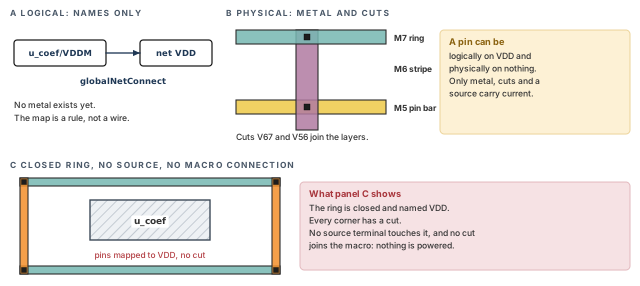
What to notice: In panel C the ring is closed and has cuts at its corners, yet nothing injects current. A map says which net a pin belongs to; only metal and cuts carry current to it.
Reading "connected" in a log message as "powered". A logical connection says which net a pin belongs to. It does not say that any metal reaches the pin. Nor does it say that the metal is on that net, or that a source feeds it.
1.4 What a power-planning pass is
A pass takes the accepted floorplan and ends at a grid whose geometry is checked. Its power integrity is either analyzed or clearly marked not run. Its steps are the sections that follow.
- Confirm the entry conditions (section 2, Entry readiness).
- Map PG pins to nets (section 3, Logical PG mapping).
- Decide who owns the source and where it sits (section 4, Supply entry). Create its terminals (section 4) once the ring exists (section 6, Ring creation).
- Choose layers and keep-outs (section 5, Layer planning).
- Build the ring (section 6) and the stripes (section 7, Stripe creation). Then build the rails and macro connections (section 8, Macro connections and row rails). Add the cuts last (section 9, Vias and cut arrays).
- Check geometry and connectivity (section 10, Checks).
- Estimate voltage drop by hand, and say what that cannot show (section 11, IR and EM).
- Refine without leaving stale geometry (section 12, Refinement), and hand over (section 15, Acceptance and handoff).
Stop here if you cannot say which net each supply pin of each macro belongs to. Every later step builds on that answer.
2 Entry readiness
Why this matters. A grid built on a wrong macro orientation, a missing library pin or an undecided supply is rebuilt. Checking the entry conditions costs a few read-only commands. Rebuilding costs a whole pass.
Every width, spacing, pitch, cut size and resistance in the examples is a fictional training value. It was chosen so the arithmetic is easy to follow. None is a process rule, and none is a project requirement. On a real project the numbers come from the process rule deck and from the project's power plan.
2.1 What must be true before the first change
| Entry item | How to confirm it | If it is missing |
|---|---|---|
| Accepted floorplan | The floorplan gate passed; checkFPlan report on hand; macros fixed | Return to Floorplanning. Do not power-plan a trial floorplan. |
| PG pin names | Read each library pin by name from the LEF and from the database | Stop. Ask the library owner. Never guess pin names. |
| Layers and directions | Read the layer list and directions from the technology file | Do not assume the layer plan is yours to invent. |
| Supply ledger | A table of nets, values and owners, signed by whoever owns power intent | Write the ledger first. The example's ledger is below. |
| Source arrangement | Where current enters: pads, bumps or block terminals | The project decides. The example uses block terminals. |
| Rules for width, spacing, cuts | From the process rules and the project | Training values are fine for practice. Mark them as such. |
2.2 The supply ledger of the worked example
The example design is a fictional single-domain block. Its core is 1000 µm square with three fixed macros, the same shape as in Floorplanning. No netlist comes with this chapter. The names in Table 4 exist only so the examples can be read.
| Net | Value | Owner of the decision | Library pins tied to it | Notes |
|---|---|---|---|---|
VDD | 0.8 V | Example ledger (fictional) | standard cells: VDD; buf_ram: VDD; coef_rom: VDDM | One always-on supply |
VSS | 0 V | Example ledger (fictional) | standard cells: VSS; buf_ram: VSS; coef_rom: VSSM | Return of the same supply |
The two buffers are RAMs (random-access memories) of master buf_ram; the coefficient macro is a ROM (read-only memory) of master coef_rom. The coef_rom macro names its supply pins differently from the other masters. A mapping that listed only VDD and VSS would leave its two supply pins tied to nothing.
2.3 Read the entry conditions
Each command below only reads. It works on the accepted floorplan, restored in a fresh session (section 15). The core box and instance names belong to the worked example; replace them with your own.
innovus> dbGet top.name ;# top cell name
innovus> dbGet top.fPlan.coreBox ;# core box llx lly urx ury, in um
innovus> dbGet head.layers.name ;# layer names in stack order
innovus> dbGet [dbGet -p top.nets.isPwrOrGnd 1].name ;# nets flagged power or ground
# Select ONE instance. dbGet -p returns object pointers, or 0x0.
innovus> set i [dbGet -p top.insts.name u_coef] ;# pointer to u_coef
# Refuse to continue on no match or on more than one match.
innovus> if {$i eq "0x0" || [llength $i] != 1} { ;# guard the selection
    puts "ERROR: expected exactly one u_coef, got: $i"
} else {
    puts "u_coef PG pins: [dbGet $i.pgCellTerms.name]"
}
- Runs where. At the Innovus prompt, with the accepted floorplan loaded.
- What it does. It reads only. Nothing is created, changed or written.
dbGet top.fPlan.coreBox. Returns four numbers in µm. Expect40 40 1040 1040. The attribute is spelledfPlanthroughout; if your release rejects it, list the names withdbGet top.?.dbGet head.layers.name. Lists the layer names the database holds. Cut layers appear between the metals. The names must match the ones later commands use.isPwrOrGnd. At this point the list may hold only the nets named at import. If a ledger net is missing, stop and find out why.-p. Returns the objects one level up from the matched attribute: here, the instances whose name matched. That is the right depth fortop.insts.name. A deeper-p2would return the parents of those objects instead. Check the pointer count before you go further.pgCellTerms. Reads the library PG pin names of one instance. Foru_coefexpectVDDMandVSSM. If the instance is missing, the guard prints an error and reads nothing. Thus, a failed selection cannot pass as an answer.
Return value, not a report. dbGet returns a Tcl list. Nothing is written to a file, and the log shows only the echoed command.
Empty answers. A result of 0x0 means nothing matched. It is not a count of zero and not a coordinate. An error means the read itself failed. Keep the three outcomes apart: a value, no match (0x0 or empty), and an error. Only the first is data. The other two stop the step until you can explain them.
Continue only if (1) the accepted floorplan restores and its core box matches. Next, (2) every supply pin name was read from the library and matches the ledger. Also (3) the layer names must match the plan, and (4) the source arrangement must be decided. If any item is open, write it down with the name of who decides it, and stop.
2.4 Missing-input decisions
| Missing input | Who decides | What you may do meanwhile |
|---|---|---|
| Supply value or net names | Power-intent owner | Draw preliminary geometry under declared assumptions. The PG plan is not accepted without the ledger. |
| Source arrangement | Project or package owner | Use block terminals as a stated stand-in, as the worked example does. |
| Width, pitch, cut rules | Process rules and project | Use training values and mark them fictional. |
| Layer allocation | Technology and routing owners | Keep the example allocation as a teaching convention. |
| Current budget | Power-estimate owner | Use an assumed average and say it is not a peak. |
| Analysis models | Rail-analysis owner | Mark rail analysis NOT RUN. Never fill a gap with zero. |
3 Logical PG mapping
Why this matters. A supply pin is tied to a net by name before any metal exists. If the name map is wrong, the metal you build later feeds the wrong supply. Every physical check can still pass. The map is cheap to read and cheap to repair, so read it first.
3.1 Purpose and what must exist
- Purpose. Tie every library PG pin to the supply net it belongs to.
- Needs. A loaded design, the library PG pin names (section 2) and the supply ledger. Save a checkpoint with
saveDesignbefore the change, so that a restore is the rollback. - Does not need. Any metal. Mapping is a database relationship, not geometry.
3.2 Inspect before changing
innovus> dbGet [dbGet -p top.nets.isPwrOrGnd 1].name ;# nets treated as power or ground
Then read the library PG pin names and their nets, one validated instance at a time.
innovus> foreach name {u_coef u_inv0} { ;# two sample instances
    set i [dbGet -p top.insts.name $name]
    if {$i eq "0x0" || [llength $i] != 1} {
        puts "ERROR: $name matched: $i"
        continue
    }
    puts "$name pins: [dbGet $i.pgCellTerms.name]"
    puts "$name nets: [dbGet $i.pgTermNets.name]"
}
- Runs where. At the prompt, design loaded. It reads only.
- Reading the result.
pgCellTermslists library pin names.pgTermNetslists the nets those terminals are tied to. Pair a name with its net only after you print both lists for the same instance. Check that they have the same length. Confirm the pairing order in your release before you rely on it. - What you may see. The import may have named the supply nets with
init_pwr_netandinit_gnd_net. Then some pins may already be tied by name. If nothing is tied, the second list is0x0. Both are normal. Write down what you saw, because the change step must not assume either. 0x0is not zero. It means no terminal matched, or none is tied. Do not turn it into a count.
3.3 The mapping command
# Tie each library supply pin to the example supply nets, all instances.
innovus> globalNetConnect VDD -type pgpin -pin VDD -all ;# cell and RAM VDD pins
innovus> globalNetConnect VSS -type pgpin -pin VSS -all ;# cell and RAM VSS pins
innovus> globalNetConnect VDD -type pgpin -pin VDDM -all ;# ROM VDDM pins to VDD
innovus> globalNetConnect VSS -type pgpin -pin VSSM -all ;# ROM VSSM pins to VSS
- What it changes. It records a global connection rule and applies it. The database now says every pin named
VDDis on netVDDand everyVSSonVSS. EveryVDDMis onVDD, and everyVSSMonVSS. - Why four statements. The coefficient macro calls its pins
VDDMandVSSM. The map goes by library pin name, so a statement forVDDdoes not touchVDDM. - Return and report. The command prints messages to the log.
-verboseadds connection statistics and warnings. Read the effect from the database, not from a return value. - Where the rule lives. Global net connections are part of the design's power data. List them with
writeFPlanScript -sections {globalNetConnect}and keep that list with the handoff. Do not treat the floorplan file as their only store.
| Part | What it does |
|---|---|
VDD (first word) | The global net to tie to. It is positional. |
-type pgpin | The object kind is a PG pin, selected by name. -pin is then required. |
-pin VDD | The pin name to match. A pattern may use *. Here the names are exact. |
-all | Apply to every instance in the design. |
The worked example has one supply and one return, owned by one ledger. Every library pin named VDD really does belong on VDD. In a design with several supply domains, one pin name can mean different nets in different places. A design-wide rule would then tie some pins to the wrong supply. Use -all only where the ledger proves the pin name has one owner throughout the scope. Otherwise the pin names, hierarchy, domain and region decide the target, and a narrower selector replaces -all.
3.4 Narrower selectors, for later
| Selector | Picks | Use when |
|---|---|---|
-sinst | One instance, by its full hierarchical name | A macro or pad needs its own tie |
-instBasename | Instances by leaf name, with * | A family of instances shares a tie |
-hierInst | One hierarchical instance and what lies under it | A whole module has its own supply |
-region | Instances inside a box llx lly urx ury | Supply follows area |
-powerDomain | Instances in a named domain | The domain is defined in the power intent |
-override replaces connections that earlier rules made. -netlistOverride goes further and also replaces ties that came from the netlist itself. Both can silently move pins that were right. Use neither to make an error message go away.
Scope matters as much as the pin name. The blanket mapping above is shown for a single-supply ledger only. A multi-supply design needs every relevant macro PG name mapped, each with a scope that matches its owner. If a mapping looks wrong, first read the actual terminal-to-net relationship. Then narrow the selector. Only then consider an override on one named instance.
3.5 Tie cells are not PG pins
Tie-high and tie-low pins are logic constants. They are not supply pins, and mapping them is a separate step. Table 8 separates the three pin kinds.
| Pin kind | What it is | Mapped by | In the example |
|---|---|---|---|
| PG pin | A supply or return pin (VDD, VSS, VDDM, VSSM) | globalNetConnect ... -type pgpin | Yes, four statements |
| Tie-high or tie-low input | A pin held at constant 1 or 0 | -type tiehi, -type tielo, or tie cells | None in the example |
| Signal pin | Carries data | The netlist | Not part of this chapter |
-type pgpinselects by pin name and cannot reach a tie pin.-autoTiealso ties tie-high pins whose related power pin is the named net. It is a separate decision, so leave it out until the project asks for it.- A tie pin has no net until one is assigned. When tie cells exist, check their connections with their own check,
verifyTieCell.
3.6 Read back, then check
# One instance of each kind: tie nets after mapping.
innovus> foreach name {u_ibuf0 u_nand0 u_inv0 u_ff0 u_buf_a u_buf_b u_coef} { ;# samples
    set i [dbGet -p top.insts.name $name]
    if {$i eq "0x0" || [llength $i] != 1} {
        puts "ERROR: $name matched: $i"
        continue
    }
    puts [format "%s pins %s nets %s" $name \
        [dbGet $i.pgCellTerms.name] [dbGet $i.pgTermNets.name]]
}
innovus> checkDesign -powerGround -noHtml \
    -outfile reports/checkdesign_pg.txt ;# write the PG pin report
- Expected readback. The pin list and the net list of each instance have the same length. Each standard cell ties its
VDDpin to netVDDand itsVSSpin to netVSS. The two buffer RAMs do the same. The coefficient macro tiesVDDMtoVDDandVSSMtoVSS. Compare each pin with its net in the order your release prints them. - What the check does.
checkDesign -powerGroundlooks for PG terminals on the wrong net, floating, or on signal nets. The report goes to the file named by-outfile. With-noHtml,-outfileis valid and-outdiris not. - Acceptance criterion. Every instance kind reads back its intended nets. The report lists no floating PG terminal and none on a signal net.
- What it still cannot see. The check flags power-to-ground, ground-to-power, floating and non-PG connections. It does not know that a project wanted
VDDMon a 0.9 V net rather than onVDD. A power pin on the wrong power net can pass. Compare the pin-to-net readback with the independent supply ledger.
Reading only one standard cell and one macro. Sample every instance kind, and for macros read every instance. In the worked example that means the two buffer RAMs and the coefficient ROM, separately.
3.7 Undo and restart
- A mapping is a rule. Removing it needs
clearGlobalNets(all rules) orglobalNetConnect ... -disconnect(only with-sinst,-type pgpinand-pin). - Run
-helpon both in your release before use.clearGlobalNetsremoves every rule, including the ones you did not make. - Repeating a mapping command is not a safe reset. The safe reset is to restore the checkpoint taken before the change, in a fresh session.
- Save a new checkpoint only after the readback and the check agree.
3.8 Domain ownership in one sentence per layer
Five layers of decision sit on top of each other, as Figure 5 shows.
- Power intent decides which supply each block uses.
- Logical mapping makes each pin follow that decision.
- The grid gives each net metal.
- Extra supplies (well bias, switched, always-on) are their own nets with their own sources.
- Analysis asks whether the delivered voltage is enough.
Thus, a wrong answer at one layer is not repaired at the next. A pin tied to the wrong net is a layer 2 fault, and no amount of metal at layer 3 fixes it.
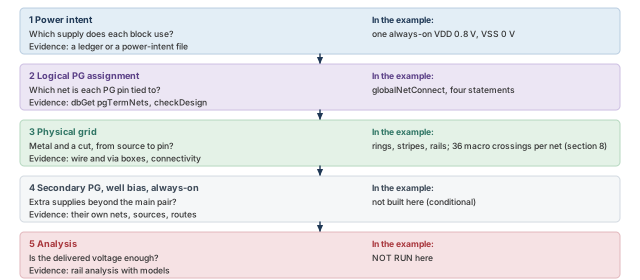
What to notice: The example covers layers 1 to 3. Layer 4 is conditional (section 13) and layer 5 is NOT RUN. A multi-domain design repeats layers 1 to 4 per domain.
4 Supply entry
Why this matters. Current has to enter the grid somewhere. In a real chip that place is a pad, a bump or a connection to a higher level. If no such place exists in the database, the grid is a closed network of metal. Every check that only looks at geometry can still pass.
4.1 Three ways current enters
Table 9 lists the three usual places where current enters.
| Arrangement | Where the source is | What carries current to the ring | In the example |
|---|---|---|---|
| Pad ring | Power pads on the die edge | Pad cell routing to the ring, often by special route with pad targets | No pad ring |
| Bump array | Bumps over the core | Bump routing and vias to the stripes | None |
| Block PG terminals | Pin shapes on the block boundary or on the ring | The ring itself | Yes: two terminals on the left M8 ring |
The example stands for a block that is one part of a larger chip. The terminals represent the connection to the supply network outside the block. A terminal is a geometric supply port. It is not by itself a complete analysis source with a voltage and a resistance. Rail analysis needs its own source data. Package behavior lies outside the example.
Figure 6 compares the example's source with a pad or bump chip and with a ring that has no source.
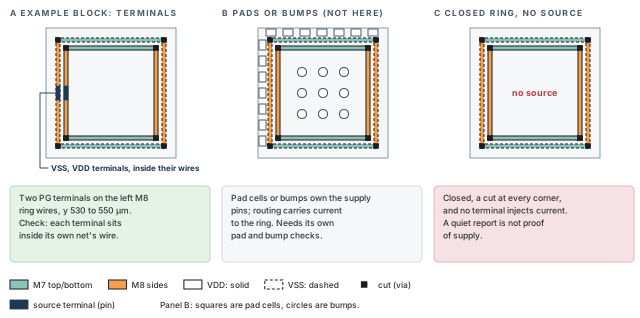
What to notice: Panel A is the worked example. Panel C looks complete and is unpowered; the only difference from A is the two navy terminals, each inside its own ring wire.
4.2 Create a physical source terminal
Purpose. Give each net one physical entry point on the ring. Prerequisite. The ring exists (section 6), and its stored wire boxes have been read back.
# One source terminal per net, 20 um tall, centered near y = 540 um.
# The x ranges are the left M8 ring wires read back in section 6
# (example values under the edge convention). Replace them with
# the stored boxes of your own run.
innovus> createPGPin VDD -net VDD -geom M8 32 530 36 550 ;# VDD pin on inner wire
innovus> createPGPin VSS -net VSS -geom M8 26 530 30 550 ;# VSS pin on outer wire
| Part | Meaning |
|---|---|
VDD / VSS (first word) | The name of the pin to create |
-net | The net it belongs to |
-geom M8 x1 y1 x2 y2 | A pin shape on layer M8, a rectangle in µm. The x range is copied from the stored ring wire. The y range is 530 to 550. Confirm the unit and argument order with createPGPin -help in your release. |
- Runs where. At the prompt, after the rings exist. It creates objects.
- Without
-geom. The pin is logical only. A logical pin has no shape and touches nothing. - If a logical pin already exists. The
-netyou give may be ignored, and the pin keeps its existing net. Read the association back after every call. - Why the x range is read back. The terminal must lie on the ring wire. Taking x from the stored box means the terminal follows the geometry that was really made. A number typed from the request would trust the request. So read the box first (section 6) and edit the numbers above to match it.
- Layer and direction.
M8is vertical in the example, and so is the left ring wire. The terminal rectangle is therefore long in y. Keep the terminal inside the wire. - Return and report. There is no report file. The result is a pin in the database.
- Undo.
deletePGPinremoves a pin. Restoring the checkpoint saved before the change is the clean reset.
4.3 createPhysicalPin: only where it fits
createPhysicalPin adds a pin shape to a top-level terminal, mainly to give a PG terminal more shapes. It creates the terminal if it does not exist, but only for a PG net.
- Use it when a PG terminal already exists and needs another shape, for example on a second layer.
- By default each shape becomes its own port, so each ties to the grid separately.
-samePortputs the shapes on the first port instead. - Do not use it for signal terminals. It cannot create them. Extra shapes on a signal terminal are discouraged, because the router will not join separate shapes.
- The worked example does not need it.
createPGPin -geommakes both the terminal and its shape in one step.
4.4 Read back and check the source
innovus> dbGet top.terms.name ;# terminal names, signal and PG together
# Select ONE terminal, then list the attributes it really has.
innovus> set t [dbGet -p top.terms.name VDD] ;# pointer to the VDD terminal
innovus> if {$t eq "0x0" || [llength $t] != 1} { ;# guard the selection
    puts "ERROR: VDD terminal matched: $t"
} else {
    dbGet $t.?
}
- Terminal names. Expect the signal ports and also
VDDandVSS. Reports differ in how they count PG terminals in a terminal total. Keep the signal-port count and the PG-terminal count as two separate numbers. Never compare a combined total to a signal-port list. - Shape attribute. The attribute that holds the pin shape and the net differs by release. Read the list that
.?prints, and pick the geometry and net attributes from it. Print them for each terminal. Do not guess their names. - Containment check. The terminal rectangle must lie inside the ring wire rectangle of the same net, on the same layer. Read both boxes, then test containment.
Contact test for a source terminal, per net (inputs invented):
  terminal box inside its own ring wire's box on x and on y  -> 1
  same terminal inside the other net's wire                  -> 0
Two boxes overlap when max(left) < min(right) and max(bottom) < min(top).
Acceptance criterion. Each terminal lies inside the wire of its own net, and not inside the other net's wire. The connectivity check (section 10) shows no open on the supply grid. The middle condition matters: a terminal on the wrong ring wire feeds the wrong supply with a perfectly clean shape.
A source terminal drawn beside the ring instead of on it. It looks right in a picture, creates a pin, passes a name check and touches nothing. Always test containment against the stored wire box.
4.5 A floating ring
A ring with no source is a closed loop of metal. It can have cuts at every corner and every stripe attached, and still carry no current from outside.
- Symptom. Grid checks are clean. Rail analysis, once its inputs exist, reports no source or an unconnected net.
- Inspect. Does a pin or pad exist on the net? Does its shape overlap the ring wire? Is its net the same as the wire's net?
- Fix. Create or move the source, then rerun the connectivity check.
Continue when (1) each net has at least one physical terminal. Next, (2) each terminal sits inside a wire of its own net. Also (3) the terminal and its net must be the ones in the ledger. Record the terminal boxes in the handoff (section 15).
5 Layer planning, keep-outs and macro pin access
Why this matters. Every power wire takes room from signal routing on its own layer. Through its cuts, it also takes room on the layers below. Layers, directions and keep-outs decide how much room is left, and where macro pins can still be reached. Choose them before the first wire exists, because a grid is expensive to move.
5.1 Purpose and what must exist
- Purpose. Decide which metal carries which part of the grid, keep the preferred directions, and know where macro pins and keep-outs sit.
- Needs. The technology data (layers, directions, widths, spacings, cut rules), the macro libraries and the accepted floorplan.
- Changes nothing in the database. This section only reads and plans.
5.2 The example layer allocation
Table 11 is a training allocation, not a process recommendation. Every figure in the chapter uses it. It is not a table of any real technology.
| Layer | Direction | Pitch | Width | Spacing | Sheet R (Ω/sq) | Role in the example |
|---|---|---|---|---|---|---|
| M1 | horizontal | 0.20 | 0.06 | 0.06 | 0.30 | Row rails (followpins), cell PG pins |
| M2 | vertical | 0.20 | 0.06 | 0.06 | 0.25 | Local vertical links |
| M3 | horizontal | 0.40 | 0.08 | 0.08 | 0.20 | Local horizontal links |
| M4 | vertical | 0.40 | 0.08 | 0.08 | 0.20 | Lower links, macro signal pins |
| M5 | horizontal | 0.80 | 0.20 | 0.20 | 0.10 | Macro PG access bars |
| M6 | vertical | 0.80 | 0.20 | 0.20 | 0.08 | Main vertical stripes |
| M7 | horizontal | 1.60 | 0.40 | 0.40 | 0.04 | Ring top and bottom, cross-grid |
| M8 | vertical | 1.60 | 0.40 | 0.40 | 0.04 | Ring left and right, source access |
The cut layers between the metals are in Table 12.
| Cut layer | Joins | Cut size | Cut spacing | Enclosure | Resistance of one cut (Ω) |
|---|---|---|---|---|---|
| V12 | M1 to M2 | 0.06 | 0.06 | 0.02 | 10 |
| V23 | M2 to M3 | 0.06 | 0.06 | 0.02 | 10 |
| V34 | M3 to M4 | 0.08 | 0.08 | 0.02 | 8 |
| V45 | M4 to M5 | 0.12 | 0.12 | 0.03 | 6 |
| V56 | M5 to M6 | 0.20 | 0.20 | 0.05 | 3 |
| V67 | M6 to M7 | 0.30 | 0.30 | 0.10 | 1.5 |
| V78 | M7 to M8 | 0.40 | 0.40 | 0.10 | 0.8 |
5.3 Read the real layer data
$ grep -n "^LAYER\|DIRECTION\|PITCH\|WIDTH\|RPERSQ" your_tech.lef  # layer rules
$ grep -n "DATABASE MICRONS" your_tech.lef  # database unit scale
- Runs where. In a Linux shell. It reads a text file.
your_tech.lefstands for your project's technology file. - Why read the file and not only the database. The LEF is the source of the numbers every later calculation uses. Compare each layer's direction with Table 11.
- Database unit. In the example the file says
DATABASE MICRONS 1000. One database unit is then 0.001 µm, and a macro 420 µm wide is 420000 database units. Read the value in your own file. Do not assume every database inherits the example scale. - Units of a printed box.
dbGetprints µm unless-dis given. A box printed with-dis in database units. Never mix it with one printed without it. - Acceptance criterion. Directions, names and the database unit match the plan. Anything else stops the pass until the owner of the technology data explains it.
5.4 Preferred direction
A layer has a preferred direction: the way its signal wires normally run. The example alternates, horizontal on odd layers and vertical on even layers. Power wires follow the same rule.
- Ring top and bottom:
M7, horizontal. - Ring left and right:
M8, vertical. - Stripes:
M6, vertical. - Row rails:
M1, horizontal. - Macro PG bars:
M5, horizontal.
A wire against the preferred direction is legal in some flows. It costs more routing room and is worth a note in the handoff.
Figure 7 shows the stack, and the one rule that matters at every crossing.
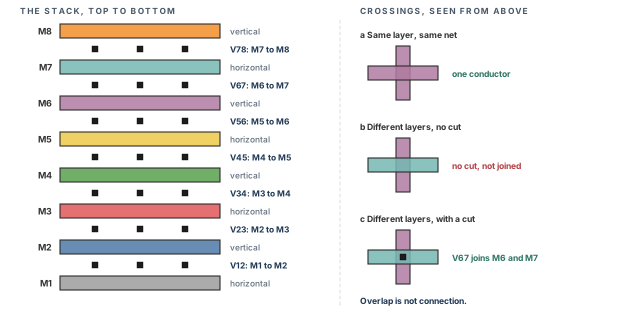
What to notice: Two wires on the same layer that cross are one conductor. Wires on different layers are not joined until a cut sits in the overlap, and a cut joins only the two metals it is named for. The upper metal is drawn on top, as seen from above.
5.5 Signal resource and power metal
A stripe on M6 is metal that signal routing cannot use on M6. Two different ratios describe the cost, and neither predicts routing capacity.
- Metal width over pitch. One
VDDand oneVSSstripe of 2 µm each make 4 µm of metal. In a 120 µm repeat that is 4 / 120 = 3.33 %. - Pair envelope over pitch. The pair also occupies the 2 µm gap between its wires. The envelope is 2 + 2 + 2 = 6 µm, and 6 / 120 = 5 %.
- In tracks. On
M6the track pitch is 0.8 µm. A 6 µm envelope equals 6 / 0.8 = 7.5 track pitches, out of the 150 in a repeat. That is a width-to-pitch ratio. It is not a count of blocked track centers, because alignment, spacing and obstructions decide that.
These ratios are dimensionless. They say how much of a corridor the power occupies. They do not say how many signal wires still fit. Spacing to signal wires, cuts through lower layers and pin positions all matter.
5.6 Keep-outs
Four different objects get called keep-outs. Mixing them up gives a wrong claim about what the grid may do.
- A placement halo keeps cells away from a macro. It does not stop metal, and it does not remove routing tracks on its own.
- A routing halo is a margin that affects signal routing as the option that created it says. Treat it as a cost or a block only after reading what it did.
- A placement blockage keeps cells out of an area. Metal ignores it unless a mode setting says otherwise.
- A routing blockage on a layer blocks metal of that layer in the area. Other layers are untouched.
Exceptions exist. A blockage or halo may or may not affect a power command. That depends on its options and on the modes in force (setAddStripeMode, setSrouteMode). Read the stored result. Do not assume every blockage acts the same on every power-planning command. Figure 8 sets the four side by side.
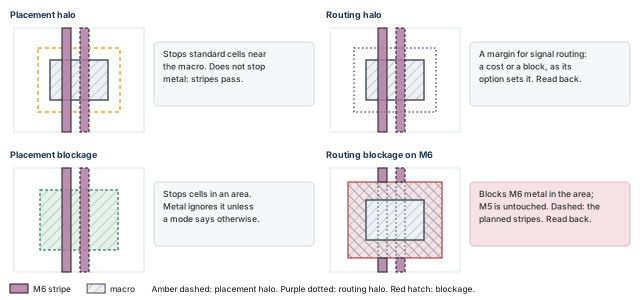
What to notice: Only the layer-specific routing blockage acts on metal of its layer; the upper panels add the macro. The example macros carry a 10 µm placement halo, and it does not clip stripes.
After any addStripe or addRing near a macro, read back where the new wires ended. Do not assume that a halo clipped them, or that it did not.
5.7 Macro pin access
A macro has signal pins and PG pins. They are different objects on different layers, and neither position predicts the other. Figure 9 shows both example masters.
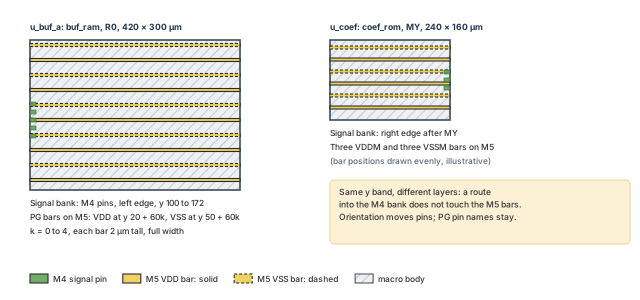
What to notice: The signal bank and the PG bars share a y band but sit on different layers. Orientation moves the signal bank to the other edge; the PG bars keep their heights, layer and pin names.
$ grep -n "MACRO\|PIN\|USE\|LAYER\|RECT" your_macros.lef # signal and PG pins
# Placement, orientation and status of each macro, one validated
# instance at a time.
innovus> foreach name {u_buf_a u_buf_b u_coef} { ;# the three macros
    set i [dbGet -p top.insts.name $name]
    if {$i eq "0x0" || [llength $i] != 1} {
        puts "ERROR: $name matched: $i"
        continue
    }
    puts [format "%s box %s orient %s status %s" $name [dbGet $i.box] \
        [dbGet $i.orient] [dbGet $i.pStatus]]
}
- What the LEF shows in the example.
buf_ramhas signal pins onM4at the left edge. Its PG bars are onM5: ten of them across the full 420 µm width, each 2 µm tall.VDDbars sit at local y = 20 + 60k andVSSbars at 50 + 60k, for k from 0 to 4.coef_romis 240 × 160 µm, with threeVDDMand threeVSSMbars. - What the database would show in the example. The box of
u_coefis590 800.2 830 960.2. That is 240 µm wide and 160 µm tall. Its orientation isMYand its statusfixed.u_buf_aandu_buf_bshare one master, 420 × 300 µm, inR0. These are the example's chosen values. Read your own. - Mirrored orientation is legal.
MYflips the macro about its vertical axis, so the signal bank lands on the right edge. The PG bars are symmetric in x, so they still span the full width. - Do not infer PG pins from the signal bank. A pin bank on one edge says nothing about the PG shapes. Read the PG shapes from the LEF.
- Acceptance criterion. For each macro you can state the layer, y positions and net of every PG bar. You can also name the edge of each signal bank.
Continue when (1) the layer plan matches the technology data. Next, (2) every planned power wire runs in its preferred direction, or its exception is written down. Also (3) keep-outs must be named by kind. Finally, (4) every macro PG pin must be listed by layer, position and net.
6 Ring creation
Why this matters. The ring is the part of the grid you can check fastest: a few long wires with clear coordinates. It also hides the most easily missed assumption: what an offset measures. Settle that with a readback of stored coordinates before any calculation depends on it.
6.1 Purpose, prerequisites, inspect
- Purpose. Make one closed loop of
VDDandVSSwires around the core, on the planned layers and widths. - Needs. The accepted floorplan, the logical mapping, and a checkpoint saved with
saveDesignjust before this step. - Not idempotent. Running
addRingtwice makes a second ring. Restore the checkpoint before every attempt.
innovus> getAddRingMode -nonDefault ;# ring settings that differ from their defaults
- What it shows. The persistent ring mode settings changed from default. An empty answer means every setting is at its default.
- The setting that matters here.
-wire_center_offset. When it isfalse(the default), an offset is measured to the wire boundary. When it istrue, it is measured to the wire center. - Return and log. The settings are printed. With
-quietthey come back as a Tcl list.
6.2 The ring command, with the mode saved and restored
# Save the setting that is in force, so it can be put back.
innovus> set oldWco [getAddRingMode -wire_center_offset -quiet] ;# remember it
# State the offset convention explicitly for this call.
innovus> setAddRingMode -wire_center_offset false ;# offset to the wire edge
# One core ring, two nets, the training values of this chapter.
innovus> set rc [catch { ;# run addRing and keep any error message
    addRing -nets {VDD VSS} -type core_rings -follow core \
        -layer {top M7 bottom M7 left M8 right M8} \
        -width 4 -spacing 2 -offset 4 -offset_adjustment fixed
} msg]
# Put the saved value back, whether addRing worked or not.
innovus> setAddRingMode -wire_center_offset $oldWco ;# restore the saved value
innovus> if {$rc} { error "addRing failed: $msg" } ;# stop if addRing failed
| Option | What it does | Units and notes |
|---|---|---|
-nets {VDD VSS} | The nets that get a wire each. Required. | The order may set which wire is inner. Read it back. |
-type core_rings | Rings around the core, not around blocks | core_rings needs -follow |
-follow core | Follow the core boundary, not the I/O boundary | There is no pad ring in the example |
-layer {top M7 bottom M7 left M8 right M8} | The layer of each side | Names as in the technology LEF. M7 is horizontal and M8 vertical, so each side runs in its preferred direction. |
-width 4 | Wire width | µm, every wire of the ring |
-spacing 2 | Space between the two ring wires | µm. Read back whether it is edge to edge. |
-offset 4 | Distance from the core boundary to the ring | µm. With -wire_center_offset false it is measured to the wire boundary; with true, to the wire center. |
-offset_adjustment fixed | Keep the offset as typed | The default, automatic, may shift the offset when width or spacing change |
The notes below explain what the call does and what it leaves open.
- Runs where. At the prompt, after the mapping and a restore. It creates wires and corner cuts.
- Why save and restore the mode.
falseis the default, not necessarily what the session held before. Setting a literal back would silently change a mode somebody else chose. Thecatchmakes the restore line run even whenaddRingerrors. - What it changes. New special wires on
M7andM8, and cuts where wires of different layers meet. - Return and report. There is no report file. The command prints to the log. The evidence is the wires in the database.
- What the request does not decide. Which wire is inner, and whether
-spacingis edge to edge. The-wire_center_offsetsetting defines what the offset measures, so that part is known. The stored coordinates decide the other two, and they confirm the whole result.
6.3 What the numbers should be under the assumed convention
Let us assume the offset runs from the core edge to the near edge of the inner wire. The spacing is edge to edge. Distances run outward from the core edge. Figure 10, after the arithmetic and its notes, draws the left side.
Distances run outward from the core edge. offset 4, wire 4, gap 2,
core edge x = 40, die edge x = 0.
Edge convention (-wire_center_offset false), inner wire starts at the offset:
  inner 4..8    outer 8+2 = 10..14    reach 14
  left x: inner 32..36, outer 26..30   room 40-14 = 26
Center convention (true), the offset reaches the wire center, so inner
starts at 4-2 = 2:
  inner 2..6    outer 6+2 = 8..12     reach 12
  left x: inner 34..38, outer 28..32   room 40-12 = 28
Check: 26 + 14 = 40 and 28 + 12 = 40.
- Reading the output. With
-wire_center_offset false(edge convention), the leftVDDwire is at x = 32 to 36 ifVDDis inner. The leftVSSwire is at x = 26 to 30. - The reach. "14" is the distance from the core edge to the outer wire edge. It includes the 4 µm setback, and 26 µm of the 40 µm margin remain.
- Center convention. With
true, the inner wire is at x = 34 to 38 and the outer at 28 to 32. The reach is 12 µm and 28 µm remain. The two wires plus their gap occupy 10 µm in both cases. - What this does not prove. It computes boxes from the request and the meaning of the setting. It does not say what the tool made.
- Mirror on the other sides. The right side adds the offset to the right core edge at 1040. The top adds to 1040 in y, and the bottom subtracts from 40 in y.
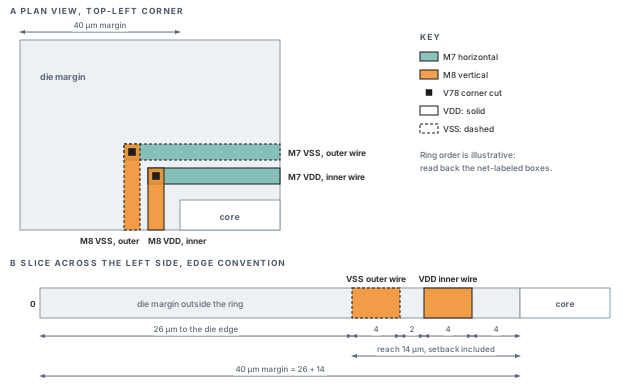
What to notice: With -wire_center_offset false the ring reaches 14 µm from the core edge, leaving 26 µm of the 40 µm margin. The two wires and their gap occupy 10 µm; the center convention (reach 12 µm) is in the arithmetic above.
6.4 Read back the stored wires
# One line per wire object, so the layer and box of a wire stay together.
innovus> foreach netname {VDD VSS} { ;# both supply nets
    set n [dbGet -p top.nets.name $netname]
    if {$n eq "0x0" || [llength $n] != 1} {
        puts "ERROR: net $netname matched: $n"
        continue
    }
    set ws [dbGet $n.sWires]
    if {$ws eq "0x0"} {
        puts "NO special wires on $netname"
        continue
    }
    foreach w $ws {
        puts "$netname [dbGet $w.layer.name] [dbGet $w.box]"
    }
}
- What it does. It selects each net with
-p, which returns the net object itself, and checks that exactly one object matched. Then it walks that net's special wires one object at a time. - Why per object. Layer and box are read from the same wire pointer, so the pairing cannot slip. An empty net prints a visible message. A failed selection prints an error and moves on, never to a number.
- Attribute names.
sWires,layer.nameandboxare the usualdbGetattribute names. Confirm each one on your release withdbGet $w.?before you rely on it. - What to compare. For each of the eight ring wires, compare the stored box against the arithmetic. Each wire is 4 µm wide, and each pair is 2 µm apart. The nearest wire is 4 µm from the core edge. Sort the printed lines before you compare two runs.
- Acceptance criterion. The stored boxes equal the expected boxes within 0.001 µm. If they equal the center-convention boxes instead, the setting in force was not the one you thought. Print
getAddRingMode -wire_center_offset, find out why, and redo the dependent numbers.
6.5 Check the ring
innovus> verifyConnectivity -type special -error 1000 -warning 50 \
    -report reports/ring_connectivity.rpt ;# special-net connectivity, caps stated
innovus> verify_drc -check_only special -limit 1000 \
    -report reports/ring_drc.rpt ;# design rules on special routes only
- Scope.
verifyConnectivity -type speciallooks at the special (power) nets.verify_drc -check_only speciallooks at special wires and cuts. Neither says anything about signal routing. - Settings to record. The caps (
-error 1000,-limit 1000), the report file names, theget_verify_drc_modeoutput, and whether the run finished. A run that reached a cap is incomplete coverage, not a result. Raise the cap and rerun. - What to expect at this stage. The standard-cell and macro PG pins have no metal yet, so open pins are expected. Record them as expected, do not suppress them, and rerun after the connections exist (section 8).
- Corner continuity. Look for a cut at each ring corner on each net. The ring wires must close into a loop. A missing ring segment is a continuity and geometry defect.
- Topology decides an open. Removing one edge of a closed loop leaves the rest connected the other way round. So read the ring geometry back as well as the connectivity report.
- Acceptance criterion at this stage. The ring wires and corner cuts exist with the stored geometry. No spacing or short finding is reported. The only opens are the pins still waiting for stripes and connections. Both checks completed below their caps.
6.6 Common misuse and consequence
| Misuse | Consequence |
|---|---|
Treating -offset 4 as the distance to the ring center | The reach from the core edge and the room to the die edge are both wrong by 2 µm. |
Leaving -offset_adjustment at automatic while changing width | The wire moves, and the stored boxes no longer match the plan. |
Running addRing again to "fix" a ring | A second ring is created on top of or beside the first. |
| Choosing layers against their direction | The ring may be refused, snapped or made as a wrong-way wire. Read what happened. |
6.7 Undo and restart
- Safest. Restore the checkpoint saved before the ring step, in a fresh session, and run the ring step once.
- Local.
editDelete -type Special -shape RING -nets {VDD VSS}deletes ring wires and the cuts attached to them. Read the help for the shape names in your release. Then read back that the wire counts fell to zero. - Save point. Save a new checkpoint only after the readback and the checks agree with the plan.
Continue when the stored ring boxes match the expected boxes and the ring closes on both nets. Both source terminals must exist and touch their own wires (section 4). The only open findings may be the pins that still wait for stripes and connections.
7 Stripe creation
Why this matters. Stripes carry current from the ring across the core to the row rails. Their pitch decides how far current travels on thin rail metal. Their width and spacing decide what the signal router loses. Two numbers get confused here: the gap inside a pair and the repeat pitch. Mixing them gives a grid that is plausible and wrong.
7.1 Purpose, prerequisites, inspect
- Purpose. Add vertical
M6power and ground stripes, one pair per 120 µm repeat, and join them to the ring. - Needs. A checkpoint saved after the ring step, the ring read back and checked, and the layer plan of section 5.
- Changes. Special wires on
M6, and the cuts that join them to the ring layer. Nothing logical changes. - Not idempotent. A second
addStripeadds a second grid on top of the first. Run it once per fresh restore.
innovus> getAddStripeMode -nonDefault ;# stripe settings that differ from defaults
# Select the net with -p (the net object), then walk its wires.
innovus> set n [dbGet -p top.nets.name VDD] ;# the VDD net object
innovus> if {$n eq "0x0" || [llength $n] != 1} { ;# guard the selection
    puts "ERROR: VDD matched: $n"
} else {
    puts "VDD special wire layers: [dbGet $n.sWires.layer.name]"
}
- Runs where. At the prompt, design restored from the post-ring checkpoint. It reads only.
- Reading the result. After the ring step you expect only the ring layers (
M7,M8). AnyM6entry means a stripe pass already happened in this session. AnERRORline means the net selection failed, a different problem from "no wires". - Why
-pand not-p2.top.nets.nameends at a net attribute. One level back (-p) is the net object. Two levels back would leave the net and land on the object that holds the nets. Then.sWireswould no longer mean the wires of that net. - Attribute names.
sWiresandlayer.nameare the usual names. List the attributes of one wire object with.?and confirm them in your release.
7.2 Pitch, gap and width are three numbers
A stripe set is one VDD stripe and one VSS stripe side by side. Three distances describe it, and Figure 11 below draws them at two scales.
- Width. The size across the wire. Example value: 2 µm.
- Spacing. The gap between the two stripes of the set, carried by
-spacing. We read it as edge to edge, and a stored-coordinate readback confirms that. - Set-to-set distance. The repeat distance from one set to the next, here 120 µm. It is a different number from the spacing, and
-set_to_set_distancecarries it.
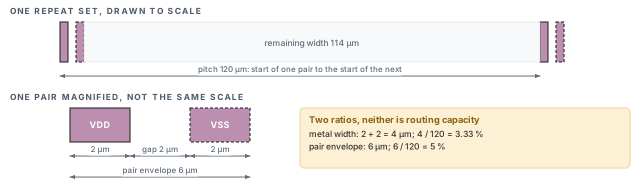
What to notice: The gap is the 2 µm between the two wires. The pitch is 120 µm from the start of one pair to the start of the next. The 3.33 % and 5 % are ratios of metal to corridor, not routing capacity.
7.3 The command
# Save the via-range settings in force, then set the range the
# stripes may use to reach the layer above.
innovus> set oldBot [getAddStripeMode -stacked_via_bottom_layer -quiet] ;# save
innovus> set oldTop [getAddStripeMode -stacked_via_top_layer -quiet] ;# save
innovus> setAddStripeMode -stacked_via_bottom_layer M6 \
    -stacked_via_top_layer M7 ;# cuts from M6 up to M7 only
# One pair per 120 um repeat. VDD is the left wire of each pair.
innovus> set rc [catch { ;# run addStripe and keep any error message
    addStripe -nets {VDD VSS} -layer M6 -direction vertical \
        -width 2 -spacing 2 -set_to_set_distance 120 \
        -start_from left -start_offset 30
} msg]
# Restore the saved range whether addStripe worked or not.
innovus> setAddStripeMode -stacked_via_bottom_layer $oldBot \
    -stacked_via_top_layer $oldTop ;# put the saved range back
innovus> if {$rc} { error "addStripe failed: $msg" } ;# stop if it failed
| Option | Value and unit | What it does |
|---|---|---|
-nets {VDD VSS} | net names | The first net is the left (or bottom) wire of each set. |
-layer M6 | one layer | The metal the stripes are drawn on. |
-direction vertical | vertical or horizontal | The run direction. M6 is vertical in the example. |
-width 2 | µm | Width of each stripe. |
-spacing 2 | µm | Gap between the stripes of one set. |
-set_to_set_distance 120 | µm | Repeat distance between sets. |
-start_from left | left, right, bottom or top | The core edge the first set is measured from. |
-start_offset 30 | µm | Distance from that edge to the first stripe. |
- Runs where. At the prompt, once. It reads the floorplan, the ring and the macro blockages, and writes special wires and vias.
- What it changes. New
M6stripes of netVDDandVSS. With a core ring and no-area, stripes connect to the ring automatically at their ends. - Net order is a decision. The first net sits on the left or bottom. Swapping the order of
-netsswaps which supply sits on the left of each pair. - Number of sets. Either
-set_to_set_distanceor-number_of_setssets the repeat. Use one of them, and read the count back. - Via range. The saved-and-restored range is part of the example's recipe. Without it, the stripe-to-ring cuts depend on whatever range the session held.
- Where stripes stop. A stripe stops at an obstruction or at the core row boundary. The example macros have no
M6obstructions, because their obstructions stop atM4. - Return and report. The command prints messages and a summary of stripes and vias to the log. It is not a count to trust. Read the count from the database.
- Tcl return value. Confirm in your release whether it returns anything useful. Do not build a script that depends on it.
7.4 Clipping and the count
The core is 1000 µm wide, from x = 40 to x = 1040. The first VDD stripe starts 30 µm inside the left edge, at x = 70 to 72. The set pitch is 120 µm, so set k starts at x = 70 + 120k.
Figure 12 places all nine sets over the macros.
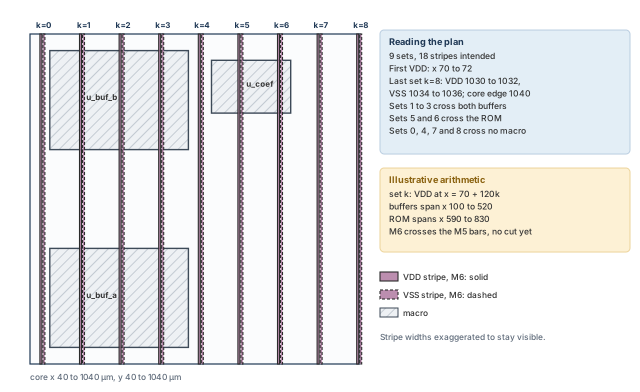
What to notice: Sets k = 1 to 3 cross both buffers and sets 5 and 6 cross the ROM. The stripes pass over the M5 macro PG bars but do not touch them until cuts are added in section 8.
Pair envelope = 2 + 2 + 2 = 6 um. Start 30, repeat 120, span 1000.
Whole sets = floor((1000 - 30 - 6) / 120) + 1 = floor(8.03) + 1 = 9
Last VDD x = 30 + 8*120 + 40 = 1030..1032 (core x), last VSS 1034..1036,
right margin 4 um.
Sets that fit, by start offset in um: 0 -> 9, 30 -> 9, 60 -> 8, 100 -> 8
Count = floor((1000 - offset - 6) / 120) + 1 when every set must fit whole.
- Expected readback. Nine sets, so nine
VDDand nineVSSstripes, 18 in all. The firstVDDstripe is at x 70 to 72; the lastVSSstripe at x 1034 to 1036. - If the tool clips instead. A partial last set gives a different count and a stripe that ends early. The arithmetic tells you what to expect; the stored boxes tell you what you got.
- The y extent. Stripe boxes also depend on where the tool stops or clips them. The arithmetic fixes the x positions and the counts, not the y extent.
- Sets over macros. The
VDDstripe of set k lies at x = 70 + 120k. The buffers span x 100 to 520, so sets 1, 2 and 3 cross them. The coefficient ROM spans x 590 to 830, so sets 5 and 6 cross it.
7.5 Read back
# Count and list the M6 stripe rectangles of each net. A net that
# cannot be selected, or has no special wires, is reported as such.
innovus> foreach netname {VDD VSS} { ;# both supply nets
    set n [dbGet -p top.nets.name $netname]
    if {$n eq "0x0" || [llength $n] != 1} {
        puts "ERROR: net $netname matched: $n"
        continue
    }
    set ws [dbGet $n.sWires]
    if {$ws eq "0x0"} { puts "NO special wires on $netname"; continue }
    set cnt 0
    foreach w $ws {
        if {[dbGet $w.layer.name] eq "M6"} {
            incr cnt
            puts "$netname M6 [dbGet $w.box]"
        }
    }
    puts "$netname M6 stripe objects: $cnt"
}
- Acceptance criterion. Nine stripe objects on each net, each box 2 µm wide. The
VDDbox of set 0 begins at x = 70. - Objects in pieces. If the tool stores a stripe in pieces, the object count can exceed nine. Compare the merged x positions, not only the object count.
- Gap check. The
VSSbox of each set begins 4 µm to the right of the start of itsVDDbox. The clear gap is therefore 2 µm. - If the counts differ. Do not fix the number in a script and move on. Find the cause: a wrong
-start_offset, a different-set_to_set_distance, clipping, or a secondaddStripepass.
7.6 Check, misuse, undo
innovus> verifyConnectivity -type special -error 1000 -warning 50 \
    -report reports/stripe_connectivity.rpt ;# special-net connectivity
innovus> verify_drc -check_only special -limit 1000 \
    -report reports/stripe_drc.rpt ;# design rules on special routes
- Reading the connectivity report. At this stage, opens about row rails or macro bars are expected, because those do not exist yet. Opens on the stripes themselves are not.
- What a clean report does not say. It does not say a source feeds the grid. Nor does it say the macros are connected.
| Misuse | Consequence |
|---|---|
Treating -spacing as the pitch | A grid with a 4 µm repeat and thousands of wires, or a rejected command. |
Swapping the -nets order | The supplies swap sides in every pair. Expected positions no longer hold, so redo the readbacks of sections 7 and 8. |
Running addStripe twice | Two overlapping grids. Counts double or shorts appear. |
Using -area with a core ring and expecting the ring connection | The automatic ring connection applies to the case without -area; confirm with -help in your installation. |
Undo. There is no undo for a creation. Delete the stripes with editDelete -type Special -shape {STRIPE} -nets {VDD VSS} and read the count back. Or restore the checkpoint saved after the ring step. Restoring is the clean way, because a delete that leaves a via behind looks like a new problem.
Continue when (1) nine VDD and nine VSS stripes exist on M6, judged by merged positions. Next, (2) the first VDD box starts at x = 70, and every box is 2 µm wide. Also (3) the gap inside a set must be 2 µm and the repeat 120 µm. Finally, (4) the connectivity and spacing reports must be saved. If a count differs, find the cause before you build on it.
8 Macro connections and standard-cell row rails
Why this matters. Stripes and rings do not feed a cell until something joins them to the cell's own pins. For standard cells that is the row rail on M1. For macros it is a cut between a macro PG bar and a stripe. Both are easy to get wrong in a way that still prints a clean report.
8.1 Purpose, prerequisites, inspect
- Purpose. Create
M1row rails for the standard-cell rows, and cuts from the macro PG bars to the stripes above them. - Needs. A checkpoint saved after the stripe step, the stripe readback of section 7, and the macro PG list of section 5.
- Changes. New special wires on
M1, and new cuts in the overlaps. The logical mapping is not touched. - Cells are not placed. In the worked example the standard cells have no placement yet. That has a consequence, explained below.
innovus> getViaGenMode -nonDefault ;# via-generation settings changed from default
innovus> getSrouteMode -nonDefault ;# special-route settings changed from default
innovus> dbGet top.fPlan.rows.orient ;# orientation of every row object
# Distinct y levels among the row boxes, and the number of row objects.
innovus> set rb [dbGet top.fPlan.rows.box] ;# box of every row object
innovus> if {$rb eq "0x0"} { ;# stop if no rows came back
    puts "ERROR: no row boxes returned"
} else {
    set ys {}
    foreach b $rb {
        lappend ys [format %.4f [lindex $b 1]] [format %.4f [lindex $b 3]]
    }
    puts "row objects: [llength $rb]"
    puts "distinct y levels: [llength [lsort -unique -real $ys]]"
}
- Reading the result. Rows alternate between
R0(as drawn) andMX(flipped about the x axis). The orientation list tells you which net sits on the first rail line. The first row,R0, putsVSSat its bottom line when the cell library drawsVSSat the bottom. - The row arithmetic. The core is 1000 µm tall and a row is 1.4 µm tall, so 1000 / 1.4 = 714.28. There are 714 whole nominal rows and a 0.4 µm remainder. The nominal rail levels are the 714 rows plus one: 715. With the first row in
R0, that is 358VSSlevels and 357VDDlevels. - Levels are not objects. 714 and 715 count nominal row heights and boundary levels before any cutting. The example floorplan called
cutRowaround three macros, and cutting splits row objects into segments. So the row-object and rail-rectangle counts can exceed 714 and 715. - Compare four things separately. Distinct y levels, row segments, clipped lengths and rail rectangles.
- The leftover 0.4 µm. Where it sits in the core (top, bottom or split) depends on how the rows were generated. Read the first and last row boxes. Do not assume a position.
Core height 1000 um, row height 1.4 um.
Whole rows = floor(1000 / 1.4) = 714, used 999.6 um, remainder 0.4 um.
Rail levels = 714 + 1 = 715. With R0 first, levels alternate: 358 VSS, 357 VDD.
These are nominal levels, not stored segments. Cuts in rows change the
segment count, not the levels.
8.2 Row rails with sroute
# Row rails on M1, joined to the stripes and the ring.
innovus> sroute -connect corePin -nets {VDD VSS} \
    -corePinWidth 0.32 -corePinLayer {M1} \
    -allowLayerChange 1 -layerChangeRange {M1 M8} \
    -crossoverViaLayerRange {M1 M6} \
    -targetViaLayerRange {M1 M8} ;# rails for every standard-cell row
| Option | Value and unit | What it does |
|---|---|---|
-connect corePin | keyword | Make rails for the standard-cell rows. blockPin, padPin, padRing, floatingStripe and secondaryPowerPin are the other targets. |
-nets {VDD VSS} | net names | The nets to route. |
-corePinWidth 0.32 | µm | Width of each row rail. |
-corePinLayer {M1} | one layer | The layer of the cell pins to follow. |
-allowLayerChange 1 | 0 or 1 | Let the router change layers to reach a target. |
-layerChangeRange {M1 M8} | layer pair | The layers it may use when changing. |
-crossoverViaLayerRange {M1 M6} | layer pair | The range for cuts at crossings with other power wires. |
-targetViaLayerRange {M1 M8} | layer pair | The layers a cut may use to reach a target. |
- Runs where. At the prompt, once. It reads rows, stripes and the ring, and writes special wires and cuts.
- Why 0.32. Two neighboring cell rows each draw half a rail of 0.16 µm, so the shared rail is 0.32 µm. A different value changes the resistance of every rail line.
- No undo.
sroutehas no undo. Save the special routing first withdefOutBySectionorsaveSpecialRoute, or restore from a checkpoint, then run it. - Return and report. The command reports counts of created wires and cuts in the log. That report is not proof that every row has a rail. Read the rails back.
- Before you run it. The
sroutemodes in force shape the result. Print them withgetSrouteMode -nonDefaultand record them.
8.3 What the rails prove, and what they do not
The rails are generated from the row geometry before placement. They exist whether or not a cell sits on the row. An unplaced instance has no valid position for its pin shapes. Do not read that as "the cell has no pins". Its connection to a rail has simply not been established. Its logical VDD and VSS assignment stays only an assignment.
Figure 13 shows shared rails, a cut row, and the difference between a placed and an unplaced cell.
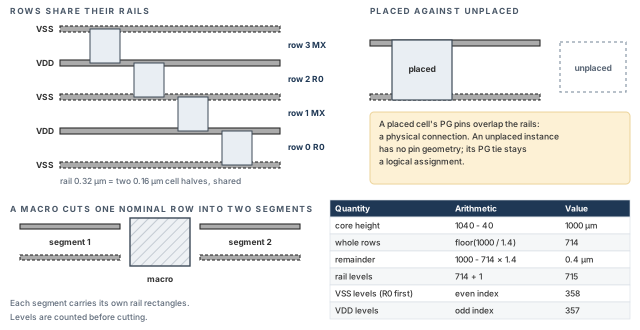
What to notice: A rail is shared by the rows above and below it. A placed cell's PG pins overlap a rail; an unplaced instance has no placed pin geometry, so the rail cannot be shown to connect it.
- Rails exist means the row grid is physically in place.
- Cells are connected means a placed cell's PG pins overlap a rail of the right net.
Do not turn the first into the second. To see the difference, place a few cells on a disposable copy of the database and rerun the connectivity check there.
8.4 Macro connections
sroute -connect blockPin joins macro PG pins to power wires by its own target choice. It can extend a block pin to the nearest legal target, or to the kind you name with -blockPinTarget. The worked example teaches the direct-cut strategy instead: scoped cuts, one macro at a time. The target is a known stripe, and the result can be counted.
These are two different tools. Overlap is a condition for the direct cut. It is not a condition for the special router. Figure 14 compares the special-route targets with the direct cut.
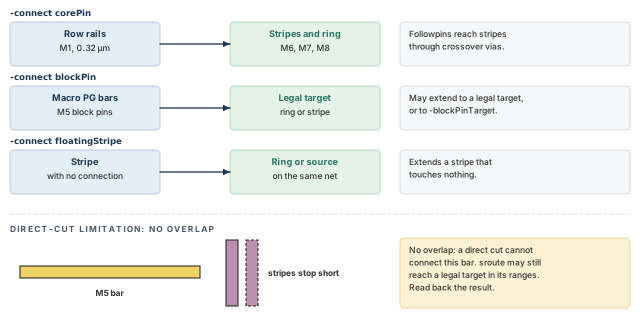
What to notice: A direct cut needs an overlap. A special-router connection needs a legal, permitted target within its ranges; obstructions, ranges, pin access and modes decide whether it can be made.
# Save the area_only setting in force, then restrict generation to
# the area given in each call.
innovus> set oldArea [getViaGenMode -area_only -quiet] ;# remember the setting
innovus> setViaGenMode -area_only true ;# adds stay inside the given area
# One call per macro, area = the macro box. Buffer A, buffer B, ROM.
innovus> set rc [catch { ;# one scoped call per macro box
    foreach a {{100 90.4 520 390.4} {100 689.6 520 989.6}
               {590 800.2 830 960.2}} {
        editPowerVia -add_vias 1 -nets {VDD VSS} \
            -bottom_layer M5 -top_layer M6 -area [list $a]
    }
} msg]
# Put back the saved value, not a literal, even if a call failed.
innovus> setViaGenMode -area_only $oldArea ;# restore the saved value
innovus> if {$rc} { error "editPowerVia failed: $msg" } ;# stop if a call failed
| Option | Value and unit | What it does |
|---|---|---|
-add_vias 1 | switch | The action. Each call chooses exactly one of add, modify or delete. |
-nets {VDD VSS} | net names | Only these nets get cuts. |
-bottom_layer M5, -top_layer M6 | metal layers | The pair of metals to join. |
-area {{590 800.2 830 960.2}} | µm | The rectangle inside which cuts are made; here the ROM box, an example to adapt. |
- Why scoped. An unscoped call adds cuts everywhere the layers cross, including places you have not reviewed.
- Why
setViaGenMode -area_only true. It limits generation to the given area for the add action. The script restores the value it found. A mode left on changes the next command, and a literalfalsewould overwrite an earlier choice. - Return and report. The command prints counts to the log. Cut counts are read from the database.
- Intended crossings. Each macro PG bar is crossed by every stripe of its own net that passes over it.
Stripe sets over each 420 um buffer: 3 (sets 1-3). Over the ROM: 2 (sets 5-6).
Bars per net per set: buffer 5, ROM 3.
Intended crossings per net = 2 buffers x 3 sets x 5 bars + 3 bars x 2 sets
                           = 30 + 6 = 36.
Crossings are not via instances and not cut shapes: count each separately.- Per buffer. Two buffers, five bars per net each. Three sets cross each buffer, so 3 × 5 = 15
VDDcrossings per buffer, 30 for both. - The ROM. It has three
VDDMbars and two sets cross it, so 6. The total is 36 intended crossings per net. - Why the ROM counts as
VDD. The mapping in section 3 tiesVDDMtoVDD. Its bars are therefore on theVDDnet. - Three different counts. A crossing is a place where a stripe of the net passes over a bar. A via instance is one object in the database. A cut shape is one square of a cut layer, and a via instance may hold an array of them. Count the three separately and name the one you mean.
- Acceptance criterion. Each of the 36 crossings per net has a via instance of its own net, on the right layer pair. The list of macro bars with no cut is empty. Do not accept a bare total.
8.5 Read back
# Special via instances of each net: how many, and what one looks like.
innovus> foreach netname {VDD VSS} { ;# both supply nets
    set n [dbGet -p top.nets.name $netname]
    if {$n eq "0x0" || [llength $n] != 1} {
        puts "ERROR: net $netname matched: $n"
        continue
    }
    set vs [dbGet $n.sVias]
    if {$vs eq "0x0"} { puts "NO special vias on $netname"; continue }
    puts "$netname special via instances: [llength $vs]"
}
# List the attributes of ONE via object before you query any field.
# $v is the first via of the last net read above.
innovus> set v [lindex $vs 0] ;# first via of the last net read
innovus> dbGet $v.? ;# list the attributes of one via object
- Reading it. The count is of via instances, the objects in the database. It includes every special via of that net: stripe-to-ring cuts and rail-to-stripe cuts too.
- What it is not. It is not a count of cut shapes, and not a count of macro crossings. To count macro-bar cuts, read the position, master and layer-pair fields that
dbGet $v.?lists. Then select by the macro box. - Upper bound for rail cuts. 358
VSSlevels × 9 stripes = 3222, and 357VDDlevels × 9 stripes = 3213. These are for uncut nominal levels, before the parts under macros are removed. Cut rows and segmentation change the real number. Treat them as rough bounds, never as targets.
Declaring the macros connected because a command finished without an error. Command acceptance does not tell you that a bar has a cut. Count crossings, and list the bars that have no cut.
8.6 Undo and restart
- Row rails. Delete with
editDelete -type Special -shape {FOLLOWPIN} -nets {VDD VSS}. Confirm the shape name in your release. Restoring the checkpoint saved after the stripe step is cleaner. - Cuts. Delete with an
editPowerVia -delete_vias 1call scoped to the same area, or restore. - Restart rule. Never rerun the whole stage over its own output. Restore first.
Continue when (1) rails exist for both nets. Next, (2) the distinct y levels match the nominal arithmetic, with segments and rail rectangles counted apart. Also (3) every macro PG bar needs at least one cut of the right net. Then (4) the macro crossing count must be 36 per net. Finally, (5) you have written down that unplaced cells are not proven connected.
9 Vias and cut arrays
Why this matters. Metal on two layers is not one conductor until a cut joins them. Most grid failures that survive a clean-looking review are missing, wrong-net or too-few cuts. This section is about creating cuts on purpose, counting them, and knowing what a cut array can and cannot be.
9.1 Purpose and prerequisites
- Purpose. Join power wires of the same net on adjacent layers wherever they cross, with cuts of the right layer and count.
- Needs. The wires of sections 6 to 8, and the cut rules of section 5 (cut size, spacing, enclosure).
- Three words, three things. A via instance is one object in the database. A cut shape is one square of a cut layer; a via instance may hold an array of them. A crossing is a place where two wires of adjacent layers overlap. A crossing can hold one via instance, or none. Say which one you mean whenever you give a number.
- Where cuts come from.
addRing,addStripeandsroutecreate cuts as they go, inside the ranges you gave them.editPowerViacreates, changes or deletes cuts after the fact, inside an area you name.
Figure 15 shows the three outcomes at one stripe-over-bar crossing.
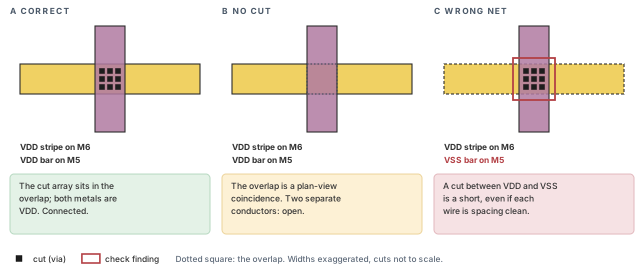
What to notice: The overlap looks identical in A and B, but only A conducts. C has a cut and is worse than B: a cut between VDD and VSS is a short, even if each wire passes spacing checks.
9.2 What a cut array is, and the arithmetic bound
An array is a rectangular group of cuts placed inside one overlap. How many fit depends on the overlap size, the cut size, the spacing between cuts and the enclosure of metal around them. Per axis, the number of cuts is at most:
floor((span - 2 x enclosure + spacing) / (cut + spacing)), with all values in µm.
Figure 16 applies the bound to the V56 crossing.
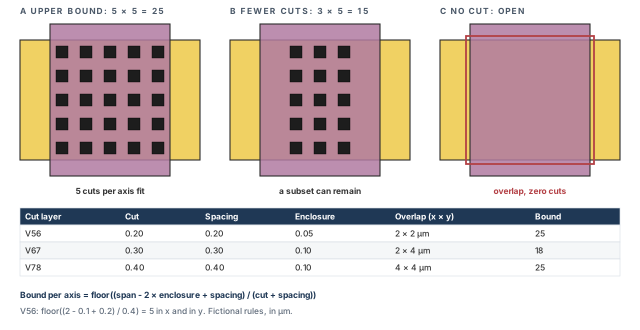
What to notice: 25 is a ceiling from arithmetic; a tool places what its own rules and obstructions allow. Zero cuts is an open connection, not a smaller array.
- Overlaps.
V56is the 2 × 2 µm crossing of a stripe and a macro bar.V67is the 2 µm stripe against the 4 µm ring wire.V78is the 4 × 4 µm corner of two ring layers. - Resistances are example values. One
V56cut is 3 Ω, so a full 25-cut array is 0.12 Ω. These are fictional numbers for arithmetic, not process data. Ideal parallel cuts ignore current crowding and other real effects. - A bound is not a count. The tool may place fewer. More cuts are not always better, because each cut also needs enclosure and takes room.
Per axis, cuts = floor((span - 2*enclosure + spacing) / (cut + spacing)).
V56 (2 x 2 um, cut .2, space .2, encl .05): floor(2.1/.4) = 5 x 5 = 25
V67 (2 x 4 um, cut .3, space .3, encl .1): x: floor(2.1/.6) = 3,
    y: floor(4.1/.6) = 6, so 3 x 6 = 18
V78 (4 x 4 um, cut .4, space .4, encl .1): floor(4.2/.8) = 5 x 5 = 25
Ideal parallel resistance (single cut 3, 1.5, 0.8 ohm): 3/25 = 0.12,
    1.5/18 = 0.0833, 0.8/25 = 0.032 ohm.
Six V56 cuts would need 6 x 0.2 + 5 x 0.2 = 2.2 um plus 0.1 um of
enclosure: more than the 2 um overlap.
A span too small for one cut gives 0 cuts. This is an upper bound, not a
tool result.
9.3 Creating, modifying, deleting
editPowerVia takes exactly one action per call. Table 19 lists its parts.
| Option | Value and unit | What it does |
|---|---|---|
-add_vias 1 | switch | Add cuts in overlaps. |
-modify_vias 1 | switch | Change existing cuts, for example their layer pair. |
-delete_vias 1 | switch | Remove cuts. |
-nets {VDD VSS} | net names | Restrict to these nets. |
-bottom_layer, -top_layer | metal layers | The metal pair the action covers. |
-area {{590 800.2 830 960.2}} | µm | Restrict to a rectangle; the ROM box is an example to adapt. |
- Runs where. At the prompt. It reads wires and cuts, and writes cuts.
- Area-only adds. Run
setViaGenMode -area_only truebefore an add that must stay inside the area. Save the value in force first and restore it afterwards, as in section 8. Delete does not need the setting. - Not idempotent. Adding twice into the same overlap may add a second set, or be refused. Read the count before and after.
- Return and report. Messages in the log. Read the effect from the via-instance readback of section 8 and from the checks below.
innovus> getViaGenMode -nonDefault ;# the via mode in force
innovus> set n [dbGet -p top.nets.name VDD] ;# the VDD net object
innovus> if {$n eq "0x0" || [llength $n] != 1} { ;# guard, then count vias
    puts "ERROR: VDD matched: $n"
} else {
    set vs [dbGet $n.sVias]
    if {$vs eq "0x0"} { puts "NO special vias on VDD" } \
    else { puts "VDD via instances: [llength $vs]" }
}
9.4 Missing and rejected cuts
A cut can be absent for five different reasons, and each has a different cure. Table 20 lists them.
| Reason | Sign | Cure |
|---|---|---|
| The layer range did not cover the pair | No cuts at that pair, others present | Widen the range of the creation command, or add with editPowerVia. |
| The overlap is smaller than one cut plus enclosure | A bound of zero in the formula | Widen the wire or the macro bar. |
| An obstruction or another net is in the way | Cuts at some crossings and not at others | Read the obstruction, then decide. |
| The two wires are on different nets | A cut would short them | Do not add. Fix the net first. |
| The command ran with the wrong area | Cuts exist elsewhere | Repeat inside the right area. |
Treating a cut-less overlap as "connected because they overlap". In plan view two layers always look joined. In the database they are separate conductors until a cut exists.
9.5 Undo and restart
- Delete with
editPowerVia -delete_vias 1, scoped as tightly as the add was. Read the count back. - When in doubt, restore the checkpoint. A hand-deleted cut that leaves its neighbors is harder to prove than a fresh restore.
Continue when (1) every intended power crossing has a via instance of its own net, and (2) no cut joins different nets. Also (3) the per-net via-instance counts must be written down and labeled as instances. Finally, (4) you have named the crossings you expected to be empty.
10 Checks: what each one proves
Why this matters. A check can only report what it looks at. Choosing the right check for a failure, and writing down its scope, is half of the job. The other half is reading a quiet report as "nothing found inside this scope", never as "nothing wrong".
10.1 Purpose and prerequisites
- Purpose. Run the mandatory checks, save their reports, and decide for each failure class which check could have seen it.
- Needs. A checkpoint saved after the connection step, and the readbacks of sections 6 to 9.
- Does not change grid geometry. Checks may change markers and write report files. Save reports under a stage name.
10.2 Four checker families, five reports
innovus> get_verify_drc_mode ;# record the DRC settings in force
# 1. Connectivity of special nets: opens, loops, unconnected pins.
innovus> verifyConnectivity -type special -error 1000 -warning 50 \
    -report reports/final_connectivity.rpt ;# special-net connectivity
# 2. Design rules on special routes only.
innovus> verify_drc -check_only special -limit 1000 \
    -report reports/final_drc.rpt ;# spacing and width of special routes
# 3. Missing cuts at orthogonal crossings on adjacent layers.
innovus> verifyPowerVia -report reports/final_vias.rpt ;# missing power vias
# 3b. The same, now including wires over macro pin shapes.
innovus> verifyPowerVia -checkWirePinOverlap -layerRange {M5 M6} \
    -report reports/final_vias_macro.rpt ;# also wire-over-pin crossings
# 4. Logical PG terminals: wrong type, floating or on signal nets.
innovus> checkDesign -powerGround -noHtml \
    -outfile reports/final_checkdesign_pg.txt ;# PG pin ties
- Runs where. At the prompt, after the stage you want to judge.
- Return value, report, markers. None of these commands is read from a return value. Read the report file, and the markers in the violation browser. A checker that prints "0 violations" to the log still needs its report saved.
- Markers are replaced. A new run can create or replace markers. Connectivity markers are overwritten on each rerun unless you pass
-append. Save what you need before the next run. A report that exists, or is quiet, is not proof of PASS. - Scope, once.
verify_drconly sees placed instances and the special wires.verifyConnectivityonly sees pins that have geometry.verifyPowerViaonly sees the crossings its options select. - An open question. Whether
verifyPowerViaskips crossings of different nets is not confirmed here. Confirm with-helpin your installation. - What
verifyConnectivitydoes not promise. It finds opens, unconnected wires and pins, and loops. It may miss a damaged redundant path or a missing redundant via, because the net stays connected another way round.
| Check | Looks at | Option notes |
|---|---|---|
verifyConnectivity -type special | Islands, opens and unconnected pins of special wires | -error and -warning cap the markers; reaching a cap means incomplete coverage. Add -allPGPinPort to verify all PG port connections, and justify the choice either way. |
verify_drc -check_only special | Spacing and width of special wires | Placed instances only. -limit caps the count; a run that reached it is incomplete. Settings come from set_verify_drc_mode and live in the design. |
verifyPowerVia | Cuts missing at orthogonal crossings on adjacent layers | Die area by default. Wire over pin shapes only with -checkWirePinOverlap. -layerRange {bottom top} adds stacked-via checks. |
checkDesign -powerGround | Power-to-ground, ground-to-power, floating and non-PG connections of PG terminals | It does not know your intended voltages or domains. With -noHtml, use -outfile; -outdir is not valid with it. |
Figure 17 maps each failure to the checks that can see it.
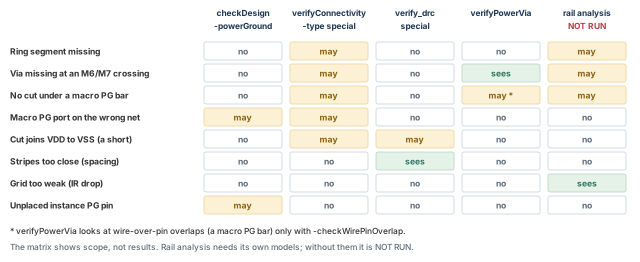
What to notice: No single check covers every row. The IR-drop row has only rail analysis, which did not run, so that claim stays open.
10.3 Reading the six outcomes
The six outcomes of section 1 (The complete power path) map to checks, as Table 22 shows.
| Outcome | Evidence |
|---|---|
| Command acceptance | The log shows no error. |
| Object creation | A readback shows the objects. |
| Logical correctness | checkDesign -powerGround and the pin-net readback. |
| Physical connectivity | verifyConnectivity and verifyPowerVia, plus placed-cell PG pins on rails. |
| DRC correctness | verify_drc -check_only special. |
| Power-integrity adequacy | Rail analysis. It is not run in the example, so this outcome is open. |
10.4 Misuse and clean-looking reports
| Misuse | Consequence |
|---|---|
| Reading "no errors" as "connected" | Unplaced cells have no pin geometry for the check to test. |
Running verify_drc before the cells are placed and calling the design DRC clean | It reports on placed instances, so unplaced cells are outside it. |
Setting -error so low that the run stops early | The report is a truncated sample. |
| Comparing reports from before and after a change without the same options | Different scope, different counts. |
Skipping -checkWirePinOverlap for macros | Macro PG bars are wire-over-pin shapes and are excluded by default. |
Continue when (1) every mandatory check ran to completion in its declared scope, with no run stopped at its cap. Also (2) each failure class needs a named check that could have seen it. Next, (3) every real violation was repaired and rechecked, or carries an approved waiver or a permitted temporary condition. A waiver states scope, owner, reason and approval; a temporary condition names its closing step. Finally, (4) you can say what each report did not cover. A finding that is explained is not a finding that is accepted. A check that did not run is NOT RUN, and it blocks the claim it would have supported.
11 IR and EM: hand calculations
Why this matters. IR drop and electromigration cannot be proven by looking at geometry. A short hand calculation tells you whether an analysis number is plausible. It also shows what an analysis needs as input. It does not replace one.
11.1 Purpose and prerequisites
- Purpose. Compute by hand the average current, a strip resistance, a drop and a current density. Learn what an analysis would need.
- Needs. Supply voltage, total power, strip dimensions and sheet resistance. All are fictional example values.
- Changes nothing. This section is arithmetic.
- Honesty rule. Nothing here runs rail analysis. Everything in this section is a toy, labeled so.
11.2 Units first
| Quantity | Unit | Check |
|---|---|---|
| Power | mW | 120 mW |
| Voltage | V | 0.8 V |
| Current | mA | mW / V = mA, so 120 / 0.8 = 150 mA |
| Resistance | Ω | Sheet resistance in Ω per square, times squares |
| Drop | mV | mA × Ω = mV |
| Current density | mA per µm of width | Current / width |
11.3 The toy model
Let us consider one strip, one load and an ideal return. The notes come first; Figure 18 then draws the circuit and the arithmetic.
- Average, not peak. 120 mW at 0.8 V is an average current. A peak during switching can be several times that. Average power is the wrong input for a worst-case drop.
- Not spread onto the strip. The 150 mA is not shared out onto this strip. The 10 mA is an arbitrary share for the hand calculation. The solved grid has many strips in parallel, many loads and a return path.
- Squares. A strip of ring metal (
M7, 0.04 Ω/sq) 100 µm long and 4 µm wide is 25 squares. At 0.04 Ω per square it is 1 Ω. - Result. 10 mA across 1 Ω is 10 mV, which is 1.25 % of 0.8 V. The 1.25 % is a share, so it has no unit.
- What the toy leaves out. Several load points, return-path drop, cut resistance, rail resistance and the real current map. Summing ideal strip and cut resistances is not a solved grid, and not an EM result.
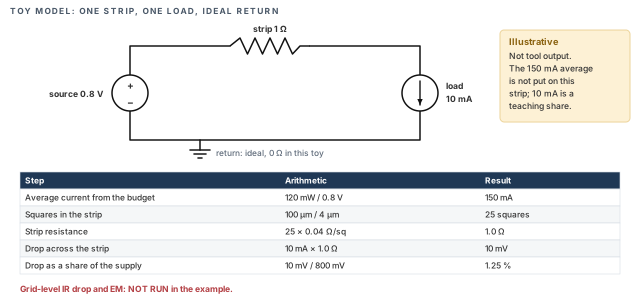
What to notice: The 120 mW budget gives an average of 150 mA. The toy carries only 10 mA of it, so 10 mV is a toy result, not a statement about any chip.
11.4 A current-density check
Current per width = 10 mA / 4 um = 2.5 mA/um.
Against the FICTIONAL limit 3.0 mA/um: 2.5 / 3.0 = 83.3 %.
- The limit is invented. 3.0 mA/µm exists only so that the division has a denominator. A real limit comes from the foundry rule deck. It depends on layer, temperature and current type. Do not use 3.0 for anything.
- What the number says. The toy strip carries 2.5 mA per µm of width, 83.3 % of the invented limit. This is a linear current-per-width figure.
- What it is not. It is not a cross-sectional current density, which needs the metal thickness. The example does not give a thickness, a foundry EM limit or a chip EM result.
11.5 What an analysis would need
- Power-grid library. Resistance and capacitance models for the grid layers.
- Current data. A power file with per-instance currents for the scenario.
- Source locations. Where the supply enters the grid.
- Instances that exist. Cells with placement, not only a name.
None of them exists in the worked example. When they are absent, the honest status is NOT RUN. That is neither zero drop nor a pass.
Stop if someone writes a drop number from the toy into a handoff as a result for the chip. A hand calculation sizes the problem. It is not a signoff claim.
Continue when (1) every number has a unit that cancels correctly, and (2) average and peak are not mixed. Also (3) the toy results must be labeled as toy results. Finally, (4) the missing analysis inputs must be listed in the handoff.
12 Refinement without stale or duplicate geometry
Why this matters. Sooner or later the grid has to change. A pitch is too coarse, a stripe lands on the wrong side, or a macro needs another cut. The risk is not the change. It is the leftover. Think of a stripe still under the new one, a cut still joining old geometry, or a count that quietly doubled.
12.1 Purpose and rule
- Purpose. Change a plan parameter, and arrive at a grid with exactly the new geometry and nothing of the old.
- Rule. Change the number in your plan, and restore the checkpoint saved before the step that uses it. Then rerun that step and every step after it.
- Why. Creation commands are not idempotent, so a rerun over its own output is never a refinement.
- Why restore beats delete. A delete by net, shape and area removes the wires you named. It does not remove the cuts you forgot, or geometry made by a different command.
12.2 Which stage owns which number
| Parameter | Used first by | Restore to the checkpoint saved before |
|---|---|---|
| Ring width, spacing, offset, layers | addRing | the ring step |
| Stripe layer, width, spacing, pitch, start | addStripe | the stripe step |
| Row rail width and layers | sroute | the rail step |
| Macro crossing area and layer pair | editPowerVia | the macro-cut step |
| Logical PG mapping | globalNetConnect | the mapping step |
Everything downstream of the changed step is stale. Checkpoints saved after it are discarded, and every later step is run again in order. Name each checkpoint after the step it precedes, so Table 25 can be followed without guessing.
12.3 A pitch sweep before you touch the tool
Hand arithmetic tells you what a change costs before you pay for a run.
Sets = floor((1000 - 30 - 6) / pitch) + 1. Metal = 4/pitch. Envelope = 6/pitch.
pitch 120:  9 sets, metal 3.33 %, envelope  5.00 %
pitch  90: 11 sets, metal 4.44 %, envelope  6.67 %
pitch  60: 17 sets, metal 6.67 %, envelope 10.00 %
- Reading it. Halving the pitch roughly doubles the stripes and the share of
M6they occupy. It also halves the distance current travels on thin rail metal. Neither side is free. - Not a recommendation. 120 µm is the example value. The sweep shows a method, not a better answer.
12.4 Refinement methods
| Situation | Method | Why |
|---|---|---|
| A parameter was wrong everywhere | Restore, rerun | No stale geometry. |
| One small area needs more metal | A scoped addStripe with -area, then a readback | Smaller blast radius. Read the result, because the options interact with the ring connection. |
| One cut set is wrong in one macro | Scoped editPowerVia, delete then add, same area | The area bounds the change. |
| A stripe must move | Restore, rerun | A move by delete and add leaves cuts at the old place. |
Treat the scoped methods as exceptions. Write down the area, the command and the readback you will compare.
12.5 Readback after a refinement
# Repeat the readbacks of sections 7 and 8 unchanged: the M6 stripe
# boxes per net and the via instances per net. Then print the modes
# that were in force for the rerun.
innovus> getAddStripeMode -nonDefault ;# stripe modes used by the rerun
innovus> getViaGenMode -nonDefault ;# via modes used by the rerun
- Acceptance criterion. The stripe count and merged positions match the arithmetic for the new pitch. The via-instance count is plausible against the new crossings. Reports are rerun with the same options and caps.
- Counts can match and geometry still differ. Counts alone do not prove that two grids are the same. Compare sorted, net-labeled boxes when it matters (section 15).
Continue when (1) the changed value is written in your plan, and (2) every later stage was rerun from a clean restore. Also (3) counts must match the new arithmetic, and (4) the check reports must be regenerated, not carried over.
13 Conditional: secondary supplies, well bias and always-on domains
Why this matters. The method of this chapter works on one supply at a time. Extra supplies reuse it, but each adds an owner, a source, a set of pins and a set of crossings. The failure is not a missing command. It is two supplies sharing a name, or a pin tied to the wrong one of them.
This section is conditional. The worked example has one supply and one return, with the macro pins VDDM and VSSM tied to them. The commands below are not part of its sequence. The section tells you what changes if your design is not like that.
13.1 When this section applies
| Design feature | What it adds |
|---|---|
| A macro with its own supply, kept apart from the core supply | A separate net, its own source, its own stripes or a local ring |
| Substrate or well bias supplies | PG pins on tap or bias cells that must reach their own net |
| An always-on region next to a switched region | Two supply nets for the same library pin name, split by domain |
| Power switches | A switched net between a source net and the cells it feeds |
13.2 What stays the same
- The six outcomes of section 1 and the checks of section 10.
- The ledger of section 2, now with a row per extra supply.
- The sequence: map, source, wires, cuts, checks, handoff.
13.3 What changes
- Logical mapping goes by scope. A blanket
-allis correct only when one net owns a pin name everywhere. With several domains, scope each statement with-sinst,-hierInst,-regionor-powerDomain. Read the effect back for every scope. - Library pin names are not net names. A bias pin has a library name. Which net it belongs to is a design decision in the ledger.
- Wires. A separate macro supply needs its own source and its own path. Only the ledger tells you which one.
- Special-route targets. Secondary power pins are joined with
sroute -connect {secondaryPowerPin}together with-secondaryPinNet {netname}. The tool requires that pairing, and secondary pin routing needs a power domain. An ordinary-netslist is not a substitute, so do not assume it works the same way. Read the result back. - Checks.
checkDesign -powerGroundand the connectivity check apply per net. They do not check that a domain boundary is legal; that is outside this chapter.
# Shape of a scoped mapping for a separate macro supply.
# Net names and the instance are invented. Confirm every option first.
innovus> globalNetConnect VDDM -type pgpin -pin VDDM -sinst u_coef \
    -override ;# tie this ROM's VDDM to its own net
innovus> globalNetConnect VSS -type pgpin -pin VSSM -sinst u_coef \
    -override ;# tie this ROM's VSSM to VSS
# Shape of a secondary power pin connection. VDD_AON is invented.
# The domain must exist. Both options are required together.
innovus> sroute -connect {secondaryPowerPin} \
    -secondaryPinNet {VDD_AON} ;# route secondary power pins
-override. It replaces an existing assignment of that pin. Use it only after reading the current assignment.- Why this block is not part of the sequence. The example ties
VDDMtoVDD. Running the block would change that design and break the expected counts. - No undo. Save the special routing before
sroute, because it has no undo.
Giving two domains the same net name because the library pin has the same name. The database accepts it, and every check reads one net. Two supplies are now shorted by name.
13.4 Handoff items for a conditional supply
- Which net, which domain, which source terminal.
- Which pins were mapped, and with what scope.
- Which checks ran on that net.
- Which analysis was not run.
14 Conditional: Flash PG with a PSDL file
Why this matters. A traditional grid is built by commands, one after another, each with its own offsets. A Flash PG grid is described once in a text file and built by one command. The description is portable. However, a description that parses is not a grid that exists. A grid that exists is not a grid that is connected.
This section is conditional. Whether route_pg is available depends on the release and the license. Confirm it in the installed tool before you plan around it. It is an alternative lane, never an addition to the traditional lane.
14.1 Purpose, prerequisites, inspect
- Purpose. Build an
M6stripe set from a description file instead of fromaddStripe. - Needs. A checkpoint saved after the logical mapping, so no rings or stripes exist yet. Also a PSDL file (
psdl/grid.psdlin the example). - Never mix. Do not build a Flash PG grid on top of a traditional one in the same database. Restore for each lane.
PSDL is the PG Structure Description Language. It is a text format, not Tcl, and its statements are in braces. A pattern is a reusable template, for example a stripe pair. A region is the area where patterns are placed.
Figure 19 sets the two lanes side by side.
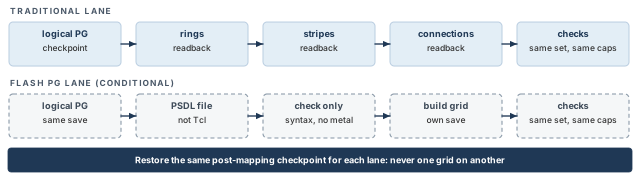
What to notice: The two grids are never mixed in one database. The syntax-only check draws no metal. Both lanes end in the same set of checks, with the same options and caps.
14.2 The PSDL file
The example file below describes the same M6 stripe pairs as section 7.
{PATTERN p_m6_pg
  {TYPE STRIPE}
  {DIRECTION VERTICAL}
  {WIDTH 2 2}
  {SPACING 2}
}
{REGION
  {COREAREA}
  {LAYER M6
    {METAL m6_pg p_m6_pg
      {NET VDD VSS}
      {OFFSET 30 * FROM REGION TO LOWEDGE}
      {STEPDISTANCE 120 * {LOWEDGETOLOWEDGE}}
    }
  }
}| Part | Meaning | Unit |
|---|---|---|
TYPE STRIPE, DIRECTION VERTICAL | A stripe pattern running vertically | none |
WIDTH 2 2 | One width per net of the pair | µm |
SPACING 2 | The gap between the two wires of the pair, edge to edge | µm |
{REGION {COREAREA}} | The region selector is braced. The region is the core. | none |
{LAYER M6 {METAL ...}} | The metal the stripes sit on, and the METAL statement inside it | none |
{NET VDD VSS} | Net order inside the pair, its own braced substatement | none |
{OFFSET 30 * FROM REGION TO LOWEDGE} | Braced substatement. The first wire's low edge is 30 µm from the region edge. * is the coordinate that does not apply. | µm |
{STEPDISTANCE 120 * {LOWEDGETOLOWEDGE}} | Braced substatement. Repeat distance, low edge to low edge. The LOWEDGETOLOWEDGE selector is itself in braces. | µm |
- Nesting is the point.
COREAREAbelongs inside a bracedREGIONselector.OFFSETandSTEPDISTANCEare separate braced substatements of theMETALstatement. Moving a brace changes the meaning, so copy the nesting, not only the words. - Status of this file. It follows the PSDL grammar for
REGION,LAYER,METAL,OFFSETandSTEPDISTANCE. It has not been parsed by the tool. The parser test is the next step, and it also confirms the units of the numbers. - Comments. PSDL files can carry comments. If you want them, copy the comment form of the PSDL examples your tool ships.
- Edge to edge here. The language describes pattern spacing as edge to edge.
SPACING 2is therefore the same 2 µm gap as in the traditional lane. - Whole sets. By default, a partial pattern set at the end of a region is allowed.
use_full_patternaccepts only whole sets. Compare the count with the arithmetic of section 7.
14.3 Step 1: syntax only
innovus> route_pg -psdl_file psdl/grid.psdl -check_psdl_only ;# parse and sanity-check
- Runs where. At the prompt, after restoring the post-mapping checkpoint. It reads the PSDL file; nothing in the database changes.
- What a pass proves. The file parses. It does not prove a grid exists.
- If it complains. Check the brace nesting first, then the spelling of the words after
OFFSETandSTEPDISTANCE.
14.4 Step 2: build
innovus> route_pg -fast -psdl_file psdl/grid.psdl \
    -write_psdl work/grid_resolved.psdl ;# build, then write resolved values
| Option | What it does |
|---|---|
-psdl_file | The description to build from. |
-fast | Fast PG mode: an internal DRC check but no full fix pass. Without it, the complete mode runs. |
-write_psdl | Writes the resolved description, so you can see which values were used. |
- Not idempotent. A second run adds the grid again. Restore before a rerun.
- Fast is for trial. Fast mode may leave rule violations that the complete mode fixes. Use the complete mode when the structure is stable.
- Return and report. Messages in the log, the resolved file, and the database. Read the stripes back with the recipe of section 7.
14.5 What a comparison with the traditional lane can show
The traditional stripes of section 7 are made after the ring and the source terminals exist. The Flash PG lane starts from the post-mapping checkpoint, which has neither. The stripe ends, their cuts to the ring and their power path therefore differ. The stored boxes need not match. Choose one of two honest comparisons.
- A stripe-pattern exercise. Compare only the x pattern, the count and the width. Expect nine
VDDand nineVSSstripes onM6, each 2 µm wide. The firstVDDbox sits at x 70 to 72, with a 2 µm gap. Say in your note that this is all that was compared. - A full-grid comparison. Give both lanes the same ring, the same source terminals and the same connection steps. Then compare the stored boxes, the cuts and the check reports. A complete alternative flow includes those structures and their checks.
- If the pattern differs. The nesting and the reference words in the file are the first suspects, then the net order.
14.6 Misuse and undo
| Misuse | Consequence |
|---|---|
| Treating the syntax pass as a built grid | No wires, an empty report, a wrong sense of progress. |
Running route_pg on top of a traditional grid | Two grids in one database. |
| Trusting a quiet fast-mode result as DRC clean | The fast mode skips the full fix pass. |
Undo. There is no undo. Restore the post-mapping checkpoint. Or delete the special wires by net and shape, then restore for certainty.
Continue when (1) route_pg is available in the installed tool, and (2) the syntax check passed. Also (3) the comparison you chose, pattern only or full grid with equal context, must be made and recorded. Finally, (4) the same checks must run with the same options and caps.
15 Acceptance, restore proof and handoff
Why this matters. A power grid that only its builder understands is not finished. The handoff says what exists, what supports each claim, and what is still open. The next person should be able to restore it, compare it and continue without asking you. Acceptance is the decision that lets a claim stand, and it needs more than a report that exists.
15.1 Purpose and prerequisites
- Purpose. Decide which claims the evidence supports, and save the grid in forms the next step can use. Prove that a fresh restore reproduces it, and write the claims with their evidence.
- Needs. The checks of section 10, run to completion, and the readbacks of sections 6 to 9. Also a checkpoint saved after the connection step.
- Changes. Files on disk. The database is not changed.
15.2 Acceptance rules
Explaining a finding does not accept it. Each mandatory check ends in exactly one of the states in Table 31.
| State of the evidence | What it allows |
|---|---|
| Ran to completion in its declared scope, below its cap, nothing reported | The claim it covers, within that scope |
| A real violation was found | Repair and recheck, or an approved waiver, or a permitted temporary condition. Nothing else. |
| Waiver | Written scope, owner, reason and approval. Without all four it is not a waiver. |
| Temporary condition | Allowed only with the named step that closes it, such as "open pins until the macro cuts of section 8" |
| Truncated, failed or interrupted | Blocks the claim. A reached cap is incomplete coverage, not a threshold you passed. |
| NOT RUN, or unknown | Blocks the claim it would have supported. It is neither zero nor a pass. |
Only a completed clean check supports an unqualified clean result. An approved waiver or permitted temporary condition may allow the stated, scoped handoff. It does not turn the check into a clean result. A check that ran in a limited scope differs from one that was NOT RUN.
- IR and EM. NOT RUN is compatible with a handoff only when the handoff is clearly scoped as a geometry-stage handoff. It is never compatible with a signoff claim.
- "Reports exist" is not a rule. A report file proves that a command wrote a file. Open each one and read its header, scope, caps and completion line.
- "Each readback matches or is explained" is not a rule. A mismatch is repaired, waived, or recorded as a temporary condition. A temporary condition names its closing step.
15.3 Saves and what each contains
# One new run directory per save. Refuse to reuse one, so no output
# of any save format can overwrite an earlier one.
innovus> set run checkpoints/grid_run1 ;# new run directory name
innovus> if {[file exists $run]} { error "already exists: $run" } ;# refuse reuse
innovus> file mkdir $run ;# create the directory
innovus> if {![file writable $run]} { error "not writable: $run" } ;# check access
innovus> saveDesign $run/grid.enc ;# full database: .enc and its data directory
innovus> saveFPlan $run/grid ;# floorplan and power route: .fp and .fp.spr
innovus> saveSpecialRoute $run/grid.spr ;# special routing on its own
# DEF with rows, pins, special-net connections and special routing.
innovus> defOutBySection -rows -pins -specialNets -specialNetRouting \
    $run/grid_special.def ;# special-net DEF with routing
| File | Carries | Does not carry |
|---|---|---|
.enc and .enc.dat | The whole database | Anything outside it |
.fp and .fp.spr | The floorplan, and the power route in the .spr part | Reports |
.spr from saveSpecialRoute | Special routing | Logical mapping rules |
.def with -specialNets | The connections of the special nets | Their routing, unless -specialNetRouting is also given |
.def with -specialNetRouting | The routing of the special nets | Signal routing, if not asked |
writeFPlanScriptis not a special-routing export. It writes the floorplan as a script and leaves out the special routing. A handoff that relies on it alone loses the grid. It is still the way to list theglobalNetConnectrules (section 3).- DEF.
defOutBySectionwrites the Design Exchange Format (DEF), a text form of the layout. - Files are not proof. A file on disk shows that a save ran. The restore below shows that it works.
15.4 Fresh restore proof
The proof has three parts. They are a dump of the grid before, the same dump after a fresh restore, and a comparison that can fail.
- What the template is. An adaptable readback template, not a verified proof engine, and it has not been run in Innovus.
- What it records. A subset of the database. It covers both PG nets' special wires and vias, three macros, the source terminals and four modes.
- What it leaves out. The top name and core box (read those as in section 2), and the halos.
- What a match means. "Same recorded subset" is all a match can say. It does not say the whole design is identical.
Run it in the saved session first. Then run it in a FRESH session after restoreDesign, with the file name changed to reports/grid_after.dump. Fill the two field lists before the first run. Keep the three parts below in one file. You can paste it at the prompt, or save it and source it.
## Template. Run in the saved session, then in a FRESH session after
## restoreDesign, with a different file name. Fill the field lists first.
set dumpfile reports/grid_before.dump
## List the attributes with: dbGet $v.? and dbGet $t.?
## Include identity and geometry fields, not just any field.
set viaFields {}
set termFields {}
if {![llength $viaFields] || ![llength $termFields]} {
    error "fill viaFields and termFields first"
}
proc need {label val} {
    if {$val eq "" || $val eq "0x0"} { error "empty or no match: $label" }
    return $val
}
proc num {label v} {
    if {![string is double -strict $v]} { error "not a number: $label $v" }
    return [format %.4f $v]
}
## Write to a temporary file. Rename only after every check passed.
file delete -force $dumpfile.tmp $dumpfile $dumpfile.ok
set out [open $dumpfile.tmp w]
set rows {}
The second part walks the special wires and vias of both nets, then the three macros. Each wire box is checked for four numbers in order.
foreach netname {VDD VSS} {
    set n [need "net $netname" [dbGet -p top.nets.name $netname]]
    if {[llength $n] != 1} { error "net $netname ambiguous: $n" }
    foreach w [need "wires $netname" [dbGet $n.sWires]] {
        set bx [need "box $w" [dbGet $w.box]]
        if {[llength $bx] == 1} { set bx [lindex $bx 0] }
        if {[llength $bx] != 4} { error "box of $w: $bx" }
        set b {}
        foreach c $bx { lappend b [num "box $w" $c] }
        if {[lindex $b 0] > [lindex $b 2] || [lindex $b 1] > [lindex $b 3]} {
            error "corners out of order: $w $b"
        }
        lappend rows "W $netname [need "layer $w" [dbGet $w.layer.name]] $b"
    }
    foreach v [need "vias $netname" [dbGet $n.sVias]] {
        set f {}
        foreach a $viaFields { lappend f [need "$a of $v" [dbGet $v.$a]] }
        lappend rows "V $netname $f"
    }
}
foreach name {u_buf_a u_buf_b u_coef} {
    set i [need "inst $name" [dbGet -p top.insts.name $name]]
    if {[llength $i] != 1} { error "inst $name ambiguous: $i" }
    lappend rows "I $name [need orient [dbGet $i.orient]]\
        [need pStatus [dbGet $i.pStatus]]\
        [need pgCellTerms [dbGet $i.pgCellTerms.name]]\
        [need pgTermNets [dbGet $i.pgTermNets.name]]"
}- What it records. Every special wire of both nets on every layer present, with its net, layer and box. Every special via instance, with the fields you confirmed. The orientation, status and PG pin names of three macros, the two source terminals, and four modes. Sorting with
lsortfixes the order. - What stops it. An empty or
0x0selection, an ambiguous match, or an empty required field. Also a non-numeric or misordered box, or empty field lists. - What it does not prove. A non-empty field list can still omit an essential field. Choose identity and geometry fields on purpose.
%.4fis a display precision, not your database precision, and not proof of exact equality. - Modes and lists. Mode readback shows the settings now, not the settings under which the geometry was built.
-quietreturns a Tcl list, so print one value before you rely on it as a scalar.
The third part adds the terminals and the modes. Then it writes the sorted rows and the completion marker.
foreach tn {VDD VSS} {
    set t [need "term $tn" [dbGet -p top.terms.name $tn]]
    if {[llength $t] != 1} { error "term $tn ambiguous: $t" }
    set f {}
    foreach a $termFields { lappend f [need "$a of $t" [dbGet $t.$a]] }
    lappend rows "T $tn $f"
}
lappend rows "M ring [getAddRingMode -nonDefault -quiet]"
lappend rows "M stripe [getAddStripeMode -nonDefault -quiet]"
lappend rows "M via [getViaGenMode -nonDefault -quiet]"
lappend rows "M sroute [getSrouteMode -nonDefault -quiet]"
foreach r [lsort $rows] { puts $out $r }
puts $out "END [llength $rows]"
close $out
## Completion marker: only a finished, checked dump gets one.
file rename -force $dumpfile.tmp $dumpfile
close [open $dumpfile.ok w]- The completion marker. The dump is renamed into place only after all checks passed, and a
.okmarker is written last. A failed run leaves neither, because the old dump and marker are deleted first. - Attribute names.
sWires,sVias,layer.name,box,pgCellTerms,pgTermNets,orientandpStatusare the usualdbGetnames. Confirm each with.?in your release. - Halos. The dump leaves halos out. List the halo attributes with
.?, read them for each macro in both sessions, and compare them separately.
The compare step is a small shell file. Run it as a script, never pasted at the prompt: its exit would close an interactive shell.
# Both dumps must be fresh, finished and marked.
for f in reports/grid_before.dump reports/grid_after.dump; do
    test -s "$f" && test -e "$f.ok" || { echo "NOT FINISHED: $f"; exit 2; }
    tail -n 1 "$f" | grep -q '^END ' || { echo "NO END LINE: $f"; exit 2; }
done
# diff exits 0 when equal, 1 when different, above 1 on failure.
diff reports/grid_before.dump reports/grid_after.dump
rc=$?
if [ $rc -eq 0 ]; then echo "EQUAL (recorded subset only)"
elif [ $rc -eq 1 ]; then echo "DIFFERENT"
else echo "COMPARISON FAILED ($rc)"; fi
$ sh compare_dumps.sh # compare the dumps and report the result
- Read the exit status. Silence from
diffis not enough. Exit 0 is equal and 1 is different. Above 1 means the comparison itself failed. - Fresh means fresh. Delete both dumps and markers before a run, so two old matching files cannot print EQUAL. The first loop refuses a dump that is empty, unmarked or missing its END line.
- If it says DIFFERENT. Look at the first differing line. A
WorVline points to the grid,Ito a macro,Tto a terminal.Mpoints to a mode set in one session and not the other.
Figure 20 lists what the proof must compare, and how each kind can differ.
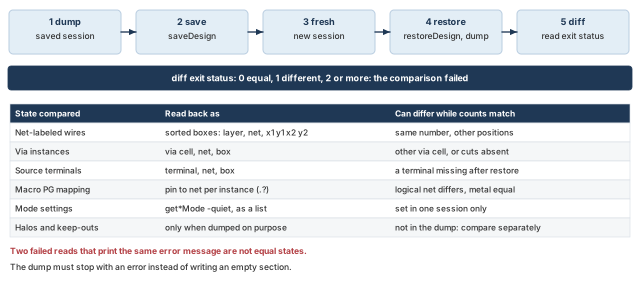
What to notice: Each kind of state has its own readback and its own way to fail. Equal counts, or two matching error messages, prove nothing.
15.5 Special-route transfer
When the grid goes to another database, the transfer is its own source of mismatches. Table 33 lists the usual ones.
| Step | What can go wrong |
|---|---|
saveSpecialRoute, then loadSpecialRoute into a database with other instances | Wires attach to nothing, or to the wrong thing |
defOutBySection, then defIn | Rows or pins missing from the file. Special-net connections without routing, when -specialNetRouting was left out |
| Logical mapping not saved with the geometry | Wires exist and pins are not tied |
After a transfer, repeat every readback: the sorted dump, the pin-net mapping and the checks of section 10. Treat a mismatch as a transfer defect until it is proven otherwise.
15.6 Settings and unresolved items
Write down, with the files:
- The mode settings in force:
getAddRingMode,getAddStripeMode,getViaGenMode,getSrouteMode,get_verify_drc_mode. - The ring offset setting and the stored boxes.
- Every "confirm in your release" item that your tool answered, and the answer.
- A list of unresolved items, each with who decides it and what it blocks.
Supply ownership:   VDD 0.8 V, VSS 0 V (example), owner: ____
Source terminals:   VDD M8 x __ __ y __ __ ; VSS M8 x __ __ y __ __
Macro PG mapping:   buf_ram VDD VSS ; coef_rom VDDM->VDD VSSM->VSS
Generated:          9+9 M6 stripes, ring M7/M8, followpins M1,
                    via instances __ (instances, not cut shapes)
Check scope:        special connectivity, special DRC, power via,
                    logical PG; caps reached: yes / no
Waivers:            ____ (scope, owner, reason, approval)
Temporary items:    ____ (closing step: ____)
Settings:           see the mode printouts saved with the dumps
IR / EM:            NOT RUN. Missing: power-grid library, current data, sources
Unresolved:         1. ____ (decides: ____, blocks: ____)
Fresh restore:      diff exit status __ ; halos compared by: ____
15.7 The handoff table
Figure 21 pairs each handoff claim with its evidence and its limit.
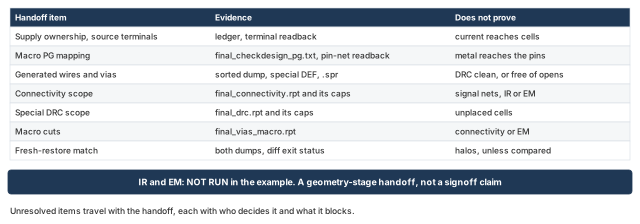
What to notice: Each claim is paired with its evidence and its limit. IR and EM are NOT RUN in the example; a geometry-stage handoff may say so and still be useful, but it cannot claim signoff.
writeFPlanScriptis not a special-route export.saveFPlan,saveSpecialRouteand the DEF special-net sections are.
Stop if the handoff says "power grid clean" or "IR OK". Say what was checked, in what scope, with what caps, and what was not.
Accept when (1) every mandatory check completed in its declared scope, below its cap. Also (2) every real violation was repaired and rechecked. If not, it carries an approved waiver or a temporary condition with its closing step. Next, (3) the fresh restore matches by a comparison whose exit status you read. Halos are compared too. Then (4) the unresolved list is written. Finally, (5) IR and EM are stated as NOT RUN in a geometry-stage handoff, or their results are attached with their inputs.
16 Common mistakes and how to catch them
Table 34 collects the beginner mistakes this chapter warned about. It names the likely cause and the fix for each. The troubleshooting matrix that follows starts from a symptom instead.
| Symptom | Likely cause | Fix |
|---|---|---|
| A log says "connected", and the pin still has no metal | A logical connection was read as "powered" | Read the pin-net readback for the net, and verifyConnectivity for the metal. |
| Pins of one domain end up on another domain's supply | A blanket -all mapping in a design with several supplies | Scope each statement by instance, hierarchy, region or domain, and read each scope back. |
| Clean geometry checks, but rail analysis reports no source | A source terminal sits beside the ring instead of on it | Test containment of the terminal box against the stored ring wire box of the same net. |
| Thousands of stripes, or a rejected stripe command | -spacing was read as the pitch | Put the repeat in -set_to_set_distance and read back the merged x positions. |
| Macros "connected", but some bars have no cut | The macros were declared connected because editPowerVia or sroute finished without an error | Count crossings per net and list the bars with no cut. |
| A quiet report hides a real failure | The report was read without its scope, options and caps | Read the header and completion line, and add the check that covers the gap. |
| A handoff carries a drop number or a zero count | A toy drop was written as a chip result, or 0x0 was read as zero | Label toy results, write NOT RUN for missing analysis, and treat 0x0 as no match. |
17 Troubleshooting matrix
Start from what you see. Each row names the first query to run, the next check, and the repair or restore with what to rerun. A cause you cannot tie to evidence is not accepted. The recipes are those of sections 2 to 15.
The rows come in three groups. First come database reads and mapping, then geometry (grid, rows, cuts), then reports, analysis and transfer.
| Symptom | First query | Next check | Repair or restore, then rerun |
|---|---|---|---|
A dbGet prints 0x0 or nothing | .? on a validated object (for example dbGet $n.?), then the exact name with dbGet top.nets.name | Is the name, depth (-p) or attribute wrong for this release? | Fix the name or attribute. Treat 0x0 as no match, never as zero. Rerun: the same query. |
A nested dbGet returns odd objects | Print the pointer list of the inner dbGet -p, with its length | Did the inner query select net or instance objects, and exactly one? | Use -p, not -p2, for top.nets.name. Validate before walking deeper. Rerun: the inner query, then the outer. |
| A macro PG pin is tied to the wrong net | pgCellTerms.name and pgTermNets.name for that instance | Compare with the supply ledger. checkDesign -powerGround may be quiet. | Narrow globalNetConnect on that one instance, or restore. Rerun: readback, checkDesign -powerGround, verifyConnectivity. |
| A macro PG port reports unconnected | The pin-net readback first | Does a bar of that net have a via instance? Is there an overlap, or only a special-route target? | Fix the mapping, then add scoped cuts in the macro box, or let sroute extend to a legal target. Rerun: verifyConnectivity -type special, verifyPowerVia -checkWirePinOverlap. |
| A floating grid, or no source | top.terms.name, then the terminal shape and net after .? | Is the terminal inside a wire of its own net on the ring? | Create or move the terminal on the ring wire. Rerun: containment test, verifyConnectivity -type special. |
| Wrong supply on a pin (ring, stripe or pin on the other net) | Net-labeled box dump of both nets | Compare each box with the ledger and the plan | Restore, correct the net order or mapping, rerun the step. Rerun: the dump, then all checks. |
| Unexpected stripe count or duplicate stripes | The M6 stripe boxes per net (section 7) | Merged x positions against the arithmetic. Two grids on top of each other double the objects. | Restore the checkpoint before the stripe step, fix the value, rerun the step once. Rerun: stripe readback, then checks. |
| Missing row rails | Row boxes, distinct y levels | Were rows cut? Are levels present and segments accounted for? Was the layer or range wrong? | Restore the checkpoint before the rail step, rerun with the right options. Rerun: rail readback, then checks. |
| Missing or rejected via | verifyPowerVia report and the via-instance readback | Layer range, overlap size against the bound, obstruction, different nets | Scoped editPowerVia, never between different nets. Rerun: verifyPowerVia, verifyConnectivity. |
| Ring segment missing | Ring wire boxes | Is the loop closed? A local geometry defect; a global open only if the topology says so | Restore and rerun the ring step. Rerun: ring readback, verifyConnectivity. |
| Short or spacing finding | Marker location in violationBrowser, nets on both shapes | Duplicate grid? A cut between different nets? | Delete the offending geometry by net and area, or restore. fixVia only for the marker types it supports. Rerun: verify_drc -check_only special. |
| Cells look connected but are not | Is the instance placed? Its pStatus | Placed pin shapes against a rail | Place the cells; do not edit the grid. Rerun: verifyConnectivity. |
| A clean-looking report | Its header, options, caps and completion line | Does the scope include the failure? Was a cap reached? | State the scope. Add the check that covers the gap. Raise the cap. Rerun: another report with a different scope. |
| A report scope gap | get_verify_drc_mode, the options of the last run | Same options before and after the change? | Rerun with the same options and area. Rerun: the same command. |
| Rail analysis fails or looks odd | The prerequisites: library, current data, sources | Is net voltage set? Are the sources on the grid? | Supply the inputs, or write NOT RUN. Do not infer a result. Rerun: the analysis, with its own log. |
| A drop of zero is reported | Did the analysis produce a result file at all? | The log, the inputs, the sources | Read zero as no result until the log says it ran. Rerun: the analysis. |
| A restore or transfer does not match | The sorted dumps and the diff exit status | First differing line: wire, via, instance or mode? | Restore in a fresh session. Compare halos apart. Redo the readbacks after a transfer. Rerun: dumps again, then the checks. |
A finding you cannot classify is not accepted. Stop and ask the owner of the input.
18 Interview preparation
Answer each question in one sentence first, then add detail.
A logical connection says which net a pin belongs to; a physical connection is metal and cuts that carry current to it.
globalNetConnectmakes the logical tie. No metal exists at that point.- Physical connection needs a source, a path of metal and cuts, and the right net at both ends.
Because nothing injects current into it unless a source terminal or pad on the same net touches the ring.
- A ring with no source is a floating loop of metal.
- Geometry checks can still be clean; rail analysis would report no source or an unconnected net.
globalNetConnect ... -all safe in the worked example but risky in a multi-domain design?It is safe only when the ledger proves one pin name has one owner throughout the scope.
- With several domains, the same pin name can belong to different nets in different places.
- Scope each statement with a narrower selector, and read each scope back.
addRing -width 4 -spacing 2 -offset 4, how far does the ring reach from the core edge?14 µm under the edge convention (-wire_center_offset false), and 12 µm under the center convention.
- Edge: inner wire 4 to 8 µm, outer 10 to 14 µm; 26 µm of the 40 µm margin remain.
- Center: inner 2 to 6 µm, outer 8 to 12 µm; 28 µm remain.
- The stored boxes, not the request, confirm which one you got.
-spacing and -set_to_set_distance in addStripe?-spacing is the gap inside one VDD-VSS pair; -set_to_set_distance is the repeat pitch from one pair to the next.
- In the example the gap is 2 µm and the pitch is 120 µm, giving nine sets.
- Treating the spacing as the pitch gives a 4 µm repeat with thousands of wires, or a rejected command.
No; rails prove the row grid exists, and only a placed cell's PG pins overlapping a rail prove a connection.
- Rails are built from row geometry before placement.
- An unplaced instance has no valid pin position, so its PG tie stays a logical assignment.
At most 5 × 5 = 25, from floor((2 - 0.1 + 0.2) / 0.4) = 5 per axis.
- Six cuts would need 2.2 µm plus enclosure, more than the overlap.
- The bound is a ceiling; the tool may place fewer, and zero cuts is an open.
verifyPowerVia run with -checkWirePinOverlap for the macro connections?Macro PG bars are pin shapes, and wire-over-pin crossings are excluded from the check by default.
- Without the option, a stripe over a bar with no cut can go unreported.
- The example adds
-layerRange {M5 M6}to cover the bar-to-stripe pair.
Its scope, options, cap and completion line, because a quiet report only means nothing was found inside its scope.
verify_drcsees placed instances only; a run that reached-limitis incomplete.- Record
get_verify_drc_mode, and compare reports only when the options match.
10 mA through a 1 Ω strip gives 10 mV, or 1.25 % of 0.8 V, and it is only a sizing aid.
- It leaves out several loads, return drop, cut and rail resistance, and the real current map.
- 120 mW at 0.8 V is an average of 150 mA, not a peak.
- Without a grid library, current data and sources, rail analysis is NOT RUN, never zero.
addStripe again?Creation commands are not idempotent, so a rerun adds a second grid on top of the first.
- Restore the checkpoint saved before the stripe step, then rerun that step and every later one.
- A delete by net and shape can leave cuts behind, which look like a new problem.
Dump a sorted, net-labeled subset before, dump it again in a fresh session after restoreDesign, and read the diff exit status.
- Exit 0 is equal, 1 is different, and above 1 means the comparison failed.
- Completion markers stop a stale or failed dump from passing; halos are compared separately.
Compact glossary
| Term | Meaning |
|---|---|
| PG pin | A cell or macro pin that must be tied to a supply or return net, such as VDD or VSSM. |
| Supply ledger | The table of supply nets, values, owners and library pins that every mapping is checked against. |
| Logical mapping | The name rule (globalNetConnect) that ties PG pins to nets. It is not metal. |
| Source terminal | A PG pin shape on the block boundary or on the ring that stands for the external supply; current enters there. |
| Ring | A closed loop of power wires around the core; here M7 top and bottom, M8 left and right. |
| Stripe | A long straight power wire repeated across the core; here 2 µm wide on M6. |
| Set-to-set distance | The repeat pitch from one stripe pair to the next; 120 µm in the example. |
| Spacing | The gap inside one stripe pair or between two ring wires, edge to edge. |
| Followpin (row rail) | The M1 power wire along each standard-cell row, shared by the rows above and below. |
| Crossing | A place where two wires of adjacent layers overlap. |
| Via instance | One via object in the database; it may hold an array of cuts. |
| Cut shape | One square of a cut layer, such as one V56 square. |
| Enclosure | Metal that must extend past a cut on each side. |
| Placement halo | A margin that keeps cells away from a macro; it does not stop metal. |
| Routing blockage | An area that blocks metal on one named layer only. |
| IR drop | Voltage lost along the grid: current times resistance. |
| EM | Electromigration: metal wear under current, limited per wire or cut by the project. |
| NOT RUN | The status of a check or analysis that did not run; never zero and never a pass. |
| Cap | The -error or -limit value that stops a check; reaching it means incomplete coverage. |
| Waiver | An accepted violation with written scope, owner, reason and approval. |
| Checkpoint | A saved database named after the step it precedes; restoring it is the clean undo. |
| PSDL | PG Structure Description Language: a braced text file that route_pg builds a grid from. |
| Restore proof | A sorted dump before and after a fresh restore, compared by diff exit status. |
One-page summary
Purpose. Build the power grid on the accepted floorplan and read back what was made. Check each claim with the tool that fits it. Then hand it on with evidence and open items.
Workflow map.
- Power path, entry gate, logical PG, source, layers.
- Ring, stripes, macro and rail connections, vias.
- Checks, hand calculation, refinement, acceptance, troubleshooting, desk sheet.
Key concepts.
- A logical connection says which net a pin belongs to. It says nothing about metal.
- Six outcomes are different claims: command acceptance, object creation, logical correctness, physical connectivity, DRC correctness and power-integrity adequacy.
- Read back the stored geometry, not the request.
- Spacing is the gap in a pair. Pitch is the repeat distance.
- A cut joins two metals. Overlap in plan view is not a connection.
- Row rails exist from row geometry and do not connect unplaced cells.
- A check reports inside its scope. A quiet report is not a clean design, and a check cap is not an acceptance threshold.
- A hand calculation sizes a problem. If IR and EM did not run, write NOT RUN, never zero.
- Creation commands are not idempotent. Restore, then rerun.
- An explained violation is not an accepted one. Repair it, waive it with an owner, or close it with a named step.
Common mistakes. See Table 34.
Acceptance questions.
- Does the ledger name every supply, owner, source and return?
- Is every PG pin mapped, and did a readback confirm it?
- Do the stored ring and stripe boxes match the plan?
- Does every macro bar have a via instance of its own net?
- Did every mandatory check finish in scope below its cap, with settings recorded?
- Are IR and EM either attached with their inputs or marked NOT RUN?
- Did a fresh restore reproduce the sorted dump, with the diff exit status read and halos compared?
- Are sources on their own net and modes recorded? Are row levels and segments reported as two numbers?
- Is the unresolved list written, with who decides each item?
Debug and sanity desk sheet
The two tables below are command patterns, all in the Legacy UI command set. Run one command per line. $n is a net object, $i an instance and $t a terminal; replace the example names and ROM box with your own. 0x0 is no match and an llength above 1 is ambiguous: stop on both. Confirm attribute names with .?.
| Ask | Command pattern | Read it as | Caution, next check |
|---|---|---|---|
| Which design and core? | dbGet top.name, dbGet top.fPlan.coreBox | Name, then llx lly urx ury in µm | Not database units unless you passed -d |
| Technology and layers? | dbGet head.?, dbGet head.layers.name | Attribute list; layer names in stack order | Directions and rules come from the LEF, not memory |
| Which nets are PG? | dbGet [dbGet -p top.nets.isPwrOrGnd 1].name | Names flagged as power or ground | A missing ledger net means stop |
| Select exactly one net | set n [dbGet -p top.nets.name VDD] | One pointer | 0x0 none, more than one ambiguous. -p gives net objects, -p2 does not |
| Special wires of it | foreach w [dbGet $n.sWires] {puts "[dbGet $w.layer.name] [dbGet $w.box]"} | One line per wire, layer and box together | Test for 0x0 first. Empty is not zero |
| Special vias | set vs [dbGet $n.sVias], and only if $vs is not 0x0, dbGet [lindex $vs 0].? | Via instances, with a field list | Instances are not cut shapes. Use .? first |
| Macro placement | set i [dbGet -p top.insts.name u_coef], then dbGet $i.box, dbGet $i.orient, dbGet $i.pStatus | Box, orientation, status | Validate $i first. An unplaced instance has no valid pin positions |
| Macro PG names and nets | dbGet $i.pgCellTerms.name, dbGet $i.pgTermNets.name | Library pin names, tied nets | Same length? Compare with the independent supply ledger |
| Rows | dbGet top.fPlan.rows.box, dbGet top.fPlan.rows.orient | One box per row object | Distinct y levels are not segments. cutRow splits rows |
| Sources | dbGet top.terms.name, set t [dbGet -p top.terms.name VDD], dbGet $t.? | Terminal names; schema of one terminal | Keep signal ports and PG terminals as separate counts |
| Modes in force | getAddRingMode, getAddStripeMode, getViaGenMode, getSrouteMode, each -nonDefault; get_verify_drc_mode | Changed settings | Record with the result. Save before setting, restore after, also on error |
Checks replace markers and write reports. A report that exists or is quiet is not a PASS: read its header, scope, caps and completion line. A reached cap is incomplete coverage, and a check that did not run is NOT RUN.
| Check | Command pattern | Reads as | Caution, next check |
|---|---|---|---|
| PG type | checkDesign -powerGround -noHtml -outfile r.txt | Power-to-ground, floating and non-PG ties | Does not know intended voltages or domains. Compare pin-to-net with the ledger |
| Connectivity | verifyConnectivity -type special -error 1000 -warning 50 -report r.rpt | Opens, islands, unconnected pins | -allPGPinPort for all PG ports, if justified. Not every damaged redundant path |
| Special DRC | set_verify_drc_mode -limit 1000, then verify_drc -check_only special -report r.rpt | Spacing, width, shorts on special wires | Placed instances only. Record the mode. Raise the limit if reached |
| Missing vias | verifyPowerVia -checkWirePinOverlap -layerRange {M5 M6} -report r.rpt | Missing cuts at crossings, wire over macro pins | A per-crossing finding, not a global open. The stacked check needs a range |
| Markers | violationBrowser -connectivity or -filter {Short} | Locations and types | Connectivity markers are overwritten on rerun |
| Fix a via marker | fixVia -area {590 800.2 830 960.2} -minCut, then verify_drc again | Replaces supported markers | Only DRC markers it supports. Not a general missing-via creator |
| Add or delete cuts | editPowerVia -add_vias 1 -nets VDD -bottom_layer M5 -top_layer M6 -area {{590 800.2 830 960.2}} | New via instances | Read the instance count before and after. Restore area_only |
| Fresh restore | Dump, restoreDesign in a new session, dump, diff | Exit 0 equal, 1 different, above 1 failed | Silence is not proof. Dumps are sorted and net-labeled |
| IR and EM | set_rail_analysis_mode, analyze_rail | Needs library, current data, sources | Missing input: NOT RUN. Never zero. Never a pass |
Where the next chapter goes, and why
You now hold a grid whose geometry is checked and whose open items are written down. One gap remains on purpose: the standard cells are not placed. Rails exist, but no cell pin has been shown to touch one.
Placement, Pre-CTS Optimization, Checks and Handoff closes that gap. Placement puts the cells on the rows, and their PG pins land on the rails you built. It is also where the grid starts to cost something, because stripes and cuts take routing room. Keep the handoff note open. Its unresolved list, its NOT RUN items and its restore proof are the first things the next stage will read.