
Placement, Pre-CTS Optimization, Checks and Handoff: legal cells for CTS
Why this chapter matters in a real project
Placement is the step where the standard cells of the netlist get locations. Everything after it inherits those positions: clock tree synthesis (CTS), routing and timing closure. Legalization and optimization can only repair small things. A poor global placement is nearly always a reason to go back, not to push forward.
Some missing inputs still let the tool produce a result. Without timing constraints, for example, the placer runs on wirelength alone. That result answers a different question from the one you meant to ask. A clean timing summary can then hide real violations, because nothing was checked. Essential physical inputs, such as rows or libraries, can stop the run outright.
The opposite error costs time too. An average can look fine while one window cannot route. A placement handed over without its evidence is only a guess. Done badly, it costs a clock tree built on cells that must move. It also costs a congestion problem found after routing, and a timing number nobody can reproduce.
Prerequisites
- Understanding the Innovus Environment and Session: how to restore a design, use the Tcl prompt and query the database with
dbGet. - Design Data Preparation, Import, Sanity Checks and Export: netlist, libraries, constraints and views loaded and checked.
- Floorplanning: die, core, rows, macros, halos and the saved floorplan checkpoint.
- Power Planning: rings, stripes, rails and the checkpoint that holds the finished grid.
- You do not need to know how the placer's algorithms work inside.
- You do not need to know clock tree synthesis. The next chapter builds the clock tree.
Learning objectives
- Explain what placement changes in a database, what it leaves alone, and which evidence shows each change.
- Separate three states that are easy to confuse: the design loads, it is ready for placement, a timing report means something.
- Describe global placement, legalization and detailed placement, and why a legal placement can still be poor or unroutable.
- Prepare the placement area: usable rows, fixed objects, blockages, regions, fences, physical cells and cell-use restrictions.
- Run
place_designandoptDesign -preCTSwith recorded settings, and read the density, congestion and timing reports. - Apply one change at a time from a restored baseline, compare runs on several measures, and accept or restore.
- Answer four separate questions: is it legal, plausibly routable, timing-acceptable for this stage, ready for CTS.
- Diagnose eight common placement failures from a symptom, and say when the cause is an upstream assumption.
- Save, restore and hand over the placement with its evidence and its open items.
Figure 1 shows the whole chapter on one page. Come back to it whenever you lose your place.
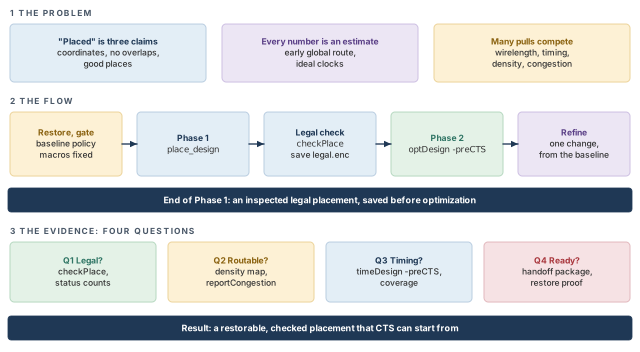
What to notice: Phase 1 ends with a saved legal placement before Phase 2 changes anything. The result bar names what CTS receives.
The running example and its conventions
Every example uses the invented design stream_acc from Floorplanning. Table 1 lists what we already know about it.
| Item | Value |
|---|---|
| Core box | 40 40 1040 1040, so the core is 1000 × 1000 µm |
Macro u_buf_a | RAM, 420 × 300 µm, box 100 90.4 520 390.4, orientation R0 |
Macro u_buf_b | RAM, 420 × 300 µm, box 100 689.6 520 989.6, orientation R0 |
Macro u_coef | ROM, 240 × 160 µm, box 590 800.2 830 960.2, orientation MY |
| Halo | 10 µm on every side of each macro |
| Rows and site | Rows 1.4 µm high on core_site, which is 0.2 × 1.4 µm |
| Power grid | Rails on M1, stripes on M6, from Power Planning |
Orientation R0 is unrotated; MY is mirrored about the vertical axis. Every quantity this chapter adds, such as a cell area, a utilization or a slack, is invented and says so. Dimensions are in µm, areas in µm² and times in ns unless a figure says ps. Code uses the plain numbers the tool expects.
Nothing in this chapter was run in a licensed session. Drawings and report excerpts are invented teaching illustrations, not measured tool output. Confirm each option with -help in your installation before you rely on it. Adapt every path and value to your site.
1 Purpose, boundaries and entry conditions
1.1 Where this chapter starts and stops
Let us fix the position of the chapter in the flow first. Floorplanning decided the geometry: die, core, rows, macros and halos. Power Planning added the supply metal. Preplaced objects, such as macros and physical cells, already have locations. The standard cells have so far been a list in a netlist, with no location.
This chapter does three things:
- It gives the standard cells locations.
- It adjusts the netlist where the tool is allowed to.
- It judges the result and hands it on.
The sequence we teach is a model, not a list of separate commands. The tool can combine steps or iterate inside them. A single place_design call, for example, runs global and detailed placement together with placement-related optimization. It can also run legalization internally. The worked flow uses two main commands: place_design, then optDesign -preCTS. Section Three commands, three different roles compares them with place_opt_design, the integrated alternative.
| In this chapter | Not in this chapter |
|---|---|
| Readiness for placement, global placement, legalization, detailed placement | Floorplan creation, macro placement, halos as design decisions (Floorplanning) |
| Pre-CTS optimization: sizing, buffering, restructuring for setup and design-rule violations | Power-grid creation and its checks (Power Planning) |
| Congestion and routability estimates, controlled refinement | Clock tree synthesis, clock skew work, hold repair after CTS |
| Placement checks, acceptance, the handoff package | Detailed routing, post-route optimization, signoff timing, signoff power integrity |
Figure 2 places these steps in order. Notice the loop back from the checks: iterating is part of the flow, not a failure of it.
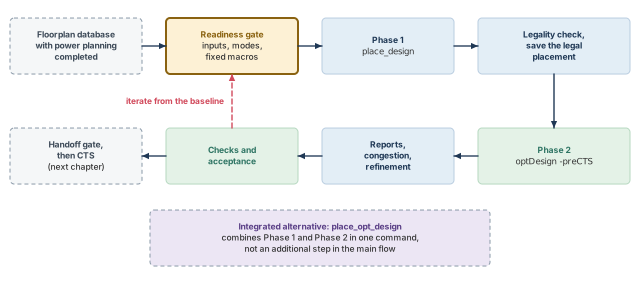
What to notice: The first arrow into placement passes a gate, and the last arrow out of the checks passes a gate. Dashed boxes are outside this chapter. The purple box is an alternative, not an extra step.
1.2 Loaded, ready, and meaningful
Three statements are easy to run together. They are different claims with different evidence, as Table 3 shows.
| State | What it means | Typical evidence | What it does not show |
|---|---|---|---|
| Loads | The database restores without a fatal error | The restore finishes; design name and instance count match the checkpoint | That the data is complete or consistent |
| Ready for placement | The inputs placement depends on are present, consistent and recorded | The readiness gate: rows, fixed objects, constraints, settings and blockages checked | That the result will be good |
| Meaningful timing analysis | A timing number says something about the design at this stage | Constraints loaded and checked, clocks defined, coverage known, views active, stage assumptions stated | That timing will close later |
Thus, a design that loads can still be unready. A design that is ready can still return a timing report that says nothing. The second case is the dangerous one, because a report with no violations looks like good news. Section Clean timing can mislead returns to it.
1.3 Entry conditions
Table 4 lists what placement depends on. Read the consequence column first: it is the reason to check.
| Input or condition | Why it matters | How to verify | Consequence if missing or wrong |
|---|---|---|---|
| The checkpoint to restore | Every later comparison starts from it | Restore it in a fresh session; compare design name, instance count and a saved fingerprint with the power-planning handoff record | You cannot say what placement changed, and a rerun cannot reproduce the baseline |
| Netlist | Placement positions what the netlist names | restoreDesign result; instance count; checkDesign -netlist | Missing or floating connections give a placement that optimizes the wrong nets |
| Physical libraries (LEF, library exchange format) | Cell sizes, sites, pins and obstructions | checkDesign -physicalLibrary | A cell size that is not a multiple of the site, or a missing LEF, makes legalization fail or produces silent overlaps |
| Timing libraries | Timing-driven placement and optimization need delays | checkDesign -timingLibrary | Cells without timing are ignored by timing work, so their paths look better than they are |
| Constraints (SDC, Synopsys Design Constraints, files) | They define the clocks, the I/O timing and the exceptions | check_timing; clock and exception reports | No constraints: the placer is not timing-driven. Wrong constraints: it works hard on the wrong paths |
| Corners and views | Which libraries and parasitics a slack refers to | Active setup views listed with the report | A slack from the wrong or a missing view is not the slack you think it is |
| Fixed macros | Cells fill the space they leave | Macro status, orientation and box read back | A movable macro may be moved by a later step, invalidating the grid and the channel plan |
| Rows, sites, legal area | Cells may sit only on sites in rows | Row count and extent; the usable area | Wrong or missing rows mean there is nowhere legal to place cells |
| Halos, blockages, regions, fences | They keep cells out of, or inside, areas | The objects read back; kinds and extents recorded | A hard blockage that was meant to be partial removes capacity; a missing fence removes a promised constraint |
| Power and ground (PG) routes as obstructions | Placement can treat preroutes as obstacles, depending on its mode | Power-planning handoff record; the placement mode for preroutes | Cells under a stripe that is treated as an obstruction cannot be legal there |
| Scan and clock information | Scan reordering and clock-gate-aware placement use them | Scan chain definitions loaded; clock specification present if the mode needs it | Scan reordering is skipped with a warning; clock-gate placement is not aware of gate positions |
1.4 What can be missing, and who decides
Some missing inputs let the tool run in a reduced way. Others stop it. Missing libraries, missing rows or corrupt data can fail the run. Missing constraints allow a wirelength-driven run. Write each gap down, name who decides it, and say what you will do meanwhile. Table 5 gives the usual cases.
| Missing input | What the tool does | Who decides | What you may do meanwhile |
|---|---|---|---|
| Constraints | Places without timing information | Timing owner | Run a wirelength-driven placement only to check legality and congestion. Mark every timing result NOT RUN |
| Scan chain definition | Skips scan reordering, with a warning | DFT (design-for-test) owner | Place without reordering; record that scan was not reordered |
| Pre-CTS clock assumption | Ideal clocks, plus any declared latencies | CTS owner | State it. Do not read a pre-CTS slack as final |
| Utilization target | No stated limit to judge by | Project lead | Report utilization of the usable area and keep the number with the run |
| Cell-use restrictions | Any library cell may be used | Library and project owners | Record the list in force. Placement does not invent one |
1.5 Restore the checkpoint and record the baseline
Everything in the chapter compares against one baseline, so we create it first. Restore the saved floorplan database with power planning completed. Then record a few facts before any placement command runs. The path and top cell name below are examples; take yours from the handoff record. Every command after the restore only reads.
innovus> restoreDesign checkpoints/grid_run1/grid.enc.dat stream_acc ;# load the DB
innovus> puts "top: [dbGet top.name]" ;# print the top cell name
innovus> puts "core box: [dbGet top.fPlan.coreBox]" ;# print the core box
innovus> puts "instances: [dbGet top.numInsts]" ;# print the instance count
innovus> foreach st {unplaced placed fixed} { ;# count instances by placement status
    set l [dbGet -p top.insts.pStatus $st]
    if {$l eq "0x0"} { set c 0 } else { set c [llength $l] }
    puts "$st: $c instances"
}
restoreDesignloads the saved database. Everything after it only reads.dbGetreturns a Tcl list. The value0x0means "no match", not a count of zero. The guard prints zero only for that case.- Expected here. The core box is
40 40 1040 1040, the three macros arefixed, and the standard cells areunplaced. So the placed count is zero. These expectations come from the floorplanning stage, not from a tool log. pStatusis the attribute that holds placement status. Confirm the field list withdbGet [lindex $some_inst 0].?before you build on it.- A zero needs a working query. An unplaced count of zero does not mean the design is placed if the list command failed. Test for
0x0and for an error before you read a number.
Continue only if all three hold:
- The checkpoint restores, and the name, core box and instance count match the power-planning handoff record.
- You have read Table 5, and every gap has an owner.
- You have written down the settings in force, as section Placement and optimization settings before the run shows.
If any item is open, record it with its owner. Then decide whether you may proceed under a stated assumption.
2 What placement does: the fundamentals
"Placed" has three meanings in everyday talk. The cells have coordinates; the cells do not overlap; the cells are in good places. A tool can deliver the first without the second, and the second without the third. If you do not keep the three apart, a legal result is read as a good one. A good result is then read as one that is ready for the next step.
2.1 The stages, in plain words
Let us start with an intuition. Imagine a few hundred thousand small parts laid out on a board with a fixed grid of slots. Each part is wired to a few others. A good layout puts parts that talk a lot close together. It keeps long wires for the connections that can afford them. It does not crowd any region so much that the wires cannot get out. A placer works toward that in stages, because one exact solution is out of reach. Table 6 names the stages.
In the tool, these stages are not separate commands, as the list below and Table 6 show:
place_designruns global and detailed placement together and includes placement-related optimization. It is timing-driven by default when constraints are loaded.- Legalization runs inside it, and also as the command
refinePlace. refinePlacelegalizes the design by fixing overlaps, orientation and blockage violations. It runs automatically at the end ofplace_opt_design,ccopt_designandoptDesign.place_opt_designis the integrated alternative. It combines placement with pre-CTS optimization.
Thus, the split in Table 6 is a way to read the result, not a list of commands to call.
| Term | What it does | What it is allowed to ignore | What it hands on |
|---|---|---|---|
| Global placement | Spreads all movable cells over the usable area to reduce a cost, mostly wirelength, with density, congestion and timing as pressures | Exact site alignment; small overlaps may remain | Approximate positions |
| Legalization | Moves cells to the nearest legal positions: on a site, in a row, in a permitted orientation, without overlap, outside blockages | Whether the move helps timing or routing | A legal but not tuned placement |
| Detailed placement | Refines the legal result by local moves, such as swaps, to reduce wirelength or improve a local measure, and keeps it legal | Anything beyond a small neighborhood | A refined legal placement |
| Timing-driven | Weights nets by how critical their paths are, so critical connections are pulled shorter | Paths it was not told about | A placement that favors the paths the constraints describe |
| Congestion-aware | Reads an estimate of routing demand and spreads cells where demand exceeds supply | The exact route the router will pick | A placement that leaves more room to route |
| Placement-related optimization | Changes the netlist during or after placement: resizing, buffering, restructuring | Only what the settings allow | A different netlist on the same placement |
2.2 Instance states
Every instance has a placement status. The status decides who may move it, as Table 7 shows.
Two facts matter in practice:
checkPlacechecks cells that are fixed or placed. It treats preplaced instances and macros as fixed.refinePlacemoves only instances whose status isplaced.
So a cell you have fixed is checked but never repaired, and an unplaced cell is neither. Whenever a status word matters to a decision, read it back from your database. The query is in section Query and debug reference; do not rely on Table 7 alone.
| State | Meaning | Who may move it | How it appears in this chapter |
|---|---|---|---|
unplaced | No location yet | Placement gives it one | Standard cells before the run. refinePlace does not place unplaced cells; ecoPlace does |
placed | Has a location; the tool may move it | Placement, legalization, optimization, CTS | Standard cells after the run |
fixed | Has a location the tool must keep | Only you | Hard macros after floorplanning. placeInstance makes an instance fixed by default |
softFixed | Located, with a weaker hold than fixed | Confirm the movement rules with -help in your installation | Not used in the example |
cover | A status for bump objects | Not applicable to ordinary cells | Not used |
2.3 Rows, sites and orientation
A row is a horizontal strip made of identical sites. A site is the smallest width a cell can occupy. In the example, core_site is 0.2 µm wide and 1.4 µm high. So a cell 1.2 µm wide occupies six sites, as Figure 3 draws. A cell is legal when three things hold:
- its lower-left corner is on a site boundary;
- its whole footprint is inside one row, or a stack of rows for multi-height cells;
- its orientation is one the row allows.
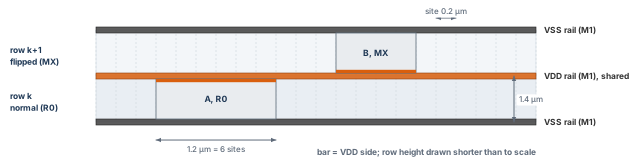
What to notice: Both cells touch the shared VDD rail with their VDD side; A is 1.2 µm wide.
Orientation exists because supply rails alternate. Power Planning laid VDD and VSS rails on alternate row boundaries, so adjacent rows share a rail. A cell in the upper row of a pair is usually flipped about the horizontal axis (MX). That way its VDD pin meets the shared rail below it, the same rail the row underneath uses. A cell in the wrong orientation has its power pins on the wrong rails. checkPlace lists row orientation and site mismatch among the violations it finds. Both rows of Figure 3 show this.
2.4 Overlap, whitespace and density
The reports use three more terms, so we define them now.
- Overlap. Two cells, or a cell and a blockage, occupy the same area. Global placement may leave overlaps. Legalization removes them.
- Whitespace. Placeable area not occupied by any cell. It is the room that legalization, buffering and later CTS have to work with.
- Utilization. The cell area divided by the area available to cells, defined below.
U   = A_cells / A_usable
d_b = A_cells,b / A_usable,b      (the same ratio for one bin b)
Here A_cells is the total standard-cell area in µm². A_usable is the placeable core area in µm², after macros, halos and hard blockages are removed. Local density d_b is the same ratio for one bin, a small square window. The density map in section Reading the density map shows it.
Which cells and which area a report counts differs between reports. checkPlace includes padding in its utilization and timeDesign does not, so the two numbers can differ. State which one you quote.
Let us work the numbers for the example (illustrative inputs, not tool output):
- The core is 1000 × 1000 µm = 1 000 000 µm².
- The three macros occupy 2 × (420 × 300) + 240 × 160 = 290 400 µm².
- The halos are 10 µm wide on every side. We assume they lie wholly inside the core and do not overlap. They add (440 × 320 − 126 000) × 2 + (260 × 180 − 38 400) = 29 600 + 8 400 = 38 000 µm².
- So the geometric subtotal is
A_usable= 1 000 000 − 290 400 − 38 000 = 671 600 µm². - Suppose the standard cells total
A_cells= 410 000 µm² (an invented figure). Then U = 410 000 / 671 600 = 0.61, or 61 percent. - Measured against the whole core instead, the same cells give 0.41.
The subtotal is a teaching number. It ignores tap and endcap sites, cut or missing rows, further hard blockages and the partial blockage of the example. A report's own capacity figure can therefore differ. The two ratios, 0.61 and 0.41, describe the same design. A reader who sees only one of them cannot tell which was meant.
2.5 Wirelength and routability
Wirelength is the first measure the placer reduces. Shorter wires mean less capacitance, less delay and less routing demand. A common estimate for one net is the half-perimeter wirelength (HPWL): the half-perimeter of the smallest box that holds its pins.
HPWL = (x_max - x_min) + (y_max - y_min)
Here x_max, x_min, y_max and y_min are the largest and smallest pin coordinates of the net, in µm. The total is the sum over all nets. Figure 4 shows one net and its box.
HPWL is an estimate. For nets with more than three pins, the shortest route is longer than HPWL even with no obstacle. It also ignores detours, so a net that must go around a macro is longer again. Whether a report states HPWL or an estimated routed length is a property of the report. Use the figure to compare runs of the same tool, not to predict a routed length.
Routability is whether the router can complete the wires with the metal and space available. Wirelength is only part of it. A placement with a short total wirelength can still concentrate many wires in one small region. The router then runs out of tracks there. This is why we read density, congestion and wirelength together.
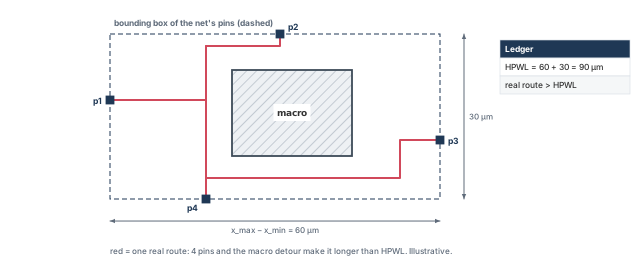
What to notice: The box is 60 µm wide and 30 µm tall, so HPWL is 90 µm. With four pins, even an unobstructed route would exceed 90 µm; the macro adds a detour on top. Numbers are illustrative.
2.6 Why the three results come apart
Figure 5 follows one small region through the three stages. It is the clearest way to see that "placed", "legal" and "good" are different words.
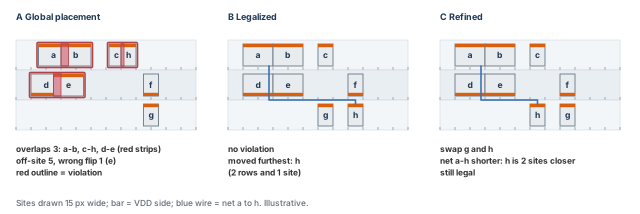
What to notice: Only panels B and C are legal. In A the red strips show where cells overlap. Cell h moves furthest in legalization. Refinement swaps g and h, keeps legality and shortens the a-to-h net. No panel shows routing.
Four statements follow from the three stages. Each is a reason not to stop at the first good-looking result.
- Global placement may be illegal. It optimizes a smooth model in which cells may overlap slightly and sit between sites, because that model is easy to improve. Legalization is a separate step because the model is not the layout.
- A legal placement may have poor timing. Legalization moves cells to the nearest free site. It does not know which cell sits on a critical path. A cell pushed 8 µm along a critical net adds wire delay that the global stage had avoided.
- A legal placement may be hard to route. Legality is about cells. Routing needs pins that can be reached and tracks that are free.
checkPlacefinds some pin-access and power-pin problems. However, cells packed around a macro pin can pass every check and still leave the net hard to route. - Low average utilization does not mean low congestion. The average over the usable area hides where the cells are. A design at 61 percent can contain a window at 95 percent, and routing demand follows the window.
Reading "legal" as "good". A clean checkPlace shows that the geometry rules are met within its scope, including some pin-access and power-pin checks. It says nothing about timing or congestion. It is not a routability guarantee. Table 8 keeps the three words apart.
| Question | Legal | Good QoR (quality of results) | Ready for CTS |
|---|---|---|---|
| What is asked | Are the geometry rules met? | Are timing, congestion, wirelength and area acceptable for this stage? | Is everything CTS needs present, checked and recorded? |
| Evidence | checkPlace, violation markers | Timing summary, density and congestion reports, comparison with a baseline | The handoff package |
| A pass needs | No overlaps, off-site cells, orientation or blockage violations in scope | Numbers judged against project criteria for the stage | Legal, plausibly routable, timing accepted for scope, and recorded |
| A pass does not mean | Good timing or routability | That the design will close timing later | That CTS will succeed |
| Typical failure | Overlap, cell outside a fence | Congested hotspot, negative slack on a main path | Missing clock information, stale report, unrestored state |
Takeaway The three words form a chain: legal is necessary for good, and good for this stage is necessary for ready. Neither link runs the other way.
3 Preparing for placement
A placer does not know what you intended. It knows the rows, the objects and the restrictions in the database. If a macro is movable when it should be fixed, the placer follows the database faithfully. The same holds for a blockage that is hard when it should be partial, or a missing fence. Preparation is where you make the database say what you mean.
3.1 Usable area and core area
The core is the rectangle that contains the rows. The usable area is the part of the core where a standard cell may actually sit. It is smaller, and the difference is the first thing to understand about a placement. The example is annotated in Figure 6. Table 9 lists what removes usable area.
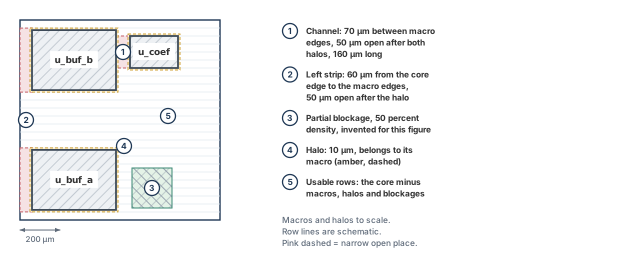
What to notice: The channel is 70 µm between macro edges and 50 µm after the halos; the left strip is 60 µm, and 50 µm after the halo. The drawing shows the database, not cell positions.
| What removes usable area | Why | Where you read it |
|---|---|---|
| Hard macros | They occupy the area | Instance box and status |
| Macro halos | They reserve space around the macro, so cells keep away | The halo setting recorded during floorplanning |
| Hard placement blockages | No cell may sit inside | The blockage list |
| Partial blockages | Only some fraction of the area may be used | The blockage list, with its density value |
| Fence boundaries | A fence admits only its members and excludes nonmembers; a region admits nonmembers too | The region and fence list |
| Rows that were cut or never made | No sites exist | Row boxes |
| Tap and endcap cells | They take sites for a physical function | Physical-cell counts |
In the example, the geometric subtotal is 671 600 µm²: the core minus the three macros and their non-overlapping 10 µm halos. It leaves out tap and endcap sites, cut or missing rows and any further hard blockage. It does not model the partial blockage either. A partial blockage limits occupancy locally; it is not simply forbidden area.
Use the subtotal for the teaching ratios in this chapter. For a tool comparison, use the placement capacity that a report states, and read which numerator and denominator it used. Do not subtract an exclusion twice. Do not mix cell occupancy with an already reduced denominator.
3.2 Fixed objects
Macros must be fixed before placement. A fixed macro is a hole the placer works around. If a macro is merely placed, later steps may move it. Moving a macro invalidates the power grid, the halos and the channel plan. Read the macros back first.
innovus> foreach n {u_buf_a u_buf_b u_coef} { ;# print status, orientation and box
    set i [dbGet -p top.insts.name $n]
    if {$i eq "0x0"} { puts "ERROR: instance $n not found"; continue }
    puts "$n status=[dbGet $i.pStatus] orient=[dbGet $i.orient]\
        box=[dbGet $i.box]"
}
- Expected here. Each macro is
fixed.u_buf_aandu_buf_bare R0 andu_coefis MY. Their boxes are100 90.4 520 390.4,100 689.6 520 989.6and590 800.2 830 960.2. - A print, not a test. This listing is a diagnostic. The acceptance script in section An acceptance pass in order turns the same comparison into a pass or fail.
- What it leaves out. It does not show the halo, or whether the PG metal is still where the macros are.
If a macro is placed, fix it deliberately at its verified origin and orientation, and record the change. placeInstance takes the lower-left corner and the orientation, and its default status is fixed. It does not check legality, so run checkPlace afterwards.
innovus> placeInstance u_buf_a 100 90.4 R0 -fixed ;# corner, orientation from record
innovus> placeInstance u_buf_b 100 689.6 R0 -fixed ;# same for the second RAM
innovus> placeInstance u_coef 590 800.2 MY -fixed ;# same for the ROM
3.3 Blockages: hard, soft, partial and macro-only
A placement blockage keeps cells out of an area. How much it keeps out depends on its type.
A blockage is a floorplan object, usually created during floorplanning. In this chapter you read it back. You change it only through the controlled refinement of section Controlled refinement.
Table 10 lists the four types.
| Type | What it blocks | Typical use | Common mistake |
|---|---|---|---|
hard (default) | All cells | Reserve an area the placer does not know about | Used where only a density limit was meant |
soft | All but buffers, inverters, isolation cells, clock gates, tie cells, level shifters | Keep logic out, leave room for repair cells | Expected to stop buffering; it lets buffers in |
partial | Cells above a stated density, -density 5 to 100 | Soften a congested area | Too low a density forces cells into neighbors |
macroOnly | Macros only | Keep macros out; cells may enter | Mistaken for a cell blockage |
Give a blockage a name so that you can remove exactly that object. The name, box (in µm, as llx lly urx ury) and density below are example values.
innovus> createPlaceBlockage -name pb_example -type partial -density 50 \
    -box {600 100 800 300} ;# at most 50 percent cell density in this box
innovus> deletePlaceBlockage pb_example ;# remove the blockage by its name
- Start from a restored baseline, so that restoring also undoes the object.
- Creating a blockage does not move cells already placed. Placement must run again for it to act.
- There is no report of its effect. Judge it by the density map and the legality check.
3.4 Regions and fences
A region and a fence both tie a set of instances to an area. The difference is exclusivity.
- Region: its members are held inside the box. Other compatible instances may also sit there.
- Fence: its members are held inside the box, and nonmembers are kept out. This is subject to the effective-capacity and scope rules of the tool.
Five practical rules apply to both:
- They are built in two moves: put existing instances into a group, then constrain the group to a box.
- Assigning members does not create new netlist instances.
- Adding a member does not enlarge an existing region or fence box.
- Check the effective utilization of the box. When a box is too small for its members, the tool can weaken the constraint. The exact condition varies by installation, so read it from the
checkFPlan -reportUtiloutput and confirm it in-helpin your installation. - Keep a fence inside one power domain, and keep nested fences consistent with the logical hierarchy.
Figure 7 shows the difference with three members and two nonmembers.
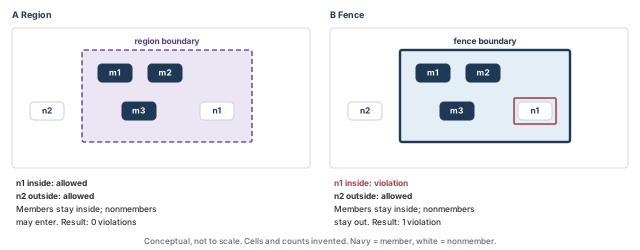
What to notice: Members stay inside in both panels. Nonmember n1 inside the region is allowed; inside the fence it is a violation. A picture is not a membership inventory: read membership back from the database.
The two examples below are separate. Names, instances and boxes are example values, and the instances must exist in your netlist.
innovus> createInstGroup grp_region ;# create an empty instance group
innovus> addInstToInstGroup grp_region {u_dp/u_logic0 u_dp/u_logic1} ;# add leaves
innovus> createRegion grp_region 120 420 480 680 ;# hold the group inside this box
innovus> createInstGroup grp_fence ;# create a second group
innovus> addInstToInstGroup grp_fence {u_ctrl/u_logic0 u_ctrl/u_logic1} ;# add members
innovus> createFence grp_fence 540 420 780 680 ;# members inside, nonmembers out
An existing hierarchical instance needs no group. Pass its name to the constraint command directly.
innovus> createFence u_core/u_mac 120 420 480 680 ;# no user group needed
Two settings decide whether the constraint is respected:
refinePlaceandcheckPlacehonor fences and regions when-place_hard_fenceis true, which is its default.- Optimization honors them only if
-opt_honor_fencesis also true. Its default is false outside multi-supply-voltage designs.
Thus, a fence can be obeyed by placement and then crossed by optimization if that option is left alone.
innovus> setPlaceMode -place_hard_fence true ;# legalizer and checker honor fences
innovus> setOptMode -opt_honor_fences true ;# optimization honors them too
Reading back membership and constraints needs more than one command, because checkPlace checks geometry and not membership.
innovus> file mkdir checks ;# directory for the group reports
innovus> checkFPlan -outFile checks/fplan_groups.txt -reportUtil ;# group utilization
innovus> selectGroup grp_region ;# select the members of one group
innovus> reportSelect -file checks/grp_region_select.rpt ;# list what is selected
innovus> deselectGroup grp_region ;# clear the selection
innovus> checkPlace checks/checkplace_groups.rpt ;# members outside their box
checkFPlan -reportUtilprints the target and effective utilization for the whole design, the fences and the regions. Read the effective figure of each box.selectGroupandreportSelectshow what the selection holds. The report layout depends on the installation, so read one report before you build a script on it.- A clean
checkPlaceshows that the geometry rules hold. It does not show who the members are.
Two optional edits are kept apart on purpose. Removing a member and removing the constraint are different actions.
innovus> deleteInstFromInstGroup grp_region u_dp/u_logic1 ;# drop one member
innovus> unplaceGuide grp_region ;# remove the guide, region or fence of the group
3.5 Narrow channels
A channel between two macros is a place where placement and routing both struggle. Cells inside it are close to macro pins. Every wire that crosses the channel has to pass through it. The example has two:
- The macro channel. It lies between
u_buf_b(right edge x = 520) andu_coef(left edge x = 590). It is 70 µm between macro edges and about 50 µm open once each 10 µm halo is taken away. The two macros face each other over a length of 160 µm. - The left strip. It is 60 µm wide, between the core edge (x = 40) and the left edges of the buffer macros (x = 100).
Two commands help here. report_narrow_channel lists channels under a width you give. setPlaceMode -place_global_auto_blockage_in_channel places a blockage in narrow macro channels before global placement.
innovus> report_narrow_channel -width 80 ;# channels under 80 um, so the 70 um one too
innovus> setPlaceMode -place_global_auto_blockage_in_channel none ;# the default
- Choosing the width. Give a width just above the channel you care about, for example 80 for the 70 µm channel. A width equal to the channel may or may not list it.
- The three values are
none(the default),softandpartial. - The soft form acts on channels under 50 µm, and optimization may still place cells in them. Our channel is at that figure, so you cannot assume the rule fires.
- Decide by reading what the tool created, not by the number. The choice is a decision, so record it.
3.6 Tap, endcap and physical-only cells
Well-tap and endcap cells are physical-only: they have no logic function. They are normally preplaced before the standard cells, after the floorplan is fixed and the hard blocks are placed. addWellTap and addEndCap insert them, setEndCapMode chooses the endcap cells, and deleteFiller removes them. The choice of cells depends on the technology and library.
There is no universal insertion sequence, so this chapter gives none as executable code. Follow the tap and endcap recipe that your process design kit (PDK) approves. The points below stay true whatever the recipe:
- They take sites. Taps and endcaps reduce usable area. Count them before you quote a utilization.
- They are fixed in place. Preplaced physical cells are not moved later, so a mistake needs deletion and a rerun, not a refinement.
- They are checked separately.
verifyEndCapandverifyWellTapcheck them. Run the checks your technology requires. - Order matters for legality. Insert them before the standard cells, so that placement works around them and not through them.
3.7 Cell-use restrictions
Optimization chooses cells from the library. Some cells may be forbidden, such as cells with a poor drive or an unwanted threshold. Set that restriction before optimization with setDontUse. The cell name below is an example; a wildcard works too.
innovus> setDontUse DELAYCELL* true ;# forbid these cells; false clears the restriction
The setting persists through save and restore. It overrides the library and constraint settings.
- Setting it twice gives a warning.
- A more specific hierarchy setting overrides a global one.
- Record the list in force, because a changed list makes two runs incomparable.
setDontUse DELAYCELL* falseclears the restriction.
3.8 High-fanout nets and scan
Placement has no separate control for high-fanout nets. Constraints and optimization handle them.
- A maximum fanout comes from
set_max_fanout. optDesignrepairs fanout violations only ifsetOptMode -opt_fix_fanout_loadis true. Its default is false.- Clock nets are ideal before CTS. Reset and scan-enable nets are project decisions.
- A long, slow high-fanout net before CTS is not yet a placement failure. First find out which of those cases it is.
Scan handling has two controls that change what placement does:
-place_global_ignore_scan truemakes the placer ignore scan connections.-place_global_reorder_scandecides whether scan chains are reordered.- Reordering changes connectivity. It needs valid scan chain data and an approved scan policy. The chain data comes from a scan DEF (design exchange format) file or from
specifyScanChain; without it the tool warns and skips. - The baseline below keeps reordering off. To reorder, set it true and change every scan assumption in the chapter with it.
3.9 Placement and optimization settings before the run
A mode that is only printed is not applied. Configure the modes first, then read them back. Every run, and every experiment of section Controlled refinement, must source the same baseline script. Printing the modes is not enough.
The values below are teaching-policy examples for this chapter. They are neither universal recommendations nor guaranteed tool defaults. Replace them with your project's approved policy, and keep the policy in one script that every run sources.
# Optimization: repair and permissions.
setOptMode -opt_drv true
setOptMode -opt_setup_target_slack 0.0
setOptMode -opt_fix_fanout_load false
setOptMode -opt_honor_fences true
setOptMode -opt_add_insts true
setOptMode -opt_delete_insts true
setOptMode -opt_move_insts true
setOptMode -opt_down_size_insts true
setOptMode -opt_enable_restructure true
setOptMode -opt_pin_swapping true
setOptMode -opt_area_recovery default
setOptMode -opt_max_density 0.95
setOptMode -opt_power_effort none
The second half of the same file holds the skew and hold policy and the placement modes.
# Teaching policy of this chapter: no useful skew, no early hold repair.
setOptMode -opt_skew false
setOptMode -opt_skew_pre_cts false
setOptMode -opt_early_hold_fixing none
# Placement.
setPlaceMode -place_design_floorplan_mode false
setPlaceMode -place_global_timing_effort medium
setPlaceMode -place_global_cong_effort auto
setPlaceMode -place_global_uniform_density false
# Controls that the experiments vary, stated explicitly so that a
# restore cannot leave a stale value.
setPlaceMode -place_global_max_density -1
setPlaceMode -place_global_module_padding {}
setPlaceMode -place_global_soft_guide_strength low
setPlaceMode -place_global_clock_gate_aware true
setPlaceMode -place_global_place_io_pins false
setPlaceMode -place_global_ignore_scan true
setPlaceMode -place_global_reorder_scan false
setPlaceMode -place_global_auto_blockage_in_channel none
setPlaceMode -place_hard_fence true
setPlaceMode -place_detail_honor_inst_pad true
setPlaceMode -place_detail_wire_length_opt_effort medium
Three lines make the starting point of every experiment explicit. They set no density cap (-1 is the off value), no module padding, and the lowest soft-guide strength, which is the default. A default is not necessarily the value a restored session holds, so the baseline sets it. The readback below confirms whether an empty module-padding value is accepted as a reset. If your installation rejects it, keep a full readback of a known-good session and compare against that instead.
innovus> source scripts/baseline_policy.tcl ;# apply the baseline policy
innovus> getOptMode ;# the effective optimization modes
innovus> getPlaceMode ;# the effective placement modes
innovus> getOptMode -nonDefault ;# only values that differ from the defaults
innovus> getPlaceMode -nonDefault ;# the same for placement
innovus> getAnalysisMode ;# the analysis settings that timing will use
Each active setting has one effect and one condition:
- Optimization permissions.
-opt_add_insts,-opt_delete_insts,-opt_move_insts,-opt_down_size_insts,-opt_enable_restructureand-opt_pin_swappingeach allow a kind of change. They do not choose a cell or guarantee a gain. Restructuring and pin swapping need an approved equivalence policy. - DRV and fanout. Design-rule violations (DRVs) here are max capacitance and max transition violations.
-opt_drv truerepairs them; false repairs only timing-violating paths. Fanout repair stays a project decision:setOptMode -opt_fix_fanout_load trueenables it as a separate experiment. - Setup target.
-opt_setup_target_slack 0.0is in ns. A positive target asks for margin and grows the netlist. - Fences.
-opt_honor_fences trueand-place_hard_fence trueare needed when binding fences or regions exist. Verify the effective capacity, because a fence too small for its members may not be honored as written. Confirm the condition for your installation. - Growth limit.
-opt_max_density 0.95is an area-utilization cap on optimization growth. It is not a recommended placement utilization target. It is also not the global placer's local density cap. - Area recovery.
defaultreduces area after global optimization and after the second TNS (total negative slack) pass. Recovery gives timing margin back to area, so read the timing summary afterwards. - Power effort.
-opt_power_effort nonekeeps power-driven transforms off. Low and high add runtime and change the trade-offs. - Useful skew. Both
-opt_skewand-opt_skew_pre_ctsmust be true for pre-CTS useful skew. The master option can disable the stage option. Any latencies it generates belong in the handoff and must be coordinated with CTS. - Early hold.
-opt_early_hold_fixingbelongs toplace_opt_design, with ideal or propagated clocks. Reconcile its use in another flow with-helpin your installation before running it. - Placement efforts.
-place_global_timing_effort mediumand-place_global_cong_effort autoare the middle settings. High timing effort is not advised for congested designs. - Clock gates.
-place_global_clock_gate_aware truemoves clock gates toward the center of their fanout. It needs a clock specification file. - Padding.
-place_detail_honor_inst_pad truemakesrefinePlaceandcheckPlacehonor instance padding. - Detailed wirelength.
-place_detail_wire_length_opt_effort mediumallows swaps for a small wirelength gain.highcan add run time. - Prototype mode.
-place_design_floorplan_mode falsekeeps the full placement. True gives a quick prototype that may be illegal.
Some controls stay out of the baseline because they depend on the technology. Examples are spacing and cut-layer modes, color-aware modes, IR-drop-aware (supply voltage drop) modes and preroute-obstruction modes. Add one only when its units, prerequisites and stage relevance are established. Post-route-only congestion controls are not pre-CTS placement techniques.
Two policy choices change the whole chapter if you flip them: scan reordering and useful skew. Keep both consistent with every later clock and scan statement, because CTS inherits them.
3.10 The readiness gate
Run the gate as a list of statements. A blocking item stops the run. A review item is recorded with a decision and an owner. It does not stop the run on its own. Table 11 lists both kinds.
| Item | Kind | How to read it, or why it is not blocking |
|---|---|---|
| A clock-gate-aware baseline has a valid clock specification, or the baseline sets the option false and says so | Blocking | The specification file name and its loaded clock trees; otherwise the recorded policy line |
| The baseline restores and matches the power-planning handoff record | Blocking | Name, core box, instance count |
| Every macro is fixed, with the expected orientation | Blocking | The macro listing, then the acceptance assertion |
Rows exist where cells are meant to go, on core_site | Blocking | Row boxes and the usable-area arithmetic |
| Constraints are loaded for a timing-driven run, or the run is declared wirelength-only | Blocking | check_timing; the declaration in the run log |
| The baseline policy is applied, read back and saved | Blocking | The readback above |
| Blockage, region and fence objects are read back and match the plan | Blocking | checkFPlan -reportUtil, report_narrow_channel, group readback |
No unexplained error in checkDesign for the checks this stage needs | Blocking | checkDesign -all -noHtml -outfile checkDesign.ascii |
| A channel at or near the soft-blockage threshold | Review | The decision is yours, and a run shows its effect |
| Scan reordering unavailable | Review | Placement still works; the chain is not optimized |
| Fence honored by placement but not by optimization | Review | Choose the setting, then read the effect |
| Utilization higher than the project's comfort level | Review | A target is a project number; the tool will place regardless |
| Physical cells inserted by an unfamiliar recipe | Review | Compare counts with the library's own cell list |
The gate needs evidence that can be reproduced, not a statement. This read-only block collects it. Confirm the attribute names of the first part with .? in your installation.
innovus> file mkdir reports/ready ;# a directory for the evidence
innovus> set rows [dbGet top.fPlan.rows] ;# all row objects; names to confirm with .?
innovus> puts "rows: [llength $rows]" ;# how many rows exist
innovus> puts "site of the first row: [dbGet [lindex $rows 0].site.name]" ;# its site
innovus> checkFPlan -reportUtil -outFile reports/ready/fplan.txt ;# objects, util
innovus> report_narrow_channel -width 80 ;# channels under 80 um, so the 70 um one
innovus> puts "active views: [all_analysis_views -type active]" ;# views in use
innovus> report_clocks > reports/ready/clocks.rpt ;# the defined clocks
innovus> report_case_analysis > reports/ready/case.rpt ;# constants that remove paths
innovus> check_timing -verbose > reports/ready/check_timing.rpt ;# completeness
Group membership and the cell-use list need more care:
- Membership.
selectGroupfollowed byreportSelectwrites the selected objects. Whether that lists every leaf member is not established here. Compare the member count in the report with the list you created. Treat a difference as unverified until you read the members back another way. - Cell-use list. The
setDontUselines of the baseline are the record. They persist through save and restore, and a changed list makes two runs incomparable. Source the baseline and keep it with the run.
Do not run placement with an unexplained blocking item. A run over a movable macro, a missing row or an unnoticed fence mistake is a run you will discard. Restoring and fixing now costs far less than finding the cause after the congestion map has been misread.
Run the gate on a fresh restore. A gate that passes on a session you have been editing may be passing on state that is not in the checkpoint. Restore, then run the checks, and the result describes the saved database.
3.11 Three commands, three different roles
Three commands sound alike and are easy to take for three consecutive steps. They are not. Read their roles in Table 12 before the first run.
| Command | Role in this chapter | Important distinction |
|---|---|---|
place_design | Main placement command | Includes placement-related optimization, so it is not guaranteed to leave the netlist unchanged |
optDesign -preCTS | Main optimization command after placement | Optimizes an existing placement and may change cells and their locations |
place_opt_design | Integrated alternative | Combines placement and pre-CTS optimization; not an extra step in the worked flow |
place_designis not "only assigning coordinates".optDesign -preCTSis not the initial placement of the full design.- Placement and optimization commands can invoke internal legalization and other operations.
refinePlaceis a supporting legalization operation, used only when legalization is needed.
We keep placement and optimization as separate steps. That way you can inspect the placement before optimization changes the design further.
- Use
place_designto place the standard cells. - Inspect the placement, the fixed objects and legality.
- Legalize further only if needed.
- Save the inspected legal placement.
- Use
optDesign -preCTSto optimize the placed design. - Regenerate the affected reports and checks before accepting the result.
place_opt_design is explained separately at the end of section Timing-aware placement and pre-CTS optimization. It is not an additional step in this worked flow.
4 Global placement
We now begin the placement phase.
- Starting state: the floorplan database with power planning completed, readiness checks passed and modes configured.
- Main operation: run
place_design. This section covers running it and inspecting the result; the next section judges legality. - Supporting operation:
refinePlace, only if further legalization is needed. It is not another full placement flow. - Ending state: a saved, inspected legal placement, ready for pre-CTS optimization.
Global placement decides the large-scale shape of the design. It decides which blocks of logic sit near which macros and where the dense areas are. It also decides how far apart the registers of a critical path end up. Legalization and optimization can only repair small things afterwards.
4.1 Intuition: a balance of pulls
Think of every net as a spring between the cells it joins. Left alone, the springs pull all connected cells together into one knot. Other pressures push back:
- cells cannot overlap;
- wires need room;
- critical paths need to be short;
- macros and I/O pins sit where they were fixed.
Global placement finds a compromise. The result is the sum of these pulls and pushes. That is why changing one setting moves things you did not expect. The pulls are listed in Table 13.
| Pull or pressure | What it wants | How the tool is told | Cost of too much |
|---|---|---|---|
| Connectivity, wirelength | Connected cells close | Always on; the base cost | Knots of logic, high density |
| Timing | Critical-path cells close | Constraints plus the timing effort | Other nets longer; not for congested designs |
| Density | No bin overfull | Density cap, uniform density | Cells pushed far from partners |
| Routing demand | Spread where wires pile up | Congestion effort | Longer wires; more runtime |
| Macros and I/O | Cells near their pins | Fixed macro and I/O pins | Crowded macro pins lose access |
| Guides and modules | Module members together | Guides, regions, fences, strength | A strong guide overrides wirelength |
4.2 Physical meaning
The placer works on a model. In it, cells have a size and a position, and nets have an estimated length. It does not route wires. It works from an estimated picture of routing resources, fed by the congestion effort and the extraction settings. That picture is coarser than completed detailed routing.
Pull a hundred cells together, and the model says wirelength falls. The physical consequence arrives later. Those hundred cells sit in one window. The wires leaving it must all pass through the edges of that window. Compare the two cases in Figure 8: a tight cluster and a spread one.
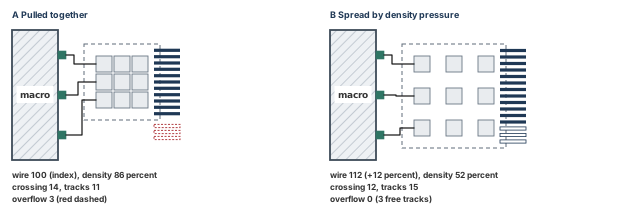
What to notice: A has the shortest wire, but 14 wires meet 11 tracks. B uses 12 percent more wire, and its 12 wires fit 15 tracks.
Thus, "cells cluster" is not a defect. It is the intended result of the main cost. It becomes a defect in two cases. The cluster may be so dense that there is no room for the repair cells optimization will need. Or the wires may be unable to get out.
4.3 Tool operation: place_design
place_design is the main placement command. It runs global and detailed placement in one call, with placement-related optimization. It is timing-driven by default when constraints are loaded. It is not timing-driven when no constraints are loaded, or in prototyping mode. It honors the optimization, routing, analysis and extraction modes, with the analysis exceptions below.
- Prerequisites. The readiness gate passed, constraints loaded for a timing-driven run, and a restored baseline with the baseline policy applied.
- Options. The baseline runs it bare.
-incrementalworks only on an already placed design and implies-noPrePlaceOpt.-noPrePlaceOptskips the pre-place step.-sdpmakes it structured-datapath aware.-concurrent_macrosselects the mixed placer, a separate flow described near the end of the chapter. - Database change. It gives locations to unplaced standard cells. By default the pre-place step also removes buffers of the specified footprint, in the manner of
deleteBufferTree. So the netlist can change before any cell is positioned. -noPrePlaceOptis not a guarantee. It skips that step, but other optimization can still change the netlist. Compare instance counts and the netlist fingerprint before and after, whichever option you chose.- Analysis overrides. During
place_designthe tool uses setup analysis even ifsetAnalysisMode -checkType holdis set. It forces ideal clocks even if-clockPropagation sdcControlis set. It uses-clkSrcPath falseeven if true is set.setExtractRCModeis honored except-detail. Thus, you cannot make placement see propagated clocks or hold paths with these options. - Routing model. Placement uses estimated routing models, not final routes. Every congestion and timing number at this stage is an estimate.
innovus> file mkdir checkpoints/place_run1 ;# a directory for this run
innovus> place_design ;# baseline run; timing-driven because constraints are loaded
innovus> saveDesign checkpoints/place_run1/placed.enc ;# save the raw result at once
The prerequisite is a restored baseline, a passed gate and the baseline policy applied. Save the raw result at once, so that this exact state can be restored and compared.
- Expected result. Standard cells have locations and the status
placed. Macros are unchanged. The log shows the placement progress. For multi-CPU runs it shows a thread count and a runtime. Read your own log for the other lines. - I/O pins. Pins placed during floorplanning stay, because
-place_global_place_io_pinsis false in the baseline. - Reports. The log only. No report file is written without a further command.
- Misinterpretation. A finished command is not an accepted placement. Legality is judged in the next section. Density, congestion and timing each need their own check.
Treating place_design as "only placement". It can change the netlist in its pre-place step, it may read scan information, and it assumes ideal clocks. Read the log for each of these before you compare netlists or timing between runs.
4.4 Global placement settings: the baseline and the experiments
The baseline values are in scripts/baseline_policy.tcl. Each experiment below changes exactly one setting, and every setter is a complete line. The procedure is the one section Controlled refinement describes:
- Restore the floorplan database with power planning completed.
- Source the baseline script and apply the one change.
- Run
place_design, thenoptDesign -preCTS, and save to a new directory. - Regenerate every report, then compare.
Each is an independent experiment. Do not stack them unless you label the result as a combination. The seven setters come first; Table 14 then summarizes what each does.
innovus> setPlaceMode -place_global_timing_effort high ;# experiment 1
innovus> getPlaceMode -place_global_timing_effort ;# read it back
innovus> setPlaceMode -place_global_cong_effort high ;# experiment 2
innovus> getPlaceMode -place_global_cong_effort ;# read it back
innovus> setPlaceMode -place_global_max_density 0.80 ;# experiment 3
innovus> getPlaceMode -place_global_max_density ;# read it back
innovus> setPlaceMode -place_global_uniform_density true ;# experiment 4
innovus> getPlaceMode -place_global_uniform_density ;# read it back
innovus> setPlaceMode -place_global_module_padding {u_dp 1.2} ;# experiment 5
innovus> getPlaceMode -place_global_module_padding ;# read it back
innovus> setPlaceMode -place_global_auto_blockage_in_channel partial ;# experiment 6
innovus> getPlaceMode -place_global_auto_blockage_in_channel ;# read it back
innovus> setPlaceMode -place_global_soft_guide_strength medium ;# experiment 7
innovus> getPlaceMode -place_global_soft_guide_strength ;# read it back
| No. | Setting changed | What it does | Trade-off |
|---|---|---|---|
| 1 | Timing effort high | Pulls critical connections shorter; for long critical paths in an uncongested design | Other nets get longer; not advised for congested designs |
| 2 | Congestion effort high | Baseline auto adds effort only for highly congested designs; high spends it everywhere | Longer wires, more runtime; try it when an early global route shows overflow |
| 3 | Density cap 0.80 | Caps local bin density; keep the cap above the design's utilization | Too low pushes cells from partners. Default -1 is off; not -opt_max_density |
| 4 | Uniform density true | Spreads cells evenly under 70 percent utilization; the example's 61 percent teaching ratio qualifies | Lengthens wires that clustering kept short; confirm the tool's own figure |
| 5 | Module padding {u_dp 1.2} | Gives module u_dp 1.2 times its area; factors below 1.0 are ignored; global placement only, refinePlace ignores it | Neighbors move out; the name is prefix-matched, so check no other module matches |
| 6 | Channel blockage partial | Partial blockages in narrow macro channels; soft and none (baseline) are the other values | Fewer cells in the channel, more load elsewhere; run report_narrow_channel first |
| 7 | Soft guide strength medium | Pulls a soft-guided module together; baseline low; no effect without a soft guide | Overrides wirelength; can lengthen nets outside the module |
A readback shows what is set; it does not apply anything. Placement reads the settings at run time, so a changed value matters only if it was set before place_design. Whether restoreDesign resets the modes is not established here. That is why every experiment sources the baseline script after the restore. For per-cell or per-instance padding that detailed placement honors, use the recipes in section Recipes: one change each.
-place_global_solver_effort may not exist in every installation. Confirm it with getPlaceMode or -help in your installation before you use it.
4.5 Readback: what to look at right after
Placement leaves the database in a state you can query. Do these in order. The status query changes nothing, and the two check commands write report files.
innovus> file mkdir reports/place_run1 ;# a directory for this run's reports
innovus> foreach st {unplaced placed fixed} { ;# 1. status counts; nothing unplaced
    set l [dbGet -p top.insts.pStatus $st]
    if {$l eq "0x0"} { puts "$st: 0" } else { puts "$st: [llength $l]" }
}
innovus> checkPlace reports/place_run1/checkplace.rpt ;# 2. legality; lists violations
innovus> reportDensityMap ;# 3. density per window, default grid and threshold
- Status counts. A non-zero unplaced count after a successful run needs an explanation (section Case 1: cells remain unplaced).
- Legality. The positional argument names the violation report file.
checkPlacealso prints the count of placed cells, the unplaced macros and the placement density. - Density.
reportDensityMapshows a color map and a text report. The defaults are a 50 µm grid and a 0.75 threshold below which bins are not reported. - Not yet. Congestion needs an early global route first. Section Congestion and routability shows how, and why the map is only an estimate.
Figure 9 shows what changed and what did not.
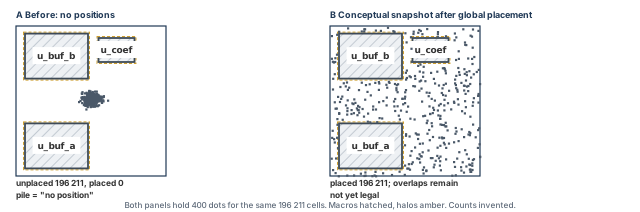
What to notice: Macros and halos do not move. The channel holds fewer cells because of the halos, not an error. B is not yet legal.
4.6 Failure and repair
Table 15 lists the first things to check when the global result looks wrong.
| Symptom | First thought | Check before acting |
|---|---|---|
| Cells pile up in one area | Density cap or guide too strong | getPlaceMode -nonDefault; the density map |
| Large empty regions | Hard blockages, a fence, or a cap that is too low | The blockage and fence list |
| Cells far from the macro they feed | Timing off, or no pull from a pin | Constraints loaded? Pin positions fixed? |
| Run is much shorter than expected | A prototype mode such as -place_design_floorplan_mode true | getPlaceMode -nonDefault |
| Scan chains look random | Reordering off, or no scan definition | The warning in the log |
4.7 Rerun requirements
Restore the baseline before each run. place_design -incremental works only on an already placed design. It is a different operation from a fresh placement.
You may change a floorplan object, a blockage, a fence, a setting that placement reads, or the constraints. In each case, restore the checkpoint, source the baseline script and run again. After any rerun, regenerate the status counts, the legality report and the density map. Regenerate every other report that depends on cell positions too. A report written before the run describes a design that no longer exists.
Proceed only if all four hold:
- The run completed and you read the log for warnings.
- No instance is unexpectedly
unplaced. - The macros are unchanged.
- The density map shows no window that the project would reject.
A window in doubt is not a stop by itself. It is a note to carry into section Congestion and routability.
5 Legalization and detailed placement
Legalization is the step where a placement becomes something a layout can contain. It is also the step that quietly spoils global placement when it has too much to do. A tool that moves each cell a fraction of a micron is polishing. A tool that moves a few cells 40 µm is rewriting the plan. The timing and routing you were counting on go with it.
5.1 Intuition: sliding cells onto a ruled page
Imagine the global result as a pile of cards laid roughly where you want them. The sheet below them is ruled with rows and columns. Legalization snaps each card to the ruling without letting any two overlap. Where a region holds more cards than it has room for, some must move to a neighboring region. The distance a card moves is its displacement. The art is to keep displacement small, especially for the cards that matter most.
5.2 Physical meaning: what makes a position legal
A position is legal when each rule in Table 16 holds. checkPlace tests them. The table lists the checks that matter most here.
| Rule | In words | Typical violation |
|---|---|---|
| Site alignment | Lower-left corner on a site boundary of a row | Off placement grid |
| Row compatibility | Cell site matches the row site; cell wholly inside a row | Site mismatch; partly outside the core |
| Orientation | Allowed in that row, so power pins meet the rails | Row orientation, cell symmetry |
| No overlap | No two cells, or a cell and an obstruction, share area | Overlap |
| Boundaries and obstructions | Outside macros, halos, hard blockages; inside its fence | Fence, region or blockage violation |
| Cell context rules | Edge spacing, padding, minimum gaps if set | Cell context constraint, instance padding |
The rule set depends on your technology and settings. More checks exist than the table lists, for example implant spacing and via spacing. Some are switched on by modes. Whether a check runs is a property of your session, so read the modes you recorded.
5.3 Overlap removal as arithmetic
Cells leave an overfull window by sliding along the row first, then by moving to another row. The capacity of a row segment is the number of sites in it. Let us work an example with invented numbers; Figure 10 then shows three typical violations and their repairs.
- Take the 50 µm strip between the core edge (x = 40) and the halo of the buffer macros (x = 90).
- On
core_site(0.2 µm wide), one row of that strip has 50 / 0.2 = 250 sites. - Suppose global placement left cells with a total width of 270 sites over a 10-row span. The strip holds 10 × 250 = 2 500 sites, so 270 is nothing unusual.
- Now suppose the same 270 sites sat in a single row. Twenty sites, or 4 µm of cell width, must leave that row.
- The nearest free sites are in the rows above and below. That is a vertical move of one row, 1.4 µm, plus any horizontal shift needed.
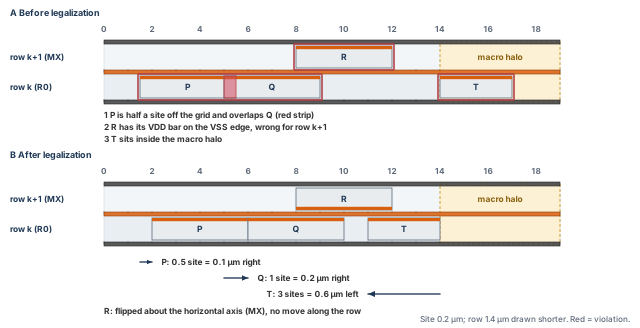
What to notice: Each violation is repaired by a different move. P snaps by half a site, Q slides one site, T slides three sites left out of the halo, and R flips without moving. Legal says nothing about the timing of the moved cells.
Thus, a local overload costs a displacement of about one row height per displaced cell. It costs more if the neighboring rows are full too.
5.4 Tool operation: refinePlace
refinePlace is a supporting legalization operation. Run checkPlace first, and run refinePlace only if the check reports violations. If the placement is already legal, skip it. It fixes overlap, orientation, constraint and blockage violations. It moves only instances whose status is placed, and it does nothing if the design is already legal. It runs automatically at the end of place_opt_design, ccopt_design and optDesign.
- Prerequisite. A placed design, saved so that you can return to it.
refinePlacedoes not place unplaced instances;ecoPlacedoes. - Window.
-area {llx lly urx ury}limits the work to a window. The braces are required; without them the command is an error. - Instance list.
-instwith a list of instances legalizes only those instances and treats the others as fixed. - Other modes.
-eco,-pre_route_ecoand-wire_length_reclaimselect other behaviors.setPlaceMode -place_detail_eco_max_distancelimits the window of ECO (engineering change order) moves. With-ecoand a value of 0, the tool sets it internally to 10 standard-cell heights. - Database change. Yes, if anything is illegal. If everything is legal, it changes nothing.
The two blocks below are alternatives, not consecutive steps. The window is an example in µm.
innovus> refinePlace ;# legalize every placed instance
innovus> refinePlace -area {40 40 140 140} ;# legalize only inside this window
- Expected result. If the design was already legal after
place_design, the command reports that nothing needed to move. Otherwise it prints a move report with the mean and maximum displacement. The report layout depends on the installation, so the excerpt below is a neutral teaching table. - Reports. The log. Follow it with the full
checkPlacebelow. - Misinterpretations. A quiet
refinePlaceshows that nothing was left to repair, not that the placement is good. A small mean displacement can hide a large maximum, which is why you read both.
instances moved by legalization : 31 482 of 196 211
mean displacement               : 0.4 um
maximum displacement            : 38.6 um   (instance u_dp/u_acc_reg[17])
How do we read it? The mean of 0.4 µm is two sites, so the bulk of the design was nearly legal. The 38.6 µm maximum is a different statement: one cell was pushed a long way. Look at that cell and its nets before you accept the placement. A maximum of 38 µm is not a defect by itself. The number says nothing about whether that cell is on a critical path. It tells you where to look.
5.5 The check: checkPlace
checkPlace checks fixed and placed cells for violations. It marks them in the violation browser and writes a report. It needs a placed design, and no cell moves.
innovus> file mkdir reports/legal_run1 ;# a directory for the legality reports
innovus> checkPlace reports/legal_run1/checkplace.rpt ;# check and write the report
Clearing old markers without a new check is a separate step:
innovus> checkPlace -clearMarker ;# remove old violation markers only
- Options that change scope.
-noHalouses the place-and-route (PR) boundary instead of halos.-noHardFence,-noPreplaced,-ignoreOutOfCore,-ignoreFillerInUtil,-instwith an instance list, and-selectedOnlyeach narrow or widen what the check sees. A result obtained with one of them is not comparable with one without it, so record the options with the result. - Scope extension.
setPlaceMode -place_check_report_fixed_inst_on_blockage truemakes it report fixed instances that sit on blockages. Without it, a fixed macro placed over a blockage does not appear. - What it reads out. Violation counts by type, the count of placed cells, the unplaced macros and the placement density. That density includes padding, so it can differ from the
timeDesigndensity. - What it does not show. Timing, congestion, a full routing check or a power-grid signoff check. It includes some pin-access and power-pin checks: more than overlaps, but still less than routability.
5.6 Padding and spacing, as the legalizer sees them
Padding is space reserved beside a cell that legalization must honor. Cell padding reserves sites beside every instance of a library cell. The cell name is an example, and -left and -right are in sites.
innovus> specifyCellPad BUFX4 -left 1 -right 1 ;# one free site each side of every BUFX4
Instance padding is honored by detailed placement only when the mode below is true. It is already true in the baseline.
innovus> setPlaceMode -place_detail_honor_inst_pad true ;# honor instance pads
innovus> specifyInstPad u_dp/u_acc_reg* 2 ;# two sites of padding on matching instances
- Cell padding is kept through optimization and CTS, and
deleteAllCellPadremoves it. - Instance padding is honored by
refinePlaceandcheckPlacewhen the mode above is true. - Both reduce the capacity of rows, so more padding means more displacement elsewhere.
- Section Controlled refinement treats padding as an experiment, not as a default.
5.7 Local refinement
After legalization, detailed placement may swap cells and shift them locally to shorten wires. The baseline setting setPlaceMode -place_detail_wire_length_opt_effort medium controls it; none and high are the other values. It can give up to 2 percent wirelength gain, and high effort may add up to 10 percent run time. These moves keep the placement legal. They do not look at the congestion map, so a gain in wirelength is not a gain in routability.
5.8 Timing and congestion effects of legalization
Some place_detail_* modes, such as IR-drop awareness, add awareness. However, the base operation optimizes displacement. Thus, look for three effects after every legalization:
- Critical cells moved. A cell on a critical net pushed several sites away adds wire delay. This is why the next step, pre-CTS optimization, also re-times the result.
- Cells pushed into narrow places. Cells displaced from a dense window end up in the nearest space. That is often beside a macro, where pins need access.
- Local density raised. Displacement spreads cells, but it also fills the free sites next to a crowded window. That creates a new dense band along its edge.
5.9 Causes of excessive displacement
The causes that push cells far are listed in Table 17. After the table, Figure 11 turns them into a procedure: classify, repair, then check again.
| Cause | Why it moves cells far | First check |
|---|---|---|
| Local density above row capacity | The overload must go somewhere | Density map; legalization window |
| Fence that is too small | Members cannot leave and nonmembers cannot enter | Fence effective utilization |
| Region that is too small | Members are tied to it; nonmembers may enter and use its capacity | Region effective utilization |
| Large halos or blockages | They remove row segments entirely | The blockage list; usable area |
| Heavy padding | It reduces capacity everywhere it applies | getPlaceMode -nonDefault; padding listings |
| Cell context rules, edge spacing | They add gaps between neighbors | Rules in force; recorded modes |
| Multi-height or special cells | Fewer legal positions | Cell list |
| Cell count grew after global placement | Pre-place or repair steps added cells | Instance counts before and after |
| Preroutes treated as obstructions | They remove sites under PG wires | Preroute-obstruction mode in force |
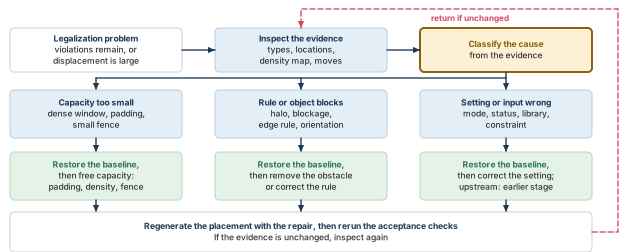
What to notice: Every path restores the baseline first and ends in a rerun of the checks. The red dashed arrow returns to inspection.
5.10 Failure and repair
Table 18 pairs each legalization symptom with its evidence, repair and rerun.
| Symptom | Evidence | Repair | Rerun |
|---|---|---|---|
Many violations remain after refinePlace | checkPlace counts by type; their locations | Locate the cluster; free capacity (reduce padding, relax a blockage) or fix the object in the way | Restore, change, place_design, checkPlace |
refinePlace ran but a window is still overfull | Density map; violations in the same window | Treat as a global problem: lower density cap, increase module padding, revisit blockage | Global placement and all later reports |
| Maximum displacement very large | The instance named in the move report; its nets | Check why it is crowded; do not move cells by hand unless you rerun legalization and checks | checkPlace, timing summary |
| A single instance will not legalize | Its type, its fence, its padding | Remove the constraint on it, or give it space | refinePlace -inst, then the full check |
Treating legalization as proof of routability or timing. checkPlace finds overlaps and rule violations. It does not read nets, tracks or slack. A design can pass every geometry check and then fail on a macro pin that nothing can reach. It can also fail on a path that the displacement lengthened.
After any legalization, read three numbers together: the violation count, the mean and maximum displacement, and the density map. The first says whether the geometry is right. The second says how much the plan changed. The third says where the changes were forced.
5.11 Rerun requirements
If legalization or its checks changed anything, regenerate the density map, the congestion estimate, the timing summary and the status counts. A legalization run with -area or -inst changes only that part. So run the full checkPlace afterwards, not only on the window.
The summary gives a mean and a maximum. To list the largest moves yourself, snapshot the lower-left corners before and after the step and compare them. This is a user script, not a tool command, and it has not been run. Confirm the attribute names .box_llx and .box_lly with .? in your installation. The file name is an example.
# Snapshot: instance name and lower-left x y, one line per placed instance.
proc snap_ll {fname} {
    set l [dbGet -p top.insts.pStatus placed]
    if {$l eq "0x0"} { puts "snap_ll: no placed instances"; return 0 }
    set fh [open $fname w]
    foreach i $l {
        puts $fh "[dbGet $i.name] [dbGet $i.box_llx] [dbGet $i.box_lly]"
    }
    close $fh
    return [llength $l]
}innovus> source scripts/snap_ll.tcl ;# define the procedure innovus> snap_ll reports/legal_run1/ll_before.txt ;# corners before the step innovus> refinePlace ;# the step being measured innovus> snap_ll reports/legal_run1/ll_after.txt ;# corners after the step
The directory reports/legal_run1 was created with the legality check above. Sort the differences outside the tool, for example in a short script of your own, and read the largest few. Equal counts in the two files are a precondition for the comparison.
5.12 Save the inspected legal placement
Save this state when checkPlace reports no violation in its declared scope. Save it also when the violations were repaired and checkPlace was run again. The next phase restores it. Do not save it while violations remain unexplained.
innovus> file mkdir checkpoints/place_run1 ;# exists already if created before; harmless
innovus> saveDesign checkpoints/place_run1/legal.enc ;# the inspected legal placement
Takeaway End of Phase 1. The standard cells now have inspected legal locations in the declared check scope, and the checkpoint legal.enc is saved. Phase 2 optimizes this placement with optDesign -preCTS; it does not restart placement. Legal placement does not by itself prove acceptable timing or detailed routability.
6 Timing-aware placement and pre-CTS optimization
Placement is complete. We now optimize the saved legal placement.
- Phase 1 used
place_designto establish and inspect the placement. From here, the main command isoptDesign -preCTS. - Optimization can resize cells, add or remove buffers, restructure logic and move cells, as the configured modes allow.
- Starts from: the saved legal placement of Phase 1.
- Where it is taught: running it in this section, then physical feedback and controlled refinement. Acceptance comes in section Checks and acceptance.
- Ends at: an accepted pre-CTS candidate, ready for checkpoint verification and CTS handoff.
- The timing, legality, density and congestion commands used afterwards only inspect the result. They do not do the job of
optDesign -preCTS.
Placement is where timing starts to depend on geometry. Before placement, a net has no real length. The analysis uses whatever wire assumption the earlier stage chose. After it, a net that stretches across 600 µm may cost more than the gate it connects. The pre-CTS timing report is the first number that reflects your layout. It is also the first one that can mislead you. The clock is still ideal and the routing is still an estimate.
6.1 The quantities a setup report uses
Let us fix the words first. A setup check asks whether data launched by one clock edge arrives in time for the next edge to capture it. Three quantities appear first.
- Arrival time
t_arris when the data reaches the capturing pin. It is the launch clock arrival plus the sum of the cell and wire delays along the path. - Required time
t_reqis the latest time the data may arrive. It is the capture clock arrival plus one clock period, minus the setup time of the register and any uncertainty margin. - Slack
sis the difference, as written below.
s     = t_req - t_arr
t_req = T + t_cap - t_setup - t_unc
t_arr = t_launch + SUM over i of (d_cell,i + d_wire,i)
Here T is the clock period in ns. t_launch and t_cap are the clock arrival times at the launching and capturing registers. t_setup is the setup time of the capturing register, and t_unc is the uncertainty margin from the constraints. d_cell,i and d_wire,i are the delays of the i-th cell and net on the path. Positive slack means the check is met; negative slack is a violation.
- WNS. The worst negative slack is the smallest slack over all checks. Whether a report prints a WNS that is zero or positive, or leaves the line out, is a report convention. Read the report's own header before comparing.
- TNS. The total negative slack is the sum of the negative slacks over the endpoints, so a TNS closer to zero is better. The overall TNS counts each endpoint once, with its worst slack. In a multi-view run it takes the worst slack per endpoint across views. Thus, it need not equal the sum of the path-group TNS values.
- Critical path. A path with the smallest slack, or with slack near the worst. Optimization works on the worst paths first.
6.2 Placement-dependent interconnect delay
A net's delay depends on its resistance and capacitance, which depend on its length and layers. A simple, widely used estimate for a net of length L is the Elmore delay of a driver and a distributed wire:
d_net ~= R_d * (c * L + C_L) + r * L * (c * L / 2 + C_L)
The symbols are:
R_dis the driver output resistance in Ω.cis the wire capacitance per unit length in fF/µm, andrthe wire resistance per unit length in Ω/µm.Lis the net length in µm, andC_Lis the pin capacitance of the loads in fF.- A product in Ω × fF is in femtoseconds.
Note the two terms. The first grows linearly with L and mostly loads the driver. The second grows with L squared and is the wire's own delay. Thus, doubling a long wire more than doubles its cost.
Let us work two nets (illustrative inputs, not tool output). Take R_d = 1000 Ω, r = 2 Ω/µm, c = 0.2 fF/µm and C_L = 5 fF.
- A 40 µm net. The first term is 1000 × (8 + 5) = 13.0 ps. The second is 80 × (4 + 5) = 0.72 ps. The total is 13.72 ps.
- A 600 µm net. The first term is 1000 × (120 + 5) = 125 ps. The second is 1200 × (60 + 5) = 78 ps. The total is 203 ps.
The same logic stretched along one wire turns a 13.72 ps net into a 203 ps net. That is the whole mechanism by which placement affects timing.
The tool does not use this formula. What it does is narrower:
timeDesign -prePlaceignores net load, so it gives a zero-wire-load baseline.timeDesign -preCTSruns an early global route and the native default extraction. Wire delays come from estimated routes, not detailed ones.setExtractRCModeis honored byplace_design, except for-detail.
Thus, a pre-CTS net delay is an estimate of an estimate: a global-route guess on top of a placement. It tracks the placement well enough to rank paths. It does not match the later numbers. Figure 12 puts the delays of one path side by side.
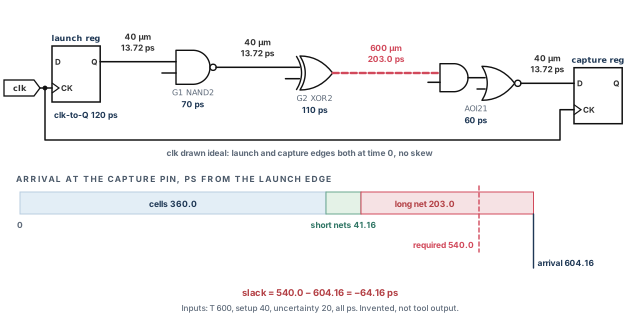
What to notice: Three of the four nets cost 13.72 ps each. The 600 µm net costs 203 ps and turns the path negative: arrival 604.16 ps against a required 540 ps. The clock is ideal, so there is no clock-tree skew.
Here is the arithmetic behind the figure (illustrative inputs, not tool output):
- The cell delays are 120 ps (launch register clock-to-output), then 70, 110 and 60 ps for three gates. They total 360 ps.
- Three nets are 40 µm long: 13.72 ps each, 41.16 ps in all. One net is 600 µm: 203.0 ps.
- With ideal clocks and no declared latency,
t_launch=t_cap= 0. - The arrival is 360 + 41.16 + 203.0 = 604.16 ps, which rounds to 604.2 ps.
- Let T = 600 ps,
t_setup= 40 ps andt_unc= 20 ps. Thent_req= 600 − 40 − 20 = 540 ps. - The slack is 540 − 604.16 = −64.16 ps, or −64.2 ps.
Now let the placement bring the long net to 250 µm, which costs 70.0 ps. The arrival falls to 360 + 41.16 + 70.0 = 471.16 ps. The slack becomes +68.84 ps, or +68.8 ps. The path is the same and the netlist is the same. Only the distance changed.
6.3 Ideal and propagated clocks
In an ideal clock, the clock arrives at every register at the same time, apart from any latency the constraints declare. Before CTS no clock tree exists, so the analysis has no choice. Clocks are ideal for timeDesign -prePlace and -preCTS. place_design forces ideal clocks whatever -clockPropagation says. A propagated clock uses the actual tree delays, so launch and capture arrivals differ by skew.
What this means for a pre-CTS slack:
- It carries no clock-tree skew. When CTS builds a tree, skew will make some slacks better and some worse. A pre-CTS slack of +0.05 ns does not promise a positive post-CTS slack.
- It assumes the clock network costs nothing, apart from declared latencies and uncertainty. Constraints should hold a realistic uncertainty, so that pre-CTS numbers are not optimistic. This is a project decision, not a tool default.
- Useful skew is a separate, optional flow. The baseline keeps
-opt_skewand-opt_skew_pre_ctsfalse, so the statements above hold as written. - If you enable useful skew, both options must be true, and the master option can disable the stage option. The result is network latencies on clock pins. They become insertion delays when the clock tree specification is created, and the pre-CTS slack then includes them. Decide this with the CTS owner, because it changes the clock inputs that CTS inherits.
6.4 Pre-CTS is not post-CTS closure
Treat the pre-CTS timing target as a gate for starting CTS, not as evidence that timing will close. The stage has no clock tree and no real routing. Its useful job is to remove the paths that placement and sizing can fix, and to find the ones they cannot. A path that is badly negative after pre-CTS optimization is a signal. Look at the floorplan, the constraints or the logic, since CTS will not repair it.
Hold is a separate question. With ideal clocks, a hold number is provisional. It can be computed and reported, but it will change once the tree exists. It becomes much more representative after CTS. Three facts follow:
- No hold repair here.
optDesign -preCTSdoes not accept-hold, so it does not repair hold at this stage. Separately,place_designuses setup analysis even ifsetAnalysisMode -checkType holdis set. - Early hold fixing is a different control. The integrated alternative
place_opt_designhas its own-opt_early_hold_fixingcontrol. The baseline sets it tonone, so no early hold repair happens in the main flow. Even where an early tree exists,timeDesign -preCTSanalyzes with forced ideal clocks.-reportOnlyreuses data already in memory, with its own limits. Record the exact analysis command and clock mode beside every report. - Reporting and repair are separate decisions. Some flows report the provisional number and ignore it until after CTS. Others record it as an input to the CTS owner. Write down which applies. Do not repair pre-CTS hold violations by hand.
6.5 Timing optimization before CTS
Optimization changes the netlist to remove violations. A pre-CTS run typically works in the order below, and the tool can interleave the steps.
- Critical-path movement. Cells on the worst paths move closer to their neighbors, which shortens the nets that matter most.
- Upsizing and buffering. A driver is replaced by a stronger one, or a buffer splits a long or heavily loaded net. Both add area.
- Downsizing and area recovery. Cells with slack to spare become smaller. Recovery returns timing margin to area, so read the summary afterwards.
- Restructuring and pin swapping. Logic is rearranged and equivalent pins are exchanged, so that late signals use faster pins. Both need an approved equivalence policy.
- DRV repair. Maximum capacitance and maximum transition violations are repaired. Fanout is repaired only if
-opt_fix_fanout_loadis true, and the baseline leaves it false.
-opt_max_density and the setup target limit growth. A positive target asks for margin and grows the netlist, and every added cell needs a free site. Useful skew is the optional coordinated flow described above. Incremental optimization (-incr) works on the paths still violated after a full run, with resizing and global buffering.
The permissions and targets of the baseline apply, so source the baseline script; a readback is not configuration. Three prerequisites must hold:
- the saved legal placement of Phase 1 exists;
- constraints are loaded and checked;
- timing loops are broken with
set_disable_timing.
Otherwise loops may be broken at different points in different runs, and WNS cannot be compared between runs. Start from the saved legal placement and apply the policy. Create the directories first, because redirection does not create them.
innovus> restoreDesign checkpoints/place_run1/legal.enc.dat stream_acc ;# Phase 1 result
innovus> source scripts/baseline_policy.tcl ;# apply the baseline policy
innovus> file mkdir reports/opt_run1/opt ;# optimization reports go here
innovus> file mkdir reports/opt_run1/timing ;# the later timing run goes here
innovus> file mkdir checkpoints/opt_run1 ;# the optimized checkpoint goes here
The main pre-CTS optimization changes the netlist, adds and deletes cells and moves cells. It ends with a legalization, because refinePlace runs at the end of optDesign. Save the result at once.
innovus> optDesign -preCTS -outDir reports/opt_run1/opt -prefix opt_run1 ;# optimize
innovus> saveDesign checkpoints/opt_run1/opt.enc ;# save the optimized candidate
innovus> getPlaceMode -nonDefault > reports/opt_run1/place_modes.txt ;# record modes
innovus> getOptMode -nonDefault > reports/opt_run1/opt_modes.txt ;# record opt modes
Two variants exist, each with its own starting state. DRV repair only, with no setup optimization, may start from the saved legal placement. It restores, configures and creates its directory itself.
innovus> restoreDesign checkpoints/place_run1/legal.enc.dat stream_acc ;# Phase 1 result
innovus> source scripts/baseline_policy.tcl ;# apply the baseline policy
innovus> file mkdir reports/opt_drv ;# its own report directory
innovus> optDesign -preCTS -drv -outDir reports/opt_drv -prefix opt_drv ;# DRV only
Incremental setup optimization is different. The tool requires a previous optDesign run on all path groups before -incr. So it starts from the saved candidate of the full run above, checkpoints/opt_run1/opt.enc. It works with resizing and global buffering, without restructuring or DRV repair. It cannot be combined with -drv. Give it its own checkpoint.
innovus> restoreDesign checkpoints/opt_run1/opt.enc.dat stream_acc ;# full-run result
innovus> source scripts/baseline_policy.tcl ;# apply the baseline policy
innovus> file mkdir reports/opt_incr ;# its own report directory
innovus> file mkdir checkpoints/opt_incr ;# its own checkpoint directory
innovus> optDesign -preCTS -incr -outDir reports/opt_incr -prefix opt_incr ;# incr
innovus> saveDesign checkpoints/opt_incr/opt.enc ;# save the incremental candidate
If you keep the incremental result, it becomes a new candidate with its own run name. The acceptance and handoff sections then follow that name, not opt_run1.
- Expected result. Fewer or smaller violations, and a legal placement again at the end. The cell count and the area can rise or fall, because downsizing, area recovery and deletion are enabled in the baseline.
- Misinterpretation. "Optimization finished" is not "timing met". Read the summary.
6.6 Reading the result
timeDesign produces the timing report for a stage. With -preCTS it runs an early global route and the native default extraction, using ideal clocks.
innovus> timeDesign -preCTS -outDir reports/opt_run1/timing \
    -prefix opt_run1_final ;# setup timing summary
A provisional hold look is a separate, optional step. It reuses the extraction already in memory. The number is provisional because the clocks are ideal.
innovus> timeDesign -preCTS -hold -reportOnly -outDir reports/opt_run1/timing \
    -prefix opt_run1_hold ;# provisional hold report, ideal clocks
The files are split by path group: reg2reg, in2reg, reg2out, in2out and reg2cgate. There are also files for max transition, max capacitance, max fanout, density and a summary. The summary table shows WNS, TNS and violating paths per group, a design-rule table, density, and routing overflow in each direction. The excerpt below is a neutral teaching table with invented numbers.
stage: preCTS, clocks ideal, view: setup_view_1
group      WNS(ns)   TNS(ns)   violating/total
all        -0.064    -3.82     118 / 41 902
reg2reg    -0.064    -3.11      96 / 30 540
in2reg     -0.021    -0.71      22 / 8 100
DRV        max_tran 0 viol   max_cap 0 viol   max_fanout 4 viol
density    61.0 %    routing overflow H 0.4 %   V 0.1 %
How do we read it?
- WNS is a minimum slack, not a count. TNS and the violating-endpoint count aggregate per endpoint, so the
allrow need not equal the sum of the groups. - Four fanout violations remain. They are not repaired unless
-opt_fix_fanout_loadis true. - The density of 61.0 percent matches the earlier arithmetic only if the report counted the same area.
- The routing overflow of 0.4 percent horizontal is an estimate from an early global route. It is a number to compare between runs, not a prediction.
For the paths themselves, write three reports. Each redirects to a file in the timing directory created above. Keep the session log of the run with them, because a console message is evidence only if it is saved.
innovus> report_timing -max_paths 3 > reports/opt_run1/timing/worst3.rpt ;# worst paths
innovus> report_constraint -all_violators > reports/opt_run1/timing/violators.rpt ;# all
innovus> check_timing -verbose > reports/opt_run1/timing/check_timing.rpt ;# constraints
The excerpt below is an invented worst-path trace in a neutral form. The notes after it show how to classify the path.
from u_dp/u_acc_reg[17] to u_dp/u_out_reg[3]   clock clk (ideal)
pin / net            cell      fanout  slew   incr     arrival
u_acc_reg[17]/Q      DFFX2     1       40     120      120.00
net 40 um            net       1       45     13.72    133.72
u_mul/U12/Y          NAND2X1   4       80     70       203.72
net 40 um            net       4       50     13.72    217.44
u_mul/U31/Y          XOR2X1    2       60     110      327.44
n_xor31 (600 um)     net       2       95     203      530.44
u_dp/U77/Y           AOI21X1   1       50     60       590.44
net 40 um            net       1       45     13.72    604.16
u_out_reg[3]/D                                         604.16
required time 540.00    slack -64.16 (VIOLATED)
Three kinds of problem look different in a trace:
- Long-net problem. One net contributes 203 ps, while the cells contribute 360 ps in four stages (clock-to-Q and three gates). It is the net after the second gate in Figure 12, and the long net of Figure 13. The remedy is geometric: placement, a buffer or a stronger driver. Compare the net length with the rest of the design.
- Logic-depth problem. Many stages, each with a small wire delay, add up to the violation. Placement cannot fix this. Look at the logic, the constraint or restructuring.
- Load and slew problem. A high fanout or a slow slew on a driver inflates the next delay. Look at the slew and fanout columns, and at the DRV section of the summary.
6.7 Placement and optimization, together and apart
Placement and optimization change the same objects. A buffer added by optimization needs a free site, which only legal whitespace provides. A cell moved by optimization alters the density map. Hence the loop of section Controlled refinement: change something, rerun, regenerate every report. The two placements below show what the loop is for.
Two placements of the same path
Let us place the path of Figure 12 twice: spread below the macros, and pulled into the channel between u_buf_b and u_coef. The drawing is in Figure 13 and the comparison in Table 19.
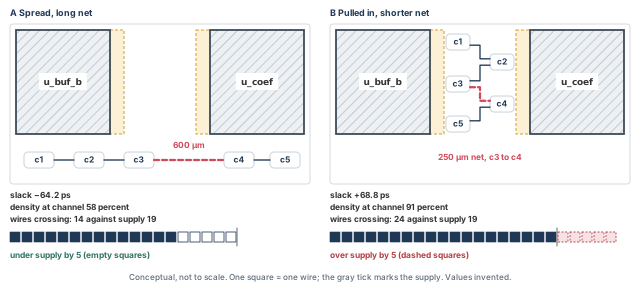
What to notice: B gains 133 ps by shortening one net from 600 to 250 µm, but 24 wires must then cross an edge with 19 tracks. Both the gain and the cost are real.
| Measure | Placement A (spread) | Placement B (pulled in) | Reading |
|---|---|---|---|
| Long net length | 600 µm | 250 µm | B is shorter |
| Slack of the path | −64.2 ps | +68.8 ps | B meets the check |
| Local density at the channel window (all cells) | 58 percent | 91 percent | B is near the limit |
| Wires crossing the channel edge | 14 against a supply of 19 | 24 against a supply of 19 | B is over the supply by 5 |
| Verdict | Fails timing; lower estimated congestion at this edge | Meets timing; congested at this edge | Neither is acceptable as it stands |
Neither placement is the answer. Thus, a timing gain from placement is not free, and its cost appears in a report you must read. The remedy might be a partial blockage, a smaller pull, a swap of macro orientation or a buffer. Section Controlled refinement teaches how to try one and compare.
6.8 Clean timing can mislead
A summary with no violation says only that the analyzed paths meet the check. It says nothing about the paths the tool did not analyze. There are four common ways to be clean and wrong:
- Unconstrained paths. A path with no required time is not checked. Missing input or output delays leave ports unconstrained.
- Missing or wrong clocks. A register with no clock has no check. A clock defined on the wrong pin gives wrong periods.
- Disabled arcs and case analysis. Constants and disabled arcs remove paths. If the case values belong to a different mode, the removed paths are real in the mode you wanted.
- A view that does not match. A slack from an inactive or non-signoff view may be easy.
Two commands read coverage, and neither changes the design. check_timing looks for missing constraints. Its default-on warnings include missing input delay, unconstrained endpoints, loops and clock issues. report_analysis_coverage counts checks that are met, violated and untested, with the reason for each untested check. The directory below exists from the optimization step.
innovus> check_timing -verbose \
    > reports/opt_run1/timing/check_timing_coverage.rpt ;# missing constraints
innovus> report_analysis_coverage -verbose {violated untested} -sort reason \
    > reports/opt_run1/timing/coverage.rpt ;# how many checks ran, and why not
A timing summary with zero violations is a stop sign, not a finish line, until coverage is read. Count the unconstrained endpoints, the untested checks and the missing clocks first. If any is large, the absence of violations may only mean that nothing was checked.
Always read the header of a report before its numbers: which stage, view, clock mode, extraction and path groups. A number without its header can be matched to the wrong run.
6.9 Rerun requirements
After placement, optimization or any legalization, rerun the timing summary, the coverage check and the density and congestion reports. A timing report that predates the last optimization is stale. If you changed setOptMode, the constraints or the cell-use list, say so alongside the numbers.
6.10 Integrated alternative: place_opt_design
place_opt_design combines placement and pre-CTS optimization in one command. It is another way to organize the flow. This chapter uses the separated flow. It lets you inspect the placement before optimization changes the design. The two routes are drawn side by side in Figure 14, after the list.
- What it combines. Pre-place optimization, standard-cell placement, I/O pin assignment if pins are not preplaced, and pre-CTS optimization.
- Options. They include
-incremental,-incremental_timing,-num_paths,-out_dirand-prefix. - Its result still needs the checks and acceptance evidence of section Checks and acceptance.
- Do not run it afterwards merely because it has also been introduced. It is not an additional step in the main flow.
- Use a separate run identity and the flow assumptions that go with it. In the early clock flow it builds clustering and useful skew. The clock tree specification must then not be deleted between steps.
- The two routes are not guaranteed to produce identical databases or quality of results.
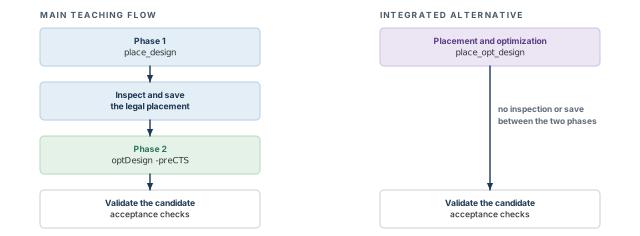
What to notice: The main flow has an inspection and save between placement and optimization. The alternative has none. Both candidates need the same acceptance checks.
7 Congestion and routability
A placement can be legal and meet timing and still be impossible to route. Routing needs tracks, and tracks are a limited supply. When many wires want to pass the same place, some do not fit. Congestion is how that shortage shows up before any wire exists. It is cheaper to read it now than to find it in a failed route.
Phase 2 continues here. This section reads the physical consequences of the optimized candidate. The commands here report; they do not perform the optimization.
7.1 Demand, capacity and overflow
Let us think in terms of a grid. The router divides the die into small windows called global-routing cells (GCells). Wires cross the edge between two GCells. Only so many can cross it, limited by the tracks on the layers that run in that direction.
- Capacity is the number of tracks available to cross an edge, counted layer by layer. For each layer that runs across the edge, take its tracks less those taken by blockages and preroutes on that layer. Sum the layers afterwards.
- Demand is the number of wires the estimated routes put across that edge.
- Overflow is demand above capacity: overflow = max(demand − capacity, 0).
Let us count one edge (illustrative inputs, not tool output), as Figure 15 draws it:
- The edge is 10 µm long. Two layers, A and B, cross it in the horizontal direction.
- Each layer has a track pitch of 0.4 µm (invented), so 10 / 0.4 = 25 tracks on each.
- A preroute running along layer A removes 6 of its tracks, so layer A has 19.
- A pre-routed signal on layer B removes 2, so layer B has 23.
- Capacity = 19 + 23 = 42. The estimated routes put 47 wires across the edge.
- Overflow = 47 − 42 = 5.
The edge is over capacity by 5 wires. At least 5 wires must take a longer route or a different layer, and they may be unable to.
Subtract an obstruction only from the layer it occupies. Subtract it also from layers it blocks by a stated mechanism, such as a via or a pin-access keep-out. A stripe on one layer does not by itself remove tracks from the next layer.
The estimate comes from an early global route. earlyGlobalRoute is a quick global route for congestion and parasitic estimation, and it is not clean against the design-rule check (DRC). Its log lines carry the tag [NR-eGR]. reportCongestion needs it to have run. timeDesign -preCTS runs it as part of the timing flow. So a timing run at this stage produces the congestion data as a side effect.
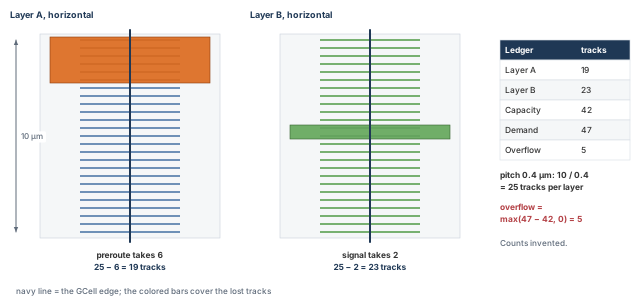
What to notice: Each loss is subtracted only from the layer it sits on. Capacity is 19 + 23 = 42; demand is 47, so the ledger shows an overflow of 5.
7.2 Directional and layer effects
Each layer has a preferred direction, and overflow is counted separately for horizontal and vertical edges. In the example, the stripes from Power Planning run vertically on M6. A stripe pair of two 2 µm wires with a 2 µm gap occupies a 6 µm band every 120 µm. So it covers 6 / 120 = 5 percent of the horizontal span of the vertical layer.
That is a geometric estimate of how much of the span the stripes cover. It is not a track count. It leaves out spacing to neighboring wires and the vias that connect the stripes down. The same reasoning applies to the ring layers and to the rails on M1, each on its own layer.
Two conclusions follow:
- The grid can cause vertical overflow. Vertical overflow can come from the power grid even though the wires are signals. The stripes sit on vertical layers.
- One overflow number hides the short direction.
timeDesignshows horizontal and vertical routing overflow separately, andreportCongestion -overflowgives a distribution. Look at both, and use the-3dform ofreportCongestionfor a layer breakdown.
7.3 Density maps and congestion maps are different
A density map shows how full the placement is: cell area per window. A congestion map shows how short the routing supply is: overflow per window edge. They overlap in practice, but each can be high without the other. Both maps of the upper half of the example are in Figure 16, and Table 20 compares them.
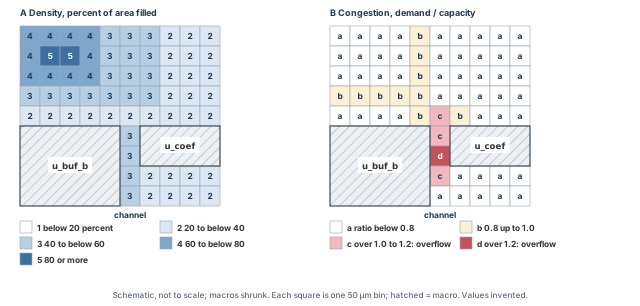
What to notice: The densest block, in the upper left, is not the most congested. The overflow sits in the narrow channel between u_buf_b and u_coef, where density is moderate.
| Aspect | Density map | Congestion map |
|---|---|---|
| Question | How much of the area is filled with cells? | Is there enough routing supply? |
| Computed from | Cell positions and sizes | An early global route of the nets |
| Needs | A placed design | A placed design and an early global route |
| High where | Many cells are packed | Many wires cross, or tracks are blocked |
| Can be high without the other | Dense logic with local wiring: high density, low congestion | A wide bus across a macro channel: low density, high congestion |
| Command | reportDensityMap | reportCongestion |
7.4 Reading the density map
reportDensityMap shows where cells are concentrated. It needs a placed design and does not modify the database. The defaults give a map in the viewer and a text report. A finer grid and a higher threshold show only the worst windows; the values below are examples.
innovus> reportDensityMap ;# default 50 um grid, 0.75 threshold
innovus> reportDensityMap -gridInMicron 20 -threshold 0.90 ;# worst bins only
Settings for later calls can be stored. Arguments given to the command win over stored settings.
innovus> setDensityMapMode -threshold 0.90 ;# store a threshold for later calls
innovus> getDensityMapMode ;# read the stored settings back
- Defaults. A 50 µm grid; bins under a 0.75 threshold are not reported.
-gridInMicronhas a maximum of 1000.-gridInRowis the alternative, in row heights. Give one of the two, and confirm in your installation which wins if both are given. - Other options.
-ignoreBlockskips block instances in supply and demand.-ignoreFillershows standard-cell density in post-filler maps.setDensityMapMode -resetrestores the defaults. - Expected result. A colored map and a text report. The report lists the bins above the threshold per power domain, the bin size and a histogram of density ranges.
- Threshold range. The threshold accepts values up to 2.0. That is an input range; it does not show that a bin can exceed 100 percent density. Whether a value above 1.0 appears depends on what the report counts, such as padding or blockage area.
- Grid. A coarse grid averages a small hotspot away. Quote the grid and the threshold with every number.
Two queries answer a narrower question about one window, in µm. The box below is an example: the channel strip beside u_coef.
innovus> queryDensityInBox 530 800.2 580 960.2 ;# cell density in one box
innovus> queryPinDensity -area 530 800.2 580 960.2 ;# pins per area in the same box
queryDensityInBox prints several areas for the box: standard cells over free space, macros, power metal and placement obstructions. It also prints the utilization in that box. It honors placement blockages. queryPinDensity snaps the area to its grid in the output.
7.5 Reading the congestion estimate
The congestion estimate needs an early global route. The route lives in the session, and the reports only read it. Run the route once, then read it three ways.
innovus> earlyGlobalRoute ;# quick global route for the estimate
innovus> reportCongestion -overflow ;# overflow by direction and edge distribution
innovus> reportCongestion -hotSpot -num_hotspot 5 ;# the five largest hotspots
innovus> reportCongestion -hotSpot -3d ;# per-layer breakdown, a separate call
- Options.
-overflowprints horizontal and vertical overflow and a table of edge distribution.-hotSpotprints the top hotspots, and-num_hotspotsets how many.-includeBlockagecounts blockage area.-3dgives the per-layer table. - Hotspot score. The maximum hotspot is the largest contiguous area of overflowing cells; the total is the sum. A maximum score below 100 typically means routable. That is a rule of thumb of the tool's own scoring, not a guarantee. Use the number to compare runs of the same design in the same tool.
- Misinterpretations. An early global route is an estimate. The overflow you read is not the final short count. A clean estimate does not promise a clean route, and a hotspot may disappear or move during real routing.
congRepair is a local experiment, not a free repair, and not part of the main flow. It is incremental placement driven by the early-global-route congestion. It spreads cells at hotspots, and it moves many cells. Run it after place_design or after pre-CTS optimization, never after post-CTS optimization.
Here it starts from the saved pre-CTS optimized candidate, in its own session. That keeps the original intact and makes the changed starting state explicit. The window is an example.
innovus> file mkdir checkpoints/cong_run1 ;# directories first
innovus> file mkdir reports/cong_run1/timing ;# its own timing folder
innovus> restoreDesign checkpoints/opt_run1/opt.enc.dat stream_acc ;# optimized DB
innovus> source scripts/baseline_policy.tcl ;# apply the baseline policy
innovus> congRepair -area 530 800.2 580 960.2 ;# spread cells at the channel hotspot
Unlike refinePlace -area, congRepair -area takes the four numbers unbraced; confirm with -help.
Then save it and regenerate every dependent report into the run directory. Redirect each console report into a file.
innovus> saveDesign checkpoints/cong_run1/cong.enc ;# save the experiment
innovus> checkPlace reports/cong_run1/checkplace.rpt ;# positions changed, so recheck
innovus> timeDesign -preCTS -outDir reports/cong_run1/timing -prefix cong_run1 ;# timing
innovus> check_timing -verbose > reports/cong_run1/check_timing.rpt ;# coverage
innovus> earlyGlobalRoute ;# fresh estimate on the new positions
innovus> reportCongestion -overflow > reports/cong_run1/congestion_overflow.rpt ;# H, V
innovus> reportCongestion -hotSpot -num_hotspot 5 \
    > reports/cong_run1/congestion_hotspot.rpt ;# the worst hotspots
innovus> reportDensityMap > reports/cong_run1/density_map.txt ;# density after the move
The -area window is optional; the default is the whole design. checkPlace follows because the move changes positions. The timing summary and the coverage check rerun in the same block, because the move changes timing. Compare against the baseline as section Controlled refinement describes. If you keep this result, it becomes the selected candidate, with its own run name.
7.6 Local density, macro pins and narrow channels
Three places concentrate demand, and the example contains all three.
- Dense windows. Cells in a dense window bring their pins with them. Every net needs wire, and pin access needs M1 and M2 room. Pin density rises with cell density.
- Macro pins. A macro's pins sit on its edge and are reached from the neighboring routing layers. Cells packed against the pins block access. The halo is meant to prevent that; a tight halo does not provide a path.
- Narrow channels. Every wire that connects the two sides of a channel must pass through it. Wires that connect cells inside the channel add to that. The channel between
u_buf_bandu_coefis 50 µm wide after the halos and carries the nets that join them.
PG routing restrictions. The supply metal from Power Planning reduces capacity on its own layers, as described above. Over a macro, the stripes also cover layers that the macro's own pins may need. Over a PG-heavy area, a hotspot is often a capacity problem first. Figure 17 draws the channel of placement B. A dashed outline in a cell marks an M5 obstruction (OBS), a shape the router may not cross. The list after the figure counts the supply and demand there, taking each loss once.
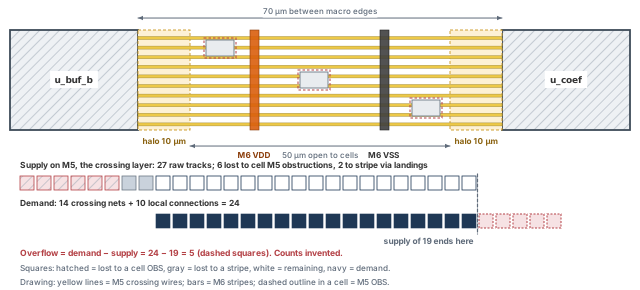
What to notice: 50 µm of the 70 µm gap is open to cells. Losses take 8 of 27 M5 tracks, so a supply of 19 meets a demand of 24: overflow 5.
- Supply on M5, the crossing layer, is 27 raw tracks.
- Cell obstructions. Each of the three cells carries an M5 OBS over two tracks, which removes six.
- Stripes. The via-landing and spacing footprint of the two stripes removes two more, one per stripe. So 19 tracks remain.
- Demand is 14 crossing nets plus 10 local connections to pins outside the obstructions, so 24. It holds only wires not already blocked by those shapes.
- Overflow = demand − supply = 24 − 19 = 5.
7.7 Placement adjustment or floorplan revisit?
A congestion problem can have a placement cause, which a placement change can fix. It can also have a floorplan cause, which it cannot. Making the wrong call costs a day. Table 21 reads the usual cases. Figure 18 turns the call into four questions.
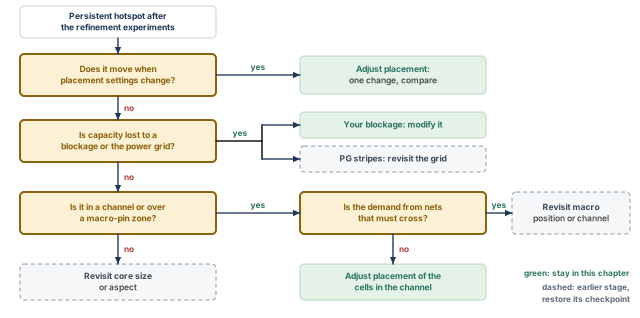
What to notice: Each question asks for evidence. A floorplan or grid leaf means restoring that stage's checkpoint.
| If you see... | The cause is probably... | Action |
|---|---|---|
| The hotspot moves when you change a placement setting | Placement | Adjust and compare (section Controlled refinement) |
| The hotspot sits in the same channel in every run | Floorplan geometry (floorplanning database) | Revisit macro spacing or halos |
| Capacity is low there before any wires are counted | Blockages or the power grid | Revisit the blockage or grid (floorplanning or power-planning database) |
| Demand is high because many nets must cross | Connectivity and macro positions | Revisit macro placement; consider the mixed placer as a separate flow |
| Overflow is high everywhere and slightly | Utilization or core size | Revisit the core, or reduce the cell area |
Reading average utilization as routability. A 61 percent utilization says how full the core is on average. It does not say whether 50 µm of channel can carry 24 wires on 19 tracks. Routability is a local property: read the maps.
Do not send a design to CTS with an unexplained hotspot. CTS adds buffers in the same windows, and routing will not remove the shortage. A hotspot may be accepted, but only with a written reason: an owner, the cause, and what is expected to change it.
7.8 Rerun requirements
Any change to placement, blockages, padding or the power grid invalidates the density map and the congestion estimate. Rerun earlyGlobalRoute before reportCongestion. Regenerate the timing summary too, because it depends on the same positions. A congestion report from before the last optimization describes cells that are no longer where it says.
8 Controlled refinement
When a result is not good enough, the temptation is to change four settings at once and run again. If the result improves, you do not know which change helped. If it worsens, you do not know which hurt. Controlled refinement is a discipline for keeping that knowledge: one change, from the same starting point, judged on the same measures.
8.1 The loop
Four rules hold the loop together.
- Restore the same baseline each time. The baseline is the saved starting checkpoint plus the baseline policy script. Restoring is cheaper than reasoning about what a previous experiment left behind.
- Change one variable. One setting, one blockage or one padding value. If two must change together, treat the pair as one variable and say so.
- Regenerate every dependent report. Comparing a new timing report with an old congestion report compares two different designs.
- Decide the acceptance rule first. Write down what "better" means before you look at the numbers, so that the numbers do not choose the rule.
Whether restoreDesign also resets mode settings such as setPlaceMode is not established here. So the sequence of every experiment is fixed:
- restore the checkpoint;
- source the full baseline script;
- apply the one change and run;
- save to a new run directory and regenerate all evidence;
- compare.
Printing the modes after the restore is not enough, because a readback is not configuration. Avoid setPlaceMode -reset as a shortcut. It restores the defaults, which may differ from the baseline you recorded. Figure 19 draws the loop.
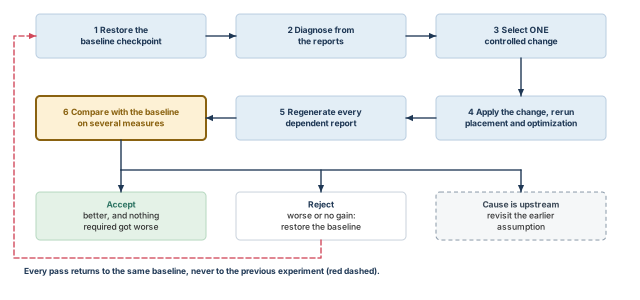
What to notice: Every pass returns to the same baseline, never to the previous experiment. The comparison uses several measures. One exit leaves the loop when the cause is upstream.
8.2 The levers, and what each costs
Each lever below is a complete command in the recipes that follow. Table 22 names the trade and the undo. None is a repair by itself; each trades one resource for another. Naming the trade before the run is what makes the result readable.
| Lever | What it is for | Cost, and what to watch | Undo |
|---|---|---|---|
| Cell padding | Routing room beside pin-dense cells | Row capacity and displacement; utilization, legality | deleteAllCellPad |
| Instance padding | The same, for named instances | The same; whether the honor mode is on | deleteInstPad, after reportInstPad |
| Module padding | Spread one module | Wirelength inside it; timing of its paths | Restore and rerun |
| Density cap | Stop windows exceeding a density | Cells pushed from partners; timing | Restore and rerun |
| Partial blockage | Limit density in a chosen place | Capacity there; displacement at its edges | deletePlaceBlockage |
| Congestion effort | More congestion work in global placement | Run time; wirelength | Restore and rerun |
| Local spreading | Incremental placement driven by congestion | Moves cells after timing work | Restore |
| Constraints | Correct what the placer is told to care about | Changes what "good" means | Restore |
| Soft guide strength | Pull a module together | Other nets get longer | Restore and rerun |
8.3 Recipes: one change each
Full-placement recipes start from the same two lines, run in a fresh session. They restore the floorplan database with power planning completed. The local recipes at the end are different: they start from a saved placed or optimized candidate, and each says so.
innovus> restoreDesign checkpoints/grid_run1/grid.enc.dat stream_acc ;# power-planned DB
innovus> source scripts/baseline_policy.tcl ;# apply the baseline policy
The seven global placement settings are the single-line experiments of Table 14. Each is applied after those two lines. It is followed by place_design, the legality inspection and optDesign -preCTS. The recipes below cover the levers that need more than one line. Cell names, instance names, counts and boxes are example values.
Cell padding. Reserve one site on each side of every BUFX4. -left and -right are in sites. The rollback is a separate step.
innovus> specifyCellPad BUFX4 -left 1 -right 1 ;# the change
innovus> deleteAllCellPad ;# rollback, run separately when you undo it
Instance padding. Pad the named instances by 2 sites; the honor mode is already true in the baseline. Then list the padding. The rollback for one instance is braced, so that Tcl passes the index literally and does not run [17] as a command.
innovus> specifyInstPad u_dp/u_acc_reg* 2 ;# the change
innovus> reportInstPad -all ;# list every instance pad
innovus> deleteInstPad {u_dp/u_acc_reg[17]} ;# rollback for one instance, run separately
Named partial blockage. A named blockage can be deleted by name. The box is the channel window in µm.
innovus> createPlaceBlockage -name pb_channel -type partial -density 50 \
    -box {530 800.2 580 960.2} ;# at most 50 percent density in the channel
innovus> deletePlaceBlockage pb_channel ;# rollback, run separately when you undo it
Local spreading. congRepair -area is a local experiment that starts from the saved optimized candidate. Its follow-up checks are in section Reading the congestion estimate. It is a move after timing work, so it is judged by the same comparison as every other recipe.
After any recipe, run the placement and then the evidence block below, and save to a new run directory.
8.4 A single controlled change, as a run
The sequence below is for one experiment. It is a template: replace the run name and the one change. All evidence goes to a run directory named for the experiment, and nothing is written over the baseline.
The one change of each experiment lives in its own small script. That way the same policy can be applied again at acceptance. The script holds mode settings only. A blockage or a padding record travels in the saved checkpoint, so the script does not repeat it. The module and factor (1.0 or more) are example values.
innovus> set fh [open scripts/exp1_modpad_override.tcl w] ;# open the override file
innovus> puts $fh {setPlaceMode -place_global_module_padding {u_dp 1.2}} ;# the change
innovus> close $fh ;# close the file
Step 1 is Phase 1 only. It ends at an inspection gate, and nothing after the gate runs until you have read the legality result.
innovus> file mkdir reports/exp1_modpad ;# 0. directories for this run
innovus> file mkdir reports/exp1_modpad/opt ;# optimization reports
innovus> file mkdir reports/exp1_modpad/final ;# final timing reports
innovus> file mkdir checkpoints/exp1_modpad ;# checkpoints of this run
innovus> restoreDesign checkpoints/grid_run1/grid.enc.dat stream_acc ;# 1. restore
innovus> source scripts/baseline_policy.tcl ;# apply the baseline
innovus> source scripts/exp1_modpad_override.tcl ;# 2. the one change under test
innovus> place_design ;# 3. Phase 1: place
innovus> checkPlace reports/exp1_modpad/checkplace_place.rpt ;# legality for review
# GATE: stop here and read the report. Continue only when legality is accepted.
After the gate, refinePlace runs only if the report lists violations, and then the check is repeated in full. Then the inspected legal placement is saved and Phase 2 runs.
# Only if the report listed violations: refinePlace, then check again.
# refinePlace
# checkPlace reports/exp1_modpad/checkplace_after_refine.rpt
innovus> saveDesign checkpoints/exp1_modpad/legal.enc ;# the inspected legal placement
innovus> optDesign -preCTS -outDir reports/exp1_modpad/opt \
    -prefix exp1_modpad_opt ;# Phase 2: optimize
innovus> saveDesign checkpoints/exp1_modpad/opt.enc ;# the optimized candidate
Regenerate every dependent report into the same run directory, as a separate block. Nothing from the baseline run is reused. The final timing run has its own prefix and folder, so it cannot overwrite the optimization reports. Every console report is redirected into a file.
innovus> getPlaceMode -nonDefault > reports/exp1_modpad/place_modes.txt ;# modes
innovus> getOptMode -nonDefault > reports/exp1_modpad/opt_modes.txt ;# opt modes
innovus> checkPlace reports/exp1_modpad/checkplace.rpt ;# legality of the final state
innovus> timeDesign -preCTS -outDir reports/exp1_modpad/final \
    -prefix exp1_modpad_final ;# final timing, own folder and prefix
innovus> earlyGlobalRoute ;# fresh congestion estimate
innovus> reportCongestion -overflow \
    > reports/exp1_modpad/congestion_overflow.rpt ;# overflow, H and V
innovus> reportCongestion -hotSpot -num_hotspot 5 \
    > reports/exp1_modpad/congestion_hotspot.rpt ;# the worst hotspots
innovus> reportDensityMap > reports/exp1_modpad/density_map.txt ;# density map
- Option used.
-place_global_module_padding {u_dp 1.2}takes a braced module and factor. A factor below 1.0 is ignored, the module name is prefix-matched, and the option acts only in global placement. - Reports. The same set as for the baseline, under a new directory name. If
reportDensityMapdoes not print to the console in your installation, confirm where it writes before relying on the redirect. - Scope. This template is a full-placement experiment that starts from the power-planned database. A local experiment starts from a saved placed or optimized candidate instead. Its results are not comparable with a full-placement run unless the baseline is rerun the same way.
- Misinterpretation. A better congestion score with a worse WNS is neither a win nor a loss. It is a trade, judged against the acceptance rule.
- Rerun. Restore the baseline before the next experiment. Do not stack experiments unless you decide to combine two that each helped. Then name the run as a combination.
A run manifest ties the files to one state. A timestamp alone is not evidence. So the manifest names the source checkpoint, the exact policy and the identities of the inputs. Write it as a small script and source it. The script name and the input file names are examples to adapt; copy the tool build from your session banner.
# Run manifest of one experiment. Input names and the build are examples.
set mf [open reports/exp1_modpad/manifest.txt w]
puts $mf "run: exp1_modpad"
puts $mf "baseline checkpoint: checkpoints/grid_run1/grid.enc.dat"
puts $mf "policy: scripts/baseline_policy.tcl"
puts $mf "override: scripts/exp1_modpad_override.tcl"
puts $mf "one change: setPlaceMode -place_global_module_padding {u_dp 1.2}"
puts $mf "legal checkpoint: checkpoints/exp1_modpad/legal.enc"
puts $mf "optimized candidate: checkpoints/exp1_modpad/opt.enc"
puts $mf "inputs: constraints/stream_acc.sdc, view setup_view_1, libs, RC extraction files"
puts $mf "tool build and UI: copied from the session banner, Legacy UI"
puts $mf "checks: checkPlace default scope; timeDesign -preCTS"
puts $mf "estimate: earlyGlobalRoute"
close $mfinnovus> source scripts/manifest_exp1.tcl ;# write reports/exp1_modpad/manifest.txt
Here RC means the resistance-capacitance extraction files. Where the project allows, add a checksum of each file named, for example with md5sum in a shell. The checksum identifies the content; a date does not.
8.5 What to compare
No single number picks the winner. Compare on every measure the acceptance rule names, and write those measures down. The usual measures are in Table 23.
| Measure | How it is read | Direction | Why it can mislead |
|---|---|---|---|
| Timing | WNS, TNS, violating paths (timeDesign -preCTS) | WNS up; TNS toward zero | Ideal clock; estimate; coverage |
| Congestion | Hotspot score and overflow (reportCongestion) | Lower | An estimate; compare within one tool and design |
| Wirelength | Reported total, or HPWL | Lower is usually good | Ignores detours; not the goal |
| Cell area | Summary or area report | A trade, read with timing | Rises with buffers; falls with recovery |
| Buffer count | Cells added by optimization | A diagnostic, not a goal | Needed for timing; many can signal stretch |
| Legality | checkPlace violation counts | Zero | Scope depends on options |
| Displacement | Mean and maximum moves | Lower | The mean hides the maximum |
| Constraint compliance | Fences, regions, blockages honored | Complete | Optimization may cross fences unless told |
There is no universal threshold. A hotspot score of 100 is a rule of thumb of the tool's own scoring, as noted earlier. What counts as acceptable is a project decision, written before the run.
8.6 An experiment log
Table 24 is an illustration with invented numbers, to show how a log is read. It is independent of the acceptance dashboard later, which uses its own invented values. Wirelength is relative to the baseline, and WNS is in ps.
| Run | One change | WNS (ps) | Hotspot score | H/V overflow (%) | Wirelength (rel.) | Legality | Displacement mean / max (µm) |
|---|---|---|---|---|---|---|---|
| R0 | Baseline | −64 | 142 | 0.4 / 0.1 | 1.000 | 0 | 0.4 / 38.6 |
| R1 | Module padding 1.2 on u_dp | −66 | 118 | 0.3 / 0.1 | 1.011 | 0 | 0.4 / 31.0 |
| R2 | Density cap 0.80 | −91 | 96 | 0.2 / 0.1 | 1.034 | 0 | 0.6 / 44.2 |
| R3 | Partial blockage, 50 percent, in the channel | −58 | 74 | 0.1 / 0.0 | 1.018 | 0 | 0.5 / 36.8 |
| R4 | Congestion effort high | −70 | 101 | 0.2 / 0.1 | 1.022 | 0 | 0.5 / 35.1 |
The same runs also differ in cell area and in the buffers that optimization added (Table 25).
| Run | Cell area (µm²) | Buffers added |
|---|---|---|
| R0 | 411 800 | 3 940 |
| R1 | 411 700 | 3 980 |
| R2 | 412 600 | 4 300 |
| R3 | 411 900 | 3 910 |
| R4 | 412 100 | 4 020 |
How do we read it?
- The baseline R0 has the shortest wirelength and the worst hotspot score.
- R2 brings the hotspot score under 100, but it costs 27 ps of WNS and 3.4 percent of wirelength.
- R3 gives up 1.8 percent of wirelength and gains both hotspot score (142 to 74) and WNS (−64 to −58 ps). It does so because the change was local, at the channel where the problem was.
Let the acceptance rule be "hotspot score below 100, WNS no worse than the baseline, no legality violations". Then only R3 passes. Thus, the best result here is not the one with the shortest wirelength. It is the one that meets the rule on every measure. It would be wrong to conclude that a partial blockage always works. It worked here because the hotspot was in a channel.
8.7 Select the candidate once
The log picks a run. The choice has to travel, or acceptance will check a different state from the one that won. Record the selected candidate once, in a small script that acceptance and handoff both read. For the worked example, run R3 is chosen. If no experiment is chosen, the record names the optimized run checkpoints/opt_run1/opt.enc.dat and no override.
innovus> set fh [open reports/selected_candidate.tcl w] ;# the one record of the choice
innovus> puts $fh {set cand_run exp3_partial_blockage} ;# the run name
innovus> puts $fh {set cand_dat checkpoints/exp3_partial_blockage/opt.enc.dat} ;# its DB
innovus> set ovr scripts/exp3_partial_blockage_override.tcl ;# the run's override script
innovus> puts $fh "set cand_override $ovr" ;# record it
innovus> close $fh ;# close the record
Section An acceptance pass in order sources this file, and the handoff manifest saves the same identity. A blockage created by the change is already inside the saved checkpoint. So the override script of that run is empty or holds only mode settings.
8.8 When to revisit a macro or the core
Refinement has a limit. Stop and go back when:
- the hotspot stays in the same place under every lever (see Figure 18);
- the change that fixes congestion costs more timing than the project can pay, or the reverse;
- the channel is narrower than the nets that cross it can use, by the track arithmetic;
- utilization of the usable area is so high that legal whitespace is nearly gone;
- a macro faces away from the logic it talks to, which is a floorplanning decision.
Going back means restoring the floorplanning or the power-planning database. You change the floorplan or the grid there, and repeat the stages that depend on it. That is slower than adjusting a setting. It is also the only fix for a cause that sits upstream.
Accept a change only if it meets the written rule on every named measure. Record its run name, settings and reports in the selected-candidate file. Otherwise restore the baseline. Do not keep a change because it "looks better" on the one number you looked at last.
9 Checks and acceptance
After a run, one question is easy to ask and wrong to answer. It is whether the placement is good. That question hides four different questions, each with its own evidence. Answering them separately lets you say afterwards which one failed and what to do about it.
9.1 Four questions, kept apart
Table 26 lists the four questions and the evidence that can, and cannot, answer each.
| Question | What it asks | Evidence that can answer it | Evidence that cannot |
|---|---|---|---|
| 1. Is it legal? | Do all cells obey the geometry and constraint rules? | checkPlace, checkDesign -place, status counts, fixed-object comparison | Timing reports, congestion maps |
| 2. Is it plausibly routable? | Is routing supply likely to meet the estimated demand? | Density map, early global route congestion, macro-channel arithmetic | A legality check; average utilization |
| 3. Is timing acceptable for this stage and scope? | Do the analyzed paths meet the stage's target, and were enough paths analyzed? | timeDesign -preCTS summary, coverage, check_timing | A summary read without its coverage |
| 4. Is it ready for CTS? | Is the state saved, restorable, reported and recorded, with open items owned? It aggregates the blockers of questions 1 to 3 | The handoff package, plus the verdicts of 1 to 3 | Any one of the three above |
"Plausibly" in the second question is deliberate. An estimate can show that a placement is unlikely to route. It cannot show that it will. The phrase "for this stage and scope" in the third is also deliberate. A pre-CTS number is not a closure number.
9.2 The checks
Figure 20 keeps the four verdicts in view.
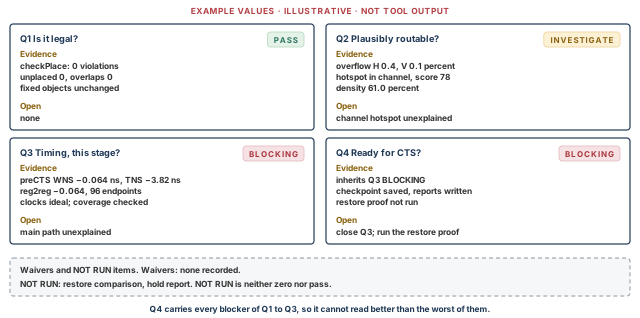
What to notice: A pass in Q1 does not lift the investigate in Q2. Q4 carries every blocker of Q1 to Q3, so it reads BLOCKING. NOT RUN sits in its own strip, neither a pass nor a zero.
Each row of Table 27 names a check and the question it informs. It also gives the evidence command and what the check leaves out.
| Check | Question | Command or evidence | Leaves out |
|---|---|---|---|
| Unplaced instances | 1 | Status counts; checkPlace count of placed cells and unplaced macros | Instances whose status is wrong but not unplaced |
| Overlaps | 1 | checkPlace | Overlap with a fixed macro under a blockage the tool does not check (see section The check: checkPlace) |
| Row and site alignment | 1 | checkPlace: off placement grid, site mismatch | Multi-height special cases |
| Orientation and boundary | 1 | checkPlace: row orientation, out of core | Orientation inside macros |
| Region, fence and blockage compliance | 1 | checkPlace, with setPlaceMode -place_hard_fence true; list of objects | Optimization breaking a fence if -opt_honor_fences is false |
| Fixed-object integrity | 1 | Compare macro boxes, orientations and statuses with the baseline | Objects that were never fixed |
| Placed-cell PG connectivity | 1 and 4 | checkPlace: standard-cell power pin connection; verifyConnectivity -type special -net on the named supply nets, with PG port connections | Other nets; a stop at the error cap; not a power-grid signoff |
| Setup timing | 3 | timeDesign -preCTS summary | Hold; post-CTS skew; routing |
| Transition, capacitance, fanout | 3 | DRV table of the summary; the max-tran, max-cap and max-fanout files | Violations only a later stage creates |
| Coverage and unconstrained paths | 3 | check_timing; report_analysis_coverage | Constraints that are present and wrong |
| Congestion hotspots | 2 | reportCongestion; the density map | The real route |
| Waivers | 4 | A written list | Anything not on the list |
9.3 An acceptance pass in order
The pass runs the checks in a fixed order and records each result. It is a template. Run it on a fresh restore of the selected candidate, so that it describes the file and not your session. The candidate is named once, in the file written in section Select the candidate once. With no experiment chosen, it is the optimized candidate opt_run1.
The script keeps collecting evidence after a failed check, so that one run shows everything. That is diagnostic continuation only. The stop is a separate gate at the end: no handoff while any blocker is open. First come the restore and the directories.
innovus> source reports/selected_candidate.tcl ;# sets cand_run, cand_dat, cand_override
innovus> restoreDesign $cand_dat stream_acc ;# restore the selected candidate
innovus> source scripts/baseline_policy.tcl ;# reapply the baseline policy
innovus> if {[file exists $cand_override]} { source $cand_override } ;# override
innovus> file mkdir reports/final ;# the acceptance evidence goes here
innovus> getPlaceMode -nonDefault > reports/final/place_modes.txt ;# record the policy
innovus> getOptMode -nonDefault > reports/final/opt_modes.txt ;# and the opt modes
Whether restoreDesign resets modes is not established here. So the policy is applied again and then read back. The readback is evidence, not configuration. Compare it with the files written for the selected run, in a Linux shell. The example uses exp3_partial_blockage, the selected run of section Select the candidate once; with no experiment chosen, use reports/opt_run1. A difference is either an approved change or a defect, and you record it either way.
$ diff reports/exp3_partial_blockage/place_modes.txt \
    reports/final/place_modes.txt # placement modes
$ diff reports/exp3_partial_blockage/opt_modes.txt \
    reports/final/opt_modes.txt # optimization modes
Question 1, legality from the database. The script below compares counts and fixed objects with the baseline record. Confirm the attribute names .cell.baseClass, .orient and .box with .? in your installation. A read that fails counts as a failure and never as a match. The expected values are copied from the power-planning handoff record. The file name is an example.
# Q1, database part. Read only. Every failed read counts as a failure.
set nfail 0
proc fail {msg} { global nfail; incr nfail; puts "FAIL: $msg" }
# Counts: macros and other instances are kept apart from the all-instance count.
set n_all [dbGet top.numInsts]
set l_mac [dbGet -p top.insts.cell.baseClass block]
if {$l_mac eq "0x0"} { set n_mac 0 } else { set n_mac [llength $l_mac] }
puts "instances: all=$n_all macros=$n_mac other=[expr {$n_all - $n_mac}]"
set l_unp [dbGet -p top.insts.pStatus unplaced]
if {$l_unp ne "0x0"} { fail "[llength $l_unp] instances are unplaced" }
# Fixed objects: expected boxes and orientations from the baseline record.
array set exp_box {
    u_buf_a {100 90.4 520 390.4}
    u_buf_b {100 689.6 520 989.6}
    u_coef  {590 800.2 830 960.2}
}
array set exp_orient {u_buf_a R0 u_buf_b R0 u_coef MY}
# Fixed objects: status, orientation and box against the baseline record.
foreach n [lsort [array names exp_box]] {
    set i [lindex [dbGet -p top.insts.name $n] 0]
    if {$i eq "" || $i eq "0x0"} { fail "$n not found"; continue }
    set st [dbGet $i.pStatus]
    set or [dbGet $i.orient]
    set b [lindex [dbGet $i.box] 0]
    if {$st ne "fixed"} { fail "$n status $st" }
    if {$or ne $exp_orient($n)} { fail "$n orientation $or" }
    if {[llength $b] != 4} { fail "$n box unreadable: $b"; continue }
    foreach v $b e $exp_box($n) {
        if {abs($v - $e) > 0.005} { fail "$n box $b differs from $exp_box($n)"; break }
    }
}
puts "Q1 database checks: failures=$nfail"
set q1_db [expr {$nfail == 0 ? "PASS" : "BLOCKING"}]
puts "Q1 database part: $q1_db"innovus> source scripts/accept_q1.tcl ;# prints FAIL lines and sets q1_db
Question 1, tool checks. checkPlace includes pin-access and power-pin checks. The connectivity check is limited to the supply nets. It also verifies all PG port connections, including the soft connections on masterslice layers. -error is a stop: the check ends when that many errors are reported, and the default is 1000. The net names are examples.
innovus> checkPlace reports/final/checkplace.rpt ;# geometry, pin access, power pins
innovus> checkDesign -place -noHtml -outfile reports/final/checkdesign_place.rpt ;# DB
innovus> verifyConnectivity -type special -net {VDD VSS} -allPGPinPort -error 1000 \
    -report reports/final/pg_connectivity.rpt ;# supply nets and PG port connections
Questions 2 and 3, routing estimate, density and timing, into files:
innovus> earlyGlobalRoute ;# fresh estimate on the restored candidate
innovus> reportCongestion -overflow > reports/final/congestion_overflow.rpt ;# H and V
innovus> reportCongestion -hotSpot -num_hotspot 5 \
    > reports/final/congestion_hotspot.rpt ;# the worst hotspots
innovus> reportDensityMap > reports/final/density_map.txt ;# density per window
innovus> timeDesign -preCTS -outDir reports/final -prefix final ;# Q3 timing summary
innovus> check_timing -verbose > reports/final/check_timing.rpt ;# missing constraints
innovus> report_analysis_coverage -verbose {violated untested} -sort reason \
    > reports/final/coverage.rpt ;# how much was analyzed
Before any verdict, record what each tool check covered. A check that stopped at its error cap is incomplete, not clean. Compare the number of errors in pg_connectivity.rpt with the cap. If they are equal, run again with a larger -error. A power-pin connection check, geometric special-net connectivity and a power-grid signoff are three different claims. This block supports only the first two, and only for the nets named.
Verdicts. The script judges only the database part of question 1, and keeps it under its own name, q1_db. The overall verdict of question 1 starts as NOTRUN. It becomes PASS only when you have also read the checkPlace, checkDesign and connectivity reports, with their scope and completion state. Questions 2 and 3 start as NOTRUN as well. Question 4 is computed, so it cannot be better than the worst of the first three. It cannot be read before the others are typed. You edit this file after reading the reports; its name is an example.
# Verdict record. Values: PASS, INVESTIGATE, BLOCKING or NOTRUN.
set q(1) NOTRUN
# Edit q(1) after reading all three tool reports. The database part cannot lift it:
if {$q1_db eq "BLOCKING"} { set q(1) BLOCKING }
set q(2) NOTRUN
set q(3) NOTRUN
# Q4 aggregates: BLOCKING or NOTRUN upstream gives BLOCKING.
set q(4) PASS
foreach k {1 2 3} {
    if {$q($k) eq "BLOCKING" || $q($k) eq "NOTRUN"} { set q(4) BLOCKING }
    if {$q($k) eq "INVESTIGATE" && $q(4) eq "PASS"} { set q(4) INVESTIGATE }
}
foreach k {1 2 3 4} { puts "Q$k: $q($k)" }
# Stop gate: handoff only when Q4 is not BLOCKING.
if {$q(4) eq "BLOCKING"} { puts "STOP: do not hand off" }
innovus> source scripts/verdicts.tcl ;# prints Q1 to Q4 and the stop line
- Prerequisites. A saved state to restore, and the baseline record made at the start of the chapter.
- Database change.
checkPlaceadds markers, andearlyGlobalRouteandtimeDesignadd session data. No cell moves. - Two parts of Q1.
q1_dbcovers the database comparison only. The overall Q1 also needs the tool reports, and it staysNOTRUNuntil a person has read them. - Fail closed. A missing instance, unreadable box, wrong status or wrong orientation is a failure. The box tolerance, 0.005 µm, is a project decision.
- Q4. The handoff package adds its own items, so a computed PASS here is necessary but not sufficient.
- Misinterpretation. A FAIL does not stop later checks, and the STOP line only prints. The gate is the person who reads the whole output, verdict lines included.
9.4 Pass, investigate, blocking
A check ends in one of three states, and each is defined by what you do next (Table 28).
| Check | Pass looks like | Investigate when | Blocking when |
|---|---|---|---|
| Unplaced instances | Zero unplaced standard cells and macros | A few unplaced physical-only cells | Any unplaced standard cell or macro |
| Overlaps and alignment | Zero in the declared scope | Violations in a region you will rework | Any violation in the final candidate |
| Orientation and boundary | Zero | A known exception with an owner | Unexplained violations |
| Region, fence, blockage | Zero, options recorded | Optimization crossed a fence that -opt_honor_fences leaves open | A hard fence or blockage violated |
| Fixed-object integrity | Boxes, orientations, statuses equal the baseline | A recorded, intended change | Unexplained difference, or unreadable value |
| Placed-cell PG connectivity | Power pin check clean; supply nets match the power-planning record | Findings near a macro edge | Opens on the cells' supply nets |
| Setup timing | WNS meets the stage target set before the run | WNS negative on a path class planned for later | Unexplained negative WNS on a main path, or no timing run |
| Transition, capacitance, fanout | Zero in the stage's rules | Fanout violations with fanout repair off | Violations on clock-adjacent or macro nets, no plan |
| Coverage | Few untested checks, each explained | Many untested checks in one block | Unconstrained endpoints in a main block, or missing clocks |
| Congestion | Hotspots under the project rule, explained | A hotspot near the rule | Above the rule with no plan, or no estimate run |
| Waivers | Scope, owner, reason and approval for each | One field missing | A waiver offered instead of a cheap repair |
NOT RUN is neither zero nor pass, and it propagates. A check that was not executed has no value. Write NOT RUN, and treat it as blocking for the claim it would have supported. The exception is a handoff that says in writing that the claim is not made. Question 4 inherits it.
9.5 Waivers and temporary conditions
A waiver allows a stated violation to remain. It is valid only with a scope, an owner, a reason and an approval. A temporary condition is allowed only with the named step that will close it. Neither turns a check into a clean result. Each lets a scoped handoff go ahead and travels with it. A check that reached a cap, or ran in a narrower scope than intended, has incomplete coverage. That is a different state from a check that was not run.
Accepting a result because the cause was explained. An explained violation is still a violation. Repair it, waive it with the four fields, or close it with a named step. Saying "I know why" is not one of the three.
You may move on to the handoff when four things hold. Each of the first three questions has a verdict and its evidence. Every investigate item has an owner. No item is blocking. Every NOT RUN is listed with the claim it blocks. Question 4 can then be answered, and it is answered last.
Takeaway End of Phase 2. When the checks above were run and read, the candidate has completed placement, pre-CTS optimization and acceptance. No blocking issue remains, waivers and open items stay visible, and the reports match the selected candidate. An unexecuted check is not a pass, and nothing here claims post-CTS timing closure or detailed-routing completion.
10 Debugging cases
Placement failures rarely announce their cause. They show a symptom, such as a count, a map or a slack. The cause sits somewhere between the symptom and an earlier stage. Each case below follows the same path. It lists what you see, the evidence, the possible causes and the check that separates them. Then come the repair and the reruns. The last row of each case also says whether the cause might lie upstream.
10.1 How to use a case
Read the symptom, then collect the evidence before you form a view. List the possible causes. Pick the discriminating check: the one expected to give a different answer under different causes. Only then change something.
The order matters:
- Restore first, then repair. Restore the baseline, apply the repair, run the named reruns, and compare with the baseline as in section Controlled refinement.
- A full-placement repair restores the power-planned database and applies the recorded policy and the change. It then runs
place_design, the legality inspection andoptDesign -preCTSagain. - A local repair restores the saved placed or optimized candidate, applies the local change and regenerates the affected checks.
- Never restore after the repair. That would discard it, and the acceptance checks would then describe the old state. A rejected experiment may be restored afterwards. Acceptance must inspect the repaired result.
The standard evidence set has six parts. They are the status counts, checkPlace, the density map, the congestion report, the timing summary and coverage. A rerun in the cases below means that set, regenerated, plus any step named.
10.2 Case 1: cells remain unplaced
| Step | Content |
|---|---|
| Symptom | After place_design the status count shows standard cells still unplaced, or checkPlace reports unplaced instances |
| Evidence | The count and the names of the instances; the log of the run; their cell names and sites |
| Possible causes | No row where the cell's site exists (site mismatch or missing rows); no placeable area for a module confined to a fence or region; a hard blockage covering the target area; the run stopped early on an error; all cells fixed or no placeable area, in which case nothing is placed |
| Discriminating checks | Group the unplaced cells by cell name. One cell type points to a library or site problem; one module points to a fence or region; all cells point to the run or the area. checkDesign -physicalLibrary shows cells whose size is not a multiple of the site |
| Corrective action | Fix the site or library data; enlarge or remove the fence; correct the blockage; rerun |
| Required reruns | Restore the baseline, apply the correction, rerun place_design, then the standard evidence set |
| Upstream? | Yes, when rows or sites are missing (floorplanning database) or the library data is wrong (library import) |
Which cell types are unplaced, and how many of each? One type points to a library or site problem.
innovus> array unset cnt ;# clear any old counts
innovus> set u [dbGet -p top.insts.pStatus unplaced] ;# all unplaced instances
innovus> if {$u eq "0x0"} { ;# 0x0 means none
    puts "no unplaced instances"
} else {
    puts "unplaced instances: [llength $u]"
    foreach c [dbGet $u.cell.name] {
        if {[info exists cnt($c)]} { incr cnt($c) } else { set cnt($c) 1 }
    }
    foreach c [lsort [array names cnt]] { puts "  $c: $cnt($c)" }
}
10.3 Case 2: cells move unexpectedly
| Step | Content |
|---|---|
| Symptom | An instance is not where it was after an earlier step; a macro box differs from the baseline |
| Evidence | Coordinates before and after; the step in between; the status word |
| Possible causes | The instance was placed, not fixed, so legalization, optimization or CTS may move it (placeInstance makes an instance fixed by default); an incremental placement or congRepair ran; optimization moved cells, as it is allowed to |
| Discriminating checks | Read pStatus. A fixed object that moved is a different, more serious problem than a placed one. Compare against the saved baseline |
| Corrective action | Make intended objects fixed (placeInstance defaults to fixed) and record it. For movable cells, judge a move by its effect, not by its existence |
| Required reruns | The standard evidence set, from the first step that depended on the old positions |
| Upstream? | If a macro moved: yes. Restore the floorplanning and power-planning databases and fix its status there, since the grid and halos assumed its position |
10.4 Case 3: legalization fails or displaces cells far
| Step | Content |
|---|---|
| Symptom | checkPlace violations remain after refinePlace, or the move report shows a large maximum displacement |
| Evidence | Violation types and locations; the density map at those locations; the instance with the maximum displacement and its nets |
| Possible causes | The causes of Table 17: local density above row capacity, a small fence, heavy padding, blockages, edge-spacing rules, cell growth after global placement, preroutes treated as obstructions |
| Discriminating checks | Put the violations on the density map. Overlap of the two points to capacity. Violations at a fence boundary point to the fence. Violations along a macro halo point to halo and blockage. Compare the padding listing with the baseline |
| Corrective action | Free capacity at the source: reduce padding, widen the fence, lower a density cap, add module padding. A fix applied only at legalization will not hold |
| Required reruns | Global placement, legalization, the standard evidence set |
| Upstream? | If the usable area is near the cell area, the core is too small for the utilization target (floorplanning database) |
10.5 Case 4: congestion persists beside a macro
| Step | Content |
|---|---|
| Symptom | A hotspot sits against a macro edge in several runs, whatever setting changed |
| Evidence | The hotspot bounding box compared with the macro edge, halo and pin positions; the per-layer breakdown; the density there |
| Possible causes | Cells crowd the pins and block access; the halo leaves no access path; stripes cover the pin layers; many nets head for the macro; the pins face the wrong side (orientation) |
| Discriminating checks | reportCongestion -3d shows the short layer. Count nets to the macro against the pin tracks on its edge; read the density just outside the halo. To test the stripes, compare per-layer capacity with and without them on a copy of the design, and repeat the grid checks there. Hiding layers in the viewer tests no capacity |
| Corrective action | A partial blockage along the macro edge to keep cells back; module padding for the connected block; a different orientation or a wider halo (floorplan); a grid change where stripes cover the pin zone |
| Required reruns | The standard evidence set, and for floorplan or grid changes, the checks of the earlier stage |
| Upstream? | Often yes: the halo and orientation are floorplanning decisions, and stripes over pins are a power-planning decision |
10.6 Case 5: a narrow channel is overloaded
| Step | Content |
|---|---|
| Symptom | Overflow concentrates in the channel between two macros, with moderate density |
| Evidence | The channel width after halos (50 µm for u_buf_b and u_coef); the count of nets that cross; the hotspot box |
| Possible causes | More crossing nets than tracks; standard cells inside the channel whose M5 shapes or connections use tracks; PG stripes removing capacity; the automatic channel blockage did not apply |
| Discriminating checks | Do the track arithmetic of Figure 17: tracks across the opening against crossing nets. Read getPlaceMode -place_global_auto_blockage_in_channel. Count the cells inside the opening |
| Corrective action | -place_global_auto_blockage_in_channel set to soft or partial, or a partial blockage of your own, to keep cells out. If the crossing nets alone exceed the tracks, no placement change will help |
| Required reruns | The standard evidence set |
| Upstream? | Yes when the crossing nets exceed the tracks: widen the channel or change macro positions (floorplanning database) |
10.7 Case 6: timing worsens after a change that looked helpful
| Step | Content |
|---|---|
| Symptom | Congestion improved after a setting change, and WNS fell (as R2 in Table 24) |
| Evidence | The two timing summaries; the worst path in each; the length of its long nets; the buffer counts |
| Possible causes | The change pulled the cells of a critical path apart; optimization behaved differently; the two runs differed in some other setting; the views or the clock mode differed; the loop-breaking set differed |
| Discriminating checks | Compare getPlaceMode -nonDefault and getOptMode -nonDefault of the two runs. Report the worst path of each and compare cell and wire delays |
| Corrective action | Revert the change, or localize it (R3 in Table 24 localized it with a blockage in the channel) and rerun |
| Required reruns | Placement, optimization, the standard evidence set |
| Upstream? | Rarely. If the same path is the worst in every run, the cause may be the logic or the constraint on it |
10.8 Case 7: timing is suspiciously clean
| Step | Content |
|---|---|
| Symptom | WNS is zero or positive, TNS is zero, and the path count is small for the size of the design |
| Evidence | Total paths against the register count; check_timing warnings; the coverage summary; the clock list |
| Possible causes | Constraints missing or partial; clocks undefined on some registers; case analysis or disabled arcs removing paths; an inactive view; an optimistic uncertainty; placement ran without constraints and so was never timing-driven |
| Discriminating checks | check_timing -verbose, report_analysis_coverage -verbose {violated untested} -sort reason, and the number of endpoints in the summary compared with the number of registers |
| Corrective action | Correct the constraints, then rerun from placement. If the constraints were absent when placement ran, adding them later does not make that placement timing-driven |
| Required reruns | Placement, optimization, the standard evidence set |
| Upstream? | Yes: constraints are an input from the data-preparation stage and the timing owner |
10.9 Case 8: stale reports after a repair
| Step | Content |
|---|---|
| Symptom | A report disagrees with the database: counts differ, a violation you fixed still appears, or a number is better than a rerun can explain |
| Evidence | Report time stamps against checkpoint time stamps; the run name inside the header; instance counts |
| Possible causes | The report was not regenerated; it was written to the same directory and name as an older one; timeDesign -reportOnly reused an old extraction (it reuses the in-memory extraction); a report was copied from another run |
| Discriminating checks | Compare modification times. Regenerate into a new directory and diff |
| Corrective action | Name every run and every output directory; regenerate all dependent reports after any change |
| Required reruns | The standard evidence set |
| Upstream? | No. It is a process failure, and the fix is the naming rule |
$ ls -l --time-style=full-iso checkpoints/opt_run1/opt.enc.dat reports/final/ # times
10.10 When the cause is an upstream assumption
Several cases ended with "upstream". The rule is simple. Suppose a repair would have to change something that an earlier stage fixed and accepted. Then restore that stage's checkpoint, change it there, and repeat what depends on it. Do not patch the symptom here. Table 37 maps the evidence to the stage.
| Evidence | Assumption it questions | Go back to |
|---|---|---|
| Rows or sites missing, site mismatch | Rows and site | Floorplanning database |
| A macro moved, or faces away | Macro status, orientation | Floorplanning database |
| Same channel overflows every run | Channel width, halos | Floorplanning database |
| Stripes cover macro pin zones | Grid pitch and offsets | Power-planning database |
| Supply opens on placed cells | Power grid and its checks | Power-planning database |
| Library cells lack data | Library import | Data preparation |
| Timing clean, coverage poor | Constraints | Timing owner, data-preparation inputs |
11 Where mixed placement fits, and why it is not the main flow here
This chapter placed standard cells around macros that were already placed, fixed and surrounded by a power grid. The mixed placer places macros and standard cells together. It answers a different question. It can also undo decisions that the floorplanning and power-planning stages spent their effort on. We describe it so that you can tell when you have left the main flow, and what that costs.
11.1 What it is, and why it is a fork
The mixed placer is invoked as place_design -concurrent_macros. It places macros and standard cells concurrently and is timing-driven.
- It needs a GigaPlace-GXL license.
- It sets
-place_opt_run_global_placetoseed. - It does not call
refine_macro_placeby default, so you can inspect the result first. - The best candidates are designs with many macros and with macro area below 60 percent of the total.
The example has three macros whose area is 29 percent of the core. The count is small. Their positions were chosen and accepted during floorplanning, with halos, orientations and a channel plan. The power grid was built around them, and the checks of both stages assume them. Thus the main flow keeps the macros fixed.
Mixed placement starts from a different question: where should the macros go? Using it replaces that earlier answer. Figure 21, after the safeguards below, shows where the branch leaves the main flow.
11.2 Safeguards
If you take the alternative flow, these rules apply.
- Do not replace the accepted checkpoint. Copy it under a new name and work on the copy. The original is the evidence for what the floorplanning and power-planning stages accepted.
- Do not assume the power grid stays valid. Stripes, rings, macro connections and halos depended on macro positions. Once a macro moves, the grid is no longer the checked grid. Assume it must be rebuilt and rechecked until the checks say otherwise.
- Expect to revisit more than placement. Macro movement can require revisiting the floorplan decisions, the power plan, the supply connectivity and every check that depended on them.
- Do not make destructive cleanup routine. One step of the flow,
update_floorplan_for_macro_place -remove all, removes blockages, placed instances, wires and more. It is a deliberate reset of a floorplan, not a tidy-up. Run it only on a copy, after you have read what it removes. - Verify every command in your installation before you turn it into executable Tcl. The names below are the steps of the flow. The options of the helper commands have not been checked for this chapter. That is why the sequence is a list and not code.
- Label the result. A design placed this way is the product of a different flow, and its handoff says so.
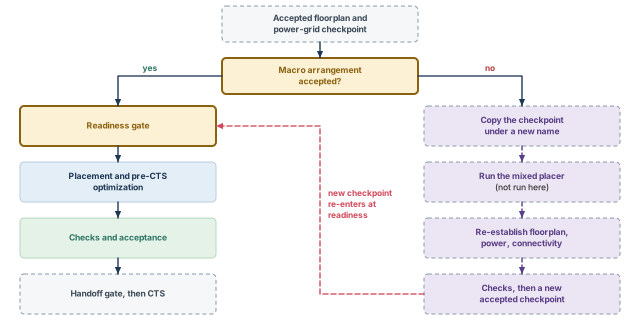
What to notice: The branch never changes the original and re-enters at the readiness gate. It is long because everything the macros touched must be re-established.
Alternative flow (separate from the main flow of this chapter):
 0. copy the accepted checkpoint to a new name; work on the copy
 1. create_pg_model_for_macro_place    (prepare a PG model)
 2. update_floorplan_for_macro_place   (-remove all is destructive)
 3. set_macro_place_constraint         (constraints for the macro placer)
 4. addHaloToBlock                     (enlarge halos if needed)
 5. place_design -concurrent_macros    (needs the GigaPlace-GXL license)
 6. saveDesign, then inspect the macro result
 7. refine_macro_place                 (not run by default)
 8. saveDesign
 9. physical cell insertion and power routing again
10. place_design, optDesign -preCTS, then re-enter the checks
place_design -concurrent_macros -incremental needs all macros to be unfixed. That is the opposite of the main flow's assumption. Table 38 compares the two flows.
| Aspect | Main flow of this chapter | Alternative: mixed placement |
|---|---|---|
| Starting question | Where do the standard cells go? | Where do the macros and the cells go? |
| Macros | Fixed, accepted during floorplanning | Movable during the run |
| Power grid | Built and checked during power planning; kept | Must be rebuilt and rechecked after macros move |
| License | Standard placement | GigaPlace-GXL |
| Risk | A poor floorplan is inherited | Earlier accepted work is replaced |
| Where its result goes | The CTS handoff | A new checkpoint that re-enters at the readiness gate |
Using the mixed placer to fix a congested channel without restoring the grid. It may move the macros and clear the channel. The stripes and macro connections from power planning then describe macros that are no longer there. Congestion improved and the power grid was invalidated, and the report you are reading does not mention it.
12 Query and debug reference
When a run goes wrong you need the next query, not a chapter. The two tables in this section are meant to be kept open beside the terminal. The first lists the questions you ask of a placed design and the commands that answer each. The second lists symptoms with the evidence, the likely cause, the repair and the evidence to regenerate.
Both follow the conventions of the rest of the chapter. Commands are Innovus Tcl unless a row says Linux shell. A report that exists is not a pass: read its header, its scope and its run name. A check that did not run is written NOT RUN.
12.1 Query reference: ask the placed design
Define three helpers once before using Table 39 and Table 40. Confirm attribute names with .? in your installation. Only the row "Which state is this?" changes state: its save writes files.
innovus> set rd reports/final ;# the report directory used below
innovus> file mkdir $rd ;# create it if needed
innovus> set i [lindex [dbGet -p top.insts.name u_coef] 0] ;# one macro to inspect
| Question | Commands | Read it as, and its limit |
|---|---|---|
| Anything unplaced? | set u [dbGet -p top.insts.pStatus unplaced]; puts [expr {$u eq "0x0" ? 0 : [llength $u]}] | The count; zero expected. 0x0 is no match, not a count |
| Is the macro intact? | puts "[dbGet $i.pStatus] [dbGet $i.orient]"; puts [dbGet $i.box] | Status, orientation and box equal the baseline. Check $i is not 0x0 first |
| Is it legal? | checkPlace $rd/checkplace.rpt; checkDesign -place -noHtml -outfile $rd/checkdesign_place.rpt | Counts by type; placed cells; unplaced macros. Geometry in the declared scope |
| Which modes? | getPlaceMode -nonDefault; getOptMode -nonDefault; getAnalysisMode | Differences from default. A readback is evidence, not configuration; source the baseline after a restore |
| Padding, groups? | reportInstPad -all; checkFPlan -reportUtil -outFile $rd/fplan.txt | Padding per instance; groups and utilization. Matches the plan |
The second part of the query reference covers density, routing, timing, coverage and the saved state.
| Question | Commands | Read it as, and its limit |
|---|---|---|
| Where is it dense? | reportDensityMap; queryDensityInBox 530 800.2 580 960.2; queryPinDensity -area 530 800.2 580 960.2 | Bins over the threshold; one window. Grid and threshold change it |
| Where is routing short? | earlyGlobalRoute; reportCongestion -overflow; reportCongestion -hotSpot -num_hotspot 5; reportCongestion -hotSpot -3d | H and V overflow; hotspots; layers. An estimate; rerun after changes |
| Timing and limits? | timeDesign -preCTS -outDir $rd -prefix final; report_timing -max_paths 3 > $rd/worst3.rpt; report_constraint -all_violators > $rd/violators.rpt | WNS, TNS, view, clock mode; DRV counts. Ideal clocks; not closure |
| Was enough analyzed? | check_timing -verbose > $rd/check_timing.rpt; report_analysis_coverage -verbose {violated untested} -sort reason > $rd/coverage.rpt | Missing constraints; untested checks. Wrong constraints pass both |
| Which state is this? | puts [dbGet top.name]; puts [dbGet top.numInsts]; file mkdir checkpoints/final; saveDesign checkpoints/final/placed.enc | Name and count. Changes state: the save writes files |
| Shell: do reports postdate the checkpoint? | ls -l --time-style=full-iso checkpoints/opt_run1/opt.enc.dat reports/final/ | File times; use your candidate's checkpoint. Linux shell, not Tcl |
12.2 Debug reference: diagnose by symptom
The standard set is the status counts, checkPlace, the density map, the congestion estimate, the timing summary and the coverage report. Regenerate it into a new named directory after every repair. Apply each repair after a fresh restore and the baseline script.
| Symptom | Evidence | Likely cause | Repair line or action | Rerun |
|---|---|---|---|---|
| Cells remain unplaced | Count; cell types grouped | Site mismatch, no rows, small fence, blockage | Fix the site, rows, fence or blockage | Placement, standard set |
| A macro or cell moved | Box differs from baseline | Status was placed | Make intended objects fixed | Standard set from the first moved object |
| Large maximum displacement | Refine log; density at the cell | Overloaded window, fence, padding | Free capacity at the source | Global placement, standard set |
Violations after refinePlace | checkPlace types on the density map | Capacity, rule or object in the way | Classify, restore the baseline, repair | Standard set |
The second part covers congestion, timing, constraints and stale evidence.
| Symptom | Evidence | Likely cause | Repair line or action | Rerun |
|---|---|---|---|---|
| Hotspot beside a macro | Box against the edge; -3d table | Cells at pins; small halo; stripes | Partial blockage, line L1 | Placement, standard set |
| Channel overflow | Tracks against crossing nets | Too many crossing nets | Channel blockage mode, line L2 | Placement, standard set |
| WNS worse after a congestion fix | Two summaries; worst paths | Critical cells pulled apart | Revert or localize | Optimization, standard set |
| Timing clean, few paths | Path count; coverage | Missing constraints or clocks | Fix constraints; rerun from placement | Placement, standard set |
| Fence crossed | checkPlace fence violations | Optimization ignored fences | Honor fences, line L3 | Optimization, standard set |
| Density hot, congestion cool | The two maps | Dense local logic | Check pin access; may be acceptable | Congestion at the next run |
| Congestion hot, density moderate | Overflow in a channel | Crossing nets, PG capacity | Treat as capacity | Standard set; grid checks if upstream |
| Report disagrees with database | File times; run name | Stale file, or reuse of an old extraction | Name runs; regenerate | Standard set |
innovus> createPlaceBlockage -name pb_edge -type partial -density 50 \
    -box {530 800.2 580 960.2} ;# L1: keep cells back from the macro edge
innovus> setPlaceMode -place_global_auto_blockage_in_channel partial ;# L2: channel mode
innovus> setOptMode -opt_honor_fences true ;# L3: optimization honors fences
The command roles, once more:
place_designplaces (Phase 1), andoptDesign -preCTSoptimizes (Phase 2).place_opt_designis the integrated alternative, not an extra step.refinePlacelegalizes, only if needed.ecoPlaceplaces unplaced instances after a change.placeInstanceplaces one instance by hand.congRepairis a local congestion repair.checkPlace,timeDesignand thereport_*commands only check or report.
13 Checkpoint, restoration and CTS handoff
A placement that exists only in your session is not a deliverable. The next stage needs to restart from exactly this state. The reviewer needs to know what was checked. A handoff is the checkpoint, the evidence and the list of what is still open. If any of the three is missing, the next person redoes the work or trusts what they should not.
13.1 What to save
Save more than the database. The database is the state. The rest says how the state came about and what was said about it (Table 43).
| Item | Why it matters | How it is produced |
|---|---|---|
| Database checkpoint | The state that CTS restores | saveDesign checkpoints/handoff_run1/accepted.enc writes the restore script and the data directory |
| Placed netlist | The netlist changed during placement and optimization. saveNetlist is recommended after timing-driven placement, CTS, scan reorder and IPO (in-place optimization) | saveNetlist |
| Placement in an exchange form | A tool-independent copy and a diff partner | defOut or defOutBySection, as the project requires |
| Scan order, if reordered | Reordering changed the chain | A scan DEF written after the reorder, in the defOut form your project uses |
| Constraints and views as used | A slack is meaningful only with its constraints and views | The files loaded, with their names |
| Modes and settings | Reproducibility | The baseline script plus the selected run's override, and the output of getPlaceMode -nonDefault, getOptMode -nonDefault, getAnalysisMode |
| Cell-use list and padding | They change what optimization and legalization do | The setDontUse list; reportInstPad -all; cell padding as specified |
| Blockages, regions, fences | They constrain placement | The floorplan script or a listing |
| Reports | The evidence | The standard evidence set, each in a named directory |
| Run manifest | Ties the files to one run | A text file with the run name, baseline, settings script and checkpoint |
| Experiment log | Why this run was chosen | Table 24 for your own runs, kept with the run |
| Waivers, temporary conditions, NOT RUN | The honest edge of the claim | A written list with owners |
| Restoration proof | Shows the save works | The comparison below |
Create one new run directory per save, and refuse to reuse one.
innovus> set run checkpoints/handoff_run1 ;# the handoff checkpoint directory
innovus> if {[file exists $run]} { error "already exists: $run" } ;# never overwrite
innovus> file mkdir $run ;# create it
innovus> file mkdir reports/handoff_run1 ;# and its report directory
Write the database, the placed netlist and the placement in DEF form. Run this in the session that restored the selected candidate and recorded the verdicts.
innovus> saveDesign $run/accepted.enc ;# the database checkpoint
innovus> saveNetlist $run/accepted.v ;# the placed netlist
innovus> defOut $run/accepted.def ;# the placement in DEF form
Write the run manifest from the same session, after source scripts/verdicts.tcl. The manifest copies the four verdicts from scripts/verdicts.tcl. The input names and build line below are examples to adapt.
# Handoff manifest. Run it in the session that sourced scripts/verdicts.tcl,
# so that q(1) to q(4) exist, and after $run is set.
source reports/selected_candidate.tcl
set mf [open reports/handoff_run1/manifest.txt w]
puts $mf "run: handoff_run1"
puts $mf "selected candidate run: $cand_run"
puts $mf "selected candidate checkpoint: $cand_dat"
puts $mf "policy: scripts/baseline_policy.tcl"
puts $mf "override: $cand_override (if present)"
puts $mf "handoff checkpoint: $run/accepted.enc"
puts $mf "evidence directory: reports/final"
puts $mf "verdicts: Q1 $q(1) Q2 $q(2) Q3 $q(3) Q4 $q(4)"
puts $mf "inputs: constraints/stream_acc.sdc, view setup_view_1, libs, RC extraction files"
puts $mf "tool build and UI: copied from the session banner, Legacy UI"
puts $mf "timing: timeDesign -preCTS, forced ideal clocks"
close $mf
innovus> source scripts/manifest_handoff.tcl ;# write reports/handoff_run1/manifest.txt
- Needs. The acceptance pass complete,
scripts/verdicts.tclsourced in the same session, and a saved state that you have inspected. - Changes. Files on disk. The database is not changed.
- Section options.
defOuthas section options. Add the ones your project needs. - Timing graph.
saveDesignmay also take a timing-graph option. Confirm in your installation what it saves before you use it. - Misinterpretation. A file on disk shows that a save ran. It does not show that the save restores.
13.2 Restore and verify
Restoration is verified with two sessions and two dump calls. Session 1 is the one that saved the design. Session 2 is fresh and restores the saved checkpoint. A comparison that cannot fail proves nothing, so the dump procedure fails closed. An unreadable name, status, orientation or box stops the script with an error. So does a count that disagrees with top.numInsts. Save the procedure once as scripts/dump_place.tcl. Confirm the attribute names and the two value lists in your installation.
proc dump_place {file src} {
    # Remove any old result first, then write to a part file and rename
    # only on success.
    file delete -force $file
    file delete -force $file.part
    set insts [dbGet top.insts]
    if {$insts eq "0x0"} { error "no instances read" }
    set expect [dbGet top.numInsts]
    # Value lists to confirm in your installation.
    set okst {fixed placed softFixed unplaced cover}
    set okor {R0 R90 R180 R270 MX MY MX90 MY90}
    array unset seen
    set n 0
    set fh [open $file.part w]
    puts $fh "# source: $src"
    foreach i $insts {
        set nm [dbGet $i.name]
        set st [dbGet $i.pStatus]
        set or [dbGet $i.orient]
        set bx [lindex [dbGet $i.box] 0]
        if {$nm eq "" || $nm eq "0x0"} { close $fh; error "unreadable name" }
        if {[info exists seen($nm)]} { close $fh; error "duplicate name $nm" }
        set seen($nm) 1
        if {[lsearch -exact $okst $st] < 0} {
            close $fh; error "bad status $st at $nm"
        }
        if {[lsearch -exact $okor $or] < 0} {
            close $fh; error "bad orientation $or at $nm"
        }
        if {[llength $bx] != 4} { close $fh; error "unreadable box of $nm" }
        foreach v $bx {
            if {![string is double -strict $v]} {
                close $fh; error "non-numeric box value at $nm"
            }
        }
        puts $fh "$nm $st $or $bx"
        incr n
    }
    if {$n != $expect} { close $fh; error "read $n of $expect instances" }
    puts $fh "#END $n"
    close $fh
    file rename -force $file.part $file
    puts "wrote $n instances to $file"
}
The file exists only if every check passed, and its last line is a completion marker. A stopped run leaves a .part file, which the comparison never reads.
innovus> source scripts/dump_place.tcl ;# define the procedure
innovus> dump_place reports/handoff_run1/place_before.dump $run/accepted.enc ;# dump
innovus> saveNetlist reports/handoff_run1/before.v ;# netlist identity
innovus> set fh [open reports/handoff_run1/views_before.txt w] ;# view list file
innovus> puts $fh [all_analysis_views -type all] ;# write all views
innovus> close $fh ;# close the view list
innovus> getPlaceMode -nonDefault > reports/handoff_run1/place_modes_before.txt ;# modes
innovus> getOptMode -nonDefault > reports/handoff_run1/opt_modes_before.txt ;# opt modes
innovus> restoreDesign checkpoints/handoff_run1/accepted.enc.dat stream_acc ;# restore
innovus> source scripts/dump_place.tcl ;# define the procedure
innovus> dump_place reports/handoff_run1/place_after.dump \
    checkpoints/handoff_run1/accepted.enc ;# dump the restored state
innovus> saveNetlist reports/handoff_run1/after.v ;# netlist identity
innovus> set fh [open reports/handoff_run1/views_after.txt w] ;# view list file
innovus> puts $fh [all_analysis_views -type all] ;# write all views
innovus> close $fh ;# close the view list
innovus> getPlaceMode -nonDefault > reports/handoff_run1/place_modes_after.txt ;# modes
innovus> getOptMode -nonDefault > reports/handoff_run1/opt_modes_after.txt ;# opt modes
The two sessions also write the netlist, the view list and the effective modes. Equality is then not claimed from the placement dump alone. Compare the identity files first, in a Linux shell. Each diff is read on its own, and none of them changes the placement verdict.
$ d=reports/handoff_run1 # the handoff report directory
$ grep -v '^//' $d/before.v > $d/before.nc.v # netlist without comment header lines
$ grep -v '^//' $d/after.v > $d/after.nc.v # the same for the restored netlist
$ diff $d/before.nc.v $d/after.nc.v > $d/netlist.diff ; echo "netlist: $?" # netlists
$ diff $d/views_before.txt $d/views_after.txt > $d/views.diff # view lists
$ echo "views: $?" # 0 means equal
$ diff $d/place_modes_before.txt $d/place_modes_after.txt \
    > $d/place_modes.diff ; echo "place modes: $?" # placement modes
$ diff $d/opt_modes_before.txt $d/opt_modes_after.txt \
    > $d/opt_modes.diff ; echo "opt modes: $?" # optimization modes
The placement comparison also runs in a Linux shell. It requires the completion marker in both dumps and checks that both sorts succeeded. It keeps the exit code of diff and prints one of three outcomes. Because it uses exit, save it as a script and run it with bash; the name compare_place.sh is an example.
d=reports/handoff_run1
for f in $d/place_before.dump $d/place_after.dump; do
  if [ "$(tail -n 1 $f | cut -c1-4)" != "#END" ]; then
    echo "COMPARISON FAILED: $f has no completion marker" ; exit 2
  fi
done
sort $d/place_before.dump > $d/before.sorted ; rc_b=$?
sort $d/place_after.dump > $d/after.sorted ; rc_a=$?
if [ $rc_b -ne 0 ] || [ $rc_a -ne 0 ]; then
  echo "COMPARISON FAILED: a sort failed" ; exit 2
fi
if [ ! -s $d/before.sorted ] || [ ! -s $d/after.sorted ]; then
  echo "COMPARISON FAILED: a dump is empty" ; exit 2
fi
diff $d/before.sorted $d/after.sorted > $d/place.diff ; rc=$?
if   [ $rc -eq 0 ]; then echo "MATCH"
elif [ $rc -eq 1 ]; then echo "MISMATCH: read $d/place.diff"
else                     echo "COMPARISON FAILED: diff exit status $rc"
fi
exit $rc$ bash compare_place.sh # prints MATCH, MISMATCH or COMPARISON FAILED
The three outcomes of the placement comparison mean:
- MATCH. The saved state restored with the same instance names, statuses, orientations and boxes.
- MISMATCH. Read
place.diff. A difference may be a recorded change or a lost one. - COMPARISON FAILED. Nothing is shown. Fix the failure and run again.
What the comparison does and does not prove:
- What equality proves. The dump covers instance identity, status, orientation and exact position for the same save and restore. Exact equality is a valid same-save test when the serialization is stable. It is not a tolerance check of intended geometry. It does not promise equal timing across tool builds, parallelism or analysis settings.
- Independent identity checks. Compare the two netlists, ignoring comment header lines that may carry a date. Compare the two view lists and the two mode files. The modes belong to the selected candidate: compare them with the baseline plus that run's override, not with the baseline alone. An accepted experiment can differ from the baseline on purpose.
- Then rerun the standard evidence set on the restored state. The timing summary should match the one before the save. A difference needs an explanation before the handoff stands.
- Why a fresh session. A session that has been editing holds state that was never saved.
13.3 The handoff package
Figure 22 gathers the package that CTS receives.
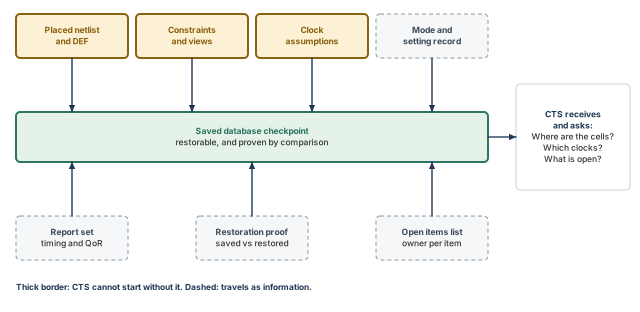
What to notice: Every item answers a question CTS will ask: where the cells are, which clocks and constraints apply, what was assumed about the clock, and what is still unsettled.
The clock assumptions deserve a line each, because CTS inherits them.
- Ideal clocks. In the baseline flow, every pre-CTS slack assumed ideal clocks, plus any declared latencies. If useful skew or the early clock flow was used, say so. Name the exact analysis command and clock mode of each report. Even with an early tree,
timeDesign -preCTSanalyzes with forced ideal clocks. - Useful skew. The baseline had it off. If you enabled it, both
-opt_skewand-opt_skew_pre_ctswere true. The result is network latencies on clock pins that CTS turns into insertion delays. Say which applies. - Early clock flow. Was
place_opt_designused in the early clock flow? Then the clock specification must travel with the package. It must not have been deleted between steps, because deleting it loses the useful skew. - Hold. Any pre-CTS hold number is provisional, because the clocks are ideal. Hold becomes much more representative after CTS. State whether it was reported at all.
- Clock-gate and scan placement. State whether clock-gate-aware placement had a clock specification to use, and whether scan was reordered.
Hand off only if all four hold:
- The database restores in a fresh session, and the comparison prints MATCH.
- The four verdicts are recorded with their evidence, and question 4 is not better than the worst of questions 1 to 3.
- Every blocking item is closed.
- The clock assumptions above are written down.
If an item is open, hand off only with it listed, its owner named and the claim it blocks stated.
A reviewer who holds only the package should be able to restore the state. A named report, rerun, should give the same number. They should also find the settings that produced it, and read what is not claimed.
13.4 What placement established, what is provisional, and what CTS will change
Established. Every standard cell has a legal location, and the acceptance evidence says so in a stated scope. Macros and physical cells are where they were fixed. An estimate checked the design for plausible routability. Timing was checked at the pre-CTS stage with ideal clocks and estimated routes, with coverage recorded. The state is saved and restores, and it carries its settings, reports and experiment log.
Provisional. The congestion estimate is not a route. The pre-CTS slacks assume ideal clocks and estimated wires. The hold numbers, if any, are provisional.
What CTS will change. It will build the clock network, which adds buffers and inverters and changes clock-gate positions and fanout. It makes the clock propagated, so skew appears in every slack. Cell padding is kept through optimization and CTS, so padding decisions made here stay in force. The timing picture will change in both directions, and hold becomes much more representative.
Takeaway A placement handed over without its evidence is only a guess. Clock tree synthesis starts from this checkpoint, so hand it over with the proof that it restores.
14 Common mistakes and how to catch them
Most placement mistakes are mistakes of reading, not of running. Table 44 collects the ones this chapter warned about.
| Symptom | Likely cause | Fix |
|---|---|---|
A clean checkPlace is reported as "placement done" | Reading legal as good | Answer the four questions separately; legality is only question 1 |
The netlist differs after place_design and nobody knows why | Treating place_design as only placement; the pre-place step removed buffers | Compare instance counts and the netlist fingerprint before and after every run |
| Timing is clean, but the path count is tiny | Missing constraints or clocks; placement was never timing-driven | Read check_timing and report_analysis_coverage before any summary |
| A mode seems set but the run ignored it | A readback was taken for configuration, or a restore left a stale value | Source the baseline script after every restore; read back only as evidence |
| Two runs differ and no one can say why | Several settings changed at once, or experiments were stacked | Restore the same baseline, change one variable, regenerate every report |
| A fixed fence is crossed after optimization | -opt_honor_fences left false | Set it true in the baseline and check fence violations after optDesign |
| A hotspot is blamed on placement in every run | The cause is floorplan geometry or the power grid | Use the decision tree; restore the earlier stage's checkpoint if the hotspot never moves |
| A report contradicts the database | A stale report, or one overwritten in a reused directory | Name every run and directory; check file times against the checkpoint |
| A NOT RUN check is counted as a pass | Treating a missing result as zero | Write NOT RUN and let it block the claim it would have supported |
| A violation is accepted because "we know why" | An explained violation was taken for a closed one | Repair it, waive it with scope, owner, reason and approval, or close it with a named step |
| The mixed placer cleared a channel and the grid is now wrong | Macros moved under a grid built for their old positions | Work on a copy, then rebuild and recheck the grid before the checks |
| CTS cannot reproduce the handoff numbers | The save was never restored and compared | Run the two-session dump comparison and rerun the standard set on the restored state |
15 Interview preparation
Legal means the geometry rules are met. Good means the stage's quality is acceptable. Ready means saved, checked and recorded.
checkPlaceanswers only the legal question.- Legal is necessary for good, and good is necessary for ready; neither link runs the other way.
Both can be right, because they use different denominators.
- 410 000 µm² of cells over the usable area of 671 600 µm² gives 0.61.
- The same cells over the whole 1 000 000 µm² core give 0.41.
- Reports also differ in what they count;
checkPlaceincludes padding andtimeDesigndoes not.
Because a placed macro may be moved by a later step, which invalidates the power grid, the halos and the channel plan.
- A fixed macro is a hole the placer works around.
placeInstancemakes an instance fixed by default but does not check legality, so runcheckPlaceafterwards.
A region holds its members inside and admits nonmembers; a fence also keeps nonmembers out.
refinePlaceandcheckPlacehonor both when-place_hard_fenceis true.- Optimization honors them only if
-opt_honor_fencesis also true; its default is false outside multi-supply-voltage designs.
place_design only assign coordinates?No. It runs global and detailed placement with placement-related optimization, and its pre-place step can remove buffers.
- It is timing-driven by default when constraints are loaded.
- It forces ideal clocks and setup analysis whatever the analysis mode says.
- Compare instance counts and the netlist fingerprint before and after the run.
The bulk of the design was nearly legal, but one cell moved far, so you inspect that cell and its nets.
- The mean is two sites; the maximum is a different statement.
- A large maximum is not a defect by itself; it tells you where to look.
- Run
refinePlaceonly whencheckPlacereports violations.
Its wire term grows with the square of the length, so doubling a long wire more than doubles its cost.
- The driver term grows only linearly with length.
- With the example values, the wire term is 0.72 ps at 40 µm but 78 ps at 600 µm.
- The whole net costs 13.72 ps at 40 µm and 203 ps at 600 µm.
- In the example path, moving that net from 250 µm to 600 µm turns a +68.8 ps slack into −64.2 ps.
No. The pre-CTS slack assumes ideal clocks and estimated routes, so it carries no clock-tree skew.
- Skew from the real tree will make some slacks better and some worse.
- Hold numbers are provisional;
optDesign -preCTSdoes not repair hold. - Treat the pre-CTS target as a gate for starting CTS, not as closure.
A density map shows cell area per window; a congestion map shows routing overflow per window edge from an early global route.
- Dense local logic can show high density and low congestion.
- A wide bus across a macro channel can show low density and high congestion.
reportDensityMapneeds only a placement;reportCongestionneedsearlyGlobalRoutefirst.
Capacity is 19 + 23 = 42, so the overflow is 47 − 42 = 5.
- Subtract each obstruction only from the layer it occupies, or one it blocks by a stated mechanism.
- At least 5 wires must take a longer route or another layer.
setPlaceMode -reset between runs?One change from the same restored baseline is the only way to know which change caused the result.
- Every experiment restores the checkpoint and sources the full baseline script, because a readback is not configuration.
-resetrestores the tool defaults, which may differ from the recorded baseline.
Coverage: unconstrained endpoints, untested checks, missing clocks, case analysis and the active view.
- Run
check_timing -verboseandreport_analysis_coverage -verbose {violated untested} -sort reason. - Compare the endpoint count with the register count.
- If constraints were missing when placement ran, that placement was never timing-driven.
Dump every instance's name, status, orientation and box in both sessions, then compare the sorted dumps.
- The dump fails closed on any unreadable value or count mismatch, and ends with a completion marker.
- Compare the netlist, the view list and the modes too, then rerun the standard evidence set.
- Only MATCH supports the handoff.
16 Chapter close
Compact glossary
| Term | Meaning |
|---|---|
| Placement status | unplaced, placed, fixed, softFixed or cover; it decides who may move an instance |
| Site | The smallest width a cell can occupy; core_site is 0.2 × 1.4 µm |
| Row | A horizontal strip of identical sites; alternate rows are flipped (MX) to share rails |
| Usable area | The part of the core where standard cells may sit, after macros, halos and blockages |
| Utilization | Cell area divided by the area available to cells; always state the denominator |
| Local density | The same ratio for one bin, shown by reportDensityMap |
| HPWL | Half-perimeter wirelength: the half-perimeter of the box around a net's pins |
| Global placement | Spreads movable cells to reduce a cost, mostly wirelength; may leave overlaps |
| Legalization | Moves cells to legal sites without overlap; refinePlace |
| Displacement | The distance a cell moves during legalization; read the mean and the maximum |
| Padding | Space reserved beside a cell or instance that legalization must honor |
| Partial blockage | A blockage that limits cell density in a box to a stated percentage |
| Fence | A box that holds its members inside and keeps nonmembers out |
| WNS / TNS | Worst negative slack, and total negative slack summed per endpoint |
| Ideal clock | A clock that reaches every register at once, apart from declared latency |
| Early global route | A quick, non-DRC-clean route (earlyGlobalRoute) used for congestion and parasitic estimates |
| Overflow | Demand above capacity on a GCell edge |
| Hotspot score | The tool's measure of contiguous overflowing area; below 100 typically routable |
| Controlled refinement | One change from one restored baseline, judged on several written measures |
| Selected candidate | The one run, named in a file, that acceptance and handoff both use |
| NOT RUN | The status of a check that was not executed; neither zero nor pass |
| Waiver | Permission for a stated violation to remain, with scope, owner, reason and approval |
| Mixed placer | place_design -concurrent_macros: places macros and cells together, a separate flow |
Placement and pre-CTS on one page
Figure 23 condenses the chapter into the order you will use it on a real block.
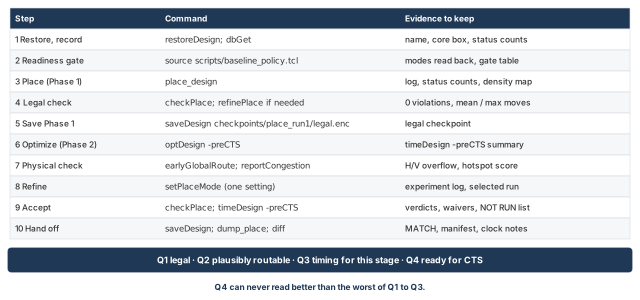
What to notice: Each step names its key commands and one piece of evidence. The four questions sit at the end, and Q4 can never read better than Q1 to Q3.
Where the next chapter goes, and why
The handoff package holds a legal, checked placement and a clear statement of its clock assumptions. Clock Tree Synthesis, Post-CTS Optimization, Checks and Handoff restores that checkpoint and builds the clock network. It adds buffers and inverters, moves clock gates and makes the clock propagated. Every slack then carries real skew, and hold becomes much more representative.
That is why this chapter insisted on recorded clock assumptions, unexplained hotspots closed or owned, and a proven restore. CTS inserts its cells into the whitespace and the routing supply that placement left. The next chapter shows how to build the tree, re-optimize with real clocks and check the result before routing.