
Clock Tree Synthesis, Post-CTS Optimization, Checks and Handoff: build, then judge
Why this chapter matters in a real project
Until clock tree synthesis (CTS), every timing number assumed an ideal clock. That clock reaches every register at the same moment and costs nothing. CTS replaces it with real buffers, inverters and wires. From then on, each register has its own clock arrival time, and every setup and hold slack can move.
Mistakes here are expensive in both directions. A wrong skew group or a missing sink gives clean reports for the wrong problem. The real violation then appears after routing, when a fix means a rebuild. A report read in the wrong view, or about the wrong candidate, gives false violations. Those send you into repairs that change nothing, or that make hold worse.
This chapter therefore treats CTS as an evidence task. We configure one thing at a time and read it back. Then we build once and judge the result with reports that each answer one question.
Prerequisites
- Placement, Pre-CTS Optimization, Checks and Handoff: the accepted placed checkpoint and its handoff record are our starting point.
- Design Data Preparation, Import, Sanity Checks and Export: you know what constraint modes, delay corners and analysis views are.
- Floorplanning: you know what a macro channel and a halo are.
- Understanding the Innovus Environment and Session: you can restore and save a design and read the log.
- You do not need to know how the CTS engine works inside. We read its stages from its outputs.
- You do not need to know routing or signoff timing. This chapter stops before both.
Learning objectives
- Explain what CTS changes in a database, what it leaves alone, and which evidence shows each change.
- Read a clock circuit, a clock tree and a skew group, and tell them apart.
- Read setup, hold, gating and generated-clock timing on aligned waveforms, with the sign of skew.
- Set each clock setting with a native command, read it back, and state what it costs.
- Select between
ccopt_design,ccopt_design -ctsandclock_opt_designfrom the input database. - Read the clock reports and the post-CTS timing reports, and state what each one does not prove.
- Apply a debugging pattern that goes from a symptom to a confirmed cause, starting from the right saved state.
- Decide in four independent assessments whether the result is ready for routing, and hand it over with its evidence.
Figure 1 puts the whole chapter on one page. Come back to it whenever you lose your place.
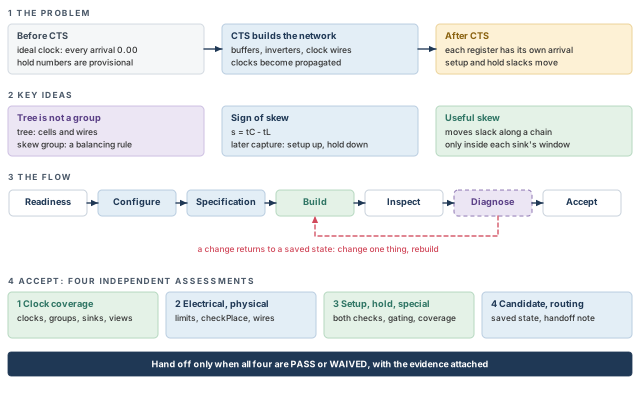
What to notice: A change returns to a saved state and rebuilds, as in Figure 2, and handoff needs all four assessments to be PASS or WAIVED (see the acceptance section).
Before you start
The starting point is the accepted placed checkpoint from Placement, Pre-CTS Optimization, Checks and Handoff. It has a legal placement, pre-CTS optimization done, a handoff record, and the clock assumptions written down. We do not repeat placement here.
The worked example is an invented design, stream_acc. It has a 1000 x 1000 µm core, two RAM macros u_buf_a and u_buf_b, and one ROM macro u_coef.
- Every number added in this chapter is invented. Times are in ns unless a figure or property uses ps. Distances are in µm.
- Library cell names, layer names and routing rules are placeholders. Use the names from your technology.
The commands use the Innovus Legacy UI command set. They follow the tool's command syntax, but no licensed Innovus session ran them. Drawings, report excerpts and numbers are invented teaching illustrations, not tool output. Check each option on your installed tool before you rely on it.
1 Where clock tree synthesis fits
Until now, every timing number in the flow assumed an idealized clock. CTS builds the real clock network. That network is made of cells and wires that carry the clock from its source to every register. After CTS each register has its own clock arrival time, so setup and hold slacks change. The new cells and wires also become something routing must respect.
Think of the clock as water from one pump that must reach every tap in a large building at the same moment. Before CTS we pretended the water arrived everywhere instantly. CTS lays the real pipes, adds booster pumps (buffers) and makes the pipe lengths match. Where the picture fails:
- A late arrival can be useful in a clock tree. It gives a slow path more time. No plumber wants late water.
- Clock "pipes" interact with their neighbors. A switching signal wire beside the clock changes its delay.
- One tap can belong to several balancing rules at once, one per clock and mode. Pipes have no such idea.
1.1 The handoff from placement
The placement stage ended with a saved, accepted checkpoint and an evidence package. The package tells you four things:
- The cells have legal locations.
- The pre-CTS slacks were measured with ideal clocks.
- Any hold number is provisional.
- Any useful skew or early clock specification is named, so CTS does not delete it by accident.
We use the package as our input, but we do not trust it blindly. You restore the checkpoint and run the readiness checks of the next section on what was actually restored.
1.2 What CTS changes and what it leaves alone
Table 1 lists both sides. Read it as a contract: anything in the right column that changes after CTS needs an explanation.
| CTS and its follow-up work change | They leave alone (unless you ask) |
|---|---|
| The clock distribution network: new buffers and inverters, resized or moved clock cells, new clock wires | The functional netlist, apart from clock cells and the datapath repairs of full CCOpt |
| The clock mode: clocks become propagated, so each register has its own arrival time | Macro positions, which are fixed |
| Placement near the clock cells, because new cells must be legal | The power grid and power routing |
| The computed setup and hold slacks, because skew now exists | Signal routing: no detailed route exists yet |
| The data path, when full CCOpt or a later optimization runs | Signoff extraction and signoff timing |
Functional clock cells that already exist stay in the design. Examples are clock gates and dividers in the netlist. CTS builds and sizes the distribution network around them.
1.3 Three construction commands
Three commands build clock trees. They look alike and are not interchangeable. Our main flow uses ccopt_design, which runs clock concurrent optimization (CCOpt): clock trees and data path are optimized together.
| Command | What it does | Accepts as input | Where it fits |
|---|---|---|---|
ccopt_design | Full CCOpt: clock trees and datapath together, with useful skew | A placed design from the conventional flow (place_design, optDesign -preCTS) | Main flow. Do not follow it with a routine extra setup-optimization pass |
ccopt_design -cts | Clock tree synthesis only, with the CCOpt engine. No datapath optimization, no useful skew | The same placed design | Alternative: build first, optimize as a second step |
clock_opt_design | The same CCOpt, with legalization at the start | Only a database made by place_opt_design in its second-generation flow (called PODV2) | Alternative. Not valid on our placed checkpoint |
The input database decides the choice. Our checkpoint came from place_design and optDesign -preCTS. It is not a PODV2 database, so clock_opt_design rejects it.
The chapter follows one sequence: configure, build, inspect, diagnose, hand off. Figure 2 draws that sequence as one picture.
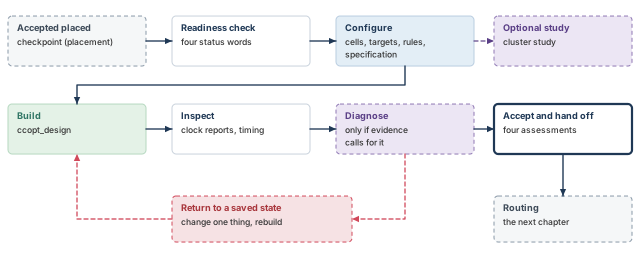
What to notice: Every return goes back to Build from a saved state, the configured or baseline checkpoint, never from the current database.
You can name the checkpoint you restored and the placement record that says it is the accepted one. If you cannot, the rest of the chapter measures something unknown.
2 Is the placement ready for CTS?
A clock tree built on an illegal, unconstrained or crowded placement wastes hours. It also gives a result you cannot trust. The checks below take minutes.
- Run the first rows right after you restore the checkpoint, so they judge the design you actually have.
- The other rows need the CCOpt settings of the next three sections. Judge them when those settings are in place, before you build.
Each row of Table 3 has one evidence source and one blocking condition. Give each row one of four words, shown in Figure 3. A missing report is never a pass. It is NOT RUN. Acceptance at the end of the chapter adds a fifth word, WAIVED, for a known failure with an approved exception.
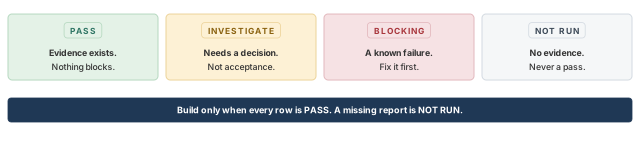
What to notice: Missing evidence is NOT RUN, never PASS, and you build only when every row is PASS.
| Check | Evidence | Blocking condition | Action |
|---|---|---|---|
| Placement legal | checkPlace report | Any overlap, off-site or unplaced cell | Return to the placement stage and repair there |
| Clocks defined | report_clocks, check_timing -type clocks | A clock with no source, or a generated clock whose master never reaches its source | Fix the constraints |
| Constraint modes | check_timing per mode, mode list against the plan | A planned mode is missing | Load the mode before the specification is derived |
| Analysis views | Views read back, primary corner chosen | No setup view, or no hold view where hold is judged | Add the view |
| Clock cells exist | Cell filtering report (see the configuration section) | No usable buffer or inverter after filtering; in a design with clock gates, no usable clock gate cell | Fix library or dont_use data, list cells explicitly |
| Room for clock cells | Density and congestion near macros and gates | Density so high that clock cells cannot be legal | Relieve it in a controlled placement change (see the optional pre-CTS work) |
| Routing rule data | Rules and layers read back | A layer in the rule that the technology does not have | Correct the rule (see the routing rules section) |
| Frozen clock nets | Explicit and computed dont_touch marks on clock nets, preserved ports report | A clock net frozen where the tool must buffer | Decide with the owner |
| Starting point | The restoreDesign line and the placement handoff record | The restored design is not the accepted checkpoint | Stop. Find the right checkpoint |
PASS: the row has evidence and no blocking condition holds. INVESTIGATE: evidence exists but needs a decision or is incomplete. It allows diagnosis, not acceptance. BLOCKING: a blocking condition holds, so fix it first. NOT RUN: the row has no evidence. Build only when every row is PASS.
3 Clock concepts the tool works with
Every clock command and every clock report uses a small vocabulary. Two words in it, clock tree and skew group, are easy to confuse. Mixing them up is behind many wrong repairs. Let us define each word on one small circuit first. The commands come later.
3.1 One small circuit for the whole chapter
The design stream_acc has one primary clock, clk_core, on the input port clk_core. Its period is 2.5 ns. It feeds four kinds of load, listed in Table 4.
| Part | What it is | Invented size |
|---|---|---|
u_ctrl | Control registers clocked directly from clk_core | 800 register clock pins |
u_dsp | Datapath registers behind one integrated clock gate (ICG), u_icg_dsp | 2400 register clock pins |
u_io | Registers behind the clock mux u_clkmux. Input I0 carries the divided clock gclk_div2 from the divider u_div. Input I1 carries clk_core directly | 600 register clock pins |
| Macros | Clock pins u_buf_a/CK, u_buf_b/CK, u_coef/CK | 3 pins, each with a clock path inside the macro |
Three counts appear in this chapter, and they are different quantities:
- Direct loads on the
clk_coretree: 800 + 2400 + 3 = 3203 sinks that do not depend on the mux. - Distinct sinks (endpoints): those 3203 plus the 600
u_ioregisters, 3803 in all, whichever mux input reaches them. - Group memberships count a sink once for every skew group that holds it. They add up to more than the number of sinks.
The divider's own clock pin is a fourth thing. It is an electrical load on the tree, not a sink. The tool treats it as the start of the generated clock, so it is not among the 3803.
3.2 The constraints behind the circuit
The tool builds its clock model from the timing constraints. The fragment below is the contract for the example, and it is illustrative. In your project, the constraint files from placement play this role.
# Function mode: the divider output is a generated clock, mux selects I0.
create_clock -name clk_core -period 2.5 [get_ports clk_core]
create_generated_clock -name gclk_div2 -source [get_ports clk_core] \
    -divide_by 2 [get_pins u_div/Q]
set_case_analysis 0 [get_pins u_clkmux/S]
# Scan mode (a separate constraint mode): slower clock, mux selects I1.
#   create_clock -name clk_core -period 10 [get_ports clk_core]
#   set_case_analysis 1 [get_pins u_clkmux/S]
Two points matter for the rest of the chapter:
- The macro clock paths are not in this fragment. Their internal delay of 0.35 ns is given to CCOpt once, as an insertion delay. Give this delay to CCOpt in one place only. If the constraints also carry it, CCOpt counts it twice.
- Separately verify how the timing model of each macro represents its internal clock path. A CTS offset does not give the timer a macro timing model.
The skew groups below follow this contract. They are the pattern for this example, not a rule for every design. Figure 4 draws the circuit.
3.3 Words you will meet
A clock source is where a clock enters the design or is created. Examples are a port, a phase-locked loop (PLL) output or a divider output. The root is the pin where the tool starts building. A sink is a pin that needs the clock edge to work. Examples are a register clock pin, a latch enable or a macro clock pin. A pin that only passes the clock on is not a sink.
A clock tree is the network between a root and its sinks. It is made of buffers, inverters, gates, nets and wires. It is a physical object.
A skew group is different. It is a balancing rule: a list of sinks plus a target for how alike their arrival times should be. By default the tool makes one skew group per clock per constraint mode. The clocks come from the SDC constraints, the standard timing-constraint format. So function-mode clk_core and scan-mode clk_core use one tree and two skew groups. Table 5 lists the three groups of the example.
| Skew group | Members | Ignores | Constrains |
|---|---|---|---|
clk_core/func | 3203 direct sinks, plus the 600 u_io registers reached through the divider and u_clkmux/I0: 3803 | u_clkmux/I1, the bypass | yes |
clk_core/scan | The same 3203, plus the 600 u_io registers through the bypass: 3803 | u_clkmux/I0, the divided path | yes |
gclk_div2/func | The 600 u_io registers (reporting only) | none | no |
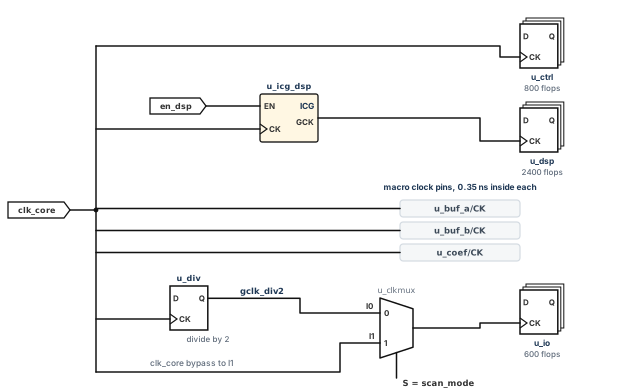
What to notice: u_clkmux selects I0 (the divided clock) in function mode and I1 (the bypass) in scan mode; data connections and the divider feedback are omitted.
The generated-clock group only reports. It does not take the 600 registers away from the master group. The master group clk_core/func still balances them with the other 3203 sinks, because their clock comes from clk_core through the divider.
This is the standard pattern for a generated clock. The generated group is non-constraining, and the master group balances the downstream sinks. The memberships add to 3803 + 3803 + 600 = 8206, but the design has only 3803 distinct sinks. If you want the divided branch balanced by a different rule, name the group that constrains it. A reporting-only group never does. Figure 5 shows the difference between the tree and the groups.
Insertion delay, also called latency, is the delay from a clock source to a sink. Source latency is the part before the network, such as PLL or board delay stated in the constraints. Network latency is the part the tree provides. A register sees both.
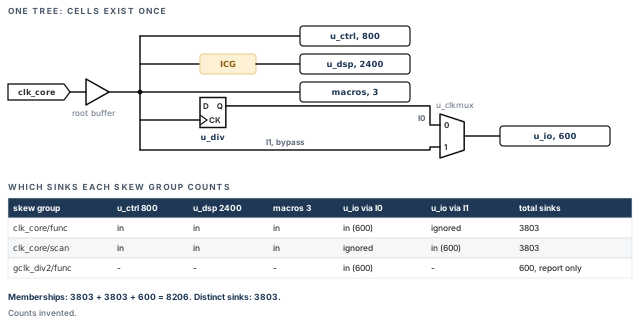
What to notice: The u_io flops are in clk_core/func through I0, in clk_core/scan through I1, and in the reporting-only gclk_div2/func.
Skew is a difference between two arrival times. This chapter uses one sign convention. Take a launching register L and a capturing register C, with clock arrivals tL and tC. The pair skew is s = tC − tL.
- Positive s means the capture clock is later.
- Global skew is the spread over a group: the latest arrival minus the earliest.
- Local skew is the skew of a pair that exchanges data. Timing feels local skew, while reports usually give global skew.
- Report columns may use the opposite sign. Map every column to the setup and hold equations of the post-CTS timing section before you read it.
Slew, or transition time, is how long an edge takes to move between its limits. Slow clock edges make downstream delay uncertain and can fail a minimum pulse width.
A clock gate switches a clock off with an enable, so the registers behind it stop toggling and save power. A generated clock is made from another clock by logic, such as a divider. A mux may select between clocks. Clocks with a fixed phase relation are related. Clocks without one are unrelated.
An ideal clock reaches each sink at its declared latency and ignores the network. In our simplified example every ideal arrival is 0.00 ns. In general, declared latencies, generated-clock phase and early-clock flows can make ideal arrivals differ. A propagated clock arrives after the real delay of real cells and wires. Figure 6 compares the two on one edge.
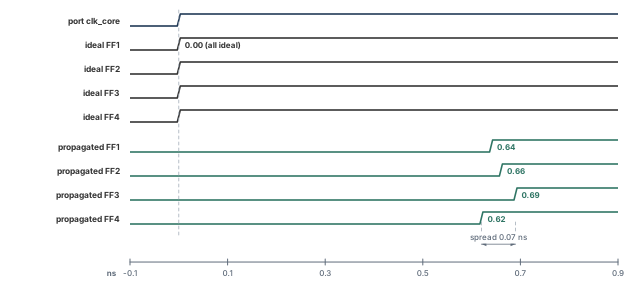
What to notice: Propagated arrivals differ: here the spread is 0.69 − 0.62 = 0.07 ns.
3.4 Why a clock-gate check is tight
An ICG compares its enable with the clock at the gate. The gate sits early in the tree, so its clock edge arrives early. The enable comes from an ordinary register whose clock arrives later. The enable therefore has less time than the register clock suggests.
The check has two halves:
- Gating setup: the enable must arrive before the clock edge passes the gate.
- Gating hold: the enable must stay stable long enough after the edge.
A library ICG states both as setup and hold times of the enable pin. Both are measured against the clock edge at its CK pin. Setup uses the latest enable arrival, and hold uses the earliest.
Let us consider invented numbers, drawn in Figure 7.
- The enable register's clock arrives at 0.64 ns. Its clock-to-Q is 0.21 ns, and the logic and wire delay is 1.60 ns.
- So the enable arrives at 0.64 + 0.21 + 1.60 = 2.45 ns.
- The gate's clock arrives at 0.31 ns. The next edge is one period later, 0.31 + 2.50 = 2.81 ns.
- With a gating setup of 0.10 ns, the enable is required by 2.71 ns. Slack is 2.71 − 2.45 = 0.26 ns.
The hold side needs the earliest arrival, which is a different path. The figure draws the earliest change at 0.85 ns. That is 0.64 + 0.21 with no logic delay at all. It assumes the same launch-clock arrival, the same clock-to-Q and a minimum logic and wire delay of zero. With those fixed assumptions, any nonnegative logic or wire delay moves the change later.
It is not a bound on a real hold view, which has its own minimum clock arrival and clock-to-Q. The hold region is therefore qualitative here. A numeric gating hold slack needs your design's minimum clock arrival, clock-to-Q and logic delay. It also needs the library hold time of the ICG.
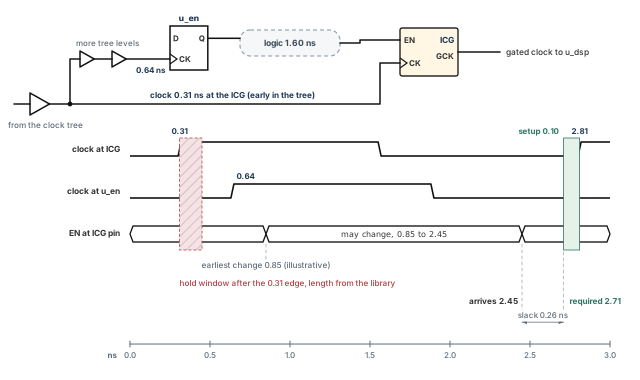
What to notice: Setup slack is 2.71 − 2.45 = 0.26 ns, while the hold side shows only an illustrative earliest change, not a measured minimum.
3.5 Generated clocks and muxes
A divider output starts a generated clock tree. The tool builds it from the divider's output pin. It also makes a reporting-only skew group for it. The divider's own clock pin remains an electrical load on the master tree. See Figure 8 for the master and the divided clock on one axis.
A mux in a clock path makes one sink reachable by two clock paths. If the two are never active together, each mode's skew group ignores the input that is inactive in that mode. If both can be active, the sink belongs to two constraining groups and must satisfy both.
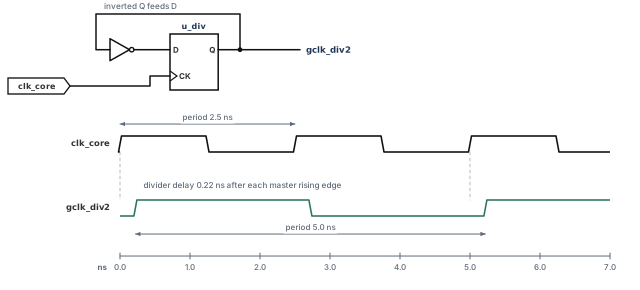
What to notice: gclk_div2 has twice the period, 5.0 ns against 2.5 ns, and its rising edges follow every second master edge after the divider delay of 0.22 ns.
Thus, a tree is a set of cells, and a skew group is a rule about arrival times. Skew is the difference between two arrivals. With this vocabulary we can set the first clock property.
Takeaway A tree is built from cells. A skew group is a rule about arrival times. Skew is tC − tL. Ideal and propagated clocks answer the same question differently.
4 Configure clock cells, targets and corners
The tool builds the tree from the cells the designer allows, to the targets given, in the corner named first. If a choice is left open, the tool typically picks a default that might not suit the library. This section sets one thing at a time. Each setting has a command, a readback and a few lines on what it means.
- Main command:
set_ccopt_property, with a property name, a value and optional object selectors. - Role: configure.
- Starts from: the restored accepted checkpoint, with no clock tree specification yet.
- Changes: CCOpt property values and the analysis mode. No clock cell is created.
- Ends at: a configured session that the specification step reads.
Begin from the accepted placed checkpoint. Restore it, and look at what came back: views, constraints and clock definitions. Then run the readiness checks on that restored design, not on a design you remember.
innovus> restoreDesign accepted_place.enc.dat stream_acc ;# load the accepted placement
When you later compare two CTS candidates, start both from this same checkpoint. Read them with the same reports in the same views. A difference between candidates means little if the starting state or the reports differ.
After each set_ccopt_property below, read the value back. A setting you did not read back is only a setting you intended.
A property has a name, a value and sometimes an object it applies to. Selectors name the object: -net_type, -pin, -skew_group, -clock_tree, -inst, -cell, -delay_corner. To learn what a property means, ask the tool. get_ccopt_property -help with the property name shows its valid values and where it applies.
A bare 100 means 100 in the library's time unit. If that unit is 0.1 ns, 100 is 10 ns, which is 10000 ps. Always write the unit: 100ps or 0.1ns.
4.1 Main settings
These are needed for the main run.
Primary delay corner
This sets the delay corner that drives construction.
innovus> set_ccopt_property primary_delay_corner dc_slow ;# build against the slow corner
innovus> get_ccopt_property primary_delay_corner ;# read the corner back
- Meaning: transition and skew limits are judged in this corner first.
- Choice: use the corner that dominates setup. The default is the corner of the first setup view you gave to
set_analysis_view, so name it when several exist. - Trade-off: a corner that is not dominant builds a tree that is good where it matters less.
Buffer cells, inverter cells and clock gate cells
These lists name the cells the tool may use to build and resize the tree.
innovus> set_ccopt_property buffer_cells \
    {CKBUF_X6 CKBUF_X8 CKBUF_X12 CKBUF_X16} ;# clock buffers allowed
innovus> set_ccopt_property inverter_cells \
    {CKINV_X6 CKINV_X8 CKINV_X12 CKINV_X16} ;# clock inverters allowed
innovus> set_ccopt_property clock_gating_cells {ICG_X4 ICG_X8 ICG_X12} ;# clock gates
innovus> get_ccopt_property buffer_cells ;# read the buffer list back
innovus> get_ccopt_property inverter_cells ;# read the inverter list back
innovus> get_ccopt_property clock_gating_cells ;# read the clock gate list back
- Meaning: listing a cell overrides its
dont_usemark, so check that every listed cell is one you want. - Choice: use clock-quality cells with balanced rise and fall delay. Keep each list short, about five cells at most. Do not exclude small sizes only to force bigger ones.
- Trade-off: a longer list gives freedom and costs runtime. The largest cells can raise clock power and electromigration load.
- Availability: a clock gate list matters only for a design that has clock gates to build or resize. A design with none needs no gating cell list.
innovus> report_ccopt_cell_filtering_reasons -cell_type buffer \
    -file filter_buf.rpt ;# write why buffers were filtered out
The filtering report names why the tool dropped a listed cell. The reason "Not available in all views" points to a library or view problem. The reason "Weak max cap cell" means the cell cannot drive copies of itself at the clock frequency. Choose a stronger cell then.
Inverter preference
This tells the tool whether to prefer inverters over buffers.
innovus> set_ccopt_property use_inverters auto ;# let the tool choose
innovus> get_ccopt_property use_inverters ;# read the preference back
- Meaning: valid values are
auto,trueandfalse. - Choice:
autolets the tool decide. Inverter pairs can give lower delay or power in some technologies. - Verify: look at the cell names in
report_ccopt_clock_tree_structure.
Transition targets for top, trunk and leaf nets
These set how sharp a clock edge the tree is built to, per net type. The routing rules section defines the three net types.
innovus> set_ccopt_property -net_type top   target_max_trans 150ps ;# top nets
innovus> set_ccopt_property -net_type trunk target_max_trans 150ps ;# trunk nets
innovus> set_ccopt_property -net_type leaf  target_max_trans 100ps ;# leaf nets, sharpest
innovus> get_ccopt_property -net_type leaf target_max_trans ;# read the leaf target back
- Meaning: the largest transition the tool aims for on that kind of net.
- Choice: leaf nets drive sinks and usually need the sharpest edge. Trunk and top nets can be looser. Take the numbers from your library and clock period.
- Trade-off: too tight means more cells, more power and more runtime. Too loose means slow edges and less gating margin.
- Verify after the build:
report_ccopt_clock_trees -histograms -file trees_slew.rptshows the transition spread per net type.
Skew target, and when it applies
This sets a skew target. Where it applies depends on the flow.
innovus> set_ccopt_property target_skew 80ps ;# global skew target
innovus> get_ccopt_property target_skew ;# read the target back
- Meaning:
ccopt_design -ctsbuilds toward this skew. Fullccopt_designdoes not use the global value as its closure objective, because useful skew scheduling decides the arrival times. - Choice: in the main flow, state a bound only where you need one, on a named skew group. Those groups do not exist until the specification creates them, so those commands live in the specification section, with their trade-off.
- Trade-off: a tight target costs cells and power. It buys little if the data path cannot use it.
- Verify:
report_ccopt_skew_groupshas a column that shows which target applied. An unmet global target after a full run is not a defect by itself.
Macro clock pin insertion delay
This tells the tool how much clock delay lies inside a macro, behind a clock pin.
innovus> set_ccopt_property -pin u_buf_a/CK insertion_delay 0.35ns ;# RAM A offset
innovus> set_ccopt_property -pin u_buf_b/CK insertion_delay 0.35ns ;# RAM B offset
innovus> set_ccopt_property -pin u_coef/CK insertion_delay 0.35ns ;# ROM offset
innovus> get_ccopt_property -pin u_buf_a/CK insertion_delay ;# read one offset back
innovus> report_ccopt_pin_insertion_delays -file pin_offsets.rpt ;# list all offsets
- Meaning: this is CTS compensation. The tool arrives at these pins 0.35 ns earlier, so that the clock reaches the macro's internal registers together with the others.
- Choice: set it only if the constraints and the library do not already carry the delay. Two places that both apply it count it twice.
- Not the same thing: the compensation moves where CTS aims. It does not prove that the timer's macro timing model contains the same internal clock delay. Check the model separately, and decide once where the 0.35 ns lives.
- Trade-off: a wrong value shifts the macro's real arrival by the error.
Common path pessimism removal
Common path pessimism removal (CPPR) removes pessimism where the launch and capture clock paths share cells.
innovus> setAnalysisMode -cppr both ;# credit shared clock path in setup and hold
innovus> getAnalysisMode -cppr ;# read the setting back
- Meaning: the timer gives credit for the shared part of the launch and capture clock path, in setup and hold.
- Choice: load the post-CTS constraints with this on and with clocks not yet propagated. CCOpt then makes the clocks propagated.
- Verify:
getAnalysisMode -cpprprints the setting. The exact text it prints differs between installations, so read it forboth.
4.2 Advanced and study settings
Skip these on your first run.
Insertion delay limit
This limits how far scheduling may lengthen a sink's insertion delay.
innovus> set_ccopt_property auto_limit_insertion_delay_factor 1.5 ;# cap global growth
- Meaning: CCOpt first computes the maximum insertion delay over all skew groups. This factor multiplies that initial maximum. Scheduling may not grow the global maximum beyond the result. The default is 1.5.
- Not a per-sink rule: it is not 1.5 times a given sink's own shortest clock path. A sink can sit far above or below that value, as long as the global maximum stays inside the limit.
- Choice: lower it to limit useful skew and shorten clock paths.
- Verify: the constraint window in
report_ccopt_worst_chain.
Useful skew effort
This sets how hard CCOpt works on useful skew.
innovus> setOptMode -opt_skew_ccopt standard ;# default effort
innovus> getOptMode -opt_skew_ccopt ;# read the effort back
- Meaning:
none,standardorextreme. - Choice:
extremeraises runtime a lot. Pair it with a high flow effort, and use it only whenstandardleaves setup failing. - Flow applicability: see the strategy table in the section on other ways to build a clock tree.
Balance mode (study only)
This chooses how far construction goes.
innovus> set_ccopt_property balance_mode cluster ;# stop after clustering
- Meaning:
cluster,trialorfull.fullis the default. - Choice: use a study mode only to look at sink clustering or virtual delays. The optional pre-CTS work section shows the standard pair of commands.
- Trade-off: a study candidate is not a result you hand off. Return to the saved baseline, or set
balance_mode full, before the real build.
4.3 Views and modes
The tool derives its clock constraints from the multi-mode setup. Load the constraints you intend to close with, with the clocks still ideal, before the specification exists.
In the example, dc_slow is the setup corner and dc_fast the hold corner. The views are av_func_slow for setup, and av_func_fast and av_scan_fast for hold. These are the illustrated case, not a law. Confirm your own dominant corners, including temperature inversion and any advanced variation modeling.
A restored checkpoint normally carries its own views. In the example, the setup list holds one view, the functional one. The hold list holds the functional and scan views. So the example analyzes scan hold. It does not analyze scan setup. No scan setup result in this chapter would exist unless you add a scan setup view.
set_analysis_view selects views that are already defined. It does not create modes, corners or views. If a needed one is missing, define it first with the multi-mode commands of your flow: create_constraint_mode, create_delay_corner, create_analysis_view. Then select. The command is not incremental, so give the complete lists:
innovus> set_analysis_view -setup {av_func_slow} \
    -hold {av_func_fast av_scan_fast} ;# full setup and hold lists, not additions
Thus, each CCOpt setting is applied, read back and judged against the plan before anything is built. Next we turn to the clock wires, which the router treats like any other net unless the designer says otherwise.
Continue when every property reads back as intended. Every listed cell survives filtering or has a written reason to be dropped. The primary corner and the loaded views match the plan.
5 Clock net types and clock routing rules
The clock is the most sensitive net in the design. A small change in its wire resistance or coupling moves the arrival time of thousands of registers together. A router treats a clock net like any other net unless the designer says otherwise.
A non-default rule (NDR) asks for wider wires, more spacing or special vias. It uses routing resources that signals also want. Let us first look at the three kinds of clock net, then at the rules attached to each kind.
- Main command:
create_route_type -namewith-non_default_rule(afteradd_ndr), assigned withset_ccopt_property -net_typeandroute_type. - Role: configure.
- Starts from: the configured session, with the technology layers loaded.
- Changes: creates rule and route-type objects, and records which route type each net kind uses. No wire is routed in this step.
- Ends at: a routing policy that the build applies to clock nets.
5.1 Leaf, trunk and top nets
The tool sorts every clock net into one of three kinds. A route type is attached to a kind.
- A leaf net connects to one or more sinks.
- A top net is selected by fanout: its transitive sink fanout is above the property
routing_top_min_fanout. It is the upper, high-fanout part of the network. It is not a separate cell and not a fixed level of the tree. - A trunk net is a clock net between the top and the leaves.
Conceptually the top nets are the upper part of the trunk. The native query, however, treats the three kinds as separate categories. get_ccopt_clock_tree_nets -net_types trunk returns trunk nets that are neither leaf nor top. Count the three kinds separately and add them. Do not expect the trunk query to include the top nets.
Figure 9 uses the invented threshold routing_top_min_fanout = 2000. A net that feeds 2400 sinks through lower buffers is a top net. A net that feeds 800 sinks is a trunk net. A net that touches a register clock pin is a leaf. The wires carry the route type policy of the next subsection.
u_io branch are omitted, and the short port net is top as well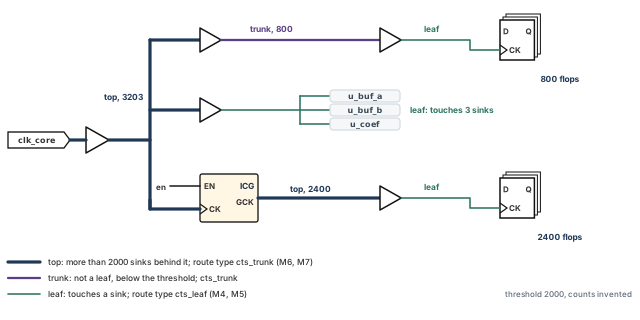
What to notice: A net that touches a sink is a leaf even if it is drawn high up, and only nets with more than 2000 sinks behind them are top.
After the build you can count the nets in each kind. Nothing is built before then, so the query has nothing to return earlier.
innovus> foreach t {leaf trunk top} { ;# count the built nets of each kind
    puts "$t nets: [llength [get_ccopt_clock_tree_nets -net_types $t]]"
}
The same -net_types filter exists on get_ccopt_clock_tree_cells.
5.2 Why wider and farther apart
Figure 10 draws three clock rules on the same tracks. Let us first see why each one helps.
A wire's delay depends on its resistance and capacitance.
- A wider wire has lower resistance and higher capacitance to the layers around it. So width helps most on long wires.
- A wire moved away from its neighbors has less coupling capacitance. It therefore changes delay less when the neighbors switch.
Both reduce the variation of clock delay. Variation is what turns a balanced tree into a skewed one in silicon. A shield is a grounded wire laid beside the clock wire. It replaces switching neighbors with steady ones, and it costs the most routing resource.
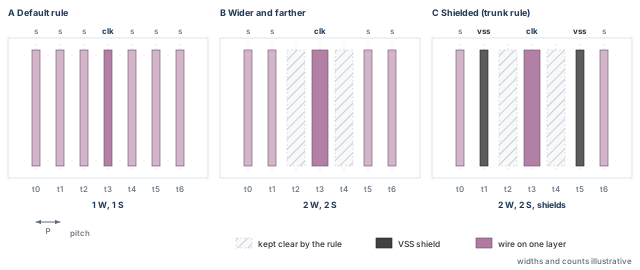
What to notice: The wider rule empties t2 and t4, shields sit on t1 and t5 (the trunk rule only), and the signals that moved away are the cost.
5.3 Layers and vias
An NDR names layers. Every layer in the rule must exist in the technology and be allowed for routing. Check the names before use.
innovus> puts [dbGet head.layers.name] ;# print every layer name
The layer names in this section (M4 to M7) are placeholders. Replace them with your technology's names. A range such as M4:M7 is valid add_ndr syntax for all layers from M4 to M7, not only the two named layers.
Wider wires need vias that fit them, so the rule command can generate vias for the changed widths. A tall via stack from a driver pin up to the clock layers adds resistance. Route types therefore offer a minimum stacked-via layer and a preference for multi-cut vias.
5.4 The policy, one command at a time
Each command below does one thing. Doing one does not do the next.
Create the rules. add_ndr defines widths and spacings by multiplier or by value. It attaches the rule to nothing.
innovus> add_ndr -name CTS_2W2S -width_multiplier {M4:M7 2} \
    -spacing_multiplier {M4:M7 2} -generate_via ;# double width and spacing
innovus> add_ndr -name CTS_2W1S -width_multiplier {M4:M5 2} \
    -generate_via ;# double width, default spacing
CTS_2W2S: double width and double spacing over the rangeM4:M7. Used for trunk and top.CTS_2W1S: double width, default spacing. Used for leaf, where shielding thousands of nets would cost too much.
Create the route types. A route type bundles a rule with preferred layers and a shield. The preferred layers are soft limits.
innovus> create_route_type -name cts_trunk -non_default_rule CTS_2W2S \
    -top_preferred_layer M7 -bottom_preferred_layer M6 \
    -shield_net VSS ;# trunk: M6 and M7, shielded by VSS
innovus> create_route_type -name cts_leaf -non_default_rule CTS_2W1S \
    -top_preferred_layer M5 -bottom_preferred_layer M4 ;# leaf: M4 and M5
The recommended practice is one layer pair per kind, one horizontal and one vertical. The tool's estimates then correlate with the final route. Here trunk uses M6 and M7, and leaf uses M4 and M5.
Attach a route type to each kind. Nothing is routed yet.
innovus> set_ccopt_property routing_top_min_fanout 2000 ;# top above 2000 sinks
innovus> set_ccopt_property -net_type top   route_type cts_trunk ;# top nets
innovus> set_ccopt_property -net_type trunk route_type cts_trunk ;# trunk nets
innovus> set_ccopt_property -net_type leaf  route_type cts_leaf ;# leaf nets
Read the policy back.
innovus> get_ccopt_property -net_type top   route_type ;# expect cts_trunk
innovus> get_ccopt_property -net_type trunk route_type ;# expect cts_trunk
innovus> get_ccopt_property -net_type leaf  route_type ;# expect cts_leaf
innovus> get_ccopt_property routing_top_min_fanout ;# expect 2000
Save the rules to a LEF file, the standard library exchange format. Then compare their widths and spacings with your intent:
innovus> exportNdr CTS_2W2S -lef ndr_CTS_2W2S.lef ;# trunk rule as LEF
innovus> exportNdr CTS_2W1S -lef ndr_CTS_2W1S.lef ;# leaf rule as LEF
There are three different kinds of evidence. Keep them apart.
- Intent: the property readback above says what you asked for.
- Actual wires: after the build,
report_net_wires -netwith one clock net lists its wire pieces, each with layer, width rule and shield status.report_via -on_clock_nets -detailsummarizes single-cut and multi-cut vias on the clock nets. - Coverage: a via total over all clock nets does not show that every clock net obeyed the full policy. Forty sampled nets show only that those forty nets did. State which you did.
A rule that exists is not a rule that was used, and one clean net is not all nets. Until you have looked at actual wires, the claim "routing policy applied" is not established. The report map in the clock reports section lists these two commands.
5.5 Macro channels and halos
Clock trunks may need to cross the channel between two macros. A channel has a limited number of routing tracks. Signals use most of them, and the clock rule takes more than a default wire would. Figure 11 shows the squeeze.
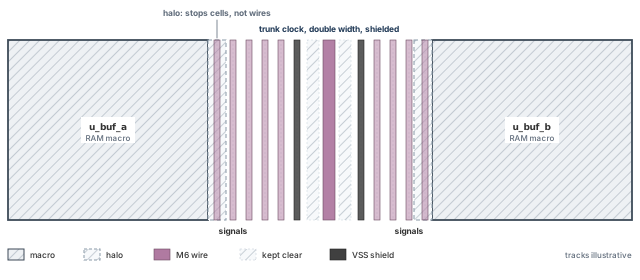
What to notice: The halo strips stop standard cells, not wires, so the channel keeps all of its tracks for routing.
A macro halo is a placement margin. It keeps standard cells away from the macro edge and does not stop wires. Only a routing blockage or the macro's own obstruction shapes remove routing capacity. If the clock wires do not fit, you have four options:
- use fewer shielded wires,
- use a different layer pair for the trunk,
- route over the macro on layers it leaves free,
- or get a wider channel from the floorplan.
Each of these is an experiment. Restore the accepted checkpoint, change one thing, rebuild, and compare with the same reports.
For a rule that comes from the technology LEF, modify_ndr cannot change it in the session. In this guide the NDR is settled before routing, because a rule changed afterwards means rebuilding the clock routes.
Thus, a routing rule is a trade: the clock gains a steadier path, and signals lose tracks. The tool still needs a description of the clock network before it builds anything. We read that description next.
Continue when the readback matches the plan and every layer exists and is allowed for routing. Remember that the check of actual wires after the build is still to be done.
6 The clock tree specification
Before it builds anything, the tool writes down what it believes the clock network is. That covers which trees, which skew groups, which pins are sinks and which are not. The build then follows that description.
If the description is wrong, the tree is built correctly for the wrong problem. A sink is left out, a gate is balanced with the wrong registers, or a divider is counted as a sink. Reading the specification costs minutes. The same fault found after the run costs a full rerun.
- Main command:
create_ccopt_clock_tree_spec -file ccopt_spec.tcl, thensource ccopt_spec.tcl. - Role: configure and inspect.
- Starts from: the configured session, with constraints loaded and clocks ideal.
- Changes: defines clock trees, skew groups and special pins in the session, and writes the spec file.
- Ends at: a specification you have read and compared with the plan, ready for the build.
6.1 What the specification contains
The specification is a Tcl script. The tool writes it after analyzing the timing graph of all active setup and hold views. It holds:
- clock trees: a root pin, and for a divider output a generated tree;
- skew groups: sources, sinks and balancing targets;
- special pins;
- the property settings the analysis derived. Examples are a transition target from the constraints, or an insertion delay from a clock latency.
When you ask for the file, it also holds comments that record why the tool set some constraints. Those comments are not stored if you let the tool extract the specification directly, without a file.
The tool builds one skew group per SDC clock per constraint mode. Then it adds what it needs:
- ignore pins for dividers and for the inactive side of a mux,
- reporting-only groups for generated clocks,
- extra groups where flops are shared.
6.2 Derived, inspected and changed: three different acts
Table 6 separates three things you can do with the specification.
| Act | Meaning | Rule |
|---|---|---|
| Derived | The tool wrote it from your constraints and properties | Expected. The file is for reading. It is not the place to make your changes |
| Inspected | You compared it with the intent | Mandatory. The count of trees, skew groups and sinks must match the plan |
| Changed | You altered the constraints, a CCOpt property or a sink type | Needs a reason in writing. Change the source (the SDC, a property or a sink type) before generation, so the tool's timing analysis and its clock analysis agree |
The reason for that preference is simple. An ignore pin stops the clock tree from tracing past a point, but a timing report still propagates the clock through it. A change made only in the specification makes CTS and the timer disagree about the network.
6.3 Creating it, once
# Write the specification to a file instead of applying it directly.
innovus> create_ccopt_clock_tree_spec -file ccopt_spec.tcl ;# derive and write the spec
# Apply it. Source it ONCE per session.
innovus> source ccopt_spec.tcl ;# create the trees and skew groups in the session
Source the file only once. A second source fails with a message that clock trees are already defined. A tree name returned by get_ccopt_clock_trees after this step means the specification object exists. It does not mean any clock cell or wire was built. Evidence that CTS was built comes later, from the structure reports.
If you must regenerate a specification, choose the action for the case you are in:
- In a conventional flow like ours, with no early clock annotations,
delete_ccopt_clock_tree_specremoves trees, skew groups and spec data. It keeps your property settings. A freshcreate_ccopt_clock_tree_specthen derives a new one. reset_ccopt_configgoes further and also removes your property settings. The configuration and routing-rule settings must then be applied again.- Both accept an option to preserve sink insertion delays.
- If the specification carries early-clock annotations, do neither (see the early clock flow below).
6.4 What the file looks like
The lines below show the shape of a specification for the example. They follow the form of real spec lines. A real file is longer and carries comments and many more properties.
create_ccopt_clock_tree -name clk_core -source clk_core -no_skew_group
create_ccopt_generated_clock_tree -name gclk_div2 -source u_div/Q \
    -generated_by u_div/CK
create_ccopt_skew_group -name clk_core/func -sources clk_core -auto_sinks
create_ccopt_skew_group -name clk_core/scan -sources clk_core -auto_sinks
create_ccopt_skew_group -name gclk_div2/func -sources u_div/Q -auto_sinks
modify_ccopt_skew_group -skew_group clk_core/func -add_ignore_pins u_clkmux/I1
modify_ccopt_skew_group -skew_group clk_core/scan \
    -add_ignore_pins {u_clkmux/I0}
set_ccopt_property constrains -skew_group gclk_div2/func none
Read it line by line:
- The first line names the tree and its root.
- The second makes the divider output a generated tree, so the divider is not treated as a sink.
- The next three create the skew groups, one per clock per mode.
- The two
modifylines add ignore pins. In function mode it is the mux input that carries the bypass path. In scan mode it is the mux input that carries the divided clock. An ignore pin is not a sink to balance in that group. - The last line makes the generated clock's group a reporting group that balances nothing.
Now follow the 600 u_io registers through these lines. In function mode their clock comes from clk_core through the divider and mux input I0. The master group clk_core/func has -auto_sinks, and the generated group is non-constraining. So the master group balances those 600 registers together with the other 3203 sinks, 3803 in all.
gclk_div2/func lists the same 600 so you can read their divided-domain latency, and it constrains nothing. The line to check in your own specification is exactly this one. Does a constraining group hold the sinks behind each generated clock?
6.5 Restricting skew on one named group (advanced)
Now that the groups exist, you can set a bound on one of them. In full ccopt_design, a group target alone is not a hard limit throughout the optimization. The standard way to carry it into the full flow is to set the target and the constraint scope together:
innovus> set_ccopt_property -skew_group clk_core/func target_skew 80ps ;# group bound
innovus> set_ccopt_property -skew_group clk_core/func constrains all ;# make it binding
innovus> get_ccopt_property -skew_group clk_core/func target_skew ;# read the bound
innovus> get_ccopt_property -skew_group clk_core/func constrains ;# read the scope
- Meaning: the value 80 ps is illustrative.
constrains allmakes the group a constraint for the whole optimization, not only a reported goal. - Trade-off: a hard group bound limits what useful skew scheduling may do. Apply it only where a block really needs it, and expect fewer setup gains.
- Do not apply it to a reporting-only group. That group is meant to balance nothing.
6.6 Sink types: stop, ignore, exclude
Three pin types mark where the tool stops tracing the clock. They must be set before the specification is created. Set afterwards, they only mark the pin, and any tree downstream remains built. Table 7 compares them.
| Type | Part of the tree graph? | A sink to balance? | Use for |
|---|---|---|---|
ignore | Yes: buffering for design-rule limits reaches it | No | A pin the clock reaches but must not be balanced, such as a divider input or a test-only register |
stop | Yes | Yes, by default | A pin where tracing must end but the pin must still be balanced with the other sinks |
exclude | No | No | A pin on a net that carries the clock but is not part of its tree; the spec prunes back to it and may put an ignore pin earlier |
# Example only: the pin name is invented.
# Run before create_ccopt_clock_tree_spec.
innovus> set_ccopt_property -pin u_test/jtag_clk_reg/CK sink_type ignore ;# not balanced
A separate mechanism applies to one skew group only: a skew-group ignore pin, added with modify_ccopt_skew_group and -add_ignore_pins. It stops that group from considering the latency to the pin and from propagating through it. Other groups are left alone.
- At a leaf register, it means the register is not balanced with the others in that group.
- At a mux input, the latency to and through the pin is ignored. The flops downstream stop being active sinks of that group.
6.7 Other exceptions and what they mean
Table 8 lists the remaining special items and where each one shows up.
| Item | Meaning | Where it shows up |
|---|---|---|
| Reporting-only skew group | A group with constrains none: it is measured and balances nothing | Hidden from reports by default; options exist to include it |
exclusive_sinks and rank | A sink is active only in the highest-rank groups that contain it | Surprising skew-group membership |
| Preserved clock tree port | A module port kept in place for the flexible H-tree flow | Preserved ports report |
dont_touch on a clock net | The tool should not buffer or resize it | A net the tool cannot repair (see the debugging cases) |
| Pin insertion delay | An offset that makes a sink arrive earlier or later than the others. Its source can be you, the SDC or library, or a useful skew result | Pin insertion delay report, which records where each offset came from |
| Timing-connectivity-based skew groups | When timing_connectivity_based_skew_groups is clock_false_path, clock groups and clock-to-clock false paths relax needless balancing | The balancing relationship comment in the spec |
Two details of insertion delay need care:
- A latency written as
set_clock_latencyon a clock becomes a target insertion delay of the skew group. - A latency on a pin becomes a pin insertion delay equal to the clock latency minus the pin latency. SDC pin latencies replace other values; they do not add to them.
For a macro, if the constraints do not state its internal clock delay, give it with set_ccopt_property -pin and insertion_delay. A positive value says the macro needs the clock earlier by that delay. The reports are report_ccopt_preserved_clock_tree_ports and report_ccopt_pin_insertion_delays.
In our example each macro has an invented internal clock path of 0.35 ns. With the 0.35 ns pin insertion delay, the tree reaches the pin about 0.35 ns before the registers. The clock inside the macro then arrives together with the register clock. If the value were omitted, the macro clock would arrive 0.35 ns late. The clock reports section shows the pin insertion delay report.
6.8 Shared clock and data, and clock tree convergence
A net that carries both clock and data confuses the tracing. So does a clock that fans back into a datapath through logic. If the SDC lets the clock propagate into a datapath, the tool finds huge numbers of reconverging clock paths. A missing case analysis is the usual cause.
- The tool checks for this when the specification is created. The check warns above 100 clock paths to any sink.
report_ccopt_clock_tree_convergencelists the offenders.- Fix it in the SDC with a case value or
set_clock_sense -stop_propagation, or with stop, ignore or exclude pins.
Do not build over it. The run is slow, and the tool does no datapath optimization.
6.9 Early clock flow and existing annotations
The placement stage may have used the early clock flow (setDesignMode -earlyClockFlow true). Then the specification already exists, and the useful skew from place_opt_design is stored as annotations on it. Do not delete or regenerate that specification before ccopt_design. Deleting it loses the useful skew.
Our placement baseline did not use the early clock flow. So no annotation exists, and the specification is derived fresh. Record which case applies. After a specification change, update_clock_tree_spec_annotations can refresh the annotations. That command belongs to the early-clock-flow case.
6.10 What to check in the derived specification
Read the spec file, and ask the tool a few questions about it:
innovus> get_ccopt_clock_trees ;# tree objects in the spec
innovus> get_ccopt_skew_groups ;# skew group objects in the spec
innovus> report_ccopt_clock_tree_convergence ;# clock paths that reconverge
innovus> ccopt_design -check_prerequisites ;# validate the setup, build nothing
innovus> check_design -type cts ;# CTS-related design checks
ccopt_design -check_prerequisites and check_design -type cts need the CCOpt targets set and the specification loaded. They cannot run on a pre-CTS database right after place_opt_design.
The names these queries return are specification objects. The membership of each group, meaning which sink pins are really active, is read after the build. Active sinks are updated only after the CTS timer runs. So do not use sink counts from get_ccopt_property with sinks now.
Then compare the answers with the plan in Table 9.
| The plan says | Where to look, and what a difference means |
|---|---|
Two trees, clk_core and generated gclk_div2 | Look: get_ccopt_clock_trees. If it differs: a missing tree means a clock or mode was not loaded. Fix the constraints. |
Three skew groups: clk_core/func, clk_core/scan, reporting-only gclk_div2/func | Look: get_ccopt_skew_groups, the create_ccopt_skew_group lines. If it differs: a missing group means a clock or mode was not loaded. Fix the constraints. |
| The inactive mux input is an ignore pin of each mode's group | Look: the -add_ignore_pins lines of the spec file. If it differs: a wrong or missing mux ignore pin can admit the inactive clock path or remove intended active sinks. Check I0 and I1 against the mode's case analysis. |
| A constraining group holds the sinks behind the divider | Look: the master group's -auto_sinks line and the generated group's constrains none. If it differs: if no constraining group holds them, nothing balances them. |
| The three macro pins are sinks with an insertion delay | Look: the spec file and report_ccopt_pin_insertion_delays. If it differs: a missing macro pin gets no clock tree. |
No unintended exclude, ignore or dont_touch | Look: the special pins in the spec, report_ccopt_preserved_clock_tree_ports, the dont_touch list and the computed preservation report. If it differs: each one needs an owner and a reason. |
| Low convergence | Look: report_ccopt_clock_tree_convergence. If it differs: fix the SDC. Do not build. |
When you do read membership, keep the three counts of the concepts section apart. In our example the two constraining groups each hold 3803 sinks, and the reporting group holds 600. The memberships add to 8206, and the design has 3803 distinct sinks.
Matching totals do not prove matching members. For a group you doubt, compare its list of active sink pins with a list from an independent netlist query. Do not compare it with a list taken from the result you are testing.
6.11 Save the configured state (optional)
If you want a return point before the build, save the configuration and the design.
save_ccopt_configwrites the configuration to a folder. Its content is proprietary, andrestore_ccopt_configis its only supported reader.- The configuration is not restored if the design was restored with
restoreDesign -mmmcFile(warningIMPIMEX-4016). saveDesignwrites the checkpoint.
innovus> save_ccopt_config configured_ccopt_config ;# CCOpt settings to a folder
innovus> saveDesign configured.enc ;# the configured checkpoint
Thus, the specification is the last place where a wrong assumption costs minutes and not a rerun. Next we look at the work that can be done before the build, and then we run it.
Continue when the trees and skew groups match the plan and a constraining group holds every sink behind a generated clock. Every special pin needs a reason. ccopt_design -check_prerequisites must have run, and check_design -type cts must have no unexplained finding.
7 Optional pre-CTS work
Sometimes the placed design is not ready for the clock tree. The macros might leave no room for clock cells. A clock gate might sit far from the registers it feeds. Or the datapath might have so little slack that skew scheduling needs every picosecond. This section lists the levers that exist before CTS, one rule that comes with them, and one way to look before committing.
7.1 Required and optional preparation
The previous sections already did what is required. Everything below is optional. Pull an optional lever only when evidence from the readiness check or from a study points to it. A lever tried "just in case" muddies every later comparison.
The rule: a lever that changes the placement or the netlist is a new experiment.
- If it changes placement, it belongs to the placement stage. Apply it there from its baseline and re-accept the placement there.
- Then restart here from the new accepted checkpoint.
Repairing placement inside the CTS session and carrying on would hand CTS a placement that was never accepted.
7.2 Study first: look before you commit
A study is a short construction to see what the full build will face. The property balance_mode limits how far construction goes:
clusterstops after clustering: design-rule buffering, no skew balancing and no timing optimization.trialadds balancing with virtual delays.fullis the default.
For a new design, check the maximum insertion delay after clustering first. For narrow channels, many blockages or complex power domains, also look for large transition violations. The standard way to study clustering pairs the property with CTS-only construction:
innovus> set_ccopt_property balance_mode cluster ;# stop after clustering
innovus> ccopt_design -cts ;# CTS-only construction for the study
Read the log and the reports to see how far it went. A study candidate is not a clock tree you hand off, because it stopped early on purpose. When the study is done, return to the saved baseline, or set balance_mode full and rebuild, before the real construction. Do not continue the study candidate as if it were production.
7.3 The levers, and the symptom that justifies each
Table 10 and Table 11 pair each lever with its symptom, its evidence, and where the change belongs.
| Lever | Pull it when | Evidence to collect | Where it belongs |
|---|---|---|---|
| Useful skew before CTS (early clock flow) | The ideal-clock datapath is tight | Pre-CTS timing with coverage | Placement stage, rerun from its baseline. Keep the specification |
| Pre-CTS optimization effort | Much slack is wire-dominated and not repaired, or slack is negative before any skew | Pre-CTS timing with coverage | Placement stage |
| Clock-gate-aware placement | A gate sits far from its registers, or a study shows large gating skew | Gate-to-register distance, gating slack | Placement stage |
| Lever | Pull it when | Evidence to collect | Where it belongs |
|---|---|---|---|
| Space for clock cells, padding, congestion refinement | A study shows transition violations in a macro channel, or local density leaves no legal place near gates or macros | Density near the channel, clock net transition report | Padding and refinement: placement stage. CCOpt halo properties: this chapter |
| A different halo setting | Many cell_halo violations | report_ccopt_cell_halo_violations | This chapter |
| Library restrictions | No listed clock cell survives filtering, or a cell is wrong for the corner | report_ccopt_cell_filtering_reasons | This chapter (the configuration section) |
| Timing-group priorities, power choices, legality and density recovery | One path group needs the effort, clock power dominates, or the design is near the density limit | Clock tree report (area, capacitance), density map | Either, as the symptom says |
If you cannot name the evidence, do not pull the lever.
Thus, each lever moves the design before the build, and each one hands CTS a new placement that must be accepted again. If no lever is needed, we continue with the build.
Fixing a placement problem in place, running CTS on it and calling the checkpoint "accepted". The placement acceptance applied to the placement that was reviewed, not to the one you changed.
8 Build the clock trees
One command now builds the clock network. It resizes and moves cells and makes the clock propagated. In the full flow, it also optimizes the data path around the new clock. Because the command is large, the preparation around it must be exact. You need the right start and the right command for the input. You also read the evidence before you judge the result. Building is not accepting. Acceptance is a separate decision, made at the end of the chapter.
- Main command:
ccopt_design -outDir timing_ccopt -prefix cts -expandedViews. - Role: construct clock trees and optimize clock and data path together.
- Starts from: the accepted placed design, with the configuration, routing rules and specification in the session.
- Changes: clock cells and wires (new, resized, moved) and the clock mode (clocks become propagated). It also changes source latencies of clock roots, and data-path cells (resized, buffered, moved).
- Datapath optimization included? Yes. Full CCOpt includes post-CTS-style optimization and a final internal optimization. Do not add a routine extra setup-optimization pass after it.
- Outputs: timing reports under
timing_ccopt, one per view, the log, and the built trees in memory. - Ends at: a candidate, saved under its own name. It is not an accepted checkpoint.
8.1 Which command, for which input
The input database decides the command. Our checkpoint came from place_design and optDesign -preCTS, so the main flow is full ccopt_design. The variants are alternatives, not extra steps:
ccopt_design -ctsbuilds the trees only.clock_opt_designaccepts only a database made byplace_opt_designin its second-generation flow (PODV2), so it rejects this checkpoint.- The section on other ways to build a clock tree compares them.
- The option
-ckSpecbelongs to an older flow and is not used here.
-outDir names the folder for the timing reports, -prefix names the report prefix, and -expandedViews asks for per-view reports. Without them, the reports land in a default folder under a name that does not say which candidate made them. A second candidate can then overwrite the first. (clock_opt_design spells its folder option -out_dir.)
8.2 Run it
First check that the setup can run, then build, then save the candidate under a name that is not the baseline's:
innovus> ccopt_design -check_prerequisites ;# validate the setup, build nothing
innovus> ccopt_design -outDir timing_ccopt -prefix cts \
    -expandedViews ;# build trees and optimize, per-view reports
innovus> saveDesign ccopt.enc ;# save the candidate under its own name
-check_prerequisites validates the setup without building a tree. Keep the baseline checkpoint untouched. A second candidate then starts again from the baseline and gets its own name, folder and prefix. You can then compare the two with the same reports.
Following full ccopt_design with a routine optDesign -postCTS. The full flow has already optimized the data path. A second pass costs runtime and can undo scheduling the first pass chose. Add a repair only for a specific failure that the clock reports and timing reports show. The targeted repairs are in the debugging cases.
8.3 What to read in the log, in order
- The prerequisites message, or the table that says why the command cannot run. Examples are a maximum transition target that is too low, or drivers that are too weak.
- The per-stage summary the tool prints: slack and metrics. Its layout depends on your installation.
- Messages with the
IMPCCOPTprefix: cells, halos, preserved nets, targets. - The worst-chain report printed periodically. The most useful one is printed after the last skew adjustment and before re-clustering, usually the second to last.
- The final lines and the elapsed time.
An invented first-glance table shows the shape. WNS is the worst negative slack and TNS the total negative slack; the post-CTS timing section defines both.
stage                      setup WNS (ns)   setup TNS (ns)   hold WNS (ns)
before ccopt_design        not shown        not shown        not shown
after clustering           -0.231           -41.7            -0.089
after skew scheduling       0.004             0.0            -0.061
after final optimization    0.012             0.0             0.021
The first row is not shown because this log layout prints no pre-CCOpt slack. Ideal-clock timing does exist: you have those numbers from placement.
In this illustration, setup and hold both improve through the displayed stages. Other candidates can trade setup against hold, so the final saved candidate still needs both analyses. The last row is not a verdict. The post-CTS timing section explains why it must be remeasured on the saved candidate.
Thus, the build is one command, but its start, its input and its evidence decide whether the result is usable. Next we look inside the command, so that its log and its cell names can be read.
Stop if the log reports an error or the prerequisites table appears. Stop also if the elapsed time is far from your earlier runs. A run that mostly worked is a diagnostic run only. Do not take it forward.
9 Inside the CTS engine
The designer does not control the algorithm. The designer controls the inputs and reads the outputs. Even so, it helps to know the stages the tool goes through. Each stage leaves a different mark in the log and in the cell names. A failure at one stage typically looks different from a failure at another. The drawings here are concepts: only the stages are visible, not the methods inside them.
9.1 The stages
Clock tree construction is graph-based and runs in three steps. CCOpt adds optimization after them, as Table 12 shows.
| Stage | What the tool does | What you can see afterwards |
|---|---|---|
| 1. Clustering | Groups nearby sinks and buffers them to meet the maximum transition, capacitance and length limits. After it, the maximum insertion delay is roughly known | Cell names starting ccl or ccl_a; a transition summary |
| 2. Constraint analysis and virtual-delay balancing | Finds how the skew and insertion-delay constraints interact and where delay must be added. One example is balancing test-mode skew without hurting functional insertion delay. The planned delays are virtual: annotations on the timing graph that allow quick what-if analysis during useful-skew scheduling | Skew-group and pin-insertion-delay reports; no cells yet for the virtual part |
| 3. Implementation | Real cells synthesize the virtual delays, then a refinement step follows. For CCOpt-CTS this is the last step | Cell names starting cdb; the final tree |
| 4. Extra optimization (full CCOpt) | Post-CTS-style datapath optimization and a final internal optimization, plus post-conditioning that repairs clock design-rule violations and skew | Cell names starting cpc_drv, cpc_sk; datapath changes in the netlist |
Figure 12 draws the stages as a strip.
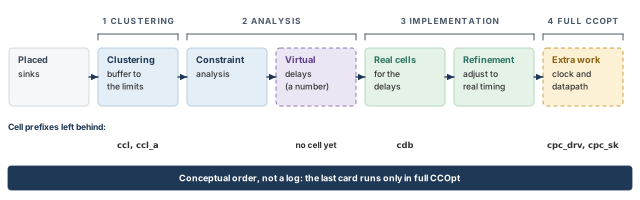
What to notice: The last card exists only in full CCOpt, and the virtual delays are a number on the graph until real cells replace them.
The tool also names the cells it creates by stage:
cclfor clustering to meet the transition target, andccl_afor agglomerative clustering;cdbfor delay balancing;cdcfor a clock driver added through a property;cpc_drvandcpc_skfor post-conditioning drivers.
The command show_ccopt_cell_name_info lists the prefixes on your installation. These names are evidence. The prefix of a cell tells you which stage made it.
9.2 Placement, clustering and the first buffering
At the start, the sinks are where placement put them. The tool looks at their positions and groups the nearby ones. A group must be small enough that its driver can meet the transition target. The net must also meet the capacitance and length limits.
Each group gets a driver. The drivers in turn are grouped under drivers, up to the root. This is clustering, and it gives a tree whose shape follows where the sinks are. Figure 13 shows it with invented counts.
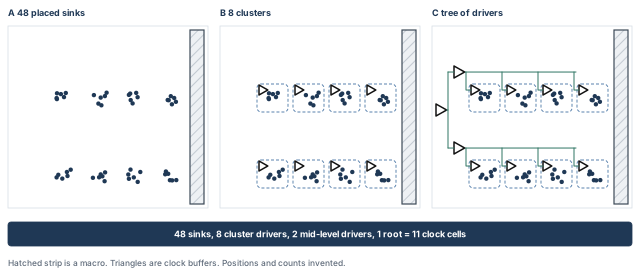
What to notice: Clusters follow where the sinks are; here 48 sinks need 8 + 2 + 1 = 11 clock cells.
If clustering runs into a narrow channel, many blockages or a complicated power domain, the tree already shows large transition violations here. That is why you look at the clustering result first on a new design. This is the study of the optional pre-CTS work.
9.3 Constraint analysis, virtual delays and physical delays
After clustering, the tool knows roughly how long each sink's clock path is. The skew groups ask for those paths to be alike, within a target, or to differ by an amount the datapath wants. The tool works out how much delay each branch needs.
It does not insert a cell for every candidate. It writes the planned delay into the timing graph as a virtual delay and asks the timer what happens. A virtual delay is a number attached to a point of the graph. It is not a cell, it takes no area, and it vanishes when it is turned into real cells.
When the plan is settled, the implementation step turns each virtual delay into physical delay. That can be a different buffer size, a longer wire or an extra inverter pair. The refinement step then adjusts the built cells to the timing they really produce. Figure 14 shows one branch before and after.
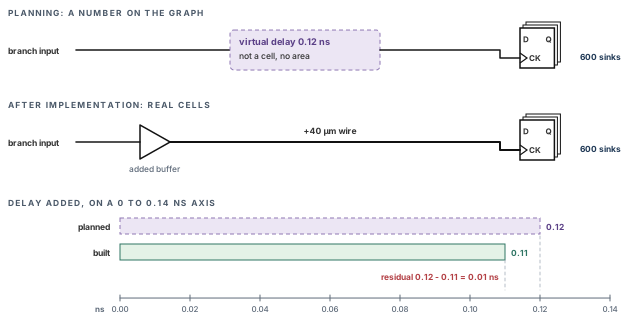
What to notice: The dashed block takes no area, and the residual is 0.12 − 0.11 = 0.01 ns.
9.4 Useful skew, chains and windows
Zero skew is the usual picture of a good clock tree, but it is not what the datapath always wants. A path with too little time can borrow it from the next path. It does so by letting its capture register's clock come later.
CCOpt treats the launch clock, the capture clock and the datapath as adjustable at each sink. It always uses propagated timing. Its aim is to improve negative setup slack, specifically the worst slack of the high-effort path groups.
A chain is a sequence of register-to-register paths through which slack can be passed. The worst negative slack is limited by a chain, not by one path. A chain ends at a loop or at a port. A clock gate can be part of it, because moving a gate's arrival moves everything behind it. The tool reports the worst chain.
Each sink also has a window: a minimum and maximum insertion delay that all constraints allow. Its edges come from several places:
- the minimum delay that clustering already gives,
- the skew-group constraints,
- the limit set by
auto_limit_insertion_delay_factor, which caps growth of the global maximum insertion delay.
Useful skew moves a sink only inside its window. If a sink sits at the edge of its window, no amount of scheduling frees more slack for it. The datapath must give.
Figure 15 works one chain through. With all clocks at 0.64 ns, F1→F2 has slack −0.10 ns and F2→F3 has +0.15 ns. Now let the F2 clock arrive 0.125 ns later:
- F1→F2 becomes −0.10 + 0.125 = +0.025 ns.
- F2→F3 becomes +0.15 − 0.125 = +0.025 ns.
- The sum, +0.05 ns, is unchanged.
A later clock at F2 helps the path into F2 and costs the path out of F2. It also takes the same 0.125 ns from the hold slack of F1→F2 (see the post-CTS timing section).
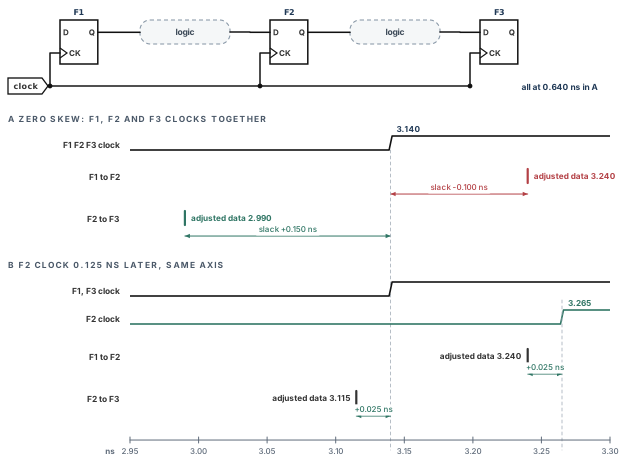
What to notice: Moving the F2 clock 0.125 ns later turns −0.100 and +0.150 into +0.025 and +0.025 ns, so slack moves from the later path to the earlier one.
9.5 Conceptual, not proprietary
The stages and cell prefixes above are what the tool shows you. The algorithms, the order of the internal sub-steps and the choice of cells are the tool's own. Use the stages to interpret what you see, never to predict a specific cell count. If two runs differ, the evidence is in the reports, not in a guess about the engine.
Thus, the stages help to interpret evidence, not to predict it. The reports that carry this evidence come next.
Takeaway Clustering follows where the sinks are. Virtual delays are plans on the graph, and physical delay is the cells that replace them. Useful skew moves slack along a chain inside each sink's window. Cell prefixes tell you which stage made a cell.
10 Reading the clock tree reports
Each report answers one question about the clock network and cannot answer another. A skew-group report, for example, tells how alike the arrival times are. It does not tell whether a data path meets timing. A clean design-rule report says nothing about hold.
This section pairs each native report with the question it answers and the fields worth reading. It also says what each report does not show. Every command here is an Innovus command. Give it a file name of your choice and read the file.
Two facts frame the whole section:
- The
report_ccopt_*reports use the CCOpt timing model, which is not the timer behindreport_timing. They recompute clock timing by default, which costs time. - Use
report_clock_timingandtimeDesignwhen you want the timer's view, including CPPR.
The two views can differ, and neither is wrong. They answer different questions.
10.1 The command map
Table 13 maps each engineering question to its native command. The five CCOpt reports that most often carry the story follow the table, with literal file names.
| Engineering question | Native command |
|---|---|
| Are the intended clocks defined? | report_clocks, check_timing -type clocks |
| Are the CTS prerequisites configured? | ccopt_design -check_prerequisites, check_design -type cts |
| Which tree and group objects exist? | get_ccopt_clock_trees, get_ccopt_skew_groups |
| What was built? | report_ccopt_clock_trees, report_ccopt_clock_tree_structure |
| How are the groups balanced? | report_ccopt_skew_groups |
| Which sinks are active in one group? | get_ccopt_skew_group_delay -all_active_sinks |
| Which clock-network limits fail? | report_ccopt_clock_tree_drv |
| Which pins carry an offset? | report_ccopt_pin_insertion_delays |
| What limits useful skew? | report_ccopt_worst_chain |
| Do clock cells keep their halos? | report_ccopt_cell_halo_violations |
| Are the placed cells legal? | checkPlace |
| Why was a clock cell dropped? | report_ccopt_cell_filtering_reasons |
| What latency and skew does the timer see? | report_clock_timing -type summary, -type skew |
| Do setup and hold pass after CTS? | timeDesign -postCTS, timeDesign -postCTS -hold |
| Are special checks violated? | report_constraint -all_violators, report_min_pulse_width |
| Were the intended checks analyzed? | report_analysis_coverage |
| Were the routes and rules actually used? | report_net_wires -net, report_via -on_clock_nets |
innovus> report_ccopt_skew_groups -include_reporting_only_skew_groups \
    -file skew_groups.rpt ;# balance per group and corner
innovus> report_ccopt_clock_tree_structure -update_timing -show_sinks \
    -file clock_structure.rpt ;# levels, cells and sinks
innovus> report_ccopt_clock_tree_drv \
    -drv_types {transition max_cap max_source_to_sink_net_length} \
    -file clock_drv.rpt ;# clock-network limit violations
innovus> report_ccopt_pin_insertion_delays -file pin_offsets.rpt ;# pin offsets
innovus> report_ccopt_worst_chain -file worst_chain.rpt ;# what limits useful skew
Run them on the candidate that is in memory, or restore the candidate you saved first. Name the candidate in your notes. A report without a candidate name is a report about an unknown design.
10.2 The skew-group report
- Question: how alike are the arrival times at the sinks of each group, in each corner?
- Command:
report_ccopt_skew_groups -include_reporting_only_skew_groups -file skew_groups.rpt. - Fields: per group and corner, the sink count, the earliest and latest insertion delay, the skew, the target and its type. It also gives the share of sinks inside the best window (occupancy). The type is explicit, auto computed, auto scaled or ignored.
- Scope: the CCOpt timing model, in the named corner. Check whether source latency is included.
- Limit: it does not say whether any data path meets timing. In full CCOpt an unmet global skew target is not a failure by itself.
Group           Corner   Sinks  MinID  MaxID  Skew   Target  Type      Occ.
clk_core/func   dc_slow   3803  0.612  0.668  0.056  0.080   explicit  100%
clk_core/func   dc_fast   3803  0.431  0.472  0.041  n/a     ignored   n/a
clk_core/scan   dc_slow   3803  0.620  0.684  0.064  0.080   explicit  100%
gclk_div2/func  dc_slow    600  0.331  0.376  0.045  n/a     n/a       n/a
Let us read it row by row, with Figure 16 beside it.
- Row 1: the arrival times span 0.612 to 0.668 ns. Skew is 0.668 − 0.612 = 0.056 ns, inside the 0.080 ns target.
- Row 2: the fast corner has no numeric target. Its type is ignored, which is normal.
- Row 3: the scan group's skew is 0.064 ns. Its latest arrival, 0.684 ns, is the largest among the illustrated rows. Claim a full maximum only from the full report.
- Row 4 is the reporting-only group. It holds the 600 registers behind the divider, with latency measured from the divider output.
Those 600 are also inside the 3803 of clk_core/func. That is why the rows do not add up to the number of sinks. This excerpt is the CTS-only alternative, where the global target applies. In the main full flow, read the group's constraint windows and the type column to see which target applied.
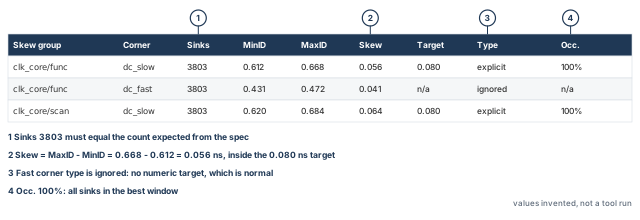
What to notice: A sink count that differs from the specification is a coverage problem, not a skew problem.
10.3 The clock tree and structure reports
- Question: what did the tool build, and does it meet its own electrical limits?
- Commands:
report_ccopt_clock_trees -histograms -list_special_pins -file clock_trees.rptandreport_ccopt_clock_tree_structure -update_timing -show_sinks -file clock_structure.rpt. - Fields of the first: cell counts per tree, clock gates by depth, area and capacitance. It also has tables of slew, capacitance, fanout, length and resistance violations. The Clock Timing Summary compares each transition target with the measured value. A star marks a target not met.
- Fields of the second: levels from the root, cells with types, fanout per level, clock gates, sink counts and labeled macro sinks.
- Limit: they describe the tree, not the data path. Violation lists show only the top ten by default, so check the count before the list. The structure report uses the primary delay corner, and only its late or early half. A clean primary corner says nothing about other corners.
Clock Timing Summary
net type     target(ns)   measured max(ns)   met
top nets     0.150        0.141              yes
trunk nets   0.150        0.149              yes
leaf nets    0.100        0.097              yes
10.4 The clock-network design-rule report
This report is often called the clock DRV report, where DRV stands for design-rule violation.
- Question: which clock nets violate the transition, capacitance or source-to-sink length limits?
- Command:
report_ccopt_clock_tree_drv -drv_types {transition max_cap max_source_to_sink_net_length} -file clock_drv.rpt. - Fields: the targets and their origin, a count of violating nets by type, and the top violating nets. Each comes with its route type, NDR, vias and length per layer.
- Scope: the clock network only, and only these three limit types. It does not report fanout, and it is not a physical or signoff rule check.
- File option: some examples use
-out_fileinstead of-file. Confirm with-helpin your installation. - Limit: the detail covers violating nets. A design with no violations has no detail to read.
10.5 The pin insertion delay report and the worst chain
- Question: which pins carry an offset, how large, and from where? What limits useful skew right now?
- Commands:
report_ccopt_pin_insertion_delays -file pin_offsets.rptandreport_ccopt_worst_chain -file worst_chain.rpt.
Positive (advancing): 3 pins     mean 0.350     largest 0.350 (u_buf_a/CK)
Negative (delaying):  0 pins
The three macro clock pins carry the 0.35 ns offset set during configuration. The report lists offsets, not each sink's measured arrival.
An offset can come from three places:
- from you, through a
set_ccopt_propertycall; - from the SDC or library, through a pin latency or a macro model;
- from a useful skew result.
A long tail of small, different offsets calls for an explanation. However, the size of the tail does not name the cause. Read the source recorded for each offset before you decide who put it there.
Do not mix up two things. An offset is CTS compensation. It is not proof that the timer's macro timing model carries the macro's internal clock path.
The worst chain shows the chain that holds the setup WNS. Hold is available with an option. For each cell it gives the slack, the constraint window, the chosen window, and the launch and capture delays.
- After a run it reports the current worst chain, not the one used during optimization.
- A window edge can come from clustering, a skew-group constraint, or the global insertion delay limit.
- It is not a general verdict on whether the clock is slow.
10.6 Halo and legality are two reports
report_ccopt_cell_halo_violations -summary -file halo.rpt reports clock cells that violate a halo. By default it checks all three supported property pairs:
cell_halo_xwithcell_halo_y,cell_densitywithadjacent_rows_legal,cell_halo_siteswithcell_halo_rows.
It is not a placement legality check. Overlapping, off-site or unplaced cells come from checkPlace. Run checkPlace after CTS as well, and judge its result independently of the halo report. A design can pass one and fail the other.
10.7 The clock timing report
- Question: what are the clock latencies and skews as the timer sees them, with common-path pessimism removed?
- Command:
report_clock_timing -type skew -nworst 4and-type summary. SetsetAnalysisMode -cppr bothfirst. - Fields: skew, latency and clock pin per entry, one entry per clock domain by default. In the report,
rorfmarks the transition at the register clock pin, andimarks inverted polarity. - Limit: take a pair of registers in the same group, measured the same way. Their absolute pair skew cannot exceed that group's latest arrival minus its earliest.
A larger number usually means the report differs in clock, view, early/late derate, CPPR setting or timing model. Check what each number measures before comparing.
10.8 Membership, net types and routed wires
These three questions have their own native queries.
- Membership. Which pins are active sinks of a group?
get_ccopt_skew_group_delay -skew_group clk_core/func -all_active_sinksreturns a Tcl dictionary of active sink pins and their latencies, after the CTS timer has run.dict sizeof the result is the active sink count. In the example,clk_core/funcandclk_core/scaneach hold 3803, andgclk_div2/funcholds 600. - A matching total does not prove correct membership. For a group you doubt, compare its pin list with an independent netlist query.
- Net types.
get_ccopt_clock_tree_nets -net_typeswithleaf,trunkandtopcounts the built nets of each kind. The three categories are disjoint: the trunk query does not return the top nets. - Routed wires.
report_net_wires -netwith one clock net prints the regular wire topology of that net. Each edge shows an NDR and a width.report_via -on_clock_nets -detailsummarizes single-cut and multi-cut vias on all clock nets.
Configuration readback says what you asked for. These two reports say what was drawn. A via total or a sample of 40 nets does not show that every clock net obeyed its rule. So state whether you looked at all of them or a sample. The exact output layout of these two commands is not confirmed here, so read it once on your design to learn it.
innovus> set d [get_ccopt_skew_group_delay -skew_group clk_core/func \
    -all_active_sinks] ;# dictionary of active sinks and latencies
innovus> puts "clk_core/func active sinks: [dict size $d]" ;# print the count
innovus> report_net_wires -net clk_core_trunk1 -file wires_trunk1.rpt ;# one net's wires
innovus> report_via -on_clock_nets -detail ;# via summary on all clock nets
Thus, every report is trusted only for the question it answers, in the corner and mode it names. Next we place the timing numbers next to these reports.
Takeaway A clock report proves what it measures, in the corner and mode it names, on the candidate it was run on. It does not prove timing or other corners. A capped list does not prove that nothing is missing, and readback does not prove what was routed.
11 Timing after CTS
In our ideal-clock example, every register saw the clock at the same time before CTS. After CTS they do not, and each setup and hold check now contains a skew term. Let us consider what changes.
The computed slack values change. Not every slack must change, but any of them can. A beginner who reads only the worst slack misses what changed. This section shows the arithmetic, the sign convention, and the difference between a number, a count and a coverage statement.
- Main command:
timeDesign -postCTS -expandedViews -numPaths 200 -outDir timing_setup -prefix post_setup, then the same with-hold. - Role: report.
- Starts from: the saved candidate of the build, restored or still in memory.
- Changes: nothing in the netlist. The command runs early global route and extraction in memory, then analyzes timing with propagated clocks.
- Ends at: report folders
timing_setupandtiming_hold, which you name after the candidate they describe.
11.1 What timeDesign -postCTS does
At the post-CTS stage the command does the following:
- runs early global route (a fast trial routing of signal nets, used only for estimates) and native default extraction;
- turns on the option that includes the clock source path in the reports;
- makes clock propagation follow the constraints, so the clocks become propagated;
- writes reports per path group, plus a summary of the worst negative slack (WNS) and total negative slack (TNS);
- counts the violating paths in that summary;
- writes design-rule tables.
-hold makes it analyze hold only. -expandedViews writes one folder per view and restores views the tool pruned.
The wiring is mixed. The clock nets are routed as part of full CTS, so their delays come from clock routes. The signal nets have no detailed route yet, so their wire delays come from early global route and extraction estimates. Say so whenever you quote a post-CTS number.
innovus> timeDesign -postCTS -expandedViews -numPaths 200 \
    -outDir timing_setup -prefix post_setup ;# setup, one folder per view
innovus> timeDesign -postCTS -hold -expandedViews -numPaths 200 \
    -outDir timing_hold -prefix post_hold ;# hold, one folder per view
innovus> report_constraint -all_violators > violations.rpt ;# every violated check
innovus> report_min_pulse_width > pulse_width.rpt ;# clock pulse width checks
innovus> report_analysis_coverage -verbose {violated untested} \
    -sort reason > coverage.rpt ;# which checks were analyzed
The value 200 is a report-size choice. It limits how many paths are written. It is not a completeness threshold and not a recommended value for every design. The default is finite as well, so leaving the option out does not mean every failure is shown. Read the scope before you read the numbers.
Scope of the views. timeDesign reports the views that are active. In the example, the setup list holds the functional view only. The hold list holds the functional and scan views. So the setup numbers of this chapter are functional-mode numbers. Scan setup was not analyzed, and no result here says anything about it. To analyze it, define and select a scan setup view first.
11.2 Launch, capture, and the sign of skew
A setup check asks whether data launched at one clock edge arrives before the next capture edge. A hold check asks whether data launched at an edge does not arrive too early for the same edge's capture.
Let L be the launching register and C the capturing register, with clock arrivals tL and tC. With the convention of the concepts section, s = tC − tL. A positive s means the capture clock arrives later than the launch clock. Figure 17 draws one pair.
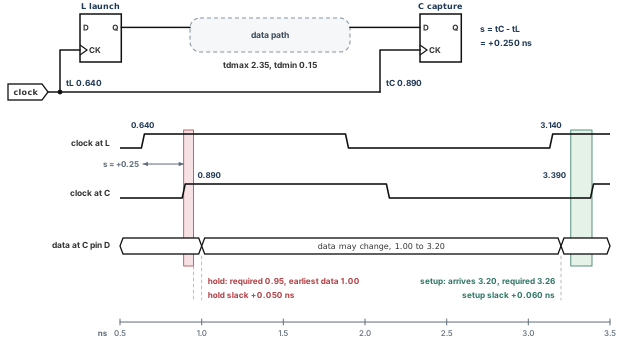
What to notice: The same skew s = +0.250 ns helps setup and costs hold: setup slack is 3.26 − 3.20 = +0.060 ns, and hold slack is 1.00 − 0.95 = +0.050 ns.
11.3 Setup, worked
Let the clock period be T = 2.500 ns. For the path from L to C, take these values, all in ns and for one corner:
- clock-to-Q delay tcq = 0.210;
- longest data path delay tdmax = 2.350;
- capture register setup time tsu = 0.080;
- setup uncertainty us = 0.050.
Real checks use different corners. The setup slack is:
setup slack = T + s − tsu − us − tcq − tdmax
With zero skew, the slack is 2.500 − 0.080 − 0.050 − 0.210 − 2.350 = −0.190 ns. The path fails by 0.190 ns.
Now the CTS result gives tL = 0.640 ns and tC = 0.890 ns, so s = +0.250 ns. The setup slack is −0.190 + 0.250 = +0.060 ns. The path now passes, and the tool did not change the data path at all.
11.4 Hold, worked on the same pair
For the hold check, take these values, all in ns:
- shortest data path delay tdmin = 0.150;
- hold time th = 0.040;
- hold uncertainty uh = 0.020.
The same clock-to-Q applies, for simplicity.
hold slack = tcq + tdmin − s − th − uh
- With zero skew: 0.210 + 0.150 − 0.040 − 0.020 = +0.300 ns.
- With s = +0.250 ns: 0.300 − 0.250 = +0.050 ns. The pair still passes, with less margin.
- If the shortest data path were 0.100 ns instead, the hold slack would be exactly 0.000 ns. Any additional skew would fail it.
Thus a later capture clock helps setup and costs hold by the same amount, here 0.250 ns. The two checks are on different edges and usually in different corners. The numbers above use one corner for clarity.
In our example the slow corner is used for setup and the fast corner for hold. That is the illustrated case, not a law. The dominant corner depends on the technology, temperature inversion and variation modeling, so confirm which views dominate. The sign of the effect is what carries over.
Hold is checked before CTS too. With ideal clocks it compares the shortest data path with the hold time and the uncertainty, and the skew term is zero. After CTS the skew term appears. Pre-CTS hold numbers are therefore provisional, not absent.
The same data in absolute times:
- The launch edge is at tL = 0.640 ns. Data arrives at 0.640 + 0.210 + 2.350 = 3.200 ns.
- The capture edge is at T + tC = 2.500 + 0.890 = 3.390 ns.
- The data is required by 3.390 − 0.080 − 0.050 = 3.260 ns.
- Setup slack is 3.260 − 3.200 = +0.060 ns, matching the formula.
The waveform figure draws exactly these edges. Report columns may define skew with the opposite sign. Before you read a report, write down which clock each column subtracts from which, and map it to s = tC − tL.
11.5 Early and late, OCV and CPPR
A real analysis does not use one delay per cell. In a setup check, on-chip variation (OCV) analysis uses the late delay for launch and the early delay for capture. A hold check uses the reverse. Derates scale early and late delays.
The launch and capture clocks usually share a part of their path. That shared part is the same physical cells, so it cannot be both slow and fast at once. Common path pessimism removal (CPPR) gives back the difference. Figure 18 shows the arithmetic:
- Take a common portion of 0.500 ns, a late derate of 1.05 and an early derate of 0.95.
- The late delay is 0.525 ns, and the early delay is 0.475 ns.
- The credit is 0.525 − 0.475 = 0.050 ns.
- Without CPPR, the slack of this pair is 0.050 ns more pessimistic.
The flow of this chapter sets setAnalysisMode -cppr both. report_clock_timing then shows a column for the adjustment.
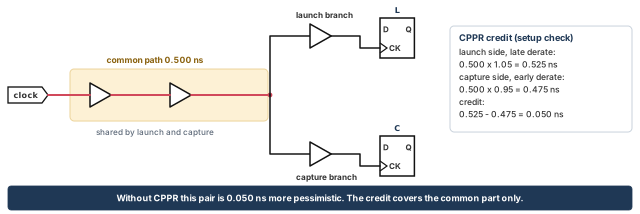
What to notice: The credit is 0.525 − 0.475 = 0.050 ns, and only the common part earns it.
11.6 A number, a count and a coverage
Several different statements are often merged. Table 14 keeps them apart.
| Statement | What it is | Example |
|---|---|---|
| WNS | The worst slack of any endpoint | −0.30 ns |
| TNS | The sum of the negative endpoint slacks | With endpoints at −0.30, −0.10 and −0.05 ns, TNS is −0.45 ns |
| Violating endpoints | How many endpoints are negative | 3 |
| Reported paths | How many paths the report lists, limited by -numPaths | With -numPaths 2, two paths |
| Coverage | How many timing checks were actually analyzed | report_analysis_coverage: met, violated, untested |
The overall TNS and the count of violating paths are endpoint-based. So they need not equal the sum over path groups. For example, an endpoint with −0.6 ns from an input and −0.3 ns from a register counts once, at −0.6 ns. In a multi-mode setup, the overall TNS sums the worst slack per endpoint across views, not per view.
Now ask three separate questions of the same run.
- Analysis coverage. Were the intended checks analyzed? Read
report_analysis_coverageand the reasons it gives for untested checks. An untested check is not a passing check. - Violation summary. What is violating, in which view and check type? WNS, TNS and the violating-endpoint count answer this, and only for the named scope.
- Review coverage. Has the required set of endpoints and checks been reviewed, including any sampling policy your project approved?
-numPathscontrols how much is written to the report. Raising it makes more paths readable, but it does not prove coverage by itself.
Let us consider a scoped example, invented. Setup, functional view, slow corner: WNS −0.030 ns, TNS −0.41 ns, 14 violating endpoints, 200 paths written.
- Fourteen endpoints may have far more than 200 violating paths between them. So the 200 may show only some of the endpoints.
- The summary has already told you that there are 14 failures. Those are known failures now, whatever you have or have not yet read.
- The unread paths affect how complete your understanding is, not whether the failure exists. Do not relabel a known negative slack as merely "under investigation".
If the summary shows positive worst slack and zero violators in the named scope, the same scope cannot also show 400 violators. Either the scope differs, or one of the numbers belongs to another view.
11.7 Special checks
Setup and hold on data paths are not the only checks. Four special clock checks belong in the post-CTS review.
- Clock gating setup and hold. The enable of a gate against the clock at the gate. Both halves must hold: the enable must arrive before the edge and stay stable after it.
report_constraint -all_violatorslists clock gating setup and hold among its check types. The gating picture of the concepts section quantifies only the setup half; its hold side is qualitative. - Minimum pulse width. A clock pulse that is too narrow fails the cell.
report_min_pulse_widthreports required and actual width and slack for clock-network pins. It reports sequential cells and clock-tree instances separately. - Generated clocks and muxes. A generated clock is timed against its master. Confirm with
report_clocksthat the divider and the generated waveform are as intended, and that no clock was lost behind a mux. - Transition and capacitance limits on clock nets, covered by the clock reports.
The commands in the block above write these reports. Read each one for what it names. Read the coverage report for untested checks and their reasons.
11.8 What a post-CTS number does not prove
It is partly an estimate: the signal wires are estimated, not routed. It covers only the views and corners that were active. It says nothing about signoff extraction, signoff timing, crosstalk after routing, or electromigration. The acceptance section states what the chapter proves, and stops there.
Thus, setup and hold must be read together, with their coverage beside them. When a number is not what was expected, the debugging cases lead from a symptom to a cause.
Reading only the worst setup slack. A tree can lift the setup WNS to +0.010 ns and drop the hold WNS to −0.060 ns in the same run. The report that was read did not show it. Always read setup and hold together, with the coverage beside them.
12 Debugging cases: from a symptom to a cause
A failed clock run gives a symptom, not a cause. The same symptom, such as large skew, can have configuration causes, physical causes and report-state causes. The repair for one might make another worse.
This section holds seventeen cases in one pattern. Each has a symptom, evidence, competing causes and a check that tells them apart. Then come a justified repair and a remeasurement. It is the only place in the chapter that lists failures in detail, so keep it open while you work.
12.1 Check this first: is the evidence about this candidate?
Before you diagnose, confirm that the evidence is not stale or about another design. A wrong report invalidates every branch below. Two reports that disagree are more often about different candidates, views or scopes than about a tool fault. Ask three questions:
- Which checkpoint did you restore for this session? The
restoreDesignline is in the log. - Did you build, repair or restore after the report was written? A report written before a repair describes the design before it.
- Do the reports name the same views and the same candidate in their folder and prefix? Those are the
-outDirand-prefixyou gave to the build and totimeDesign.
If any answer is wrong, regenerate the reports on the right candidate (case 17) and start again.
12.2 Find the family
Five families cover most cases. Cases 6 and 7 (insertion delay and skew target) are clock-quality checks, reached when no family matches:
- Configuration is what you told the tool.
- Physical capacity is room for cells and wires.
- Clock topology is what the tool believes the network is.
- Data path is the logic between registers.
- Report state is whether the evidence matches the database.
Figure 19, after case 1 below, turns them into a decision tree that asks for evidence at each branch.
Use three words and keep them apart. An observation is what a report shows. A hypothesis is a cause you suspect. A confirmed cause is a hypothesis that a second, independent check supports.
Each case ends with a remeasurement: the relevant assessment from the acceptance section, on a new candidate, with its own reports. Assessments 1 to 4 are the four rows of the acceptance table. None of the repairs below is "tighten the skew target" or "remove a restriction" by default. Each needs its owner and its evidence.
12.3 The seventeen cases
Case 1 - No clock tree is created
- Symptom: the run ends without clock cells, or
ccopt_designprints a table saying it cannot run. - Evidence: the prerequisites table and the
check_design -type ctsfindings. A tree name fromget_ccopt_clock_treesonly shows that a specification object exists, not that anything was built. - Competing causes: no clock in the loaded mode, or a specification never created or deleted. A transition target may be too low, or drivers too weak. The constraints may stop the clock before any register.
- Distinguishing check:
check_timing -type clocksandreport_clockssay whether the clock exists.ccopt_design -check_prerequisiteslists design problems and per-tree problems separately. - Repair: fix the constraint or the property named in the table, then rebuild from the baseline.
- Remeasure: assessment 1.
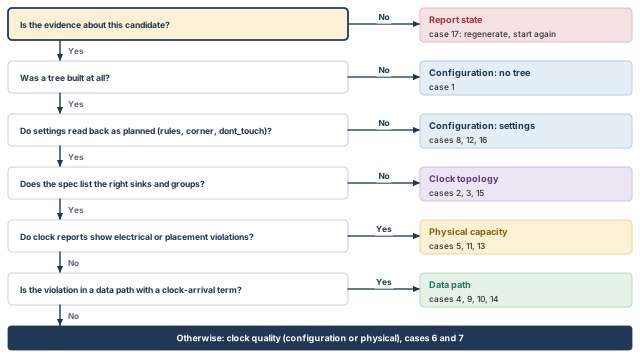
What to notice: The first question asks whether the evidence is about this candidate; if not, no branch below it tells you anything.
Case 2 - Sinks are missing
- Symptom: a group's active sink count is lower than the plan, or a register is in no group.
- Evidence: the active sinks of the group from
get_ccopt_skew_group_delay -skew_group clk_core/func -all_active_sinks, with the group you suspect. Compare them with an independent netlist query of the registers that should be there. - Competing causes: a pin marked ignore or exclude before spec creation. A
set_clock_sense -stop_propagationor a case value may stop the clock. Or the clock does not reach the pin in the netlist. - Distinguishing check:
get_ccopt_property -pinwith the pin name andskew_groups_sinkorskew_groups_active_sinknames the groups of a pin. The second reflects connectivity and is current only after the CTS timer has run. - Repair: fix the SDC so the timer and the tool agree. Otherwise change the sink type before regenerating the specification.
- Remeasure: assessment 1.
Case 3 - A sink is in the wrong skew group
- Symptom: a register is balanced with a clock it should not follow, or not with the one it should.
- Evidence: the group listing for the pin, and the skew-group report.
- Competing causes: exclusive sinks and rank, where a sink is active only in the highest-rank groups that hold it. Or a misplaced ignore pin. Or default balancing treats clocks as related when the constraints call them unrelated.
- Distinguishing check: the
skew_groups_active_sinklist of the pin against the rank of each candidate group. - Repair: if the relationship is wrong in the constraints, fix the clock groups or false paths, and consider
timing_connectivity_based_skew_groups. If only the grouping is wrong, usemodify_ccopt_skew_groupwith a written reason. - Remeasure: assessment 1.
Case 4 - Clock gating checks fail
- Symptom:
report_constraint -all_violatorslists clock gating setup or hold violations. - Evidence: the failing path report.
- Competing causes: the enable register's clock is late and the gate's early. Other causes are long enable logic or wire delay, a large clock-to-Q, uncertainty, or a distant gate.
- Distinguishing check: the gap between the two clock arrivals is only one term. Read the whole path: the clock edge relation, enable clock-to-Q, logic delay, net delay, uncertainty and the gating check. For hold, check that the enable stays stable after the edge.
- Repair: in CCOpt, useful skew normally schedules the enable register earlier, so read the worst chain for a window limit first. For CCOpt-CTS, one known option is a skew group that balances the enable register with the gate. Moving the gate closer is a placement-stage lever.
- Remeasure: assessment 3.
Case 5 - Transition violations on clock nets
- Symptom: starred rows in the Clock Timing Summary, or violations in the clock-network DRV report.
- Evidence: the violation summary by net type, and the detailed nets with their route type.
- Competing causes: an unrealistic target or a wrong unit, or cells filtered out. A long net may cross a narrow channel, or the tool may not be allowed to buffer it. A wider rule can also raise capacitance on a long net.
- Distinguishing check: read the target back (the unit trap), read the filtering reasons, and look at the net's length and layer split. The DRV report covers transition, max capacitance and source-to-sink length only. Fanout or other limits come from the clock tree report or another source.
- Repair: correct the unit, add a stronger cell, relieve the channel, or free a frozen net with its owner. Raise a target only with a written reason.
- Residual data-net violations: if maximum-capacitance or transition violations remain on data nets after the cause is fixed, the native repair is
optDesign -postCTS -drv. It fixes those two violation types only, and it cannot be combined with-incr. - Remeasure: assessment 2.
Case 6 - Insertion delay is very large
- Symptom: the maximum insertion delay is far above the study's, or above the limit.
- Evidence: the skew-group report. The pin insertion delay report lists offsets, not each sink's measured arrival.
- Competing causes: many levels after clustering, weak cells or long distances. Scheduling may have lengthened sinks, a macro offset may be applied the wrong way, or topology is the cause.
- Distinguishing check: compare a
balance_mode clusterstudy with the full run. If the study is already large, the cause is physical or configuration. If only the full run is large, look at scheduling and atauto_limit_insertion_delay_factor. That factor limits growth of the global maximum, not each sink. - Repair: match the cause: cell list, offsets, the limit factor, or a physical lever.
- Remeasure: assessments 2 and 3.
Case 7 - The skew target is not met
- Symptom: the report shows a skew above the target.
- Evidence: the Type column and occupancy of the skew-group report.
- Competing causes: the target did not apply, or a physical limit, or the corner is not the primary one. Full
ccopt_designdoes not use the globaltarget_skewas its objective. - Distinguishing check: which command ran, and which target type does the report show? If the type is ignored, or this is the global target in a full CCOpt run, there is nothing to fix. If you set a bound on a named group, check that you also set
constrains all. If the target applied, read the worst chain. - Repair: none if the target did not apply. Otherwise treat the physical or configuration cause.
- Remeasure: assessment 2.
Case 8 - A frozen net blocks repair
- Symptom: a violation stays on a net the tool did not touch.
- Evidence: the explicit
dont_touchmarks on the net (report_preserves -obj_type net -dont_touch), the computed marks that a net inherits (report_preserves -computed -obj_type net), andcheck_design -type cts. A computed report that is also filtered by-dont_touchhas qualified meaning, so run the two reports separately. - Competing causes: a restriction from an earlier stage or an IP owner.
- Not a preserved port: a preserved port belongs to the flexible H-tree flow. It keeps a module port in place so sinks below stay below. It does not freeze a net, and its report (
report_ccopt_preserved_clock_tree_ports) is not a list of frozen nets. - Distinguishing check: check explicit and effective preservation attributes, including inherited restrictions, before concluding that the net is free to change.
- Repair: a decision for the owner. Do not remove a restriction silently.
- Remeasure: assessment 2, with the decision recorded.
Case 9 - Hold violations after CTS
- Symptom: hold WNS is negative.
- Evidence: failing paths with launch and capture arrival and the skew term.
- Competing causes: a capture clock later than the launch by more than the data path allows. Short data paths, uncertainty or a fast corner can also cause it.
- Distinguishing check: compute the skew from the path report. Then compare all changed terms between the pre-CTS and post-CTS reports. A skew term that explains part of the shortfall does not prove the data path is unchanged.
- Repair: targeted hold repair, with the hold options set first (block below). Write down the finding, the believed cause and the expected evidence before you run it.
- Remeasure: assessment 3 on the repaired candidate, saved under its own name. Rerun post-CTS setup and hold in the same required views, and review WNS, TNS and margins. Refresh the affected special-check and coverage evidence. Recheck placement legality after inserted or moved cells.
The hold target slack defaults to 0, and resizing is allowed by default. Setup TNS may degrade while hold is repaired, unless you forbid it. The margin below is a placeholder value to adapt.
innovus> setOptMode -opt_hold_target_slack 0.020 ;# aim for 0.020 ns hold margin
innovus> setOptMode -opt_hold_allow_setup_tns_degradation false ;# protect setup TNS
innovus> optDesign -postCTS -hold ;# repair hold only
If a hold violation stays, setOptMode -opt_verbose true shows why. Listed causes include no legal location for a buffer, setup degradation the settings forbid, and an excluded path group.
Case 10 - Setup is worse than before CTS
- Symptom: a path that met pre-CTS now fails.
- Evidence: the same path in both reports: launch and capture arrival, uncertainty, derates.
- Competing causes: skew of the wrong sign for that path, CPPR not applied, uncertainty changed between stages, or estimated wires.
- Distinguishing check: compare the clock arrival terms. If CPPR was off, switch it on and read again.
- Repair: if the cause is real skew, read the worst chain for windows. If it is a setting, fix it and rebuild from the baseline. A blanket setup pass is not a repair. If a targeted setup repair is still justified after full CCOpt,
optDesign -postCTS, with the finding written down, is the native form. - Remeasure: assessment 3.
Case 11 - Clock wires crowd a macro channel
- Symptom: routing overflow near a macro channel, or trunk nets detouring.
- Evidence: the congestion report and the trunk detail.
- Competing causes: shielded trunk wires take many tracks, or capacity was assumed from a halo.
- Distinguishing check: a halo is not a routing blockage. Compare against real routing capacity.
- Repair: fewer shielded wires or another layer pair. Otherwise route over the macro on a free layer, or get a wider channel from the floorplan.
- Remeasure: assessments 2 and 4.
Case 12 - The routing rule was not used
- Symptom: clock nets look default width.
- Evidence: the readback of the route types, and
report_net_wires -netfor one trunk net and one leaf net. - Competing causes: the route type was not attached, a name was mistyped, layers are not allowed, or the configuration was not restored.
- Distinguishing check: read all three kinds back, then read the wires. Readback says what you asked for, and the wire report says what was drawn. Say whether you looked at every clock net or a sample.
- Repair: reassign the route type and rebuild. This guide rebuilds a finished tree under its corrected rule instead of patching it, so the candidate stays reproducible.
- Remeasure: assessment 2.
Case 13 - Clock cells violate placement
- Symptom:
checkPlacelists overlapping or off-site clock cells, or the halo report lists halo violations. These are two different problems. - Evidence: both reports and the cell name prefixes.
- Competing causes: halos too large for the local density, or fixed cells in the way. Large cells with a density-based halo are another cause. The tool disables such halos with a message.
- Distinguishing check: the halo report checks halo rules for all three property pairs. Legality comes from
checkPlaceonly. - Repair: use the halo-in-microns or halo-in-sites form, or relieve the area at the placement stage.
- Remeasure:
checkPlaceclean, then assessment 2.
Case 14 - Functional timing passes and scan timing fails
- Symptom: hold or setup fails in the scan views only.
- Evidence: the per-view reports from
-expandedViews. - Competing causes: the scan group is missing or unconstrained, a different latency in scan mode, or reversed mux ignore pins.
- Distinguishing check: first check which scan views were analyzed. In the example, the hold list holds the scan view, but the setup list holds the functional view only. So scan hold can be diagnosed, and scan setup cannot, because it was never analyzed. Then list the groups and their ignore pins, and compare scan arrivals with functional ones.
- Repair: constraints first, then a justified
modify_ccopt_skew_group. - Remeasure: assessments 1 and 3.
Case 15 - A generated clock or mux is mishandled
- Symptom: a divided domain is balanced with the wrong clock, or a mux input is counted as a sink.
- Evidence: the structure report with generated trees, and
report_clocks. - Competing causes: the generated clock's source pin is not reached by its master, or ignore pins are missing at the inactive input. Another cause is that no constraining group holds the sinks behind the divider, because the generated group is reporting-only.
- Distinguishing check:
check_timing -type clocksfor generated clocks with no source, then the structure report. Then read the master group's-auto_sinksline and the generated group'sconstrains none. - Repair: fix the constraint, regenerate the specification and rebuild.
- Remeasure: assessments 1 and 3.
Case 16 - The wrong primary corner
- Symptom: skew and slew look good in one corner and bad in the one that matters.
- Evidence: the corner column of the skew-group report, and the readback of
primary_delay_corner. - Competing causes: the default, the first setup view's corner, is not the dominant one.
- Distinguishing check: which corner drives the limits?
- Repair: set it explicitly and rebuild.
- Remeasure: assessments 2 and 3.
Case 17 - The reports do not match the candidate
- Symptom: a number cannot be reproduced, or two reports disagree about the same quantity.
- Evidence: the report folder and prefix, the
restoreDesignline in the log, and when the design in memory last changed. - Competing causes: reports made before a repair, after a restore, or for another candidate; or reports of different views and scopes.
- Distinguishing check: regenerate one report, for example
report_ccopt_skew_groups, on the design you now hold. Compare it with the old file. - Repair: regenerate the full set on the intended candidate. Never restore an older checkpoint and quote the old reports as proof of a repair.
- Remeasure: assessment 4.
Thus, a symptom is never repaired directly. Each case ends with a remeasurement on a candidate saved under its own name. Before the repaired result can leave this chapter, it has to be accepted. We do that after a look at the alternatives.
13 Other ways to build a clock tree
Three choices hide behind "other CTS flows":
- The flow is which commands run, from which input database.
- The topology is the shape of the network.
- The strategy is what the optimization may do.
The rows below are alternatives, not steps.
13.1 Choose the flow from the input database
Table 15 starts from the input database, because that is what decides the command.
| Input and precondition | Native command | Consequence |
|---|---|---|
A placed design from place_design and optDesign -preCTS, with the specification described earlier | ccopt_design | Clock trees and datapath optimized together, with useful skew. The main flow of this chapter. Do not follow it with a routine extra setup pass |
The same input, as two inspectable steps. Global target_skew set | ccopt_design -cts, then a separate optimization | Trees first, no useful skew and no datapath optimization in step one. The global target_skew applies. A second step is needed |
A database made by place_opt_design in the second-generation (PODV2) flow | clock_opt_design | The same CCOpt, with legalization first. The tool rejects any other database |
Early clock flow was on (-earlyClockFlow true) before place_opt_design | ccopt_design, specification kept | Clustering and useful skew from placement live on the specification. Deleting it loses them |
innovus> ccopt_design -cts ;# build the trees only
innovus> optDesign -postCTS ;# then optimize setup
innovus> optDesign -postCTS -hold ;# then repair hold
The post-CTS stage does not fix fanout load violations unless setOptMode -opt_fix_fanout_load is set. Option spellings differ: ccopt_design writes reports with -outDir, and clock_opt_design with -out_dir.
setOptMode -opt_enable_podv2_clock_opt_flow defaults to true, so place_opt_design leads to clock_opt_design. With false it leads to ccopt_design. Our checkpoint came from place_design, so it is not a PODV2 database. One made by place_opt_design may be, so check how yours was made. Check prerequisites with clock_opt_design -check_cts_config. Set effort with setOptMode -opt_podv2_flow_effort.
13.2 Choose topology and effort from evidence
Topology answers a floorplan question: how is the top of the network distributed? Strategy answers a timing question: how hard may the optimization work on useful skew? Neither fixes a hard constraint or creates routing tracks that are not there. Table 16 and Table 17 list the options.
| Topology | Use it when | Main cost |
|---|---|---|
| Conventional tree built by the tool | Most blocks. The main flow | Cross-corner scaling is left to the tool |
| Flexible H-tree | A large design where a structured top-of-tree distribution helps. Large drivers and low-resistance top layers scale better across corners, and relaxed symmetry tolerates placement restrictions | Floorplan and power-grid interaction, and a separate synthesis step |
| Multi-tap (multisource) | You want local buffering and balancing between a structured top and the sinks. It works with the H-tree | More configuration |
| Hierarchical and macro interfaces | Blocks, interface logic models (ILMs) and macros that come with clock models. It gives honest offsets at macro pins | The macro's content is read-only, so chains stop at its boundary |
The tool names create_ccopt_flexible_htree and synthesize_ccopt_flexible_htrees for the H-tree, the clock tree source group commands for multi-tap, and create_ccopt_macro_model_spec for macro models. Check each one on your installation before use. The pin insertion delays of the configuration section are the simple case of macro modeling. A mesh is beyond this chapter.
| Useful skew strategy | Setting | What it means and costs |
|---|---|---|
| None | setOptMode -opt_skew_ccopt none | Low-effort CCOpt without skewing |
| Standard | setOptMode -opt_skew_ccopt standard | Local clock network changes in post-CTS optimization. The default with the standard flow effort |
| Extreme | setOptMode -opt_skew_ccopt extreme | Concurrent clock and datapath optimization for setup, in ccopt_design only. Much more runtime. Use it after good ideal-mode timing and the early clock flow |
Whether a setting applies depends on the flow and on your installation, so check each one with -help on your installation.
Choose the flow from the input database, the topology from the floorplan, and the effort from the worst-chain evidence. Start with the default effort. Raise it only when that report shows that strategy, not a window, is the limit.
14 Accept the clock tree and hand it to routing
A built clock tree is not automatically an acceptable one. No project-independent Innovus command knows a project's intended clocks, margins, approved waivers and routing assumptions. So none can declare "CTS accepted". Acceptance is a person's engineering decision on native evidence. This section gives the decision table, the five status words and the export commands.
14.1 Which saved state does each experiment start from?
Know which kind of experiment made a candidate: each kind starts from a different saved state (Table 18).
| Kind | Example | Starts from |
|---|---|---|
| Main build | The first ccopt_design | The accepted placement checkpoint |
| Property or specification experiment | A tighter leaf slew, a changed sink type | The accepted checkpoint again, with the change made before the specification. A conventional-flow specification is regenerated on purpose. An early-clock-flow specification is kept |
| Local repair | A hold fix | The built candidate of the same experiment |
| Placement rework | Padding, halos, gate-aware placement | The placement baseline, re-accepted at the placement stage |
14.2 Four assessments, kept independent
Each assessment in Table 19 and Table 20 has its own evidence and rule.
| # | Assessment and native evidence | Ready means | Do not hand off when |
|---|---|---|---|
| 1 | Clock coverage and configuration. Clock definitions, tree structure, skew groups, active-sink queries, analysis-view readback | The intended clocks, modes and endpoints are represented. Special pins and exclusions are understood | Endpoints are missing or unintended. An exclusion is unexplained. A required view was not analyzed |
| 2 | Electrical and physical quality. Clock-network DRV report, halo report, checkPlace, route readback, actual wire and via reports | Project limits met. Clock cells are legal (checkPlace), judged apart from the halo report. The wires drawn match the required policy | A violation is unresolved. A cell is illegal. Routing intent is mistaken for implemented routing |
| # | Assessment and native evidence | Ready means | Do not hand off when |
|---|---|---|---|
| 3 | Setup, hold and special checks. Post-CTS setup and hold summaries, path detail, violation and pulse-width reports, analysis coverage | Margins met in the intended views. Gating and pulse checks reviewed. Untested scope explained | A known failure has no accepted exception. A check is missing. Completeness is claimed without support |
| 4 | Candidate and routing readiness. Saved checkpoint and configuration, matching reports, handoff note, open items | The saved candidate is the one that was reviewed. Assumptions and unresolved ownership are explicit | Reports are stale. The restart state is wrong. A blocking issue has no owner. An exchange file is unacceptable |
A pass in one assessment never offsets a failure in another. Good setup never cancels bad hold, and a legal placement never cancels missing clock coverage.
14.3 The status words
Use five words, and use each for one thing.
- PASS. The criterion is established for the named scope.
- INVESTIGATE. Evidence is incomplete or its meaning is unresolved. It is not acceptance. It never hides a known failure. A negative slack you have already seen is a known failure, and it stays BLOCKING while you investigate how widespread it is.
- BLOCKING. A criterion is known to fail and has no accepted exception.
- NOT RUN. There is no valid evidence. A missing report is NOT RUN, never PASS.
- WAIVED. A known failure has a written, authorized exception for this scope and this candidate.
A waiver does not establish a check that never ran. Investigation comes first and establishes the result. A waiver then applies to an identified failure, not to ignorance. A waiver for another candidate does nothing.
Hand off to routing when every assessment is PASS or WAIVED and every WAIVED row has its record. The handoff note below must also be filled in.
Let us consider a short example, invented, drawn in Figure 20.
- Setup WNS is −0.030 ns, with 14 violating endpoints in the functional view, and 200 paths were written. Assessment 3 is BLOCKING, because the summary has already shown a failure. The unread endpoints are an open review item beside it, not a reason to downgrade it.
- Assessment 2 shows route readback matching the plan, but wires were read on 40 of the clock nets only. That is INVESTIGATE, until you read the rest or state a sampling policy your project approved.
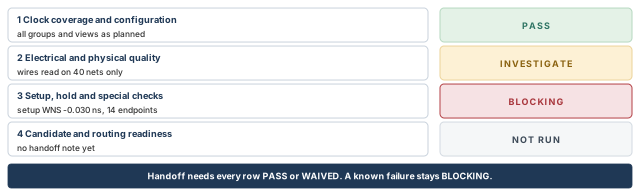
What to notice: Each status carries text as well as color, and this candidate cannot be handed off until every row is PASS or WAIVED.
14.4 Save and export what routing needs
The native checkpoint is the authoritative restart artifact. The netlist and DEF (the standard design exchange format) are exchange forms for tools that cannot read it. Use your own names.
innovus> saveDesign handoff_cts.enc ;# the restart checkpoint
innovus> save_ccopt_config handoff_ccopt_config ;# the CCOpt configuration
innovus> saveNetlist handoff_cts.v ;# netlist exchange form
innovus> defOut -routing handoff_cts.def ;# DEF with the CTS routes
save_ccopt_config content is proprietary, and restore_ccopt_config is its only supported reader. The configuration is not restored if the design was restored with restoreDesign -mmmcFile (warning IMPIMEX-4016). So a restored checkpoint does not automatically bring back every view and setting. State in the handoff note how your site restores the multi-mode setup and then the CCOpt configuration.
A plain defOut writes the floorplan and placed cells. It does not carry the CTS routes.
-routingwrites the routing and implies the netlist. Without-routing, no vias are written.- Shield wires are power and ground (P/G) routing.
-withShieldbelongs with-routingand-selected. Decide whether your receiving flow needs them as DEF routing. - By default
defOutomits the NONDEFAULTRULE and VIA definitions that come from LEF. SetdefOutLefNDRto 1 anddefOutLefViato 1 (set defOutLefNDR 1,set defOutLefVia 1) to include the relevant ones. Otherwise let the receiving tool get matching definitions from its libraries or technology data.
A nonempty file is not proof. Open the DEF, look for routing under the clock nets, and confirm that the intended rules survived.
14.5 The handoff note
A small table, Table 21, answers what the next engineer will ask. Figure 21 shows everything routing receives around the reviewed candidate.
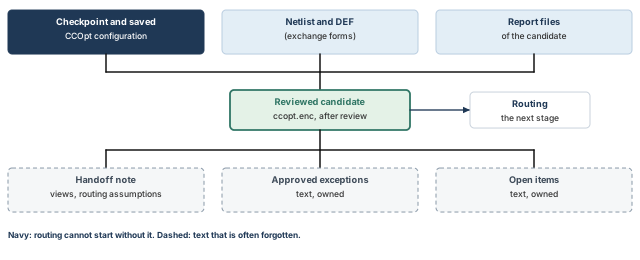
What to notice: The database alone is not the handoff: the note, the exceptions and the open items travel with it.
| Item | What to state |
|---|---|
| Candidate and restart state | The checkpoint, the saved configuration, and how each is restored |
| Construction flow | ccopt_design full CCOpt, or the alternative, and whether a separate post-CTS pass ran |
| Analyzed views | Setup and hold modes and corners, and the primary construction corner |
| Clock routing assumptions | Route types, NDRs, layers and shields, and that routing must not reroute them with default rules. Signal routing: none yet, timing uses estimated wires |
| Margins and special checks | Setup and hold margins, clock gating and minimum pulse width results |
| Approved exceptions | Each waiver with its scope, owner and approver |
| Open items | Each item with an owner and the claim it blocks |
14.6 What this chapter establishes, and what it does not
- Established. Clock trees exist for the clocks and modes in the specification. Structure and electrical limits were read from reports of one candidate. Setup and hold were measured with propagated clocks in the views named.
- Provisional. Every timing number uses estimated signal wires, so margins change after routing and extraction.
- Not claimed. That the design routes, that post-route timing closes, or that signoff timing, crosstalk, IR drop or electromigration pass.
We followed one clock network from an accepted placement to a handoff note. Thus, routing receives a database with its evidence, and an owner for every open item.
15 Common mistakes and how to catch them
Table 22 indexes the seventeen debugging cases by symptom. Check first, always: the reports must be about the candidate you restored, written after its last change. Each repair starts from the built candidate or the baseline, and new reports on that candidate follow it.
An observation is what a report shows. A hypothesis is the cause you suspect. A confirmed cause needs a second, independent check. A missing result is NOT RUN. Tightening the target, lowering the NDR and removing a restriction are never default cures. Each needs its owner and evidence.
| # | Symptom | Likely cause to test | Confirm with | Fix needs |
|---|---|---|---|---|
| 1 | No clock tree | No clock, spec missing, target too low | check_timing -type clocks, prerequisites table | The named fix, then a rebuild |
| 2 | Sinks missing | ignore / exclude, stop propagation, clock not reaching the pin | Active-sink query, the pin's group list | SDC fix, or sink type before the spec |
| 3 | Sink in the wrong group | Rank, misplaced ignore pin, related vs unrelated | The pin's active groups, rank | Constraint fix, or a justified group change |
| 4 | Gating check fails | Gate and enable clock times, enable clock-to-Q, logic and net delay, uncertainty, hold side | The whole path report | Worst-chain check, then a lever with evidence |
| 5 | Clock slew violations | Unit, target, filtered cells, long net | Readback, filter report, net length | A written reason for any target change |
| 6 | Insertion delay large | Levels, weak cells, distance, scheduling, offsets | Cluster study against the full run | The cause that matched |
| 7 | Skew target missed | Target did not apply to this flow or group | Type column, command used | Nothing, if it did not apply |
| 8 | Frozen net blocks repair | Explicit or inherited dont_touch on the net (a preserved port alone does not freeze it) | report_preserves -obj_type net -dont_touch, then -computed | The owner's decision, recorded |
| 9 | Hold fails after CTS | Skew term, short paths, uncertainty, fast corner | All changed terms in path reports | optDesign -postCTS -hold with settings and reasons read |
| 10 | Setup worse than pre-CTS | Skew sign, CPPR off (needs both), uncertainty, estimates | Clock terms in both reports | Worst-chain check first. No blanket pass |
| 11 | Channel crowded | Shielded trunk demand, halo mistaken for blockage | Real routing capacity, trunk detail | Fewer shields, other layers, or floorplan |
| 12 | Routing rule not used | Not attached, wrong name or layers, configuration not restored | Readback, report_net_wires on trunk and leaf | Reassign and rebuild |
| 13 | Clock cells illegal or halo-violating | Two different problems | checkPlace and the halo report | Halo form change, or placement rework |
| 14 | Scan fails, function passes | Scan group missing, latency differs, ignore pins reversed | Which scan views were analyzed; groups and ignore pins per mode | Constraints first |
| 15 | Generated clock or mux wrong | Master does not reach source, ignore pin missing, no constraining group below the divider | Clock check, structure report, group lines of the spec | Constraint fix, new spec |
| 16 | Wrong primary corner | Default is the first setup view's corner | Corner column, readback | Set it explicitly, rebuild |
| 17 | Reports do not match | Reports before a repair, other candidate, other views | restoreDesign line, folder and prefix, a fresh report | Regenerate on the intended candidate |
16 Interview preparation
CTS changes the clock network, the clock mode and nearby placement; it leaves macros, power, signal routing and signoff alone.
- New, resized or moved clock cells and new clock wires appear.
- Clocks become propagated, so setup and hold slacks change.
- Full CCOpt also changes the data path.
A clock tree is a physical network of cells and wires. A skew group is a balancing rule over a list of sinks.
- One tree can serve several skew groups, for example one per mode.
- In the example, 3803 sinks give 8206 group memberships.
place_design and optDesign -preCTS. Can you run clock_opt_design?No: clock_opt_design accepts only a PODV2 database made by place_opt_design.
- The main flow for this input is full
ccopt_design. ccopt_design -ctsis the alternative that builds trees only.
ccopt_design, and is that a defect?Full CCOpt does not use the global target_skew as its objective, so an unmet global target is not a defect by itself.
- Useful skew scheduling decides the arrival times.
- To bind a named group, set
target_skewandconstrains allon that group together.
Setup slack improves by 0.250 ns, and hold slack drops by the same 0.250 ns.
- In the worked example, setup moves from −0.190 to +0.060 ns.
- Hold moves from +0.300 to +0.050 ns.
The gate sits early in the tree, so its clock edge arrives earlier than the enable register's clock.
- In the example, the gate clock is at 0.31 ns and the enable register clock at 0.64 ns.
- The enable must arrive by 2.71 ns and arrives at 2.45 ns, so slack is 0.26 ns.
It makes the tree reach the macro pin 0.35 ns earlier. It does not prove the timer's macro model carries that delay.
- It is CTS compensation for the clock path inside the macro.
- Decide once where the 0.35 ns lives, or it is counted twice.
The master group does, through its -auto_sinks line, because the generated group has constrains none.
- In the example,
clk_core/funcbalances the 600u_ioregisters with the other 3203 sinks. - If no constraining group holds them, nothing balances them.
It delays the capture clock of the failing path, which borrows slack from the next path in the chain.
- With F2 0.125 ns later, −0.100 and +0.150 ns become +0.025 and +0.025 ns.
- Each sink can move only inside its window, and the worst chain shows where a window edge limits it.
- It also takes the same 0.125 ns from the F1→F2 hold slack.
No: the failure is already known, so the assessment is BLOCKING while you investigate its extent.
-numPathslimits what is written, not what fails.- An untested check is not a passing check either.
optDesign -postCTS after full ccopt_design?The full flow has already optimized the data path, so a second pass costs runtime and can undo the scheduling.
- Add a repair only for a specific failure the reports show.
- For hold, use
optDesign -postCTS -holdwith the hold options set first.
Not necessarily: legality comes only from checkPlace, which is a separate report.
- The halo report checks halo property pairs, not overlaps or off-site cells.
- A design can pass one and fail the other.
The saved CCOpt configuration, the candidate's reports, and a handoff note with views, routing assumptions, waivers and open items.
defOutneeds-routingto carry the CTS routes.save_ccopt_configcontent is read only byrestore_ccopt_config.
17 Chapter close
Compact glossary
| Term | Meaning |
|---|---|
| CTS | Clock tree synthesis: building the real clock network of cells and wires |
| CCOpt | Clock concurrent optimization: clock trees and data path optimized together |
| Sink | A pin that needs the clock edge, such as a register clock pin or a macro clock pin |
| Root | The pin where the tool starts building a clock tree |
| Clock tree | The physical network of buffers, inverters, gates and wires between a root and its sinks |
| Skew group | A balancing rule: a list of sinks plus a target for how alike their arrivals should be |
| Reporting-only group | A skew group with constrains none: measured, but it balances nothing |
| Insertion delay (latency) | The delay from a clock source to a sink |
| Skew | A difference between two arrival times; this chapter uses s = tC − tL |
| Useful skew | A deliberate clock arrival difference that moves slack from one path to another |
| Chain | A sequence of register-to-register paths through which slack can be passed |
| Window | The minimum and maximum insertion delay that all constraints allow at one sink |
| Virtual delay | A planned delay written on the timing graph; it is not a cell and takes no area |
| ICG | Integrated clock gate: switches a clock off with an enable to save power |
| Generated clock | A clock made from another clock by logic, such as a divide-by-2 flop |
| Leaf, trunk, top net | Clock net kinds: touching a sink, between top and leaves, and above the fanout threshold |
| NDR | Non-default rule: wider wires, more spacing or special vias for a net |
| Route type | A bundle of an NDR, preferred layers and an optional shield, attached to a net kind |
| Shield | A grounded wire laid beside the clock wire to keep its neighbors steady |
| Halo | A placement margin around a macro or cell; it stops cells, not wires |
| CPPR | Common path pessimism removal: credit for the clock path shared by launch and capture |
| OCV | On-chip variation: late and early delays used on opposite sides of a check |
| WNS / TNS | Worst negative slack, and the total of negative endpoint slacks |
| LEF / DEF | Standard exchange formats: LEF for library and rule data, DEF for the placed and routed design |
| PODV2 | The second-generation place_opt_design flow; only its databases are valid for clock_opt_design |
CTS and handoff on one page
Keep this page open beside the terminal. Each block answers one question about a post-CTS design with a native command. A report that exists is not a pass: read its header, scope and candidate. File names are illustrative. The reasoning behind each symptom is in the debugging cases.
innovus> get_ccopt_property primary_delay_corner ;# construction corner
innovus> get_ccopt_property buffer_cells ;# allowed clock buffers
innovus> get_ccopt_property -net_type leaf target_max_trans ;# leaf slew target
innovus> get_ccopt_property target_skew ;# global skew target
innovus> get_ccopt_property -net_type trunk route_type ;# trunk route type
innovus> get_ccopt_property routing_top_min_fanout ;# top-net threshold
innovus> getAnalysisMode -cppr ;# look for: both
# Names here are spec objects, not built trees.
innovus> get_ccopt_clock_trees * ;# tree objects
innovus> get_ccopt_skew_groups * ;# skew group objects
innovus> get_ccopt_skew_group_delay -skew_group clk_core/func \
    -all_active_sinks ;# active sinks of one group, as a Tcl dict
innovus> get_ccopt_clock_tree_nets -net_types trunk ;# built trunk nets only
innovus> report_clocks ;# clock definitions
innovus> check_timing -type clocks ;# clocks with problems
innovus> ccopt_design -check_prerequisites ;# setup can run?
innovus> check_design -type cts ;# CTS design checks
innovus> report_net_wires -net clk_core_trunk1 -file wires_trunk1.rpt ;# one net's wires
innovus> report_via -on_clock_nets -detail ;# vias on clock nets
innovus> report_ccopt_clock_trees -histograms -list_special_pins \
    -file clock_trees.rpt ;# cells, slew histograms, special pins
innovus> report_ccopt_clock_tree_structure -update_timing -show_sinks \
    -file clock_structure.rpt ;# levels and sinks
innovus> report_ccopt_skew_groups -include_reporting_only_skew_groups \
    -file skew_groups.rpt ;# balance per group and corner
innovus> report_ccopt_clock_tree_drv \
    -drv_types {transition max_cap max_source_to_sink_net_length} \
    -file clock_drv.rpt ;# clock-network limits
innovus> report_ccopt_pin_insertion_delays -file pin_offsets.rpt ;# offsets
innovus> report_ccopt_worst_chain -file worst_chain.rpt ;# useful skew limit
innovus> report_ccopt_cell_halo_violations -summary -file halo.rpt ;# halo rules
innovus> report_ccopt_cell_filtering_reasons -cell_type buffer \
    -file filter.rpt ;# why cells were dropped
innovus> report_clock_timing -type skew -nworst 4 ;# skew, with CPPR on for setup and hold
innovus> report_clock_timing -type summary ;# latency summary
innovus> timeDesign -postCTS -expandedViews -numPaths 200 \
    -outDir timing_setup -prefix post_setup ;# setup; 200 is a report size
innovus> timeDesign -postCTS -hold -expandedViews -numPaths 200 \
    -outDir timing_hold -prefix post_hold ;# hold
innovus> report_constraint -all_violators > violations.rpt ;# other violators
innovus> report_min_pulse_width > pulse_width.rpt ;# pulse width
innovus> report_analysis_coverage -verbose {violated untested} -sort reason \
    > coverage.rpt ;# what was analyzed
innovus> checkPlace checkplace.rpt ;# legality, separate from the halo report
innovus> saveDesign handoff_cts.enc ;# restart checkpoint
innovus> save_ccopt_config handoff_ccopt_config ;# CCOpt configuration
innovus> saveNetlist handoff_cts.v ;# netlist
innovus> defOut -routing handoff_cts.def ;# -routing writes the CTS routes
Command roles. ccopt_design builds trees and optimizes the data path, so no routine extra setup pass follows it. ccopt_design -cts builds trees only. clock_opt_design needs a PODV2 database. optDesign -postCTS and -postCTS -hold repair. timeDesign and report_* only measure. A tree name from get_ccopt_clock_trees is a spec object, and a capped path list is not a coverage statement.
Where the next chapter goes, and why
We now hold a reviewed candidate with real clock trees, clock routes under their rules, and timing measured with propagated clocks. Every signal wire, however, is still an estimate.
Routing, Post-Route Optimization, Checks and Handoff replaces those estimates with real routes. It must respect the clock routes and rules handed over here, without rerouting them with default rules. Then the post-CTS margins are measured again on real wires. That is why the handoff note records the views, the routing assumptions and every open item: routing starts from them.