
Routing, Post-Route Optimization, Checks and Handoff: from estimates to routed wires
Why this chapter matters in a real project
Until now, the data wires in every timing report were estimates. Routing draws the real ones: metal shapes on specific layers, joined by vias, on tracks, around obstacles. Those shapes have length, resistance, capacitance and neighbors that the estimate never saw. So the slacks move.
In our example, one setup path loses 0.125 ns between estimate and route. A hold path that looked safe turns negative. Routing also creates new things to check: spacing, shorts, opens and antenna violations.
The cost of getting this stage wrong is high in both directions. If you read stale or partial reports, you hand off a design with real violations that finishing then has to unpick. If you chase every number without a diagnosis, you waste runs. Worse, you break one check while fixing another.
Prerequisites
- Clock Tree Synthesis, Post-CTS Optimization, Checks and Handoff: the starting point is its accepted checkpoint. Clock trees are built, clocks are propagated, post-CTS setup and hold were read, and a handoff note exists.
- Placement, Pre-CTS Optimization, Checks and Handoff: you know what a legal placement and a macro halo are.
- Power Planning: you know that the power grid takes routing tracks on some layers.
- You do not need to know how the router's internal algorithms work.
- You do not need signoff extraction or signoff timing. Those come in later stages.
The worked example is the invented design stream_acc. It has a 1000 x 1000 um core, two RAM macros u_buf_a and u_buf_b, and one ROM macro u_coef. The main clock clk_core has a 2.5 ns period. Time is in ns, distances in um and capacitance in pF.
- Every design number in this chapter is invented for teaching. Library cell names, layer names, routing rules and limits are examples. Use the names and limits of your technology and project.
- The examples use the Innovus Legacy UI. The command forms were checked, but no licensed Innovus run was made. The chapter is not execution-verified.
- Drawings, report excerpts and numbers are teaching illustrations, not tool output. Report layouts differ between releases. Check each option in your installed release before you rely on it.
Learning objectives
- Describe what routing changes in a database, what it leaves alone, and which evidence shows each change.
- Tell a route guide from detailed wiring, and a global-route result from a routable design.
- Set layers, rules, clock-net protection, and timing-driven and crosstalk-driven routing with native commands, then read the settings back.
- Read a congestion count as demand against capacity, find its cause, and change the cause rather than the symptom.
- Inspect a detailed route for completion, design-rule violations, antenna violations, clock-route integrity, detours and vias.
- Explain why routed wires change setup and hold slack, and measure the change against a baseline.
- Apply setup, hold and electrical repairs in an order that protects each from the others, and state what each repair costs.
- Read the timing, electrical, violation and connectivity reports, say what each one does not prove, and recognize a stale report.
- Debug from a symptom to a confirmed cause, then classify the candidate as clean, accepted with documented exceptions, or not ready.
The whole stage fits on one page, in Figure 1. Come back to it whenever you lose your place.
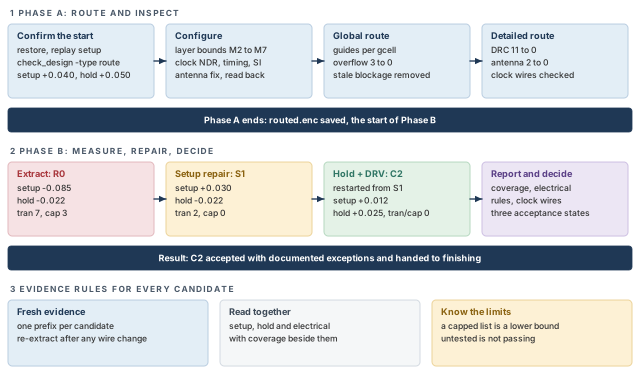
What to notice: Phase A ends with a saved checkpoint, and every Phase B candidate is measured against the R0 baseline.
1 Where routing fits
Until now, the data wires in the timing report were estimates. The clock wires were whatever clock tree synthesis had routed. Routing now draws the real signal wires. That changes three things: timing, the set of checks, and how hard the database is to change.
1.1 The handoff from the previous stage
The post-CTS stage ended with a saved checkpoint and a handoff note. The note says:
- which clocks are propagated;
- which clock nets carry routing rules;
- which post-CTS slacks were measured on estimated wires;
- which items were left open on purpose.
This chapter uses that note as input, but not blindly. You restore the checkpoint and check what came back, as "Confirm the starting checkpoint" shows.
The flow in Figure 2 runs from that checkpoint to finishing.
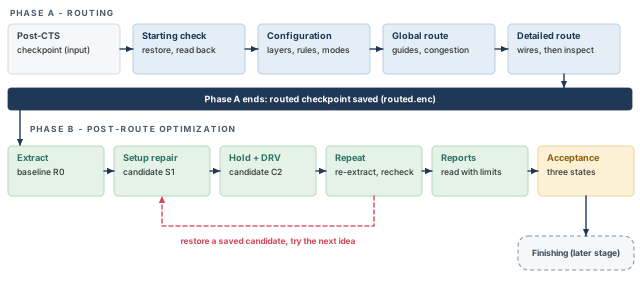
What to notice: The routed checkpoint is saved at the end of Phase A, so every Phase B experiment can start from it.
1.2 What routing adds
Routing adds signal wires and vias. For clock nets, it adds the clock wires that were reserved earlier. By itself, routing does not move cells, change the clock tree or alter the power grid. Repairs such as antenna diodes can add cells, though.
A router can fail a net in three different ways:
- leave it unrouted;
- route it with a violation;
- route it far from the shortest way (a detour).
Each of those has a different consequence, and the evidence for each is different.
1.3 Why routed parasitics change timing
An estimate models a wire from the placement and an early route. It is not detailed geometry. A routed wire has a real length, real layers, vias, pin access and real neighbors. Three effects follow:
- Length. A detour around a macro adds resistance and capacitance, so the delay grows.
- Layer. Upper layers are wider and less resistive. Lower layers are narrower and more resistive. The layer a wire lands on changes its delay.
- Neighbors. A wire next to a switching wire couples to it. The delay shifts later or earlier, depending on how the neighbor switches.
These effects are not small. In our example, one path loses 0.125 ns between estimate and route. A hold path that looked safe turns negative (see "Extract and assess").
1.4 Two phases
This chapter separates two jobs, because they answer different questions.
- Phase A, Routing. Can the design be wired, and is the wiring legal and connected? The outputs are a routed database and its check results.
- Phase B, Post-route optimization. Given real wires, does timing meet its targets? Which repairs close the gap without opening another? The outputs are a candidate, its reports and a decision.
Finishing comes after both phases: fillers, decoupling cells, metal fill and signoff checks. Finishing can reopen timing. Thus this handoff is a stage decision, not a signoff.
Takeaway Phase A answers "is it wired and legal?". Phase B answers "does it time, and can it go forward?". Keep the two questions apart.
Phase A: Routing
Phase A takes the accepted post-CTS checkpoint and confirms it. It configures the router, builds the guides, draws the detailed wires and inspects the result. It ends with a saved routed checkpoint.
2 Confirm the starting checkpoint
Routing makes the physical database much harder to change. Some defects are cheap to fix before routing: an illegal cell, a missing clock rule, a broken power connection. After routing, each becomes an ECO (engineering change order). Spend ten minutes here to avoid a day later.
2.1 Restore, replay and read back
Restore the checkpoint and look at what came back. Do not rely on your memory of what was saved.
Start a new Innovus session for every restore. The tool does not support loading another database while a design is already in memory. This chapter does not use an unload command. So when a later step says "restore", close the session and start a fresh one.
innovus> restoreDesign handoff_cts.enc.dat stream_acc ;# load the post-CTS checkpoint
The checkpoint and design names are examples to adapt. Database identity is not analysis identity, though. Replay the approved site setup, read the configuration back, and compare the active analysis views with the views the project requires.
innovus> source site_setup.tcl ;# replay the approved site setup
innovus> getAnalysisMode ;# print the analysis mode
innovus> getExtractRCMode ;# print the extraction mode
innovus> getDelayCalMode -SIAware ;# is delay calculation crosstalk-aware?
innovus> all_analysis_views -type setup ;# list the active setup views
innovus> all_analysis_views -type hold ;# list the active hold views
innovus> check_timing -verbose > start_check_timing.rpt ;# look for missing constraints
Here is what each piece does:
site_setup.tclis an example name for one site-owned procedure. It validates the approved views, libraries, RC (resistance-capacitance) corners and derates, then reapplies approved analysis settings. It must not blindly recreate views or reset every mode. Use the same procedure after every fresh restore in this chapter.all_analysis_viewslists the active setup and hold views. Write the project's required list beside them. An active list that is shorter than the required list is a finding.check_timing -verboselooks for missing constraints. Examples are unpropagated clocks, unconstrained endpoints and incomplete I/O delays. A bare default call does not enable every warning class. Review its warnings, and write down each one that is intentional.
Then run the readiness checks.
innovus> checkPlace ;# are all cells still legally placed?
innovus> check_design -type route ;# the routing readiness check
innovus> report_clocks -generated ;# list clocks, including generated clocks
innovus> timeDesign -postCTS -outDir timing_start -prefix start ;# starting setup
innovus> timeDesign -postCTS -hold -outDir timing_start -prefix start ;# starting hold
check_design -type routeis the routing readiness check. Run it beforerouteDesign, and read its messages.checkPlaceconfirms that the cells still have legal locations.report_clocks -generatedlists the clocks, including generated clocks, with their definitions and waveforms. That is constraint-level evidence. It shows what the clocks are meant to be. It does not show that they are propagated, or that the routed clock wires are intact. Those come from the timing and clock-wire reports later.- The two
timeDesigncalls run early global route and extraction on this checkpoint. They give you the starting numbers, on estimated wires, that Phase B is compared with. - They also generate the default electrical reports for maximum transition and capacitance. Read those reports now: they are the starting electrical record.
2.2 What blocks routing, and what proceeds with tracking
Not every finding stops the flow. Table 1 separates the findings that block routing from the ones you track and carry forward.
| Finding | Decision | Why |
|---|---|---|
checkPlace reports illegal or overlapping cells | Blocks | Routing around an illegal cell wastes the route, and the cell moves later |
check_design -type route reports errors | Blocks | The tool is saying that the design is not ready to route |
| Clock trees missing, or clocks not propagated | Blocks | Timing-driven routing then optimizes against the wrong clock |
| Clock routing rules not recorded in the handoff | Blocks | You cannot protect what you cannot name |
A required analysis view is not active, or check_timing shows a missing constraint with no reason | Blocks | Good slack in the wrong view set proves nothing |
| Power connections incomplete | Blocks | Signal routing assumes the grid is there |
| Small setup or hold violations on estimated wires | Proceeds, tracked | Real wires replace the estimates in "Extract and assess", and the numbers will move |
| Antenna status unknown | Proceeds, tracked | It is a routing result, first visible after detailed route |
| A post-CTS waiver that is current, approved and still applicable | Proceeds, tracked | Carry it into the acceptance record with its approval reference |
Proves: on estimated wires, the starting design has setup WNS (worst negative slack) +0.040 ns. Hold WNS is +0.050 ns in the intended views. Does not prove: that either number survives routing. They are the baseline for "Extract and assess", nothing more.
3 Routing essentials
Every routing decision in this chapter rests on six ideas: tracks, layers, vias, guides, capacity and rules. Learn them once on small drawings. The congestion and violation cases later then read as simple counts.
3.1 Tracks and layers
A routing layer has a preferred direction. For example, odd layers might run horizontally and even layers vertically, or the reverse, depending on the technology. Wires normally sit on tracks: evenly spaced lines in that direction, one wire wide.
Most regular routing follows the preferred tracks. Off-track geometry can exist. However, it must still satisfy the manufacturing grid, the technology rules and the routing policy. A wire in the wrong direction is legal in some technologies, but it uses resources fast, so the router avoids it.
Low layers are thin and narrow, so they are resistive and good for short local wires. High layers are wide and thick, so they are fast and good for long wires. That is a tendency, not a law. It is why timing repair often promotes long nets upward, and the benefit depends on the technology.
3.2 Vias
A via joins two adjacent layers. It is a cut with metal enclosure on both layers. Its footprint takes routing space through both the enclosure and the cut spacing. A via also has resistance of its own.
Route topology balances wire RC, via RC, pin access, design rules and reliability. So a layer change is sometimes the better choice and sometimes the cost.
Figure 3 shows a net that changes layer twice, and a second net that only crosses it.
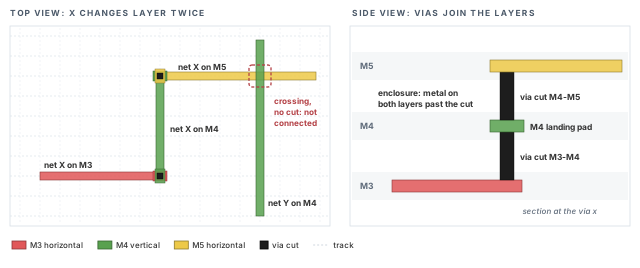
What to notice: A crossing is not a connection. Only a cut with enclosure on both layers joins two layers.
3.3 Guides, then wires
Routing happens in two steps.
- Global route divides the die into rectangular gcells (global routing cells). It decides, net by net, which gcells each net will pass through. That decision is a guide.
- Detailed route then draws the real wires and vias on tracks, inside or near the guide, and fixes the design rules.
A guide does not give legal tracks or physical wire and via geometry. Global routing can still account for layers, as the 3D congestion report shows.
Figure 4 is a simplified 2D projection of the same net at both stages.
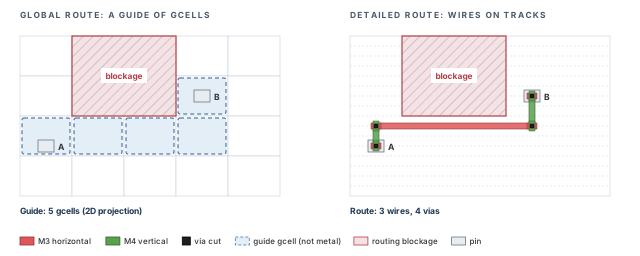
What to notice: The guide is not metal. The same five gcells become three wires and four vias.
A guide is like a travel plan that lists the towns you will pass through. Detailed route is the drive itself, lane by lane.
- A plan can look fine and still fail on the road. Zero overflow in global route does not promise a violation-free detailed route.
- Unlike towns, gcells have a hard count of lanes (tracks). The plan is judged by counting them.
3.4 Capacity and demand
Each gcell edge has a capacity: the number of tracks that can cross it on the usable layers. It also has a demand: the number of wires that want to cross it. If demand exceeds capacity, the excess is overflow:
overflow = max(0, demand - capacity)
With several layers, add up the positive overflows. Spare tracks on another layer do not cancel a blocked layer. Overflow means some wire must detour, change layer, or become a violation.
Figure 5 shows the arithmetic on one gcell edge.
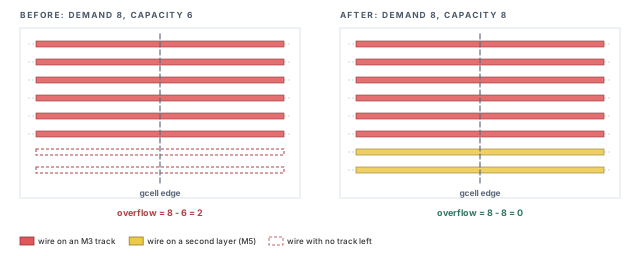
What to notice: The arithmetic is the whole mechanism: 8 - 6 = 2, then 8 - 8 = 0.
3.5 Rules and blockages
The router obeys design rules from the technology: minimum width, minimum spacing, minimum area and via enclosure. Non-default rules (NDRs) give selected nets wider wires or more spacing, such as the clock rule from clock tree synthesis.
Blockages remove tracks from a region. A blockage helps when it protects something. It hurts when it is stale and nobody remembers why it was placed.
Takeaway A guide is a plan; detailed wires are the result. Capacity counts tracks, demand counts wires, and overflow is the excess, never negative. A via costs footprint and resistance. A blockage nobody can explain deserves a question before it deserves respect.
4 Prepare the routing configuration
Left alone, the router uses defaults. Those defaults do not know your clock rules, your timing priorities or your antenna fix. Each setting below answers one question. Set it before routing, read it back, and write down what you changed. A setting you did not read back is only a setting you intended.
4.1 Which layers may signal nets use?
Two different commands do two different jobs. Global bounds belong to setDesignMode. It takes the lowest and highest routing layer by technology layer name.
innovus> setDesignMode -bottomRoutingLayer M2 -topRoutingLayer M7 ;# signals on M2-M7
The layer names are examples. In this invented design the approved top layer is M7. The residual M7 tracks are approved for signals after the power-ground reservations. The congestion case in the next section depends on that. A blockage removal cannot make a layer usable above a hard top bound. So the bound and the capacity table have to agree.
Per-net preference belongs to setAttribute, with layer numbers from your technology. A preference is not a bound and not a guarantee. The router can leave the preferred layers when it must. setNanoRouteMode has no global layer-bound option, so do not look for one there.
innovus> setAttribute -net clk_core_trunk1 -bottom_preferred_routing_layer 5 \
    -top_preferred_routing_layer 6 -preferred_routing_layer_effort high ;# layers 5-6
- Meaning. Wires of this net prefer layers 5 to 6. The effort says how hard the router tries:
low,medium,highorhard. - Net names. Use the actual physical net names from the clock tree, such as
clk_core_trunk1. The token@CLOCKnames the clock-net class. This chapter does not rely on a@CLOCK|nameform. It does not apply one setting to every clock net without saying so. Repeat the command for each net you mean to protect. - Cost. A strong preference pulls wires onto a limited number of layers, which concentrates demand there.
-avoid_detour trueasks global routing to keep the net from wandering. It is a request, not a guarantee, and it can add congestion elsewhere.
4.2 How do the clock nets stay as they were built?
Clock tree synthesis reserved clock routing rules and layers. The router must honor them. It should also leave clock nets that are already routed alone unless it must change them.
innovus> setNanoRouteMode -route_strict_honor_route_rule true ;# harden NDR spacing
innovus> setNanoRouteMode -route_route_clock_nets_first true ;# clock nets first
innovus> setNanoRouteMode -route_fix_clock_nets true ;# keep clock net status
-route_strict_honor_route_rule truehardens NDR spacing only. The router can still taper a wire or use default vias. So read the clock wire and via reports after detailed route, rather than assume the rule held everywhere. The defaultfalselets the router use extra NDR space when congested.-route_route_clock_nets_first trueis arouteDesigncontext option. It needs clock routing that NanoRoute, the Innovus router, already made. It does nothing for clock wires that came from elsewhere.-route_fix_clock_nets trueapplies torouteDesignonly. It preserves the status that clock nets already have. It does not make them FIXED (a route status that tells the router not to change the net).
This chapter's main flow runs globalRoute and detailRoute separately. The two routeDesign options above control the alternative flow. Setting them is context, not proof that the clock was preserved in the split flow. Validate the clock with the physical clock reports after detailed route and on the final candidate.
Clock wires that do not move during routing can still move later. Post-route optimization can repair clock design-rule violations through ccopt_pro. That is a clock-tree optimization step it can call. "The clock did not move" is a measurement, not an assumption.
4.3 Should routing watch timing and crosstalk?
innovus> setNanoRouteMode -route_with_timing_driven true ;# slack as a priority
innovus> setNanoRouteMode -route_with_si_driven true ;# reduce crosstalk
-route_with_timing_driven truetells the router to treat slack as a priority. It routes critical sinks first, with less resistance and coupling, and tunes detours. It writes a timing file in the working directory.-route_with_si_driven truereduces crosstalk (SI, signal integrity) by spacing and layer choice. Together with the timing option, this is the combined routing mode, sometimes called SMART routing.- Cost. Both options add runtime. They do not replace post-route optimization. They lower the work that the setup and hold repairs must do later.
4.4 How should antenna violations be fixed?
An antenna violation is charge collected on a long wire during manufacturing that can damage a connected gate. By default the router fixes it by layer hopping. It moves the long run up a layer, so less metal is attached at each manufacturing step. It can also insert a diode near the gate.
innovus> setNanoRouteMode -route_detail_fix_antenna true ;# repair antennas
innovus> setNanoRouteMode -route_antenna_diode_insertion true ;# allow diode insertion
innovus> setNanoRouteMode -route_antenna_cell_name ANTENNA_X1 ;# example diode cell name
- The antenna-fix default is
auto, which acts liketrueonly on data nets inrouteDesign. Confirm with-helpin your installation which option carries that default. Settrueexplicitly for full effect. - Antenna repair needs three things. The first is LEF (library exchange format) antenna data for the layers. The others are a real diode cell with a placeable site, and free space near the gate. If the technology data is missing, an antenna check that finds nothing is a coverage failure, not a clean result.
- Clock nets are separate. Diode insertion on clock nets needs
-route_diode_insertion_for_clock_nets, which isfalseby default. This chapter leaves it off and reports clock antennas as their own item. - Cost. A diode costs one cell and one pin on the net. Layer hopping costs vias and a little congestion. Choose by what your block can afford.
4.5 How many vias, and how many cuts?
innovus> setNanoRouteMode -route_detail_use_multi_cut_via_effort medium ;# more cuts
The values are low (the default), medium and high. Higher effort means more double cuts. Double cuts help yield and resistance, but they cost runtime and congestion.
4.6 Blockages
createRouteBlk places a routing blockage, and deleteRouteBlk removes one by name and layer. Both belong to the partition-floorplanning command set. No command in this flow prints all existing route blockages.
To find out which blockages exist, read the floorplan record or open the layout view. A blockage that you did not create and cannot explain is a finding for global route.
4.7 Read the settings back
Each setter has its own getter. One getter does not report another interface's state, and none of them reports actual geometry.
innovus> getDesignMode -bottomRoutingLayer ;# read the lowest routing layer
innovus> getDesignMode -topRoutingLayer ;# read the highest routing layer
innovus> getAttribute -net clk_core_trunk1 ;# read the per-net attributes
innovus> getNanoRouteMode ;# read the router modes
getDesignMode reads the global layer bounds, getAttribute the per-net attributes, and getNanoRouteMode the router modes. Keep the output with the candidate. When two candidates differ, the first question is whether their settings were the same.
Setting -route_with_timing_driven true and assuming the timing problem is handled. The router uses the slacks it has, which are post-CTS slacks on estimated wires. It improves the odds. It does not replace the extract, repair and remeasure loop of Phase B.
5 Global route and congestion
Global route is cheap and fast. It shows where the design will struggle before any metal is drawn. Congestion that you find here costs one rerun. The same congestion found as hundreds of violations after detailed route costs a day.
5.1 Run global route and read the congestion
Table 2 summarizes what the main command does.
| Field | Value |
|---|---|
| Role | Construct (guides) |
| Starts from | The restored checkpoint, with the routing configuration in the session |
| Changes | Net-to-gcell assignments. No detailed wire yet |
| Ends at | A guide for every signal net, and congestion counts per gcell |
innovus> globalRoute ;# build a guide for every signal net
innovus> reportCongestion -overflow ;# report gcell overflow
innovus> reportCongestion -hotSpot -3d ;# report hotspots, layer by layer
reportCongestion -overflowreports overflow.reportCongestion -hotSpot -3dis meant for global-route hotspots, so it suits the state afterglobalRoute. The-3doption asks for layer-based congestion.- You can also read the congestion from the layout view or the log.
dumpNanoCongestArea is intended for use after routeDesign. This chapter does not rely on it for a global-route-only state. If you try it there in your release, treat the result as unverified. A line of its output has this form:
gcell (412 380) V: 0/6/20 H: -3/0/23
Read each group as a direction (V or H) with overflow / remaining / total tracks. The remaining and total values are added up over the layers of that direction.
- A negative first number is the tool's encoding of overflow.
- It can coexist with remaining tracks. Overflow arises on a layer that is short, while another layer has spare slots.
- So the tuple is not a lossless demand-minus-capacity equation.
The "capacity 23, demand 26" used below is hypothetical bookkeeping from the layer table in the congestion case. Keep it separate from anything a tool prints.
Proves: where the global router could not find capacity for every wire it wanted to place. Does not prove: that a design with no overflow will route without violations. Global route sees gcells, not tracks, spacing or vias. Detailed route decides those.
5.2 A congestion case: the channel between the two RAMs
In stream_acc, the horizontal count above sits in the narrow channel between u_buf_a and u_buf_b. Every wire that crosses from the left half of the design to the right passes there. Let us follow it from symptom to intervention.
Evidence. Overflow of 3 on the horizontal tracks of the channel. Total capacity 23, demand 26.
Competing causes. Either too many nets want to cross, or capacity is lower than it should be. These need different repairs: placement changes for the first, routing resources for the second. To tell them apart, count the capacity by layer (Table 3).
| Layer | Tracks in the channel | Taken by | Usable |
|---|---|---|---|
| M3 | 14 | nothing | 14 |
| M5 | 14 | the clock bundle, which reserves 5 slots (an invented figure, not derived from 2x width and 2x space) | 9 |
| M7 | 14 | 6 power stripes, and a blockage over the other 8 | 0 |
| Total | 23 |
The M7 row is the finding. The blockage covers 8 tracks that nobody uses for power. Its name suggests an old floorplan keep-out. Nobody on the team can say why it is still there.
Intervention. Confirm with the power owner that the blockage protects nothing, then delete it. Do not delete a blockage because it looks stale. Ask first.
innovus> deleteRouteBlk -name blk_m7_chan -layer 7 ;# remove the stale M7 blockage
The blockage name and layer are examples. Resulting evidence. Capacity becomes 14 + 9 + 8 = 31. Demand is still 26, so overflow is 0 and the utilization is 26 / 31 = 84%. Rerun globalRoute and reportCongestion -overflow to confirm that the gcell no longer appears.
Figure 6 draws the channel before and after the fix.
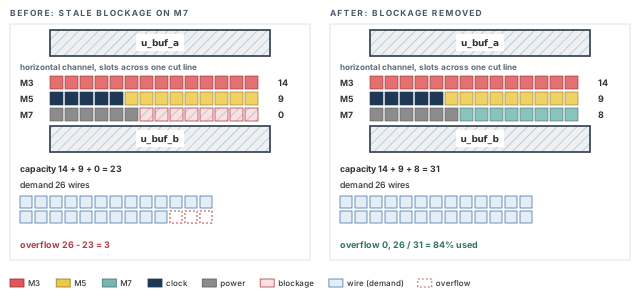
What to notice: Removing one blockage adds 8 slots and ends the overflow: 26 / 31 = 84% used.
Treating overflow as a router-effort problem, and raising effort settings when the cause is a blockage. Count capacity by layer first. If capacity is correct and demand is the problem, the repair is in placement or in the netlist. It belongs before routing, not after.
- Overflow remains after the cause has been removed.
- The worst overflow sits on clock nets.
For this teaching flow, resolve significant or persistent overflow before detailed route. Small residual hotspots need project judgment and detailed-route evidence. They raise the risk of violations, but they do not prove that the design cannot be repaired.
6 Detailed route and inspect
Detailed route draws the real wires. It is the step that can fail in ways that global route could not predict. After it, you must answer five questions:
- Is every net connected?
- Are the design rules met?
- Is the antenna clean?
- Are the clock routes intact?
- Did anything take an unexpected path?
6.1 Run detailed route
| Field | Value |
|---|---|
| Role | Construct |
| Starts from | The guides from global route, with no significant overflow, and the routing configuration |
| Changes | Wires and vias on tracks, plus optimization and antenna repair in the final passes |
| Ends at | A routed database, still holding whatever violations the router could not remove |
innovus> detailRoute ;# draw wires and vias on tracks
innovus> saveDesign routed_raw.enc ;# save before any repair
Save before you repair. If the repair makes things worse, you can come back here.
routeDesign is the supercommand that runs global route and detailed route in one call. Its optional passes are not interchangeable:
-trackOptoptimizes after track assignment and may involve model generation.-viaOptoptimizes vias after route and can involve search and repair.-wireOptwidens or shrinks wires under the modes you configured. It is not an unconditional timing gain.-viaPillarOptinserts or upgrades via pillars where the technology and modes allow it.-clockEcois a clock-ECO routing context, not another ordinary signal pass.
Do not combine them blindly. With the timing-driven and crosstalk-driven options on, routeDesign runs the combined mode. Run check_design -type route before it.
This chapter runs globalRoute and detailRoute separately for one reason. You can read congestion between them, and fix a blockage for the price of one global route. If you already trust the congestion picture, routeDesign is shorter.
6.2 Inspect the routed result
Run the checks in this order. Each answers one question, and a later check is hard to read if an earlier one fails.
innovus> set_verify_drc_mode -limit 1000 ;# stop listing after 1000 violations
innovus> verifyConnectivity -type all -error 50 -warning 50 ;# opens, unrouted, loops
innovus> verify_drc -report A_drc_first.rpt ;# design rules on routed geometry
innovus> verify_antenna -report A_antenna_first.rpt ;# antenna ratios on routed nets
These habits keep the reports honest.
- Cap.
-error 50stops the listing at 50 messages. If a run prints exactly 50, read it as "at least 50", not "50".-type allis the connectivity check family. It is not LVS (layout versus schematic), and it is not every power-ground port check. - Mode.
set_verify_drc_modesettings persist. A later bareverify_drcuses them and would overwrite a report name set there. So this chapter names each report on theverify_drccall itself, with a name that carries the stage or candidate. Write the options you set into the record. - Scope. The default check scope
check_onlyis not all checks. The NDR spacing modeautois not the same as asking for NDR spacing explicitly withverify_drc -check_ndr_spacing. If NDR spacing is part of the question, ask for it. - Prerequisites.
verify_antennaneeds antenna data in the LEF. With no data it has nothing to compare. An empty list then means "not checked", not "clean".
Is every net connected?
verifyConnectivity finds opens, unconnected wires, unconnected pins, loops, and partial or unrouted nets. It makes markers and a report. Shorts between nets appear as design-rule markers in the next check.
Begin Summary
  Open      : 0
  Unrouted : 0
  Loop      : 0
End Summary
Decision. Any open or unrouted net blocks the handoff. Does not prove: that the wires are legal, only that each net joins its pins.
Are the design rules met?
verify_drc checks the routed geometry against the technology rules. It leaves markers for the violation browser.
Violation Type         Count
Short                      3
Metal Spacing              6
Min Area                   2
Total                     11
The first pass in this example shows 11 violations. Your count will differ. What matters is whether the violations are local or clustered. Figure 7 shows three of the findings you meet most often.
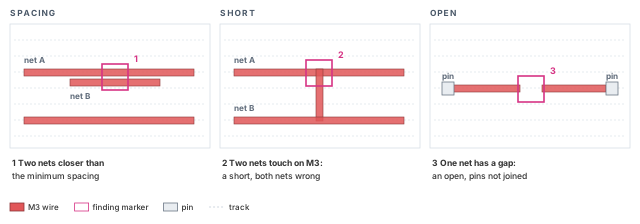
What to notice: In a short, both nets are wrong. Each finding has its own repair.
Repair design-rule violations with ecoRoute -fix_drc. It fixes the existing markers only. It reports an error if open nets exist, so settle connectivity first. Also make sure the markers are current: the verify_drc above just made them. Clear nothing by hand, run the check again, and compare the counts.
innovus> ecoRoute -fix_drc ;# repair the current DRC markers
innovus> verifyConnectivity -type all -error 50 -warning 50 ;# recheck connectivity
innovus> verify_drc -report A_drc_second.rpt ;# recheck design rules, new report name
In the example, the count goes from 11 to 0. Any physical repair can disturb the other checks. So connectivity, DRC (design rule check) and antenna checks all rerun after the last repair. Do not rerun only the check that prompted it.
If the count does not reach 0, go to "Debug common failures". Do not run ecoRoute -fix_drc repeatedly and hope. A violation that survives two passes has a cause, and the cause is rarely in the router's effort.
Is the antenna clean?
verify_antenna checks antenna ratios on the routed nets. It needs antenna information in the LEF. Repair needs a real diode cell, its site and free space. The default report lists only violating layers.
Net n_7781   layer M3   ratio 512.0   limit 400.0   VIOLATION
Net n_9020   layer M4   ratio 431.0   limit 400.0   VIOLATION
Total antenna violations: 2
The limit is a property of the technology, not a number to adopt. The mechanism is simple. A long wire built on a low layer collects charge before the layer above it exists. The fix attaches less metal at that step (layer hopping) or gives the charge a path (a diode).
Figure 8 compares the two antenna fixes side by side.
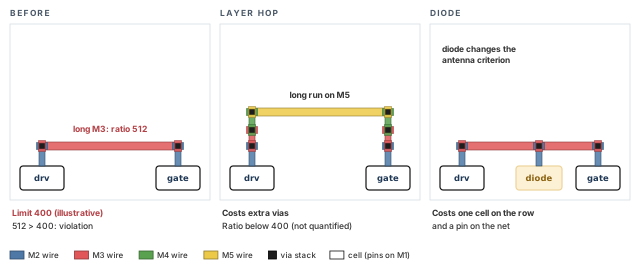
What to notice: Layer hopping costs vias and a little congestion. A diode costs one cell and a pin on the net.
If the antenna settings were on and violations remain, route only those nets again. Clear the selection first and last, so that nothing else rides along.
innovus> deselectAll ;# start with an empty selection
innovus> selectNet {n_7781 n_9020} ;# select the two antenna nets
innovus> detailRoute -select ;# reroute only the selected nets
innovus> deselectAll ;# clear the selection again
innovus> verifyConnectivity -type all -error 50 -warning 50 ;# recheck connectivity
innovus> verify_drc -report A_drc_third.rpt ;# recheck design rules
innovus> verify_antenna -report A_antenna_second.rpt ;# recheck antenna
The net names are the example's. In the example both violations clear, 2 to 0, and the rerun connectivity and DRC stay clean. If they did not, the reroute would have traded one problem for another.
Are the clock routes intact?
A clock net routed with the wrong rule or on the wrong layer passes verifyConnectivity. It can still fail timing and electrical checks later. So read back what was drawn.
innovus> report_net_wires -net clk_core_trunk1 -file wires_trunk1.rpt ;# trunk 1
innovus> report_net_wires -net clk_core_trunk2 -file wires_trunk2.rpt ;# trunk 2
innovus> report_via -on_clock_nets -detail ;# via details on clock nets
- Look for: the width rule and layer on each wire piece, the shield status, and the via cut counts.
- Repeat the first command for every net on the intended clock-net list from the post-CTS handoff. The two names here are examples, not the whole population.
- Decision. Compare with the clock rule and layer policy from clock tree synthesis. A documented, approved change is acceptable. An unexplained difference means you reroute the clock nets before going on.
- This is the Phase A record. Post-route optimization can change clock wires, so the same checks are repeated on the final candidate.
Did anything take the long way around?
Detours, and layers you did not expect, show up as timing later. You can look for them now. report_route prints routing statistics, including via tables. -multi_cut adds the share of multi-cut vias.
innovus> report_route -multi_cut ;# routing statistics with multi-cut via share
For a specific net, open the layout view of the path studied in "Extract and assess". Note a route much longer than the straight pin-to-pin distance, or one that jumps through many layers. Such a route is a finding, not necessarily a fault. A detour around a macro is correct if the straight way is blocked.
6.3 Checkpoint summary for Phase A
Table 5 collects the Phase A evidence in one place.
| Question | Evidence | Example result |
|---|---|---|
| Every net connected? | verifyConnectivity | 0 opens, 0 unrouted |
| Design rules met? | verify_drc | 11 first pass, 0 after ecoRoute -fix_drc |
| Antenna clean? | verify_antenna | 2 first pass, 0 after a reroute of those nets |
| Clock routes intact? | report_net_wires, report_via | Rule and layers as specified |
| Anything unexpected? | report_route, layout view | One macro detour, noted for "Extract and assess" |
Save the design only after the last physical change has been followed by connectivity, DRC and antenna runs.
innovus> saveDesign routed.enc ;# save the inspected routed checkpoint
End of Phase A - routed checkpoint saved The design now has routed, inspected signal wires. Connectivity and design-rule checks are clean, and routed.enc is saved. Phase B measures what those real wires did to timing. It does not route again unless a repair requires it.
Phase B: Post-route optimization
Phase B extracts the real parasitics from the routed checkpoint. It measures timing and electrical limits against them, repairs in a protected order, and decides whether the result can go forward. It starts by measuring, not by repairing.
7 Extract and assess
You cannot repair what you have not measured. You cannot call a repair good without a baseline either. Extraction turns the drawn wires into resistance and capacitance. Timing analysis on those numbers is the first honest timing result of the flow. Save it as candidate R0 before you change anything.
| Field | Value |
|---|---|
| Main command | timeDesign -postRoute -expandedViews -numPaths 200 -outDir timing_route -prefix R0, then the same with -hold |
| Role | Report |
| Starts from | The routed checkpoint of Phase A, restored or still in memory |
| Changes | No intentional edit of the netlist or routing. It extracts parasitics, analyzes timing, and writes reports and caches |
| Ends at | Report folders named after the candidate they describe |
7.1 Configure extraction and the analysis
The multi-mode multi-corner (MMMC) setup comes from the project: views, libraries, RC technology and derates. It was validated when you confirmed the starting checkpoint. This block does not define it. Set the analysis type first, because SI needs it. Then set extraction and SI, then read everything back.
innovus> setAnalysisMode -analysisType onChipVariation -cppr both ;# OCV, remove CPPR
innovus> setExtractRCMode -engine postRoute -effortLevel low -coupled true ;# routed RC
innovus> setDelayCalMode -SIAware true ;# include crosstalk in delay calculation
innovus> getAnalysisMode ;# read the analysis mode back
innovus> getExtractRCMode ;# read the extraction mode back
innovus> getDelayCalMode -SIAware ;# read the SI setting back
-engine postRouteextracts from the real wires.-coupled trueincludes coupling capacitance between neighbors, the third effect from "Where routing fits". Coupled extraction is the default for the post-route engine.-effortLevel lowselects the native extractor. Higher levels select other extractors, and some need their own license or a signoff setup. Check what your site uses. Implementation extraction is not signoff extraction.-analysisType onChipVariation -cppr bothanalyzes with on-chip variation (OCV). It removes the common-path pessimism (CPPR) that the launch and capture clock paths share. The best-case/worst-case analysis type can be optimistic with crosstalk, so do not use it here.-SIAware truemakes delay calculation include crosstalk. It needs the MMMC setup with on-chip-variation analysis.timeDesign -postRouteandoptDesign -postRouteenable SI by default, unless it was explicitly set tofalse. Thus an SI-off diagnostic left in a session silently stays off. Restore the exact setting afterwards, and never accept an SI-off run as evidence.- Each getter reads one interface.
getExtractRCModedoes not report the analysis views. The required and active views come fromall_analysis_viewsand the report headers.
Now measure, and save what you measured.
innovus> timeDesign -postRoute -expandedViews -numPaths 200 \
    -outDir timing_route -prefix R0 ;# setup on routed wires
innovus> timeDesign -postRoute -hold -expandedViews -numPaths 200 \
    -outDir timing_route -prefix R0 ;# hold on routed wires
innovus> saveDesign routed_R0.enc ;# save the baseline candidate
timeDesign -postRoute runs the native detailed extraction itself. It does not run early global route. The expanded views give you one report per analysis view.
7.2 The baseline
Table 7 compares the start of Phase A with R0.
| Measure | Start of Phase A (estimated wires) | R0 (routed, extracted) |
|---|---|---|
| Setup WNS | +0.040 | -0.085 |
| Setup TNS and endpoints | 0, none | -1.30, 31 endpoints |
| Hold WNS | +0.050 | -0.022 |
| Hold TNS and endpoints | 0, none | -0.180, 12 endpoints |
| Max transition violators | not recorded in this comparison | 7 nets |
| Max capacitance violators | not recorded in this comparison | 3 nets |
Everything in Phase B is measured against the R0 column. Setup and hold both went from passing to failing. The electrical counts were not recorded at the start of Phase A in this table. The post-CTS electrical reports still had to be reviewed, though. R0 is where this chapter begins counting them.
The counts in the table name different objects:
- TNS (total negative slack) adds up the worst negative slack of each endpoint across the applicable views. It does not count an endpoint or a path twice. So the overall multi-view TNS is not the sum of per-view TNS.
- Violating endpoints are endpoints.
- The transition and capacitance counts are the objects the report lists: pins, ports or nets, as the report states.
- Coverage counts, in the reporting section, are checks.
7.3 Why one path lost 0.125 ns
Let us consider the worst setup path, P1. It runs from u_acc/acc_reg_12 to u_out/res_reg_3 on clock clk_core, period 2.5 ns. The capture clock arrives at 0.650 ns and the launch clock at 0.640 ns. Setup time is 0.080 and uncertainty is 0.050, so:
required time = 0.650 + 2.500 - 0.080 - 0.050 = 3.020 ns
The data arrives at launch latency, plus clock-to-Q, plus the data delay: 0.640 + 0.210 + the data delay.
- On estimated wires, the data delay is 2.130 (cells 1.800 plus wire 0.330). Arrival is 2.980, and slack is +0.040.
- After routing, the data delay is 2.255. Arrival is 3.105, and slack is -0.085.
Path 1: VIOLATED Setup Check with Pin u_out/res_reg_3/D
  Launch clock latency      0.640
  Clock-to-Q                0.210
  Logic cells               1.835
  Wire (base RC delay)      0.395
  Crosstalk delta (SI)      0.025
  Arrival time              3.105
  Required time             3.020
  Slack                    -0.085
Check the arithmetic: 0.640 + 0.210 + 1.835 + 0.395 + 0.025 = 3.105. The layout of a real report differs, and the values here are invented. What matters is that you can find the same four groups in your report: cells, wire, crosstalk and the clock terms. The split of the wire term into base RC and a separate crosstalk delta is a simplified bookkeeping view.
The change from estimate to route has three parts, and each has a physical cause (Table 8).
| Part | Estimate | Routed | Change | Cause |
|---|---|---|---|---|
| Wire delay | 0.330 | 0.395 | +0.065 | Length 320 um became 455 um: the straight way crosses the macro, which blocks the low routing layers, so the route goes around it |
| Crosstalk | 0 | 0.025 | +0.025 | A neighbor switches the other way over a long parallel run |
| Cell delay | 1.800 | 1.835 | +0.035 | The weak driver sees a more resistive, more capacitive wire. Its output edge is slower, so the next cell is slower too |
| Total | 2.130 | 2.255 | +0.125 |
A longer wire is slower for two reasons at once. Resistance grows with length, and so does capacitance. So for an isolated uniform wire, its own RC term grows faster than linearly. Buffering, loading, layer changes and coupling change the path total, so treat this as a tendency. It is one reason a detour can hurt more than its extra length suggests.
Figure 9 shows the wire part: the same net, estimated and routed.
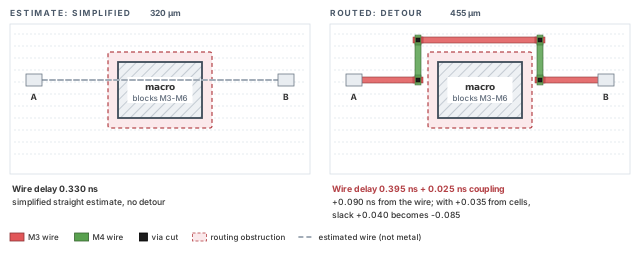
What to notice: Wire delay 0.330 became 0.395, plus 0.025 of coupling: +0.090 ns from the wire. With +0.035 from the cells, slack +0.040 becomes -0.085. Real early-route estimates can see obstacles, but still differ from final geometry.
Coupling needs its own picture, because it works in both directions. Setup analysis assumes the neighbor makes the victim slower. Hold analysis assumes it makes the victim faster. Each check must hold in its own worst case. On P1 the slow case adds 0.025 ns. On the hold pair, a same-way neighbor speeds the edge by 0.022 ns. Figure 10 shows the geometry and both effects.
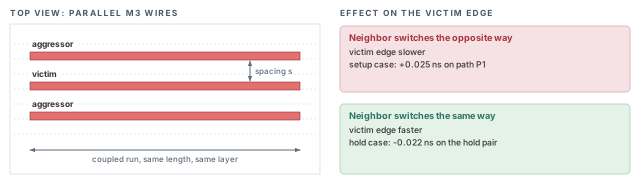
What to notice: The victim tends to be slower when the neighbor switches the other way, and faster when it switches the same way. Setup takes the slow case and hold the fast case, when the switching windows can overlap.
Subtract the launch latency and the clock-to-Q from the required time. The rest is the data path's budget: 3.020 - 0.640 - 0.210 = 2.170 ns. Any data delay above that is negative slack.
Figure 11 puts the three versions of P1's data delay side by side against the budget.
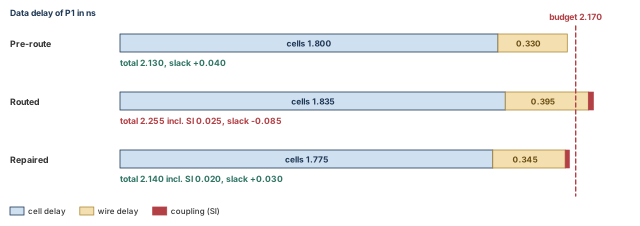
What to notice: The routed bar crosses the budget by 0.085. The repaired bar, from "Optimize setup", is back under it.
7.4 The limits of this evidence
Proves: with this extraction setting and this analysis mode, the candidate has these slacks in the analyzed views. R0 is the reference that later candidates are compared with. Does not prove: that signoff timing agrees. Implementation extraction, crosstalk analysis and variation handling differ from the signoff tool's. Correlation to signoff is a separate measurement. Finishing steps (fill, decoupling cells, ECOs) can still change the wires. Does not prove: that every endpoint was analyzed. Read the coverage report beside the slacks.
Reading only the setup WNS. A route can pass setup and fail hold in the same run, and a summary that shows only one number hides it. Read setup, hold and the electrical limits together, with coverage beside them.
8 Optimize setup
Setup repair that starts with the command instead of the diagnosis wastes runs. Four different causes can produce the same negative slack, and each has a different cheap fix. Find the cause on the worst path, then let the tool repair the rest.
8.1 Diagnose before repairing
For P1, four causes compete. Each has a check that rules it in or out (Table 9). In the checks, n_p1 is the example name of P1's long net.
| Cause | Distinguishing check | In P1 |
|---|---|---|
| Weak driver for its load | The driver's output transition in the path report is high compared with its neighbors | Yes. Cell delay grew by 0.035, and the driver is a small size |
| Wire on layers that are too low | report_net_wires -net n_p1 shows the layer of each piece | Yes. The long runs are on M3 and M4 |
| Detour | The routed length (455 um) against the straight distance (320 um) | Yes, but the macro blocks the straight way. This is not a setup-stage repair |
| Crosstalk | Compare the path with and without the crosstalk term | Yes, 0.025. Layer choice and spacing reduce it |
Two of the four are repairable at this stage: the driver and the layers. The detour stays. Moving a macro or its halo reopens two earlier stages: Placement, Pre-CTS Optimization, Checks and Handoff and Clock Tree Synthesis, Post-CTS Optimization, Checks and Handoff. Name the detour in the acceptance record instead of fighting it.
8.2 Repair
Let the tool do the general work first. It sees all violating paths, not only P1.
innovus> setOptMode -opt_setup_target_slack 0.0 ;# setup target slack of 0.0 ns
innovus> optDesign -postRoute -outDir timing_route -prefix S1opt ;# post-route repair
- By default,
optDesign -postRouteruns with setup priority, so no extra option is needed. - It is not setup-only. The default run also repairs design-rule violations and glitch (crosstalk noise) violations. That is why the electrical counts can move here too.
- It optimizes in the analysis views together, and it routes the changes it makes.
- The
-prefixonly names the report files. It neither restores nor creates a checkpoint.
Then raise the layer preference on what is still stubborn, and route only that net again. Clear the selection first and last.
innovus> setAttribute -net n_p1 -bottom_preferred_routing_layer 5 \
    -top_preferred_routing_layer 6 -preferred_routing_layer_effort high ;# prefer 5-6
innovus> deselectAll ;# start with an empty selection
innovus> selectNet n_p1 ;# select the stubborn net
innovus> detailRoute -select ;# reroute only that net
innovus> deselectAll ;# clear the selection again
A manual reroute changes the wires, so every number measured before it is out of date. Refresh the evidence before you call the result a candidate.
innovus> extractRC ;# extract parasitics from the current wires
innovus> timeDesign -postRoute -expandedViews -numPaths 200 \
    -outDir timing_route -prefix S1 ;# fresh setup numbers
innovus> timeDesign -postRoute -hold -expandedViews -numPaths 200 \
    -outDir timing_route -prefix S1 ;# fresh hold numbers
innovus> verifyConnectivity -type all -error 50 -warning 50 ;# recheck connectivity
innovus> verify_drc -report S1_drc.rpt ;# recheck design rules
innovus> verify_antenna -report S1_antenna.rpt ;# recheck antenna
innovus> report_constraint -all_violators > S1_constraints.rpt ;# list all violators
In this example, the two repairs on P1 save 0.115 ns (Table 10).
| Repair | Saves | Resulting delay |
|---|---|---|
| Driver X2 to X4 (a stronger size of the same cell) | 0.060 | cells 1.775 |
| Long runs from M3 and M4 to M5 and M6 | 0.055 | wire 0.345 plus crosstalk 0.020 = 0.365 |
| Total | 0.115 | data delay 2.140 |
Check: 1.775 + 0.365 = 2.140. Arrival is 0.640 + 0.210 + 2.140 = 2.990. Required is 3.020, so slack is +0.030. The difference 2.255 - 0.115 = 2.140 confirms the saving.
8.3 What this repair costs
- Area and power. A larger driver is a larger cell with more input capacitance, which loads the previous stage.
- Routing resources. A net that moves to M5 and M6 uses tracks that other nets wanted. In a congested region, this can create overflow that was not there before.
- Hold. A faster data path has a shorter minimum delay. On a net with a hold-critical short path, speeding up the data path can make hold worse. Read hold again after setup repair. Here it is unchanged at -0.022.
Figure 12 shows the same routed path before and after the two repairs.
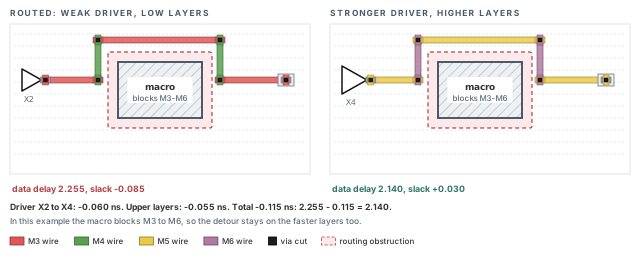
What to notice: The detour around the macro is unchanged, because in this example the macro also blocks M5 and M6. Delay was recovered by driving the wire harder and moving it to faster layers.
Candidate S1 is acceptable as input to hold repair when two things are true. Setup WNS and TNS meet the project target in the analyzed views. The design-rule checks still pass on the changed nets. The fresh evidence above is what counts, not the numbers printed by the optimizer. In the example, S1 has setup WNS +0.030, TNS 0, 0 endpoints, hold -0.022, 2 transition and 0 capacitance violators.
Save only after that evidence is in hand.
innovus> saveDesign routed_S1.enc ;# save candidate S1
9 Hold and electrical repair
Hold repair and electrical repair both add cells. Each can take slack from setup. This section shows how, with one worked pair of paths. Then it separates electrical repair from timing repair, because they answer different questions.
9.1 Why routed wires expose hold
A hold check asks whether new data arrives too early, while the capture flop still needs the old value. The data must not arrive before the capture clock edge plus the hold time. Hold uses the minimum delay of the data path. So it is sensitive to everything that makes a path faster: shorter wires, a neighbor switching the same way, a sharper slew.
Let us consider the worst hold pair, from flop FF1 to flop FF2. It runs through a two-input AND gate, where the short FF1 path meets the long FF3 path. When the FF1 arc is timed, the FF3-side input is assumed to be 1 (non-controlling), and the other way around. So both arcs through the AND gate are timed. The gate delay is inside the path delays below. In the example, FF1 is u_acc/acc_reg_4 and FF2 is u_io/io_reg_9.
The launch clock arrives at 0.640 and the capture clock at 0.890. So the capture clock is 0.250 later than the launch clock. That skew is the reason hold is tight: data has to survive 0.250 ns of extra waiting. Hold time is 0.040 and uncertainty is 0.020, so:
required time = 0.890 + 0.040 + 0.020 = 0.950 ns
Table 11 shows the pair before and after routing.
| Term | Pre-route | Routed |
|---|---|---|
| Clock-to-Q | 0.200 | 0.200 |
| Minimum data delay | 0.160 | 0.088 |
| Arrival (0.640 + the above) | 1.000 | 0.928 |
| Slack (arrival - required) | +0.050 | -0.022 |
The minimum data delay dropped by 0.072. Three causes add up to it (Table 12).
| Cause | Amount |
|---|---|
| The routed wire is shorter than the estimate | 0.030 |
| A neighbor switching the same way speeds the victim edge | 0.022 |
| Better input slew on intermediate cells, which shortens their delay (measured as a total over those cells) | 0.020 |
| Total | 0.072 |
Estimates are often pessimistic about wires on short paths. Routing can remove that pessimism, which tends to help setup and hurt hold.
The 0.020 is a delay inside the path. It is not a change to the hold time of FF2. Slew at the capture pin can change the library hold requirement. That is a different term, on the required-time side, and a sharper slew does not always improve it.
Figure 13 draws the same numbers on one time axis.
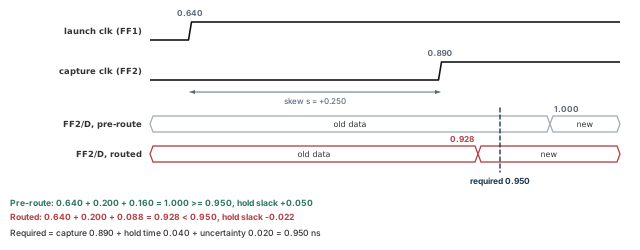
What to notice: The routed arrival lands before the required time of 0.950, so hold slack is 0.928 - 0.950 = -0.022.
9.2 The repair and what it takes from setup
The usual hold repair is a delay cell: a cell that adds delay and does nothing else. Put one in the fast corner and the pair is fixed. A delay cell of 0.050 in the fast corner gives -0.022 + 0.050 = +0.028.
However, the same cell sits where other paths share it. In this example it sits at position H1, on the net between the AND gate and FF2. The long path from FF3 also passes there. The cell is slower in the slow corner, where setup is checked: it costs 0.080 there. The long path had slack +0.075, so now it has 0.075 - 0.080 = -0.005.
Hold repair with the default settings in the tool is allowed to do this. The option that controls it is -opt_hold_allow_setup_tns_degradation. Its default is true, meaning setup TNS may get worse while hold is fixed. Setting it to false protects setup TNS only. It is not a promise about setup WNS or about every path, so read the setup numbers again afterwards.
Figure 14 shows both positions of the delay cell.
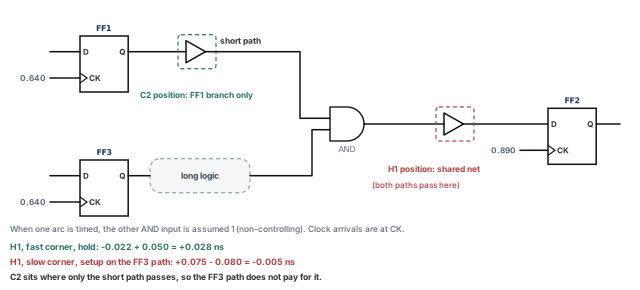
What to notice: One cell helps one check and costs margin in the other. A cell on a shared net is paid for by every path through it.
C2 restarts from S1, not from H1. H1 is an experiment that did not protect setup, so it is not a parent. Start a new session and restore the saved S1 checkpoint (the reason is in "Confirm the starting checkpoint"). Replay the site setup and read the analysis modes back. Database identity alone does not prove identical analysis settings.
innovus> restoreDesign routed_S1.enc.dat stream_acc ;# restore S1 in a fresh session
innovus> source site_setup.tcl ;# replay the approved site setup
innovus> getAnalysisMode ;# read the analysis mode back
innovus> getDelayCalMode -SIAware ;# confirm SI is on
innovus> setOptMode -opt_hold_allow_setup_tns_degradation false ;# protect setup TNS
innovus> setOptMode -opt_hold_target_slack 0.0 ;# hold target slack of 0.0 ns
innovus> optDesign -postRoute -hold -outDir timing_route -prefix C2hold ;# repair hold
site_setup.tcl is the example name for the site-owned procedure. -opt_hold_target_slack sets the hold target. Zero is only a starting value: write down the target your project uses, and why.
In the example, the hold repair with the default produces candidate H1. H1 has hold WNS +0.028 and TNS 0, but setup WNS -0.005, TNS -0.005 and one endpoint. Running it from S1 with the protection on leads to C2. There the cell goes at position C2, on the FF1 branch before the gate. Only the short path pays for it. C2 is a candidate only after its final state is saved and measured.
Treating "hold met" as success without rereading setup. The two checks share cells. Always report setup and hold from the same candidate, in the same run.
9.3 Electrical repair is a separate question
Maximum transition and maximum capacitance are not timing checks. They are limits that a pin must not exceed, no matter what the slack is. A cell driving a long wire can produce a slow edge. That edge can make the next cell misbehave, even if the path meets setup. These limits are often called DRV (design rule violation) limits in optimization commands.
innovus> report_constraint -drv_violation_type {max_transition max_capacitance} \
    -all_violators > C2hold_electrical.rpt ;# transition and capacitance violators
Reports go to the log or the screen unless you redirect them. A redirect overwrites an existing file, so name each state's file yourself.
- This file is the state after the hold repair and before the DRV step. The final C2 report has its own name.
- The broader
report_constraint -all_violatorsalso lists special checks. That is why this chapter restricts the electrical report to the two limits it repairs.
max_transition   n_4412  limit 0.300 actual 0.342 slack -0.042 VIOLATED
max_capacitance  n_6035  limit 0.080 actual 0.091 slack -0.011 VIOLATED
R0 has 7 transition and 3 capacitance violators. The excerpt above stands for R0, not for C2hold. Setup repair fixes most of them as a side effect. The cause is often the same: a weak driver on a long wire.
S1 has 2 transition and 0 capacitance violators. The two remaining transition violators need a different repair, because their cause is not delay. In this example the hold cells add no new capacitance violation. The default optDesign -postRoute also repairs design-rule violations, so your own counts can differ.
optDesign -postRoute -drv fixes only maximum capacitance and maximum transition. It does not repair setup or hold, and it is not allowed with -incr.
innovus> optDesign -postRoute -drv -outDir timing_route -prefix C2drv ;# tran and cap
The two prefixes, C2hold and C2drv, keep the two stages' reports apart. Why a separate stage? It targets exactly two limits, and it is not a setup or hold repair. So after it, you read setup, hold and the electrical counts again from the same state. Do not assume that fixing one set leaves the other alone.
Takeaway Hold uses the minimum delay and setup the maximum, so a repair that adds delay helps one and spends the other. A cell on a shared net is paid for by every path through it. Electrical limits and slacks are independent checks. The order setup, hold, electrical is a reasonable default, not a universal one: measure after each step and be ready to loop.
10 Reroute, re-extract and repeat
Every repair changes the database, and every change needs a fresh measurement. The way to stay in control is to treat each repair as a candidate. A candidate is a saved database with its own reports, compared with the one before. A repair that makes the next number worse is discarded, not patched on top.
10.1 What a repair leaves behind
Repairs add or change cells and wires. The optimizer routes its own changes. You must still check three things after each one:
- New violations. A new wire can create a spacing or antenna violation. Run
verify_drcandverify_antennaon the candidate, as after detailed route. UseecoRoute -fix_drcfor what remains, then run connectivity, DRC and antenna again. - Stale extraction. Parasitics describe the database at the time they were extracted. After any change to wires, extract again.
timeDesign -postRouteruns the native extraction for you. If you use a separate report command, runextractRCfirst. - Stale timing. The slacks you read an hour ago describe a database that no longer exists.
10.2 One compact comparison
Table 13 puts the four candidates side by side.
| Candidate | What produced it | Setup WNS / TNS / endpoints | Hold WNS / TNS / endpoints | Max tran | Max cap |
|---|---|---|---|---|---|
| R0 | Route, extract | -0.085 / -1.30 / 31 | -0.022 / -0.180 / 12 | 7 | 3 |
| S1 | R0, setup repair | +0.030 / 0 / 0 | -0.022 / -0.180 / 12 | 2 | 0 |
| H1 | S1, default hold repair | -0.005 / -0.005 / 1 | +0.028 / 0 / 0 | 2 | 0 |
| C2 | S1, protected hold repair, -drv, fresh evidence | +0.012 / 0 / 0 | +0.025 / 0 / 0 | 0 | 0 |
Read it row by row.
- S1 fixes setup and does not touch hold.
- H1 fixes hold and breaks setup, with one endpoint.
- C2 starts again from S1 in a fresh session, not from H1, with protection on. It passes both. It is a candidate only once its final state has been saved (
saveDesign routed_C2.enc) and measured. - C2's setup slack (+0.012) is lower than S1's (+0.030), because the hold cells and their wires add load. In C2 the worst setup path is still P1, at +0.012.
- C2's hold slack (+0.025) is a little lower than H1's (+0.028). The cell is smaller, and it sits on a branch rather than the shared net.
That is a trade, and it is visible because the candidates were kept. Figure 15 draws the same history as a tree.
Before you save C2, produce its fresh evidence. Run the C2 reports of "Reporting: timing, electrical, rules and connectivity", then save.
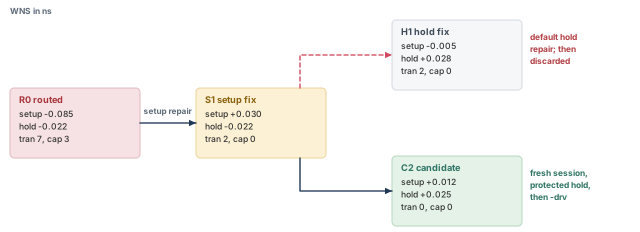
What to notice: C2 is not a child of H1. It is a separate branch of S1.
innovus> saveDesign routed_C2.enc ;# save candidate C2
10.3 Which saved state does each experiment start from?
| Experiment | Starts from |
|---|---|
| First setup repair | R0, the routed and extracted baseline |
| Hold repair | The setup-repaired candidate of the same experiment, restored in a fresh session |
| A different option set | The same parent, restored in a fresh session, not the child of the last try |
| A change in placement or clock | The placement or clock tree stage, re-accepted there |
10.4 When to stop
Stop repairing and investigate upstream when:
- two successive candidates improve a number by less than the run-to-run noise you have seen on this design;
- one repair keeps undoing another, as H1 did to S1;
- the remaining violations share a cause that routing cannot change: a detour around a macro, a clock skew, or a constraint.
The last case is common. If every remaining setup violator crosses the same macro channel, the repair is in floorplan or placement. It is not necessarily in a fourth optDesign run.
- A repair makes setup and hold both worse at once.
- The reports of the new candidate do not describe it. See "Recognizing a stale report".
11 Reporting: timing, electrical, rules and connectivity
Each decision in this chapter rests on a report, and each report answers one question. Reports come before debugging for two reasons. You cannot debug a symptom you have not read correctly. And most debugging starts with the question "which report is that number from?".
Run the reports on the candidate in memory, or restore the candidate you saved first. Name the candidate in your notes. Table 15 maps each question to its report family.
| Question | Report family | Native command |
|---|---|---|
| Were the required views active, and are the constraints complete? | Views and completeness | all_analysis_views, check_timing |
| Does timing meet its targets? | Timing | report_timing, timeDesign -postRoute |
| Which endpoints were actually analyzed? | Coverage | report_analysis_coverage |
| Do transition and capacitance limits hold? | Electrical | report_constraint |
| Is the geometry legal, connected and antenna-clean? | Rules and connectivity | verify_drc, verifyConnectivity, verify_antenna |
| Is the clock still as built? | Clock | report_clock_timing |
11.1 Views and constraint completeness
Question. Did the required views run, and does every necessary constraint exist?
innovus> all_analysis_views -type setup ;# list the active setup views
innovus> all_analysis_views -type hold ;# list the active hold views
innovus> check_timing -verbose > C2_check_timing.rpt ;# constraint completeness
- Plain English. The first two commands list the active setup and hold views. You compare them with the project's required list.
check_timingreports missing or unpropagated clocks, unconstrained endpoints and incomplete I/O delays. It accepts-viewfor a per-view report. - Decision. A required view that is not active blocks acceptance. Every warning is fixed or recorded as intentional.
- Does not prove: that the constraints are correct, only that they are present. A default call does not enable every warning class. The coverage report below complements this check; it does not replace it.
11.2 Timing
Question. Does each path meet setup and hold, with the real wires?
innovus> timeDesign -postRoute -expandedViews -numPaths 200 \
    -outDir timing_final -prefix C2 ;# final setup summary
innovus> timeDesign -postRoute -hold -expandedViews -numPaths 200 \
    -outDir timing_final -prefix C2 ;# final hold summary
innovus> report_timing -late -max_paths 5 -nworst 1 > C2_setup_paths.rpt ;# setup paths
innovus> report_timing -early -max_paths 5 -nworst 1 > C2_hold_paths.rpt ;# hold paths
Setup      WNS +0.012         TNS 0.000       Violating endpoints 0
Hold       WNS +0.025         TNS 0.000       Violating endpoints 0
- Plain English. WNS is the worst slack of any path. TNS adds up the worst negative slack of each endpoint across the applicable views, without counting an endpoint twice. So the overall TNS is not the sum of per-view TNS. The endpoint count says how many endpoints fail. State the view scope of every summary you quote.
- Decision. Compare against the project targets, in each analyzed view. A positive WNS in the views that ran passes those views.
- Does not prove: that the views that did not run pass, that signoff agrees, or that the margin survives fill and ECOs.
- Options.
-latereports the setup side and-earlythe hold side. - Coverage limits.
-numPaths 200limits how many paths are listed, not how many endpoints were analyzed.-expandedViewsreports only the views that are active. Five paths fromreport_timingare a spot check, not a full review. Reports go to the log unless you redirect them, so the files above carry the candidate name.
11.3 Coverage
Question. How many checks were analyzed, and why were the rest not?
innovus> report_analysis_coverage -verbose {violated untested} -sort reason \
    > C2_coverage.rpt ;# met, violated and untested checks
Check type       Total     Met     Violated   Untested
Setup            4020      4002         0         18
Hold             4020      4008         0         12
- Plain English. Every check is either met, violated or untested. Check: 4002 + 0 + 18 = 4020, and 4008 + 0 + 12 = 4020.
- The same report on R0 would have shown 3971 + 31 + 18 for setup and 3996 + 12 + 12 for hold. Take the coverage from the candidate you are deciding on, not from an earlier one.
- Counts are checks. They are not endpoints, so a violated count need not equal an endpoint count. Dynamic checks are left out unless you ask for them with
-include_dyn_checks. - Decision. Every untested check needs a reason. A tied-off clock, a constant or a disabled arc is a reason. "I do not know" is not.
- Does not prove: that untested means passing. Untested means no result exists.
11.4 Electrical limits
innovus> report_constraint -drv_violation_type {max_transition max_capacitance} \
    -all_violators > C2_electrical.rpt ;# final transition and capacitance violators
The excerpt is in "Hold and electrical repair". The file name is explicit because the report otherwise goes to the log. This name, C2_electrical.rpt, is reserved for the final C2 state.
report_constraintlists up to 1000 items per design-rule category by default. If a category reaches that limit, request a larger listing limit and keep the complete totals.- Counts here are the pins, ports or nets that the report lists.
- Plain English. The limit is a property of the library or the constraints. The actual value is what the extraction produced. The slack is limit minus actual.
- Decision. Every violator is repaired, or has a named reason.
- Does not prove: anything about timing. A net can violate a limit with positive timing slack.
11.5 Rules and connectivity
innovus> verifyConnectivity -type all -error 50 -warning 50 ;# opens and unrouted nets
innovus> verify_drc -report C2_drc.rpt ;# design rules of candidate C2
innovus> verify_antenna -report C2_antenna.rpt ;# antenna of candidate C2
verifyConnectivity         Open 0      Unrouted 0
verify_drc                 Total 0
verify_antenna             Total 0
- Plain English. The wires join the right pins, obey the spacing and width rules, and carry no antenna excess.
- Decision. Any open, unrouted net or short blocks the handoff. Design-rule and antenna violations are repaired or documented.
- Scope. Record the
set_verify_drc_modeoptions in force. The default check scope is not all checks, and a-error 50cap can hide a longer list. A cleanverify_antennaalso needs antenna data in the LEF. - Does not prove: that the rules are the ones your foundry signs off. The technology file in the session defines them, and signoff verification is a later stage.
11.6 Clock
innovus> report_clock_timing -type skew -early -view hold_view \
    > C2_clock_skew.rpt ;# clock skew for the hold check
report_clock_timing -type skew defaults to the setup skew. For the hold check, ask for the early side and name the hold view. Restrict it to the intended start and end pair with the options your release supports.
launch clock arrival   u_acc/acc_reg_4     0.640
capture clock arrival  u_io/io_reg_9       0.890
s = capture - launch = +0.250
- Plain English. These are the clock arrivals at FF1 (
u_acc/acc_reg_4) and FF2 (u_io/io_reg_9), the hold pair of Figure 13. - This chapter writes skew as s = capture - launch. So s = +0.250 makes hold harder and setup easier. A report may print its skew with the opposite sign, so convert to this convention before you compare.
- Decision. Compare with the post-CTS record. Whether this skew is intended is in that record.
- Does not prove: anything about data paths. It says nothing about clock topology, wire status, layers, widths, shielding or vias either. A skew number can look the same while the clock wires differ. Check the clock physically, on the final candidate, as below.
innovus> report_net_wires -net clk_core_trunk1 -file C2_wires_trunk1.rpt ;# trunk 1
innovus> report_net_wires -net clk_core_trunk2 -file C2_wires_trunk2.rpt ;# trunk 2
innovus> report_via -on_clock_nets -detail ;# via details on clock nets
Repeat report_net_wires for every net on the intended clock-net list, not for one sample. Compare the rule and layer policy with the post-CTS record. Approved changes are acceptable if they are documented. Literal geometric identity is not required.
11.7 Recognizing a stale report
A stale report describes a database that no longer exists. It looks like any other report. Check these signs before you trust a number. They are triggers for investigation, not proof. Tie freshness to the last change that matters (geometry, netlist, constraints or analysis settings), and to the candidate and configuration identity.
- Time. The report file is older than the last repair or reroute. A
saveDesignalone does not change the design, so an older file is only a clue. - Name. The prefix or folder is not the candidate's. This is why every run in this chapter carries a prefix: R0, S1, C2.
- Extraction. Parasitics were extracted before the last wire change.
timeDesign -postRouteextracts fresh. A report from another command might not. - Views. The report covers different views, or a different analysis mode, from the one you compare against.
getAnalysisMode,all_analysis_viewsand the report header show them.getExtractRCModeshows the extraction mode only. - A repair with no visible effect. The headline numbers equal the previous candidate's to the last digit. An unrelated local repair can leave the worst slack unchanged, so this is a reason to look, not a verdict.
Comparing the slack of today's candidate with a number copied from a log three hours ago. Rerun the report on the saved candidate, and compare two reports, not a report and a memory.
12 Debug common failures
Routing and post-route failures are cheap to fix when the cause is known, and expensive when it is guessed. Every case here uses the same six steps, shown in Figure 16:
- Symptom: one named failure.
- Evidence: the report or view that shows it.
- Competing causes: at least two, written down.
- Distinguishing check: one look that rules a cause in or out.
- Repair: only the confirmed cause.
- Remeasure: rerun the same report, with the same settings, on the new candidate.
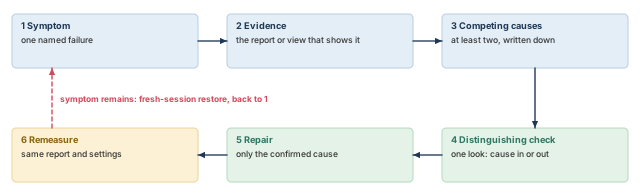
What to notice: The repair comes fifth. A repair before the distinguishing check is a guess.
12.1 Case 1: persistent congestion or incomplete routing
- Symptom. Overflow remains after global route, or detailed route ends with unrouted nets.
- Evidence.
reportCongestion -overflowoutput with overflow. Where your release supports it afterrouteDesign,dumpNanoCongestArealines with negative overflow.verifyConnectivityreporting unrouted nets. - Competing causes. Capacity lower than it should be (a stale blockage, a wide clock rule). Or demand higher than the region can hold (placement, a macro channel).
- Distinguishing check. Count capacity by layer in the worst gcell, as in the channel case. If capacity matches the layer count, the cause is demand.
- Repair. Capacity: remove a confirmed blockage, or relax a rule only where the owner agrees. Demand: change placement or macro spacing, which reopens Placement, Pre-CTS Optimization, Checks and Handoff.
- Remeasure.
globalRouteandreportCongestion -overflowagain.
12.2 Case 2: recurring design-rule violations
- Symptom.
ecoRoute -fix_drcclears the markers, and the same ones return. - Evidence. The violation type and layer, repeated at one location or on one net type.
- Competing causes. A rule the router cannot satisfy in this space (a clock NDR in a congested channel). A cell or pin the router cannot access. Or a setting that fights the rule.
- Distinguishing check. Do the violations cluster on the NDR nets? Run the check below and compare. Do they cluster at one macro or cell edge?
- Repair. NDR: give the net its space, or change the rule with the owner. Pin access: change the placement or halo.
- Remeasure.
verify_drcwith a new report name, and compare counts and locations.
innovus> verify_drc -check_ndr_spacing -report case2_ndr.rpt ;# include NDR spacing
12.3 Case 3: opens and shorts
- Symptom.
verifyConnectivityreports opens, orverify_drcreports shorts. - Evidence. The net names and the marker positions.
- Competing causes. For opens: congestion left the net unfinished, or the net already had FIXED route status. A skip-routing or preservation restriction may also apply.
-route_fix_clock_netsis arouteDesignsetting. It does not control the splitglobalRouteanddetailRouteflow of this chapter. For shorts: a repair or a guide squeezed two nets together. - Distinguishing check.
report_preserves -obj_type net -dont_touchlists nets with explicit preservation. Add-computedto see preservation that the net inherits. Fixed-route and skip-routing status are separate causes, so inspect them separately. Check whether the open net shows up in any of the three: preserved, FIXED, or skip-routing. - Repair. Open: route the nets again (
deselectAll,selectNet,detailRoute -select,deselectAll), or remove the restriction with its owner. Short:ecoRoute -fix_drc, after connectivity is settled. - Remeasure.
verifyConnectivity, thenverify_drc, thenverify_antenna.
innovus> report_preserves -obj_type net -dont_touch ;# explicit net preservation
innovus> report_preserves -obj_type net -dont_touch -computed ;# include inherited ones
12.4 Case 4: antenna violations that stay
- Symptom.
verify_antennastill lists violations after routing. - Evidence. Net, layer, ratio and limit.
- Competing causes. The antenna settings were not active (the default acts on data nets only). Or the diode cell name or its site is wrong. Or the LEF has no antenna data, and the check has nothing to compare.
- Distinguishing check.
getNanoRouteModeshows the settings. The one-net report below shows that net's layers in detail. Without-nets,-detailedcovers all nets and all layers. - Repair. Set the options, and route those nets again, with the selection cleared before and after.
- Remeasure.
verifyConnectivity,verify_drcandverify_antenna, each with a new report name.
innovus> verify_antenna -nets n_7781 -detailed -report antenna_n_7781.rpt ;# one net
12.5 Case 5: setup degrades after route
- Symptom. Slack that passed on estimates fails after routing.
- Evidence. The stage breakdown from "Extract and assess": cell, wire, crosstalk.
- Competing causes. Detour, low layers, weak driver, crosstalk.
- Distinguishing check. Compare the routed length with the straight distance. Read the layers from
report_net_wiresand the driver transition. Time the path with crosstalk off, as a diagnostic run only. - SI-off diagnostic, safely. Read
getDelayCalMode -SIAwarefirst. Switch SI off for the diagnostic. Then restore the exact prior setting, read it back, and regenerate the baseline report with SI on. An SI-off run is never final evidence. - Repair. As in "Optimize setup", one cause at a time.
- Remeasure.
timeDesign -postRoute, same views.
12.6 Case 6: hold exposed by routed parasitics
- Symptom. Hold passed before routing and fails after.
- Evidence. The minimum delay of the failing path, before and after.
- Competing causes. A shorter wire than the estimate, a neighbor switching the same way, a sharper slew, a changed clock skew.
- Distinguishing check. Break the minimum-delay change into those parts, as in "Hold and electrical repair". Check the clock latencies at both flops, so you know skew did not move.
- Repair. A delay cell on the short branch, or skew if the clock allows it.
- Remeasure.
timeDesign -postRoute -hold, and setup.
12.7 Case 7: setup regression after hold repair
- Symptom. Hold is fixed, and a setup path that had margin now fails.
- Evidence. The failing setup path passes through a cell inserted by the hold repair.
- Competing causes. The cell sits on a shared net, protection was off, or the hold target was higher than needed.
- Distinguishing check. List the inserted cells and the other paths that go through each. Check
-opt_hold_allow_setup_tns_degradationand-opt_hold_target_slack. - Repair. Restart from the setup-repaired candidate in a fresh session. Set
-opt_hold_allow_setup_tns_degradationtofalse, which turns the protection on. Lower the target to what the project needs. - Remeasure. Setup and hold together.
12.8 Case 8: transition or capacitance violations
- Symptom.
report_constraintlists maximum transition or capacitance violators. - Evidence. Net, limit, actual, slack.
- Competing causes. A weak driver on a long wire, or a fanout too high. A wide NDR wire with more capacitance. Or a limit tighter than the library supports.
- Distinguishing check. Net length, fanout and driver cell, and the limit's source.
- Repair.
optDesign -postRoute -drv, with its own prefix. A tight limit is a constraint question for its owner. - Remeasure.
report_constraintto a named file, and setup and hold afterwards.
12.9 Case 9: timing stops improving
- Symptom. Successive candidates change a number by less than the noise.
- Evidence. The remaining violators.
- Competing causes. The router and optimizer have exhausted what they can do. Or the violators share a cause upstream: a macro detour, a clock skew, a constraint.
- Distinguishing check. Group the violators by shared structure: the same macro, the same clock, the same path group.
report_timing -fromand-tonarrow it. - Repair. Go upstream. Another
optDesignrun with nothing changed upstream is not a diagnosis. - Remeasure. After the upstream change, start again from R0 of the new database.
12.10 Case 10: reports that do not match the candidate
- Symptom. A number in a report cannot be reproduced.
- Evidence. The file time, header and prefix.
- Competing causes. Stale extraction, wrong restore, wrong prefix, different views.
- Distinguishing check. Restore the saved candidate from a fresh session, replay the site setup, and run the report again.
- Repair. Regenerate every report you rely on.
- Remeasure. The two reports agree.
13 Accept the candidate and hand it to finishing
A candidate that was repaired is not necessarily one that can go forward. No command knows your project's margins, its waivers, or what finishing will do next. The decision uses evidence, and it ends in one of three states.
13.1 Five assessments, kept independent
A pass in one assessment never offsets a failure in another. Good setup does not cancel an open net. Table 16 lists the five.
| # | Assessment and native evidence | Ready means | Do not hand off when |
|---|---|---|---|
| 1 | Connectivity and rules. verifyConnectivity, verify_drc, verify_antenna | No open, unrouted net or short; rule and antenna violations repaired or documented | An open, unrouted net or short remains |
| 2 | Timing. timeDesign -postRoute, report_analysis_coverage | Targets met in every required view; untested checks explained | A required view did not run, or an untested check has no reason |
| 3 | Electrical limits. report_constraint | Limits met, or each violator documented | A violator has no reason on record |
| 4 | Clock routes. report_net_wires, report_via -on_clock_nets, report_clock_timing | Clock rules and layers as set at clock tree synthesis | A clock net lost its rule or layer |
| 5 | Candidate and record. Saved checkpoint, matching reports, handoff note | The saved candidate is the one reviewed | Reports are stale, or the candidate name is unclear |
13.2 Three states
The five assessments roll up into one of three states, drawn in Figure 17.
- Clean. Every assessment ran and passes. Nothing is open.
- Accepted with documented exceptions. Every assessment ran. Some items stay open, and each has a record. The record holds the item, the evidence, the owner and the reason it is acceptable now. It also names who approved it and when it is checked again. The record is the difference between an exception and an oversight.
- Not ready. A check did not run, a blocking item is open, or the reports are stale. Repair and measure again. This is a normal result.
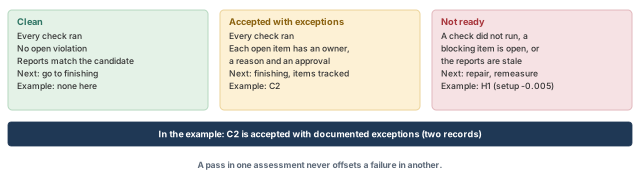
What to notice: Each state carries text as well as color. "Accepted" is not "clean".
The thresholds that turn a number into a pass belong to your project. This chapter does not set any.
13.3 Worked example: candidate C2
C2 has setup WNS +0.012, hold WNS +0.025, and zero transition and capacitance violators. Connectivity, rules and antenna are clean. Coverage shows 18 untested setup checks and 12 untested hold checks.
- Assessments 1, 3, 4 and 5 pass.
- Assessment 2 passes only if the untested checks are explained and approved. In the example they are. Their capture clocks are tied off in this mode, and the constraint owner has approved it. The same functions are covered in the other required modes.
- C2 is therefore accepted with documented exceptions, with two records (Table 17).
Both records depend on the receiving project's stage target. This example assumes a target of 0.000 ns for setup and hold at this stage. That is an invented value, not a recommendation, and acceptance is conditional on the real target.
| Item | Evidence | Owner and approval | Reason acceptable now | Recheck |
|---|---|---|---|---|
| 18 setup and 12 hold checks untested (the exact check and object list is attached, with mode, view and reason code) | report_analysis_coverage sorted by reason, C2_coverage.rpt | Constraint owner, approval reference and date recorded | Capture clocks tied off in this mode, and the function is covered in the other required modes | When modes or constraints change |
| P1 slack +0.012, thin | Path report of C2 | Timing owner, approval reference and date recorded | Meets the stated stage target | After fill, and again against signoff |
Open nets, shorts and a missing required analysis are not waivable under this chapter's gate. An inherited waiver counts only if it is current, approved and still applicable.
13.4 Save and export what finishing needs
The native checkpoint is the authoritative restart artifact. The netlist and the DEF (design exchange format) file are exchange forms for tools that cannot read it. Use your own names. Say what each file does and does not carry, because the receiving flow depends on it.
innovus> saveDesign handoff_route.enc ;# native checkpoint for restart
innovus> saveNetlist handoff_route.v ;# logical Verilog netlist
innovus> defOut -routing handoff_route.def ;# DEF with routing
- Native checkpoint. It references the libraries, LEF and SDC (timing constraint) files it was built with. It does not copy them, so keep those files, in the same form, with the checkpoint. Extracted RC and timing-graph data are optional, not automatic. Plan to extract and time again after a restore, not to find them waiting.
- Netlist.
saveNetlistwrites a logical Verilog netlist by default. Add-includePhysicalInst,-includePowerGroundor-physonly when the receiving flow asks for them. - DEF.
defOutneeds matching technology, cell, via and rule definitions on the receiving side. Net attributes are not saved in DEF.-withShieldis a selected-net export option that needs-routingand-selected. It is not a switch that makes a full-block DEF complete, so do not add it to the command above. - Packaging. Consider
saveDesign -libsonly if the site's packaging and licensing policy allows it. Do not add export options blindly.
Then regenerate the evidence from the saved candidate, so the reports and the checkpoint cannot disagree. Start a new Innovus session first, because the tool does not load a second database while a design is in memory. Name every file for the candidate.
innovus> restoreDesign handoff_route.enc.dat stream_acc ;# restore the handoff candidate
innovus> source site_setup.tcl ;# replay the approved site setup
innovus> getAnalysisMode ;# read the analysis mode back
innovus> getExtractRCMode ;# read the extraction mode back
innovus> getDelayCalMode -SIAware ;# confirm SI is on
innovus> all_analysis_views -type setup ;# active setup views
innovus> all_analysis_views -type hold ;# active hold views
innovus> check_timing -verbose > handoff_check_timing.rpt ;# constraint completeness
innovus> timeDesign -postRoute -expandedViews -numPaths 200 \
    -outDir timing_handoff -prefix handoff ;# setup on the handoff candidate
innovus> timeDesign -postRoute -hold -expandedViews -numPaths 200 \
    -outDir timing_handoff -prefix handoff ;# hold on the handoff candidate
innovus> report_constraint -all_violators > handoff_constraints.rpt ;# all violators
innovus> report_analysis_coverage -verbose {violated untested} -sort reason \
    > handoff_coverage.rpt ;# coverage with reasons
innovus> verifyConnectivity -type all -error 50 -warning 50 ;# connectivity
innovus> verify_drc -report handoff_drc.rpt ;# design rules
innovus> verify_antenna -report handoff_antenna.rpt ;# antenna
innovus> report_net_wires -net clk_core_trunk1 -file handoff_wires_trunk1.rpt ;# clock
innovus> report_net_wires -net clk_core_trunk2 -file handoff_wires_trunk2.rpt ;# clock
innovus> report_via -on_clock_nets -detail ;# clock vias
innovus> report_clock_timing -type skew -early -view hold_view \
    > handoff_clock_skew.rpt ;# hold-side clock skew
The broad report_constraint -all_violators also lists special checks, and its file is named for what it holds. Repeat report_net_wires for the whole intended clock-net list, because post-route optimization can change clock wires. Read the handoff files, not the intermediate ones.
13.5 The handoff note
The note separates what is established from what is still provisional (Table 18).
| Established | Provisional |
|---|---|
| Wires are connected and rule-clean in the session technology | Signoff extraction and timing have not been run |
| Setup and hold meet the project targets in the analyzed views, on implementation extraction, with coverage and its untested checks explained | Fill, decoupling cells and later ECOs can change wires and slacks |
| Electrical limits are met | Open items and their owners, as in the exception records |
13.6 The package manifest
The handoff note says what is established. A receiver also needs to tie the files and claims together without asking you. Attach a compact manifest (Table 19).
| Item | What to record |
|---|---|
| Tool and top cell | Tool build, startup scripts, top cell name |
| Candidate | Saved checkpoint directory, restore command, candidate name (here handoff_route.enc) |
| Dependencies | Library, LEF, SDC and technology paths, or immutable versions or hashes |
| Configuration | The site setup script and its version, required and active views, extraction, SI and variation settings |
| Evidence | The exact report files (handoff_*, C2_*), with their folders |
| Targets and exceptions | The stage targets used, and the exception records with approval references |
| Export policy | Which of physical-only instances, power-ground connections and shields the netlist and DEF carry |
| Receiver checks | What the receiver must re-run before relying on the package |
Proves: the saved candidate has these results, in these views, with this extraction. Does not prove: signoff closure. Finishing can reopen timing. Fillers and decoupling cells change the layout, metal fill adds coupling capacitance, and an ECO changes wires. After any of them, run the checks of this chapter again on the new candidate.
14 Before you copy any recipe
This chapter says which commands it uses, and it also says that none of them was run. A reader on a different release needs to know what each claim is, and what to try before trusting a recipe.
14.1 Commands by recipe
Table 20 maps each recipe in this chapter to the commands to confirm with -help in your installation.
| Recipe | Commands to confirm |
|---|---|
| Restore and save | restoreDesign, saveDesign, saveNetlist, defOut |
| Layer bounds and attributes | setDesignMode, setAttribute, getDesignMode, getAttribute |
| Router modes | setNanoRouteMode, getNanoRouteMode, routeDesign, globalRoute, detailRoute, ecoRoute |
| Congestion | reportCongestion, dumpNanoCongestArea |
| Checks | verifyConnectivity, set_verify_drc_mode, verify_drc, verify_antenna, report_preserves |
| Timing and optimization | setAnalysisMode, setDelayCalMode, setExtractRCMode, timeDesign, optDesign, setOptMode, check_timing, all_analysis_views |
| Reports | report_timing, report_constraint, report_analysis_coverage, report_clock_timing, report_net_wires, report_via, report_route |
14.2 Three kinds of statement
Three kinds of statement are mixed in this chapter. Keep them apart.
- A tool behavior describes what a command does.
- An invented value is teaching data: every number, name and report layout.
- A project policy is this chapter's teaching choice, not a vendor rule. Examples are the zero-overflow gate, the acceptance states and the example stage target.
14.3 The smoke test
Do these in a licensed, approved environment, and record what happens.
- Check each command and option you will use with
-helpin your installation, and record the build. - Restore a disposable copy of an accepted checkpoint in a fresh session. Confirm that every example name (net, layer, cell, view, file name) maps to a real object, and that all dependencies resolve.
- Try the split
globalRouteanddetailRoutepath, and therouteDesign-only clock settings, separately. Do not infer one command's behavior from another's name. - Reproduce the congestion intervention under your real layer bounds. Look at the physical result, not the invented numbers.
- Try an isolated selected-net reroute, a marker-driven repair and a one-net antenna report. Look for collateral changes.
- Run one candidate through the site configuration before and after a save and restore, and reconcile the results.
- Check the final report, database, netlist and DEF package from the receiving side.
- Keep the logs, report files, configuration and approvals.
You do not need to reproduce the chapter's invented numbers. Report what actually happened.
End of Phase B - optimized candidate saved The candidate has been routed, extracted, optimized for setup, hold and electrical limits, reported with its evidence, and classified. Proceed to finishing with the handoff note and the saved checkpoint handoff_route.enc.
15 Common mistakes and how to catch them
Most failures at this stage are reading failures, not tool failures. The list in Table 21 collects the ones this chapter warns about, and how to catch each.
| Symptom | Likely cause | Fix |
|---|---|---|
| Overflow persists after raising router effort | The cause is capacity, such as a stale blockage, not effort | Count capacity by layer; remove a confirmed blockage with its owner's approval |
verify_antenna reports nothing on a new technology | No antenna data in the LEF, so nothing was checked | Confirm the LEF antenna data before calling the result clean |
verifyConnectivity lists exactly 50 errors | The -error 50 cap hides a longer list | Read it as "at least 50" and raise the cap or fix and rerun |
ecoRoute -fix_drc reports an error | Open nets exist, or the markers are stale | Settle connectivity first and rerun verify_drc to make fresh markers |
| The same DRC markers return after every repair | A rule the router cannot meet in that space, or a pin it cannot reach | Check NDR clustering with verify_drc -check_ndr_spacing; change the rule or placement with the owner |
| Setup passes, but the candidate fails later on hold | Only the setup WNS was read | Read setup, hold and electrical limits together, with coverage |
| Hold is fixed and a setup path now fails | A delay cell on a shared net, with setup protection off | Restart from S1 with -opt_hold_allow_setup_tns_degradation false |
| Slack improved "too well" after a diagnostic | SI was left off after a crosstalk-off run | Read getDelayCalMode -SIAware, restore the setting, regenerate reports |
| A slack cannot be reproduced | A stale report, wrong prefix, or different views | Restore the saved candidate in a fresh session, replay site setup, rerun |
| Clock skew looks fine, but clock wires changed | Skew does not prove wire layers, widths or shields | Rerun report_net_wires and report_via -on_clock_nets on the final candidate |
16 Interview preparation
Global route assigns each net to a guide of gcells; detailed route draws the real wires and vias on tracks.
- A guide is not metal and has no legal tracks or vias.
- Detailed route works inside or near the guide and fixes the design rules.
- Zero overflow in global route does not prove a violation-free detailed route.
Overflow = max(0, demand - capacity), counted per layer, with the positive overflows added up.
- Capacity is a count of tracks; demand is a count of wires.
- Spare tracks on another layer do not cancel a blocked layer.
- In the channel example, 26 wires on 23 tracks gives an overflow of 3.
Count the capacity by layer, so you know whether the cause is low capacity or high demand.
- Low capacity points to routing resources, such as a stale blockage.
- High demand points to placement or the netlist, and belongs before routing.
- Raising router effort treats neither cause.
Manufacturing charge on a long wire that can damage a connected gate; the router fixes it by layer hopping or a diode.
- Layer hopping moves the long run up a layer and costs vias and a little congestion.
- A diode near the gate costs one cell and one pin on the net.
- Both need antenna data in the LEF; without it, an empty report means "not checked".
verifyConnectivity printed exactly 50 errors. What does that tell you?At least 50 errors exist, because -error 50 caps the listing.
- Read a capped report as a lower bound, not a count.
-type allis not LVS and not every power-ground port check.
Three physical effects: a longer wire (+0.065), crosstalk (+0.025) and slower cells driving the heavier wire (+0.035).
- The route detoured around a macro that blocks the low layers: 320 um became 455 um.
- A neighbor switching the other way added the coupling delay.
- The weak driver's slower output edge also slowed the next cell.
Hold uses the minimum delay, and routing can remove pessimism that made short paths look slow.
- A shorter wire than estimated, a neighbor switching the same way and a sharper slew all speed a path.
- In the example the minimum data delay fell by 0.072 ns, turning +0.050 into -0.022.
- Setup analysis takes the slow coupling case; hold takes the fast case.
The delay cell sat on a net shared with a long setup path, and setup protection was off by default.
- At H1, the cell gave hold +0.028 but cost the FF3 path 0.080 ns in the slow corner, giving -0.005.
- Restart from S1 in a fresh session, set
-opt_hold_allow_setup_tns_degradation false, and repair hold again. - That option protects setup TNS only, so reread setup WNS afterwards.
Because a failed experiment is not a parent, and the tool does not load a second database while one is in memory.
- C2 forks from S1, not from the discarded H1.
- After a restore, replay the site setup and read the modes back; database identity is not analysis identity.
optDesign -postRoute -drv repair, and why run it as its own stage?Only maximum capacitance and maximum transition; it does not repair setup or hold.
- It is not allowed with
-incr. - A separate prefix keeps its reports apart from the hold stage.
- After it, read setup, hold and the electrical counts again from the same state.
No: untested means no result exists, so each untested check needs a reason on record.
- Valid reasons include a tied-off clock, a constant or a disabled arc.
- Coverage counts checks, not endpoints.
- In the example, C2 is accepted with documented exceptions because the reasons are approved.
Check its time, its name or prefix, when extraction ran, and which views it covers.
- A file older than the last repair, or a prefix that is not the candidate's, is a clue.
- A repair with no visible effect is a reason to look, not a verdict.
- The fix is to restore the saved candidate in a fresh session and rerun the report.
Clean, accepted with documented exceptions, and not ready.
- Clean: every check ran and passes.
- Accepted: every check ran, and each open item has an owner, a reason and an approval.
- Not ready: a check did not run, a blocking item is open, or the reports are stale.
Compact glossary
| Term | Meaning |
|---|---|
| Track | An evenly spaced line in a layer's preferred direction, one wire wide |
| Preferred direction | The direction (horizontal or vertical) most wires on a layer run |
| Via | A cut with metal enclosure on two adjacent layers that joins them |
| Gcell | A rectangular global routing cell; global route assigns nets to gcells |
| Guide | The set of gcells a net will pass through; a plan, not metal |
| Capacity | The number of tracks that can cross a gcell edge on usable layers |
| Demand | The number of wires that want to cross a gcell edge |
| Overflow | max(0, demand - capacity), added up over layers |
| NDR | Non-default rule: wider wires or more spacing for selected nets, such as clocks |
| Route blockage | A region where tracks are removed from routing |
| Antenna violation | Manufacturing charge on a long wire that can damage a connected gate |
| Layer hopping | Moving a long run to a higher layer to fix an antenna violation |
| DRC marker | A design-rule violation location left by verify_drc |
| Open / short | A net with a missing piece / two nets touching |
| Extraction | Turning drawn wires into resistance and capacitance |
| SI | Signal integrity: crosstalk effects included in delay calculation |
| OCV / CPPR | On-chip variation analysis / removal of common clock-path pessimism |
| WNS / TNS | Worst negative slack / total of the worst negative slack per endpoint |
| Coverage | How many timing checks were met, violated or untested |
| DRV | Design rule violation limits: maximum transition and maximum capacitance |
| Delay cell | A cell that only adds delay, used for hold repair |
| Candidate | A saved database with its own named reports (R0, S1, C2) |
| Stale report | A report that describes a database that no longer exists |
| Exception record | Item, evidence, owner, reason, approval and recheck point for an open item |
Routing and post-route on one page
Table 23 is the stage in one table. Pair it with Figure 1.
| Step | Main commands | Evidence to keep | Gate |
|---|---|---|---|
| Confirm the start | restoreDesign, source site_setup.tcl, check_design -type route, timeDesign -postCTS | Required vs active views, starting slacks | Nothing in the "Blocks" rows |
| Configure | setDesignMode, setAttribute, setNanoRouteMode, getters | Settings printed into the log | Every setting read back |
| Global route | globalRoute, reportCongestion -overflow | Overflow per gcell, capacity by layer | No significant overflow |
| Detailed route | detailRoute, ecoRoute -fix_drc, detailRoute -select | Connectivity, DRC, antenna, clock wires | 0 opens, rules clean, routed.enc saved |
| Extract and assess | setExtractRCMode, timeDesign -postRoute | R0 setup, hold, electrical | Baseline saved as R0 |
| Repair | optDesign -postRoute, -hold, -drv | Fresh evidence per candidate | Meets its gate; all checks re-read |
| Report and accept | report_analysis_coverage, report_constraint, report_clock_timing | Named reports from the saved candidate | Clean, or accepted with records |
| Hand off | saveDesign, saveNetlist, defOut -routing | Handoff note and manifest | Reports match the checkpoint |
Where the next chapter goes, and why
You now hand finishing a routed, extracted and optimized candidate with named evidence. Finishing then adds what this stage left out: fillers, decoupling cells and metal fill, and the signoff checks.
Each of those changes the layout. Fill adds coupling capacitance, and fillers and decoupling cells change the rows. So the next chapter, Chip Finishing and Signoff Handoff, reruns the same evidence discipline on a new candidate. The habits you built here carry straight over. Save a named candidate and measure it fresh. Read each report for what it does not prove, and decide with a record.