
Chip Finishing and Signoff Handoff: finish, measure, verify and export
Why this chapter matters in a real project
The routed design from Routing, Post-Route Optimization, Checks and Handoff connects, obeys the router's rules and meets timing. A foundry will still not manufacture it. The cell rows have gaps, and large areas of the metal layers are nearly empty. Both are manufacturing problems, not logic problems.
Finishing fixes them, and that changes the layout the timing numbers described. Finishing is not cosmetic. It changes the physical design and can change its electrical behavior. So it must end with fresh evidence tied to the exact layout being handed off.
Getting this wrong costs in two directions:
- Missed real violations. A clean timing report that describes the layout before fill hides the delay the fill adds. The receiving team finds it late, as an ECO (engineering change order).
- False confidence and wasted runs. A density check run without the fill reports "clean" about the wrong thing. So does a rule check that ignored the fill. A fill run with a wrong rule wastes hours.
Prerequisites
- Understanding the Innovus Environment and Session: you start fresh sessions, restore checkpoints and read logs.
- Design Data Import, Sanity Checks and Export: you know analysis views and the site setup script.
- Floorplanning and Power Planning: you know end caps, well taps, rails and global power connection rules.
- Routing, Post-Route Optimization, Checks and Handoff: you have the accepted routed candidate and its handoff note.
- You do not need to know how a polishing machine or a fill engine works inside.
- You do not need to have run a signoff extraction before.
Learning objectives
- Explain what finishing adds to a routed database, and why a clean routed candidate is not yet a finished one.
- Restore the incoming candidate in a fresh session with its analysis setup, and record which layout it is.
- Inspect the physical-only cells, complete only what is missing, and verify the result without deleting what the design needs.
- Explain why metal fill exists and what it costs, and tell native fill, integrated signoff fill and external signoff tools apart.
- Compute a window density by hand, then configure, insert and inspect signoff fill.
- Re-extract with the fill present, compare against a controlled baseline, and attribute a timing change to its cause.
- Repair a fill-related regression with a scoped, measured edit that does not break density.
- Verify the finished layout with separate questions, export it, and write a handoff record. Every check in it is run, or marked not run.
Figure 1 shows the whole chapter as one flow. Come back to it whenever you lose your place.
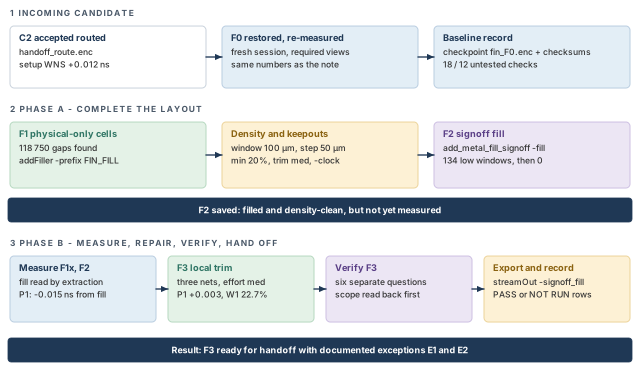
What to notice: Phase A ends with F2 saved but not yet measured. Phase B measures it, repairs it into F3, and verifies and exports F3 only.
Before you start: the example design
The starting point is the accepted routed candidate, saved as handoff_route.enc. We call it C2. Its numbers are:
- setup WNS (worst negative slack) +0.012 ns and hold WNS +0.025 ns;
- no transition or capacitance violators;
- accepted with two documented exceptions.
Routing is not repeated here. The note that came with C2 is the handoff note. In this chapter, "the routed handoff" means C2 and that note together.
The worked example is the invented design stream_acc:
- a 1000 x 1000 µm core;
- two RAM macros,
u_buf_aandu_buf_b, and one ROM macro,u_coef; - a clock
clk_corewith a 2.5 ns period; - one setup path, P1, from
u_acc/acc_reg_12tou_out/res_reg_3.
Time is in ns, distances in µm and capacitance in fF unless a table says pF. Cell names, layer names, rule files, map files, window sizes and every limit are example values. Use the ones from your technology and your project.
The commands use the Innovus Legacy UI, as in Routing, Post-Route Optimization, Checks and Handoff. Every command form was checked, but nothing was run in a licensed Innovus session.
- The command blocks are templates to adapt, not a script to run from top to bottom.
- Some blocks restore a checkpoint and start a new session, and some are alternatives.
- Report excerpts, layouts and numbers are invented teaching illustrations. Report layouts differ between releases.
- Check each option in your installed release before you rely on it.
1 Scope and the incoming candidate
The routed layout is legal for the router, but not yet for the foundry. Every step in this chapter follows from one sentence. Finishing changes the layout, so it must end with fresh evidence tied to the layout handed off.
1.1 What finishing adds, and where the chapter stops
Finishing makes three kinds of change, each with a different risk:
- Physical-only cells. Filler, well-tap and end-cap cells. They carry no logic. They keep the rows continuous, the wells connected and the cell boundaries legal.
- Metal fill. Extra metal shapes in empty areas, so every region of a layer holds a similar amount of metal. They carry no signal, but they sit next to signal wires and couple to them.
- Checks and exports. Checks show the new layout is legal. Exports are the files that carry it to the next team.
All three change the layout, so each needs its own evidence. Metal fill is the one most likely to move timing, because it adds coupling next to your wires.
The chapter produces a finished layout and evidence tied to it. Signoff verification belongs to the receiving team's tools. Examples are a foundry-deck design-rule check, a layout-versus-schematic comparison and a full signoff timing run. Where this chapter runs a native check, the text says what that check does not prove.
1.2 Which layout is which
Each step starts from a named candidate. The names separate five different things. They are the incoming layout, a new layout, a restored copy of an old layout, a measurement condition, and a failed experiment. The list is in Table 1.
| Name | What it is | Kind | Made in |
|---|---|---|---|
| C2 | The accepted routed candidate, handoff_route.enc | Incoming layout | Routing, Post-Route Optimization, Checks and Handoff |
| F0 | C2 restored in a fresh session and measured again; same layout as C2 | Restored checkpoint | Scope and the incoming candidate |
| F1 | F0 with the physical-only cells complete; saved even when nothing was added | New layout | Complete the physical-only cells |
| F1x | F1 timed with the finishing extraction setup, no fill | Measurement condition | Extract and measure the filled design |
| F2 | F1 with signoff metal fill inserted | New layout | Insert and inspect the fill |
| X1 | F2 with all fill near the path deleted | Rejected experiment | Repair without breaking density |
| F3 | F2 with a local fill trim | New layout | Repair without breaking density |
A rejected experiment is never a parent. If an idea fails, return to the last accepted candidate in a fresh session. Start the next idea from there. The section "Verify the finished candidate" draws this lineage together with the reports each candidate owns.
1.3 Restore the incoming candidate
Finishing edits a design that somebody else accepted. A mistake in the incoming candidate costs more after fill than before it. So we restore first, then verify.
- Main commands:
restoreDesign,source,getAnalysisMode,all_analysis_views,timeDesign. - Role: restore, then verify. The blocks are labeled by kind.
- Starts from: the routed files
handoff_route.encandhandoff_route.v, their reports and the handoff note. - Changes: nothing in the layout. Only session state and a new checkpoint name.
- Inspect: the restored design, the analysis setup, and one fresh set of numbers compared with the note.
- Continue if: the fresh numbers equal the handoff note to the stated precision, and the checkpoint is recorded.
Start a new session for every restore. A restored database is not the same thing as a restored analysis setup.
innovus> restoreDesign handoff_route.enc.dat stream_acc ;# load C2 into a new session
Now replay the site setup and read the configuration back. The site script is the same example script as in Routing, Post-Route Optimization, Checks and Handoff. It holds your analysis views, derates and tool modes.
innovus> source site_setup.tcl ;# views, derates and tool modes (example name)
innovus> getAnalysisMode ;# show the timing analysis mode
innovus> getExtractRCMode ;# show the extraction settings
innovus> getDelayCalMode -SIAware ;# show whether delay calc is signal-integrity-aware
innovus> all_analysis_views -type setup ;# list the active setup views
innovus> all_analysis_views -type hold ;# list the active hold views
innovus> getFillerMode ;# show how filler will be added
innovus> get_verify_drc_mode ;# show what the rule check will look at
innovus> get_metal_fill_signoff_mode ;# show the fill settings, empty for now
Three of those getters are new to you:
getFillerModeshows how filler is added.get_verify_drc_modeshows what the rule check will look at.get_metal_fill_signoff_modeshows the fill settings, which should be empty at this point.
A setting you did not expect is a finding, not a detail.
Now run the same analysis as for the routed handoff, with a prefix that names the candidate. From here on every report carries a candidate prefix. A report can then always be matched to a layout.
innovus> timeDesign -postRoute -expandedViews -numPaths 200 \
    -outDir timing_F0 -prefix F0 ;# setup timing of F0
innovus> timeDesign -postRoute -hold -expandedViews -numPaths 200 \
    -outDir timing_F0 -prefix F0 ;# hold timing of F0
innovus> report_constraint -drv_violation_type {max_transition max_capacitance} \
    -all_violators > F0_electrical.rpt ;# transition and capacitance violators
innovus> verifyConnectivity -type all -error 50 -warning 50 ;# opens and unrouted nets
innovus> verify_drc -report F0_drc.rpt ;# native rule check
Setup               WNS +0.012   TNS 0.000   Violating endpoints 0
Hold                WNS +0.025   TNS 0.000   Violating endpoints 0
Electrical          max_transition 0         max_capacitance 0
verifyConnectivity  Open 0       Unrouted 0
verify_drc          Total 0
If a number differs, stop. Compare the active views with the project's required views first. A different view set is a more common cause than a different layout.
Proves: the restored session reproduces the numbers of the handoff note. That supports the incoming baseline.
Does not prove: that F0 is the same layout as C2. Equal WNS, TNS (total negative slack) and counts can come from different layouts. Identity comes from provenance:
- record the checkpoint name and the files it was restored from;
- record a checksum of
handoff_route.vand of the site script; - compare them with the handoff note.
Nor does it prove that the layout has the physical-only cells finishing needs, or that fill will leave these slacks alone. Those are the next two questions.
Save the verified state under a new name and write the numbers down. Table 2 is the reference for every later comparison.
innovus> saveDesign fin_F0.enc ;# checkpoint F0
| Item | F0 value | Where it is recorded |
|---|---|---|
| Checkpoint and input identities | fin_F0.enc, restored from handoff_route.enc.dat; checksums of the netlist and site script | Baseline record |
| Setup WNS / TNS / endpoints | +0.012 / 0.000 / 0 | timing_F0, prefix F0 |
| Hold WNS / TNS / endpoints | +0.025 / 0.000 / 0 | timing_F0, prefix F0 |
| Transition / capacitance violators | 0 / 0 | F0_electrical.rpt |
| Open / unrouted nets | 0 / 0 | log of verifyConnectivity |
Rule violations from verify_drc | 0 | F0_drc.rpt |
| Untested checks (setup / hold) | 18 / 12, carried from the routed handoff | handoff note |
Continue when F0 reproduces the routed handoff numbers in a fresh session, with the required views active. The baseline record must also be complete. If it does not, the incoming handoff is not what it said it was. Do not start finishing until that is settled with its owner.
The next four sections complete the physical-only cells and insert fill. Phase A ends with the filled candidate F2 saved.
2 Complete the physical-only cells
Fill and checks both read the layout as it is. Suppose the rows still have gaps when you insert metal fill, and a later step fills the gaps. Then the layout you measured is not the layout you ship. Settle the cells first.
2.1 What physical-only cells are, in plain English
They are cells that hold no logic. Three kinds matter here:
- End-cap cells sit at the ends of a row segment. They give the row a legal boundary.
- Well-tap cells connect the wells to the supply at a regular spacing. A row with too few of them breaks a well-connection rule.
- Filler cells sit in the gaps between ordinary cells. They continue the power rails and the wells through the gap, so a row has no holes.
Figure 2 shows one row before and after filler.
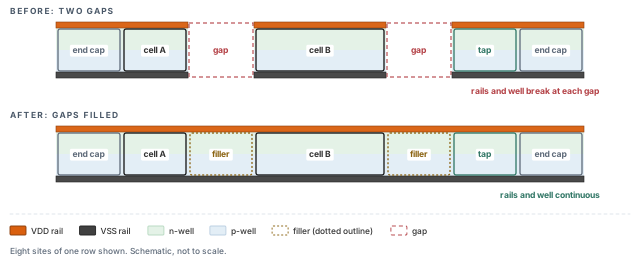
What to notice: The rails and the well stripe break at both gaps in the top row and run unbroken in the bottom row. The tap and the end caps were already there.
2.2 Inspect first
Flows differ. Some add filler before routing, some after, and some leave it to the receiving team. The only reliable way to know is to look. Three questions need three checks, and none of them edits the layout.
innovus> checkFiller -file F0_filler_gaps.rpt ;# count core gaps that have no filler
innovus> verifyEndCap -report F0_endcap.rpt ;# end caps present and of the right type
innovus> verifyWellTap -report F0_welltap.rpt ;# well taps present and within spacing
What each check does:
checkFillerwith no other option reports the number of gaps in the core area that have no filler.verifyEndCapchecks that end-cap cells are present and of the right type. It checks against thesetEndCapModesettings in the session.verifyWellTapchecks that well-tap cells are present and meet the spacing rule you set for it.
checkFiller     Total number of gaps found: 118750
verifyEndCap    Violations 0   (end-cap cells 1280)
verifyWellTap   Violations 0   (well-tap cells 9840)
Read the result by what it shows, not by what it implies. End caps and taps are complete, so there is nothing to add there. Now the gaps:
- the row area is 600 000 µm² and the cells fill 372 000 µm²;
- the free 228 000 µm² is 570 000 sites in 118 750 gaps;
- that is 4.8 sites per gap.
Those gaps need filler, if the project's policy is to add filler in finishing. If the project leaves filler to the receiving team, record the gap count in the handoff note. Save F1 anyway, as shown later, so every later step has one checkpoint name to restore.
Deleting all physical-only cells and adding them again "to be safe". deleteFiller removes filler, end-cap and well-tap cells from the rows. End caps and taps are deleted by default, unless they are fixed and you ask to keep them. A routine delete risks removing cells that the floorplan placed on purpose. If you must remove only filler you added, give the command a prefix that only your filler has.
2.3 Complete the filler
- Role: construct. It adds filler instances.
- Starts from: F0, with the global power connection rules in the database and the gap report above.
- Why: the gaps have no filler, and the project adds it here. Doing it before fill keeps one layout under measurement.
- Changes: adds filler instances in the gaps, with a prefix.
- Inspect: the
checkFillergap count,verify_drcand the instance count. - Continue if: zero gaps remain, no new violation appears, and nothing else moved.
Before you add filler, make sure the filler cells will connect to the supply nets. addFiller uses the global power connection rules of the session to decide that. The rules come from the floorplan, and the recommended order is globalNetConnect before addFiller.
A restored database normally carries the rules. A missing rule would show up as filler with unconnected power pins. Confirm with the floorplan script's owner, or rerun the rules, before you rely on it.
innovus> setFillerMode -core {FILLER8 FILLER4 FILLER2 FILLER1} ;# example cell names
innovus> getFillerMode ;# read the filler settings back
List the filler cells from the largest to the smallest. The cell names belong to your library. setFillerMode is persistent and is saved with the database.
innovus> addFiller -prefix FIN_FILL -markFixed ;# fill every gap, lock the new filler
innovus> verify_drc -report F1_drc_first.rpt ;# first rule check after filler
-prefix FIN_FILLreplaces the default prefixFILLER.-markFixedplaces the new filler in fixed status, so a later optimization cannot move it. Use it when the project wants fillers locked.
Give your filler its own prefix. Then deleteFiller -prefix FIN_FILL removes exactly this filler later, and nothing else.
Run the next block only if F1_drc_first.rpt shows violations between filler and neighboring cells. In the example it shows none, so the block is skipped.
innovus> addFiller -fixDRC -prefix FIN_FILL ;# replace the filler cells that cause them
-fixDRC replaces the filler cells that cause the marked violations. It does not repair violations that belong to routed nets. Reroute those nets instead.
If checkFiller still reports gaps, read the gap widths with checkFiller -reportGap 0.2, one width at a time. Compare the narrowest cell in getFillerMode with the narrowest gap. The usual causes are:
- a filler list with no cell narrow enough;
- a blockage or halo over the gap;
- a gap where a filler would break a rule.
Add the missing width with setFillerMode -core, or combine cells with addFiller -fitGap. Do not reach for deleteFiller.
2.4 Verify the cells
innovus> checkFiller -file F1_filler_gaps.rpt ;# gaps left after filler
innovus> verifyEndCap -report F1_endcap.rpt ;# end caps still legal
innovus> verifyWellTap -report F1_welltap.rpt ;# taps still legal
innovus> verifyConnectivity -type all -error 50 -warning 50 ;# opens and unrouted nets
innovus> verify_drc -report F1_drc.rpt ;# native rule check of F1
checkFiller         Total number of gaps found: 0
verifyEndCap        Violations 0
verifyWellTap       Violations 0
verifyConnectivity  Open 0    Unrouted 0
verify_drc          Total 0
Instances           std 128610  tap 9840  endcap 1280  filler 213750  total 353480
The numbers reconcile:
- instances: 128 610 + 9 840 + 1 280 + 213 750 = 353 480;
- filler: 213 750 cells for 118 750 gaps, 1.8 filler cells per gap on average;
- area: 372 000 + 228 000 = 600 000 µm², so the free area is full.
These checks say the rows are complete in the checked area, and that no new rule violation appeared. They do not say the supply connections of the filler are right. That is a separate connectivity question. Nor do they say the implant and well rules of the foundry deck pass, which is a signoff question. Filler has no logic, but it changes the layout, so timing is read again later.
innovus> saveDesign fin_F1_cells.enc ;# checkpoint F1
F1 is now the parent of everything that follows. If nothing was added, F1 has the layout of F0, and the save still gives later steps one name to restore.
Takeaway Inspect before you add, add only what is missing with your own prefix, and save F1 even when nothing changed.
3 Metal fill: manufacturing and electrical effects
A layer of metal wiring is built by depositing metal over a patterned surface and then polishing it flat. How flat it ends up depends on how much metal each area holds. Fill exists to reduce that difference.
Fill is real metal, though. It couples to your wires, and capacitance is delay. You are adding something to a design whose timing you just accepted. So you need to know why it is there and what it does.
3.1 Why a layer needs metal that carries no signal
After metal is deposited, the surface is ground flat by chemical-mechanical polishing (CMP). A pad rubs the surface and removes material. How fast it removes it depends on how much of each material is under it.
The pad also bridges short distances. So the result in one spot depends on the pattern around it, over tens of microns or more. Two effects follow in processes that use polished copper wiring:
- Dishing. A wide metal line is softer than the dielectric around it. The metal ends up lower than its neighbors, like a shallow dish.
- Erosion. In an area dense with narrow lines and thin dielectric, the pad removes the whole area faster. The array ends up thinner than the area around it.
The word to keep in mind is thickness. Where the metal is thinner, a wire is more resistive. Where the surface is uneven, the next layer starts from an uneven base. Extreme dishing or erosion can cause shorts or opens. Each effect's size depends on the process, so the numbers below are invented.
Let us consider a wire on M3 with a nominal thickness of 0.200 µm. In a region that polishes thin, it comes out at 0.180 µm.
- Sheet resistance follows thickness, so resistance rises by 0.200 / 0.180 = 1.111, which is +11.1%.
- Suppose the net has R = 450 Ω and C = 38 fF. R x C is in ohm-femtofarads, and 1 Ω·fF = 0.001 ps.
- So R x C = 450 x 38 x 0.001 = 17.1 ps.
- With the thinner wire, R = 500 Ω and the product is 19.0 ps.
The difference is 1.9 ps. That is 15.8% of the +0.012 ns slack of C2 on P1, from one net and one cause. It is a scale estimate, not a delay model. It shows why a thin slack and a manufacturing effect belong together. Figure 3 shows both effects in a side view.
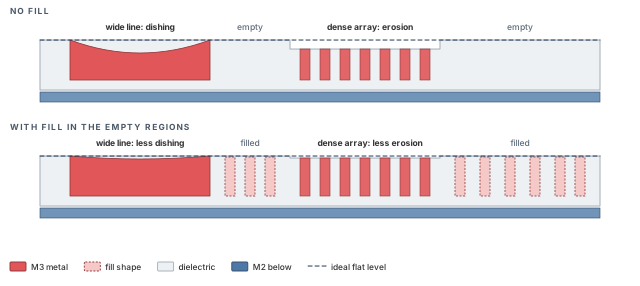
What to notice: The dashed line is the ideal flat level. Without fill, the wide line and the dense array sit below it; with fill, both sit much closer to it.
Fill is a manufacturing requirement:
- The foundry's rules say how much metal a window must hold.
- The logic does not change when fill is added or removed.
- Fill does not repair a wire. It makes the surface around the wire more uniform.
The rule values, window size, and minimum and maximum density come from the foundry deck for your technology. The values in this chapter are examples.
3.2 What a fill shape is, and what it costs
A fill shape is a small metal rectangle drawn in empty space on a metal layer. It is not part of any signal net. It is usually one of two kinds:
- Floating fill is not connected to anything. It is an island of metal that couples to the wires around it.
- Connected fill is tied to a net, usually a power or ground net. It couples to the neighboring wire against a known, fixed reference.
Figure 4 compares the two, with an idealized equivalent circuit under each.
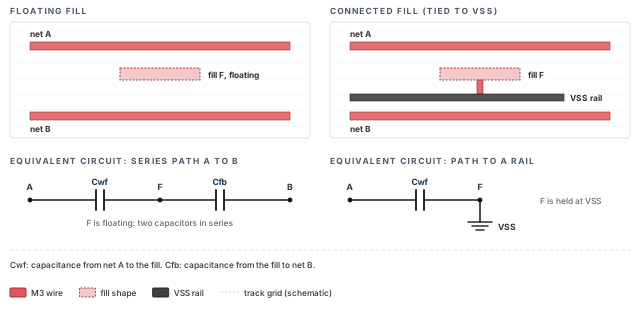
What to notice: Cwf is net A to fill, and Cfb is fill to net B. Real extraction reduces many coupled conductors, so these circuits only show the idea.
Both kinds add capacitance. Floating fill adds it in a way that depends on where the other conductors are. That is why a fill tool and an extraction tool must agree on the geometry. Connected fill adds a more predictable capacitance, but it uses wiring resources to reach its rail. Most signoff fill is floating, but your technology's rule deck decides. Table 3 lists what fill costs.
| Cost | What happens | Where you see it |
|---|---|---|
| Capacitance | Wires couple to nearby fill, so delay and noise change | Timing, in "Extract and measure the filled design" |
| Data volume | Millions of shapes; files and runs grow | Runtime, disk, export size |
| ECO fragility | Moving a wire invalidates the fill beside it | Incremental fill after any edit |
| Check scope | Checks that ignore fill hide its effect; checks that include it take longer | "Verify the finished candidate" |
| Keepouts | Fill must stay away from some nets and shapes | Rules and trim, in the density and repair sections |
3.3 Three different things called "fill"
Keep them apart, because they use different commands and different databases.
- Native fill. Innovus computes the shapes itself.
setMetalFillsets rules,addMetalFillinserts shapes,verifyMetalDensitychecks the density, andtrimMetalFillNearNettrims shapes around critical nets. The shapes are ordinary objects in the database. ChecksetMetalFill -helpandaddMetalFill -helpin your installation before you rely on an option. - Integrated signoff fill. Innovus calls a signoff fill engine from inside the session.
set_metal_fill_signoff_modeconfigures it andadd_metal_fill_signoffruns it. The result is a hierarchical metal fill (HMF) database stored beside the design. Innovus can show it, trim it, flatten it into the database, and hand it to extraction and stream-out. - External signoff tools. You write the layout out, and the receiving team runs its own fill and checks. Innovus is not in the loop for the fill.
Decide the path before you insert any fill. Mixing paths puts two sets of shapes in one layout. This chapter follows path 2. The signoff flow is the recommended one, and its rules come from the same deck that signoff will use. Native fill is described in a box at the end of "Insert and inspect the fill". External tools are a boundary, covered in "Export and hand off".
3.4 What the fill does to one net
Let us consider n_4412, an M3 net of P1, about 300 µm long. Before fill it has 28.0 fF to ground and 6.0 fF of coupling to neighboring wires, 34.0 fF in total. After fill, the extraction would report three changes on this net:
- The coupling to neighboring wires falls by 0.4 fF. Fill shapes sit between some of the wires and partly shield them.
- A new effective coupling to the fill appears: 3.6 fF. This is what the extractor reports for the fill after it reduces the floating conductors. It is not a raw capacitor to an island.
- The ground capacitance is unchanged.
So C after = 28.0 + (6.0 - 0.4) + 3.6 = 37.2 fF.
The change is ΔC = 3.6 - 0.4 = +3.2 fF, which is +3.2 / 34.0 = +9.4%.
To turn capacitance into delay, take the resistance the net sees. It is the effective driver resistance of 1 800 Ω plus half the wire resistance of 300 Ω. We take half because the wire capacitance is spread along the wire.
- R eff = 1 800 + 300 / 2 = 1 950 Ω.
- Δdelay ≈ 1 950 Ω x 3.2 fF x 0.001 = 6.2 ps.
This is a sensitivity estimate, not an exact split of timing-analysis delay. It does not show that every net gains 9%, or that a coupling change always slows a path. It becomes large when it adds to the same change on every other net of the path, as the measurement section shows.
Takeaway Fill is required for manufacturing, and it always adds capacitance. Choose one fill path, and expect to measure its timing cost.
4 Density rules and fill configuration
Fill has a target to hit and zones to avoid. The target is a density rule, and the zones are keepouts. Configure both before the first run. A fill run can take a long time, and a wrong rule wastes it.
4.1 What density is, exactly
Metal density is the area of metal in a window divided by the area of the window, as a percentage. The rule has four parts:
- a window size;
- a step by which the window moves;
- a minimum density;
- a maximum density.
The checker slides the window across the layer, and every position must stay between the minimum and the maximum.
In this chapter the invented rule for M3 is: window 100 x 100 µm, step 50 µm, minimum 20%, maximum 70%. The checked region is the 1000 x 1000 µm core, and the windows lie fully inside it. These are examples. The foundry deck of your technology holds the real values, including how it treats the region boundary.
4.2 Worked example: where is the layer too empty?
Let us consider a strip of five overlapping windows along x, from 200 to 500 µm. The windows are 100 µm wide, so each overlaps its neighbor by half. A window has an area of 100 x 100 = 10 000 µm². Cut the strip into six tiles 50 µm wide. Table 4 gives the routed M3 metal in each tile.
| Tile (x range, µm) | T1 (200-250) | T2 (250-300) | T3 (300-350) | T4 (350-400) | T5 (400-450) | T6 (450-500) |
|---|---|---|---|---|---|---|
| M3 metal, µm² | 700 | 744 | 2 356 | 3 194 | 926 | 964 |
Each window is two adjacent tiles. Add them, then divide by 10 000, as in Table 5.
| Window | Tiles | Metal, µm² | Density |
|---|---|---|---|
| W1 (200-300) | T1 + T2 | 700 + 744 = 1 444 | 14.4% |
| W2 (250-350) | T2 + T3 | 744 + 2 356 = 3 100 | 31.0% |
| W3 (300-400) | T3 + T4 | 2 356 + 3 194 = 5 550 | 55.5% |
| W4 (350-450) | T4 + T5 | 3 194 + 926 = 4 120 | 41.2% |
| W5 (400-500) | T5 + T6 | 926 + 964 = 1 890 | 18.9% |
The mean of the five is (14.4 + 31.0 + 55.5 + 41.2 + 18.9) / 5 = 161.0 / 5 = 32.2%. That mean is above 20%, so a check on the average would pass. The rule is on every window, and W1 and W5 both fail it. Figure 5 draws the same numbers.
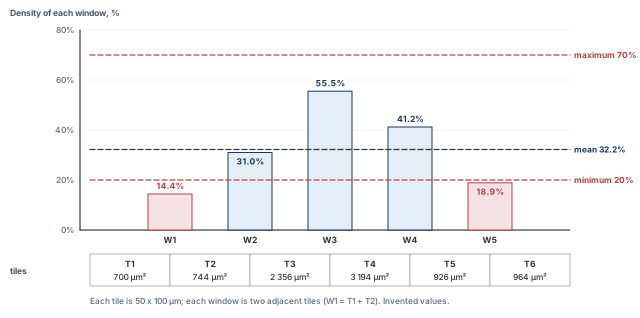
What to notice: The mean sits well above the minimum, yet W1 and W5 are below it. The rule is checked per window, not on the mean.
Judging density from an average or from a color map. A heat map shows the picture, and an average hides the worst window. Only a per-window report is evidence.
How much fill does W1 need?
- To reach the 20% minimum: 0.20 x 10 000 - 1 444 = 556 µm². With a fill shape of 2.0 µm², that is at least 278 shapes.
- The recipe in this example aims higher, at 26%, to leave room for later edits. So W1 needs 0.26 x 10 000 - 1 444 = 1 156 µm², or 578 shapes.
- W5 needs only 110 µm² to reach 20%.
The windows overlap, so fill placed in T2 helps both W1 and W2.
4.3 Where fill must stay away
Fill is allowed only where it does no harm. The keepout rules come from three places:
- the foundry: spacing from signal wires and from the edges of the die;
- the project: nets too sensitive for any fill nearby;
- your own measurements: nets whose timing the fill hurt, as in "Repair without breaking density".
Figure 6 shows the kinds side by side.
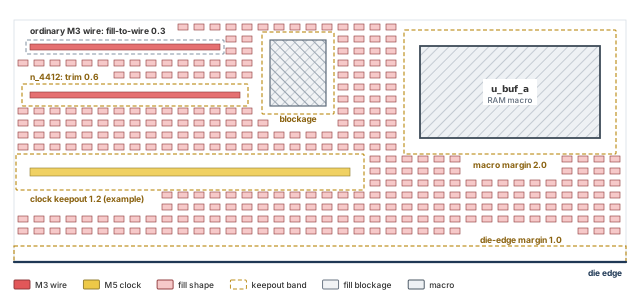
What to notice: Ordinary fill-to-wire spacing is the smallest, and the trim around n_4412 is wider. The clock keepout is wider still, and the macro and die edge have their own margins.
The ordinary fill-to-wire spacing of the rule is the smallest, 0.3 µm in this example. A trim around a critical net is wider than that rule. Its width is set in multiples of the layer pitch, as the configuration below shows. The 1.2 µm clock band in the figure is an example project keepout. It is separate from the -clock trim, which clears fill at the -trim_effort distance.
4.4 Configure the fill
- Role: configure.
- Starts from: F1 in a fresh session, with the project's rule file and layer map file available.
- Why: the fill run reads these settings. A wrong layer map writes fill to the wrong layers.
- Changes: session settings, saved with the design by
saveDesign. No layout object. - Inspect:
get_metal_fill_signoff_mode. - Continue if: every setting you passed is read back with the value you meant.
innovus> restoreDesign fin_F1_cells.enc.dat stream_acc ;# load F1
innovus> source site_setup.tcl ;# replay the site setup
innovus> set_metal_fill_signoff_mode -rule_file fill/fill_rules.rul \
    -layer_map_file fill/streamOut.map \
    -fill_layer {M2 M3 M4 M5 M6} \
    -min_density {20 {M2 M3 M4 M5 M6}} \
    -window_size 100 -window_step 50 \
    -trim_effort med -clock ;# rules, layers, windows and trim for the fill engine
innovus> get_metal_fill_signoff_mode ;# read every setting back
What each option does:
-rule_filenames the fill rule file for the signoff engine. The alternative is-technology, which names the technology so the engine finds its rule file. Use one of them.-layer_map_fileis the stream-out layer map. The fill engine writes shapes with layer numbers, and the map relates those numbers to your layer names. A map with a missing fill datatype is the most common reason for fill that exists but is not seen later.-fill_layerlimits the layers to fill. Listing them makes the run explicit.-min_densityhas the formpercent layer_list. It sets the window density the trim protects. The trim uses it to avoid removing fill where that could cause a density violation. The window size and step control how it is measured.-window_sizeand-window_stepare the window and step used when trimming looks at density. The defaults are 100 and 50, the same as the example rule. Setting them explicitly makes them visible in the readback.-trim_effort medsets the clearance of the trim around critical nets.lowis one layer pitch,medis 1.5 pitches andhighis two pitches.-clockasks the trim to keep fill away from all clock nets.
This example has an M3 pitch of 0.4 µm. So low is 0.4 µm, med is 0.6 µm and high is 0.8 µm. -trim_effort and -spacing cannot be used together.
It is not settled what the tool does when a requested clearance and -min_density conflict. So treat the minimum as an input to the trim. Always confirm the result with an independent density check, as the repair section does.
The settings are saved with the design when you run saveDesign. A mismatch between what you passed and what is read back is a finding, so fix it before the run. Continue when two things hold:
- the readback shows the intended rule file, layer map, layers, minimum density, window size and step, trim effort and clock keepout;
- the layer map has an entry for every fill layer and datatype in the rule file.
5 Insert and inspect the fill
This step changes the metal layers. It can take a long time and produce a very large database. Inspect it before you save and measure. That keeps a defective fill from becoming the parent of everything that follows.
First measure what fill has to fix. The native density check reads the density values in the session's technology data. Run it on F1, before any fill, to get a count.
innovus> verifyMetalDensity -report F1_density.rpt -detailed ;# per-window density of F1
Layer   Windows checked   Below minimum   Above maximum
M2      361               31              0
M3      361               47              0
M4      361               38              0
M5      361               12              0
M6      361                6              0
Total below minimum       134
Under this example's checked region and window placement, each layer has (1000 - 100) / 50 + 1 = 19 positions along each axis. So it has 19 x 19 = 361 windows. A report that lists another count is a reason to investigate.
Read the window count first, before the violation count: 361 per layer here. A wrong count means the check did not look where you think.
If the count differs, the rule, the region, the boundary handling or the layer set may differ from what you meant.
The total is 31 + 47 + 38 + 12 + 6 = 134. W1 of the worked example is one of the 47 on M3.
- Role: construct. It adds fill to the HMF database.
- Starts from: F1, with the settings of the configuration step read back.
- Why: the 134 windows below the minimum.
- Changes: the metal layers of the layout, in the HMF database. Not the cells, not the signal nets.
- Inspect: the run log, a view of the fill, and a native density check with the fill included.
- Continue if: no window on any filled layer is outside the rule, and the fill stays out of its keepouts.
innovus> add_metal_fill_signoff -fill ;# run the signoff fill engine
-fill is one primary action of this command, and you choose one per call. The others used in this chapter are -view_fills, -flatten, -delete_flatten_fills, -trim and -delete_fill.
For a long run, -bg computes the fill in the background without holding the license. Every add_metal_fill_signoff action you want to run in the background must carry -bg. The run stores the fill as the HMF database. It does not make the shapes editable in the session, which keeps a session with millions of shapes responsive.
Fill generation complete.
Layers filled: M2 M3 M4 M5 M6
M3   shapes added 41204   fill area 82408 µm²
HMF database written next to the design.
5.1 Look at the fill, then measure it
innovus> add_metal_fill_signoff -view_fills ;# show the HMF fill, read only
-view_fills loads the HMF database in read-only form. Look at three things in the layout view:
- the fill is on the expected layers;
- it stays out of the keepouts of the configuration step;
- it is thinner or absent around the clock nets.
A picture is for finding problems. It is not evidence that a rule passes, because a picture has no per-window numbers.
It is not settled whether the native checks read HMF fill that has not been flattened. The conservative procedure, used throughout this chapter, has three steps:
- Flatten the fill into the database.
-flattenbrings the fill in for the native rule and density checks. - Run the check.
- Remove the flattened copy afterwards.
Timing does not use the flattened copy. It reads the fill through the extraction setting in "Extract and measure the filled design".
Figure 7 shows where the signoff fill lives and how each command reaches it. Keep it in view for the rest of the chapter.
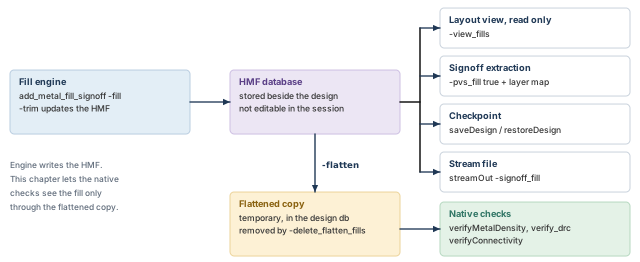
What to notice: The flattened copy is temporary: it exists only between -flatten and -delete_flatten_fills, and the checkpoint carries the HMF database alone.
innovus> add_metal_fill_signoff -flatten ;# copy the HMF fill into the design database
innovus> verifyMetalDensity -report F2_density.rpt -detailed ;# per-window density of F2
Layer   Windows checked   Below minimum   Above maximum
M2      361               0               0
M3      361               0               0
M4      361               0               0
M5      361               0               0
M6      361               0               0
innovus> add_metal_fill_signoff -delete_flatten_fills ;# drop the copy, keep the HMF
-delete_flatten_fills removes the flattened shapes without updating the HMF database. Run it when the native checks are done, so the checkpoint carries one representation of the fill. It is not settled whether a flattened copy would be written into the checkpoint, so avoid the question.
W1 now holds 1 444 + 1 156 = 2 600 µm² in 10 000, which is 26.0%. It was 14.4%.
Proves: with the fill present, the native density check finds no window outside the rule on any filled layer. It uses the session's rules.
Does not prove:
- that the foundry's density rules pass, because the signoff deck decides;
- that fill is clear of every keepout, which you read in the layout view and the rule check;
- that timing is unchanged, which is the next section.
If windows remain below the minimum, count the windows per layer first. Then read get_metal_fill_signoff_mode for the layers and rule, look at the fill with -view_fills, and confirm that you flattened before the check. The usual causes are:
- a layer missing from
-fill_layeror from the layer map; - keepouts that leave too little room;
- a rule in the session that is not the rule the fill used;
- a check that ran without the fill in the database.
Fix the setting, and run -fill again from the saved F1 in a fresh session. After an ECO, -incremental fills only the changed region.
innovus> saveDesign fin_F2_fill.enc ;# checkpoint F2, with its HMF database
saveDesign stores the design with its HMF under fin_F2_fill.enc.dat, and restoreDesign restores a design that is aware of the HMF. F2 is a new layout, and none of the reports of F0 or F1 describes it.
F2 is ready to measure when three things hold:
- the fill run completed without errors;
- the density check with fill shows no window outside the rule;
- the fill is on the layers the map names.
It is not yet accepted.
If the project does not use signoff fill, Innovus can place fill by itself:
setMetalFillsets the rules and can override the metal-fill rules of the technology LEF (Library Exchange Format) file;addMetalFillinserts the shapes;verifyMetalDensitychecks them;trimMetalFillNearNettrims fill around critical nets after timing is measured.
The shapes are ordinary objects in the database, so every native check sees them without a flatten step. Two limits apply. First, the signoff deck is not involved, so the density that signoff computes may differ. Second, the options of setMetalFill and addMetalFill are not described here in detail. Confirm each one with -help in your installation. Do not mix this path with signoff fill in one layout. The rest of the chapter assumes signoff fill.
The next four sections measure the filled candidate with the fill present and repair a regression if one exists. Then they verify the result, export it, and decide. Phase B ends with a final candidate and its record.
6 Extract and measure the filled design
Every timing number in the F0 reports describes a layout without fill. The F2 database holds fill, but nothing has yet looked at the capacitance it adds. Until a new extraction reads the fill, a timing report of F2 describes F1. So measure again, in a way that tells you which change caused which difference.
6.1 Which extraction can see the fill
This depends on the engine. Three facts decide the plan:
- The native extraction at low effort, used for the routed handoff, does not read the fill shapes. Its parameter
-assumeMetFillassumes fill in a defined way, for example full fill at the minimum spacing. That is an approximation, not the shapes you inserted. - The setting
-pvs_fill truesends the fill database to Quantus so its effect is extracted. It affects only the signoff extraction in Quantus, the standalone signoff extraction tool. It has no effect on TQuantus or IQuantus, the built-in extraction engines of Innovus. It also needs a stream layer map for the fill. -effortLevel signoffselects the standalone Quantus engine. It takes its commands from a file given with-qrcCmdFile(the Quantus command file).
So the plan uses the signoff effort level with -pvs_fill true. The cost is a Quantus license and a run that takes longer than the native one. If you cannot run Quantus, the native -assumeMetFill is a labeled alternative, and its numbers are an estimate.
6.2 Why the baseline needs to be measured again
Two things change at once. The routed handoff timed C2 with the native engine. The finishing flow times F2 with a different engine, and with the fill. If P1 gets worse, you could not tell which change did it.
The fix is a controlled baseline. Extract F1, which has no fill, with exactly the settings you will use for F2. Call that measurement F1x. The difference between F1x and F2 is then the fill and its reading. The cells, the routing and every other setting stay the same. F1x is the same layout as F1. It is a measurement condition, not a candidate. Figure 8 lays out the three measurements.
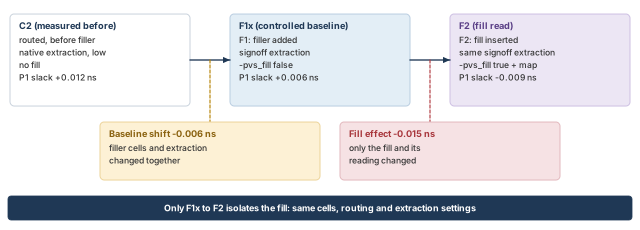
What to notice: Only the second step isolates the fill. The first step is a baseline shift that cannot be split without a third measurement.
- Role: configure, then verify.
- Starts from: F1 in one fresh session, F2 in a second fresh session. The settings are the same in both, except
-pvs_filland its map. - Why: to separate the effect of the fill from the effect of the new measurement setup.
- Changes: the parasitic data of the session. Not the layout.
- Inspect:
getExtractRCMode, the extraction log, then the timing and net reports. - Continue if: the readback shows the settings you meant. The log says the fill was read for F2, not for F1x.
innovus> restoreDesign fin_F1_cells.enc.dat stream_acc ;# load F1
innovus> source site_setup.tcl ;# replay the site setup
innovus> setExtractRCMode -engine postRoute -effortLevel signoff \
    -qrcCmdFile qrc/finish.cmd -coupled true -pvs_fill false ;# signoff engine, no fill
innovus> getExtractRCMode ;# read the extraction settings back
innovus> extractRC ;# extract F1 with the finishing setup
innovus> timeDesign -postRoute -expandedViews -numPaths 200 \
    -outDir timing_F1x -prefix F1x ;# setup timing of F1x
innovus> timeDesign -postRoute -hold -expandedViews -numPaths 200 \
    -outDir timing_F1x -prefix F1x ;# hold timing of F1x
Now repeat in a fresh session on F2. Only the checkpoint and the fill settings differ.
innovus> restoreDesign fin_F2_fill.enc.dat stream_acc ;# load F2 with its HMF
innovus> source site_setup.tcl ;# replay the site setup
innovus> setExtractRCMode -engine postRoute -effortLevel signoff \
    -qrcCmdFile qrc/finish.cmd -coupled true -pvs_fill true \
    -signoff_stream_layer_map fill/fill_extract.map ;# same setup, fill read
innovus> getExtractRCMode -pvs_fill ;# must read true
innovus> extractRC ;# extract F2 with the fill
The map file converts the stream layer and datatype numbers of the fill into Quantus layers, one line per fill layer. Without it, -pvs_fill true is not valid. A missing or wrong line means that layer's fill is not extracted, and no timing error tells you.
innovus> timeDesign -postRoute -expandedViews -numPaths 200 \
    -outDir timing_F2 -prefix F2 ;# setup timing of F2
innovus> timeDesign -postRoute -hold -expandedViews -numPaths 200 \
    -outDir timing_F2 -prefix F2 ;# hold timing of F2
innovus> report_constraint -drv_violation_type {max_transition max_capacitance} \
    -all_violators > F2_electrical.rpt ;# transition and capacitance violators
innovus> report_analysis_coverage -verbose {violated untested} -sort reason \
    > F2_coverage.rpt ;# met, violated and untested checks
6.3 What changed
Table 6 reads each measurement with its layout and its extraction. In every run, P1 is the worst setup path of this invented example.
| Measurement | Layout and extraction | P1 slack | Setup WNS / TNS | Violating endpoints | Hold WNS |
|---|---|---|---|---|---|
| C2 | Routed layout, native extraction, no fill | +0.012 | +0.012 / 0.000 | 0 | +0.025 |
| F1x | F1 layout, finishing extraction, no fill | +0.006 | +0.006 / 0.000 | 0 | +0.021 |
| F2 | F2 layout, finishing extraction, fill read | -0.009 | -0.009 / -0.009 | 1 | +0.027 |
There are two differences, with different meanings:
- C2 to F1x is -0.006 ns on P1. It is a baseline shift. New filler cells and a new extraction setup arrived together. The shift cannot be split between them without a third measurement: F1 with the native engine. If the project needs the split, make that measurement. Here the combined shift is recorded in the handoff note.
- F1x to F2 is -0.015 ns on P1. It is the fill effect. Cells, routing and extraction settings are the same, so the fill and its reading are the only difference.
Hold moves the other way. The fill slows the data wires, so the hold slack grows from +0.021 to +0.027. Do not assume that; read it. Wires on a clock net would behave differently, and the clock net has a keepout.
The electrical report for F2 shows 0 transition and 0 capacitance violators. Coverage counts checks that met, violated or were untested:
- setup: 4 001 + 1 + 18 = 4 020, where the one violated check is the P1 endpoint;
- hold: 4 008 + 0 + 12 = 4 020.
The 18 and 12 untested checks are the same ones as in the routed handoff.
6.4 Where P1 lost 0.015 ns
Ask the path. Time P1 again with the net names and loads, then read the capacitance of the nets.
innovus> report_timing -late -from u_acc/acc_reg_12/CK -to u_out/res_reg_3/D \
    -format {hpin net cell load slew delay arrival} > F2_P1_detail.rpt ;# P1 in detail
innovus> report_net -net n_4412 > F2_n_4412.rpt ;# wire and total capacitance of one net
report_net -net lists the wire capacitance and the total capacitance of the net. Compare the F2 value with the F1x value. Table 7 shows the three nets of P1 that gain the most.
| Net | ΔC from fill, fF | R eff, Ω | Δdelay ≈ R x ΔC, ps |
|---|---|---|---|
n_4412 | +3.2 | 1 800 + 300 / 2 = 1 950 | 6.2 |
n_4417 | +2.1 | 1 950 | 4.1 |
n_4420 | +1.2 | 2 000 | 2.4 |
| slew carry | residual: the remainder of the path loss | 2.3 | |
| Total | 15.0 ps = 0.015 ns |
The three net rows are sensitivity estimates, the same kind as for n_4412 earlier. The slew carry is not measured on its own. It is what is left of the 15.0 ps after the three estimates, and the path report shows it as slower transitions. Treat it as a residual.
P1's arrival moves from 3.014 ns to 3.029 ns against a required time of 3.020 ns. That is the -0.009 ns slack. Both times exceed the 2.5 ns period because, in this invented example, they include clock network latency.
Proves: with the fill read by the extraction, P1 loses 15.0 ps from F1x to F2. About 12.7 ps is traced to three nets by estimate, and 2.3 ps is a residual.
Does not prove: that the signoff timing tool will see the same numbers, because it extracts with its own settings. Nor that the three net estimates are exact.
Stop if F2 shows no capacitance change on any net, or if the extraction log does not mention the fill. Also stop if getExtractRCMode -pvs_fill does not read true. Then the extraction did not see the fill, and the timing report describes F1.
Also compare the fill layers in the layout with the lines of the map file, one line per layer and datatype. A true setting and some capacitance change do not exclude a map that misses one layer. Fix the setting or the map, extract again, and discard the timing reports made before.
7 Repair without breaking density
F2 fails setup by 0.009 ns. The cause is capacitance from fill that the design has no reason to keep close to P1. You want the smallest change that restores the slack, with the density rule intact. The smallest change is local, so it must be aimed.
7.1 What could be wrong, and how to tell
Four causes would each produce a worse P1 after fill. They need different repairs, so separate them first. Table 8 lists them.
| Competing cause | What the evidence looks like | Distinguishing check | Scoped repair |
|---|---|---|---|
| The baseline moved | P1 already moved between C2 and F1x, with no fill | C2 against F1x | None from fill; agree which setup's number the project accepts |
| Fill capacitance on the path's nets | F1x to F2 changes ΔC on P1's nets | report_net on the nets of P1, F1x against F2 | Trim fill around those nets (below) |
| The extraction did not match the fill | Capacitance unchanged, or log silent about fill, or a layer missing from the map | getExtractRCMode -pvs_fill, the log, the map lines | Fix the setting or the map, extract again |
| Fill sits closer than the keepout rule says | Fill beside a net the rule marks as sensitive | The layout view of the fill, the rule file | Fix the keepout in the rule, then regenerate |
In the example:
- The first cause is real and already counted (-0.006 ns).
- The second is confirmed: ΔC is positive on every measured net of P1.
- The third is excluded. The F2 setting reads
true, the map has a line for every fill layer, and the capacitance changed. - The fourth is excluded. The layout view shows no fill inside the clearance of the rule.
So the loss from F1x to F2 comes from fill capacitance, and fill capacitance is what the repair targets.
7.2 A rejected experiment: delete the fill near the path
The tempting move is to remove all fill near the path. You would use add_metal_fill_signoff -delete_fill with a -delete_area over the region.
As an experiment from F2 in a fresh session, P1 returns to +0.006 ns, the F1x value. But the cleared area includes W1. W1 falls back to its routed density of 14.4%. The native density check finds six M3 windows below the minimum. The verdict is in Table 9.
| Experiment | P1 setup slack | M3 windows below 20% | Verdict |
|---|---|---|---|
| X1, delete all fill in the box | +0.006 | 6 (W1 at 14.4%) | Rejected; it trades a timing failure for a density failure |
X1 is saved as fin_X1_rejected.enc for the record. It is not a parent, and F3 starts again from F2.
7.3 Trim only around the nets that matter
- Role: modify. It removes fill near named nets and updates the HMF.
- Starts from: F2 in a fresh session, with the fill settings of the configuration step replayed.
- Why: P1 loses 15.0 ps to fill on three nets. The rest of the layer must keep its fill.
- Changes: the HMF database, only near the three nets and only on the listed layers.
- Inspect:
get_metal_fill_signoff_mode, a new extraction, timing, and the density check. - Continue if: P1 meets the stage target (0.000 ns in this example), and no window is below the minimum.
innovus> restoreDesign fin_F2_fill.enc.dat stream_acc ;# load F2 with its HMF
innovus> source site_setup.tcl ;# replay the site setup
innovus> get_metal_fill_signoff_mode ;# the fill settings must be back
If the readback is empty, the fill settings were not saved or not restored. Run the set_metal_fill_signoff_mode block of "Configure the fill" again, and read it back before you trim.
innovus> add_metal_fill_signoff -trim \
    -net {n_4412 n_4417 n_4420} \
    -trim_layer {M2 M3 M4} -trim_effort med ;# clear fill around three nets
-netnames the critical nets that the trim keeps clear of fill. Name only the nets whose timing needs it, because a longer list removes more fill.-trim_layerlimits the trim to the layers that matter. The nets are on M3, and the layers above and below couple to them. So M2 and M4 are included, and M5 and M6 are not.-trim_effortsets the clearance as a multiple of the layer pitch:lowis one pitch,medis 1.5 andhighis two. It cannot be combined with-spacing, which you use when you need an exact distance from a rule.
The timing-aware variant is -slack_threshold. It trims around every net whose slack is below a value. That is wider than a named list, so it is the wrong tool when only three nets are known.
This option combination has no known worked example, so read the run log.
7.4 What each clearance costs
Pick the clearance by measuring. Make three runs from F2, one per effort level. Follow each with a new extraction and an independent density check.
In this invented design, n_4412 and n_4417 pass through W1, so the trim removes fill from it. Each level clears fill out to a distance larger than the ordinary 0.3 µm rule. The results are in Table 10. Its Option column is the -trim_effort value.
| Option | Clearance, µm | Fill removed in W1, µm² | W1 density | Timing recovered, ps | P1 setup slack | Verdict |
|---|---|---|---|---|---|---|
| none (F2) | - | 0 | 26.0% | 0 | -0.009 | Fails timing |
low | 0.4 | 150 | 24.5% | 6.0 | -0.003 | Fails timing |
med | 0.6 | 330 | 22.7% | 12.0 | +0.003 | Meets both |
high | 0.8 | 700 | 19.0% | 14.0 | +0.005 | Fails the density rule |
The high option wins on timing and loses on density, so it is rejected. Figure 9 shows the trade-off.
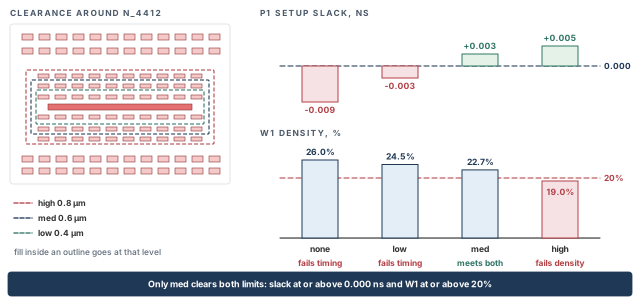
What to notice: Only med clears both limits: P1 slack at or above 0.000 ns and W1 density at or above 20%.
W1 is the window that limits the choice. Its density after fill is (1 444 + 1 156) / 10 000 = 26.0%. After each trim it is (2 600 - removed) / 10 000: 24.5%, 22.7% and 19.0%. The last is below the 20% minimum.
The configuration passed a minimum of 20% to the engine. Still, in this invented run the independent check found W1 at 19.0%. It is not settled whether the tool stops short of the clearance or only warns in that case. That is why the density check after the trim is part of the procedure, not an extra.
7.5 Re-extract, re-measure, save
Run the same extraction as for F2 in the same session, then time and check again.
innovus> setExtractRCMode -engine postRoute -effortLevel signoff \
    -qrcCmdFile qrc/finish.cmd -coupled true -pvs_fill true \
    -signoff_stream_layer_map fill/fill_extract.map ;# same setup as for F2
innovus> getExtractRCMode -pvs_fill ;# must read true
innovus> extractRC ;# extract the trimmed layout
innovus> timeDesign -postRoute -expandedViews -numPaths 200 \
    -outDir timing_F3 -prefix F3 ;# setup timing of F3
innovus> timeDesign -postRoute -hold -expandedViews -numPaths 200 \
    -outDir timing_F3 -prefix F3 ;# hold timing of F3
innovus> report_constraint -drv_violation_type {max_transition max_capacitance} \
    -all_violators > F3_electrical.rpt ;# transition and capacitance violators
innovus> report_analysis_coverage -verbose {violated untested} -sort reason \
    > F3_coverage.rpt ;# met, violated and untested checks
innovus> add_metal_fill_signoff -flatten ;# bring the fill in for the density check
innovus> verifyMetalDensity -report F3_density.rpt -detailed ;# per-window density
innovus> add_metal_fill_signoff -delete_flatten_fills ;# drop the flattened copy
The extraction runs before the flatten step, so the flattened copy never takes part in it. Save only after all of this is read, and without any further edit.
innovus> saveDesign fin_F3_repair.enc ;# checkpoint F3
| Candidate | P1 slack | Setup WNS / TNS | Violating endpoints | Hold WNS | M3 windows below min |
|---|---|---|---|---|---|
| F2 | -0.009 | -0.009 / -0.009 | 1 | +0.027 | 0 |
| X1 (rejected) | +0.006 | +0.006 / 0.000 | 0 | +0.021 | 6 |
| F3 | +0.003 | +0.003 / 0.000 | 0 | +0.025 | 0 |
After the trim, the delay added on P1's nets is 0.8 + 0.6 + 0.8 ps, plus 0.8 ps of slew residual. That is 3.0 ps in total, against 15.0 ps in F2. The trim recovered 12.0 ps. Check: -0.009 + 0.012 = +0.003.
Coverage for F3 is 4 002 + 0 + 18 = 4 020 for setup. For hold it is 4 008 + 0 + 12 = 4 020. The 18 and 12 untested checks are the same as before. Figure 10 puts the four measurements side by side.
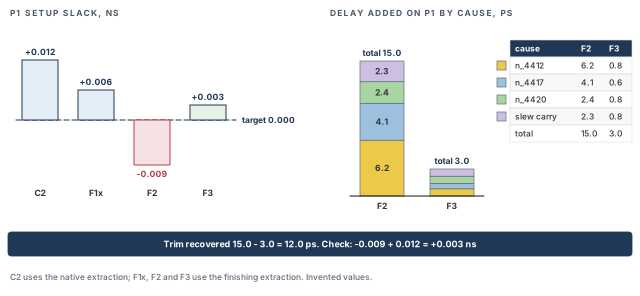
What to notice: The trim gives back 12.0 ps. The final slack of +0.003 ns is positive but thin.
F3 is accepted as the finished candidate when three things hold:
- the setup and hold slacks meet the stage target in the required views;
- no density window is outside the rule;
- its reports describe F3 and not F2.
In the example, F3 meets a stage target of 0.000 ns with +0.003 ns on P1. That margin is thin, so it is recorded as an exception in the handoff record. Expect the signoff tool, which extracts with its own settings, to disagree by a similar amount.
8 Verify the finished candidate
F3 is the candidate you intend to hand off. Before it leaves, ask what is true of exactly this layout, one question at a time. Different checks answer different questions, and a pass on one tells you nothing about another. The commonest finishing mistake is to read one clean report as "the layout is fine". Examples are a clean connectivity report or a green density map.
8.1 Six questions, kept separate
Table 12 pairs each question with its check and with what the check cannot tell you.
| Question | Check in this session | What it cannot tell you |
|---|---|---|
| Are the wires and pins connected as the database says? | verifyConnectivity | Whether the layout matches the schematic. That is layout-versus-schematic comparison, which compares devices and nets extracted from the layout |
| Does the geometry meet the rules this session knows? | verify_drc | Whether it meets the foundry deck. The session knows the technology data it was given, not the signoff deck |
| Is every density window inside the rule? | verifyMetalDensity with the fill included | Whether the signoff deck agrees, and whether a picture of density is a pass. A heat map has no per-window limit |
| Are the physical-only cells complete and legal? | checkFiller, verifyEndCap, verifyWellTap | Whether the implant and well rules of the deck pass |
| Is antenna excess within limits? | verify_antenna | Whether the receiving team's antenna rules agree |
| Does timing meet the target, with the fill extracted? | timeDesign, report_analysis_coverage, report_constraint | Whether the signoff timing tool agrees, and what the untested checks would show |
Each check may pass while the layout still fails a question that check does not ask.
8.2 Check the scope before you read the result
An empty report is a result only if the check looked at what you meant. A check can look at less than you think in three ways:
- The scope was narrowed.
verify_drchas an-area, a-layer_rangeand a-check_onlyselection in its settings. It stops after-limitviolations (default 1000).verifyConnectivityhas-errorand-warninglimits. It can skip classes of finding with options such as-noFilland-noFloatingMetal. - The fill was ignored.
set_verify_drc_mode -ignore_fill_wire truemakes the rule check ignore metal fill wires. A check that ignores fill says nothing about fill, so a clean result covers the signal wires only. Its default is unclear, so set it and read it back. - The fill was not in the database. It is not settled whether native checks read HMF fill that is not flattened. So we flatten first, as when inserting the fill, and remove the flattened copy afterwards.
A density report has a built-in plausibility test. Under this example's checked region and window placement, each layer reports 361 windows. A different count does not prove the run is bad. It tells you to look at the rule, the region and the layer set before you trust the result. The three traps and the test are summed up in Figure 11.
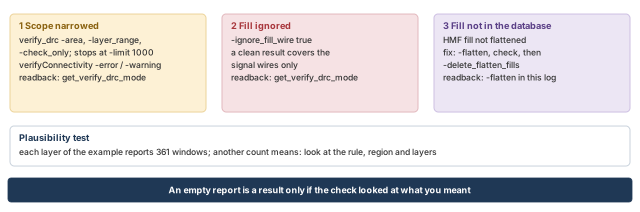
What to notice: Each trap has its own readback: the rule-check mode, the fill-wire setting, and whether you flattened.
8.3 Run the checks on F3
The order matters, because a setting only counts in the session that runs the check. The order is:
- Restore F3 and replay the site setup.
- Set the verification scope and read it back.
- Bring the fill in and run the checks.
The F3 timing, electrical and coverage reports came from the session that saved F3, at the end of the repair. No edit followed them, so they belong to the F3 checkpoint. If you cannot show that, run them again here.
innovus> restoreDesign fin_F3_repair.enc.dat stream_acc ;# load F3 with its HMF
innovus> source site_setup.tcl ;# replay the site setup
innovus> get_metal_fill_signoff_mode ;# confirm the fill settings came back
innovus> set_verify_drc_mode -ignore_fill_wire false -limit 1000 ;# include fill wires
innovus> get_verify_drc_mode ;# read the scope back
The readback must show no -area or -layer_range narrower than the core, and the limit you meant. Compare it with the project's required scope and write it down. Then load the fill and run the checks.
innovus> add_metal_fill_signoff -flatten ;# copy the HMF fill into the database
innovus> verifyConnectivity -type all -error 50 -warning 50 ;# opens and unrouted nets
innovus> verify_drc -report F3_drc.rpt ;# rule check, fill included
innovus> verifyMetalDensity -report F3_density.rpt -detailed ;# per-window density
innovus> verify_antenna -report F3_antenna.rpt ;# antenna check
innovus> checkFiller -file F3_filler_gaps.rpt ;# gaps left
innovus> verifyEndCap -report F3_endcap.rpt ;# end caps
innovus> verifyWellTap -report F3_welltap.rpt ;# well taps
innovus> add_metal_fill_signoff -delete_flatten_fills ;# keep only the HMF fill
verifyConnectivity   Open 0   Unrouted 0
verify_drc           Total 0
verifyMetalDensity   M2..M6: 361 windows each, 0 below, 0 above
verify_antenna       Total 0
checkFiller          Total number of gaps found: 0
verifyEndCap         Violations 0
verifyWellTap        Violations 0
Proves: in this session, with the settings read back, F3 has no open or unrouted net. It has no rule violation in the checked scope, fill included. It has no density window outside the rule, no antenna violation and no unfilled gap.
Does not prove: layout-versus-schematic equivalence, signoff rule or density compliance, signoff timing, or power integrity. None of those was run in this session.
If connectivity reports floating metal after the fill is loaded, look at where the markers sit. Floating fill is not connected by design. Run verifyConnectivity -noFill -type all and compare: a real open stays, and floating fill disappears. For floating fill, use the option and record it. For a real open, go back to Routing, Post-Route Optimization, Checks and Handoff.
8.4 Which report belongs to which layout
Every report in this chapter carries a candidate prefix, and a prefix is only a label. A report describes a candidate when four things hold:
- It was run on that candidate's checkpoint, or on the session state saved as that checkpoint.
- The settings of that candidate were read back.
- It ran to completion.
- No relevant layout or setting change followed it.
A file's age is a warning sign, not a test. Saving an unchanged layout does not make its reports stale, and a copied file gets a new time. The deciding record is provenance: which checkpoint, which session, which settings, all in the manifest.
Table 13 lists the checks by what each run actually covered. "Run" means a run exists on that layout. Only the F3 column supports the F3 handoff, and every other cell describes an earlier layout.
Figure 12 draws the facts of Table 13 on the lineage of the candidates.
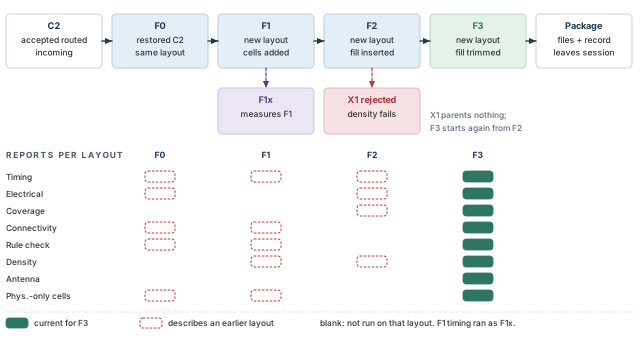
What to notice: F3 descends from F2, not from X1. Only the filled chips under F3 support the handoff; antenna ran on F3 alone.
| Check | F0 | F1 | F2 | F3 |
|---|---|---|---|---|
| Timing, setup and hold | Run | Run as F1x | Run | Run |
| Electrical limits | Run | Not run | Run | Run |
| Analysis coverage | Not run, carried from the routed handoff | Not run | Run | Run |
| Connectivity | Run | Run | Not run | Run |
| Rule check | Run | Run | Not run | Run |
| Density | Not run | Run, before fill | Run, with fill | Run |
| Antenna | Not run | Not run | Not run | Run |
| Physical-only cells | Run | Run | Not run | Run |
Stop if a report cannot be tied to the checkpoint you are shipping. Stop if a report named for F3 was produced in a session that held another candidate. Stop if the scope in the mode readback differs from the project's required scope. In each case, run it again in a fresh session on the checkpoint.
9 Export and hand off
The receiving team will never see your session. It sees files and a record. Whatever the files do not carry does not exist for them. Examples are a layer that was not mapped and a cell that was not merged. So export from the exact candidate you verified, check what you wrote, and write a record. The record says which checks ran, which did not, and who owns the rest.
9.1 What stream-out needs before it runs
streamOut writes a GDSII (Graphic Data System II, the stream format) file of the current database. It has four prerequisites, listed in Table 14 with what happens when each is missing.
| Prerequisite | If it is missing |
|---|---|
| A map file with every layer to write, its stream number and datatype, fill layers included | Unmapped layers are not written; fill can vanish without an error |
Macro and library cell layouts, merged with -merge or written with -outputMacros | Cells are empty or missing. Use one of the two per cell, not both |
The units (-units) that the receiving flow expects. The default is the units of the LEF | A mismatch scales the whole layout |
| The HMF database. The fill option merges the fill data and places the signoff top fill cell at 0,0, unrotated, in the top cell | The file carries no fill, or an old fill |
Some installations spell the fill option -signoff_fill and others -pvs_fill. Run streamOut -help and use the spelling it prints. The block below uses -signoff_fill.
- Role: export.
- Starts from: F3 restored in a fresh session, the verification checks read, and the map file with the fill layers present.
- Why: the receiving team reads a layout file, not a session.
- Changes: nothing in the design. It writes files.
- Inspect: the stream-out log and report file, the size of the file, then the receiving side's readback.
- Continue if: the log has no unmapped-layer or renamed-cell warning you cannot explain, and the readback matches the manifest.
innovus> restoreDesign fin_F3_repair.enc.dat stream_acc ;# load F3 with its HMF
innovus> source site_setup.tcl ;# replay the site setup
innovus> get_metal_fill_signoff_mode ;# confirm the fill settings came back
innovus> streamOut stream_acc_F3.gds -mapFile fill/streamOut.map \
    -libName DesignLib -structureName stream_acc -units 1000 \
    -mode ALL -signoff_fill \
    -merge {gds/u_buf_a.gds gds/u_buf_b.gds gds/u_coef.gds \
    gds/stdcells.gds} \
    -reportFile stream_acc_F3_streamout.rpt ;# write the GDSII of F3 with its fill
What each option does:
-mapFileis required for a successful stream-out, so give it explicitly. If you leave it out, the tool reads a file namedstreamOut.mapif one exists. Otherwise it writes a generic map you have to customize.-units 1000is 1000 database units per micron. It must equal what the receiving flow expects.-mode ALLwrites every layer in the map.FILLONLYwrites only the fill layers, andNOFILLonly the others. The last two suit a receiving team that wants two files to merge.-mergetakes the external layouts and checks all merged files for name collisions. If a name collides, the tool renames it and warns. Do not rely on the order of the files to decide which one wins. Read the warnings.-structureNamenames the top structure. Its default is the top cell of the current design.
Export from a restored F3, not from the session where you ran the density check or the trial trims. A session that has run experiments may hold a flattened copy, an edited setting or a different candidate.
Figure 13 shows the whole export: inputs, the files written, and the three levels of checking that follow.
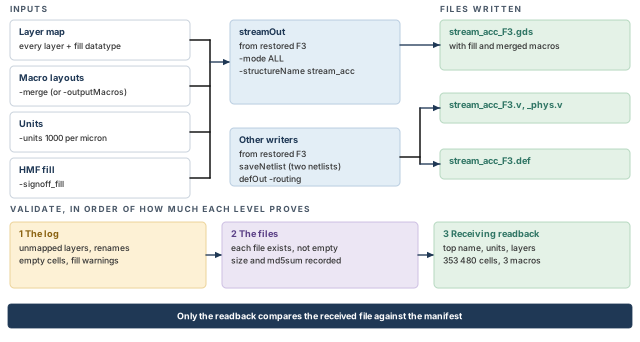
What to notice: Each validation level proves more than the one before it. Only the receiving side's readback compares the file against the manifest.
If the receiving tool finds no fill datatype, or reports renamed or empty cells, check four things:
- the option spelling, with
streamOut -help; - that the map lists every layer and datatype;
get_metal_fill_signoff_modein the restored session;- the log, for renames.
A rename means a -merge name collision picked one cell. List the colliding cells and decide with their owner which is right. Restore F3, correct the cause, export again and take a new checksum.
9.2 What else the receiving team needs
The package depends on the project's agreement. Table 15 shows a typical set, each item with the command that writes it.
| Item | Command | Notes |
|---|---|---|
| The checkpoint | saveDesign (already done: fin_F3_repair.enc) | Restores the design with its HMF |
| Logical netlist | saveNetlist stream_acc_F3.v | Default: logical cells only |
| Netlist with physical instances and power connections | saveNetlist stream_acc_F3_phys.v -includePhysicalInst -includePowerGround | For flows that compare layout against a netlist; the receiving team decides. A netlist made with the different option -includePhysicalCell should not be read back into Innovus |
| Routed wires as DEF (Design Exchange Format) | defOut -routing stream_acc_F3.def | Carries the routing. defOut has no option for the signoff fill, so the fill travels in the stream file |
| Parasitics as SPEF (Standard Parasitic Exchange Format) | rcOut -spef stream_acc_F3.spef | Only if the receiving team asks; they normally extract with their own settings |
| Reports and record | The files with prefix F3_ and the record below | Provenance in the manifest |
innovus> saveNetlist stream_acc_F3.v ;# logical netlist
innovus> saveNetlist stream_acc_F3_phys.v -includePhysicalInst \
    -includePowerGround ;# netlist with physical instances and power
innovus> defOut -routing stream_acc_F3.def ;# routed wires as DEF
9.3 Validate what you wrote
There are three levels, in order of how much they can prove.
- The log. Open
stream_acc_F3_streamout.rptand the session log. Look for unmapped layers, renamed cells, empty cells and warnings about the fill data. A warning you cannot explain is a finding. - The files. Check that each file exists and is not empty. Record each one in the manifest with its size and a checksum. The checksum supports integrity when you compare it with a value recorded at a trusted point, such as receipt. It does not show that the content is right.
- A readback on the receiving side. The tool that reads the stream file reports what it found. Ask for the facts in Table 16 and compare each with the manifest.
innovus> file size stream_acc_F3.gds ;# Tcl file size in bytes
innovus> exec md5sum stream_acc_F3.gds ;# shell checksum for the manifest
Both commands above run at the Innovus prompt but are not Innovus commands. file size is plain Tcl, and exec md5sum calls the Linux shell.
Reference counts depend on the hierarchy. A raw count can include library internals and fill structure. So compare against the count the manifest recorded for the intended hierarchy, read with the same tool.
| Fact | Expected for F3 | If it differs |
|---|---|---|
| Top structure name | stream_acc | The wrong file or the wrong -structureName |
| Database units | 1000 per µm | The wrong -units; everything is scaled |
| Layout bounding box | The die of the design, with the macros and the core inside | A missing macro, a missing boundary or an offset |
| Layers present | Every layer and datatype of the map, including the fill datatypes of M2 to M6 | An unmapped layer; the fill is missing |
| Library cell instances in the top design | 353 480 (128 610 + 9 840 + 1 280 + 213 750), as the manifest records | Missing filler, taps or end caps |
| Macro references | 3 (u_buf_a, u_buf_b, u_coef) | A macro not merged, or empty |
| Signoff top fill cell references | 1, at the origin without rotation | The fill was not merged, or merged twice |
| Cell-name renames | None unexplained | A name collision in -merge; the wrong cell may have won |
9.4 The handoff record
The record is a decision with evidence. It separates two decisions that are easy to merge:
- Handoff readiness: is this layout, with these results, ready for the receiving team to work from? That is the producer's decision, and this chapter makes it.
- Signoff readiness: is the layout clean in the receiving team's tools? That is not decided here, because those checks are not run here.
Figure 14 shows the split between the two decisions on the record of F3.
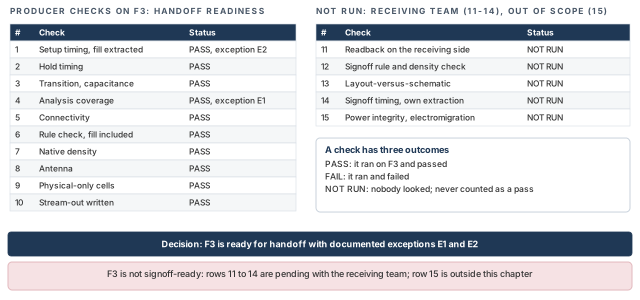
What to notice: NOT RUN is written as words, never as a 0, and it never counts as a pass.
Table 17 defines the three handoff states.
| Handoff state | Means | Rule |
|---|---|---|
| Ready | Every check required of the producer ran on this layout, with the right scope, and passed | No exception |
| Ready with documented exceptions | Every required check ran. Some results carry an exception that someone with authority approved, with a record | Each exception has a scope, an owner, an approval reference and a recheck trigger |
| Not ready | A required check failed, did not run, or describes another layout | State which, and what would change it |
A check has three outcomes, not two: it passed, it failed, or it did not run. A table with a 0 for a check that never ran reads as "no violations". It really means "nobody looked".
So the record uses words in the status column, and a number only where a tool produced it. A check that belongs to the receiving team is recorded as NOT RUN with its owner. That is a pending responsibility, not an exception to the producer's handoff. It is never counted as a pass. The record for F3 is in Table 18 and Table 19.
| # | Check | Status | Result | Evidence file |
|---|---|---|---|---|
| 1 | Setup timing, fill extracted | PASS with exception (E2) | WNS +0.003, TNS 0.000, 0 endpoints | timing_F3/, prefix F3 |
| 2 | Hold timing | PASS | WNS +0.025, 0 endpoints | timing_F3/ |
| 3 | Transition, capacitance | PASS | 0 / 0 violators | F3_electrical.rpt |
| 4 | Analysis coverage | PASS with exception (E1) | Setup 4 002 + 0 + 18 = 4 020, hold 4 008 + 0 + 12 = 4 020 | F3_coverage.rpt |
| 5 | Connectivity | PASS | Open 0, unrouted 0 | session log of verifyConnectivity |
| 6 | Rule check, fill included | PASS | Total 0, limit 1000 | F3_drc.rpt |
| 7 | Native density | PASS | 361 windows per layer, 0 below, 0 above. Tightest M3 window 22.7% | F3_density.rpt |
| 8 | Antenna | PASS | Total 0 | F3_antenna.rpt |
| 9 | Physical-only cells | PASS | Gaps 0, end-cap 0, well-tap 0 | F3_filler_gaps.rpt, F3_endcap.rpt, F3_welltap.rpt |
| 10 | Stream-out written | PASS | Log read, checksum recorded | stream_acc_F3_streamout.rpt |
The remaining rows belong to the receiving team or lie outside this chapter.
| # | Check | Status | Result | Evidence file |
|---|---|---|---|---|
| 11 | Readback on the receiving side | NOT RUN | Pending, receiving team | none yet |
| 12 | Signoff rule and density check | NOT RUN | Pending, receiving team | none |
| 13 | Layout-versus-schematic comparison | NOT RUN | Pending, receiving team | none |
| 14 | Signoff timing, own extraction | NOT RUN | Pending, receiving team | none |
| 15 | Power integrity, electromigration | NOT RUN | Outside this chapter | none |
Rows 1 to 10 ran on F3 and are tied to its checkpoint in the manifest. Rows 11 to 15 have no file.
9.5 The exceptions
Two exceptions go with the record. The approval references below are invented examples. A real record carries the project's owner and reference, and an exception without them is not approved.
| Exception | Scope and evidence | Owner | Approval | Recheck when |
|---|---|---|---|---|
| E1. 18 setup and 12 hold checks have no result | Same objects and reasons as the routed handoff record, F3_coverage.rpt. Capture clocks are tied off in this mode, and other modes cover the function | Constraint owner (role) | APPR-0412 (example) | A mode or constraint changes |
| E2. P1 slack is +0.003, and the finishing setup differs from the routed handoff by -0.006 ns on P1 | timing_F3/ and the F1x comparison. Meets the stage target of 0.000 ns | Timing owner (role) | APPR-0413 (example) | Signoff timing disagrees by more than the margin, or any edit follows |
The stage target of 0.000 ns is an invented value of the example. The receiving project's number is the one that counts.
9.6 Decision
F3 is ready for handoff with documented exceptions E1 and E2. It is not signoff-ready, and this record does not claim that. Rows 11 to 14 are pending with the receiving team, and row 15 is outside this chapter.
Anything that edits the layout, even one wire or one fill shape, makes F3 a new candidate. It returns you to "Extract and measure the filled design". The lineage is C2, F0, F1, F2, F3. F1x is a measurement of F1, and X1 is a rejected experiment that parents nothing. The handoff note carries the items in Table 21.
| Part of the handoff note | Content for F3 |
|---|---|
| Candidate | F3, checkpoint fin_F3_repair.enc, restore command, lineage |
| What changed | 213 750 filler cells; signoff fill trimmed (med) around n_4412, n_4417, n_4420 |
| Settings | Fill, extraction (-pvs_fill true, layer map) and rule-check readbacks |
| Evidence | The files of the record, with their folders and the checkpoint each was run on |
| Exceptions | E1 and E2 |
| Pending | Rows 11 to 14 (receiving team); row 15 (outside this chapter) |
| Files | The stream file with its checksum, netlists, DEF, reports |
| Verify again | Restore fin_F3_repair.enc.dat, replay the site setup, rerun the checks. A rebuild from F2 is the trim and re-extraction only |
Takeaway F3 is packaged with its record. The receiving team now runs the checks that are theirs, and the record lists them.
10 Debug index and open caveats
Finishing failures are expensive to guess at, because each rerun of fill or extraction takes a long time. The sections above carry the detail. This section is the index: find the symptom, run the first check, and go to the section that repairs it.
Use the same order every time. Start from the symptom and its evidence, then list the competing causes. Run a check that tells them apart, make a scoped repair, and measure the repaired candidate again.
10.1 Open caveats to settle in your installation
These points are not settled for every release. Note them before you rely on a result.
- The fill option of
streamOutis spelled-signoff_fillin some installations and-pvs_fillin others. Use the spelling that-helpprints. - The default of
deleteFiller -keepFixedis unclear, so fixed end caps and taps may or may not survive. Always pass-prefixor-celltodeleteFiller. - Confirm every
setMetalFillandaddMetalFilloption with-helpbefore you use it. - The default of
set_verify_drc_mode -ignore_fill_wireis unclear. Set it, then read it back. - It is not settled whether the native checks read HMF fill without
-flatten, or whethersaveDesignwould write a flattened copy. This chapter flattens for the checks and deletes the flattened copy afterwards. - It is not settled what the trim does when a requested clearance and
-min_densityconflict. This chapter verifies density independently after every trim. defOuthas no option for signoff fill, so the fill travels only in the stream file.- If you need the global connection rules as a script, try
writeFplanScript -sections {globalNetConnect}. Confirm it with-helpfirst. - The combination
-trim -net -trim_layer -trim_efforthas no known worked example. Read the run log after the first trim.
10.2 Common mistakes and how to catch them
Table 22 maps each symptom to its likely cause, its first check and its repair.
| Symptom | Likely cause | First check | Fix, and where |
|---|---|---|---|
checkFiller still reports gaps | No filler cell narrow enough, or a blockage or halo over the gap | checkFiller -reportGap, getFillerMode | Add the missing filler width ("Complete the physical-only cells") |
| Windows below the minimum after fill | Layer missing from -fill_layer or the map, tight keepouts, wrong rule, or fill not flattened | Window count, get_metal_fill_signoff_mode, -view_fills | Fix the setting, run -fill again from F1 ("Insert and inspect the fill") |
| Timing worse after fill | Fill capacitance on the path's nets | F1x against F2, then report_net on the path's nets | Trim around the confirmed nets and measure density ("Repair without breaking density") |
| Timing after fill equals timing before | The extraction did not read the fill | getExtractRCMode -pvs_fill, the log, the map lines | Fix the setting or the map, extract again ("Extract and measure the filled design") |
| Rule check is clean and silent about fill | Fill ignored by the mode, or fill not flattened | get_verify_drc_mode | Set the scope, flatten, run again ("Verify the finished candidate") |
| Floating metal after the fill is loaded | Floating fill is unconnected by design | verifyConnectivity -noFill against a run without it | Record the option for floating fill ("Verify the finished candidate") |
| No fill, or renamed cells, in the stream file | Wrong option spelling, missing map datatype, or a -merge name collision | streamOut -help, the map, the log | Correct, restore F3, export again ("Export and hand off") |
| A clean report that may belong to another candidate | The report ran in a session that held another layout | The manifest: checkpoint, session, settings | Run it again on the shipped checkpoint ("Verify the finished candidate") |
11 Interview preparation
Because the rows still have gaps and the metal layers have empty areas, which are manufacturing problems.
- Finishing adds physical-only cells and metal fill, then checks and exports.
- All three change the layout, so each needs its own evidence.
End caps give a row a legal boundary, well taps tie the wells to the supply, and fillers close the gaps.
- Fillers continue the power rails and the wells through each gap.
- None of them carries logic.
Because deleteFiller also removes end caps and well taps, which the floorplan placed on purpose.
- End caps and taps are deleted by default unless they are fixed and you ask to keep them.
- Add your filler with a distinct prefix, such as
FIN_FILL, so you can remove only that.
CMP removes material at a rate that depends on local metal density, so empty or dense areas end up uneven.
- Dishing thins wide lines, and erosion thins dense arrays; thinner metal is more resistive.
- Fill evens the density but adds capacitance, data volume, ECO fragility, check scope and keepouts.
Not necessarily, because the rule applies to every window, not to the average.
- In the worked example, W1 is at 14.4% and W5 at 18.9%, both below the minimum.
- Only a per-window report is evidence; a heat map or an average is not.
Floating fill is an unconnected island; connected fill is tied to a net such as VSS.
- Floating fill sits between two wires like two capacitors in series.
- Connected fill gives a more predictable capacitance to a fixed rail, but uses wiring to reach it.
Because it is not settled whether native checks read unflattened HMF fill, and the checkpoint should carry one copy of the fill.
add_metal_fill_signoff -flattenbrings the fill in for the native rule and density checks.-delete_flatten_fillsremoves the copy without updating the HMF database.
Because the extraction engine and the fill change together, so without F1x you cannot attribute a slack change.
- C2 to F1x is a baseline shift (-0.006 ns on P1).
- F1x to F2 isolates the fill effect (-0.015 ns on P1).
That the extraction did not read the fill.
- Check that
getExtractRCMode -pvs_fillreadstrueand the log mentions the fill. - Check that the stream layer map has one line per fill layer and datatype.
- Discard the timing reports made before the fix.
Because it drops W1 back to 14.4% and leaves six M3 windows below the minimum.
- It trades a timing failure for a density failure.
- A scoped trim (
-trim_effort med) recovers 12.0 ps and keeps W1 at 22.7%.
By provenance: the checkpoint, the session and the settings it ran with, recorded in the manifest.
- It must run to completion with no relevant change after it.
- A file name prefix or a file date is only a label or a warning sign.
streamOut writes a usable layout?A complete layer map with fill datatypes, merged macro layouts, the expected units, and the HMF fill included.
- A missing map line silently drops that layer, including its fill.
- A
-mergename collision renames a cell, so read the warnings.
Handoff readiness is the producer's decision on its own checks; signoff readiness needs the receiving team's checks.
- Checks owned by the receiving team are recorded as NOT RUN with an owner.
- NOT RUN is never counted as a pass.
Compact glossary
| Term | Meaning |
|---|---|
| Finishing | The steps after routing that complete physical-only cells, add metal fill, check and export the layout |
| Candidate | A named, saved layout state, such as F1 or F3 |
| Physical-only cell | A cell with no logic: end cap, well tap or filler |
| End-cap cell | A cell at the end of a row segment that gives the row a legal boundary |
| Well-tap cell | A cell that connects the wells to the supply at a regular spacing |
| Filler cell | A cell that closes a gap so the rails and wells continue |
| Metal fill | Extra metal shapes in empty areas that carry no signal |
| CMP | Chemical-mechanical polishing, which grinds each metal layer flat |
| Dishing | A wide metal line polished lower than its neighbors |
| Erosion | A dense array polished thinner than the area around it |
| Floating fill | A fill shape connected to nothing |
| Connected fill | A fill shape tied to a net, usually power or ground |
| Metal density | Metal area in a window divided by the window area, in percent |
| Density window | The square area, moved by a fixed step, in which density is checked |
| Keepout | A zone where fill must not be placed |
| Trim | Removing fill near named nets to recover timing |
| HMF | Hierarchical metal fill database, where signoff fill is stored beside the design |
| Flatten | Copying the HMF fill into the design database for native checks |
| Controlled baseline | A measurement of the unfilled layout with the same extraction as the filled one (F1x) |
| Provenance | The record of which checkpoint, session and settings produced a report |
| Stream-out | Writing the layout as a GDSII (stream) file |
| Layer map | The file that relates layer names to stream numbers and datatypes |
| Documented exception | An approved deviation with scope, owner, approval reference and recheck trigger |
Chip finishing on one page
Table 24 is the whole flow as a cheat sheet. The numbers are those of the worked example.
| Step | Candidate | Main commands | Continue if |
|---|---|---|---|
| Restore and re-measure | F0 | restoreDesign, source, timeDesign, verify_drc | Numbers equal the handoff note; provenance recorded |
| Complete the cells | F1 | checkFiller, setFillerMode, addFiller -prefix FIN_FILL | 0 gaps, no new violation |
| Configure the fill | F1 | set_metal_fill_signoff_mode, get_metal_fill_signoff_mode | Readback matches intent; map covers every fill datatype |
| Insert the fill | F2 | add_metal_fill_signoff -fill, -flatten, verifyMetalDensity | 0 windows outside the rule (was 134 below) |
| Measure | F1x, F2 | setExtractRCMode -pvs_fill, extractRC, timeDesign | Fill read; effect attributed (-0.015 ns on P1) |
| Repair | F3 | add_metal_fill_signoff -trim -trim_effort med | P1 +0.003 ns; W1 at 22.7% |
| Verify | F3 | verifyConnectivity, verify_drc, verifyMetalDensity, verify_antenna | Every question answered with scope read back |
| Export and record | F3 | streamOut, saveNetlist, defOut | Log clean; record lists PASS and NOT RUN rows |
Where the next chapter goes, and why
F3 is handed off with a record. That record lists what is still open: signoff timing with its own extraction, and a thin +0.003 ns margin on P1.
The next chapter, Signoff Preparation and Timing ECO Closure, picks up exactly there. It prepares the signoff timing run and closes the paths that fail there with ECOs. Every ECO edits the layout, so the habits of this chapter come with you. Each edit means a new candidate name, incremental fill and a fresh extraction. The evidence is again tied to the exact layout.