Why this chapter matters in a real project
A netlist on its own is only a list of names. It says that cell U1 is a NAND2X1, but it says nothing about how fast a NAND2X1 is. The speed lives in a separate file called a logic library. Before PrimeTime can time anything, it must read both and join them together.
This joining step is called linking. If it goes wrong, every later number is wrong or missing. For example, the tool might pick an old copy of a library because it sat earlier in the search order. Thus, the design would be timed with the wrong delays, and the report would still look clean.
The rest of this chapter covers daily habits that save hours. You will check that all files exist before a long run. You will save a session so a colleague can reload it in minutes. You will also cut a small test case when you need help with a problem. These skills are used in every project, on every block.
Prerequisites
- No earlier chapter is required.
- You should know basic digital logic: gates, flip-flops and clocks.
- You should know what a netlist is: a file that lists cell instances and the nets that connect them.
- You do not need to know timing constraints, clocks in PrimeTime or report reading yet. Those come in later chapters.
In this chapter, times are in nanoseconds (ns) unless said otherwise.
Learning objectives
- Explain what a logic library describes and why timing needs it.
- Set
search_pathandlink_path, and predict the order in which the tool searches them. - Read and link a design, then verify it with
list_designsandlist_libs. - Describe a fusion library and include it in the link path in two ways.
- Apply a different link path to selected instances, and predict which rule wins.
- Run a script in file identification mode to find missing files before a full run.
- Find design objects with the "get" commands and set the current design and current instance.
- Use the attribute commands, and keep user attributes across sessions.
- Save and restore a session, and choose between version-specific and version-compatible sessions.
- Create a small standalone test case with
create_testcase.
Figure 1 is a map of the whole chapter. Come back to it whenever you lose your place.
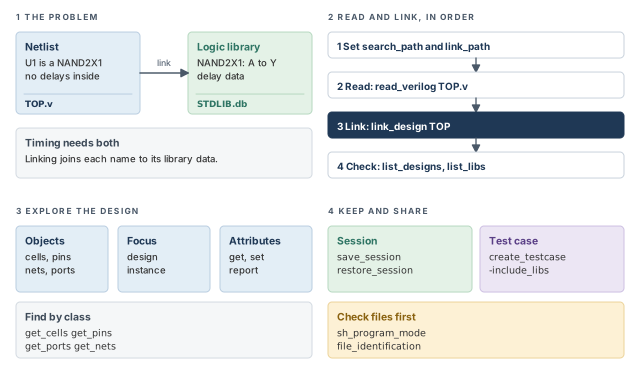
1 The beginner's mental model
Think of a factory that builds a kit from an assembly drawing. The drawing lists slots and part numbers: "slot U1 takes part NAND2X1". It does not say how fast each part is. That data sits in parts catalogs on the shelves.
Before building, a clerk walks the drawing slot by slot. For each part number, the clerk searches the catalogs in a fixed order. When the clerk finds the part, the slot is linked to that catalog page. Figure 2 shows this picture and maps each piece to its PrimeTime name.
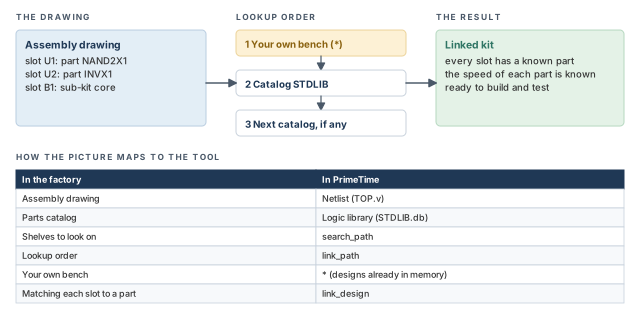
- A real catalog page is the same everywhere. A library cell is not. The same cell name can appear in several libraries, each built for different conditions. Thus, the search order decides which delays you get.
- The clerk only matches part numbers. In the same way, linking does no timing at all. Timing starts later, after constraints are applied.
- A real factory uses one catalog order for the whole kit. PrimeTime can give selected slots a different order, as you will see in the per-instance section.
Now the engineering model
In engineering terms, the flow has five steps:
- Tell the tool where to look. The
search_pathvariable lists directories. - Tell the tool what to link against. The
link_pathvariable lists libraries, in order. - Read the design. A read command loads the netlist into memory.
- Link the design. The
link_designcommand resolves each cell reference to a library cell or a subdesign. - Verify. The
list_designsandlist_libscommands show what is in memory.
A reference is the name of the thing an instance is built from. For example, instance U1 has reference NAND2X1. Resolving a reference means finding the matching library cell or design.
2 Logic libraries
2.1 What a library cell describes
A logic library is a file that describes the cells of one technology. It holds the timing and the logic function of each cell. Libraries are built with a library tool. The same libraries also feed synthesis and place-and-route tools.
Let us consider one cell, a two-input NAND gate called NAND2X1. Figure 3 shows the four kinds of data the library holds for it:
- Structure. The cell, its buses and its pins. This is how the cell connects to the outside world.
- Function. The logic function of each output pin. For this cell, Y is the NAND of A and B.
- Timing and optimization data. Pin-to-pin timing relationships, delay parameters, and timing constraints for sequential cells. For example, a flip-flop has setup and hold checks.
- Other parameters. Area, power and design rule constraints.
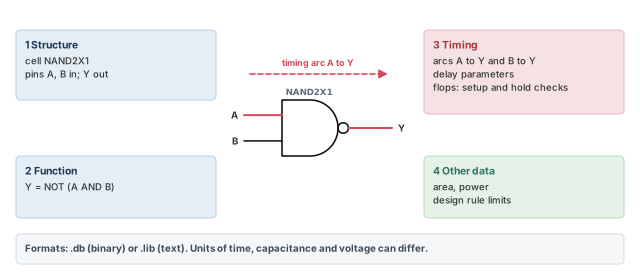
A timing arc is one pin-to-pin timing relationship inside a cell. The NAND gate has two arcs: A to Y and B to Y. Thus, when a signal passes through U1, the tool takes the delay from the matching arc.
2.2 Library formats and units
PrimeTime reads logic libraries in two file formats:
- .db — a compiled binary database.
- .lib — the readable text library format.
Different libraries can use different units for time, capacitance and voltage. For example, one library might state time in ns and another in ps. You can still load them together in one run.
Before you compare numbers taken from two libraries, check the units of each one. It is a quick check, and it avoids reading picoseconds as nanoseconds.
3 Reading and linking a design
3.1 Formats the tool can read
Table 1 lists the input formats. Design data is the netlist side. Logic libraries are the cell-data side.
| Input data | Supported formats |
|---|---|
| Design data | Binary database (.db), Milkyway, Synopsys logical database (.ddc), Verilog, VHDL |
| Logic libraries | Binary database (.db), Library Compiler text format (.lib), fusion library |
A fusion library stores logic and physical library data together. It has its own section later in this chapter.
3.2 Step by step: from files to a linked design
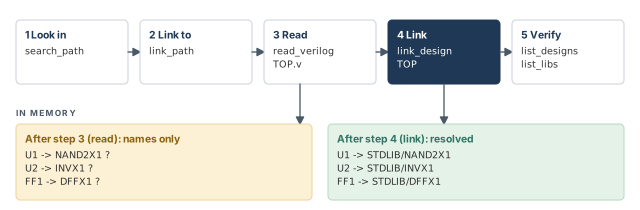
Figure 4 shows the five steps and what is in memory after reading and after linking.
Step 1 — Set the search path
The search_path variable lists the directories where the tool looks for designs, libraries and other data such as timing models. The tool searches them in the order you give.
pt_shell> set_app_var search_path ". /abc/design /abc/libs" ;# look here, in orderHere . is the current directory. Thus, a file in the current directory is found before a file with the same name in /abc/libs.
Step 2 — Set the link path
The link_path variable lists where the tool finds the cells used in the design hierarchy. It can hold:
- an asterisk (
*), which means "designs already in memory"; - library names;
- file names;
- fusion library directory names.
The tool searches these in the order you give. The first library in the link path is called the main library.
pt_shell> set_app_var link_path "* STDLIB.db" ;# memory first, then STDLIB.dbStep 3 — Read the design
This example reads a Verilog netlist into memory.
pt_shell> read_verilog TOP.v ;# load the top-level netlist into memoryOften the subdesigns sit in separate files. You can then read only the top level, if the search path names those files. This is an exception to the usual directory entries. Each entry must give the full path to the subdesign file, not just its directory.
Step 4 — Link the design
pt_shell> link_design TOP ;# join cell references to libraries and subdesignsDuring linking, the tool loads subdesigns automatically when the subdesign names match the file names. For example, a subdesign core stored in a file named after it can be picked up this way.
Step 5 — Verify what is loaded
pt_shell> list_designs   ;# show the designs in memory
pt_shell> list_libs      ;# show the libraries in memory
It is better to run both commands every time, because they catch a wrong library in seconds. A wrong library found after a two-hour timing run costs two hours.
A beginner sets link_path to "STDLIB.db" and forgets the asterisk. The asterisk tells the tool to look for designs already in memory. Without it, subdesigns you have read are not searched while linking. Keep * as the first entry unless you have a clear reason.
3.3 How the search order decides what you get
Figure 5 shows both searches at work for two references. Reference core is a subdesign, so the asterisk finds it in memory. Reference NAND2X1 is a library cell, so the tool moves on and finds it in STDLIB.db.
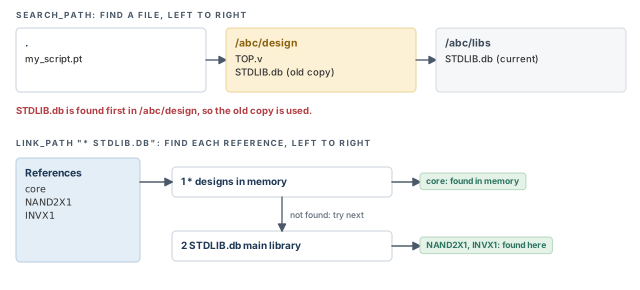
The figure also shows a common trap. Two directories hold a file with the same name. The tool walks the search path in order, so the earlier directory supplies the file. If that copy is old, the timing is wrong, and the run may give no obvious sign of it.
On a real project, the library directories come from a central setup script. Print search_path and link_path at the top of every run log. When results change without a design change, the log tells you at once whether the paths changed.
4 Fusion libraries
4.1 What is inside a fusion library
A fusion library is a single way to store logic and physical library data together. One fusion library can hold timing models at several operating conditions. An operating condition is a combination such as voltage and temperature. Many tools from the same vendor read this format.
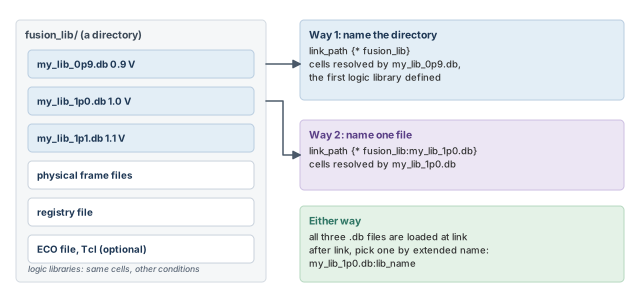
On disk, a fusion library is a directory. Figure 6 shows its contents:
- a set of logic library files (.db);
- a set of physical frame files, which carry the physical side of the cells;
- a registry file with essential information about the fusion library;
- an optional ECO file in Tcl format, used to modify the fusion library. ECO means engineering change order, a late, small change. Tcl (Tool Command Language) is the scripting language of the tool.
All logic libraries inside one fusion library model the same set of cells. They differ only in operating condition. For example, the three files might be built at 0.9 V, 1.0 V and 1.1 V.
4.2 Two ways to put a fusion library in the link path
Way 1 — name the directory.
set_app_var link_path {* fusion_lib} ;# first logic library inside resolves cellsThe first logic library defined inside the fusion library resolves cell references. If the fusion library is also the first library in the link path, that logic library becomes the main library.
Way 2 — name one file inside it.
set_app_var link_path {* fusion_lib:my_lib_1p0.db} ;# this file resolves cellsHere the named logic library resolves cell references.
Two more facts hold in both cases:
- The tool looks for fusion library directories through
search_path, exactly as it does for library files. - When the link path names a fusion library, all its logic libraries are loaded into memory at link time. This holds even when you name one file.
Why load all of them? Later commands can then use the other libraries. One example is defining scaling library groups. A scaling library group is a set of libraries the tool uses to scale library data between conditions. The Delay Calculation chapter covers them.
4.3 Naming one logic library after linking
After linking, three files may each contain a logical library with the same name, such as lib_name. A plain name then matches all three. To pick one, use its extended name. This is the logical library name, qualified by the file name. The file name can be the base name or the full path.
pt_shell> get_libs lib_name                       ;# matches all three libraries
{"lib_name", "lib_name", "lib_name"}
pt_shell> get_attribute [get_libs lib_name] extended_name   ;# show each full name
/path/to/library/my_lib_0p9.db:lib_name
/path/to/library/my_lib_1p0.db:lib_name
/path/to/library/my_lib_1p1.db:lib_name
pt_shell> get_libs my_lib_1p0.db:lib_name         ;# base name picks one library
{"lib_name"}
pt_shell> get_libs /path/to/library/my_lib_1p0.db:lib_name   ;# full path also works
{"lib_name"}fusion_directory_name:db_file_namenames a .db file inside a fusion library. You use it in the link path.db_file_name:logical_namenames a logical library in memory. You use it after linking.
They look similar, but they point at different things.
5 Per-instance link paths
5.1 Why one link path is sometimes not enough
The link_path variable applies to the whole design. Sometimes selected instances need different libraries. For example:
- Process and layout effects. Some cells may see body bias or proximity effects. Body bias is a voltage applied to the transistor body that shifts its speed. Proximity effects come from what is placed nearby.
- Voltage-specific blocks. A block running at a lower voltage needs libraries built for that voltage. Scaling library groups are the recommended way to do this, but per-instance paths also work.
A per-instance link path is a link path given to selected instances. It takes precedence over the global link_path.
There are two ways to set per-instance link paths:
- The
link_path_per_instancevariable. The list lives in memory, so no extra files are needed. It suits smaller lists. - The
set_link_lib_mapcommand. The list lives in one or more files, read only during linking. It suits larger lists.
Both methods give the same result. However, you cannot use both together in one run.
5.2 The link_path_per_instance variable
The variable is a list of lists. Each sublist is a pair: a set of instances, then the link path for them. You must set it before you link the design.
The listed instances can be hierarchical cells (blocks) or leaf cells. A leaf cell is a cell with no hierarchy below it, such as a gate. All instance paths are relative to the top-level design.
set_app_var link_path {* lib1.db}                    ;# global link path
set_app_var link_path_per_instance [list \
    [list {ucore1 ucore2}         {* lib2.db}] \
    [list {ucore1/usubblk}        {* lib3.db}] \
    [list {ucore1/U12 ucore1/U34} {* lib4.db}]]      ;# three overrides
read_verilog my_design.v                             ;# read the netlist
link_design MY_DESIGN                                ;# link with the overrides
Figure 7 shows which library each instance ends up with.
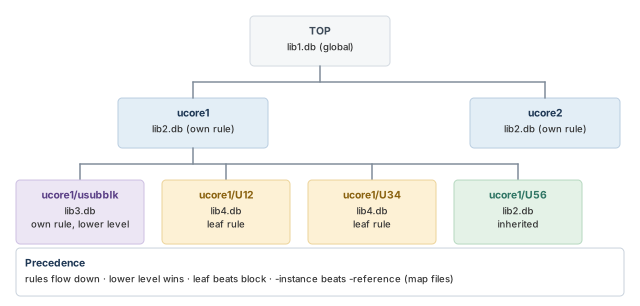
The precedence rules for the variable are:
- Specifications propagate downward into the hierarchy.
- Lower-level specifications take precedence over higher-level ones.
- Leaf cell specifications take precedence over block specifications.
Thus, in Figure 7, ucore1/usubblk uses lib3.db, not lib2.db. Its own rule is lower in the hierarchy than the rule on ucore1.
5.3 The set_link_lib_map command
The command reads a file. Each line holds a set of instances, a colon with a space on both sides, and a link path.
% cat ./link_paths.txt
ucore1 ucore2          : * lib2.db
ucore1/usubblk         : * lib3.db
ucore1/U12 ucore1/U34  : * lib4.db
You give the file to the command before linking.
set_app_var link_path {* lib1.db}    ;# global link path
set_link_lib_map ./link_paths.txt    ;# per-instance overrides from a file
read_verilog my_design.v             ;# read the netlist
link_design MY_DESIGN                ;# link with the overrides
By default, instance paths in the file are relative to the top-level design. Two options change that starting point:
-instanceapplies the file relative to the named cell instance.-referenceapplies the file relative to every instance of the named design.
set_link_lib_map -instance {ucore1/usubblk1} ./link_paths_subcore.txt ;# one instance
set_link_lib_map -reference {subblk} ./link_paths_subcore.txt  ;# every subblk
Each option accepts a single name. Their purpose is to keep long instance names out of the file. For example, a deep block path can be stated once on the command instead of on every line.
The precedence rules for the command are the three rules above, plus one more:
-instancespecifications take precedence over-referencespecifications.
Pick one method per project and write it in the setup notes. Use the variable for a handful of overrides. Use map files when the list grows, because files are easier to review and compare.
6 Checking that every file exists before a long run
6.1 The file identification mode
A full timing run can take hours. If a file is missing near the end, those hours are lost. It is better to check every file first.
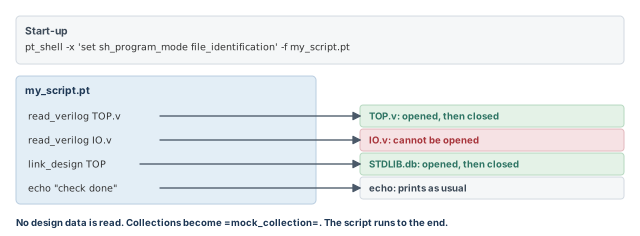
For this, set the sh_program_mode variable to file_identification before your script runs. In this mode, the tool opens each file the script touches and closes it at once. No design data is read. Thus, the whole script runs quickly, and you learn which files are missing.
pt_shell> set_app_var sh_program_mode file_identification ;# open files, read nothingFigure 8 shows the idea.
6.2 How commands behave in this mode
With no design data, many commands cannot work normally. So the tool changes how they behave, and the script can run to the end. Table 2 lists the changes. A collection is the tool's handle to a set of design objects. Collections are covered later in this chapter.
| Command type | Behavior in this mode |
|---|---|
| Commands that read libraries, directly or indirectly | Open the libraries to confirm read access, then close them. Libraries come from the usual settings, such as link_path and scaling groups. |
| Commands that read files | Open the files to confirm read access, then close them. search_path is used as usual. |
| Commands that return collections | Return a special collection handle, =mock_collection=. |
get_attribute |
For a =mock_collection= object, returns the string =mock_collection=attr=. |
sizeof_collection |
For a =mock_collection= object, returns 1. |
| Conditional and looping commands | If the condition or loop list contains =mock_collection=, the body runs once. Otherwise they work as usual. |
restore_session |
Opens all files in the session directory, then closes them. Nothing is restored. |
echo |
Prints as usual. |
| All other commands | Return 1. |
6.3 Starting the mode from the command line
The -x option of the pt_shell start-up command runs a command before your script. Use it to set the variable, so you do not need to edit the script.
% $PT_PATH/pt_shell \
    -x 'set sh_program_mode file_identification' \
    -f my_script.pt
Here $PT_PATH stands for the directory where the tool is installed.
The same check works inside two packaging utilities. The Testcase Packager (stp) and the Cloud Transfer Packager (sctp) both run a command you give them.
% stp -r \
    "$PT_PATH/pt_shell \
      -x 'set sh_program_mode file_identification' \
      -f my_script.pt"
% sctp -r \
    "$PT_PATH/pt_shell \
      -x 'set sh_program_mode file_identification' \
      -f my_script.pt"
The Cloud Transfer Packager can also list every file your script uses. You can review that list without packaging the test case.
6.4 Limitations
The mode does not support:
- DMSA — distributed multi-scenario analysis, where one master runs many scenarios on several machines.
- Distributed analysis in general.
- Scripts that build file names from design object names. For example, a script that makes an SDC (Synopsys Design Constraints) file name from the design name. In this mode, object names are mock values, so the file name would be wrong.
Run the file check whenever a script moves to a new project area or a new machine. Library paths often break in a move.
7 Design objects and collections
7.1 Objects in a design
A design is a hierarchy built from objects. Figure 9, just after Table 3, shows the four most common ones on a small piece of logic:
- Port — a connection point on the boundary of the current design, such as input
IN2. - Net — a wire that connects pins and ports, such as
n2. - Cell — an instance in the design, such as
U1. It can be a hierarchical block or a library cell. - Pin — a connection point on a cell inside the design, such as
U1/B.
Table 3 lists every object class and the command that finds objects of that class.
| Object class | What it is | Command |
|---|---|---|
cell |
An instance; a hierarchical block or a library cell | get_cells |
clock |
A clock | get_clocks |
design |
A design | get_designs |
lib |
A library | get_libs |
lib_cell |
A cell in a logic library | get_lib_cells |
lib_pin |
A pin on a library cell | get_lib_pins |
lib_timing_arc |
A timing arc on a library cell | get_lib_timing_arcs |
net |
A net in the current design | get_nets |
path_group |
A group of paths for cost-function calculations and timing reports | get_path_groups |
pin |
A pin of a lower-level cell; input, output or inout | get_pins |
port |
A port of the current design; input, output or inout | get_ports |
timing_arc |
A timing arc | get_timing_arcs |
timing_path |
A timing path | get_timing_paths |
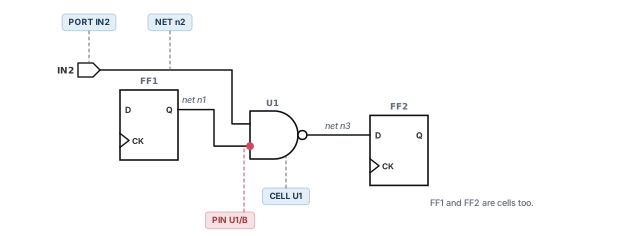
Note the pairs. A cell is an instance in your design, while a lib_cell is the library model it links to. Thus, U1 is a cell and STDLIB/NAND2X1 is a lib cell. An inout port or pin is bidirectional.
7.2 Collections and nesting
You need objects to constrain the design, to time it and to find the source of a problem. You get them by creating a collection with the matching "get" command. For example, get_ports creates a collection of ports.
You can nest a "get" command inside another command that works on objects:
pt_shell> set_input_delay 2.3 [get_ports IN*] ;# 2.3 ns on every port named IN...The square brackets run get_ports first. Its result, all ports whose names start with IN, becomes the object list for set_input_delay. Input delay itself is covered in the Constraining the Design chapter.
A beginner writes set_input_delay 2.3 IN* without get_ports. It is better to always pass a collection from a "get" command, because it states clearly which class of object you mean. A port and a net can share the same name.
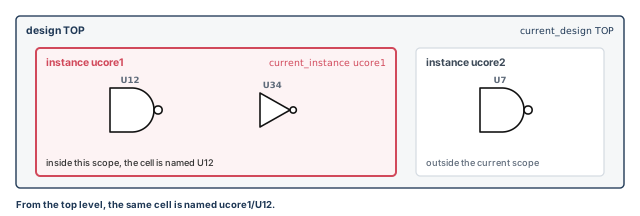
7.3 Current design and current instance
Many commands work relative to a focus. Two settings define it:
| Setting | What it is | Command to set or return it |
|---|---|---|
| Current design | The top level of the design you are working on. Most objects are named relative to it. | current_design |
| Current instance | A hierarchical cell inside the current design that is the current scope. You move through the hierarchy by changing it. | current_instance |
pt_shell> current_design TOP         ;# make TOP the current design
pt_shell> current_design             ;# return the current design name
pt_shell> current_instance ucore1    ;# move the scope into block ucore1
Figure 10 shows the two levels of focus on a small hierarchy.
8 Attributes
8.1 What an attribute is
An attribute is a string or value attached to an object. It carries one piece of information about that object. For example, the extended_name attribute of a library holds its full qualified name, as shown in the fusion library section.
The tool comes with application attributes, which are predefined for each object class. You can also create your own user-defined attributes. With Tcl scripts, you can read attributes from the design database and build custom reports.
8.2 Attribute commands
Table 5 lists the commands for creating, setting, reading and reporting attributes.
| Command | What it does |
|---|---|
define_user_attribute |
Creates a new attribute for one or more object classes |
set_user_attribute |
Sets a user-defined attribute on one or more objects |
get_attribute |
Returns the value of any attribute from a single object |
list_attributes |
Shows the attributes defined for each object class, or for one class; can also show application attributes |
report_attribute |
Shows the value of all attributes on one or more objects; can also show application attributes |
remove_user_attribute |
Removes a user-defined attribute from one or more objects |
The usual life cycle of a user attribute has four steps. You define it once for a class, set it on objects, read it back, and remove it when done.
The tool also has built-in help that describes the application attributes of each class. For example, man lib_cell_attributes describes the library cell attributes.
pt_shell> man lib_cell_attributes       ;# describe the library cell attributes
pt_shell> list_attributes               ;# list the attributes defined per class
pt_shell> report_attribute [get_cells U1]   ;# show the attributes on cell U1
8.3 Saving attributes
The save_session command does not save attributes. To keep attributes you applied during a session, write them to a script with write_script. The script can be in pt_shell, dc_shell or dctcl format. After you restore the session, run the script to re-create the attributes.
A beginner tags hundreds of cells with a user attribute, saves the session and goes home. The next day, the restored session has no tags. Run write_script before you finish, because the session alone does not carry attributes.
9 Saving and restoring sessions
9.1 What a session holds
Reading, linking and annotating a large design can take a long time. A session lets you skip that the next time. The save_session command writes the state to a directory. The restore_session command loads it back later.
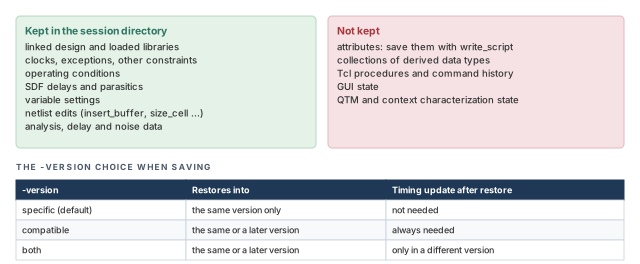
A session is a directory created by the tool. It contains:
- the linked design and the loaded libraries;
- clocks, timing exceptions and other constraints;
- operating conditions;
- back-annotated SDF delays and parasitics (SDF is the Standard Delay Format; parasitics are the resistance and capacitance of the wires);
- variable settings;
- netlist edits made with
insert_buffer,size_cellandswap_cell; - analysis data;
- cross-coupled delay data and noise data.
Save and restore is a PrimeTime session tool. It is not a way to archive a design database. A session does not save or restore:
- collections of derived data types;
- Tcl procedures and command history;
- GUI (graphical user interface) state, such as timing path tables, schematics and histograms;
- quick timing model state, between
create_qtm_modelandsave_qtm_model; - context characterization state, between
characterize_contextandwrite_context.
Teams often save a session at the end of the nightly signoff run. In the morning, each engineer restores it and starts debugging at once. Nobody waits for reading and annotation again.
Figure 11 sums up what is kept, what is lost and how the version choice works.
9.2 Saving a session
The directory name is required.
pt_shell> save_session my_session ;# write the session to directory my_sessionSaving environmental constraints.....
Saving netlist information.....
Saving miscellaneous application information.....
Saving timing information.....
Saving variable information.....
Information: Executed with 4 workers
Information: At least 6 MB of free disk space in pt_tmp_dir will be
required to restore this session. (SR-044)The SR-044 message tells you how much free space the temporary directory (pt_tmp_dir) needs at restore time. If the directory already exists, the tool prints an information message and overwrites its contents.
pt_shell> save_session my_session
Information: Cleaning and overwriting all data in the existing directory
 '/home/user/run1/my_session'. (SR-002)
Saving environmental constraints.....
...The overwrite is silent apart from SR-002. If you save a new run into the name of a good old session, the old one is gone. Use a new directory name for each run you want to keep.
9.3 Version-specific and version-compatible sessions
By default, save_session writes a version-specific session. It can only be restored into the same tool version. The -version option gives three choices:
| Option | Restores into | Timing update needed after restore? |
|---|---|---|
-version specific (the default) |
The same version only | No |
-version compatible |
The same or a later version | Always |
-version both |
The same or a later version | Only when restored into a different version |
A timing update is the step where the tool computes all delays and arrival times. Spelling out -version specific gives the same result as the default. It simply makes the choice visible in the script.
A version-compatible session cannot store the in-memory results of a timing update. So you must update timing after restoring it. The new results can differ slightly in quality of results (QoR), especially in a newer version. In-memory physical data for ECO fixing is also not stored. In this context, an ECO is a late, small fix to the netlist. That physical data is reloaded when you run check_eco or a fix_eco_* command.
The tool marks a version-compatible session with this note in the README file inside the session directory:
******** This session is saved in version compatible mode and
         it can be restored in newer versions of PrimeTime ******
A typical restore of a version-compatible session looks like this:
restore_session session_name        ;# load the saved state
set_app_var si_enable_analysis true ;# optional: a setting not in the session
update_timing                       ;# recompute timing; always needed here
# reporting and other analysis go here
In an ECO flow, the same script continues:
set_eco_options -physical_design_path design.def.gz ;# optional: new ECO setting
check_eco                                           ;# check that all is ready
fix_eco_timing -type setup                          ;# one fix_eco_* command
# any further ECO steps go here
The ECO Flow chapter explains these commands.
When a session must outlive a tool upgrade, save it with -version both. You get a fast restore in the same version and a working restore in a newer one.
9.4 Including ECO physical data
In a physically aware ECO flow, the tool also uses physical data files. These are set up with set_eco_options and include:
- LEF technology and cell definition files (LEF is the Library Exchange Format);
- DEF design data files (DEF is the Design Exchange Format);
- physical library constraints and rules;
- via ladder definitions and associations. A via is a vertical connection between two metal layers. A via ladder is a stack of vias that carries a strong connection up through several layers.
By default, the session stores the ECO settings, but they point to files outside the session directory. If those files move, the session no longer points at them. To copy them into the session, add -include {physical_data}:
pt_shell> save_session my_session \
            -version compatible \
            -include {physical_data}   ;# copy ECO physical data into the session
This copies the ECO physical data directory into the session directory. Two limits apply:
- The feature works only for version-compatible sessions.
- The IC Compiler II reference libraries, set with
set_eco_options -physical_icc2_lib, are not copied. Their original location is stored in thesession_dir/eco_configfile. Edit these paths before restoring, if needed.
9.5 Restoring a session
The restore_session command reads a directory written by save_session. It returns the tool to the same state as when the session was saved.
pt_shell> restore_session my_session ;# load the saved stateKeep these rules in mind:
- Version. By default, you must restore into the same tool version. The README file in the session directory names the version that saved it.
- Version-compatible sessions can be restored into the same or a later version. The tool then reports the version that saved the session.
- Memory is cleared. Any design or library data already in memory is removed before the restore.
- Licenses. The command first tries to get every license that was in use at save time. If this fails, the restore fails.
- Library locations. The session directory has an ASCII file named
lib_map. It lists the path and leaf name of each logic library needed. You can edit the paths if the libraries moved. You cannot change the leaf names.
The tool assumes the libraries are the same ones used at save time. Thus, editing lib_map to point at a different library release gives you a mix that the session was never built for.
When you restore a version-compatible session, the tool prints information message SR-048. It names the tool version that saved the session. Thus, the log always records where the session came from.
9.6 Program options in a version-compatible restore
A session stores two kinds of settings:
- Application variables. These are the default and user settings that
report_app_varshows. - Program options. These are internal settings that affect the analysis. They sometimes change between releases.
report_app_vardoes not show them.
When you restore a version-compatible session into a different version, the -program_options option controls the program options:
restore_session -program_options save_versionuses the program options stored in the session. This helps the new version match the original analysis. This is the default.restore_session -program_options restore_versionuses the program option defaults of the version doing the restore. This lets you pick up updated options from the newer release.
It is better to keep the default when you want to reproduce an old result. Use restore_version when you want the newer release's analysis.
10 Creating test cases
10.1 What a test case is
Sometimes you want a small, standalone copy of part of the design. For example, you might want to try new settings or constraints without the full run time. Or you might need to send a problem to the tool vendor's support team.
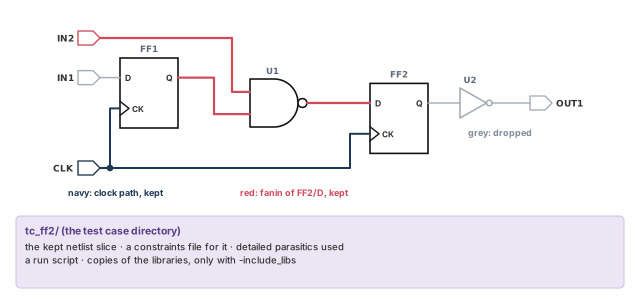
The create_testcase command does this. It writes a directory that contains:
- the chosen portion of the design;
- a constraints file that applies to that portion;
- any detailed parasitics used;
- a run script for the test case.
create_testcase
   [-paths list]          # keep the given timing paths
   [-ports list]          # keep logic around the given ports
   [-endpoints list]      # keep the logic that drives the given endpoints
   [-cells list]          # keep the given cells
   [-directory string]    # output directory name
   [-include_libs]        # copy the libraries into the test case
   [-mim]                 # repeat the logic across multiple-instance modules
10.2 Choosing what logic to keep
The command keeps only the logic you name. Table 7 lists the four ways to name it. Fanin is all logic that drives a point; fanout is all logic that a point drives. A startpoint is where a timing path begins, and an endpoint is where it ends.
| Option | Logic that is kept | Clock paths to registers kept? |
|---|---|---|
-paths path_collection |
All cells along the timing paths, including startpoints and endpoints | Yes |
-ports port_list |
Fanout logic from input ports, including endpoints; fanin logic to output ports, including startpoints | Yes |
-endpoints pin_port_list |
Fanin logic to the endpoint pins or ports, including startpoints | Yes |
-cells cell_list |
The listed leaf cells, the nets they drive, and the leaf cells and ports on those nets | No |
Figure 12 shows what -endpoints keeps for endpoint FF2/D in our small design.
Rules for these options:
- You must give exactly one of
-paths,-ports,-endpointsor-cells. You cannot combine them. - In a PrimeTime SI (signal integrity) analysis, aggressor stages that have annotated timing windows are also kept. An aggressor is a nearby net whose switching disturbs the net being timed. Its timing window is when it can switch.
- With
-portsor-endpoints, the design does not need a timing update first. In this case, aggressors use zero input pin slews and infinite windows. Slew is the rise or fall time of a signal. This is useful for reproducing a crash in the first timing update.
10.3 Libraries and the output directory
By default, the test case refers to the logic libraries where they are now. This saves disk space when the test case stays in the same environment. If the test case must run somewhere else, add -include_libs. It copies the required libraries into the test case directory.
pt_shell> create_testcase -endpoints [get_pins FF2/D] -include_libs ;# copy librariesBy default, the directory is named after the current design. Use -directory to choose a name.
pt_shell> create_testcase -endpoints [get_pins FF2/D]
...
Testcase is generated in the TOP directory.
1
pt_shell> create_testcase -endpoints [get_pins FF2/D] -directory ./my_testcase_FLAT
...
Testcase is generated in the my_testcase_FLAT directory.
1
10.4 Multiple-instance modules
A multiple-instance module (MIM) is one design used as several instances, such as four copies of a CPU core. When you keep logic up to an endpoint inside one MIM instance, add -mim. The same endpoint fanin is then kept across all instances of that MIM block.
pt_shell> create_testcase \
            -endpoints $endpoint_in_one_MIM \
            -mim   ;# repeat the fanin in every instance
The -mim option requires -endpoints.
10.5 Limitations
The command does not support:
- HyperScale data, meaning block models or context data from hierarchical analysis;
- SMVA (simultaneous multivoltage analysis) or DVFS (dynamic voltage and frequency scaling) analysis.
Before sending a test case to anyone, copy it to a clean directory and run its script yourself. It is better to find a missing file now than after a week of email.
11 Worked example: bring up a small block and hand it off
Let us bring up a small block named TOP. Figure 13 shows its logic and where its files live. The library STDLIB.db holds the cells DFFX1, NAND2X1 and INVX1. The goal is to link the block, explore it, save a session and cut a test case for one endpoint.
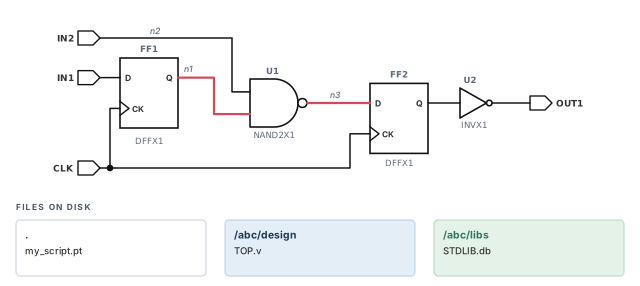
Step 1 — Check that every file exists
Put steps 2 to 4 in a script named my_script.pt. Then run it once in file identification mode.
% $PT_PATH/pt_shell \
    -x 'set sh_program_mode file_identification' \
    -f my_script.pt
Check: the log reports no file it could not open. If a file is missing, fix the path now.
Step 2 — Point the tool at the files
pt_shell> set_app_var search_path ". /abc/design /abc/libs"   ;# directories, in order
pt_shell> set_app_var link_path "* STDLIB.db"   ;# memory first, then the library
Check: only one directory in search_path holds a file named STDLIB.db.
Step 3 — Read and link
pt_shell> read_verilog TOP.v   ;# load the netlist from /abc/design
pt_shell> link_design TOP ;# resolve DFFX1, NAND2X1 and INVX1Loading verilog file '/abc/design/TOP.v'
Loading db file '/abc/libs/STDLIB.db'
Linking design TOP...Check: the log shows the expected library path and no unresolved references.
Step 4 — Verify designs and libraries
pt_shell> list_designs
TOP
pt_shell> list_libs
Library Registry:
  STDLIB      /abc/libs/STDLIB.db:STDLIB
Check: the library path is the one you expect. A path under someone's home directory is a warning sign.
Step 5 — Explore the objects
pt_shell> get_cells *                         ;# all cells at the top level
{"FF1", "FF2", "U1", "U2"}
pt_shell> sizeof_collection [get_cells *]     ;# count them
4
pt_shell> get_pins U1/*                       ;# all pins of U1
{"U1/A", "U1/B", "U1/Y"}
pt_shell> get_lib_cells STDLIB/NAND2X1        ;# the library model of U1
{"STDLIB/NAND2X1"}
Check: the counts match the netlist. Four cells are expected here.
Step 6 — Save a session that survives an upgrade
pt_shell> save_session my_session -version both ;# fast now, portable laterCheck: the SR-044 message gives the free space needed at restore. If you added user attributes, also run write_script now.
Step 7 — Restore later
pt_shell> restore_session my_session   ;# memory is cleared, then the state is loaded
pt_shell> update_timing                ;# needed when restoring into a new version
Check: if the libraries moved, edit the paths in my_session/lib_map before you restore.
Step 8 — Cut a test case for FF2/D
pt_shell> create_testcase -endpoints [get_pins FF2/D] \
-directory ./tc_ff2 -include_libs ;# fanin of FF2/D, with libraries...
Testcase is generated in the tc_ff2 directory.
1Check: the directory holds the netlist slice, the constraints file, the run script and the libraries. Run the script once in a clean directory.
12 Common mistakes and how to catch them
| Symptom | Likely cause | Fix |
|---|---|---|
| Linking reports cells it cannot resolve | The library is missing from link_path, or its directory is missing from search_path |
Add the library name and its directory; check with list_libs |
| Delays change with no design change | Two files share a name; search_path order picked the other one |
Remove the duplicate or reorder search_path; log both paths each run |
| Subdesigns already read are not used | * is missing from link_path |
Put * first in link_path |
| Per-instance overrides have no effect | They were set after linking | Set either method before link_design |
| A script sets both override methods | The two methods cannot be used together | Choose one method per run |
| User attributes are gone after restore | save_session does not save attributes |
Save them with write_script and run it after restore |
| Session will not restore in a new version | The default is a version-specific session | Save with -version both or -version compatible |
| Restore fails at once | A license used at save time is not available | Make the same licenses available, then retry |
| Restore cannot find libraries | Library files moved | Edit the paths in lib_map; keep the leaf names |
| Test case fails at another site | The libraries were referenced, not copied | Re-create it with -include_libs |
13 Interview preparation
Reading loads the netlist names into memory; linking resolves each reference to a library cell or subdesign.
- After reading,
U1is known to be aNAND2X1, but only by name. - After
link_design,U1points at the library cell, so its timing data is available.
link_path "* STDLIB.db" mean?It tells the tool to look first for designs that are already in memory.
- Subdesigns you have read are found this way.
- After the asterisk, the libraries are searched in the order listed.
search_path and link_path?search_path lists directories to find files; link_path lists libraries and designs to resolve cells.
- Both are searched in the order you give.
- A library named in
link_pathis located throughsearch_path.
A cell is an instance in your design; a lib cell is the model in a library that it links to.
U1is a cell;STDLIB/NAND2X1is a lib cell.- They are found with
get_cellsandget_lib_cells.
STDLIB.db. Which one is used?The one in the earlier directory, because the search path is searched in order.
- The tool takes the first match and moves on.
- Results can change silently if the order changes.
- Print both paths in every log and check
list_libs.
With per-instance link paths, set by link_path_per_instance or by set_link_lib_map, before linking.
- They take precedence over the global
link_path. - The variable suits small lists; map files suit large lists.
- The two methods cannot be used together.
ucore1 has a rule for lib2.db, and leaf ucore1/U12 has a rule for lib4.db. Which library does U12 use?lib4.db, because leaf cell rules beat block rules and lower levels beat higher levels.
- Other cells in
ucore1with no rule inheritlib2.db. - With map files,
-instancerules also beat-referencerules.
Set sh_program_mode to file_identification, for example with pt_shell -x, and run the script.
- Each file is opened and closed; no design data is read.
- Collections become
=mock_collection=, so the script runs to the end. - It does not support DMSA or distributed analysis.
save_session does not save attributes; they must be saved with write_script and re-applied.
- The script can be written in pt_shell, dc_shell or dctcl format.
-version specific, compatible and both?Specific restores fast in the same version only. Compatible restores in later versions but always needs a timing update. Both gives you each.
- A compatible restore can show slight QoR differences.
- ECO physical data is reloaded at
check_ecoorfix_eco_*. - Physical data can be copied in with
-include {physical_data}, only for compatible sessions.
-program_options control when restoring a version-compatible session?It chooses between the program options saved in the session and the defaults of the restoring version.
save_versionis the default and helps match the original analysis.restore_versionpicks up updated options from the newer release.- Program options are internal and not shown by
report_app_var.
create_testcase help, and which option do you use?Use -endpoints or -ports, because they do not need a timing-updated design.
- Aggressors then use zero input pin slews and infinite windows.
- Add
-include_libsif the test case leaves your environment. - Only one logic option is allowed per command.
get_libs lib_name returns three libraries. How do you pick one?Use its extended name, the logical name qualified by the .db file name, such as my_lib_1p0.db:lib_name.
- The file part can be the base name or the full path.
- The
extended_nameattribute shows each full name. - Do not confuse it with
fusion_lib:my_lib_1p0.db, which names a file in the link path.
14 Chapter close
Compact glossary
| Term | Meaning |
|---|---|
| Logic library | A file describing each cell's structure, function, timing and other data |
| Library cell (lib cell) | One cell model in a library, such as NAND2X1 |
| Timing arc | A pin-to-pin timing relationship in a cell, such as A to Y |
| Reference | The name an instance is built from, such as NAND2X1 for U1 |
| Linking | Resolving every reference to a library cell or subdesign |
search_path |
Ordered list of directories where the tool looks for files |
link_path |
Ordered list of libraries and designs used to resolve references |
| Main library | The first library in the link path |
| Fusion library | A directory holding logic and physical data for the same cells at several conditions |
| Extended name | A logical library name qualified by its .db file name |
| Per-instance link path | A link path for chosen instances that overrides the global one |
| Leaf cell | A cell with no hierarchy below it |
| File identification mode | A dry run that opens and closes files but reads no design data |
| Collection | The tool's handle to a set of design objects |
| Port / Pin | A connection on the design boundary / on a cell |
| Net | A wire connecting pins and ports |
| Current design | The top level the tool is working on |
| Current instance | The hierarchical scope inside the current design |
| Attribute | A value attached to an object |
| Session | A tool-written directory that holds a run's state for a later restore |
| Version-compatible session | A session that can be restored into a later version, with a timing update |
| Program options | Internal settings not shown by report_app_var |
| Test case | A small, runnable slice of the design made by create_testcase |
| MIM | Multiple-instance module: one design used as several instances |
Working with design data on one page
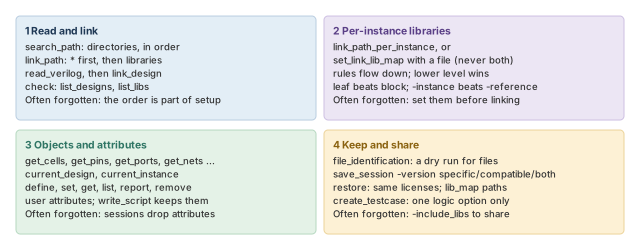
Figure 14 is the summary to redraw from memory.
Where the next chapter goes, and why
You now have a linked design in memory, and you can find any port, pin or cell in it. However, the tool still knows nothing about the world outside the block. It does not know when inputs arrive, what drives them or what loads the outputs.
The Constraining the Design chapter adds that information. It covers input and output delays, drive and load at the ports, and design rule constraints. Thus, the objects you learned to find here become the targets of every constraint there.