Why this chapter matters in a real project
After linking, the tool knows every cell and net inside your block. However, it knows nothing about the world outside it. It does not know when a signal reaches an input. It does not know when an output must be ready, what drives each input or what each output must drive.
That outside information is called a timing constraint. Without it, paths that start or end at ports may not be checked at all. Thus, a block can pass timing on its own and still fail when it meets its neighbors on the chip.
Wrong constraints are worse than missing ones. An input delay that is too small hides a real violation until silicon. An input delay that is too large creates false violations, and the team wastes days fixing paths that were fine. This chapter shows how to state each constraint, and how to check them before you trust a report.
Prerequisites
- Working With Design Data: you can read and link a design and find ports with
get_ports. - You know what a flip-flop, a latch, setup time and hold time are.
- You do not need to know how clocks are defined yet. The Clocks chapter covers that. Here we assume the clock already exists.
- You do not need to read timing reports in detail. Short report samples are explained where they appear.
In this chapter, times are in nanoseconds (ns) unless said otherwise. Capacitance is in the capacitance unit of the main library. The report_units command shows it.
Learning objectives
- Explain what a timing constraint is and why ports need them.
- Set input delays and output delays, including several clocks on one port.
- Choose between
set_driving_cell,set_driveandset_input_transition, and avoid counting a delay twice. - Describe external load with
set_loadand with an external wire load model. - Set wire load models by hand or automatically, and predict which model each net gets in each wire load mode.
- Explain how slew is propagated at a pin where several timing arcs meet.
- Convert a slew between libraries with different thresholds and derating factors.
- Set and report maximum transition, capacitance and fanout limits, and predict which limit wins.
- Create ideal networks, and give them ideal latency and transition.
- Check constraints with design reports,
check_timingandcheck_constraints.
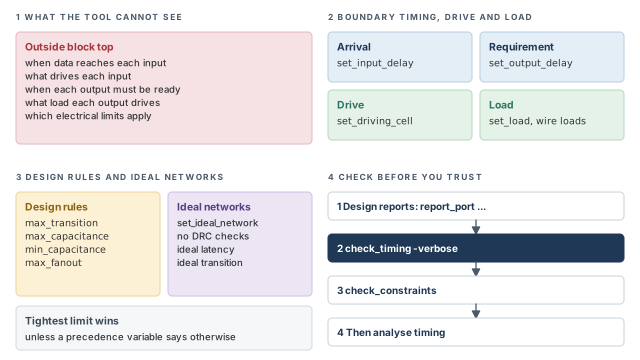
Figure 1 is a map of the whole chapter. Come back to it whenever you lose your place.
1 The beginner's mental model
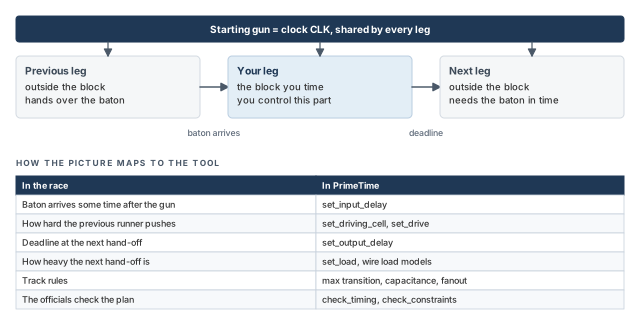
Think of one leg of a relay race. Your runner is the block. The baton arrives from the previous runner at some time after the starting gun. Your runner must then hand it to the next runner before a deadline.
To plan the leg, the coach needs a few facts. When does the baton arrive? How hard does the previous runner push it? When must it reach the next runner, and how heavy is the next hand-off? The track also has rules, such as a maximum lane width. Figure 2 maps each fact to its PrimeTime name.
- A relay has one baton. A block has many ports, and each port can have its own arrival time and driver.
- A runner either makes the deadline or misses it. The tool checks the earliest and the latest arrival, so it checks hold and setup at once.
- Track rules do not change with the runner. Design rule limits can come from the library, the design, a port, a pin or a clock, and only one limit wins.
Now the engineering model
In engineering terms, you give the tool five kinds of facts:
- Arrival at inputs. The
set_input_delaycommand says when data reaches each input port, relative to a clock edge. - Requirements at outputs. The
set_output_delaycommand says how much time the outside world needs after each output port. - Drive at inputs.
set_driving_cell,set_driveorset_input_transitiondescribe what pushes each input. - Load at outputs.
set_loadand wire load models describe the capacitance each port must drive. - Design rules. Limits on transition time, capacitance and fanout.
Then you check the result with check_timing and other reports.
2 Timing constraints at the boundary
2.1 What a timing constraint is
A timing constraint limits when a signal may arrive at a device input or be valid at a device output. It is also called a timing assertion. You must give these constraints before timing analysis starts.
Let us consider a block with one input and one output. Figure 3 shows the picture. Outside the block, a flip-flop launches data on the clock edge. The data passes through some outside logic and reaches our input port. Inside, the data travels through our logic to a flip-flop. The same is true at the output, in reverse.
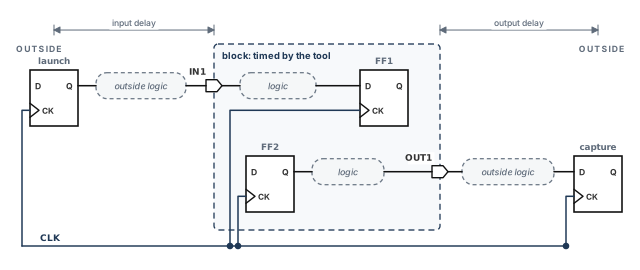
The tool cannot see the outside flops or logic. So you replace each outside part with one number:
- the input delay, the time from the clock edge to the data arrival at the input port;
- the output delay, the time the outside world needs from the output port to its capturing flop.
The clock itself is defined with create_clock. The Clocks chapter covers it in full.
3 Input delays
3.1 Setting an input delay
To check paths that start at an input, the tool needs the arrival time of the signal at that port. The set_input_delay command gives it. You state a minimum and a maximum delay, from a clock edge to the arrival at the port.
The tool then uses this arrival to check the port itself and its transitive fanout. The transitive fanout is all logic that the port drives, directly or through other cells.
pt_shell> set_input_delay 4.5 -clock PHI1 {IN1} ;# data reaches IN1 4.5 ns after PHI1When you set an input delay, you can also state whether the value already includes the clock's latency. You can say it includes the network latency or the source latency. Source latency is the delay from the clock's origin to its definition point. Network latency is the delay from the definition point to the register clock pins. The Clocks chapter explains both.
3.2 Input delay and the driving cell
Later in this chapter, you will describe the external cell that drives each input. Once you do that, the port gets its own cell delay. That delay depends on the load the port sees, so it is called load-dependent.
This creates a trap. The real outside path already includes the delay of that driving cell. If the input delay also includes it, the tool counts it twice.
The rule is simple. Measure the outside path from the clock pin of the source flip-flop to the output pin of the driving cell. Then subtract the load-dependent part of the driving cell's delay.
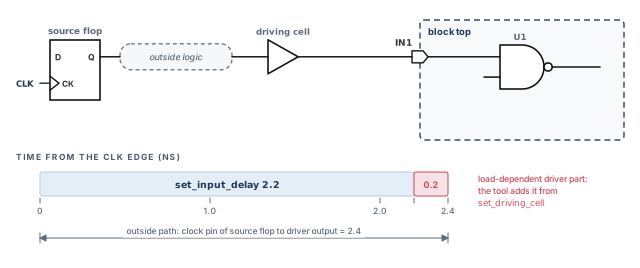
For example, let the outside path be 2.4 ns, and let 0.2 ns of it be the driver's load-dependent part. The input delay is then 2.2 ns:
pt_shell> set_input_delay 2.2 -clock CLK {IN1} ;# 2.4 ns path minus 0.2 ns driver partYou must estimate the load-dependent part yourself. Figure 4 shows the split on a time line.
A beginner copies the full outside path, 2.4 ns, into the input delay and also sets a driving cell. The tool then adds the driver delay again. Each input path now looks 0.2 ns slower than it is, and you chase false violations.
3.3 Several clocks or edges on one port
Sometimes paths from more than one clock, or from more than one edge, reach the same port. Figure 5 shows such a case. It uses two-phase clocking, where two clocks PHI1 and PHI2 take turns.
Outside the block, latch L1 is clocked by PHI1 and latch L2 by PHI2. Both drive port IN1:
- From L1, the outside path to IN1 is 4.5 ns, after the load-dependent driver part is removed.
- From L2, the outside path to IN1 is 2.3 ns.
To keep both values, add -add_delay to every command after the first. Without -add_delay, a new set_input_delay on a port removes the existing data there.
pt_shell> set_input_delay 4.5 -clock PHI1 {IN1}              ;# path from L1
pt_shell> set_input_delay 2.3 -clock PHI2 -add_delay {IN1}   ;# keep PHI1, add PHI2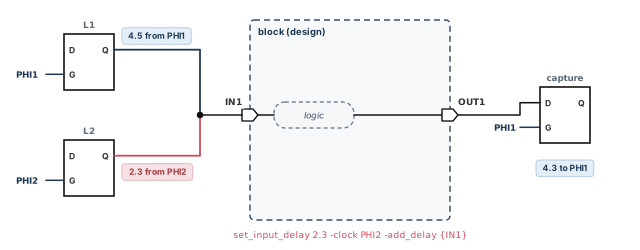
The second command is written without -add_delay. The tool keeps only the PHI2 value, and every path launched by PHI1 through IN1 goes unchecked. The second command is legal on its own, so the loss is easy to miss.
3.4 When the source is a latch
A level-sensitive latch passes data while its enable is active, not only at an edge. If the outside source of the input delay is such a latch, add -level_sensitive. The tool can then find the correct single-cycle timing constraint for paths from this port.
-level_sensitivealone means a positive level-sensitive latch. It is open while the clock is high.-level_sensitive -clock_fallmeans a negative level-sensitive latch. It is open while the clock is low.
3.5 Reporting and removing input delays
pt_shell> report_port -input_delay       ;# show the input delays on the ports
pt_shell> remove_input_delay {IN1}       ;# remove all input delay data on IN1
The remove_input_delay command works on ports or pins in the current design. By default, it removes all input delay data on each object you list.
-add_delay for every extra clock or edge on the same port.3.6 One input port as clock and data
Sometimes one input port carries a clock and also feeds data pins. The tool can treat such a port as clock and data at the same time. The timing_simultaneous_clock_data_port_compatibility variable controls this.
When the variable is false, the default, the port can act as both. You can set input delays relative to a clock, with three rules:
- Clock defined on the same port, and the port feeds data pins. The tool ignores the command and issues an error. A single signal cannot be data relative to a clock and that clock at the same time.
- Clock defined on a different port, and the port feeds data pins. The input delay is set. It controls data edges launched from the port, relative to that clock.
- The clock port does not fan out to any data pin. The input delay on the clock port is ignored, and you get an error. This holds wherever the data port is.
When the variable is true, this dual behavior is turned off. A port with a clock on it is treated only as a clock port. The tool restricts the data edges launched from it. It also refuses input delays relative to another clock.
In both settings, use set_clock_latency to control the source latency of a clock defined on an input port. Do not use an input delay for it.
If a clock port also feeds logic, read the messages from each set_input_delay on it. When the tool ignores an input delay, it issues an error at that moment. It is better to catch it now than to find the path unchecked later.
4 Output delays
4.1 What an output delay describes
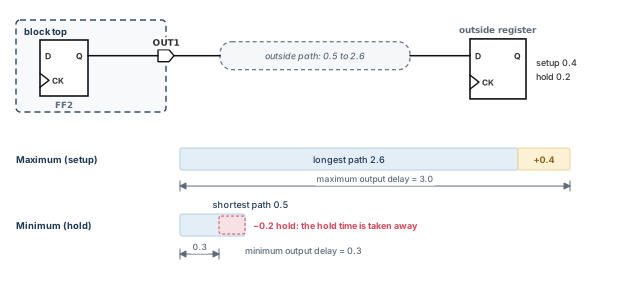
At an output, the tool needs to know how much time the outside world needs. The set_output_delay command gives it. You state a minimum and a maximum delay, from the output port to the outside sequential device that captures the data.
These values set the times when a signal must be ready at the port. They follow from the outside capturing register:
- Maximum output delay = longest outside path to the register data pin + setup time of the register.
- Minimum output delay = shortest outside path to the register data pin − hold time of the register.
The maximum value drives the setup check, and the minimum value drives the hold check. Give the two values with the -max and -min options. A single value without them is used for both. Figure 6 shows both with numbers.
4.2 Setting, reporting and removing output delays
In the two-phase example of Figure 5, OUT1 is captured outside on clock PHI1. This command sets an output delay of 4.3 ns relative to the rising edge of PHI1:
pt_shell> set_output_delay 4.3 -clock PHI1 {OUT1}   ;# outside needs 4.3 ns after OUT1
pt_shell> report_port -output_delay                 ;# show output delays on the ports
pt_shell> remove_output_delay {OUT1}                ;# remove all output delays on OUT1
By default, remove_output_delay removes all output delays on each port or pin you list. To remove only some values, add one or more of these options:
-clock— only values relative to the named clock;-clock_fall— only values relative to the falling clock edge;-minor-max— only the minimum or the maximum values;-riseor-fall— only the values for rising or falling transitions.
5 Drive characteristics at input ports
5.1 Why drive matters
An input port is driven by some cell outside the block. A weak driver makes a slow, sloped signal. A strong driver makes a sharp one. The transition time, also called slew, is how long a signal takes to rise or fall.
The tool needs the drive strength for two reasons:
- to compute the load-dependent cell delay at the port;
- to compute an accurate transition time at the port. That transition feeds the delay and transition calculation of every later logic stage.
5.2 Three ways to describe the driver
You have three commands. The table below compares them.
| Command | What the tool assumes | Port cell delay | Best for |
|---|---|---|---|
set_driving_cell |
A library cell drives the port | Load-dependent part of that cell's delay | Most cases; accurate as load changes |
set_drive |
A driver with a given resistance | Rdriver × Ctotal, with wire load models | Drivers you cannot model with a library cell |
set_input_transition |
A fixed transition time | Zero | Matching another tool; large chip-level drivers |
The most recent drive command on a port wins. For example, if you run set_drive on a port and then set_driving_cell on it, the set_drive data is removed. Figure 7, in the next section, shows the three side by side.
5.3 Setting the port driving cell
The set_driving_cell command makes the tool calculate as if the port were an instance of a chosen library cell. You can name a library cell arc, so the result stays accurate when the load changes.
Two things are calculated from that cell:
- Delay. The port gets a cell delay made of only the load-dependent part.
- Transition. The transition at the port is computed as if that library cell were driving the net.
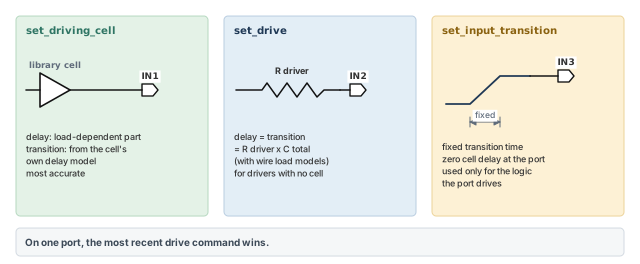
The tool uses the cell's real delay model, whether it is nonlinear or linear. A nonlinear delay model looks up delay in tables indexed by input transition and load.
You can also give the transition at the input of the driving cell. Use -input_transition_rise and -input_transition_fall. If you do not give one, the default is 0.
Two options name the driver:
-lib_cellgives the library cell to copy, for example a bufferBUFX4.-pingives the output pin of that cell, for exampleZ. The tool uses the cell's timing arc that ends at this pin.
pt_shell> set_driving_cell -lib_cell BUFX4 -pin Z {IN1}   ;# IN1 is driven like BUFX4/Z
pt_shell> set_driving_cell -lib_cell BUFX4 -pin Z \
            -input_transition_rise 0.10 \
            -input_transition_fall 0.12 {IN2}   ;# also give the driver's input slews
Remember the rule from the input delay section. When a port has a driving cell or a drive resistance, its input delay must not include the load-dependent driver delay.
5.4 Setting the port drive resistance
The set_drive command sets the external drive strength, as a resistance. It works on input and inout (bidirectional) ports in the current design. With wire load models, the transition time and the delay at the port both equal Rdriver × Ctotal. Here Rdriver is that resistance, and Ctotal is the total capacitance on the port's net. The tool uses this transition to compute the delays of the next stages.
For example, a driver of 0.5 on a net of 0.04 gives 0.5 × 0.04 = 0.02 ns. These values are illustrative, in library units whose product is ns.
pt_shell> set_drive 0.5 {IN2} ;# external driver resistance on IN2Use set_drive when no library cell can describe the driver. For example, the driver may be a custom block with no library model. However, it is less accurate than set_driving_cell for nonlinear delay models.
5.5 Setting a fixed port transition time
The set_input_transition command gives a port a fixed transition time. The port then has zero cell delay. The tool uses the transition only to compute the delays of the logic the port drives.
pt_shell> set_input_transition 0.15 {IN2} ;# 0.15 ns transition, zero port delayA fixed transition is useful in two cases:
- Comparing with another tool that supports only an input transition time.
- Top-level chip ports with a large external driver and a large external capacitance. There, the transition hardly depends on the capacitance inside your design.
5.6 Displaying and removing drive information
To see the drive or transition on ports, use report_port -drive.
pt_shell> report_port -drive ;# show port transition and drive data| Command | What it removes |
|---|---|
remove_driving_cell |
Driving cell data on the ports you name |
set_drive 0.0 |
The drive resistance |
set_input_transition 0.0 |
The input transition |
reset_design |
Drive data and all user data, such as clocks and input and output delays |
A beginner runs reset_design to clear one wrong driving cell. It also removes every clock, input delay and output delay. Use remove_driving_cell for a targeted fix, and keep reset_design for a full restart.
set_driving_cell. Use set_drive when no library cell fits, and set_input_transition for correlation or large chip-level drivers.6 Port capacitance
To time a design well, the tool needs the external load on each top-level port. That load includes the pin capacitance of outside cells and the capacitance of outside wires. The set_load command sets it. Figure 8 shows both parts.
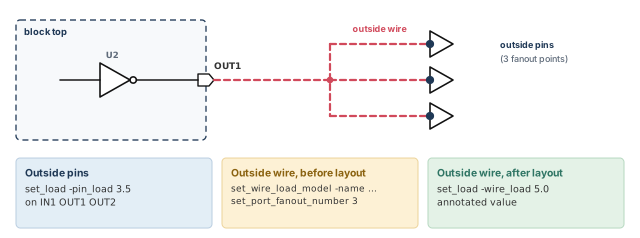
pt_shell> set_load -pin_load 3.5 {IN1 OUT1 OUT2} ;# outside pin capacitanceYou also need the wire capacitance outside the port:
- Before layout, give an external wire load model and the number of external fanout points. The next section shows how.
- After layout, give the annotated outside wire capacitance as wire capacitance on the port.
pt_shell> set_load -wire_load 5.0 {OUT3}   ;# annotated outside wire capacitance
pt_shell> remove_capacitance {OUT3} ;# remove port capacitance valuesAt block level, take port loads from the parent design's budget, not from a guess. A missing output load makes the output driver look far faster than it is. That is a classic way to miss a violation that appears at chip level.
7 Wire load models
7.1 Why wire load models exist
To compute net delays, the tool needs the resistance and capacitance of each wire. These are the wire's parasitics. Before placement and routing, no real wires exist. So the tool estimates them with wire load models from the logic library.
A wire load model is a statistical table from the library vendor. It estimates the wire load of a net from its number of fanout pins. For example, a model might say that a net with 3 fanout pins has a certain length and capacitance. You can set models by hand or let the tool pick them.
7.2 Setting wire load models by hand
The set_wire_load_model command sets a named model on a design, an instance, a list of cells or a list of ports.
Let us consider this hierarchy. Design TOP has two instances of MID, named u1 and u2. Each MID holds one instance of BOTTOM, named u5.
TOP
  MID (instance u1)
    BOTTOM (instance u5)
  MID (instance u2)
    BOTTOM (instance u5)
We want model 10x10 on every BOTTOM, 20x20 on every MID, and 30x30 on nets at the top level:
pt_shell> set_wire_load_mode enclosed               ;# how levels combine; see below
pt_shell> set_wire_load_model -name 10x10 \
            [all_instances BOTTOM]                  ;# every BOTTOM instance
pt_shell> set_wire_load_model -name 20x20 \
            [all_instances MID]                     ;# every MID instance
pt_shell> set_wire_load_model -name 30x30           ;# the current design, TOP
The all_instances command returns every instance of the named design. Without an object list, the model goes on the current design.
The outside part of a port's net
A port's net continues outside the block. To capture that outside part before layout, set an external wire load model and a number of fanout points on the port. For port Z:
pt_shell> set_wire_load_model -name 70x70 [get_ports Z]   ;# outside wire model
pt_shell> set_port_fanout_number 3 Z                      ;# 3 outside fanout points
The tool now assumes port Z has a fanout of 3 and uses model 70x70 to compute delays.
To see the model settings, use report_wire_load for the current design or an instance. Use report_port -wire_load for ports. To remove models you set, use remove_wire_load_model.
7.3 Automatic wire load model selection
The tool can also pick wire load models for you. It does this when it updates the timing of the design. Here is the order it follows when you set no model for a design or block:
- A selection group, if one is set. The tool picks models from the wire load selection group.
- The library default. With no model and no group, the tool uses the library's
default_wire_loadmodel, if the library defines one. - Nothing. Otherwise, wire resistance, capacitance, length and area are all 0.
A wire load selection group maps the block sizes of cells to wire load models. Automatic selection is turned on in either of two cases:
- you run
set_wire_load_selection_groupon the top design; - the main logic library defines a
default_wire_load_selection_group.
When selection is on, the tool picks a model for each hierarchical block larger than a minimum cell area. The choice is based on the block's cell area.
pt_shell> set_wire_load_min_block_size 200     ;# select only for blocks above 200 units
pt_shell> set auto_wire_load_selection false   ;# turn automatic selection off
pt_shell> remove_wire_load_selection_group     ;# remove the selection group setting
The size for set_wire_load_min_block_size is in library cell area units. It must be 0 or more.
The auto_wire_load_selection variable defaults to true. Thus, selection happens whenever a selection group is associated with the design.
If no model, group or library default applies, every wire is free. Pre-layout timing then looks far too good. Run report_wire_load once per block to confirm that a model is really in use.
7.4 The wire load mode
A net can cross several levels of hierarchy. The wire load mode decides which model each part of the net uses. Set it with set_wire_load_mode. There are three modes:
- top — the top-level model is used for all nets, at every level of hierarchy.
- enclosed — each net uses the model of the smallest hierarchical cell that fully encloses it.
- segmented — each segment of a net uses the model of its own level. The net's value is the sum of all segments.
With enclosed or segmented mode, the models on hierarchical cells set the wire capacitance, resistance and area of nets inside them. If you set no mode, the library's default_wire_load_mode is used.
pt_shell> set_wire_load_mode enclosed ;# use the model that encloses each netThe enclosed mode is often the most accurate. However, your ASIC vendor might recommend a specific mode, and that advice comes first. An ASIC is an application-specific integrated circuit, and the vendor is the company that supplies its libraries.
An example with three models
Let us take a design with these settings:
- model
Bigon the current design; - model
Mediumon instancesU1andU2; - model
Smallon instanceU2/U1.
pt_shell> set_wire_load_model -name Big                     ;# the current design
pt_shell> set_wire_load_model -name Medium [get_cells {U1 U2}]   ;# instances U1 and U2
pt_shell> set_wire_load_model -name Small [get_cells U2/U1]      ;# the inner block
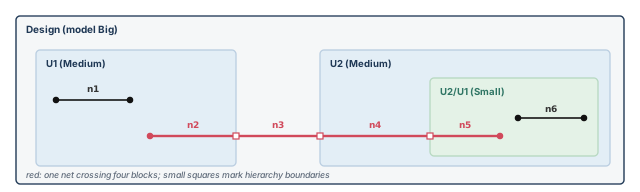
Figure 9 shows the design and its nets. The table lists the model each net uses in each mode.
Let us read one row of the table. Under enclosed mode, segment U2/U1/n5 sits inside the Small block. However, its net also runs through U2, the top and U1. Only the top design encloses the whole net, so Big is used.
| Net | top | enclosed | segmented |
|---|---|---|---|
U1/n1 |
Big | Medium | Medium |
U1/n2 |
Big | Big | Medium |
n3 |
Big | Big | Big |
U2/n4 |
Big | Big | Medium |
U2/U1/n5 |
Big | Big | Small |
U2/U1/n6 |
Big | Small | Small |
7.5 Reporting wire load models
Two commands report wire load settings:
report_wire_load— the models on the current design or on given cells;report_port -wire_load— the wire load data on ports.
8 Slew propagation
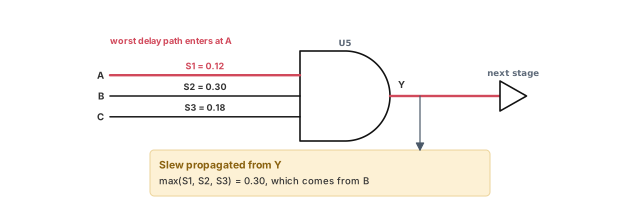
Some pins are reached by several timing arcs. For example, the output of a three-input gate has one arc from each input. Each arc gives its own slew at the output. Which one should the tool pass on to the next stage?
For maximum slew, the tool computes the slew of each driving arc at the pin. It then picks the worst slew and propagates it.
The chosen slew might not come from the input on the worst path. Thus, the delay computed after the merge pin can be pessimistic. Pessimistic means the result is worse than reality, which is safe but can cause false violations. Figure 10 shows an example.
Minimum slew works the same way, in the other direction. The tool picks the minimum slew based on the input with the best delay at the merge point.
9 Design rule constraints
9.1 What design rules are
A design rule constraint (DRC) is an electrical limit on a net or pin. The tool checks rules defined in the library or set with commands. The rules include, but are not limited to:
- maximum and minimum limits for transition time;
- maximum and minimum limits for capacitance;
- maximum and minimum limits for fanout.
Why care? Cell delay tables typically cover only a range of transitions and loads. Outside that range, the computed delays are less trustworthy.
The report_constraint command reports design rule violations. By default, it prints a summary for the whole design. Options restrict the report to some constraint types or objects, show only violators, or give verbose details.
pt_shell> report_constraint                   ;# summary for the whole design
pt_shell> report_constraint -max_transition   ;# only the maximum transition checks
9.2 Slew thresholds and derating
The tool treats a maximum transition limit the same way as a slew. So before we set one, we must know how a transition is measured. A real signal edge is a curve, as SPICE shows it. SPICE is a transistor-level circuit simulator. A library stores the edge as one number.
That number depends on two settings:
- Slew thresholds. The two voltage points, in percent of the supply, between which the time is measured. For example, 10–90 means from 10% to 90%.
- Slew derate. A factor applied to the stored number. The stored value times the derate gives the time measured between the library thresholds.
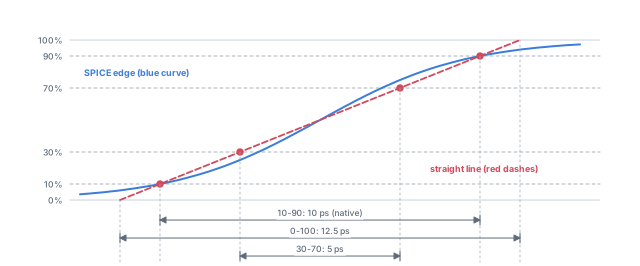
Let us take one edge. SPICE measures 10 picoseconds (ps) between 10% and 90%. Figure 11 shows three ways to write the same edge:
- 0–100 linearized: draw a straight line through the 10% and 90% points. It takes 10 × (100 − 0) / (90 − 10) = 12.5 ps for the full swing.
- 30–70: the same straight line takes 12.5 × (70 − 30) / (100 − 0) = 5 ps.
- 10–90: the native value, 10 ps.
| Case | Stored value | Slew derate | Stored value × derate |
|---|---|---|---|
| A (native) | 10 ps | 1.0 | 10 ps |
| B (rescaled to 0–100) | 12.5 ps | 0.8 | 10 ps |
| C (rescaled to 30–70) | 5 ps | 2.0 | 10 ps |
The slew threshold in a library is always the threshold used for the SPICE measurement. Case A is native. Cases B and C rescale the number to 0–100 and 30–70, and the derate brings it back.
9.3 Converting slews between libraries
Libraries may use any slew thresholds, to keep the straight-line error small in each process technology. So when slew data from two libraries meets, the tool converts both to a common base. Pins of one library with different thresholds are converted too.
Let us call the two sides L1 and L2. Each can be a library, a design or a library pin:
- L1 has low and high thresholds TL1 and TH1, and derate SD1. S1 is a slew in L1's terms.
- L2 has thresholds TL2 and TH2, and derate SD2. S2 is a slew in L2's terms.
The slew S2, written in L1's terms, is:
S2_1 = S2 * (SD2 / (TH2 - TL2)) * ((TH1 - TL1) / SD1)The first factor turns S2 into a full-swing time. The second factor writes that time in L1's thresholds and derate. Now S1 and S2_1 can be compared directly. S1 and S2 cannot.
The same rule applies to maximum transition limits as well as slews. With detailed resistance-capacitance (RC) parasitics, the tool computes slew in the right threshold and derate context.
A worked conversion
Let us use a main library with thresholds 20/80 and derate 0.5. Each object below stores 10 ps. We express each one in the main library's terms:
| Object | Thresholds | Derate | 10 ps in main library terms |
|---|---|---|---|
| Main library | 20/80 | 0.5 (defined) | 10 ps |
| Local library | 40/60 | 0.6 (defined) | 10 × (0.6 / 0.2) × (0.6 / 0.5) = 36 ps |
| Library pin | 30/70 | 0.6 (inherited from its library) | 10 × (0.6 / 0.4) × (0.6 / 0.5) = 18 ps |
| Design | main library's | main library's | 10 ps |
| Cell instance pin | 30/70 | 0.6 (inherited) | 18 ps |
The conversion also works the other way. Let us express the main library's 10 ps limit in each object's own terms:
- local library: 10 × (0.5 / 0.6) × (0.2 / 0.6) ≈ 2.8 ps;
- library pin and cell instance pin: 10 × (0.5 / 0.6) × (0.4 / 0.6) ≈ 5.6 ps;
- design: 10 ps, since it shares the main library's terms.
Some rules come out of this example:
- A library pin can have its own slew thresholds. It inherits the derate of its library.
- The design uses the main library's derate and slew thresholds.
- On a cell instance pin, the more local trip points win over the more general ones. A trip point is a threshold voltage used to measure delay or slew.
- Limits can come from the main library, a local library, a library pin and the design. On a cell instance pin, the most restrictive limit applies.
When two libraries disagree about "the same" transition, check their thresholds and derates first. A 10 ps limit can mean 18 ps or 36 ps once converted.
9.4 Setting the maximum transition limit
A maximum transition limit can come from three places: your command, the library and the library pin. Limits you set are expressed in the main library's derate and slew threshold.
The set_max_transition command sets a limit on pins, ports, designs or clocks. On a clock, the limit applies to the pins in that clock's domain. Within a clock domain, you can narrow it to clock paths or data paths, and to rising or falling transitions.
pt_shell> set_max_transition 2.0 [get_ports "OUT*"]      ;# on ports OUT*
pt_shell> set_max_transition 5.0 [current_design]        ;# default for the design
pt_shell> set_max_transition 4.0 [get_clocks CLK1] \
            -data_path -rise                             ;# CLK1 domain, rising data
The command places the max_transition attribute on the objects. This attribute is a design rule constraint.
Which limit wins
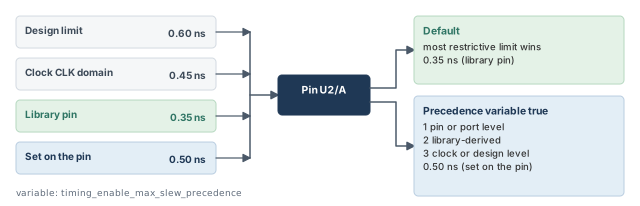
A pin can get limits from the design, the pin, the port, a clock and the library. Figure 12 shows the two ways the tool can choose.
- Default. The tool uses the most restrictive limit from the design, the pin, the port, the clock and the library. The clock only counts if the pin is in its domain. This also holds when several clocks launch the same path.
- With
timing_enable_max_slew_precedenceset totrue. The location decides, not the value. The order is: 1) pin or port level, 2) the library-derived limit, 3) clock or design level.
How the limit is scaled
The tool reports slews and maximum transition limits in the local threshold and derate of each pin or library. For example, a limit set in design terms is scaled to the design pin's threshold and derate. This scaling for slew threshold is on by default.
To scale every max_transition value by one factor, set the timing_max_transition_derate variable.
9.5 Checking the maximum transition
pt_shell> report_constraint -max_transition   ;# evaluate the limits
pt_shell> report_port -design_rule            ;# the limit on each port
pt_shell> report_design                       ;# the default limit for the design
pt_shell> remove_max_transition [get_ports "OUT*"]   ;# undo limits you set
The report gives all limits and slews in the threshold and derate of the cell instance pin. Violations are sorted by their absolute values, not by values in design terms.
You can also report only one list of pins or ports. Give the list as the object_list argument of report_constraint. This works for maximum capacitance and maximum transition.
remove_max_transition undoes limits that you set on ports, pins, designs or clocks.
Example: scaling by slew threshold
Library lib1 has a slew threshold of 10/90. You set a maximum transition of 0.3 ns on the design. The main library's slew threshold is 30/70 for rise and fall.
The 0.3 ns limit covers 40% of the swing (30% to 70%). The full swing is then 0.75 ns. In lib1's 10/90 terms, that is 0.75 × 0.8 = 0.6 ns.
pt_shell> report_constraint -max_transition -all_violators -significant_digits 4
                Required       Actual
Pin             Transition    Transition        Slack
---------------------------------------------------------
FF1/D           0.6000         0.4000           0.2000
The required value is 0.6, not 0.3. The pin's actual transition, 0.4 ns in lib1 terms, passes with 0.2 ns of slack.
Example: scaling by derating
Now lib1 has a slew derate of 0.5 and thresholds of 30/70. The main library also uses 30/70, with a derate of 1.0. You set the same 0.3 ns limit.
The thresholds match, so only the derate changes the number: 0.3 × 1.0 / 0.5 = 0.6 ns. The same command gives the same report as the previous example: required 0.6000, actual 0.4000, slack 0.2000.
A beginner sees "Required 0.6" after setting 0.3 and decides the limit was ignored. It was not. The report shows the limit in the pin's own threshold and derate. Always check the library thresholds before you call a report wrong.
9.6 Minimum capacitance
The set_min_capacitance command sets a minimum capacitance limit on ports or on the whole design.
- On a port, the limit applies to the net connected to that port.
- On a design, it sets the default limit for all nets in the design.
The command places the min_capacitance attribute, a design rule constraint. Capacitance checks apply only to output pins. When several limits apply, the most restrictive one is used.
pt_shell> set_min_capacitance 0.2 [get_ports "OUT*"]   ;# on ports OUT*
pt_shell> set_min_capacitance 0.1 [current_design]     ;# default for all nets
pt_shell> report_constraint -min_capacitance           ;# evaluate the limits
pt_shell> remove_min_capacitance [get_ports "OUT*"]    ;# undo limits you set
report_port -design_rule shows port limits, and report_design shows the design defaults.
9.7 Maximum capacitance
The set_max_capacitance command sets a maximum capacitance limit. Like the minimum limit, it works on ports and designs. It can also go on pins or clocks. On a clock, it constrains the pins in that clock's domain. You can narrow it to clock paths or data paths, and to rising or falling capacitance.
The command places the max_capacitance attribute. Checks apply only to output pins, and the most restrictive limit is used.
pt_shell> set_max_capacitance 0.3 [current_design]   ;# default for all nets
pt_shell> report_constraint -max_capacitance         ;# evaluate the limits
pt_shell> remove_max_capacitance [current_design]    ;# undo limits you set
report_port -design_rule and report_design show the limits here too. To scale all max_capacitance values by one factor, set the timing_max_capacitance_derate variable.
Limits on a clock: clock path and data path
You can set a maximum capacitance limit on clocks, for rise and fall. It constrains the outputs of driver pins on two kinds of path. Figure 13 shows both:
- the clock path: all pins in the clock network, up to the register clock pins;
- the data path of the clock: the pins in the launching path, from the register output onward.
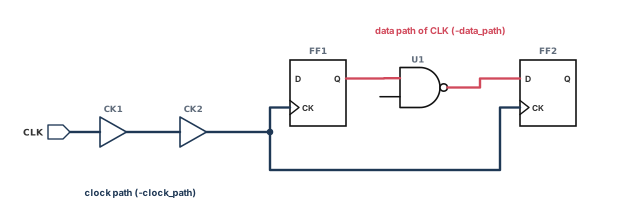
When the object list is a clock list, four options narrow the limit:
-clock_path— only pins in the clock network;-data_path— only pins in the launching path;-rise/-fall— only rising or falling capacitance.
pt_shell> set_max_capacitance 0.1 [get_clocks CLK] -clock_path ;# clock network onlyA pin or port may get limits from the design, the library, a clock and the port. The most restrictive limit has priority. The slack at the pin is that limit minus the total capacitance at the pin. This works for generated clocks too. Use report_constraint to see the violations.
9.8 Frequency-based maximum capacitance
A library can hold lookup tables of max_capacitance values by frequency, for each driver pin. The pin frequency is the highest frequency of all clocks that launch signals arriving at the pin.
By default, the tool uses these tables when they exist. It then takes the smallest of these values:
- the
max_capacitancevalue from the lookup table in the library; - the library-cell
max_capacitancevalue; - every
max_capacitancevalue you set on the pin, port, clock and design.
This smallest value is used for design rule attribute reports, report_constraint, engineering change order (ECO) fixing and extracted timing model (ETM) generation. An ECO is a late, small change to the netlist. An extracted timing model is a compact timing model of a block, made for use at a higher level.
Two variables change this:
timing_enable_library_max_cap_lookup_tableset tofalseignores the lookup tables completely.timing_library_max_cap_from_lookup_tableset totruelets the lookup table value take precedence over the library-cell value.
| ..._from_lookup_table = false (default) | ..._from_lookup_table = true | |
|---|---|---|
..._lookup_table = true (default) |
user values; lookup table value; library-cell value | user values; lookup table value, or the library-cell value if no table value exists |
..._lookup_table = false |
user values; library-cell value | user values; library-cell value |
In the table, the rows are timing_enable_library_max_cap_lookup_table. The columns are timing_library_max_cap_from_lookup_table. "User values" means all max_capacitance values you set on the pin, port, clock and design.
Maximum capacitance with case analysis
Case analysis sets some nets to constant values, for example to pick one mode. The Case and Mode Analysis chapter covers it. By default, maximum capacitance is not checked on pins in the path of a propagated constant. To check them, set timing_enable_max_capacitance_set_case_analysis to true.
9.9 Maximum fanout
The set_max_fanout command sets a maximum fanout load on ports or designs. It places the max_fanout attribute, a design rule constraint.
- On a port, the limit applies to the net connected to that port.
- On a design, it sets the default limit for all nets in the design.
- If the two conflict, the more restrictive value applies.
Library cell pins can also carry a max_fanout value. The tool uses the more restrictive of your limit and the library limit. Output pins can thus get a maximum fanout limit from the library or from set_max_fanout.
pt_shell> set_max_fanout 2.0 [get_ports "IN*"]   ;# on ports IN*
pt_shell> set_max_fanout 5.0 [current_design]    ;# default for all nets
pt_shell> report_constraint -max_fanout          ;# evaluate the limits
pt_shell> remove_max_fanout [get_ports "IN*"]    ;# undo limits you set
As before, report_port -design_rule shows port limits and report_design shows the design default.
Fanout load values for output ports
Fanout here is not a simple pin count. Each input pin has a fanout_load attribute. The fanout load of a net is the sum of the fanout_load attributes of the input pins and output ports on it. For example, three pins with fanout load 1.0 and one with 2.0 give a net fanout load of 5.0.
By default, ports have a fanout load of 0.0. So the outside logic on an output port adds nothing. The set_fanout_load command sets the expected fanout load on output ports of the current design.
pt_shell> set_fanout_load 3.0 "OUT*" ;# each OUT* port counts as fanout load 3.010 Ideal networks
10.1 Why ideal networks exist
Early in a project, some nets are huge and not yet buffered. Reset and scan enable nets are common examples. They have high fanout and high capacitance, so they swamp the design rule reports. Their violations will be fixed later, when buffer trees are built.
An ideal network lets you set such nets aside. It is a set of connected ports, pins, nets and cells with these properties:
- No design rule checks. The
max_capacitance,max_fanoutandmax_transitionchecks are skipped. - No timing updates and no design rule fixing.
- "Ideal timing" instead of computed timing, which also reduces runtime.
Ideal networks are like ideal clock networks, but they also work on data networks. You mark the source of the network. Then you mark the rest as ideal, or the tool does it for you through ideal propagation.
10.2 How the ideal property spreads
When you name the sources of an ideal network, the objects in their transitive fanout can become ideal. The sources are ports or leaf-level pins. A leaf-level pin is a pin on a library cell, not on a hierarchical block. These rules decide what becomes ideal:
- A pin is ideal if any of these is true:
- it is in the object list of
set_ideal_network; - it is a driver pin and its cell is ideal;
- it is a load pin on an ideal net.
- it is in the object list of
- A net is ideal if all its driving pins are ideal.
- A combinational cell is ideal if all its input pins are ideal. It is also ideal if it is tied to a constant net and all its other input pins are ideal.
Propagation passes through combinational cells, but it stops at sequential cells. Figure 14 shows an example.
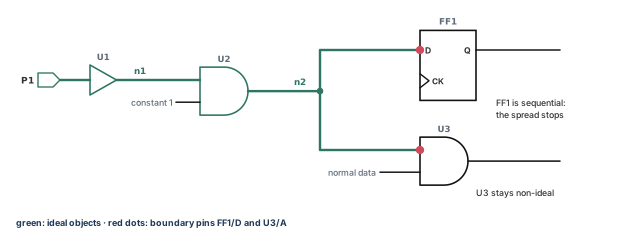
The tool propagates the ideal network during a timing update. It propagates again from the sources when the design changes, for example after an ECO.
10.3 Setting, reporting and removing ideal networks
The set_ideal_network command marks the sources. Give them as the object_list argument.
pt_shell> set_ideal_network P1 ;# P1 and its fanout, by the rules aboveThe property is set on port P1 and spreads along the nets, cells and pins in its transitive fanout.
The -no_propagate option limits the network to objects electrically connected to the source. For a net, that means the net, its driver pins and its load pins. Nothing else becomes ideal.
pt_shell> set_ideal_network -no_propagate net1 ;# net1, its drivers and loads onlyWithout -no_propagate, the tool sets the property on the listed pins, ports or nets and spreads it by the rules above.
To remove an ideal network, use remove_ideal_network. To see ideal ports, pins, nets and cells, use report_ideal_network.
pt_shell> report_ideal_network -timing -load_pin -net -cell
...
Source ports    Latency                Transition
and pins        Rise       Fall        Rise       Fall
                min max    min max     min max    min max
-----------------------------------------------------------
P1              --  --     --  --      --  --     --  --

Internal pins        Latency                Transition
with ideal timing    Rise        Fall       Rise      Fall
                     min  max    min  max   min max   min max
-------------------------------------------------------------
U2/A                 0.40 0.40   0.40 0.40  --  --    --  --

Boundary pins   Latency                Transition
                Rise       Fall        Rise       Fall
                min max    min max     min max    min max
-----------------------------------------------------------
FF1/D           --  --     --  --      --  --     --  --
U3/A            --  --     --  --      --  --     --  --
Nets
-----------------------------------------------------------
P1
n1
n2

Cells
-----------------------------------------------------------
U1
U2
The report lists source pins, internal pins with ideal timing, boundary pins, nets and cells. A boundary pin is where the ideal network ends.
10.4 Ideal latency
By default, the delay through an ideal network is zero. Use set_ideal_latency to give pins and ports in an ideal network an ideal latency. Ideal latency adds up along a path, the same way a delay does.
pt_shell> set_ideal_latency 0.40 [get_pins U2/A]   ;# 0.40 ns at U2/A
pt_shell> remove_ideal_latency [get_pins U2/A]     ;# take it off again
Ideal latency only takes effect on an ideal object. If the object is not in an ideal network, report_ideal_network shows a warning.
10.5 Ideal transition
By default, the transition time in an ideal network is also zero. Use set_ideal_transition to give it a value.
The value spreads from the object along the ideal network. It stops at the network's boundary pins or at the next ideal transition value.
pt_shell> set_ideal_transition 0.20 [get_ports P1]   ;# 0.20 ns along the network
pt_shell> remove_ideal_transition [get_ports P1]     ;# take it off again
As with latency, the value only takes effect on an ideal object. If the object is not ideal, report_ideal_network warns you.
A beginner sets set_ideal_latency on a pin that is outside the ideal network. Nothing changes in the timing, and no error stops the script. Read the warnings of report_ideal_network after setting ideal values.
10.6 Seeing the path through an ideal clock network
The report_timing -path_type full_clock_expanded command shows the full clock path of a timing path. By default, it does not show the path through an ideal clock network. Instead, it prints one line with the ideal clock latency at the clock arrival point.
Sometimes you need the real topology. For example, an ideal clock may reach a register where you did not expect it. To trace the cells, set timing_report_trace_ideal_clocks to true.
With the variable set, the report changes in three ways:
- It lists every cell on the ideal clock path, with each incremental delay.
- At the clock arrival point, a "propagated network delay removal" line cancels the traced delay.
- A "clock network delay (ideal)" line then adds the ideal clock network delay.
So the ideal clock edge time is kept, and you can still see the cells. The variable also controls report_clock_timing -verbose and report_min_pulse_width -path_type full_clock_expanded.
pt_shell> set_app_var timing_report_trace_ideal_clocks true
true
pt_shell> report_timing -path_type full_clock_expanded
  ...
  Point                                     Incr       Path
  ---------------------------------------------------------
  clock CLK (rise edge)                     0.00       0.00
  clock source latency                      0.00       0.00
  CLK (in)                                  0.00 &     0.00 r
  CK1/Z (BUFX4)                             0.30 &     0.30 r
  CK2/Z (BUFX8)                             0.25 &     0.55 r
  propagated network delay removal         -0.55       0.00
  clock network delay (ideal)               0.80       0.80
  FF1/CK (DFFX1)                            0.00 &     0.80 r
  ... full data path ...
In this sample, the traced delay is 0.55 ns and is removed. The ideal clock network delay, 0.80 ns, is then added at FF1/CK.
11 Checking the constraints
11.1 Why check before analyzing
Before a full analysis, check the design and its constraints. Paths with wrong constraints may not appear in violation reports at all. Thus, you could miss a real violation and never know.
11.2 Design reports
The commands in the table below describe the design and its settings. Use them before a full timing run, and again to debug violations afterwards.
| Command | What it reports |
|---|---|
report_bus |
Buses (pins or ports) in the current instance or design |
report_cell |
Cells used: library name, inputs, outputs, net connections, area, attributes |
report_clock |
Clocks: name, period, rise and fall times, latency, uncertainty |
report_design |
Design attributes: operating conditions, wire load data, design rules, derating factors |
report_disable_timing |
Disabled timing arcs |
report_hierarchy |
A hierarchical list of submodules and leaf cells |
report_lib |
A library: time and capacitance units, wire loads, operating conditions, trip points, cell names |
report_net |
Nets: fanin, fanout, capacitance, wire resistance, pin count, attributes, connections |
report_path_group |
Path groups; the tool groups timing paths by conditions at their endpoints |
report_port |
Ports: direction, pin and wire capacitance, input and output delay, related clock, design rules, wire loads |
report_reference |
Hierarchical references: name, unit area, count, total area, attributes |
report_transitive_fanin |
Logic that fans in to given pins, ports or nets |
report_transitive_fanout |
Logic that fans out from given pins, ports or nets |
report_units |
Units for current, capacitance, resistance, time and voltage |
report_wire_load |
Wire load models on the current design or on given cells |
11.3 Constraint checking with check_timing
The check_timing command looks for constraint problems. The main ones are:
- undefined clocking, such as register clock pins with no clock;
- undefined input arrival times;
- undefined output constraints.
It also reports possible problems with:
- minimum clock separation, for master-slave clocking, where two latches on opposite clock phases act as one flop;
- ignored timing exceptions;
- combinational feedback loops;
- latch fanout.
You fix unconstrained paths by adding constraints, such as create_clock, set_input_delay and set_output_delay.
pt_shell> check_timing
Information: Checking 'no_clock'.
Warning: There are 4 register clock pins with no clock.
Information: Checking 'no_input_delay'.
Information: Checking 'unconstrained_endpoints'.
Information: Checking 'generic'.
Information: Checking 'latch_fanout'.
Warning: There are 2 level-sensitive latches which fanout to
themselves.
Information: Checking 'loops'.
Warning: There are 6 timing loops in the design.
Information: Checking 'generated_clocks'.
By default, check_timing runs a set of checks and prints a summary like this one. These options and settings change it:
| Option or variable | What it does |
|---|---|
-verbose |
Gives a detailed report |
-include |
Adds checks to the default list |
-exclude |
Removes checks from the default list |
timing_check_defaults |
Sets the list of checks for later check_timing runs |
A warning from check_timing is not always a real design problem. Use the design reports above to learn more before you change anything.
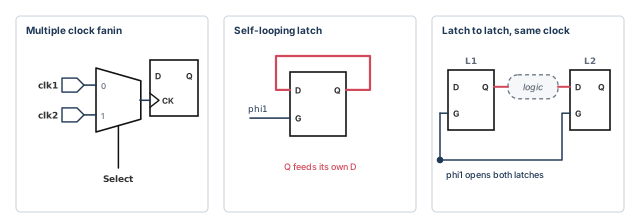
Figure 15 shows three shapes that often cause warnings.
- Multiple clock fanin. A multiplexer (mux) with a Select input lets either
clk1orclk2reach a clock pin. - Self-looping latch. The latch output feeds back to its own input. This is the
latch_fanoutwarning in the sample above. - Latch fanout to a latch on the same clock. Both latches are open at the same time, so data may pass through both in one phase.
For unconstrained paths, check_timing reports only the unconstrained endpoints, not the startpoints. The same holds for paths constrained only by set_max_delay, set_min_delay or both, instead of input and output delays. The Timing Paths and Exceptions chapter covers those two commands.
Run check_timing -verbose after every constraint change and keep the log. Compare it with the previous run. A new "no clock" or "unconstrained endpoint" line often points to a typo in a port name.
11.4 Detailed constraint checking and debugging
The tool also has a detailed constraint checker. It applies a broad set of predefined rules. The rules cover problems in clocks, exceptions, case settings and design rules. Examples are blocked timing paths and missing clock definitions.
To run it from the PrimeTime shell:
- (Optional) Put your checking setup in the
.synopsys_gca.setupfile. - Set the current design with
current_design. - (Optional) Name a rule file with the
gca_setup_filevariable. The file holds your own violation waivers and custom rules. A waiver marks a known violation as accepted. - Run
check_constraints. - To check another design, repeat steps 2 to 4. You can use a different rule file each time.
pt_shell> current_design top                             ;# step 2: pick the design
pt_shell> set_app_var gca_setup_file ./top_rules.tcl     ;# step 3: rules and waivers
pt_shell> check_constraints                              ;# step 4: run the checks
pt_shell> current_design block                           ;# step 5: next design
pt_shell> set_app_var gca_setup_file ./block_rules.tcl   ;# its own rule file
pt_shell> check_constraints ;# run again****************************************
Report : check_constraints
...
****************************************
Scenario Violations Count Waived Description
-------------------------------------------------------------------
Design: top
default 2 0 Default scenario violations
error 2 0
CAP_0001 2 0 Output/inout port 'port' has zero
or incomplete capacitance values.
1 of 2 0 Output/inout port 'OUT1' has zero
or incomplete capacitance values.
2 of 2 0 Output/inout port 'OUT2' has zero
or incomplete capacitance values.
-------------------------------------------------------------------
Total Error Messages 2 0
Total Warning Messages 0 0
Total Info Messages 0 0The report groups violations by severity and rule, with a count and a waived count for each. Here rule CAP_0001 found two output ports with no load. A set_load on each port fixes it.
You can also view the results in the graphical user interface (GUI). Choose Constraints > View Constraint Checking Results. The checks can also run in a separate constraint checking shell, ptc_shell. The Constraint Consistency chapter covers that shell.
check_timing for missing constraints, and check_constraints for deeper rule checks.12 Worked example: constrain block top and check it
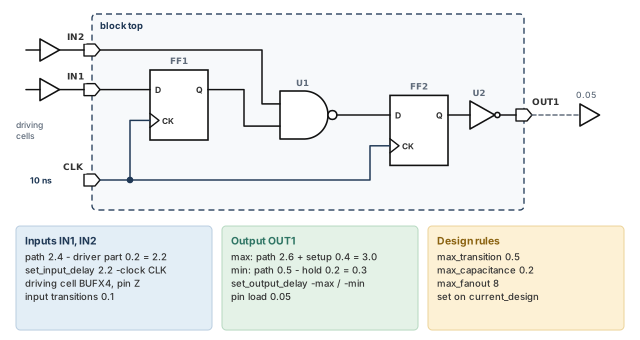
Let us constrain a small block named top. Figure 16 shows it with all its outside facts. Clock CLK is already defined, with a 10 ns period. The Clocks chapter shows how.
The outside facts are:
- IN1 and IN2 come from flops clocked by CLK. The outside path is 2.4 ns, and 0.2 ns of it is load-dependent driver delay.
- OUT1 goes to a flop clocked by CLK. The longest outside path is 2.6 ns, and setup is 0.4 ns. The shortest path is 0.5 ns, and hold is 0.2 ns.
- OUT1 drives an outside pin load of 0.05.
Step 1 — See what is missing
pt_shell> current_design top   ;# work on block top
pt_shell> report_clock         ;# confirm that CLK exists
pt_shell> check_timing ;# list what is still unconstrainedInformation: Checking 'no_clock'.
Information: Checking 'no_input_delay'.
Warning: There are 2 input ports with no input delay.
Information: Checking 'unconstrained_endpoints'.
Warning: There is 1 unconstrained endpoint.
...Check: the warnings match what you expect. Two inputs have no delay, and output OUT1 is an unconstrained endpoint.
Step 2 — Describe the input drivers
pt_shell> set_driving_cell -lib_cell BUFX4 -pin Z \
            -input_transition_rise 0.1 \
            -input_transition_fall 0.1 {IN1 IN2}   ;# outside driver is BUFX4/Z
pt_shell> report_port -drive                       ;# confirm the drive data
Check: report_port -drive shows the driving cell on both inputs. In a real project, pick the cell that the parent design really uses to drive these ports.
Step 3 — Set the input delays
pt_shell> set_input_delay 2.2 -clock CLK {IN1 IN2}   ;# 2.4 ns path minus 0.2 ns
pt_shell> report_port -input_delay                   ;# confirm the values
Check: both ports show 2.2 ns relative to CLK. If you see 2.4, the driver delay is counted twice.
Step 4 — Set the output delay and load
The maximum output delay is 2.6 + 0.4 = 3.0 ns. The minimum is 0.5 − 0.2 = 0.3 ns.
pt_shell> set_output_delay -max 3.0 -clock CLK {OUT1}   ;# setup side: 2.6 + 0.4
pt_shell> set_output_delay -min 0.3 -clock CLK {OUT1}   ;# hold side: 0.5 - 0.2
pt_shell> set_load -pin_load 0.05 {OUT1}                ;# outside pin capacitance
pt_shell> report_port -output_delay                     ;# confirm the values
Check: report_port -output_delay shows 3.0 ns as the maximum and 0.3 ns as the minimum on OUT1. A single value without -max and -min would be used for both, and the hold check would be wrong.
Step 5 — Set the design rule limits
pt_shell> set_max_transition 0.5 [current_design]    ;# no slower edge than 0.5 ns
pt_shell> set_max_capacitance 0.2 [current_design]   ;# no net above 0.2
pt_shell> set_max_fanout 8 [current_design]          ;# no net above fanout load 8
pt_shell> report_design                              ;# confirm the defaults
Check: report_design lists the three limits. Library limits still apply where they are tighter.
Step 6 — Check again and report violations
pt_shell> check_timing -verbose                ;# should show no new warnings
pt_shell> report_constraint -all_violators ;# design rule violators only...
max_transition
Required Actual
Pin Transition Transition Slack
---------------------------------------------------------
U2/A 0.5000 0.5600 -0.0600 (VIOLATED)
...Check: the input delay and unconstrained endpoint warnings are gone. One pin, U2/A, breaks the 0.5 ns transition limit. That is a real design problem to fix, not a constraint problem.
13 Common mistakes and how to catch them
| Symptom | Likely cause | Fix |
|---|---|---|
| Input paths look slower than the budget says | The input delay includes the driver's load-dependent delay, and a driving cell is also set | Subtract the load-dependent part from the input delay |
| Paths from one clock through a port vanish | A second set_input_delay without -add_delay erased the first |
Add -add_delay to every extra clock or edge |
| An input delay on a clock port is ignored with an error | The clock is on the same port, or the clock port feeds no data pin | Follow the three rules; use set_clock_latency |
| Hold checks at outputs look too easy or too hard | The hold time was added to the minimum output delay instead of subtracted | Minimum output delay = shortest path − hold |
| Pre-layout timing looks far too good | No wire load model applies, so wires are 0 | Set a model or group; check report_wire_load |
| Constraints vanish after a quick clean-up | reset_design removed all user data |
Use remove_driving_cell and other targeted commands |
| Reported limit differs from the one you set | The limit is scaled to the pin's threshold and derate | Check library thresholds and derates |
| A tight library limit is ignored | The precedence variable is true, so location wins |
Know which mode your flow uses |
| A big reset net floods the design rule report | It is a pre-layout high-fanout net | Make it an ideal network until buffering |
set_ideal_latency has no effect |
The pin is not in an ideal network | Read its warnings in the report |
check_timing is clean but some startpoints are unconstrained |
It reports only unconstrained endpoints | Also check input delays with report_port -input_delay |
14 Interview preparation
It is the time from a clock edge to data arrival at an input port, caused by outside logic.
- It is set with
set_input_delayand a-clock. - The tool uses it to check the port and its transitive fanout.
Maximum is the longest outside path plus setup; minimum is the shortest outside path minus hold.
- For example, 2.6 + 0.4 = 3.0 ns and 0.5 − 0.2 = 0.3 ns.
- The maximum value drives setup checks, the minimum drives hold checks.
set_driving_cell, set_drive and set_input_transition.
- The driving cell copies a library cell and is the most accurate.
set_driveuses one resistance;set_input_transitionfixes the transition with zero port delay.- The most recent drive command on a port wins.
-add_delay do on set_input_delay?It keeps the existing input delay and adds another, for a different clock or edge.
- Without it, the new command removes the existing data on the port.
No. Subtract the load-dependent part of the driver's delay, or it is counted twice.
- The tool already adds that part as the port's cell delay.
- The input delay runs from the source flop's clock pin to the driver output, minus that part.
Top uses one model everywhere. Enclosed uses the model of the block that fully encloses the net. Segmented sums each level's segment.
- With no mode set, the library's
default_wire_load_modeapplies. - Enclosed is often the most accurate, but follow your vendor's advice.
A selection group if set, else the library's default_wire_load model, else zero for all wire values.
- Selection is on when a group is set or the library defines a default group.
auto_wire_load_selectionistrueby default.
For maximum analysis, the worst slew of all arcs, even if it is not on the worst delay path.
- This can make later delays pessimistic.
- For minimum analysis, it picks the minimum slew based on the input with the best delay.
By default, the most restrictive. With timing_enable_max_slew_precedence set to true, location decides: pin or port, then library, then clock or design.
- The same "most restrictive" default applies to capacitance limits.
The report shows the limit in the pin's own threshold and derate, which differ from the main library's.
- For example, 0.3 ns at 30/70 is 0.6 ns at 10/90.
- A derate of 0.5 in the pin's library with matching thresholds gives the same result.
The library gives max_capacitance by frequency per driver pin. The tool takes the smallest of that, the cell value and yours.
- Pin frequency is the highest frequency of the clocks launching signals to the pin.
timing_enable_library_max_cap_lookup_table falseignores the tables.timing_library_max_cap_from_lookup_table truemakes the table win over the cell value.
It is a set of objects exempt from timing updates and design rule checks. It spreads through combinational cells and stops at sequential cells.
- A combinational cell becomes ideal when all its inputs are ideal. It also becomes ideal when one input is tied to a constant and all other inputs are ideal.
-no_propagatelimits it to the net, its drivers and its loads.
check_timing is clean. Can there still be unconstrained paths?Yes. It reports unconstrained endpoints, not unconstrained startpoints.
- The same holds for paths constrained only by
set_max_delayorset_min_delay. - Its warnings also need judgment; not all are real problems.
15 Chapter close
Compact glossary
| Term | Meaning |
|---|---|
| Timing constraint | A limit on when a signal may arrive at an input or be valid at an output; also called a timing assertion |
| Input delay | Time from a clock edge to data arrival at an input port |
| Output delay | Time the outside world needs from an output port to its capturing register |
| Transitive fanout | All logic driven by a point, directly or through other cells |
| Load-dependent delay | The part of a cell delay that grows with the load it drives |
| Driving cell | A library cell the tool assumes drives an input port |
| Transition time (slew) | How long a signal takes to rise or fall between two thresholds |
| Slew threshold | The two voltage points between which a slew is measured |
| Slew derate | A factor that converts a stored slew back to the measured value |
| Wire load model | A statistical table that estimates wire parasitics from fanout |
| Wire load selection group | A map from block size to wire load model |
| Wire load mode | Top, enclosed or segmented: which model each part of a net uses |
| Design rule constraint | A limit on transition, capacitance or fanout |
| Fanout load | The sum of fanout_load values of the pins and ports on a net |
| Pin frequency | The highest frequency of the clocks launching signals to a pin |
| Ideal network | Connected objects exempt from timing updates and design rule checks |
| Ideal latency / transition | Values you give to an ideal network instead of zero |
| Boundary pin | Where an ideal network ends |
| Case analysis | Setting nets to constants, for example to pick a mode |
| Unconstrained endpoint | A path end with no timing check on it |
| Waiver | A known constraint violation marked as accepted |
| ETM | Extracted timing model: a compact timing model of a block |
Constraining the design on one page
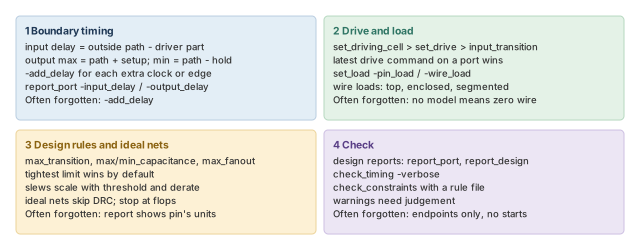
Figure 17 is the summary to redraw from memory.
Where the next chapter goes, and why
Every input and output delay in this chapter was "relative to a clock". So far, we simply assumed the clock existed. However, a real clock has a period, a waveform, latency and uncertainty, and some clocks are made from others.
The Clocks chapter defines all of that. It shows how create_clock sets the edges that every constraint here refers to. Thus, the input delays you wrote become real checks with real edges.