Why this chapter matters in a real project
Many blocks pass through two tools. Design Compiler synthesizes the block: it turns register-transfer level (RTL) code into a gate-level netlist and optimizes it for speed and area. PrimeTime then checks the timing of that netlist. Both tools read constraints, and both report slack.
Engineers expect the two tools to agree. Usually they come close, but not always. For example, a hold check through a latch can pass in synthesis and fail in PrimeTime. If you do not know why, you may waste days hunting a bug that is really a difference in rules.
Scripts are the other daily problem. Synthesis scripts often change the current design to set local values. That habit breaks in PrimeTime. A shared constraint file avoids most of this trouble, if you know what may go in it.
This chapter collects the differences, the safe ways to share scripts, and the path group link between the two tools. It also explains an older hierarchical flow, HyperScale distributed analysis, which you may meet in legacy run scripts.
Prerequisites
- Working With Design Data: reading and linking a design,
current_designandcurrent_instance, and sessions. - Constraining the Design: wire load models, input and output delays.
- Clocks: creating clocks with
create_clock. - Timing Paths and Exceptions: timing paths, startpoints and path groups.
- Advanced Analysis Techniques: time borrowing at latches. A short reminder is given here.
- You do not need to know how to run Design Compiler. Its shell is
dc_shell, and its commands shown here are only for comparison. The PrimeTime shell ispt_shell.
In this chapter, times are in nanoseconds (ns) unless said otherwise.
Learning objectives
- Name the PrimeTime features that Design Compiler does not support, and give the workaround for each.
- Explain the short-path borrowing difference and switch PrimeTime to match synthesis when needed.
- Explain how the two tools treat load-dependent delay on a segmented path.
- Predict how each tool stores transition time on an inout pin.
- Rewrite a
current_design-based synthesis script for PrimeTime withcurrent_instanceor cell names. - Split a script into shared and tool-specific parts, and source the shared part in both tools.
- Read, write and check SDC files with
read_sdc,write_sdc,read_sdc -syntax_onlyandset_units. - Compare path groups in the two tools, and describe the critical range.
- Describe HyperScale distributed analysis, its partitioning options and its session flows.
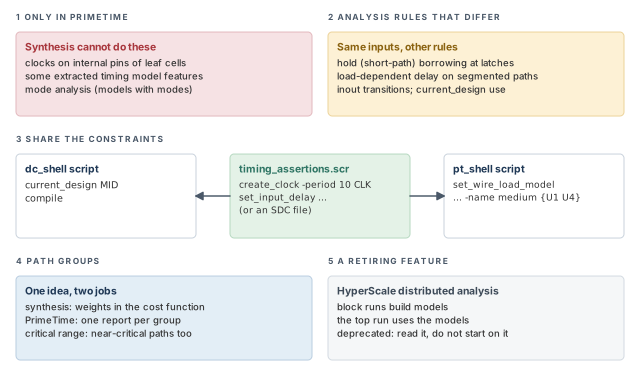
Figure 1 is a map of the whole chapter. Come back to it whenever you lose your place.
1 The beginner's mental model
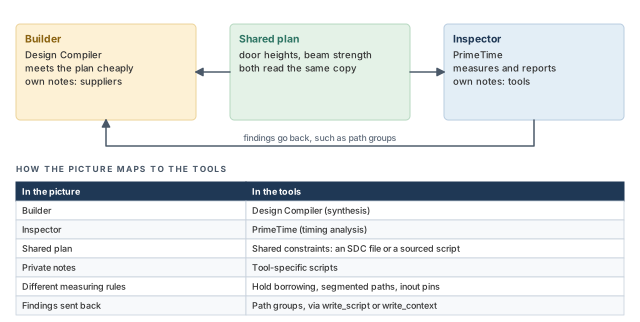
Think of a house built by a builder and checked by an inspector. Both work from the same building plan. The plan says how tall each door must be and how strong each beam must be.
The builder makes choices to meet the plan cheaply. The inspector only measures and reports. They speak the same language for most things, so they share one plan. However, each also keeps private notes. The builder notes which suppliers to use. The inspector notes which measuring tools to use. Figure 2 shows this picture and maps each piece to its tool name.
- A real inspector never builds. PrimeTime can still make small netlist fixes, as the ECO Flow chapter showed. Thus, the roles overlap a little.
- A building plan has one meaning for both people. Some constraints do not. For example, short-path borrowing at latches is on in synthesis but off by default in PrimeTime.
- A builder and inspector can rewrite each other's notes. The tools cannot. You cannot convert a dc_shell script into a pt_shell script.
Now the engineering model
In engineering terms, the two tools share three things and differ in four places:
- Shared: the netlist, the logic libraries and most constraint commands. The cleanest shared form is an SDC file.
- Differs — features: internal clocks and mode-based timing models work only in PrimeTime.
- Differs — analysis rules: hold borrowing at latches, load-dependent delay on segmented paths, and inout transition times.
- Differs — scripting: how you set local values in a hierarchy.
- Differs — path groups: synthesis uses them to steer optimization; PrimeTime uses them to group reports.
SDC stands for Synopsys Design Constraints. It is a format for timing constraints that many tools read. It is based on Tcl (Tool Command Language), the scripting language that both tool shells use.
2 Features only PrimeTime supports
Some PrimeTime features have no match in Design Compiler. They are:
- clocks on internal pins;
- certain features of extracted timing models;
- mode analysis, which means timing models with operating modes.
An extracted timing model is a compact timing view of a block, made from its netlist. A model with operating modes has arcs that are active only in some modes. For example, a memory model may have a read mode and a write mode.
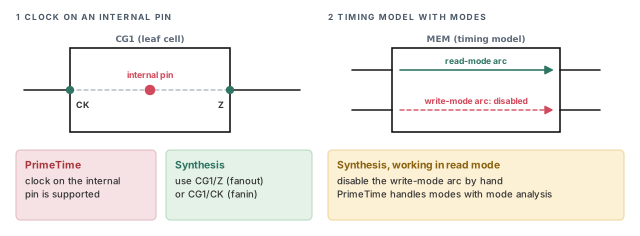
Figure 3 shows the two everyday cases and the workaround for each.
2.1 Clocks on internal pins
A leaf cell is a cell with no hierarchy below it, such as a gate or a model. Some leaf cells have an internal pin, which is a pin inside the cell, not on its boundary. PrimeTime can create a clock on such a pin.
Design Compiler cannot. For synthesis, you must define the clock on an input or output pin instead. The chosen pin must lie in the fanin or fanout of the internal pin. Fanin is all logic that drives a point. Fanout is all logic that a point drives.
For example, suppose a clock generator cell CG1 has an internal pin where the divided clock appears. Its output pin CG1/Z is in the fanout of that internal pin. Thus, for synthesis, you create the clock on CG1/Z.
A beginner copies a PrimeTime clock definition on an internal pin into the synthesis script. The synthesis tool does not support it. It is better to keep internal-pin clocks in the PrimeTime-only script, and use a boundary pin for synthesis.
2.2 Timing models with operating modes
Design Compiler cannot analyze or optimize a design with timing models that use mode analysis. To work on a module in one mode, you must disable the inactive timing arcs by hand. The arcs that belong to other modes must be turned off.
The cost of skipping this step is real. Without it, synthesis cannot analyze or optimize the module in the mode you want. Thus, the block may not be optimized for that mode at all.
3 Timing analysis differences
Even with the same netlist and the same constraints, a few rules differ. They fall into three groups: path rules (hold borrowing and segmented paths), transition time on inout pins, and the use of current_design.
3.1 Time borrowing for hold checks
A level-sensitive latch passes data while its enable is active. Time borrowing lets a path that arrives while the latch is open use time from the next stage. The Advanced Analysis Techniques chapter covers it in full.
Short-path borrowing is time borrowing for hold checks at level-sensitive latches. A hold check makes sure new data does not arrive too early. The two tools treat it differently:
- PrimeTime disables short-path borrowing by default.
- Design Compiler always allows borrowing for short paths.
Figure 4 shows the two settings on one latch.
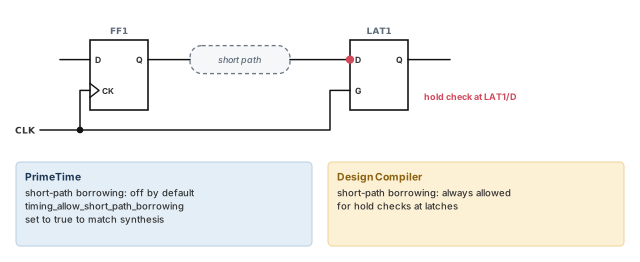
To make PrimeTime behave like synthesis, set the timing_allow_short_path_borrowing variable to true.
pt_shell> set_app_var timing_allow_short_path_borrowing true ;# allow hold borrowingIt is better to use this setting only when you compare results with synthesis, because it changes the hold check rules. For signoff, keep the setting your team has agreed.
When a latch hold result differs between the two tools, check this variable first. It takes seconds, and it explains many "the tools disagree" tickets.
3.2 Segmented paths and load-dependent delay
A path is segmented when it is broken at a point inside the design. That point becomes a new startpoint. The timing report then starts there, not at the original register.
A gate's delay has a part that grows with the load it drives. We call this the load-dependent part. For example, gate U1 might have a 0.30 ns delay. Of that, 0.12 ns comes from the load on its output net.
The tools treat a report that starts at the new startpoint differently:
- Design Compiler moves the load-dependent part of the source gate's delay onto the output net delay. This can help synthesis results, but it is not right for static timing analysis.
- PrimeTime does not add the load-dependent delay to the net.
Figure 5 shows the same segment in both tools.
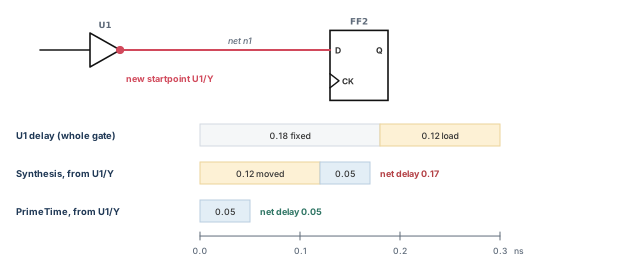
Thus, the same segment can show a smaller arrival in PrimeTime. This is a rule difference, not a bug. Do not "fix" it by adding margin.
3.3 Transition time on inout pins
An inout pin, also called a bidirectional pin, can both drive and receive. So it has a driver part and a load part. Transition time is how long a signal takes to rise or fall.
- PrimeTime keeps separate transition times for the driver and the load parts of the pin.
- Design Compiler keeps only the larger of the two.
Figure 6 shows an example with illustrative values.
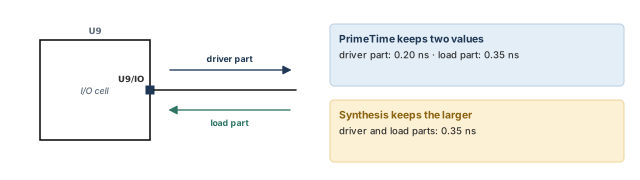
Thus, delays timed from the side with the smaller transition can be smaller in PrimeTime. The synthesis view is pessimistic for that side.
3.4 Setting local values: current_design versus current_instance
Some settings apply to one part of the hierarchy. A wire load model is one example. It estimates wire load from the number of fanout pins, before real wires exist. The Constraining the Design chapter covers it.
Let us use a small hierarchy. Design TOP contains cell U1, an instance of design MID. Inside U1 is cell U1/U2, an instance of design BOTTOM. We want:
largeforTOP;mediumforMID;smallforBOTTOM.
In Design Compiler, you change the current design for each local setting:
dc_shell> current_design BOTTOM                ;# work on design BOTTOM
dc_shell> set_wire_load_model -name small      ;# small model for BOTTOM
dc_shell> current_design MID                   ;# work on design MID
dc_shell> set_wire_load_model -name medium     ;# medium model for MID
dc_shell> current_design TOP                   ;# back to the top
dc_shell> set_wire_load_model -name large      ;# large model for TOP
In PrimeTime, do not use current_design for this. Use the current_instance command, or give hierarchical cell names:
pt_shell> current_design TOP                                    ;# the top design
pt_shell> set_wire_load_model -name large                       ;# model for TOP
pt_shell> set_wire_load_model -name medium [get_cells U1]       ;# model for U1
pt_shell> set_wire_load_model -name small [get_cells U1/U2]     ;# model for U1/U2
Figure 7 compares the two styles on the same hierarchy.
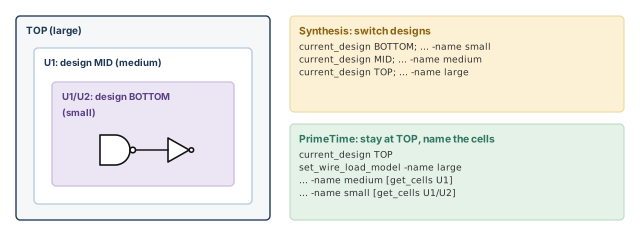
Why does this matter? In PrimeTime, the current design is the top level of the analysis. Most objects are named relative to it. Thus, a synthesis-style script can leave you working in the wrong design.
A beginner pastes the synthesis lines into pt_shell. In PrimeTime, current_design is not meant for local settings. Use cell names or current_instance instead, because they put the value on the instances being timed.
current_design switching with current_instance or cell names.4 Sharing scripts between the two tools
4.1 Two ways to share
You can share scripts when one design goes through both tools. There are two ways:
- Use SDC. This is the easiest way. The shared constraints live in an SDC file that both tools read.
- Split the scripts. Keep shared commands in one file. Keep tool-specific commands in a separate script for each tool.
Note these limits first:
- You cannot convert a dc_shell Tcl script into a pt_shell script.
- You can source some dc_shell Tcl scripts directly into pt_shell.
- Some PrimeTime commands have the same syntax as their synthesis twins. Others, such as local wire load settings, must be written differently.
Figure 8 shows the split-script method.
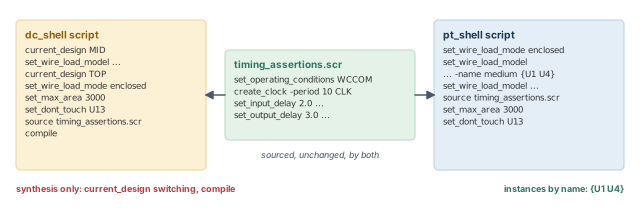
4.2 Splitting shared and tool-specific commands
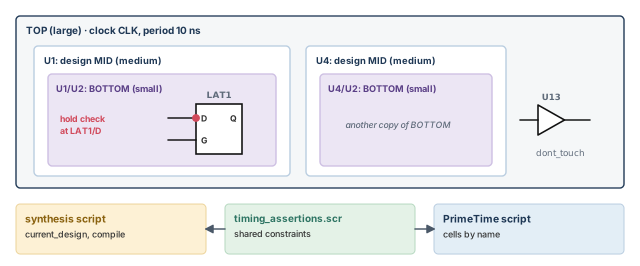
Let us build on the hierarchy above. Now TOP has two instances of MID, named U1 and U4, and a cell U13 that must not change.
Here is the synthesis script. It sources a shared file named timing_assertions.scr:
current_design MID                 ;# local setting for design MID
set_wire_load_model -name medium   ;# medium model for MID
current_design TOP                 ;# back to the top
set_wire_load_mode enclosed        ;# how wire load models apply across levels
set_wire_load_model -name large    ;# large model for TOP
set_max_area 3000                  ;# area goal for synthesis
set_dont_touch U13                 ;# keep cell U13 unchanged
source timing_assertions.scr       ;# shared constraints
compile                            ;# synthesize (synthesis only)
The wire load mode decides which wire load model applies to a net that crosses levels. With enclosed, a net uses the model of the block that fully encloses it.
The shared file holds only commands that both tools understand:
set_operating_conditions WCCOM   ;# a named operating condition
create_clock -period 10 CLK      ;# 10 ns clock on port CLK
set_input_delay 2.0 -clock CLK {IN1}    ;# input delay on port IN1
set_output_delay 3.0 -clock CLK {OUT1}  ;# output delay on port OUT1
The PrimeTime script holds the equivalent of the synthesis-only lines:
set_wire_load_mode enclosed                 ;# same mode as synthesis
set_wire_load_model -name medium {U1 U4}    ;# both MID instances, by name
set_wire_load_model -name large             ;# model for TOP
source timing_assertions.scr                ;# the same shared constraints
set_max_area 3000                           ;# same area setting
set_dont_touch U13                          ;# same dont-touch setting
Notice three things:
- The
current_design MIDlines became a list of instances,{U1 U4}. - The shared file is sourced unchanged by both tools.
- There is no
compile. Synthesis is not a PrimeTime job.
Keep the shared file free of anything tool-specific. One stray synthesis command can cause errors in the PrimeTime run. A clean shared file can be checked once and trusted by both tools.
5 SDC script files
5.1 What SDC is, and what it is not
SDC files are Tcl scripts. They use a subset of the commands that PrimeTime and Design Compiler support. Some of those commands carry limits. For example, not every option is supported in every case.
SDC is a subset of Tcl, but it is not a full scripting language:
- It is meant to state timing constraints across many design tools.
- It is not meant for complex scripting.
- It knows only one design: the current design. You cannot change the current design in SDC.
The last point fits the previous section. SDC never switches designs, so it cannot hold current_design-based local settings.
5.2 Reading and writing SDC
PrimeTime reads SDC files with read_sdc and writes them with write_sdc.
pt_shell> read_sdc top.sdc    ;# apply the constraints in top.sdc
pt_shell> write_sdc out.sdc   ;# write the current constraints as SDC
A file written by write_sdc is a handy way to pass constraints to another tool.
5.3 Checking the syntax
Before you apply a new SDC file, check it. The read_sdc -syntax_only command checks that the file is correct in syntax and in meaning. It has no effect on the design.
pt_shell> read_sdc -syntax_only top.sdc ;# check only; the design is unchangedIt is better to run this check on every SDC file you receive. A bad line found later can mean a constraint was silently missing.
5.4 Checking the units
Each logic library has units for time, capacitance and so on. The main library is the first library in the link path. If an SDC file assumes other units, every number in it is scaled wrongly. For example, an input delay of 2 meant as 2 ns becomes 2 ps.
The set_units command states the units a file expects:
pt_shell> set_units -time 1ns -capacitance 1nF -current 1mA \
            -voltage 1V -resistance 1kOhm -power 1W   ;# expected units
If these units differ from the main library units, PrimeTime issues a warning. You can use set_units in SDC files, on the command line or in script files. The command is optional. However, you should use it, because it catches mixed units from different constraint files.
Figure 9 shows the two checks in order.
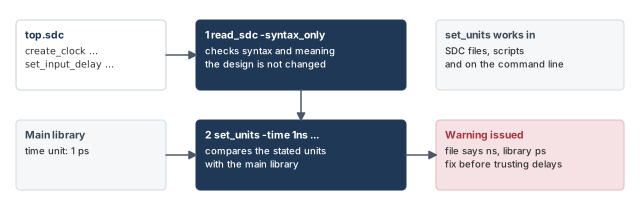
Teams often put a set_units line at the top of every SDC file they hand off. The receiving tool then warns at once if the units do not match its libraries.
read_sdc -syntax_only, and state units with set_units.6 Path groups in both tools
A path group is a named set of timing paths. In PrimeTime, you create one with group_path. The Timing Paths and Exceptions chapter covers that command. The two tools use path groups for different jobs.
6.1 Path groups in Design Compiler
In synthesis, path groups change the cost function. The cost function is the score that the optimizer tries to lower. You can assign paths or endpoints to named groups. Each group has a weight that you can set. The weight decides how much the group adds to the maximum delay cost of the design.
6.2 Path groups in PrimeTime
PrimeTime checks each timing path for maximum delay violations. It compares the actual path delay, for rising and falling signals, with a target path delay. The worst violation in a group is the path with the largest negative slack.
You can define path groups in PrimeTime too. When you ask for a path timing report, PrimeTime lists a report for each path group.
6.3 Sending path groups back to synthesis
You can pass PrimeTime path group information to Design Compiler in three ways:
- with the
write_scriptcommand; - with the
write_contextcommand; - by budgeting the design, which means splitting the timing goals among blocks.
6.4 The critical range
When you create an explicit path group, you can also give it a critical range. This is a margin of delay for the group during synthesis optimization.
- A nonzero range lets the optimizer also improve near-critical paths. These are paths close to the worst one, within the margin.
- The condition is that the worst violation must not get worse.
Figure 10 shows a group with an illustrative critical range.
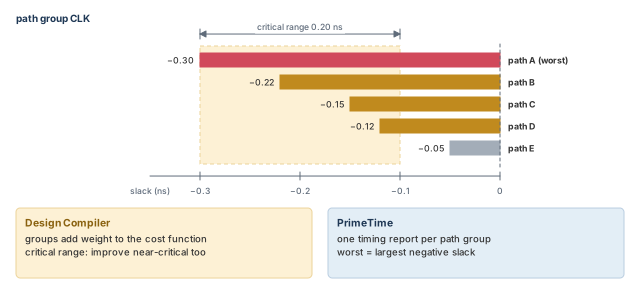
A sensible critical range improves the overall timing picture, not only the worst path. As a result, fewer paths are typically left just short of passing when PrimeTime checks the result.
write_script or write_context, or by budgeting.7 A retiring feature: HyperScale distributed analysis
HyperScale distributed analysis is deprecated. It still exists, but it is planned for removal. You may meet it in older run scripts, so you should be able to read them. It is better not to start new flows on it, because they will need rework.
7.1 What HyperScale distributed analysis does
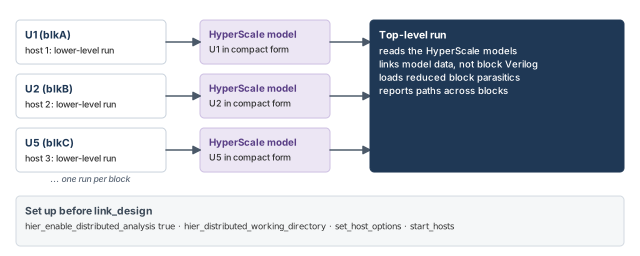
Timing a large chip in one flat run can take a long time. Hierarchical analysis splits the work by blocks. A HyperScale model is a compact timing model of one block that the tool builds itself.
In HyperScale distributed analysis, the tool does three things automatically:
- It runs a separate analysis for each lower-level block.
- It builds a HyperScale model of each block.
- It runs the top-level analysis using those models.
Each block analysis is a partition. The tool sends the block runs to the available hosts. Figure 11, at the end of the next section, shows the whole flow.
7.2 From a flat script to a distributed run
You can reuse an existing full-chip flat script. You only add a few lines to turn on hierarchical analysis and name the hosts.
set_app_var hier_enable_distributed_analysis true      ;# turn on the flow
set_app_var hier_distributed_working_directory $nfs_dir ;# shared work area
# optional: set_hier_config here changes the default partitioning (shown below)
set_host_options -num_processes $nProc1 -max_cores $mCore1 \
    -submit_command $submit1  ;# first set of hosts; $submit1 is your job command
set_host_options -num_processes $nProc2 -max_cores $mCore2 \
    -submit_command $submit2  ;# second set of hosts
start_hosts                   ;# launch the hosts
The original flat script then follows, unchanged:
read_verilog blk_A.v          ;# block netlist
read_verilog blk_B.v          ;# block netlist
read_verilog top.v            ;# top netlist
link_design TOP               ;# link the full chip
update_timing                 ;# time the design
report_timing -path_type full_clock_expanded \
    -from IN1 -to U2/reg78    ;# flat-like report from the top
Keep these rules in mind:
- Order. Set up the hosts and the hierarchical configuration before you link the design.
- Host use. The tool assigns the lower-level blocks to the available hosts.
- Licenses. When
hier_enable_distributed_analysisorhier_enable_analysisistrue, one PrimeTime-ADV license is needed for each 32 cores requested.
Block netlists and parasitics are not needed for blocks shown as HyperScale models. Still, you can keep the commands that read them. With the flow on and the configuration set, the tool behaves like this:
- It links with the HyperScale model data, not the full block Verilog, even if that Verilog was read.
- It loads the reduced parasitics from the HyperScale data, and skips the full block parasitics.
To save more runtime and memory, you can remove the commands that read the block Verilog.
7.3 Default and custom partitioning
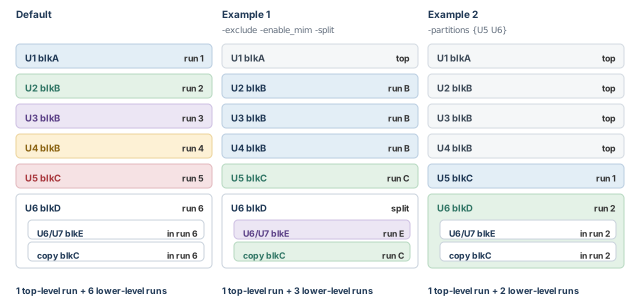
By default, each block at the top level gets its own partition. Let us use a chip Top with these instances:
U1, an instance ofblkA;U2,U3andU4, three instances ofblkB;U5, an instance ofblkC;U6, an instance ofblkD. Inside it areU6/U7, an instance ofblkE, and one moreblkCcopy.
By default, this gives one top-level run and six lower-level runs, one for each of U1 to U6. The set_hier_config command changes the partitioning. Its options are:
| Option | What it does |
|---|---|
-exclude {cells} |
Keeps the listed blocks in the top-level run |
-split {cells} |
Splits the listed blocks one level down |
-enable_mim |
Merges the context of multiple-instance modules |
-partitions {cells} |
Analyzes only the listed blocks separately; all others stay in the top run |
A multiple-instance module (MIM) is one design used as several instances, such as blkB here. Context means the constraints a block sees from its surroundings. MIM merging analyzes all copies in one run with merged context.
set_hier_config \
    -enable_mim \
    -exclude {U1} \
    -split {U6}        ;# merge MIMs; keep U1 at top; split U6 one level
Here U1 stays in the top-level run. The three blkB copies share one merged run. U6 is split one level down, so its inner blocks become partitions. MIM merging also joins the two blkC copies. The result is one top-level run and three lower-level runs.
set_hier_config \
    -partitions {U5 U6}    ;# analyze only U5 and U6 as separate blocks
Use -partitions when only a few large blocks deserve their own run. Everything else stays at the top. This example gives two lower-level runs.
Two rules govern -partitions:
- You cannot use it with
-excludeor-split. - You can use it with
-enable_mim, to partition a subset of the MIM copies.
Figure 12 shows the default and the first two examples side by side.
set_hier_config \
    -enable_mim \
    -partitions {U3 U4 U5 U6}   ;# U2 stays at top; U3 and U4 merge
This gives three lower-level runs: one merged run for U3 and U4, one for U5 and one for U6.
7.4 Host resource affinity
Large blocks need large machines. You can tie partitions to named host resources with set_host_options and set_hier_config -affinity.
set_host_options -name RA -num_processes 1 -max_cores 2 host1  ;# resource RA
set_host_options -name RB -num_processes 1 -max_cores 1 host2  ;# resource RB
set_host_options -name RC -num_processes 1 -max_cores 1 host3  ;# resource RC
start_hosts                                         ;# launch the hosts
report_host_usage -verbose                          ;# show the host resources
set_hier_config -partitions {P1 P2} -affinity {RA RB}  ;# P1, P2 on RA, RB
set_hier_config -partitions {P3} -affinity {RC}        ;# P3 on RC
The tool pairs them by size. The larger of P1 and P2, by number of cells, runs on the larger of RA and RB, by allocated memory. P3 runs on RC.
7.5 Reading attributes in lower-level blocks
An attribute is a value attached to an object, such as the slack on a pin. In a distributed run, block attributes are not immediately available at the top level. So a query on a block object can take some time.
For faster access, gather the attribute data into a cache first:
cache_distributed_attribute_data -class pin \
    -attributes {min_rise_slack max_rise_slack}   ;# fetch once, into a cache
set mypins [get_pins -hierarchical *]             ;# all pins in the hierarchy
foreach_in_collection pin $mypins {
    set slack1 [get_attribute $pin min_rise_slack]  ;# read from the cache
    set slack2 [get_attribute $pin max_rise_slack]  ;# read from the cache
}
When you no longer need the cached data, remove it:
purge_distributed_attribute_data -class pin \
    -attributes {min_rise_slack max_rise_slack}   ;# remove the cached data
7.6 The top-only flow
Sometimes you only care about timing at the top level. The top-only flow saves compute resources for that case:
pt_shell> set_hier_config -enable_top_only_flow ;# analyze the top level onlyIn this flow, timing reports exist only for active objects. These are the ports, cells, nets and pins of the top design. To ask whether an object is active, read its is_active attribute:
pt_shell> get_attribute [get_pins U123/ZN] is_active   ;# true if active
true
After a timing update, the tool releases the hosts used for block partitions. That stops any further timing update. To keep the hosts, set this variable:
pt_shell> set hier_enable_release_resources_in_top_only_flow false ;# keep hosts7.7 Flat-like reporting from restored sessions
Suppose you already ran separate HyperScale sessions for blkA, blkB and the top level. Each block session read the top-level context with read_context, then saved itself with save_session.
You can restore all of them into a new top-level session. Then you can report paths that cross block boundaries, without paying for another top-level analysis.
set_app_var hier_enable_analysis true                  ;# hierarchical mode on
set_hier_config -session -block blkA -path $blkAsession  ;# block blkA data
set_hier_config -session -block blkB -path $blkBsession  ;# block blkB data
set_hier_config -session -top -path $topSession          ;# top-level data
report_timing -path_type full_clock_expanded \
    -from IN1 -to BLKA/reg2                            ;# full-chip timing report
report_noise                                           ;# noise report
report_constraint                                      ;# constraint report
report_analysis_coverage                               ;# coverage report
report_qor                                             ;# quality-of-results summary
After the restore, reporting works the same as in a distributed session.
7.8 From distributed analysis back to block-level analysis
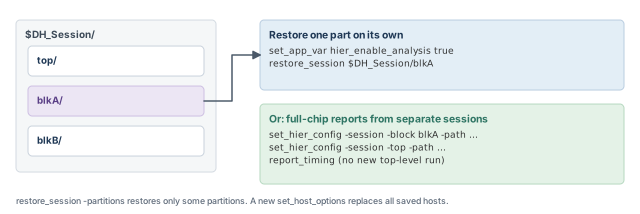
A distributed run already performs a block-level analysis for each block in the background. When you save the session, the tool writes the top-level data and each block's data to separate subdirectories.
save_session $DH_Session ;# top and block data in separate subdirectoriesLater, in a new PrimeTime session, you can restore just one part and analyze it again:
set_app_var hier_enable_analysis true   ;# hierarchical mode on
restore_session $DH_Session/blkA        ;# only block blkA
report_timing                           ;# report on blkA
# in another new session, for the top level:
# set_app_var hier_enable_analysis true
# restore_session $DH_Session/top
By default, restore_session restores all partitions of the original session. To save time and memory, restore only the partitions you need with -partitions.
A restored distributed session also reuses the original host settings by default. To use other hosts, run set_host_options before restore_session:
set_host_options -num_processes 2 -max_cores 4 myCore3       ;# new host setting
restore_session -partitions {P2} my_session_dir              ;# only partition P2
Figure 13 shows the saved directory, next to the full-chip restore from the previous section.
A beginner adds one small set_host_options line, expecting it to add to the saved hosts. Any use of set_host_options in the current session cancels all host settings of the original session. Thus, list every host you need.
7.9 MIM merging in a full-chip run
In the full-chip distributed flow, set_hier_config -enable_mim merges all copies of a MIM block into one lower-level run. You should read the parasitics into every copy. Parasitics are the resistance and capacitance of the wires, here in a Standard Parasitic Exchange Format (SPEF) file.
set_hier_config -enable_mim                          ;# merge MIM copies
read_parasitics -path {U2 U3 U4} blkB.spef           ;# list the copies by name
read_parasitics -path [all_instances -hierarchy blkB] blkB.spef  ;# or find them all
Sometimes one copy sees a very different context from the rest. Then it is better to analyze that copy with the top level. Name the other copies with -partitions:
set_hier_config -enable_mim -partitions {U3 U4} ;# U2 is timed with the topHere U3 and U4 share one merged run. Reading parasitics into U2 is not required here. However, you should still read parasitics into all copies, because that prevents possible errors in a full MIM merging setup.
7.10 HyperScale attributes
One attribute belongs to this flow. It exists on three object classes:
| Object class | Attribute | Type | Meaning |
|---|---|---|---|
| cell | is_active |
Boolean | true if the cell is an active object in the top-only flow |
| pin | is_active |
Boolean | true if the pin is an active object in the top-only flow |
| port | is_active |
Boolean | true if the port is an active object in the top-only flow |
The top-only flow is the one turned on with set_hier_config -enable_top_only_flow.
8 Worked example: bring a synthesized block into PrimeTime
Let us take block TOP from synthesis to timing. Figure 14 shows the block. TOP holds two MID instances, U1 and U4, and each holds a BOTTOM instance named U2. Cell U13 must not change. Clock CLK has a 10 ns period. Latch LAT1 sits inside U1/U2.
We assume the design is already read and linked, as in Working With Design Data.
Step 1 — Sort the synthesis script
Read the synthesis script line by line. Put each line in one of two bins:
- Shared: operating conditions, clocks, input and output delays.
- Tool-specific:
current_designswitching,compile, and anything that relies on synthesis-only features.
Check: the shared file contains no current_design and no compile.
Step 2 — Check the shared file as SDC
Suppose the shared constraints were also written as top.sdc for other tools. Check that file before using it.
pt_shell> read_sdc -syntax_only top.sdc    ;# check only; no effect on the design
pt_shell> set_units -time 1ns -capacitance 1nF -current 1mA \
            -voltage 1V -resistance 1kOhm -power 1W   ;# warn if units differ
Check: no syntax errors, and no unit warning. A unit warning means the file and the main library disagree.
Step 3 — Write the PrimeTime wire load settings
pt_shell> current_design TOP                                 ;# the top design
pt_shell> set_wire_load_mode enclosed                        ;# same mode as synthesis
pt_shell> set_wire_load_model -name large                    ;# model for TOP
pt_shell> set_wire_load_model -name medium [get_cells {U1 U4}]       ;# MID copies
pt_shell> set_wire_load_model -name small [get_cells {U1/U2 U4/U2}]  ;# BOTTOM copies
Check: the script never switches current_design away from TOP.
Step 4 — Source the shared constraints
pt_shell> source timing_assertions.scr   ;# operating conditions, clock, I/O delays
pt_shell> set_max_area 3000              ;# same as synthesis
pt_shell> set_dont_touch U13             ;# same as synthesis
Check: the clock CLK exists with a 10 ns period, exactly as in synthesis.
Step 5 — Explain a hold difference at LAT1
Synthesis reported a clean hold check at LAT1, but PrimeTime shows a hold violation there. Before you debug the logic, test the rule difference.
pt_shell> set_app_var timing_allow_short_path_borrowing true   ;# synthesis-like rule
pt_shell> report_timing -delay_type min -to U1/U2/LAT1/D   ;# re-check hold
Check: if the violation disappears, the difference came from short-path borrowing. Set the variable back to your signoff setting before final reports. The -delay_type min option asks for a hold report, as covered in Reporting and Debugging Analysis Results.
Step 6 — Write constraints for the next tool
pt_shell> write_sdc top_out.sdc   ;# constraints as SDC for other tools
pt_shell> write_script            ;# constraints, including path groups, as a script
Check: read top_out.sdc back with read_sdc -syntax_only before you send it.
9 Common mistakes and how to catch them
| Symptom | Likely cause | Fix |
|---|---|---|
| Synthesis does not support a clock that PrimeTime accepts | The clock is on an internal pin of a leaf cell | Define it on an input or output pin in the fanin or fanout of that pin |
| Synthesis cannot analyze or optimize a module in the wanted mode | The module uses a timing model with mode analysis | Disable the inactive arcs by hand |
| Latch hold passes in synthesis but fails in PrimeTime | Short-path borrowing is off by default in PrimeTime | Compare with timing_allow_short_path_borrowing true, then decide the signoff setting |
| A segment shows less net delay in PrimeTime | Synthesis moves load-dependent gate delay onto the net | Accept the PrimeTime number; it is the correct one for timing analysis |
| Wire load settings land on the wrong design | A synthesis script switched current_design in pt_shell |
Use current_instance or hierarchical cell names |
An SDC file sets current_design |
SDC supports only one design | Move local settings to the tool-specific script |
| Constraint values look 1000 times off | The SDC units differ from the main library units | Add set_units and read the warning |
| A restored HyperScale session runs on fewer hosts than before | A new set_host_options canceled all saved host settings |
List every host needed before restore_session |
set_hier_config rejects -partitions |
Used together with -exclude or -split |
Use -partitions alone, or with -enable_mim only |
10 Interview preparation
So both tools optimize and check against the same intent, without copies that drift apart.
- The easiest shared form is SDC.
- Tool-specific commands stay in each tool's own script.
SDC is a Tcl subset for timing constraints; it is not a full scripting language and cannot change the current design.
- It knows only the current design.
- Some commands have limited options.
- PrimeTime reads it with
read_sdcand writes it withwrite_sdc.
Run read_sdc -syntax_only on it.
- It checks syntax and meaning.
- It has no effect on the design.
current_design to set a wire load model on a block in PrimeTime?In PrimeTime, current_design sets the top of the analysis; local values go on instances.
- Use
current_instance, or name the cell, such as[get_cells U1/U2]. - Synthesis scripts switch designs; PrimeTime scripts should not.
Short-path borrowing: synthesis always allows it, while PrimeTime disables it by default.
- Set
timing_allow_short_path_borrowingtotrueto match synthesis. - Use it to explain the difference, then apply your team's signoff setting.
Synthesis moves the load-dependent part of the source gate's delay onto the output net; PrimeTime does not.
- This helps synthesis results.
- It is not right for static timing analysis.
PrimeTime keeps separate driver and load values; synthesis keeps only the larger one.
- Thus, synthesis is more pessimistic on the driver side.
set_units do in an SDC file?It states the units the file expects; PrimeTime warns if they differ from the main library units.
- It is optional but recommended.
- It works in SDC files, scripts and on the command line.
Synthesis uses weighted groups in its cost function; PrimeTime reports each group and its worst negative slack.
- PrimeTime groups can go back with
write_script,write_contextor budgeting. - A critical range lets synthesis work on near-critical paths too.
It lets synthesis optimize near-critical paths in the group, as long as the worst violation does not increase.
- It is set on an explicit path group.
- It typically reduces the number of paths left just short of passing.
Internal-pin clocks, some extracted model features and mode analysis.
- Move internal-pin clocks to a pin in the fanin or fanout.
- For mode-based models, disable the inactive arcs by hand.
-exclude, -split and -partitions do, and which can be combined?-exclude keeps blocks at the top, -split goes one level down, and -partitions lists the only blocks run separately.
-partitionscannot be used with-excludeor-split.-partitionscan be used with-enable_mim.
The tool releases the block hosts after a timing update, which prevents further updates.
- Set
hier_enable_release_resources_in_top_only_flowtofalseto keep them. - Reports exist only for active objects; check
is_active.
11 Chapter close
Compact glossary
| Term | Meaning |
|---|---|
| Design Compiler | The synthesis tool that turns RTL into an optimized gate netlist |
| SDC | Synopsys Design Constraints: a Tcl subset for timing constraints, with one design |
| Shared script | A file of commands that both tools understand, sourced by each |
| Internal pin | A pin inside a leaf cell, not on its boundary |
| Mode analysis | Timing models whose arcs depend on an operating mode |
| Short-path borrowing | Time borrowing for hold checks at level-sensitive latches |
| Segmented path | A path broken at an inside point, which becomes a new startpoint |
| Load-dependent delay | The part of a gate delay that grows with its output load |
| Inout pin | A bidirectional pin with a driver part and a load part |
| Wire load model | An estimate of wire load from fanout, used before real wires exist |
| Wire load mode | The rule for which wire load model a net uses across levels |
current_instance |
Sets the hierarchical scope without changing the current design |
set_units |
States expected units and warns on a mismatch with the main library |
| Main library | The first library in the link path |
| Path group | A named set of timing paths |
| Cost function | The score synthesis tries to lower; path groups weight it |
| Critical range | A delay margin that lets synthesis improve near-critical paths |
| Budgeting | Splitting timing goals among blocks |
| HyperScale model | A compact block timing model built by the tool |
| Partition | A block analyzed in its own lower-level run |
| MIM | Multiple-instance module: one design used as several instances |
| MIM merging | Analyzing all copies of a MIM in one run with merged context |
| Active object | A top-design port, cell, net or pin in the top-only flow |
PrimeTime with Design Compiler on one page
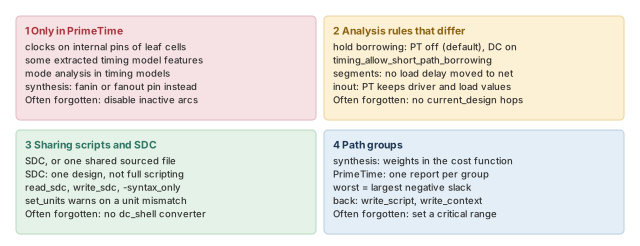
Figure 15 is the summary to redraw from memory.
Where the series ends, and what comes next
You started with Working With Design Data, reading and linking a netlist. Constraining the Design, Clocks and Timing Paths and Exceptions then told the tool what to check. Operating Conditions, Delay Calculation, Back-Annotation, Case and Mode Analysis and Variation made the numbers real. Multivoltage Design Flow, SMVA Graph-Based Simultaneous Multivoltage Analysis, Signal Integrity Analysis and Advanced Analysis Techniques handled harder designs. Constraint Consistency, Reporting and Debugging Analysis Results and ECO Flow closed the work: check, read, fix.
This last chapter, Using PrimeTime With Design Compiler, closed the loop with synthesis. Thus, the same constraints now flow from synthesis to signoff and back again. The next step is practice. Take a real block, write its constraints once, and time it in every mode and corner. Each rule in this series will then feel familiar, not new.