Why this chapter matters in a real project
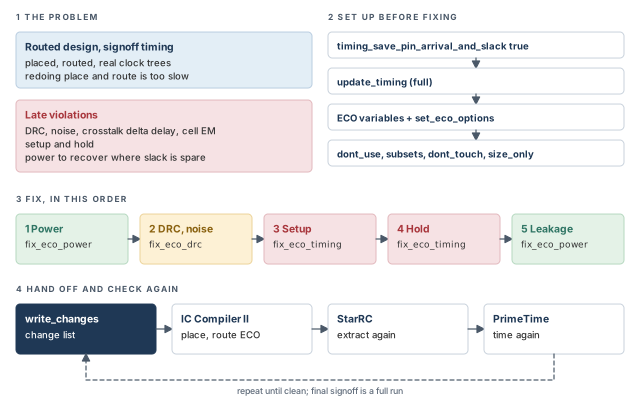
Late in a project, the layout is placed and routed, and it has real clock trees. Signoff timing, the final check before the design is released, then shows a few hundred violations. Redoing synthesis and place-and-route is far too slow. Instead, the team makes small, local changes: a bigger cell here, a buffer there. Such a late, small change is an engineering change order, or ECO.
PrimeTime is where the violations are found, so it is also a good place to decide the fixes. The tool can size cells, insert buffers and remove buffers. It then writes the changes as a script that the layout tool runs. After layout, the parasitics are extracted again and timing is checked again. This loop repeats until the design is clean.
Getting the loop wrong is expensive. A fix that ignores free space in the layout may not be placeable, so the violation comes back. A setup fix may create hold violations. Fixing in the wrong order can undo earlier work. Each extra loop through layout and extraction can cost a day or more near tapeout. Tapeout is the hand-off of the final layout for manufacturing.
Prerequisites
- Working With Design Data: reading, linking, sessions, attributes and
write_script. - Constraining the Design: design rule constraints such as maximum transition, capacitance and fanout.
- Clocks and Timing Paths and Exceptions: setup, hold, launch and capture clock paths.
- Back-Annotation: reading detailed parasitics.
- Signal Integrity Analysis: aggressors, victims, crosstalk delta delay and noise.
- Multivoltage Design Flow: level shifters, isolation cells and voltage areas.
- Reporting and Debugging Analysis Results: reading
report_timingandreport_constraint. - You do not need to know how to drive a layout tool. The layout commands shown here are only what PrimeTime hands over.
In this chapter, times are in nanoseconds (ns) unless said otherwise. A few examples use picoseconds (ps), and they say so.
Learning objectives
- Explain what an ECO is and name the three automatic fixing commands.
- Set up the tool for ECO with the right variables and
set_eco_options. - Restrict fixing with
dont_use, library subsets,dont_touchandsize_only. - Run
fix_eco_drc,fix_eco_timingandfix_eco_power, and choose a sensible order. - Prepare physical data and choose between
open_site,occupied_siteandfreeze_silicon. - Describe the main fixing methods, including clock network fixing and load cells.
- Read unfixable-violation and unusable-cell reasons and act on them.
- Write change lists in the right format and replay them.
- Describe the incremental, reduced-resource and freeze silicon flows.
- Edit a netlist by hand, estimate the effect first and verify it afterwards.
Figure 1 is a map of the whole chapter. Come back to it whenever you lose your place.
1 The beginner's mental model
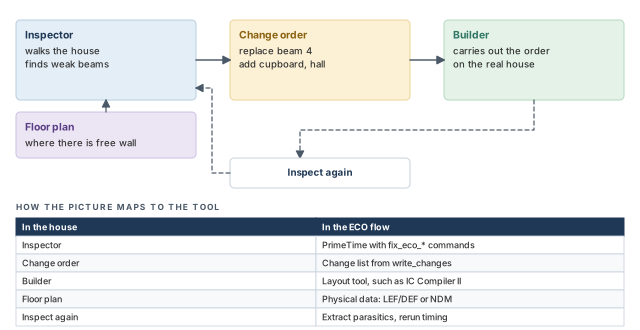
Think of a house that is built and painted. An inspector walks through and finds problems: a weak beam, a door that sticks. Nobody rebuilds the house. Instead, the inspector writes a change order: "replace beam 4 with a thicker one". The builder carries out the order, and the inspector checks again.
A good inspector also knows the floor plan. They only ask for a new cupboard where there is free wall space. Figure 2 maps this picture to PrimeTime.
- In a house, fixing one door rarely breaks another. In a chip, one fix often hurts a nearby path. For example, a buffer that fixes hold can create a setup violation.
- The inspector here does the fix in a model first. PrimeTime changes its own netlist copy and re-times it before writing the order.
- A house inspector writes one kind of order. PrimeTime can write the same changes in several script formats, for different tools.
Now the engineering model
In engineering terms, the loop has six steps:
- Analyze. Run static timing and signal integrity analysis on the routed design.
- Set up. Save pin slack data, update timing and set the ECO options.
- Fix. Run
fix_eco_drc,fix_eco_timingandfix_eco_power. Each changes the tool's netlist copy. - Write. Run
write_changesto write a change list. This is a script that describes every change. - Implement. The layout tool runs the change list, places the new cells and repairs the routes.
- Check again. Extract parasitics again and rerun timing in PrimeTime.
2 ECO fixing overview
2.1 What an ECO does
In PrimeTime, an ECO is an incremental change to a chip design. Its purpose is one of three:
- fix timing violations;
- fix design rule constraint (DRC) violations, such as maximum transition;
- reduce power.
The tool makes three kinds of change: it sizes cells, replaces cells and inserts buffers. For example, it may replace a weak BUFX1 with a stronger BUFX4. It then writes the changes in script form, so another tool can implement them.
The three fixing commands are:
| Command | What it fixes |
|---|---|
fix_eco_drc |
DRC, noise, crosstalk delta delay and cell electromigration violations |
fix_eco_timing |
Setup or hold timing violations |
fix_eco_power |
Recovers power and area where slack allows |
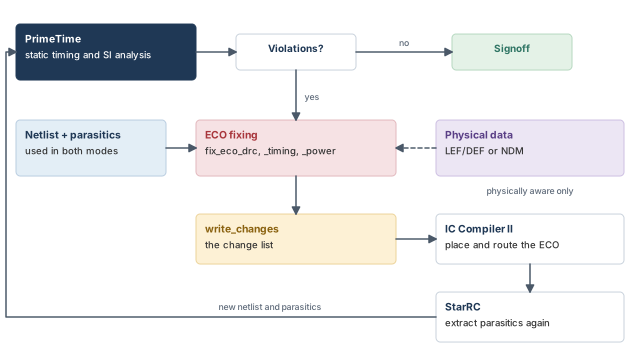
After fixing, write_changes writes the change list. You run it in the physical implementation tool, such as IC Compiler II. Then you extract parasitics again with an extraction tool such as StarRC. Finally, you rerun timing in PrimeTime. Figure 3 shows the loop.
2.2 Logic-only and physically aware modes
You can run ECO fixing with or without physical placement data:
- Logic-only mode. The tool uses only the netlist and detailed parasitic data. It does not know where cells sit or where free space is.
- Physically aware mode. The tool also reads physical placement data. It replaces cells and inserts buffers only where there is room. The change list then gives the location of each change, so layout is fast and accurate.
It is better to use the physically aware mode, because it gives the best quality of results (QoR). A logic-only fix can ask for a buffer in a spot that is already full. The layout tool must then move it, which changes the parasitics you timed.
2.3 Where ECO fits and what it needs first
ECO fixing works with single-core analysis, multicore analysis and distributed multi-scenario analysis (DMSA). In DMSA, one manager process controls several worker processes, and the workers time the scenarios. A scenario is one combination of mode and corner, such as "functional mode at the slow corner".
Two optional flows reduce memory, runtime and turnaround time:
- Reduced-resource ECO flow. Timing analysis runs on the whole design, but fixing runs on a smaller "reduced" design. That design holds only the data related to the violations.
- Incremental ECO flow. The layout tool, StarRC and PrimeTime write and analyze only the changed part of the design at each step.
Both flows have their own sections later in this chapter.
A beginner runs ECO fixing on a design that is placed but not routed, or has ideal clocks. The fixes are then aimed at the wrong numbers. Run ECO only on a fully placed and routed design with real clock trees.
3 Setting up before any fixing
3.1 The five setup steps
Before you run any fixing command, follow these steps:
- Import the design: read the Verilog netlist, the Synopsys Design Constraints (SDC) and the parasitic data.
- Set the
timing_save_pin_arrival_and_slackvariable totrue. The fixing commands need the arrival and slack at every pin. - Run a full timing update, with
update_timingorreport_timing. - Set the ECO variables that suit your design.
- Run
set_eco_optionswith the options your design needs.
The commonly used ECO variables are:
| Condition | Relevant variables |
|---|---|
| Physically aware ECO | eco_allow_filler_cells_as_open_sites, eco_insert_buffer_search_distance_in_site_rows |
| Design contains multiply instantiated modules (MIMs) | eco_enable_mim |
| Multi-scenario ECO with more scenarios than hosts | eco_enable_more_scenarios_than_hosts |
To list every ECO variable with its current and default value, use a wildcard:
pt_shell> report_app_var eco* ;# every ECO variable, current and default valuesSteps 2 and 3 look like this in a script:
pt_shell> set_app_var timing_save_pin_arrival_and_slack true   ;# keep pin slacks
pt_shell> update_timing                                        ;# full timing update
3.2 The set_eco_options command
The set_eco_options command holds the ECO settings that are not simple variables. The options group like this:
| To specify this | Use these options |
|---|---|
| Data for physically aware ECO | -physical_tech_lib_path, -physical_lib_path, -physical_design_path, -physical_icc2_lib, -physical_icc2_blocks, -physical_constraint_file, -physical_lib_constraint_file |
| Handling of physical data | -physical_enable_clock_data, -physical_enable_all_vias, -keep_site_names, -power_ground_net_layer, -enable_pin_color_alignment_check, -allow_missing_lef, -convert_sites, -enable_via0_alignment_check |
| MIM groups | -mim_group |
| Filler cells | -filler_cell_names |
| Spare cells (freeze silicon flow) | -programmable_spare_cell_names |
| Extra setup or hold timing margin | -drc_setup_margin, -drc_hold_margin, -timing_setup_margin, -timing_hold_margin, -power_setup_margin, -power_hold_margin |
| Output log file | -log_file |
Two companion commands help:
pt_shell> report_eco_options   ;# show the ECO options now in force
pt_shell> reset_eco_options    ;# clear all ECO options
3.3 Several libraries with the same name
Sometimes two library files contain a logical library with the same name. For example, two corners may both use a library called core. The change list must then say which one a cell came from.
Two variables control how library cell names are written in the change list:
eco_write_changes_prepend_libname_to_libcelladds the library name in front of the cell name.eco_write_changes_prepend_libfile_to_libcelladds the library file name in front of the cell name.
Both are false by default. They affect every change list format.
set_eco_options. Check the result with report_eco_options.4 Controlling what the fixing commands may touch
4.1 Excluding library cells everywhere with set_dont_use
Some library cells should never appear in a fix. For example, a cell may have a known layout problem. The set_dont_use command sets the dont_use attribute on library cells, so ECO does not use them.
set_dont_use lib_cells [true | false]4.2 Excluding library cells in one part of the design
Sometimes a cell is fine in one block and banned in another. The set_target_library_subset command sets a dont_use list for chosen hierarchical cells or for the top level.
set_target_library_subset
-objects objects | -top
-dont_use lib_cellsThese commands look like the same-named synthesis commands. Here, however, a subset specification supports only the -dont_use option.
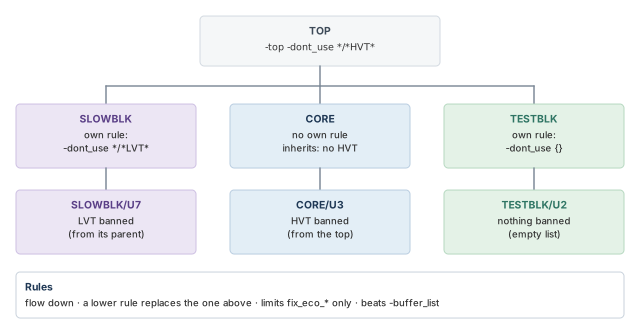
The rules are:
- A specification can sit on hierarchical cells, on the top-level design, or on both.
- Specifications propagate downward on their own.
- A specification applied lower down completely overrides any specification from above.
- An empty list,
-dont_use {}, blocks the restrictions from above.
Let us consider an example. HVT cells are slow, high-threshold-voltage cells. We want to ban them everywhere, except inside block SLOWBLK, where we ban LVT cells instead.
pt_shell> set_target_library_subset -top -dont_use */*HVT*   ;# no HVT cells anywhere
pt_shell> set_target_library_subset -objects {SLOWBLK} \
            -dont_use */*LVT*   ;# inside SLOWBLK: no LVT cells instead
Figure 4 shows how these rules flow down the hierarchy.
Three more facts:
- Subset specifications restrict only the
fix_eco_*commands. - They take precedence over any
-buffer_listyou give a fixing command. - They apply only to logic being optimized. Existing logic that is not changed is not affected.
4.3 Preserving parts of the design with dont_touch
Some logic was tuned by hand earlier, and you want to keep it. The ECO fixing commands make no change on any object whose dont_touch attribute is true. Three commands set such protection:
| Command | Effect |
|---|---|
set_dont_touch |
Sets dont_touch on cells, nets, designs or library cells, so they cannot change |
set_size_only |
Sets size_only on cells, so they can be sized but not deleted |
set_dont_touch_network |
Sets dont_touch on the transitive fanout of pins, ports or clocks. It covers all nets and combinational cells, but stops at cells with setup or hold checks, such as registers and latches |
The transitive fanout is everything a point drives, gate after gate.
To see these attributes in timing reports, set timing_report_include_eco_attributes. The report then gains an Attributes column.
pt_shell> set_app_var timing_report_include_eco_attributes true
true
pt_shell> report_timing ...
Attributes:
     d - dont_touch
     u - dont_use
     i - ideal_net
  Point                               Incr    Path    Attributes
  ----------------------------------------------------------------
  clock CLK (rise edge)               0.00    0.00
  clock network delay (propagated)    0.30    0.30
  FF1/CK (DFFX1)                      0.00    0.30 r
  FF1/Q (DFFX1)                       0.21    0.51 f   i
  U1/Y (NAND2X1)                      0.08    0.59 r     d u
  data arrival time                           0.59
4.4 Resizing power management cells
By default, fix_eco_timing, fix_eco_power and fix_eco_drc do not resize power management cells. These are level shifters, isolation cells, retention registers and always-on cells. They come from the multivoltage setup.
To allow resizing of some types, set eco_allow_sizing_with_lib_cell_attributes to a list of these strings:
is_level_shifter— level shifters may be resized.is_isolation— isolation cells may be resized.is_retention— retention registers may be resized.always_on— always-on cells may be resized.
A library cell is then considered when its attribute of that name is true.
pt_shell> set_app_var eco_allow_sizing_with_lib_cell_attributes \
"is_level_shifter" ;# level shifters may now be sizedTeams usually keep one restriction file per project. It holds the set_dont_use, set_target_library_subset and set_dont_touch lines. Every ECO run sources it first, so no run uses a banned cell by accident.
dont_use and library subsets limit which cells the fixer may pick. dont_touch and size_only limit which instances it may change.5 Fixing DRC, noise and crosstalk with fix_eco_drc
5.1 What fix_eco_drc fixes
The fix_eco_drc command fixes the violations that these report commands show:
report_constraint -max_capacitance ...
report_constraint -max_transition ...
report_constraint -max_fanout ...
report_noise ...
report_si_bottleneck ...
report_cell_em_violation ...It sizes cells and inserts buffers or inverter pairs (two inverters in a row, which act like a buffer). It tries to keep the area increase small. By default, it does not consider timing.
The command has options to set:
- the type of violation to fix and the target slack;
- the scope: a list of pins or ports, or the whole design;
- the fixing methods: cell sizing, buffer insertion or inverter pair insertion;
- the library cells to use for buffers or inverter pairs;
- whether to change cells in data paths or in clock networks;
- whether to respect timing during fixing, and if so, the setup and hold margins;
- the physical mode: none, open site, occupied site or freeze silicon.
5.2 Two simple examples
pt_shell> fix_eco_drc -type max_transition -methods {size_cell} ;# size cells onlypt_shell> fix_eco_drc -type noise \
-methods {size_cell insert_buffer} \
-buffer_list {BUFX1 BUFX2 BUFX3} \
-physical_mode open_site ;# change only where space existsThe second command gives the buffers it may use. It also picks the open site mode, which makes changes only where there is already room.
The command runs many fixing passes. It stops when all violations are fixed, or when more fixing is not worth the runtime. At the end, it shows the remaining violations and the number it could not fix. Add -verbose to get the reasons for the unfixable ones.
5.3 Crosstalk delta delay fixing
Crosstalk delta delay is the extra delay, or speed-up, on a victim net caused by a switching neighbor, the aggressor. The fix_eco_drc -type delta_delay command sizes cells and inserts buffers on victim nets to reduce it.
No constraint limits delta delay, so there is no "delta delay slack". Thus, you must give a threshold:
- Give
-delta_delay_thresholdas a positive value greater than zero. - The same threshold applies to slowdown and speedup delta delays.
- By default, only nets on paths with negative slack are targeted.
pt_shell> fix_eco_drc -type delta_delay -verbose \
            -delta_delay_threshold 0.05 \
            -methods {size_cell insert_buffer} \
            -buffer_list {BUFX1 BUFX2 BUFX3} \
            -physical_mode open_site   ;# victim nets with cost over 0.05
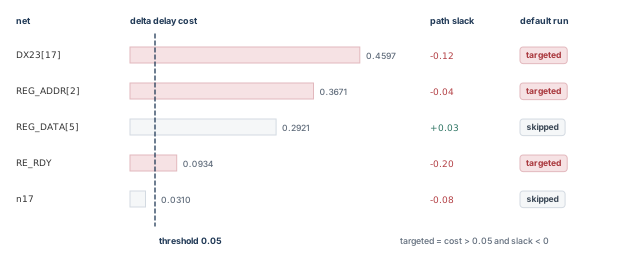
This command targets victim nets with a delta delay cost above 0.05 time units. Each such net must also lie on a path with negative slack. It needs a PrimeTime-ADV-PLUS license.
To change which paths count, use -slack_lesser_than. The command then targets nets on paths with slack below that value.
- A positive value fixes more nets and leaves a positive timing margin.
- A negative value fixes fewer nets.
pt_shell> fix_eco_drc -type delta_delay -verbose \
            -delta_delay_threshold 0.05 -methods {size_cell insert_buffer} \
            -buffer_list {BUFX1 BUFX2 BUFX3} -physical_mode open_site \
            -slack_lesser_than 0.05   ;# include paths with slack under 0.05
5.4 Previewing the targets with report_si_bottleneck
The delta delay fixer picks nets by signal integrity (SI) bottleneck analysis. This analysis ranks nets by their crosstalk cost. To preview the nets it will target, run report_si_bottleneck first.
pt_shell> report_si_bottleneck -cost_type delta_delay \
            -min -max -slack_lesser_than 0.0 -all_nets
...
Bottleneck Cost: delta_delay
net               scenario             cost
----------------------------------------------
DX23[17]          scen1                0.4597
REG_ADDR[2]       scen2                0.3671
REG_DATA[5]       scen1                0.2921
RE_RDY            scen1                0.0934
How to read it:
- The highest-cost nets come first, with max and min analysis taken together.
- The cost is the absolute value of the delta delay. A negative delta delay is shown as positive.
- In a DMSA run, the report merges all scenarios.
Figure 5 shows which of these nets the fixer would target with a threshold of 0.05.
Use report_si_bottleneck before and after fixing, just as you use report_constraint for DRC and report_timing for timing.
5.5 Cell electromigration fixing
Cell electromigration (EM) happens inside a logic gate. Very high current density slowly moves metal atoms. Over time, this can cause a short or an open in the metal. The PrimePower tool finds high-risk cells from library data, design data, switching activity and, if available, physical data. It reports them as EM DRC violations.
fix_eco_drc can target these violations with the cell_em type. It can use sizing and buffering. The feature needs a PrimePower license and a PrimeTime-ADV-PLUS license.
set_app_var power_enable_analysis true      ;# turn on power analysis
set_app_var power_enable_em_analysis true   ;# turn on cell EM analysis
update_power                                ;# run the power and EM analysis
report_cell_em_violation                    ;# list the cell EM violations
fix_eco_drc -type cell_em -methods {size_cell insert_buffer}   ;# fix them
The cell_em type runs only one fixing pass. To fix more violations, run update_power again, then run fix_eco_drc -type cell_em again.
fix_eco_drc fixes design rules, noise, delta delay and cell EM. Delta delay needs a threshold, and report_si_bottleneck previews the targets.6 Fixing setup and hold with fix_eco_timing
6.1 What fix_eco_timing does
The fix_eco_timing command reduces setup or hold violations. It sizes cells and inserts buffers or inverter pairs. It tries to keep the area and power increase small.
The command has options to set:
- the type: setup or hold;
- the scope: from or to start and end points, path groups, a path collection, or the whole design;
- the methods: cell sizing, buffer insertion or inverter pair insertion;
- the library cells for buffers or inverter pairs;
- whether to change cells in data paths or clock networks;
- the target slack margin;
- the analysis mode: graph-based, path-based, or exhaustive path-based;
- the physical mode: none, open site, occupied site or freeze silicon;
- whether to minimize power while fixing timing.
Path-based analysis (PBA) re-times each path on its own, so it is less pessimistic than graph-based analysis. The exhaustive mode searches paths more thoroughly, for the least pessimism.
pt_shell> fix_eco_timing -type setup ;# fix all setup violationspt_shell> fix_eco_timing -type hold -pba_mode exhaustive \
-buffer_list {BUFX2 DLY1X2 DLY2X2} ;# delay cells allowed6.2 Setup and hold are fixed differently
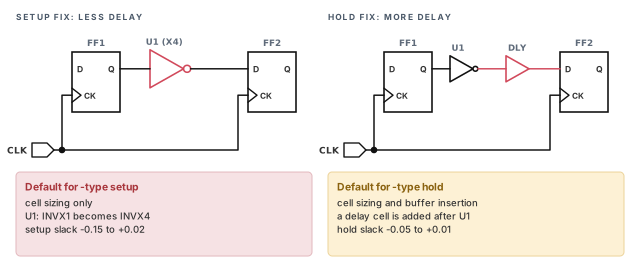
You must give -type setup or -type hold every time, because the two problems are opposite. Figure 6 shows the difference on a small path.
The defaults are:
- Setup fixing uses cell sizing alone, to reduce data path delay.
- Hold fixing uses cell sizing and buffer insertion, to increase data path delay.
- Both fix only data paths, not clock networks.
The command starts with the worst violations. It repeats passes until all are fixed, or more fixing is not worth the runtime.
Each fixer also protects other checks:
- Setup fixing tries not to create DRC violations. It may create hold violations, because setup is harder to fix.
- Hold fixing tries not to create setup or DRC violations.
At the end, the command shows the remaining violations and the number it could not fix. Use -verbose or -estimate_unfixable_reasons to see why.
A beginner fixes hold first, then setup, and is surprised by new hold violations. Setup fixing is allowed to create them. Fix setup first, then hold.
fix_eco_timing needs a type every time. Setup fixing speeds paths up, hold fixing slows them down, and only hold fixing promises to protect the other check.7 Recovering power and area with fix_eco_power
7.1 What fix_eco_power does
When a path has spare slack, its cells may be larger or faster than needed. The fix_eco_power command recovers power and area there:
- it downsizes cells in paths with positive setup slack;
- it removes buffers from paths with positive hold slack.
It never creates or worsens timing or DRC violations. By default, it downsizes cells in all paths with positive setup slack, to reduce area.
You can pick one of these recovery methods per run:
| Method | Option |
|---|---|
| Replace cells to minimize area | the default |
| Replace cells to minimize a numeric library cell attribute | -power_attribute |
| Replace cells by a priority list of name or attribute strings | -pattern_priority |
| Replace cells to minimize switching, leakage or total power from PrimePower data | -power_mode |
| Remove buffers from paths with positive hold slack | -methods {remove_buffer} |
For several methods, run the command several times with different options.
pt_shell> fix_eco_power   ;# downsize sequential and combinational cells
pt_shell> fix_eco_power -pattern_priority {HVT MVT LVT}   ;# lower leakage by name
pt_shell> fix_eco_power -pba_mode path   ;# downsize, check timing with PBA
pt_shell> fix_eco_power -pattern_priority {HVT LVT} \
            -pba_mode exhaustive   ;# LVT to HVT swaps, exhaustive PBA
pt_shell> fix_eco_power -methods {remove_buffer}   ;# drop buffers, spare hold slack
Here HVT, MVT and LVT are name prefixes for threshold voltage flavors, from high to low. A high-threshold cell leaks less but is slower.
7.2 How power recovery works
Power recovery is iterative:
- The command makes the targeted changes.
- It checks for new or worse timing and DRC violations.
- It backs out changes, a few at a time, until the constraints are met again.
- It also explores further changes for more recovery.
- It repeats until more progress costs more than it gains.
For every cell replacement method, a swap happens only when all of these hold:
- The swap does not create or worsen any timing or DRC violation.
- The new cell has the same logic function. It also meets any limits set by
eco_alternative_cell_attribute_restrictionsandeco_alternative_cell_instance_based_restrictions. - The new cell is better in the chosen way. It has less area, a smaller power attribute, a higher-priority string, or less power by PrimePower data.
7.3 A step-by-step power recovery procedure
- (Optional) Guide the recovery. Limit the alternative cells by attribute value with the two restriction variables above. To skip unconstrained cells, set
eco_power_exclude_unconstrained_cellstotrue. - (Optional) List the alternative cells with
report_eco_library_cells. - (Optional) Report the cells used in the design with
report_cell_usage. - Run
fix_eco_powerwith the options you chose. - Report the result with the PrimePower
report_powercommand. Compare it with a report taken before recovery.
pt_shell> report_eco_library_cells
...
Alternative library cells:
    Attributes:
        u - dont_use or pt_dont_use
        d - dont_touch
Group Library_cell                  Area Attributes
----------------------------------------------------
[ 0] core_typical/hvt_buf_1         4.50
      core_typical/hvt_buf_2        5.40
      core_typical/hvt_dly2         8.10 u
[ 1] core_typical/hvt_inv_1         3.60
      core_typical/hvt_inv_2        4.50
Each group holds cells that can replace each other. A u marks a cell that ECO may not use.
pt_shell> report_cell_usage
...
Cell Group        Count            Area
-------------------------------------------------
Combinational     3977 ( 85%)     5496.50 ( 22%)
Sequential         668 ( 14%)     9514.75 ( 38%)
Clock               43 (  1%)     2975.50 ( 12%)
Others               1 (  0%)     6873.25 ( 28%)
-------------------------------------------------
Total 4689 (100%) 24860.00 (100%)pt_shell> set_app_var power_enable_analysis true ;# turn on power analysis
pt_shell> report_power -groups {register combinational sequential} ;# before
pt_shell> fix_eco_power ;# recover power and area
pt_shell> report_power -groups {register combinational sequential} ;# after7.4 Recovery by library cell names
Many libraries name cells with a variable part and a fixed part. For example, HVT_BUF1X, NVT_BUF1X and LVT_BUF1X share the fixed string _BUF1X. The variable prefix gives the threshold voltage: high, normal or low.
To swap by these names, list the prefixes in -pattern_priority, lowest-power first. Figure 7 shows the idea.
pt_shell> fix_eco_power -pattern_priority {HVT NVT LVT} ;# HVT is most preferred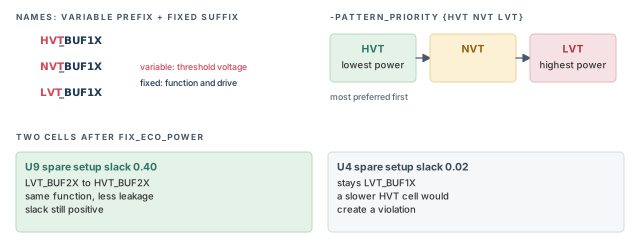
7.5 Recovery by a string attribute
Sometimes the names follow no pattern. You can then define your own string attribute on library cells, and rank its values.
define_user_attribute vt_swap_priority -type string -class lib_cell   ;# new attribute
set_user_attribute -class lib_cell lib/INV1XH vt_swap_priority INV1X_best ;# lowest
set_user_attribute -class lib_cell lib/INV1XN vt_swap_priority INV1X_ok    ;# middle
set_user_attribute -class lib_cell lib/INV1X vt_swap_priority INV1X_worst ;# highest
fix_eco_power -pattern_priority {best ok worst} \
  -attribute vt_swap_priority   ;# rank by the attribute value
The patterns match the same way as the name prefixes above. Each value has a fixed part and a variable part. Here INV1X_ is the fixed part, and best, ok or worst is the variable part. You list only the variable parts. Cells whose values share the fixed part, such as INV1X_best and INV1X_worst, can replace each other, and the list order ranks them.
Again, list the strings in priority order, lowest-power cells first.
7.6 Leakage-aware setup fixing with a numeric attribute
Upsizing cells to fix setup can raise leakage power. By default, fix_eco_timing keeps the area increase small, but it ignores leakage. If leakage matters more than area, give fix_eco_timing a numeric attribute with -power_attribute.
define_user_attribute leak_attr -type float -class lib_cell   ;# leakage per lib cell
set_user_attribute -class lib_cell \
  [get_lib_cells LIB_H/INV1X_HVT] leak_attr 1.0    ;# worst-corner leakage values
set_user_attribute -class lib_cell \
  [get_lib_cells LIB_H/INV2X_HVT] leak_attr 2.0   ;# 2.0 for the larger HVT inverter
set_user_attribute -class lib_cell \
  [get_lib_cells LIB_L/INV1X_LVT] leak_attr 10.0   ;# LVT cells leak much more
set_user_attribute -class lib_cell \
  [get_lib_cells LIB_L/INV2X_LVT] leak_attr 15.0   ;# 15.0 for the larger LVT inverter
fix_eco_timing -type setup -power_attribute leak_attr   ;# fix setup, minimize leakage
The command then picks library cells with the least leakage. It only replaces instances whose cell has leak_attr, and only with cells that also have it. Cells without the attribute are ignored.
You can also import these values from the library data instead of typing them. In DMSA, matching cells in different libraries must have matching leakage values.
7.7 Recovery from PrimePower data
PrimePower analysis uses real switching activity and library power data. It runs when you use update_power or report_power. To use its numbers in recovery, set -power_mode:
dynamic— minimize switching power;leakage— minimize leakage power;total— minimize dynamic plus leakage power.
With total, the tool picks the action that cuts total power most, case by case:
- High switching activity favors downsizing, which cuts switching power.
- Low switching activity favors a higher threshold voltage, which cuts leakage.
- Where slack is plentiful, it can do both.
-power_mode cannot be used with -power_attribute or -pattern_priority.
In DMSA, two more options choose where the power data comes from:
-dynamic_scenarionames the one scenario for dynamic power data.-leakage_scenarionames the one scenario for leakage power data.
These options are used only in DMSA. Usually, give the scenario with the worst dynamic power and the one with the worst leakage. They can be the same scenario. Timing and DRC are still checked in all scenarios.
restore_session Session1                 ;# restore the analysis session
set_app_var power_enable_analysis true   ;# enable PrimePower analysis
set_app_var power_clock_network_include_register_clock_pin_power false ;# see below
read_saif activity_file.saif             ;# read switching activity (or read_vcd)
update_power                             ;# run the power analysis
report_power                             ;# power before recovery
fix_eco_power -power_mode total          ;# dynamic and leakage recovery
report_power                             ;# power after recovery
When power_clock_network_include_register_clock_pin_power is false, the internal power at a register's clock pin counts as part of the register. It is no longer counted in the clock network. Thus, the recovery shows up in the data path. Recovery may then swap registers to cut clock pin power, but it never changes the clock network.
current_session {S1 S2 S3 S4 S5 S6}   ;# timing and DRC from all six scenarios
current_scenario {S1 S3}              ;# power data needed only in S1 and S3
remote_execute {   ;# run in each worker of S1 and S3
  set_app_var power_enable_analysis true   ;# enable PrimePower analysis
  set_app_var power_clock_network_include_register_clock_pin_power false ;# see below
  read_saif activity_file.saif   ;# read switching activity
  update_power   ;# run the power analysis
}                                     ;# power analysis in S1 and S3
current_scenario -all                 ;# back to all scenarios
fix_eco_power -power_mode total \
  -leakage_scenario S1 \
  -dynamic_scenario S3                ;# S1 most leakage, S3 most dynamic
remote_execute runs the commands inside the braces in each worker of the current scenarios.
7.8 Keeping I/O paths out of recovery
Sometimes I/O timing is owned by someone else, and you want it left alone. fix_eco_power can recover power only on internal, register-to-register paths. Two settings are needed:
-start_end_type reg_to_reg. This is the only valid value for this command.-pba_mode pathor-pba_mode exhaustive. This is required.
pt_shell> fix_eco_power \
            -start_end_type reg_to_reg \
            -pba_mode exhaustive   ;# leave I/O paths untouched
The same -start_end_type option exists on report_timing and get_timing_paths, with more values.
A cell counts as internal only if no path, constrained or unconstrained, connects it to an I/O port. Case analysis and disabled timing arcs are taken into account. In DMSA, a cell is excluded if it reaches an I/O port in any scenario. Excluded cells are left untouched, even with slack below the margin. They are reported with reason code V.
fix_eco_power only spends spare slack, never more. Choose one method per run, and give name or attribute priorities lowest-power first.8 Faster power recovery with machine learning
8.1 The idea
Power recovery can be slow, especially with PBA. The tool must study timing, topology and power in detail to pick each swap. Machine learning can reuse earlier decisions instead.
It works like this:
- When
fix_eco_powerfinishes, it saves its decisions in a training data file. These include swaps made, swaps refused, and the timing and topology around each. - Next time, the command reads the earlier training data and trains a model.
- Where a cell or small circuit matches earlier conditions, it repeats the earlier decision. It skips the slow detailed analysis there.
This feature needs a PrimeTime-ADV-PLUS license.
8.2 Turning it on
Set training_data_directory to a directory name. Nothing else is needed.
pt_shell> set_app_var training_data_directory ./train_dir   ;# read and write data here
pt_shell> fix_eco_power -power_mode total   ;# uses and adds training data
The first run has no data, so it takes the usual time and reports a training coverage of 0.0%. At the end, it writes a file such as train_dir/tr1.td. Later runs read every file in the directory and add a new one.
Information: Machine learning enabled ...
Information: Reading training data train_dir/tr1.td
Machine Learning Summary:
-------------------------------------------------------
Total number of cells                          10272492
Cells eligible for power recovery               4788129
Trained cells                                   4069910
Adjusted cells                                     2109
Untrained cells                                  718219
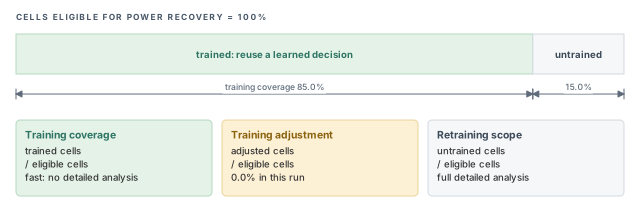
Training coverage                                 85.0%
Training adjustment                                0.0%
Retraining scope                                  15.0%
Information: Writing training data train_dir/tr2.td
The three ratios in the summary are:
- Training coverage = trained cells / cells eligible for power recovery.
- Training adjustment = adjusted cells / cells eligible for power recovery.
- Retraining scope = untrained cells / cells eligible for power recovery.
Figure 8 draws the same numbers.
8.3 How much it helps
The runtime gain depends on how similar the new design is to the training designs. A large benefit is likely with:
- the same or a similar design type;
- the same or similar clock characteristics;
- the same or similar layout and parasitic data.
Little or no benefit is likely with:
- a different design type, such as CPU versus modem, or latches versus flip-flops;
- different clock characteristics, such as period or uncertainty;
- different operating conditions, such as voltage or temperature;
- a different technology or process node.
For example, a second run on the same design and timing gives 100% coverage and can be about five times faster. A very different design or clock period can give 0% coverage and no gain. The best gain comes from coverage of 90% to 100%. Below 50%, expect very little.
8.4 The training data files
- The files are binary. You cannot read or edit them.
- You can copy and delete them to shape the training set.
- Each file is named after its source design and the date and time it was made.
- To read only some files, use the
-training_dataoption offix_eco_power.
It is better to let the command read every file, because it then finds the best match. Reading many files costs little runtime or memory.
8.5 When to enable it
Machine learning can only help runtime; it cannot hurt it. If the data does not match, the command ignores it and runs the normal analysis. It still stores what it learns. The overhead of reading and saving is negligible, and QoR is similar with or without it. Thus, it is best to leave it on in every fix_eco_power run, so the data covers many design styles.
8.6 Covering every stage of the design cycle
You can build training data from several design states. For example, save a session after each fixing step. Then run power recovery from each session, in parallel on different hosts.
update_timing                     ;# timing before any fixing
save_session after_update         ;# state 1: before any fixing
fix_eco_drc                       ;# fix DRC
save_session after_drc_fix        ;# state 2: after DRC fixing
fix_eco_timing -type setup        ;# fix setup
save_session after_setup_fix      ;# state 3: after setup fixing
fix_eco_timing -type hold         ;# fix hold
save_session after_hold_fix       ;# state 4: after hold fixing
# Then, on each of four hosts, with one of the four sessions:
set_app_var training_data_directory ./all_training_data   ;# shared directory
restore_session after_update      ;# or one of the other three
fix_eco_power                     ;# writes one training file per run
A new revision of the design is then likely to match one of these states. Thus, coverage is high and power recovery is much faster.
8.7 Learning from your own scripts
You may have your own power optimization script. The tool can learn from it with record_training_data and write_training_data.
record_training_data                        ;# start recording
source my_eco_changes.tcl                   ;# your own power optimization script
write_training_data -output my_training.td ;# save what was learnedfix_eco_power -training_data my_training.td ;# reuse the recorded decisionsThe tool does not judge the quality of your script. It simply treats each change as good and records the conditions around it. Later, where it finds similar conditions, it applies the same change without detailed analysis. Elsewhere, it runs normal recovery.
Set training_data_directory in the project's common setup file. Every engineer's runs then add to one shared pool, and coverage grows week by week.
9 Choosing the order of fixing
9.1 Who can hurt whom
The fixing commands protect different things:
- Setup or hold fixing does not make DRC (
max_capacitance,max_transition) worse. - DRC fixing has the highest priority, so it can make setup or hold worse.
- Hold fixing keeps setup slack. Setup fixing may create some hold violations.
Thus, fix DRC first, then setup, and hold last. Power recovery fits at both ends. Figure 9 shows the recommended order.
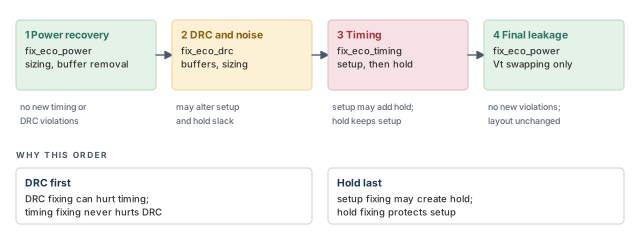
| Step | Command | Fixing mechanisms | What it respects |
|---|---|---|---|
| 1 Power recovery | fix_eco_power |
Cell sizing, buffer removal | Creates no new timing or DRC violations |
| 2 Fix DRC and noise | fix_eco_drc |
Buffer insertion, cell sizing | Alters setup and hold slack as needed |
| 3 Fix timing | fix_eco_timing |
Buffer insertion, cell sizing | Setup honors DRC and may alter hold; hold honors setup and DRC |
| 4 Final leakage recovery | fix_eco_power |
Threshold voltage swapping | Creates no new timing or DRC violations; does not change the layout |
9.2 When one pass makes too many changes
Many changes in one pass can upset ECO routing and legalization in the layout tool. In that case, run DRC, setup and hold fixing one at a time, each with its own layout pass. Fix the violations that cause the most changes first.
9.3 Letting timing win over DRC
By default, fix_eco_timing does not fix timing on paths that have DRC violations. To put timing first, add -ignore_drc. The command then ignores, and may worsen, max_transition, max_capacitance and max_fanout violations.
A beginner adds -ignore_drc to clear the last few setup paths. A week later, signoff shows new transition violations on the same nets. Use -ignore_drc only when you plan to rerun DRC fixing afterwards.
10 Physically aware ECO
10.1 Why physical data helps
The basic logic-only flow fixes violations without any layout knowledge. The physically aware flow reads the layout and uses it while fixing. This brings several benefits:
- higher and more predictable fix rates;
- placement locations written for every changed cell;
- no large cell moves when a cell is resized;
- buffers placed with care for free space, placement density and wire delay;
- on-route buffering, which places a buffer on the existing route of a net;
- faster convergence, because the layout is disturbed as little as possible.
This flow needs a PrimeTime-ADV license.
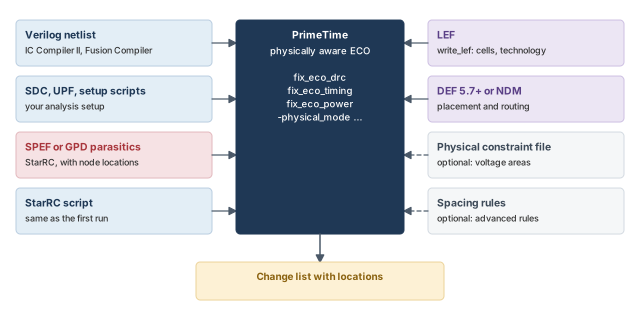
10.2 The files you need
In short, you need:
- Design data files — the netlist, constraints and timing information.
- Block-level LEF library data — technology and physical cell information. LEF is the Library Exchange Format.
- DEF files or IC Compiler II database files — the physical layout. DEF is the Design Exchange Format.
- A physical constraint file — voltage areas and placement blockages in multivoltage designs. This is optional.
- Advanced spacing labels and rules — this is optional.
- Parasitic data from StarRC — parasitics with location information.
The design data files in detail are:
| Type of data | Description |
|---|---|
| Verilog netlist | Written from IC Compiler II, Fusion Compiler or a third-party layout tool |
| Script and setup files | Files that set up SDC, UPF (Unified Power Format) power intent, DMSA and the analysis |
| SPEF or GPD parasitics | Must have location information. Set NETLIST_NODE_SECTION: YES and REDUCTION: NO_EXTRA_LOOPS in the StarRC command file |
| StarRC extraction script | Must be the same script used for the initial parasitics |
| Physical design data (NDM or LEF/DEF) | The NDM design database from IC Compiler II or Fusion Compiler, or LEF/DEF from a third-party tool. LEF/DEF must match the netlist and parasitics; extract again if needed |
| Extra physical constraints | Voltage area and placement blockage definitions kept outside NDM, if any |
| Advanced spacing rules | Written with export_advanced_technology_rules in IC Compiler II |
GPD and SPEF are two formats for parasitic data. NDM is the IC Compiler II design database.
Figure 10 shows these inputs and the tools that make them.
10.3 A clean, consistent starting layout
The design must be free of legality and routing violations. Otherwise, the layout tool fixes them later and changes the starting point the ECO was based on. In IC Compiler II or Fusion Compiler, check with:
check_legality -verbose— all cells should be legal or fixed.check_route— there should be no shorts or opens, or each one should be understood. Any other DRC violations should be understood and have no effect on ECO.
To keep all files consistent, make them in this order:
- Open the block NDM in IC Compiler II or Fusion Compiler.
- Make sure there are no legality or routing violations.
- Write the Verilog netlist. This can rename objects to meet Verilog rules, so it must come first. The NDM and parasitics then include any name changes.
- Save the NDM block.
- Extract parasitics from the NDM saved in step 4.
A beginner writes the netlist after extraction. Writing the netlist renamed a few escaped names, so the parasitics no longer match the netlist. Always write the netlist first, then save, then extract.
10.4 Block-level LEF data
From IC Compiler II, write LEF for all standard cells and all macros. Only one LEF file needs the technology information.
open_lib lib1                              ;# first library
write_lef -include {cell tech} lib1.lef    ;# cells plus technology
close_lib                                  ;# close the first library
open_lib lib2                              ;# other libraries
write_lef -include {cell} lib2.lef         ;# cells only
close_lib                                  ;# close it
If the layout tool is IC Compiler, the design lives in a Milkyway database. The Milkyway Environment tool can write the LEF files from it, in batch mode.
$ milkyway -nullDisplay -nogui -tcl -f write_lef.tcl ;# batch mode, no GUIset mw_reference_library "lib1 lib2 lib3" ;# libraries to write
set out 1 ;# file counter
foreach lib $mw_reference_library { ;# one pass per library
open_mw_lib -readonly $lib ;# open read-only
write_lef -lib_name $lib l$out.lef ;# write l1.lef, l2.lef, ...
close_mw_lib $lib; set out [expr $out +1] ;# close, next number
}
exit ;# leave the toolWith this loop, every LEF file contains the technology section. Only one needs it. If you write the files one by one, add write_lef -ignore_tech_info after the first file to leave it out.
10.5 DEF files or the IC Compiler II database
A DEF file holds the placement and routing of the design. The physically aware ECO needs hierarchical top-level and block-level DEF files, version 5.7 or higher. It can use IC Compiler II database files instead. The tool uses this data to find free sites and to place buffers near the original routes.
open_mw_lib design.mw                      ;# open the Milkyway library
open_mw_cel post_route_design              ;# open the routed design
current_design design                      ;# set the current design
link                                       ;# link it
write_def -all_vias -output file_com.def   ;# include every via definition
The -all_vias option includes via definitions that may be missing from the technology LEF.
10.6 Converting DEF site names to LEF site names
A site is the smallest placement slot in a row. Sometimes the DEF and LEF use different names for the same site. The -convert_sites option maps one to the other.
pt_shell> set_eco_options -convert_sites {{unit CORE2T}} ... ;# DEF name, LEF nameHere rows such as ROW STD_ROW_324 unit ... in the DEF use the LEF site CORE2T.
10.7 Blocks with missing LEF
A DEF component for a hierarchical block may lack a LEF macro model. In that case, the tool takes the size, shape, pin locations and routing obstructions from the DEF.
Some macros may have neither LEF nor DEF data. You can list them with -allow_missing_lef, and ECO proceeds without them.
What follows from such a list:
- The ignored components are left out of the layout view of the graphical user interface (GUI).
- Their area is treated as empty. Add placement blockages there, so nothing is placed on top of them.
report_eco_optionslists the ignored macro models.- If a listed macro does have LEF or DEF data, the tool uses the data anyway and issues a warning.
For example, this command ignores macros X2 and Y2:
pt_shell> set_eco_options -physical_tech_lib_path $tech_lef_files \
            -physical_lib_path $lef_files \
            -physical_design_path design.def.gz \
            -allow_missing_lef {X2 Y2}   ;# ECO ignores these macro models
10.8 The physical constraint file
Multivoltage designs have voltage areas: regions that run at one supply. A voltage area can be disjoint, made of separate pieces. It can also be nested inside another. Figure 11 shows both.
The tool aims to fix late violations with few layout changes and no new electrical rule check (ERC) violations. For that, it needs a file that defines voltage areas and blockages with two commands:
create_placement_blockage— creates a placement blockage.create_voltage_area— creates a voltage area.
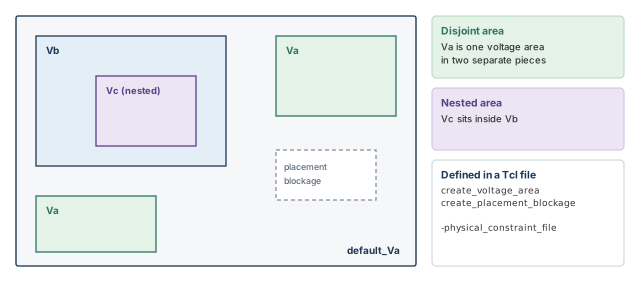
In a flat flow with one DEF file, give the file in the global set_eco_options command.
pt_shell> set_eco_options \
            -physical_tech_lib_path ... \
            -physical_lib_path ... \
            -physical_design_path TOP.def \
            -physical_constraint_file TOP_phys_cons.tcl   ;# voltage areas, blockages
With several DEF files, each DEF gets its own constraint file in a separate command.
pt_shell> set_eco_options -physical_design_path TOP.def \
            -physical_constraint_file TOP_phys_cons.tcl     ;# for the top
pt_shell> set_eco_options -physical_design_path BLOCK.def \
            -physical_constraint_file BLOCK_phys_cons.tcl   ;# for the block
10.9 Advanced spacing labels and rules
Modern nodes have placement rules between neighboring cells. Respecting them avoids big moves and timing loss during ECO. The tool can consider:
- rules exported by
export_advanced_technology_rulesin IC Compiler or IC Compiler II:- minimum Vt (threshold voltage) rules;
- jog (OD) rules;
- trim poly (TPO) rules;
- legal index rules;
- vertical abutment rules;
- advanced pairwise ECO physical-only cell spacing rules;
- your own pairwise spacing labels and rules between library cells.
set_lib_cell_spacing_label
-name label_name
[-left_lib_cells {lib_cell_list}]
[-right_lib_cells {lib_cell_list}]
set_spacing_label_rule
-labels {label_name_list}
{ minimum maximum }10.10 Parasitics from StarRC
In StarRC, extract parasitics and write them in GPD or SPEF format. With several scenarios, you may need several extractions.
The physically aware flow uses the parasitic node locations. They show exactly where a new cell would sit on a net. For an accurate result, the parasitic file must have no loops. Set these lines in the StarRC command file:
REDUCTION: NO_EXTRA_LOOPS
NETLIST_NODE_SECTION: YES10.11 Running a physically aware ECO, step by step
Step 1. Enable reading of parasitics with location data.
pt_shell> set_app_var read_parasitics_load_locations true ;# keep node locationsStep 2. Set the physically aware options you need:
pt_shell> set_app_var eco_allow_filler_cells_as_open_sites true   ;# fillers are free
pt_shell> set_app_var eco_insert_buffer_search_distance_in_site_rows 8 ;# search rows
pt_shell> set_eco_options -power_ground_net_layer M1 ;# PG straps on M1eco_allow_filler_cells_as_open_sitestreats filler cells as free sites. A filler cell only fills gaps in a row.eco_insert_buffer_search_distance_in_site_rowssets how many site rows away the tool looks for a free site for a buffer. The default is 8.-power_ground_net_layernames the layer of vertical bottom-metal power and ground straps. The tool then avoids overlaps between those straps and signal pins on the same layer. The layer nameM1here is illustrative.
Step 3. Read the physical data with set_eco_options.
set_eco_options \
  -physical_tech_lib_path tech_LEF_files \
  -physical_lib_path LEF_files \
  -physical_design_path DEF_files \
  -physical_constraint_file physical_constraint_file \
  -physical_lib_constraint_file spacing_rule_file_list \
  -filler_cell_names cell_names \
-log_file my_log ;# LEF/DEF messages go to this logset_eco_options \
-physical_icc2_lib icc2_lib_path \
-physical_icc2_blocks icc2_blocks ;# no LEF/DEF neededStep 4. (Optional) Protect cells, nets, designs and library cells with set_dont_touch. To allow sizing but not removal, use set_size_only.
Step 5. Run check_eco to find missing, incomplete or problematic LEF/DEF data. Fix any issue and run check_eco again.
Step 6. Run the fixing commands: fix_eco_drc -physical_mode ..., fix_eco_timing -physical_mode ... and fix_eco_power ....
Step 7. Write the block-level and top-level change lists with write_changes -format icctcl. They include locations.
Step 8. Implement the changes at block and top level in IC Compiler or IC Compiler II.
size_cell U1 AND2X
insert_buffer U2/Z BUF1X -location {212.3 753.2}
add_buffer_on_route net1 BUF2X -location {215.0 853.2} -no_legalize10.12 Choosing the physical mode
The -physical_mode option decides how freely the tool may use space. Figure 12 compares the three modes on one row.
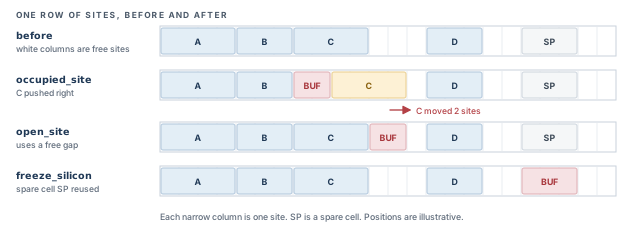
The three modes are:
- occupied_site places or resizes cells even with no free sites. It suits an early-stage ECO or a densely packed design. Density here is the share of the area already filled with cells. It fixes more violations, because placement is more aggressive.
- open_site places cells only in free sites. It suits a late-stage ECO or a design with low density. Cells move less, because placement is more careful.
- freeze_silicon places new cells only on spare cells, so the silicon layers stay the same.
Many teams use occupied_site in the first ECO loop, when there is still room to adjust. They switch to open_site for the last loops, when the layout must hardly move.
10.13 Site-aware fixing with cells of several heights
Some designs mix single-height and double-height cells in one region. The physically aware flow supports:
- downsizing, upsizing, swapping and insertion of single-height buffers;
- upsizing and insertion of multiple-height buffers.
Physically aware sizing only changes a cell's width, never its height.
You can restrict a multiple-height cell to rows of a matching site type. For example, double-height buffer BUFLVT1 may only go in rows of type 2Tunit. Figure 13 shows such rows.
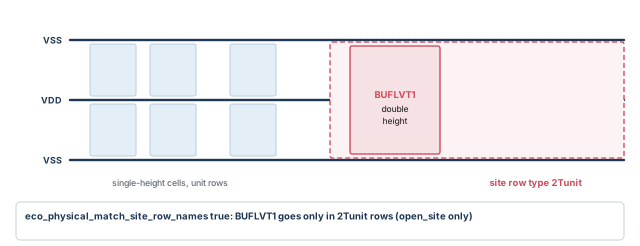
This feature needs an exact match between the LEF site name of the cell and the DEF row name:
MACRO BUFLVT1
  SIZE 1.632 BY 0.768 ;
  SITE 2Tunit ;
...
ROW 2Xrow_1 2Tunit 1500 1680 N DO 4080 BY 1 STEP 96 0 ;
ROW 2Xrow_2 2Tunit 1500 2448 N DO 4080 BY 1 STEP 96 0 ;
To turn it on, set eco_physical_match_site_row_names:
pt_shell> set_app_var eco_physical_match_site_row_names true ;# match site to rowYou can change this variable between fixing runs. The script below first fixes with single-height cells, then with double-height cells in 2Tunit rows. The option -keep_site_names keeps the 2Tunit site data when the LEF/DEF is read.
set_eco_options -physical_tech_lib_path technology.lef.gz \
  -physical_lib_path library.lef.gz -physical_design_path design.def.gz \
  -physical_lib_constraint_file icc2_adv_tech_rule.gz \
  -log_file lef_def.log                               ;# LEF/DEF and rule files
set_eco_options -keep_site_names {2Tunit}             ;# keep 2Tunit site data
report_eco_options                                    ;# confirm the settings
check_eco                                             ;# check and read LEF/DEF
# Pass 1: default mode, single-height buffers
set_app_var eco_physical_match_site_row_names false   ;# no site matching
fix_eco_drc -type max_transition -physical_mode open_site \
  -buffer_list $SINGLE_BUF -verbose                   ;# fix transition
fix_eco_timing -type setup -physical_mode open_site \
  -verbose                                            ;# fix setup
fix_eco_timing -type hold -physical_mode open_site \
  -buffer_list $SINGLE_BUF -verbose                   ;# fix hold
# Pass 2: site-aware mode, double-height buffers in 2Tunit rows
set_app_var eco_physical_match_site_row_names true    ;# match site to row
fix_eco_drc -type max_transition -physical_mode open_site \
  -buffer_list $DOUBLE_BUF -verbose                   ;# fix transition
fix_eco_timing -type setup -physical_mode open_site \
  -verbose                                            ;# fix setup
fix_eco_timing -type hold -physical_mode open_site \
  -buffer_list $DOUBLE_BUF -verbose                   ;# fix hold
Site-aware fixing works only with -physical_mode open_site.
check_eco, fix with a physical mode, and write an icctcl change list. Pick occupied_site early and open_site late.11 ECO fixing methods
You steer the changes with the command you pick and its options, such as -type and -methods. This section covers the main methods.
11.1 Load buffering and load shielding
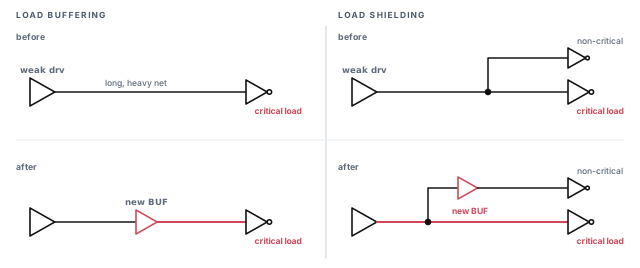
A weak driver is a cell too small for the load it drives. Physically aware buffering can help such nets in two ways:
- Load buffering inserts a buffer to strengthen a weak driver. This speeds up the path to the critical load.
- Load shielding inserts a buffer to shield the critical load from the non-critical loads.
In both cases, the tool picks the best free location and respects placement blockages. Figure 14 shows both methods.
To use them for setup, run setup fixing with the insert_buffer method.
fix_eco_timing -type setup \
  -methods insert_buffer \
  -buffer_list {list_of_buffers}   ;# buffers it may insert
You can give insert_buffer and size_cell together. If you run them separately for setup, run size_cell first. Then use insert_buffer and other methods for further gains.
11.2 Side-load cell sizing
The -methods option of fix_eco_timing supports cell sizing, general buffer insertion, buffer insertion at load pins and side-load cell sizing.
A side load is a cell that hangs on a critical net but is not on the critical path. The size_cell_side_load method works in two steps. Figure 15 shows them.
- It downsizes side-load cells on non-critical paths. This reduces the parasitic capacitance on the critical net.
- It upsizes cells on the critical path.
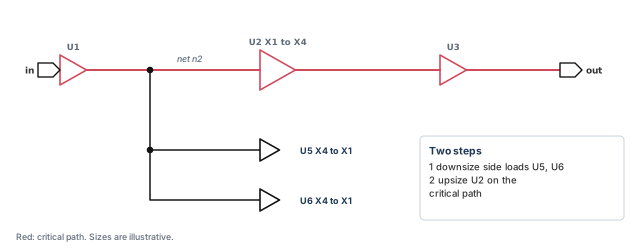
pt_shell> fix_eco_timing -type setup -methods {size_cell_side_load} ... ;# 2 stepsThis method works only with -type setup and -cell_type combinational.
11.3 Clock network ECO fixing
By default, ECO changes only cells in data paths. You can also fix in clock networks. There, you can:
- fix setup and hold by changing clock arrival times, which solves some hard cases;
- fix DRC violations inside the clock network.
Clock network fixing works only in the physically aware flow. Set -physical_enable_clock_data before you read the LEF/DEF or IC Compiler II data, so the clock network's physical data is read.
fix_eco_timing
-type setup | hold
-cell_type clock_network
[-clock_fixes_per_change integer]
[-clock_max_level_from_reg integer]
[-methods {size_cell | insert_buffer | insert_inverter_pair}]
...
fix_eco_drc
-type max_transition | max_capacitance | max_fanout
-cell_type clock_network
[-methods {size_cell | insert_buffer | insert_inverter_pair}]
...Clock changes can shift the skew, the difference in clock arrival between flops. To keep skew changes small, fix data paths first. Then fix the remaining violations in the clock network.
pt_shell> fix_eco_timing -type setup -cell_type combinational ...   ;# data paths first
pt_shell> fix_eco_timing -type setup -cell_type clock_network ...   ;# then clock paths
Fixing timing through the clock
With -cell_type clock_network, fix_eco_timing changes clock arrival times. For setup, it may upsize buffers in the launch clock path. It may also insert or downsize buffers in the capture clock path.
pt_shell> set_eco_options -physical_enable_clock_data ...   ;# read clock physical data
pt_shell> fix_eco_timing -type setup -methods {size_cell insert_buffer} \
            -buffer_list {buf2 buf4 buf6 buf8} \
            -cell_type clock_network   ;# setup fixing in clock paths
Two options limit how far into the clock tree a change may go:
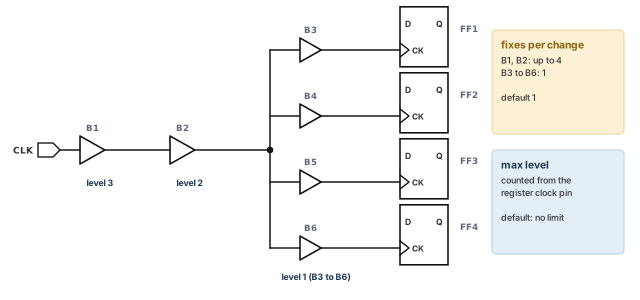
-clock_fixes_per_changesets the minimum number of violations each change must fix. The default is 1. For example, resizing a cell that fans out to four register clock pins can fix four violations. A larger value gives fewer changes, higher in the tree, closer to the clock source.-clock_max_level_from_regsets the maximum number of buffers between the change and the register clock pin. The default is no limit. A value of 1 limits each change to the immediate driver of the clock pin. A value of 0 restores the default.
pt_shell> fix_eco_timing -type setup -methods {size_cell insert_buffer} \
            -buffer_list {buf2 buf4 buf6 buf8} -cell_type clock_network \
            -clock_fixes_per_change 4 \
            -clock_max_level_from_reg 6   ;# 4 fixes per change, up to 6 levels
Figure 16 shows both options on a small tree.
Fixing DRC in the clock network
With -cell_type clock_network, fix_eco_drc fixes maximum transition, capacitance or fanout in the clock network. It upsizes and inserts buffers there. The default is data paths only.
pt_shell> fix_eco_drc -type max_transition \
            -methods {size_cell insert_buffer} \
            -buffer_list {buf2 buf4 buf6 buf8} \
            -cell_type clock_network   ;# DRC fixing in clock paths
Some paths use a clock signal as data. To allow hold fixing on them, set a variable.
pt_shell> set_app_var eco_enable_fixing_clock_used_as_data true ;# allow these paths11.4 TNS-driven clock network fixing
Total negative slack (TNS) is the sum of all negative slacks. Worst negative slack (WNS) is the single worst one. One clock change often helps several endpoints but hurts another. By default, that trade is not allowed. Two options change this:
fix_eco_timing
  [-target_violation_type endpoint | tns]
[-wns_limit float]endpointis the default, the same as leaving the option out. A clock change may not worsen any endpoint violation.tnsallows a clock change to worsen some violations while fixing others, aiming at TNS. WNS may not get worse than the existing WNS, or than-wns_limitif given.
TNS targeting needs a PrimeTime-ADV license.
pt_shell> fix_eco_timing -type hold \
            -cell_type clock_network \
            -methods {insert_buffer} -buffer_list {buf1 buf2 buf3} \
            -target_violation_type tns   ;# trade endpoints, aim at TNS
The result:
- TNS goes down.
- Some paths may get worse.
- WNS does not get worse, or stays within
-wns_limit.
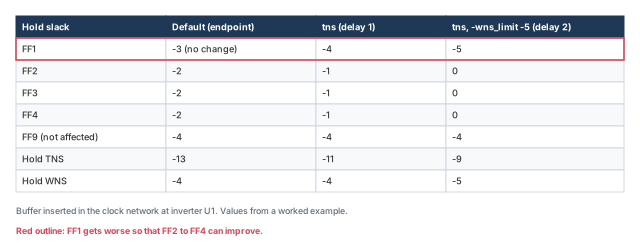
Let us walk through one example. A buffer in the clock network at inverter U1 would help the hold violations at FF2, FF3 and FF4. However, it would worsen the hold violation at FF1. FF9 has the worst violation, −4. The three outcomes are:
- Default. No buffer is inserted. The violation is reported as unfixable, because launch and capture timing conflict. TNS stays −13.
-target_violation_type tns. The tool inserts a buffer with a delay of 1. TNS improves from −13 to −11. FF1 worsens from −3 to −4, which equals the existing WNS of −4.tnswith-wns_limit -5. The tool inserts a buffer with a delay of 2. TNS improves to −9, and FF1 worsens to −5.
Figure 17 puts the three outcomes side by side.
You can set -wns_limit above or below the existing WNS. Clock network fixing respects it either way.
Use TNS targeting when many small violations share a clock branch. Always choose -wns_limit on purpose. By default, other endpoints may worsen all the way down to the existing WNS.
11.5 Hold fixing with load capacitance cells
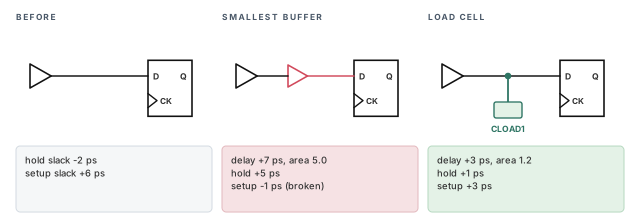
A very small hold violation is easy to over-fix. Even the smallest buffer may add too much delay and create a setup violation. Figure 18 shows an example, in picoseconds:
- Before: hold slack −2 ps, setup slack +6 ps.
- With the smallest buffer: +7 ps delay, so hold is +5 ps but setup is −1 ps.
- With a load cell: +3 ps delay, so hold is +1 ps and setup is +3 ps.
A load capacitance cell, or load cell, adds capacitance to a net. Its delay effect is like that of a buffer. However, it is a better way to fix hold violations of about 5 ps or less.
Three kinds of cell can serve as load cells:
- buffer cells, with the output left unconnected;
- inverter cells, with the output left unconnected;
- dedicated load cells. These are small single-pin cells that are easy to place.
A dedicated load cell has these attributes:
| Attribute | Type | Value |
|---|---|---|
function_id |
string | unknown |
is_black_box |
boolean | true |
is_combinational |
boolean | true |
number_of_pins |
int | 1 |
To insert load cells, use -load_cell_list with hold fixing. You can fix small violations with load cells first, then the rest with buffers.
fix_eco_timing -type hold -methods insert_buffer -load_cell_list $clist \
  -slack_lesser_than 0.000 -slack_greater_than -0.003   ;# only slack in (-3 ps, 0)
fix_eco_timing -type hold -methods insert_buffer -buffer_list $bflist ;# the rest
Or let the tool choose in one run:
fix_eco_timing -type hold -methods insert_buffer \
  -load_cell_list $clist -buffer_list $bflist   ;# small: load cells; large: buffers
The tool then fixes small violations with load cells and larger ones with buffers.
For physically aware fixing, write the change list for IC Compiler or IC Compiler II. Each new load cell gets a location and orientation.
pt_shell> write_changes -format icctcl -output wc_eco.tcl
...
create_cell U_LOAD_CAP_CELL_1 CLOAD1
connect_net n231 [get_pins {U_LOAD_CAP_CELL_1/A}]
set_cell_location -coordinates {150.00 30.60} -orientation N
In the physically aware flow, eco_insert_buffer_search_distance_in_site_rows limits the search for a free site. This holds for buffers and for load cells.
11.6 ECOs with multiply instantiated modules
A multiply instantiated module (MIM) is one design used as several instances, such as four CPU cores. A fix in one core usually belongs in all of them.
When eco_enable_mim is true, the tool makes the same ECO changes across each set of MIM instances. It writes one change list file for each set. It recognizes a set like this:
- in physically aware fixing, instances that share the same DEF file;
- in logic-only fixing, instances that share the same parasitics file, by the
-pathoption ofread_parasitics.
The steps are:
- Set
eco_enable_mimtotrue. - (Optional) Define MIM groups with
set_eco_options -mim_group, once per group. Report them withreport_eco_mim_instances. - Fix with
fix_eco_drc,fix_eco_timingandfix_eco_power. - Write the change lists with
write_changes.
pt_shell> set_app_var eco_enable_mim true          ;# same fix in every MIM instance
pt_shell> set_eco_options -mim_group {CPU1 CPU2}   ;# group 1
pt_shell> set_eco_options -mim_group {CPU3 CPU4}   ;# group 2
pt_shell> report_eco_mim_instances                 ;# show the groups
pt_shell> write_changes -format icctcl -output pteco.tcl   ;# after fixing
Groups can cost more runtime and memory, because each group is analyzed on its own. This example writes three files. The module name is put in front of the given name:
pteco.tcl— changes for the top-level module;CPU_pteco.tcl— changes for module CPU, instances CPU1 and CPU2;CPU_0_pteco.tcl— changes for module CPU, instances CPU3 and CPU4.
This is a custom setup. By default, all changes in the CPU module go into one file.
For manual edits, two more controls decide whether a change stays inside one instance:
- The
eco_mim_preservevariable sets whether MIM groups are kept wheneco_enable_mimistrue. - The
-all_mim_instancesoption ofsize_cell,insert_bufferandremove_bufferoverrideseco_mim_preservewhen that variable isfalse.
Figure 19 shows the decision.
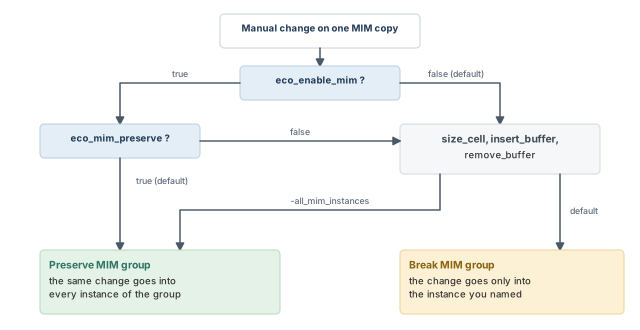
eco_enable_mim so every copy of a block gets the same fix.12 Reporting why fixing stopped
12.1 Unfixable timing and DRC violations
fix_eco_timing and fix_eco_drc can report why a violation could not be fixed. First, set how many violations to explain:
pt_shell> set_app_var eco_report_unfixed_reason_max_endpoints 50 ;# report limitThen pick how to get the reasons:
| To do this | Use |
|---|---|
Estimate the unfixable violations without fixing (fix_eco_timing only) |
fix_eco_timing -estimate_unfixable_reasons |
| Fix, and print the reasons in the output | fix_eco_timing or fix_eco_drc with -verbose |
| Fix, and write the reasons to a log file | -unfixable_reasons_prefix file_name_prefix, plus -unfixable_reasons_format text or csv if wanted |
| Fix, print the reasons and write them to a file | -verbose plus -unfixable_reasons_prefix ... |
A run of the estimate mode looks like this:
pt_shell> fix_eco_timing -type setup -estimate_unfixable_reasons
Information: Using option -estimate_unfixable_reasons. ...
Information: The design will not be changed.
Information: 22 violating endpoints located... (PTECO-022)
Information: 22 endpoints are being considered for fixing... (PTECO-027)
Unfixable violations:
   A - There are available library cells outside area limit
   B - Delay improvement is too small to fix the violation
   C - The violation is in clock network
   I - Buffer insertion with given library cells cannot fix the violation
   S - Cell sizing with alternative library cells cannot fix the violation
   T - Timing margin is too tight to fix the violation
   U - UPF restricts fixing the violation
   V - Net or cell is invalid or has dont_touch attribute
   W - Fixing the violation might degrade DRC violations
   Violation                          Reasons     Prio/slk
   -------------------------------------------------------
   S:FF1/Q
     U1/Y                             A B W        P8
     U2/Y                             B W          P9
   E:FF2/D                                       -0.150
Each entry lists the cells along a violating path, each with its reason codes. The last line of the entry gives the slack.
The estimate mode is the safest place to start. It is faster than real fixing, and it changes nothing. Use it to tune the options before you fix. In the reason codes above, I suggests a richer buffer list, A suggests relaxing the area limit, and T suggests relaxing margins.
The estimate works with every other fix_eco_timing option. For example, restrict it to one path with -from and -to:
pt_shell> fix_eco_timing -type setup -estimate_unfixable_reasons \
            -from FF1/Q -to FF2/D   ;# explain just this path
12.2 Unusable cells for power reduction
fix_eco_power has a similar feature. It reports why a cell could not be downsized. Power has no "violation", so the words differ: unusable cells instead of unfixable violations.
pt_shell> set_app_var eco_power_report_max_unusable_cells 100 ;# report limit| To do this | Use |
|---|---|
| Recover, and print the reasons in the output | fix_eco_power -verbose |
| Recover, and write the reasons to a log file | fix_eco_power -unusable_reasons_prefix file_name_prefix |
| Recover, print the reasons and write them to a file | fix_eco_power -verbose -unusable_reasons_prefix file_name_prefix |
pt_shell> fix_eco_power -verbose
Unusable Cells:
  B - Power benefit is too small
  L - Physical constraints restrict sizing
  S - Cell has no alternate library cell with better power
  T - Sizing cell might degrade timing
  U - UPF restrictions prevent sizing
  V - Cell is invalid or has dont_touch attribute
  W - Sizing cell might degrade DRC
  X - Cell is unusable for ECO
  Z - Cell is sized
   Cell name      Lib_cell name      Reasons
   -----------------------------------------
   FF3            SDFFARX1_HVT       W
   U4             AO22X1_HVT         T
   U7             OA21X1_HVT         T W Z
A summary at the end counts the cells for each reason code.
The cells are listed, and cut to the limit, in an order that depends on the recovery type:
| Power fixing type | Order |
|---|---|
| Area-based downsizing | The order of [get_cells -hier *] |
| Leakage swapping | Pattern priority, lowest to highest, with the name as a tiebreaker |
| Attribute-based downsizing | Decreasing library cell attribute value, with the name as a tiebreaker |
| Power-mode downsizing | Decreasing instance cell power. In DMSA total power mode, the -dynamic_scenario scenario sets the order |
13 HyperTrace ECO fixing
13.1 What HyperTrace adds
HyperTrace is a technology that speeds up path-based analysis. The tool can use it to speed up fix_eco_timing and fix_eco_power when -pba_mode is used. Its graph refinement data is updated on its own during fixing. This feature needs a PrimeECO license.
The supported modes are:
| Command | Supported PBA mode values |
|---|---|
fix_eco_timing |
exhaustive, ml_exhaustive |
fix_eco_power |
path, exhaustive, ml_exhaustive |
13.2 Turning it on
pt_shell> set_app_var eco_enable_graph_based_refinement true   ;# HyperTrace for ECO
pt_shell> fix_eco_timing -pba_mode exhaustive ...   ;# or ml_exhaustive
pt_shell> fix_eco_power -pba_mode path ...          ;# or exhaustive, ml_exhaustive
eco_enable_graph_based_refinement is independent of timing_enable_graph_based_refinement. The second variable is for HyperTrace reporting, not ECO.
To confirm that HyperTrace is in use, look for this message:
Information: Running HyperTrace-based ECO fixing (PTECO-115)fix_eco_power builds HyperTrace fully into its algorithms. So it does not use or need the reporting refinement variables:
timing_refinement_max_slack_thresholdtiming_refinement_min_slack_thresholdtiming_refinement_maximum_critical_pin_percentage
13.3 Options that block full HyperTrace
Some options allow only partial use of HyperTrace:
fix_eco_timing -path_selection_options;fix_eco_power -start_end_type reg_to_reg;fix_eco_power -pba_path_selection_options.
With one of these, the tool issues PTECO-116 instead of PTECO-115:
Information: Using HyperTrace to accelerate PBA-based ECO fixing.
(PTECO-116)
In that case, you must set the reporting refinement threshold variables to suitable values for ECO.
eco_enable_graph_based_refinement, and check for PTECO-115 in the log.14 Writing change lists
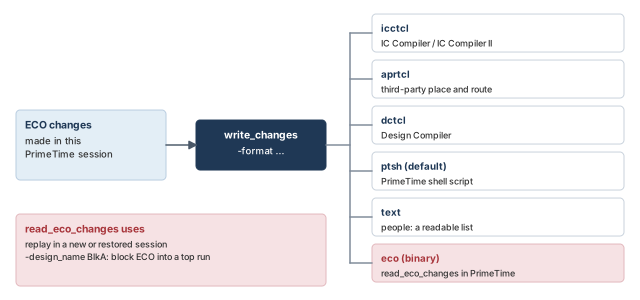
14.1 Formats
A change list describes every change made by all ECO work in the session. It tells the implementation tool how to carry the changes out. The write_changes command writes it, and -format picks the format:
| Format value | What it writes |
|---|---|
ptsh |
A Tcl script for the PrimeTime shell (the default) |
text |
A list of changes in plain descriptive text |
dctcl |
A Tcl script for Design Compiler |
icctcl |
A Tcl script for IC Compiler or IC Compiler II |
eco |
A binary file for the PrimeTime read_eco_changes command |
aprtcl |
A Tcl-like script for third-party place-and-route tools |
You can replay the scripts in a tool such as IC Compiler II to implement the changes. You can also replay them in other PrimeTime sessions. This helps you judge the ECO in other scenarios. Figure 20 shows where each format goes.
14.2 Replaying a change list in PrimeTime
The recommended flow is:
- In the original session, write the changes in the binary
ecoformat. - In a new or restored session, check the LEF/DEF with
check_eco, then replay the changes withread_eco_changes. - Judge the result, and run more ECO commands if needed.
- Write a change list for implementation.
write_changes -format eco -output change_list_file   ;# step 1, original session
# --- later, in a new or restored session ---
restore_session ...                                  ;# step 2
set_eco_options ...                                  ;# same options as before
check_eco                                            ;# check the LEF/DEF data
read_eco_changes change_list_file                    ;# replay the changes
# step 3: report, and fix more if needed
write_changes -format icctcl new_change_list_file    ;# step 4, for layout
14.3 Bringing block-level ECOs into a top-level run
In a hierarchical flow, ECOs run at block level and at top level. Different teams may fix different blocks, even with different PrimeTime versions. The top-level run can then read all block changes.
pt_shell> write_changes -format eco -output changesBlkA ;# block A's ECOpt_shell> read_eco_changes -design_name BlkA changesBlkA ;# apply to module BlkAThe name BlkA is the Verilog module name of the block. It can also be the reference name of a MIM. For a MIM, the changes go to every instance in the MIM group.
14.4 Change lists for third-party tools
In a physically aware flow, -format aprtcl writes changes for third-party place-and-route tools. The name is short for automatic place-and-route. It writes pseudo-Tcl commands that belong to no particular tool. Your own scripts can parse them and feed them to any layout tool.
The commands special to this format are below. Any other command is the same as in the icctcl format.
| ECO operation | Pseudo-Tcl command |
|---|---|
| Insert buffer, pin-based | insert_buffer new_lib_cell -new_net_names ... -new_cell_names ... [-location {x y}] [-orientation dir] [-inverter_pair] {pin_or_port_list} |
| Insert buffer, on-route | As above, plus -on_route and [-route_cut_location {x y}] |
| Resize cell | size_cell leaf_cell new_lib_cell [-overlap] [-location {x y}] [-orientation dir] |
| Create cell (load cells) | create_cell load_cell_name new_lib_cell [-location {x y}] [-orientation dir] |
| Connect net (load cells) | connect_net net_name pin_or_port_list |
| Remove buffer | remove_buffer cell_name |
For an inverter pair, -location and -route_cut_location take two points: {x1 y1 x2 y2}.
# Change list, formatted for Third Party Compiler
# aprtcl_file_syntax_version : 1.0
current_instance
current_instance {blk/subblk3}
insert_buffer -on_route BUFFD4 \
  -new_net_names {net1} -new_cell_names {BUF1} \
  -location {x1 y1} -route_cut_location {x1' y1'} \
  {sink1/I sink2/I sink3/I sink4/I}
insert_buffer -on_route BUFFD2 \
  -new_net_names {net2} -new_cell_names {BUF2} \
  -location {x2 y2} -route_cut_location {x2' y2'} \
  {sink1/I sink2/I sink3/I}
create_cell {U_LOAD_CAP_CELL_1} {CLOAD1_LVT} \
  -location {150.6320 61.8640} -orientation N
connect_net {design_ack_signal} {U_LOAD_CAP_CELL_1}
This example builds a buffer tree that drives four load pins, and adds a load cell to fix a hold violation. The order of the insert_buffer lines and their load pin lists re-create the tree.
The file header holds a syntax version, so parsers can adapt as the format changes. Today the only value is 1.0. It is better for a parser to check this value, so a future syntax change cannot cause silent errors.
icctcl for IC Compiler II, aprtcl for other layout tools, and the binary eco format to replay changes in PrimeTime.15 Implementing the changes in the layout tools
With separate tools, the loop is:
- In PrimeTime, write the change list:
write_changes -format icctcl new_change_list_file. - In the layout tool, apply and route the changes:
- In IC Compiler II, source the change list. Then place and legalize the ECO cells with
place_eco_cells, insert fillers withcreate_stdcell_fillers, and update the routes withroute_eco. - In IC Compiler, read the change list with
eco_netlist. Then runplace_eco_cells,legalize_placementandroute_zrt_eco.
- In IC Compiler II, source the change list. Then place and legalize the ECO cells with
- Extract parasitics with StarRC.
- Read the updated full netlist and parasitics into PrimeTime.
- Rerun timing analysis and check the QoR.
- Repeat with more ECO passes as needed.
With a PrimeECO license, the PrimeECO tool can do physical implementation, extraction and signoff timing in a single shell.
16 The incremental ECO flow
16.1 Why incremental
In the normal loop, every pass writes the full netlist and extracts the full design. The incremental ECO flow handles only what changed:
- IC Compiler II implements the changes and writes only the incremental changes.
- StarRC extracts only the changed parts and writes an incremental parasitic file.
- PrimeTime applies the incremental parasitics to a restored session and checks timing.
Each pass is faster, because only the changes are extracted and analyzed. However, final signoff still needs a full extraction and a full timing analysis. With a PrimeECO license, PrimeECO offers a single-shell alternative here too.
16.2 Two steps
- Initialize. Build the reference data in IC Compiler II, StarRC and PrimeTime. Enable tracking of changes in IC Compiler II.
- Iterate. Run the ECO in PrimeTime. Record the changes while IC Compiler II implements them.
icc2_shell> record_signoff_eco_changes -init -def   ;# step 1: start the reference
icc2_shell> record_signoff_eco_changes -start       ;# step 2: begin recording
# ... place and route the ECO changes here ...
icc2_shell> record_signoff_eco_changes -stop        ;# end recording
At the end of each pass, IC Compiler II writes:
- an incremental NDM database for StarRC extraction;
- an incremental change list for PrimeTime's next pass.
Figure 21 shows the whole loop.
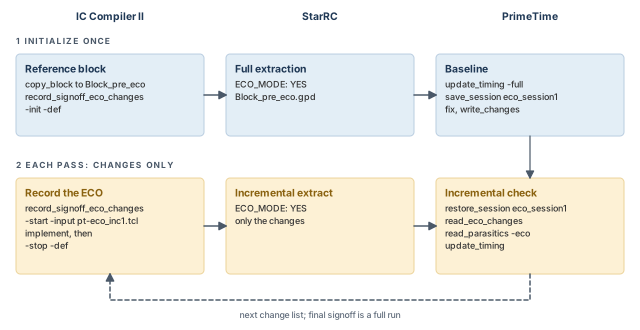
16.3 Initializing the flow
Step 1. In IC Compiler II, copy the block and initialize the ECO database.
icc2_shell> open_lib Design.nlib                                  ;# open the library
icc2_shell> copy_block -from_block Block -to_block Block_pre_eco  ;# keep the original
icc2_shell> open_block Block_pre_eco                              ;# work on the copy
icc2_shell> record_signoff_eco_changes -init -def                 ;# save, Verilog, DEF
record_signoff_eco_changes saves the design and writes the Verilog netlist and the DEF data. PrimeTime uses these in step 3.
Step 2. In StarRC, extract in ECO mode with lines like these in the command file:
NDM_DATABASE: Design.nlib
BLOCK: Block_pre_eco
ECO_MODE: YES
GPD: Block_pre_eco.gpd
Step 3. In PrimeTime, run a full baseline, save it, and do the first ECO.
pt_shell> read_verilog ndm_path/design.full.v.gz   ;# full netlist
pt_shell> link_design                              ;# link it
pt_shell> read_parasitics Block_pre_eco.gpd        ;# full parasitics
pt_shell> read_sdc Block.sdc                       ;# constraints
pt_shell> update_timing -full                      ;# full timing update
pt_shell> save_session eco_session1                ;# the reference session
pt_shell> set_eco_options -physical_design_path \
            ndm_path/design.full.def.gz ...        ;# layout data
pt_shell> fix_eco_timing ...                       ;# first ECO
pt_shell> fix_eco_drc ...                          ;# then DRC
pt_shell> write_changes pt-eco_inc1.tcl            ;# changes for pass 1
Here ndm_path stands for Design.nlib/Block_pre_eco/attach/design.signoff.eco.data.
16.4 One incremental pass
Step 1. In IC Compiler II, implement the changes and track them.
icc2_shell> open_lib Design.nlib                                       ;# library
icc2_shell> copy_block -from_block Block_pre_eco -to_block Block_eco1  ;# new copy
icc2_shell> open_block Block_eco1                                      ;# open it
icc2_shell> record_signoff_eco_changes -start -input pt-eco_inc1.tcl   ;# record
# ... implement the ECO with the minimal physical impact flow ...
icc2_shell> record_signoff_eco_changes -stop -def                      ;# stop, write
Step 2. In StarRC, extract the modified design incrementally:
NDM_DATABASE: Design.nlib
BLOCK: Block_eco1
ECO_MODE: YES
GPD: Block_pre_eco.gpd
Step 3. In PrimeTime, read the incremental netlist changes and parasitics, and check timing.
pt_shell> restore_session eco_session1               ;# the reference session
pt_shell> read_eco_changes ndm_path/design.incr.pt   ;# incremental netlist changes
pt_shell> read_parasitics -eco Block_eco1_inc.gpd    ;# incremental parasitics
pt_shell> update_timing                              ;# incremental by default
pt_shell> save_session eco_session2                  ;# for the next pass
pt_shell> report_timing ...                          ;# is another ECO needed?
pt_shell> fix_eco_timing ...                         ;# if so, fix again
pt_shell> fix_eco_drc ...                            ;# and DRC
pt_shell> write_changes pt-eco_inc2.tcl              ;# changes for pass 2
Repeat steps 1 to 3, using the data from the previous pass, until timing closes. Then run a final full-chip extraction and timing analysis for signoff.
16.5 Hierarchical designs
The hierarchical flow is like the flat one. Usually, IC Compiler II and StarRC run each block and the top separately. PrimeTime puts all blocks and the top together and analyzes them as one. So you gather the incremental data from each run into PrimeTime.
First, initialize the top and each block as above. Then, per pass:
- IC Compiler II, per block and top: copy the block and start recording with that level's change list. Run the minimum-physical-impact ECO, put fillers back, add metal fill, and stop recording. Metal fill is added with
signoff_create_metal_fill -auto_eco true, after setting its options withset_app_options. - StarRC, per block and top: extract in ECO mode. The top-level example also sets
NETLIST_INCREMENTAL: YESand names the incremental GPD file. - PrimeTime: read every level's changes and parasitics into one restored session.
restore_session eco_session1                   ;# restore the initial session
read_eco_changes ndm_path_Top/design.incr.pt   ;# top-level changes
read_eco_changes ndm_path_Blk1/design.incr.pt  ;# block 1 changes
read_eco_changes ndm_path_BlkN/design.incr.pt  ;# ... block N changes
read_parasitics -eco Top_eco1_inc.gpd          ;# top-level parasitics
read_parasitics -eco Blk1_eco1_inc.gpd         ;# block 1 parasitics
read_parasitics -eco BlkN_eco1_inc.gpd         ;# ... block N parasitics
update_timing                                  ;# incremental by default
save_session eco_session2                      ;# for the next pass
read_eco_changes and read_parasitics -eco apply the hierarchy stored in the incremental files on their own. You do not need current_instance or the -path option of read_parasitics.
16.6 Incremental passes in DMSA
Start with an initial run like the one above, using a normal DMSA script. For each pass, create each scenario from its saved session with create_scenario -image. Then read the incremental data in the workers and update timing.
create_scenario -name $scenario \
  -image pre_session_dmsa/${scenario}_pre_eco_session   ;# from the saved session
remote_execute {                                        ;# runs in every worker
  read_eco_changes ndm_path_Top/design.incr.pt          ;# top-level changes
  read_eco_changes ndm_path_Blk1/design.incr.pt         ;# block 1 changes
  read_parasitics -eco Top_eco1_inc.gpd                 ;# top-level parasitics
  read_parasitics -eco Blk1_eco1_inc.gpd                ;# block 1 parasitics
  update_timing                                         ;# incremental by default
}
save_session eco_session2_dmsa                          ;# save for the next pass
fix_eco_timing ...                                      ;# fix again if needed
write_changes pt-eco_inc2_dmsa.tcl ;# changes for the next pass17 The reduced-resource ECO flow
17.1 What it does
The reduced-resource ECO feature is deprecated and will be removed from the tool. Using it gives warning PTECO-042. The Hybrid timing view feature of the PrimeECO tool replaces it. Learn the idea here, but prefer the replacement in new flows.
This flow cuts the memory and runtime of ECO fixing. It helps most when ECOs run in many scenarios under DMSA.
The idea is a smaller design for fixing. The ECO design holds only the data related to the violations being fixed, such as setup and hold. The fixing command uses it to fix violations against the chosen constraints. Figure 22 shows the flow, from static timing analysis (STA) to fixing.
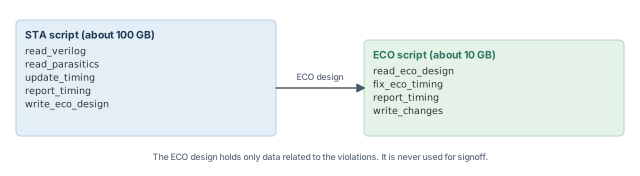
To use it, split your script in two:
- The STA script ends with
write_eco_design, which writes the reduced ECO design. - The ECO script starts with
read_eco_design, which reads it and fixes on it.
For example, if the STA script needs 100 GB, the ECO script might need only 10 GB. This matters when you run many ECOs, for different fixing types or scenarios.
With write_eco_design, you can choose which timing or design rule constraints to optimize. More constraint types give a larger ECO design. You can also limit the endpoints used to build it.
The reduced design may not show every possible violation. Thus, the flow is only for ECOs, never for final signoff. Always finish with a full-design analysis.
17.2 Several scenarios in one session
After STA in DMSA, write the ECO designs. Then stop the large hosts and start smaller ones for fixing.
create_scenario ...                       ;# DMSA scenarios
set_host_options -num_processes 20 \
  -submit_command "bsub [mem=100G] ..."   ;# 100 GB hosts for STA
start_hosts                               ;# launch the workers
current_session -all                      ;# focus on all scenarios
report_global_timing                      ;# STA
write_eco_design ;# write the ECO designsstop_hosts ;# stop the large hosts
remove_host_options ;# clear the old host settings
set_host_options -submit_command "bsub [mem=10G] ..." ;# 10 GB hosts for ECO
start_hosts ;# launch the small workers
read_eco_design ;# read the ECO designs
fix_eco_timing ;# fix on the small designsEach ECO run now needs 10 GB instead of 100 GB.
17.3 Many saved sessions
A common practice is to run and save one session per PVT corner (process, voltage and temperature). Later, a manager restores them as scenarios and runs the ECO.
To use the reduced flow here, set eco_save_session_data_type in each STA session before saving. This stores extra endpoint data in the session. write_eco_design then uses it to build the ECO designs.
read_verilog ...                                ;# netlist for this corner
read_parasitics ...                             ;# parasitics for this corner
report_timing                                   ;# STA
set_app_var eco_save_session_data_type timing   ;# save ECO data for timing ECO
save_session ./corner01 ;# save the session with ECO datacreate_scenario -image ./corner01 ;# one scenario per saved session
create_scenario -image ./corner16 ;# ... up to corner 16
set_host_options -num_processes 2 \
-submit_command "bsub [mem=100G] ..." ;# two 100 GB workers
start_hosts ;# launch two workers
current_session -all ;# focus on all scenarios
write_eco_design ;# restore sessions, extract ECO designs
stop_hosts ;# stop the large workers
remove_host_options ;# clear the old host settings
set_host_options -num_processes 16 \
-submit_command "bsub [mem=10G] ..." ;# sixteen 10 GB workers
start_hosts ;# launch 16 small workers
read_eco_design ;# load the ECO designs
fix_eco_timing ;# fix on the ECO designs
report_timing ;# check the resultwrite_eco_design finds the ECO data in the saved sessions, restores them and extracts the ECO designs. Two 100 GB machines do this one after another. Then read_eco_design starts 16 small workers on 10 GB machines. The full-design flow would need 16 large 100 GB machines for the same ECO.
17.4 Using negative margins to skip a check
In each scenario, you may only care about one check. A large negative margin makes the tool ignore the other check there, which saves runtime.
set scenario ${mode}_${corner}                ;# this run's scenario name
if { $scenario == "mode_worst"} {             ;# worst-case scenario
  read_parasitics -format SPEF ./worst.spef   ;# worst-case parasitics
  set_eco_options -timing_hold_margin -100.0 \
    -timing_setup_margin 0.050                ;# check setup, ignore hold
}
if { $scenario == "mode_best"} {              ;# best-case scenario
  read_parasitics -format SPEF ./best.spef    ;# best-case parasitics
  set_eco_options -timing_hold_margin 0.000 \
    -timing_setup_margin -100.0               ;# check hold, ignore setup
}
17.5 The non-DMSA variant
You can also run write_eco_design in standalone sessions. It then merges the failing endpoints of several sessions into one ECO design.
- In each session, set
eco_save_session_data_typebeforesave_session. - Run
write_eco_designwith-merge_sessions, listing the session directories.
read_verilog ...                                ;# netlist for this corner
update_timing ...                               ;# timing update
set_app_var eco_save_session_data_type timing   ;# keep failing endpoint data
save_session $my_sess/STA_SESS_FF ;# STA_SESS_SS on the other hostrestore_session $my_sess/STA_SESS_FF ;# STA_SESS_SS on the other host
set my_sess_list "$my_sess/STA_SESS_FF $my_sess/STA_SESS_SS" ;# both sessions
write_eco_design $rreco_db/FF -merge_sessions $my_sess_list ;# $rreco_db/SS thereThe rest is the same as the DMSA flow. In the DMSA manager, read_eco_design $rreco_db finds the two ECO designs and starts two workers. It then runs fix_eco_timing or fix_eco_drc.
18 The freeze silicon ECO flow
18.1 What it does
Making new masks for a chip costs time and money. In the freeze silicon flow, IC Compiler II changes only the metal and via layers. The silicon layers, such as implant, diffusion and poly, stay as they are. Thus, no new masks are needed for them.
This works only if spare cells were placed across the layout in advance. A spare cell is an unused cell waiting for a later ECO. The ECO connects spare cells into the design with metal routes.
The commands in each tool are:
add_spare_cells -cell_name ... -lib_cell ... -num_cells ...   ;# place spare cells
create_stdcell_fillers -lib_cells ... ;# fill the gapsset_eco_options ... ;# spare cells, rules, LEF/DEF
fix_eco_drc -type ... -physical_mode freeze_silicon ;# DRC on spare cells
fix_eco_timing -type ... -physical_mode freeze_silicon ;# timing on spare cells
write_changes -format icctcl -output pt_eco.tcl ;# the change listset_app_options -name design.eco_freeze_silicon_mode -value true ;# mode on
source pt_eco.tcl ;# apply changes
set_app_options -name design.eco_freeze_silicon_mode -value false ;# mode off
connect_pg_net -automatic ;# connect power and ground
# Turn off timing-driven routing in all three routing stages
set_app_options -category route.global -list {timing_driven false} ;# global
set_app_options -category route.track -list {timing_driven false} ;# track
set_app_options -category route.detail -list {timing_driven false} ;# detail
check_routes ;# check the routes
route_eco -reroute modified_nets_only -open_net_driven true ;# route the changesFigure 23 shows the data used in this flow.
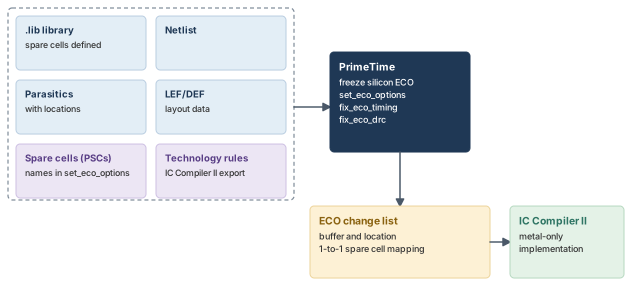
18.2 Preparing for the flow
The requirements are:
- Spare cells must be in the chip layout.
- The spare cells must be defined in the .lib library.
- Their library and instance layout data must be in LEF/DEF files. IC Compiler II can write these.
- The spacing rules for cell placement must be in a file. You can provide it in three ways:
- with
export_advanced_technology_rulesin IC Compiler II, which writes the rules in a binary encrypted format; - as a script of
set_lib_cell_spacing_labelandset_spacing_label_rulecommands; - in the Synopsys technology file format.
- with
18.3 Programmable spare cells
A normal spare cell has one fixed function, such as a NAND gate. A programmable spare cell (PSC) is built from transistor-level parts that can be wired in many ways. So it can become one of several logic functions. If an ECO uses only part of a PSC, the rest stays free for later ECOs.
Figure 24 shows a row before and after an ECO. No cell can move in this flow, but PSCs can be wired up.
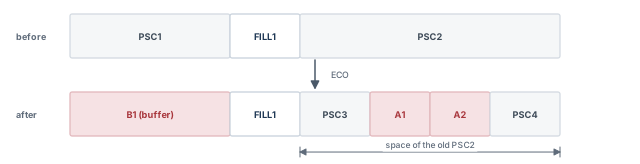
In PrimeTime, set_eco_options chooses the flow and names the spare cells, the rules file and the LEF/DEF files.
pt_shell> set_eco_options \
            -programmable_spare_cell_names {PSC1 PSC2 PSC3 PSC4 PSC5 PSC6} \
            -physical_lib_constraint_file ../tech_data/my_spacing_rules \
            -physical_tech_lib_path {../phy_data/my_tech.lef} \
            -physical_lib_path {../phy_data/my_lib.lef ../phy_data/my_design.def} \
-log_file my_lef_def.log ;# LEF/DEF errors and warnings go here-log_file writes the LEF/DEF processing messages to the named file.
18.4 LEF/DEF descriptions of PSCs
IC Compiler II can write the PSC layout data with write_lef and write_def.
- In LEF, a PSC looks like an ordinary fill cell. However, a fill cell's MACRO section must have
CLASS CORE FEEDTHRUorCLASS CORE SPACER. For a PSC, this is optional. - In DEF, a PSC instance must have
SOURCE DISTin the COMPONENTS section, because it is not in the netlist. It must also bePLACED, because it has a location. It cannot beFIXEDorCOVER.
# LEF programmable spare cell, cell name = e0hd_cap12x
MACRO e0hd_cap12x
 CLASS CORE ;
 ORIGIN 0 0 ;
 SIZE 0.816 BY 0.42 ;
END e0hd_cap12x
# DEF instance of the programmable spare cell
-xofiller!ECO_DECAP_FILLER_!e0hd_cap12x!179638
e0hd_cap12x + SOURCE DIST + PLACED (264300 624100) N ;
To check the PSC descriptions, use -log_file and look for the PSC messages after fixing.
Information: Reading LEF file my_lib.lef
Information: Information: Identified programmable spare cell PSC1 at
 lineNumber 1238.
Information: Reading DEF file my_design.def
Physical Information Summary:
Identified programmable spare cells PSC1 ...
18.5 Exporting DEF and spacing rules from IC Compiler II
set myblocks "block1 block2 block3"                      ;# blocks to export
set mylib "design_A"                                     ;# library name
open_lib $mylib                                          ;# include all required libs
foreach blockx $myblocks {                               ;# one pass per block
  open_block $blockx                                     ;# open the design
  check_legality                                         ;# check placement legality
  link -force                                            ;# link the block
  write_def $blockx.def                                  ;# block DEF file
  export_advanced_technology_rules ${blockx}_rules.tcl   ;# technology rules
  close_blocks $blockx                                   ;# close it
}
18.6 A freeze silicon ECO in PrimeTime
Three commands do the work: set_eco_options sets the parameters, fix_eco_timing or fix_eco_drc makes the changes, and write_changes writes them. The script below fixes hold in several scenarios.
set_app_var read_parasitics_load_locations true           ;# keep node locations
remote_execute {                                          ;# in each worker:
  set_app_var timing_save_pin_arrival_and_slack true      ;# keep pin data
  update_timing -full }                                   ;# full timing update
remote_execute { set lef_files [glob ./*.lef]             ;# LEF list, then:
  set_eco_options \
    -physical_tech_lib_path $tech_lef_files \
    -physical_lib_path $lef_files \
    -physical_design_path ./design.def.gz \
    -physical_lib_constraint_file $rule_files \
    -programmable_spare_cell_names $pscs \
    -log_file ./lef_def.log }                             ;# physical data, per worker
set buffer_list {BUF_1 BUF_2 BUF_N}                       ;# allowed buffers
set_app_var eco_report_unfixed_reason_max_endpoints 50    ;# explain failures
fix_eco_timing -type hold -physical_mode freeze_silicon \
  -buffer_list $buffer_list -verbose                      ;# fix hold on spare cells
remote_execute { write_changes -format icctcl -output pt_eco.tcl }   ;# write
As before, -physical_icc2_lib and -physical_icc2_blocks can replace the LEF/DEF options.
In the change list, each insert_buffer gives the new buffer's location. A map_freeze_silicon command then names the spare cell it replaces.
insert_buffer [get_pins {U1/z}] e0hd_cap12x \
-new_net_names {eco_hold_net1} \
-new_cell_names {eco_hold_buf1} \
-location {665.4320 193.6320} -orientation FS
map_freeze_silicon \
-eco_cell [get_cells -hier " eco_hold_buf1 "] \
-spare_cell xofiller!ECO_DECAP_FILLER_!e0hd_cap12x!179638 \
-filler_map_strategy closest19 Running ECO scenarios on fewer hosts
19.1 More scenarios than machines
Normally, each scenario has a host of its own. ECO can also run when there are more scenarios than hosts. Set eco_enable_more_scenarios_than_hosts to true.
The requirements are:
- At least four hosts. The recommended number is at least eight, or a quarter of the scenarios, whichever is larger. For 64 scenarios, that is 16 hosts.
- Enough disk space. The DMSA working directory must hold the session data of all scenarios. For example, 32 scenarios of 1 GB each need at least 32 GB.
As hosts decrease, runtime grows linearly. The extra turnaround also depends on design size, violation count, scenario types, network speed and free disk space.
19.2 Making the scripts faster
With fewer hosts, the hosts run in scenario swapping mode. They take turns, loading one scenario after another. This slows things down a lot. To swap less:
- Use fewer merged reporting commands, such as
report_timingandreport_analysis_coverage. - Merge
remote_executecommands into one block. Eachremote_executecosts one round of swapping.
remote_execute {                                      ;# setup in one block
  set_dont_touch $dont_touch_list                     ;# protect logic
  set_dont_use $dont_use_list                         ;# ban lib cells
  set eco_alternative_area_ratio_threshold 2          ;# an ECO variable setting
  update_timing                                       ;# update timing
}                                                     ;# one swap round for setup
fix_eco_timing -type setup                            ;# fix setup at the manager
remote_execute {                                      ;# all reports in one block
  report_analysis_coverage                            ;# coverage per scenario
  report_timing -delay_type max ...                   ;# setup paths
  report_timing -delay_type min ...                   ;# hold paths
  report_constraint -all_violators ...                ;# violations
}                                                     ;# one swap round for all reports
report_constraint -all_violators ...                  ;# minimum reports at the manager
current_scenario scen1                                ;# write from one scenario only
remote_execute { write_changes -output my_eco.tcl } ;# one change listeco_enable_more_scenarios_than_hosts, ECO runs on fewer hosts by swapping scenarios. Group your remote commands so each swap round does as much as possible.20 Manual netlist editing
20.1 When to edit by hand
Late in a project, only a few small edits may be allowed. You can then edit the netlist by hand and see the effect on timing. For many violations or larger changes, it is better to use the fixing commands.
The steps are:
- To replace or resize a cell, find the alternative library cells first.
- Edit the netlist with the commands in the table below.
- Write a change list with
write_changes.
pt_shell> get_alternative_lib_cells -base_names U135
AN2 AN2i| Object | Task | Command |
|---|---|---|
| Buffer | Insert a buffer | insert_buffer |
| Buffer | Remove a buffer | remove_buffer |
| Cell | Change the size (drive strength) of a cell | size_cell |
| Cell | Create a cell | create_cell |
| Cell | Rename a cell | rename_cell |
| Cell | Remove a cell | remove_cell |
| Net | Add a new net | create_net |
| Net | Connect nets to pins | connect_net |
| Net | Disconnect nets from pins | disconnect_net |
| Net | Rename a net | rename_net |
| Net | Remove a net | remove_net |
20.2 What-if analysis with fast incremental updates
You can try changes inside PrimeTime and see the result quickly. The tool then uses a fast incremental update. It re-times only the part of the design the change affects.
Typical what-if changes are:
- larger driving cells with
size_cell, or buffers withinsert_buffer; - separated victim and aggressor nets with
set_coupling_separation, for crosstalk; - custom edits, such as removing a cell and connecting a new one with
remove_cell,create_cellandconnect_net.
These commands keep the update incremental:
size_cellinsert_buffer,remove_bufferset_coupling_separation,remove_coupling_separationconnect_net,disconnect_net,remove_netcreate_cell,remove_cell
Any other netlist editing command makes update_timing do a full update.
An incremental update works in four steps:
- Find the nets directly affected by the changes, and their aggressors.
- Filter the affected nets electrically.
- Run a first pass on the fanout cone of the affected nets. The depth of this cone is limited to where the slew changes.
- Run the second and any later passes on the nets in that cone.
When you are happy with the changes, write a change list for the layout tool.
What-if crosstalk results can differ slightly from a full analysis. This is because the analysis is iterative, and timing windows and crosstalk delays depend on each other. For final signoff, run a full analysis with complete GPD or SPEF data and the netlist from layout.
20.3 Automatic uniquifying
Suppose block low is used twice, and you edit one instance. That instance now differs from the other, so it must become its own design. PrimeTime does this for you, which is called uniquifying. It renames the edited instance's design to something like low_0, avoiding names already used.
In PrimeTime, no new design is created at that moment. A placeholder is created instead, like the one left by link_design -remove_sub_designs. To list the designs created this way, use list_designs -all. They become real only when you relink the design.
An edited block is uniquified together with every block above it. This stops at the first block that has a single instance. Figure 25 shows an example.
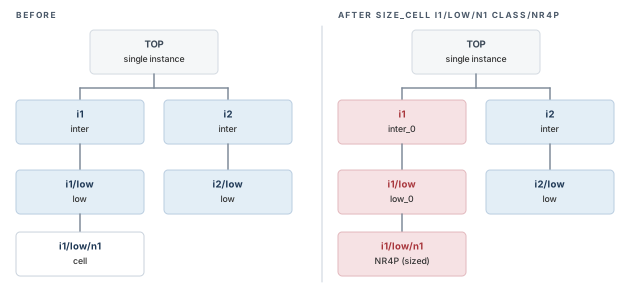
pt_shell> size_cell i1/low/n1 class/NR4P
Uniquifying 'i1/low' (low) as 'low_0'.
Uniquifying 'i1' (inter) as 'inter_0'.
Sized 'i1/low/n1' with 'class/NR4P'
1
pt_shell> get_attribute [get_cells i1/low] is_edited
true
Editing a block also marks its parent and all ancestors up to the top as edited. The Boolean attribute is_edited shows this, on designs and on hierarchical cells.
20.4 Naming library cells in editing commands
Many editing commands take a library cell, either as an object or as a name. To get objects, use get_lib_cells, for example get_lib_cells */*.
A library cell name can be:
- the full name, such as
mylib1/AND2, which is never ambiguous; - the base name, such as
AND2, which must be resolved to a library.
Base names matter most in DMSA, because each scenario may have different libraries. You can use them in a single scenario too. Two options control how a base name is resolved:
-current_libraryresolves it from the cell's currently linked library. It works withsize_cell,get_alternative_lib_cellsandreport_alternative_lib_cells.-librariesgives a list of libraries, searched in order. It works withsize_cell,insert_bufferandcreate_cell.
Without these options, the tool searches in this order:
- the link library of the current cell, for
size_cell,get_alternative_lib_cellsandreport_alternative_lib_cells; - libraries set by
link_path_per_instanceorset_link_lib_map; - libraries in
link_path.
The -base_names option of get_alternative_lib_cells returns base names as strings, not a collection.
20.5 Estimating delay changes before editing
Checking each idea with report_timing costs an incremental timing update. For a quicker look at size_cell and insert_buffer ideas, use estimate_eco. It computes the options from the current timing of one stage: a driving cell plus the net it drives.
The estimate considers, as Figure 26 shows:
- the incoming transition times;
- the output loading and fanout loading;
- detailed parasitics, if present;
- the driver characteristics of the candidate cells.
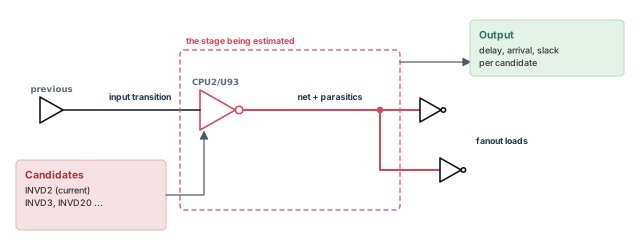
The estimate is fast but not exact. Use it to explore, and confirm the final choice with report_timing. The steps are:
1. Show the options.
pt_shell> estimate_eco -type size_cell -max -rise CPU2/U93
delay type : max_rise
lib cell           area stage_delay   arrival      slack
---------------------------------------------------------
mylib90/INVD24     21.17     0.0265    0.0265     0.1671
mylib90/INVD20     18.35     0.0291    0.0291     0.1645
mylib90/INVD3       3.53     0.1295    0.1295     0.0212
*mylib90/INVD2      2.82     0.1936    0.1936    -0.0013
mylib90/CKNXD1      2.82     0.4271    0.4271    -0.3214
Each row is an alternative library cell and the timing it would give. An asterisk marks the current cell. Here INVD3 fixes the small violation with little extra area.
2. Estimate the stage delay change for the change you picked.
pt_shell> estimate_eco -type insert_buffer -inverter_pair \
            -max -rise -verbose -lib_cells {INVD2} CPU2/U25/Y
cell name : CPU2/U25
current lib cell: mylib90/INVD1
buffer lib cell : mylib90/INVD2
max_rise                   current      estimate
------------------------------------------------
area                         0.925        1.270
cell delay                   0.371        0.175
output net delay             0.206        0.110
arrival time                 0.371        0.175
slack                        0.304        0.499
3. Commit and verify. When sure, run size_cell or insert_buffer, then update_timing to see the exact result.
The timing update does not include parasitic changes from new placement and routing. Those come only after layout and extraction.
To add columns to the estimate_eco report, set eco_estimation_output_columns. It can add the transition time and the stage maximum fanout. It can also add the stage minimum and maximum transition and capacitance.
20.6 Sizing cells
The size_cell command replaces a cell with another size of the same function. First, list the alternatives:
pt_shell> get_alternative_lib_cells CPU2/reg318
{"class/FD2P1", "class/FD2P2", "class/FD2P3"}
pt_shell> report_alternative_lib_cells CPU2/reg318
Alternative                     Slack
Library Cells
------------------------------------------
class/FD2P3                      1.88(r)
class/FD2 *                     -1.02(r)
class/FD2P1                     -2.88(r)
class/FD2P2                     -2.98(r)
report_alternative_lib_cells shows the slack at the cell's outputs for each choice. Only class/FD2P3 gives positive slack, so we choose it.
pt_shell> size_cell CPU2/reg318 class/FD2P3   ;# replace with the positive-slack size
Information: Sized 'CPU2/reg318' with 'class/FD2P3'
1
20.7 Inserting and removing buffers
The insert_buffer command adds a buffer at one or more pins. The remove_buffer command removes a buffer. Figure 27 shows an example.
pt_shell> insert_buffer {u3/A u4/A} class/B1I ;# one buffer drives u3/A and u4/A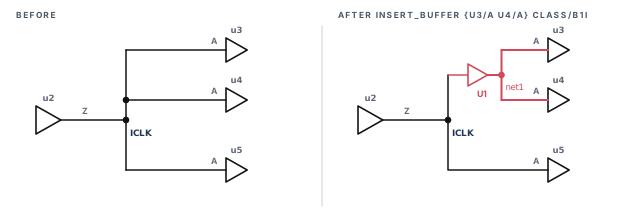
The command creates buffer U1 and net net1. The buffer's input is the existing net ICLK, and its output is net1. The prefix of new buffer names comes from eco_instance_name_prefix, which is U by default.
20.8 Editing in the GUI
The PrimeTime GUI has an ECO menu for inserting buffers, removing buffers and sizing cells. ECO in the GUI needs a PrimeTime-ADV-PLUS license. You can undo a change easily, if the menu's undo option is enabled. If you will not use undo, turn it off to save memory.
20.9 dont_use and manual edits
The set_dont_use and set_target_library_subset restrictions apply only to the fix_eco_* commands. They do not stop manual edits, get_alternative_lib_cells or report_alternative_lib_cells. However, the tool warns you when a manual edit uses a restricted cell.
pt_shell> insert_buffer U9/Y slow/HVT_BUFX1
Warning: Library cell 'slow/HVT_BUFX1' is part of a -dont_use subset
specification that applies to cell 'U9'. (NED-076)
Information: Inserted 'U1' at 'U9/Y' with 'slow/HVT_BUFX1'. (NED-046)
pt_shell> size_cell U3 slow/HVT_OR2X2
Warning: Library cell 'slow/HVT_OR2X2' is part of a -dont_use subset
specification that applies to cell 'U3'. (NED-076)
Information: Sized 'U3' with 'slow/HVT_OR2X2'. (NED-045)A beginner reads NED-076 as an error and assumes nothing changed. The edit was made, as NED-046 or NED-045 confirms. Undo it, or choose an allowed cell, before writing the change list.
20.10 Swapping cells
The swap_cell command replaces the listed cells with a different design or library cell. It is meant for complex or hierarchical cells. A swap always causes a full timing update. For a simple resize, use size_cell, which is much more efficient.
Rules for swap_cell:
- Before swapping, the tool checks the pins. For every pin of the old cell, the new cell needs a pin with the same name.
- The command always relinks the replaced part. Do not run
link_designafterwards, because it often undoes the swap. - The PrimeTime data model is instance based. The swap changes the instance, not the design behind it. Thus, a fresh link reverts to the old design.
- The tool keeps the swap only until the next link. However, the change list records it, and
write_changesexports it.
By default, swap_cell restores the constraints that were on the design before the swap. For many swaps, it is far more efficient to save the constraints first with write_script. Then swap with -dont_preserve_constraints, and source the saved script at the end.
pt_shell> read_verilog A.v                                     ;# read design A
pt_shell> current_design TOP                                   ;# go to the top design
pt_shell> swap_cell {u1 u2 u3} A.db:A                          ;# u1-u3 become design A
pt_shell> swap_cell {u1 u2 u3} [get_lib_cells misc_cmos/LC3]   ;# or lib cell LC3
20.11 Renaming cells and nets
The rename_cell and rename_net commands change a name. With hierarchical names, the old and new names must be at the same level. Refer to any cell or net below the current instance by its full hierarchical name.
pt_shell> rename_cell cellA cellB
Information: Renamed cell 'cellA' to 'cellB' in design 'blkA'. (NED-008)
1
pt_shell> rename_net [get_nets u1/low/w1] u1/low/netA
Uniquifying 'u1/low' (low) as 'low_0'.
Uniquifying 'u1' (inter) as 'inter_0'.
Information: Renamed net 'w1' to 'netA' in 'blkA/u1/low'. (NED-009)
1
The first command renames a cell in the current instance. The second renames a net lower down. Its blocks have several instances, so they are uniquified first. write_changes writes renames as rename_cell and rename_net commands.
20.12 Functional equivalence of library cells
ECO can replace a cell with a functionally equivalent cell of different area, drive or power. Such a cell has the same logic function, the same number and direction of pins, and the same timing arcs. Two variables relax the matching:
eco_strict_pin_name_equivalence,falseby default. Whenfalse, cells can be sized even if pin names differ. The tool matches pins by other library information.eco_strict_lib_arc_equivalence,trueby default. When set tofalse, cells can be sized even if timing arcs differ. Again, the tool matches by other library information.
Some complex cells need a library cell attribute named user_function_class to describe their function. The foundry can supply function classes, so the right cells are chosen for upsizing.
20.13 Editing the netlist in several scenarios
A manual fix must not hurt timing in any scenario. To check this, edit under DMSA and use merged reports across the scenarios.
- You can run any number of editing commands, with a changing command focus.
- You can run editing commands directly at the manager. Complex nested command structures are not supported there.
- All the commands in the editing table work in DMSA.
swap_celldoes not work at the manager, but it works throughremote_execute.
Through remote_execute, these commands run in the workers and apply to all scenarios in focus:
set_coupling_separation— creates a separation constraint on nets in every scenario;remove_coupling_separation— removes it from every scenario;read_parasitics -eco— reads StarRC ECO parasitic files into every scenario.
estimate_eco, edit with incremental-friendly commands, verify with update_timing, and write a change list.21 Worked example: a physically aware ECO on block TOP
Let us run one complete ECO pass on a small routed block named TOP, clocked by CLK. Figure 28 shows its three problems:
- a setup violation of −0.150 ns from
FF1throughU1andU2toFF2/D; - a hold violation of −0.002 ns (−2 ps) from
FF3toFF4/D; - a maximum transition violation on net
n5, driven by the weak cellU3.
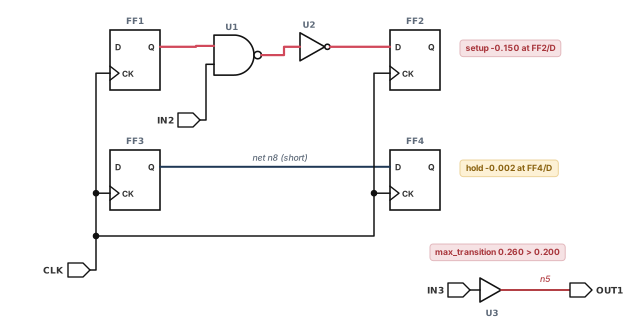
Step 1 — Load the design with located parasitics
pt_shell> read_verilog TOP.v                          ;# netlist written by layout
pt_shell> link_design TOP                             ;# link to the libraries
pt_shell> read_sdc TOP.sdc                            ;# constraints
pt_shell> set_app_var read_parasitics_load_locations true   ;# keep node locations
pt_shell> read_parasitics TOP.spef                    ;# parasitics with locations
pt_shell> set_app_var timing_save_pin_arrival_and_slack true ;# needed by ECO
pt_shell> update_timing                               ;# full timing update
Check: the location variable must be set before read_parasitics. Otherwise the locations are not kept.
Step 2 — See what is failing
pt_shell> report_constraint -all_violators
max_transition
  Net          Required   Actual    Slack
  n5             0.200     0.260   -0.060 (VIOLATED)
max_delay/setup ('CLK' group)
  Endpoint     Slack
  FF2/D        -0.150 (VIOLATED)
min_delay/hold ('CLK' group)
  Endpoint     Slack
  FF4/D        -0.002 (VIOLATED)
Check: the list matches Figure 28. Save it, so you can compare after fixing.
Step 3 — Give the tool the layout
pt_shell> set_app_var eco_allow_filler_cells_as_open_sites true   ;# fillers are free
pt_shell> set_eco_options -physical_tech_lib_path tech.lef \
            -physical_lib_path cells.lef -physical_design_path TOP.def \
            -filler_cell_names {FILL1 FILL2} -log_file lef_def.log   ;# layout data
pt_shell> report_eco_options   ;# confirm what was set
pt_shell> check_eco            ;# look for missing or bad LEF/DEF data
Check: check_eco reports no LEF/DEF problems, and lef_def.log has no errors.
Step 4 — Protect and restrict
pt_shell> set_dont_use [get_lib_cells */*X0*]   ;# no very weak cells in fixes
pt_shell> set_size_only [get_cells FF3]          ;# FF3 may be sized, never removed
pt_shell> set_app_var eco_report_unfixed_reason_max_endpoints 50   ;# explain failures
Check: report_eco_library_cells marks the banned cells with u.
Step 5 — Fix DRC
pt_shell> fix_eco_drc -type max_transition \
            -methods {size_cell insert_buffer} -buffer_list {BUFX2 BUFX4} \
            -physical_mode open_site -verbose   ;# only where there is room
Check: report_constraint shows no transition violation on n5. Setup or hold on paths through n5 may have moved, which is expected.
Step 6 — Estimate, then fix setup
pt_shell> fix_eco_timing -type setup -estimate_unfixable_reasons
Information: The design will not be changed.
Information: 1 violating endpoints located... (PTECO-022)pt_shell> fix_eco_timing -type setup -physical_mode open_site -verbose ;# size firstFinal ECO Summary:
--------------------------------------------------------
Number of size_cell commands 2
Total number of commands 2
Area increased by cell sizing 1.40
Total area increased 1.40Check: report_timing -to FF2/D now shows positive slack. Also check hold, because setup fixing may create hold violations.
Step 7 — Fix hold with a load cell
pt_shell> fix_eco_timing -type hold -methods insert_buffer \
            -load_cell_list {CLOAD1} -buffer_list {BUFX1 DLY1X2} \
            -physical_mode open_site -verbose   ;# load cells for tiny violations
Check: FF4/D hold slack is now small and positive, and FF2/D setup slack is still positive.
Step 8 — Final leakage recovery
pt_shell> fix_eco_power -pattern_priority {HVT NVT LVT} ;# lowest-power prefix firstCheck: compare report_power before and after. No new timing or DRC violations should appear.
Step 9 — Write the change lists and save
pt_shell> write_changes -format icctcl -output top_eco.tcl   ;# for IC Compiler II
pt_shell> write_changes -format eco -output top_eco.chg      ;# for PrimeTime replay
pt_shell> save_session top_after_eco ;# keep this statesize_cell U1 NAND2X2
size_cell U2 INVX2
insert_buffer U3/Y BUFX2 -location {48.6 22.8}
create_cell U_LOAD_CAP_CELL_1 CLOAD1
connect_net n8 [get_pins {U_LOAD_CAP_CELL_1/A}]
set_cell_location -coordinates {61.20 15.60} -orientation NCheck: every new cell in top_eco.tcl has a location.
Step 10 — Close the loop
- In IC Compiler II, source
top_eco.tcl, then runplace_eco_cells,create_stdcell_fillersandroute_eco. - Extract with StarRC, using the same settings as before.
- Read the new netlist and parasitics into PrimeTime and repeat Steps 1 and 2.
Check: the three violations are gone and no new ones appeared. If a few remain, run another pass, usually with open_site only.
22 Common mistakes and how to catch them
| Symptom | Likely cause | Fix |
|---|---|---|
| Fixing works from incomplete timing data | timing_save_pin_arrival_and_slack was not set, or no full update followed |
Set it to true, then run a full update_timing |
| Physically aware fixes are poor or misplaced | Parasitics were read without node locations | Set read_parasitics_load_locations before read_parasitics; check the StarRC settings |
| Many violations come back after layout | Logic-only fixing asked for cells where there was no room | Use the physically aware mode with open_site |
| New hold violations after setup fixing | Setup fixing may create hold violations | Fix setup first, then hold |
| DRC violations reappear after timing fixing | -ignore_drc was used |
Rerun fix_eco_drc, or avoid -ignore_drc |
| A banned cell appears in a fix | It was banned only for one block, or added by hand | Check set_target_library_subset levels; look for NED-076 warnings |
| Small hold violations become setup violations | The smallest buffer adds too much delay | Use -load_cell_list for violations of about 5 ps or less |
| A swap disappears | link_design was run after swap_cell |
Never relink after swap_cell |
| HyperTrace does not seem to speed things up | An unsupported option gives PTECO-116, not PTECO-115 | Remove the option, or set the refinement threshold variables |
| A reduced-resource run passes, but signoff fails | The ECO design does not show every violation | Always finish with a full-design analysis |
| Netlist and parasitics do not match | The netlist was written after extraction | Write the netlist first, save, then extract |
23 Interview preparation
An ECO is a small, late change to the design; fix_eco_drc, fix_eco_timing and fix_eco_power make it.
- The tool sizes cells, replaces cells and inserts or removes buffers.
write_changeswrites the result for the layout tool.
-type every time you run fix_eco_timing?Because setup and hold need opposite changes.
- Setup fixing reduces data path delay, by default with sizing alone.
- Hold fixing adds delay, by default with sizing and buffer insertion.
Logic-only uses the netlist and parasitics; physically aware also uses placement data and only changes where there is room.
- The physically aware change list includes locations.
- It gives the best QoR and faster convergence.
timing_save_pin_arrival_and_slack before the timing update, and read_parasitics_load_locations before reading parasitics.
- The first keeps pin arrivals and slacks for the fixer.
- The second keeps parasitic node locations.
DRC, then setup, then hold, with power recovery at the start and a leakage pass at the end.
- DRC fixing can hurt setup and hold, but timing fixing does not hurt DRC.
- Hold fixing protects setup, but setup fixing may create hold violations.
occupied_site over open_site?Early in the project or on a dense design, when more fixes matter more than small cell moves.
occupied_siteplaces cells even with no free sites, so it fixes more but displaces cells more.open_siteuses only free sites and suits late ECOs.
fix_eco_drc pick nets for crosstalk delta delay fixing?By SI bottleneck analysis: nets above -delta_delay_threshold on paths with negative slack, by default.
- There is no delta delay slack, so the threshold is required.
-slack_lesser_thanwidens or narrows the set of paths.report_si_bottleneckpreviews the targets.
Insert a load cell with -load_cell_list, because even the smallest buffer may add too much delay.
- A load cell adds a little capacitance, so a little delay.
- It is also smaller than a buffer.
Set eco_report_unfixed_reason_max_endpoints, then use -verbose, -unfixable_reasons_prefix or -estimate_unfixable_reasons.
- Codes such as
I,S,A,TandVpoint to the next action. - The estimate mode changes nothing and runs faster.
-target_violation_type tns allow in clock network fixing?A clock change may worsen some endpoints to cut total negative slack, within the WNS limit.
- By default, WNS may not get worse than it is.
-wns_limitsets a different limit.- It needs a PrimeTime-ADV license.
Each pass extracts and analyzes only the changes, so it is faster; final signoff still needs a full run.
- IC Compiler II records changes with
record_signoff_eco_changes. - PrimeTime restores a session and applies
read_eco_changesandread_parasitics -eco.
It implements every change by wiring spare cells with metal, so only metal and via layers change.
- Use
-physical_mode freeze_siliconand-programmable_spare_cell_names. - Programmable spare cells can be wired into several functions, and unused parts stay available.
link_design after swap_cell?Because the swap changes an instance, not the design, and a relink reverts to the old design.
swap_cellrelinks the replaced part itself.- The change list still records the swap for
write_changes.
fix_eco_power run?Yes; it can only help runtime, and unmatched data is simply ignored.
- Coverage of 90% to 100% gives the best speed-up.
- The QoR is similar with or without it.
24 Chapter close
Compact glossary
| Term | Meaning |
|---|---|
| ECO | Engineering change order: a small, late change to fix violations or cut power |
| Change list | A script, written by write_changes, that describes every ECO change |
| Logic-only ECO | Fixing with the netlist and parasitics only |
| Physically aware ECO | Fixing that also uses placement data and writes locations |
| Open site | A free placement site; open_site mode uses only these |
| Occupied site mode | A mode that places or resizes cells even when no free site exists |
| Freeze silicon | ECO with metal and via changes only, using spare cells |
| Programmable spare cell (PSC) | A spare cell that can be wired into several functions |
| Load cell | A small cell that adds capacitance, used for tiny hold fixes |
| Load buffering | Inserting a buffer to strengthen a weak driver |
| Load shielding | Inserting a buffer to hide non-critical loads from a critical one |
| Side-load sizing | Downsizing off-path loads, then upsizing the critical path |
| Delta delay threshold | The minimum crosstalk delta delay a net needs to be targeted |
| TNS / WNS | Total of all negative slacks / the single worst slack |
| Power recovery | Downsizing cells or removing buffers where slack allows |
| Training coverage | Share of eligible cells that reuse a learned power decision |
| Unfixable reason | A code that explains why a violation was not fixed |
| Unusable cell | A cell that power recovery could not change, with a reason code |
| MIM | Multiply instantiated module: one design used as several instances |
| Incremental ECO flow | Passes that extract and analyze only the changes |
| ECO design | The reduced design used by the reduced-resource flow |
| Scenario swapping | Hosts taking turns on scenarios when there are fewer hosts than scenarios |
| Uniquifying | Giving an edited copy of a shared block its own design name |
| HyperTrace | A technology that speeds up path-based analysis during fixing |
ECO flow on one page
Figure 29 is the summary to redraw from memory.
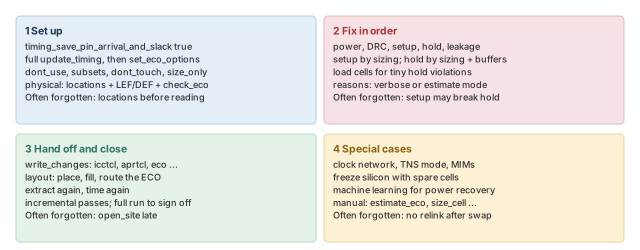
Where the next chapter goes, and why
You can now find violations, fix them with the ECO commands and hand the changes to layout. Every fix so far changed a netlist that already existed. However, many timing problems are cheaper to prevent earlier, while the netlist is still being made.
The Using PrimeTime With Design Compiler chapter looks at that earlier stage. Design Compiler is the synthesis tool that makes the netlist. The chapter shows where the two tools time paths differently, how to share scripts between them, and how path groups compare. Thus, synthesis and signoff agree more closely, and fewer violations reach the ECO loop.