Why this chapter matters in a real project
Most chips today do not run on one supply. A CPU core may run at 0.9 V while an always-on block runs at 0.7 V. Some blocks are switched off completely to save power. Each of these voltages changes cell delay.
A cell at 0.7 V is much slower than the same cell at 0.9 V. If the tool times every cell at one voltage, the low-voltage paths look faster than they are. Thus, real setup violations stay hidden until silicon.
Voltage also affects correctness, not only speed. A signal from a 0.7 V block may not be strong enough to switch a cell at 0.9 V. A missing level shifter like this is a functional bug, and no amount of slack can fix it.
This chapter shows how to describe the supplies and how the tool turns them into pin voltages. It also shows how to check the result. Getting it wrong costs missed violations, false violations and late ECOs (engineering change orders).
Prerequisites
- Working With Design Data: reading, linking and per-instance link paths.
- Constraining the Design:
check_timingand basic constraints. - Operating Conditions:
set_operating_conditions, minimum and maximum delays, and CRPR (clock reconvergence pessimism removal). - Delay Calculation: CCS (composite current source) models and scaling library groups.
- Signal Integrity Analysis is not required. Where crosstalk or noise appears here, it is explained briefly.
In this chapter, times are in nanoseconds (ns) and voltages are in volts (V) unless said otherwise.
Learning objectives
- Explain what power intent is and the two ways to give it to the tool.
- Load a UPF file, or infer supply connectivity from a power-and-ground netlist.
- Name the UPF commands the tool supports, ignores and rejects.
- Describe supply sets, supply set handles and the virtual power network.
- Predict which setting decides the voltage on a power pin, using the precedence order.
- Set supply voltages and temperatures with
set_voltageandset_temperature. - Use scaling library groups and cell alternative library mapping for voltage-specific timing.
- Report the power network and query power-pin attributes.
- Run the
check_timingpower checks and read a signal level mismatch report. - Annotate IR drop and run a dynamic voltage drop analysis with rail map files.
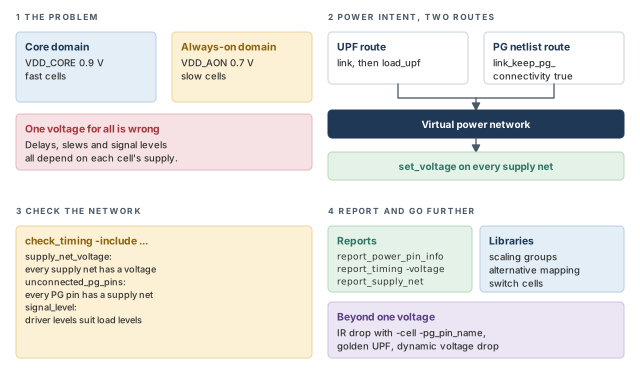
Figure 1 is a map of the whole chapter. Come back to it whenever you lose your place.
1 The beginner's mental model
Think of a large house with several electrical circuits. The kitchen runs on full mains voltage. The garden lights run on a low-voltage transformer. A wall switch can turn the garage circuit off completely.
An electrician's wiring plan says which room is on which circuit. A small adapter is needed wherever a low-voltage device must drive a full-voltage one. When the garage is off, a fixed plug keeps its outgoing wires at a safe level. Figure 2 maps each piece of the house to its PrimeTime name.
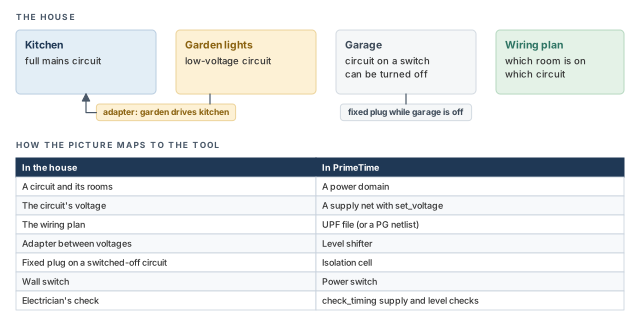
- A house circuit has one voltage. A chip supply has two for analysis: one for maximum-delay checks and one for minimum-delay checks.
- The wiring plan alone does not tell PrimeTime the voltage. You must also set the voltage of each supply net with
set_voltage. - An electrician checks the real wires. PrimeTime builds a virtual power network from the plan. It does not check physical wires or resistance, unless you annotate IR drop. IR drop is the supply voltage lost across the resistance of the power grid.
Now the engineering model
In engineering terms, a multivoltage analysis needs four things:
- Power intent. This says which logic runs on which supply. It comes from a UPF file or from a netlist that carries power and ground pins.
- Voltages. The
set_voltagecommand gives each supply net a value. - Voltage-aware libraries. Libraries hold power pin data and timing at the right voltages.
- Checks and reports. The tool checks that every pin has a supply and a voltage, and that signal levels match.
Power intent is the description of which logic operates at which voltages. UPF (Unified Power Format) is the IEEE 1801 standard language for writing it. A power domain is a group of cells that share the same primary supply.
set_voltage command says how many volts each supply has.2 What multivoltage analysis needs
2.1 What each tool calculates
Multivoltage analysis is analysis with different supply voltages on different cells. Three tools in the same family use it:
- PrimeTime calculates voltage-correct delays and slews. Slew is the rise or fall time of a signal.
- PrimeTime SI calculates voltage-correct crosstalk delay and noise. Crosstalk is the effect of one switching net on a nearby net.
- PrimePower calculates power from the actual supply voltage on each supply pin of each cell.
2.2 Two ways to give power intent
You can give the tool power intent in two ways. The table below shows what each way needs.
| Power intent comes from | Verilog netlist needed | Library needed |
|---|---|---|
| A UPF file, or the same commands in Tcl | PG-pin netlist or non-PG-pin netlist | PG-pin library |
| Inferred from the netlist | PG-pin netlist | PG-pin library |
A PG pin is a power or ground pin of a cell, such as VDD or VSS. A PG-pin netlist shows these pins and the supply nets tied to them. A normal netlist usually leaves them out.
2.3 Library requirements
Both ways need two things from the libraries.
First, every cell needs PG pin data. In Liberty, the library text format, two statements describe it:
voltage_mapdefines the power supplies and their default voltage values.pg_pinnames the supply for each power pin of each cell, plus some power-related pin parameters.
Some cells in a PG-pin library may lack power or ground pins. The tool removes such cells from the design at link time. No timing or power is reported for them.
A beginner sees a path that simply vanishes from the reports. The cause is often a library cell with no ground pin. The tool removed the cell at link time. Check the link messages for removed cells before trusting any multivoltage report.
Second, the timing data must be right at each voltage. The tool can interpolate between libraries built at different supply voltages. This is called voltage scaling. You turn on voltage and temperature scaling with define_scaling_lib_group.
Design Compiler behaves differently. It links each cell at an exact corner voltage. PrimeTime can instead time a cell at a voltage between two library corners. The Delay Calculation chapter covers scaling groups in detail.
3 Specifying power supply connectivity
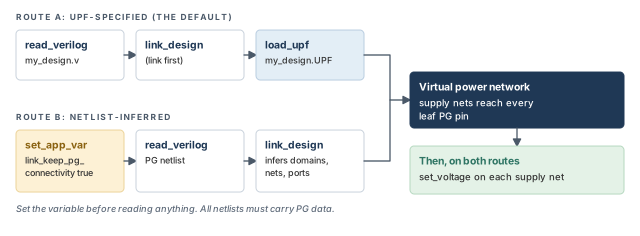
Supply connectivity says which supply net reaches each PG pin of each cell. The tool supports two ways to get it. Figure 3 compares them.
3.1 UPF-specified supply connectivity
By default, a design with UPF power intent gets its PG connectivity from its UPF files. You load them after linking with load_upf.
pt_shell> set_app_var search_path "/path1/mydata /path2/mydata"   ;# where files are
pt_shell> set_app_var link_path "* mylib_1V.db"   ;# memory, then the library
pt_shell> read_verilog my_design.v       ;# read the netlist
pt_shell> link_design                    ;# link it
pt_shell> load_upf my_design.UPF         ;# read the power intent
pt_shell> read_sdc my_constraints.sdc    ;# read the timing constraints
pt_shell> set_voltage 0.9 -min 0.6 -object_list [get_supply_nets VDD1]   ;# VDD1
pt_shell> set_voltage 0.8 -min 0.5 -object_list [get_supply_nets VDD2]   ;# VDD2
pt_shell> set_voltage 0.0 -min 0.0 -object_list [get_supply_nets VSS]    ;# ground
Each set_voltage line gives a supply net two values. The first number is for maximum-delay analysis. The -min value is for minimum-delay analysis.
3.2 Netlist-inferred supply connectivity
Sometimes the netlist already carries all PG connections. Then the tool can derive the supply connectivity from it. Set link_keep_pg_connectivity to true before you read any design data.
pt_shell> set_app_var search_path "/path1/mydata /path2/mydata"   ;# where files are
pt_shell> set_app_var link_path "* mylib_1V.db"     ;# memory, then the library
pt_shell> set_app_var link_keep_pg_connectivity true   ;# keep PG nets from netlist
pt_shell> read_verilog my_design.v       ;# read the PG netlist
pt_shell> link_design                    ;# link and infer the power intent
pt_shell> read_sdc my_constraints.sdc    ;# no UPF file is needed
pt_shell> set_voltage 0.9 -min 0.6 -object_list [get_supply_nets VDD1]   ;# VDD1
pt_shell> set_voltage 0.8 -min 0.5 -object_list [get_supply_nets VDD2]   ;# VDD2
pt_shell> set_voltage 0.0 -min 0.0 -object_list [get_supply_nets VSS]    ;# ground
With the variable set, the tool derives the power intent from the PG netlist. It updates its database as if it had run UPF commands such as these:
create_power_domaincreate_supply_portcreate_supply_netconnect_supply_net
After linking, you still set the supply voltages with set_voltage.
Key facts about this flow:
- It works with design data from either the UPF-prime flow or the golden UPF flow. Both flows are explained later in this chapter.
- It supports timing analysis, voltage scaling, power switches and ECOs. An ECO is a late, small netlist fix.
- All netlists must have PG information. A mix of PG and non-PG netlists is not accepted.
The tool also creates UPF power switch objects from a PG Verilog file. A power switch is a cell that turns the supply of a domain on and off. You can query these objects with:
get_power_switches, which returns a collection of power switches;report_power_switch, which reports them;get_supply_nets -of_objects, given power switch objects, which returns their supply nets.
A beginner sets link_keep_pg_connectivity after read_verilog. The variable must be set before any design data is read. If it is set later, the PG netlist route is not set up. Set the variable first, before you read anything.
3.3 Reading block boundary information from UPF
In the netlist-inferred flow, you can still read a UPF file. However, the tool applies only boundary information from it. This means port supply and voltage data. Internal block information is ignored.
This is most useful with extract_model. That command builds an ETM (extracted timing model) of a block. The boundary UPF gives the model the correct port attributes.
| UPF command | Behavior |
|---|---|
add_pst_state |
Always applied |
connect_supply_net |
Ignored by default; applied if pg_allow_pg_pin_reconnection is true |
set_port_attributes |
Always applied, but used only by ETM extraction |
set_related_supply_net |
Always applied |
All other UPF commands are ignored while link_keep_pg_connectivity is true. Four important ones are ignored:
create_supply_netset_level_shifterset_isolationcreate_power_switch
load_upf. Netlist route: set link_keep_pg_connectivity first, and use PG netlists everywhere. Both routes still need set_voltage.4 UPF in PrimeTime
4.1 The multivoltage building blocks
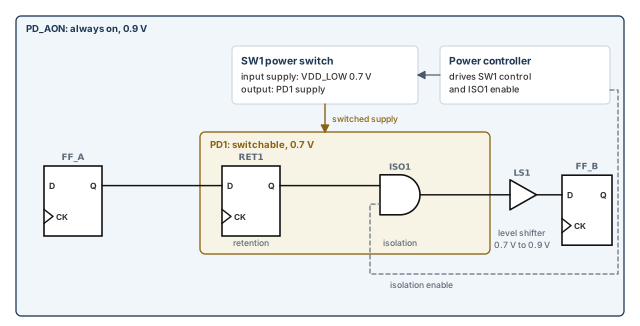
Let us name the parts of a multivoltage design before the commands. Figure 4 shows them in a small example.
- Power domains. Different supplies at different voltages feed different areas of the chip.
- Shut-down domains. Some domains can be switched off during idle periods to save power.
- Level shifters. A level shifter converts a signal leaving one domain and entering another at a different voltage.
- Isolation cells. An isolation cell holds the output of a switched-off domain at a constant level.
- Retention registers. A retention register keeps its value while its domain is off.
- Power switches. A power switch turns a domain's supply on and off. A power controller block drives its control pin.
You can describe all of these in UPF.
4.2 How the tool uses UPF
Licensing. A standard PrimeTime license includes UPF support. However, power analysis needs a PrimePower license. IR drop annotation needs a PrimeTime SI license.
From UPF to pin voltages. The tool combines the UPF power intent with your set_voltage values. From them it builds a virtual model of the power network. It then carries the voltages from the UPF supply nets down to the PG pins of leaf cells. A leaf cell is a cell with no hierarchy below it, such as a gate.
Power state tables. A power state table (PST) lists the legal combinations of supply states, such as "core on, memory off". PrimeTime does not read power state tables directly. Thus, your set_voltage values must match the one PST state you intend to verify.
How to enter UPF. You can type UPF commands at the prompt. You can also run them from a file with source or load_upf.
Relinking. Loaded UPF data is removed when you relink the design. This is the same as for timing constraints read from an SDC (Synopsys Design Constraints) file.
Read only. The tool reads and uses UPF, but it never changes the power domain description. Thus, write_script writes no UPF commands, and the tool does not recognize save_upf.
A beginner sets VDD_CORE to 0.7 V and VDD_MEM to 1.0 V, but no PST state has that pair. The tool still times it, because it does not read the PST. The run is clean but checks a mode the chip never uses. Pick one PST state first, then set the voltages to match it.
4.3 A typical command sequence
Here is a typical script for timing with UPF power intent. The UPF-related lines are marked in the comments.
# Read libraries and designs
read_lib l1.lib                ;# read a library
read_verilog d1.v              ;# read the netlist
# The UPF file holds commands such as create_power_domain,
# create_supply_set, create_supply_net, create_supply_port,
# create_power_switch and connect_supply_net (UPF)
set_scope block1               ;# UPF: move the UPF scope into block1
load_upf block1_upf.tcl        ;# UPF: read the block's power intent
# Read SDC and other timing assertions
source d1.tcl                  ;# timing constraints
# Scaling library groups for voltage and temperature scaling
define_scaling_lib_group {lib_0.9V.db lib_1.05V.db}   ;# interpolate between these
# Voltages and temperatures
set_voltage 0.9 -min 1.0 -object_list [get_supply_nets VDD1]   ;# voltage on a supply net
set_voltage 0.85 -cell [get_cells U5] -pg_pin_name VDD1   ;# IR drop on one pin
set_temperature 125 -object_list [get_cells U5]   ;# temperature on a cell
# Timing and signal integrity analysis
report_timing                  ;# report the paths
The values here are illustrative. The -cell and -pg_pin_name options of set_voltage need a PrimeTime SI license. The scope set by set_scope is the level of hierarchy where the next UPF commands apply.
4.4 Supported, ignored and rejected commands
PrimeTime supports a subset of the IEEE 1801 commands and options. Unsupported commands either belong to other jobs, such as synthesis and physical implementation, or are not implemented. The supported commands fall into five groups.
| Group | Commands |
|---|---|
| Power domain | connect_supply_net, create_power_domain, create_power_switch, create_supply_net, create_supply_port, create_supply_set, set_domain_supply_net |
| Isolation and retention | set_isolation, set_isolation_control, set_port_attributes, set_design_attributes, set_retention, set_retention_elements, set_retention_control |
| Find and query | find_objects, query_cell_instances, query_cell_mapped, query_net_ports, query_port_net |
| Flow | load_upf, set_scope, set_design_top, upf_version |
| Related non-UPF commands | check_timing -include signal_level, check_timing -include supply_net_voltage, check_timing -include unconnected_pg_pins, get_power_domains, get_power_switches, get_supply_nets, get_supply_ports, get_supply_sets, report_power_domain, report_power_network, report_power_pin_info, report_power_switch, report_supply_net, report_supply_set, set_level_shifter_strategy, set_level_shifter_threshold, set_related_supply_net, set_temperature, set_voltage |
Some UPF commands matter to synthesis and implementation tools only. Their data is either not used in timing or comes from elsewhere. PrimeTime accepts them as valid UPF syntax, but otherwise ignores them:
add_port_state,add_pst_state,create_pstmap_isolation_cell,map_level_shifter_cell,map_power_switch,map_retention_cellname_format,set_level_shifterconnect_logic_net,create_logic_net,create_logic_port
Other commands are rejected as unknown syntax. They are outside the vendor's UPF subset, or exist only in RTL UPF:
add_domain_elements,bind_checker,merge_power_domainscreate_hdl2upf_vct,create_upf2hdlvctsave_upf,set_pin_related_supply
RTL UPF is the power intent written for the register-transfer-level design, before synthesis.
When a UPF load reports unknown syntax, look for a rejected command first. A file written for an RTL tool often contains one. It is better to keep RTL-only lines in a separate file, because PrimeTime rejects them as unknown syntax.
5 Supply sets and supply set handles
5.1 Supply sets
A supply set is an abstract group of supply nets with two functions: power and ground. It is domain-independent. Any power domain created in the same scope can use it. However, each domain can be limited to certain supply sets.
Why use them? A supply set lets you write power intent at RTL, before you know the real supply net names. You can then synthesize the design. Before place and route, each supply set must be refined, meaning tied to real supply nets.
5.2 Supply set handles
A supply set handle is an abstract supply set created automatically for a power domain. With handles, you can synthesize a design before you create any supply sets, supply nets or supply ports. Before implementation, each handle must be tied to a real supply set. That supply set must then be tied to real supply nets.
By default, creating a power domain creates three handles for it:
primarydefault_isolationdefault_retention
You can also create your own handles:
create_power_domain -supply {supply_set_handle [supply_set_ref]} ;# extra handleFigure 5 shows a design with two domains. Domain TOP is always on. Domain PD1 holds block u1, with a retention strategy, an isolation strategy and a power switch.
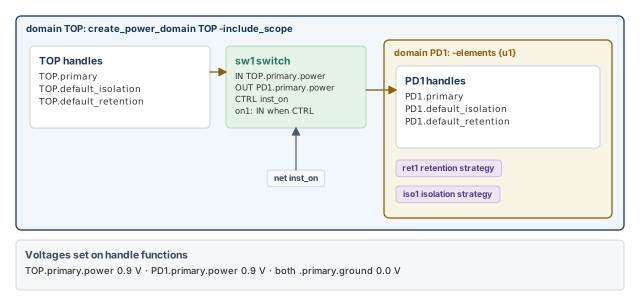
# create power domains
create_power_domain TOP -include_scope   ;# TOP covers the current scope
create_power_domain PD1 -elements {u1}   ;# PD1 covers block u1
# retention, isolation and switch
set_retention ret1 -domain PD1           ;# retention strategy for PD1
set_isolation iso1 -domain PD1           ;# isolation strategy for PD1
create_power_switch sw1 -domain PD1 \
   -input_supply_port {IN TOP.primary.power} \
   -output_supply_port {OUT PD1.primary.power} \
   -control_port {CTRL inst_on} \
   -on_state {on1 IN {CTRL}}             ;# on when CTRL is true
# voltages
set_voltage 0.9 -object_list {TOP.primary.power}   ;# TOP power
set_voltage 0.9 -object_list {PD1.primary.power}   ;# PD1 power
set_voltage 0.0 -object_list {TOP.primary.ground PD1.primary.ground}   ;# grounds
Read the switch definition piece by piece:
-input_supply_port {IN TOP.primary.power}names input portINand its supply.-output_supply_port {OUT PD1.primary.power}names output portOUTand the supply it drives.-control_port {CTRL inst_on}names control portCTRL, driven by netinst_on.-on_state {on1 IN {CTRL}}names stateon1. In it,INpasses to the output whenCTRLis true.
5.3 Finding power and ground nets with attributes
Which real nets sit behind each domain's primary supply? You can find out by reading UPF attributes. Five attributes do the job:
primary_supply,default_isolation_supplyanddefault_retention_supplyreturn the handles of a power domain.powerandgroundreturn the power or ground net of a supply set.
The script below prints the primary supply of every domain and collects all power and ground nets. Implicit supply sets are on by default. The commented line shows the variable that controls them.
# set upf_create_implicit_supply_sets true   ;# on by default
set domain_list [get_power_domains *]        ;# every power domain
foreach_in_collection domain $domain_list {  ;# loop over the domains
  echo [format "Domain: %s " [get_attribute $domain full_name]]   ;# domain name
  set sset [get_attribute $domain primary_supply]   ;# primary handle
  echo [format " Primary supply: %s " [get_attribute $sset full_name]]   ;# handle
  echo [format "    power net: %s " [get_attribute \
    [get_attribute $sset power] full_name]]         ;# its power net
  echo [format "    ground net: %s " [get_attribute \
    [get_attribute $sset ground] full_name]]        ;# its ground net
  append_to_collection power_nets [get_attribute $sset power] -unique   ;# collect
  append_to_collection ground_nets [get_attribute $sset ground] -unique  ;# collect
}
echo "power nets associated with domains:"   ;# heading
query $power_nets                            ;# print the power nets
echo "ground nets associated with domains:"  ;# heading
query $ground_nets ;# print the ground netsprimary_supply, power and ground lead you back to the real nets.6 The virtual power network
6.1 How the network is built
The usual multivoltage flow has three inputs. You read the netlist, source a UPF script for power intent, and source an SDC script for timing constraints. From the netlist and the UPF, the tool builds a virtual power network. This network feeds every PG pin of every leaf cell.
Figure 6 shows how a voltage travels from a supply port to the PG pins.
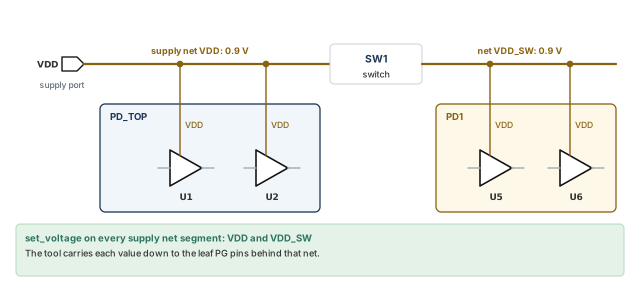
The network comes from these commands:
- Structure.
create_power_domain,create_supply_net,create_supply_set,create_supply_port,set_domain_supply_netandconnect_supply_net. The tool works out each cell's domain and traces supplies through nets and ports to the leaf level. - Retention registers.
set_retention,set_retention_elementsandset_retention_controldecide their supply connections. - Isolation cells.
set_isolationandset_isolation_controldecide the connections of their backup supply nets. - Isolation source and sink.
set_port_attributesandset_design_attributesgive attributes of the source or sink elements forset_isolation. - Port data.
set_port_attributesgives data for ports on power domain boundaries. The tool uses it to decide the isolation and guard needs of each port. - Related supplies.
set_related_supply_netsets attributes and their values on the objects you name.
6.2 Which setting decides a supply port's voltage
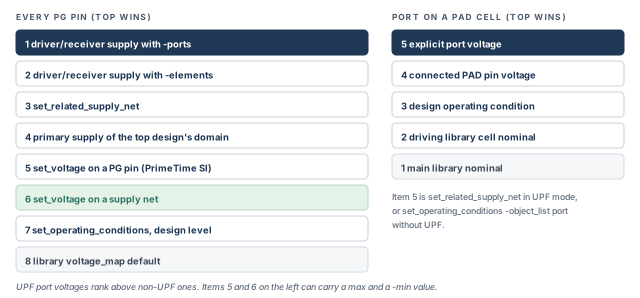
Several settings can give a supply port its voltage. The tool uses this order, from highest to lowest precedence:
- The
-driver_supplyor-receiver_supplyoption with the-portsoption. - The
-driver_supplyor-receiver_supplyoption with the-elementsoption. - The
set_related_supply_netcommand. - The primary supply of the power domain of the top design.
In both of the first two items, a driver supply applies to input ports and a receiver supply applies to output ports.
6.3 Level shifters and related supply nets
PrimeTime does not support the set_level_shifter UPF command. So connect_supply_net must state the PG pin connections of every level shifter explicitly.
You rarely write these lines yourself. Design Compiler creates the connect_supply_net commands when it inserts level shifters. It writes them out with save_upf. Thus, UPF from Design Compiler already contains them.
Level shifter checks have their own two non-UPF commands: set_level_shifter_strategy and set_level_shifter_threshold. They control signal level mismatch reports from check_timing -include signal_level. They do not change PG connectivity.
The set_related_supply_net UPF command ties a supply net to one or more ports of the design. Its -object_list option lists the ports. Without this command, the tool assumes ports run at the voltage of the design operating condition.
You can replace set_related_supply_net with set_port_attributes. Use its -receiver_supply and -driver_supply options. The -receiver_supply option is allowed only on top-level ports and on the design. For ports below the top level, the tool issues a warning and ignores the attribute.
A beginner forgets the related supply of a top-level input port. The tool then uses the operating-condition voltage for that port. The port may be timed at the wrong voltage, and level checks on it can be wrong.
connect_supply_net lines, and ports need a related supply.7 Setting voltage and temperature
7.1 Which setting decides a PG pin's voltage
Many settings can give a voltage to a PG pin. Let us walk the ladder in Figure 7 from the top. The tool takes the highest setting that applies.
-driver_supplyor-receiver_supplywith-ports.-driver_supplyor-receiver_supplywith-elements.set_related_supply_net.- The primary supply of the power domain of the top design.
set_voltageon a PG pin, which needs a PrimeTime SI license.set_voltageon a supply net.set_operating_conditionsat the design level.- The default supply voltage in the library cell, from
voltage_map.
As before, the driver supply applies to input ports and the receiver supply to output ports. A UPF port voltage has higher precedence than a non-UPF port voltage.
7.2 Library defaults and operating conditions
By default, the tool uses the supply voltages in the library cell, set by voltage_map.
To override them, apply set_operating_conditions at the design level. Design level means without its -object_list option.
pt_shell> set_operating_conditions WCIND ;# design-level operating conditionThe voltages of a named operating condition come from its library definition. They can also come from create_operating_conditions. The Operating Conditions chapter covers both commands.
7.3 The set_voltage command
The set_voltage command overrides both the library and the operating-condition voltages. It applies to specific supply nets or specific PG pins:
-object_list supply_netsnames one or more supply nets.-cell cell -pg_pin_name pg_pinnames PG pins on cells. These two options need a PrimeTime SI license.
You can give one voltage, max_voltage. You can also give two: -min min_voltage and max_voltage. The -min value is used for minimum-delay analysis, and it is typically the larger voltage.
Why larger? A higher voltage makes cells faster. Fast cells are the worst case for hold checks, which use minimum delays. Thus, 1.18 V for hold and 0.91 V for setup is a normal pair.
pt_shell> set_voltage 1.20 -object_list [get_supply_nets VDD1]   ;# 1.20 V on VDD1
pt_shell> set_voltage 0.91 -min 1.18 -cell XA91 -pg_pin_name PWR   ;# one pin
The second line works on pin PWR of cell XA91. It sets 0.91 V for maximum delay and 1.18 V for minimum delay.
A beginner writes set_voltage 1.18 -min 0.91 ..., swapping the values. Setup is then timed fast and hold is timed slow. Both checks become optimistic. Remember: the plain value is the slow, maximum-delay voltage.
7.4 Port voltage for PAD cells
A PAD cell is an I/O cell at the chip boundary. In Liberty, a pin is a PAD pin when its is_pad attribute is true. The tool detects ports connected to PAD cells. It sets their voltage in this order of increasing priority:
- The nominal voltage of the main library.
- The nominal voltage of the driving library cell.
- The design operating condition.
- The voltage of the connected pin of the PAD cell.
- The explicit port voltage. This is
set_related_supply_netin UPF mode, orset_operating_conditions -object_list portin non-UPF mode.
Thus, item 5 wins over all the others.
7.5 Multirail cells and operating conditions
A multirail cell has more than one power rail. Level shifters and power management cells are examples. An operating condition holds only one voltage value. So be careful when you set operating conditions on a design with such cells.
The tool applies the operating-condition voltage only to the first library power rail. This is the first nonground voltage_map line in the .lib file. Thus, in this partial multivoltage flow, the order of voltage_map lines matters. Figure 8 shows the effect on a level shifter.
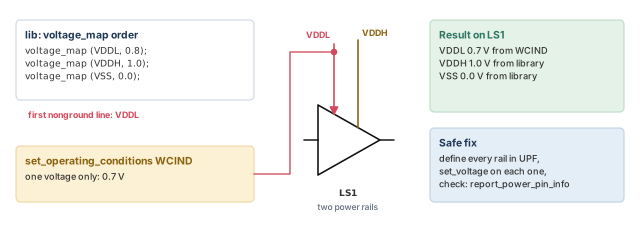
The safe way to avoid this is a proper multivoltage flow, such as UPF. Define every rail and set each one with set_voltage. To check the voltage of every rail on a multirail cell, use report_power_pin_info.
Two reports show voltages:
report_power_pin_infoshows the voltage of PG pins.report_timing -voltageshows the voltage of signal pins on a path.
Both appear in the reporting section later in this chapter.
7.6 Temperature per cell
You can also set the operating temperature of chosen cells with set_temperature. It overrides the design operating condition. Use it to model on-chip temperature variation, such as a hot spot near a busy block.
pt_shell> set_temperature 130 -object_list [get_cells XA91] ;# 130 degrees C on XA91set_voltage beats operating conditions, which beat the library. Use UPF and set_voltage for multirail cells.8 Library support for multivoltage analysis
8.1 How delays and slews are scaled
The tool uses library and supply voltage data to compute delays and slews. The method depends on the stage of the design:
- Post-layout, with detailed parasitics annotated, the tool computes delays and slews from analog waveforms. Parasitics are the resistance and capacitance of the wires.
- Pre-layout, without detailed parasitics, it scales transition times and net delays geometrically. It considers the voltage swing of the driver and the load, and their logic thresholds.
In both cases, transition times are reported with each cell's own library thresholds and local voltages. This can make a transition look better along a net. Figure 9 shows why.
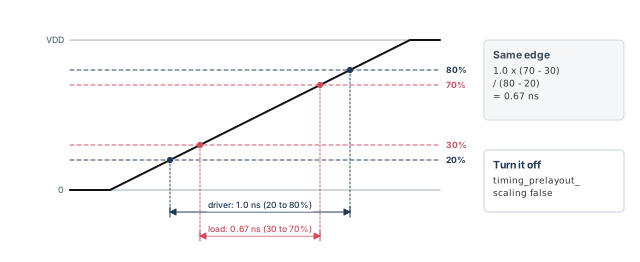
Let us work it out. The driver's transition is 1.0 ns, measured between 20% and 80% of VDD. The load measures between 30% and 70% of VDD. Thus, the load sees 1.0 × (70 − 30) / (80 − 20) = 0.67 ns.
To turn off pre-layout scaling, set timing_prelayout_scaling to false.
8.2 Scaling library groups
Scaling library groups are the recommended way to give the tool voltage-specific library data. You give a set of libraries built across a range of voltages and temperatures.
pt_shell> define_scaling_lib_group \
            {lib_0.9V.db \
             lib_1.05V.db \
             lib_1.3V.db}   ;# same cells, three voltages
During analysis, the tool interpolates between these libraries. It computes each cell's behavior at that instance's exact voltage and temperature. For example, a cell at 0.97 V is timed between the 0.9 V and 1.05 V libraries. The Delay Calculation chapter covers scaling groups in full.
8.3 Cell alternative library mapping
Sometimes there is no UPF and no PG netlist. You still need some blocks timed at a different voltage. Cell alternative library mapping lets you choose which library each cell instance uses.
set link_path {* slow_0.7v.db}             ;# link everything at 0.7 V first
read_verilog text.v                        ;# read the netlist
link_design MY_DESIGN                      ;# link it
define_scaling_lib_group -exact_match_only { \
  slow_0.7v.db \
  slow_1.1v.db}                            ;# both libraries in one group
define_cell_alternative_lib_mapping {slow_0.7v.db} -cells {BLK1}   ;# BLK1 at 0.7 V
define_cell_alternative_lib_mapping {slow_1.1v.db} -cells {BLK2}   ;# BLK2 at 1.1 V
update_timing                              ;# apply the mapping
report_timing                              ;# report the paths
Figure 10 shows the result.
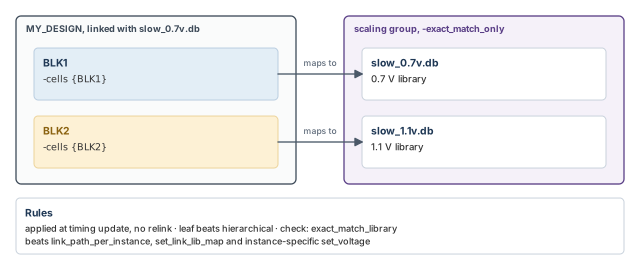
The define_cell_alternative_lib_mapping command names an alternative library for chosen cells:
- Cells can be hierarchical or leaf cells.
- For a hierarchical cell, you can give a set of libraries. Each leaf cell inside uses the first library in the set that has its reference.
- Each library must belong to a scaling library group.
- The group can use
-exact_match_onlyto show the per-cell exact-match intent. You can leave this option out when other areas of the design need true voltage scaling.
The mapping can be set after linking, because it is evaluated during timing analysis. If you change the mapping, you do not relink. You only update timing again.
The precedence rules are:
- Leaf cell settings take precedence over hierarchical cell settings.
define_cell_alternative_lib_mappingtakes precedence overlink_path_per_instance,set_link_lib_mapand instance-specificset_voltage.
To see which library a cell was mapped to, query its exact_match_library attribute:
pt_shell> get_attribute [get_cells U01] exact_match_library   ;# mapped library
{"slow_1.1v"}
8.4 Per-instance link library paths
Per-instance link paths control which library files cell instances link to, at link time. They take precedence over the global link_path. You set them in one of two ways:
- the
link_path_per_instancevariable; - the
set_link_lib_mapcommand.
The Working With Design Data chapter explains both methods and their precedence rules.
Prefer scaling library groups with real power intent. Use cell alternative mapping when power intent is missing. Use per-instance link paths when instances must link to different files at link time.
8.5 Fine-grained switch cells
A fine-grained switch cell is a library cell with its own built-in power switch. A library cell counts as one only when it has the cell-level switch_cell_type attribute:
switch_cell_type : fine_grain;Such a cell has internal PG pins behind the switch and external PG pins outside it. Key rules:
- Use
report_powerto see the power of fine-grained switch cells. - The voltage on the internal PG pins sets the signal level of the pins related to them.
- Set a design-specific voltage on internal PG pins with
set_voltage. Otherwise the voltage comes fromvoltage_mapin the library. set_voltageon the external PG pins does not change the voltage on the internal PG pins.- PrimePower derives the ON and OFF states of internal PG pins from the library's
switch_functionandpg_function. connect_supply_netcan connect explicitly to the internal PG pins.report_power_pin_inforeports both internal and external PG pins, with name, type and voltage.
report_power reports the power of internal PG pins together with their external PG pins. It does not split the numbers between internal and external pins.
9 Reporting the power network
9.1 Collection commands
The "get" commands each create a collection of objects for reporting. A collection is the tool's handle to a set of objects. Five commands cover the power network:
get_power_domainsget_power_switchesget_supply_netsget_supply_portsget_supply_sets
The get_power_domains command returns the power domains made by create_power_domain. You can pass the collection to another command. For example, you can read the name, scope and elements attributes of each domain.
Options narrow the collection:
-of_objectskeeps only the domains that the given objects belong to.- A name pattern keeps only the domains whose names match it.
The other "get" commands work the same way, with similar options. The tables below list the attributes of each object class.
| Command and class | Attribute | Type | Meaning |
|---|---|---|---|
get_power_domains (upf_power_domain) |
name |
String | Name as entered |
full_name |
String | Hierarchical name | |
elements |
Collection | ||
scope |
String | ||
supplies |
String | Function keywords and supply set names | |
primary_supply, default_isolation_supply, default_retention_supply |
Collection | The supply set handle of the domain | |
get_supply_nets (upf_supply_net) |
name |
String | Name as entered |
full_name |
String | Hierarchical name | |
domains |
Collection | ||
resolve |
String | Such as one_hot |
|
voltage_min |
Float | Minimum-delay voltage | |
voltage_max |
Float | Maximum-delay voltage | |
static_prob |
Float | Probability of logic 1, for power analysis |
| Command and class | Attribute | Type | Meaning |
|---|---|---|---|
get_supply_ports (upf_supply_port) |
name |
String | Name as entered |
full_name |
String | Hierarchical name | |
domain |
Collection | ||
direction |
String | In or out | |
scope |
String | ||
get_supply_sets (upf_supply_set) |
name |
String | Name as entered |
full_name |
String | Hierarchical name | |
ground, power |
Collection of one upf_supply_net |
Ground or power net of the set | |
get_power_switches (upf_power_switch) |
name |
String | Name as entered |
full_name |
String | Hierarchical name | |
domain |
Collection | ||
output_supply_port_name |
String | Name as entered | |
output_supply_net |
Collection | Supply net | |
input_supply_port_name |
String | Name as entered | |
input_supply_net |
Supply net | ||
control_port_name |
List of strings | Name as entered | |
control_net |
Collection | ||
on_state |
List of strings | state_name input_supply_port boolean_function |
9.2 Report commands
Seven reports describe the power network:
| Command | What it reports |
|---|---|
report_power_domain |
Power domains and the PG nets of each one |
report_power_network |
All connectivity of the power network, through ports and switches |
report_power_pin_info |
PG connectivity of leaf cells, or of the library cells used |
report_power_switch |
Power switches made with create_power_switch |
report_supply_net |
Supply nets of a domain, or of an object in a domain |
report_supply_set |
Details of the defined supply sets |
report_timing -voltage |
The voltage of signal pins on timing paths |
report_power_domain lists the domains made with create_power_domain, with their PG nets.
pt_shell> report_power_domain [get_power_domains B]
...
  Power Domain : B
  Scope : H1
  Elements : PD1_INST H2 H3

  Connections :    -- Power --         -- Ground --
    Primary          H1/H7/VDD           H1/H7/VSS
--------------------------------------------------------
report_power_network reports the whole network. You can limit it to chosen nets with -nets.
pt_shell> report_power_network -nets H1/VDD
...
Supply Net:     H1/VDD
  Connections:
     Name       Object type         Domain
    ------------------------------------------------------------
     VDD         Supply_port         D1
     H1/VDD      Supply_port         D2
     U1/VDD      PG_power_pin        D1
     SW1/IN      Switch_input        D1
report_power_pin_info reports the PG connectivity of leaf cells or of library cells. A (*) marks an exceptional power connection. The two voltage columns are the maximum-delay and minimum-delay values.
pt_shell> report_power_pin_info [get_cells -hierarchical]
...
Note: Power connections marked by (*) are exceptional
Cell         Power Pin  Type             Voltage          Power Net
             Name                        Max      Min     Connected
---------------------------------------------------------------------
PD0_INST/I0  PWR        primary_power    0.9300   1.2700  int_VDD_5
PD0_INST/I0  GND        primary_ground   0.0000   0.0000  A_VSS
I0           PWR        primary_power    1.0000   1.0000  int_VDD_4 (*)
I0           GND        primary_ground   0.0000   0.0000  int_VSS_4 (*)
I1           PWR        primary_power    1.1500   1.1500  T_VDD
I1 GND primary_ground 0.0000 0.0000 T_VSSpt_shell> report_power_pin_info [get_lib_cells -of [get_cells -hier]]
...
Cell Power Pin Name Type Voltage
-------------------------------------------------------------------
INVX2 PWR primary_power 1.0000
INVX2 GND primary_ground 0.0000
AND2X1 PWR primary_power 1.0000
AND2X1 GND primary_ground 0.0000report_power_switch lists the switches made with create_power_switch.
pt_shell> report_power_switch
...
 Total of 3 power switches defined for design 'top'.

Power Switch : sw1
------------------------------------------------------------
  Power Domain : PD_SODIUM
  Output Supply Port : vout VN3
  Input Supply Port : vin1 VN1
  Control Port: ctrl_small ON1
  Control Port: ctrl_large ON2
  Control Port: ss SUPPLY_SELECT
  On State : full_s1 vin1 { ctrl_small & ctrl_large & ss }
------------------------------------------------------------
report_supply_net reports supply nets of a domain, or of an object in a domain. It shows the voltages and the hookups of each net.
pt_shell> report_supply_net
...
 Total of 14 power nets defined.

 Power Net 'T_VDD' (power,switchable)
 --------------------------------------------------------
 Voltage states:                                    {1.2}
 Voltage ranges:                                {1.1 1.3}
 Max-delay voltage:                                  1.15
 Min-delay voltage:                                  1.15
 Primary Power Hookups:                                 T
 --------------------------------------------------------
 Power Net 'VDD_Backup' (power)
 --------------------------------------------------------
 Backup Power Hookups:                                  A
 --------------------------------------------------------
report_supply_set gives details of each supply set.
pt_shell> report_supply_set
...
 --------------------------------------------------------
 Supply Set : primary_sset
 Scope       : top
 Function    : power, supply net association: VDD
 Function    : ground, supply net association: VSS
 --------------------------------------------------------
report_timing -voltage adds a voltage column for signal pins on the path. In custom reports, you can read the voltage attribute of timing_point objects from get_timing_paths.
pt_shell> report_timing -voltage
...
 Point                                      Incr       Path    Voltage
 ----------------------------------------------------------------------
 clock HVCLK_SYNC_D (rise edge)             0.00       0.00
 clock network delay (propagated)           0.00       0.00
 input external delay                       5.00       5.00 f
 in0[0] (in)                                0.00       5.00 f     1.00
 ALU1/in0[0] (alu_ao_3)                     0.00       5.00 f
 ALU1/t0_reg_0_/D (SDFQM1RA)                0.00       5.00 f     1.03
 data arrival time                                     5.00
9.3 Power and ground pin attributes
Two informational objects describe PG pins:
pg_pin_infofor the PG pins of a cell or a port;lib_pg_pin_infofor the PG pins of a library cell.
These objects can be queried, but they are not PG pin netlist objects. You get them by reading the attribute of the same name.
pt_shell> get_attribute [get_cells FF1] pg_pin_info   ;# PG pins of cell FF1
{"FF1/VDD", "FF1/VSS"}
pt_shell> get_attribute [get_ports CLK] pg_pin_info   ;# supplies of port CLK
{"CLK/<port_power>", "CLK/<port_ground>"}
pt_shell> get_attribute [get_lib_cells */DFFX1] lib_pg_pin_info   ;# library cell
{"DFFX1/VDD", "DFFX1/VSS"}
A pg_pin_info object has these attributes. Ports have similar ones.
| Attribute | Type | Example for FF1/VDD |
|---|---|---|
full_name |
string | FF1/VDD |
pin_name |
string | VDD |
supply_connection |
string | VDD_TOP_NET |
type |
string | primary_power |
voltage_for_max_delay |
float | 0.800000 |
voltage_for_min_delay |
float | 1.200000 |
voltage_source |
string | Where the voltage came from; empty for FF1/VDD here, LIBRARY_VOLTAGE_MAP for FF1/VSS |
A lib_pg_pin_info object has pin_name, type and voltage. You can list all of them with report_attribute -application on the objects.
pt_shell> report_attribute -application \
            [get_attribute [get_cells FF1] pg_pin_info]   ;# all PG attributes
This script prints the supply pins and voltages of a set of cells:
set my_cells [get_cells U5*]                    ;# cells to inspect
foreach_in_collection cell $my_cells {          ;# loop over the cells
  echo [get_object_name $cell]                  ;# print the cell name
  foreach_in_collection pg_pin_info [get_attribute $cell pg_pin_info] {  ;# PG pins
    echo [format {%8s %6.3f %6.3f} \
      [get_attribute $pg_pin_info pin_name] \
      [get_attribute $pg_pin_info voltage_for_max_delay] \
      [get_attribute $pg_pin_info voltage_for_min_delay]]   ;# name, max, min
  }
}When a path's timing surprises you, read voltage_source and the two voltages on the PG pins of its cells. A source of LIBRARY_VOLTAGE_MAP points to the library default. For a ground pin at 0 V that is often fine. For a power pin, check that this is what you meant.
pg_pin_info gives the voltage and its source on one pin.10 Checking the power network with check_timing
10.1 The three supply checks
The check_timing command can check the power supply connections. Three checks matter most:
supply_net_voltage: every supply net segment has a voltage.unconnected_pg_pins: every PG pin of every cell has a supply net.signal_level: driver and load pins have compatible signal levels.
10.2 Voltage set on each supply net segment
Every supply net segment must have a voltage from set_voltage. To verify this, include the supply net voltage check:
pt_shell> check_timing -include supply_net_voltage -verbose
Information: Checking 'no_clock'.
Information: Checking 'no_input_delay'.
 ...
Information: Checking 'supply_net_voltage'.
Warning: There are '2' supply nets without set_voltage. (UPF-029)
  VG
  VS1
Warning: The voltage of driving cell 'INV'(0.700) does not match the
related supply voltage at port 'reset'(1.080). (UPF-408)
Two warnings appear here:
- UPF-029 lists supply nets without
set_voltage. HereVGandVS1have no voltage. - UPF-408 says the cell driving port
resetruns at 0.700 V. However, the related supply of that port is 1.080 V.
10.3 Supply net connected to each PG pin
Each PG pin of every cell should connect to a UPF supply net. To verify this, include the unconnected PG pin check:
pt_shell> check_timing -include unconnected_pg_pins ;# every PG pin has a net?A UPF supply connection can be explicit or implicit:
- Explicit connections come from
connect_supply_net. - Implicit connections come from the cell's power domain, isolation strategy, retention strategy and so on.
To find supply nets without a supply port, use this check:
pt_shell> check_timing \
            -include supply_net_without_associated_supply_port   ;# orphan nets
10.4 Compatible driver-to-load signal levels
Now the most important check. Let us consider a driver at 0.7 V feeding a load at 1.2 V. Can the driver's high level switch the load? Figure 11 answers it with numbers.
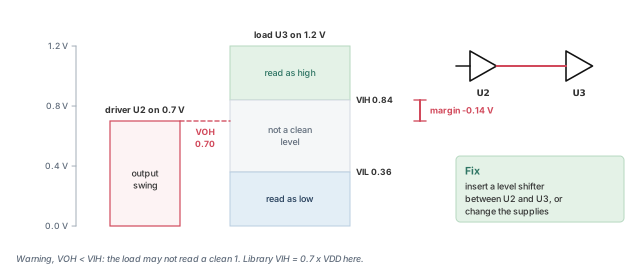
To check voltage levels between cells on different supplies, run:
pt_shell> check_timing -include signal_level ;# driver levels against load levelsThe check walks every net. For each one, it checks whether the driver's output level can drive the load pins. It reports each driver-load pair that fails. It assumes no voltage loss along the net. To fix a violation, change the supply voltages or insert a level shifter.
The tool compares input and output levels from the library for pins of leaf cells. The levels come from one of two sources:
- Noise margins in the library. Liberty
input_voltageandoutput_voltagedefine the safe signal level ranges. - Supply voltages. The driver and load supply voltages are compared directly.
Here are the level names you will see. Each is a voltage:
| Name | Meaning |
|---|---|
| VOH / VOL | The lowest output voltage counted as high / the highest counted as low |
| VIH / VIL | The lowest input voltage read as high / the highest read as low |
| VOmax / VOmin | The highest / lowest voltage the output can produce |
| VImax / VImin | The highest / lowest voltage the input can safely take |
The tool reports two kinds of problems:
- "Incompatible voltage" error: driver VOmax > load VImax, or driver VOmin < load VImin. The driver can damage the load.
- "Mismatching driver-load voltage" warning: driver VOH < load VIH, or driver VOL > load VIL. The load may read the wrong logic value.
pt_shell> check_timing -verbose -include signal_level
 ...
Error: There are 2 voltage mismatches
  MIN-MAX - driver vomax > load vimax:

Driver      Voltage   Load           Voltage   Margin
---------------------------------------------------------
u2/Z        2.50      u3/A           0.90      -1.60
u3/Z        2.10      u5/A           1.47      -0.63

Warning: There is 1 voltage mismatch
  MIN-MAX - driver vol > load vil:

Driver      Voltage   Load           Voltage   Margin
---------------------------------------------------------
u2/Z        0.30      u3/A           0.20      -0.10
In these rows, the margin is the load value minus the driver value. For example, 0.90 − 2.50 = −1.60.
Library levels scale with supply. The library often defines levels in terms of the supply voltage. The tool computes the real values from each cell's own supply. A library might define:
- VIL = 0.3 × VDD, VIH = 0.7 × VDD
- VOL = 0.4, VOH = 2.4
- VImin = −0.5, VImax = VDD + 0.5
- VOmin = −0.3, VOmax = VDD + 0.3
For multirail cells, transition time scaling needs the input_signal_level and output_signal_level attributes. The signal level check itself uses input_voltage and output_voltage on all pins.
Without library levels. Even without input_voltage or output_voltage, the tool still reports the 100 worst mismatches. It flags rail voltages that are not exactly equal.
pt_shell> check_timing -include signal_level -verbose
 ...
Warning: There are 2 voltage mismatches
  MAX-MAX - driver rail != load rail:
  The 100 worst voltage mismatches:

Driver      Voltage   Load           Voltage   Margin
---------------------------------------------------------
u1/Y        4.75      u3/A           3.00      -1.75
u3/Y        3.00      ff2/CLK        4.75      -1.75
In this rail-only report, the margin is the size of the gap between the two rails, shown as a negative number. So both rows show −1.75, whichever rail is higher. A matching MIN-MIN section follows, with the minimum-delay voltages.
10.5 Correlated supplies
The signal level check knows when two cells share one supply. Suppose you set VDD like this:
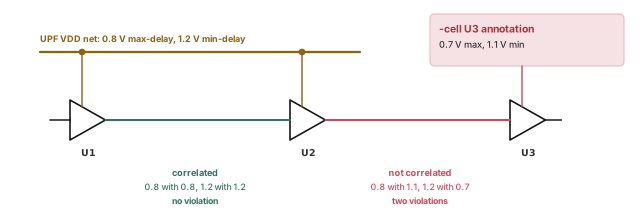
pt_shell> set_voltage 0.8 -min 1.2 VDD ;# 0.8 V max-delay, 1.2 V min-delayBoth the driver U1 and the receiver U2 sit on VDD. When VDD is low for U1, it is also low for U2. The tool knows these supplies are correlated, meaning they move together. So it compares 0.8 with 0.8 and 1.2 with 1.2, and finds no mismatch. The left half of Figure 12 shows this case. The right half returns later, with IR drop.
10.6 Strategy and threshold
Not every rail difference needs a report. Two commands control which driver and load supply mismatches are reported.
set_level_shifter_strategy picks the direction:
low_to_highreports a lower-voltage source driving a higher-voltage sink.high_to_lowreports a higher-voltage source driving a lower-voltage sink.all, the default, reports both.
set_level_shifter_threshold sets how large a difference must be to count:
pt_shell> set_level_shifter_threshold -voltage 0.1 -percent 5 ;# 0.1 V and 5 percentA difference is acceptable only when it is below both thresholds. So with these settings, a difference above 0.1 V or above 5% of the driver voltage is reported. The percentage is:
abs(driver(VDD) - load(VDD)) / driver(VDD) * 100Let us try it. A 1.00 V driver feeds a 0.96 V load. The difference is 0.04 V, below 0.1 V. The percentage is 4%, below 5%. Thus, no mismatch is reported. At 0.92 V, the percentage is 8%, so it is reported.
Both thresholds default to zero. If you set one to a nonzero value, set the other to a nonzero value too. To turn off one kind of threshold, set it to a large value.
A beginner sets only -voltage 0.1. The percentage threshold stays at zero, so every nonzero difference is still reported. Set both thresholds together.
The table below sums up what strategy and threshold can and cannot filter.
| Check | Strategy effect | Threshold effect | Why |
|---|---|---|---|
| Driver VOmax > load VImax | None | None | Exceeding the load's breakage voltage is fatal; it cannot be filtered |
| Driver VOmin < load VImin | None | None | Same as above |
| Driver VOH < load VIH | None | None | Library margins define the safe region; they cannot be suppressed |
| Driver VOL > load VIL | None | None | Same as above |
| Driver VDD differs from load VDD | low_to_high filters out driver VDD > load VDD; high_to_low filters out driver VDD < load VDD |
Filters out any mismatch below the tolerance | Your tolerance and strategy are fully used |
11 The golden UPF flow
11.1 UPF-prime against golden UPF
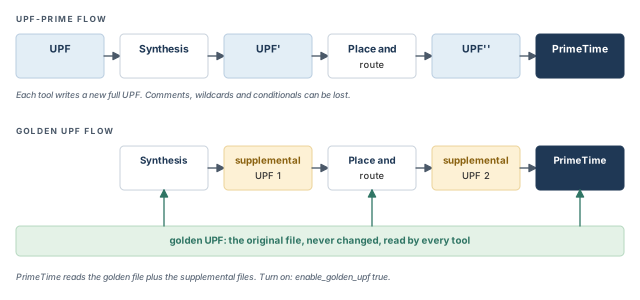
Power intent passes through several tools: synthesis, place and route, then verification. There are two ways to carry it. Figure 13 compares them.
- UPF-prime flow. Each tool writes a new, full UPF file. Synthesis writes UPF' and place and route writes UPF''. The next tool reads only the latest file.
- Golden UPF flow. The original "golden" UPF file stays unchanged through every step. Each tool writes its changes into a separate supplemental UPF file. Later tools read the golden file plus the supplemental files.
The golden UPF flow is optional. Its advantages are:
- The golden file stays unchanged. Its form, structure, comments and wildcard names stay as written.
- You can use tool-specific conditional statements for different tasks in different tools. The UPF-prime flow loses them.
- Changes to the power intent are easy to track in the supplemental file.
- You can keep all PG connectivity in the Verilog netlist. Then
connect_supply_netlines are not needed in the UPF. This can greatly shrink the UPF files.
11.2 Turning it on in PrimeTime
To use the golden UPF flow in PrimeTime SI, set a variable:
pt_shell> set_app_var enable_golden_upf true ;# read UPF in golden modeIn this mode, UPF commands other than query commands must sit in a script run by load_upf. You cannot run them one by one at the prompt or with source.
A beginner enables golden UPF mode, then types create_power_domain at the prompt to test something. The command is not allowed this way. Put it in a small file and run load_upf on that file.
enable_golden_upf and load every UPF command through load_upf.12 Multiple supply voltage analysis
12.1 What PrimeTime SI adds
PrimeTime SI can analyze designs where different cells have different supply voltages. It uses the cell delay models in the library. It finds the effect of supply differences on delay, slew and noise. With it you can:
- compute uncoupled net delays, constraints and timing violations with the exact driver and load rail voltages;
- compute coupled delay, noise bumps, timing violations and noise violations with the exact aggressor rail voltages;
- check signal levels between drivers and loads;
- do all of the above with instance-specific IR drop on power rails, and with block-specific or instance-specific temperature.
An aggressor is a nearby net whose switching disturbs the net being timed. A noise bump is the short glitch it causes.
12.2 What accurate analysis needs
Most PrimeTime results come fairly close to SPICE circuit simulation. For accurate results in PrimeTime SI, you need:
- PG connectivity.
- Voltage values on PG nets, from
set_voltage. - IR drop values for PG pins, from
set_voltagewith-celland-pg_pin_name. This is optional and needs a PrimeTime SI license. - Libraries for each voltage. Use CCS libraries with delay and constraint data in a
define_scaling_lib_group, or per-voltage libraries linked withlink_path_per_instance. - Settings that tell the tool how to build delay models from the library data. The same two features give these.
CCS libraries are recommended for the best accuracy. The define_scaling_lib_group command scales delays and constraints between libraries built at different voltages and temperatures. The link_path_per_instance variable links different instances to different library models.
12.3 Simultaneous multivoltage analysis in brief
Timing paths often cross from one power domain to another. Suppose each domain can run at several voltages. Traditional analysis cannot time every voltage combination well:
- With one voltage per domain, each run covers one combination, so the combinations are not bounded.
- With min/max voltages per domain, the analysis is pessimistic. Different cells in one domain cannot run at different voltages at the same time.
Graph-based simultaneous multivoltage analysis (SMVA) removes this pessimism. Paths within a domain are timed at every voltage level of that domain. Cross-domain paths are timed at every voltage combination of the domains they cross. All of this happens in one run. The SMVA Graph-Based Simultaneous Multivoltage Analysis chapter covers SMVA in detail.
12.4 IR drop annotation
You can annotate supply voltages on the PG pins of cells. This models the effect of IR drop on timing and noise. Use the -cell and -pg_pin_name options of set_voltage:
pt_shell> set_voltage 1.10 -cell [get_cells U5*] -pg_pin_name VDD1 ;# 1.10 V on VDD1This sets 1.10 V on the VDD1 pins of all cells named U5*. Rules:
-celland-pg_pin_namemust be used together.- Both need a PrimeTime SI license.
- Other options, such as
-object_listfor supply nets, need no PrimeTime SI license.
12.5 Signal level checking with IR drop
The check_timing -include signal_level check also handles IR drop. Earlier, cells on the same net were correlated. A cell-level annotation changes that. Let us look at these commands:
pt_shell> set_voltage 0.8 -min 1.2 VDD                          ;# corner voltages
pt_shell> set_voltage 0.7 -min 1.1 -cell U3 -pg_pin_name VDD    ;# IR drop on U3
This is the right half of Figure 12. PrimeTime SI assumes a cell-level voltage is not correlated with the main supply. So it takes the full worst-case difference between driver U2 and receiver U3. It compares 0.8 V with 1.1 V, and 1.2 V with 0.7 V. Thus, it reports two mismatch violations.
On a real project, IR drop values come from a power-integrity tool, one per cell. Expect new signal level warnings after you annotate them. Review them against the strategy and threshold settings before you call them real.
13 Dynamic voltage drop with RedHawk-SC
13.1 Writing STA files for RedHawk-SC
Ansys RedHawk-SC is a power and reliability analysis tool. It works with PrimeTime to analyze IR drop and clock jitter effects on timing. Clock jitter is cycle-to-cycle variation in clock edge timing. Figure 14 shows the round trip between the two tools.
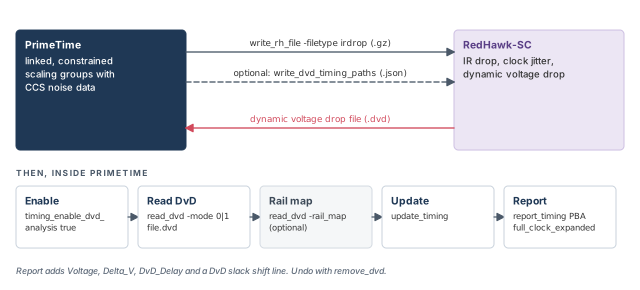
RedHawk-SC needs static timing analysis (STA) data from PrimeTime. It uses the data for IR drop, clock jitter and dynamic voltage drop analysis. To write it:
1. Write the design pin information with write_rh_file:
write_rh_file
-output string # output file name
[-filetype jitter | irdrop] # irdrop for dynamic voltage drop analysis
[-significant_digits digits] # number precision- The command updates timing first, if needed.
- It writes compressed (.gz) data, which RedHawk accepts directly.
- Use
-filetype irdropfor dynamic voltage drop analysis. - It needs a PrimePower or PrimeTime-ADV-PLUS license.
2. Optionally, write critical paths with write_dvd_timing_paths. Use this for the critical-path scenario approach in RedHawk-SC.
set target_paths [get_timing_paths -max_paths 100]         ;# paths to send
write_dvd_timing_paths -out input.json -paths $target_paths   ;# JSON file
For best results, choose paths that are violating or near-violating and sensitive to voltage. The -vdd_slack_lesser_than option comes from the PrimeShield tool. These settings give good coverage:
set target_paths \
  [get_timing_paths \
    -vdd_slack_lesser_than 0.1 \
    -path_type full_clock_expanded \
    -pba_mode exhaustive \
    -max_paths 100000]   ;# voltage-sensitive paths, full clock, exhaustive PBA
In some installations, write_dvd_timing_paths comes as a Tcl procedure that you get from tool support.
13.2 Performing dynamic voltage drop analysis
Dynamic voltage drop (DvD) is a short dip in supply voltage while many cells switch. PrimeTime can read DvD data from RedHawk-SC. It then analyzes how dynamic changes in power and ground rail voltage affect timing.
Key points:
- Only rail variations inside each cell's signal pin switching window count. A switching window is the time range when the pin can switch.
- The variations change the cell's output response in two ways. Undershoot slows the response. Overshoot speeds it up. Both rising and falling responses are affected.
- The effects are computed during path-based analysis, from the CRPR common point of each path. Path-based analysis (PBA) re-times one path with its own slews.
- This feature needs a PrimeTime-ADV-PLUS license.
The steps are:
- Set up voltage scaling library groups for the design. The libraries must have CCS noise data.
- Load, link and constrain the design.
- Turn on DvD analysis.
- Read the DvD file from RedHawk-SC. Use
-mode 0for power rail variation only. Use-mode 1for simultaneous power and ground rail variation. - Update timing.
- Analyze paths with PBA. Use the
-path full_clock_expandedoption ofreport_timingorget_timing_paths.
pt_shell> set_app_var timing_enable_dvd_analysis true   ;# turn on DvD analysis
pt_shell> read_dvd -mode 1 ./redhawk_data.dvd   ;# power and ground variation
pt_shell> update_timing                         ;# update the design timing
pt_shell> report_timing -pba_mode exhaustive \
            -path full_clock_expanded \
            -voltage -input_pins                ;# PBA report with DvD columns
13.3 Reading the DvD report
With timing_enable_dvd_analysis set to true, report_timing adds DvD columns. Here is a short piece of a report:
Point Incr Path Voltage Delta_V DvD_Delay
----------------------------------------------------------------------
ff1/Q (SDFFQ_X1) 0.188 0.243 r 0.570 -0.009 0.017
and/Y (AND2_X2) 0.145 & 0.424 f 0.570 -0.046 0.012
or/Y (OR2_X2) 0.192 0.627 f 0.570 -0.075 0.054
ff2/D (SDFFQ_X1) 0.000 0.627 f 0.570 -0.059 0.000
data arrival time 0.627
...
slack (VIOLATED) -0.198
DvD slack shift -0.167Read the three new items:
- Delta_V is the reduction in voltage between the power and ground rails.
- DvD_Delay is the change in cell delay that results.
- DvD slack shift is the total change in path slack from DvD effects.
In this example, or/Y sees its rails squeezed by 0.075 V. That adds 0.054 ns to its delay. Over the whole path, DvD costs 0.167 ns of slack.
To remove the DvD data and go back to regular timing analysis:
pt_shell> remove_dvd ;# drop DvD data; regular timing again13.4 Rail map files
Sometimes you run PrimeTime at a voltage corner with no DvD data. A rail map file remaps DvD data from one voltage corner to another. It is a text file in this format:
version: 1.0

object_type: supply_net
object_spec: supply_net1 [supply_net2 ... ]
scaling: value_list
offset: value_list
The fields are:
object_typeis the type of object to scale. Onlysupply_netis supported.object_speclists one or more supply nets to scale.scalingandoffseteach take one or two values. One value applies to both clock and data. Two values aredata_value clock_value.
version: 1.0

object_type: supply_net
object_spec: VDD1
scaling: 0.85 0.80
offset: 0.02

object_type: supply_net
object_spec: VDD2
scaling: 0.85
offset: 0.021 0.019
For each original voltage in the DvD file, the new value is:
Vnew = (Vinput * value_scaling) - value_offsetA positive offset lowers the adjusted voltage. If no rule matches a supply net, no change is made. That is the same as a scaling of 1 and an offset of 0.
Let us check one value. A data voltage of 0.60 V on VDD1 becomes 0.60 × 0.85 − 0.02 = 0.49 V. On the clock side, it becomes 0.60 × 0.80 − 0.02 = 0.46 V.
To read a rail map file, use -rail_map with read_dvd. The command accepts one file name at a time, so read the DvD file and the rail map with separate commands.
set timing_enable_dvd_analysis true      ;# turn on DvD analysis
read_dvd -mode 1 ir_drop.dvd             ;# the voltage drop data
read_dvd -rail_map high2low_set1.map     ;# the rail map, in its own command
To swap in new rail map data, remove only the old map with -rail_map_only. The DvD data stays.
remove_dvd -rail_map_only                ;# keep DvD data, drop the map
read_dvd -rail_map high2low_set2.map ;# read the new map14 Worked example: bring up a two-voltage block
Let us bring up a small block named top. Figure 15 shows it. Domain PD_TOP runs on VDD_TOP. Domain PD_LOW holds block u_low and runs on VDD_LOW. Both share ground VSS. A path starts at u_low/FF1, crosses level shifter LS1, passes U1 and ends at FF2. A second net, from u_low/U3 to U4, crosses with no level shifter.
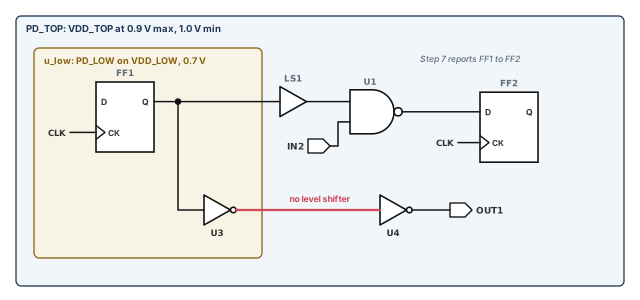
The goal is to give the block a voltage on every pin and find any power problems. Then we report a cross-domain path.
Step 1 — Link with PG-pin libraries and load the UPF
pt_shell> set_app_var link_path "* lib_0.7V.db"   ;# memory, then a PG-pin library
pt_shell> read_verilog top.v                      ;# read the netlist
pt_shell> link_design top                         ;# link it
pt_shell> load_upf top.upf                        ;# domains, supplies, LS1 hookups
pt_shell> read_sdc top.sdc                        ;# clocks and constraints
Check: the link log removes no cells for missing PG pins. Any such cell would vanish from every report.
Step 2 — Add the scaling library group
pt_shell> define_scaling_lib_group {lib_0.7V.db lib_0.9V.db} ;# interpolate 0.7-0.9 VCheck: both libraries hold the same cells, including LS1's two-rail cell.
Step 3 — Set the supply voltages
pt_shell> set_voltage 0.9 -min 1.0 -object_list [get_supply_nets VDD_TOP]   ;# PD_TOP
pt_shell> set_voltage 0.0 -min 0.0 -object_list [get_supply_nets VSS]       ;# ground
Check: the values match one state in the power state table. Here, both domains are on.
Step 4 — Check that every net has a voltage
pt_shell> check_timing -include supply_net_voltage -verbose
 ...
Information: Checking 'supply_net_voltage'.
Warning: There are '1' supply nets without set_voltage. (UPF-029)
  VDD_LOW
We forgot VDD_LOW. Without it, PD_LOW cells would not be timed at 0.7 V. Fix it, then run the check again:
pt_shell> set_voltage 0.7 -min 0.8 -object_list [get_supply_nets VDD_LOW]   ;# PD_LOW
pt_shell> check_timing -include supply_net_voltage   ;# expect no UPF-029 now
pt_shell> check_timing -include unconnected_pg_pins  ;# every PG pin has a net?
Check: no UPF-029 warning and no unconnected PG pins.
Step 5 — Check signal levels
pt_shell> check_timing -include signal_level -verbose
 ...
Warning: There is 1 voltage mismatch
  MAX-MAX - driver rail != load rail:
  The 100 worst voltage mismatches:

Driver      Voltage   Load           Voltage   Margin
---------------------------------------------------------
u_low/U3/Y  0.70      U4/A           0.90      -0.20
A matching MIN-MIN line shows 0.80 against 1.00. The nets around LS1 are not listed. Pin LS1/A runs on VDD_LOW, like its driver, and LS1/Y runs on VDD_TOP, like its load. The net from U3 to U4 is a real low-to-high crossing, and it needs a level shifter.
Check: report it to the implementation team. Do not hide it with a threshold.
Step 6 — Confirm the voltages of the level shifter rails
foreach_in_collection cell [get_cells {LS1 FF2}] {   ;# loop over two cells
  echo [get_object_name $cell]                          ;# print the cell name
  foreach_in_collection pg_pin_info [get_attribute $cell pg_pin_info] {  ;# PG pins
    echo [format {%8s %6.3f %6.3f} \
      [get_attribute $pg_pin_info pin_name] \
      [get_attribute $pg_pin_info voltage_for_max_delay] \
      [get_attribute $pg_pin_info voltage_for_min_delay]]   ;# name, max, min
  }
}LS1
VDDL 0.700 0.800
VDDH 0.900 1.000
VSS 0.000 0.000
FF2
VDD 0.900 1.000
VSS 0.000 0.000Check: each rail of LS1 shows its own supply. If both rails showed one value, the level shifter hookups in the UPF would be wrong.
Step 7 — Report the cross-domain path with voltages
pt_shell> report_timing -voltage
 ...
 Point                                      Incr       Path    Voltage
 ----------------------------------------------------------------------
 u_low/FF1/Q (DFFX1)                        0.31       0.31 r     0.70
 LS1/A (LSLH1)                              0.00       0.31 r     0.70
 LS1/Y (LSLH1)                              0.22       0.53 r     0.90
 U1/Y (NAND2X1)                             0.08       0.61 f     0.90
 FF2/D (DFFX1)                              0.00       0.61 f     0.90
 data arrival time                                     0.61
Check: the voltage steps from 0.70 to 0.90 exactly at LS1/Y. The 0.31 ns clock-to-output of FF1 reflects its 0.7 V supply.
15 Common mistakes and how to catch them
| Symptom | Likely cause | Fix |
|---|---|---|
| Cells vanish from reports | Library cells lack PG pins and were removed at link | Fix the PG-pin library; read the link log |
| UPF-029 lists supply nets | A supply net has no set_voltage |
Set every supply net segment |
| A power pin shows the library voltage | The library voltage_map default was used |
Check voltage_source; set its supply net |
| No supplies in the netlist flow | link_keep_pg_connectivity set after reading, or a non-PG netlist mixed in |
Set the variable first; use PG netlists everywhere |
| Both checks pass too easily | set_voltage values swapped |
Plain value for max delay (low V); -min for min delay (high V) |
| Wrong voltage on a second rail | Operating condition on a multirail cell sets only the first rail | Use UPF with set_voltage on every rail; check with report_power_pin_info |
| UPF load reports unknown syntax | A rejected command, such as save_upf or set_pin_related_supply |
Remove RTL-only commands from the file PrimeTime reads |
| UPF commands fail at the prompt | Golden UPF mode is on | Put the commands in a file and run load_upf |
| Power intent disappears | The design was relinked | Load the UPF again after every relink |
| Many rail mismatches on intended crossings | Strategy and threshold left at defaults | Set set_level_shifter_strategy and both thresholds |
16 Interview preparation
Power intent says which logic runs at which supply; you give it with a UPF file or a PG-pin netlist.
- UPF route: link, then
load_upf. - Netlist route: set
link_keep_pg_connectivitytotruebefore reading. - Both routes need
set_voltageon each supply net.
set_voltage 0.9 -min 1.0 -object_list VDD, which value is used for setup?0.9 V, the plain value, is used for maximum-delay analysis such as setup.
- The
-minvalue, 1.0 V, is used for minimum-delay analysis such as hold. - The
-minvalue is typically the larger voltage, because higher voltage makes cells faster.
A level shifter converts a signal between voltages; an isolation cell holds the output of a switched-off domain constant.
- Level shifters sit on domain crossings with different voltages.
- Isolation cells sit on outputs of domains that can turn off.
PG pin data in every cell, from Liberty voltage_map and pg_pin, and timing data valid at each voltage.
- Cells missing power or ground pins are removed at link time.
- Voltage scaling uses
define_scaling_lib_group.
set_voltage match a power state table state?PrimeTime does not read power state tables, so it cannot know which voltage combinations are legal.
- A clean run at an illegal combination proves nothing.
- Pick one PST state, then set every supply net to match it.
set_voltage, and the design also has set_operating_conditions. Which wins for a PG pin on that net?set_voltage on the supply net wins over design-level operating conditions.
- Both beat the library
voltage_mapdefault. set_voltageon a PG pin, and UPF port settings, rank higher still.
check_timing -include signal_level report, and how do you fix a violation?It reports driver-load pairs whose voltage levels do not match; fix by changing supply voltages or inserting a level shifter.
- Errors: VOmax > VImax or VOmin < VImin.
- Warnings: VOH < VIH or VOL > VIL.
- It assumes no voltage loss along the net.
set_level_shifter_threshold -voltage 0.1 -percent 5 do?It reports a rail difference only when it exceeds 0.1 V or 5% of the driver voltage.
- A difference must be below both thresholds to be acceptable.
- Both default to zero, so set both together.
- Library-defined level violations cannot be filtered.
Each cell reports transition with its own library thresholds, so a narrower window gives a smaller number.
- For example, 1.0 ns at 20–80% is 0.67 ns at 30–70%.
- Pre-layout scaling can be turned off with
timing_prelayout_scaling.
0.8 -min 1.2. Why is there no signal level mismatch? What changes with IR drop on the receiver?The supplies are correlated, so low meets low and high meets high; a cell-level annotation is treated as uncorrelated.
- With
set_voltage 0.7 -min 1.1 -cell U3 -pg_pin_name VDD, the tool compares 0.8 with 1.1 and 1.2 with 0.7. - That gives two mismatch violations.
define_cell_alternative_lib_mapping, and what does it override?When power intent is missing and blocks must be timed with a different library; it overrides per-instance link paths and instance set_voltage.
- Each library must belong to a scaling library group.
- It is evaluated at timing update, so no relink is needed.
- Check the result with the
exact_match_libraryattribute.
The original UPF stays unchanged and tool changes go into supplemental files; in PrimeTime, non-query UPF commands must run through load_upf.
- Comments, wildcards and tool-specific conditionals survive.
- PG connectivity can live in the netlist instead of
connect_supply_net. - Enable it with
enable_golden_upf.
Set timing_enable_dvd_analysis, read the RedHawk-SC file with read_dvd, update timing and report PBA paths with full clock expansion.
- Libraries need CCS noise data in scaling groups.
- DvD slack shift is the total slack change on the path from DvD effects.
- A rail map file remaps the data to another voltage corner.
17 Chapter close
Compact glossary
| Term | Meaning |
|---|---|
| Power intent | Which logic operates at which supply voltages |
| UPF | Unified Power Format, the IEEE 1801 language for power intent |
| Power domain | A group of cells that share the same primary supply |
| PG pin | A power or ground pin of a cell |
| Supply net / supply port | A UPF power net / a UPF connection point for supplies |
| Supply set handle | A supply set created automatically for a domain, such as primary |
| Virtual power network | The tool's model that carries supply voltages to leaf PG pins |
| Level shifter | A cell that converts a signal between two voltages |
| Isolation cell | A cell that holds a switched-off domain's output constant |
| Retention register | A register that keeps its value while its domain is off |
| Power switch | A cell that turns a domain's supply on and off |
| Power state table | The legal combinations of supply states |
| Multirail cell | A cell with more than one power rail |
| Scaling library group | Libraries at several voltages that the tool interpolates between |
| VOH / VIH | Lowest output counted as high / lowest input read as high |
| Correlated supplies | Supplies that move together because they are the same net |
| IR drop | Supply voltage lost across power grid resistance |
| Golden UPF | A flow that keeps the original UPF and adds supplemental files |
| SMVA | Simultaneous multivoltage analysis of all voltage combinations in one run |
| DvD | Dynamic voltage drop, a short supply dip while cells switch |
| Rail map file | A file that remaps DvD data to another voltage corner |
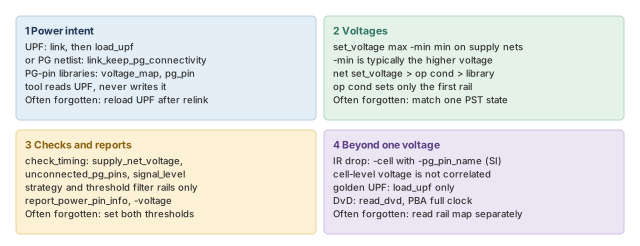
Multivoltage design flow on one page
Figure 16 is the summary to redraw from memory.
Where the next chapter goes, and why
You can now give every pin a voltage and check the power network. However, each run here timed one voltage per supply, or one min-max pair. A chip with several domains, each at several voltages, would need many runs.
The SMVA Graph-Based Simultaneous Multivoltage Analysis chapter removes that burden. It times every voltage combination of the domains a path crosses, in one run. The supply nets, voltages and power states you set up here become its inputs.