Why this chapter matters in a real project
Modern chips save power by changing supply voltages while they run. A block may run at 1.00 V for heavy work and drop to 0.86 V when it is idle. When two blocks change voltage on their own, a path between them sees many voltage mixes.
Older ways of timing this either miss some mixes or invent mixes that can never happen. The first gives you silicon that fails in the field. The second gives you false violations, and days of fixing paths that were never broken.
SMVA (graph-based simultaneous multivoltage analysis) solves both problems. It times every real voltage combination for every path, in one run. The tool then reports the worst real case, and tells you exactly which voltage mix caused it.
Prerequisites
- Multivoltage Design Flow: power domains, UPF (Unified Power Format) power intent, supply nets and
set_voltage. This chapter builds directly on it. - Clocks and Timing Paths and Exceptions:
create_clock,set_false_pathandset_multicycle_path. - Delay Calculation: scaling library groups, and how the tool scales library data and derates between voltages.
- You do not need signal integrity or hierarchical analysis. The ideas you need are explained where they appear.
In this chapter, times are in nanoseconds (ns) and voltages are in volts (V) unless said otherwise.
Learning objectives
- Explain why one fixed voltage, or min/max voltages, give wrong results for multivoltage paths.
- Predict how many voltage combinations the tool checks for a within-domain path and a cross-domain path.
- Configure SMVA with
timing_enable_cross_voltage_domain_analysis, supply groups and named voltage levels. - Choose a scope with
timing_cross_voltage_domain_analysis_modeand-domain_crossing. - Read the
Voltage Configline and theSupply-Net-Groupcolumn of a timing report. - Build a DVFS scenario with
get_sms_scenarios, and predict which propagated scenarios it keeps. - Apply DVFS scenarios to commands, attributes, scripts and contexts, and predict which one wins.
- Disable and enable DVFS scenarios, and run the right timing update afterwards.
- Use SMVA with HyperScale, voltage-scaled derates, extracted timing models, multi-rail arcs and noise analysis.
- List the features that do not work with SMVA.
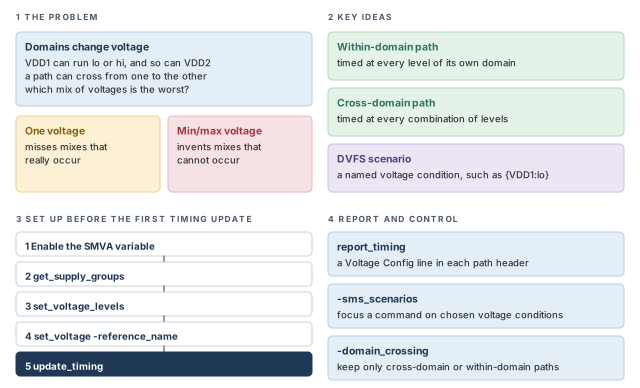
Figure 1 is a map of the whole chapter. Come back to it whenever you lose your place.
1 The beginner's mental model
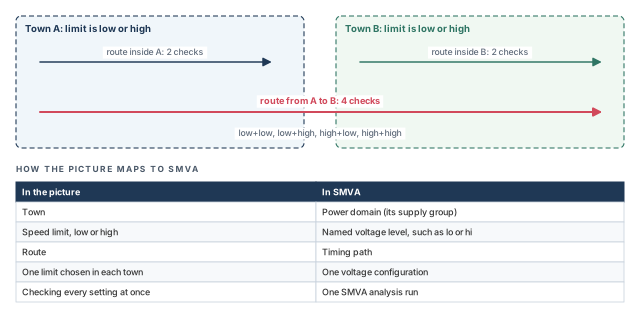
Think of a delivery company with routes in two towns. Each town council sets its speed limit to low or high, and each town chooses on its own. The company must promise a delivery time that holds whatever the councils choose.
A route that stays inside Town A needs two checks: low and high. A route from Town A to Town B needs four checks, one per pair of limits. Figure 2 shows this picture and maps each piece to its SMVA name.
- A car on one route never drives at two limits inside the same town. Older min/max voltage methods do exactly that to cells, as you will see next.
- Real voltage does not change only speed. In designs that scale frequency too, the clock period also changes with the voltage. DVFS (dynamic voltage and frequency scaling) scenarios handle that later in this chapter.
- The company plans each check by hand. The tool generates every combination itself, and skips mixes that are impossible for a path.
Now the engineering model
In engineering terms:
- A power domain is a group of cells that share one supply. Its supply can run at several voltage levels.
- A within-domain path starts, runs and ends inside one domain. The tool times it at every voltage level of that domain.
- A cross-domain path passes through two or more domains. The tool times it at every combination of the levels of those domains.
- A voltage configuration is one choice of level for each domain on a path, such as "VDD1 lo, VDD2 hi".
SMVA (graph-based simultaneous multivoltage analysis) does all of this for all paths, in one run. Graph-based means the tool computes timing across the whole design graph, not only path by path.
2 Why traditional multivoltage analysis falls short
2.1 Three ways to pick voltages
Let us consider a path from FF2 to FF3 inside domain A. Domain A runs at lo or hi. The clock period is 2.00 ns. At lo, the data delay is 1.30 ns and the clock latency is 0.40 ns. Clock latency is the delay from the clock source to a flop. At hi, they are 1.00 ns and 0.30 ns. Figure 3 compares three ways to time it.
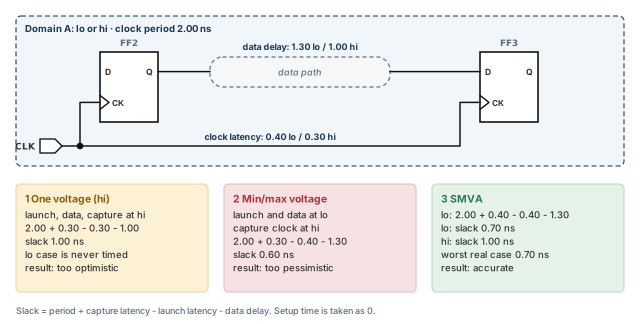
- One voltage per domain. You pick one level, say
hi, and get 1.00 ns of slack. Thelocase is never timed. In other words, the voltage combinations are not bounded: some real cases are left out. - Min/max voltages. You treat the two levels like on-chip variation, which times launch and capture with different values. The launch side runs at
loand the capture clock athi. The slack drops to 0.60 ns. However, cells in one domain cannot run at two voltages at the same time. Thus, the answer is pessimistic: worse than any real case. - SMVA. The tool times
lo(0.70 ns) andhi(1.00 ns) separately. The worst real slack is 0.70 ns.
The cost of the first method is a missed violation. The cost of the second is a false one, which wastes ECO (engineering change order) effort and area.
2.2 What SMVA does differently
With SMVA enabled, the tool considers all combinations of supply voltages for each path, at the same time. It covers both within-domain and cross-domain paths. It also excludes combinations that are impossible for each path and each path segment.
SMVA is most useful for designs that use DVFS (dynamic voltage and frequency scaling). DVFS raises the voltage and frequency for demanding tasks and lowers them at other times. You get accurate timing for these designs by giving the tool two things:
- scaling library groups, so it can compute delays at any of the voltages;
- the exact supply voltages that each power domain can use.
3 What SMVA needs
3.1 Design and library requirements
Graph-based SMVA needs all of the following:
- Multivoltage power intent. The design must be set up for multivoltage analysis, as in the Multivoltage Design Flow chapter.
- Scaling library groups. The design must use voltage scaling library groups. A scaling library group is a set of libraries for the same cells at different voltages.
- CCS noise data. Every library in the scaling library groups must contain CCS noise information. CCS (composite current source) is a library model format.
- A license. The feature is enabled by the PrimeTime-ADV-PLUS license. The number of licenses needed depends on the number of voltage levels and DVFS scenarios.
A beginner enables SMVA with a set of libraries that lack CCS noise data. Check the libraries in every scaling group before you plan the run. It is better to find a missing model now than after a long setup.
3.2 Supply connections decide domain membership
The UPF setup decides which power domain each cell belongs to. For this to work:
- every cell must have its PG (power and ground) pins connected to a supply net;
- each port should have a defined supply net.
The tool reads supply connections from two places:
- a Verilog PG netlist, which lists the power and ground connections of each cell;
- UPF
connect_supply_netcommands.
A Verilog PG netlist is the preferred method, because it is more direct, concise and reliable.
What if a path contains an object with no supply information? The tool then guesses the most likely supply from the design and library data. It uses the single voltage value of that supply. Thus, that object is not varied across levels, and a real case may be missed.
To report missing supply data, run these checks:
pt_shell> check_timing -include unconnected_pg_pins   ;# PG pins with no supply net
pt_shell> check_timing -include supply_net_voltage ;# supply nets with no voltageTeams add these two checks to every SMVA run script, before update_timing. A clean result means every cell and port will be varied correctly. A dirty result explains odd slack long before anyone debugs a path.
4 Within-domain and cross-domain paths
4.1 How each kind of path is timed
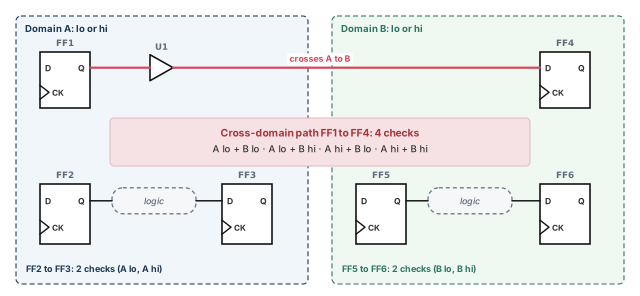
Let us consider two domains, A and B. Each can be set to low or high, on its own. Figure 4 shows three paths.
- FF2 to FF3 stays in domain A. The tool times it at A low and A high.
- FF5 to FF6 stays in domain B. The tool times it at B low and B high.
- FF1 to FF4 crosses from A to B. The tool times it under four combinations. Each A level is paired with each B level.
The tool treats each voltage configuration of a path as a separate path for collection and reporting. For example, report_timing -nworst can report the physical path FF1 to FF4 up to four times. That is once per combination, for each type of check (setup and hold).
When you see the same start and end points several times in one report, do not assume a bug. Read the Voltage Config line of each copy. Each copy is a different voltage configuration.
4.2 How the tool decides a path is cross-domain
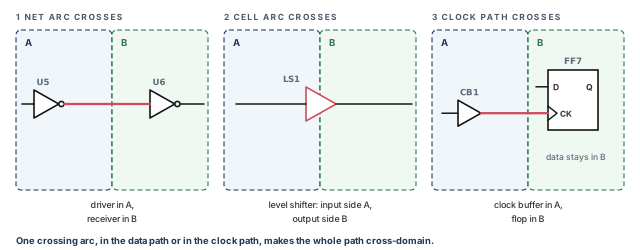
A path is cross-domain if any timing arc in its data path or its clock path crosses a power domain boundary. Figure 5 shows the three ways this happens.
- Net arc. The driving cell is in one domain and the receiving cell is in another.
- Cell arc. A level shifter is a cell that passes a signal between two voltages. Its input side and output side belong to different domains.
- Clock path. The flop and its data are in one domain, but a clock buffer is in another.
5 Configuring SMVA
5.1 The setup steps
Do all of these steps before the first timing update:
- Configure the design for multivoltage analysis, as in the Multivoltage Design Flow chapter.
- Enable SMVA by setting the variable
timing_enable_cross_voltage_domain_analysistotrue. - Define reference voltage names and their voltage values for the power domains.
- Optionally, restrict the scope with the
timing_cross_voltage_domain_analysis_modevariable.
Step 3 is what lets the tool merge several voltage corner runs into a single run. Figure 6 shows the steps with real commands.
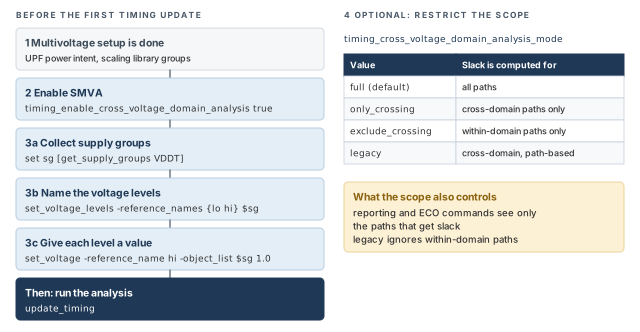
pt_shell> set_app_var timing_enable_cross_voltage_domain_analysis true ;# turn SMVA onThe SMVA-only commands, options and variables in this chapter work only when this variable is true.
5.2 Named voltage references
A named voltage reference is a label, such as lo or main_high, for one voltage level of a supply. Three commands set them up:
| Command | What it does |
|---|---|
get_supply_groups {supplies} |
Returns a collection of the supply groups that contain the given supplies |
set_voltage_levels -reference_names {names} groups |
Names the voltage levels, such as low and high, for a supply group collection |
set_voltage -reference_name name -object_list groups value |
Gives a voltage value to one name defined by set_voltage_levels |
A collection is the tool's list of design objects. A supply group is a set of supply nets that are connected together. To find which supply nets belong to which group, get_supply_groups traces the supply connections. It uses both the Verilog PG netlist and UPF connect_supply_net commands.
Let us consider a top-level design TOP with two blocks, B1 and B2. There are two named conditions, main_low and main_high. Figure 7 shows the voltages.
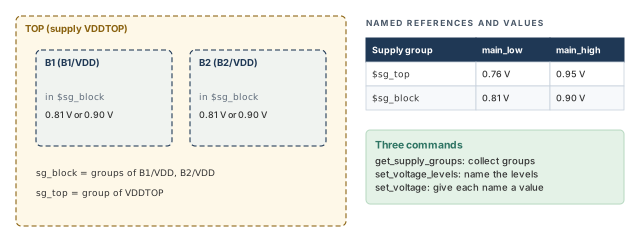
pt_shell> set sg_block [get_supply_groups {B1/VDD B2/VDD}]   ;# groups of block supplies
pt_shell> set_voltage_levels -reference_names {main_low main_high} $sg_block \
            ;# name the block levels
pt_shell> set_voltage -reference_name main_high -object_list $sg_block 0.90 \
            ;# block high value
pt_shell> set_voltage -reference_name main_low -object_list $sg_block 0.81 \
            ;# block low value
pt_shell> set sg_top [get_supply_groups VDDTOP]   ;# group of the top supply
pt_shell> set_voltage_levels -reference_names {main_low main_high} $sg_top \
            ;# name the top levels
pt_shell> set_voltage -reference_name main_high -object_list $sg_top 0.95 \
            ;# top high value
pt_shell> set_voltage -reference_name main_low -object_list $sg_top 0.76 \
;# top low valueA beginner runs set_voltage_levels but forgets one set_voltage value. set_voltage_levels only creates the names; set_voltage is what gives each name its voltage. Give every name in every group a value, and read them back in the log.
5.3 Restricting the scope of the analysis
By default, SMVA times all paths and computes slack for all of them. The timing_cross_voltage_domain_analysis_mode variable can narrow this:
| Value | Timing analysis | Slack computed for | Reporting and ECO commands see |
|---|---|---|---|
full (default) |
All paths | All paths, cross-domain and within-domain | All paths |
only_crossing |
All paths | Cross-domain paths only | Cross-domain paths only |
exclude_crossing |
All paths | Within-domain paths only | Within-domain paths only |
legacy |
Path-based analysis of cross-domain paths | Cross-domain paths | Within-domain paths are ignored |
Path-based analysis times specific paths one at a time, instead of the whole graph. The legacy value uses it for cross-domain paths.
pt_shell> set_app_var timing_cross_voltage_domain_analysis_mode only_crossing \
;# slack only for cross-domain pathsKeep the default full for signoff, because every other value hides some paths. Use only_crossing when you debug crossings alone and want shorter reports.
6 Reading SMVA timing reports
6.1 The Voltage Config line
In an SMVA run, report_timing adds one line to each path header. The Voltage Config line shows the voltage configuration of that path.
pt_shell> report_timing -through BLK2/C
...
  Startpoint: BLK1/FF1 (rising edge-triggered flip-flop clocked by CK1)
  Endpoint: BLK2/FF3 (rising edge-triggered flip-flop clocked by CK1)
  Path Group: CK1
  Path Type: max
  Voltage Config: VDDT:hi, VDD1:lo, VDD2:lo
...
Read it as "this copy of the path was timed with VDDT at hi, VDD1 at lo and VDD2 at lo".
6.2 Showing the supply of each point
The -supply_net_group option adds a Supply-Net-Group column. It shows the supply group of each point along the path.
pt_shell> report_timing -through BLK2/C -supply_net_group
...
  Voltage Config: VDDT:hi, VDD1:lo, VDD2:lo

  Point                               Incr      Path   Supply-Net-Group
  ---------------------------------------------------------------------
  clock CK1 (rise edge)               0.00      0.00
  clock network delay (ideal)         0.00      0.00
  BLK1/FF1/CP (DFFX1)                 0.00      0.00 r VDD1
  BLK1/FF1/Q (DFFX1)                  0.92      0.92 r VDD1
  U1/Z (BUFX2)                        0.46      1.38 r VDDT
  BLK2/C (block2) <-                  0.00      1.38 r
  BLK2/FF3/D (DFFX1)                  0.05      1.43 r VDD2
  data arrival time                             1.43

  clock CK1 (rise edge)               2.00      2.00
  clock network delay (ideal)         0.00      2.00
  BLK2/FF3/CP (DFFX1)                           2.00 r
  library setup time                 -0.06      1.94
  data required time                            1.94
  ---------------------------------------------------------------------
  data required time                            1.94
  data arrival time                            -1.43
  ---------------------------------------------------------------------
  slack (MET)                                   0.51
The BLK2/C row has no supply group, because it is the boundary pin of block BLK2, not a cell pin.
6.3 The path's scenario as an attribute
Each timing_path collection object has an sms_scenario attribute. Its description attribute describes the same voltage configuration as the Voltage Config line.
pt_shell> set path [get_timing_paths -domain_crossing only_crossing]   ;# worst crossing
pt_shell> get_attribute $path sms_scenario.description   ;# its voltage configuration
{VDD2:lo, VDD1:lo, VDDT:hi}
The order of the groups in the text does not matter.
6.4 Choosing which paths a command sees
The analysis mode variable restricts paths for the whole run. For a single command, use the -domain_crossing option of report_timing or get_timing_paths:
-domain_crossing allgathers or reports all paths, cross-domain and within-domain. This is the default.-domain_crossing only_crossinggathers or reports only cross-domain paths.-domain_crossing exclude_crossinggathers or reports only within-domain paths.
pt_shell> report_timing -domain_crossing only_crossing      ;# crossings only
pt_shell> get_timing_paths -domain_crossing exclude_crossing ;# within-domain onlySupply-Net-Group column or in the sms_scenario attribute.7 DVFS scenarios
7.1 Why voltage alone is not enough
On its own, SMVA varies only the supply voltages. In a DVFS design, other timing settings must change with the voltage too. The clock frequency is the usual example: a slower clock goes with a lower voltage.
So SMVA offers DVFS scenarios. A DVFS scenario is a named voltage condition. It lets you:
- apply design constraints only under certain voltage conditions;
- run reports and analysis only under certain voltage conditions.
DVFS scenarios are voltage and frequency conditions inside one SMVA run. They are not the operating-condition and constraint scenarios of DMSA (distributed multi-scenario analysis). DMSA scenarios run as separate distributed runs. DVFS scenarios are all analyzed in a single run.
7.2 The sms_scenario object
The tool stores a DVFS scenario as an sms_scenario collection object. SMS stands for simultaneous multi-scenario. It is the general name for timing several voltage corner conditions at once, in one run.
One DVFS scenario can name one supply group or several. For each group, it can allow one named level or several. For example:
| Description | Meaning |
|---|---|
{VDDT:lo} |
One supply group at one named level |
{VDD1:lo sleep, VDDT:hi, VDD2:lo sleep} |
Three supply groups; VDD1 and VDD2 each allow two named levels |
You build one with get_sms_scenarios. Pass one -supply_group and -reference_names pair per supply group:
pt_shell> set my_dvfs_scenario1 [get_sms_scenarios \
            -supply_group VDDT -reference_names {lo}]   ;# VDDT at lo
pt_shell> set my_dvfs_scenario2 [get_sms_scenarios \
            -supply_group VDD1 -reference_names {lo sleep} \
            -supply_group VDDT -reference_names {hi} \
            -supply_group VDD2 -reference_names {lo sleep}]   ;# three groups
pt_shell> sizeof_collection $my_dvfs_scenario2   ;# still one object
1
pt_shell> get_attribute $my_dvfs_scenario2 description   ;# read it back
{VDD1:lo sleep, VDDT:hi, VDD2:lo sleep}
Each command returns one object that describes the whole condition. The order of supply groups and of names does not matter.
The tool builds these objects only when they are needed. It does not list every possible partial and full condition in memory, because that would be far too large. From here on, "DVFS scenario" means an sms_scenario object.
7.3 Fully describing and propagated scenarios
Each timing path has a set of DVFS scenarios that fully describe its possible voltage conditions. A scenario is fully describing for a path when it names one level for every supply group the path touches.
For example, {VDDT:hi} fully describes a path inside VDDT. For a path from VDDT into VDD1, it is only partially describing, because it says nothing about VDD1.
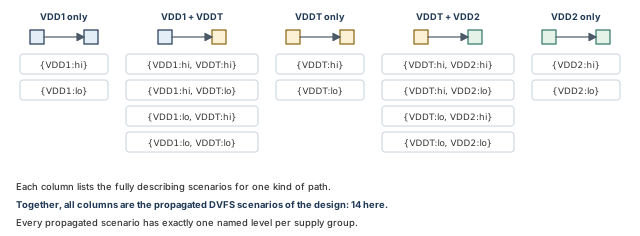
Collect the fully describing scenarios of every path in the design. The result is the propagated DVFS scenarios of the design. Figure 8 shows them for a design with three supply groups.
A propagated DVFS scenario always has exactly one named level per supply group. This is different from a scenario you build, which can allow several names, such as lo sleep.
7.4 Compatible scenarios and command scope
When you give a DVFS scenario to a constraint or report command, the command applies to the compatible propagated scenarios. A propagated scenario is compatible when it has no conflict with your scenario's named levels.
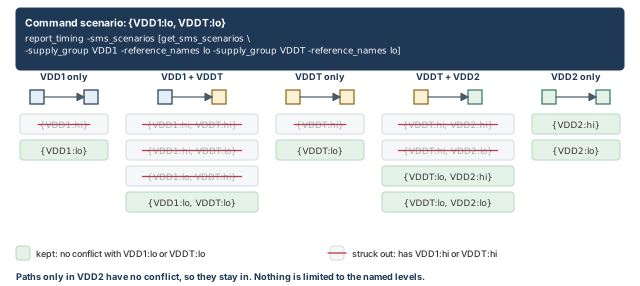
Let us give {VDD1:lo, VDDT:lo} to report_timing. Figure 9 shows the result.
This point surprises many people. A command scenario excludes what conflicts. It does not limit the command to only the named groups.
A beginner passes {VDD1:lo} and expects a report of VDD1 paths only. The report also contains VDD2-only paths, because nothing in them conflicts. A scenario only removes conflicting cases. To narrow further, also name a level for each of the other groups.
7.5 Querying DVFS scenarios
DVFS scenarios are collection objects, and get_sms_scenarios returns them. It works in two ways.
Build a scenario for given supply group conditions. Give one or more -supply_group and -reference_names pairs. Use this to make a scenario to pass to a constraint or report command.
pt_shell> get_sms_scenarios \
            -supply_group $sg_top -reference_names {low}   ;# top at low
pt_shell> get_sms_scenarios \
            -supply_group $sg_blk1 -reference_names {low sleep} \
            -supply_group $sg_top -reference_names {high} \
            -supply_group $sg_blk2 -reference_names {low sleep}   ;# three groups
Get all propagated scenarios. Use the -propagated option.
pt_shell> get_sms_scenarios -propagated ;# every propagated scenarioIf the design is not up to date, the tool first does a logical design update. The result is a collection of many sms_scenario objects. Each one belongs to one or more timing paths. This is useful for exploring the design. However, not every command with -sms_scenarios accepts a collection of several scenarios.
sms_scenario object. The tool keeps propagated scenarios that do not conflict with yours, and drops only the ones that do.8 Applying DVFS scenarios
By default, commands and attributes that support DVFS scenarios consider all of them. Four ways narrow this for chosen commands. A fifth removes scenarios from the whole analysis. A later section lists the commands and attributes that support DVFS scenarios.
8.1 To one command
Commands with a -sms_scenarios option take the scenarios directly:
pt_shell> report_timing -sms_scenarios $my_dvfs_scenario1 ;# only compatible scenariosAn explicit -sms_scenarios option beats any script-based or context-based setting.
Constraints use the same option. For example, a DVFS clock can run slower when the top supply is low. The second create_clock uses -add, so both clock definitions exist side by side.
pt_shell> set vdd_mission [get_sms_scenarios \
            -supply_group $vdd_top -reference_names high]   ;# top at high
pt_shell> set vdd_sleep [get_sms_scenarios \
            -supply_group $vdd_top -reference_names low]    ;# top at low
pt_shell> create_clock -name CK1 -period 200 \
            -sms_scenarios $vdd_mission [get_pin pll/o]     ;# fast clock at high
pt_shell> create_clock -name CK1 -period 300 \
            -sms_scenarios $vdd_sleep [get_pin pll/o] -add  ;# slow clock at low
Timing exceptions work the same way. Here $vdd1_high_vdd2_low and $vdd1_low_vdd2_high were built earlier with get_sms_scenarios, one level for each block supply.
pt_shell> set_false_path -from CK2 -to CK1 \
            -sms_scenarios $vdd1_high_vdd2_low      ;# no check in this mix
pt_shell> set_multicycle_path 3 -from CK1 -to CK2   ;# no scenario: all mixes
pt_shell> set_multicycle_path 4 -from CK1 -to CK2 \
            -sms_scenarios $vdd1_high_vdd2_low      ;# four cycles in this mix
pt_shell> set_multicycle_path 5 -from CK1 -to CK2 \
            -sms_scenarios $vdd1_low_vdd2_high      ;# five cycles in this mix
8.2 To an attribute query
To read an attribute under certain scenarios, put an sms_scenario object in parentheses after the attribute name. This is called an attribute subscript.
pt_shell> set low_low [get_sms_scenarios \
            -supply_group VDD_top -reference_names {low} \
            -supply_group VDD_block -reference_names {low}]   ;# both groups low
pt_shell> get_attribute $pin pin_capacitance_max($low_low)   ;# pin value in low_low
pt_shell> get_attribute $pin net.pin_capacitance_max($low_low)   ;# via the pin's net
pt_shell> report_attribute -attribute {pin_capacitance_max($low_low)} $pin \
            ;# report form
pt_shell> get_pins -filter {pin_capacitance_max($low_low) > 0.1}   ;# filter form
Rules for subscripts:
- If the collection holds several scenarios, you get the worst-case value. That is the minimum or the maximum, depending on the attribute.
- If the values differ and cannot be merged, such as strings, the tool issues an ATTR-11 warning.
- If the attribute does not support DVFS scenarios, the tool issues an ATTR-3 error.
- A subscript beats any script-based or context-based setting.
8.3 To a whole script
An SDC (Synopsys Design Constraints) file holds timing constraints. To apply DVFS scenarios to a whole SDC file or tool script, use the -sms_scenarios option of read_sdc or source:
pt_shell> source -sms_scenarios $low_low low_low.tcl     ;# a tool script
pt_shell> read_sdc -sms_scenarios $low_low low_low.sdc   ;# an SDC file
This works as if you added -sms_scenarios to every command in the file that supports it. It also subscripts every attribute query that supports it.
However, not all SDC commands support -sms_scenarios. The tool still runs such a command, but it cannot tie it to the scenarios. As with any script, the command read last wins: it overrides earlier settings of the same value, even scenario-specific ones. It is better to use only commands that support the option in these files, for two reasons:
- the settings stay unambiguous;
- a command that gains the option later could change your results.
8.4 To a sequence of commands
To apply DVFS scenarios to any sequence of commands, including scripts and Tcl (Tool Command Language) procedures, use a context. The push_sms_scenario command sets one. The pop_sms_scenario command removes the most recent one.
pt_shell> push_sms_scenario -sms_scenario $low_low   ;# start the low_low context
pt_shell> report_timing                              ;# runs in low_low
pt_shell> pop_sms_scenario                           ;# end the context
The context applies to later commands and attribute queries that support DVFS scenarios. Contexts can be nested. The inner context does not mix with the outer one: only the inner one is used until it is popped. Timing updates inside a DVFS context are not supported.
8.5 Disabling and enabling scenarios
The configure_sms_scenarios command removes scenarios from the analysis with -disable and puts them back with -enable.
pt_shell> configure_sms_scenarios -disable $low_low   ;# omit low_low
pt_shell> update_timing -full                         ;# full update is required
pt_shell> report_sms_scenarios -disabled              ;# list disabled scenarios
pt_shell> configure_sms_scenarios -enable $low_low    ;# bring it back
pt_shell> update_timing -full ;# full update again...
Current Ignored Scenarios:
------------------------------------------------------------
VDD_block:low VDD_top:lowA disabled scenario is left out entirely. Timing updates do not compute its data, and reports do not consider it.
Every enable or disable needs a full timing update, update_timing -full. By default, update_timing is incremental, and that is not enough to pick up the change.
There is an alternative. You can set a false path to everything in the scenarios you want to drop:
pt_shell> set top_high_block_low [get_sms_scenarios \
            -supply_group $sg_top -reference_names {main_high} \
            -supply_group $sg_block -reference_names {main_low}]   ;# scenario to drop
pt_shell> set_false_path -to * -sms_scenarios $top_high_block_low ;# time nothingA beginner disables a scenario and runs a plain update_timing. The incremental update does not pick up the change. Always follow -disable or -enable with update_timing -full.
8.6 Which setting wins
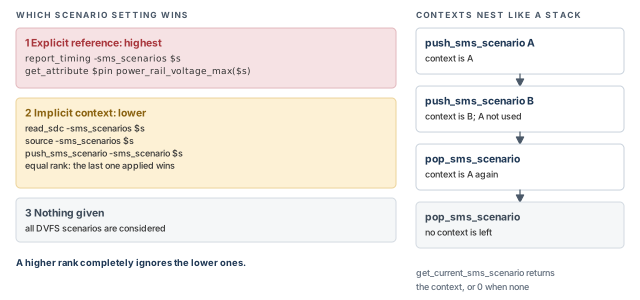
You can now give scenarios in several ways at once. The most specific one, "closest" to the command, wins. Figure 10 shows the ranks.
- Explicit references rank highest. These are the
-sms_scenariosoption on a constraint or report command, and an attribute subscript. Examples:report_timing -sms_scenarios $dvfs_scenarioandget_attribute $pin power_rail_voltage_max($dvfs_scenario). - Implicit references rank lower. These are
read_sdc -sms_scenarios,source -sms_scenariosandpush_sms_scenario. All three have equal rank. The last implicit context applied wins. - A lower rank is completely ignored when a higher rank applies.
The get_current_sms_scenario command returns the current DVFS scenario context, or 0 if there is none.
pt_shell> get_current_sms_scenario   ;# current context, or 0 if none
0-sms_scenarios or a subscript for one command. Use read_sdc or source for a file, and push and pop for a block of commands. The closest setting wins.8.7 DVFS-related object attributes
Three attributes give SMVA facts about paths and scenarios:
| Attribute | Class | Type | Meaning |
|---|---|---|---|
sms_scenario |
timing_path |
sms_scenario object |
The DVFS scenario of the timing path |
has_voltage_domain_crossing |
timing_path |
Boolean | true for a cross-domain path, the kind shown by -domain_crossing only_crossing |
supply_groups |
sms_scenario |
supply group collection | The supply groups relevant to the scenario |
For example, this loop picks out the cross-domain paths from a path collection:
set my_path_collection [get_timing_paths -domain_crossing all]   ;# gather paths
foreach_in_collection path $my_path_collection {                 ;# visit each path
  if {[get_attribute $path has_voltage_domain_crossing]} {       ;# a crossing?
    # take action on this cross-domain path here
  }
}
9 SMVA with other tool features
9.1 HyperScale hierarchical analysis
HyperScale is the tool's hierarchical analysis. A block is timed on its own, then represented by a compact model at the top level. This saves memory and runtime.
SMVA works with HyperScale. The flow keeps accurate aggressor models and context data at the top-to-block boundaries, for all voltage configurations. An aggressor is a nearby net whose switching disturbs a signal through crosstalk. Context data means values such as arrival times and latencies at the block boundary. Figure 11 shows the two directions of data.
- Block to top. In a block-level run,
write_hier_datawrites a block model with data for all DVFS scenarios. For example, it tracks arrival times and crosstalk aggressor behavior per voltage configuration. The top-level run uses this model. - Top to block. In a top-level run,
write_hier_datawrites context data that represents all DVFS scenarios. The block-level run reads this merged context.
In other words, both levels see every DVFS scenario with the same timing as a flat run. They still get the memory and runtime savings of HyperScale.
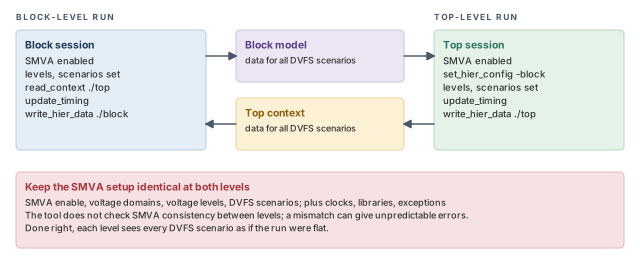
The flow needs the same SMVA setup at block and top level. That means the SMVA enable, voltage domains, voltage levels and DVFS scenarios. The usual HyperScale rules also apply: matching clocks, libraries and timing exceptions. The tool does not check SMVA consistency between levels. A mismatch can cause unpredictable errors.
The block-level script below shows the SMVA parts in order. The first part reads the block and turns SMVA on:
set hier_enable_analysis true                     ;# HyperScale on
set link_path {* *.db}                            ;# libraries
set upf_create_implicit_supply_sets false         ;# no UPF 2.0 supply sets needed
read_verilog block.v.gz                           ;# block netlist
link_design block                                 ;# link it
set timing_enable_cross_voltage_domain_analysis true   ;# SMVA on
read_parasitics -format spef block.spef           ;# block parasitics
Next comes the power intent: domains, supply nets, level names and values.
create_power_domain B -elements [get_cells {ff1 iv1}]  ;# block domain
create_power_domain T                             ;# virtual top domain
create_supply_net sn_T -domain T                  ;# top power net
create_supply_net gn_T -domain T                  ;# top ground net
create_supply_net sn_B -domain B                  ;# block power net
create_supply_net gn_B -domain B                  ;# block ground net
set_domain_supply_net -primary_power_net sn_T -primary_ground_net gn_T T  ;# top
set_domain_supply_net -primary_power_net sn_B -primary_ground_net gn_B B  ;# block
set_voltage_levels sn_T -reference_names {hi lo}  ;# top level names
set_voltage_levels sn_B -reference_names {hi lo}  ;# block level names
set_voltage -object_list sn_T -reference_name lo 0.80 -min 0.90   ;# top lo
set_voltage -object_list sn_T -reference_name hi 1.10 -min 1.20   ;# top hi
set_voltage -object_list sn_B -reference_name lo 0.70 -min 0.80   ;# block lo
set_voltage -object_list sn_B -reference_name hi 1.00 -min 1.10   ;# block hi
The last part adds the DVFS clocks and exceptions, reads the top context and writes the model:
create_clock -name CK1 -period 10 clk1 -sms_scenarios \
  [get_sms_scenarios -supply_group sn_B -reference_names hi]      ;# CK1 at block hi
create_clock -name CK1 -period 12 clk1 -sms_scenarios \
  [get_sms_scenarios -supply_group sn_B -reference_names lo] -add ;# CK1 at block lo
create_clock -name CK2 -period 10 clk2 -sms_scenarios \
  [get_sms_scenarios -supply_group sn_T -reference_names hi]      ;# CK2 at top hi
create_clock -name CK2 -period 12 clk2 -sms_scenarios \
  [get_sms_scenarios -supply_group sn_T -reference_names lo] -add ;# CK2 at top lo
set_multicycle_path 3 -from CK1 -to CK2 -sms_scenarios \
  [get_sms_scenarios -supply_group sn_B -reference_names hi \
                     -supply_group sn_T -reference_names lo]      ;# one mix only
set_multicycle_path 4 -through iv1/Z -sms_scenarios \
  [get_sms_scenarios -supply_group sn_B -reference_names hi \
                     -supply_group sn_T -reference_names lo]      ;# same mix
read_sdc block.sdc                                ;# the non-DVFS constraints
read_context ./top                                ;# context from the top run
set_clock_map CK1 -parent_clocks CK1              ;# map block clock to top clock
set_clock_map CK2 -parent_clocks CK2              ;# same for CK2
update_timing                                     ;# full SMVA analysis
write_hier_data ./block                           ;# block model, all scenarios
In each set_voltage line, the first value is the voltage for maximum-delay analysis. The -min value is the voltage for minimum-delay analysis. The Multivoltage Design Flow chapter explains this.
The top-level script mirrors it. The key differences are shown here:
set_hier_config -block block -path ./block        ;# use the block model
read_verilog top.v.gz                             ;# top netlist
link_design top                                   ;# link it
set timing_enable_cross_voltage_domain_analysis true   ;# SMVA on
set timing_cross_voltage_domain_analysis_mode full     ;# all paths
set_voltage_levels B/sn_B -reference_names {hi lo}     ;# block supply from model
set_voltage -object_list B/sn_B -reference_name lo 0.70 -min 0.80  ;# same values
set_voltage -object_list B/sn_B -reference_name hi 1.00 -min 1.10  ;# as the block
read_sdc design.sdc                               ;# the non-DVFS constraints
set_clock_map CK1 -block_clocks CK1               ;# map top clock to block clock
set_clock_map CK2 -block_clocks CK2               ;# same for CK2
update_timing                                     ;# full SMVA analysis
write_hier_data ./top                             ;# context, all scenarios
At the top level, the block's UPF comes from the HyperScale model. So the block supply is named through the hierarchy, as B/sn_B. The top-level script also repeats the top domain, its supply nets, levels and voltages, and the DVFS clocks and exceptions.
9.2 Context characterization
SMVA also works with the context characterization flow. That flow uses the characterize_context and write_context commands. The context it writes uses accurate delay and latency across all DVFS scenarios. Two settings are required:
write_contextmust write the binary context format,-format gbc.- The
hier_characterize_context_modevariable must befull_context, its default, notconstraints_only.
9.3 Voltage-scaled timing derates
The set_timing_derate command sets early or late timing adjustments on different objects. In SMVA flows, you can give voltage-specific derates. The tool then scales them as needed during the analysis.
To enable this, set two variables. The Delay Calculation chapter covers derate scaling in voltage scaling flows.
pt_shell> set_app_var \
            timing_enable_derate_scaling_for_library_cells_compatibility false \
            ;# required value for this feature
pt_shell> set_app_var \
            timing_enable_derate_scaling_interpolation_for_library_cells true \
            ;# turn on derate scaling
With these settings, derates set on library cells in a scaling group are scaled. The tool uses the voltage of each instance, computed per DVFS scenario. For example:
define_scaling_lib_group {lib_1.1V.db lib_1.0V.db lib_0.9V.db}   ;# three voltages
set_timing_derate -late [get_lib_cell lib_1.1V/INV1] 1.07        ;# derate at 1.1 V
set_timing_derate -late [get_lib_cell lib_1.0V/INV1] 1.10        ;# derate at 1.0 V
set_timing_derate -late [get_lib_cell lib_0.9V/INV1] 1.15        ;# derate at 0.9 V
set_voltage_levels sg1 -reference_names {hi lo}                  ;# two levels
set_voltage -object_list sg1 -reference_name lo 0.90             ;# exact derate
set_voltage -object_list sg1 -reference_name hi 1.05             ;# scaled derate
Figure 12 shows which derate each level gets.
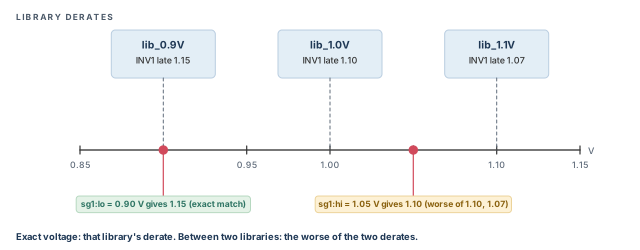
sg1:lois 0.90 V. This exactly matches the 0.9 V library, so the INV1 derate of 1.15 applies.sg1:hiis 1.05 V. No library matches. The two nearest are 1.0 V and 1.1 V, with derates 1.10 and 1.07. The tool uses the worse value, 1.10.
set_timing_derate also has a -sms_scenarios option, to name the DVFS scenarios for a cell derate directly. Two limits apply:
- It works only for leaf cell instances. A leaf cell is a cell with no hierarchy below it.
- The scenario may only name supplies of that cell.
As with normal derating, a derate on a cell instance overrides a more general one on its library cell.
9.4 Extracted timing models
An extracted timing model (ETM) is a timing-only model of a block. SMVA works with ETM blocks that are used in a scaling library group. To generate the models, you must give ETM characterization data at each voltage corner.
In SMVA mode, extract_model writes one ETM file for each active DVFS scenario, or voltage combination, that the design uses. With -sms_scenarios, it writes one model for each DVFS scenario compatible with the one you give.
Each model name joins three parts: the output name you give, the voltage domain names and the level names. Figure 13 shows an example with domains SN1 and SN2, each with levels low and high.
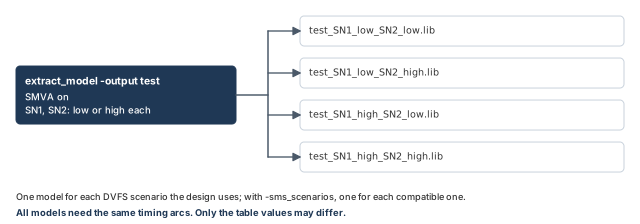
pt_shell> extract_model -output test ;# one .lib per voltage combinationDuring analysis, the tool computes ETM delays from the delay tables of the right voltage corner. It picks the corner from the DVFS scenarios explored by SMVA.
The ETMs extracted at different voltages must pass every scaling library group rule. They must share the same number and types of timing arcs. Only the values in the timing tables may differ.
Sometimes extraction at different voltages gives different arcs. For example, a latch may be transparent, passing data straight through, in one model and not in the other. The cause is different arrival times inside the block. Building a scaling library group from such models triggers an error. Using the models this way is not supported.
9.5 Timing arcs that depend on extra power rails
Some macro cells have timing arcs that depend on other PG pins than those of the arc's own pins. For example, a low-power memory may have constraint arcs, such as setup checks. These arcs can depend on both its main supply and its backup supply. With SMVA enabled, the tool supports such cells.
An extra PG supply that an arc depends on is called a virtual PG pin. Figure 14 shows one.
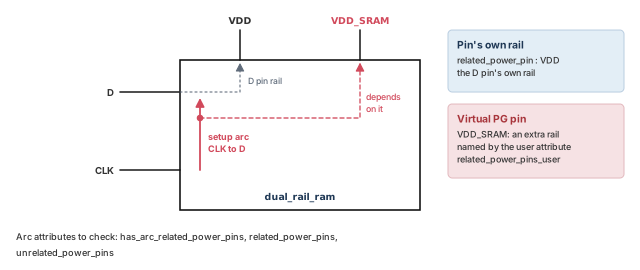
Liberty is the text format of cell libraries (.lib files). Liberty syntax cannot directly map a constraint arc to a virtual PG pin. Instead, the tool supports a user-defined lib_timing_arc attribute named related_power_pins_user. The tool imports it from a user-defined attribute in the Liberty cell description. You can also set the attribute on each library timing arc by hand.
This Liberty fragment defines the attribute and sets it to VDD_SRAM:
library (MEM_1_0.81) {
   define (related_power_pins_user, timing, string);
   ...
   cell("dual_rail_ram") {
      ...
      pin (D) {
         direction : input;
         related_power_pin : VDD;
         timing() {
            related_pin : "CLK"
            timing_type : setup_rising;
            related_power_pins_user : "VDD_SRAM";
         }
      }
   }
The run script defines the attribute, imports it and sets up the SRAM scaling group:
define_user_attribute related_power_pins_user \
  -classes lib_timing_arc -type string -import     ;# import from Liberty
set_app_var link_path {* MEM_1_0.81}               ;# one SRAM library, plus others
read_verilog top.v                                 ;# netlist
define_scaling_lib_group \
  {MEM_1_0.81 MEM_1_0.72 MEM_0.9_0.81 MEM_0.9_0.72} ;# SRAM scaling group
set timing_enable_cross_voltage_domain_analysis true ;# SMVA on
load_upf chip_connectivity.upf                     ;# power intent
set_voltage_levels {VDD1 VDD2} -reference_names {low high}  ;# level names
set_voltage -supply_group VDD1 -reference_name low 0.9      ;# VDD1 low
set_voltage -supply_group VDD1 -reference_name high 1       ;# VDD1 high
set_voltage -supply_group VDD2 -reference_name low 0.72     ;# VDD2 low
set_voltage -supply_group VDD2 -reference_name high 0.81    ;# VDD2 high
read_parasitics top.spef                           ;# parasitics
read_sdc chip.sdc                                  ;# constraints
update_timing -full                                ;# full timing update
Three more lib_timing_arc attributes help you check the result:
has_arc_related_power_pinsistruewhen the arc's PG dependence was extended byrelated_power_pins_user.related_power_pinslists the PG pins that affect the arc.unrelated_power_pinslists the PG pins that do not affect the arc.
9.6 Noise analysis
SMVA also works with noise analysis. Many noise constraint commands apply either to all DVFS scenarios or to chosen ones. Noise reports can cover all DVFS scenarios or chosen ones.
The three main noise commands all support -sms_scenarios. The table below shows how they behave. The right column also applies when an SMVA scenario context is set.
| Command | No DVFS scenario given | DVFS scenario given |
|---|---|---|
update_noise |
Analyzes noise across all DVFS scenarios | Analyzes noise for the compatible DVFS scenarios |
report_noise |
Reports the worst noise slacks across all DVFS scenarios | Reports the worst noise slacks for the compatible DVFS scenarios |
report_noise_calculation |
Reports the noise computation for all scenarios relevant to the net | Reports it for the relevant scenarios that are compatible |
In SMVA, report_noise adds a Voltage Config column with the DVFS scenario of each pin slack:
pt_shell> report_noise -below -high
...
 analysis mode: report_at_source
 slack type: height

 noise_region: below_high
 pin name (net name)       width    height     slack   Voltage Config
 ---------------------------------------------------------------------
 X/A (net1)                7.73      0.91      -0.44   VDD_SD:high
 X/B (net2)                12.47     0.84      -0.44   VDD_SD:high
 X/C (net3)                12.63     0.73      -0.33   VDD_SD:low
report_noise_calculation writes a separate report for each DVFS scenario it considers:
pt_shell> report_noise_calculation -from U1/Z -to U2/A -below -high
Analysis mode                    : report_at_source
Region                           : below_high
Voltage Config                   : VDD_SD:low
...calculation omitted...

Analysis mode                    : report_at_source
Region                           : below_high
Voltage Config                   : VDD_SD:high
...calculation omitted...
Some noise attributes can be read per DVFS scenario. In general, the value for the worst noise slack is returned.
| Attribute | No DVFS scenario given | DVFS scenario given |
|---|---|---|
si_noise_bumps_*_* |
Pairs of aggressor and worst bump, over all scenarios relevant to the pin | The same, over the relevant scenarios that are compatible |
si_noise_slack_*_* |
The worst noise slack over all scenarios relevant to the pin | The worst over the relevant scenarios that are compatible |
si_noise_total_bump_*_* |
The total bump causing the worst slack, over all relevant scenarios | The same, over the relevant scenarios that are compatible |
Noise in SMVA has three limits:
- Global only. These commands apply to all DVFS scenarios, but cannot be given per scenario:
remove_input_noise,remove_noise_immunity_curve,remove_noise_margin,set_input_noise,set_noise_derate,set_noise_immunity_curve,set_noise_marginandset_steady_state_resistance. - Commands not supported:
check_noise,get_noise_violation_sources,report_noise_violation_sourcesandsim_validate_noise. - Attributes not supported:
si_noise_active_aggressors_*,si_noise_prop_bumps_*andsi_noise_worst_prop_arc_*.
The Signal Integrity Analysis chapter explains noise bumps, regions and slacks.
10 Commands and attributes that support DVFS scenarios
10.1 Commands with -sms_scenarios
These commands accept -sms_scenarios in SMVA, to limit a constraint or a report to chosen DVFS scenarios:
| Group | Commands |
|---|---|
| Clocks | create_clock, create_generated_clock, set_clock_gating_check, set_clock_latency, set_clock_uncertainty, remove_clock_gating_check, remove_clock_latency, remove_clock_uncertainty |
| Exceptions and checks | set_false_path, set_max_delay, set_min_delay, set_multicycle_path, set_path_margin, set_data_check, remove_data_check |
| Inputs and outputs | set_input_delay, set_output_delay, remove_input_delay, remove_output_delay, set_driving_cell (only -input_transition_rise/fall), set_load (only -pin_load), set_annotated_transition |
| Design rules | set_max_capacitance, set_min_capacitance, set_max_transition, set_max_fanout, set_fanout_load, remove_max_capacitance, remove_min_capacitance, remove_max_transition, remove_max_fanout, remove_fanout_load |
| Derates and waveforms | set_timing_derate, set_waveform_integrity_analysis, remove_waveform_integrity_analysis |
| Scripts | read_sdc, source |
| Paths and timing reports | get_timing_paths, report_timing, report_constraint, report_global_slack, report_global_timing, report_qor, report_analysis_coverage, report_crpr, report_delay_calculation, report_timing_derate |
| Clock reports | report_clock, report_clock_timing, report_clock_gating_check, report_min_period, report_min_pulse_width, report_pulse_clock_max_transition, report_pulse_clock_max_width, report_pulse_clock_min_transition, report_pulse_clock_min_width |
| Other reports | report_port, report_etm_arc, report_si_bottleneck, report_waveform_integrity_analysis, report_noise, report_noise_calculation |
| Noise, models and output | update_noise, extract_model, define_cell_alternative_lib_mapping, write_interface_timing, write_sdf |
Two more commands support SMVA without the option. check_timing and report_exceptions check or report across all possible scenario and voltage combinations.
10.2 Attributes that support DVFS scenarios
These attributes can be read for one DVFS scenario or a set of them, with a subscript. For a set, you get the worst-case value.
| Group | Attributes | Object class |
|---|---|---|
| Actual transition | actual_fall_transition_max, actual_fall_transition_min, actual_rise_transition_max, actual_rise_transition_min, actual_transition_max, actual_transition_min |
pin, port |
| Cached load values | cached_c1_max_fall, cached_c1_max_rise, cached_c1_min_fall, cached_c1_min_rise, cached_c2_max_fall, cached_c2_max_rise, cached_c2_min_fall, cached_c2_min_rise, cached_ceff_max_fall, cached_ceff_max_rise, cached_ceff_min_fall, cached_ceff_min_rise |
pin, port |
| Effective capacitance | ceff_params_max, ceff_params_min, effective_capacitance_max, effective_capacitance_min |
pin, port |
| Design rule values | constraining_max_transition, drc_actual_max_capacitance, drc_actual_max_transition, drc_constraining_max_capacitance, drc_coupled_actual_max_transition, drc_max_capacitance_slack, drc_max_transition_slack |
pin, port |
| Driver models | driver_model_scaling_libs_max, driver_model_scaling_libs_min, driver_model_type_max_fall, driver_model_type_max_rise, driver_model_type_min_fall, driver_model_type_min_rise, is_driver_scaled_max_fall, is_driver_scaled_max_rise, is_driver_scaled_min_fall, is_driver_scaled_min_rise |
pin, port |
| Receiver models | receiver_model_scaling_libs_max, receiver_model_scaling_libs_min, receiver_model_type_max_fall, receiver_model_type_max_rise, receiver_model_type_min_fall, receiver_model_type_min_rise, is_receiver_scaled_max_fall, is_receiver_scaled_max_rise, is_receiver_scaled_min_fall, is_receiver_scaled_min_rise |
pin, port |
| Exact-match library cells | exact_match_lib_cell_max_fall, exact_match_lib_cell_max_rise, exact_match_lib_cell_min_fall, exact_match_lib_cell_min_rise |
cell, port |
| Limits | fanout_load, max_capacitance, max_fanout, max_transition, min_capacitance, min_fanout, min_transition |
lib_pin, pin, port |
| Clock limits | max_capacitance_clock_path_fall, max_capacitance_clock_path_rise, max_capacitance_data_path_fall, max_capacitance_data_path_rise, max_transition_clock_path_fall, max_transition_clock_path_rise, max_transition_data_path_fall, max_transition_data_path_rise |
clock |
| Pin capacitance | pin_capacitance_max, pin_capacitance_max_fall, pin_capacitance_max_rise, pin_capacitance_min, pin_capacitance_min_fall, pin_capacitance_min_rise |
pin, port, net |
| Rail voltage | power_rail_voltage_max, power_rail_voltage_min |
pin, port |
| Noise | si_noise_bumps_above_high, si_noise_bumps_above_low, si_noise_bumps_below_high, si_noise_bumps_below_low, si_noise_slack_above_high, si_noise_slack_above_low, si_noise_slack_below_high, si_noise_slack_below_low, si_noise_total_bump_above_high, si_noise_total_bump_above_low, si_noise_total_bump_below_high, si_noise_total_bump_below_low |
pin, port |
| CCS capacitance | total_ccs_capacitance_max_fall, total_ccs_capacitance_max_rise, total_ccs_capacitance_min_fall, total_ccs_capacitance_min_rise |
net |
| Voltage for delay | voltage_for_max_delay, voltage_for_min_delay |
pg_pin_info |
Engineers keep these two lists next to their constraint templates. Before adding -sms_scenarios to a constraint, they check the command is listed. Before subscripting an attribute, they check it here, to avoid ATTR-3 errors.
11 Features that do not work with SMVA
SMVA is not compatible with:
- generating one single SMVA extracted timing model; SMVA writes one model per voltage combination instead;
- reduced-resource ECO;
- different SDF annotated delay data for each DVFS scenario;
- PLL generated clocks, that is
create_generated_clock -pll_feedbackand-pll_output; - certain types of advanced attribute usage.
A PLL (phase-locked loop) is a circuit that makes a clock from a reference clock. SDF (Standard Delay Format) is a file of annotated delays.
Check this list at the start of the project, not at signoff. A PLL model or a per-scenario SDF flow found late can force a different analysis plan.
12 Worked example: SMVA for a three-supply design
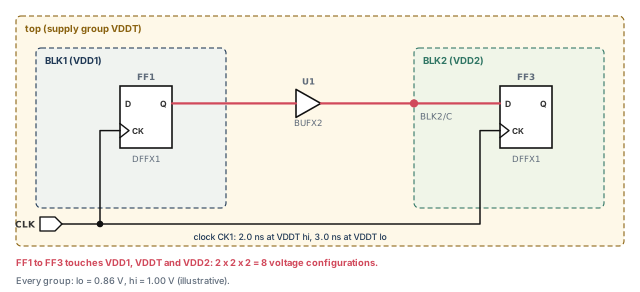
Let us set up SMVA for a design named mydesign. Figure 15 shows its key path. Block BLK1 runs on supply VDD1. Block BLK2 runs on VDD2. The top level runs on VDDT. Each supply can be lo (0.86 V) or hi (1.00 V). Clock CK1 runs faster when VDDT is hi.
Step 1 — Read, link and enable SMVA
pt_shell> set_app_var link_path {* lib_1.0V_pg.db}   ;# 1.0 V library for linking
pt_shell> read_verilog mydesign.v.gz                 ;# read the PG netlist
pt_shell> current_design mydesign                    ;# set the top
pt_shell> link                                       ;# link the design
pt_shell> set_app_var timing_enable_cross_voltage_domain_analysis true   ;# SMVA on
Check: SMVA is enabled before any timing update.
Step 2 — Scaling groups and power intent
pt_shell> define_scaling_lib_group \
            "lib_1.0V_pg.db lib_0.9V_pg.db lib_0.8V_pg.db"   ;# three voltages
pt_shell> load_upf mydesign.upf                              ;# power intent
pt_shell> set_related_supply_net -object_list [get_ports *] \
            -power VDDT -ground VSS                          ;# top supply for every port
Check: all three libraries contain CCS noise data. Every port now has a related supply.
Step 3 — Supply groups, level names and values
pt_shell> set vdd_top [get_supply_groups VDDT]   ;# top group
pt_shell> set vdd1 [get_supply_groups VDD1]      ;# BLK1 group
pt_shell> set vdd2 [get_supply_groups VDD2]      ;# BLK2 group
pt_shell> set_voltage_levels -reference_names {lo hi} $vdd_top   ;# names, top
pt_shell> set_voltage_levels -reference_names {lo hi} $vdd1      ;# names, BLK1
pt_shell> set_voltage_levels -reference_names {lo hi} $vdd2      ;# names, BLK2
pt_shell> set_voltage -reference_name hi -object_list $vdd_top 1.0   ;# top hi
pt_shell> set_voltage -reference_name lo -object_list $vdd_top 0.86  ;# top lo
pt_shell> set_voltage -reference_name hi -object_list $vdd1 1.0      ;# BLK1 hi
pt_shell> set_voltage -reference_name lo -object_list $vdd1 0.86     ;# BLK1 lo
pt_shell> set_voltage -reference_name hi -object_list $vdd2 1.0      ;# BLK2 hi
pt_shell> set_voltage -reference_name lo -object_list $vdd2 0.86     ;# BLK2 lo
Check: every name in every group has a value.
Step 4 — Check supply connections
pt_shell> check_timing -include unconnected_pg_pins  ;# unconnected PG pins
pt_shell> check_timing -include supply_net_voltage   ;# missing voltages
Check: no warnings. A warning means some object will be timed at a single guessed voltage.
Step 5 — DVFS clocks, then the other constraints
The clock runs at 2.00 ns when the top supply is hi, and at 3.00 ns when it is lo.
pt_shell> set top_hi [get_sms_scenarios \
            -supply_group $vdd_top -reference_names hi]   ;# top at hi
pt_shell> set top_lo [get_sms_scenarios \
            -supply_group $vdd_top -reference_names lo]   ;# top at lo
pt_shell> create_clock -name CK1 -period 2.0 \
            -sms_scenarios $top_hi [get_ports CLK]        ;# fast clock at hi
pt_shell> create_clock -name CK1 -period 3.0 \
            -sms_scenarios $top_lo [get_ports CLK] -add   ;# slow clock at lo
pt_shell> read_sdc mydesign.sdc                           ;# other constraints
Keep mydesign.sdc free of clock definitions, so it does not fight the DVFS clocks.
Step 6 — Run and report the worst path
pt_shell> update_timing                    ;# time every voltage configuration
pt_shell> report_timing -through BLK2/C ;# worst over all configurations Startpoint: BLK1/FF1 (rising edge-triggered flip-flop clocked by CK1)
Endpoint: BLK2/FF3 (rising edge-triggered flip-flop clocked by CK1)
Path Group: CK1
Path Type: max
Voltage Config: VDDT:hi, VDD1:lo, VDD2:lo
...
data arrival time 1.43
data required time 1.94
slack (MET) 0.51Check: read the Voltage Config line. The worst case is a mix: the fast clock with slow blocks. A run with all supplies at lo would miss it, because the slow clock hides the slow cells.
Step 7 — Report one voltage condition
pt_shell> report_timing -sms_scenarios $top_lo -through BLK2/C ;# VDDT at lo only Voltage Config: VDDT:lo, VDD1:lo, VDD2:lo
...
data arrival time 1.58
data required time 2.94
slack (MET) 1.36Check: every reported path has VDDT:lo. The other groups still vary, because they do not conflict with $top_lo.
Step 8 — Drop a condition the chip never uses
Suppose the chip never runs with BLK1 at hi while the top is at lo.
pt_shell> set never [get_sms_scenarios -supply_group $vdd1 -reference_names hi \
            -supply_group $vdd_top -reference_names lo]   ;# BLK1 hi, top lo
pt_shell> configure_sms_scenarios -disable $never         ;# leave it out
pt_shell> update_timing -full                             ;# full update is required
pt_shell> report_sms_scenarios -disabled ;# confirm...
Current Ignored Scenarios:
------------------------------------------------------------
VDD1:hi VDDT:loCheck: the disabled condition is listed. Reports no longer show any path with both VDD1:hi and VDDT:lo.
13 Common mistakes and how to catch them
| Symptom | Likely cause | Fix |
|---|---|---|
| SMVA commands or options give errors | timing_enable_cross_voltage_domain_analysis is not true |
Set it before the first timing update |
| A named level has no voltage value | set_voltage_levels was run, but set_voltage was skipped for that name |
Run set_voltage for every name in every group |
| Some cells use one fixed voltage | Unconnected PG pins or ports without a supply net | Run the two check_timing checks; fix the PG netlist or UPF |
| Same path appears many times | Each voltage configuration is a separate path | Read the Voltage Config line; this is expected |
Report with {VDD1:lo} shows VDD2 paths |
Scenarios exclude conflicts; they do not limit | Expected; to narrow further, name a level for the other groups too |
| Within-domain paths missing from reports | Mode variable is only_crossing or legacy |
Use full for signoff |
| Disabled scenario still appears | Only an incremental update was run | Run update_timing -full after -disable or -enable |
source -sms_scenarios gives odd results |
The script has commands without -sms_scenarios support |
Keep only supported commands in scenario scripts |
| ATTR-3 error on a subscript | The attribute does not support DVFS scenarios | Check the supported attribute list |
| HyperScale run fails in strange ways | SMVA setup differs between block and top | Use identical enable, levels and scenarios at both levels |
14 Interview preparation
It times every path at every real combination of supply voltages, for the whole design, in one run.
- Within-domain paths get every level of their domain.
- Cross-domain paths get every combination of the domains they cross.
- Impossible combinations are excluded.
It lets cells in one domain run at different voltages at once, which cannot happen.
- For example, launch at low voltage and capture clock at high voltage.
- The slack is worse than any real case, so you fix false violations.
report_timing -nworst show it?Up to four times for each check type, once per voltage combination.
- Each configuration is treated as a separate path.
- Setup and hold are counted separately.
timing_enable_cross_voltage_domain_analysis true, before the first timing update.
- The named voltage levels must also be set before that update.
Yes. Any arc that crosses a domain boundary, in the data or clock path, makes it cross-domain.
- Crossings can be net arcs or level shifter cell arcs.
The tool guesses its most likely supply and uses that supply's single voltage.
- So the object is not varied with the levels.
check_timing -include unconnected_pg_pinsandsupply_net_voltagefind such cases.
{VDD1:lo, VDDT:lo} to report_timing. Are VDD2-only paths reported?Yes. A command scenario excludes only conflicting scenarios; it does not limit the report to named groups.
- Paths with
VDD1:hiorVDDT:hiare excluded. - VDD2-only paths have no conflict.
Define the clock twice with create_clock -sms_scenarios, once per scenario, using -add for the second.
- Build each scenario with
get_sms_scenarios. - Exceptions such as
set_multicycle_pathwork the same way.
A DVFS scenario is a voltage condition inside one SMVA run. A DMSA scenario is a separate distributed run.
- DMSA scenarios cover operating conditions and constraints.
push_sms_scenario, and one command inside uses -sms_scenarios. Which applies?The explicit -sms_scenarios option, because explicit references rank above implicit contexts.
- Lower-rank references are completely ignored.
- Among implicit methods, the last one applied wins.
Enabling or disabling needs update_timing -full; the default incremental update is not enough.
report_sms_scenarios -disabledconfirms what is disabled.- A false path with
-sms_scenariosis an alternative.
1.10, the worse of the two nearest library derates.
- An exact voltage match uses that library's derate.
- Two variables enable this scaling.
Extraction at different voltages can give different arcs, such as a latch transparent in only one model.
- All models must have the same number and types of arcs.
- Only the table values may differ.
An extra supply an arc depends on, given by the related_power_pins_user attribute on library timing arcs.
- It is imported with
define_user_attribute related_power_pins_user -classes lib_timing_arc -type string -import. has_arc_related_power_pinsconfirms the mapping.
15 Chapter close
Compact glossary
| Term | Meaning |
|---|---|
| SMVA | Graph-based simultaneous multivoltage analysis: all voltage combinations, all paths, one run |
| Power domain | A group of cells that share one supply |
| Within-domain path | A path that stays inside one power domain |
| Cross-domain path | A path with any data or clock arc that crosses a domain boundary |
| Voltage configuration | One level chosen for each supply group on a path |
| Supply group | A set of connected supply nets, found by get_supply_groups |
| Named voltage reference | A label for one voltage level, such as lo or main_high |
| DVFS scenario | A voltage condition in a DVFS (dynamic voltage and frequency scaling) design, stored as sms_scenario |
| Fully describing scenario | A scenario that names one level for each group a path touches |
| Propagated DVFS scenarios | The fully describing scenarios of every path in the design |
| Compatible scenario | A propagated scenario with no conflict with the given one |
| DVFS scenario context | A scenario set by push_sms_scenario for later commands |
| ETM | Extracted timing model; SMVA writes one per voltage combination |
| Virtual PG pin | An extra supply that a timing arc depends on |
| HyperScale | Hierarchical analysis using block models and top context |
SMVA on one page
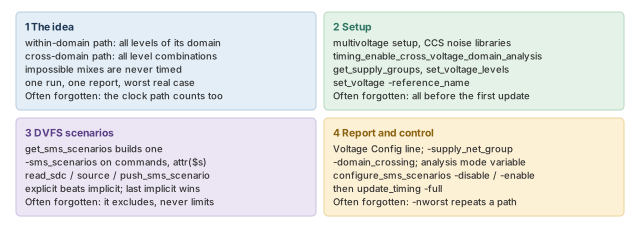
Figure 16 is the summary to redraw from memory.
Where the next chapter goes, and why
You can now time every real voltage combination in one run. You can also aim constraints and reports at chosen voltage conditions. However, so far each net has been timed as if its neighbors were quiet.
The Signal Integrity Analysis chapter adds crosstalk. A switching neighbor can slow a signal, speed it up or push a glitch onto it. It also explains the noise reports you met here.