Why this chapter matters in a real project
No two transistors on a chip are exactly alike. Two identical inverters, side by side, can differ slightly in delay. Static timing must cover this, or silicon fails at speed. The classic cover is on-chip variation (OCV) analysis. It slows down one path and speeds up the other by a fixed percentage, called a derate.
A fixed derate is simple, but it is crude. It charges a 20-gate path the same percentage as a 2-gate path. Yet random effects tend to cancel over many gates. Thus, the long path carries more margin than it needs. That extra margin is pessimism: violations that silicon would never show. Each one costs buffers, area, power and days of ECO work. An ECO (engineering change order) is a late, small fix to the netlist.
This chapter shows two ways to cut that pessimism safely. Advanced OCV (AOCV) picks the derate from tables, based on path depth and distance. Parametric OCV (POCV) treats each delay as a statistical spread and combines the spreads along the path. Getting them wrong costs in two ways. Too much margin means wasted area. Too little means a chip that fails.
Prerequisites
- Operating Conditions: early and late analysis, OCV, and the
set_timing_deratecommand. - Delay Calculation: cell and net delays, slew (the rise or fall time of a signal), and timing arcs.
- Back-Annotation: reading detailed parasitics with
read_parasitics. - Timing Paths and Exceptions: launch and capture paths, setup and hold checks.
- You do not need statistics beyond the idea of an average and a spread. This chapter explains the rest.
In this chapter, times are in nanoseconds (ns) unless said otherwise.
Learning objectives
- Explain why a flat OCV derate is pessimistic for deep paths.
- Enable AOCV, read derating tables with
read_ocvm, and run graph-based and path-based AOCV. - Write and read an AOCV table file, and predict the derate a path receives.
- Apply table groups, depth coefficients, guard-band derates and incremental derates.
- Predict which derate wins when OCV and AOCV values both apply.
- Explain how POCV models each delay as a distribution with a mean and a sigma.
- Provide POCV data through LVF libraries or side files, and enable each POCV feature.
- Read a
report_timing -variationreport and compute a corner value by hand. - Control how
set_timing_deratescales the mean and the sigma of a distribution. - Query POCV slack attributes and generate variation tables in an extracted model.
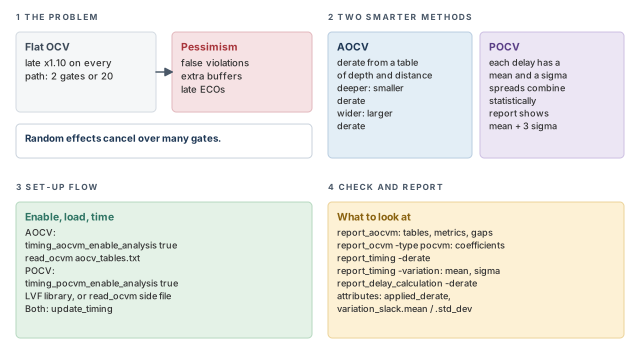
Figure 1 is a map of the whole chapter. Come back to it whenever you lose your place.
1 The beginner's mental model
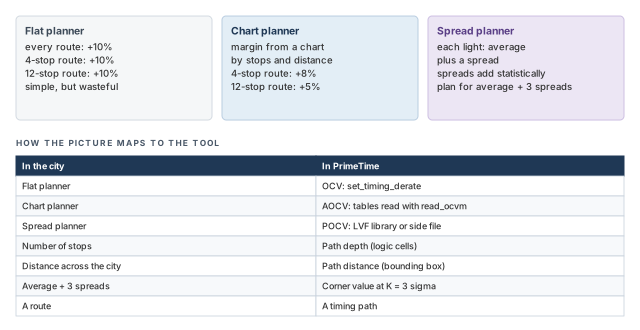
Think of a delivery van on a city route. Each traffic light adds a little random delay. A planner who adds a flat 10% to every trip is safe but wasteful. On a route with 20 lights, some lights are quick and some are slow. The random delays largely cancel out.
Now picture two smarter planners. The first keeps a chart. It gives a smaller margin to routes with many stops, and a larger one to routes that cross the whole city. The second planner records the spread of each light and adds up the spreads with statistics. Figure 2 shows the three planners side by side.
- Traffic is the same for every driver at one moment. Chip variation is fixed after manufacture. Each chip has its own frozen set of fast and slow cells.
- A planner can learn from yesterday. The tool cannot measure your chip. It relies on library data built from simulation.
- In a city, crossing farther does not always mean more delay. On a die, a wider path spans more systematic variation, such as a gradual change across the wafer. Thus, distance raises the margin, while depth lowers it.
Now the engineering model
In engineering terms, there are three levels of variation modeling:
- OCV. A constant derate for early and late delays. For example, late delays get ×1.10 and early delays get ×0.90.
- AOCV. A derate looked up from a table. The table index is the path depth (number of logic cells) and the path distance (physical span).
- POCV. Each cell delay is a distribution with a mean and a standard deviation (sigma). The tool combines them statistically along the path. It then reports a corner value, such as mean plus three sigma.
2 Why a flat derate is not enough
2.1 On-chip variation in one paragraph
On-chip variation analysis applies different conditions to minimum paths and maximum paths. For a setup check, the tool makes the launch path slow and the capture path fast. For a hold check, it does the reverse. The set_timing_derate command sets these factors. A derate is a multiplier on a delay; for example, 1.10 makes a 0.200 ns delay 0.220 ns. The Operating Conditions chapter covers this in detail.
The trouble is that OCV derates are constants. They ignore two path-specific facts:
- Depth. A longer path, with more gates, tends to have less total variation. Random variations from gate to gate cancel each other out.
- Distance. A path that spans a larger physical distance tends to have larger systematic variation. Systematic variation changes smoothly across the die, so far-apart cells differ more.
2.2 Two ways to sharpen the margin
The tool offers two variation methods on top of OCV:
| Method | Margin comes from | Main input |
|---|---|---|
| Advanced on-chip variation (AOCV) | Derate tables indexed by path depth and distance | AOCV table files read with read_ocvm |
| Parametric on-chip variation (POCV) | A statistical model of each cell instance | LVF library data or POCV side files |
LVF stands for Liberty variation format. It is a set of library constructs that store variation data next to the normal timing tables.
3 Advanced on-chip variation (AOCV)
3.1 Depth: why long paths need less margin
AOCV analysis reduces pessimism by applying less derating to paths with less variation. It uses two metrics for each path:
- Path depth, the number of logic cells in the path.
- A location-based bounding box, the smallest rectangle that holds the cells of the path. Its size gives the path distance.
Let us consider depth first. Figure 3 shows two data paths. The short path has two gates. The long path has five. Each gate varies randomly by the same amount. On the long path, some gates run fast and some run slow, so the total varies less, in relative terms.
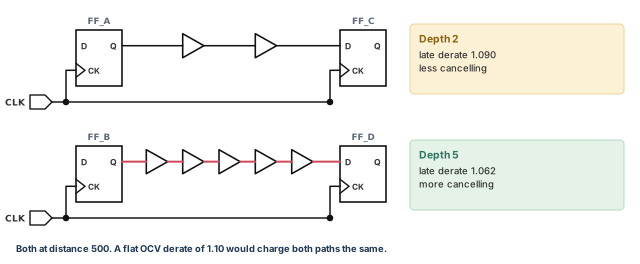
The derate falls as depth rises. In the figure, the 2-gate path gets 1.090 and the 5-gate path gets 1.062. A flat OCV derate of, say, 1.10 would charge both paths the same.
3.2 Distance: why wide paths need more margin
Now let us consider distance. Systematic variation changes gradually across the die. Thus, two cells far apart are more likely to differ than two neighbors. Figure 4 shows how the tool measures the span of a path.
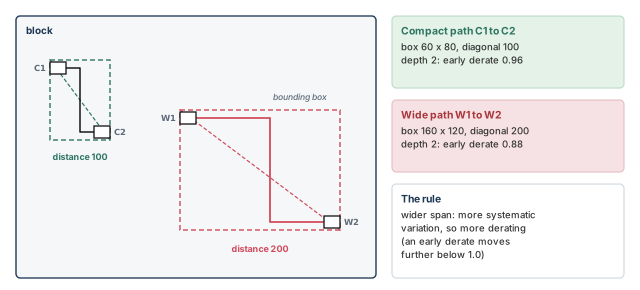
The bounding box is the smallest rectangle that holds every cell of the path. A larger box means a larger distance and more derating. AOCV combines both metrics into one path-specific derate.
3.3 The AOCV flow
The AOCV flow has three parts:
- Enable it. Set the
timing_aocvm_enable_analysisvariable totrue. - Give it tables. Provide derate tables for ranges of path depth and distance. Read them with
read_ocvm. - Time as usual. Run
update_timingorreport_timing. The results reflect the varying derates.
pt_shell> set_app_var timing_aocvm_enable_analysis true   ;# turn on AOCV analysis
pt_shell> read_ocvm aocv_tables.txt                       ;# read the derate tables
pt_shell> update_timing                                   ;# graph-based AOCV runs here
pt_shell> report_timing -derate                           ;# show the derate per arc
Here is a small table file. It sets early derates for cells of the whole design top, at 1.2 V.
version:      1.0
object_type:  design
rf_type:      rise fall
delay_type:   cell
derate_type:  early
object_spec:  top
voltage:      1.2
depth:        0 1 2 3
distance:     100 200
table:        0.88 0.94 0.96 0.97 \
              0.84 0.86 0.88 0.91
AOCV works with all other PrimeTime features. It affects all reporting commands. It is also compatible with distributed multi-scenario analysis (many scenarios spread over several machines). It also works with multicore analysis (one run spread over several processor cores).
3.4 Graph-based AOCV
AOCV is built into both analysis styles of the tool:
- Graph-based analysis (GBA) times the whole design at once. Each cell gets one set of values that must hold for every path through it.
- Path-based analysis (PBA) re-times selected paths one at a time, with values for that path only.
Graph-based AOCV is a fast, design-wide analysis. It runs during update_timing. Because the derate drops for most deep paths, you can save area and improve performance across the whole design.
By construction, graph-based analysis picks conservative depth and distance values. They must bound the worst-case path through each cell. For example, the depth count for a cell never exceeds the depth of the shallowest path through that cell. Otherwise, the analysis could be optimistic for that shallow path.
Figure 5 shows the effect. Cell U3 sits on a 2-cell path and a 5-cell path.
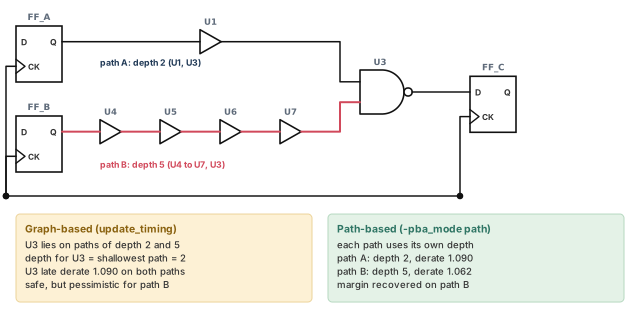
For most designs, graph-based AOCV is sufficient for signoff. It is also a prerequisite for path-based AOCV.
3.5 Path-based AOCV
If violations remain after graph-based AOCV, you can re-time those paths in path-based mode. Path-based analysis looks at each path in isolation. Use report_timing or get_timing_paths with -pba_mode path.
pt_shell> report_timing -pba_mode path ;# recompute depth and distance per pathThe difference between the two modes is this:
- Graph-based. For each timing arc, the tool computes depth and distance for all paths through it, and applies the worst values.
- Path-based. The tool computes depth and distance exactly for each individual path.
By default, path-based analysis with AOCV does two things together:
- Normal path-based analysis, without AOCV. This recalculates slew propagation along the path.
- AOCV path-based analysis. This reduces the derate for deeper paths and for paths that span shorter distances.
To save runtime, you can run only the AOCV part. Set pba_derate_only_mode to true. The tool then uses the worst-slew propagation, instead of recalculating slews.
pt_shell> set_app_var pba_derate_only_mode true   ;# AOCV part only, faster
pt_shell> report_timing -pba_mode path ;# re-time with path depthFor most designs, graph-based AOCV is enough for signoff. Run path-based AOCV only on the few paths that still fail. Thus, the full design stays fast to time, and only the stubborn paths pay the extra runtime.
3.6 Configuration variables
Table 2 lists the variables that configure AOCV.
| Variable | What it controls |
|---|---|
timing_aocvm_analysis_mode |
How depth metrics are calculated. The separate_data_and_clock_metrics mode enables separate derating for clock and data paths. |
timing_aocvm_enable_clock_network_only |
Applies AOCV to the clock network only |
timing_aocvm_enable_single_path_metrics |
Whether AOCV uses separate depth and distance values for nets and cells |
timing_ocvm_enable_distance_analysis |
Whether advanced or parametric OCV performs distance-based analysis |
timing_ocvm_precedence_compatibility |
The fallback to OCV derating for advanced or parametric OCV |
4 AOCV derating tables
4.1 Reading, protecting and reporting tables
To run AOCV, you must give the tool derating tables. The read_ocvm command reads them from a file. The tables are annotated onto design objects and applied directly to timing arc delays. A table can be attached to three classes of object:
- hierarchical cells;
- library cells;
- designs.
A hierarchical cell is a cell that holds other cells, such as a block instance.
Some table data reveals sensitive process facts. The write_binary_aocvm command converts an ASCII (plain text) table file into a binary encoded file. The read_ocvm command reads binary and compressed binary files written by write_binary_aocvm. No extra arguments are needed.
pt_shell> read_ocvm aocv_tables.bin ;# binary files are read the same wayTo see the derates the tool computed, add -derate to report_timing. The derate column then shows the AOCV derate of each arc.
The report_aocvm command shows the table data. With it, you can:
- show objects annotated with early, late, rise, fall, cell or net tables;
- find cells and nets that are, or are not, annotated with AOCV data;
- show graph-based depth, distance and derate on timing arcs;
- show path metrics for a timing path: distance, launch depth and capture depth.
A table read from a binary or compressed binary file is not visible in report_aocvm output.
pt_shell> report_aocvm [get_timing_arcs -of_objects [get_cells U1]]   ;# arc metrics
pt_shell> report_aocvm [get_timing_paths \
            -path_type full_clock_expanded \
-pba_mode path] ;# distance, launch and capture depthRun report_aocvm to list the cells and nets with no AOCV data before you trust any slack. It is better to find a block with no table now than after signoff.
4.2 The AOCV file format
One file can hold many tables. Each table is either:
- one-dimensional, in depth only or in distance only; or
- two-dimensional, in both depth and distance.
Each table is tied to a group of objects with two definitions:
object_type design | lib_cell | cellnames the object class.object_spec [patterns]names the objects. The pattern is optional.
The pattern gives the object name and an expression to evaluate on the object's attributes. It uses regular expression matching, the same as the Tcl regexp command. That is the matching used by get_cells, get_lib_cells and get_designs. You may also use any option of the matching "get" command. For example, when object_type is lib_cell, any get_lib_cells argument is allowed in the pattern.
What each object class can carry:
designcan carry cell and net tables for the whole design.lib_cellcan carry cell tables on library cells.cellcan carry cell and net tables on hierarchical cells.
All entries are required, unless marked optional. A comment starts with two forward slashes (//) and can go anywhere in the file.
| Specifier | Meaning |
|---|---|
version |
The AOCV version number |
group_name |
Optional. A table group name; apply a group with set_aocvm_table_group |
object_type |
design, lib_cell or cell |
rf_type |
rise, fall or rise fall |
delay_type |
cell, net or cell net |
derate_type |
early or late |
path_type |
Optional. clock, data or clock data |
object_spec |
A pattern for the objects the table affects |
voltage |
Optional. The supply voltage, in volts; the table applies only to cells at that voltage |
depth |
M floating-point values, each a number of logic cells in the path; M=0 if none |
distance |
N floating-point values, each a physical span in nanometers (nm); N=0 if none |
table |
N × M derate values, one for each depth and distance pair |
4.3 Reading a table: lookup and interpolation
The table entry holds N × M values. Each row matches one distance value, and each column one depth value. Figure 6 shows the early table from the flow example as a grid.
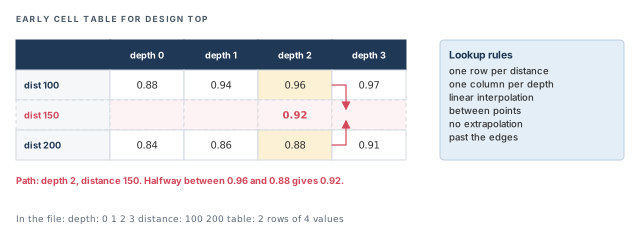
Three rules govern the lookup:
- Linear interpolation. Between data points, the tool interpolates linearly.
- No extrapolation. The tool does not extrapolate beyond the most extreme values in the table.
- One-dimensional cases. If N=0, the table has M entries. If M=0, it has N entries. If both are 0, it has one entry.
For example, a path of depth 2 spans 150 nm. At depth 2, the row for 100 gives 0.96 and the row for 200 gives 0.88. Halfway between is 0.92.
A beginner writes a table that stops at depth 3 for a design with 30-deep paths. The tool does not extrapolate past the last point, so the deep paths never get a smaller derate. Cover the real range of depths and distances in your design.
4.4 Which table wins
Several tables can apply to one cell or net. When they share the same rf_type and derate_type, the precedence follows the set_timing_derate rules.
For cell arcs, from highest to lowest:
- Library cell
- Hierarchical cell
- Design
For net arcs, from highest to lowest:
- Hierarchical cell
- Design
If several entries have the same object_type, rf_type and derate_type for one object, the last entry wins.
The voltage entry has its own rules:
- If you give
voltagewithout a value, or leave it out, the table applies to all voltages. - For a multirail cell, a cell with more than one supply, do not give a voltage. Instead, use the most conservative derates over all its input and output voltage combinations.
4.5 More table examples
This table sets an early derate for every cell and net of design top, at any voltage:
version:      1.0
object_type:  design
rf_type:      rise fall
delay_type:   cell net
derate_type:  early
object_spec:  top
depth:        0 1 2 3
distance:     100 200
table:        0.87 0.93 0.95 0.96 \
              0.83 0.85 0.87 0.90
This table applies to nets only:
version:      1.0
object_type:  design
rf_type:      rise fall
delay_type:   net
derate_type:  early
object_spec:  top
depth:        0 1 2 3
distance:     100 200
table:        0.88 0.94 0.96 0.97 \
              0.84 0.86 0.88 0.91
The optional path_type entry limits a table to clock paths, data paths or both. Three rules come with it:
- To derate clock and data paths separately, set
timing_aocvm_analysis_modetoseparate_data_and_clock_metrics. - If
path_typeis left out, the table applies to both clock and data paths. - If
path_typeis used,versionmust be2.0.
version: 2.0
object_type: lib_cell
object_spec: LIB/BUF1X
rf_type: rise fall
delay_type: cell
derate_type: late
path_type: data
depth: 1 2 3 4 5
distance: 500 1000 1500 2000
table: \
1.123 1.090 1.075 1.067 1.062 \
1.124 1.091 1.076 1.068 1.063 \
1.125 1.092 1.077 1.070 1.065 \
1.126 1.094 1.079 1.072 1.067
Read it row by row. Along a row, the derate falls as depth grows. Down a column, it rises as distance grows. That is exactly the depth and distance behavior from the start of this section.
4.6 Table groups for blocks
A large chip often holds several blocks, each built by a different team. Each block may need its own tables. Table groups make this possible. You give each set of tables a name, then apply the group to hierarchical cells.
Use the group_name entry to put a table in a group. When group_name is used, version must be 3.0.
version: 3.0
group_name: core_tables
object_type: lib_cell
object_spec: LIB/BUF1X
rf_type: rise fall
delay_type: cell
derate_type: late
path_type: data clock
depth: 1 2 3 4 5
distance: 500 1000
table: \
1.123 1.090 1.075 1.067 1.062 \
1.124 1.091 1.076 1.068 1.063
A group typically holds several tables. A table with no group_name belongs to the default group. The default group applies to every part of the design with no named group.
Apply a group to a hierarchical instance with set_aocvm_table_group:
pt_shell> set_aocvm_table_group core_tables [get_cells H1] ;# H1 uses core_tablesFigure 7 shows exactly what the group covers.
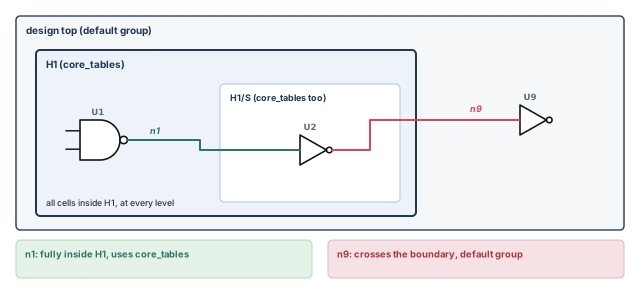
The rules are:
- The group applies to all cells in
H1, including lower-level cells in the hierarchy. - It applies to all nets fully enclosed in
H1. - It does not apply to a net partly inside and partly outside
H1.
Groups are applied independently at each level of hierarchy. No data is shared between blocks. Thus, a block keeps its table settings when it is reused at a higher level.
The report_aocvm command shows, for each group and the default group, how many cells carry AOCV data. It also lists each group name and the hierarchical cells it affects. To remove a group from a cell, use reset_aocvm_table_group.
Running set_aocvm_table_group, reset_aocvm_table_group or read_ocvm after a timing update triggers a new full timing update. Put them before the first update_timing to avoid paying twice.
4.7 Depth coefficients
By default, each cell arc counts as 1 toward path depth. Some cells are more complex than others. For example, a buffer is often built from two inverters in series. It is fair to count it as depth 2.
A depth coefficient sets this count. Use set_aocvm_coefficient on cells, library cells or library timing arcs.
pt_shell> set_aocvm_coefficient 2.0 [get_lib_cells lib1/BUF2] ;# every BUF2 counts 2This sets a coefficient of 2.0 on every instance of lib1/BUF2. Coefficients are optional. The default is 1.0.
5 Adjusting AOCV derates
5.1 Guard-band derating
AOCV tables model process variation. A guard-band derate adds margin for effects not related to process, in an AOCV flow.
Use the -aocvm_guardband option of set_timing_derate. The option also exists on report_timing_derate and reset_timing_derate. Two rules apply:
- The option works only in an AOCV context. Outside AOCV, the guard-band derate has no effect.
- The derate on an arc is the product of the guard-band derate and the AOCV derate.
For example, an AOCV derate of 1.075 with a guard band of 1.02 gives 1.075 × 1.02 = 1.0965.
pt_shell> set_timing_derate -late 1.02 -aocvm_guardband   ;# 2% extra late margin
pt_shell> report_timing_derate -aocvm_guardband           ;# guard-band factors only
pt_shell> reset_timing_derate -aocvm_guardband            ;# remove the guard band
The report_timing_derate command shows derates on the current design. Its report depends on the options:
- With
-aocvm_guardband, it reports only guard-band derates. - With neither
-variationnor-aocvm_guardband, it reports only the deterministic derates, meaning the ordinary fixed ones. - The
-variationand-aocvm_guardbandoptions are mutually exclusive.
5.2 Incremental derating
Sometimes you want to nudge one cell's derate without rewriting it. Incremental derating does this. Add the -increment option to set_timing_derate. The value you give is then added to the regular derate.
Incremental derating follows the same precedence and override rules as regular derating. You cannot make a guard-band derate incremental. Thus, -increment and -aocvm_guardband are mutually exclusive.
The arithmetic has four rules:
- Default values. With no derate set, the tool uses 0.0 for incremental and 1.0 for regular.
- Addition. Final derate = regular derate + incremental derate.
- Replace by default. A new incremental value replaces the previous one on that object.
- No negative delays. If the final derate is below 0.0, the tool uses 0.0.
To accumulate successive incremental values instead of replacing them, set timing_enable_cumulative_incremental_derate to true.
Let us work two examples. Figure 8 shows both.
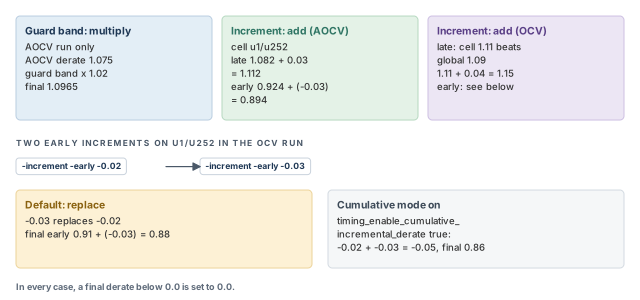
Example 1 — AOCV. Cell u1/u252 has a regular late derate of 1.082 and an early derate of 0.924.
set_app_var timing_aocvm_enable_analysis true            ;# AOCV on
set_timing_derate -increment -late 0.03 [get_cells u1/u252]    ;# add 0.03 late
set_timing_derate -increment -early -0.03 [get_cells u1/u252]  ;# add -0.03 early
The final late derate is 1.082 + 0.03 = 1.112. The final early derate is 0.924 + (−0.03) = 0.894.
Example 2 — OCV. The design has global derates, and the cell has its own late derate.
set_timing_derate -late 1.09                                   ;# global late
set_timing_derate -early 0.91                                  ;# global early
set_timing_derate -late 1.11 [get_cells u1/u252]               ;# cell late
set_timing_derate -increment -late 0.04 [get_cells u1/u252]    ;# add 0.04 late
set_timing_derate -increment -early -0.02 [get_cells u1/u252]  ;# first early step
set_timing_derate -increment -early -0.03 [get_cells u1/u252]  ;# replaces it
The final late derate is 1.11 + 0.04 = 1.15. The cell's own 1.11 wins over the global 1.09. The final early derate is 0.91 + (−0.03) = 0.88. The −0.03 replaced the −0.02.
To remove only the incremental derates on an object, use reset_timing_derate -increment. To report them, use report_timing_derate -increment.
pt_shell> set_timing_derate -data -increment -early -0.02    ;# data, early
pt_shell> set_timing_derate -data -increment -late 0.06      ;# data, late
pt_shell> set_timing_derate -clock -increment -early -0.05   ;# clock, early
pt_shell> set_timing_derate -clock -increment -late 0.10     ;# clock, late
pt_shell> report_timing_derate -increment ;# show increments****************************************
Report : timing derate
-scalar -increment
...
****************************************
----- Clock ------ ------ Data ------
Rise Fall Rise Fall
Early Late Early Late Early Late Early Late
----------------------------------------------------------------------
design: simple_path
Net delay static -0.05 0.10 -0.05 0.10 -0.02 0.06 -0.02 0.06
Net delay dynamic -0.05 0.10 -0.05 0.10 -0.02 0.06 -0.02 0.06
Cell delay -0.05 0.10 -0.05 0.10 -0.02 0.06 -0.02 0.06
Cell check -- -- -- -- -- -- -- --The increments were set on the whole design, so only global values appear.
A beginner runs -increment -early -0.02 and then -increment -early -0.03, expecting −0.05 in total. By default the second value replaces the first. If you want them to add up, set timing_enable_cumulative_incremental_derate to true first.
5.3 Mixing OCV and AOCV derates
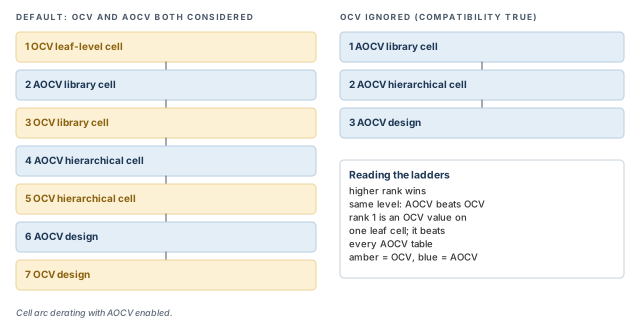
A design can carry both OCV derates from set_timing_derate and AOCV tables. By default, the tool considers both for each object. If both are at the same level, the AOCV value wins.
With AOCV enabled, cell arc derating uses this order, from highest to lowest:
- OCV leaf-level cell
- AOCV library cell
- OCV library cell
- AOCV hierarchical cell
- OCV hierarchical cell
- AOCV design
- OCV design
To ignore OCV derates completely during AOCV, set timing_aocvm_ocv_precedence_compatibility to true. The tool then uses the set_timing_derate precedence rules with AOCV only:
- AOCV library cell
- AOCV hierarchical cell
- AOCV design
Figure 9 puts the two orders side by side.
Two variables have close names. Do not mix them up:
timing_aocvm_ocv_precedence_compatibilityignores OCV derates during AOCV, as described here.timing_ocvm_precedence_compatibilitycontrols the fallback to OCV derating for advanced or parametric OCV.
A beginner adds a quick set_timing_derate -late 1.15 on one leaf cell to test something, then forgets it. In the default order, that OCV value beats every AOCV table for that cell. Search your scripts for cell-level derates before AOCV signoff.
5.4 Querying AOCV derating on timing paths
For detail on a path, query these AOCV attributes:
| Attribute | What it holds |
|---|---|
aocvm_coefficient |
The depth coefficient used |
applied_derate |
The derate finally applied |
depth |
The depth metric |
derate_factor_depth_distance |
The derate from the depth and distance table |
distance |
The distance metric |
guardband |
The guard-band derate |
incremental |
The incremental derate |
AOCV derates belong to timing arcs. However, these attributes sit on the timing point objects where the arcs end. They work in both graph-based and path-based analysis.
Before using them, do one of these:
- Enable graph-based AOCV by setting
timing_aocvm_enable_analysistotrue. - Run path-based AOCV with
get_timing_paths -pba_mode.
This script prints the applied derate at each point of each path:
set path_list [get_timing_paths -pba_mode path]       ;# the paths to inspect
foreach_in_collection path $path_list {               ;# each path
  foreach_in_collection point [get_attribute $path points] {   ;# each point
    echo [format "Derate value: %f" [get_attr $point applied_derate]]  ;# print it
  }
}6 Parametric on-chip variation (POCV)
6.1 What POCV gives you
Parametric on-chip variation (POCV) models the timing of each cell instance as a function of its own variable. In other words, each instance gets its own random value. The cell model is written in terms of it.
POCV provides:
- statistical single-parameter derating for random variation;
- one input format and one characterization source for both AOCV and POCV table data;
- familiar, non-statistical timing reports;
- limited statistical reporting (mean and sigma) for timing paths;
- compatibility with existing PrimeTime functions;
- a smaller pessimism gap between graph-based and path-based analysis;
- less overhead for incremental timing analysis.
Some features need extra licenses:
| Feature | License |
|---|---|
| POCV analysis | PrimeTime-ADV |
| Moment-based variation modeling | PrimeTime-ADV-PLUS |
| Via variation | PrimeTime-ADV-PLUS |
POCV models four kinds of variation. The next sections take them one at a time: single-parameter random, via, distance-based, and a mix of single-parameter and distance-based.
6.2 Single-parameter random variation
POCV can model random variation of each cell instance as one parameter of that instance. This is single-parameter variation analysis.
Each cell's timing is treated as statistically independent. In other words, one cell being slow tells you nothing about its neighbor. As arrivals and slews move through the logic, the tool statistically combines each cell's delay and slew with the incoming values. Figure 10 shows this.
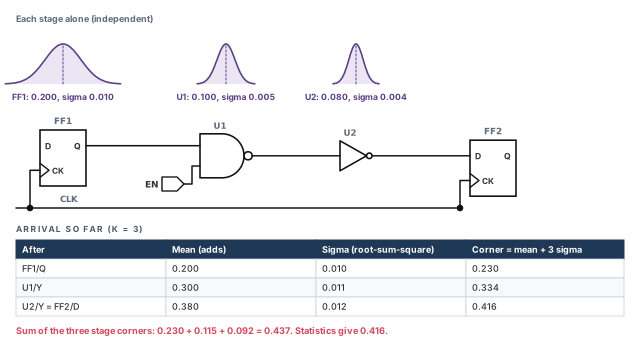
Let us check the numbers. Means add: 0.20 + 0.10 + 0.08 = 0.38. Independent sigmas combine as a root-sum-square: √(0.010² + 0.005² + 0.004²) ≈ 0.012. The 3-sigma corner is 0.38 + 3 × 0.012 ≈ 0.416. Adding each cell's own corner would give 0.437. The gap is pessimism that POCV removes.
POCV data is usually faster to produce than AOCV data:
- AOCV depth tables need Monte Carlo simulation on a long chain of cells.
- POCV cell parameters need simulation of only one or a few stages.
Monte Carlo simulation runs a circuit many times with random device values to measure the spread.
6.3 Normal variation modeling
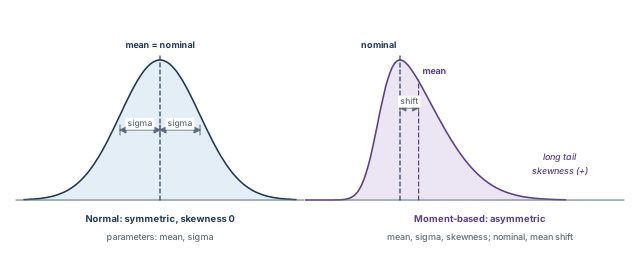
By default, single-parameter analysis models random effects as normal (Gaussian) distributions. A normal distribution is the familiar symmetric bell curve. It has two parameters:
- Mean. The average value. The curve is symmetric, so the mean is also the nominal value.
- Standard deviation (σ, or "sigma"). The amount of spread around the mean.
6.4 Moment-based variation modeling
At advanced process nodes and very low supply voltages, the bell curve can become lopsided. Moment-based analysis models these asymmetric (non-Gaussian) distributions. It uses three parameters:
- Mean. The average value. This is the first moment.
- Standard deviation (σ). The spread around the mean. This is the second central moment.
- Skewness. The asymmetry, the third standardized moment. Zero means symmetric. A positive value means a longer tail toward larger values; a negative value, toward smaller values.
Because the curve is lopsided, the mean no longer equals the no-variation value. Two more terms describe this:
- Nominal. The timing with no variation modeled.
- Mean shift. The difference between the nominal value and the mean.
Figure 11 shows a normal curve and a skewed one.
In variation reports, mean values are the mean-shifted values, not the nominal values.
Moment-based analysis needs libraries with moment-based LVF delay and slew data. For example, an ocv_std_dev_cell_rise table gives the standard deviation of cell delay. It is a function of input transition and output load. If normal POCV models appear in a moment-based run, the tool converts them. It uses their minimum (early) and maximum (late) variation behavior.
6.5 Via variation
A via is a vertical connection between two metal layers. Vias vary in their physical construction. That changes their resistance and capacitance, so it changes the timing of signals through them.
Figure 12 shows a net from one cell to another through four vias.
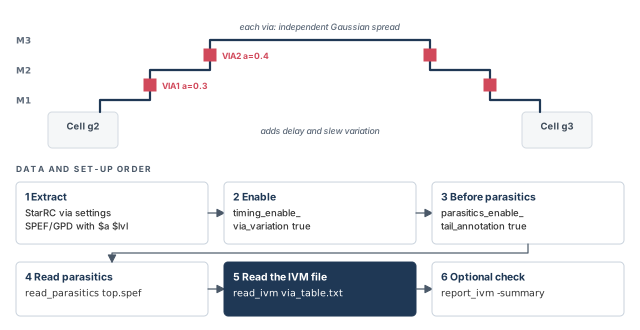
Key facts about via variation:
- Each via varies independently, with a Gaussian spread.
- Vias add resistance and capacitance, so they add delay variation.
- They also add slew variation, because the slew degrades along the net.
- Via variation is an optional part of single-parameter analysis.
- It needs LVF libraries with slew variation data, so via-induced slew variation is computed and propagated correctly.
6.6 Distance-based variation
POCV can also model systematic variation as a function of how far a path spans across the die. This is distance-based variation analysis.
The tool computes a bounding box for a timing path. It takes the diagonal of that box, the largest possible distance between path objects. It then looks up a derate from a table, just as in Figure 4.
- In graph-based analysis, each cell uses a distance derate computed from all paths through that cell.
- In path-based analysis, the path uses one distance derate computed for that path alone.
6.7 Mixing single-parameter and distance-based variation
POCV can model both kinds together in one analysis. The tool computes and applies each one independently:
- Single-parameter variation is computed for each cell instance, assuming random variation. Cell behavior and the timing through the logic are both statistical distributions.
- Distance-based variation is computed for each cell along a path, from the bounding box of paths through that cell. It is applied as a plain scalar derate.
When a distance derate meets a single-parameter distribution, it shifts only the mean. It does not change the standard deviation.
7 Providing POCV data
POCV data can come from three places: LVF libraries, POCV side files, and via variation files.
7.1 POCV data in LVF libraries
LVF constructs can store both single-parameter and distance-based variation data in the library. For single-parameter data, a sigma table sits next to the nominal delay table.
ocv_sigma_cell_rise ("delay_template_7x7") {
  sigma_type : "early";
  index_1("0.008800, 0.026400, 0.060800, 0.129600, 0.267200, 0.542400, 1.093600");
  index_2("0.001000, 0.002400, 0.005200, 0.010800, 0.022100, 0.044500, 0.089500");
  values("0.000476, 0.000677, 0.001075, 0.001870, 0.003438, 0.006626, 0.012922", \
         "0.000651, 0.000901, 0.001303, 0.002081, 0.003678, 0.006818, 0.013144", \
         ...);
}
ocv_sigma_cell_rise ("delay_template_7x7") {
  sigma_type : "late";
  ...
}
Each table gives sigma at each pair of slew and load points. The sigma_type says whether it is the early or the late sigma.
LVF improves accuracy, because the variation can change with each arc and with slew and load. A side file gives one fixed coefficient for all conditions. LVF can model variation for:
- delay timing arcs;
- setup and hold constraints;
- recovery and removal constraints;
- minimum pulse width and minimum period;
- clock-gating checks.
Two rules to remember:
- Arc-dependent, slew- and load-dependent variation exists only in LVF. Side files cannot hold it.
- The unit of POCV LVF data is the library time unit.
LVF can also hold distance-based derates:
ocv_table_template("aocvm_distance_template") {
  variable_1 : path_distance;
  index_1 ("0, 10, 100, 1000");
}
...
ocv_derate(aocvm_distance_design){
  ocv_derate_factors(aocvm_distance_template) {
    rf_type : rise_and_fall;
    derate_type : late;
    path_type : clock_and_data;
    values ( "1.1, 1.2, 1.3, 1.4" );
  }
  ocv_derate_factors(aocvm_distance_template) {
    rf_type : rise_and_fall;
    derate_type : early;
    path_type : clock_and_data;
    values ( "0.9, 0.8, 0.7, 0.6" );
  }
}
default_ocv_derate_distance_group : aocvm_distance_design;
Distance-based LVF data does the same job as a distance table in a side file.
7.2 POCV side files
A side file is a separate text file of variation data. POCV side files use table format version 4.0 or later. The format extends the AOCV format:
ocvm_type: pocvmmarks the entry as POCV.coefficient: valuegives the coefficient of variation: standard deviation divided by nominal.distance:andtable:give distance-based derates.- The
depthfield is not supported.
LVF libraries give sigma in time units. Side files give a coefficient, a unitless ratio. For example, a coefficient of 0.05 on a 0.100 ns delay means a sigma of 0.005 ns.
| Variation type | Applies to | Example entry |
|---|---|---|
| Single-parameter | Library cells | version: 4.0 · ocvm_type: pocvm · object_type: lib_cell · rf_type: rise fall · delay_type: cell · derate_type: early · object_spec: lib28nm/invx* · coefficient: 0.05 |
| Distance-based | Design level | version: 4.0 · ocvm_type: pocvm · object_type: design · rf_type: rise fall · delay_type: cell · derate_type: early · object_spec: (empty) · distance: 1 10 50 100 · table: 0.911 0.903 0.891 0.871 |
If several tables apply to the same leaf cell or net, the precedence is, highest first:
- Design
- Hierarchical cell
- Library cell (leaf cells only)
Single-parameter and distance-based data usually sit in separate files. They can share one file, but only in separate object entries.
A beginner assumes POCV side files follow the AOCV order, where library cells win. For POCV side-file tables, the order is design, then hierarchical cell, then library cell. Check which entries overlap before you trust a coefficient.
7.3 Via variation data
Via variation needs two inputs:
- detailed parasitics that carry via area and resistance;
- a side file that gives via resistance variation as a function of via area.
For the parasitics, the StarRC extraction tool must write via data into the parasitic file. That file is SPEF (Standard Parasitic Exchange Format) or GPD (Galaxy Parasitic Database). These extraction settings are required:
EXTRA_GEOMETRY_INFO: NODE
KEEP_VIA_NODES: YES
NETLIST_NODE_SECTION: YES
NETLIST_TAIL_COMMENTS: YES
REDUCTION: LAYER_NO_EXTRA_LOOPS
In the extracted netlist, each via is a resistor with a tail comment. The comment gives its area ($a) and layer level ($lvl):
// *LAYER_MAP
// *7 VIA1
// *8 VIA2
// *9 VIA3
*D_NET w2 10.0000
...
*RES
0 g2:z w2:1 500
1 w2:1 w2:2 500 // $a=0.3 $lvl=7
2 w2:2 w2:3 500 // $a=0.4 $lvl=8
3 w2:3 g3:a 500 // $a=0.6 $lvl=9
*END
Here resistor 1 is a VIA1 with area 0.3. Resistor 0 has no via comment.
The second input is an interconnect variation model (IVM) side file:
version : 1.0

// default (if no layer match)
object_type: design
delay_type : via
layer_name : *
area           : 0.1
table_min_sigma: 0.25
table_max_sigma: 0.4
table_meanshift: 0
table_stdev    : 0

// via variation data for VIA1 layer
object_type: design
delay_type : via
layer_name : VIA1
area           : 0.200 0.400 0.800
table_min_sigma: 0.185 0.143 0.124
table_max_sigma: 0.223 0.204 0.184
table_meanshift: 0      0      0
table_stdev    : 0      0      0
How to read it:
arealists via areas.table_min_sigmaandtable_max_sigmagive the coefficient of variation of resistance (standard deviation divided by mean) at each area.- Values between the listed areas are linearly interpolated.
table_meanshiftandtable_stdevmust be zero.- The
layer_name : *entry is the default for layers with no match.
Notice that larger vias vary less. In the VIA1 entry, table_max_sigma falls from 0.223 to 0.184 as area grows.
8 Enabling and loading POCV
8.1 Basic POCV set-up
Three steps turn on POCV:
pt_shell> set_app_var timing_pocvm_enable_analysis true   ;# 1. turn on POCV
pt_shell> read_ocvm pocv_side_file_name   ;# 2. only if you use a side file
pt_shell> set_app_var timing_pocvm_corner_sigma 3 ;# 3. optional K; 3 is the default- Step 1. The tool then runs graph-based POCV automatically within
update_timing. - Step 2. Read a side file only if you use one. LVF data needs no command.
- Step 3.
timing_pocvm_corner_sigmasets the K used to compute graph corner values. Higher values are more conservative. The default is 3 sigma.
8.2 Optional POCV features
Moment-based analysis
pt_shell> set_app_var timing_pocvm_enable_extended_moments true ;# asymmetric modelsThe libraries must contain moment-based LVF models.
Constraint variation
Constraint variation has its own switch. To give setup and hold constraints variation too:
pt_shell> set_app_var timing_enable_constraint_variation true   ;# vary setup and hold
pt_shell> set_app_var \
            timing_use_slew_variation_in_constraint_arcs setup_hold   ;# add slew effect
The second variable adds slew variation to the constraint variation. Its values are setup_hold, setup, hold or none. The default is none. It needs timing_enable_constraint_variation set to true. The libraries must have LVF constraint and slew variation data.
Via variation
You need the data from the via variation section first. Then follow this order:
pt_shell> set_app_var timing_enable_via_variation true        ;# 1. turn on vias
pt_shell> set_app_var parasitics_enable_tail_annotation true  ;# 2. before parasitics
pt_shell> read_parasitics top.spef                            ;# 3. read SPEF or GPD
pt_shell> read_ivm via_table.txt                              ;# 4. read the IVM file
pt_shell> report_ivm -summary                                 ;# 5. optional: check it
Via variation brings slew variation effects. Slew variation is on by default. Do not turn it off when via variation is on.
Distance-based variation
Distance-based derates need coordinates to compute the path distance. The tool reads the coordinates of net nodes, pins and ports from a SPEF or GPD file:
pt_shell> set_app_var read_parasitics_load_locations true   ;# 1. before parasitics
pt_shell> read_parasitics top.spef                          ;# 2. read with locations
Turning off slew variation
Slew variation is on by default. It is used when the libraries have LVF slew variation data. To turn it off for cell delays:
pt_shell> set_app_var timing_enable_slew_variation false ;# fixed slews for cellsA beginner reads the parasitics first and sets parasitics_enable_tail_annotation or read_parasitics_load_locations afterwards. Both must be set before read_parasitics. Otherwise the via data or the coordinates are not read in, and the analysis lacks them.
8.3 Loading variation data
There are two sources of POCV data:
- LVF libraries. No special action is needed. The tool reads the POCV data from the library while linking the design.
- Side files. Read them with
read_ocvm, as in the AOCV flow.
pt_shell> read_ocvm pocv_single_parameter_file_name        ;# coefficients
pt_shell> read_ocvm pocv_distance_based_derating_file_name ;# distance derates
Rules for side files:
- The file must use the POCV format, version 4.0 or later.
- The tool applies the coefficients directly to the instance delays.
- If a table has bad syntax, the tool issues an error and does not annotate that data.
read_ocvmcan run before or after linking, but must run before the timing update.
If both an LVF library and a side file give data, the side file wins. Thus, a side file can selectively override LVF data.
- For single-parameter data,
timing_pocvm_precedencecontrols this order. - For distance-based data, the side file always wins.
9 Applying timing derate to POCV distributions
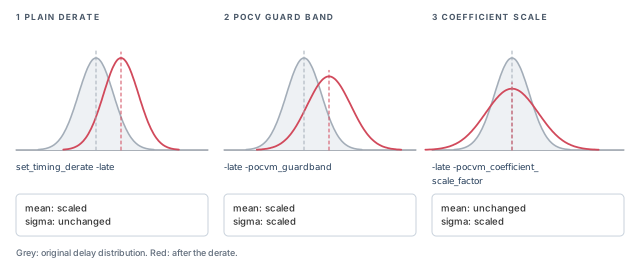
In POCV, a delay is a distribution, not a number. So a derate must say what it scales: the mean, the sigma, or both. By default, set_timing_derate scales the mean but not the sigma. It moves the curve without changing its width.
Two options change this. Table 7 lists all three forms.
| Option added to the derate command | Scales mean? | Scales sigma? |
|---|---|---|
| no extra option | Yes | No |
-pocvm_guardband |
Yes | Yes |
-pocvm_coefficient_scale_factor |
No | Yes |
For example, use -pocvm_guardband to model effects not related to process. They scale the whole distribution, both mean and sigma.
You can give several derate components with several set_timing_derate commands. Each one is applied to its objects by the usual derate precedence rules. The report_timing_derate and reset_timing_derate commands also accept -pocvm_guardband and -pocvm_coefficient_scale_factor. Thus, you can report or reset each component on its own.
Figure 13 shows the three cases as curves.
pt_shell> set_timing_derate -late 1.02 -pocvm_guardband    ;# scale mean and sigma
pt_shell> set_timing_derate -late 1.10 \
            -pocvm_coefficient_scale_factor              ;# widen sigma by 10%
pt_shell> report_timing_derate -pocvm_guardband          ;# report the guard band
pt_shell> reset_timing_derate -pocvm_coefficient_scale_factor   ;# remove the scale
The report_delay_calculation -derate command shows how the components combine. The reporting section shows it in detail.
10 Reporting POCV results
10.1 Reporting coefficients and derating tables
Use report_ocvm -type pocvm to show POCV data. It shows coefficients and distance-based tables. It lists objects annotated with early, late, rise, fall, cell or net data. It also shows the annotation of leaf cells and nets.
pt_shell> report_ocvm -type pocvm [get_cells I] ;# coefficients on cell I******************************************************
POCV Table Set : *Default*
******************************************************
POCV coefficient: 0.0500
Name Object Process Voltage Sense Path Delay Inherited
------------------------------------------------------------------
I cell early * rise clock cell lib1/INV1
I cell early * fall clock cell lib1/INV1
I cell early * rise data cell lib1/INV1
I cell early * fall data cell lib1/INV1A second block follows with the same rows for late. The Inherited column shows where the value came from, here the library cell lib1/INV1.
To find gaps in the data:
pt_shell> report_ocvm -type pocvm -cell_delay -list_not_annotated   ;# no data at all
pt_shell> report_ocvm -type pocvm -cell_delay \
-list_not_annotated -coefficient ;# no coefficient only- The first form lists cells missing coefficients or distance-based tables.
- The second lists cells missing only coefficients. Use it when you apply no distance-based table.
The report_ocvm command does not need update_timing. Thus, you can run it before the timing update to catch missing data early.
For POCV LVF, the sigma tables live on library timing arcs. So you must give library timing arcs in the object list:
pt_shell> report_ocvm -type pocvm [get_lib_timing_arcs \
-from */INVD1/I -to */INVD1/ZN] ;# all sigma tables on this arcmin rise table
Sense / Type: negative_unate
| Slew
Load | 0.0010000 0.0024000 0.0052000 0.0108000 ...
----------+--------------------------------------------
0.0088000 | 0.0004760 0.0006770 0.0010750 0.0018700 ...
0.0264000 | 0.0006510 0.0009010 0.0013030 0.0020810 ...
...
min fall table
...Each table shows its mode, min (early) or max (late), and its sense, negative_unate or positive_unate. If several library arcs have different input conditions, the sdf_cond is shown too. It is the condition under which that arc is active.
10.2 Corner values and the reporting sigma
POCV works with all reporting commands. Reports show corner values, not whole distributions:
- For maximum values, the corner is on the right side of the distribution.
- For minimum values, the corner is on the left side.
- Constraint values are always on the right side, because higher values constrain more for both setup and hold.
By default, corners are at 3 sigma. The timing_pocvm_report_sigma variable changes this. Changing it does not trigger update_timing; it affects only reporting.
pt_shell> set_app_var timing_pocvm_report_sigma 2   ;# below the corner sigma of 3
pt_shell> set_app_var timing_pocvm_report_sigma 0   ;# slack with no POCV at all
Two rules:
- The value must be smaller than
timing_pocvm_corner_sigma, or it is ignored. With the default corner sigma of 3, a value of 4 does nothing. To report at 4 sigma, first raisetiming_pocvm_corner_sigmaabove 4, for example to 5. That change does triggerupdate_timing. - A value of 0 shows the slack at 0 sigma, meaning without POCV. It does not trigger
update_timing.
Setting the report sigma to 0 is a quick way to see how much margin POCV adds. Compare the slack at 0 and at 3 sigma. If a path fails only at 3 sigma, its variation, not its mean delay, is the problem.
10.3 Reading report_timing -variation
To see the variation in a timing report, use report_timing -variation. Here is the data arrival part for a short path.
                        --------- Incr ------------   ------ Path ------
Point                    Mean  Sensit Corner  Value    Mean Sensit  Value
-------------------------------------------------------------------------
clock clk (rise edge)                          0.00                 0.00
in1 (in)                 0.00   0.00   0.00   0.00    0.00   0.00   0.00 r
b1/Z (B1I)               1.00   3.00  10.00  10.00    1.00   3.00  10.00 r
b3/Z (B1I)               1.00   2.00   7.00   2.82    2.00   3.61  12.82 r
out1 (out)               0.00   0.00   0.00   0.00    2.00   3.61  12.82 r
data arrival time                                                  12.82
In the Incr columns:
- Mean, Sensit, Corner describe the incremental delay distribution of that stage alone. Sensit (sensitivity) is the standard deviation.
- Value is not taken from that distribution. It is the plain difference between the previous and current Path Value.
In the Path columns:
- Mean, Sensit, Value describe the cumulative arrival distribution at that pin.
- The cumulative distribution is the statistical combination of all incremental distributions up to that pin.
Figure 14 explains the columns, using two stages of this path.
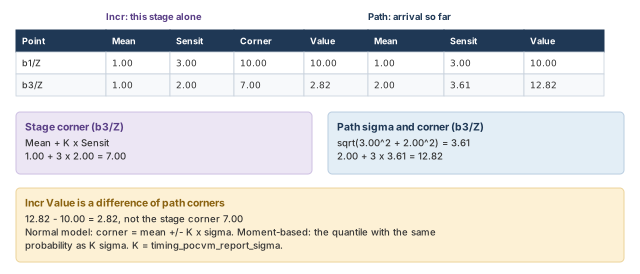
Corner values (Incr Corner and Path Value) are computed with K equal to timing_pocvm_report_sigma:
- Normal modeling (the default). Corner = Mean ± K × Sensit.
- Moment-based modeling. The corner is the quantile whose probability matches K sigma in a normal distribution. A quantile is the value below which a given share of outcomes falls.
Let us check one row. At b3/Z, the path mean is 1.00 + 1.00 = 2.00. The path sigma is √(3.00² + 2.00²) ≈ 3.61. The corner is 2.00 + 3 × 3.61 ≈ 12.82. The Incr Value is 12.82 − 10.00 = 2.82.
The rest of the report adds the required time and the slack, each with a mean, a sensitivity and a value. A statistical adjustment line appears just before the slack.
10.4 Reading report_delay_calculation -derate
The report_delay_calculation -derate command shows how the final derate is built, for the cell delay and for its sigma.
pt_shell> report_delay_calculation -from I/I -to I/ZN -derate ;# arc I to ZN Rise Fall
------------------------------------------------------------------
Cell delay = 0.008886 0.009559 (in library unit)
POCVM coefficient = 0.050000 0.050000
POCVM coef scale factor = 1.000000 1.000000
POCVM distance derate = 1.000000 1.000000
POCVM guardband = 1.020000 1.020000
Incremental derate = 0.000000 0.000000
Cell delay derated = 0.009064 0.009750 (in library unit)
Cell delay sigma = 0.000453 0.000488 (in library unit)
Cell delay derated = "Cell delay" *
( "POCVM guardband" * "POCVM distance derate" + "Incremental derate" )
Cell delay sigma = "Cell delay" *
( "POCVM guardband" * "POCVM coefficient" * "POCVM coef scale factor" )The two formulas are printed at the bottom. Let us check the rise column:
- Derated delay = 0.008886 × (1.02 × 1.00 + 0.00) ≈ 0.009064.
- Sigma = 0.008886 × (1.02 × 0.05 × 1.00) ≈ 0.000453.
With POCV LVF, the format changes slightly, because LVF sigma is already in time units. The report shows POCVM delay sigma instead of a coefficient. The sigma formula becomes:
Cell delay sigma = "POCVM delay sigma" *
 ( "POCVM guardband" * "POCVM coef scale factor" )
For example, a delay sigma of 0.000652 with a guard band of 0.98 gives 0.000652 × 0.98 ≈ 0.000639.
If via variation is on, delay reports for net arcs also show the via part of the wire variation:
POCVM delay sigma induced by wire variation
                        = 0.002582    0.003449
POCVM output transition sigma induced by wire variation
                        = 0.011070    0.009584
10.5 Statistical graph merging pessimism
In POCV, arrivals are distributions. At a gate with several inputs, the tool must take the maximum of several distributions. The maximum of two distributions can be larger than either one alone. This is graph merging pessimism.
Figure 15 shows the idea.
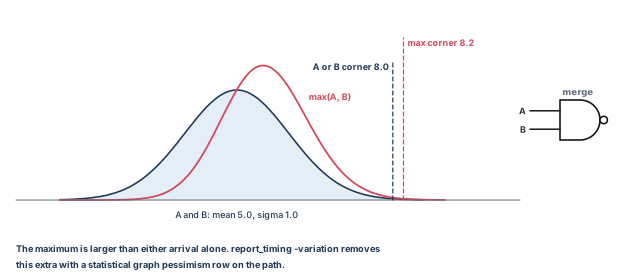
POCV removes this pessimism with a timing point adjustment in report_timing -variation. It appears as a statistical graph pessimism row after the affected pin:
Point Mean Sensit Corner Value Mean Sensit Value
------------------------------------------------------------------------------------
b1/Z (B1I) 1.00 3.00 10.00 10.00 1.00 3.00 H 10.00 r
statistical graph pessimism 3.00 -2.24 0.00 4.00 2.00 10.00
b3/Z (B1I) 1.00 2.00 7.00 3.49 5.00 2.83 H 13.49 r
statistical graph pessimism 5.00 -2.58 0.00 10.00 1.16 13.49A report with both -from and -to can have less merging pessimism than a report with -to alone. Thus, report_timing -to xyz bounds report_timing -from abc -to xyz, but the two need not match.
When a -to report and a -from -to report to the same endpoint disagree slightly under POCV, do not panic. The -to report is the bound. The narrower report removes some merging pessimism.
10.6 Querying POCV slack and arrival attributes
POCV slack and arrival attributes are statistical. Each has a mean and a standard deviation. If you query the attribute directly, the tool returns an empty list. You must ask for .mean or .std_dev.
pt_shell> get_attribute [get_pins I/ZN] max_fall_variation_slack   ;# no suffix
{}
pt_shell> get_attribute [get_pins I/ZN] max_fall_variation_slack.mean   ;# mean
0.990180
pt_shell> get_attribute [get_pins I/ZN] max_fall_variation_slack.std_dev   ;# sigma
0.000488
pt_shell> set path [get_timing_paths -fall_through I/ZN]   ;# one path
_sel96
pt_shell> get_attribute $path variation_slack.mean   ;# path slack mean
0.990180| Attribute | Object class |
|---|---|
max_fall_variation_arrival, max_rise_variation_arrival |
pin |
max_fall_variation_slack, max_rise_variation_slack |
pin |
min_fall_variation_arrival, min_rise_variation_arrival |
pin |
min_fall_variation_slack, min_rise_variation_slack |
pin |
statistical_adjustment |
timing_path |
variation_arrival |
timing_path, timing_point |
variation_slack |
timing_path, timing_point |
A script reads max_fall_variation_slack without a suffix, gets {}, and treats it as "no violation". Always add .mean or .std_dev. An empty result means you asked the wrong question, not that the slack is fine.
11 POCV in extracted timing models
An extracted timing model (ETM) is a compact timing model of a block, made with extract_model. It stands in for the block at a higher level.
When POCV is on, extract_model writes LVF tables into the ETM by default. Thus, the tool that reads the ETM can time it accurately at various corners. The ETM gets:
- delay sigma tables for combinational and sequential delay arcs;
- constraint sigma tables for setup, hold, minimum pulse width, clock-gating, removal and recovery arcs, when constraint variation is on.
For best accuracy at the top level, generating LVF tables is recommended. However, some downstream tools may not fully support LVF. The extract_model_create_variation_tables variable chooses which types of LVF data the ETM gets.
12 POCV reference tables
Table 9 lists the POCV variables.
| Variable | What it does |
|---|---|
parasitics_enable_tail_annotation |
Reads tail annotation data from parasitic files, for via variation |
timing_enable_constraint_variation |
Enables variation for setup and hold constraints |
timing_enable_slew_variation |
Enables slew variation for cell delays |
timing_enable_via_variation |
Enables via variation using data read with read_ivm |
timing_pocvm_corner_sigma |
The corner sigma for POCV delay constraint analysis |
timing_pocvm_enable_analysis |
Enables POCV analysis |
timing_pocvm_enable_extended_moments |
Enables asymmetric moment-based modeling data |
timing_pocvm_max_transition_sigma |
The corner sigma for POCV maximum transition time analysis |
timing_pocvm_precedence |
The priority between file-based and library-based POCV coefficients |
timing_pocvm_report_sigma |
The sigma used for reporting |
timing_use_slew_variation_in_constraint_arcs |
Uses slew variation in constraint arc variation; needs timing_enable_constraint_variation set to true |
Table 10 lists the POCV commands.
| Command | What it does |
|---|---|
read_ocvm pocvm_file |
Reads POCV tables |
read_ivm via_file |
Reads via variation tables |
report_delay_calculation -derate |
Reports derating detail for delay calculation |
report_ocvm -type pocvm |
Shows POCV coefficients and distance-based tables |
report_ivm |
Shows via variation table data |
report_timing -derate |
Reports POCV information in the timing report |
report_timing_derate -pocvm_coefficient_scale_factor |
Reports POCV scaling |
report_timing_derate -pocvm_guardband |
Reports the POCV guard band |
reset_timing_derate -pocvm_coefficient_scale_factor |
Removes POCV scaling |
reset_timing_derate -pocvm_guardband |
Removes the POCV guard band |
set_timing_derate -pocvm_coefficient_scale_factor |
Sets POCV coefficient scaling |
set_timing_derate -pocvm_guardband |
Sets the POCV guard band |
The LVF library groups and attributes for POCV fall into three families. The two single-parameter families cover the same tables: cell delay, constraint, transition, retain slew and retaining, each in rise and fall. The distance-based family holds derate tables.
| Family | Groups or attributes | Contained in |
|---|---|---|
| Normal single-parameter | ocv_sigma_cell_fall, ocv_sigma_cell_rise, ocv_sigma_fall_constraint, ocv_sigma_rise_constraint, ocv_sigma_fall_transition, ocv_sigma_rise_transition, ocv_sigma_retain_fall_slew, ocv_sigma_retain_rise_slew, ocv_sigma_retaining_fall, ocv_sigma_retaining_rise |
timing |
| Normal single-parameter | sigma_type |
the ocv_sigma_ cell, transition, retain slew and retaining groups (not the constraint groups) |
| Moment-based | ocv_std_dev_*, ocv_mean_shift_* and ocv_skewness_*, each with the same ten suffixes: cell_fall, cell_rise, fall_constraint, rise_constraint, fall_transition, rise_transition, retain_fall_slew, retain_rise_slew, retaining_fall, retaining_rise |
timing |
| Distance-based | ocv_derate_distance_group |
cell |
| Distance-based | default_ocv_derate_distance_group, ocv_derate, ocv_table_template |
library |
| Distance-based | ocv_derate_factors |
ocv_derate |
The library-level attribute that names the default distance table is default_ocv_derate_distance_group, as in the LVF example above. Do not confuse it with default_ocv_derate_group, a similar name for derate groups that are not distance-based.
13 Worked example: POCV signoff on a small block
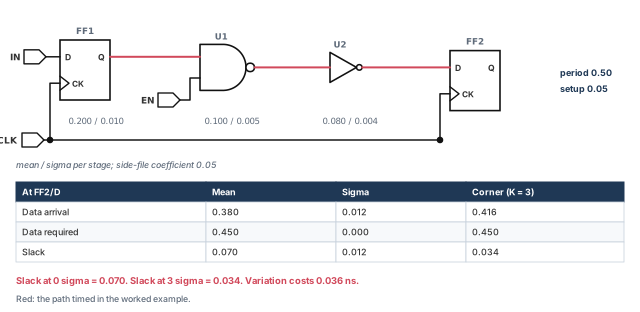
Let us run POCV on a small block named top. Figure 16 shows the path we will follow. FF1 launches on clock CLK, the data goes through U1 and U2, and FF2 captures it. The clock period is 0.50 ns. All numbers are illustrative.
Step 1 — Write the side file
We use one coefficient for every cell in library STDLIB, for early and late.
version    : 4.0
ocvm_type  : pocvm
object_type: lib_cell
rf_type    : rise fall
delay_type : cell
derate_type: early
object_spec: STDLIB/*
coefficient: 0.05

version    : 4.0
ocvm_type  : pocvm
object_type: lib_cell
rf_type    : rise fall
delay_type : cell
derate_type: late
object_spec: STDLIB/*
coefficient: 0.05
Check: both entries say ocvm_type: pocvm and version 4.0 or later. There is no depth line.
Step 2 — Enable POCV and read the data
pt_shell> set_app_var timing_pocvm_enable_analysis true   ;# turn on POCV
pt_shell> read_ocvm pocv_coef.txt                         ;# before update_timing
Check: no syntax error from read_ocvm. A table with bad syntax is not annotated.
Step 3 — Find cells with no coefficient
pt_shell> report_ocvm -type pocvm -cell_delay \
            -list_not_annotated -coefficient   ;# cells missing a coefficient
Check: no cell of top is listed. This step needs no timing update, so you can run it early.
Step 4 — Update timing and read the variation report
pt_shell> update_timing                          ;# graph-based POCV runs here
pt_shell> report_timing -to FF2/D -variation ;# mean, sigma and corner columns ------- Incr --------------- ------ Path ------
Point Mean Sensit Corner Value Mean Sensit Value
--------------------------------------------------------------------------
clock CLK (rise edge) 0.000 0.000
clock network delay (ideal) 0.000 0.000
FF1/CK (DFFX1) 0.000 0.000 0.000 0.000 0.000 0.000 0.000 r
FF1/Q (DFFX1) 0.200 0.010 0.230 0.230 0.200 0.010 0.230 r
U1/Y (NAND2X1) 0.100 0.005 0.115 0.104 0.300 0.011 0.334 f
U2/Y (INVX1) 0.080 0.004 0.092 0.082 0.380 0.012 0.416 r
FF2/D (DFFX1) 0.000 0.000 0.000 0.000 0.380 0.012 0.416 r
data arrival time 0.416
clock CLK (rise edge) 0.500 0.500
clock network delay (ideal) 0.000 0.500
library setup time -0.050 0.450
data required time 0.450 0.000 0.450
--------------------------------------------------------------------------
data required time 0.450 0.000 0.450
data arrival time -0.380 0.012 -0.416
--------------------------------------------------------------------------
slack (MET) 0.070 0.012 0.034Check: recompute one row by hand. At U1/Y, the mean is 0.200 + 0.100 = 0.300. The sigma is √(0.010² + 0.005²) ≈ 0.011. The corner is 0.300 + 3 × 0.0112 ≈ 0.334.
Step 5 — See the cost of variation
pt_shell> set_app_var timing_pocvm_report_sigma 0   ;# no update_timing needed
pt_shell> report_timing -to FF2/D -variation        ;# slack becomes the mean
pt_shell> set_app_var timing_pocvm_report_sigma 3   ;# back to the default
Check: the slack is 0.070 at 0 sigma and 0.034 at 3 sigma. The path is safe, but variation uses half its margin.
Step 6 — Read the slack in a script
pt_shell> get_attribute [get_pins FF2/D] max_rise_variation_slack.mean      ;# mean
0.070
pt_shell> get_attribute [get_pins FF2/D] max_rise_variation_slack.std_dev   ;# sigma
0.012
Check: you used the .mean and .std_dev suffixes. Without them, the result is {}.
Step 7 — Add a guard band and confirm the arithmetic
The signoff team asks for 2% extra late margin on the whole distribution.
pt_shell> set_timing_derate -late 1.02 -pocvm_guardband   ;# scale mean and sigma
pt_shell> report_delay_calculation -from U1/A -to U1/Y -derate ;# show the math Rise Fall
------------------------------------------------------------------
Cell delay = 0.094000 0.100000 (in library unit)
POCVM coefficient = 0.050000 0.050000
POCVM coef scale factor = 1.000000 1.000000
POCVM distance derate = 1.000000 1.000000
POCVM guardband = 1.020000 1.020000
Incremental derate = 0.000000 0.000000
Cell delay derated = 0.095880 0.102000 (in library unit)
Cell delay sigma = 0.004794 0.005100 (in library unit)Check: U1/Y falls on our path, so read the Fall column. Derated delay = 0.100 × 1.02 = 0.102. Sigma = 0.100 × 1.02 × 0.05 = 0.0051. Both mean and sigma grew by 2%, as a guard band should do.
Step 8 — Re-time and decide
pt_shell> report_timing -to FF2/D -variation ;# re-time with the guard bandCheck: the slack drops below 0.034, because every late delay and sigma grew by 2%. If the path now fails, look at the Incr columns. The stage with the largest Sensit is the best target for a fix.
14 Common mistakes and how to catch them
| Symptom | Likely cause | Fix |
|---|---|---|
| AOCV results look the same as OCV | AOCV is not enabled, or no table matched | Set timing_aocvm_enable_analysis; check with report_aocvm |
| Deep paths get no derate relief | The table stops at a small depth; there is no extrapolation | Extend depth to the real path depths |
| One cell ignores its AOCV table | An OCV derate on that leaf cell ranks first | Remove the stray derate, or set timing_aocvm_ocv_precedence_compatibility |
| A block's table group misses some nets | Nets that cross the block boundary are not covered | Expect it; give boundary nets a suitable default table |
| Two early increments do not add up | A new increment replaces the old one by default | Turn on cumulative incremental derating |
| A long run repeats its timing update | Tables or groups were loaded after update_timing |
Load all tables and groups before the first update |
| Via variation has no effect | Tail annotation was enabled after reading parasitics | Enable it, read parasitics, then run read_ivm |
| Distance-based POCV uses no distance | Load locations were not enabled before reading parasitics | Enable them, then re-read the parasitics |
| Report sigma of 4 changes nothing | It must be smaller than the corner sigma | Raise timing_pocvm_corner_sigma first |
A POCV slack attribute returns {} |
The .mean or .std_dev suffix is missing |
Query variation_slack.mean and .std_dev |
15 Interview preparation
Random variation partly cancels over many gates, so a deep path varies less than a flat derate assumes.
- AOCV gives a smaller derate as depth grows.
- The extra margin of flat OCV shows up as false violations.
Path depth, the number of logic cells, and path distance, from the bounding box of the path.
- More depth lowers the derate.
- More distance raises it, because systematic variation grows across the die.
Set timing_aocvm_enable_analysis to true and read the tables with read_ocvm.
- Then run
update_timingorreport_timingas usual. - Use
report_aocvmto check which objects got data.
A side-file coefficient is sigma divided by nominal delay, a unitless ratio; LVF gives sigma in library time units.
- A coefficient of 0.05 on a 0.100 ns delay means sigma 0.005 ns.
- LVF can also vary sigma with arc, slew and load.
It picks a conservative value: the depth never exceeds the depth of the shallowest path through that cell.
- This bounds the worst-case path through the cell.
- Deep paths through the same cell become pessimistic.
- Path-based AOCV with
-pba_mode pathrecovers that margin.
-increment -late 0.04. What is the final derate?1.15, because an incremental derate is added to the regular one.
- A later increment on the same object replaces this one, unless cumulative mode is on.
- A final negative derate is clamped to 0.0.
b3/Z is 7.00 but its Incr Value is 2.82. Why?Incr Value is the difference between the previous and current path corner, not the stage corner.
- Path sigmas combine as a root-sum-square, so stage corners do not simply add.
- Path Value = Path Mean + K × Path Sensit.
-pocvm_guardband and -pocvm_coefficient_scale_factor change?The guard band scales both mean and sigma; the coefficient scale factor scales sigma only.
- A plain
set_timing_deratescales the mean only. report_delay_calculation -derateshows how each component is applied.
Set timing_pocvm_report_sigma to 0 and report again.
- The report sigma affects only reporting.
- It must be smaller than
timing_pocvm_corner_sigma, or it is ignored.
The OCV leaf-cell derate, which is first in the default unified order.
- At the same level, AOCV beats OCV.
- Setting
timing_aocvm_ocv_precedence_compatibilitytotrueignores OCV derates entirely.
The maximum of several arrival distributions at a merge point can exceed each one, so the graph is pessimistic.
- POCV removes it as a
statistical graph pessimismrow inreport_timing -variation. - A
-toreport bounds a-from -toreport but need not match it.
Only the mean shifts; the standard deviation is unchanged.
- Distance-based variation is a scalar derate per cell.
- Single-parameter variation stays a statistical distribution.
Parasitics with via area and layer tail comments, an IVM side file, and LVF slew variation data.
- Set
timing_enable_via_variationandparasitics_enable_tail_annotationbeforeread_parasitics. - Read the IVM file with
read_ivm, then check it withreport_ivm -summary. - Keep slew variation on.
LVF sigma tables, which extract_model writes by default when POCV is on.
- Constraint sigma tables appear when constraint variation is on.
- Use
extract_model_create_variation_tablesif a downstream tool lacks full LVF support.
16 Chapter close
Compact glossary
| Term | Meaning |
|---|---|
| On-chip variation (OCV) | Fixed early and late derates on minimum and maximum paths |
| Derate | A multiplier on a delay, such as 1.10 |
| Pessimism | Extra margin that silicon does not need |
| AOCV | Advanced OCV: derates from tables of depth and distance |
| Path depth | The number of logic cells in a path |
| Path distance | The span of a path, from its bounding box |
| Bounding box | The smallest rectangle holding every cell of a path |
| Graph-based analysis (GBA) | Whole-design timing with one conservative value per cell |
| Path-based analysis (PBA) | Re-timing one path with values for that path only |
| Table group | A named set of AOCV tables applied to hierarchical cells |
| Depth coefficient | How much one cell arc counts toward path depth |
| Guard-band derate | Extra margin for effects not related to process |
| Incremental derate | A value added to the regular derate |
| POCV | Parametric OCV: each delay is a statistical distribution |
| Mean / sigma | The average and the spread of a distribution |
| Coefficient of variation | Sigma divided by nominal, as used in side files |
| LVF | Liberty variation format: variation data inside the library |
| Moment-based modeling | Asymmetric distributions with mean, sigma and skewness |
| Mean shift | The gap between nominal value and mean |
| Corner value | Mean ± K × sigma, the number shown in reports |
| Via variation | Random spread in via resistance and capacitance |
| IVM file | Interconnect variation model: via sigma versus area |
| Graph merging pessimism | Extra spread from taking the maximum of distributions |
Variation on one page
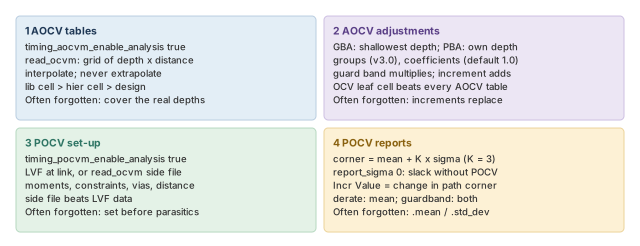
Figure 17 is the summary to redraw from memory.
Where the next chapter goes, and why
You can now give each path a fair margin for variation. However, most examples so far assumed a single supply voltage across the chip. Modern designs run blocks at different voltages, and switch some blocks off.
The Multivoltage Design Flow chapter adds power domains, supply nets and level shifters to the analysis. The voltage entry in AOCV tables and the multirail rule you met here are a first glimpse of that world.