Why this chapter matters in a real project
Two wires that run side by side for a long distance act like the two plates of a small capacitor. When one wire switches, it pushes charge onto its neighbor. This is called crosstalk. In older processes it was a small effect. In modern processes, wires are tall, thin and very close together, so crosstalk can change a stage delay by a large fraction.
A timing run without crosstalk can therefore report a clean design that fails on silicon. For example, a path with 30 ps of setup slack can lose 50 ps to one strong neighbor. The design then fails at speed, and nobody saw it coming.
Crosstalk also causes a second kind of failure. A quiet wire, held at logic 0, can get a short voltage spike when its neighbor switches. If the spike is tall and wide enough, the next gate sees a 1. That can corrupt a register or clock a flop twice. No setup or hold check catches this, so a separate noise check is needed.
This chapter shows how the tool finds both problems, how you control its pessimism, and how you read the reports. These skills decide whether late fixes go to the right nets or are wasted on false alarms.
Prerequisites
- Delay Calculation: how a stage delay and slew are computed. It also introduces CCS (composite current source) and NLDM (nonlinear delay model) libraries.
- Back-Annotation: reading parasitics with
read_parasitics. - Clocks: generated clocks and clock groups.
- Timing Paths and Exceptions: false paths and path groups.
- Case and Mode Analysis:
set_case_analysis. - Variation: on-chip variation, early and late arrival times.
- You do not need to know circuit simulation, library characterization or layout repair. Those ideas are explained here where they are used.
In this chapter, times are in nanoseconds (ns) and noise heights are in volts (V) unless said otherwise. A picosecond (ps) is 0.001 ns.
Learning objectives
- Explain crosstalk delay and crosstalk noise, and name the aggressor and the victim in a picture.
- Explain why timing windows decide whether an aggressor can hurt a victim.
- Enable crosstalk delay analysis, read coupled parasitics and run the checks that make results trustworthy.
- Predict which aggressors electrical filtering removes, given bump sizes and thresholds.
- Include, exclude and group aggressors, and remove those settings correctly.
- Choose clock group settings that remove crosstalk pessimism without making the analysis optimistic.
- Read a crosstalk timing report, a bottleneck report and a crosstalk delay calculation report.
- Detect and report double-switching errors.
- Run static noise analysis, and read noise slack in height, area and area-percent form.
- Supply missing noise data with noise immunity curves, noise margins and steady-state resistance.
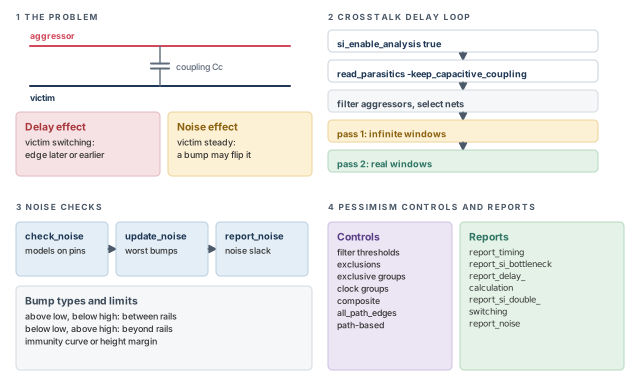
Figure 1 is a map of the whole chapter. Come back to it whenever you lose your place.
1 The beginner's mental model
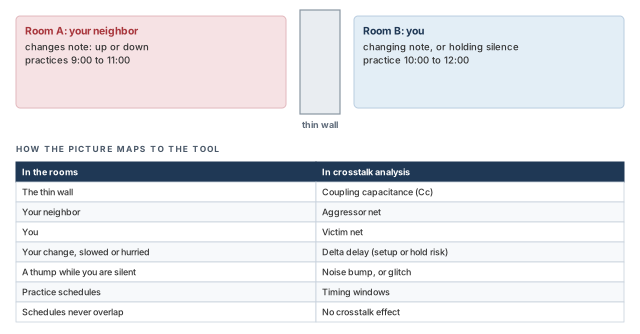
Think of two practice rooms that share a thin wall. You are singing in one room. Your neighbor is singing in the other.
- If your neighbor jumps to a loud note at the exact moment you change note, the wall carries the push. Your change takes longer, or happens sooner.
- If you are holding silence and your neighbor bangs on the wall, a listener in your room hears a thump. A loud, long thump might be mistaken for a word.
- If your neighbor only practices in the morning and you sing in the afternoon, nothing happens. Your schedules never overlap.
Figure 2 maps each part of this picture to its engineering name.
- Every net is both a singer and a neighbor. A net can be a victim of one net and an aggressor to another at the same time.
- Direction matters. A neighbor switching the opposite way slows you down, but one switching the same way speeds you up.
- Your own driver holds your wire steady. A strong driver resists a thump, and a weak one does not. The wall alone does not decide the result.
- A thump can pass through a gate. It can grow or shrink on the way, so one bump can cause a failure several gates later.
- The tool does not know the exact time of each note. It knows a window of possible times, from earliest to latest.
Now the engineering model
In engineering terms:
- A victim net is a net that receives unwanted coupling effects from a nearby net.
- An aggressor net is a net that causes those effects.
- Coupling capacitance is the capacitance between two neighboring nets.
- Delta delay is the extra delay, or delay reduction, that crosstalk adds to a switching victim.
- A noise bump, or glitch, is a short voltage spike on a victim that should be steady.
- A timing window is the range of times, from earliest to latest arrival, when a net can switch.
The tool finds windows from an ordinary timing update. It then uses the window overlaps to decide which aggressors can matter.
2 Crosstalk basics
2.1 Why crosstalk grows as geometries shrink
Signal integrity is the ability of a signal to carry information reliably. It must resist interference from nearby signals. Crosstalk is the unwanted electrical interaction between physically adjacent nets through coupling capacitance.
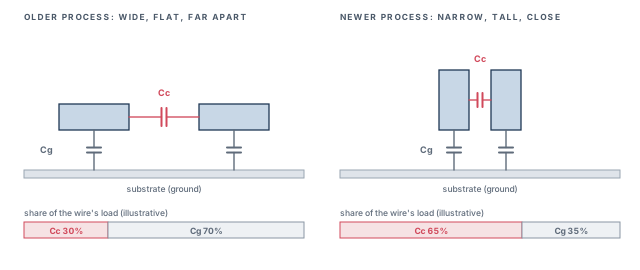
Figure 3 shows why the problem grows in smaller processes:
- Wires sit closer together and become taller. The facing side walls grow, so coupling capacitance grows.
- Wires become narrower. Their capacitance to the substrate (ground) becomes smaller.
- Transistors become smaller, so cell delays become shorter.
Thus, the coupling share of the total load grows, while the delays it disturbs shrink. Crosstalk becomes large compared with cell and net delays.
PrimeTime SI is the tool option that adds crosstalk analysis to the static timing analyzer. SI stands for signal integrity. It needs its own license. It can analyze two kinds of crosstalk effect:
- Delay effects. Crosstalk changes when a transition happens. The tool adds the delay change to the timing reports.
- Static noise effects. Crosstalk causes a bump on a steady net. The tool reports bumps that can cause a functional failure.
You can ask for delay effects, noise effects or both.
2.2 Two effects: a delay change and a noise bump
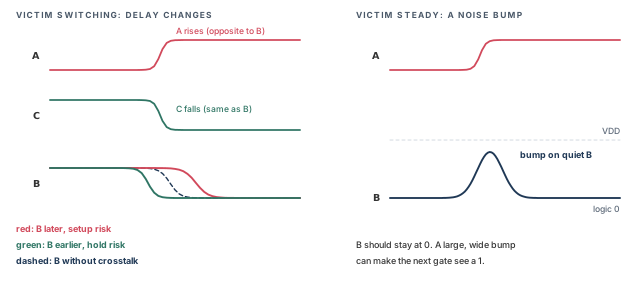
Let us consider three coupled nets, A, B and C. Net B is falling. The left panel of Figure 4 shows what happens.
- Net A rises at about the same time. It switches in the opposite direction, so it fights B. The transition on B happens later. This can cause a setup violation on a path through B.
- Net C falls at about the same time. It switches in the same direction, so it helps B. The transition on B happens earlier. This can cause a hold violation on a path through B.
The right panel shows the second effect. Net B should stay at logic 0. Net A rises, and coupling pushes a bump onto B. If the bump is large and wide enough, the next gate can see the wrong value.
The tool finds the worst-case delay changes. It uses them in total slack values. It also reports where crosstalk delays occur and how large they are. Thus, you can change the design or the layout at the critical points.
For noise, the tool finds where bumps have the largest effects. It reports the locations so they can be fixed.
2.3 Delta delay and the fanout stage effect
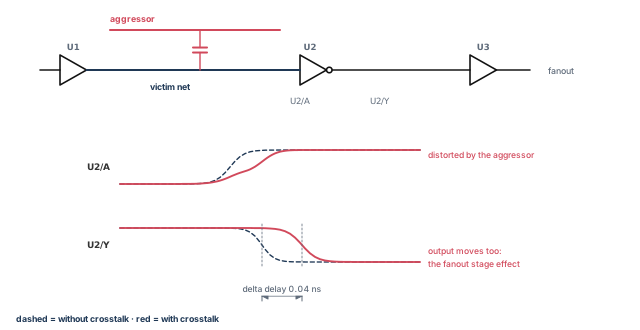
Crosstalk does not only shift the victim waveform. It also distorts its shape. A distorted waveform at a receiver input changes the receiver's own output timing. That change then flows on to the next stage.
Figure 5 shows this. The tool calls the extra delay on the switching victim the delta delay. The delay passed on to the fanout stages is the fanout stage effect. The tool includes the fanout stage effect as part of the delta delay.
2.4 Aggressors, victims and what decides the effect
The words aggressor and victim describe a relationship between two nets. They are not fixed labels. An aggressor can itself be a victim, and a victim can also be an aggressor.
The timing effect of an aggressor on a victim depends on four things:
- the amount of coupling capacitance;
- the relative times and slew rates of the two transitions;
- the switching directions, rising or falling;
- the combined effect of several aggressors on one victim.
The tool considers all four. It saves a lot of runtime by skipping two kinds of case. It ignores coupling capacitors that are too small to matter. It also ignores cases where the transitions on the two nets cannot overlap in time.
2.5 When the aggressor switches matters
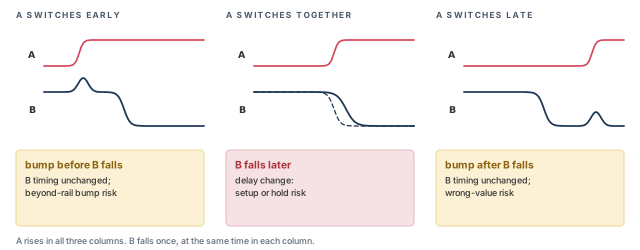
Let us consider aggressor A with a range of possible arrival times, from early to late. Victim B switches once. Figure 6 shows three cases.
- A switches at about the same time as B. B's transition moves. It moves later for a setup risk, or earlier for a hold risk.
- A switches early. A bump appears on B before B switches. B's timing does not change. However, a large bump can forward-bias a pass transistor and cause unwanted current. The tool reports the worst such bumps.
- A switches late. A bump appears on B after B switches. Again B's timing does not change. However, a large bump can flip the logic value, and the wrong value can travel down the path. The tool reports such bumps.
2.6 Timing windows and the two-pass analysis
The tool has two analysis modes for operating conditions: single and on-chip variation. Crosstalk analysis uses the on-chip variation mode. In that mode, the tool finds the earliest and latest arrival times of every net. The range between them is the net's timing window.
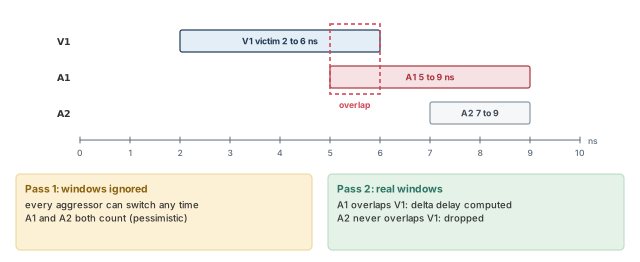
Crosstalk timing effects can occur only when an aggressor window overlaps a victim window. For example, in Figure 7, victim V1 can switch from 2 ns to 6 ns. Aggressor A1 can switch from 5 ns to 9 ns. The windows overlap from 5 ns to 6 ns, so the tool computes a delta delay on V1 due to A1. Aggressor A2 switches from 7 ns to 9 ns and never overlaps, so it is ignored.
By default, the analysis takes two passes:
- Pass 1 ignores timing windows. It assumes every transition can occur at any time. This gives pessimistic delta delays.
- Pass 2 uses the timing windows. It removes victim-aggressor pairs whose windows do not overlap.
When windows do overlap, the tool computes the effect of the aggressor switching at the same time as the victim. It takes the drive strengths and the coupling of both nets into account.
2.7 Cross-coupling models
Each real wire has resistance spread along its length. It also has capacitance to ground and to its neighbors. A detailed model splits each net into short pieces, called subnets. Each piece gets its own resistor and capacitors.
Figure 8 shows a small layout with three wires and its detailed model. Victim B runs between aggressors A and C. B has one driver and two receivers.
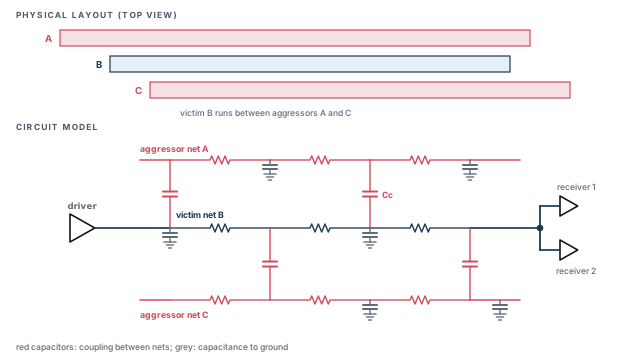
A very detailed model predicts crosstalk accurately in circuit simulation. However, a full chip would have far too many elements to simulate in practical time. The tool instead takes a reasonably accurate but simple coupled network from the extraction tool. This keeps the results accurate and the runtime reasonable.
3 Running a crosstalk delay analysis
3.1 The extra steps
Crosstalk delay analysis uses the same commands, libraries and Tcl scripts as ordinary timing. You add only a few steps:
- Enable crosstalk analysis. Set
si_enable_analysistotrue. - Read coupling capacitance. Back-annotate the design with a SPEF or GPD parasitic file, and keep the coupling capacitors. SPEF is the Standard Parasitic Exchange Format. GPD is another parasitic data format.
- Optionally tune the analysis. A set of variables controls speed and accuracy. They are listed later in this section.
- Debug what you find. If the timing report shows large crosstalk effects, debug or fix them. The graphical interface can draw histograms of crosstalk delays and bump voltages. You can also read crosstalk attributes with Tcl and build your own reports.
pt_shell> set_app_var si_enable_analysis true   ;# turn on crosstalk analysis
pt_shell> read_parasitics -keep_capacitive_coupling file_name.spf   ;# keep coupling caps
pt_shell> read_parasitics -keep_capacitive_coupling \
            -format GPD file_name.gpd   ;# same, from a GPD file
Without -keep_capacitive_coupling, the coupling data is not kept. The tool then has nothing to compute crosstalk from.
Here is a complete small script. The crosstalk-specific lines are marked in the comments.
set_operating_conditions -analysis_type on_chip_variation   ;# SI: windows need min/max
set_app_var si_enable_analysis true                         ;# SI: enable crosstalk
read_verilog ./test1.v                                      ;# read the netlist
current_design test1                                        ;# set the top design
link_design                                                 ;# link to libraries
read_parasitics -keep_capacitive_coupling SPEF.spf          ;# SI: keep coupling caps
create_clock -period 5.0 clock                              ;# 5 ns clock on port clock
check_timing -include { no_driving_cell ideal_clocks \
  partial_input_delay unexpandable_clocks }                 ;# SI-related checks
report_timing                                               ;# timing with crosstalk
report_si_bottleneck                                        ;# SI: worst victims
report_delay_calculation -crosstalk \
  -from [get_pins g1/Z] -to [get_pins g2/A]                ;# SI: detail for one net
The first line sets on-chip variation. The tool needs it to handle minimum and maximum timing windows correctly. If you do not set it, the tool switches to that mode by itself.
Check the SPEF coupling before a long run. Read the design first. Then run read_parasitics with both -syntax_only and -keep_capacitive_coupling. The tool warns if it finds asymmetric couplings, where A-to-B and B-to-A disagree. It is better to fix the extraction now, because a bad coupling file gives wrong crosstalk everywhere.
3.2 How the analysis runs
Crosstalk analysis runs inside your normal flow. With it enabled, any timing update runs the steps in Figure 9. For example, update_timing or report_timing starts it.
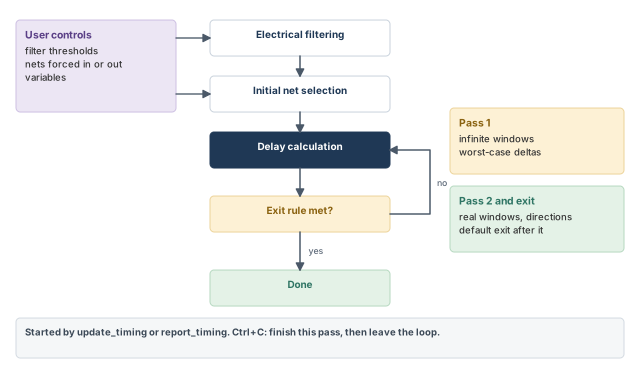
- Electrical filtering. The tool removes aggressors whose effect is too small. It judges this by the size of the voltage bump they put on the victim. You can set the threshold.
- Initial net selection. From the nets that survive filtering, the tool picks the nets to analyze. You can force nets in or out of this set.
- Delay calculation. This is ordinary delay calculation plus crosstalk.
- Exit check. The tool repeats delay calculation until it meets the exit rule.
The first delay calculation is conservative. It ignores timing windows and assumes every aggressor makes its worst transition at the worst time. This gives the worst-case delays.
In the second and later passes, the tool looks at when victim transitions can happen and in which direction. It removes delta delays that can never occur, either because of time separation or because of aggressor direction. The result is more accurate and less pessimistic.
By default, the loop exits after the second pass. This typically gives good results in reasonable time.
You can interrupt a pass with Ctrl+C. The tool finishes the current pass, leaves the loop and reports the state of the analysis at that point.
3.3 The crosstalk variables
Table 1 lists the variables that control crosstalk analysis, with their defaults. To enable crosstalk analysis at all, set si_enable_analysis to true.
| Variable | Default | What it controls |
|---|---|---|
delay_calc_waveform_analysis_mode |
disabled |
Waveform propagation (full_design) |
si_analysis_logical_correlation_mode |
true |
Logical correlation between aggressors |
si_ccs_aggressor_alignment_mode |
lookahead |
Advanced; keep the default |
si_enable_analysis |
false |
Turns crosstalk analysis on |
si_filter_accum_aggr_noise_peak_ratio |
0.03 |
Filter threshold, small aggressors combined |
si_filter_per_aggr_noise_peak_ratio |
0.01 |
Filter threshold for one aggressor |
si_noise_composite_aggr_mode |
disabled |
Composite aggressors in noise analysis |
si_noise_endpoint_height_threshold_ratio |
0.75 |
Height that makes a logic pin an endpoint |
si_noise_limit_propagation_ratio |
0.75 |
Bump reduction after a noise failure |
si_noise_slack_skip_disabled_arcs |
false |
Advanced; keep the default |
si_noise_update_status_level |
none |
Advanced; keep the default |
si_use_driving_cell_derate_for_delta_delay |
false |
Advanced; keep the default |
si_xtalk_composite_aggr_mode |
disabled |
Composite aggressors in delay analysis |
si_xtalk_composite_aggr_noise_peak_ratio |
0.01 |
Bump height for joining the composite |
si_xtalk_composite_aggr_quantile_high_pct |
99.73 |
Probability level of the composite bump |
si_xtalk_delay_analysis_mode |
all_paths |
Window overlap mode |
si_xtalk_double_switching_mode |
disabled |
Double-switching detection |
si_xtalk_exit_on_max_iteration_count |
2 |
Maximum number of passes |
si_xtalk_max_transition_mode |
uncoupled |
Advanced; keep the default |
Each variable with a described purpose is explained in its own section of this chapter.
3.4 Logical correlation
A conservative analysis assumes that all aggressors can switch together in the direction that hurts the victim most. Sometimes logic makes this impossible.
Let us consider Figure 10. Aggressor net 1 drives an inverter, and the inverter output is aggressor net 2. When net 1 rises, net 2 must fall. They can never both rise at the same time. Without this knowledge, the tool would assume both rise together. With it, the tool uses the real opposite directions, which gives a smaller worst case.
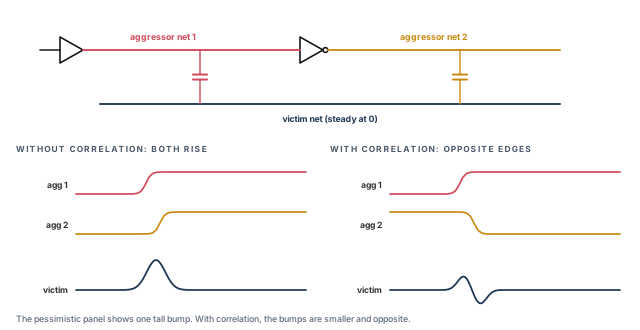
By default, the tool considers logical relationships between aggressors through buffers and inverters. This gives a more accurate, less pessimistic result with several aggressors. It does cost CPU time.
For a faster but more pessimistic run, turn it off:
pt_shell> set_app_var si_analysis_logical_correlation_mode false ;# faster, more pessimistic3.5 Electrical filtering
To get results in reasonable time, the tool filters aggressors that have too small an effect. A filtered aggressor, and its coupling capacitors to that victim, are not analyzed for that victim.
Filtering is based on the peak voltage of the bump that the aggressor puts on the victim. The bump size depends on the coupling capacitance, the drive strengths and the net resistances. There are three rules:
- Automatic. If an aggressor's bump is less than 0.00001 of the victim's nominal voltage, it is always filtered.
- Per aggressor. An aggressor is filtered if its peak bump divided by VDD is below
si_filter_per_aggr_noise_peak_ratio. VDD is the power supply voltage. The default is 0.01. - Accumulated small aggressors. If the combined bumps of the smaller aggressors, divided by VDD, are below
si_filter_accum_aggr_noise_peak_ratio, all of them are filtered. The default is 0.03.
Let us work through Figure 11. A victim has three aggressors. For this example, the accumulated threshold is set to 0.05.
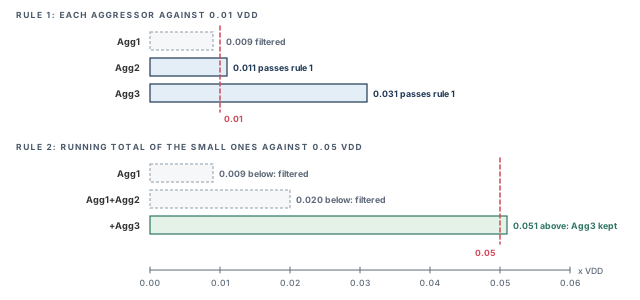
- Agg1 makes a bump of 0.009 VDD. That is below 0.01, so Agg1 is filtered at once.
- The tool then adds bumps from the smallest up. Agg1 plus Agg2 is 0.009 + 0.011 = 0.020. That is below 0.05, so both are filtered.
- Adding Agg3 gives 0.020 + 0.031 = 0.051. That is above 0.05, so Agg3 is not filtered.
Set the thresholds higher for more filtering and less runtime. Set them lower for less filtering and more accuracy.
A beginner raises the filter thresholds to make a slow run fast and forgets them. Many small aggressors then vanish from signoff. The cost is missed delta delays on paths with many neighbors. Keep a written reason for any threshold change, and restore the defaults for signoff unless the change is approved.
4 Preparing a good crosstalk run
Most crosstalk variables trade accuracy against runtime. For example, more delay calculation passes give more accuracy, at the cost of more runtime. The guidelines below give reasonable accuracy in reasonable time.
4.1 Start from a clean timing run
First, make sure the design is well constrained. It should pass normal static timing analysis with crosstalk disabled. There should be no timing violations. Otherwise, you cannot tell crosstalk problems from ordinary ones.
4.2 Capacitive coupling data
A good crosstalk analysis needs an accurate and reasonably simple set of coupling capacitors.
- If the extraction tool can drop small capacitors below a threshold, let it. That can be more efficient than filtering inside the timing tool.
- To trade more accuracy for simplicity, you can limit the number of coupling capacitors per aggressor-victim pair.
- The tool ignores coupling between a net and itself. If possible, tell the extraction tool not to write such self-coupling capacitors.
- Always use
-keep_capacitive_couplingwithread_parasitics, or the coupling data is dropped.
The Back-Annotation chapter covers parasitic reading in detail.
4.3 Operating conditions
Crosstalk analysis uses on-chip variation to find the arrival window of every net. If the mode is not already on-chip variation, the tool switches to it automatically. The consequences are:
- If you already used on-chip variation, the analysis continues in that mode.
- If you used a single operating condition, the analysis runs in on-chip variation mode. That one condition is used for both minimum and maximum, so the results match a single-condition run.
4.4 Checking the setup with check_timing
check_timing can find setup problems that make crosstalk results inaccurate. Run it after you set the constraints and before update_timing or report_timing.
| Check | What it reports | Why it matters for crosstalk |
|---|---|---|
no_driving_cell |
Input ports with no driving cell and no case analysis | Such a net gets a strong driver as an aggressor, which can be pessimistic |
ideal_clocks |
Clock networks that are ideal, not propagated | Accurate crosstalk needs a real clock tree and propagated clocks |
partial_input_delay |
Inputs with only a minimum or only a maximum input delay | Windows need both earliest and latest arrival times |
unexpandable_clocks |
Clocks not expanded to a common time base | Windows of synchronous clocks with different periods cannot be aligned |
All of these checks are on by default, except ideal_clocks. To enable it, set the timing_check_defaults variable, or use -include:
pt_shell> check_timing -include { ideal_clocks } ;# also report ideal clocksCrosstalk on a clock net moves every launch and capture edge below it. Teams therefore run crosstalk analysis only after clock tree synthesis, with propagated clocks. A crosstalk run on ideal clocks gives windows that do not match silicon.
4.5 The first run: use the defaults
For the first crosstalk run, keep the default variable settings. You get results quickly.
pt_shell> set_app_var si_enable_analysis true   ;# enable crosstalk analysis
pt_shell> report_timing                         ;# runs the default two-pass analysis
With defaults, the first pass ignores windows to estimate crosstalk quickly. The second and final pass uses the windows of all nets and the directions of overlapping pairs.
The default run quickly tells you:
- how effective and accurate the current filtering is;
- the rough signal integrity of the design, from the number of violations;
- the rough runtime for the critical path;
- the detailed crosstalk effects on the critical path.
If no violations appear, the design probably meets timing. If you see violations or small slacks, analyze them in more detail. Near the end of the project, also run a more detailed analysis to confirm the fast result.
5 Including and excluding nets
5.1 The four commands
Sometimes you know that certain nets cannot disturb each other. Telling the tool removes pessimism and saves runtime. Table 3 lists the four commands.
| Command | What it does | Applies to |
|---|---|---|
set_si_delay_analysis |
Includes or excludes nets for crosstalk delay | Delay |
set_si_noise_analysis |
Includes or excludes nets for crosstalk noise | Noise |
set_si_aggressor_exclusion |
Makes aggressors exclusive, so only some switch together in the same direction | Delay and noise |
set_coupling_separation |
Excludes nets or net pairs from both delay and noise | Delay and noise |
If these settings conflict, set_coupling_separation wins over set_si_delay_analysis and set_si_noise_analysis.
5.2 Delay exclusions with set_si_delay_analysis
set_si_delay_analysis can do four things:
- make chosen nets use infinite arrival windows, meaning they can switch at any time;
- exclude chosen nets as aggressors;
- exclude chosen nets as victims;
- exclude chosen aggressor-victim pairs.
You can narrow an exclusion further:
-riseor-fallexcludes only rising or only falling edges at the victim.-maxor-minexcludes only maximum-delay (setup) or only minimum-delay (hold) analysis.
Excluding a clock net as a victim. Suppose clock net CLK1 is not much affected by crosstalk. You can stop analyzing it as a victim:
pt_shell> set_si_delay_analysis -exclude -victims [get_nets CLK1] ;# CLK1 is never a victimThis saves runtime. However, CLK1 can still act as an aggressor to other nets.
Excluding aggressor-victim pairs. Use -exclude with both -victims and -aggressors. Suppose scan clocks SCN_CLK_* and clock nets CLK_NET_* cannot affect each other.
pt_shell> set_si_delay_analysis -exclude -victims [get_nets CLK_NET_*] \
            -aggressors [get_nets SCN_CLK_*]   ;# scan clocks never hit clock nets
pt_shell> set_si_delay_analysis -exclude -victims [get_nets SCN_CLK_*] \
            -aggressors [get_nets CLK_NET_*]   ;# and the other way round
The first command covers one direction, and the second covers the other. Other relationships remain. For example, CLK_NET1 can still be an aggressor to CLK_NET2.
5.3 Noise exclusions with set_si_noise_analysis
set_si_noise_analysis works the same way for noise. This example stops analyzing CLK1 as a noise victim:
pt_shell> set_si_noise_analysis -exclude -victims [get_nets CLK1] ;# no noise check on CLK1You can also exclude only some bump types. The four bump types are explained in the noise sections later. This example excludes above-high and below-low bumps on CLK1:
pt_shell> set_si_noise_analysis -exclude [get_nets CLK1] -above -high   ;# skip above-high
pt_shell> set_si_noise_analysis -exclude [get_nets CLK1] -below -low    ;# skip below-low
5.4 Quiet aggressors
A quiet aggressor is a net that never switches, such as a static mode signal. Use set_case_analysis on it. The tool then treats it as non-switching. It is not an effective aggressor to any victim, in timing or in noise.
5.5 Exclusive aggressor groups
By default, when several aggressor windows overlap a victim window, the tool assumes the worst case. All those aggressors switch in the same direction at the same time. Sometimes logic prevents this.
Let us consider a one-hot decoder. At any time only one output is 1, and the others are 0. Figure 12 shows three decoder outputs, agg1, agg2 and agg3, running beside a victim. Only one of them can rise at a time.
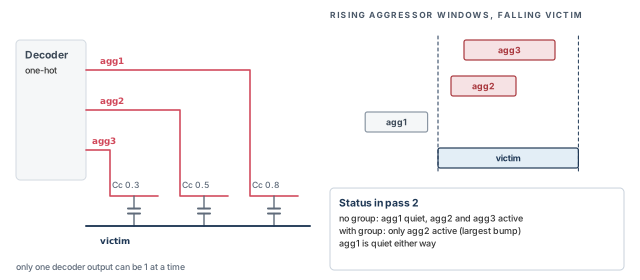
In the first pass, the tool adds all three aggressors. In later passes it uses windows. For a falling victim, it looks at the rising windows of the aggressors. Table 4 shows the result.
| Case | agg1 | agg2 | agg3 |
|---|---|---|---|
| No exclusive group | Quiet | Active | Active |
| Exclusive group {agg1 agg2 agg3} | Quiet | Active | Quiet |
agg1is quiet in both cases, because its window misses the victim window.- Without a group,
agg2andagg3are both active, because both overlap the victim. - With the group, only the aggressor that makes the largest bump,
agg2, stays active.
Use set_si_aggressor_exclusion to define such groups. It applies to both delay and noise analysis.
-risemakes the group exclusive for rising only.-fallmakes it exclusive for falling only. With neither, it is exclusive in both directions.-number_of_active_aggressorssets how many group members may switch together. Without it, only one member is active.
pt_shell> set_si_aggressor_exclusion [get_nets {A1 A2 A3 A4}] -rise   ;# one rises at a time
pt_shell> set_si_aggressor_exclusion [get_nets {DECODER*}] \
            -number_of_active_aggressors 2   ;# at most two switch together
Rules to remember:
- The order of these commands does not matter. The most restrictive number of active aggressors is used.
- Aggressors already excluded with
-excludeinset_si_delay_analysisorset_si_noise_analysisstay excluded. - The next
update_timingafter these commands is a full update.
To remove groups, use remove_si_aggressor_exclusion. It removes only groups made by set_si_aggressor_exclusion.
pt_shell> remove_si_aggressor_exclusion [get_nets {A1 A2 A3}] -rise   ;# remove one rise group
pt_shell> remove_si_aggressor_exclusion -all ;# remove every groupA beginner declares a group exclusive because the nets "look like" decoder outputs. If two of them can in fact switch together, the analysis becomes optimistic. The cost is a missed violation on silicon. Declare a group only when the logic guarantees it, and write down why.
5.6 Coupling separation
set_coupling_separation creates a separation constraint. It acts like -exclude in both set_si_delay_analysis and set_si_noise_analysis at once.
pt_shell> set_coupling_separation [get_nets CLK1]   ;# cut CLK1 off from all nets
pt_shell> set_coupling_separation -pairwise \
            [get_nets CLK1] [get_nets NET1]   ;# ignore coupling only between CLK1 and NET1
The first form cuts CLK1 off from all other nets. The -pairwise form ignores coupling only between the two named nets.
5.7 Removing exclusions
Each setting command has a matching remove command:
set_si_delay_analysisis undone withremove_si_delay_analysis.set_si_noise_analysisis undone withremove_si_noise_analysis.set_si_aggressor_exclusionis undone withremove_si_aggressor_exclusion.set_coupling_separationis undone withremove_coupling_separation.
These commands remove only settings you made directly. They cannot remove an exclusion that came about implicitly through coupling.
Let us consider victim V with three aggressors A1, A2 and A3. Figure 13 follows the example.
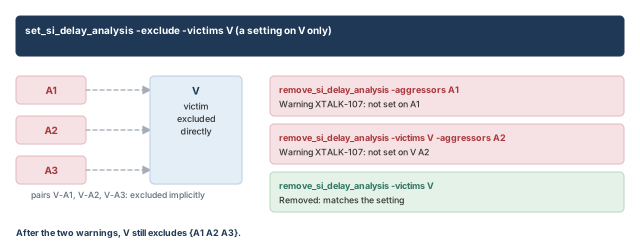
pt_shell> set_si_delay_analysis -exclude -victims V   ;# V is no longer a victim
pt_shell> remove_si_delay_analysis -aggressors A1     ;# fails: nothing was set on A1
Warning: Cannot remove global separation or exclusion that
was not set on net(s) A1. (XTALK-107)
pt_shell> remove_si_delay_analysis -victims V -aggressors A2   ;# fails: no pair setting
Warning: Cannot remove global separation or exclusion that
was not set on net(s) V A2. (XTALK-107)
pt_shell> remove_si_delay_analysis -victims V   ;# works: matches the original setting
After the two failed commands, the excluded list for V is still {A1 A2 A3}. Only the last command reverses the original exclusion.
6 Timing windows and aggressor alignment
6.1 Window overlap analysis
Depending on the alignment of victim and aggressor switching times and directions, crosstalk can slow a victim or speed it up. The tool computes the effect from the timing windows of the aggressors and the victim. This is called timing window overlap analysis, or aggressor alignment.
Key facts:
- The tool computes a delta delay for each load pin of a victim net.
- It uses arrival windows because a window covers every timing path through the net.
- If an aggressor window only partly overlaps the victim window, the tool uses the partial, smaller effect.
- When victim and aggressor windows come from different clocks, the tool considers the clock combinations with respect to the clock periods.
Figure 7 earlier showed a single overlap: V1 from 2 ns to 6 ns and A1 from 5 ns to 9 ns.
6.2 Several aggressors on one victim
With several aggressors, the engine finds the combination that gives the worst crosstalk. It then computes the delta delay for that combination.
Let us consider victim V with aggressors A1, A2 and A3 in Figure 14. A1 is the strongest and A3 the weakest.
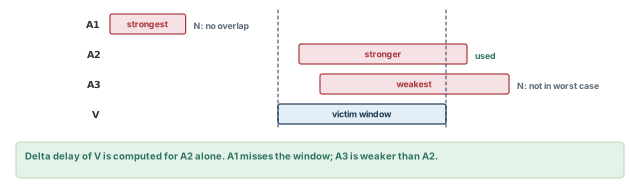
A1does not overlap the victim window, so it cannot count.A2andA3both overlap, but the worst alignment the engine finds usesA2, the stronger one.- The delta delay is computed for
A2alone.A1andA3are not used.
report_delay_calculation -crosstalk marks A1 and A3 with this attribute:
N - aggressor does not overlap for the worst case alignment6.3 Victim nets with several clock domains
A victim net can have arrival windows from several clocks. The tool must decide how to compute and store their delta delays. Figure 15 shows the choices with one example. The victim has windows from CLK1, CLK2 and CLK3, with delta delays of +100 ps, +50 ps and 0 ps.
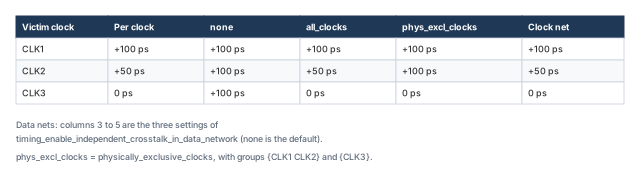
Clock network victims. For clock nets, the tool always computes a separate delta delay for each clock. Clock nets have narrow, tightly controlled windows. A clock net can have a delta delay in one clock domain but not in another. Crosstalk on a clock net also moves every launching and capturing register below it.
Data network victims. For data nets, including clocks used as data, a variable chooses the behavior:
pt_shell> set_app_var \
            timing_enable_independent_crosstalk_in_data_network \
none ;# or all_clocks, or physically_exclusive_clocksnone(the default) computes the worst delta delay across all clocks of the victim. In the example, all three clocks get +100 ps. Data nets tend to have wide windows because paths reconverge, so the delta delays vary less across clocks. This setting is fast and suits most analysis. However, it can be pessimistic when one run covers several modes with very different clocks.all_clockscomputes a separate delta delay for each clock, as for clock nets. It can increase memory and runtime in multimode designs with many overlapping clocks.physically_exclusive_clockscomputes a separate delta delay for each group of clocks that can physically exist at the same time. In a multimode run with physically exclusive clock groups, this merges delta delays within a mode but keeps modes apart. It removes some pessimism with less memory and runtime thanall_clocks.
The physically_exclusive_clocks setting uses only groups defined with set_clock_groups -physically_exclusive. It ignores physically exclusive clocks found by set_clock_exclusivity.
set_clock_groups -physically_exclusive \
    -group {CLK1 CLK2} \
    -group {CLK3}   ;# CLK1 and CLK2 coexist; CLK3 never coexists with them
6.4 Asynchronous clocks
If the victim's clock and the aggressor's clock are asynchronous, they have no fixed timing relationship. The tool then treats the aggressor as having an infinite window with respect to the victim. It can switch at any time. The report marks it like this:
I - aggressor has Infinite arrival with respect to the victimSeveral aggressors may be synchronous to each other but asynchronous to the victim. Then the tool keeps the timing relationships between the aggressors. However, each is still treated as an infinite window with respect to the victim.
6.5 "All paths" and "all path edges" overlap modes
By default, the tool builds one victim window. It spans from the earliest minimum-delay path to the latest maximum-delay path through the net. Any overlap with an aggressor window triggers a delta delay calculation. This is the all paths mode.
The all paths mode is simple and fast, but conservative. Let us consider three paths through a victim net, each with its own arrival range. The top panel of Figure 16 merges them into one window. The aggressor overlaps that window, so all early and late edges get a delta delay. However, the late edges do not really overlap the aggressor. For a maximum-delay check, they cannot be pushed later by it.
For critical paths, you can remove this pessimism in two ways:
- Run path-based analysis, which looks at each path on its own:
report_timing -pba_mode pathor-pba_mode exhaustive. - Use the all path edges mode:
pt_shell> set_app_var si_xtalk_delay_analysis_mode all_path_edges ;# use the real edges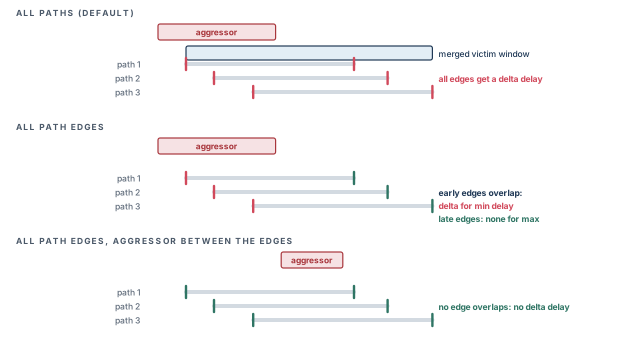
The all path edges mode looks at the actual early and late edge times. It does not merge them into one window. In the middle panel, no late edge overlaps the aggressor, so no delta delay is applied for maximum delay. At least one early edge overlaps, so delta delays are applied to all early edges for minimum delay. In the bottom panel, the aggressor falls between the edges. It touches neither, so no delta delay is applied at all.
| Method | How | Accuracy | Runtime |
|---|---|---|---|
| All paths (default) | si_xtalk_delay_analysis_mode all_paths |
Conservative | Fastest |
| All path edges | si_xtalk_delay_analysis_mode all_path_edges |
Less pessimistic | Some extra cost |
| Path-based analysis | report_timing -pba_mode path or exhaustive |
Most accurate | Largest cost |
7 Clock relationships and crosstalk
7.1 What set_clock_groups tells the crosstalk engine
When a design has several clocks, set_clock_groups states how they relate. The crosstalk engine uses this too.
-grouplists the clocks in one group.-namegives the group set a name of your choice.- The other options state the relationship: logically exclusive, physically exclusive or asynchronous.
Table 6 shows what each relationship means for timing checks and for crosstalk.
| Relationship | Timing paths checked between them? | Crosstalk between them? |
|---|---|---|
-logically_exclusive |
No | Yes, with normal windows |
-physically_exclusive |
No | No: the clocks are physically isolated |
-asynchronous |
No | Yes, with infinite windows |
-asynchronous -allow_paths |
Yes | Yes, with infinite windows |
7.2 Logically and physically exclusive clocks
The most accurate way to analyze several clocks is one run per clock combination. Distributed multi-scenario analysis can run many such combinations and merge the results. However, modern designs may have hundreds or thousands of clocks to save power. Then one run per combination is not practical. Instead, you analyze all clocks in one run and describe their relationships with set_clock_groups.
Let us consider Figure 17. A multiplexer U1 selects CLK1 or CLK2. Only one clock is enabled at a time. Capacitor x1 couples the two clock inputs before the multiplexer. Capacitor x4 couples two clock branches after it, each driven by its own buffer. Both branches carry whichever clock is selected.
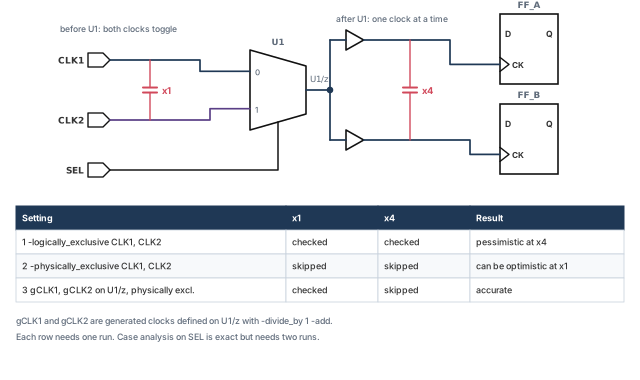
By default, the tool checks crosstalk across x4 between the overlapping windows of CLK1 and CLK2. That is pessimistic, because the two clocks are never on those nets together.
The most accurate fix is case analysis: one run with the select at 0, and one with it at 1. That needs two runs, which is not practical with many clocks. The single-run options are:
Option 1 — logically exclusive.
pt_shell> set_clock_groups -logically_exclusive \
            -group {CLK1} -group {CLK2}   ;# no timing paths between CLK1 and CLK2
This stops timing path checks between the clocks, much like a false path. However, crosstalk across x4 is still computed. That stays pessimistic.
Option 2 — physically exclusive.
pt_shell> set_clock_groups -physically_exclusive \
            -group {CLK1} -group {CLK2}   ;# no paths and no crosstalk between them
Now no delta delays are computed between the clocks, so the x4 pessimism is gone. However, crosstalk across x1 is also dropped. That can be optimistic if the multiplexer is deep in the chip and x1 is large.
Option 3 — generated clocks at the multiplexer output. Define one generated clock per input clock on the output pin, and make only those physically exclusive.
pt_shell> create_generated_clock -name gCLK1 \
            -source [get_ports CLK1] -divide_by 1 \
            -add -master_clock [get_clocks CLK1] \
            [get_pins U1/z]   ;# CLK1 as seen after the mux
pt_shell> create_generated_clock -name gCLK2 \
            -source [get_ports CLK2] -divide_by 1 \
            -add -master_clock [get_clocks CLK2] \
            [get_pins U1/z]   ;# CLK2 as seen after the mux
pt_shell> set_clock_groups -physically_exclusive \
            -group {gCLK1} -group {gCLK2}   ;# exclusive only after the mux
Now the tool computes CLK1-to-CLK2 crosstalk across x1, before the multiplexer. It skips gCLK1-to-gCLK2 crosstalk across x4 and the rest of the generated clock tree.
Physically exclusive groups remove pessimism where no crosstalk exists. This applies to crosstalk timing and crosstalk noise analysis. Keep these rules in mind:
- You are responsible for correct groups. The tool does not check that a setting makes sense for the design.
- Only group-to-group conflicts are detected. For example,
CLK1andCLK2declared asynchronous are still synchronous toCLK3by default. The tool does not detect this implied three-way conflict. Resolve it yourself withset_clock_groups. - Clock groups beat false paths. An exclusive or asynchronous group has higher priority than
set_false_path. reset_pathdoes not cancel clock groups. Relationships made withset_clock_groupsremain.
A beginner declares two functional clocks physically exclusive because they are "never used together". However, both run through shared logic before a multiplexer. The crosstalk at that shared point disappears from the report. Use generated clocks at the multiplexer output, as in option 3, so only the truly separate part is excluded.
7.3 Path-based physical exclusion analysis
If clocks are physically exclusive, at most one of them can be an aggressor to a given victim. The left panel of Figure 18 shows this. Physically exclusive clocks gCLK1 and gCLK2 both overlap victim clock MYCLK. Only one can be present, so the tool picks the stronger, gCLK1, which causes the larger delta delay. It ignores gCLK2.
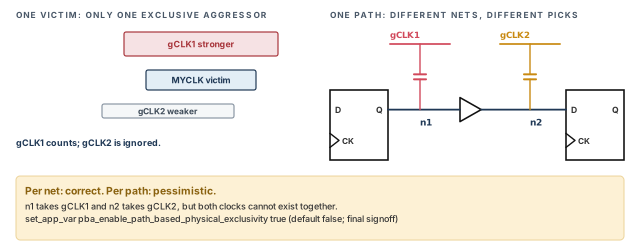
Each net can pick a different aggressor. In the right panel, the arrival times differ at the two nets. So gCLK1 is the aggressor for net n1, and gCLK2 for net n2. Each choice is correct for its own net. For the whole path it is pessimistic, because the two clocks cannot both reduce the path slack.
You can ask the tool to find the worst allowed set of clocks for each path. This whole-path analysis reduces pessimism. It needs slightly more runtime than the per-net analysis. Even so, it is usually much faster than separate runs for every clock combination.
pt_shell> set_app_var pba_enable_path_based_physical_exclusivity true ;# signoff onlyThe default is false. It is better to keep it false for most runs and set it to true only for final timing signoff. The extra runtime is not needed for daily work.
7.4 Infinite alignment windows with timing checks
Sometimes you want normal timing checks between two clocks but a safe, conservative crosstalk analysis. Use -allow_paths with -asynchronous. Timing paths between the groups stay in place. Crosstalk between the groups uses infinite windows.
pt_shell> set_clock_groups -asynchronous -allow_paths \
            -group {CLK1} -group {CLK2}   ;# paths checked, infinite crosstalk windows
You can still turn off some or all of the clock-to-clock paths with set_false_path, together with set_clock_groups.
8 Refining the crosstalk delay analysis
8.1 Composite aggressors
In fine geometries, a net can have hundreds of small aggressors. Filtering ignores their effect completely. Analyzing each in detail can take very long. The composite aggressor mode handles many small aggressors in reasonable runtime.
This mode suits designs with:
- many aggressors per victim net;
- little or no filtering of aggressors;
- crosstalk calculations in high effort mode.
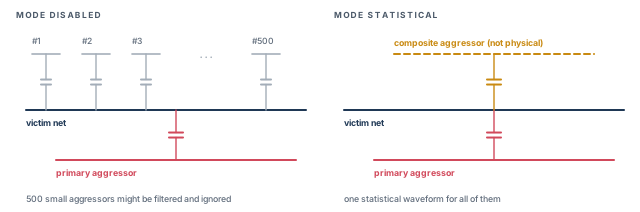
A composite aggressor is a single waveform that stands for all the small aggressors, including filtered ones. It is not a physical net or cell. Figure 19 shows 500 small aggressors replaced by one composite aggressor.
Enabling it for delay analysis. The mode is off by default.
pt_shell> set_app_var si_xtalk_composite_aggr_mode statistical   ;# enable the mode
pt_shell> set_app_var si_xtalk_composite_aggr_noise_peak_ratio 0.01 ;# 1% of VDD (default)- An aggressor whose bump is below
si_xtalk_composite_aggr_noise_peak_ratiotimes the supply voltage joins the composite. The default is 0.01, which is 1 percent. - Aggressors that meet the normal filtering rules, per aggressor or accumulated, also join the composite instead of being thrown away.
How the statistical mode works. The tool assumes each small aggressor can switch either way, so it may help or hurt the victim. The combined bump can therefore be anywhere from zero to the worst case. All of them switching the bad way at once is unlikely. So the tool lowers the composite bump to the largest value with a chosen probability.
si_xtalk_composite_aggr_quantile_high_pct sets that probability. The default is 99.73. It means a 99.73 percent chance that the composite bump is at least as large as the real effect. That is three standard deviations (3 sigma) of a normal distribution. A smaller value, such as 90, gives a smaller, less conservative bump.
Excluding nets from the statistical reduction. For some nets you may not want the reduction. Use set_si_delay_disable_statistical and remove_si_delay_disable_statistical with a list of nets. They have no effect on a net that is not part of a composite group.
Reporting composite aggressors. report_delay_calculation -crosstalk lists composite members with the letter C. It shows only those that meet the filtering threshold, although all are used. A line in the report shows whether the mode is disabled or statistical.
To see every member, including those below the filtering thresholds, read one of four net attributes. There is one for each analysis type: min_rise, min_fall, max_rise and max_fall.
pt_shell> get_attribute -class net vict1 \
            si_xtalk_composite_aggr_min_rise   ;# members used for min_rise
{"aggr1", "aggr2", "aggr3"}
The other three attributes are si_xtalk_composite_aggr_min_fall, si_xtalk_composite_aggr_max_rise and si_xtalk_composite_aggr_max_fall.
8.2 Ideal aggressors
An aggressor often couples to many nets. When the tool analyzes one victim, it uses only the coupling capacitors to that victim. By default, the aggressor's coupling capacitors to other nets are turned into capacitors to ground. That extra ground load makes the aggressor weaker.
Some flows have placeholder nets that couple to very many nets. Their many grounded capacitors can make them look much weaker than intended. To fix this, mark them as ideal aggressors. The command sets the si_ideal_aggressor attribute.
pt_shell> set_ideal_aggressor $nets   ;# mark placeholder nets as ideal aggressors
pt_shell> get_nets * -filter {si_ideal_aggressor == true}   ;# find them later
Figure 20 compares the two cases. With the attribute, the coupling capacitors to other nets are left out entirely. The aggressor acts at full strength on the current victim.
The attribute affects aggressor behavior in both delay and noise analysis. It does not change:
- aggressor transition times;
- aggressor timing windows;
- the coupling capacitances of victim nets.
report_delay_calculation marks an ideal aggressor with the letter P:
 Aggressor   Coupling   Driver     Clocks  Attributes  Switching Bump
 Net         Cap        Lib Cell                       (ratio of VDD)
 ----------  ---------  ---------  ------  ----------  --------------
 n232        0.200000   BF1T4_D    CLK1    P           -
To remove the attribute:
pt_shell> remove_ideal_aggressor $nets   ;# from chosen nets
pt_shell> remove_ideal_aggressor -all    ;# from every net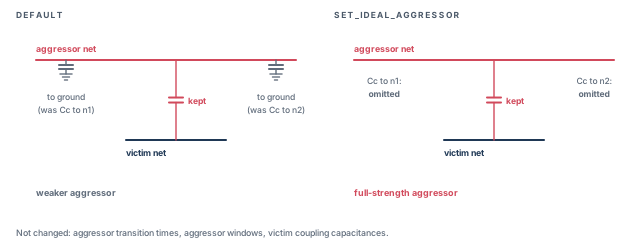
8.3 Path-based crosstalk analysis
In path-based analysis, the tool recomputes crosstalk for one path at a time. It takes new victim arrival times and slews from the path itself. Aggressor windows still come from the previous timing update.
This is useful when only a few violations remain. It tells you whether those violations come from pessimistic arrival times and slews. Use the -pba_mode option of get_timing_paths or report_timing. Path-based analysis as a whole is covered in the Reporting and Debugging Analysis Results chapter.
8.4 Crosstalk delay with CCS models
CCS (composite current source) libraries carry detailed timing and noise data. With them, the tool uses gate-level simulation for crosstalk delay, which is more accurate:
- It models the drivers and receivers of the victim and the aggressors with CCS timing and noise data.
- It builds a reduced-order model of the coupled wires, with several inputs and outputs.
- It runs a time-step analysis to find the distorted waveforms at the victim receiver inputs.
The distorted waveform changes the delay of the victim net and the receiver stage. The tool models this as a delta delay on the victim stage.
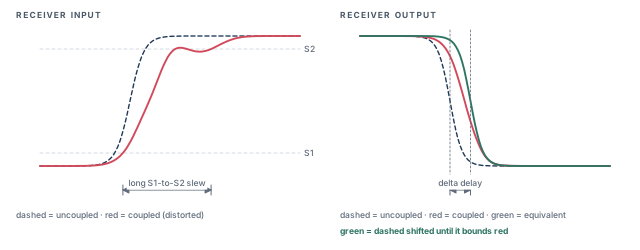
The equivalent waveform. Delay calculation works stage by stage. The transition time of one stage feeds the next. Measuring the slew of a badly distorted waveform at the usual trip points, S1 and S2, would be pessimistic. A long tail stretches the measured slew far beyond the real behavior.
Instead, the tool builds an equivalent waveform. Figure 21 shows the idea.
- When the receiver has CCS noise data, the tool computes the receiver's output for the distorted input. It then shifts the uncoupled waveform in time until its output bounds that coupled output. This is always conservative, whatever the distorted slew.
- When the receiver lacks CCS noise data, as some macros and memories do, the tool cannot push the distorted waveform through it. It instead estimates an equivalent waveform at the receiver input that bounds the distorted input. This is also conservative.
The delta delay of the victim stage is the difference between the uncoupled waveform and the equivalent waveform. The equivalent waveform is passed to the next stage.
Driver waveform data. Gate-level simulation needs library characterization waveforms, stored as normalized_driver_waveform. The tool uses them as input waveforms to the CCS noise driver models, and in the equivalent waveform calculation. If they are missing, the tool assumes the library was characterized with the Synopsys pre-driver 0.5 waveform. Check that the data is present with the check_library command of the Library Compiler tool.
8.5 Waveform propagation
To improve accuracy when waveforms are distorted, turn on waveform propagation. The Delay Calculation chapter explains it.
pt_shell> set_app_var delay_calc_waveform_analysis_mode full_design ;# propagate waveforms8.6 Annotated delta delays
You can set delta delays yourself instead of letting the tool compute them. This lets you use delta delays from an external tool. Use set_annotated_delay -net -delta_only.
pt_shell> set_annotated_delay -net -max -delta_only \
            -from U1/Z -to U2/A 0.12   ;# +0.12 for max-delay analysis only
The rules for which value wins:
- With crosstalk analysis disabled (
si_enable_analysis false), the annotated delta delay is applied. - With crosstalk analysis enabled, a delta delay computed by the tool overrides the annotated one.
- You may annotate both a delta delay and a full delay on the same arc. Then the full delay is assumed to include the delta. The
-delta_onlyvalue is not used.
You can set delta transition times on ports or pins in the same way with set_annotated_transition -delta_only.
8.7 Iteration count and exit
The first pass of the loop uses infinite windows. In later passes, the tool keeps analyzing all nets.
si_xtalk_exit_on_max_iteration_count sets the maximum number of passes, whatever the results. The default is 2, which is also the largest allowed value. Some designs need only one pass:
pt_shell> set_app_var si_xtalk_exit_on_max_iteration_count 1 ;# infinite windows onlyA single pass uses infinite windows only, so it is the pessimistic estimate.
You can stop a run in progress with Ctrl+C:
- Press it once: the tool finishes the current pass, then leaves the loop.
- Press it several times: the tool exits from PrimeTime SI when the loop completes.
9 Reading crosstalk reports
9.1 The report commands
Several commands report crosstalk effects:
report_timinggives slack reports that include crosstalk delays.report_si_bottleneckfinds the victims or aggressors behind many violations.report_delay_calculation -crosstalkgives full detail for one victim net.report_si_double_switchinglists victims with double-switching violations, covered later.report_noisereports static noise effects, also covered later.
9.2 The crosstalk timing report
With crosstalk enabled, report_timing already includes crosstalk in the path delays. To see the crosstalk detail, add -crosstalk_delta.
pt_shell> report_timing -transition_time -crosstalk_delta \
-input_pins -significant_digits 4 ;# show slews and delta delays-crosstalk_delta shows input pins even without -input_pins, because the delta values sit on input pins.
Point DTrans Trans Delta Incr Path
------------------------------------------------------------------------
clock CLK (rise edge) 0.0000 0.0000
clock network delay (propagated) 0.4000 0.4000
FF1/CK (DFFX1) 0.0800 0.0000 0.4000 r
FF1/Q (DFFX1) 0.1200 0.3100 & 0.7100 r
U1/B (NAND2X1) 0.0000 0.1200 0.0000 0.0060 & 0.7160 r
U1/Y (NAND2X1) 0.2100 0.1800 & 0.8960 f
U2/A (INVX1) 0.0300 0.2400 0.0600 0.0640 & 0.9600 f
U2/Y (INVX1) 0.1500 0.1400 & 1.1000 r
FF2/D (DFFX1) 0.0000 0.1500 0.0000 0.0030 & 1.1030 r
data arrival time 1.1030
...
slack (VIOLATED) -0.0410How to read it:
- A stage is one cell together with the net it drives. The tool computes crosstalk per stage and stores the delta values on the input pin at the end of the stage.
DTransis the delta transition: the slew change due to crosstalk.Deltais the delta delay of the stage.Incralready includes the delta delay. Do not addDeltato it again.- An ampersand (
&) in theIncrcolumn means parasitic data was used.
In this illustrative report, only the stage ending at U2/A has a delta delay, 0.0600 ns. Without it, the path would pass with about 0.019 ns of slack.
To customize the report, a Tcl example script is installed with the tool, at install_path/auxx/pt/examples/tcl/custom_timing_1.tcl.
A beginner adds the Delta column to the Incr column to "include crosstalk". That counts the delta delay twice and invents violations. Incr and Path already include it.
9.3 Bottleneck reports
When report_timing shows many crosstalk violations, a few nets usually cause most of them. report_si_bottleneck finds them, much as report_bottleneck does for ordinary violations. It lists the nets with the highest cost, meaning the largest contribution to crosstalk that causes violations.
| Cost type | What it lists |
|---|---|
delta_delay |
Victims with the largest absolute delta delay |
delta_delay_ratio |
Victims with the largest delta delay relative to their stage delay |
total_victim_delay_bump |
Victims with the largest sum of unfiltered bump heights, from the si_xtalk_bumps net attribute, whatever their delta delay |
delay_bump_per_aggressor |
Aggressors ordered by the sum of the delay bumps they cause on victims |
Each cost type counts only victims whose slack is below a limit. By default the limit is zero, so only violations count. If there are no violations, nothing is reported. Raise the limit to see near misses:
pt_shell> report_si_bottleneck -cost_type delta_delay \
            -slack_lesser_than 2.0   ;# include near misses
pt_shell> report_si_bottleneck -cost_type delta_delay \
            -minimum_active_aggressors 3   ;# only nets with 3 or more active aggressors
Other options:
- Without
-maxor-min, both setup and hold constraints are considered. - Clock nets are excluded by default, because they have no slack values. Add
-include_clock_netsto include them. -minimum_active_aggressorskeeps only nets hit by at least that many active aggressors.
Investigate the reported nets with report_delay_calculation -crosstalk. If the violations are real, try what-if repairs such as size_cell or set_coupling_separation, and see how each strategy changes the result.
9.4 The crosstalk delay calculation report
report_delay_calculation -crosstalk shows how the tool computed crosstalk for one victim net. It lists the aggressors and how they affect the victim.
The option works only on a net timing arc, not a cell arc. Give the net's driver pin and one load pin:
pt_shell> report_delay_calculation -crosstalk \
            -from [get_pins g1/Z] -to [get_pins g2/A]   ;# driver pin to load pin
The report shows:
- the number of coupled aggressors, and the number of active aggressors left after filtering;
- victim information, such as active or inactive status and reselection status;
- detail for each active aggressor, such as bump height and window alignment status;
- the reason an aggressor is inactive, such as filtering, case analysis or a bump that is too small;
- the delta delay and delta slew. These also appear without
-crosstalk.
The delta slew for setup analysis is always zero or positive. The delta slew for hold analysis is always zero or negative.
9.5 Reporting your crosstalk settings
Three commands show the settings you made:
pt_shell> report_si_delay_analysis        ;# delay-side settings
pt_shell> report_si_noise_analysis        ;# noise-side settings
pt_shell> report_si_aggressor_exclusion ;# exclusive aggressor groups| Report | Settings made by |
|---|---|
report_si_delay_analysis |
set_si_delay_analysis, remove_si_delay_analysis, set_si_delay_disable_statistical, remove_si_delay_disable_statistical, set_coupling_separation, remove_coupling_separation |
report_si_noise_analysis |
set_si_noise_analysis, remove_si_noise_analysis, set_si_noise_disable_statistical, remove_si_noise_disable_statistical, set_coupling_separation, remove_coupling_separation |
report_si_aggressor_exclusion |
set_si_aggressor_exclusion |
Facts about these reports:
- By default, they report settings for all nets. Given a list of nets, they report settings applied directly to those nets.
report_si_delay_analysisandreport_si_noise_analysisdo not start a timing or noise update. They only read existing attributes.- A net-specific report shows only settings applied directly to that net. It does not show global settings on other nets that affect it implicitly.
Let us consider net n1, which couples to n2 and n3.
pt_shell> set_coupling_separation n1        ;# n1 bumps vanish from n2 and n3 reports
pt_shell> report_si_delay_analysis n2       ;# shows nothing: the setting is on n1
pt_shell> report_si_delay_analysis [get_attribute \
            [get_nets n2] effective_aggressors]   ;# settings on all nets coupled to n2
pt_shell> set_coupling_separation n1 -pairwise {n2 n3}   ;# now shown for n2 and n3
report_si_aggressor_exclusion with a net lists every exclusive group that contains the net. To see which group members were active and which were screened as quiet, use report_delay_calculation for delay and report_noise_calculation for noise. Members of one group can be active in different analysis types, based on coupling and worst-case alignment.
Delta and DTrans per stage, and remember that Incr already includes crosstalk. Use the bottleneck report to find the few nets behind many violations. Use the settings reports to audit exclusions.10 Double-switching detection
10.1 What double switching is
update_timing with crosstalk finds timing violations: transitions that are slowed or sped up. update_noise, covered later, finds functional errors on steady nets. There is a third kind of error. Crosstalk can hit a victim while it is switching and make the next gate switch twice. This is a double-switching error.
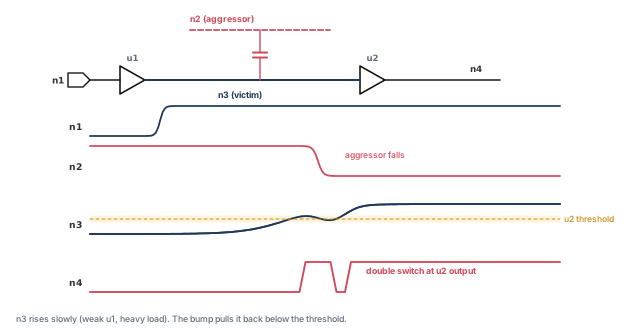
Figure 22 shows an example. A rising transition on n1 passes through buffers u1 and u2 to n3 and n4. Buffer u1 is weak and n3 has a large load, so n3 rises slowly. While n3 is in the sensitive voltage region of u2's input, aggressor n2 falls. It pushes a bump into n3. The output of u2 then switches twice.
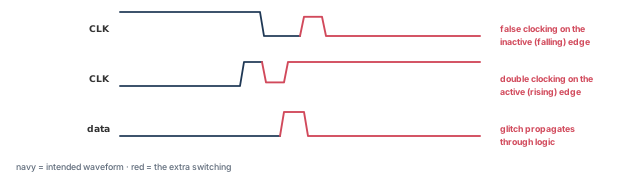
Double switching can break a circuit in three ways, shown in Figure 23:
- False clocking on the inactive edge of a clock. A falling clock edge gets an extra rising pulse.
- Double clocking on the active edge. One rising edge becomes two.
- Glitch propagation through combinational logic.
The first two cause wrong clocking of rising-edge registers.
Double switching needs a strong aggressor on a sensitive victim. Those are the same conditions that cause static noise errors. So most double-switching cases are also found by static noise analysis. However, some cases are large enough to cause double switching but not large enough to fail the steady-state noise check. update_noise does not find those.
10.2 Turning on detection
Set si_xtalk_double_switching_mode:
clock_networkchecks false clocking, double clocking and double switching in the clock network only.full_designchecks the same conditions in data paths as well as the clock network.
pt_shell> set_app_var si_xtalk_double_switching_mode clock_network ;# clocks onlyThe recommended procedure has three steps:
- Run static timing analysis without crosstalk. Make sure there are no timing violations and no maximum transition violations.
- Run static timing and static noise analysis with crosstalk. Fix the crosstalk timing and noise violations.
- Enable double-switching analysis and run static timing analysis. Fix the double-switching errors.
Remember that ordinary static noise analysis finds most double-switching conditions. The tool detects double switching during update_timing. It marks each affected net with an attribute that you can read in a script:
pt_shell> get_attribute [get_nets clk_net] \
            si_has_double_switching   ;# true if double switching was found
10.3 How double switching is detected
Several things decide whether double switching occurs:
- the coupling capacitance;
- the drive of the aggressor and the victim;
- the aggressor arrival time and direction relative to the victim transition;
- the load coupling capacitance of the victim net;
- the input sensitivity of the cells the victim drives.
The tool uses the CCS noise model to propagate the coupled waveform through each stage. So the cell library must have CCS noise models. Detection runs in the first and later passes of the crosstalk loop.
For each failure, the tool sets the si_has_double_switching net attribute to true. It also measures how severe the failure is as a double-switching slack. A victim with more risk has a more negative slack. In an engineering change order (ECO), fix the worst double-switching slack first.
The slack is stored in the si_double_switching_slack net attribute:
- For nets with no double-switching error, it is
POSITIVE. - If the library has no CCS noise model, the bump is unconstrained, and the value is
INFINITY.
10.4 Reporting double switching
After a timing update with detection enabled, report_si_double_switching lists all victims with double switching. Many of them may also cause noise violations.
-clock_networkreports the clock network only. It works whichever mode the variable is set to.-risereports rising victims only.-fallreports falling victims only.- A list of nets checks only those nets. Otherwise, the whole clock network or the full design is checked, as the variable says.
Victim Switching Actual Required Double Switching
Net Direction Bump Height Bump Height Slack
~~~~ ~~~~~~~~~ ~~~~~~~~~~~ ~~~~~~~~~~~ ~~~~~~~~~~~~~~~~
I2 max_rise 0.69 0.42 -0.26 (Violating)
I1 max_fall 0.50 0.30 -0.20 (Violating)This design has two possible errors. Net I2 has the more negative slack, so it is more likely to fail and should be fixed first. With the variable set to clock_network or full_design, report_delay_calculation -crosstalk also shows whether a victim has double-switching violations.
10.5 Fixing double switching
Typical fixes:
- reduce coupling by spacing or shielding the neighboring wires;
- upsize the victim driver, which makes the victim transition faster.
To fix timing violations, use fix_eco_timing. The ECO Flow chapter covers it.
11 Static noise analysis: the ideas
11.1 What static noise analysis does
Static noise analysis finds the worst noise effects in a design so they can be reduced or removed. Like static timing analysis, it uses no test vectors and no circuit simulation. Instead it considers:
- the coupling capacitance between aggressors and the victim;
- the arrival windows of aggressor transitions;
- the drive of the aggressors;
- the steady-state load behavior of the victim's driver;
- the propagation of noise through cells.
From these, the tool finds the worst-case noise and reports conditions that can cause logic failure.
| Noise command | Timing twin | What it does |
|---|---|---|
check_noise |
check_timing |
Checks that driver and load pins have valid noise models |
update_noise |
update_timing |
Runs noise analysis and stores bump information |
report_noise |
report_timing |
Reports worst bumps, with width, height and noise slack |
Table 9 shows that the main noise commands mirror the timing commands.
Figure 24 compares the two analyses on one victim. Both look at coupling. Static timing analysis finds the worst delay change on a switching victim. Static noise analysis finds the worst bump on a steady-state victim, one held at logic 1 or logic 0. A bump can travel down the path and be captured as wrong data at the endpoint.
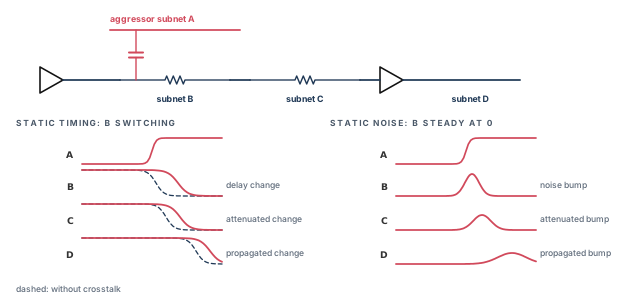
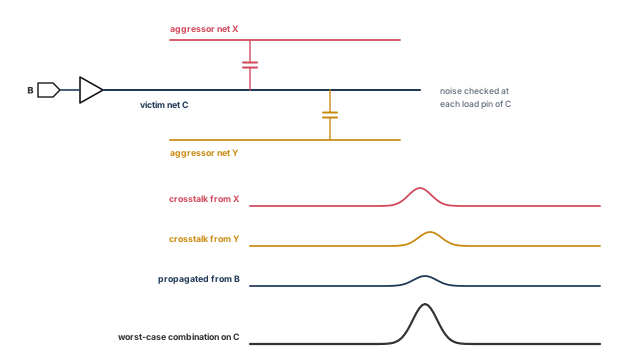
The tool combines bumps from several aggressors with noise propagated from the previous stage. It takes aggressor windows into account. It then carries the worst bump through the victim's subnets to each load pin. Figure 25 shows this for victim net C.
11.2 Noise bump types
In electronics, noise means any unwanted change in the voltage of a net that should be constant. In CMOS (complementary metal-oxide-semiconductor) circuits, that includes data signals held at logic 0 or logic 1.
Noise has many causes, such as charge storage at p-n junctions, power supply noise and substrate noise. However, in deep-submicron CMOS the dominant cause is crosstalk between neighboring nets. So the tool focuses on crosstalk noise and on how bumps travel from cell inputs to outputs.
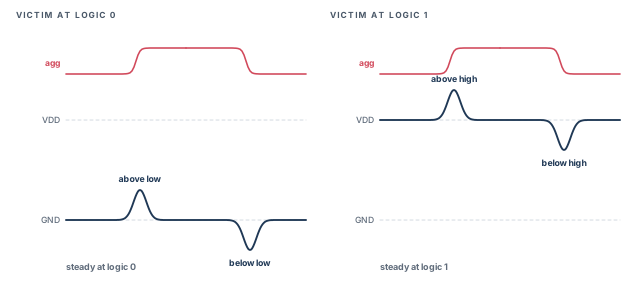
The tool analyzes four types of bump, shown in Figure 26:
- Above low: a victim at logic 0 bumps upward.
- Below low: a victim at logic 0 dips below ground.
- Below high: a victim at logic 1 dips downward.
- Above high: a victim at logic 1 rises above VDD.
Why each type matters:
- Between-rail bumps (above low, below high) can cause logic failure if they cross the logic thresholds.
- Beyond-rail bumps (below low, above high) can forward-bias pass gates at the inputs of flip-flops and latches. Then a wrong value can be latched.
11.3 Describing a bump with three numbers
The tool describes a bump with three numbers:
- Height, in voltage units.
- Width, the total width in time units.
- Time-to-peak ratio: the time to the peak divided by the total width. A ratio of 0.5 means a symmetrical bump.
A real bump has an irregular shape. To get its width and time to peak, the tool uses a triangular approximation with the same peak and the same area. Figure 27 shows it.
- Width = 2 × (area under the curve) / height.
- Time to peak = 2 × (area to the left of the peak) / height.
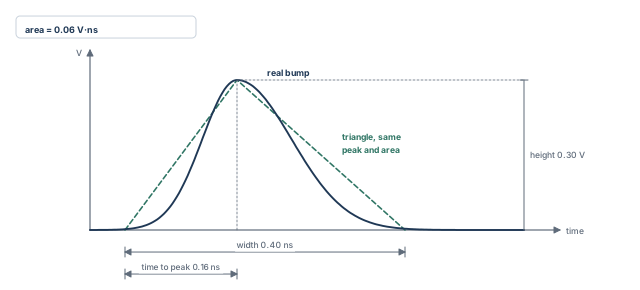
For example, take a bump with height 0.30 V and area 0.06 V·ns. Its width is 2 × 0.06 / 0.30 = 0.40 ns.
11.4 Where noise comes from
The tool adds up noise from three sources.
Crosstalk noise. This uses the coupling capacitance, aggressor windows, aggressor drive and the steady-state resistance of the victim driver. It is like the crosstalk delay calculation, but it uses the steady-state load behavior of the victim driver, not its switching behavior. Aggressors that contribute to the worst bump are active aggressors. The others do not contribute because:
- their windows are outside the worst-case region;
- their bumps are too small to matter;
- you excluded them, or logical correlation removed them.
Propagated noise. This is noise on a victim caused by noise at an input of its driver cell. The tool computes the output bump from the input bump and the output load. Propagation can amplify or attenuate the bump. The output bump may be larger or smaller, depending on the input bump and the cell.
User-defined noise. Sometimes propagated noise exists but cannot be computed. For example, the driver may be an extracted timing model or a black box. Then you can set a bump on any pin or port with set_input_noise. User-defined noise can replace or add to propagated noise there.
11.5 Logic failures and how to fix them
In static noise analysis, a logic failure is a wrong logic value on a net. It is caused by a bump passing from a cell input to its output.
A logic failure is not always a functional failure. Let us consider Figure 28. A rising clock edge launches data from net A to net E. Crosstalk from net X puts a large bump on net B, which causes a logic failure on net C. The failure travels to the endpoint at net E.
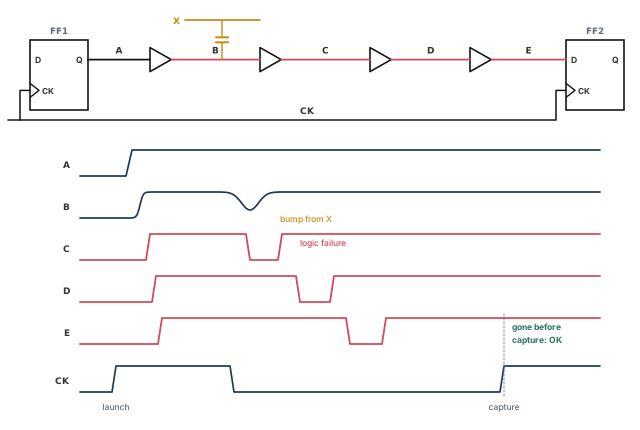
- If E is still wrong at the capture edge, an error is latched. The device fails.
- If E becomes correct again before the capture edge, the device works.
There are two strategies for repair:
- Fix only latched failures. Ignore glitches that are not latched. These are reported in report at endpoint mode.
- Fix every failure at its source, latched or not. All noise-caused logic violations are reported in report at source mode. This is the default.
set_noise_parameters chooses the mode. In the default report-at-source mode, a detected failure is not propagated forward. The tool assumes it will be fixed at the source. Instead it shrinks the input bump to a fraction of the failure level, 0.75 by default. Analysis then continues in the fanout of the failure.
Ways to fix a crosstalk noise problem include:
- change the routing to avoid the coupling;
- insert a buffer on the victim net;
- make the victim driver stronger.
After fixing, analyze the design again. This confirms the fix and checks for new problems.
12 Running static noise analysis
12.1 The noise analysis flow
Static noise analysis needs the SI license, and si_enable_analysis must be true. The flow is the crosstalk timing flow plus three commands at the end. Figure 29 shows it.
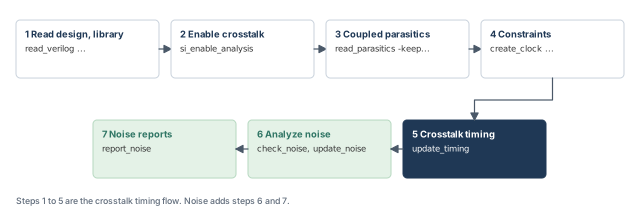
check_noisechecks that driver and load pins have noise models.update_noiseruns static noise analysis with the aggressor windows from timing analysis.report_noisereports where the worst bumps are and how large.
The tool supports two kinds of library noise model:
- CCS noise is the newer, more accurate technology. It computes the real response of each cell to each bump. Its accuracy is close to circuit simulation, at the speed of static analysis. It also allows very fast library characterization.
- NLDM (nonlinear delay model) is the older technology. It gives good results for technologies above 65 nm.
12.2 The noise command catalog
Table 10 lists the noise analysis commands.
| Command | Purpose |
|---|---|
check_noise |
Checks noise models on driver and load pins; reports pins not constrained for noise |
get_attribute si_noise_* |
For a pin, returns active aggressor nets, or a string of aggressors with their bump heights and widths |
get_noise_violation_sources |
Makes a collection of sources behind failing noise endpoints; report-at-endpoint mode only |
remove_input_noise |
Removes bumps set with set_input_noise |
remove_noise_immunity_curve |
Removes curves set with set_noise_immunity_curve |
remove_noise_lib_pin |
Reverses set_noise_lib_pin |
remove_noise_margin |
Removes margins set with set_noise_margin |
remove_si_noise_analysis |
Reverses set_si_noise_analysis |
remove_si_noise_disable_statistical |
Reverses set_si_noise_disable_statistical |
remove_steady_state_resistance |
Removes steady-state resistance set on cells |
report_noise |
Reports width, height and slack of worst-case bumps |
report_noise_calculation |
Shows how a bump was computed for one net arc and bump type, including why each aggressor is active or not |
report_noise_parameters |
Shows the settings made with set_noise_parameters |
report_noise_violation_sources |
Reports sources behind failing noise endpoints; report-at-endpoint mode only |
reset_noise_parameters |
Returns all set_noise_parameters settings to their defaults |
set_input_noise |
Sets a bump of given width and height on a port or pin, replacing or adding to propagated noise |
set_noise_derate |
Scales or offsets the computed bump height or width |
set_noise_immunity_curve |
Sets the three coefficients of a noise immunity curve |
set_noise_lib_pin |
Copies the noise behavior of a library pin to a pin |
set_noise_margin |
Sets bump-height noise margins |
set_noise_parameters |
Sets noise analysis options: effort level, aggressor arrival handling, beyond-rail analysis, propagation and reporting mode |
set_si_noise_analysis |
Includes or excludes nets for crosstalk noise analysis |
set_si_noise_disable_statistical |
Turns off statistical reduction for chosen nets in composite aggressor analysis |
set_steady_state_resistance |
Sets the steady-state drive resistance of an output |
update_noise |
Runs noise analysis with the set_noise_parameters settings; runs a timing update if needed |
12.3 Performing noise analysis
Set si_enable_analysis to true, then use check_noise, update_noise and report_noise.
update_noiseanalyzes crosstalk noise in the current design. If timing has not been updated yet, it runs a full timing update first.set_noise_parameterssets the noise options.report_noise_parametersshows them.reset_noise_parametersreturns them all to their defaults.set_si_noise_analysisexcludes nets from noise analysis, much likeset_si_delay_analysisdoes for delay.remove_si_noise_analysisreverses it.
12.4 Checking noise models with check_noise
Run check_noise before update_noise. It checks that every load pin and driver pin has a valid noise model. It also reports pins not constrained for noise. It finds many modeling problems quickly, before a long noise run.
Its options are:
-includechooses what to check: noise immunity on load pins, noise models on driver pins, or both. By default, only noise immunity is checked.-beyond_railalso checks beyond-rail noise. By default, only between-rail noise is checked.-verboselists individual pins as well as the summary.-nosplitstops long lines from being split.
The si_noise_immunity_default_height_ratio variable sets the default margin used for unconstrained pins. Its default is 0.4, which is 40 percent of VDD. Setting it to 1.0 turns off the default noise immunity, for backward compatibility.
Noise driver pin check:

  Noise driver type              above_low below_high
  -----------------------------------------------------
  CCS noise                             11           11
  library IV curve                       0            0
  library resistance                     0            0
  equivalent library pin                 4            4
  user resistance                        1            1
  none                                   2            2
Noise load pin immunity check:

  Noise immunity type            above_low below_high
  ------------------------------------------------------
  user hyperbolic curve                  1           1
  user margin                            2           2
  library immunity table                 0           0
  library hyperbolic curve               0           0
  library CCS noise immunity            14          14
  library DC noise margin                0           0
  default margin                         5           5
  none                                   0           0
How to read it:
- Each row counts pins by the kind of noise model or constraint they have.
- Pins in the
default marginrow are not constrained. The default margin is used for them. - The
nonerow of the load pin check must be zero. Otherwise some pins are not checked at all.
The typical use is:
- After crosstalk timing, before noise analysis, run
check_noise. If pins lack constraints, run it again with-verboseto list them. - Constrain those pins with
set_noise_lib_pin,set_noise_marginorset_noise_immunity_curve. - Run
check_noiseagain to confirm that all pins are constrained. Then runupdate_noise.
12.5 Noise analysis options
set_noise_parameters has several options that trade runtime for accuracy:
-ignore_arrivalignores aggressor windows. The tool assumes all aggressors of each victim switch together. This is conservative. If it reports violations, run again with windows to see if they disappear.-include_beyond_railsadds beyond-rail bumps (above high, below low). By default only between-rail bumps are analyzed, because they are usually more important. Beyond-rail bumps can still latch wrong data by forward-biasing pass transistors at flip-flop and latch inputs. This option costs runtime.-enable_propagationadds propagated noise. By default, only crosstalk noise and user-specified noise are considered. The default suits a first run that finds the worst violations quickly. Propagation gives more accuracy at more runtime.
pt_shell> set_noise_parameters -enable_propagation \
            -include_beyond_rails      ;# propagated noise and beyond-rail bumps
pt_shell> report_noise_parameters      ;# confirm the settings
12.6 Report at source and report at endpoint
The two reporting modes differ in where a violation is reported:
- Report at source reports a violation at the source of each noise violation.
- Report at endpoint reports violations only at endpoints, where noise propagation stops, such as sequential cells.
Figure 30 shows both modes on one circuit. A violation happens when a bump crosses the noise immunity curve of a pin. Noise injected at U3 passes through U4 and U5 and reaches the flop input FF/D. Noise injected at U1 stops at U2, because U2 is immune to it.
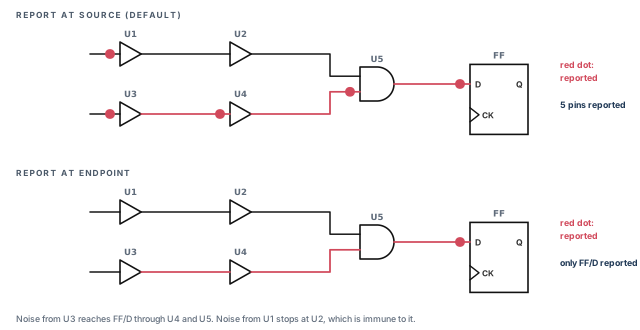
- In report-at-source mode, the inputs of
U1,U3,U4,U5andFFare reported. Each has negative slack. - In report-at-endpoint mode, only
FF/Dis reported.
A noise startpoint can be:
- an output pin of a flip-flop;
- an output pin of a level-sensitive latch;
- an input port;
- an output pin of a multistage cell, which has several levels of transistor stages, such as a flip-flop or a macro.
A noise endpoint can be:
- a data, clock or asynchronous pin of a flip-flop;
- an input pin of a level-sensitive latch;
- an output port;
- any combinational logic pin where the bump exceeds 75 percent of VDD, set by
si_noise_endpoint_height_threshold_ratio; - an input pin of a multistage cell.
The endpoint mode gives a shorter report, because it includes only violations latched as wrong data. The source mode gives a complete report of every noise immunity violation, latched or not. The default is report at source.
pt_shell> set_noise_parameters -analysis_mode report_at_endpoint   ;# latched failures only
pt_shell> set_noise_parameters -analysis_mode report_at_source     ;# back to the default
Changing the mode requires a full timing update. To save time, set the mode before update_noise.
In report-at-endpoint mode, use report_noise_violation_sources or get_noise_violation_sources to find the sources behind endpoint violations.
Use report at endpoint early, when you want the short list of failures that really latch wrong data. Use report at source for signoff, because a glitch that is harmless today can become latched after a small timing change.
12.7 Derating noise results
set_noise_derate changes computed bump sizes by a factor or an absolute amount. It works like set_timing_derate, but on bump sizes instead of delays. The derating affects reported bump sizes and noise slacks. You specify:
- the bump types (above or below, high or low);
- the parameter to change: height offset, height factor or width factor;
- the factor or amount.
12.8 The noise failure propagation limit
In report-at-source mode, a failure is not propagated forward as a wrong logic value. Instead, the tool shrinks the input bump to a fraction of the failure level. Analysis then continues in the fanout. The default fraction is 0.75, as Figure 31 shows.
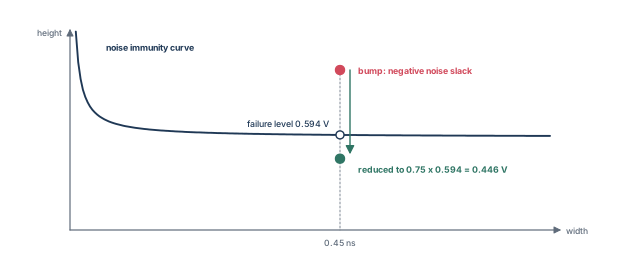
pt_shell> set_app_var si_noise_limit_propagation_ratio 0.6 ;# any value from 0.0 to 1.0- The value must be between 0.0 and 1.0.
- In report-at-endpoint mode, the whole bump is propagated, so this variable has no effect.
- Whatever the setting, a propagated bump is never taller than VDD, the rail-to-rail swing.
12.9 Composite aggressors in noise analysis
Some designs need an efficient way to handle many aggressors on one victim. They usually have:
- a large number of aggressors per victim;
- little or no filtering of aggressors;
- noise calculations in high effort mode.
Composite aggressor analysis merges many aggressors into one virtual aggressor. This cuts computation, runtime and memory without affecting accuracy. It is off by default.
pt_shell> set_app_var si_noise_composite_aggr_mode statistical ;# statistical compositeThe statistical mode reduces the composite's overall effect on the victim. To keep the full effect on chosen nets, use set_si_noise_disable_statistical and remove_si_noise_disable_statistical with a list of nets. They have no effect on nets outside a composite group. report_noise_calculation marks composite members with C. The delay-side version was explained in the composite aggressor section earlier.
12.10 Incremental noise analysis
After a full update_noise, the tool can sometimes run a fast incremental noise update after design changes. It analyzes only the parts affected by the changes, so it takes a fraction of the time.
Depending on history and on the changes, update_noise may run:
- an incremental noise update;
- a full noise update;
- an incremental timing update with a full noise update;
- a full timing update with a full noise update.
The tool generally picks the fastest type that gives accurate results. To force a complete noise update, use update_noise -full. If a timing update is also needed, for example after size_cell, the timing update is then full too.
check_noise until the none row is zero. Choose the reporting mode before update_noise. Add propagation and beyond-rail analysis when you need accuracy more than speed.13 Reporting noise analysis results
13.1 report_noise
report_noise shows the worst bumps on one or more nets. If no noise update has been done, it runs update_noise first. With no options, it shows the pin with the smallest slack for each bump type.
analysis_mode report_at_source
slack type: height

noise_region: above_low
pin name (net name)       width    height     slack
-----------------------------------------------------
tmp2f_reg/D (buf2_1f)      0.07      0.12      0.12

noise_region: below_high
pin name (net name)       width    height     slack
-----------------------------------------------------
U3/A (buf0_2f)             0.22      0.03      0.37
Units: width is in library time units, such as ns. Height is in library voltage units, such as volts. Area-type slack is in voltage-time units, such as volt-ns.
Options that narrow or extend the report:
| Option | Effect |
|---|---|
-above / -below with -high / -low |
Only the chosen bump types |
-nworst_pins n |
The n pins with the worst noise slack |
-slack_type height, area or area_percent |
How noise slack is measured; the default is height |
-slack_lesser_than value |
Only pins with slack worse than the value |
-all_violators |
Only pins with negative noise slack |
| a list of pins, ports or nets | Only those objects; a net reports all its load pins |
-data_pins, -clock_pins, -async_pins |
Only data, clock or asynchronous pins of registers |
-verbose |
Shows each aggressor's contribution separately |
pt_shell> report_noise -above -low                  ;# above-low bumps only
pt_shell> report_noise -above -low -nworst_pins 4   ;# four worst pins
pt_shell> report_noise -above -low {net1 net2}      ;# load pins of two nets
pt_shell> report_noise -data_pins                   ;# register data pins only
pt_shell> report_noise -verbose -above -low         ;# per-aggressor detail
A pin you name should be a load pin: a cell input or bidirectional pin, not an output. The one exception, an unbuffered latch output, comes later. The height slack is the most direct measure of a noise violation on a pin.
noise_region: above_low
pin name (net name)       width    height     slack
-----------------------------------------------------
tmp2f_reg/D (buf2_1f)
Aggressors:
CK                         0.07      0.12
net2                       0.04      0.02
Total:                     0.07      0.12      0.12
Two special rules apply:
- Setup-hold window. A bump on the data pin of a flip-flop is reported only if it overlaps the pin's setup-hold window. If it does not,
report_noise_calculationorreport_noise -verbosestill lists the aggressors, but the total bump is 0. The same holds for any latch data pin with a setup-hold window. - "positive" slack with CCS. With CCS noise models, small bumps show the slack as
positive, because the exact number does not matter. For exact numbers, or for pins that are not endpoints, usereport_noise_calculation.
13.2 report_noise_calculation
report_noise_calculation shows how a bump was computed on one net arc. You give the bump type and the driver pin or port of the victim net. You also give a load pin or port on the same net.
pt_shell> report_noise_calculation -below -high \
-from buf2/ZN -to buf5/I ;# below-high bump, driver to loadAnalysis mode : report_at_source
Region : below_high
Victim driver pin : buf2/ZN
Victim net : I2
Noise derate height scale factor : 1.000000
Noise composite aggressor mode : disabled
Height Width Area Aggressor Attr.
----------------------------------------------------------
Aggressors:
I1 0.300604 0.786466 0.118207 A I D
I3 0.300604 0.786466 0.118207 A I D
Total: 0.497124 0.919737 0.228612 G
Noise slack calculation:
Constraint type: library CCS noise immunity
Height Area
----------------------------------------------------------
Required 0.581570 (0.581570 * 0.919737)
Actual 0.497124 (0.497124 * 0.919737)
----------------------------------------------------------
Slack 0.084445 0.077668The command uses the set_noise_parameters settings. If no noise update has been done, it first runs one automatically. This is the same update_noise analysis that report_noise triggers. The report shows:
- the victim driver pin and net;
- any derating from
set_noise_derate; - the bump from each aggressor, and noise propagated from the previous stage;
- the noise slack, as required minus actual.
In this example, the required height is 0.581570 V and the actual is 0.497124 V. The height slack is their difference, 0.084445 V. The area slack multiplies that margin by the width.
The Aggressor Attributes column uses the letters in Table 12. Aggressors removed by filtering do not appear at all.
| Letter | Meaning |
|---|---|
| A | Active: contributes to the worst-case bump, given the possible overlap of all aggressors |
| C | A composite aggressor made of two or more smaller aggressors |
| D | Computed with the detailed, high-effort algorithm |
| E | Inactive: excluded with set_si_noise_analysis |
| G | Analyzed by gate-level simulation with CCS noise models |
| I | Infinite window: no fixed timing relationship with the victim, because of -ignore_arrival or different clock domains |
| L | Inactive: removed by logical correlation with the victim or other aggressors |
| S | Inactive: screened out because an internal prescreen found its bump too small |
| X | Inactive: excluded with set_si_aggressor_exclusion |
13.3 Reading noise data from attributes
Crosstalk information is stored in attributes on pins, nets, ports, timing points, timing arcs, library pins and library timing arcs. Read them with get_attribute or report_attribute.
By default, if no noise update has been done, both commands run update_noise automatically to find the value. For report_attribute, the si_noise_skip_update_for_report_attribute variable controls this, as Table 13 shows.
| Situation | Variable false (default) | Variable true |
|---|---|---|
| Noise update already done | Reports values at once | Reports values at once |
| No noise update yet | Runs a noise update, then reports | Does not update and does not report values |
The same rules apply after you change a noise constraint. The variable does not affect get_attribute.
report_noise finds the worst pins. report_noise_calculation explains one of them, letter by letter. Attributes hold the same data for scripts.14 Setting noise bumps and filling library gaps
14.1 Setting a bump with set_input_noise
Instead of letting the tool compute propagated noise, you can set a bump on any port or pin with set_input_noise. You give the pin, the bump type, the width in library time units and the height in library voltage units. Height is always a positive number.
pt_shell> set_input_noise -above -low \
            -width 1.70 -height 0.58 [get_pins U1/B]   ;# 1.70 ns wide, 0.58 V tall
Figure 32 shows the bump this creates.
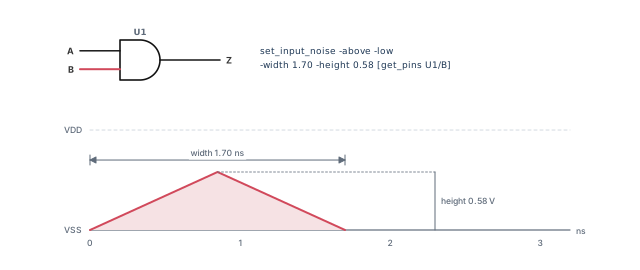
Rules for this bump:
- The tool treats it as propagated noise from the driver of the net on the pin.
- By default, it replaces any propagated noise the tool would compute from that driver.
- With
-add_noise, it is added to existing propagated or previously added noise. - You can also set it on an output pin. Unless you use
-add_noise, it then replaces the propagated noise computed from the driver. The bump travels through the subnets, weakened by the net resistance and capacitance, to each load pin.
With extracted timing models or other hierarchical models, a set bump can model the worst noise at each output of the model. The extract_model command writes set_input_noise commands into its output constraint script for this purpose.
14.2 When the library lacks noise data
Table 14 lists commands that give noise behavior where the library has none. They can also override the library at chosen points.
| Set with | Remove with | What it supplies |
|---|---|---|
set_noise_lib_pin |
remove_noise_lib_pin |
Copies all noise behavior from a library pin |
set_noise_immunity_curve |
remove_noise_immunity_curve |
A height-versus-width immunity curve at an input |
set_noise_margin |
remove_noise_margin |
A height-only immunity limit at an input |
set_steady_state_resistance |
remove_steady_state_resistance |
The steady-state drive resistance of an output |
set_noise_lib_pin. This says a design pin behaves like a library pin for noise. It helps when some library cells have noise data and others, such as macros, do not.
pt_shell> set_noise_lib_pin [get_pins macro_cell/A] ccs_noise_lib/inv/I   ;# input immunity
pt_shell> set_noise_lib_pin [get_pins macro_cell/Z] ccs_noise_lib/buf/Z   ;# output drive
The first command gives macro_cell/A the immunity of the inverter input. The tool uses it to compute that pin's noise immunity. The second gives macro_cell/Z the drive behavior of the buffer output. The tool uses it to compute bumps on the net that macro_cell/Z drives.
set_noise_immunity_curve. This sets the immunity at an input of a library cell, or at an output port of the design. The tool uses it to decide whether a bump at the input causes a logic failure. A noise immunity curve gives the largest allowed bump height for each bump width. Three positive coefficients define it, as explained in the noise immunity section below. You give:
- the bump type: above high, below high, above low or below low. A full description needs one command per type.
- the three coefficients;
- the library cell input pin, or design output port.
pt_shell> set_noise_immunity_curve -above -low \
            -width 0.00 -height 0.58 -area 0.0064 lib_name/AN2/A   ;# c3, c1, c2
set_noise_margin. Sometimes no immunity curve exists, from the library or from the command above. Then the tool uses noise margins based on bump height only. This command sets the margin at an input of a library cell or at a port of the design. For a library cell, it overrides the library's voltage noise margins. You give the bump type, the height failure threshold and the pin.
pt_shell> set_noise_margin -above -low 0.4 lib_name/AN2/A ;# fail above 0.4 VAll margin values are positive numbers, including those for below-high and below-low bumps.
set_steady_state_resistance. This sets the drive resistance at an output of a library cell or at a port of the design. The tool uses it to size crosstalk bumps. You give the bump type, the resistance in library units such as ohms or kilohms, and the pin.
pt_shell> set_steady_state_resistance -above -low 0.042 \
            lib_name/AN2/Z   ;# 0.042 in library resistance units
All resistance values are positive numbers.
set_input_noise puts a bump where the tool cannot compute one. The four library-gap commands describe how a pin drives or tolerates noise, and each has a matching remove command.15 Noise models in the library
15.1 Noise modeling with CCS noise data
CCS noise uses an advanced, current-based driver model. Its accuracy is close to circuit simulation. With an adaptive algorithm, the tool computes injected crosstalk bumps, propagated bumps and driver weakening effects. This accuracy is needed for 65 nm processes and below.
With CCS noise, the tool computes nonlinear bump waveforms on the fly. It correlates very well with circuit simulation at speeds that handle millions of gates. NLDM uses fixed noise immunity curves. CCS noise instead computes immunity dynamically, including non-monotonic waveforms and noise propagation.
The analysis uses two tiers, a fast engine and an accurate one:
- Each victim is first analyzed with a fast macro model engine. Its bumps are generally conservative.
- If a bump is below the transistor threshold voltage of the receiver pins, it cannot affect the receiver output. Analysis stops, and slack is reported as
POSITIVE. - If a bump exceeds that threshold, the tool recomputes it with the more accurate CCS noise gate-level simulation engine.
Thus, nets with possible violations get the accurate engine, and the rest get the fast one.
15.2 Which immunity data wins
A pin can have immunity data from several places. A DC noise margin is a height-only limit for steady, direct-current (DC) conditions. The tool uses this order, from highest priority to lowest:
- A noise immunity curve set with
set_noise_immunity_curve. - A DC noise margin set with
set_noise_margin. - An arc-specific noise immunity curve, polynomial or table from the library.
- A pin-specific noise immunity curve from the library.
- The CCS noise model from the library.
- A DC noise margin from the library (VOL, VOH, VIL, VIH).
For example, a curve or margin you set with a command is used for noise slack. This holds even when the library has CCS noise data.
A beginner sets a quick set_noise_margin on a library pin during debug and forgets it. That margin now overrides the library's CCS noise data on every instance of that pin. Remove debug constraints with remove_noise_margin before signoff.
15.3 Unbuffered-output latches
Level-sensitive latches are common in fast designs, because their data-to-output and clock-to-output delays are smaller than a flip-flop's. Figure 33 shows two ways to build one. Both have an input buffer, a pass gate and an inverter loop that holds the value on the latch node.
- With an output buffer, the latch resists noise at the output. The buffer isolates the latch node from the output node.
- Without one, the latch is faster and uses less power. However, it is very sensitive to noise at the output.
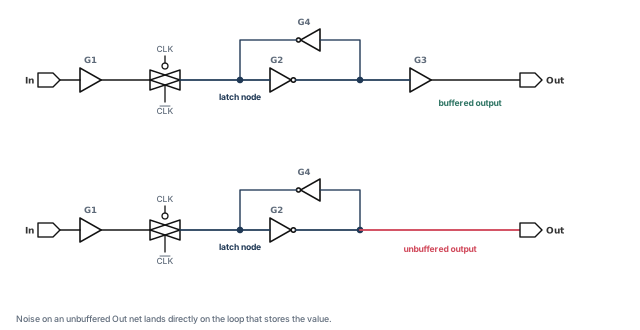
The tool analyzes noise on such an output pin under two conditions. The library sets its is_unbuffered attribute to true, and the pin is characterized for noise. The is_unbuffered attribute is part of the Liberty CCS modeling syntax. You can then name the output pin in report_noise:
noise_region: above_low
pin name (net name) width height slack
-----------------------------------------------------
I2/Z (P4) 1.03 2.03 -1.99
noise_region: below_high
pin name (net name) width height slack
-----------------------------------------------------
I2/Z (P4) 1.04 2.07 -2.0415.4 Noise modeling with NLDM
With NLDM, the cell noise behavior must come from the .lib library or from commands. Three kinds of information are used:
- Steady-state I-V behavior of outputs. I-V means current versus voltage. It sizes crosstalk bumps.
- Noise immunity of inputs. It is given as allowed height and width (immunity curves) or as height alone. It decides whether an input bump causes a logic failure at the output.
- Propagated bump size at outputs, given the input bump and the output load. It sizes propagated bumps.
It is better to put this data in the library, because the library syntax is richer. Libraries can hold piecewise linear models, polynomial models and several kinds of propagation model. Commands cover only part of that. Commands are useful when the library lacks the data or you want to override it.
If the library has no propagation data, you can set bumps directly with set_input_noise. Sometimes there is no characterization data at all. Then a circuit simulator such as HSPICE can produce theoretical noise behavior for the library or the commands.
If no noise data exists anywhere, the tool still runs noise analysis. It estimates noise behavior from the library timing and slew data. However, it then cannot detect logic failures and cannot compute noise propagation.
15.5 Steady-state I-V characteristics
A steady driver loads its net, and that changes the size of crosstalk bumps. The tool needs the driver's steady-state I-V behavior to size bumps accurately.
For example, a victim driver holds logic 0. An aggressor rises and puts an above-low bump on the victim. The driver pulls back against the bump. The simplest model is a straight-line I-V curve, which is just a resistor to ground.
The real curve comes from holding the output low or high and measuring the current at different output voltages. For a CMOS inverter at logic 0:
- the operating point is (0 V, 0 A);
- near that point, the curve is a straight line, so the output acts like a resistor;
- at larger positive voltages, it bends, because the NMOS (n-channel) transistor turns off and the PMOS (p-channel) junction diode becomes forward-biased;
- well below 0 V, it bends because the NMOS junction diode becomes forward-biased.
At logic 1, the operating point is (VDD, 0 A). Let us assume a process with matched NMOS and PMOS transistors. Then the logic-1 curve is the logic-0 curve rotated 180 degrees and shifted right by VDD.
Figure 34 shows both curves and the four bump regions on one graph. It also shows a two-resistor approximation of each curve. Each resistance is the inverse of the line's slope, voltage divided by current.
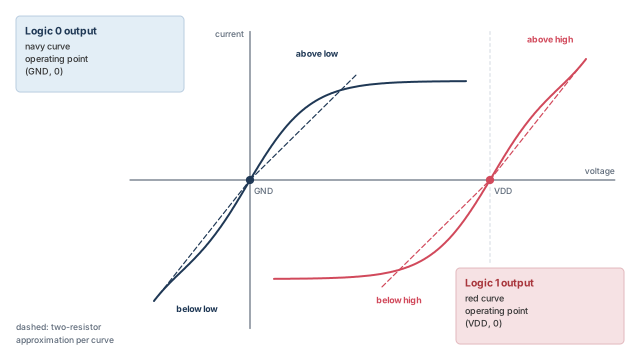
You can enter the four resistances in the library or with set_steady_state_resistance. Piecewise linear and polynomial models are more accurate, but only the library can hold them.
If no I-V data is given, the tool estimates a linear resistance from:
- the output delay and output slew in the library;
- assumed NMOS and PMOS threshold voltages of 0.2 times the rail-to-rail voltage.
If several sources conflict, the tool uses this order:
- Resistance set with
set_steady_state_resistance. - Library per-arc I-V polynomials or tables.
- Library per-pin steady-state resistance.
- Its own estimate from output delay, output slew and threshold voltages.
| Method | Library type | How it is described |
|---|---|---|
| Lookup tables | NLDM | Two tables per timing arc, for steady low and steady high, of current versus voltage |
| Steady-state resistance | NLDM | Four resistances per timing arc: above low, below low, above high, below high. The output is a resistor to ground for logic 0, or to VDD for logic 1. Can also be set per output with set_steady_state_resistance |
15.6 Noise immunity
Each cell input can tolerate some noise without a failure at the output. This is its noise immunity. The tool uses immunity data at cell inputs to decide whether failures occur and how much noise slack each input has.
The recommended definition of logic failure comes from the cell's DC transfer curve, the plot of output voltage against input voltage. The failure points are where the curve's slope reaches 45 degrees, that is, a gain of magnitude 1. Past that point, a small input change makes a larger output change. A library creator might still use other criteria.
Immunity can be given in two ways:
- as allowed bump height and width, with noise immunity curves, polynomials or tables;
- as noise margins, which use bump height only.
| Method | Library type | How it is described |
|---|---|---|
| Hyperbolic noise immunity curves (per input) | NLDM | Four hyperbolas per input, one per bump type, each with three coefficients. Can also be set with set_noise_immunity_curve |
| Noise immunity lookup tables (per timing arc) | NLDM | Four tables per arc, one per bump type, of maximum height against width and output load |
| Noise margins on height only (per input) | NLDM | Four values per input pin: the allowed voltages for logic 0 and logic 1. Can also be set with set_noise_margin |
15.7 Noise immunity curves
With an immunity curve, the tool looks at both the width and the height of an input bump. The input has capacitance, so a very short bump can be tolerated even if it is tall.
To measure immunity, bumps of different heights and widths are applied to the input. Small, narrow bumps change nothing at the output. Wide, tall bumps cause an output bump or even a full logic change. A few rules for characterization:
- A cell with several outputs can have different immunity per arc. Use the worst input-to-output arc for each input.
- Immunity depends on output load, so characterize with the worst case, the smallest capacitive load.
Plot the height-width points where failures just begin, and you get a curve like Figure 35. Given that curve and an input bump, the tool decides whether the output fails.
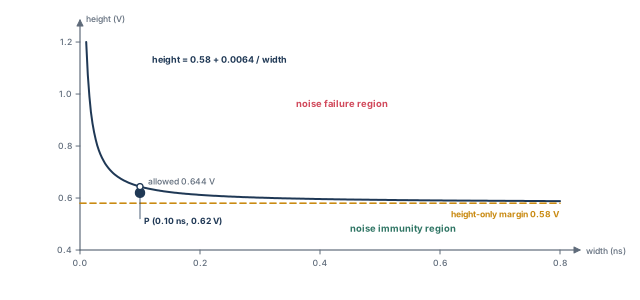
The library can describe the curve as a hyperbola, a piecewise linear model or a polynomial. A hyperbola needs three coefficients:
height = c1 + c2 / (width - c3)

height  the bump height at the threshold of logic failure
width   the width of the input bump
c1      voltage offset, equal to the DC noise immunity value
c2      size parameter of the hyperbola
c3      time offset
Choose the coefficients to fit the characterized failure points. For example, with c1 = 0.58, c2 = 0.0064 and c3 = 0.0:
- a bump 0.10 ns wide may be up to 0.58 + 0.0064 / 0.10 = 0.644 V tall;
- a bump 0.40 ns wide may be up to 0.58 + 0.0064 / 0.40 = 0.596 V tall.
Key facts:
- In the library, c1, c2 and c3 are called
height_coefficient,area_coefficientandwidth_coefficient. - In
set_noise_immunity_curve, they are set with-height,-areaand-width. - Immunity can differ per bump type, so an input can have four curves: below low, above low, below high and above high.
- All coefficients are positive numbers for all four types.
15.8 Noise immunity polynomials and tables
Immunity can vary a lot with output load or with the path through the cell. Then the library can use polynomials or lookup tables instead of hyperbolas. They give the maximum input bump height as a function of input bump width and output load. Each one applies to one input-to-output arc, not to all arcs through the input.
Per-arc data captures state-dependent differences. For example, take an XOR gate with inputs A and B and output Z. The A-to-Z and B-to-Z arcs take different transistor paths. Their immunity can differ.
15.9 Bump height noise margins
A noise margin considers only the input bump height. It ignores width and output load. It is simpler, faster and more conservative than the other methods.
Figure 35 shows the difference. The margin is a flat line at the curve's lowest level.
- For tall, narrow bumps, the margin is pessimistic. It fails bumps that the curve would pass, such as bump P.
- For wide bumps, the curve flattens toward c1, so the margin gives the same result as the curve.
Each input has four margin values: below low, above low, below high and above high. All are positive numbers. set_noise_margin sets them where the library has none, or overrides the library.
If no immunity data exists from commands or the library, the tool uses the DC noise margins of the driver and receiver. These come from the library logic-level parameters VIL, VIH, VOL and VOH. VIL and VIH are the input voltages still read as 0 and as 1. VOL and VOH are the output low and high levels.
15.10 Noise slack
In timing, slack is the margin by which a constraint is met, in time units. Negative slack means failure. In noise analysis, slack can be measured three ways: height, area and area_percent. The default is height.
Figure 36 shows three bumps plotted against one immunity curve. Bump A is below the curve, B is on it and C is above it.
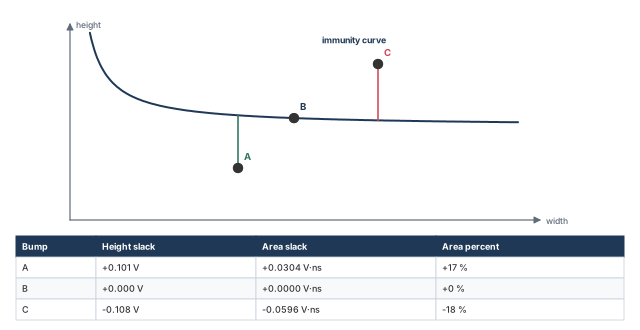
- Height slack is the voltage margin at the bump's own width: allowed height minus actual height. For curves, tables and polynomials, different widths give different allowed heights. Height is the most direct measure of a violation on a pin.
- Area slack is the height margin multiplied by the bump width. It is positive below the curve and negative above it. Its units are voltage times time, such as volt-ns.
- Area percent slack is the area slack divided by the constraint area. The constraint area is the bump width times the allowed height. For example, a margin of +0.12 V on an allowed height of 0.60 V gives +20 percent.
15.11 Propagated noise characteristics
A large enough input bump causes an output bump. This is noise propagation. It is measured by applying bumps of different heights and widths to an input and measuring the output bump. The output bump depends on the input height and width and on the output load. It depends less on the input time-to-peak ratio.
The library can describe propagation in two ways:
- Polynomials give output height, width and time-to-peak ratio from input height, width, time-to-peak ratio and output load. That is three functions for each of four bump types, so 12 polynomials per timing arc.
- Lookup tables give output height and width from input height, width and output load. That is two functions for each of four bump types, so 8 tables per timing arc. They have no time-to-peak data, but the tool still computes the output time-to-peak ratio from the library cell delay and slew data.
The time-to-peak ratio lies between 0.0 and 1.0, and is 0.5 for a symmetrical bump. Including it makes the model more accurate but needs more characterization work.
| Method | Library type | How it is described |
|---|---|---|
| Lookup tables | NLDM | Four pairs of tables (eight tables) per timing arc: output height and output width against input height, input width and output load, one pair per output bump type |
16 Worked example: crosstalk and noise on a small block
Let us check a small block named top for crosstalk. Figure 37 shows the circuit. Flop FF1 launches through NAND gate U1 and inverter U2 into flop FF2. Both flops use clock CLK with a 0.8 ns period. Net n3, from U1/Y to U2/A, runs beside net agg1, which buffer U9 drives.
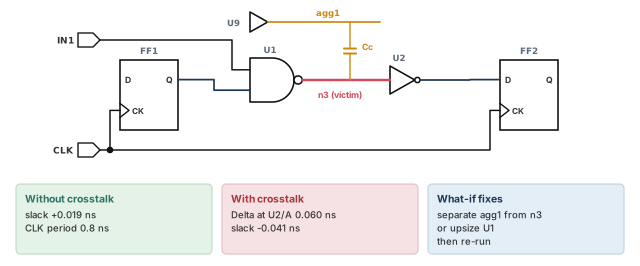
Step 1 — Confirm a clean run without crosstalk
pt_shell> set_app_var si_enable_analysis false   ;# crosstalk off for the baseline
pt_shell> report_timing -to FF2/D                ;# setup path into FF2
Check: the path meets timing. Here the slack without crosstalk is +0.019 ns. Fix any ordinary violation before you go on.
Step 2 — Enable crosstalk and read coupled parasitics
pt_shell> set_app_var si_enable_analysis true   ;# crosstalk on
pt_shell> read_parasitics -syntax_only -keep_capacitive_coupling top.spef   ;# check symmetry
pt_shell> read_parasitics -keep_capacitive_coupling top.spef   ;# read, keeping coupling
Check: no warnings about asymmetric coupling. If there are any, fix the extraction first.
Step 3 — Check the setup for crosstalk
pt_shell> check_timing -include { ideal_clocks } ;# the other SI checks are on by defaultCheck: no ideal clocks, no inputs without driving cells, no partial input delays and no unexpandable clocks.
Step 4 — Run the default analysis and read the path
pt_shell> report_timing -to FF2/D -transition_time -crosstalk_delta \
            -significant_digits 4   ;# slews and delta delays per stage
The report is the illustrative one shown earlier in the timing report section. The stage ending at U2/A has Delta 0.0600 ns, and the slack is −0.0410 ns.
Check: the slack moved from +0.019 ns to −0.041 ns. The 0.060 ns difference comes from the delta delay on n3.
Step 5 — Find out why n3 is hit
pt_shell> report_delay_calculation -crosstalk \
            -from [get_pins U1/Y] -to [get_pins U2/A]   ;# net arc of n3
pt_shell> report_si_bottleneck -cost_type delta_delay \
            -slack_lesser_than 0.1   ;# other victims close to failing
Check: agg1 is the active aggressor. Its window overlaps the window of n3. The bottleneck report shows whether other victims are also close to failing.
Step 6 — Try a what-if repair
pt_shell> set_coupling_separation -pairwise [get_nets agg1] [get_nets n3]   ;# what if spaced?
pt_shell> report_timing -to FF2/D -crosstalk_delta   ;# slack without that coupling
Check: without the coupling, slack returns to about +0.019 ns. Spacing or shielding n3 is therefore a valid fix. Upsizing U1 is another, because a stronger victim driver resists the aggressor. Then remove the what-if setting with remove_coupling_separation, so that it does not hide the real coupling later.
Step 7 — Run static noise analysis
pt_shell> check_noise                    ;# every load pin needs a noise constraint
pt_shell> update_noise                   ;# static noise analysis with real windows
pt_shell> report_noise -all_violators    ;# only pins with negative noise slack
Check: the none row of check_noise is zero. Then report_noise lists any pin with negative slack. For a violating pin, run report_noise_calculation to see which aggressors are active.
Step 8 — Signoff extras
pt_shell> set_app_var si_xtalk_double_switching_mode clock_network   ;# clock double switching
pt_shell> update_timing                                              ;# detect it
pt_shell> report_si_double_switching                                 ;# list any victims
Check: no double-switching victims. Record any filter, exclusion or clock group setting in the run notes, with its reason.
17 Common mistakes and how to catch them
| Symptom | Likely cause | Fix |
|---|---|---|
| No delta delays appear anywhere | Parasitics read without -keep_capacitive_coupling, or si_enable_analysis is false |
Re-read with the option; enable the analysis |
| Crosstalk results look random or one-sided | Asymmetric coupling in the SPEF | Check with -syntax_only -keep_capacitive_coupling; fix the extraction |
| Very large delta delays on clock nets | Ideal clocks, so windows are wrong | Propagate clocks; run check_timing -include { ideal_clocks } |
| Heavy pessimism on paths from input ports | No driving cell, so a strong aggressor driver is assumed | Set driving cells on inputs |
| Delta delays added twice in a hand calculation | Incr already includes Delta |
Read Incr and Path as final values |
| Violation disappears after a clock group change | Clocks declared physically exclusive where they share wires | Use generated clocks after the multiplexer; exclude only truly separate parts |
| Exclusion cannot be removed; XTALK-107 | The exclusion was implicit, not set on that net | Remove the original setting on the original object |
| Signoff misses many small aggressors | Filter thresholds raised for speed | Restore defaults, or use composite aggressor mode |
Noise run reports few violations but check_noise shows none pins |
Unconstrained pins are not checked | Constrain them until the none row is zero |
| Library CCS noise data seems ignored | A command-set curve or margin takes priority | Remove debug constraints with the matching remove command |
18 Interview preparation
Crosstalk is unwanted coupling between neighboring nets. It changes the delay of a switching victim and puts bumps on a steady victim.
- The delay effect can cause setup or hold violations.
- The noise effect can cause a wrong logic value, a functional failure.
In the opposite direction to the victim, at about the same time.
- Opposite switching fights the victim, so it is slower: a setup risk.
- Same-direction switching helps it, so it is faster: a hold risk.
Set si_enable_analysis to true, and read parasitics with -keep_capacitive_coupling.
- Without the option, coupling capacitors are not kept.
- The tool switches to on-chip variation by itself if needed.
It is the earliest-to-latest switching range of a net; crosstalk delay can only occur where aggressor and victim windows overlap.
- Windows come from on-chip variation analysis.
- The first pass ignores windows; the second uses them.
The first two are filtered; the third is kept.
- 0.009 is below 0.01, so it goes at once.
- 0.009 + 0.011 = 0.020 is below 0.05, so both go.
- Adding 0.031 gives 0.051, above 0.05, so the third stays.
Delta is the stage's crosstalk delay change; Incr already includes it.
DTransis the slew change from crosstalk.- Values are stored per stage on the input pin.
- An
&means parasitics were used.
It also removes real crosstalk before the multiplexer; generated clocks on the multiplexer output, declared physically exclusive, remove only the impossible part.
- Logically exclusive keeps the pessimistic crosstalk after the multiplexer.
- The tool does not check that clock groups make sense.
All paths merges every path into one victim window. All path edges uses the real early and late edges, which removes pessimism.
- All path edges costs some extra runtime.
- Path-based analysis is the most accurate and the slowest.
- The variable is
si_xtalk_delay_analysis_mode.
Report at source flags every noise violation where it starts; report at endpoint flags only violations that reach endpoints such as registers.
- Report at source is the default.
- In it, failing bumps are reduced to 0.75 of the failure level and analysis continues.
- Changing the mode needs a full timing update.
update_noise miss it?Crosstalk hits a slowly switching victim in the receiver's sensitive region, so the receiver output switches twice.
- It can cause false clocking, double clocking or glitch propagation.
- Static noise checks steady nets; some bumps are too small to fail that check but large enough to double switch.
- Detection needs CCS noise models and
si_xtalk_double_switching_mode.
It replaces many small aggressors with one statistical composite waveform, sized to a chosen probability.
- The default probability is 99.73 percent, about 3 sigma.
- Filtered aggressors join the composite instead of being thrown away.
- Statistical reduction can be turned off for chosen nets.
Measuring slew on a distorted waveform is pessimistic, so the tool shifts the clean waveform until its output bounds the real one.
- The shift is the delta delay of the stage.
- Without CCS noise data on the receiver, the bound is estimated at the receiver input.
- Missing
normalized_driver_waveformdata makes the tool assume a pre-driver 0.5 waveform.
No. At 0.10 ns the allowed height is 0.644 V, so the height slack is +0.024 V.
- Allowed height = 0.58 + 0.0064 / 0.10 = 0.644 V.
- A height-only margin of 0.58 V would call it a failure.
- That is why margins are pessimistic for narrow bumps.
set_noise_margin?The command-set margin, because command-set curves and margins take priority over all library data.
- Command curve, then command margin, then library arc curves, pin curves, CCS noise and DC margins.
- Forgotten debug margins are a common source of wrong noise slack.
19 Chapter close
Compact glossary
| Term | Meaning |
|---|---|
| Crosstalk | Unwanted interaction between neighboring nets through coupling capacitance |
| Aggressor net | A net whose switching disturbs a nearby net |
| Victim net | A net disturbed by a nearby net |
| Coupling capacitance | Capacitance between two neighboring nets |
| Delta delay | The delay change crosstalk adds to a switching victim, including the fanout stage effect |
| Delta transition | The slew change crosstalk adds to a switching victim |
| Timing window | The earliest-to-latest switching range of a net |
| Electrical filtering | Dropping aggressors whose bumps are too small to matter |
| Logical correlation | Using logic, such as an inverter, to rule out impossible aggressor combinations |
| Exclusive aggressor group | Aggressors of which only a set number can switch together in one direction |
| Infinite window | A window that allows switching at any time, used for asynchronous clocks |
| Composite aggressor | One statistical waveform standing for many small aggressors |
| Ideal aggressor | An aggressor whose coupling to other nets is left out, keeping it at full strength |
| Equivalent waveform | A shifted clean waveform that bounds a distorted one |
| Double switching | A receiver output switching twice because of a bump during a slow transition |
| Noise bump | A short voltage spike on a net that should be steady |
| Above low / below high | Between-rail bumps that point toward the opposite logic level |
| Below low / above high | Beyond-rail bumps outside the supply range |
| Time-to-peak ratio | Time to the peak divided by the bump width |
| Noise immunity | How much input noise a cell tolerates without an output failure |
| Noise immunity curve | Allowed bump height as a function of bump width |
| Noise margin | An allowed bump height that ignores width |
| Steady-state resistance | The drive resistance of an output holding a constant level |
| Noise slack | The margin to the immunity limit, as height, area or area percent |
| Report at source / endpoint | Report every violation where it starts / only where it reaches an endpoint |
Signal integrity on one page
Figure 38 is the summary to redraw from memory.
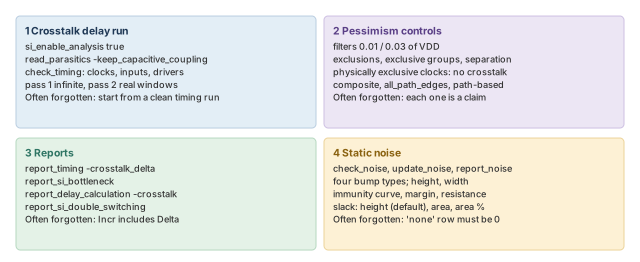
Where the next chapter goes, and why
You can now include crosstalk in delays, find noise failures and control the pessimism of both. Next, Advanced Analysis Techniques covers special circuits: latches, asynchronous logic, three-state buses, data-to-data checks and parallel arcs.