Why this chapter matters in a real project
Most of a design is simple. A flip-flop launches data, logic delays it, and another flip-flop captures it. Earlier chapters covered that case well. However, every real chip also has corners that do not fit the simple picture.
A memory has extra arcs that guard its output. A shared bus has several drivers. A handshake has two data signals that must keep an order, with no clock between them. A fast datapath uses latches that pass data while they are open. Each case needs its own rules.
If you treat these cases like plain flip-flop paths, two things go wrong. You may miss a real violation, so the chip fails in the lab. Or you may chase a false violation for days. Both are expensive late in a project. This chapter gives you the rules for each corner case, and the commands that control them.
Prerequisites
- Clocks: clock waveforms, latency, uncertainty and propagated clocks.
- Timing Paths and Exceptions: startpoints, endpoints,
set_false_path,set_multicycle_path,set_max_delayand clock groups. - Delay Calculation: what a timing arc is and how cell delays are found.
- Back-Annotation: what an SDF (Standard Delay Format) file holds.
- Operating Conditions: clock reconvergence pessimism removal (CRPR). It helps, but this chapter defines it again.
- You do not need to know latch design in depth. This chapter builds it from a small example.
In this chapter, times are in nanoseconds (ns) unless said otherwise.
Learning objectives
- Explain parallel arcs and trim them in path reports with one variable.
- Describe a retain arc, and check and write retain arcs correctly.
- List the conditions a design must meet for static timing, and explain a base period.
- Find combinational loops, choose where to break them, and keep loop breaking consistent with synthesis.
- Predict which three-state arc delay exposes a setup or a hold problem on a shared bus.
- Write data-to-data checks with
set_data_check, and know when library checks are better. - Calculate time borrowed, maximum borrow time and time given for a latch.
- Limit time borrowing with
set_max_time_borrow. - Run advanced latch analysis, manage loop-breaker latches, and apply exceptions to throughpaths.
- Read local slack, normalized slack and recovered paths in a latch design.
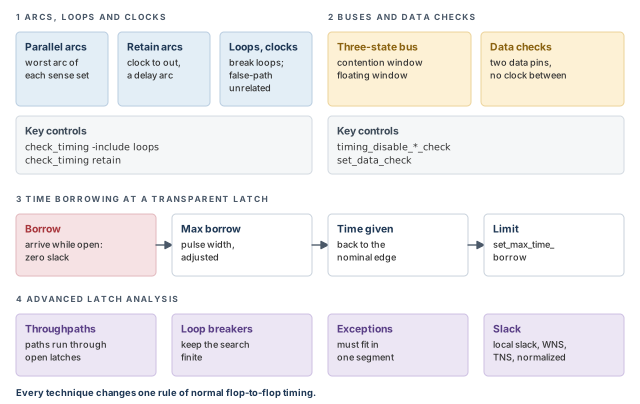
Figure 1 is a map of the whole chapter. Come back to it whenever you lose your place.
1 The beginner's mental model
Think of a road inspector who times delivery vans. On most roads, the rule is simple: leave at one checkpoint, arrive at the next before the gate shuts.
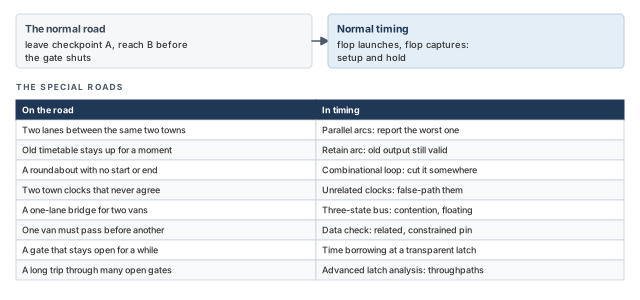
Some roads are special. A road may have two lanes between the same towns, and the inspector only cares about the slowest one. A roundabout has no start or end, so the inspector must pick a place to cut it. A one-lane bridge is shared, and two vans must never meet on it. Some checkpoints have no clock at all; one van must simply pass before another. Some gates stay open for a while, so a late van can borrow time from the next leg. Figure 2 maps each special road to its timing name.
- A road has one van at a time. A timing path has a rising and a falling edge, and the tool times both.
- An inspector can watch every road. The tool cannot find the worst path through a large loop of latches, so it must cut loops on purpose.
- A borrowed minute on the road is simply late. In a latch design, the time borrowed is given to the next stage, so the next stage has less time.
Now the engineering model
In engineering terms, the chapter covers seven techniques:
- Parallel arc path tracing. Report only the worst of several same-sense arcs between two pins.
- Retain arcs. Extra clock-to-output arcs on memories that guard the old output value.
- Asynchronous logic. What static timing can handle, how loops are broken, and what to do with unrelated clocks.
- Three-state buses. Setup and hold checks for bus contention and floating buses.
- Data-to-data checks. Setup and hold between two signals when neither is a clock.
- Time borrowing. How a transparent latch passes extra time to the next stage.
- Advanced latch analysis. Timing paths that run through several latches without being cut.
2 Parallel arc path tracing
2.1 What parallel arcs are
A timing arc is a pin-to-pin delay inside a cell, such as A to Y. Some cells have several arcs between the same two pins. Arcs that share the same two pins are parallel arcs. For example, a cell may have three arcs from pin A to pin Y, each with its own delay.
Each arc also has a sense. The sense says how the output responds to the input:
- positive_unate: the output moves in the same direction as the input.
- negative_unate: the output moves in the opposite direction.
- non-unate: the output can move either way, depending on other inputs.
A sense set is a group of parallel arcs that have the same sense. For example, an XOR gate can have a positive_unate arc and a negative_unate arc between the same two pins. Those two arcs are in different sense sets.
2.2 Keeping only the worst arc in each sense set
When you ask for many paths per endpoint, the report can fill with near-copies. The -nworst option of report_timing sets how many paths per endpoint may be returned. With three parallel arcs, one route through the logic can appear three times. Each copy differs only in which arc it used.
To keep only the worst arc of each sense set, set one variable:
pt_shell> set_app_var timing_report_use_worst_parallel_cell_arc true   ;# worst arc only
pt_shell> report_timing -nworst 5 -to [get_pins FF2/D]   ;# fewer near-copies per endpoint
The worst arc depends on the kind of path:
- For maximum delay (setup) tracing, the worst arc is the slowest arc.
- For minimum delay (hold) tracing, the worst arc is the fastest arc.
Figure 3 shows the effect on a cell with three same-sense arcs and on an XOR gate.
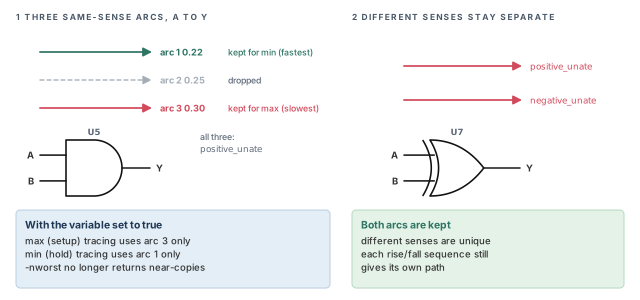
Paths through other arcs with the same rise and fall sequence are not returned. However, arcs with different senses are still unique. Thus, a non-unate gate still gives separate paths for each rise and fall sequence.
2.3 What this changes, and what it does not
- It affects
report_timingandget_timing_pathswhen-nworstis greater than 1. - Only parallel arcs of the same sense are trimmed. A positive_unate and a negative_unate arc across an XOR are still both used.
- It changes path tracing at report time only. It does not change
update_timing. - You can change the variable at any time. No timing update penalty follows.
What happens to the number of paths depends on the -nworst limit:
- Limit not reached, for example when reporting to one endpoint: fewer paths come back.
- Limit reached, for example across a whole path group: the paths that come back cover more varied routes through the logic.
Turn this variable on in scripts that walk timing_path collections. Examples are bottleneck reports and engineering change order (ECO) scripts. They become more efficient, because fewer near-copies of the same route come back.
3 Retain arcs
3.1 What a retain arc is
A random access memory (RAM) changes its output some time after the clock edge. Before that, the old data stays valid for a short time. A retain arc models this short "old data still good" time.
- A retain arc goes from a clock pin to a data output of the memory.
- It is always defined in parallel with a parent arc. The parent arc is the normal delay arc between the same two pins.
- It is similar to a hold-check arc. However, it creates no timing check. The tool treats it as one more delay arc in parallel with its parent.
Thus, a clock-to-output retain arc guarantees that the output does not change for a set time after the clock edge.
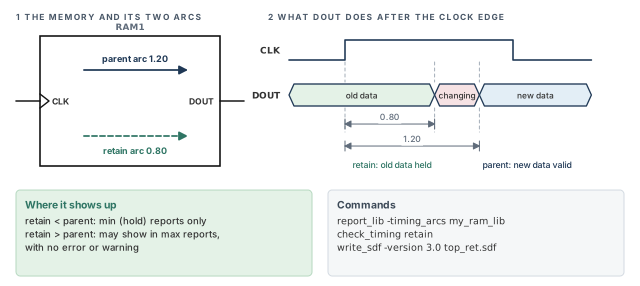
Figure 4 shows a RAM with a 1.20 ns parent arc and a 0.80 ns retain arc.
3.2 How retain arcs appear in reports
The relation between the two delays decides where the retain arc appears:
- Retain delay shorter than the parent delay (the normal case): the retain arc appears only in minimum delay path reports.
- Retain delay longer than the parent delay: the retain arc can also appear in maximum delay reports. The tool gives no error or warning for this.
Because the tool gives no warning, check for this case on purpose.
pt_shell> report_lib -timing_arcs my_ram_lib   ;# list every arc, retain arcs included
pt_shell> check_timing retain                  ;# flag retain arcs longer than the parent
3.3 Reading and writing retain arcs in SDF
The tool loads retain arcs from library files. It can also annotate retain arc delays from SDF files and report them.
read_sdfsupports retain arcs.write_sdfdoes not write retain arcs by default, because its default is SDF version 2.1.- To write retain arcs, use SDF version 3.0:
pt_shell> write_sdf -version 3.0 top_ret.sdf ;# version 3.0 keeps retain arcsFour functions map retain information for arcs:
min_rise_retain_delaymin_fall_retain_delaymax_rise_retain_delaymax_fall_retain_delay
A beginner writes SDF for a memory-heavy block with plain write_sdf. The SDF file then holds no retain arcs at all. Use -version 3.0 whenever retain arcs matter.
check_timing retain, and write SDF 3.0 to keep it.4 Asynchronous logic analysis
4.1 What static timing can and cannot handle
Static timing assumes that clocks control when data moves. Logic without such control is asynchronous. The simplest approach is to keep it apart:
- Isolate asynchronous logic into separate blocks, then disable timing on those blocks.
- Self-timed logic has no global clock at all. The tool does not support it. Isolate it in its own level of hierarchy, and verify it with full-timing gate-level simulation.
The tool can analyze a design that meets these conditions:
- No combinational feedback loops. Loops that contain flip-flops or latches are fine. Combinational loops are broken automatically.
- No unclocked memory elements, such as RS latches.
- A single clock or several clocks fanning in to each register clock pin.
- A known, fixed phase relation between the clocks at the start and end of every path.
4.2 The base period
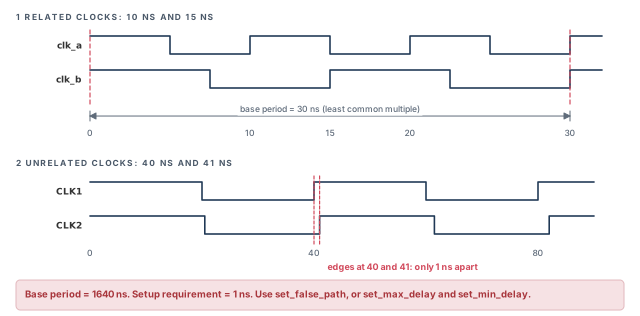
For the last condition, interacting clocks must share a base period. This is the time after which all their waveforms repeat together. It is the least common multiple of their periods.
For example, take clocks of 10 ns and 15 ns. Both waveforms line up again at 30 ns, so the base period is 30 ns. The top half of Figure 5, a little further on, shows this case.
4.3 Unrelated clocks
Unrelated clocks have frequencies with no reasonable base period. The lower half of Figure 5 shows CLK1 at 40 ns and CLK2 at 41 ns.
- The tool still tries to find a base period and phase relation. The result is typically not useful.
- The closest pair of edges is only 1 ns apart, so the setup requirement becomes very tight.
- Dynamic simulation may be a better way to verify such a crossing.
To remove these paths from static timing, declare them false. This also saves runtime and avoids false violations.
pt_shell> set_false_path -from [get_clocks clk40] \
            -to [get_clocks clk41]   ;# no timing between the two unrelated clocks
Sometimes you do know the allowed delays of the logic between two registers on unrelated clocks. In that case, constrain the path with set_max_delay and set_min_delay instead.
4.4 Combinational feedback loops
A combinational feedback loop is a path through combinational logic that returns to its own start. For example, the output of gate u1 drives u2, and u2 drives an input of u1.
To time such logic, the tool must stop tracing somewhere in the loop. This is called breaking the loop. First, find the loops:
pt_shell> check_timing -include loops ;# report combinational feedback loopsBy default, the tool finds each loop and disables one timing arc in it. For example, it may disable the arc from one input to the output of a NAND gate in the loop.
However, a disabled arc also cuts every real path that uses it. In some loops, no arc can be cut without losing a valid path. Figure 6 shows such a loop.
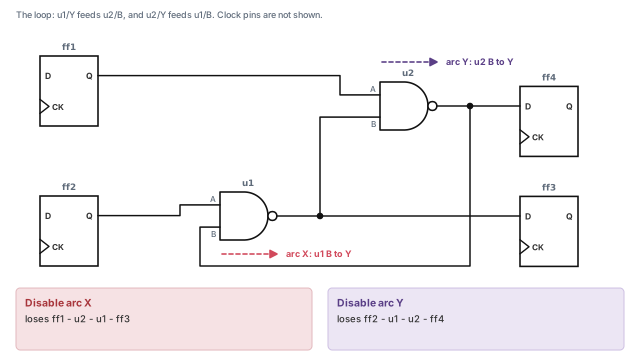
In Figure 6, cutting arc X hides the path ff1–u2–u1–ff3. Cutting arc Y hides the path ff2–u1–u2–ff4. Either choice loses a real path. You need to know which one you lose.
4.5 Choosing where to break a loop
There are usually several places to break a loop. To use a different point from the default, disable timing there yourself. In Figure 6, pin u2/B is only fed by the loop, so disabling it cuts arc Y:
pt_shell> set_disable_timing [get_pins u2/B]   ;# cut the loop at pin u2/B (arc Y)
pt_shell> report_disable_timing   ;# list all disabled arcs and why
Design Compiler, the synthesis tool, also breaks loops when it times a design. Its break points can differ from the ones PrimeTime picks, so the two tools can report different timing. To make PrimeTime use the synthesis choices:
pt_shell> set_app_var timing_keep_loop_breaking_disabled_arcs true   ;# default is false
pt_shell> update_timing   ;# a timing update is needed to see the change
With this variable set, the tool takes the loop-breaking choices from the .ddc or .db file written by Design Compiler. The report_disable_timing report then shows which arcs the tool disabled itself and which it inherited from the file.
Always read the check_timing -include loops output early. It is better to choose the break point yourself, because a default break can quietly hide the very path you care about.
5 Three-state bus analysis
5.1 Three-state buffers and their arcs
A three-state buffer drives its output high, low, or not at all. "Not at all" is the high-impedance state, written Z. Several three-state buffers can share one wire, called a bus. An enable pin decides which buffer drives.
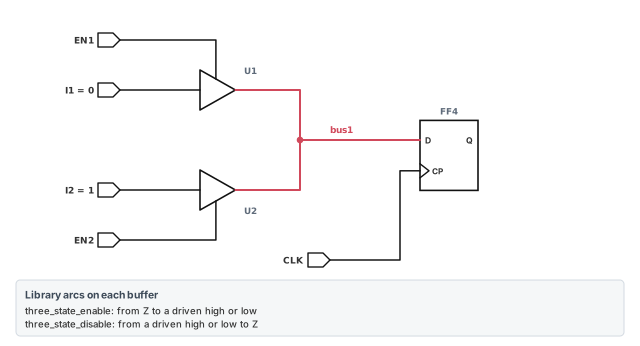
The library describes three-state buffers with two arc types:
- three_state_enable: the time the pin takes to go from Z to a high or low state.
- three_state_disable: the time the pin takes to go from a high or low state to Z.
Figure 7 shows the circuit used in this section. Buffer U1 drives bus1 with I1 = 0 when EN1 is on. Buffer U2 drives bus1 with I2 = 1 when EN2 is on. Flip-flop FF4 captures the bus.
5.2 What the tool checks by default
By default, the tool checks setup and hold on three-state bus designs. It checks the worst delay path, so that a latched value is stable and is not unknown (X).
- A disabling transition may look like a 0 or a 1 at the output. The tool considers both.
- During path tracing, the tool uses the
three_state_disableandthree_state_enablearcs from the library. - This is not the same as propagating an X value. However, for static timing the effect is the same.
5.3 Bus contention
In most designs, two drivers with different values are never on together in the steady state. The steady state is when the enable pins have settled for the clock cycle. Two drivers fighting over one bus is called bus contention.
A design can still have transient bus contention. It happens while control passes from one driver to another. For a short time, both drivers may drive opposite values, so the bus is X.
- Setup checks make sure this X is not latched.
- The setup check is measured from the time the bus becomes stable again.
5.4 Floating buses
A floating bus happens when no driver is enabled. The tool assumes the bus becomes X immediately.
- Hold checks make sure this X is not latched.
- The hold check is measured to the time the bus starts to float.
5.5 Performing transient bus contention checks
Let us use Figure 7 with I1 = 0 and I2 = 1. Suppose EN2 turns on before EN1 turns off. The upper half of Figure 8 shows the result.
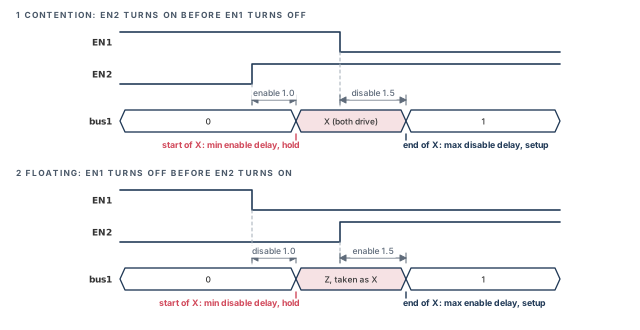
- The bus becomes X when U2 turns on. That time comes from the three_state_enable delay.
- The bus becomes a clean 1 when U1 finally turns off. That time comes from the three_state_disable delay.
- The X at FF4/D lasts until the contention ends and the new value arrives.
So the two checks depend on different arcs:
- The setup violation appears only if the three_state_disable arc delay is used.
- The hold violation appears only if the three_state_enable arc delay is used.
- A move to Z must be treated as a possible move to 0 or 1. Otherwise some cases are missed.
The contention window is bounded by the minimum enable delay of any driver on one side. It is bounded by the maximum disable delay on the other side.
5.6 Performing floating bus checks
Now suppose EN1 turns off before EN2 turns on. The bus was at a valid value and then floats. The lower half of Figure 8 shows this case.
- The tool uses the same setup and hold relations as for any data signal.
- The hold violation appears only if the three_state_disable arc delay is used.
- The setup violation appears only if the three_state_enable arc delay is used.
The floating window is bounded by the minimum disable delay of any driver on one side. It is bounded by the maximum enable delay on the other side. The tool ignores charge decay here. It assumes the bus becomes X as soon as it floats.
By default, the tool checks all setup and hold violations from both windows.
5.7 Disabling the checks
If you know that one kind of window never happens, you can turn its checks off. Two variables do this. Both default to false.
| Variable (set to true) | Delay propagation it turns off | Checks removed |
|---|---|---|
timing_disable_bus_contention_check |
Maximum delay along three_state_disable arcs; minimum delay along three_state_enable arcs | Setup and hold checks from the contention window |
timing_disable_floating_bus_check |
Minimum delay along three_state_disable arcs; maximum delay along three_state_enable arcs | Setup and hold checks from the floating window |
Each variable removes only its own window. For example, with timing_disable_bus_contention_check set to true, the floating bus checks still run. Thus, the tool still uses the enable arc for setup and the disable arc for hold. In the same way, timing_disable_floating_bus_check leaves the contention checks in place.
pt_shell> set_app_var timing_disable_bus_contention_check true   ;# no contention window
pt_shell> report_timing -to [get_pins FF4/D] -delay_type max ;# floating checks remainA beginner sets both variables to true to silence a noisy bus report. That removes every three-state timing check on the bus. Disable a window only when you know it can never occur in the design.
5.8 Limitations of the checks
- The tool checks for setup and hold errors caused by contention or floating. It does not check logical or power problems caused by them.
- The analysis is pessimistic. Some reported violations may never happen, because of state dependencies in the design.
- In some simulators, Z turns into X only after a charge decay time. The tool does not model this. It uses gate delay equations to propagate Z and X, which can be pessimistic.
6 Data-to-data checking
6.1 Why check two data signals
Sometimes two signals must keep an order, but neither is a clock. For example, a request signal must be stable before an acknowledge signal rises. The tool can check setup and hold between any two pins of this kind. This is useful for:
- handshaking interface logic;
- asynchronous or self-timed circuit interfaces;
- signals with odd clock waveforms that are hard to describe with
create_clock; - skew between the lines of a bus;
- recovery and removal checks between asynchronous preset and clear pins.
A timing check between two data (nonclock) signals is a nonsequential constraint, also called a data check. You can define it in two ways:
- in PrimeTime, with the
set_data_checkcommand; - in the library cell, as nonsequential constraints built with Library Compiler, the library-building tool.
Use data checks only for cases like these. They do not replace normal sequential checks.
6.2 Constrained pin and related pin
A data check has two pins:
- The related pin gives the reference edge. It plays the role a clock pin would play.
- The constrained pin must be stable around that edge.
For example, a cell has data inputs D1 and D2. The rising edge of D2 is the edge that "latches" D1. Thus, D1 is the constrained pin and D2 is the related pin. You might keep D2 as a data signal instead of a clock for many reasons.
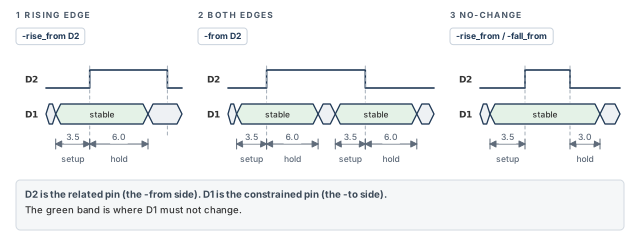
Here, D1 must be stable 3.5 ns before the rising edge of D2 (setup). It must also stay stable 6.0 ns after it (hold).
pt_shell> set_data_check -rise_from D2 -to D1 -setup 3.5   ;# D1 stable 3.5 before D2 rises
pt_shell> set_data_check -rise_from D2 -to D1 -hold 6.0    ;# and 6.0 after it
The "from" pin is always the related pin. The "to" pin is always the constrained pin. Figure 9 shows this check on the left, next to two other shapes covered below.
6.3 Both edges and the no-change check
The edge options decide which edge of the related pin is used:
| Option | Edge of the related pin used |
|---|---|
-rise_from |
The rising edge only |
-fall_from |
The falling edge only |
-from |
Both the rising and the falling edge |
pt_shell> set_data_check -from D2 -to D1 -setup 3.5   ;# setup before each D2 edge
pt_shell> set_data_check -from D2 -to D1 -hold 6.0    ;# hold after each D2 edge
A no-change check asks D1 to stay stable for the whole of a D2 pulse. Write it as a setup from the rising edge and a hold from the falling edge:
pt_shell> set_data_check -rise_from D2 -to D1 -setup 3.5   ;# stable before D2 rises
pt_shell> set_data_check -fall_from D2 -to D1 -hold 3.0    ;# until 3.0 after D2 falls
The tool reads this pair as a no-change check on a positive-going pulse. The right panel of Figure 9 shows it.
6.4 Data checks do not break timing paths
A normal setup check ends a timing path at the data pin. A data check does not. Data checks are nonsequential, so paths still pass through the constrained pin.
Figure 10 shows a cell dchk with a data check between D1 and D2. Paths from ff1 and ff2 still continue through dchk to ff3.
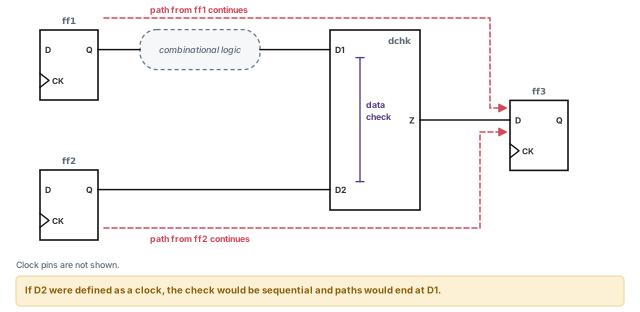
If you define the D2 signal as a clock, the check becomes sequential. Then paths end at D1, like any setup check.
You can still report a data check on its own:
pt_shell> report_timing -to dchk/D1        ;# the data check report at D1
pt_shell> report_timing -through dchk/D1   ;# normal paths passing through D1
To remove checks that you set with set_data_check, use the remove_data_check command.
6.5 Data checks and clock domains
The signals at either pin can come from different clock domains. The tool checks each signal path separately and puts them into clock groups, just like normal sequential checks.
The related pin may carry signals from several clock domains. To analyze only one of them at that pin, choose either:
- the
-clock clock_nameoption ofset_data_check; or - disabling all clocks except the one you want.
6.6 Library-based data checks
The tool also runs data checks for any cell with nonsequential constraints in its library model. This happens only if the signal at the related pin is not a clock in PrimeTime.
If the related signal is a clock:
- the tool converts the nonsequential checks into sequential checks;
- the tool does not block the clock from propagating further;
- if a combinational arc leaves the related pin, the clock continues along it. An integrated clock-gating cell is an example.
In Library Compiler, a nonsequential constraint sits on the constrained pin. It names a related pin and one of these timing_type values:
non_seq_setup_risingnon_seq_setup_fallingnon_seq_hold_risingnon_seq_hold_falling
Library checks are more accurate than set_data_check. Their setup and hold values can depend on the slew at both pins. Slew is the rise or fall time of a signal. The set_data_check command is not sensitive to slew.
Two more rules apply to library checks:
- To choose the clock domain at the related pin, use the
-clock clock_nameoption ofset_data_check. remove_data_checkdoes not remove checks defined in library cells.
Use set_data_check to try a check quickly. For a check that will live through signoff, ask for it in the library model, because slew-aware values are more accurate.
7 Time borrowing in latch-based designs
7.1 Why latches can borrow time
A level-sensitive latch is transparent while its gate input is active. While transparent, data flows from D to Q. A flip-flop, in contrast, only samples on an edge.
This gives latch designs an advantage called time borrowing, also known as cycle stealing. A slow logic stage can use some of the next stage's time. The next stage must be fast enough to pay it back.
The cost is control. Latch designs use several clock phases, and they lack "hard" edges where events must happen. Thus, their timing is harder to reason about.
7.2 Borrowing time from the next stage
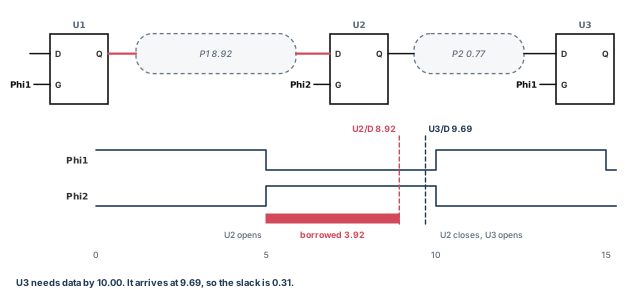
Figure 11 shows three positive-level-sensitive latches, U1, U2 and U3. They are open when G = 1. The clocks are two phases with a 10 ns period:
- Phi1 is high from 0 to 5 ns.
- Phi2 is high from 5 to 10 ns.
P1 and P2 are combinational paths. For now, assume a latch setup time of zero, and zero delay from D to Q in transparent mode. For these latches, the tool uses the rising (opening) edge as the reference edge.
In a two-phase design, each latch-to-latch path normally has half a cycle, which is 5 ns here. Let us walk through the numbers:
- P1 brings data to U2 at 8.92 ns.
- U2 opened at 5.00 ns. So the data looks 3.92 ns late.
- However, U2 stays open until 10.00 ns. So the data passes straight through.
- P2 is only 0.77 ns. Thus, data reaches U3 at 8.92 + 0.77 = 9.69 ns.
- U3 needs it by 10.00 ns. The total fits, with 0.31 ns to spare.
In other words, P1 borrowed 3.92 ns from the U2-to-U3 stage.
7.3 How the tool models a latch endpoint
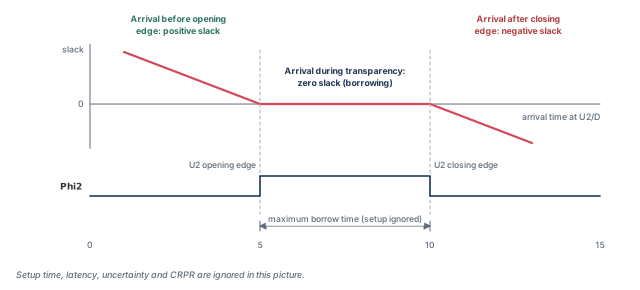
The tool looks at when data arrives at the endpoint latch:
- Before the opening edge. The latch acts like a flip-flop. The opening edge captures the data, and the same edge launches the next path.
- While the latch is transparent. The tool launches the next stage from the latch D pin, not its clock pin. There is no violation; the slack is zero. The borrowed time becomes the departure time of the next stage, after small adjustments covered below.
- After the closing edge. This is a timing violation.
Figure 12 plots slack against arrival time at U2. It ignores setup time, latency, uncertainty and clock reconvergence pessimism removal.
7.4 Reading a latch timing report
The report below matches Figure 11. Look for the line "time borrowed from endpoint".
Startpoint: U1 (positive level-sensitive latch clocked by Phi1)
Endpoint: U2 (positive level-sensitive latch clocked by Phi2)
Path Group: Phi2
Point                                  Incr       Path
------------------------------------------------------
clock Phi1 (rise edge)                 0.00       0.00
clock network delay (ideal)            0.00       0.00
U1/G (LATCH)                           0.00       0.00 r
U1/Q (LATCH)                           0.57       0.57 r
...
U2/D (LATCH)                           8.35       8.92 r
data arrival time                                 8.92
clock Phi2 (rise edge)                 5.00       5.00
clock network delay (ideal)            0.00       5.00
U2/G (LATCH)                           0.00       5.00 r
time borrowed from endpoint            3.92       8.92
data required time                                8.92
------------------------------------------------------
slack (MET)                                       0.00
The required time moves out to the arrival time, so the slack is exactly zero. Below the path, the same report prints a box with the borrowing budget:
Time Borrowing Information
------------------------------------------------------
Phi2 nominal pulse width 5.00
library setup time -0.46
------------------------------------------------------
max time borrow 4.54
actual time borrow 3.92The pulse width is 5.00 ns, less a 0.46 ns setup time. So up to 4.54 ns may be borrowed, and 3.92 ns was used.
The next stage starts at U2. Look for "time given to startpoint":
Startpoint: U2 (positive level-sensitive latch clocked by Phi2)
Endpoint: U3 (positive level-sensitive latch clocked by Phi1)
Path Group: Phi1
Point                                  Incr       Path
------------------------------------------------------
clock Phi2 (rise edge)                 5.00       5.00
clock network delay (ideal)            0.00       5.00
time given to startpoint               3.92       8.92
U2/D (LATCH)                           0.00       8.92 r
U2/Q (LATCH)                           0.53       9.45 r
...
U3/D (LATCH)                           0.24       9.69 f
data arrival time                                 9.69
clock Phi1 (rise edge)                10.00      10.00
clock network delay (ideal)            0.00      10.00
U3/G (LATCH)                           0.00      10.00 r
time borrowed from endpoint            0.00      10.00
data required time                               10.00
------------------------------------------------------
slack (MET)                                       0.31
The tool adds the 3.92 ns to the launch time at U2. P2 has enough slack, so neither path fails.
7.5 Maximum borrow time
The most time a latch can lend is based on its pulse width. This is the time from the opening edge to the closing edge of the gate signal, as set by create_clock. The tool subtracts the library setup time of the latch.
For better accuracy, the tool then adjusts this for three clock effects. In each case, what matters is the difference between the opening and closing edges:
- Clock latency. Latency comes from
set_clock_latency, or from the real clock tree withset_propagated_clock. Example: rise latency 2.3 and fall latency 1.3. The opening edge moves later by 2.3, the closing edge by 1.3. The window shrinks by 1.0. - Clock uncertainty. Uncertainty comes from
set_clock_uncertainty. For setup, the tool uses the earliest possible capture edges. Example: rise uncertainty 2.1 and fall uncertainty 1.8. The window grows by 0.3. - Clock reconvergence pessimism removal (CRPR). This corrects pessimism from a clock path segment that launch and capture share. Enable it with
timing_remove_clock_reconvergence_pessimismset to true. CRPR shifts edges later, unlike uncertainty. Example: CRPR rise 0.3 and fall 0.2. The window shrinks by 0.1.
Figure 13 adds the pieces up.
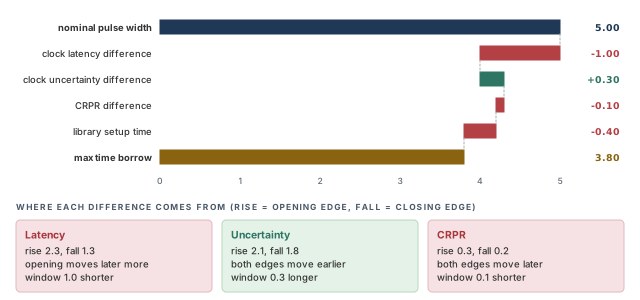
The report lists each adjustment:
Time Borrowing Information
---------------------------------------------------
CLK nominal pulse width 5.00
clock latency difference -1.00
clock uncertainty difference 0.30
CRPR difference -0.10
library setup time -0.40
---------------------------------------------------
max time borrow 3.80Uncertainty makes the analysis more pessimistic, so it moves the capture edge earlier. CRPR makes the analysis less pessimistic, so it moves the edge later. Thus, the same rise-to-fall difference has opposite signs.
7.6 Time borrowed and time given
The tool measures the time borrowed from the opening clock edge at the latch. It first adjusts that edge for path-specific uncertainty and CRPR. Then it compares the adjusted edge with the data arrival at D.
When the opening edge has uncertainty or CRPR, two numbers differ:
- Time borrowed, measured from the adjusted opening edge.
- Time given to startpoint, measured from the nominal opening edge. The tool subtracts the uncertainty and CRPR adjustments to get it.
Why subtract? In transparent mode, the next stage must launch exactly when the data arrives at D. The nominal edge is the starting time for the next stage. Figure 14 shows this on the left.
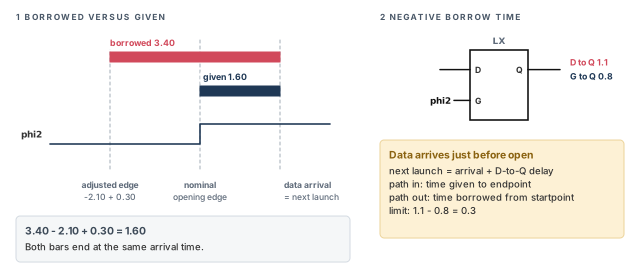
---------------------------------------------------
max time borrow 3.80
---------------------------------------------------
actual time borrow 3.40
open edge uncertainty -2.10
open edge CRPR 0.30
---------------------------------------------------
time given to startpoint 1.60Check the arithmetic: 3.40 − 2.10 + 0.30 = 1.60.
The timing_early_launch_at_borrowing_latches variable changes this behavior. When it is disabled:
- Arrival and launch times are no longer identical.
- A late clock latency is used on purpose to launch the next stage.
- The CRPR adjustment to the time given is not applied.
This mode is recommended when CRPR is enabled.
7.7 Negative borrow time
Usually, data before the opening edge means no borrowing. Data after the edge means borrowing. The borrowed amount is the arrival time minus the edge time.
There is one exception. Suppose the latch D-to-Q delay is larger than its clock-to-Q delay. Suppose also that the data arrives just before the edge. Then the next stage departs based on the arrival time plus the D-to-Q delay. The right half of Figure 14 shows such a latch.
The tool handles this by allowing borrowing with a negative amount:
- For the path ending at the latch, the report says "time given to endpoint".
- For the path starting at the latch, it says "time borrowed from startpoint".
- The amount cannot exceed the D-to-Q delay minus the clock-to-Q delay. In Figure 14, that is 1.1 − 0.8 = 0.3 ns.
7.8 Limiting time borrowing
Sometimes you want less borrowing than the pulse allows. The set_max_time_borrow command sets a limit for all latch endpoints in a scope. At those latches, the tool uses the smaller of your limit and the adjusted pulse width.
pt_shell> create_clock -period 10 -waveform {0 5} clk   ;# 5 ns high pulse
pt_shell> set_max_time_borrow 2.5 [get_clocks clk]      ;# borrow at most 2.5
pt_shell> report_timing -to latch1/D ;# see the new limitTime Borrowing Information
-----------------------------------------------
user max_time_borrow 2.50
-----------------------------------------------
max time borrow 2.50
actual time borrow 0.00The limit can take special values:
- Zero. No borrowing is allowed. The tool treats the latch like a flip-flop.
- Negative. The data must be stable before the opening edge. Use this to make sure an enable arrives before the clock, for example on a gated-clock latch.
To see and remove the limits:
pt_shell> report_exceptions                          ;# shows max_time_borrow settings
pt_shell> remove_max_time_borrow [get_clocks clk]    ;# remove the limit on these objects
The time borrowed at a latch D pin is usually the same as the time given to the next startpoint. A small difference can come from uncertainty and CRPR on the opening edge. Sometimes, if borrowing at D is small, the worst path from the latch still starts at G. If you report explicitly from D, the time given equals the time borrowed.
A borrow limit is your choice, not a tool default. Set one where you want to keep part of the latch window as margin. An arrival later than the limit then shows as a violation, so you see it early.
8 Advanced latch analysis
8.1 Single-segment paths and throughpaths
By default, the tool times a latch design as single-segment paths. Each path stops at the next latch.
- When a latch borrows or fails, the tool adds a borrowing path. This is also a single segment, ending at the D pin of the next latch or flip-flop.
- Short segments make it hard to see the whole route. That slows down timing fixes and power optimization.
Advanced latch analysis times paths through latches without cutting them. In this mode:
- A transparent latch is both a throughpath point and an endpoint.
- Paths can end at the latch D pin, and other paths can pass through the latch.
- Each latch clock pin can also be a startpoint.
This gives a global view of timing through latches. Figure 15, after the table below, compares the two views.
8.2 Enabling advanced latch analysis
The table below lists the controls. Each one is explained in the next sections.
| Command or variable | What it does |
|---|---|
timing_enable_through_paths |
Turns on advanced latch analysis (default false) |
set_latch_loop_breaker |
Breaks latch loops at chosen points instead of the tool's choice |
get_latch_loop_groups |
Returns a list of collections; each holds the D pins of one latch loop group |
report_latch_loop_groups |
Reports latch D pins that are part of loops of transparent latches |
timing_through_path_max_segments |
Maximum number of successive latch segments per path |
timing_report_skip_early_paths_at_intermediate_latches |
Stops reporting throughpaths that arrive early at intermediate latches |
report_timing with -trace_latch_borrow or -trace_latch_forward |
Traces backward or forward through loop-breaker latches |
pt_shell> set_app_var timing_enable_through_paths true ;# default is false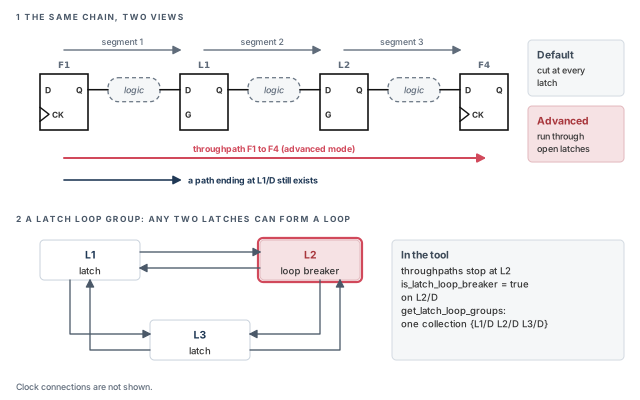
8.3 Loop-breaker latches
Latches can form loops. With loops, finding the worst throughpath is only possible for very small circuits. So the tool picks some latches as loop-breaker latches. Paths do not pass through them.
- By default, the tool picks the loop breakers.
- It tries to keep the set small, based on design connectivity.
- It does not look at arrival times when it picks them.
report_timingonly reports paths that avoid every loop-breaker latch.
You can choose loop breakers yourself:
pt_shell> set_latch_loop_breaker -pin [get_pins L2/D] ;# paths stop at L2A latch is a good loop breaker when:
- it is not on a critical path;
- it sits on a path that is not really a loop, but looks like one. A register file with read and write ports never used together is an example;
- it uses a pulse clock, or has only a small transparency window;
- other latches in the loop should not be loop breakers.
To find the loop breakers, query the is_latch_loop_breaker pin attribute. It is true on the D pin of each loop-breaker latch.
pt_shell> get_pins -hierarchical * -filter "@is_latch_loop_breaker" ;# breaker D pins8.4 Latch loop groups
One latch can sit in several loops. The set of all loops that intersect is a latch loop group. Every latch in the group is in at least one loop with every other latch in it. For example, in the bottom panel of Figure 15, L1, L2 and L3 form one group. Any two of them can form a loop.
To get the groups as collections:
get_latch_loop_groups
   [-of_objects list_of_transparent_d_pins]   # only groups holding these D pins
[-loop_breakers_only] # only loop-breaker pins in each group- It returns a Tcl list of collections. Each collection holds the latch D pins of one group.
- By default, it returns every latch loop group.
- With
-of_objects, it returns only the groups that hold the D pins you list. - With
-loop_breakers_only, each collection holds only the loop-breaker pins of its group. - It does not return latches outside of loops.
To print the groups:
pt_shell> report_latch_loop_groups
Attributes
  b - loop breaker d pin
  p - long path breaker d pin, but not in a loop
  u - user requested to be a loop breaker using set_latch_loop_breaker
  a - user requested to avoid with set_latch_loop_breaker -avoid
Latch D pin        Latch Loop Group     Attributes
-------------------------------------------------
DUT/Latch1/D       NA                   pu
DUT/Latch2/D       1                    b
DUT/Latch3/D       1
DUT/Latch4/D       2                    bu
DUT/Latch5/D       2                    a
How to read it:
- The left column lists latch D pins. The second column numbers the group each pin belongs to.
- The letters show whether the pin is a loop breaker, and whether you asked for that or asked to avoid it.
NAmeans the pin is not in a loop. Such a pin can still be a path breaker (p), asDUT/Latch1/Dshows. The report lists these pins, butget_latch_loop_groupsnever returns them, because they belong to no group.
8.5 Limiting the number of latches per path
By default, the tool follows at most five successive latches per path. To keep paths this short, it adds extra loop-breaker latches, even where there is no loop.
pt_shell> set_app_var timing_through_path_max_segments 8 ;# follow up to 8 latches- A higher number gives better accuracy on long paths.
- A lower number gives a shorter runtime.
- Zero means no limit. If the runtime becomes too long, go back to the default or another reasonable value.
8.6 Timing exceptions on latch paths
With advanced latch analysis, an exception must be satisfied within one path segment. All of its -from, -through and -to points must lie in the same segment. Each exception type then behaves as follows.
False paths. If any segment of a throughpath satisfies a false path, the whole throughpath becomes false. The tool does not check constraints at its end.
Multicycle paths. A satisfied multicycle path on a segment shifts the expected transparency window of later latches. It also shifts the required time at the path end. Different segments of one throughpath can have different multicycle paths. For example, take a throughpath from F1 to F4 with two multicycle exceptions on its segments. With both applied, the required time at F4 is 40, minus setup time. For the path from F1 to L2/D, it is 25, minus setup time. These exceptions also change normalized slack, because they change the allowed propagation delay.
Maximum and minimum delay.
- A maximum delay exception works on a throughpath when it ends at a latch D pin.
- It applies to that segment only, and replaces the normal pulse relation for it.
- Throughpaths that do not satisfy it are not affected, even if they pass through that D pin.
- For affected throughpaths, it changes the local check at the latch. It does not change path recovery or normalized slack.
- A minimum delay exception ending at a latch D pin changes the local hold check of single-segment paths. Throughpaths are not affected, because hold is not checked on throughpaths.
Clock groups. Use clock groups to say that two clocks never talk to each other. A clock-to-clock false path cannot do this for all throughpaths, because it may not be satisfied within one segment.
- A clock-to-clock exception applies only if some segment satisfies it. For example, suppose the first intermediate latch uses clkA and the second uses clkB. Then
set_false_path -from clkA -to clkBmakes the throughpath false. - Throughpaths that rely on two exclusive clocks are not constrained. This holds even if the exclusive clocks appear only at intermediate latches.
- Clock-to-clock false paths still work for hold checks, because hold is not checked on throughpaths.
Figure 16, a little further on, shows clock groups at work. Latch L1 sees clocks clk_b and clk_c. Latch L2 sees clk_d and clk_e.
Without clock groups, all four clock pairings are valid throughpaths. Two commands remove the impossible pairs:
pt_shell> set_clock_groups -exclusive -group {clk_b} -group {clk_d}   ;# never together
pt_shell> set_clock_groups -exclusive -group {clk_c} -group {clk_e}   ;# never together
Two throughpaths remain: clk_b with clk_e, and clk_c with clk_d.
Setup-only clock-to-clock false paths
For exclusive clocks, use set_clock_groups. Sometimes you want to drop setup checks between two clocks but keep hold checks. A setup-only false path is a partial answer:
pt_shell> set_false_path -from [get_clocks clkA] -to [get_clocks clkB] -setup ;# setup only- Single-segment paths launched by clkA and captured by clkB are affected.
- A throughpath is affected only if one of its segments satisfies the exception. For example, launch on clkA with the first intermediate latch on clkB.
- A throughpath launched by clkA and captured by clkB, with intermediate latches on other clocks, is not affected.
Writing exceptions that fit one segment
Exceptions with several path points should only use points within one segment. These two are written wrongly for the circuit in Figure 16, shown below. They have no effect on throughpaths:
set_multicycle_path 2 -from F1/clk -through L1/Q   ;# L1/Q is in the next segment
set_multicycle_path 2 -from F1/clk -to F4/D        ;# F4/D is in the third segment
To list exceptions that have no effect, run report_exceptions -ignored.
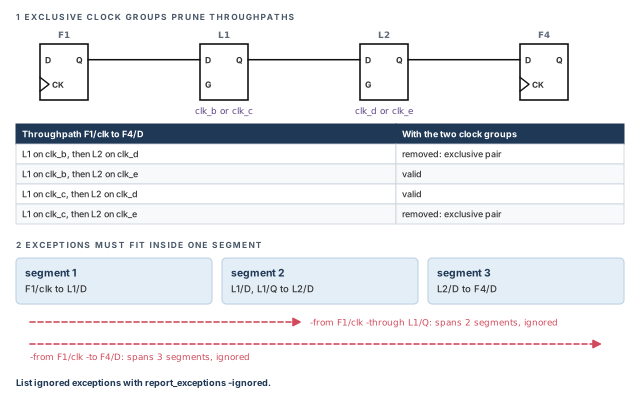
A beginner moves a flip-flop script to a latch design and keeps -from F1/clk -to F4/D exceptions. With advanced latch analysis on, they silently do nothing. Run report_exceptions -ignored after enabling the mode, and rewrite any exception it lists.
8.7 Reporting paths through latches
In a latch design, the transitive slack at a pin estimates how much the paths through that pin must improve. It looks downstream through open latches. To see the critical path behind it:
pt_shell> report_timing -through L1/D ;# the worst path through this pinYou can fix that slack anywhere along the critical path. For power work, the same report shows which path limits resizing at that pin.
The table below shows transitive slack on a small path, F1 to L1 to F3. The slack is +2 at every pin, because one path, F1 to F3, sets it at each pin. The local required time at L1/D is 7, but the downstream path asks for 6.
| Pin | Arrival | Required | Slack |
|---|---|---|---|
| F1/clk | 0 | 2 | +2 |
| L1/D | 4 (path from F1/clk) | 6 (from downstream; local required time is 7) | +2 |
| L1/Q | 4 (path from F1/clk) | 6 | +2 |
| F3/D | 8 (path from F1/clk) | 10 | +2 |
A throughpath report includes a section for each intermediate transparency window:
Startpoint: F1/clk (rising edge-triggered flip-flop clocked by CLK)
Endpoint: F3/D (rising edge-triggered flip-flop clocked by CLK)
Point Incr Path
---------------------------------------------------
clock CLK (rise edge) 0.00 0.00
F1/Q (flop) 0.00 0.00 r
delay1/z (delay) 9.00 9.00 f
L1/D (latch) 0.00 9.00 f
---------------------------------------------------
Transparency Window #1 (missed)
clock CLK (rise edge) 3.00
clock network delay (ideal) 0.02 3.02
Transparency max open edge 3.02
clock CLK (fall edge) 7.00
clock network delay (ideal) 0.03 7.03
library setup time -0.01 7.02
inter-clock uncertainty -0.02 7.00
Transparency max close edge 7.00
L1/D (latch) 9.00
Path recovery -2.00 7.00Read the window section like this:
- The window opens at 3.02, after clock latency. It closes at 7.00, after latency, setup time and uncertainty.
- Data reaches L1/D at 9.00, after the close. The window is "missed".
- The "Path recovery" line pulls the arrival back to 7.00, so the trace can continue to F3.
The same report then continues through L1 to the flip-flop F3:
L1/Q (latch)                           0.00       7.00 f
delay2/z (delay)                       2.00       9.00 r
F3/D (flop)                            0.00       9.00 r
data arrival time                                 9.00
clock CLK (rise edge)                 10.00      10.00
data required time                               10.00
---------------------------------------------------
slack (MET)                                       1.00
---------------------------------------------------
normalization delay                              10.00
normalized slack                                  0.10
The path meets its end check at F3 with 1.00 ns to spare. The last two lines give normalized slack, explained below.
8.8 Filtering and tracing options
Early arrivals. By default, report_timing also reports throughpaths that arrive before the open edge of intermediate latches. To filter them out:
pt_shell> set_app_var timing_report_skip_early_paths_at_intermediate_latches true ;# filterFor example, data from f1 may reach latch I2 before it opens. With the variable set, report_timing and get_timing_paths do not report that throughpath to f3.
Through loop breakers. The tool uses downstream timing for the required time at a loop-breaker latch. It does this when you call report_timing or get_timing_paths without -to:
pt_shell> report_timing -through $latch_loop_breaker                  ;# no -to given
pt_shell> report_timing -from $startpt -through $latch_loop_breaker   ;# no -to given
pt_shell> report_timing -from $startpt                                ;# no -to given
The report below ends at a loop-breaker latch named ld1:
Point Incr Path
---------------------------------------------------------
clock clk (rise edge) 0.00 0.00
clock network delay (propagated) 60.00 60.00
fd_in2/CP (FD1) 0.00 60.00 r
fd_in2/Q (FD1) 1.58 61.58 f
...
ld1/D (LD1) 0.00 103.88 f
data arrival time 103.88
clock clk' (rise edge) 30.00 30.00
clock network delay (propagated) 22.00 52.00
clock reconvergence pessimism 44.00 96.00
ld1/G (LD1) 96.00 r
transparency open edge 96.00
time required through endpoint 98.00
data required time 98.00
---------------------------------------------------------
slack (VIOLATED) -5.88Here the required time, 98.00, comes from downstream timing through the loop breaker. It is not just the local latch check.
Tracing forward. The -trace_latch_forward option traces forward through loop-breaker latches. It is the partner of -trace_latch_borrow, which traces backward.
- The trace starts from a primary path given with
-fromor-through. - Extra segments are added, tracing forward from the end of the primary segment.
- The trace follows the worst required time.
pt_shell> report_timing -from [get_pins fd_in2/CP] -trace_latch_forward ;# follow on8.9 Worst and total negative slack
Two pin attributes give the local slack in a latch path:
max_rise_local_slackmax_fall_local_slack
They exist on latch D pins and other timing endpoints. Local slack uses the arrival and setup check at that pin only. It ignores checks downstream of a transparent latch. If the pin has no check, the attribute is undefined.
The normal slack attributes, such as max_fall_slack and max_slack, do include downstream checks.
- WNS (worst negative slack) is the slack at the end of the worst violating path. That path can be a single segment or a throughpath. With no violations, WNS is zero. WNS is the minimum of all
max_rise_local_slackandmax_fall_local_slackvalues. - TNS (total negative slack) is summed over all timing endpoints:
TNS = sum over all timing endpoints of
      minimum(0, minimum(max_rise_local_slack, max_fall_local_slack))
In other words, each endpoint adds its worst local slack, but only if it is negative.
8.10 Normalized slack
Normalized slack lets you work out the highest frequency a path can run at. It is valid for a path unless:
- the path is a recovered path; or
- the path contains a latch marked as a loop breaker or a path breaker.
The tool first computes the allowed propagation delay of the path. It uses ideal clock edges and ignores setup time, uncertainty and clock latency. The allowed delay may be half a cycle, a full cycle or several cycles. It is harder to work out when launch and capture are in different clock domains.
Normalized slack is the path slack divided by this allowed delay. The report prints the allowed delay as the normalization delay. In the report above, that is 1.00 / 10.00 = 0.10. However, that path was recovered at L1. So the tool prints the value, but you should not use it to estimate frequency.
Turn the analysis on before timing is updated, then sort paths by it:
pt_shell> set_app_var timing_enable_normalized_slack true   ;# before the timing update
pt_shell> report_timing -normalized_slack   ;# report and sort by normalized slack
The Reporting and Debugging Analysis Results chapter covers normalized slack in more depth.
8.11 Finding recovered paths
A path is recovered when its arrival at a latch is later than the window close, minus uncertainty and setup time. The report above shows one: data reached L1/D at 9.00 after a 7.00 close.
To find recovered paths, query the is_recovered timing path attribute. It is true for a path that was recovered at an intermediate latch.
pt_shell> get_attribute [get_timing_paths -to F3/D] is_recovered ;# true if recoveredA recovered path means a latch window was missed upstream. Fix that latch first. The end slack can look fine even though an intermediate latch failed.
9 Worked example: time a small two-phase latch block
Let us time a small block named top. Figure 17 shows it. It has three latches, U1, U2 and U3, on two clock phases. The path P1 is slow, so U2 must borrow time. The numbers match Figure 11. The goal is to check loops, read the borrowing, cap it, and then turn on advanced latch analysis.
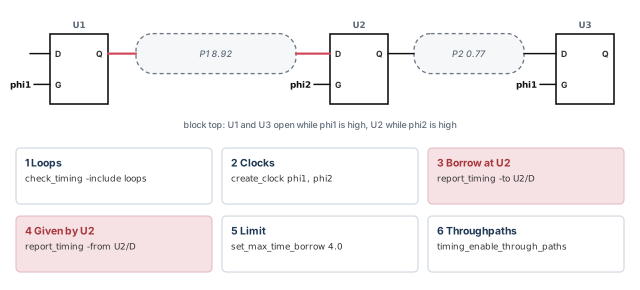
Step 1 — Check for loops and odd structures
pt_shell> check_timing -include loops ;# any combinational feedback loops?Check: no combinational loops are reported. If one appears, decide where to break it with set_disable_timing.
Step 2 — Create the two clock phases
pt_shell> create_clock -name phi1 -period 10 -waveform {0 5} [get_ports phi1]  ;# 0-5 high
pt_shell> create_clock -name phi2 -period 10 -waveform {5 10} [get_ports phi2] ;# 5-10 high
Check: phi1 and phi2 have the same 10 ns period. Their base period is 10 ns, so their phase relation is fixed.
Step 3 — Read the borrowing at U2
pt_shell> report_timing -to U2/D ;# path ending at the transparent latchtime borrowed from endpoint 3.92 8.92
slack (MET) 0.00
max time borrow 4.54
actual time borrow 3.92Check: the slack is zero and the actual borrow is below the maximum. If actual borrow equals the maximum, the stage is at its limit.
Step 4 — Check that the next stage pays it back
pt_shell> report_timing -from U2/D ;# explicit report from D: given equals borrowedtime given to startpoint 3.92 8.92
data arrival time 9.69
slack (MET) 0.31Check: the time given equals the time borrowed, and the slack at U3 is positive.
Step 5 — Cap the borrowing on phi2 latches
pt_shell> set_max_time_borrow 4.0 [get_clocks phi2]   ;# at most 4.0 at phi2 latches
pt_shell> report_exceptions                           ;# confirm the max_time_borrow
pt_shell> report_timing -to U2/D                      ;# max borrow is now 4.00
Check: the box shows "user max_time_borrow 4.00" and "max time borrow 4.00". The tool keeps the smaller of 4.00 and 4.54. The 3.92 borrow still fits.
Step 6 — Turn on advanced latch analysis
pt_shell> set_app_var timing_enable_through_paths true   ;# paths run through latches
pt_shell> report_latch_loop_groups                       ;# any latch loops?
pt_shell> report_exceptions -ignored                     ;# exceptions that no longer fit
pt_shell> report_timing -through U2/D                    ;# worst path through U2
Check: the latch loop report shows no groups for this chain. No exception is ignored. The path through U2/D runs from U1 to U3 as one throughpath.
10 Common mistakes and how to catch them
| Symptom | Likely cause | Fix |
|---|---|---|
-nworst reports are full of near-identical paths |
Parallel arcs of the same sense each give a path | Set timing_report_use_worst_parallel_cell_arc to true |
| A memory output shows up in a max path with an odd arc | A retain arc is longer than its parent arc | Run check_timing retain and fix the library |
| Simulation sees no retain delays | SDF written in the default version 2.1 | Write with write_sdf -version 3.0 |
| A real path is missing from every report | A loop was broken on an arc that the path uses | Read check_timing -include loops; choose the break with set_disable_timing |
| Timing differs from synthesis around a loop | The two tools broke the loop at different arcs | Set timing_keep_loop_breaking_disabled_arcs to true, then update timing |
| Huge setup violations between two clocks | The clocks are unrelated, such as 40 ns and 41 ns | Use set_false_path between them, or set_max_delay and set_min_delay |
| No three-state checks appear at all | Both bus check variables were set to true | Disable a window only when the design guarantees it |
| Paths stop at a data check pin | The related pin was defined as a clock | Keep it a data signal, or accept a sequential check |
A data check stays after remove_data_check |
The check comes from the library cell | Library checks cannot be removed with that command |
| Exceptions do nothing after enabling throughpaths | They span more than one segment | Run report_exceptions -ignored and rewrite them within one segment |
| End slack is fine, but a latch window was missed | The path was recovered at an intermediate latch | Query is_recovered and fix the latch stage |
11 Interview preparation
A slow stage uses part of the next stage's time, because the endpoint latch is still transparent.
- Data arriving while the latch is open gets zero slack at that latch.
- The same amount is given to the next stage as a later launch.
- Data arriving after the closing edge is a violation.
A clock-to-output delay arc on a memory, in parallel with the normal arc, that models how long the old output stays valid.
- It creates no timing check; it is just another delay arc.
- If shorter than its parent, it appears only in min delay reports.
A loop has no start or end, so tracing must stop somewhere; check_timing -include loops lists them.
- By default, the tool disables one arc in each loop.
- That arc may carry a real path, which then disappears.
set_data_check -rise_from D2 -to D1 -setup 3.5, which pin is which?D2 is the related pin and D1 is the constrained pin.
- The "from" pin gives the reference edge, like a clock.
- D1 must be stable 3.5 ns before D2 rises.
The base period is 1640 ns and the closest edges are 1 ns apart, so the setup requirement is unrealistically tight.
- Declare the paths false with
set_false_pathbetween the clocks. - If the real delay limits are known, use
set_max_delayandset_min_delay.
Setup depends on the three_state_disable delay; hold depends on the three_state_enable delay.
- The X window starts at the minimum enable delay and ends at the maximum disable delay.
- For a floating bus, the roles reverse.
set_data_check?Library values can depend on the slew at both pins; set_data_check values cannot.
- Library checks use
non_seq_*timing types on the constrained pin. remove_data_checkdoes not remove them.
Start from the clock pulse width, then adjust for latency, uncertainty and CRPR differences, and subtract the library setup time.
- Example: 5.00 − 1.00 + 0.30 − 0.10 − 0.40 = 3.80.
set_max_time_borrowcan lower it further; the smaller value wins.
set_max_time_borrow 0 do to a latch?It allows no borrowing, so the tool analyzes the latch like a flip-flop.
- A negative value requires data to be stable before the opening edge.
report_exceptionsshows the setting;remove_max_time_borrowclears it.
Borrowing is measured from the opening edge adjusted for uncertainty and CRPR, while time given is measured from the nominal edge.
- Example: 3.40 borrowed − 2.10 uncertainty + 0.30 CRPR = 1.60 given.
- The next stage must launch exactly when the data arrives.
A latch that throughpaths do not pass through, used to keep path search finite.
- Choose one off the critical path, or with a pulse clock or small window.
- Also choose one on a false loop, such as a register file never read and written together.
- Use
set_latch_loop_breaker -pin, and check withis_latch_loop_breaker.
set_multicycle_path 2 -from F1/clk -to F4/D do nothing on a latch throughpath?In advanced latch analysis, an exception must be satisfied within one path segment, and this one spans several.
report_exceptions -ignoredlists such exceptions.- For clocks that never interact, use
set_clock_groupsinstead of clock-to-clock false paths.
From local slack: WNS is the minimum local slack, and TNS sums each endpoint's negative local slack.
- Local slack ignores checks downstream of a transparent latch.
- The attributes are
max_rise_local_slackandmax_fall_local_slack.
A path whose arrival at a latch is later than the window close minus uncertainty and setup.
- The report shows a "Path recovery" line, and
is_recoveredis true. - Normalized slack is not valid for it.
12 Chapter close
Compact glossary
| Term | Meaning |
|---|---|
| Parallel arcs | Several timing arcs between the same two pins of a cell |
| Sense set | Parallel arcs with the same sense, such as positive_unate |
| Retain arc | A clock-to-output delay arc, parallel to its parent, that guards the old output |
| Parent arc | The normal delay arc between the same pins as a retain arc |
| Base period | The least common multiple of the periods of interacting clocks |
| Unrelated clocks | Clocks with no reasonable base period |
| Combinational feedback loop | A combinational path that returns to its own start |
| Loop breaking | Disabling an arc so that tracing stops inside a loop |
| three_state_enable arc | Delay from Z to a driven high or low |
| three_state_disable arc | Delay from a driven high or low to Z |
| Bus contention | Two drivers driving one bus with different values |
| Floating bus | A bus with no driver enabled |
| Data check | A setup or hold check between two data signals (nonsequential constraint) |
| Related / constrained pin | The reference pin / the pin that must be stable |
| No-change check | Setup from one edge and hold from the opposite edge of a pulse |
| Transparent latch | A latch passing D to Q while its gate is active |
| Time borrowing | Using the next stage's time while the endpoint latch is open |
| Maximum borrow time | Pulse width adjusted for latency, uncertainty, CRPR and setup |
| Time given to startpoint | Borrowed time measured from the nominal opening edge |
| Throughpath | A path that runs through transparent latches without being cut |
| Loop-breaker latch | A latch that throughpaths do not pass through |
| Latch loop group | All intersecting latch loops together |
| Local slack | Slack at a pin, ignoring checks downstream of a transparent latch |
| Normalized slack | Slack relative to the allowed propagation delay of a path |
| Recovered path | A path whose arrival at a latch missed the window close |
Advanced analysis techniques on one page
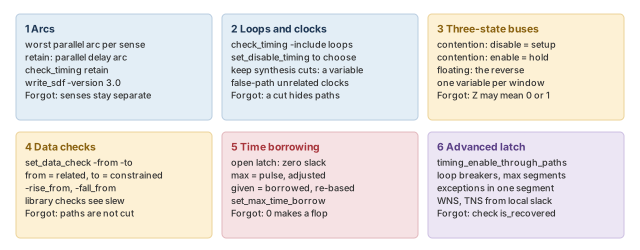
Figure 18 is the summary to redraw from memory.
Where the next chapter goes, and why
You can now time the odd corners of a design: memories, loops, shared buses, handshakes and latches. Many of these needed extra constraints, such as false paths, data checks, borrow limits and clock groups. Each added constraint is one more chance to make a mistake.
The Constraint Consistency chapter looks at the constraints themselves. It shows how to check that they are complete and that they agree with each other. Thus, the special cases you set up here can be checked before they mislead a signoff run.