Why this chapter matters in a real project
Timing results are only as good as the constraints behind them. A clock on the wrong pin can hide real violations. So can a false path that matches nothing, or two case values that fight. Worse, the timing report still looks clean.
Constraints also change many times in a project. The pre-layout set is edited for placement, for clock tree synthesis, for routing and for chip assembly. Each edit is a chance to break something. Blocks bought from other teams arrive with their own constraints, which may not match the top level.
Constraint consistency is a checking mode of PrimeTime built for this problem. It reads the netlist and the constraints, and runs a large set of rule checks. It reports constraints that are missing, invalid, unnecessary, inefficient or conflicting. It then helps you find the root cause of each one.
The cost of skipping these checks is high. A bad constraint found at signoff can mean a late ECO. A bad constraint never found can mean silicon failure. A few minutes of checks after every constraint edit is cheap insurance.
Prerequisites
- Working With Design Data: reading and linking a design, collections and attributes.
- Constraining the Design: input and output delays, drive, load and design rules.
- Clocks: clocks, generated clocks, latency, uncertainty and clock groups.
- Timing Paths and Exceptions: false paths, multicycle paths and min/max delay.
- Case and Mode Analysis: case values, constant propagation and scenarios.
- You do not need any timing analysis results. Constraint consistency checks constraints, not slack.
In this chapter, times are in nanoseconds (ns) unless said otherwise.
Learning objectives
- Explain what constraint consistency checks, and why it runs after every constraint edit.
- Start a session, load a design and constraints for several scenarios, and run
analyze_design. - Read a rule code, name the rule families, and enable, disable or modify a rule.
- Predict which timing exception wins on a path when two exceptions conflict.
- Suppress violations by disabling rules or by writing waivers with
create_waiver. - Trace a violation to its root cause with
analyze_paths,analyze_clock_networks,analyze_unclocked_pinsandreport_case_details. - Measure constraint coverage with
report_analysis_coverage, and find ignored exceptions withreport_exceptions. - Compare block and top constraints with
compare_block_to_top. - Compare two constraint sets, or two designs, with
compare_constraints. - Write, register and run a user-defined rule.
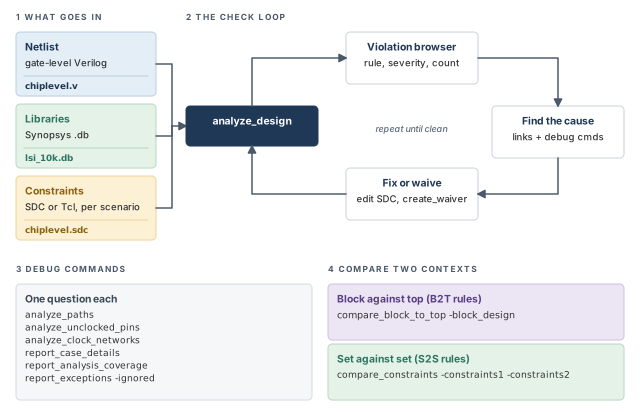
Figure 1 is a map of the whole chapter. Come back to it whenever you lose your place.
1 The beginner's mental model
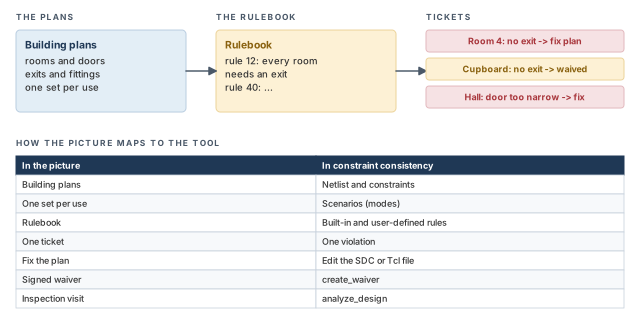
Think of a building inspector who checks plans before anyone builds. The inspector carries a thick rulebook. Rule 12 might say "every room needs an exit". The inspector walks the plans room by room and writes a ticket for each room that breaks a rule.
Some tickets are real mistakes, and the architect fixes the plan. Others are known and accepted, such as a storage cupboard with no exit. For those, the architect signs a waiver, so the ticket stops coming back. Figure 2 shows this picture and maps it to the tool.
- A building inspector checks one set of plans. The tool checks several scenarios at once, such as a functional mode and a test mode. A rule can pass in one scenario and fail in another.
- An inspector never builds anything. The tool also never edits your constraints. You must change the files yourself and run the checks again.
- Building rules rarely change. Here you can add your own rules, change a rule's severity, or switch rules off for a phase of the project.
Now the engineering model
In engineering terms, constraint consistency works in five stages:
- Load. Read and link a gate-level Verilog netlist, then apply SDC or Tcl constraints for each scenario.
- Propagate. The tool works out where clocks, data signals and constants travel through the gates.
- Check. The
analyze_designcommand runs the enabled rules. A rule is one checked condition. Each place where the design breaks a rule is a violation. - Debug. A violation browser and a set of analysis commands lead you to the root cause.
- Repeat. You fix the constraints, or waive accepted violations, and check again.
2 What constraint consistency does
2.1 Constraints in the design flow
Timing-driven steps such as synthesis, placement and routing all depend on constraints. Constraints describe the operating environment and everything else that valid static timing needs. They usually come as SDC (Synopsys Design Constraints) files or as more general Tcl scripts.
Constraints are often changed between steps. For example, the pre-layout set is edited to make the sets for placement, clock tree synthesis, routing and chip assembly. Each time a set is created or changed, it should be checked for correctness, completeness and consistency.
Constraint consistency analyzes the constraints at the gate level. It works out where and how clocks, data and constants propagate. It applies the SDC commands in your script and ignores tool-specific commands that are not SDC.
Table 1 lists the kinds of problems the rule checks detect.
| Problem area | Example |
|---|---|
| Capacitance | Incorrect capacitance values on ports |
| Clocks | Incorrectly specified clocks |
| Generated clocks | A generated clock whose master source has no clock |
| Clock latency and transition | Incorrect latency or transition times |
| Driving cells | Incorrect or missing driving cells |
| Timing exceptions | An exception that names an invalid endpoint |
| Input and output delays | Incorrectly specified external delays |
| Netlist | Netlist problems such as conflicting drivers |
| Case analysis | Conflicting case analysis values |
For deeper digging, there are dedicated commands. The analyze_paths, analyze_clock_networks, analyze_unclocked_pins and report_case_details commands help with blocked paths and missing clocks. The report_analysis_coverage, report_exceptions and compare_block_to_top commands help with multi-scenario constraints, overlapping exceptions and block-versus-top conflicts.
2.2 Key features
The main features are:
- A large set of built-in rules that covers many kinds of constraint problems.
- Support for user-defined rules that you write in Tcl.
- Analysis of several scenarios, such as operating modes, in one process.
- Capacity to analyze designs with many millions of cell instances.
- Diagnostic commands that find the root cause of a problem and show the impact of constraints.
- Collection commands and object attributes for debugging and custom scripts.
- Rule checkers fully compliant with SDC version 2.0, which flag syntax errors for invalid objects.
- An interactive Tcl shell that supports most SDC commands, plus loops, variables, conditions and collections.
- A graphical user interface (GUI) where most constraints link to the file name and line number that defined them.
- Constraint interpretation and propagation that match the other Synopsys implementation tools.
2.3 Inputs and outputs
The tool accepts:
- Verilog netlists;
- cell libraries in Synopsys .db format;
- design constraints in SDC or PrimeTime Tcl format;
- tool control scripts in Tcl format.
It produces:
- text reports;
- query commands and object attributes for interactive debugging, custom reports and conditional scripts.
3 The typical flow
3.1 Seven steps
Figure 3 shows the typical flow. Each step is one or two commands.
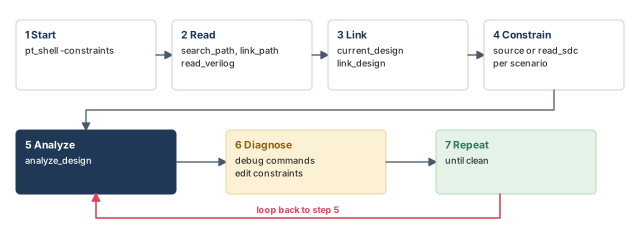
- Start the tool with
pt_shell -constraintsat the Linux prompt. - Read the design: set
search_pathandlink_path, then runread_verilog. - Link the design with
current_designandlink_design. - Apply constraints for each scenario. Use
sourcefor Tcl scripts andread_sdcfor SDC files. - Analyze with
analyze_design. - Diagnose problems with the dedicated debug commands, and edit the constraints.
- Repeat analysis and diagnosis as needed.
ptc_shell> set_app_var search_path ". ./libs ./design"   ;# where to look for files
ptc_shell> set_app_var link_path "* lsi_10k.db"   ;# memory first, then the library
ptc_shell> read_verilog chiplevel.v   ;# read the gate-level netlist
ptc_shell> current_design ChipLevel   ;# choose the top design
ptc_shell> link_design   ;# resolve every reference
ptc_shell> source ./design/chiplevel.sdc   ;# apply the constraints
ptc_shell> analyze_design   ;# run the rule checks
The shell prompt in this mode is ptc_shell>, not pt_shell>. The constraint commands are the same SDC commands you use in normal PrimeTime.
3.2 Starting and ending a session
Start the tool with the -constraints option:
% pt_shell -constraints ;# start constraint consistencyA PrimeTime SI license is checked out automatically, the GUI starts, and the ptc_shell> prompt appears:
                  PrimeTime (R)
       Version ... for linux64 -- ...
                     ...
Running PrimeTime constraint consistency
ptc_shell>
Licenses work like this:
- A PrimeTime SI license is checked out when the session starts and checked in when it ends. Others at your site can then use it.
- A PrimeTime license must also be available on the same license server. It is not checked out, but the tool will not start without it.
If the tool fails to start, check these points:
- Constraint consistency is correctly installed.
- The PrimeTime installation path is in your path definition.
- The Synopsys license server is running.
- Your license key file is available and current, and includes a PrimeTime SI license.
To end the session, type exit or quit. The tool prints a short summary:
ptc_shell> exit
Maximum memory usage for this session: 33.34 MB
CPU usage for this session: 2 seconds
Diagnostics summary: 2 errors
Thank you for using ptc_shell!
3.3 Setup files
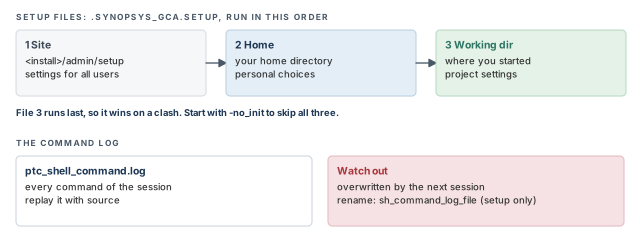
Every session first runs the commands in a set of setup files. Use them to set variables, describe the design environment and choose your working options. Each file is named .synopsys_gca.setup. The tool looks for it in three places, in this order:
- The installation setup directory,
admin/setup. For example, with the tool installed in/usr/synopsys, the file is/usr/synopsys/admin/setup/.synopsys_gca.setup. - Your home directory.
- The current working directory where you started the session.
If several exist, all of them run, in that order. Typically, the site file holds settings for all users. The home file holds your personal choices, and the working-directory file holds project settings. So, when two files set the same variable, the file that runs last usually decides the final value.
To skip all setup files, start the session with the -no_init option. Figure 4 shows the order, together with the log file described next.
3.4 The command log file
The tool records every command of the session in the command log file. It is a record of your work. You can replay the whole session later by running the file with source.
- The file is named
ptc_shell_command.logand is written in the current working directory. - An existing file with the same name is overwritten. Rename any log you want to keep before starting a new session.
- To use a different name, set the
sh_command_log_filevariable in your setup file. You cannot change it during a session.
A beginner starts a second session in the same directory and loses the log of the first one. The tool overwrites ptc_shell_command.log without asking. Rename the log first, or set sh_command_log_file in the working-directory setup file.
3.5 GUI or shell only
By default, the session starts with the GUI. Inside the shell, gui_start and gui_stop start and stop it. You can also close the GUI with File > Close GUI and keep the shell session running. File > Exit ends the session.
Two start-up options are shown with the ptc_shell command name, the name of the constraint consistency shell that pt_shell -constraints opens. To run with no GUI at all, start with ptc_shell -no_gui. To run a script at start-up, use the -f option, for example ptc_shell -f run_tutorial.tcl. The usual way to start a session is still pt_shell -constraints.
pt_shell -constraints. Setup files run site, then home, then working directory. Keep your logs safe from overwriting.4 Loading constraints
4.1 Supported constraint formats
The tool supports constraints in both SDC format and Tcl format.
- Tcl scripts are loaded with
source. They can use loops, variables and collections. - SDC files are loaded with
read_sdc.
Here is a Tcl constraint fragment. It loops over all clocks, prints each name and sets an uncertainty of 1.5 on each.
foreach_in_collection i [all_clocks] {                       ;# every clock
    echo [format "Clock : '%s'" [get_attribute $i full_name]] ;# print its name
    set_clock_uncertainty 1.5 $i                             ;# 1.5 ns uncertainty
}
Because the file uses Tcl loops, it must be loaded with source, not read_sdc.
4.2 Scenarios
A scenario is one named set of constraints on the design, such as a functional mode or a test mode. You define scenarios with create_scenario and choose the active one with current_scenario. Constraints you load then go into the current scenario.
set_app_var sh_continue_on_error true   ;# keep going if a command fails
current_design b_top                    ;# choose the design
link_design                             ;# link it
create_scenario system                  ;# first scenario
create_scenario test                    ;# second scenario
current_scenario system                 ;# make system the active scenario
source constraints.tcl                  ;# load its constraints
When several scenarios share most constraints, put the shared part in one file. A loop then loads the common file and each scenario's own file:
set all_scenarios {system myscenario_1 myscenario_2}   ;# scenario names
foreach scenario $all_scenarios {                     ;# one pass per scenario
    create_scenario ${scenario}                         ;# create; it becomes active
    source ./scripts/common.tcl                         ;# shared constraints
    source ./scripts/${scenario}_constraints.tcl        ;# this scenario only
}Keep shared constraints in one common file, as in the loop above. A fix then reaches every scenario at once. Copies of the same constraint in several files drift apart, and the drift shows up later as scenario-only violations.
4.3 Checking that constraints were accepted
Before you trust any rule result, confirm that the constraints were really read. The statistics keyword of report_constraint_analysis -include counts the constraints that were accepted and rejected.
ptc_shell> report_constraint_analysis -include statistics
Constraint Processing Statistics
Constraint Accepted Rejected Total
-----------------------------------------------------
create_clock 7 0 7
set_clock_uncertainty 1 0 1
set_input_delay 6 0 6
set_output_delay 6 0 6A non-zero Rejected count means some commands were not applied. Find out why before reading any violations.
A script with a wrong path in source loads nothing for one scenario. The rule checks then run on an almost empty scenario and report odd violations, such as unused clocks. Run the statistics report first; it shows the missing constraints at a glance.
4.4 Reading designs with incomplete or mismatched netlists
Early in a project, design data changes often. For example, a block-level designer adds a pin. The top-level designer still uses the older block, which has fewer pins. The netlists now disagree. This is a design mismatch.
To link such designs, set the link_allow_design_mismatch variable to true. Its default is false. The tool then issues DMM warning messages for mismatched pins, ports, cells or nets.
Each object affected by a mismatch has its is_design_mismatch attribute set to true. The default is false. You can see this attribute in the Properties dialog box of the GUI.
Figure 5 shows the main cases the tool can link through.
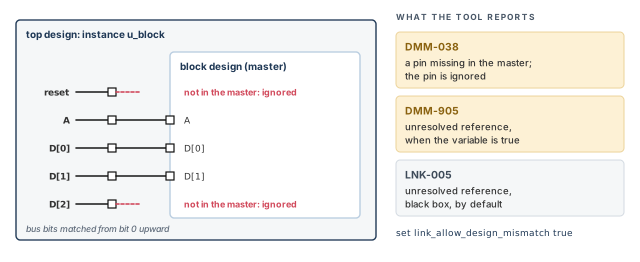
With the variable set to true, the tool links through these netlist problems:
- Pins at a higher level that do not exist at the lower level. The extra pins are ignored and do not exist in the linked netlist. Nets on them are left dangling. Constraints are not applied on these pins. The tool can also link netlists that have anchor cells (placeholder cells) inserted on the dangling nets. In that case, constraints on the mismatched pins are kept in the linked design in memory.
- Bus width differences. Bus bits are connected starting from the least significant bit. Extra bits on the lower-level block are left unconnected. Extra bits on the higher-level block are ignored.
- Different power and ground (PG) pin data. If the netlist has PG pins but the library does not, the tool treats it like extra pins at the higher level.
- Cells missing from the library. By default, the linker makes a black box for each unresolved reference and keeps linking. It issues an LNK-005 message. With the variable set to
true, it issues a DMM-905 message instead and keeps linking.
To list the mismatches found while linking, use report_design_mismatch.
ptc_shell> report_design_mismatch
Message  Design Object          Type    Count    Mismatch Description
----------------------------------------------------------------------
DMM-038  top    u_block/reset   pin     1 of 1   Pin "reset" of cell
                                                 "u_block" ... does not
                                                 exist in the reference
                                                 block. Ignoring this pin.
DMM-905  top    BUFFD1          design  1 of 48  Cannot find the design
                                                 'BUFFD1' in design
                                                 libraries.
...
Information: Reaching the message display limit of
report_design_mismatch. (UIC-063)
The report groups messages by ID. For each ID it shows the design, the object, the object type and a count. When there are too many lines, the report stops and prints UIC-063.
Use the mismatch mode to keep early checks moving, not to hide problems. Review report_design_mismatch after every link. Each DMM line is a real difference that must be gone before signoff.
5 Rules and violations
5.1 What a rule is
The tool checks a loaded, linked and constrained design against many conditions. Let us define the terms once:
- A rule is one condition that is checked.
- A violation is one place in the design that fails a rule. One rule can have many violations.
- A severity is attached to each rule: Information, Warning or Error.
- A waiver is a condition that stops a rule from reporting in one place, such as one block or one clock.
- A user-defined rule is a rule you write yourself.
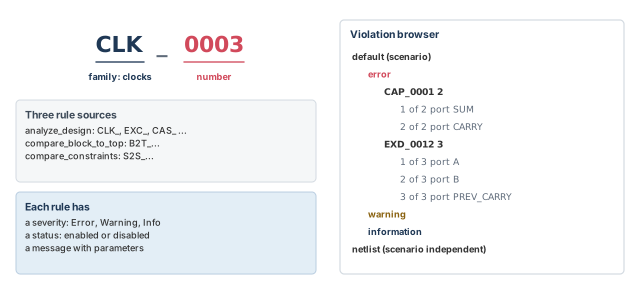
Each rule has a code: three or four letters, an underscore and four digits. The letters name the rule family. For example, CLK_0003 is a clock rule. Its message reads "Generated clock clock_name is not expanded because it has no clock reaching its master source pin_name". It fires when the -source of create_generated_clock names a pin with no clock on it.
Three commands each check their own set of rules:
analyze_designchecks the standard design rules.compare_block_to_topchecks block-to-top rules, with codes startingB2T_.compare_constraintschecks constraint-set comparison rules, with codes startingS2S_.
Figure 6 shows how a code is built and how violations are grouped in the browser.
5.2 Built-in rule families
When the tool starts, it loads the built-in rules. Table 2 lists every family, grouped by the kind of check.
| Group | Family | What it checks |
|---|---|---|
| Boundary conditions | CAP_xxxx |
Capacitance values |
| Boundary conditions | DRV_xxxx |
Drive constraints |
| Boundary conditions | EXD_xxxx |
External delays: input and output delays |
| Constraints and exceptions | CAS_xxxx |
Case analysis values |
| Constraints and exceptions | EXC_xxxx |
Timing exceptions |
| Clocks | CGR_xxxx |
Clock groups |
| Clocks | CLK_xxxx |
Clock properties |
| Clocks | CNL_xxxx |
Clock network latencies |
| Clocks | CTR_xxxx |
Clock transitions |
| Clocks | CSL_xxxx |
Clock source latencies |
| Clocks | UNC_xxxx |
Clock uncertainties |
| General | CMP_xxxx |
Compatibility with other tools |
| General | DES_xxxx |
Design constraints |
| General | HIER_xxxx |
Hierarchical checks |
| General | LOOP_xxxx |
Timing loops |
| General | PRF_xxxx |
Performance, such as the clock count |
| General | NTL_xxxx |
Netlist and net properties |
| General | UNT_xxxx |
Library units |
The block-to-top families (B2T_xxx_xxxx) compare top-level constraints with block-level constraints. They are covered in the hierarchical section later.
5.3 Rules you meet in this chapter
Table 3 lists every individual rule named in this chapter. It says what each one checks, in plain words, as far as its message or example shows.
| Rule | Severity shown | What it checks, in plain words |
|---|---|---|
CAP_0001 |
error | An output or inout port has zero or incomplete capacitance values |
CAS_0001 |
error | A net has conflicting user case values on its load pins |
CAS_0002 |
error | A pin or port is driven by conflicting values; a value of zero is used |
CAS_0003 |
error | A propagated value on a pin conflicts with a user case value there |
CAS_0004 |
error | A bidirectional pin has conflicting values on its load and driver sides |
CLK_0003 |
— | A generated clock is not expanded, because no clock reaches its master source |
CLK_0020 |
— | A generated clock has edge relationships with its master that cannot be met |
CLK_0021 |
— | A clock is not used in this scenario |
CLK_0026 |
warning | A clock is used as data: it reaches a register data pin or a constrained output |
DES_0001 |
warning | A design constraint rule; used here to show severity and message edits |
DES_0003 |
— | A design constraint rule; used here in a custom rule set |
DRV_0001 |
— | A drive rule whose violations name a port |
EXC_0001 |
— | An exception rule whose violations name an exception and a rise or fall edge |
EXC_0002 |
— | An exception rule; used here in the disable example |
EXC_0004 |
warning | An exception names an invalid endpoint in its -to option |
EXC_0006 |
— | Finds exceptions with no effect; disabled by default for runtime |
EXC_0014 |
— | Finds exceptions with no effect; disabled by default for runtime |
EXD_0012 |
error | An input delay has a zero window between its min and max values |
UNC_0003 |
— | An uncertainty rule whose violations name a clock |
UNT_0002 |
error | A library has incomplete units defined |
A dash means the severity is not shown in this chapter. Use report_rule to see it in your session.
Each rule has a rule reference page in the tool's online Help. It explains the rule, shows a design that breaks it, and suggests how to debug it. Use it whenever a message is not clear.
5.4 Enabling and disabling rules
Not all built-in rules are enabled by default. To list all rules and their status, use report_rule *. When a rule is enabled, the tool checks the design against it and reports each violation.
ptc_shell> report_rule *   ;# list every rule with its severity and status
ptc_shell> enable_rule [list EXD_0012]   ;# turn on one rule
ptc_shell> disable_rule [list DES_0001 EXC_0002]   ;# turn off two rules
Some rules are off by default for two reasons:
- They conflict with enabled rules. For example, pre-layout rules differ from post-layout rules, and running both gives clashing results.
- They cost runtime. For example,
EXC_0006andEXC_0014need extra runtime.
5.5 Modifying rules
You can change any part of a rule: its message, its description or its severity.
ptc_shell> set_rule_severity error [get_rules DES_0001]   ;# warning becomes error
ptc_shell> set_rule_message [list "The pin of the register" \
             "didn't receive any clock"] [get_rules DES_0001]   ;# new message text
The set_rule_description command changes the description in the same way.
Teams often raise a few warnings to errors for signoff. For example, a team may decide that a clock used as data is never acceptable on its chips. Put such changes in the site setup file, so every engineer checks with the same rulebook.
5.6 Rule sets
A rule set is a named group of rules for one purpose, such as signal integrity. Rule sets let you check one area of the flow at a time. The built-in rule sets are:
compatibilitypostlayoutprelayoutprimetime_sihierarchical
ptc_shell> report_rule [get_rulesets primetime_si]   ;# list the rules in the set
ptc_shell> analyze_design -rules primetime_si   ;# check only those rules
You can also build your own rule set with create_ruleset. This helps you focus on the issues of your design.
ptc_shell> create_ruleset -name my_ruleset [list DES_0001 DES_0003]   ;# two rules only
ptc_shell> analyze_design -rules my_ruleset   ;# check with that set
ptc_shell> create_ruleset -name myExcRuleset [get_rules EXC*]   ;# all EXC rules
ptc_shell> set allRules [get_rules *]   ;# every built-in rule
ptc_shell> set EXDRules [get_rules EXD*]   ;# the EXD rules
ptc_shell> set myRules [remove_from_collection $allRules $EXDRules]   ;# all but EXD
ptc_shell> create_ruleset -name myRuleset $myRules   ;# an exclusion rule set
The last four lines show an exclusion rule set: all rules except one family. It uses ordinary collection commands.
5.7 Rule-related commands
Table 4 lists the commands that work on rules and rule sets.
| Command | What it does |
|---|---|
report_rule |
Reports detailed rule information; -parameters lists a rule's parameters |
get_rules |
Creates a collection of rules |
get_rulesets |
Creates a collection of rule sets |
get_rule_property |
Returns one property of a single rule |
set_rule_property |
Sets rule properties, such as a comparison tolerance |
enable_rule, disable_rule |
Turn rules on or off |
set_rule_severity, set_rule_message, set_rule_description |
Change a rule's severity, message or description |
create_ruleset |
Creates a user-defined rule set |
remove_ruleset |
Removes user-defined rule sets; built-in sets cannot be removed |
6 Running the checks and reading results
6.1 Running analyze_design
After loading, run analyze_design. It checks the enabled rules for each scenario it analyzes. It also runs scenario-independent checks on the netlist.
ptc_shell> analyze_design
Information: Checking scenario 'default': Starting rule
checks (ADES-002)
Information: Checking netlist: Starting scenario-independent rule
checks. (ADES-003)
1
Useful options are:
-ruleslimits the check to the named rules or rule set, such asanalyze_design -rules {CAS_0003}.-scenariosnames the scenarios to check, such asanalyze_design -scenarios "scn1 scn2".
6.2 The violation browser
The violation browser is the main debugging window. It shows a tree of all violations, with suggestions on how to fix them. The tree looks like this:
- one node per scenario, plus a node for netlist (scenario-independent) violations;
- under each, severity nodes in the order Error, Warning, Information;
- under each severity, one node per rule, with its count;
- under each rule, one row per violation.
When the GUI first opens, the severity nodes are expanded and the rule nodes are collapsed. Click the + next to a rule to list its violations. By default, the browser shows up to 1000 violations per rule. The display_violations_per_rule_limit variable changes this limit.
The browser groups violations of one rule when their object names are similar. This shows the scope of a problem quickly. Selecting a group shows its description in the information pane. Rules with no netlist objects in their parameters are not grouped, because grouping works on names of pins, ports and cells. Both waived and unwaived violations appear in a group. The grouping_violations_hierarchy_separator_limit variable disables grouping or sets how many hierarchy levels it uses.
Each run of a check is kept in its own violation browser. The analysis run chooser, opened from the Analysis menu, lets you pick which run to view. It groups the results by type: normal, block-to-top (B2T) and SDC-to-SDC (S2S).
6.3 Analyzing a violation
Select a violation, and the information pane shows its details. The pane stays in step with the browser selection. It contains the full message and links to related objects. Figure 7 shows the links you use most.
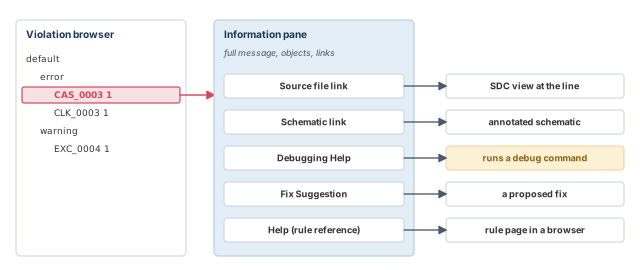
- Source file link. Opens the SDC view at the file and line that defined the constraint.
- Schematic link. Draws the relevant part of the circuit, annotated with clocks and case values.
- Debugging Help. Suggests debug commands, often with a link that runs them for you.
- Fix Suggestion. Proposes a fix.
- Help link. Opens the rule reference page in the online Help.
In the schematic, the Pin annotation list controls which clock and case annotations are drawn. The data related to the violation is shown by default. You can expand the list to show any annotation.
6.4 Text reports with report_constraint_analysis
The GUI is good for browsing. For a record, or for scripts, use report_constraint_analysis. It reports rule violations, user messages and rule information. Results are sorted by analysis type, design and scenario.
| Option | What it does |
|---|---|
-include |
Chooses the content, such as violations, user_messages, rule_info or statistics |
-style |
Chooses a full or a summary report |
-rules |
Limits the report to the named rules |
-rule_types |
Limits the report to the named rule types |
-format |
Writes plain text or comma-separated values (CSV) |
The CSV format is handy for loading results into a spreadsheet.
Here is a script that links three designs in one session and checks TOP in two scenarios. The link_design -add command keeps the earlier designs linked.
link_design TOP                          ;# link the top design
link_design -add HALF_ADDER              ;# keep TOP; link another design
link_design -add FULL_ADDER              ;# and a third
current_design TOP                       ;# work on TOP
create_scenario scn1                     ;# first scenario of TOP
create_clock -period 10 -name TOP_VCLK   ;# virtual clock, 10 ns
create_clock -period 10 -name TOP_VCLK2  ;# a second clock, never used
set_input_delay 2 -clock TOP_VCLK [all_inputs]    ;# 2 ns on all inputs
set_output_delay 2 -clock TOP_VCLK [all_outputs]  ;# 2 ns on all outputs
create_scenario scn2                     ;# second scenario of TOP
create_clock -period 20 -name TOP_VCLK   ;# 20 ns in this scenario
set_input_delay 3 -clock TOP_VCLK [all_inputs]    ;# 3 ns on all inputs
set_output_delay 3 -clock TOP_VCLK [all_outputs]  ;# 3 ns on all outputs
analyze_design -scenarios "scn1 scn2"    ;# check both scenarios
report_constraint_analysis -include violations    ;# text report
The report lists each design, then its scenarios, then severities and rules:
Scenario              Violations Count Waived Description
----------------------------------------------------------------------
Design: TOP
<Global Violations>        1     0   Scenario independent violations
  error                    1     0
    UNT_0002               1     0   Library 'library' has incomplete
                                     units defined.
scn1                      33     0   User-defined scenario violations
  error                   18     0
    CAP_0001              10     0   Output/inout port 'port' has zero
                                     or incomplete ...
    EXD_0012               8     0   The input delay at 'object_type'
                                     'object' has zero window for min
                                     and max values.
  ...
    CLK_0021               1     0   Clock 'clock' is not used in this
                                     scenario.
      1 of 1                     0   Clock 'TOP_VCLK2' is not used in
                                     this scenario.
...
Read it from the top. The 18 errors of scn1 are the 10 CAP_0001 and 8 EXD_0012 violations. UNT_0002 is a library problem, so it sits under Global Violations, outside any scenario. CLK_0021 points at TOP_VCLK2, which the script defined but never used. EXD_0012 fires because each input delay uses one value for both min and max, so the window is zero.
report_constraint_analysis is for records. Both group violations by design, scenario, severity and rule.7 Exception order of precedence
7.1 Why precedence matters here
Many violations involve timing exceptions that overlap. To read them, you must know which exception wins on a path. The tool applies the precedence rules per path, not per command.
For example:
ptc_shell> set_max_delay -from A 5.1   ;# paths starting at A: 5.1 ns max
ptc_shell> set_false_path -to B   ;# paths ending at B: not timed
A false path beats a max delay. So paths from A to B are false paths. However, paths from A that end elsewhere still get the 5.1 ns limit. Neither command is thrown away.
7.2 Exception type priority
Some pairs are not in conflict, so both apply to the same path:
- two
set_false_pathsettings; - a
set_min_delayand aset_max_delaysetting; set_multicycle_path -setupandset_multicycle_path -hold.
When exceptions do conflict, the types rank from highest to lowest:
set_false_pathset_max_delayandset_min_delayset_multicycle_path
For example, if a path is both false and has a max delay, the false path wins. The max delay is ignored on that path. To list ignored exceptions, use report_exceptions -ignored.
7.3 Path specification priority
When two exceptions have the same type, the more specific one wins. Exceptions on pins or ports beat exceptions on clocks.
ptc_shell> set_max_delay 12 -from [get_clocks CLK1]   ;# all paths from CLK1
ptc_shell> set_max_delay 15 -from [get_clocks CLK1] \
             -to [get_clocks CLK2]   ;# only CLK1 to CLK2: more specific
Paths from CLK1 to CLK2 get 15 ns. All other paths from CLK1 keep 12 ns.
The path specification options rank from highest to lowest:
-from pin,-rise_from pin,-fall_from pin-to pin,-rise_to pin,-fall_to pin-through,-rise_through,-fall_through-from clock,-rise_from clock,-fall_from clock-to clock,-rise_to clock,-fall_to clock
To compare two commands, walk down the list. The first level where one command has the option and the other does not decides the winner. Figure 8 shows both ladders and the common combinations in order.
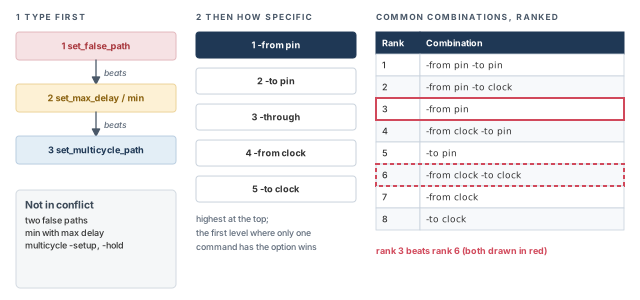
| Rank | Combination |
|---|---|
| 1 | -from pin -to pin |
| 2 | -from pin -to clock |
| 3 | -from pin |
| 4 | -from clock -to pin |
| 5 | -to pin |
| 6 | -from clock -to clock |
| 7 | -from clock |
| 8 | -to clock |
A beginner writes a broad clock-to-clock false path and then a pin-level multicycle path inside it, expecting the multicycle to apply. Type comes first, so the false path wins on the shared paths. The multicycle path is ignored there, and report_exceptions -ignored lists it.
8 Suppressing violations
8.1 Disable or waive
Not every violation needs a fix. Some are known and accepted. The tool gives two ways to suppress them:
- Disable a rule. The rule is not checked at all. For example, you may not want any capacitance checks, so you disable the
CAP_xxxxrules. - Waive a violation. The rule still runs, but specific violations are suppressed. For example, you keep capacitance checks on all output ports but one, so you waive the
CAP_xxxxrules on that port.
There are commands to create, report, remove and write waivers, and the GUI makes it easy to create and remove them. Figure 9 shows how both kinds of suppression behave before and after analysis.
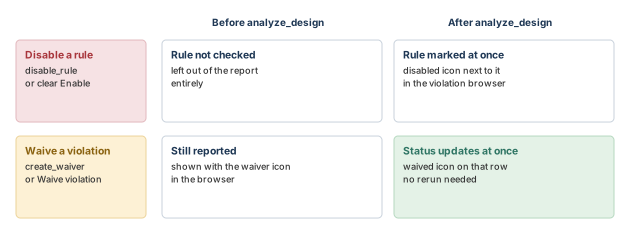
You can suppress before or after running analyze_design:
- After analysis, the browser marks a suppressed violation with a special icon. Its status updates at once, so you see the effect right away.
- Before analysis, a disabled rule is left out of the report entirely. A waived violation is still reported, but shown with the special icon.
8.2 Disabling rules
There are three ways to disable a rule:
- In the violation browser. Right-click the rule and choose Disable rule. The tool generates the matching
disable_rulecommand. A disabled icon appears next to the rule. - In the Waiver Configuration dialog box. Choose Design > Waiver Configuration and clear the box next to the rule. It is not checked or reported at the next
analyze_design. - On the command line, with
disable_rule.
8.3 Waiving specific violations
There are also three ways to waive a violation:
- In the violation browser. Right-click the violation and choose Waive violation. The tool generates a full
create_waivercommand and shows a "waived" icon. You can select several violations at once. However, Undo last waiver only undoes the last waiver of the group. - In the Waiver Configuration dialog box. Choose Design > Waiver Configuration, click Create waiver, and fill in the Edit Waiver dialog box.
- On the command line, with
create_waiver.
The browser can also hide waived violations. The View menu has a Hide Waived Violations command, linked to the hide_waived_violations variable. The variable and the menu command control the same setting. Setting hide_waived_violations to false changes the toggle state of that command on the View menu.
8.4 The create_waiver command
The create_waiver command suppresses violations of one rule that match a set of conditions. The key options are:
| Option | What it does |
|---|---|
-rule |
The rule to waive |
-condition |
A list of two items: a rule parameter name and a collection or value. Can repeat |
-not_condition |
Like -condition, but matches when the parameter is not in the collection. Can repeat |
-name |
A name for the waiver |
-comment |
A comment stored with the waiver |
-design, -scenario |
Assign the waiver to a design and scenario when several designs are loaded |
-cells |
Makes an instance-level waiver for the given cells |
-all_scenarios |
Applies an instance-level waiver to all scenarios of the design |
-design1, -scenario1, -design2, -scenario2, -inst2 |
Name the two contexts of a block-to-top or SDC-to-SDC waiver |
A violation is suppressed only if all the -condition and -not_condition options are met. In other words, the conditions combine with AND. For netlist objects and constraints, the condition needs a real collection, such as [get_clocks CLK], not a bare name.
The parameter names come from the rule. To list them, use report_rule -parameters:
ptc_shell> report_rule -parameters CLK_0026
Rule Severity Status Message
------------------------------------------------------------------
CLK_0026 warning enabled Clock 'clock' is used as data. One or
more sources of the clock fans out to a
register data pin or to a constrained
primary output or inout port.
CLK_0026 parameters:
Name Value Types
--------------------------
clock clockSo a CLK_0026 waiver can test one parameter, named clock. Figure 10 shows how conditions combine for a rule with two parameters.
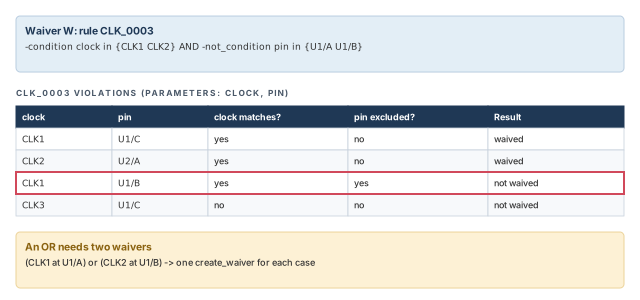
Here are the common forms, each with what it waives:
# 1. CLK_0026 on every clock whose name starts with CLK
ptc_shell> create_waiver -rule CLK_0026 -condition [list "clock" \
             [get_clocks CLK*]]   ;# match by clock
# 2. CLK_0026 on every clock except CLK3
ptc_shell> create_waiver -rule CLK_0026 \
             -not_condition [list "clock" [get_clocks CLK3]]   ;# all but CLK3
# 3. CLK_0003 when the clock is CLK1 or CLK2 AND the pin is not U1/A or U1/B
ptc_shell> create_waiver -rule CLK_0003 \
             -condition [list "clock" [get_clocks {CLK1 CLK2}]] \
             -not_condition [list "pin" [get_pins U1/A] [get_pins U1/B]]   ;# AND
To waive "CLK1 at U1/A, or CLK2 at U1/B", you need two waivers. One waiver can only express AND.
ptc_shell> create_waiver -rule CLK_0003 \
             -condition [list "clock" [get_clocks CLK1]] \
             -condition [list "pin" [get_pins U1/A]]   ;# case 1
ptc_shell> create_waiver -rule CLK_0003 \
             -condition [list "clock" [get_clocks CLK2]] \
             -condition [list "pin" [get_pins U1/B]]   ;# case 2
A condition can also match an exception and a plain value. This one waives EXC_0001 for the exception from U1/A to U2/Z, on the rising edge only:
ptc_shell> create_waiver -rule EXC_0001 \
             -condition [list "exception" [get_exceptions -from U1/A -to U2/Z]] \
             -condition [list "rise_or_fall" "rise"]   ;# rise edge only
Two more rules decide where a waiver lands:
- Scenario. If the rule depends on the scenario, the waiver is added to the current scenario. If the rule is scenario-independent, the waiver applies to the scenario-independent checks.
- Current instance. Netlist names are read relative to the current instance. Thus, these two waivers are the same:
ptc_shell> current_instance U1   ;# scope: U1
ptc_shell> create_waiver -name "my_waiver4" -rule CAS_0003 \
             -condition [list "pin" [get_pins U2/U3/A]]   ;# means U1/U2/U3/A
ptc_shell> current_instance U1/U2   ;# scope: U1/U2
ptc_shell> create_waiver -name "my_waiver4" -rule CAS_0003 \
             -condition [list "pin" [get_pins U3/A]]   ;# also U1/U2/U3/A
8.5 Waivers for comparison rules
Block-to-top (B2T) and SDC-to-SDC (S2S) rules compare two contexts. A waiver for them must say which context each object comes from. Inside the condition, set the design first, then get the object. You also name the design and scenario pair, and for B2T, the block instance.
ptc_shell> create_waiver -rule B2T_CLK_0012 \
  -condition [list "blk_object" [current_design BLOCK ; get_pins zGate/A]] \
  -condition [list "blk_object_type" "pin"] \
  -condition [list "top_object" [current_design TOP ; get_pins b1/zGate/A]] \
  -condition [list "top_object_type" "pin"] \
  -design1 TOP -scenario1 default \
  -design2 BLOCK -scenario2 default \
-inst2 b1 ;# top TOP, block BLOCK, instance b1ptc_shell> create_waiver -rule S2S_DIS_0001 \
-condition [list "object" \
[current_design S2S_CLK_0001 ; get_pins ck2_i2/Test_pin]] \
-condition [list "object_type" "pin"] \
-condition [list "scenario1" "set2"] \
-condition [list "scenario2" "set1"] \
-design1 zDesign -scenario1 set1 \
-design2 zDesign -scenario2 set2 ;# one design, two constraint setsThe parameter names, such as top_object_type, are listed in each rule's reference page.
8.6 Instance-level waivers
An instance-level waiver waives rules for whole cells or design instances. You can make one in the GUI or on the command line. The commands remove_waiver, write_waiver and report_waiver all support them.
From the hierarchy browser:
- Choose Design > Hierarchy Browser.
- Click the cell instance, then right-click it.
- Choose Waive Instance. An instance waiver icon appears in the violation browser next to every waived instance.
From the Waiver Configuration dialog box:
- Choose Design > Waiver Configuration.
- Click Instance Waivers, then Create Waiver. The Edit Waiver Instance dialog box opens.
- Enter the details and click Create.
On the command line, use -cells:
ptc_shell> create_waiver -name my_waiver_1 -cells [get_cell U1/U1]   ;# one cell
ptc_shell> create_waiver -name my_waiver_2 -cells [get_cell {U1/U2 U1/U3}]   ;# two
ptc_shell> report_waiver ;# list all waiversName Rule Scenario Condition Comment
--------------------------------------------------------------------
my_waiver_1 -cells {U1/U1} waived by Jane on ...
my_waiver_2 -cells {U1/U2 U1/U3} waived by Jane on ...Keep these limits in mind:
- An instance-level waiver applies to the current scenario. Add
-all_scenariosto apply it to all scenarios of the design. - A violation is waived only if all its objects are inside the named cell or instance. Thus, some general rules cannot be waived this way.
- Custom (user-defined) rules cannot be waived with instance-level waivers.
8.7 Modifying, reporting, removing and writing waivers
Modify a waiver in the GUI:
- Open Design > Waiver Configuration.
- Double-click the waiver. The Edit Waiver dialog box opens with its current settings.
- Make your changes and click Create.
- Confirm that you want to replace the existing waiver, and click OK.
Report waivers with report_waiver. By default, it reports all waivers for each design in the session. Use -design to choose designs and -rules to choose rules.
ptc_shell> report_waiver -design TOP HALF_ADDER   ;# waivers of two designs
ptc_shell> report_waiver -rules CAP_0001 ;# waivers of one ruleName Rule Scenario Condition
------------------------------------------------------------------
Design: TOP
waiver_0_0 UNC_0003 scn1 -condition [list clock1 [get_clocks {TOP_VCLK}]]
waiver_0_1 CAP_0001 scn3 -condition [list port [get_ports {PLUS_CARRY}]]
Design: HALF_ADDER
waiver_1_0 DRV_0001 default -condition [list port [get_ports {A}]]Remove a waiver in one of three ways:
- In the violation browser, right-click the waiver and choose Undo created waiver.
- In Design > Waiver Configuration, select the waiver and choose Remove waiver.
- On the command line, use
remove_waiver.
Write waivers to a Tcl file with write_waiver. You can source the file later to restore every waiver.
write_waiver -output output_file [-force]if {[current_scenario] == "func"} {
create_waiver -name "my_waiver1" -rule CLK_0026 -condition \
[list "clock" [get_clocks {clk1 clk2}]] -comment "test"
}
if {[current_scenario] == "test"} {
create_waiver -name "my_waiver3" -rule CLK_0003 -condition \
[list "clock" [get_clocks {clk1 clk2}]] -comment "test"
}Note three points about the written file:
- Each scenario's waivers sit inside an
ifoncurrent_scenario. - Netlist objects use full paths, even if the original waiver used names relative to the current instance.
- The file is accurate but can be harder to read than your original commands. It can also be large, especially if you used wildcards.
Keep a hand-written waiver script under version control, with a comment on every waiver. Use write_waiver as a backup, not as the master copy. A reviewer can judge "waived because the scan clock is quiet in functional mode", but not a page of expanded pin names.
8.8 The Waiver Configuration dialog box
The Waiver Configuration dialog box (Design > Waiver Configuration) waives whole rules or specific violations. It differs from the violation browser in two ways:
- It works both before and after
analyze_design. - It shows all rules, while the browser shows only rules with violations.
| Column | Meaning |
|---|---|
| Rules/Waivers | The rule name. A plus sign means some violations of the rule are waived |
| Enable | A check mark means the rule is enabled. Clearing it disables the rule in all scenarios |
| Count | The number of waivers for the rule |
| Design | The design the waiver applies to. Empty means the current design |
| Scenario | The scenarios where the waiver is active. Empty means all scenarios |
| Description | A short explanation of a built-in rule, or your comment for a user-defined rule |
A beginner waives a violation with a wildcard such as [get_clocks *] to make the browser clean. The waiver then also hides every future violation of that rule, including real ones. Waive the narrowest set of objects that is truly accepted, and add a comment saying why.
9 Debug commands: finding the root cause
9.1 Why we need them
A rule message tells you what is wrong. It does not always tell you why. For example, a register may have no clock. Is the clock missing, or is it blocked by a constant, or by a disabled arc? The debug commands answer such questions.
Table 9 maps common questions to the command that answers them.
| Question | Command |
|---|---|
| Which paths and exceptions reach this pin, and what blocks them? | analyze_paths |
| Which register clock pins have no clock, and why? | analyze_unclocked_pins |
| Where does this clock go, and where does it stop? | analyze_clock_networks |
| How did this case value or constant get here? | report_case_details |
| Which clock domains talk to each other? | report_clock_crossing |
| How much of the design do my constraints really test? | report_analysis_coverage |
| Which exceptions do nothing, and which matter? | report_exceptions |
9.2 analyze_paths
Sometimes report_timing does not show a path you expect. Is that correct behavior or a constraint problem? The analyze_paths command finds what blocks the path and why.
It helps you:
- find the exceptions and constraints on given paths;
- count the paths that match a from, through or to condition, optionally limited to a rise or fall edge.
It lists the pins on the paths and ranks the information by how many paths each constraint affects.
ptc_shell> analyze_paths -to Tranx/pay_count__reg[1]/D   ;# default report
ptc_shell> analyze_paths -to Tranx/CRC_tranx/pay_out_reg/D \
             -path_type full   ;# add startpoints and every pin by level
ptc_shell> analyze_paths -to Tranx/CRC_tranx/pay_out_reg/D \
             -path_type summary   ;# paths and exceptions, no pin list
ptc_shell> analyze_paths -to Tranx/CRC_tranx/pay_out_reg/D \
-path_type full -traverse_disabled ;# also trace disabled paths| Option | What it does |
|---|---|
-from, -through, -to |
Choose the paths to analyze |
-path_type full |
Breaks paths down by startpoint and endpoint, and lists every pin with its logic level |
-path_type summary |
Shows the summary of paths and the exception information only |
-traverse_disabled |
Traces through disabled paths and shows why paths are blocked |
-max_endpoints |
Limits the number of paths drawn in the schematic |
-text_only |
Writes only a text report, even when the GUI is open |
With the GUI open and -path_type full, the command also draws a schematic of the paths. Without the GUI, or with -text_only, you get text only.
The default report counts paths per endpoint and shows the launch and capture clocks:
Path Endpoints:
                                      Path   Clocks
Endpoint                  Constraints Count  Launch/Capture
----------------------------------------------------------------
Tranx/pay_count__reg[1]/D               10   (set 0)/(set 0)
Tranx/pay_count__reg[1]/D                8   sysclk/(set 0)
Sets of Launching and Capturing Clocks:
  set 0 (2 clocks):
    falling sys_clk
    falling sysclk
When exceptions sit on the paths, the full report tags them. It names the object, the exception type and the script line. Figure 11 draws the paths of the next report.
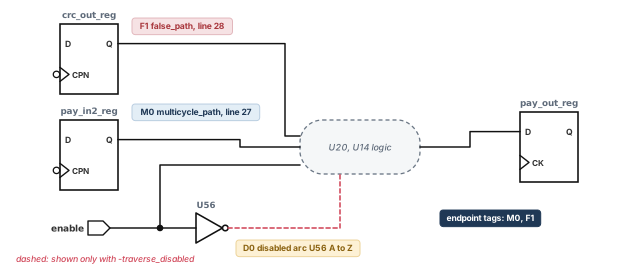
Summary of Paths:
Startpoint                       Endpoint        Constraints Count
-------------------------------------------------------------------
enable                           .../pay_out_reg/D            2
enable                           .../pay_out_reg/D     D0     2
Tranx/CRC_tranx/crc_out_reg/CPN  .../pay_out_reg/D     F1     2
Tranx/CRC_tranx/pay_in2_reg/CPN  .../pay_out_reg/D     M0     2
Exception Information:
  M0 multicycle_path   (run.ztcl, line 27)
  F1 false_path        (run.ztcl, line 28)
Disabled Object Information:
  D0:
    set_disable_timing negative_unate Arc
      From: Tranx/CRC_tranx/U56/A
      To:   Tranx/CRC_tranx/U56/Z
Level Pin                                Attr   Constraints
-------------------------------------------------------------------
1     Tranx/CRC_tranx/crc_out_reg/CPN    Start
2     Tranx/CRC_tranx/crc_out_reg/Q              F1
2     Tranx/CRC_tranx/pay_in2_reg/Q              M0
...
8     Tranx/CRC_tranx/pay_out_reg/D      End     M0,F1
With -traverse_disabled, the report shows two more things: possible paths with no blockage, and the reasons paths are blocked or cut. Here, D0 is a disabled arc on U56 from A to Z.
9.3 analyze_unclocked_pins
The analyze_unclocked_pins command looks for missing clock definitions and blocked clock propagation. By default, it analyzes all pins in the design and reports:
- a summary of the analysis;
- possible points for a missing clock definition;
- locations where clock propagation is blocked.
The -verbose option adds detailed lists of unclocked pins. Each register clock pin gets one of four states:
- Clocked — a clock reaches it.
- Unclocked — no clock reaches it.
- Case-disabled — case analysis propagation disables the timing checks or arcs from the pin.
- Register-disabled —
set_disable_timingconstraints disable all arcs from the pin.
Register Clock Pin Status                      Number of Pins
---------------------------------------------------------------
Clocked                                              148
Unclocked                                             67
Case disabled clock pin                                0
Register behavior disabled                             0
Total register clock pins                            215
        Possible Startpoints for Missing Clock Definitions
Pin/Port Startpoints   Number unclocked  Reason a Startpoint
---------------------------------------------------------------
clk_adder_div2/Q       50                constraint forced startpoint
                                         on interior pin (default)
clk_8x8/Z              16                constraint forced startpoint
                                         on interior pin (default)
clk_adder/Z             1                set_disable_timing (default)
Clocks are blocked from register clock pins at the following locations:
Clock  Blocking Pin   Number unclocked   Reason
---------------------------------------------------------------
mclk   clk_8x8/Z      16                 constraint forced
                                         startpoint on interior pin
aclk   clk_adder/Z     1                 set_disable_timing
Read it like this. 67 register clock pins have no clock. 50 of them sit after clk_adder_div2/Q, which may need its own clock definition. Clock aclk is blocked at clk_adder/Z by set_disable_timing. Clock mclk is blocked at clk_8x8/Z, because a constraint forced a startpoint on that interior pin. Check whether each blockage is intended.
9.4 analyze_clock_networks
Modern clock networks contain generated clocks, clock gating and clock multiplexers. Constraints on them interact in ways that are hard to follow. The analyze_clock_networks command reports how a clock propagates to and from given points. It can show the impact of constraints on:
- the clock network;
- the potential clock network, which
-traverse_disabledreveals beyond blocking constraints; - the source latency network of a generated clock.
| Option | What it does |
|---|---|
-from, -through, -to |
Choose the clock, pins or endpoints to trace |
-traverse_disabled |
Continues past blocking constraints and marks potential senses, such as [P] |
-style |
Chooses the layout, such as full or full_expanded |
-max_endpoints |
Limits the number of endpoints reported |
-end_types |
Chooses end types, such as {register port clock_source} |
-nosplit |
Keeps each report line unbroken |
The report lists each pin with its level, its clock sense and notes. Table 12 decodes the abbreviations.
| Abbreviation | Meaning |
|---|---|
P, N |
Positive or negative clock sense |
[P] |
Potential positive sense, found with -traverse_disabled |
R (in Sense) |
Rise-triggered, as in N,R |
R or REG (in Notes) |
The clock ends at a register |
CS |
The clock ends at a clock source |
D |
The clock reaches data |
CG |
A clock-gating point |
DT#0 |
A blocking constraint, listed under Clock Blocking Constraints |
ptc_shell> analyze_clock_networks -from [get_clocks sysclk] \
-to Tranx/U0/o_lfsr1_reg[11]/CP -traverse_disabled \
-style full_expanded
Full report for clock: sysclk
Level Info Sense Notes Port/Pin
------------------------------------------------------------
0 P source clk
1 P Tranx/U1775/A
...
13 P Tranx/U0/U1121/A
14 [P] DT#0 Tranx/U0/U1121/Z
15 [P] R Tranx/U0/o_lfsr1_reg[11]/CP
Clock Blocking Constraints:
DT#0 at pin: Tranx/U0/U1121/Z
set_disable_timing
run.ztcl, line 25The clock is positive up to U1121/A. From U1121/Z on, it is only potential, shown as [P]. The reason is DT#0, a set_disable_timing on line 25 of run.ztcl. Thus, the register clock pin receives no real clock.
For a generated clock, -to gclk reports its source latency paths from the master clock. The branches then show where the network meets clock gating (CG), a clock source (CS) or data (D).
9.5 report_case_details
Case values and logic constants can travel far through a netlist. Their propagation depends on user values, other constraints, how values meet at a gate, and the gate's logic function. The report_case_details command shows how they propagate to or from given pins and ports.
| Option | What it does |
|---|---|
-to, -from |
Choose the pins or ports to trace into or out of |
-sources |
Lists the pins and ports where the values were set and propagated from |
-max_objects |
The maximum number of gates in the schematic; a larger cone gets no schematic |
-text_only |
Writes only a text report, even when the GUI is open |
With the GUI open, the command also draws the cone of logic with the values annotated on the cells. With -sources but no -from or -to, no schematic is drawn, because the logic cone is not reported.
Properties     Value   Pin/Port
------------------------------------------------------------
constant net   0       zOut9
Case fanin report:
Verbose Source Trace for pin/port zOut9:
Path number: 1
Value  Properties   Pin/Port
------------------------------------------------------------
0                   zOut9
0      F()=A        io_buffer_out_231/Y
0                   io_buffer_out_231/A
...
0      F()=A'       zDesign_top_i0/top_tieoff_i0/U100/Y
1                   zDesign_top_i0/top_tieoff_i0/U100/A
1      constant net zDesign_top_i0/top_tieoff_i0/U42/HI
Read the trace from the bottom up. The source is a tie-high cell U42. Each F()= entry is the gate function used to pass the value on; for example, F()=A' is an inverter. Thus, output zOut9 is a constant 0 because of that tie cell.
9.6 report_clock_crossing
The report_clock_crossing command reports how clock domains interact. By default, it lists every pair of clocks with a path launched by one and captured by the other. Pairs declared partly or completely false are noted. You can narrow the report with -from and -to clocks. You can also limit it to fully false pairs, or to pairs with some valid paths.
-traverse_disabled whenever you suspect that a constraint is blocking something.10 Measuring constraint coverage
10.1 What coverage means
A design can have hundreds of thousands of timing checks. Some are never tested by any constraint, for example because a register has no clock. Counting them by hand is impossible. The report_analysis_coverage command does it for you.
It looks at the endpoints and timing arcs in all scenarios and reports how many checks are tested and untested. A scenario here is an operating mode with a process, voltage and temperature (PVT) corner. PVT corners change only delays and transition times. They do not change whether an endpoint is constrained.
The check types counted are:
clock_gating_holdandclock_gating_setupholdandsetupclock_separationmax_skewmin_pulse_widthmin_periodrecoveryremoval
Reports also show out_setup and out_hold, the checks at constrained output ports.
10.2 Single-scenario reports
With one scenario, the report shows whether each endpoint or arc is tested. If you have several scenarios but want one, use -scenario.
Type of Check        Total       Tested         Untested
--------------------------------------------------------------
clock_gating_hold      294     294 (100%)       0 (  0%)
hold                 75481   45553 ( 60%)   29928 ( 40%)
min_period             376     196 ( 52%)     180 ( 48%)
out_hold               359     333 ( 93%)      26 (  7%)
out_setup              359     333 ( 93%)      26 (  7%)
setup                75479   45532 ( 60%)   29947 ( 40%)
...
--------------------------------------------------------------
All Checks          242022  164476 ( 68%)   77546 ( 32%)
10.3 Narrowing down reports
Use -status_details and -check_type to list the checks behind a number, with a likely reason for each:
ptc_shell> report_analysis_coverage -status_details untested \
-check_type [list out_setup out_hold] ;# list each untested checkConstrained Pin Related Pin Check Type Untested Reason
--------------------------------------------------------------
zOut1 out_hold no_startpoint_clock
zOut7 out_hold no_paths
zOut9 out_hold constant_disabled
...Each reason points to the next debug command. For example, constant_disabled at zOut9 calls for report_case_details -to [get_ports zOut9]. That trace, shown earlier, finds the tie cell.
10.4 Multi-scenario reports
Usually, no single mode tests every endpoint. For example, scan pins of flip-flops are not tested in functional mode, but they are tested in test mode. So the multi-scenario report changes its columns to Tested in 1+ scenario and Untested in all scenarios. Figure 12 shows the idea.
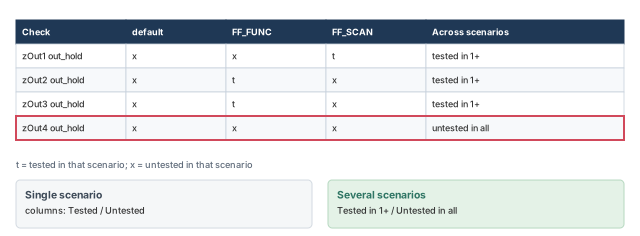
ptc_shell> report_analysis_coverage -check_type out_hold \
-style verbose -status_details tested ;# per-scenario detailConstrained Pin Check Type Scenarios Untested Reasons
--------------------------------------------------------------
zOut1 out_hold default x
FF_FUNC x
FF_SCAN t
zOut2 out_hold default x
FF_FUNC t
FF_SCAN xA t means tested. Thus, zOut1 is tested in scan mode and zOut2 in functional mode.
Run report_analysis_coverage with all signoff scenarios loaded together. A check untested in every scenario is never timed at signoff. Explain each one, for example as a real constant, or fix it by adding the missing constraint.
11 Finding redundant exceptions
11.1 Incorrect, incomplete and unnecessary constraints
The tool helps with three kinds of bad constraints:
- Incorrect constraints are mostly flagged by the built-in rules of
analyze_design. - Incomplete constraints show up through the built-in rules or through
report_analysis_coverage. - Unnecessary constraints are reported by
report_exceptions.
Unnecessary exceptions do not change timing, but they increase memory use and runtime. They are hard to find by eye. The report_exceptions command finds them. You can also enable rules EXC_0006 and EXC_0014 in analyze_design; they are off by default because they need extra runtime.
11.2 Using report_exceptions
The report_exceptions command works on the current scenario. Switch scenarios with current_scenario. With no options, it lists every exception from your SDC or Tcl files, with file and line.
Scenario: SCAN_SCENARIO
# /remote/designs/zDesign/zDesign_scan.sdc, line 88
set_false_path -through [get_pins {jtag_wrap_inst/.../INT_DR_LATCH_reg_44_/q}]
# /remote/designs/zDesign/zDesign_scan.sdc, line 89
set_false_path -through [get_pins {jtag_wrap_inst/.../INT_DR_LATCH_reg_69_/q}]
...
The full list is long, so narrow it. The command accepts -from, -through, -to, -rise_through and -fall_through. A filter reports only exceptions written with the same clause. For example, with these two exceptions:
set_multicycle_path 3 -from [get_clocks CLK1]   ;# clock-level -from
set_multicycle_path 3 -from ff1/CP              ;# pin-level -from
Even if ff1/CP is clocked by CLK1, report_exceptions -from [get_clocks CLK1] reports only the first line. The filter matches the written clause, not the paths.
When you combine these filters with -ignored or -dominant, the set is further reduced. With -ignored, it keeps only exceptions ignored on all paths. With -dominant, it keeps only exceptions used on at least one path.
11.3 Ignored and dominant exceptions
An ignored exception has no effect on the design. The tool gives one of four reasons:
- It is fully covered by another exception.
- No path in the design matches it.
- It has no valid startpoint.
- It has no valid endpoint.
A dominant exception affects the constraints on at least one path. Without it, the design would be constrained differently. Figure 13 shows both kinds.
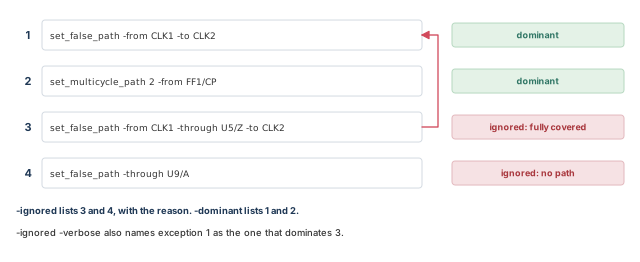
ptc_shell> report_exceptions -ignored   ;# exceptions with no effect, by reason
ptc_shell> report_exceptions -dominant   ;# exceptions that matter on some path
ptc_shell> report_exceptions -ignored -verbose ;# and what dominates each## Redundant exceptions (totally overridden by other exceptions):
# /remote/designs/zDesign/sdc/functional.sdc, line 440
set_false_path -from [get_clocks {Top_clk_1}] -through [get_pins
{zdesign_core_i0/zPin1}] -to [get_clocks {Top_clk_2}]
## Exceptions that do not cover any constrained paths:
# /remote/designs/zDesign/sdc/functional.sdc, line 474
set_false_path -through [get_pins {zDesign_core_i0/i_resetb_pad_din}]
## Exceptions with no valid -from objects:
# /remote/designs/zDesign/sdc/functional.sdc, line 503
set_false_path -hold -from [get_ports {JTAG_CE}] -to [get_pins ...]With -verbose, each redundant exception is followed by the exceptions that dominate it:
# The following exception in test.tcl at line 61 is dominated by other
exceptions:
set_multicycle_path 2 -setup -from [get_clocks {CLK1_1}]
# The following exceptions dominate the above exception :
    # test.tcl, line 62
    set_multicycle_path 3 -setup -from [get_pins {H1/H1/F1/CLK}]
    # test.tcl, line 64
    set_multicycle_path 2 -setup -from [get_pins {H2/H1/F1/CLK}]
This matches the precedence rules. The pin-level -from exceptions beat the clock-level one on every path, so the clock-level exception is never used.
Remove ignored exceptions from your SDC files to save runtime and memory in later sessions.
The tool never edits your constraints. Edit the files yourself, then run the checks again to confirm.
-ignored finds exceptions you can delete. -dominant finds the ones that really shape timing.12 Hierarchical consistency: block versus top
12.1 The problem
Teams reuse blocks and buy third-party IP. Each block comes with the constraints it was synthesized and placed with: clocks, exceptions and boundary conditions. Once the block sits in a larger design, those constraints must still hold. Constraints can also drift apart during iterations, when new ones are added by hand at either level.
The compare_block_to_top command checks this. It loads the block-level and the top-level constraints and compares them on one netlist. It produces block-to-top violations, which you debug just like normal violations. To find problems inside one constraint set, use analyze_design at either level instead.
12.2 Keeping two designs linked
Normally, linking a design removes previously linked designs. This flow needs two designs in memory:
- the block design with block-level constraints;
- the top design with top-level constraints.
Use link_design -add to keep the earlier design. Switch between designs with current_design. When done, remove_linked_design removes a design from memory.
set_app_var search_path [list . ${TOP_DIR}/libs ${TOP_DIR}/design]   ;# paths
set_app_var link_path [list * libs.db]                     ;# link libraries
read_verilog ${TOP_DIR}/design/ChipLevel_no2blocks.v       ;# top netlist
read_verilog ${TOP_DIR}/design/Multiply16x16.v             ;# block netlist
read_verilog ${TOP_DIR}/design/PathSegment.v               ;# another block
link_design ChipLevel                                      ;# link the top
link_design -add Multiply16x16                             ;# keep top; add block
current_design ChipLevel                                   ;# top constraints
source ${TOP_DIR}/dc_outdir/ChipLevel_propagate.sdc -echo   ;# top SDC
current_design Multiply16x16                               ;# block constraints
source ${TOP_DIR}/design/Multiply16x16.sdc -echo           ;# block SDC
current_design ChipLevel                                   ;# back to the top
compare_block_to_top -block_design [get_designs Multiply16x16]   ;# compare
remove_linked_design [get_designs Multiply16x16]           ;# free the block
A shorter form loads one top netlist that already contains the block:
ptc_shell> read_verilog ./chip.v   ;# top netlist, block included
ptc_shell> link_design chip   ;# link the top
ptc_shell> source chip_constraints.tcl   ;# top constraints
ptc_shell> link_design -add usb_core   ;# keep chip; add the block design
ptc_shell> source usb_core_constraints.tcl   ;# block constraints
ptc_shell> set out_dir /user/abc/public_html/compare_chip   ;# output directory
ptc_shell> compare_block_to_top -block_design usb_core   ;# run the comparison
12.3 Running it from the GUI
A typical session goes like this:
- Load the design.
- Run
analyze_designat the top level and at the block level. Make sure both constraint sets are clean on their own. - Run
compare_block_to_top, naming the block and top designs. - Choose Analysis > B2T Mismatch Browser.
- Debug the block-to-top violations. You can waive them like any others.
The B2T mismatch browser also shows any design-level violations. Fix those first, so the comparison results are valid. Results for several blocks are kept in one session, each in its own browser window.
The information pane offers two side-by-side views:
- Dual schematic. The Schematic link draws the block and the top schematics together. For example, for a
B2T_CLK_0006violation, white MUX outputs mark the first place where the mismatch occurs. - Dual SDC viewer. The source file links open the block and top SDC files side by side, with the violating constraint highlighted in each.
Run step 2 first, every time. If the block constraints already break rules on their own, the block-to-top comparison mixes two problems. Clean each side, then compare.
12.4 What is compared
Figure 14 shows a block inside a top design and the five categories that are compared. By default, all five are checked. Use -include to restrict them.
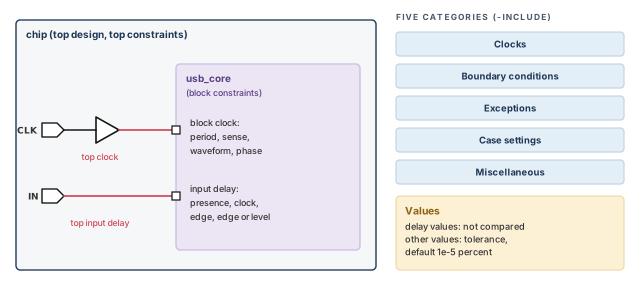
- Clocks. Block clocks are matched with the top clocks that reach the block. The tool compares period, sense, waveform and phase. Tcl-based mapping is an alternative way to match clocks.
- Boundary conditions. Input and output delays of the block are checked against the top. The delay values are not compared. The comparison covers four items: presence of the delay, its clock, the clock's triggering edge, and edge- versus level-sensitivity.
- Exceptions.
set_min_delay,set_max_delay,set_multicycle_path,set_clock_groupsandset_false_path. - Case settings. Case and constant values at the block boundary in the top design, against case settings at the ports of the standalone block. Block case settings not covered at the top are reported as missing block constraints.
- Miscellaneous. Settings for
set_disable_timing, clock gating, clock sense and operating conditions.
12.5 Multiple scenarios and multiple instances
To compare scenarios in pairs, use -top_scenarios and -block_scenarios. The first top scenario is matched with the first block scenario, and so on.
compare_block_to_top -block_design Multiply16x16 \
  -top_scenarios [list FUNC SCAN] \
  -block_scenarios [list BFUNC BTEST]   ;# FUNC-BFUNC and SCAN-BTEST
When a block has several instances, all are compared with the top at once. This assumes every instance was built with the same constraints. If not, run the command once per unique constraint set, and name the instances with -cells:
compare_block_to_top -block_design Multiply16x16 \
  -top_scenarios [list FUNC SCAN] \
  -block_scenarios [list BFUNC BTEST] \
  -cells [get_cells [list TOP/Block1 TOP/Block2]]   ;# these two instances
12.6 Block-to-top rules
The block-to-top rules load automatically when you run compare_block_to_top.
| Family | What it compares |
|---|---|
B2T_EXD_xxxx |
Boundary conditions and external delays |
B2T_CAS_xxxx |
Case analysis |
B2T_EXC_xxxx |
Timing exceptions |
B2T_CLK_xxxx |
Clock properties |
B2T_CLT_xxxx |
Clock source latency and clock network latency |
B2T_UNC_xxxx |
Clock uncertainty |
B2T_DIS_xxxx |
Disabled objects and arcs |
B2T_OPC_xxxx |
Operating conditions |
Individual comparison rules used in this chapter are:
| Rule | What it reports, in plain words |
|---|---|
B2T_CAS_0001 |
A pin in the top instance has a case value that is missing in the block design |
B2T_CLK_0001 |
A clock mismatch whose details list top-level pins, through top_missing_at_pin |
B2T_CLK_0006 |
A clock mismatch that can be drawn as a dual schematic |
B2T_CLK_0012 |
A mismatch between a block object and a top object, used in the waiver example |
S2S_CAS_0003 |
A pin or port has different case values in the two constraint sets |
S2S_DIS_0001 |
An SDC-to-SDC rule whose violations name an object and its type, used in the waiver example |
Some rules compare values. These have a tolerance rule property that allows a small difference before a violation is issued. The tolerance is a percentage of the smaller value. The default is 1e-5 percent, which means an exact match. Change it with set_rule_property.
For text reports, use report_constraint_analysis. Block-to-top results appear in their own section, per top and block scenario pair and per block instance:
Top/Block Scenario    Count Waived Description
--------------------------------------------------------------
Designs: TOP/HALF_ADDER
scn1/default              2   0
  U1/U1/U2                2   0    Block Instance
    error                 2   0
      B2T_CAS_0001        2   0    Pin 'top_pin' in top instance has
                                   case value that is missing in
block designcompare_block_to_top checks that a block still sees the world it was built for. Clean each side first, then compare.13 Correlation consistency: comparing two constraint sets
13.1 Comparing two sets on one netlist
Constraint files change during a project. Edits can create differences between the original and the modified set. Correlation consistency compares two constraint sets on one common netlist. You can also compare two designs, each with its own constraint set.
To compare two sets, define each one as a scenario on the current design. Then compare the scenarios with compare_constraints. Table 16 lists what it compares.
| Area | Commands compared |
|---|---|
| Clock definitions | create_clock, create_generated_clock |
| External delays | set_input_delay, set_output_delay |
| Timing exceptions | set_false_path, set_multicycle_path, set_min_delay, set_max_delay, set_clock_groups |
| Case analysis | set_case_analysis |
| Disable timing | set_disable_timing |
| Uncertainty | set_clock_uncertainty |
| Transitions | set_clock_transition, set_input_transition |
| Latency | set_clock_latency |
| Clock gating | set_clock_gating_check |
| Clock sense | set_sense |
| Loading | set_load |
As with block-to-top rules, value comparisons have a tolerance property. Its default is 1e-5 percent, an exact match. Change it with set_rule_property.
There are three more limits:
- You can compare constraints that affect data path propagation. You cannot compare constraints that affect clock network propagation.
- You cannot compare only a subset of constraint types.
- You can disable comparison violations. Disabled violations do not appear in the GUI or in text reports.
13.2 The comparison method
- Model the original and the modified sets as scenarios with
create_scenario. Constraints can come from SDC files or several Tcl scripts. - Compare the scenarios with
compare_constraints. - Find the differences in the SDC-to-SDC (S2S) browser. Use
report_constraint_analysisfor a text report. - Fix the violations in this order: clocks, then
set_disable_timing, thenset_case_analysis, then exceptions. - Repeat the comparison as needed.
ptc_shell> compare_constraints -constraints1 \
             my_original_constraint_scenarios \
             -constraints2 my_modified_constraint_scenarios   ;# compare
Why this fix order? Clocks decide where everything else applies. Disabled arcs and case values then decide which paths exist. Exceptions sit on top of those paths. Thus, a clock difference can cause many exception differences that vanish once the clock is fixed.
Figure 15 shows both comparison modes.
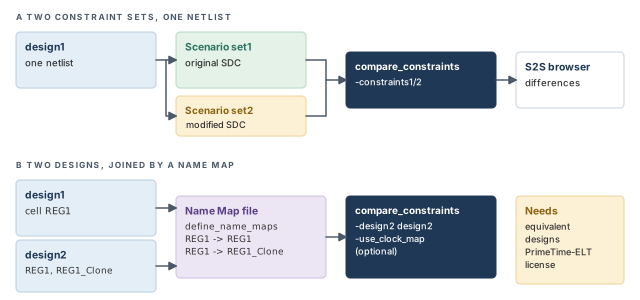
13.3 The S2S browser and reports
The S2S browser works like the normal violation browser. Its links behave the same way. When a schematic fits the violation, the information pane has a Schematic link. It draws the schematics of both constraint sets side by side, annotated for debugging.
The pane can also show the constraints from each SDC file. Use the source file links for scenario 1 and scenario 2 in the Violation Details section. You can show schematics and SDC files at the same time. Then follow the Debugging Help section and the fix suggestion in the pane.
You can waive S2S violations through the GUI or the command line, in the same way as other waivers.
Constraint Comparison Violations
                       Count Waived Description
--------------------------------------------------------------
set1/set2                  1   0
    error                  1   0
      S2S_CAS_0003         1   0   Pin/Port 'pin_port' has different
                                   case values between the constraint
                                   set 'scenario1' and constraint set
                                   'scenario2'.
        1 of 1                 0   Pin/Port 'n/A' has different case
                                   values between the constraint set
                                   'set1' and constraint set 'set2'.
User Messages
MessageID    Count   Description
--------------------------------------------------------------
  ADES-016       1   waiver '%s' removed.
  LNK-040        1   %sunits loaded from library '%s'
Here, S2S_CAS_0003 says that pin n/A has different case values in the two sets. By default, the report includes violations, user messages and rule information.
13.4 Comparing two designs with two constraint sets
You can also compare two designs that are functionally equal. For example, one design is the synthesized netlist and the other is after cloning or restructuring. This mode supports all the equivalence checks of the one-design mode. It needs a PrimeTime-ELT license.
The method is:
- Link both designs and load each constraint set.
- Map objects between the designs in a Name Map file (NMF).
- Run
compare_constraintswith-design2, and optionally-use_clock_map. - Get text reports with
report_constraint_analysis. - Fix any violations.
- Repeat the comparison as needed.
compare_constraints -constraints1 scenario_list \
-constraints2 scenario_list [-design2 design_name] \
[-use_clock_map custom_mapping_file]Linking two designs. Before comparing, verify that the two designs are formally equivalent. They must have different names. To link the second design with its latest subdesigns, use link_design -add -latest. The -design2 option names the second design; the current design is the first one.
The Name Map file. The NMF holds define_name_maps commands that pair object names. It is the only mapping format compare_constraints reads. Convert any other format to NMF first.
| Option | What it gives |
|---|---|
-application |
The application the map is for, such as golden_sdc |
-design_name |
The design the names belong to |
-columns |
The column names, such as {class pattern options names} |
You can map pins, ports, nets and cells, including hierarchical cells. The object type goes in the class column. Here are three typical maps:
# Cloning: REG1 became REG1 and REG1_Clone
define_name_maps -application golden_sdc -design_name design2 \
    -columns {class pattern options names} \
    [list cell REG1 [list] [list REG1]] \
    [list cell REG1 [list] [list REG1_Clone]]
# Hierarchy changes: cells moved into or between blocks
define_name_maps -application golden_sdc -design_name design2 \
    -columns {class pattern options names} \
    [list cell U1 [list] [list Wrapper/U1]] \
    [list cell SUB25/SUB22/FF01 [list] [list SUB25/SUB21/FF01]] \
    [list cell SUB01 [list] [list Wrapper/SUB01]] \
    [list cell SUB40 [list] [list SUB40/SUB41]]
# Multibit banking: FF1 and FF2 merged into FF12; map CP and D pins
define_name_maps -application golden_sdc -design_name design2 \
    -columns {class pattern options names} \
    [list pin FF1/CP [list] [list FF12_CP]] \
    [list pin FF2/CP [list] [list FF12_CP]] \
    [list pin FF1/D [list] [list FF12_D0]] \
    [list pin FF2/D [list] [list FF12_D1]]
Every map uses the same four columns. Each entry is a four-item list: class, old name, options (empty here) and new names. The hierarchy map also moves whole blocks. The SUB01 block moved inside Wrapper, so it becomes Wrapper/SUB01. The SUB40 block moved down one level, so it becomes SUB40/SUB41. Write every name from the top of the design, like the other entries.
A custom clock map. When clock names differ between the two designs, map them with set_clock_map. Then pass the file to compare_constraints -use_clock_map.
| Option | Meaning |
|---|---|
-clocks1 {clock_list} |
Clocks in the first scenario |
-clocks2 {clock_list} |
Clocks in the second scenario |
-scenario1 first_scenario |
Name of the first scenario |
-scenario2 second_scenario |
Name of the second scenario |
-design2 design2 |
Name of the second design |
set_clock_map -clocks1 gclk1_hier -clocks2 gclk1_buf \
    -design2 design2 -scenario1 sdc1_mode1 -scenario2 sdc2_mode1   ;# pair two clocks
A complete script:
set link_library "* tcbn90gwc.db"      ;# libraries
read_verilog ./design1.v               ;# first design
current_design design1                 ;# make design1 current
link                                   ;# link design1
read_verilog ./design2.v               ;# second design
current_design design2                 ;# make design2 current
link_design -add -latest design2       ;# keep design1; link design2
current_design design1                 ;# constraints of design1
source sdc1.tcl                        ;# constraint set 1
current_design design2                 ;# constraints of design2
source sdc2.tcl                        ;# constraint set 2
define_name_maps -application golden_sdc -design_name design2 \
    -columns {class pattern options names} \
    [list port IN [list] [list IN_2]] \
    [list port OUT [list] [list OUT_2]] \
    [list cell BLK1 [list] [list BLK2]]   ;# map renamed objects
current_design design1                 ;# compare from design1
compare_constraints -constraints1 default \
-constraints2 default -design2 design2 ;# run the comparisoncompare_constraints shows what changed between two constraint sets. Fix differences in the order clocks, disables, case values, exceptions.14 Scripting with attributes and collections
14.1 Attributes
An attribute is a value attached to a design object. For example, the number_of_pins attribute of a cell holds its pin count. Tcl scripts can read attributes for custom checks and reports.
| Command | What it does |
|---|---|
list_attributes |
Shows the attributes of each class or one class; -application adds built-in ones |
get_attribute |
Returns one attribute value from a single object |
report_attribute |
Shows all attributes of one or more objects; can show built-in ones |
The get_attribute and report_attribute commands take a collection or a list of collections. However, get_attribute is limited to one collection with one object. Attributes are read-only unless stated otherwise.
ptc_shell> list_attributes -application -class net ;# built-in net attributes| Class | Class | Class |
|---|---|---|
cell |
clock |
clock_group |
clock_group_group |
design |
exception |
exception_group |
input_delay |
lib |
lib_cell |
lib_pin |
lib_timing_arc |
net |
output_delay |
pin |
port |
rule |
rule_violation |
ruleset |
scenario |
timing_arc |
Note the rule, ruleset and rule_violation classes. They let scripts work on the checks themselves.
14.2 Timing arcs and library arcs
The get_timing_arcs command makes a collection of timing arcs. The get_lib_timing_arcs command does the same for library arcs. Both work the same way:
- Loop over the arcs with
foreach_in_collection. - Read values with
get_attribute. - Use
-filterwhile creating the collection to keep only some arcs. - You cannot copy, sort or index these collections, or filter them later with
filter_collection.
The arc attributes from_pin and to_pin give the pin or port where an arc begins and ends. For library arcs, they are from_lib_pin and to_lib_pin.
ptc_shell> set arcs [get_timing_arcs -of_objects U1 -filter \
             "sense == positive_unate"]   ;# positive-unate arcs of U1
ptc_shell> foreach_in_collection arc $arcs { \
             echo [get_attribute $arc is_disabled] \
           }   ;# print true or false for each
true
falseptc_shell> set larcs [get_lib_timing_arcs -from class/FD1/CP] ;# library arcs
ptc_shell> foreach_in_collection larc $larcs \
{ echo [get_attribute $larc sense] } ;# print each sense
hold_clk_rise
setup_clk_rise
rising_edge
rising_edge14.3 Violation data in Tcl
Everything in the browser is also available to scripts. The get_rule_violations command returns violations as a collection.
ptc_shell> get_rule_violations -of_objects [get_rules CLK_*]   ;# clock-rule violations
ptc_shell> get_attribute [index_collection [get_rule_violations \
             -of_objects CLK_0020] 0] message   ;# message of the first one
Generated clock 'Gen_CLK' has edge relationships with its master clock
'MCLK' that cannot be satisfied. Only paths with 'negative' sense exist
from the master clock to source pin 'buf1/Z'. A 'positive' sense is
expected.
The get_violation_info command goes further. It returns a rule parameter value, or a violation details attribute, for one violation. To see which details a rule offers, read the rule's violation_details attribute:
ptc_shell> get_attribute [get_rules B2T_CLK_0001] violation_details   ;# list
top_missing_at_pin
A details value is a collection of real objects, so it has all the attributes of its class:
ptc_shell> set top_clk_pins [get_violation_info \
             -attribute top_missing_at_pin [index_collection \
             [get_rule_violations -of_objects [get_rules B2T_CLK_0001]] 0]]
{"u7/ff1/CP", "u7/ff2/CP"}
ptc_shell> foreach_in_collection pin $top_clk_pins { \
             query_object -verbose $pin }   ;# show each object with its class
{"pin:u7/ff1/CP"}
{"pin:u7/ff2/CP"}
ptc_shell> get_attribute [get_pins u7/ff1/CP] clocks   ;# clocks on that pin
{"clk2"}
So the first B2T_CLK_0001 violation has two top-level pins where clock clk2 reaches a register.
15 User-defined rules
15.1 When to write one
The built-in rules cover a wide range. However, your team may have its own policies. For example, "no output delay on hierarchical pins". You can turn such a policy into a user-defined rule. It runs automatically in analyze_design and is reported with the built-in rules. Figure 16 shows the three parts.
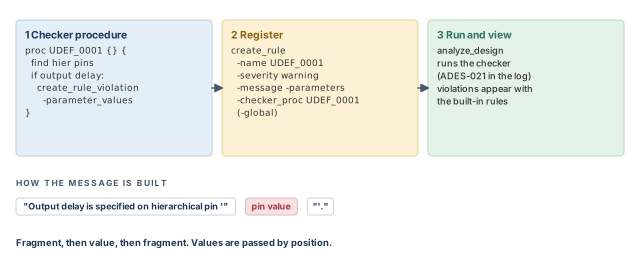
15.2 Step 1 — write the checker procedure
The checker is a Tcl procedure. It contains:
- Tcl code that inspects objects and attributes in the design;
- a
create_rule_violationcall for each unwanted condition found.
To see which attributes exist on a class, use list_attributes. For example, list_attributes -class rule -application lists the attributes of rules.
proc get_details_for_output_delays {output_delays} {     ;# HTML detail text
    set text "<b>Relative Clocks</b><ul>"              ;# start the list
    foreach_in_collection out_del $output_delays {      ;# each output delay
        append text "<li>" [get_attribute $out_del clock_name]   ;# each clock
    }
    append text "</ul>"                               ;# close the list
    return $text                                         ;# HTML text
}
proc UDEF_0001 {} {                                      ;# the checker
    set hier_cells [get_cells * -filter "is_hierarchical==true"]  ;# blocks
    set hier_pins [get_pins -of_objects $hier_cells]              ;# their pins
    foreach_in_collection pin $hier_pins {                     ;# each pin
        set output_delays [get_output_delays -of_objects $pin -quiet]   ;# its delays
        if {[sizeof_collection $output_delays] > 0} {             ;# found one
            set pin_name [get_attribute $pin full_name]     ;# pin name
            create_rule_violation -rule UDEF_0001 -parameter_values $pin_name \
                -details [get_details_for_output_delays $output_delays]
        }
    }
}
The create_rule_violation command reports one violation:
-rulenames the rule.-parameter_valuespasses values into the message. Values are passed by position, in the order declared withcreate_rule.-detailsadds extra text in the Violation Details section. The GUI shows HTML, so you can format it with HTML tags.
Two tips for efficient checkers:
- One procedure can create violations for several rules. They can then share collections.
- Build a large collection, such as
[get_nets -hier *], once, and keep it in a variable.
15.3 Step 2 — register the rule
Register the rule with create_rule:
ptc_shell> create_rule -name UDEF_0001 \
             -severity warning \
             -description {"Team XYZ does not allow output delays to be \
               specified on hierarchical pins"} \
             -message {"Output delay is specified on hierarchical pin '" "'."} \
             -parameters {"pin"} \
-checker_proc UDEF_0001 ;# name of the checker procedure| Option | What it gives |
|---|---|
-name |
A unique name. It must start with UDEF_ to avoid clashing with built-in names |
-severity |
info, warning, error or fatal |
-message |
Fixed text fragments; parameter values are inserted between them, in order |
-parameters |
The parameter names, in the order values are passed |
-description |
A description of the rule |
-checker_proc |
The Tcl procedure that runs the check. It must exist before create_rule runs |
-global |
Makes the rule global instead of scenario-related |
For example, this message has three fragments and two parameters:
ptc_shell> create_rule -name UDEF_0002 -severity warning \
             -message {"The clock " " has " " source(s) on inout ports."} \
             -parameters {"clock" "count"} \
             -description "Clock defined on an inout port" \
             -checker_proc clk_inout_checker   ;# clock and count fill the gaps
The clock name goes after the first fragment, and the count after the second. For clock CLK1 with two sources, the message reads: The clock CLK1 has 2 source(s) on inout ports. This rule is named UDEF_0002, because UDEF_0001 is already taken.
There are two kinds of rules:
- Global rules depend only on the design or library structure, not on constraints. They run once for the whole design. Use the
-globalswitch. - Scenario-related rules depend on the constraints. They run once per scenario.
One checker procedure can define several rules, but all must be the same kind. The first rule declared in the checker sets the kind for all the others.
15.4 Step 3 — run and view
After registration, analyze_design runs your rule automatically. Its violations appear in the violation browser with the built-in ones. The log shows your checkers running:
ptc_shell> analyze_design
Information: Checking scenario 'scen1': Starting rule checks (ADES-002)
Information: Checking scenario 'scen1': Starting user-defined rule checks
(ADES-002)
Information: Running user-defined checker : UDEF_Rule_6. (ADES-021)
Information: Running user-defined checker : check_UDEF_CLK_0026.
(ADES-021)
Information: Checking netlist: Starting scenario-independent rule checks.
(ADES-003)
15.5 Linking to the SDC browser
The details text can link straight to a line in an SDC file. Use an HTML link with the src:filename#line form:
<a href="src:constraints.sdc#12"> File:constraints.sdc, Line 12</a>Clicking it opens the SDC browser at line 12 of constraints.sdc.
15.6 A larger example: virtual clock latency
A fuller example rule, UDEF_Rule_6, flags virtual clocks whose source latency is missing or incomplete. It works like this:
- Find virtual clocks with
filter_collection [all_clocks] -regexp { undefined(sources) }. A virtual clock has no source. - For each one, read eight attributes:
clock_source_latency_withearlyorlate,riseorfall, andminormax. For example,clock_source_latency_early_rise_min. - If any value is empty or zero, the latency is incomplete.
- Call
create_rule_violation -rule UDEF_Rule_6with the clock name, and HTML details.
The HTML details hold a table of the eight values and the file and line where the clock was defined. That location comes from the file_line_info attribute of the clock. The details also suggest a debug command, report_clocks [get_clocks clock] -skew.
ptc_shell> create_rule -name UDEF_Rule_6 -severity warning \
             -message {"Clock latency is not fully defined for virtual clock '" "'."} \
             -parameters {"clock"} \
             -description {"The clock source latency is missing or incompletely
               defined for a virtual clock"} \
-checker_proc UDEF_Rule_6 ;# the checker procedureStart each custom rule as a warning. Run it on two or three real designs and check the false alarms. Raise it to error only when it is quiet on good designs, because a noisy rule teaches people to ignore errors.
create_rule. Name it UDEF_..., pass values by position, and choose global or scenario.16 The GUI at a glance
16.1 Windows
The GUI is the main way to work with constraint consistency. It also helps debug constraints for other tools, such as Design Compiler and IC Compiler. At start-up, the violation browser, information pane and console are docked on the left. Figure 17 shows a typical layout.
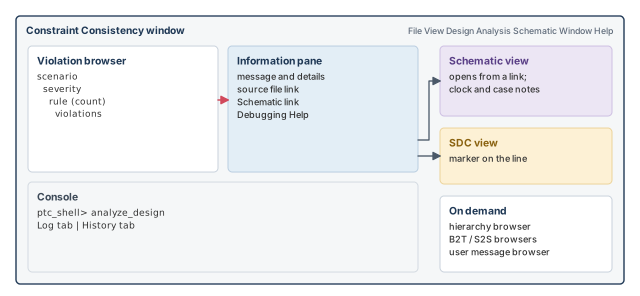
| Window | What it shows |
|---|---|
| Violation Browser | Violations in the current design, by scenario and severity |
| B2T Mismatch Browser | Differences between top-level and block-level constraints, by severity |
| S2S Mismatch Browser | Differences between two constraint sets, by severity |
| User Message Browser | User messages in the current design, by severity |
| Information Pane | Details of the current selection |
| Console | The ptc_shell prompt, the log, command history and messages |
| SDC View | A constraint file, with a marker on the relevant line |
| Hierarchy Browser and Schematic View | The design hierarchy, for selecting cells, nets, ports or pins |
| Path Schematic | A schematic of a hierarchical cell or a path |
| Properties Dialog Box | The properties of an object |
Windows can be minimized, maximized, moved, resized and overlapped. Window > Tile lays them out like tiles; Window > Cascade stacks them. View > Palette/Toolbars shows or hides toolbars and panels; a check mark shows what is visible. You can undock or remove the default windows and open others, such as schematics. The hierarchy browser is "on demand": add it to your preferences, or open one with Window > New Hierarchy Browser.
16.2 Menus and toolbars
| Menu | What it contains |
|---|---|
| File | Running scripts, printing schematics, exiting |
| View | Design views, mouse function, InfoTips, toolbars and other view settings |
| Selection | Selecting schematic objects and reporting the selection |
| Highlight | Coloring selected objects in schematics |
| Design | Analyzing the design, the hierarchy browser and the waiver configuration dialog box |
| Analysis | The violation, B2T, S2S and user message browsers |
| Schematic | Opening and controlling schematic views |
| Window | Arranging windows |
| Help | Online Help |
Toolbar buttons give quick access to common menu commands. Buttons that do not apply to the current selection are dimmed. For example, path buttons become active only after you select a path.
16.3 Browsers, pane and console
- User message browser (Analysis > UserMessage Browser). Lists user messages sorted by severity. Selecting one shows its details, with a link to the SDC line that caused it.
- Block-to-top and S2S browsers. Show the results of
compare_block_to_topandcompare_constraints. - Information pane. Shows the full message, links to related objects, debug suggestions and setup for some path schematics.
- Console. Anything you can do in a batch session, you can do here. The Log tab shows output and errors; the History tab lists commands. To save the history, click History, then Save Contents As.
- Online Help. Opens from the Help menu, from the Help link of any rule, or with the
mancommand. Each rule's reference page has an explanation, an example design and a debug suggestion.
The online Help opens in a web browser. To choose the browser, set the USER_HELP_BROWSER environment variable at the operating system prompt, for example setenv USER_HELP_BROWSER preferred_browser. The browser program must be in your path.
16.4 SDC view, hierarchy browser and schematics
The SDC view opens when you click a constraint link. It loads the file and puts a marker on the line.
The hierarchy browser shows the logic hierarchy. Selecting a level lists its cells. The schematic view can search for cells, nets and pins, zoom and pan, and print. It can show cell names, net names and library cell names. Selecting objects in a schematic fills the selection box on the status bar.
The schematic toolbar has these buttons:
- Create Instance Schematic draws the selected level, or the current design if nothing is selected.
- Create Abstract Path Schematic of Selected Objects draws only the selection and its direct connections.
- Add Fanin/Fanout to Path Schematic is active when a schematic window is open.
- Zoom, pan and select buttons help you move around.
A path schematic shows only part of the design, annotated with data such as constants and clocks. The information pane opens one on request. You can expand or reduce it, add or remove gates, select objects, and show attributes in a separate pane. If drawing will take long, a warning appears first, so you can cancel. A Work In Progress indicator shows that the tool is still busy.
To create a schematic, click the Schematic link of a violation. Or open Design > Hierarchy Browser, select logic, and right-click to choose New Design Schematic View, or use Schematic > New Schematic View.
16.5 Select By Name toolbar
The Select By Name toolbar finds objects by name. Open it with Selection > By Name Toolbar or Ctrl+/. Then:
- Choose the object type with Page Up or Page Down.
- Choose the action: F1 to select or F2 to highlight.
- Type the name, and press Tab to complete it.
- Press Insert to switch between adding to and replacing the selection.
- Press Enter to select or highlight.
| Key | Action |
|---|---|
| Enter | Select or highlight the objects |
| Tab | Complete the name to its longest match |
| Down | Show the completion menu |
| F1 / F2 | Selection mode / highlight mode |
| Page Up / Page Down | Previous / next object type |
| Insert | Switch between Add and Replace |
| Escape | Hide the toolbar |
More details:
- Separate several names with spaces. Put a name containing a space in curly braces.
- A name that matches nothing turns light red.
- If several names match, a list shows the first fifteen. Use the arrow keys and Enter to pick one, or Escape to close it.
- After a search, the text is highlighted so you can type the next one. You can also click Apply.
- Selection replaces the current selection unless the Add option is on.
- If you turn on name sorting, it stays on for later searches.
16.6 Properties and schematic display options
The Properties dialog box shows the properties of nets, pins, ports and cells. Right-click an object in a schematic and choose Properties. Arrow buttons step through several selected objects. The All option shows their combined properties in one pane.
To simplify a schematic, you can collapse buffer chains, buffer trees, hierarchical blocks and unconnected pins of large macros. A collapsed buffer chain becomes one larger "meta-buffer" with thicker lines. It is not a real cell. Use the pop-up menu, or Schematic > Collapse and Schematic > Expand. Choices include Selected Objects, All Hierarchy, All Buffers/Inverters, Buffers/Inverters By Chain and Buffers/Inverters By Tree.
To show attribute groups on pins and ports in the schematic:
- Right-click any element and click Properties.
- Click Settings and select Show attribute group.
- Click the Menu button and choose Manage All.
- Select the pin or port object class and the
SchemAnnotAttrattribute group. - Click Modify, and move attributes between Available and Group attributes.
For example, adding case_value, exceptions_summary and clock_names shows those values on pins and ports.
17 Worked example: debugging the ChipLevel design
17.1 The design and the files
Let us debug a real constraint set. The ChipLevel design does binary arithmetic. It is hierarchical, with these blocks:
Adder16CascadeModComparatorMultiply8x8Multiply16x16MuxModPathSegment
It is a pre-layout design. Its clock network and constraints are still being built. This is the best time to find constraint problems.
The files come with the tool installation. Copy them to a working directory:
% cp -r $SYNOPSYS/doc/gca/tutorial . ;# copy the example filesThe tutorial directory holds a run script and two subdirectories:
run_tutorial.tcl— the commands of steps 2 to 5;design/— the netlistchiplevel.vand the constraintschiplevel.sdc;libs/— the librarylsi_10k.db.
Step 1 — Start the tool
% cd my_directory/tutorial   ;# go to the tutorial directory
% pt_shell -constraints       ;# start the tool
Check: the GUI opens. All commands and output go to ptc_shell_command.log. If the tool does not start, check the installation, the path and the license server. Also check that PrimeTime and PrimeTime SI licenses exist.
Step 2 — Set the paths
ptc_shell> set_app_var search_path [list . ./libs ./design]   ;# where to look
. ./libs ./design
ptc_shell> set_app_var link_path [list * lsi_10k.db]   ;# memory, then the library
* lsi_10k.db
Use set_app_var rather than the plain Tcl set. It checks that the variable is an application variable and that the value is legal. The * in link_path means "designs already in memory".
Step 3 — Read and link
ptc_shell> read_verilog chiplevel.v   ;# load the gate-level netlist
ptc_shell> current_design ChipLevel   ;# the top design
{"ChipLevel"}
ptc_shell> link_design ;# resolve references to lsi_10k cellsLoading db file '.../tutorial/libs/lsi_10k.db'
Information: units loaded from library 'lsi_10k' (LNK-040)
Removing previously linked designs ...
Design 'ChipLevel' was successfully linked.
1Check: "successfully linked", and no unresolved references.
Step 4 — Load the constraints
ptc_shell> source ./design/chiplevel.sdc ;# apply the constraintsInformation: Setting sdc_version outside of an SDC file has no
effect (SDC-1)
Warning: set_max_delay is forcing pin 'clk_8x8/Z' to be a timing
startpoint. (UIC-011)
Warning: Object 'u5/res_reg[0]/Q' is not a valid endpoint. The
set_multicycle_path command will not match this object. (UIC-009)
...Check: read every warning now. UIC-009 already hints at the EXC_0004 violation of Step 8. Since the file holds only SDC commands, read_sdc would also work.
Step 5 — Analyze
ptc_shell> analyze_design ;# check every enabled ruleWarning: Conflicted case values driving and set at pin u7/U168/S.
Using the set logicvalue of '0'. (CASE-003)
Information: Checking scenario 'default': Starting rule
checks (ADES-002)
Information: Checking netlist: Starting scenario-independent rule
checks. (ADES-003)Check: the violation browser fills in. Violations are grouped by scenario and then by severity. Error violations are the most severe. Errors and warnings can point to inconsistencies that affect analysis, runtime and memory. Information violations flag situations that might be mistakes.
To see a short description of each case analysis rule, run report_rule CAS_*. The four CAS rules appear in Table 3 earlier.
Step 6 — Debug the CAS_0003 violation
Double-click the CAS_0003 row, then click its violation. The information pane says a propagated value conflicts with a user case value on pin u7/U168/S. The User Case Value section shows a user value of 0 on that pin. The Source Info section names port op as the source of the other value. Figure 18 shows the circuit.
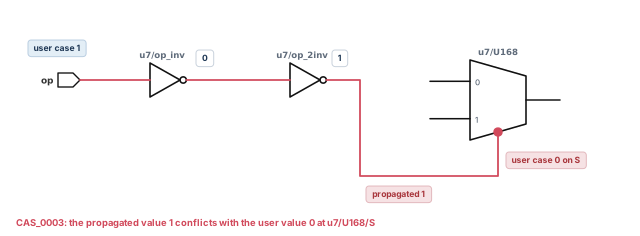
The Source File links open the SDC view at each case constraint. The Schematic link draws the circuit, with the conflicting pin highlighted. The trace is:
- port
ophas a user case value of 1; - inverter
u7/op_invturns it into 0; - inverter
u7/op_2invturns it back into 1; - pin
u7/U168/Shas a user value of 0, so the values conflict.
A schematic view replaces the violation browser; click the ViolationBrowser.1 tab to go back. Then the Execute link under Debugging Help runs report_case_details for this violation:
Properties   Value   Pin/Port
------------------------------------------------------------
user case    0       u7/U168/S (MUX21L)
Case fanin report:
Verbose Source Trace for pin/port u7/U168/S:
Path number: 1
Value  Properties   Pin/Port
------------------------------------------------------------
0      user case    u7/U168/S (MUX21L)
1      F()=A'       u7/op_2inv/Z (B4I)
0                   u7/op_2inv/A (B4I)
0      F()=A'       u7/op_inv/Z (IV)
1                   u7/op_inv/A (IV)
1      user case    op (in)
Fix: this depends on the design and the mode. Sometimes the case value on u7/U168/S should go. Sometimes the one on op should go. Either way, resolve the conflict. Otherwise, timing may be incomplete, or false paths may be timed for this mode.
Step 7 — Debug the CLK_0003 violation
Click the CLK_0003 violation. The message says generated clock clk_adder_div2 does not propagate. Its master source, clk_adder_div2/CP, has no clock reaching it. Click the clock name to see its definition in the SDC view. The schematic shows a path from port aclk to that pin. So why does the clock not arrive?
The Debugging Help suggests that a potential clock may reach the pin. Its "execute and show schematic" link runs analyze_clock_networks. To save the full report to a file, use redirect:
ptc_shell> redirect -file clk_0003_report.txt \
{ analyze_clock_networks -from [get_clocks {aclk}] \
-through [get_pins {clk_adder_div2/CP}] -max_endpoints 1 -style full \
-end_types {register port clock_source } -traverse_disabled -nosplit }Full report for clock: aclk
Level Info Sense Notes Port/Pin
------------------------------------------------------------
0 P source aclk (in)
1 P inv_clk_adder/A (IV)
2 N inv_clk_adder/Z (IV)
3 N DT#0 clk_adder/A (B4I)
4 [P] clk_adder/Z (B4I)
5 [P] REG clk_adder_div2/CP (FD1)
Clock Blocking Constraints:
DT#0 = set_disable_timing
at pin: clk_adder/A
./design/chiplevel.sdc, line 19Figure 19 draws this trace.
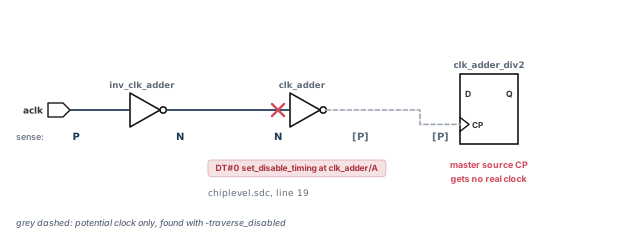
Read it step by step. aclk starts positive (P). After inverter inv_clk_adder, it is negative (N). Inverter clk_adder would make it positive again. However, DT#0 marks a set_disable_timing on clk_adder/A, on line 19 of the SDC file. So the clock after that point is only potential, [P]. The master source of the generated clock gets no real clock.
Fix: there may be a valid reason to disable that part of the clock network. If so, rethink the generated clock definition. Left as it is, the generated clock never propagates.
Step 8 — Debug the EXC_0004 violation
Expand the Warning node and select EXC_0004. This rule flags exceptions with invalid endpoints in -to. The Violation Details show a multicycle path with many through and to points. The Reason for the to points is nonendpoint.
The Debugging Help suggests report_disable_timing -all_arcs for some reason codes: case disabled, check disabled, sequential disabled and node disabled. It has no command for nonendpoint. So open the rule reference with the online Help link. It explains that nonendpoint means the -to pin is an internal pin, not a timing path endpoint. The exception is ignored until it names a valid endpoint.
All the -to pins are named Q. The schematic shows each Q pin highlighted in white. Double-click one to expand the view. The expanded view shows that the Q pin drives an output port. Figure 20 shows the result.
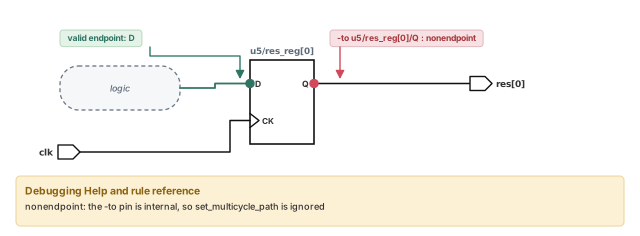
Fix: the Q pin was probably written instead of the D pin. Changing it to D may fix the violation. First confirm that this was the intent of the constraint.
Step 9 — End, restart and focus
To end, type exit. Confirm with OK in the dialog that appears. The tool prints its memory and CPU usage.
To restart the whole analysis later in one command, run the script:
% ptc_shell -f run_tutorial.tcl ;# load, link, constrain and analyzeThe tool loads the libraries, design and constraints, runs the checks, and shows the results in the violation browser. To recheck only one rule after a fix, use -rules:
ptc_shell> analyze_design -rules { CAS_0003 } ;# check only CAS_000318 Common mistakes and how to catch them
| Symptom | Likely cause | Fix |
|---|---|---|
| Many odd violations in one scenario only | Its constraint file was not loaded, or was loaded into the wrong scenario | Run report_constraint_analysis -include statistics; check current_scenario before each source |
Tcl constraint file fails with read_sdc |
The file uses loops or variables | Load Tcl files with source |
| Yesterday's command log is gone | ptc_shell_command.log is overwritten each session |
Rename it, or set sh_command_log_file in a setup file |
| A waiver hides nothing | One condition does not match; conditions combine with AND | Check names with report_rule -parameters; split an OR into two waivers |
| A waiver hides real violations | A wildcard condition was too broad | Narrow the collection; add a -comment with the reason |
| An instance waiver has no effect | The violation involves objects outside the instance, or the rule is user-defined | Use a normal create_waiver with conditions |
A generated clock does not propagate (CLK_0003) |
The clock to its master source is blocked or missing | Trace with analyze_clock_networks -traverse_disabled |
An exception has no effect (EXC_0004) |
-to names an internal pin such as Q |
Point it at a real endpoint, such as the D pin |
| Coverage shows many untested checks | Missing clocks, constants or exceptions | Use -status_details untested, then the matching debug command |
| Block-to-top results are noisy | One side already breaks rules on its own | Run analyze_design on top and block first, then compare |
| Comparing two designs reports everything as missing | Objects were renamed and not mapped | Add define_name_maps entries and a clock map |
19 Interview preparation
It checks constraints against rules on a linked netlist; it never edits constraints, and its results are rule violations, not slack.
- It finds missing, invalid, unnecessary, inefficient or conflicting constraints.
- You fix the files and run the checks again.
Run pt_shell -constraints; it checks out a PrimeTime SI license and needs a PrimeTime license present.
- The PrimeTime license is not checked out, but must exist on the same server.
- The prompt becomes
ptc_shell>.
A rule is one checked condition; a violation is one place in the design that fails it.
- One rule can have many violations.
- A code such as
CLK_0003names the family and the number.
Disabling stops the rule from being checked; waiving suppresses only chosen violations of a rule that still runs.
- Disabled rules vanish from the report.
- Waived violations stay visible with a waiver icon.
set_false_path and set_max_delay. Which applies?The false path, because false path ranks above max/min delay, which ranks above multicycle.
- Precedence is decided per path, not per command.
- The max delay still applies to its other paths.
report_exceptions -ignoredlists exceptions that end up unused.
set_max_delay commands overlap: one -from a clock, one -from a pin. Which wins?The -from pin one, because pin specifications rank above clock specifications.
- The ladder is: from pin, to pin, through, from clock, to clock.
- Walk down the list until one command has an option the other lacks.
CLK_0003 for "CLK1 at U1/A" or "CLK2 at U1/B". How?Write two waivers, because all conditions in one waiver must hold together.
- Each waiver has a clock condition and a pin condition.
report_rule -parameters CLK_0003gives the parameter names.
CLK_0003. How do you find the cause?Trace the master clock with analyze_clock_networks -traverse_disabled to see where and why it stops.
- Potential senses such as
[P]show the network beyond the blocking constraint. - The Clock Blocking Constraints section names the constraint and its file line.
report_analysis_coverage tell you in a multi-scenario run?Which checks are tested in at least one scenario, and which are untested in all scenarios.
- PVT corners do not change whether a check is tested.
-status_details untestedgives a reason per check.
One with no effect on any path; removing it saves memory and runtime in later sessions.
- Reasons: fully covered, no matching path, no valid startpoint, or no valid endpoint.
-dominantlists exceptions that do shape timing.EXC_0006andEXC_0014find them too, but are off by default.
compare_block_to_top compare for boundary conditions?Presence of input and output delays, their clock, the triggering edge, and edge versus level sensitivity, but not the values.
- Clocks are matched on period, sense, waveform and phase.
- Value comparisons in other rules use a tolerance, default 1e-5 percent.
compare_constraints. In which order do you fix the differences?Clocks, then set_disable_timing, then set_case_analysis, then exceptions.
- Clocks decide where everything else applies.
- Disabled arcs and case values decide which paths exist for exceptions.
Link both designs, map renamed objects in a Name Map file with define_name_maps, then run compare_constraints -design2.
- Use
link_design -add -latestfor the second design. - Clock name changes need
set_clock_mapand-use_clock_map. - It needs a PrimeTime-ELT license.
A Tcl checker that calls create_rule_violation, and a create_rule registration that names it.
- The name must start with
UDEF_. - Values fill the message by position.
- All rules in one checker must be global or all scenario-related.
20 Chapter close
Compact glossary
| Term | Meaning |
|---|---|
| Constraint consistency | A PrimeTime mode, started with pt_shell -constraints, that checks constraints against rules |
| Rule | One condition the tool checks, such as CLK_0003 |
| Violation | One place in the design that fails a rule |
| Severity | The level of a rule: Information, Warning or Error |
| Rule family | The letter prefix of a rule code, such as CLK or EXC |
| Rule set | A named group of rules, such as primetime_si |
| Scenario | One named set of constraints, such as a mode |
| Waiver | A condition that suppresses chosen violations of a rule |
| Instance-level waiver | A waiver for all violations inside chosen cells |
| Violation browser | The GUI tree of violations by scenario, severity and rule |
| Information pane | The GUI pane with details and links for the selection |
| Exception precedence | The rules that decide which exception applies on a path |
| Potential clock | A clock beyond a blocking constraint, shown as [P] with -traverse_disabled |
| Analysis coverage | The share of timing checks tested by the constraints |
| Ignored exception | An exception with no effect on any path |
| Dominant exception | An exception that changes the constraints on at least one path |
| Block-to-top (B2T) | Comparison of block constraints with top constraints |
| SDC-to-SDC (S2S) | Comparison of two constraint sets |
| Name Map file (NMF) | A file of define_name_maps commands that pairs renamed objects |
| Tolerance | A rule property allowing a small value difference; default 1e-5 percent |
| User-defined rule | A UDEF_ rule made from a Tcl checker and create_rule |
| Design mismatch | A difference between netlist levels, linked with link_allow_design_mismatch |
Constraint consistency on one page
Figure 21 is the summary to redraw from memory.
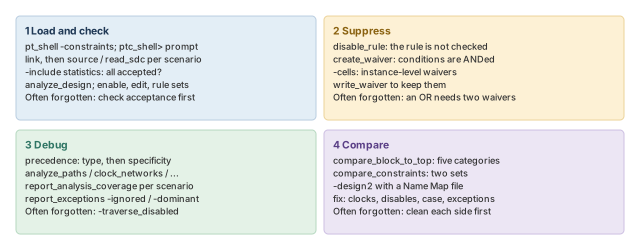
Where the next chapter goes, and why
You can now trust your constraints. You have checked them against rules, traced every violation to its cause, and compared them across blocks and versions. Clean constraints mean the timing reports now describe the real design.
The Reporting and Debugging Analysis Results chapter turns to those reports. It covers how to read timing, constraint and design reports, and how to debug the violations they show. The root-cause habits from this chapter carry straight over to timing results.