Why this chapter matters in a real project
A timing run on a large block produces millions of numbers. Nobody can read them all. The real skill is to ask the right report the right question, in the right order.
A typical day starts with one summary line, such as "setup WNS −0.08 ns, 3 endpoints failing". From there you must find out which paths fail, why they fail, and whether the failure is real. Each of those questions has its own report.
Getting this wrong is expensive. If you read only the single worst path, you may fix it while twenty similar paths stay broken. If you trust a report while checks are untested, you may sign off a design with paths that were never timed. If you chase pessimism as if it were real, you waste days on fixes that were never needed.
This chapter gives you the full reporting toolbox. It also shows how to debug with it, step by step.
Prerequisites
- You should know how to read and link a design, from Working With Design Data.
- You should know clocks, input and output delays and path groups, from Constraining the Design, Clocks and Timing Paths and Exceptions.
- It helps to know on-chip variation and clock reconvergence pessimism removal, from Operating Conditions and Variation.
- Crosstalk is mentioned only briefly. Signal Integrity Analysis covers it in depth, but you do not need it here.
- You do not need to know engineering change order (ECO) fixing. That comes next.
In this chapter, times are in nanoseconds (ns) unless said otherwise.
Learning objectives
- Read a global timing summary and explain WNS, TNS and the number of violating endpoints.
- Control which paths
report_global_timinggathers and how it lays out the tables. - Read a path timing report line by line, and select paths with
-from,-through,-to,-excludeand cover options. - Compute normalized slack and use it to predict the clock period a design can reach.
- Use path tagging to work through large path sets in batches.
- Explain union and every-group TNS, and read QoR and constraint reports.
- Report maximum skew, no-change, minimum pulse width and minimum period checks.
- Find bottleneck cells and check analysis coverage for untested timing checks.
- Report clock latency, transition and skew with
report_clock_timing. - Choose a path-based analysis mode, and configure HyperTrace acceleration safely.
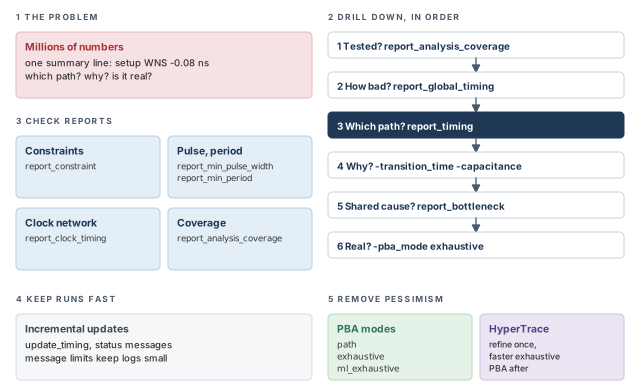
Figure 1 is a map of the whole chapter. Come back to it whenever you lose your place.
1 The beginner's mental model
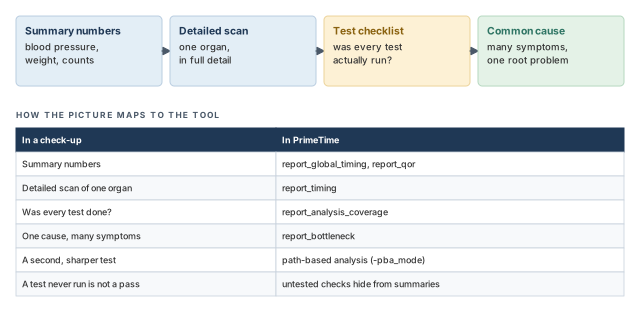
Think of a yearly health check-up. The doctor first looks at a few summary numbers: blood pressure, weight, a blood count. If one is out of range, the doctor orders a detailed scan of one organ.
The doctor also checks a list: were all the tests actually done? A test that was never run is not a pass. Finally, if many symptoms point at one cause, the doctor treats that cause first. Figure 2 maps this picture to PrimeTime reports.
- A doctor's summary numbers come from tests run once. Timing summaries are only as complete as your constraints. A missing clock silently removes paths from every summary.
- A scan shows the organ as it is. A graph-based timing report is deliberately pessimistic. A path can look worse in the report than it really is.
- A doctor treats the patient. Reports never fix anything. They only point at where a fix should go.
Now the engineering model
In engineering terms, the reports fall into five families:
- Summary reports.
report_global_timingandreport_qorgive the overall state, such as worst slack and total negative slack. - Path reports.
report_timingandget_timing_pathsshow single timing paths in full detail. - Check reports.
report_constraint,report_min_pulse_width,report_min_periodandreport_clock_timingreport specific checks and clock behavior. - Debug aids.
report_bottleneck,report_global_slackandreport_analysis_coveragefind common causes and gaps. - Pessimism removal. Path-based analysis recalculates chosen paths more accurately.
A few terms appear everywhere:
- Slack is required time minus arrival time. Negative slack means a violation.
- WNS (worst negative slack) is the most negative slack in a set of paths.
- TNS (total negative slack) is the sum of the negative slacks of the violating endpoints.
- An endpoint is where a timing path ends, such as a flip-flop data pin or an output port.
2 Global timing summary
2.1 What the summary reports
The report_global_timing command reports the global timing closure state of the design. It shows WNS, TNS and the number of violating endpoints across the whole design.
It works with other analysis features:
- path-based analysis (PBA), covered at the end of this chapter;
- distributed multi-scenario analysis (DMSA), where one manager process runs many scenarios on several worker processes;
- simultaneous multivoltage analysis (SMVA), with dynamic voltage and frequency scaling (DVFS) scenarios. The SMVA Graph-Based Simultaneous Multivoltage Analysis chapter covers it.
Because the command is about closure status, it has two traits:
- It looks only at violating paths. Passing paths are not gathered or analyzed.
- It sorts paths into four topological categories, by where they start and end.
Figure 3 shows the four categories on a small design.
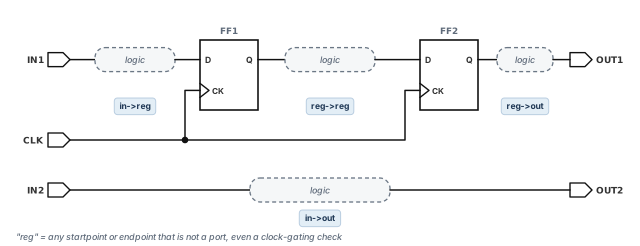
The categories are:
- in->reg — from an input port to a register.
- reg->reg — from a register to a register.
- reg->out — from a register to an output port.
- in->out — from an input port straight to an output port.
2.2 Two stages: gathering and reporting
Internally, the command works in two stages:
- Path gathering. It collects violating paths from the design. This answers "which paths do I want to analyze?"
- Reporting. It analyzes the gathered paths and prints tables. This answers "what data do I want to see about them?"
Separate options control each stage, so it helps to think about one stage at a time.
2.3 Controlling path gathering
By default, the command gathers the single worst path to each endpoint. It ignores the path's category and path group when choosing it. Table 1 lists the options that change this.
| To do this | Use this option |
|---|---|
| Gather only setup (max-delay) or only hold (min-delay) paths | -delay_type min | max |
| At each endpoint, gather the worst path for each path group in a list | -group group_list |
| At each endpoint, gather the worst path for each topological category | -enable_multiple_categories_per_endpoint |
| At each endpoint, gather the worst path for each category, each path group and each launch/capture clock pair | -include {per_clock_violations} |
| Gather the paths with path-based analysis | -pba_mode none | path | exhaustive | ml_exhaustive |
| Gather paths only from chosen DVFS scenarios | -sms_scenarios dvfs_scenarios |
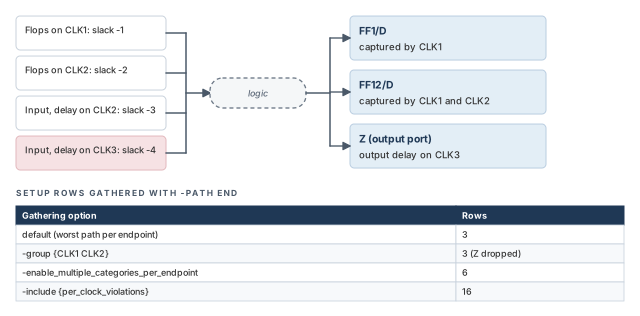
Let us see how the options change what is gathered. Figure 4 shows a small design with three endpoints:
FF1/D, captured byCLK1;FF12/D, captured by bothCLK1andCLK2;- output
Z, which has an output delay relative toCLK3.
Four sources reach every endpoint. Each source gives the same slack at every endpoint, to keep the numbers easy.
pt_shell> report_global_timing -delay_type max -path end ;# setup paths, one row eachSlack Type Group From_clock To_clock Endpoint
------------------------------------------------------
-4.00 in2out CLK3 CLK3 CLK3 Z
-4.00 in2reg CLK1 CLK3 CLK1 FF1/D
-4.00 in2reg CLK2 CLK3 CLK2 FF12/D
------------------------------------------------------Each endpoint appears once. FF12/D sits in two path groups, but only one row is kept.
Now ask for the worst path per group, for groups CLK1 and CLK2:
pt_shell> report_global_timing -delay_type max -path end \
-group {CLK1 CLK2} ;# worst path per group, per endpointSlack Type Group From_clock To_clock Endpoint
------------------------------------------------------
-4.00 in2reg CLK1 CLK3 CLK1 FF1/D
-4.00 in2reg CLK1 CLK3 CLK1 FF12/D
-4.00 in2reg CLK2 CLK3 CLK2 FF12/D
------------------------------------------------------FF12/D now has a row for each of its groups. Output Z is gone, because its group CLK3 was not in the list.
With -enable_multiple_categories_per_endpoint, each endpoint gets its worst path in each category. FF1/D, for example, now shows a reg->reg row at −2 and an in->reg row at −4. With -include {per_clock_violations}, the split goes further. Each endpoint gets a row for every category, path group and launch/capture clock pair. In this small design, that grows three rows into sixteen.
Start with the default. Add gathering options only when a question needs them, because each one can multiply the row count.
2.4 Controlling the report output
By default, the command prints summary tables. Each table shows WNS, TNS and the number of violating endpoints (NUM). It shows them for the total and for each of the four categories, for both setup and hold.
Setup violations
---------------------------------------------------------
Total reg->reg in->reg reg->out in->out
---------------------------------------------------------
WNS -6.08 -6.08 -0.80 -4.09 0.00
TNS -51.61 -41.38 -1.60 -8.63 0.00
NUM 13 7 2 4 0
---------------------------------------------------------
Hold violations
---------------------------------------------------------
Total reg->reg in->reg reg->out in->out
---------------------------------------------------------
WNS -2.90 -0.75 -2.90 -1.01 0.00
TNS -13.43 -4.44 -5.97 -3.02 0.00
NUM 12 6 3 3 0
---------------------------------------------------------Figure 5 shows how one summary column is built from the endpoint rows below it.
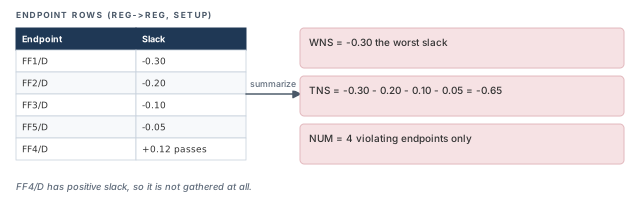
Table 2 lists the options that change the layout.
| To do this | Use this option |
|---|---|
| Choose summary tables or per-endpoint tables | -path_type summary | end (default summary) |
| Make separate tables for the nonstandard path groups | -separate_non_standard_groups |
| Make separate tables for all path groups, standard and nonstandard | -separate_all_groups |
| Make separate tables for launch/capture clock pairs | -include {per_clock_violations inter_clock} |
| Show empty categories, with zero paths, instead of hiding them | -include {non_violated} |
| Show scenario details in a DMSA session | -include {scenario_details} |
| Choose the summary table layout | -format narrow | wide (default narrow) |
| Write the data to a comma-separated value (CSV) file | -format csv -output filename |
| Set the number of significant digits | -significant_digits digits |
The nonstandard path groups are **default**, **async_default** and **clock_gating_default**. All other path groups are standard.
A few options need a closer look:
-path_type endshows the per-endpoint rows behind each summary number. Use it when a summary looks wrong and you want the names.-include {per_clock_violations inter_clock}shows clock-to-clock detail. You need both keywords.per_clock_violationsgathers the paths for each clock pair, andinter_clockreports them in separate tables.-format wideputs WNS, TNS and NUM in adjacent columns instead of rows. It helps with long reports full of small tables. It does not change-path_type endtables.
pt_shell> report_global_timing -delay_type max \
-include {per_clock_violations inter_clock} ;# one table per clock pairSetup violations
---------------------------------------------------------
Total reg->reg in->reg reg->out in->out
---------------------------------------------------------
C2C * -> *
WNS -6.08 -6.08 -5.44 -4.09 -3.96
TNS -269.83 -142.31 -103.30 -16.88 -7.33
NUM 59 27 22 8 2
---------------------------------------------------------
C2C * -> CLK1
WNS -6.08 -6.08 -5.44 0.00 0.00
...
C2C CLK2 -> CLK1
WNS -6.08 -6.08 -4.87 0.00 0.00
...The * rows are intermediate summaries with a wildcard clock. For example, * -> CLK1 covers every launch clock that is captured by CLK1.
A useful habit is to write the summary with -format csv -output after every nightly run. A small script then plots WNS and TNS per category over time. A sudden jump in one category points straight at the change that caused it.
report_global_timing sees only violating paths. Gathering options decide which paths count; output options decide how the tables look.3 Path timing reports
3.1 What a path report shows
A summary tells you that something fails. A path timing report tells you why. By default, report_timing reports the single path with the worst setup slack.
A path report can show:
- each gate level in the logic path;
- the incremental delay of each gate level;
- the running total of the path delay;
- the slack of the path;
- the launch and capture clock names, their latency and uncertainty;
- on-chip variation (OCV) effects, with clock reconvergence pessimism removed.
Figure 6 shows the parts of a typical setup report. We use the small design TOP from the worked example. The path runs from FF1 through U1 and U2 to FF2. Clock CLK has a 2.00 ns period.
A setup report has three blocks:
- Arrival. The launch clock edge, plus clock network delay, plus each cell and net delay.
randfmark a rising or falling transition. - Required. The capture clock edge, plus capture clock latency, plus the pessimism credit, minus uncertainty and the library setup time.
- Slack. Required time minus arrival time. Here 2.16 − 2.24 = −0.08 ns.
Startpoint: FF1 (rising edge-triggered flip-flop clocked by CLK)
Endpoint: FF2 (rising edge-triggered flip-flop clocked by CLK)
Path Group: CLK
Path Type: max
Point Incr Path
---------------------------------------------------------
clock CLK (rise edge) 0.00 0.00
clock network delay (propagated) 0.40 0.40
FF1/CK (DFFX1) 0.00 0.40 r
FF1/Q (DFFX1) 0.35 0.75 r
U1/Y (NAND2X1) 0.52 1.27 f
U2/Y (INVX1) 0.95 2.22 r
FF2/D (DFFX1) 0.02 2.24 r
data arrival time 2.24
clock CLK (rise edge) 2.00 2.00
clock network delay (propagated) 0.35 2.35
clock reconvergence pessimism 0.03 2.38
clock uncertainty -0.10 2.28
library setup time -0.12 2.16
data required time 2.16
---------------------------------------------------------
data required time 2.16
data arrival time -2.24
---------------------------------------------------------
slack (VIOLATED) -0.08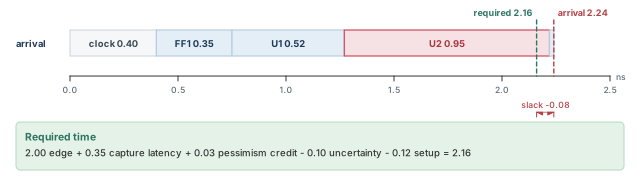
3.2 Selecting paths with report_timing
The report_timing command has options to control:
- the number of paths;
- the types of paths;
- the amount of detail;
- the startpoints, endpoints and points along the path.
The -significant_digits option sets how many digits appear after the decimal point. It changes only the display. The internal precision of the analysis stays the same.
pt_shell> report_timing -input_pins -max_paths 4   ;# four worst paths, input pins shown
pt_shell> report_timing -slack_lesser_than 100 \
-max_paths 40 ;# up to 40 paths, passing ones includedA beginner asks for -max_paths 40 and gets only three paths. The reason is a rule of the command. With -max_paths above 1, only paths with negative slack are reported. To include passing paths, add -slack_lesser_than with a large value.
The -from, -through and -to options
These options pick paths by the points they visit. Figure 7 shows how several -through options combine.
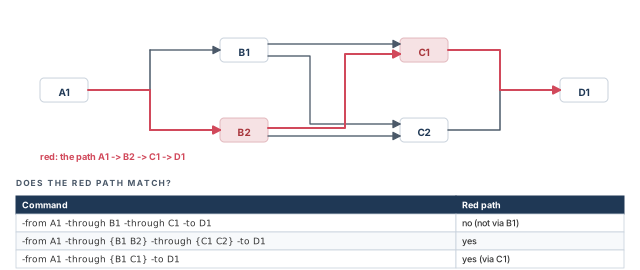
pt_shell> report_timing -from A1 -through B1 -through C1 \
            -to D1   ;# through B1, then C1, in that order
pt_shell> report_timing -from A1 -through {B1 B2} \
            -through {C1 C2} -to D1   ;# B1 or B2, then C1 or C2
pt_shell> report_timing -from A1 -through {B1 C1} -to D1   ;# through B1 or C1
In other words:
- Each separate
-throughis a point the path must pass, in the order given. - A list inside one
-throughmeans "any one of these".
Choosing paths by start and end type
The -start_end_type option keeps only paths with a given kind of startpoint and endpoint:
| Value | Keeps only paths |
|---|---|
reg_to_reg |
From a register to a register |
reg_to_out |
From a register to an output port |
in_to_reg |
From an input port to a register |
in_to_out |
From an input port to an output port |
Here, an input or output port also includes a bidirectional port. The word "reg" means any valid startpoint or endpoint that is not a port. It need not be a real register. For example, a clock-gating check endpoint counts as "reg" in in_to_reg.
These four types are the same as the four categories of report_global_timing. Every timing path falls into exactly one of them.
pt_shell> report_timing -start_end_type in_to_out ;# port-to-port paths onlyShowing transition time and capacitance
Two options add columns that help explain a slow cell:
pt_shell> report_timing -transition_time -capacitance ;# add Trans and Cap columnsPoint Cap Trans Incr Path
------------------------------------------------------
FF1/Q (DFFX1) 2.10 0.11 0.35 0.75 r
U1/Y (NAND2X1) 3.40 0.18 0.52 1.27 f
U2/Y (INVX1) 18.60 0.62 0.95 2.22 r
FF2/D (DFFX1) 0.62 0.02 2.24 rTransition time is how long a signal takes to rise or fall. A large load capacitance gives a slow transition, and a slow transition gives a large delay. Here U2 drives 18.60 units of load, and its transition is 0.62 ns. Thus, the load on U2 is the likely cause.
-transition_time -capacitance to see why it is large.3.3 Normalized slack
Why raw slack can mislead
The highest frequency a path can reach depends on two things: its delay and the number of clock cycles it is allowed. A path with worse slack does not always limit the frequency more.
Normalized slack fixes this. It divides the slack by the time the path is allowed:
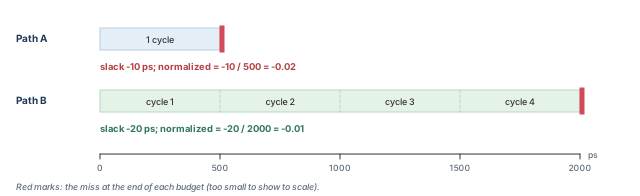
normalized slack = path slack / allowed propagation delay for the pathLet us consider two paths with a 500 ps clock period:
| Path A (single cycle) | Path B (multicycle path) | |
|---|---|---|
| Path slack | −10 ps | −20 ps |
| Allowed clock cycles | 1 | 4 |
| Clock period | 500 ps | 500 ps |
| Allowed propagation delay | 500 ps | 2000 ps |
| Normalized slack | −0.02 | −0.01 |
Path B has the worse raw slack. However, it is allowed four cycles, so its normalized slack is smaller in size: −0.01 against −0.02. Thus, Path A limits the frequency more. Figure 8 shows both paths to scale.
Running normalized slack analysis
Set timing_enable_normalized_slack to true before timing analysis. After that, report_timing reports normalized slack. The tool can also sort paths by it and find the worst ones.
pt_shell> set_app_var timing_enable_normalized_slack true   ;# before the timing update
pt_shell> report_timing -normalized_slack   ;# report the worst normalized slack
Timing path objects from get_timing_paths carry a normalized_slack attribute. It exists only if you enabled the feature before the last full timing update.
Normalized slack analysis can cost a lot of runtime and memory. To limit it, set timing_max_normalization_cycles. It caps the allowed propagation delay at a multiple of the clock period. The default is four clock cycles.
pt_shell> set_app_var timing_max_normalization_cycles 4 ;# cap at four clock periodsUsing normalized slack to adjust the clock period
When the launch and capture clocks are the same, normalized slack tells you how much the period must change:
delta_period = -(normalized_slack) x (period)
delta_period = -(worst_normalized_slack) x (period)
For example, take a clock period of 1000 ps and a worst normalized slack of −0.2. The two minus signs cancel, so delta_period = 0.2 × 1000 ps = 200 ps. The design meets timing at a 1200 ps period.
The formulas work in both directions. If every normalized slack is positive, delta_period comes out negative. That tells you how much you could speed the clock up.
With latches and advanced latch analysis, normalized slack can still give the maximum frequency of a path. There are two exceptions:
- a recovered path found by latch analysis;
- a path that contains a latch marked as a loop breaker or a path breaker during latch loop analysis.
Both ideas belong to advanced latch analysis, which the Advanced Analysis Techniques chapter covers.
3.4 Excluding objects from path reports
The -exclude options
Sometimes a known problem hides everything behind it. The -exclude, -rise_exclude and -fall_exclude options skip paths that touch given objects. Each option takes a list of pins, ports, nets and cells.
The rules are:
- For a pin or port, paths from, to or through it are skipped. This does not apply to clock pins.
- For a cell or net, paths from, to or through any of its pins are skipped.
-excludetakes precedence over-from,-toand-through.-rise_excludeand-fall_excludeskip only paths with a rising or falling transition at the object.- With
-trace_latch_borrow,-excludedoes not apply to the borrowing path. - With
-path_type full_clock_expandedorfull_clock,-excludedoes not apply to the clock path. - Multiple levels of
-excludeare not supported. You cannot exclude one path by giving a series of-excludeoptions.
Let us consider the design in Figure 9. Point C is a register, so it is both an endpoint and a startpoint.
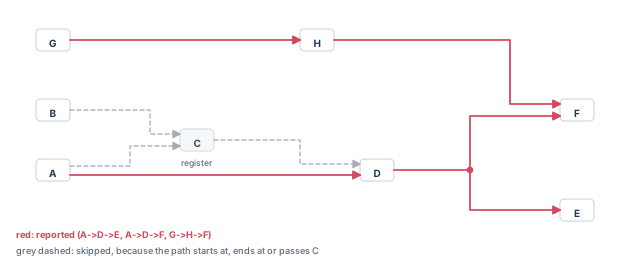
pt_shell> report_timing -nworst 2 -max_paths 3 -exclude C ;# three paths avoid CThe command reports three paths: A→D→E, A→D→F and G→H→F.
Exclude and latch borrowing
The -exclude option applies only to data paths, not to borrowing paths. Time borrowing is when a transparent latch lets data arrive late and passes the debt to the next stage.
Let us consider latches LD1, LD2, LD3 and LD4. LD2 borrows from both LD1 and LD4, and the path from LD1 is the worst. Then LD2 feeds LD3.
pt_shell> report_timing -exclude LD1 -to LD3/D   ;# worst path still borrows from LD1
pt_shell> report_timing -exclude LD1 -to LD3/D \
            -trace_latch_borrow   ;# same, with the borrowing shown
Both commands show the worst path starting at LD2. It still borrows from LD1, because -exclude does not touch borrowing paths.
3.5 Cover design and cover through
The -cover_design option
Asking for "the worst N paths" can miss paths. For example, a low -nworst value can miss paths, and -start_end_pair can miss reconvergent paths. Reconvergent paths split apart and join again later.
The -cover_design option fixes this. With report_timing or get_timing_paths, it returns the worst path through each violating pin in the design.
Cover design works well with path-based analysis:
- Add
-pba_mode pathto recalculate the cover set quickly. You find more real violations early, with short runtime. - For signoff, use exhaustive path-based analysis instead, because it removes the most pessimism.
Cover design reporting works with signal integrity analysis, advanced on-chip variation (AOCV), parametric on-chip variation (POCV) and SMVA flows. In DMSA, it runs at the worker processes. Merged reporting at the manager process is not possible.
The -cover_through option
The -cover_through through_list option reports the single worst violating path through each object in the list.
pt_shell> report_timing -cover_through {n1 n2 n3} ;# up to three pathsThis gives up to three paths. You get fewer when an object has no violating path, or when two objects share the same worst path. By default, only negative-slack paths are collected. With -slack_lesser_than, paths below that value are collected instead.
Figure 10 shows why this differs from a plain -through.
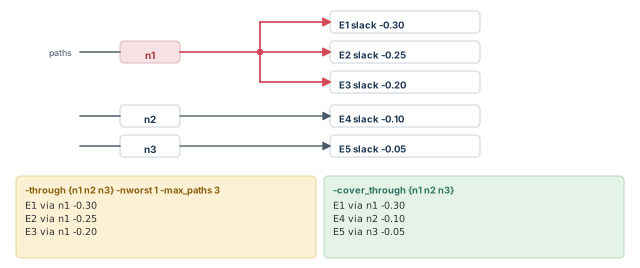
pt_shell> report_timing -cover_through {n1 n2 n3}   ;# worst path through each net
pt_shell> report_timing -through {n1 n2 n3} \
-nworst 1 -max_paths 3 ;# three worst paths through any of them-cover_design and -cover_through spread the report across the design. Use them when "the worst N paths" all crowd into one corner.3.6 Path tagging
Why tag paths
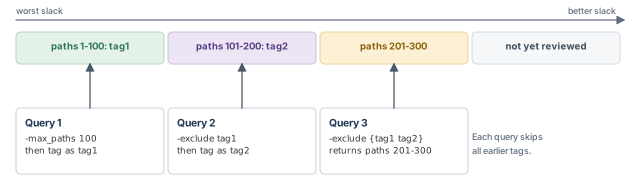
A large design can have tens of thousands of violating paths. Path tagging lets you work through them in batches. You mark a set of paths with a name, called a tag set. Later report_timing and get_timing_paths commands can then skip every tagged path.
Figure 11 shows the idea: each batch excludes the batches before it.
The tagging commands
Path tagging is off by default. Turn it on first:
pt_shell> set_app_var enable_path_tagging true ;# default is falseThen tag, exclude and manage the sets:
pt_shell> set paths1 [get_timing_paths -nworst 100 -max_paths 100]   ;# collect paths
pt_shell> create_path_tag_set $paths1 -name tag1   ;# tag them as tag1
pt_shell> report_timing -exclude tag1   ;# report while skipping tag1
pt_shell> set paths2 [get_timing_paths -nworst 100 -max_paths 100 \
-exclude tag1] ;# the next 100 worst paths| Command | What it does |
|---|---|
create_path_tag_set paths -name tag |
Tags a path collection. If the name is in use, the new set overwrites the old one. |
-exclude {tag1 tag2} |
On report_timing or get_timing_paths, skips paths in the named tag sets |
report_path_tag_set -name tag |
Reports the number of paths in a tag set |
get_path_count_for_tag -name tag |
Returns the number of paths in a tag set as an integer |
remove_path_tag_set -name tag |
Removes a tag set. Without -name, it works on all tag sets. |
pt_shell> report_path_tag_set -name tag1
Tag name                  | Number of paths
-------------------------------------------------
tag1                      | 100
pt_shell> get_path_count_for_tag -name tag1
100
pt_shell> remove_path_tag_set -name tag1
Removing these path tag sets:
        tag1
1
Path-based analysis in batches
Tagging pairs well with path-based analysis. You recalculate one batch, tag it, and never recalculate it again.
set_app_var enable_path_tagging true          ;# turn on tagging
set path_set1 [get_timing_paths -slack_lesser_than 0 -max_paths 1000]   ;# batch 1
report_timing -pba_mode path $path_set1      ;# recalculate batch 1
create_path_tag_set $path_set1 -name done1   ;# mark it done
set path_set2 [get_timing_paths -slack_lesser_than 0 -max_paths 1000 \
    -exclude done1]                           ;# batch 2 skips batch 1
report_timing -pba_mode path $path_set2      ;# recalculate batch 2
create_path_tag_set $path_set2 -name done2   ;# mark it done
Tagging with exhaustive path-based analysis
In exhaustive path-based analysis, the tool first runs graph-based analysis. It discards paths that already meet timing. Those paths need no second look, because graph-based analysis is pessimistic.
You can also cap the number of paths analyzed per endpoint with pba_exhaustive_endpoint_path_limit. When an endpoint hits the cap, the tool warns with UITE-480. Tagging then lets you rerun only those endpoints, without the paths already discarded:
set_app_var enable_path_tagging true   ;# turn on tagging
set path_set1 [get_timing_paths -slack_lesser_than 0 -max_paths 1000 \
    -pba_mode exhaustive -tag_paths_filtered_by_pba done1]   ;# tag discarded paths
report_timing -pba_mode path $path_set1   ;# report batch 1
set exceeded_endpoints [get_attribute [current_design] \
    exhaustive_limit_exceeded_endpoints]   ;# endpoints that hit the cap
set path_set2 [get_timing_paths -slack_lesser_than 0 -max_paths 1000 \
    -to $exceeded_endpoints -pba_mode exhaustive -exclude done1]   ;# rerun them
report_timing -pba_mode path $path_set2   ;# report batch 2
Here -tag_paths_filtered_by_pba tags the paths that graph-based analysis discarded. The exhaustive_limit_exceeded_endpoints attribute of the design lists the endpoints that hit the cap.
On a block with thousands of violations, review the worst 100 paths, tag them, and move on. Each batch gets a fresh look, and no time is spent on paths you already understand.
3.7 Custom timing reports with attributes
The -attributes option adds your own columns to a timing report. You give a list of point attribute names.
pt_shell> report_timing -nosplit -pba_mode exhaustive \
            -significant_digits 3 -input_pins \
-attributes {transition object.max_transition} ;# two extra columnsPoint Incr Path transition object.max_transition
-------------------------------------------------------------------------
U2/A (INVX1) 0.000 1.270 f 0.180 0.500
U2/Y (INVX1) 0.950 2.220 r 0.620 0.500
FF2/D (DFFX1) 0.020 2.240 r 0.620 0.400Rules for this option:
- The attributes must belong to the
timing_pointobjects along the path. - To reach the underlying pin, port or net, use the "dot" notation. For example,
object.max_transitionreadsmax_transitionfrom the pin or port of each point. - An undefined attribute value is left blank.
- Report types that print timing paths are supported, including full-clock and path-based reports.
- Merged DMSA reporting is supported for attributes that exist at the manager.
- Use
-nosplitso long lines are not broken. - Set
timing_report_fixed_width_columns_on_lefttotrueto move the point name to the right of the attribute values. - With
-nets, net rows show no attributes. Only timing point rows are supported.
-attributes turns report_timing into a custom table. Use dot notation to reach the pin or port behind each point.4 Quality of results report
4.1 What report_qor shows
The report_qor command gives an overview of the design's quality of results (QoR). It shows:
- the length of the worst paths, shown as "Critical Path Length". This is the arrival time at the path's endpoint;
- total negative slack (TNS);
- minimum delay and hold results;
- a detailed summary of the design rule constraints.
4.2 Union TNS and every-group TNS
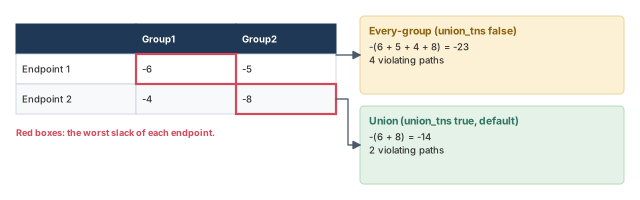
One endpoint can sit in more than one path group. For example, two clocks can reach the same flip-flop. Should its violation count once or twice in TNS? The tool offers two modes:
- Union TNS (the default). Each violating endpoint adds its worst slack once. The worst is taken across all path groups and scenarios.
- Every-group TNS. Each violating endpoint adds its worst slack once per path group. An endpoint that fails in two groups adds twice.
In both modes, a DMSA run uses the worst slack of each endpoint across all scenarios.
The timing_report_union_tns variable chooses the mode. Set it to true for union mode, the default, or false for every-group mode.
Figure 12 works through one example. In a single scenario:
- Every-group TNS = −(6 + 5 + 4 + 8) = −23, with 4 violating paths.
- Union TNS = −(6 + 8) = −14, with 2 violating paths.
With DMSA, add a scenario dimension. Suppose endpoint 1 has −3 and −5 in scenario 1, and −9 and −1 in scenario 2. Endpoint 2 has −4 and −8, then −2 and −6. Groups come in the order Group1, Group2.
- Every-group mode takes the worst per endpoint and group across scenarios: −(9 + 5 + 4 + 8) = −26.
- Union mode takes the worst per endpoint across everything: −(9 + 8) = −17.
Two engineers compare TNS from two runs and disagree by a large amount. One run set timing_report_union_tns to false. Always check this variable before comparing TNS numbers, because the two modes can differ widely.
5 Constraint reports
5.1 What report_constraint covers
The report_constraint command summarizes constraint violations. For each constraint, it shows how much it is violated or met, and which object is the worst violator. It can also report the maximum area and check pin limits.
Timing constraints
The timing constraints it reports include:
- maximum path delay and setup;
- minimum path delay and hold;
- recovery time;
- removal time;
- clock-gating setup and hold;
- minimum pulse width, high or low, at clock pins;
- minimum period at a clock pin;
- maximum skew between two clock pins of a cell.
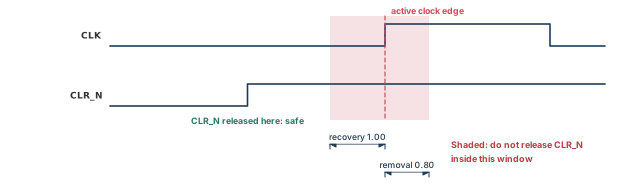
Recovery and removal apply to asynchronous control pins, such as the asynchronous clear of a flip-flop. Figure 13 shows both:
- Recovery time is the minimum time between the control signal going inactive and the next active clock edge. It works like a setup check.
- Removal time starts at a clock edge that occurs while the control is still active. It is the minimum time until the control is released. It works like a hold check.
Design rule constraints
The tool also checks that the netlist meets the design rules. These come from the application-specific integrated circuit (ASIC) vendor, through the logic library. You can also set them yourself, with commands such as set_max_capacitance.
report_constraint checks these rules when they are defined in the library or the design:
- total net capacitance, minimum and maximum;
- pin transition time, minimum and maximum;
- the sum of fanout loads on a net, minimum and maximum.
Usually, only maximum capacitance and maximum transition matter. You can set them separately for rising and falling transitions, and for different clock domains and their data paths.
5.2 Reading the default report
A default report gives brief information about the worst result for each constraint and an overall cost.
pt_shell> report_constraint ;# worst result per constraint, plus cost Weighted
Group (max_delay/setup) Cost Weight Cost
-----------------------------------------------------
C1 1.50 1.00 1.50
C2 0.00 1.00 0.00
-----------------------------------------------------
max_delay/setup 1.50
Constraint Cost
-----------------------------------------------------
max_delay/setup 1.50 (VIOLATED)
min_delay/hold 0.00Each path group gets a cost, a weight and a weighted cost. In this example, group C1 has a cost of 1.50 and its worst slack is −1.50 ns. A cost of 0.00 means the group has no violation.
5.3 Listing violators
pt_shell> report_constraint -all_violators   ;# list every violating object
pt_shell> report_constraint -all_violators -verbose ;# full path for each one max_delay/setup ('C1' group)
Endpoint Slack
-------------------------------------
OUT1 -1.50 (VIOLATED)
OUT2 -1.50 (VIOLATED)With -verbose, each violation is shown as a full path report, much like a report_timing path.
5.4 Checking chosen pins
You can also report the result at chosen pins or ports, met or violated:
pt_shell> report_constraint -max_transition $pins   ;# met and violated pins
pt_shell> report_constraint -max_transition $pins \
-all_violators ;# violated pins only Required Actual
Pin Transition Transition Slack
--------------------------------------------------
U31/Y 3.000 3.095 -0.095 (VIOLATED)
U44/B 3.000 3.053 -0.053 (VIOLATED)
U85/A 3.000 2.923 0.077 (MET)Pin and port reporting works only with these types: -max_capacitance, -max_transition, -max_fanout, -min_capacitance, -min_transition and -min_fanout.
report_constraint gives the cost view first. Add -all_violators for the list and -verbose for full paths.5.5 Maximum skew checks
Some sequential cells have more than one clock input. A skew constraint limits how far apart two clock signals may arrive at such a cell.
How the library describes skew
A library cell describes a skew check in a timing group. Its timing_type attribute is skew_rising or skew_falling. Its related_pin attribute names the reference clock pin.
- With
skew_rising, the check is measured from the rising edge of the reference pin to an edge of the constrained pin. - With
skew_falling, it is measured from the falling edge of the reference pin.
The value comes from one of two attributes:
intrinsic_riseis the maximum skew to a rising edge at the constrained pin.intrinsic_fallis the maximum skew to a falling edge at the constrained pin.
You can give intrinsic_rise or intrinsic_fall, but not both. The top panel of Figure 14 shows rising-edge skew between CK1 (reference) and CK2.
How the tool computes skew
The tool computes the actual skew as the absolute difference between two delayed edges:
- the reference edge, delayed by the minimum clock latency to the reference pin;
- the constrained edge, delayed by the maximum clock latency to the constrained pin.
Clock uncertainty is not used for skew checks. Only maximum skew checks are reported.
pt_shell> report_constraint -max_skew -all_violators   ;# every skew violation
pt_shell> report_constraint -max_skew -verbose   ;# the full calculation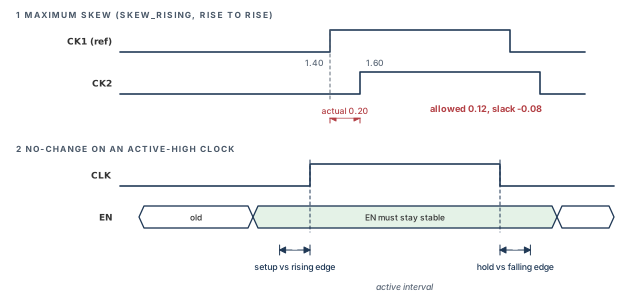
Constrained Pin: ff2/c
Reference Pin: ff2/cn
Check: max_skew
Point Incr Path
-------------------------------------------------------
clock sclk (rise edge) 0.00 0.00
clock network delay (ideal) 1.40 1.40 r
reference pin arrival time 1.40
clock mclk (rise edge) 0.00 0.00
clock network delay (ideal) 1.60 1.60 r
constrained pin arrival time 1.60
-------------------------------------------------------
allowable skew 0.12
actual skew 0.20
-------------------------------------------------------
slack (VIOLATED) -0.08The actual skew is 1.60 − 1.40 = 0.20 ns. The limit is 0.12 ns, so the slack is −0.08 ns. In the -all_violators list, each pin also shows an edge pair, such as (r->f) or (f->f).
Without an option, report_constraint shows all timing and design rule constraints. -max_skew limits it to skew checks.
5.6 No-change checks
Some signals must not change while a clock is active. For example, an enable pin may need to stay still while the clock is high. A no-change check enforces this. The library describes it.
A no-change check is two checks in one, as the bottom panel of Figure 14 shows:
- a setup check against the edge that starts the active interval;
- a hold check against the edge that ends it.
For an active-high clock, setup uses the rising edge and hold uses the falling edge. report_timing and report_constraint show these as "library nochange setup time" and "library nochange hold time".
Startpoint: EN1 (level-sensitive input port clocked by CLK)
Endpoint: UCKLENH (positive nochange timing check clocked by CLK')
...
clock CLK' (rise edge) 2.00 2.00
UCKLENH/G (LD1QC_HH) 0.00 2.00 r
library nochange setup time -0.32 1.68
data required time 1.68
data arrival time -1.25
...
slack (MET) 0.435.7 Minimum pulse width reports
A clock pulse that is too narrow may not trigger a cell correctly. Three commands check minimum pulse width at clock pins and ports:
report_min_pulse_width, optionally with-verbosereport_constraint -min_pulse_width, optionally with-verbosereport_analysis_coverage -check_type min_pulse_width
By default, report_min_pulse_width includes every object with a pulse width constraint. Add -all_violators to see only failures.
pt_shell> set_timing_derate -late 2.0 -cell_check   ;# a late cell-check derate of 2.0
pt_shell> report_min_pulse_width -all_violators \
            -path_type full_clock -derate   ;# show clock paths and derates
The report traces both edges of the pulse through the clock tree. Figure 15 (top) shows how the numbers relate:
- The open edge clock latency is when the pulse starts at the pin.
- The close edge clock latency is when it ends.
- The actual pulse width is close minus open.
- The slack is actual pulse width minus required pulse width.
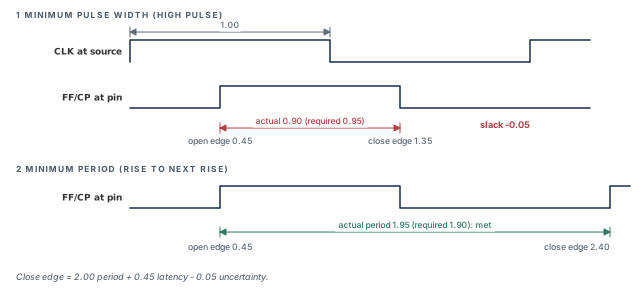
In the figure, the rising edge reaches the pin at 0.45 ns and the falling edge at 1.35 ns. The actual pulse is 0.90 ns, while 0.95 ns is required. Thus, the slack is −0.05 ns.
5.8 Minimum period reports
A minimum period check makes sure the clock period at a pin is not shorter than the cell allows. Three commands report it:
report_min_period, optionally with-verbosereport_constraint -min_period, optionally with-verbosereport_analysis_coverage -check_type min_period
By default, the report shows the required and the actual minimum period.
pt_shell> report_min_period -significant_digits 5 -nosplit   ;# summary
pt_shell> report_min_period -path_type full_clock_expanded ;# debug one violationsequential_clock_min_period
Required Actual
Pin min period min period Slack
-----------------------------------------------------------------
FF_C/CP (clk rise) 0.20000 0.19780 -0.00220 (VIOLATED)
FF_C/CP (clk fall) 0.20000 0.19800 -0.00200 (VIOLATED)With -path_type full_clock_expanded, the report traces two edges one period apart, as the bottom of Figure 15 shows. The actual period is the close edge latency minus the open edge latency. The close edge also includes clock reconvergence pessimism and clock uncertainty.
For the rising-edge violation above, the open edge latency is 0.34169 ns. The close edge latency is 0.53949 ns. The difference, 0.19780 ns, is under the required 0.2 ns.
When a pulse width or period check fails, look at the full clock path first. The clock tree often delays rising and falling edges differently, and that alone can shrink a pulse.
report_constraint. Each also has a full-path view for debugging.6 Bottleneck report
6.1 What a bottleneck is
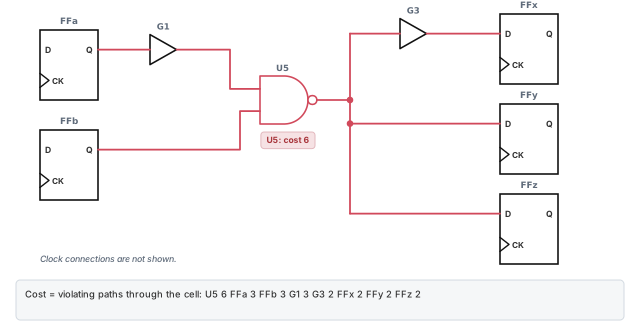
A bottleneck is a common point that contributes to many violations. If thirty failing paths all pass through one slow buffer, fixing that buffer may fix all thirty. Figure 16 shows the idea.
Bottleneck analysis helps you:
- find the worst bottlenecks;
- judge how likely a real improvement is;
- choose a netlist change, such as guiding synthesis or sizing a gate.
The tool links bottlenecks to leaf cells, which are cells with no hierarchy below them. Sometimes fixing many smaller violations is better than fixing a few worst ones. Place-and-route may resolve a few worst violators on its own.
6.2 Getting bottleneck data
There are three ways:
- The graphical user interface (GUI). A timing bottleneck histogram shows the data graphically.
- The shell. The
report_bottleneckcommand lists the leaf cells with the highest bottleneck cost. - A Tcl procedure. It reads, organizes and reports bottleneck attributes. An example procedure ships with the tool installation, in a file named
bottleneck_utils.tcl.
If you use report_bottleneck, set timing_save_pin_arrival_and_slack to true before the first timing update.
pt_shell> set_app_var timing_save_pin_arrival_and_slack true   ;# before first update
pt_shell> report_bottleneck ;# leaf cells on the most violating pathsReport : bottleneck
-max_cells 20
-nworst_paths 100
Bottleneck Cost = Number of violating paths through cell
Bottleneck
Cell Reference Cost
----------------------------------------------------------
ipxr/ir1/i2/i0/u3 DFF1A 39656.00
ipxr/ir1/U14 INV2 39654.00
ipxr/ir1/U16 INV8 39654.00
ipxr/U1712 MUX2I 23999.00This default report lists the 20 worst cells. The cost is the number of paths through the cell with slack below 0.
6.3 Verifying a bottleneck
Always confirm a bottleneck with report_timing or get_timing_paths before changing the netlist. A Tcl procedure can recompute the cost for one cell and compare it with the report. Its logic is simple:
- Get the pins of the cell that are not inputs.
- For each pin, get the violating paths through it with
get_timing_paths -through. - Count the paths and add up their negative slacks.
- Print the count and the sums with
echo.
set through_pins [get_pins -of_object [get_cells $cell] \
    -filter "direction!=in"]            ;# pins that are not inputs
set path_count 0                        ;# path counter
set path_cost 0.0                       ;# slack sum
foreach_in_collection through_pins $through_pins {   ;# each pin
  set paths [get_timing_paths -through $through_pins \
      -slack_lesser_than $slack_limit -nworst $nworst]   ;# violating paths
  foreach_in_collection path $paths {   ;# each path
    incr path_count                     ;# one more path
    set path_cost [expr $path_cost - [get_attribute $path slack]]   ;# add |slack|
  }
}
echo "path_count = $path_count"         ;# print the count
echo "path_cost = $path_cost"           ;# print the sum
The full procedure takes four arguments: the cell, the slack limit, an -nworst value and a print_report flag. When the flag is set, it also runs report_timing through each pin. It prints a third number too, fanout_endpoint_cost. That number adds up the slacks of up to 10000 violating paths through each pin, gathered with -max_paths.
7 Global slack report
The report_global_slack command shows the slack at pins or ports. By default, it reports all pins, except pins of hierarchical cells and ports of the design.
Set timing_save_pin_arrival_and_slack to true before the first timing update. If you do not, report_global_slack sets it for you and pays for another timing update.
Options to choose what is reported:
-maxor-minpicks setup or hold slack. They are mutually exclusive.-riseor-fallpicks the transition. They are also mutually exclusive.- An object list names the pins or ports. Without one, all pins are reported.
Two design attributes list the failing endpoints, in order of increasing slack:
pt_shell> get_attribute [current_design] violating_endpoints_max   ;# setup failures
{"TOP/I_BLENDER/op2_reg[31]/D", ... }
pt_shell> get_attribute [current_design] violating_endpoints_min   ;# hold failures
{"sd_DQ[0]", ... }
These lists are handy in scripts. For example, you can loop over them and report one path per endpoint.
8 Analysis coverage report
8.1 Why coverage matters
Static timing analysis is exhaustive: it checks every path. However, that is true only if the constraints are complete and no paths are disabled. False paths, disabled timing arcs and case analysis can all switch checks off. A check that is never tested is not a pass.
The report_analysis_coverage command reports which timing checks are met, violated or untested. It works on the current design or the current instance. Coverage is most important on new designs and is critical for signoff.
The basic flow is:
- Run
link_designand resolve link errors. - Run
check_timingand resolve the timing check errors it finds. - Run
report_analysis_coverageand resolve untested checks. - Do the rest of the analysis.
Repeat the coverage check after any large change to the design or to the timing constraints.
8.2 What it summarizes
The report covers these kinds of checks:
- setup, hold and no-change;
- minimum period and minimum pulse width;
- recovery and removal;
- clock separation, for master-slave clocking;
- clock-gating setup and clock-gating hold;
- output setup and output hold;
- maximum skew.
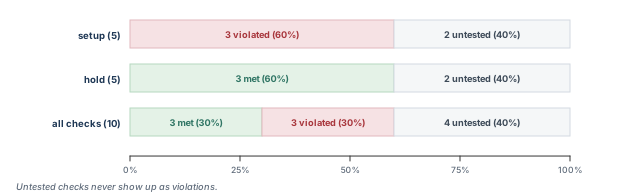
The default report is a summary by check type. For each type, it shows the number and percentage of checks that are met, violated and untested. A type with no checks is not shown.
pt_shell> report_analysis_coverage ;# met, violated, untested per check typeType of Check Total Met Violated Untested
----------------------------------------------------------------
setup 5 0 ( 0%) 3 ( 60%) 2 ( 40%)
hold 5 3 ( 60%) 0 ( 0%) 2 ( 40%)
----------------------------------------------------------------
All Checks 10 3 ( 30%) 3 ( 30%) 4 ( 40%)Figure 17 shows the same numbers as bars.
8.3 Finding why a check is untested
The -status_details option lists the individual checks with their status. For an untested check, it also gives the reason, when the tool can find one. The -exclude_untested option helps you sort through the list of reasons.
pt_shell> report_analysis_coverage -status_details {untested} \
-check_type {setup} ;# list each untested setup checkConstrained Related Check
Pin Pin Type Slack Reason
------------------------------------------------------
ffd/CR CP setup untested no_clock
ffd/D CP setup untested no_clockHere the reason is no_clock: the related pin CP has no clock, so the checks at ffd are never timed.
You can also use coverage with case analysis. Run the report in each configuration. A check that is untested in every configuration needs more analysis.
A beginner sees "0 violations" and declares the block clean. Coverage shows 40 percent of checks untested. Always run report_analysis_coverage before you trust a clean summary, because untested checks never appear as violations.
9 Clock network timing reports
9.1 What report_clock_timing reports
Clock behavior drives every timing check. The report_clock_timing command reports the clock latency, transition time and skew at the clock pins of sequential cells.
You give it three things:
- the report type:
latency,transition,skew,interclock_skeworsummary; - the scope of the design to analyze;
- any filtering or ordering options.
9.2 Latency and transition reporting
The tool keeps latency and transition data for every clock pin of a flip-flop or latch. The latency at a pin depends on three conditions:
- the constraint type: setup or hold;
- the role of the cell in the path: launch or capture;
- the transition: rise or fall.
pt_shell> report_clock_timing -type latency -to U1/CP \
            -hold -capture -rise   ;# hold check, capture, rising edge
pt_shell> report_clock_timing -type latency \
            -to {U1/CP U7/CP} -hold -capture -rise   ;# two pins
If you give neither -rise nor -fall, the tool picks the transition. It uses the cell type and its launch or capture role.
A pin in the -to list may not be a clock pin of a sequential cell. By default, the tool then replaces it with all such clock pins in its transitive fanout. Here, "clock pin" means the clock pin of a flip-flop or the gate pin of a latch. With -probe, the tool instead reports the latency directly at the named pin, with no fanout tracing.
9.3 Skew reporting
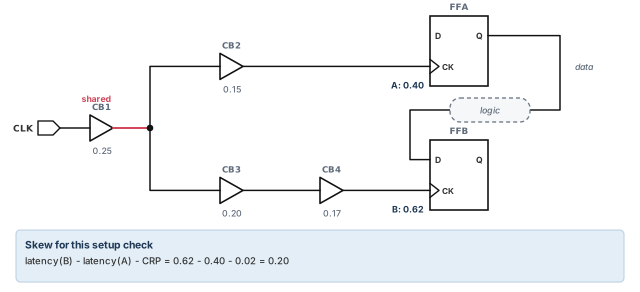
Clock skew between two sequential cells is the difference between their clock latencies. Figure 18 shows the calculation for a launch flop at point A and a capture flop at point B:
skew = (latency at B) - (latency at A) [ - (clock reconvergence pessimism) ]To find the latency at each pin, the tool considers:
- the cell type: rising or falling edge-triggered, or high or low level-sensitive;
- the constraint type: setup or hold, which sets the path type, transition and library data;
- the role of the cell: launch or capture.
If clock reconvergence pessimism removal (CRPR) is enabled, the tool uses it in the skew. The Operating Conditions chapter explains CRPR.
There are two skew report types:
-type skewreports skew between pins clocked by the same clock.-type interclock_skewreports skew between pins clocked by different clocks, as well as the same clock.
pt_shell> report_clock_timing -from latch/G -to ff/CP \
            -type skew -setup   ;# setup skew from latch to flop
Rules for skew reports:
- A pair is reported only if a data path connects them in the given direction. The tool does not check whether that path is false.
- To find the worst skew to or from some pins, give only
-fromor only-to. The tool fills in all pins that talk to them. -clock clock_listlimits the clocks considered.-include_uncertainty_in_skewadds clock uncertainty to the skew.- Like
report_timing, skew uses the opening edge at the "to" cell. This holds even for a latch that borrows time.
9.4 Interclock skew reporting
An interclock skew report can answer questions such as:
- What is the skew between pin A, clocked by
CLK1, and pin B, clocked byCLK2? - What is the worst local skew between all cells on
CLK1and all cells onCLK2? - What are the ten worst skews to all cells that talk to pin A, in any domain?
Use -from_clock from_clock_list, -to_clock to_clock_list or both to limit the scope. It is better to be as specific as possible, because the number of clock pin pairs can be very large. Add -show_clocks to print the two clock names for each entry.
9.5 The report types
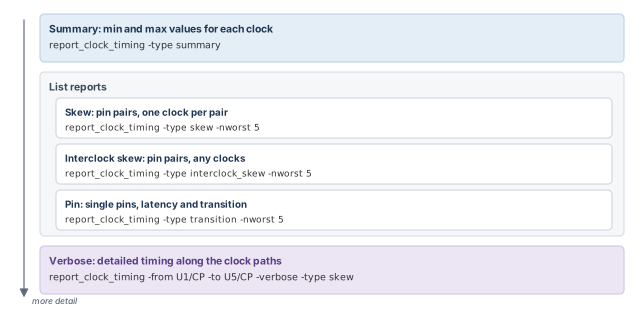
Figure 19 shows the report types, from the most general at the top to the most detailed at the bottom.
Summary report
A summary report lists the minimum and maximum latency, transition and skew found in the requested scope.
pt_shell> report_clock_timing -type summary \
-clock [get_clocks CLK1] ;# min and max values for CLK1 Clock: CLK1
---------------------------------------------------------
Maximum setup launch latency:
f2_2/CP 6.11 rp-+
Minimum setup capture latency:
f1_2/CP 1.00 rpi-+
Maximum active transition:
l3_2/G 0.13 rpi-
Maximum setup skew:
f2_2/CP rp-+
f2_1/CP 4.00 rp-+
---------------------------------------------------------For each value, the report shows the pin, the time and a code for the conditions. Table 6 explains the codes.
| Code | Meaning |
|---|---|
r |
Rising transition at the clock pin |
f |
Falling transition at the clock pin |
p |
Propagated clock network; no p means an ideal network |
i |
Clock inverted from the source; no i means not inverted |
- |
The transition causes a launch event |
+ |
The transition causes a capture event |
For example, rpi-+ means a rising edge, a propagated network and an inverted clock. That edge both launches and captures data.
You can limit the scope with -from and -to:
pt_shell> report_clock_timing -type summary -clock CLK1 \
            -from {A B C} -to {D E}   ;# latency at A..E, skew between groups
This reports CLK1 latency and transition at pins A to E. It reports CLK1 skew only between the groups {A B C} and {D E}.
List reports
A list report gives more detail than a summary. The tool gathers clock pins, filters and sorts them by an attribute, and prints them. There are two kinds:
- Skew reports list pin pairs with the skew of each pair.
- Pin reports list single pins with their latency and transition.
pt_shell> report_clock_timing -clock CLK1 -type skew -setup \
-nworst 3 ;# largest skews first Clock: CLK1
Clock Pin Latency CRP Skew
---------------------------------------------------------
f2_2/CP 6.11 rp-+
f2_1/CP 2.01 -0.10 4.00 rp-+
l2_2/G 4.11 rp-
f1_2/CP 1.00 -0.10 3.01 rpi-+
---------------------------------------------------------Each pair shows the latency at both pins and the clock reconvergence pessimism (CRP) used. For the first pair, 6.11 − 2.01 − 0.10 = 4.00 ns.
pt_shell> report_clock_timing -type interclock_skew \
            -nworst 12 -setup -include_uncertainty_in_skew   ;# 12 worst, any clocks
An interclock skew report starts with the number of startpoint and endpoint pins and clocks considered. Very large numbers there warn of a long runtime.
pt_shell> report_clock_timing -clock CLK1 -type transition \
-nworst 5 ;# five largest transition times Clock: CLK1
--- Latency ---
Clock Pin Source Network Total Trans
----------------------------------------------------------
l3_2/G 0.10 4.00 4.10 0.13 rpi-
f3_1/CP 0.11 3.00 3.11 0.12 rp-+
l2_1/G 0.10 4.00 4.10 0.10 rpi-
----------------------------------------------------------A pin report shows source, network and total latency. Use -type latency instead of -type transition to sort by latency.
Verbose report
The verbose report is the most detailed. It shows how skew, latency and transition build up along the clock paths.
pt_shell> report_clock_timing -from f3_3/CP -to f2_2/CP -verbose \
-hold -type skew -include_uncertainty_in_skew ;# full clock pathsendpoint clock latency 6.11
startpoint clock latency -3.00
clock reconvergence pessimism -0.10
inter-clock uncertainty 0.21
-------------------------------------------------------
skew 3.22Above these lines, the report lists every buffer on both clock paths, with transition, increment and total latency. With -type latency or -type transition, only one clock path is shown instead of two.
9.6 Limitations
- The skew between two clock pins is reported even when the path between them is false.
- Large
-fromand-tolists can take a long time, especially for interclock skew.
9.7 Finding clock network objects
The get_clock_network_objects command returns a collection of clock network objects. It works like get_cells or get_nets, but only for the clock network. The objects include latches, flip-flops and black box IP blocks driven by the clock network.
-typepicks the object type:cell,register,net,pinorclock_gating_output.- A clock list limits the result to some clock domains. Without one, all domains are used.
-include_clock_gating_networkadds the clock-gating networks.
pt_shell> get_clock_network_objects -type pin ;# no clock-gating networksreport_clock_timing goes from a summary per clock to a full trace of one pair. Read the condition codes before you trust a number.10 Clock-gating and recovery/removal checks
Two kinds of checks run by default, and each has a switch:
- Clock-gating checks. The tool finds clock gating by itself and runs clock-gating setup and hold checks. To stop reporting them, set
timing_disable_clock_gating_checkstotrue. - Recovery and removal checks. These run by default too. To stop reporting them, set
timing_disable_recovery_removal_checkstotrue.
It is better to leave both checks on, because turning them off removes real checks from every report.
11 Keeping timing updates fast and visible
11.1 Incremental timing updates
The first timing update is the slow one. After that, the tool reuses as much as it can. For example, suppose you time a design, then change one port load with set_load. The next report_timing reuses the earlier results and recomputes only what changed. Thus, the second update takes much less time.
Key facts:
- Commands that need timing, such as
report_timingandreport_constraint, update it automatically. You do not need a manual update. update_timingupdates timing explicitly.update_timing -fullforces a complete update and skips the fast method. Avoid it unless you need it, because it throws away the speed-up.- The
timing_update_effortvariable trades computing effort against memory. It can below,medium(the default) orhigh.
These commands trigger the fast, partial update:
| Load and resistance | Port fanout and drive |
|---|---|
set_load |
set_port_fanout_number |
remove_capacitance |
remove_port_fanout_number |
set_resistance |
set_input_transition |
remove_resistance |
set_driving_cell, remove_driving_cell, set_drive |
11.2 Status messages during an update
On a large design, a timing update can run for a long time. Status messages show what it is doing, such as propagating constants, calculating delays or calculating slack.
The timing_update_status_level variable sets how many messages appear. It can be none, low, medium or high. The default is none. The messages appear with an explicit update_timing or with an implicit update from report_timing.
pt_shell> set_app_var timing_update_status_level high   ;# most detail
pt_shell> update_timing ;# progress messages appearInformation: Updating design - Started (UITE-214)
Information: Updating design - Propagating Constants (UITE-214)
Information: Updating design - Calculating delays (UITE-214)
Information: Updating design - Calculating delays 10%... (UITE-214)
...
Information: Updating design - Calculating slacks (UITE-214)11.3 Message limits
Some commands can print thousands of similar messages. Those commands are read_parasitics, report_annotated_parasitics -check, read_sdf and timing updates.
For these commands, some messages have a limit per run of the command. Past the limit:
- a note in the log says no more such messages will be printed;
- a summary at the end of the session lists the affected messages and how many were suppressed.
This keeps log files small. Two variables control it:
sh_message_limitsets the default limit.sh_limited_messagessets which messages are limited. It affects only messages from the commands listed above.
On a new design, set timing_update_status_level to low for the first run. When an update takes much longer than usual, the last message shows which phase is slow.
12 Path-based analysis
12.1 Why graph-based analysis is pessimistic
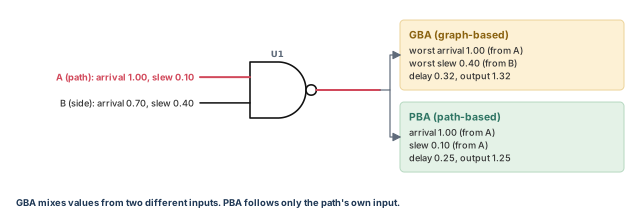
The normal analysis is graph-based analysis (GBA). It is designed to be pessimistic, so that no violation is ever missed. For example, at a gate with two inputs, it takes the worst arrival time and the worst slew from all inputs. It does this even when those come from different inputs.
Slew is the transition time of a signal.
Path-based analysis (PBA) removes this pessimism for chosen paths. It recalculates each path on its own:
- It propagates the edge along the path only.
- It ignores slews from side inputs along the path.
- It recalculates delays, giving a path-specific slack.
Figure 20 shows the effect at one gate.
Path effects are also recomputed for the path alone. These include clock reconvergence pessimism removal and crosstalk delta delays. The new arrival times, slews and slack are stored on the path collection.
PBA is useful when only a few violations remain. It tells you whether they come from pessimism or are real.
12.2 Slack order can change
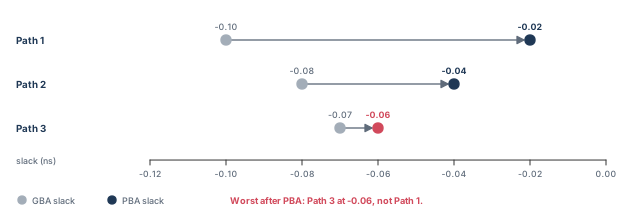
One property surprises many beginners. After recalculation, the slack order of paths can change. The worst path before recalculation may not be the worst one after.
Thus, to find the true worst recalculated slack at an endpoint, you may need to recalculate many paths to it. Recalculating only the single worst path is not enough. Figure 21 shows why.
12.3 Commands and modes
These commands accept the -pba_mode option:
get_timing_pathsreport_constraintreport_global_timingreport_qorreport_timing
There are three PBA modes:
| Mode | What it does | When to use it |
|---|---|---|
path |
Recalculates the paths found by GBA. It does not search for other paths that may be worse after recalculation. Results match a full search or are slightly optimistic. | A quick look at how much PBA helps |
exhaustive |
Recalculates as many paths as needed so the returned paths are the true worst recalculated paths | Signoff |
ml_exhaustive |
An exhaustive search sped up with machine learning. Faster than exhaustive. |
Early design, with many violations or high TNS |
For good runtime with exhaustive search:
- Use
-pba_mode exhaustivewith-slack_lesser_than, if it applies, to keep the search bounded. - Run an exhaustive search only when
-pba_mode pathshows slacks fairly close to the target. - Make reports as specific as possible, for example by path group, startpoint or endpoint.
- Set
timing_report_use_worst_parallel_cell_arctotrueto enable worst parallel-arc reporting.
pt_shell> report_timing -pba_mode exhaustive -slack_lesser_than 0 ;# PBA signoff viewIf this reports no path with negative slack, the design has no timing violations.
12.4 Combining PBA with other options
PBA works with the usual selection options, such as -from, -through, -to, -max_paths and -nworst. Two details matter:
- With
-pba_mode path,-slack_lesser_thanapplies to the original slack used to find the paths. The recalculated slack may be better. - With
-pba_mode exhaustive,-max_pathsand-nworstcount paths at the end of the search. The search looks at more paths along the way.
pt_shell> report_timing -pba_mode exhaustive -nworst 1 \
            -slack_lesser_than 0 -max_paths 1000   ;# one row per endpoint
report_timing -pba_mode exhaustive does not support -start_end_pair or -slack_greater_than.
12.5 Recalculating a path collection
You can also recalculate a collection you already have:
pt_shell> set mypaths [get_timing_paths -max_paths 10]   ;# ten GBA paths
pt_shell> set recalc_paths [get_timing_paths -pba_mode path $mypaths]   ;# recalculate
pt_shell> report_timing $recalc_paths   ;# report the new values
Rules for recalculated collections:
- The new values can be read only by
report_timingandget_attribute. Other commands, such asreport_constraint, do not see them. report_attributecan report the new attribute values inside the collection.- Each
timing_pathobject has anis_recalculatedBoolean attribute. - The report header marks such a path as
Path Type: max (recalculated). - A timing update, such as
update_timing, deletes all path collections made byget_timing_paths.
12.6 Recalculating clock paths and borrowing
By default, PBA recalculates only the data part of a path. The pba_recalculate_full_path variable changes this:
false(the default): clock paths and latch borrowing paths are never recalculated.true: clock paths and borrowing paths are always recalculated.
The -path_type full_clock_expanded option interacts with it in a subtle way:
- On
report_timing, it only shows the clock path. It does not decide whether the clock path is recalculated. With the variabletruebut without this option, the clock path is recalculated but not shown. - On
get_timing_paths, it stores the clock path with each path object. When the variable istrueandget_timing_paths -pba_modegets paths directly, the clock path is recalculated but not stored. - If you recalculate a path object that was obtained without this option, while the variable is
true, the tool issues an error. It needs the clock path for correct results.
With the variable true, borrowing at transparent latches is recalculated only if -trace_latch_borrow is given. Otherwise, the existing borrowing at the original startpoint is used.
12.7 Runtime of the exhaustive search
The timing_report_recalculation_status variable helps with debugging and runtime concerns. It works for both get_timing_paths and report_timing with -pba_mode exhaustive.
The time for the search depends on:
- how much recalculation improves slack;
- how many paths are in scope, set by
-slack_lesser_than,-from,-throughand-to; - how many paths you ask for, set by
-max_pathsand-nworst.
Large -nworst values in particular can slow the search a lot. You can also cap paths per endpoint with pba_exhaustive_endpoint_path_limit.
A beginner runs report_timing -pba_mode path on the worst path, sees it pass, and waives the endpoint. Another path to that endpoint may still fail after recalculation. Use -pba_mode exhaustive before waiving anything, because only it searches for the true worst recalculated path.
12.8 Exhaustive PBA with machine learning
Machine learning PBA (ML-PBA) runs an exhaustive search with machine learning to trade accuracy for runtime. It is faster than regular exhaustive PBA, so it suits early design with many violations or high TNS. As the design gets cleaner, its results converge to regular exhaustive results.
ML-PBA results are always a subset of regular exhaustive results, within the same scope:
- If ML-PBA reports no violations, regular exhaustive PBA reports none either.
- If ML-PBA reports a violation, regular exhaustive PBA reports violations too. It may find worse paths to those endpoints. It may also find more violating endpoints.
pt_shell> report_timing -pba_mode ml_exhaustive ;# faster exhaustive searchpba_exhaustive_endpoint_path_limit must be infinity, its default, for ML-PBA.
Violations cannot be safely waived in an ML-PBA flow. As a reminder, the tool prints this warning:
Warning: ML-PBA was used; additional unreported violating endpoints
might exist, and worse violators might exist for the reported endpoints.
(UITE-647)
At the start of each ML-PBA command, the tool tries to train a model from endpoints in scope. If there are too few endpoints, it quietly falls back to regular exhaustive PBA. To see messages about ML-PBA usage, set timing_report_recalculation_status to high.
12.9 Recalculation limits
There are two limits:
-pba_mode pathrecalculates at most 2000000 paths per command.-pba_mode exhaustivecan have a per-endpoint path limit, set withpba_exhaustive_endpoint_path_limit.
The pba_path_recalculation_limit_compatibility variable decides what happens at a limit:
| Setting | Path mode | Exhaustive mode |
|---|---|---|
true (default) |
Paths beyond the limit are discarded | The limited endpoint leaves the search; paths already found for it stay |
false |
Paths beyond the limit keep their GBA timing | Extra paths for the limited endpoint keep their GBA timing |
In both cases, the path header shows which paths were recalculated.
12.10 Infinity or an integer limit
pba_exhaustive_endpoint_path_limit takes the string infinity or an integer:
infinity(the default). The tool splits each endpoint's fanin cone into subgraphs. It analyzes and changes them in turn to find the worst path. This covers all paths and always returns the worst PBA slack.- An integer. The tool recalculates each path on its own. When it reaches the limit, it stops and issues a UITE-480 warning, "The exhaustive path-based recalculation limit of 25000 is reached ...".
pt_shell> set_app_var pba_exhaustive_endpoint_path_limit 25000 ;# per-endpoint capWhich is faster depends on the design:
infinityis faster when GBA and PBA slacks are far apart, or with complex reconvergent datapath logic.- An integer can be faster when GBA and PBA slacks are already close and few paths are needed.
path mode for a quick estimate, exhaustive for signoff and ml_exhaustive for early, messy designs. Never waive on path or ml_exhaustive results.12.11 HyperTrace accelerated PBA
The idea
Exhaustive PBA gets GBA paths and then recalculates them. HyperTrace speeds this up. It first computes refined graph-based timing data, then uses that data to drive the exhaustive search. Using it requires a PrimeTime-ADV-PLUS license.
The refinement is applied only to the critical region. This is the set of slack-critical, or violating, pins. Refinement merges signals selectively. It improves accuracy while keeping the memory and runtime benefits of a graph.
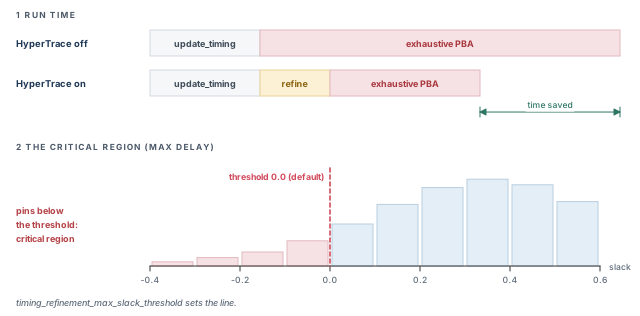
The tool runs the refinement before the first exhaustive PBA command. This has two opposite effects on runtime, as the top of Figure 22 shows:
- Time is spent computing the refinement.
- Time is saved in every later exhaustive PBA command.
To win overall, the PBA saving must be larger than the refinement cost. Two thresholds help you decide:
- Over 20 percent is the entry point. Below that share, the PBA saving is too small to beat the refinement cost. HyperTrace is then not worth trying.
- Over 50 percent is where it is recommended. Then PBA dominates the run and the saving is largest.
It is also not suitable when much of the design is in the critical region. Refinement then costs more than it saves. In short, HyperTrace is recommended when:
- the design is near signoff;
- exhaustive PBA takes more than 50 percent of the flow runtime (above 20 percent it can still help, but less);
- fewer than 10 percent of the pins have timing violations.
The refined timing is used only for exhaustive PBA. Normal GBA reports still use the original timing graph.
The critical region
A pin is in the max-delay critical region when its setup slack is below timing_refinement_max_slack_threshold. The default threshold is 0.0.
The exhaustive search must stay entirely inside the critical region to be accelerated. Thus, set the threshold to the largest -slack_lesser_than value used for exhaustive PBA, explicit or default. If a report asks for more, the tool warns and falls back to normal exhaustive PBA:
pt_shell> report_timing -pba_mode exhaustive -slack_lesser_than 1.0
Warning: Graph-based refinement will not be used for this report as
slack_lesser_than exceeds refinement slack threshold. (UITE-588)
Refinement runtime grows with the size of the critical region, so keep it small. The tool reports the size during the first refinement:
Information: 9.160 percent of pins in the design are being included
in the critical region for graph-based refinement. (UITE-579)
Warning: The number of pins considered critical for graph-based
refinement is large (37.405 percent of pins in the design). Graph-based
refinement may incur significant runtime and memory impact. (UITE-589)
A good limit is usually 10 percent of the design, and UITE-589 warns above that. However, this is only a guideline. A flow dominated by exhaustive PBA runtime may still gain with a larger region.
Configuring HyperTrace
Add these settings before the first exhaustive PBA command:
- Enable it. Set
timing_enable_graph_based_refinementtotrue. - Set the max-delay threshold. Find the
-slack_lesser_thanvalue used for max-delay exhaustive PBA. If it is above zero, settiming_refinement_max_slack_thresholdto it. With no explicit-slack_lesser_thanoptions, the default of zero is fine. - Optionally set the min-delay threshold. It is normally off. Set it if complex hold cones, such as I/O or memory interfaces, make min-delay PBA slow.
- With
parallel_execute, settiming_update_include_graph_based_refinementtoalways. - Optionally limit by region size. Set
timing_refinement_maximum_critical_pin_percentage. The best value depends on the design.
set_app_var timing_enable_graph_based_refinement true      ;# turn HyperTrace on
set_app_var timing_refinement_max_slack_threshold 0.100    ;# match -slack_lesser_than
set_app_var timing_refinement_maximum_critical_pin_percentage 20   ;# size guard
The two threshold variables
| Variable | Delay type | Default |
|---|---|---|
timing_refinement_max_slack_threshold |
Max-delay (setup) | 0.0 |
timing_refinement_min_slack_threshold |
Min-delay (hold) | disabled |
Both take a floating-point value, or disabled to turn refinement off for that delay type. Min-delay refinement is off by default, because min-delay exhaustive PBA is usually fast.
For example, a max threshold of −0.10 puts every pin with setup slack worse than −0.10 in the region. A min threshold of 0.05 puts every pin with hold slack worse than 0.05 in the region.
If the right threshold gives a large region, or a slower run overall, the design needs more timing closure first.
Enabling HyperTrace by region size
timing_refinement_maximum_critical_pin_percentage sets the largest critical region you allow. HyperTrace then turns itself off while the design is badly violating, and on once the design is clean enough. When the region is too large, the tool says so:
Warning: Graph-based refinement is not being performed because the
percentage of pins in critical region exceeds 20.000 percent.
(UITE-630)
The default is 100 percent, which in effect turns this feature off.
Controlling when refinement happens
By default, refinement waits until the first exhaustive PBA command. The timing_update_include_graph_based_refinement variable changes this. Its default is default.
| Value | Full timing update | Exhaustive PBA command | Incremental timing update |
|---|---|---|---|
never |
— | Full refinement | — |
default |
— | Full refinement | Incremental refinement |
always |
Full refinement | — | Incremental refinement |
Two notes apply to the table:
- At an exhaustive PBA command, no update happens if the critical region threshold is not met.
- With
always, an incremental update becomes a full update if no refinement data exists yet.
Use the values like this:
alwayswithparallel_execute. Refinement cannot run inside aparallel_executecommand. So compute it during the timing update first, then run the reports in parallel. Afterwards, set the variable back todefaultto avoid needless refinement later.neverduring manual ECO edits. If a script runs edits such assize_cellandinsert_buffer, with no exhaustive PBA in between, useneverto defer refinement. Withnever, refinement updates are always full. Set it back todefaultafterwards.
set_app_var timing_update_include_graph_based_refinement always   ;# refine at update
update_timing   ;# if timing is current, only the refinement is updated
# run two exhaustive PBA reports in parallel, each to its own log file
parallel_execute {
  {report_timing -pba_mode exhaustive -max_paths 1000} file1.log
  {report_timing -pba_mode exhaustive -nworst 10 -max_paths 100} file2.log
}   ;# run reports in parallel
set_app_var timing_update_include_graph_based_refinement default   ;# restore
Using HyperTrace and reading its messages
Once configured, update timing and run exhaustive PBA as usual. These messages show the refinement running:
Information: Beginning graph-based refinement. (UITE-585)
Information: 8.459 percent of pins in the design are being included
in the critical region for graph-based refinement. (UITE-579)
Information: Graph-based refinement complete. (UITE-586)
They come from update_timing or from the first exhaustive PBA command. Which one depends on timing_update_include_graph_based_refinement.
| Message | Meaning |
|---|---|
| UITE-588 | The report's -slack_lesser_than is above the threshold; refinement is not used for it |
| UITE-590 | The tool lowered the default -slack_lesser_than for this report |
| UITE-587 | Refinement is not supported with some feature in use |
| PTE-137 | The refinement data was invalidated |
| UITE-589 | The critical region is large; expect runtime and memory cost |
| UITE-630 | The region exceeds the allowed percentage; refinement is skipped |
The default -slack_lesser_than adjustment
Without HyperTrace, a missing -slack_lesser_than defaults like this:
- If
-max_pathsis above 1, it defaults to 0.0. - If
-max_pathsis 1, it defaults to infinity.
With HyperTrace, a third rule applies. If the default would exceed the critical region threshold, it is lowered to the threshold. This avoids the UITE-588 fallback. The tool warns when it does this:
Warning: Setting slack_lesser_than to 0 for this timing report.
(UITE-590)- For
-max_pathsequal to 1, this always happens. - For
-max_pathsabove 1, it happens when the threshold is below 0.0.
When the refinement data is thrown away
The refinement data lasts after the command that computes it. Later exhaustive PBA commands reuse it. These events invalidate it:
- a full timing update;
- an unsupported design or netlist change command;
- a change to any of these variables:
timing_enable_graph_based_refinement,timing_refinement_max_slack_threshold,timing_refinement_min_slack_threshold,timing_pocvm_report_sigma,pba_derate_only_mode,timing_report_use_worst_parallel_cell_arc; - removing or resetting the design.
The tool then prints PTE-137, "Invalidating the graph-based refinement analysis". The next qualifying exhaustive PBA command computes a new refinement.
Three ECO commands keep the data and update it incrementally: size_cell, insert_buffer and remove_buffer. After them, incremental timing updates also update the refinement, with the same messages as a full one. Any other design change invalidates the data, and a full refinement runs when needed.
Unsupported flows
HyperTrace refinement does not run when:
- the design is not in on-chip variation mode;
timing_remove_clock_reconvergence_pessimismisfalse;timing_enable_cross_voltage_domain_analysisistrue;timing_disable_internal_inout_cell_pathsisfalse;timing_disable_internal_inout_net_arcsisfalse;- HyperScale analysis with AOCV analysis is enabled;
- HyperScale distributed analysis is enabled.
HyperScale is a hierarchical analysis method that works with block models. In these cases, the tool issues UITE-587. All later reports still run, but without the speed-up.
12.12 Receiver models in path-based analysis
A receiver model describes the input capacitance of a load cell's input pin. With composite current source (CCS) models, PBA uses the actual receiver models of the cells on the path. For side loads, which are cells off the path, it uses the worst-case receiver models.
During PBA, receiver models come from the effective capacitance (Ceff) at the output of the load cell. To keep this capacitance for PBA, set rc_cache_min_max_rise_fall_ceff to true. The default is false.
The variable is set to true automatically in two cases:
- crosstalk analysis is enabled;
- the GUI was started before
update_timing.
-slack_lesser_than and watch the region size.13 Worked example: debug a failing block from summary to root cause
Let us debug the small block TOP from Figure 23. Clock CLK has a 2.00 ns period. Flops FF1 to FF4 are DFFX1 cells. U1 is a NAND2X1, and U2 is an INVX1 that drives the data inputs of FF2, FF3 and FF4.
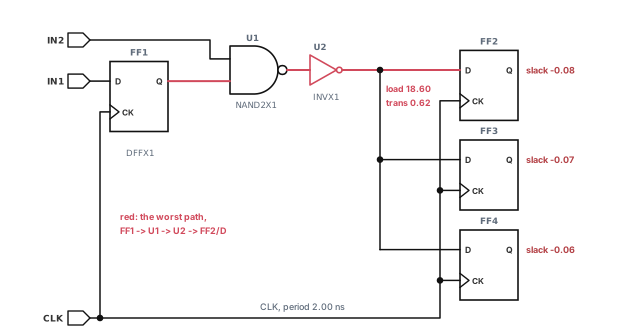
Step 1 — Set up reporting before the first update
pt_shell> set_app_var timing_save_pin_arrival_and_slack true   ;# for bottleneck data
pt_shell> set_app_var timing_enable_normalized_slack true   ;# normalized slack
pt_shell> set_app_var timing_update_status_level low   ;# a few progress messages
pt_shell> update_timing   ;# first, full timing update
Check: the UITE-214 messages appear, and the update finishes.
Step 2 — Make sure every check is tested
pt_shell> report_analysis_coverage ;# met, violated, untestedType of Check Total Met Violated Untested
----------------------------------------------------------------
setup 4 1 ( 25%) 3 ( 75%) 0 ( 0%)
hold 4 4 (100%) 0 ( 0%) 0 ( 0%)
----------------------------------------------------------------
All Checks 8 5 ( 62%) 3 ( 38%) 0 ( 0%)Check: no untested checks. If there were some, you would fix the constraints first.
Step 3 — Read the global summary
pt_shell> report_global_timing -delay_type max   ;# setup summary
pt_shell> report_global_timing -delay_type max -path_type end ;# endpoint rowsSetup violations
---------------------------------------------------------
Total reg->reg in->reg reg->out in->out
---------------------------------------------------------
WNS -0.08 -0.08 0.00 0.00 0.00
TNS -0.21 -0.21 0.00 0.00 0.00
NUM 3 3 0 0 0
---------------------------------------------------------
Slack Type Group From_clock To_clock Endpoint
------------------------------------------------------
-0.08 reg2reg CLK CLK CLK FF2/D
-0.07 reg2reg CLK CLK CLK FF3/D
-0.06 reg2reg CLK CLK CLK FF4/D
------------------------------------------------------Check: TNS is the sum of the three slacks: −0.08 − 0.07 − 0.06 = −0.21 ns.
Step 4 — Read the worst path with loads and transitions
pt_shell> report_timing -to FF2/D -transition_time -capacitance ;# why is it slow?The full report is the one shown just before Figure 6, plus the extra columns shown earlier. U2/Y adds 0.95 ns, drives 18.60 units of load and has a 0.62 ns transition.
Check: one increment dominates the path. That cell is the first suspect.
Step 5 — Confirm the design rule problem
pt_shell> report_constraint -max_transition [get_pins U2/Y] \
-all_violators ;# is the transition too slow? Required Actual
Pin Transition Transition Slack
--------------------------------------------------
U2/Y 0.500 0.620 -0.120 (VIOLATED)Check: U2/Y breaks its transition limit. This explains the slow delay.
Step 6 — Find the common cause
pt_shell> report_bottleneck ;# cells on the most violating pathsCell Reference Cost
-----------------------------------
U2 INVX1 3.00
U1 NAND2X1 3.00
FF1 DFFX1 3.00Check: U2, U1 and FF1 sit on all three violating paths. However, only U2 has a design rule violation and a large increment. Thus, U2 is the cell to fix.
Step 7 — Check how much is pessimism
pt_shell> report_timing -pba_mode exhaustive -nworst 1 \
            -slack_lesser_than 0.1 -max_paths 1000   ;# worst per endpoint, near passes too
The 0.1 ns limit keeps endpoints that pass narrowly after recalculation, so we can see them too.
Endpoint GBA slack PBA slack
-----------------------------------
FF2/D -0.08 -0.03
FF3/D -0.07 0.01 (no longer violating)
FF4/D -0.06 0.02 (no longer violating)This table is a summary of the recalculated reports, written by hand. Each path header shows Path Type: max (recalculated).
Check: FF2/D still fails after recalculation, so the violation is real. It is not just pessimism.
Step 8 — Decide on the fix
The evidence points at U2. It drives a large load, breaks its transition limit and lies on every failing path. A larger inverter, or a buffer on the long net, should fix all three endpoints.
Before making the change, tag the paths you have reviewed:
pt_shell> set_app_var enable_path_tagging true   ;# turn on tagging
pt_shell> create_path_tag_set [get_timing_paths -through U2/Y \
            -max_paths 3] -name u2_paths   ;# the three U2 paths
pt_shell> report_timing -exclude u2_paths   ;# anything else failing?
Check: with the U2 paths excluded, the worst remaining path has positive slack. The fix itself is an ECO, covered next.
14 Common mistakes and how to catch them
| Symptom | Likely cause | Fix |
|---|---|---|
-max_paths 40 returns only a few paths |
With more than one path, only negative-slack paths are reported | Add -slack_lesser_than with a large value |
| Summary is clean, but some checks were never timed | Checks were untested because of a missing clock or disabled paths | Run report_analysis_coverage and resolve untested checks |
| TNS differs between two runs of the same design | timing_report_union_tns differs |
Set the same TNS mode before comparing |
| Fixing the worst path leaves many violations | The real cause is a shared bottleneck cell | Run report_bottleneck and fix the shared cell |
An endpoint waived after -pba_mode path fails later |
Path mode does not search for worse recalculated paths | Use -pba_mode exhaustive before waiving |
| A violation waived after ML-PBA turns out worse in signoff | ML-PBA results are a subset of exhaustive results | Never waive on ML-PBA; rerun with exhaustive |
report_global_slack triggers a second long update |
timing_save_pin_arrival_and_slack was not set first |
Set it before the first timing update |
normalized_slack attribute is missing |
Normalized slack was enabled after the last full update | Enable it before timing analysis |
| A skew is reported between clocks with a false path | Skew reporting does not check false paths | Judge the skew in light of your exceptions |
| HyperTrace gives no speed-up and prints UITE-588 | -slack_lesser_than exceeds the refinement threshold |
Set the threshold to the largest value you use |
15 Interview preparation
WNS is the worst slack, TNS is the sum of negative slacks, and NUM is the number of violating endpoints.
report_global_timingreports them per category, for setup and hold.- It gathers only violating paths.
in->reg, reg->reg, reg->out and in->out.
- "Reg" means any start or end that is not a port, such as a clock-gating check endpoint.
-start_end_typeinreport_timinguses the same four types.
report_timing -max_paths 40 sometimes show fewer than 40 paths?With more than one path requested, only negative-slack paths are reported.
- Add
-slack_lesser_thanwith a large value to include passing paths.
A check the tool never evaluated, for example because no clock reaches the pin.
- It is neither met nor violated, so it hides from slack summaries.
report_analysis_coverage -status_details {untested}lists them with a reason.
-cover_through {n1 n2 n3} differ from -through {n1 n2 n3} -nworst 1 -max_paths 3?Cover through gives the worst path through each net; plain through gives the three worst paths through any of them.
- If the three worst paths all use n1, plain through shows nothing for n2 or n3.
Union counts each failing endpoint once at its worst slack; every-group counts it once per path group.
timing_report_union_tnschooses;true, union mode, is the default.- With slacks −6/−5 and −4/−8, union gives −14 and every-group gives −23.
The single-cycle path, with normalized slack −0.02 against −0.01.
- Normalized slack is slack divided by the allowed propagation delay.
- Enable it with
timing_enable_normalized_slackbefore the timing update.
Capture latency minus launch latency, less clock reconvergence pessimism when CRPR is on.
-include_uncertainty_in_skewadds uncertainty.- Pairs are reported only if a data path connects them, false or not.
report_clock_timing.It lets you work through paths in batches, excluding paths already reviewed.
- Enable
enable_path_tagging, then usecreate_path_tag_setand-exclude. - It avoids recalculating the same paths in successive PBA runs.
Recalculation can change the slack order, so another path may become the true worst.
-pba_mode exhaustivesearches as many paths as needed.-pba_mode pathcan be slightly optimistic.
No; ML-PBA results are a subset of exhaustive results, so worse paths or more endpoints may exist.
- No ML-PBA violations means no exhaustive violations.
- The tool warns with UITE-647.
Near signoff, when exhaustive PBA dominates runtime and few pins violate; set the threshold to the largest -slack_lesser_than you use.
- Otherwise reports fall back with UITE-588.
- A large critical region, flagged by UITE-589, can cost more than it saves.
pba_recalculate_full_path control?Whether clock paths and latch borrowing paths are recalculated in PBA; the default false recalculates only data paths.
-path_type full_clock_expandedonly controls display or storage of the clock path.- Borrowing is recalculated only with
-trace_latch_borrow.
timing_save_pin_arrival_and_slack early?Bottleneck and global slack reports need it before the first update; turning it on later costs another timing update.
report_global_slacksets it by itself if needed, at that cost.
16 Chapter close
Compact glossary
| Term | Meaning |
|---|---|
| Slack | Required time minus arrival time; negative means a violation |
| WNS | Worst negative slack in a set of paths |
| TNS | Sum of the negative slacks of the violating endpoints |
| NUM | Number of violating endpoints in a summary table |
| Path category | in->reg, reg->reg, reg->out or in->out |
| Nonstandard path group | **default**, **async_default** or **clock_gating_default** |
| Normalized slack | Path slack divided by the allowed propagation delay |
| Cover design | Worst path through each violating pin |
| Path tag set | A named set of paths that later reports can exclude |
| Union TNS | Each failing endpoint counted once at its worst slack |
| Recovery / removal | Setup-like and hold-like checks on asynchronous controls |
| Maximum skew check | A limit on the gap between two clocks at one cell |
| No-change check | A signal must stay still while a clock is active |
| Bottleneck | A cell shared by many violating paths |
| Analysis coverage | Counts of met, violated and untested checks |
| Untested check | A check that was never evaluated |
| Clock skew | Capture clock latency minus launch clock latency |
| Condition code | Letters such as rpi-+ describing a clock value |
| GBA | Graph-based analysis: fast and pessimistic |
| PBA | Path-based analysis: recalculates paths one at a time |
| ML-PBA | Exhaustive PBA sped up with machine learning |
| HyperTrace | Refined graph data that speeds up exhaustive PBA |
| Critical region | The set of pins below the refinement slack threshold |
| Incremental update | A timing update that recomputes only what changed |
Reporting and debugging on one page
Figure 24 is the summary to redraw from memory.
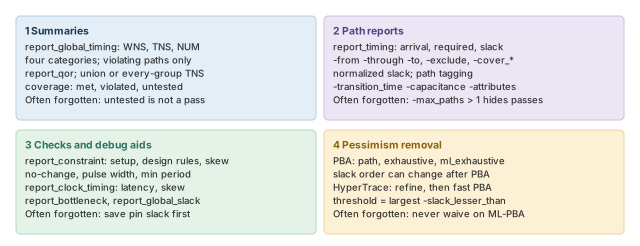
Where the next chapter goes, and why
You can now find every violation, trace it to a cause and prove it is real. In the worked example, the evidence pointed at one small inverter, U2. However, a report only tells you where a fix should go. It does not make the fix.
The ECO Flow chapter makes the fix. It covers sizing cells, inserting buffers and fixing violations automatically, then checking the result. Thus, the reports you learned here become the before-and-after evidence for every engineering change.