Why this chapter matters in a real project
Every timing check in static timing analysis is measured against a clock edge. A setup check asks whether data arrives before the next capture edge. A hold check asks whether data stays stable after the current edge. If the clock is wrong, every one of those checks is wrong.
Clock mistakes are rarely loud. A missing generated clock leaves a whole block untimed, and the report still looks clean. A missing clock group makes the tool time paths between clocks that never talk. Thus, you get thousands of false violations and lose days chasing them.
Latency and uncertainty decide how much margin each path has. Too little margin before clock tree synthesis hides real problems until late in the project. Too much margin makes the design slower than it needs to be. This chapter shows how to describe clocks honestly, so the numbers you sign off are the numbers the silicon sees.
Prerequisites
- Working With Design Data: reading and linking a design, and finding objects with
get_ports,get_pinsandget_clocks. - Constraining the Design: input and output delays, and design rule constraints such as maximum transition.
- Basic digital logic: flip-flops, latches, multiplexers and the idea of setup and hold time.
- You do not need to know timing exceptions, signal integrity analysis or variation yet. Where this chapter touches them, it explains the idea briefly.
In this chapter, times are in nanoseconds (ns) unless said otherwise.
Learning objectives
- Create real and virtual clocks with
create_clock, and read a clock waveform. - Explain source latency, network latency, ideal clocking and propagated clocking.
- Predict which early or late latency value the tool uses for setup and for hold.
- Apply clock uncertainty and jitter, and read their effect in a timing report.
- Check minimum pulse width, voltage swing and minimum period, and read the reports.
- Declare clocks as synchronous, asynchronous, logically exclusive or physically exclusive.
- Choose between false paths, case analysis, clock groups, active clocks and exclusivity points for multiplexed clocks.
- Control clock sense, and define pulse clocks and their width constraints.
- Define generated clocks with
-divide_by,-multiply_by,-edgesand-edge_shift, including PLL outputs. - Set up clock-gating checks and describe the clock mesh simulation flow.
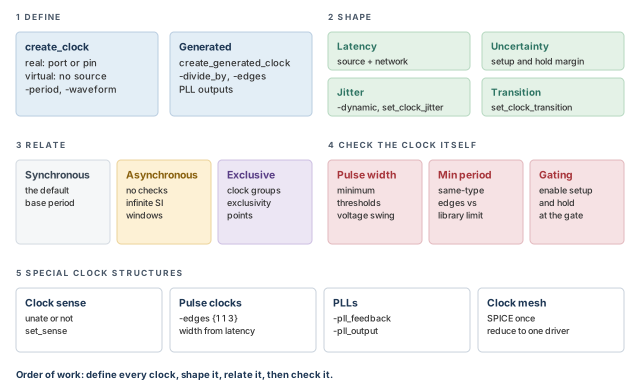
Figure 1 is a map of the whole chapter. Come back to it whenever you lose your place.
1 The beginner's mental model
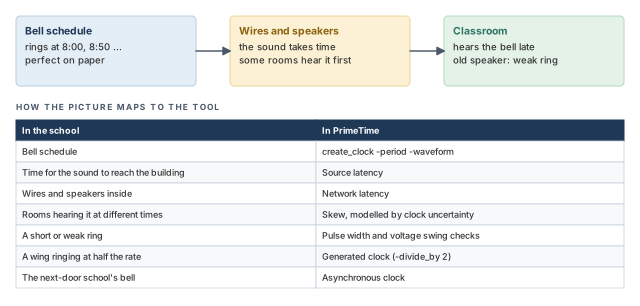
Think of a school with one master bell. The bell schedule says it rings at 8:00, 8:50 and so on. That schedule is perfect on paper. However, the sound travels through wires and speakers before it reaches each classroom.
So a few real effects appear. Every room hears the bell a little late. Some rooms hear it earlier than others. Some speakers are old and give a short, weak ring. One wing runs its own bell at half the rate. A second school next door has its own bell, unrelated to ours. Figure 2 maps each effect to its PrimeTime name.
- A bell rings for people who can wait. A flip-flop captures data at one instant. A few picoseconds of clock error can turn a pass into a fail.
- In the school, you can listen and measure. Before clock tree synthesis (CTS), there is no clock tree to measure. You must estimate latency and uncertainty yourself.
- Two bells in one school are clearly related. In a chip, the tool assumes two clocks are related unless you say otherwise. Silence is not "unrelated".
Now the engineering model
PrimeTime analyzes the synchronous part of a design. That means paths between registers, or between registers and ports, that are timed by clock edges. When paths cross between clocks, the tool works out the phase relationship between the launch clock and the capture clock. The clocks can be single phase, multiple phase or multiple frequency.
The tool supports these kinds of clock information:
- Multiple clocks. Clocks can have different waveforms and frequencies. A clock can have a real source, a port or a pin. It can also be virtual, with no source in the design.
- Clock network delay and skew. Clock latency is the delay from the clock source to a register clock pin. Clock skew is the spread of arrival times at different registers. You can also give interclock skew between two clocks.
- Ideal or computed delay. Before clock tree synthesis, you give an ideal delay. After it, the tool computes the delay from the real tree.
- Minimum pulse width. The tool can check that the clock pulse does not shrink too far along the network.
- Gated clocks. A gated clock is a clock controlled by gating logic, other than simple buffers or inverters. The tool runs setup and hold checks on the gating signal.
- Generated clocks. A generated clock is made from another clock by a circuit inside the design, such as a clock divider.
- Clock transition times. The transition time is how long a signal takes to change from one logic state to the other. You can set it at register clock pins.
So a complete clock description covers six items:
- period and waveform;
- latency, also called insertion delay;
- uncertainty, which covers skew;
- divided and other internally generated clocks;
- clock-gating checks;
- a fixed transition time while the clock network is incomplete.
2 Defining clocks
2.1 Creating a clock
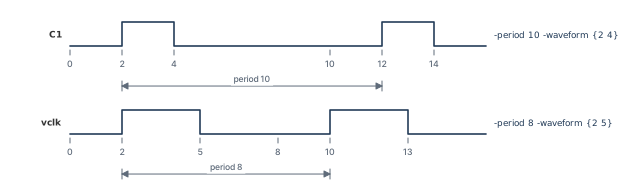
Let us consider a block with a clock port C1. Its clock repeats every 10 ns. It rises at 2 ns and falls at 4 ns.
You must define every clock in the design with create_clock. The command creates a clock at the source you name. The source can be an input port or an internal pin. From there, the tool traces the clock network automatically. Thus, the clock reaches every register in the transitive fanout of the source. That is everything the source drives, directly or through other cells.
pt_shell> create_clock -period 10 -waveform {2 4} {C1 CK2} ;# one clock, two sourcesHere is what this command does:
-period 10sets the clock period.-waveform {2 4}gives the edge times within one period: a rising edge at 2 and a falling edge at 4.- The clock gets the name
C1, after the first source in the list. - The tool also creates a path group named
C1. It holds all paths that end at points clocked byC1. Path groups are covered in the Timing Paths and Exceptions chapter.
The waveform is ideal. It ignores all delay in the clock network. After you create the clock, you still need to describe the network. The latency and uncertainty sections show how.
A single register can be reached by more than one clock. To define a second clock on the same port or pin, add -add to create_clock.
2.2 Virtual clocks
Some signals come from, or go to, clocked chips outside our block. We need a clock to describe their timing, but that clock has no source in our design. This is a virtual clock. You use it as the reference for input and output delays.
pt_shell> create_clock -period 8 -name vclk -waveform {2 5} ;# virtual: no sourceBecause there is no source object, we name the clock with -name. Figure 3 shows both waveforms from this section.
Name virtual clocks clearly, for example vclk_ddr or vclk_spi. In a report, a path that starts at a virtual clock is an input or output path. A clear name tells you at once which interface it is.
2.3 Selecting, applying and removing clocks
A clock and a port can share a name, such as CLK. The get_clocks command makes sure a command works on the clock object, not the port. It also accepts patterns and filters.
pt_shell> report_clock [get_clocks -filter "period <= 5.0" PHI1*] ;# fast PHI1 clocksThis reports the clocks whose names start with PHI1 and whose period is at most 5.0.
The all_clocks command is the same as get_clocks *. It returns a collection, a handle to a set of clock objects. The clock names are not printed.
pt_shell> set_max_time_borrow 0 [all_clocks] ;# no time borrowing on any clockTime borrowing lets a path through a transparent latch use time from the next cycle. Setting the limit to 0 on all clocks turns it off.
To remove clocks, use remove_clock. The reset_design command also removes clocks, together with other settings.
pt_shell> remove_clock [get_clocks CLKB*]   ;# remove clocks whose names start with CLKB
pt_shell> remove_clock -all ;# remove every clockcreate_clock. Use get_clocks to point at a clock object, and all_clocks to point at all of them.3 Clock latency
3.1 Source latency and network latency
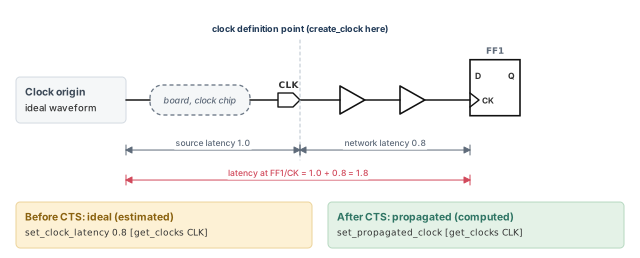
A clock edge does not appear at a flip-flop at time zero. It travels first from its true origin to the chip, then through the clock tree. Figure 4 splits this journey in two:
- Source latency is the time from the ideal waveform origin to the clock definition point. That is the port or pin where you created the clock. For example, the board and an off-chip clock generator might add 1.0 ns.
- Network latency is the time from the clock definition point to a register clock pin. That is the delay of the on-chip clock tree, rise or fall.
The total latency at a register clock pin is the sum of the two.
There are two ways to give network latency:
| Method | How it works | When to use it |
|---|---|---|
| Propagated | The tool adds up the real cell and net delays along the clock network | After clock tree synthesis, with annotated delays or parasitics |
| Ideal (estimated) | You set an estimated latency with set_clock_latency |
Before clock tree synthesis |
Ideal clocking is the default. With ideal clocking, you can set latency on a clock, a port or a pin. A value on a port or pin applies to every register clock pin in its transitive fanout. It overrides the value set on the clock object for those pins.
3.2 Propagated latency
After clock tree synthesis and layout, the clock tree exists. Its cell and net delays are back-annotated, or its net parasitics are calculated. Now the tool can compute latency itself. The edge times at each register are skewed by the real path delay from the clock source.
pt_shell> set_propagated_clock [get_clocks CLK] ;# compute latency from the real treeYou can set the propagated clock attribute on clocks, ports or pins. On a port or pin, it affects all register clock pins in the transitive fanout. To undo it on clocks, ports, pins or cells, use remove_propagated_clock.
A beginner switches to propagated clocks on a pre-layout netlist. The parasitics are still unknown, so the computed latency is usually inaccurate. Propagated latency is accurate only when real clock trees and annotated delays or parasitics exist. Before that, use estimated latency.
3.3 Estimated latency with set_clock_latency
Before layout, the parasitics are unknown, so propagated latency is usually inaccurate. Instead, you estimate the latency and set it with set_clock_latency. The command sets latency on one or more clocks, ports or pins.
You can give different values for rising and falling edges:
pt_shell> set_clock_latency -rise 1.2 [get_clocks CLK]  ;# rise edges 1.2 later
pt_shell> set_clock_latency -fall 0.9 [get_clocks CLK]  ;# fall edges 0.9 later
Source latency works for both ideal and propagated clocks. You set it with the -source option. For a generated clock, the tool can compute source latency itself. This happens when its master clock is propagated and you have not set the generated clock's source latency.
To remove latency you have set on objects, network or source, use remove_clock_latency.
3.4 Early and late source latency
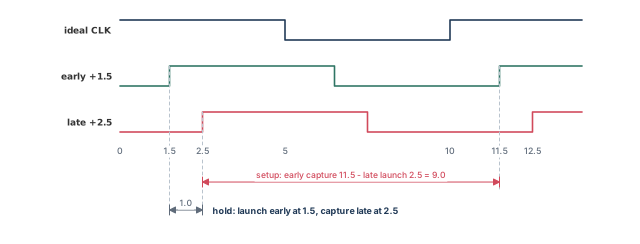
Now suppose the board delay to our CLK pin is not fixed. It can be anywhere from 1.5 to 2.5 ns. Figure 5 shows the setup. We describe this range with -early and -late:
pt_shell> create_clock -period 10 [get_ports CLK]                ;# the clock itself
pt_shell> set_clock_latency 1.5 -source -early [get_clocks CLK]  ;# earliest arrival
pt_shell> set_clock_latency 2.5 -source -late [get_clocks CLK]   ;# latest arrival
The tool then picks the more pessimistic value for each check:
- Setup: the late value for the launch clock and the early value for the capture clock.
- Hold: the early value for the launch clock and the late value for the capture clock.
The same idea works with any values. For example, an early source latency of 0.8 and a late one of 0.9 on CLK1:
pt_shell> set_clock_latency 0.8 -source -early [get_clocks CLK1]  ;# early value
pt_shell> set_clock_latency 0.9 -source -late [get_clocks CLK1] ;# late value3.5 Dynamic latency: modeling jitter in the source
A PLL produces a clock whose edges wander a little from cycle to cycle. This is jitter. It is a dynamic effect: it changes from one edge to the next.
You could model jitter with clock uncertainty, covered in the next section. However, uncertainty has two limits:
- It does not affect the crosstalk arrival windows. These are the time ranges in which a net can switch, used in signal integrity analysis.
- Clock reconvergence pessimism removal (CRPR) ignores it. CRPR removes the false pessimism on the clock path shared by launch and capture.
The -dynamic option of set_clock_latency avoids both limits. It marks part of the source latency as dynamic. Arrival windows then include it. CRPR treats the dynamic part the same way it treats signal integrity delta delays.
Let us take a static source latency of 3.0 early and 5.0 late on CLK:
pt_shell> set_clock_latency -early -source 3.0 [get_ports CLK]   ;# static, early
pt_shell> set_clock_latency -late -source 5.0 [get_ports CLK]    ;# static, late
Now add 0.5 of dynamic latency in each direction. The value you give is the new total, and -dynamic gives the dynamic part of it:
pt_shell> set_clock_latency -early -source 2.5 \
            -dynamic -0.5 [get_clocks CLK]   ;# total 2.5 = static 3.0 + dynamic -0.5
pt_shell> set_clock_latency -source -late 5.5 \
            -dynamic 0.5 [get_clocks CLK]    ;# total 5.5 = static 5.0 + dynamic 0.5
When CLK is also propagated, delay calculation uses the total, static plus dynamic. However, look at a path that launches and captures on different clock edges. Up to the common point of the clock path, CRPR uses only the static latency. It removes the static pessimism from the result.
Two reports help here:
report_timingshows the static and dynamic parts of clock latency separately.report_crprshows the clock reconvergence pessimism (CRP) for static and dynamic conditions. It also shows which value was used for removal.
CRPR itself is covered in the Operating Conditions chapter.
set_clock_latency -dynamic when crosstalk windows or CRPR matter. Plain uncertainty is ignored by both.4 Clock uncertainty and jitter
4.1 What uncertainty does to a check
Before clock tree synthesis, we do not know the real skew. We still want margin for it. Clock uncertainty is that margin. It is the largest expected difference in clock arrival, within one clock or between clocks. You can also add extra margin to it on purpose, to tighten setup or hold.
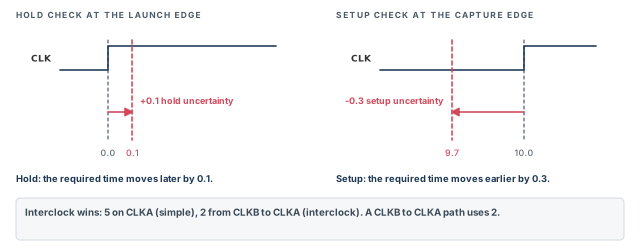
Figure 6 shows its effect with a 10 ns clock:
- Setup: the tool subtracts the setup uncertainty from the data required time. With 0.3, the capture edge at 10.0 becomes 9.7. Data must arrive 0.3 sooner.
- Hold: the tool adds the hold uncertainty to the data required time. With 0.1, data must stay stable 0.1 longer.
If you give a single value, it applies to both setup and hold.
4.2 Simple and interclock uncertainty
You set uncertainty with set_clock_uncertainty. It describes variation in successive edges of one clock, or between edges of different clocks. There are two kinds:
- Simple uncertainty is the variation of one clock's edges from their ideal times. You give clocks, ports or pins. It applies to every capturing register clocked by that clock, or in the fanout of those ports or pins.
- Interclock uncertainty is the skew between edges of two different clocks. It is more specific. You give a "from" clock with
-from,-rise_fromor-fall_from. You give a "to" clock with-to,-rise_toor-fall_to. It applies to paths that launch on the "from" clock and capture on the "to" clock.
You can also give uncertainty between two clock pins driven by the same clock. Interclock uncertainty matters most when launch and capture registers use different clocks.
pt_shell> set_clock_uncertainty 0.45 [get_pins U1/FF*/CP]  ;# setup and hold
pt_shell> set_clock_uncertainty -setup 0.21 [get_clocks CLK1]    ;# setup only
pt_shell> set_clock_uncertainty -hold 0.33 [get_clocks CLK1]     ;# hold only
When a path has both kinds, interclock uncertainty wins:
pt_shell> set_clock_uncertainty 5 [get_clocks CLKA]   ;# simple: all paths into CLKA
pt_shell> set_clock_uncertainty 2 -from [get_clocks CLKB] \
            -to [get_clocks CLKA]                     ;# interclock: CLKB to CLKA only
A path from CLKB to CLKA uses 2. A path from CLKA to CLKA still uses 5.
Interclock uncertainty is one-way. If paths run in both directions, set both, even with the same value:
pt_shell> set_clock_uncertainty 2 -from [get_clocks CLKA] \
            -to [get_clocks CLKB]   ;# CLKA to CLKB
pt_shell> set_clock_uncertainty 2 -from [get_clocks CLKB] \
-to [get_clocks CLKA] ;# CLKB to CLKAA designer sets simple uncertainty on two clock ports that both feed a clock multiplexer (MUX). The worst of the two values then applies to the entire fanout of the MUX. This happens even when that clock is disabled at the MUX. Set uncertainty on the clock object instead, so each clock keeps its own value.
To remove uncertainty from clocks, ports, pins or cells, or between clocks, use remove_clock_uncertainty.
4.3 Clock jitter commands
The tool also has dedicated jitter commands:
set_clock_jittersets jitter on a master clock. All clocks generated from that master get the same jitter. With no master clock named, it sets jitter on all clocks.remove_clock_jitterremoves jitter from a master clock and its generated clocks. With no master clock named, it removes jitter from all clocks.report_clock_jittershows the cycle jitter and duty-cycle jitter of each clock. It also shows the master clock whose jitter a generated clock uses.
pt_shell> report_clock_jitter
****************************************
Report : clock jitter
...
****************************************
Clock    cycle jitter   duty-cycle jitter    master clock with jitter
---------------------------------------------------------------------
mclk        2                   3                mclk
gclk        2                   3                mclk
Here gclk is generated from mclk, so it uses the jitter of mclk.
To see jitter in a path, use report_timing with the full clock path. In this example, CLK also has an estimated network latency of 1.0.
pt_shell> set_clock_uncertainty -setup 0.3 [get_clocks CLK]   ;# setup margin for skew
pt_shell> set_clock_jitter -cycle 0.4 CLK                     ;# cycle jitter on CLK
pt_shell> report_timing -from FF1 -to FF2 -path_type full_clock ;# show clock linesPoint Incr Path
---------------------------------------------------------
clock CLK (rise edge) 10.00 10.00
clock network delay (ideal) 1.00 11.00
clock uncertainty -0.30 10.70
clock jitter -0.40 10.30
FF2/CK (DFFX1) 10.30 r
library setup time -0.05 10.25
data required time 10.25
---------------------------------------------------------The report lists uncertainty and jitter on separate lines. Each one moves the required time earlier.
5 Clock transition time
Before clock tree synthesis, one buffer may drive 10,000 register clock pins. The computed transition on those pins is then very slow. A slow clock transition distorts the clock-to-output delays. It also distorts the setup and hold values taken from the library.
To avoid this, set an estimated transition for the whole clock network with set_clock_transition. It gives a nonzero transition time to an ideal clock.
pt_shell> set_clock_transition 0.64 -fall [get_clocks CLK1] ;# falling edges onlyThe value applies to all nets that directly feed sequential elements clocked by that clock. The useful options are:
-riseor-fallsets the value for only rising or only falling edges.-minor-maxsets the value for minimum or maximum operating conditions.
To remove the estimate, use remove_clock_transition.
Teams usually set clock latency, uncertainty and transition together in one pre-layout clock file. After clock tree synthesis, they switch to propagated clocks and remove the transition estimate. Keeping the two setups in separate files makes the switch a one-line change.
6 Pulse width, voltage swing and period checks
6.1 Minimum pulse width
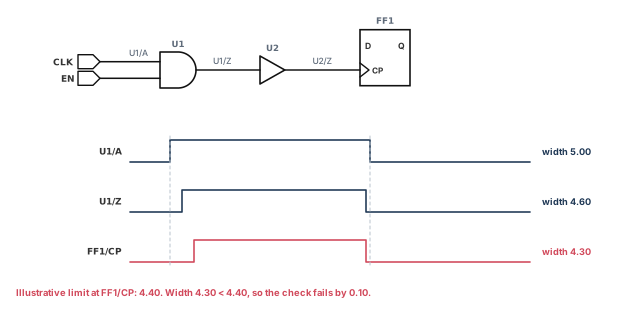
Let us follow one clock pulse through a gate and a buffer. Each cell slows the rising and falling edges by different amounts. Thus, the high pulse can shrink at each stage. Figure 7 shows this. Two problems can follow:
- If the pulse is too narrow at a register clock pin, the register might not capture data. Library cell pins can carry a minimum pulse width limit.
report_constraintchecks it. - The pulse might shrink so much inside the network that it does not pass any further. The tool can check the whole clock network against a threshold.
There is no default limit for clock tree pulse width checks. You set one with these commands:
| Command | What it constrains |
|---|---|
set_min_pulse_width |
Normal clock networks; set on clocks, cells, pins, ports or the current design |
set_pulse_clock_min_width |
Minimum width in pulse generator networks |
set_pulse_clock_max_width |
Maximum width in pulse generator networks |
remove_min_pulse_width |
Removes minimum pulse width checks in a clock tree or at sequential cells |
A minimum pulse width can also come from the library, on cell clock pins. The report_constraint command checks minimum pulse width at register clock pins and on clock networks. Pulse generator networks are covered in the pulse clock section.
By default, the uncertainty from set_clock_uncertainty also applies to pulse width checks. You can change this with a variable:
set_app_var timing_include_uncertainty_for_pulse_checks \
  none | setup_only | hold_only | setup_hold   ;# choose one value
The default is setup_hold, which applies both setup and hold uncertainty. The same variable controls pulse clock width checks.
6.2 Pulse width measurement thresholds
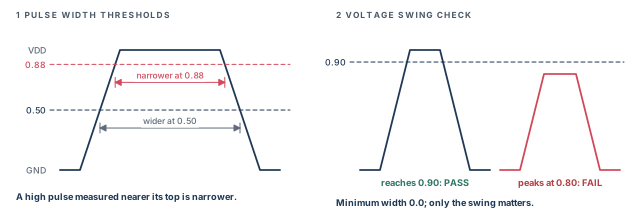
By default, the tool measures pulse width where the waveform crosses 50% of the supply voltage. For clock network pins, you can move this threshold to any fraction between 0.0 and 1.0.
A more conservative check measures a low pulse below 0.5 and a high pulse above 0.5. Figure 8 shows why: the pulse is narrower near its tip.
set delay_calc_waveform_analysis full_design               ;# required for this analysis
set timing_enable_min_pulse_width_waveform_adjustment true ;# turn on the adjustment
set timing_min_pulse_width_low_pulse_threshold 0.12        ;# low pulse measured at 12%
set timing_min_pulse_width_high_pulse_threshold 0.88       ;# high pulse measured at 88%
report_min_pulse_width -path_type short                    ;# run the check
With nondefault thresholds, the report shows two extra adjustment lines. They are "open edge threshold voltage adjustment" and "close edge threshold voltage adjustment".
6.3 Voltage swing checking
A weak driver may never pull a clock pulse fully to the supply rail. The voltage swing check finds this on clock network pins. It asks whether a high pulse gets close enough to the power rail. It also asks whether a low pulse gets close enough to the ground rail.
set delay_calc_waveform_analysis full_design         ;# required for this analysis
set timing_enable_voltage_swing true                 ;# turn on the swing check
set timing_voltage_swing_low_pulse_threshold 0.10    ;# low pulse must reach 10%
set timing_voltage_swing_high_pulse_threshold 0.90   ;# high pulse must reach 90%
report_min_pulse_width -voltage_swing                ;# run the check
The tool treats this as a special minimum pulse width check:
- The minimum width is 0.0.
- The width is measured at the chosen fraction of the supply voltage.
- A pulse of any width that reaches or crosses the threshold passes.
- A pulse that never crosses the threshold is a violation.
- For a passing pulse, the positive slack is its width at the threshold.
Reading these reports in depth is covered in the Reporting and Debugging Analysis Results chapter.
6.4 Minimum period checking
Some cells have a min_period constraint on a pin, set in the library. It says that two successive clock edges of the same type must be at least that far apart. Same type means rising to rising, or falling to falling.
Three commands run the check:
report_min_period, with optional-verbosefor more detail;report_constraint -min_period, also with optional-verbose;report_analysis_coverage -check_type min_period.
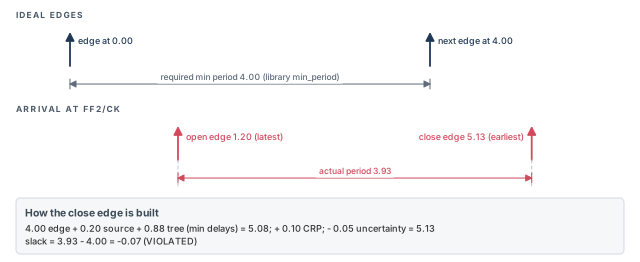
Let us read one result. The clock CLK has a period of 4.00. Pin FF2/CK has a min_period of 4.00 in the library.
Pin: FF2/CK
Related clock: CLK
Check: sequential_clock_min_period
Point Incr Path
----------------------------------------------------------
clock CLK (rise edge) 0.00 0.00
clock source latency 0.20 0.20
CLK (in) 0.00 0.20 r
CB1/Y (BUFX4) 0.90 1.10 r
CB2/Y (BUFX2) 0.10 1.20 r
FF2/CK (DFFX1) 0.00 1.20 r
open edge clock latency 1.20
clock CLK (rise edge) 4.00 4.00
clock source latency 0.20 4.20
CLK (in) 0.00 4.20 r
CB1/Y (BUFX4) 0.80 5.00 r
CB2/Y (BUFX2) 0.08 5.08 r
FF2/CK (DFFX1) 0.00 5.08 r
clock reconvergence pessimism 0.10 5.18
clock uncertainty -0.05 5.13
close edge clock latency 5.13
----------------------------------------------------------
required min period 4.00
actual period 3.93
----------------------------------------------------------
slack (VIOLATED) -0.07Here is how to read it, with Figure 9 alongside:
- Open edge clock latency is the latest arrival of the first edge. It uses maximum delays through the clock cells: 1.20.
- Close edge clock latency is the earliest arrival of the second edge. It uses minimum delays through the same cells: 5.08.
- Clock reconvergence pessimism is added back, which reduces the violation: +0.10.
- Clock uncertainty is subtracted, which adds to the violation: −0.05. The close edge is 5.13.
- Actual period is close minus open: 5.13 − 1.20 = 3.93. It is less than 4.00, so the slack is −0.07.
7 How clocks relate to each other
7.1 Three kinds of relationship
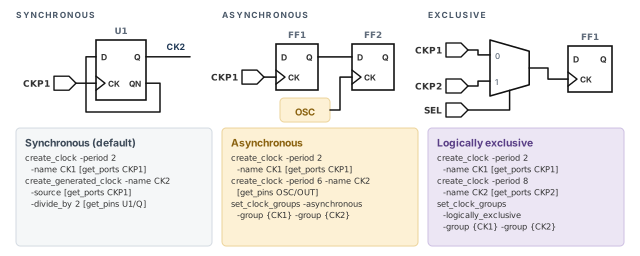
With several clocks, the tool must know how they relate. Two clocks can be:
- Synchronous: they share a common source and have a fixed phase relationship.
- Asynchronous: they do not communicate in the design. Their edges can occur at any time relative to each other.
- Exclusive: they do not interact, because only one of them is active at a time.
Figure 10 shows one small circuit for each case, with the commands that describe it. To analyze paths between clock domains correctly, you may need false paths between clocks. You may need to exclude some clocks from the analysis. Or you may need to declare the relationship directly.
7.2 Synchronous clocks and the base period
Unless you say otherwise, the tool assumes two clocks are synchronous whenever a path launches on one and captures on the other. All clock waveforms are aligned at time zero, as create_clock defines them. Latency and uncertainty then shift the edges further.
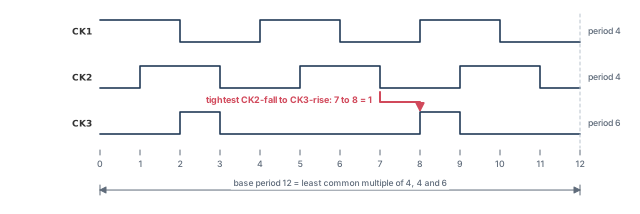
Let us take three clocks:
pt_shell> create_clock -period 4 -name CK1 -waveform {0 2}   ;# rises 0, falls 2
pt_shell> create_clock -period 4 -name CK2 -waveform {1 3}   ;# rises 1, falls 3
pt_shell> create_clock -period 6 -name CK3 -waveform {2 3}   ;# rises 2, falls 3
Paths may cross between these clocks. To test every pair of edges, the tool expands the clocks internally. It repeats each clock up to the least common multiple of all synchronous periods. This is the base period. Here the periods are 4, 4 and 6, so the base period is 12.
The tool then checks paths between all edges in the expanded clocks. Figure 11 shows the result. Take paths from a falling edge of CK2 to a rising edge of CK3. The tightest setup check runs from 7 to 8.
A beginner defines two unrelated clocks with periods 3.1 and 4.7 and leaves them synchronous. The tool now expands both clocks over a huge base period. It may find two edges very close together and report a false violation. Define clocks the way they really operate.
To declare clocks that are not synchronous, use case analysis, set_clock_groups or set_false_path.
7.3 Asynchronous clocks
A free-running on-chip oscillator is asynchronous to a system clock entering from outside. To declare this, use set_clock_groups -asynchronous. The tool then:
- does not check paths that launch on one clock and capture on the other, as if they were false paths;
- in crosstalk analysis, gives infinite arrival windows to aggressor and victim nets between the two domains.
An aggressor is a net whose switching disturbs a nearby victim net. Infinite windows mean the tool assumes they can switch at any time relative to each other. The Signal Integrity Analysis chapter covers this in depth.
7.4 Exclusive clocks
A circuit might send a fast clock or a slow clock onto one clock line through a MUX. Only one is active at a time, so they never interact. Checking paths between them wastes runtime and creates false violations.
You can declare a false path between them. You can disable one with case analysis. Or you can declare them exclusive:
pt_shell> set_clock_groups -logically_exclusive \
            -group {CK1} -group {CK2}   ;# no paths CK1->CK2 or CK2->CK1
This is like a false path in both directions. However, report_exceptions does not show clock groups. To see them, use report_clock -groups. To limit that report to some clocks, give a list: report_clock -groups clock_list.
The group rules are simple:
- A group can hold several clocks:
-group {CK1 CK2} -group {CK3 CK4}. Paths between the two groups are ignored. - With more than two groups, each group is exclusive to every other group.
- With just one group, that group is exclusive to all other clocks.
-namegives the declaration a name, so you can remove it later.
pt_shell> set_clock_groups -logically_exclusive -name EX1 \
            -group {CK1 CK2} -group {CK3 CK4}   ;# named, two groups of two
pt_shell> set_clock_groups -logically_exclusive \
            -group {CK1 CK2} -group {CK3 CK4} -group {CK5}   ;# three groups
pt_shell> set_clock_groups -logically_exclusive \
-group {CK1 CK2} ;# CK1, CK2 exclusive to every other clockDo not add false paths between clocks that are already in exclusive groups. It is redundant, and set_clock_groups invalidates those false paths anyway. The same holds for -asynchronous groups.
Some clocks are physically exclusive as well. They are never present in the chip together, for example because of multiplexing or physical separation. Then there can be no crosstalk between them either. Use -physically_exclusive instead of -logically_exclusive. The tool then skips crosstalk analysis between their nets.
Asynchronous groups and exclusive groups are kept separately, even though one command creates both. Table 3 sums up the three options.
| Option | Timing paths between groups | Crosstalk between groups |
|---|---|---|
-asynchronous |
Not checked | Analyzed with infinite arrival windows |
-logically_exclusive |
Not checked | Still analyzed |
-physically_exclusive |
Not checked | Not analyzed |
Three more commands help:
pt_shell> get_clock_relationship {CK1 CK2}  ;# how do they relate?
pt_shell> remove_clock_groups -logically_exclusive -name EX1   ;# remove one declaration
pt_shell> remove_clock_groups -logically_exclusive -all ;# remove all exclusive7.5 Choosing a method for multiplexed clocks
Figure 12 shows four clocks and one select signal. With SEL at 0, CK1 and CK3 run. With SEL at 1, CK2 and CK4 run. By default, the tool checks all combinations, including the impossible ones.
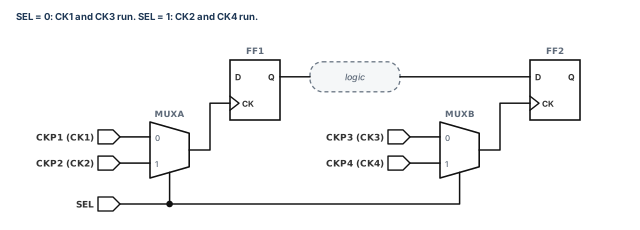
There are four ways to describe this:
1. False paths between every invalid pair. One run covers all valid combinations.
pt_shell> set_false_path -from CK1 -to CK2   ;# repeat for each invalid pair:
pt_shell> set_false_path -from CK2 -to CK1   ;#   CK3<->CK4, CK1<->CK4, CK2<->CK3
The full set has eight commands: both directions of CK1–CK2, CK3–CK4, CK1–CK4 and CK2–CK3.
2. Case analysis. Set a constant on the select line. Only one mode is timed per run.
pt_shell> set_case_analysis 0 [get_ports SEL] ;# only CK1 and CK3 are activeTo cover both modes you need two runs, one with SEL=0 and one with SEL=1.
3. Disable timing from some clock inputs.
pt_shell> set_disable_timing [get_ports {CKP2 CKP4}] ;# no paths from these clock pins4. Clock groups with active clocks.
pt_shell> set_clock_groups -logically_exclusive -name E1 \
            -group {CK1 CK3} -group {CK2 CK4}   ;# the two valid sets
pt_shell> set_active_clocks [all_clocks]        ;# analyze both sets in one run
The tool checks all valid paths in one run. To time only the SEL=0 mode, change the last line to set_active_clocks {CK1 CK3}. That makes CK2 and CK4 inactive, just like case analysis.
Now give each MUX its own select, S1 and S2. Only CK1–CK2 and CK3–CK4 are invalid now. Every other pair is possible.
pt_shell> set_clock_groups -logically_exclusive -name mux1 \
            -group {CK1} -group {CK2}   ;# first MUX
pt_shell> set_clock_groups -logically_exclusive -name mux2 \
            -group {CK3} -group {CK4}   ;# second MUX
pt_shell> set_active_clocks {CK1 CK2 CK3 CK4}   ;# all four, one run
The tool times CK1 and CK2 against CK3 and CK4, in both directions if paths exist. It skips CK1–CK2 and CK3–CK4. With false paths, you would need four commands here. With case analysis, you would need four runs: S1 S2 = 00, 01, 10 and 11. To time only 00, use set_active_clocks {CK1 CK3}.
One more case is common. CK1 launches a path and CK2 captures it. The same two clocks also meet at a MUX further on. Here the path between the clocks is real, but paths after the MUX are not. Case analysis on the select line is the best method, because it removes only the downstream combinations.
For complex clock MUX trees, exclusivity points, covered next, usually work best. Clock groups with set_active_clocks also keep one run and document intent in one place. Case analysis stays useful when you sign off one mode at a time.
7.6 Clock exclusivity points
Modern chips often pick a clock through MUX cells. A fast clock runs under heavy load, and a slow clock saves power. Figure 13 shows two cascaded MUXes, U15 and U23.
By default, CK1, CK2 and CK3 all reach the flops below U23 together. The tool checks every launch and capture pair, such as launch on CK1 and capture on CK2. In silicon, only one clock is there at a time, as long as the MUX controls stay static between launch and capture.
An exclusivity point marks a pin where only one clock at a time can pass. For complex clock MUX trees, this usually gives better simplicity, accuracy, completeness and turnaround time than the other methods.
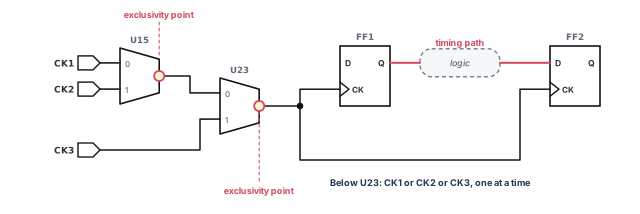
The exclusivity setting applies to delay checks, minimum pulse width checks and minimum period checks. There are two ways to place the points.
Explicitly, with set_clock_exclusivity:
pt_shell> set_clock_exclusivity -type mux -output "U15/Z"   ;# one clock at a time here
pt_shell> set_clock_exclusivity -type mux -output "U23/Z"   ;# and here
This enforces a physically exclusive relationship among the clocks in the transitive fanout of the pin. It works whatever the value of the automatic variable below.
Automatically, with a variable:
pt_shell> set_app_var timing_enable_auto_mux_clock_exclusivity true  ;# auto-detect
pt_shell> set_disable_auto_mux_clock_exclusivity MUX32/Z   ;# but not at this MUX
With the variable true, the tool finds MUX cells with several clocks at their inputs. It places exclusivity points at their outputs. Clock interactions in the fanin of the MUX are not affected. set_disable_auto_mux_clock_exclusivity turns off the inference at chosen MUX cells.
Automatic detection works only for real MUX cells, as marked by the is_mux_cell cell attribute. A MUX built from random logic is not detected. For such logic, set the point by hand and name the clock inputs as well:
pt_shell> set_clock_exclusivity -type user_defined \
            -inputs "OR1/A OR1/B" -output OR1/Z   ;# clock inputs and output pin
To report all points, inferred or explicit, use report_clock -exclusivity. To query one pin, read its is_clock_exclusivity attribute.
pt_shell> report_clock -exclusivity
...
clock exclusivity points:

     -type mux
     -output U23/Z
pt_shell> get_attribute -class pin [get_pins U23/Z] is_clock_exclusivity
true
Table 4 compares exclusivity points with the other methods. Each has strengths in simplicity, flexibility, turnaround time and completeness.
| Method | Command | Note |
|---|---|---|
| Exclusivity points | set_clock_exclusivity or the auto MUX variable |
Exclusive below the MUX only; one run |
| False paths | set_false_path |
One run; many commands for many clocks |
| Exclusive clock groups | set_clock_groups -logically_exclusive |
One run; applies everywhere, not just below the MUX |
| Case analysis | set_case_analysis |
One mode per run |
| Disable timing | set_disable_timing |
Cuts all paths from the chosen clock input pins |
| New clocks at MUX outputs | Define new clocks on the MUX output pins | Exclusive downstream, not upstream |
7.7 Removing clocks from analysis
By default, the tool analyzes all clocks and all interactions between them. Often you want only some clocks, for one operating mode. For example, a device may use a fast clock normally and a slow clock in power-down mode.
The first way is case analysis on the select port:
pt_shell> set_case_analysis 0 [get_ports SEL] ;# analyze only the SEL=0 modeThe second way is set_active_clocks. Clocks not listed are inactive and ignored.
pt_shell> set_active_clocks {CK1 CK2}    ;# only CK1 and CK2 are analyzed
pt_shell> set_active_clocks [all_clocks]  ;# back to the default: all clocks active
Keep these rules in mind:
- A generated clock based on an inactive clock is also inactive.
- Each use of the command replaces the previous list.
- The command triggers a full timing update.
- It works for standard timing analysis only. It does not work for context characterization, model extraction or
write_sdc.
8 Clock sense
8.1 Positive, negative and non-unate clocks
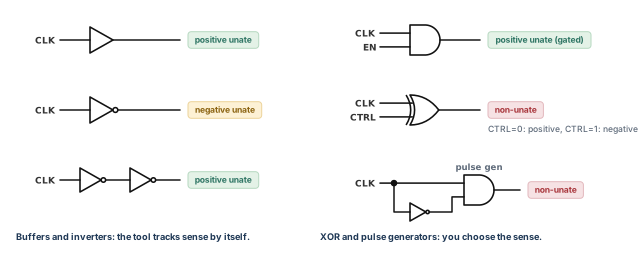
The tool tracks inverters and buffers in clock trees. It knows whether each register sees the clock true or inverted. This is the clock sense. For a tree of only buffers and inverters, you need not set anything. The clock at each register is unate.
- Positive unate: a rising edge at the source gives a rising edge at the register. A falling edge gives a falling edge. Buffers, two inverters and an AND gate used for gating all keep positive sense.
- Negative unate: a rising edge at the source gives a falling edge at the register, and the reverse. One inverter does this.
- Non-unate: the sense is ambiguous, because of non-unate timing arcs in the clock path. Through an XOR gate, the sense depends on the other input. With that input at 0 the sense is positive; at 1 it is negative.
A pulse generator is also non-unate. It has a direct path through an AND gate and an inverting path through an inverter. Figure 14 shows all of these cases.
8.2 Resolving a non-unate clock with set_sense
To resolve the ambiguity, set a sense to propagate forward from a pin in the non-unate part of the network:
set_sense -type clock
-positive | -negative
object_listpt_shell> set_sense -type clock -positive [get_pins UX1/Z] ;# keep only positive pathsThis propagates only the positive unate paths through UX1/Z, relative to the original clock source. After that point, the tool tracks sense through any further buffers and inverters as usual.
Two rules apply:
- The command affects only the non-unate part of a clock network. Suppose you set it on a pin in a unate part, and the sense disagrees with the real one. The tool then reports an error and ignores the command.
- The setting applies to every clock through the pin. To limit it to some clocks, add
-clocks.
pt_shell> set_sense -type clock -positive \
            -clocks [get_clocks CLK] [get_pins UMUX1/Z]   ;# only CLK at this pin
set_sense -type clock also has options for pulse clocks. They are covered in the next major section.
8.3 Stopping clock propagation
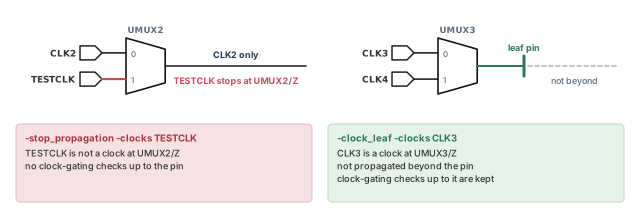
Sometimes a clock physically never passes a point. In Figure 15, the control logic lets UMUX2 select CLK2, but never TESTCLK. So TESTCLK never exists after UMUX2.
pt_shell> set_sense -type clock -stop_propagation -clocks TESTCLK UMUX2/Z ;# stop hereThis says the signal is not used as a clock at that pin. It also prevents clock-gating checks on the clock network leading up to the pin.
A leaf pin is the last pin of a clock network, where the clock is used. To stop a clock at a leaf pin, use -clock_leaf instead:
pt_shell> set_sense -type clock -clock_leaf -clocks CLK3 UMUX3/Z ;# leaf hereHere the signal is a clock at the pin, but it does not propagate past it. Clock-gating checks on the network leading up to the pin are still performed.
To remove a sense set with set_sense -type clock, use remove_sense -type clock.
set_sense -type clock only where the sense is ambiguous or where a clock really stops.9 Pulse clocks
9.1 What a pulse clock is
A pulse clock is a train of short pulses. Both edges of each pulse come from the same edge of another clock. Pulse clocks can improve performance and reduce power.
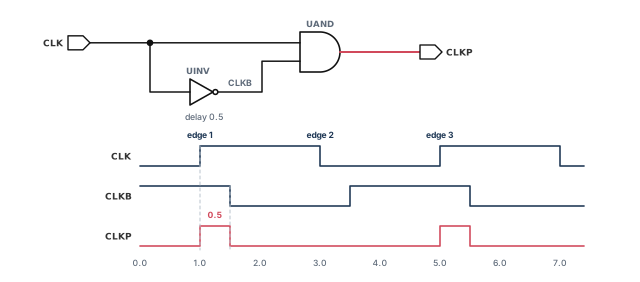
Figure 16 shows a simple pulse generator. CLK and a delayed, inverted copy CLKB feed an AND gate. Each rising edge of CLK makes a short high pulse on CLKP. The pulse ends when CLKB falls, so its width is the delay of the inverter.
9.2 Three ways to describe a pulse clock
The tool needs the timing behavior of the pulse. There are three ways to give it:
- A characterized pulse generator cell. The library describes the cell with pulse generator attributes. This is the best method. You need to do nothing more in PrimeTime.
create_generated_clock. You describe the pulse timing relative to the source clock. This creates a new clock domain at the pulse generator output.set_sense -type clock. You give the sense of the pulses relative to the source clock. This does not create a new clock. It sets the sense of the existing clock downstream of the pin.
Without characterized cells, you must use method 2 or 3 at each pulse generation point.
9.3 Method 2: a generated pulse clock
For the circuit in Figure 16, the pulse clock is defined like this:
pt_shell> create_generated_clock -name CLKP -source CLK \
            -edges {1 1 3} [get_pins UAND/Z]   ;# rise and fall both on edge 1
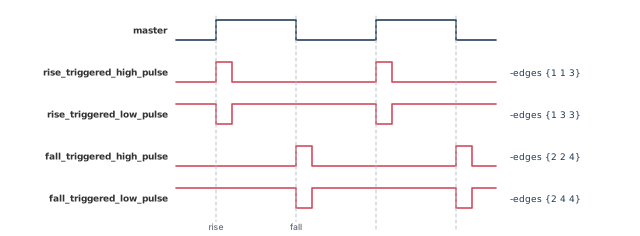
The -edges list names edges of the master clock. Edge 1 is the first rising edge, edge 2 the first falling edge, edge 3 the next rising edge. The three numbers give the generated clock's rising edge, falling edge and next rising edge.
A repeated edge number marks a pulse. It is better to use repeated edge numbers than explicit pulse times. This keeps the delay checks between source and pulse clock correct. The general rule:
- The position of the repeated number decides a high or low pulse.
- The repeated number decides which master edge triggers the pulse.
| Edge list | Pulse type |
|---|---|
{1 1 3} |
Rising edge of the source triggers a high pulse |
{2 2 4} |
Falling edge of the source triggers a high pulse |
{1 3 3} |
Rising edge of the source triggers a low pulse |
{2 4 4} |
Falling edge of the source triggers a low pulse |
9.4 Method 3: a pulse clock sense
Instead of a new clock, you can tell the tool that the existing clock becomes a pulse after a pin:
pt_shell> set_sense -type clock -pulse rise_triggered_high_pulse \
            [get_pins UAND/Z]   ;# same clock, now a rise-triggered high pulse
The general syntax is:
set_sense
-type clock
-pulse rise_triggered_high_pulse | rise_triggered_low_pulse |
fall_triggered_high_pulse | fall_triggered_low_pulse
object_listFigure 17 shows the four pulse senses next to the master clock. It also shows the matching -edges list for each.
9.5 Why method 3 scales
A design may need thousands of pulse generators for clock gating, skew control and pulse integrity. A generated clock at each one does not scale. You must find and define each one, and the clock groups multiply.
For pulse generators that do not change frequency, set the pulse_clock attribute to one of the four senses instead. They cover all four types without any generated clock. Points to remember:
- The sense can be set on internal, bidirectional or output pins. On a bidirectional pin, it affects only clock paths through the output side.
- If the requested sense does not exist, the tool issues a warning. For example,
rise_triggered_high_pulseneeds a path where a source rise gives a fall at the pin. With only a positive unate path, there is none, so the command is not applied. - With both a positive and a negative unate path to the pin, the command works. The rise latency comes from the positive path and the fall latency from the negative path.
- The tool reports an error if a pulse clock merges with another sense of the same clock. Where senses merge, set the one you want with
set_sense -type clock -pulse. - For pulse generators that change frequency, such as frequency doublers, use
create_generated_clock.
9.6 Pulse width comes from latency
The nominal width of every pulse clock is zero, whichever method you use. The tool computes the real width from the rise and fall latency at the pulse generator output:
- high pulse width = fall network latency − rise network latency
- low pulse width = rise network latency − fall network latency
The tool can compute these latencies from the circuit. Or you can set them with set_clock_latency, which fixes the pulse width. You can set it on any pin in the clock network. It then affects all registers in the fanout. For an ideal high pulse width of 0.5, with an overall latency of 0.6:
pt_shell> set_clock_latency -rise 0.6 UAND/Z   ;# pulse starts 0.6 after the source edge
pt_shell> set_clock_latency -fall 1.1 UAND/Z   ;# ends 1.1 after: width 1.1 - 0.6 = 0.5
A clock driven by a pulse generator may need a waveform whose edge times do not strictly increase. In the example below, the rise and fall edges are both at 0.0, so the ideal pulse has zero width. The source latencies then set the real pulse. It rises 0.23 and falls 0.65 after the edge, so its high width is 0.65 − 0.23 = 0.42. To define such a clock, use create_clock -waveform:
pt_shell> create_clock -waveform {0.0 0.0} -period 10 [get_ports BCK]  ;# zero width
pt_shell> set_clock_latency -source -rise 0.23 -fall 0.65 \
[get_ports BCK] ;# rise and fall-edges with a repeated number, or a pulse sense. The pulse width always comes from fall minus rise latency.9.7 Constraining pulse width in a pulse clock network
The transitive fanout of a pulse generator is a pulse clock network. The clock traveling through it is the pulse clock. If the pulse generator has sequential arcs, its output is not a clock unless you define a generated clock there.
Two commands constrain pulse width in these networks:
set_pulse_clock_min_width -transitive_fanout value object_list
set_pulse_clock_max_width -transitive_fanout value object_list- You can name pulse generator instances or pulse generator library cells.
- On a clock, the constraint covers the fanout of every pulse generator driven by that clock.
- On the design, it covers all pulse clock networks.
- If constraints conflict, the most restrictive one is used.
- The library minimum pulse width also applies in the pulse clock network.
When CRPR is enabled, the clock reconvergence pessimism is a credit to the pulse width. It is added for the minimum width check and subtracted for the maximum width check.
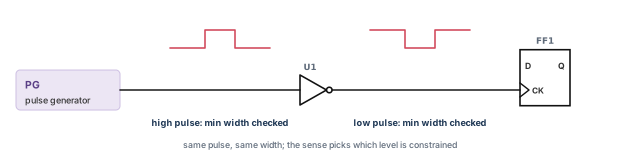
The tool infers whether the high or the low pulse is constrained from the clock sense. Before an inverter, the high pulse minimum width is checked. After the inverter, the low pulse is checked, as Figure 18 shows.
To remove these constraints, use remove_pulse_clock_min_width or remove_pulse_clock_max_width. You must name every source of the constraint you want removed. To report them, use:
report_pulse_clock_min_widthorreport_constraint -pulse_clock_min_width;report_pulse_clock_max_widthorreport_constraint -pulse_clock_max_width.
By default, the general minimum pulse width constraints apply everywhere except pulse clock networks. The more specific pulse clock constraints apply inside them. The variable timing_enable_pulse_clock_constraints controls this. Setting it to true enables pulse clock constraint checking. Setting it to false makes the tool ignore pulse clock constraints and use the general constraints everywhere.
During report_analysis_coverage, the tool sets this variable to false for a moment, to collect design data correctly. It prints an information message when it does.
9.8 Constraining transitions at pulse generators
A pulse generator needs a sharp enough input edge, and its output network needs controlled slopes. Two commands set these limits.
Minimum transition, at the pulse generator input only:
set_pulse_clock_min_transition [-rise | -fall] value object_listYou can apply it by pulse generator instance, pulse generator library cell, clock or design. On a clock, it covers the inputs of all pulse generators in that clock network. On a design, it covers all pulse generator inputs.
Maximum transition, at the input or in the fanout:
set_pulse_clock_max_transitionwithout-transitive_fanoutconstrains only the pulse generator inputs.- With
-transitive_fanout, it constrains the fanout of the pulse generators. - You can apply it by instance, library cell, clock or design. On a design, all pulse networks are covered.
- A
set_max_transitionlimit on the design also applies to pulse networks. So do maximum transition limits on library pins.
For both commands, the most restrictive constraint wins on a conflict. -rise and -fall constrain the two edges separately.
Table 6 lists the remove and report commands.
| Task | Command |
|---|---|
| Remove minimum transition at inputs | remove_pulse_clock_min_transition |
| Remove maximum transition at inputs | remove_pulse_clock_max_transition, without -transitive_fanout |
| Remove maximum transition in fanout | remove_pulse_clock_max_transition -transitive_fanout |
| Report maximum transition | report_pulse_clock_max_transition or report_constraint -pulse_clock_max_transition |
| Report minimum transition at inputs | report_pulse_clock_min_transition or report_constraint -pulse_clock_min_transition |
To report the maximum transition at pulse generator inputs, leave out -transitive_fanout. As with width, timing_enable_pulse_clock_constraints must be true for pulse clock constraint checking.
10 PLL-based designs
10.1 What a PLL does for timing
A phase-locked loop (PLL) aligns the phase of its feedback pin with the phase of its reference clock. If the feedback is taken from the end of the clock tree, the tree delay is nearly canceled. This reduces skew between launch and capture flops. It also allows much faster chip-to-chip communication.
Effects such as on-chip variation (OCV) and signal integrity need a complete and accurate analysis that includes the PLL. OCV is the small spread of delays across one die; the Variation chapter covers it.
The PLL library model marks the reference, output and feedback pins with attributes. The tool uses them for extra error checks when you define the PLL output clocks. During the timing update, the tool computes the feedback path timing. It applies that as a phase correction on the PLL cell. This keeps runtime low and scripts short. The approach supports:
- multiple PLLs, and PLLs with multiple outputs;
- PLL jitter and long-term drift;
- CRPR for PLL paths, and PrimeTime SI (signal integrity) analysis;
- sequential cells in the feedback path;
- PLL adjustment during path-based analysis.
10.2 Defining PLL output clocks
You create each PLL output clock with create_generated_clock, plus two PLL options:
-pll_feedbacknames the PLL feedback pin used for the phase correction.-pll_outputnames the PLL output pin whose clock reaches the feedback pin.
For a single-output PLL, -pll_output is the same pin as the generated clock source. For a multiple-output PLL with one shared feedback path, it can be a different output.
With these options, only some options are allowed, and four pins are involved:
| Pin | Given by | What it is |
|---|---|---|
| Source object | the pin the clock is created on | A single pin: the PLL clock output being described |
| Master pin | -source |
The reference clock input of the PLL |
| Feedback pin | -pll_feedback |
The feedback input of the PLL |
| Output pin | -pll_output |
The output where the feedback path starts; can differ from the source object |
All four pins must belong to the same cell. For the PLL adjustment to work, both clocks must be propagated. That means the PLL output clock and the reference clock at the reference pin.
10.3 A sequential cell in the feedback path
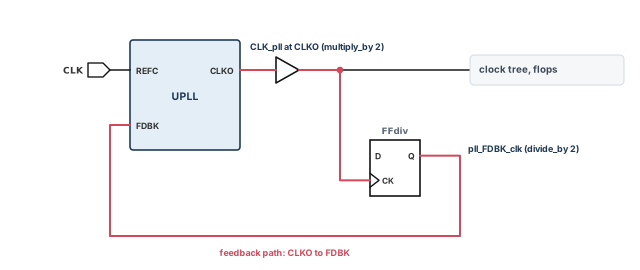
If the feedback path has sequential cells, define a generated clock at the output of the last one. Its master pin can be any pin that lies on the feedback path and whose fanout reaches the feedback pin.
In Figure 19, the PLL output CLKO runs at twice the reference frequency at REFC. The flop FFdiv divides it back down before the feedback pin FDBK.
pt_shell> create_generated_clock -name CLK_pll \
            -source [get_pins UPLL/REFC] \
            -pll_output [get_pins UPLL/CLKO] \
            -pll_feedback [get_pins UPLL/FDBK] \
            -multiply_by 2 [get_pins UPLL/CLKO]   ;# twice the reference frequency
pt_shell> create_generated_clock -name pll_FDBK_clk \
            -source [get_pins UPLL/CLKO] \
            -divide_by 2 [get_pins FFdiv/Q]       ;# the divider in the feedback path
10.4 PLL drift and jitter
Drift is a slow, long-term phase error of the PLL output. Jitter is the fast, edge-to-edge error. You set both with set_clock_latency on the PLL output clock, using -pll_shift:
- With
-pll_shift, the value is added to the base early or late latency of the PLL clock. Normally,set_clock_latencyreplaces the latency instead. - The value given with
-pll_shiftalone is the drift. - Jitter uses both
-pll_shiftand-dynamic. - Set it on the generated clock at the PLL output that feeds the feedback pin. The tool applies the same shift to every PLL output.
set drift 0.100                                   ;# long-term drift
set jitter 0.020                                  ;# edge-to-edge jitter
create_clock -period 5 [get_ports CLK]            ;# reference clock
create_generated_clock -name CLK_pll -divide_by 1 \
   -source UPLL/CLKIN \
   -pll_feedback UPLL/FDBK \
   -pll_output UPLL/CLKOUT \
   [get_pins UPLL/CLKOUT]                         ;# PLL output clock
set_clock_latency -source -pll_shift [get_clocks CLK_pll] \
   -early -${drift} -dynamic -${jitter}           ;# early: drift and jitter
set_clock_latency -source -pll_shift [get_clocks CLK_pll] \
   -late +${drift} -dynamic +${jitter}            ;# late: drift and jitter
set_propagated_clock {CLK CLK_pll}                ;# both clocks propagated
10.5 CRPR, checks and reports for PLLs
The tool treats all outputs of a PLL as having the same phase. So, for CRPR, the outputs are interchangeable. Take a path launched by OUTCLK1 and captured by OUTCLK2. The last physical common pin is the PLL reference pin. Still, the tool removes clock reconvergence pessimism up to the PLL outputs. This is essential, because the outputs must be in phase. report_crpr shows this by listing one PLL output as the common pin.
Two more checks help:
check_timingconfirms that a PLL clock reaches each feedback pin.update_timingruns the same check.report_timingshows the PLL adjustment on the line for the PLL output.
clock CLK (rise edge) 0.00 0.00
clock source latency 0.00 0.00
clk_in (in) 0.00 0.00 r
inst_my_pll/REFCLK (my_pll) 0.00 0.00 r
inst_my_pll/OUTCLK (my_pll) (gclock source) -798.03 * -798.03 r
b1/A (buf1a1) 0.00 -798.03 r
...The large negative value is the phase correction. It cancels the delay of the clock tree that the feedback loop measures.
10.6 What the PLL library cell needs
The PLL library cell needs a single positive unate timing arc from the reference pin to each output. Four attributes identify it:
is_pll_cellmarks the cell as a PLL.is_pll_reference_pin,is_pll_output_pinandis_pll_feedback_pinmark the three kinds of pin.
cell(my_pll) {
  is_pll_cell : true;
  pin( REFCLK ) { direction : input;  is_pll_reference_pin : true; }
  pin( FBKCLK ) { direction : input;  is_pll_feedback_pin : true; }
  pin( OUTCLK1 ) {
    direction : output;
    is_pll_output_pin : true;
    timing() {                       /* the required timing arc */
      related_pin : "REFCLK";
      timing_sense : positive_unate;
      cell_fall(scalar) { values("0.0"); }
    }
  }
}
A second output, OUTCLK2, would repeat the OUTCLK1 block with its own name.
create_generated_clock -pll_feedback -pll_output, propagate the clocks, and let the tool apply the phase correction. Add drift and jitter with -pll_shift.11 Clock-gating checks
11.1 What the tool checks
A gated clock appears when the clock network holds logic other than buffers and inverters. For example, the clock feeds one input of an AND gate and an enable signal feeds the other. The output is a gated clock.
The tool checks setup and hold on the gating input automatically. The goal is that the gate never cuts or clips the clock. The check runs only on combinational gates. One input must be a clock that can pass through, and the gating input must not be a clock.
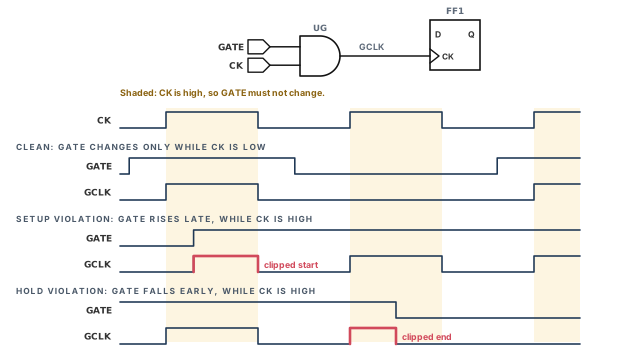
- Clock-gating setup check. The enable must settle before the clock becomes active. The leading clock edge is checked against both edges of the enable. A violation gives a glitch at the start of the pulse, or a clipped pulse.
- Clock-gating hold check. The enable must stay stable while the clock is active. The trailing clock edge is checked against both edges of the enable. A violation gives a glitch at the end of the pulse, or a clipped pulse.
For an AND gate, the clock is active while high. So the enable must change only while the clock is low. Figure 20 shows a good case and both kinds of violation.
A gating check must reach a clock pin to take effect. Such pins include reference pins of sequential timing constraints and the from-pins of sequential arcs.
11.2 Setting and reporting gating checks
By default, the setup and hold values are 0.0. The exception is a library cell with its own gating setup or hold arcs. To set nonzero values, use set_clock_gating_check. It affects only gating checks at the cells or pins you name. To cover a whole clock network, name a clock.
pt_shell> set_clock_gating_check -setup 0.2 -hold 0.4 \
            [get_clocks CLK1]  ;# all CLK1 gates
pt_shell> set_clock_gating_check -setup 0.5 [get_cells and1]  ;# one gate only
To run the checks and find violations, use report_clock_gating_check:
pt_shell> report_clock_gating_check [get_cells and1]  ;# run the checks at and1
pt_shell> report_clock_gating_check -auto_inferred_only  ;# tool-inferred gates only
With -auto_inferred_only, the report shows only gates the tool inferred itself. It leaves out checks inserted by the Power Compiler tool or defined by clock-gating library cells. To remove values set with set_clock_gating_check, use remove_clock_gating_check.
11.3 Disabling and restoring gating checks
You can disable or restore gating checks on any pin or cell in the design or its subdesigns:
pt_shell> set_disable_clock_gating_check U44/Z      ;# no gating check at this pin
pt_shell> remove_disable_clock_gating_check U44     ;# restore the checks on cell U44
With no objects given, set_disable_clock_gating_check disables all clock-gating checks. That is the same as setting the variable timing_disable_clock_gating_checks to true.
A designer disables all gating checks to silence a noisy report. Real glitch risks on enable paths then go unchecked. It is better to find why the checks fail. Disable a check only on a named pin, with a written reason.
12 Generated clocks
12.1 Why generated clocks need their own definition
Many designs make a new clock from a master clock with on-chip logic, such as a divider. The tool does not look at the circuit logic of a clock generator. So you must describe the generated clock yourself. You define it relative to the master, so it follows any change to the master clock.
create_generated_clock defines an internally generated clock:
- Running it on an existing generated clock overwrites that clock.
- Generated clocks become real clocks during analysis. This expansion happens inside
report_timing, or explicitly withupdate_timing.
| Option | Meaning |
|---|---|
-divide_by 2 |
A frequency-divided clock (here, half the master frequency) |
-multiply_by 2 |
A frequency-multiplied clock (here, twice the master frequency) |
-edges {1 5 7} |
A clock built from numbered edges of the master |
-edge_shift {2.2 2.2 2.2} |
Shifts each edge by a time; only with -edges |
-combinational |
Used with -divide_by, -multiply_by or -edges; source latency follows only the logic the master clock passes through |
-master_clock |
Picks the master when several clocks reach the source pin |
With -combinational, there must be a valid path for the master clock's rise and fall edges to the generated clock source pin. The source latency of this clock includes only the logic the master clock passes through.
12.2 A divide-by-2 clock
Figure 21 shows a flop FF1 with its QN fed back to D. Each rising edge of SYSCLK toggles Q. So FF1/Q runs at half the frequency. The figure calls this clock DIV2A.
pt_shell> create_generated_clock -name DIV2A \
-source [get_ports SYSCLK] -divide_by 2 [get_pins FF1/Q] ;# half of SYSCLK-sourcenames a port or a pin, not a clock name. It is the master source.- The last argument is the pin where the new clock is created.
-divide_bycounts rising edges at the master source pin. For a clock based on falling edges, use-edgesinstead.
12.3 Clocks built from edges
The -edges option lists master edges by number. They are the new clock's rising edge, falling edge and next rising edge. Figure 21 numbers the edges of SYSCLK: odd numbers are rising edges, even numbers falling edges.
DIV2A toggles on rising edges, so either form works:
pt_shell> create_generated_clock -name DIV2A \
            -source [get_ports SYSCLK] -divide_by 2 [get_pins FF1/Q]    ;# by division
pt_shell> create_generated_clock -name DIV2A \
            -source [get_ports SYSCLK] -edges { 1 3 5 } [get_pins FF1/Q] ;# by edges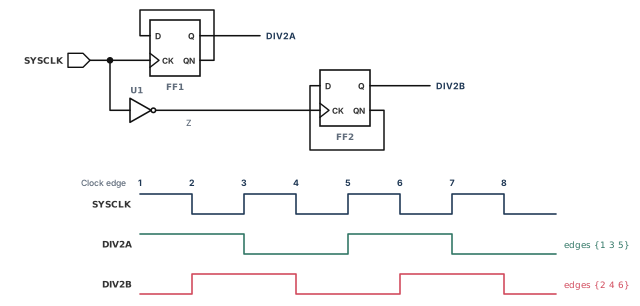
DIV2B toggles on falling edges, so -divide_by cannot describe it:
pt_shell> create_generated_clock -name DIV2B \
            -source [get_ports SYSCLK] -edges { 2 4 6 } [get_pins FF2/Q]  ;# fall edges
Another way is to use the inverted clock at U1/Z as the source. Its edges 1, 3 and 5 are the falling edges of SYSCLK:
pt_shell> create_generated_clock -name DIV2B \
            -source [get_pins U1/Z] -edges { 1 3 5 } [get_pins FF2/Q]  ;# U1/Z rises
Edges also describe uneven waveforms. A divide-by-3 circuit can make DIV3A, high for two master periods and low for one. Let SYSCLK have period 2. Then DIV3A rises at edge 1 (time 0), falls at edge 5 (time 4) and rises at edge 7 (time 6).
pt_shell> create_clock -period 2 -name SYSCLK [get_ports SYSCLK]   ;# master
pt_shell> create_generated_clock -edges { 1 5 7 } \
            -name DIV3A -source [get_ports SYSCLK] [get_pins U2/Q]   ;# period 6
12.4 Shifting the edges of a generated clock
You can shift each edge of a generated clock by a fixed time with -edge_shift. The shift is not clock latency. It is part of the waveform. -edge_shift works only together with -edges.
In Figure 22, a period-2.2 master drives two flops in series. DIV3B comes from U3/Q. DIV3C is the same waveform, one master period later, at U4/QN.
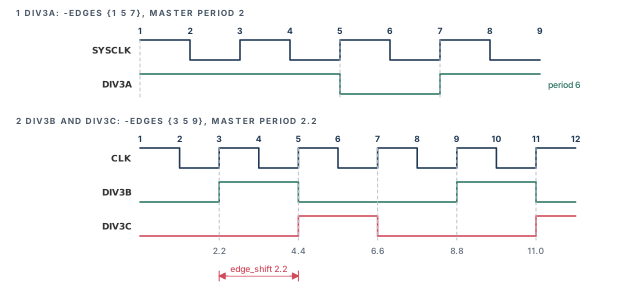
pt_shell> create_clock -period 2.2 -name CLK [get_ports SYSCLK]  ;# master
pt_shell> create_generated_clock -edges { 3 5 9 } \
            -name DIV3B -source [get_ports SYSCLK] [get_pins U3/Q]  ;# {2.2 4.4}
pt_shell> create_generated_clock -edges { 3 5 9 } \
            -edge_shift { 2.2 2.2 2.2 } \
            -name DIV3C -source [get_ports SYSCLK] [get_pins U4/QN]  ;# 2.2 later
report_clock lists both the clocks and the generated clock details:
  p - propagated_clock
  G - Generated clock

Clock          Period   Waveform        Attrs     Sources
----------------------------------------------------------
CLK              2.20   {0 1.1}                   {SYSCLK}
DIV3B            6.60   {2.2 4.4}       G         {U3/Q}
DIV3C            6.60   {4.4 6.6}       G         {U4/QN}

Generated     Master       Generated    Waveform
Clock         Source       Source       Modification
----------------------------------------------------------
DIV3B         SYSCLK       U3/Q         edges( 3 5 9 )
DIV3C         SYSCLK       U4/QN        edges( 3 5 9 )
                                        shifts( 2.2 2.2 2.2 )
12.5 Several clocks at the source pin
The generated clock depends on the clock that reaches its -source pin. That pin may receive more than one clock. Then you pick the master with -master_clock, together with -source. report_clock shows the master clock, the master source pin and the generated clock pin.
12.6 Selecting, reporting and removing generated clocks
get_clocks selects clocks by name pattern or by filter. If all generated clocks share a pattern, use it:
pt_shell> set_false_path -from [get_clocks CLK_DIV*] \
            -to [get_clocks CLKB]   ;# all CLK_DIV clocks to CLKB
If the names follow no pattern, filter on the is_generated attribute:
pt_shell> set_false_path -from [get_clocks CLK* -filter "is_generated==true"] \
            -to [get_clocks CLKB]   ;# generated clocks only
For reports and clean-up:
report_clockreports clocks and generated clocks in the current design.report_clock_timinggives a detailed report of a clock network. The Reporting and Debugging Analysis Results chapter covers it.report_transitive_fanout -clock_treeshows the clock networks in the design.remove_generated_clockremoves a generated clock and its clock object.
pt_shell> remove_generated_clock CLK_DIV2 ;# remove CLK_DIV212.7 Edge-specific source latency for generated clocks
The source latency of a generated clock depends on which master edge makes each of its edges. The tool takes this into account. It finds the worst-case path that produces the required edge type, starting from the master clock source.
Sometimes paths exist, but none gives the needed edge relationship. The tool then reports error UITE-461. It says that no path is found for the generated clock source latency, and it uses zero source latency:
Error: Generated clock 'clk_div2' 'rise_edge' is not
satisfiable; zero source latency will be used. (UITE-461)
Error: Generated clock 'clk_div2' 'fall_edge' is not
satisfiable; zero source latency will be used. (UITE-461)

Path Type: min

Point                                    Incr       Path
----------------------------------------------------------
clock clk_div2 (rise edge)              0.000      0.000
clock source latency                    0.000      0.000
Udiv/Q (FD1)                            0.000      0.000 r
...A beginner ignores UITE-461 because it is "only latency". However, zero source latency hides the whole master clock path. Every path on that clock is then timed with wrong clock arrival times. Fix the -edges list or the source pin until the error disappears.
-divide_by for rising-edge dividers, -edges for anything else, and treat UITE-461 as a real error.13 Clock mesh analysis
13.1 What a clock mesh is and why it is special
A clock mesh is a grid of metal wires driven by many buffers in parallel. Each load is driven by several drivers at once. Thus, the mesh is a good candidate for circuit-level simulation.
PrimeTime SI offers a simple way to analyze a mesh with transistor-level accuracy, using SPICE simulation. SPICE is a circuit simulator that solves the transistor equations directly. If the clock network does not change, you can reuse the results in later timing and signoff runs.
13.2 How the analysis works
- You give the root node of the clock network.
- From there, the tool traces the whole network, including the mesh and the sequential loads.
- It runs an external HSPICE-compatible simulator on the network. This gives the exact timing of each cell arc and net arc.
- It back-annotates the measured delays onto the design.
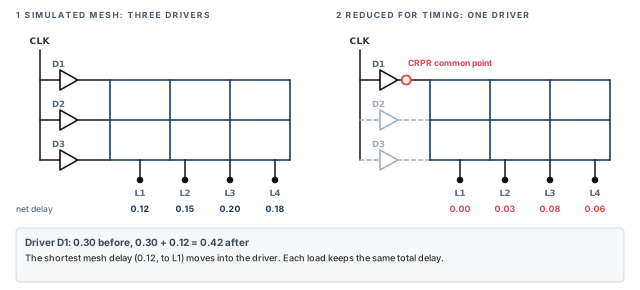
- It reduces the timing arcs of the mesh, as Figure 23 shows.
In the reduction, the tool keeps a single mesh driver. It disables timing through the other drivers. Arcs from the disabled drivers are replaced by equal arcs from the retained driver.
Why reduce? With n drivers and m loads, the full mesh has n × m driver-to-load arcs. After the reduction there are only m. The driver-to-load timing stays accurate.
13.3 CRPR through the mesh
The delays from the single driver to the loads differ. The shortest one, to the nearest load, is shared by every path through the mesh. To get the most CRPR benefit, this shared part should sit before the CRPR common point. So the tool makes this adjustment:
- The output of the retained driver becomes the CRPR common point.
- The tool finds the shortest net delay through the mesh, for example 0.12.
- It adds that value to the driver cell delay: 0.30 becomes 0.42.
- It subtracts the same value from every net delay through the mesh: 0.15 becomes 0.03.
report_timing through the mesh shows the timing through the single retained driver. The numbers reflect the SPICE results.
13.4 Running the flow
The flow has two parts. You generate the clock mesh model once. Then you reuse it in as many runs as you need. Figure 24 shows both.
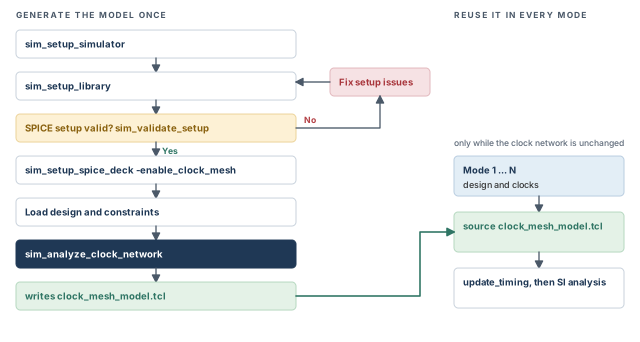
The model can be reused while the clock network stays the same. Typical reuse cases are timing analysis, ECO (engineering change order) netlist editing and constraint clean-up.
# set up the simulator, working directory and options
sim_setup_simulator -simulator /usr/bin/hspice -simulator_type hspice \
  -work_dir ./tmp_dir -sim_options ".option ingold=2 numdgt=6 statfl=1"  ;# SPICE setup

foreach_in_collection lib [get_libs *] {
  sim_setup_library -library $lib \
    -sub_circuit /u/xtalk/si_lib_gen/unit/gem/hspice \
    -header /u/xtalk/si_lib_gen/unit/gem/model_hspice \
    -file_name_pattern {my_%s.spc}                  ;# map cells to SPICE files
}

sim_validate_setup -from A -to Y -lib_cell [get_lib_cells */IV170BQ] \
  -capacitance 48 -transition_time 0.2              ;# optional: check one arc

sim_setup_spice_deck -enable_clock_mesh             ;# turn on mesh model output

read_verilog top.v                                  ;# read the design
link                                                ;# link the design
read_parasitics top.spef                            ;# clock net parasitics
create_clock -period 10 [get_ports CLK1]            ;# clock constraints

sim_analyze_clock_network -from [get_ports CLK1] \
  -output ./clock_mesh_model.tcl                    ;# simulate and annotate
The simulation results are written to a Tcl script. In later runs, source that script instead of repeating the generation steps, then update timing.
# ... read the design and clock constraints for this mode ...
source clock_mesh_model.tcl   ;# load the clock simulation results
update_timing                 ;# then continue with the SI analysis
13.5 The five simulation commands
| Command | What it does |
|---|---|
sim_setup_simulator |
Sets the simulator location, simulator type and working directory |
sim_setup_library |
Library setup, such as mapping transistor models to gate-level cells |
sim_setup_spice_deck |
Sets options for writing the SPICE deck; -enable_clock_mesh turns on mesh model generation |
sim_validate_setup |
Checks that the SPICE setup matches the library characterization |
sim_analyze_clock_network |
Extracts the network from a root, simulates it and back-annotates the results |
pt_shell> sim_setup_simulator -simulator /usr/bin/hspice \
            -simulator_type hspice -work_dir ./tmp_dir \
-sim_options ".option ingold=2 numdgt=6 statfl=1" ;# simulator setuppt_shell> sim_setup_library -library $lib_name \
-sub_circuit /u/xtalk/si_lib_gen/unit/gem/hspice \
-header /u/xtalk/si_lib_gen/unit/gem/model_hspice \
-file_name_pattern {my_%s.spc} ;# SPICE files per cell
pt_shell> sim_setup_spice_deck -enable_clock_mesh ;# mesh model flow onsim_validate_setup deserves care, because a wrong SPICE setup spoils everything after it:
- It runs the simulator from
sim_setup_simulatoron the timing arcs of one library cell. - It checks that the library characterization settings match the SPICE setup.
- It looks for the SPICE executable, SPICE netlists, model files and licenses.
- It checks SPICE options and data such as I/O rail settings and unit sizes.
- It checks the model license and the SPICE version against the model.
- If no errors are found, it shows the delay and slew from SPICE and from PrimeTime side by side.
It supports only combinational cells. It assumes the library is already fully validated, so any mismatch points at the simulator setup. It runs only when no design is loaded.
pt_shell> sim_validate_setup -from A -to Y \
            -lib_cell [get_lib_cells $lib_name/IV170BQ] \
            -capacitance 48 -transition_time 0.2  ;# one arc
Finally, sim_analyze_clock_network extracts the network from the root you give. It writes a SPICE deck, runs the simulator and back-annotates the results.
pt_shell> sim_analyze_clock_network -from [get_ports CLK1] \
-output ./clock_mesh_model.tcl ;# results saved as a Tcl script14 Worked example: clocking a small block before and after CTS
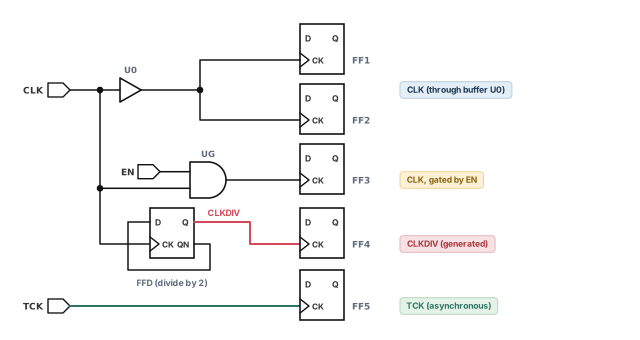
Let us clock a small block named top. Figure 25 shows its clock network.
- Port
CLKdrivesFF1andFF2through bufferU0. CLKalso drives AND gateUG, enabled byEN.UGclocksFF3.- Flop
FFDdividesCLKby 2. Its output clocksFF4. - Port
TCKis a slow test clock from outside. It clocksFF5and never talks toCLK.
Step 1 — Create the master clocks
pt_shell> create_clock -period 10 -waveform {0 5} [get_ports CLK]  ;# system clock
pt_shell> create_clock -period 100 -waveform {0 50} [get_ports TCK] ;# slow test clock
Check: report_clock lists CLK and TCK with the right periods.
Step 2 — Create the generated clock
pt_shell> create_generated_clock -name CLKDIV -source [get_ports CLK] \
            -divide_by 2 [get_pins FFD/Q]   ;# half of CLK, at FFD/Q
Check: report_clock shows CLKDIV with a G and a period of 20. No UITE-461 error appears at the next timing update.
Step 3 — Add a virtual clock for the interface
pt_shell> create_clock -period 10 -name vclk -waveform {0 5} ;# off-chip partner clockInput and output delays then refer to vclk, as the Constraining the Design chapter shows.
Step 4 — Pre-CTS latency, uncertainty and transition
pt_shell> set_clock_latency 1.0 -source -early [get_clocks CLK]   ;# board delay, early
pt_shell> set_clock_latency 1.4 -source -late [get_clocks CLK]    ;# board delay, late
pt_shell> set_clock_latency 0.8 [get_clocks CLK]  ;# tree estimate
pt_shell> set_clock_uncertainty -setup 0.3 [get_clocks CLK]       ;# skew plus margin
pt_shell> set_clock_uncertainty -hold 0.1 [get_clocks CLK]        ;# hold margin
pt_shell> set_clock_transition 0.15 [get_clocks CLK]              ;# estimated slope
Check: a setup report for FF1 to FF2 shows source latency 1.4 at launch and 1.0 at capture.
Step 5 — Clock-gating check on UG
pt_shell> set_clock_gating_check -setup 0.2 -hold 0.1 [get_clocks CLK]  ;# all CLK gates
pt_shell> report_clock_gating_check [get_cells UG]                     ;# check EN at UG
Check: no clock-gating violation at UG. A violation means EN changes while CLK is high.
Step 6 — Declare the unrelated test clock
pt_shell> set_clock_groups -asynchronous -name sys_vs_test \
            -group {CLK CLKDIV vclk} -group {TCK}   ;# never time CLK against TCK
pt_shell> report_clock -groups                    ;# confirm the groups
pt_shell> get_clock_relationship {CLK TCK}        ;# report how CLK and TCK relate
Check: the timing report has no path between TCK and the system clocks.
Clock          Period   Waveform        Attrs     Sources
----------------------------------------------------------
CLK             10.00   {0 5}                     {CLK}
CLKDIV          20.00   {0 10}          G         {FFD/Q}
TCK            100.00   {0 50}                    {TCK}
vclk            10.00   {0 5}                     {}
Step 7 — Check pulse width and period
pt_shell> report_constraint -min_period              ;# library min_period limits
pt_shell> report_min_pulse_width -path_type short    ;# pulse width on clock pins
Check: no minimum period or pulse width violation. Before CTS, these mainly catch waveform and library limit problems.
Step 8 — After CTS: switch to the real tree
pt_shell> set_propagated_clock [all_clocks]     ;# real tree delays from now on
pt_shell> remove_clock_transition [get_clocks CLK]   ;# real slopes replace the estimate
Check: report_timing -path_type full_clock now lists each clock buffer on the clock path. Rerun Step 7, because real tree delays can shrink pulses.
Keep the source latency from Step 4 after CTS. It describes the board, which clock tree synthesis does not change. Only the on-chip parts become propagated.
15 Common mistakes and how to catch them
| Symptom | Likely cause | Fix |
|---|---|---|
| Flops on a divider output are untimed | No generated clock at the divider | Add create_generated_clock at the divider pin |
| Thousands of violations between two clocks | Unrelated clocks left synchronous | Declare set_clock_groups -asynchronous |
| False paths between clocks have no effect | The clocks are already in a clock group, which invalidates them | Remove the redundant false paths |
| Setup slack looks too good before CTS | No clock uncertainty set | Add setup and hold uncertainty |
| Pre-layout clock latency looks wrong | Propagated clock used before a clock tree exists | Use set_clock_latency estimates until after CTS |
| Large clock-to-output delays before CTS | One buffer drives every clock pin, so slopes are slow | Set set_clock_transition |
| One MUX input clock gets another clock's uncertainty | Uncertainty set on ports feeding a clock MUX | Set uncertainty on the clock objects |
| UITE-461 at timing update | Edge list or source pin does not match the circuit | Fix -edges or -source; never ignore it |
| Every pair of MUXed clocks is timed | No exclusivity declared | Use exclusivity points, clock groups or case analysis |
| Pulse clock width reported as zero | No rise and fall latency at the pulse generator | Let latency propagate, or set -rise and -fall latency |
| Error that a pulse clock merges with another sense | Two senses of one clock meet | Set the wanted sense with set_sense -type clock -pulse |
16 Interview preparation
create_clock -period 10 -waveform {2 4} [get_ports C1] define?A clock on port C1 with a 10 ns period, rising at 2 and falling at 4 in each period.
- The clock is named
C1, after its first source. - A path group named
C1is also created. - The waveform is ideal until you add latency.
A clock with no source in the design, used as the reference for input and output delays.
- It models a clocked device outside the block.
- You create it with
create_clockand-name, and no source object.
Source latency runs from the ideal origin to the clock definition point; network latency runs on to the register clock pin.
- Total latency is the sum.
- Board and off-chip delay are source latency.
- After CTS, network latency is usually propagated.
Setup uncertainty is subtracted from the required time; hold uncertainty is added to it.
- Both make the check harder.
- A single value applies to both setup and hold.
Setup uses late launch and early capture; hold uses early launch and late capture.
- This picks the pessimistic value for each check.
- Same clock, 10 ns period: the setup window shrinks to 9.0.
CLKA and interclock uncertainty 2 from CLKB to CLKA. What is used on a CLKB to CLKA path?2, because interclock uncertainty overrides simple uncertainty.
- Interclock uncertainty is one-way; set both directions if needed.
- A
CLKAtoCLKApath still uses 5.
set_clock_latency -dynamic instead of set_clock_uncertainty?Uncertainty is ignored by crosstalk arrival windows and by CRPR; dynamic latency is handled correctly by both.
- CRPR uses only the static part up to the common point for paths with different launch and capture edges.
report_timingshows static and dynamic latency separately.
-logically_exclusive, -physically_exclusive and -asynchronous?All three stop timing checks between groups; they differ in crosstalk handling.
- Asynchronous: crosstalk analyzed with infinite arrival windows.
- Logically exclusive: crosstalk still analyzed normally.
- Physically exclusive: no crosstalk analysis between the clocks.
It expands both clocks over the base period, the least common multiple 12, and checks every launch edge against every capture edge.
- This assumes the clocks are synchronous, which is the default.
- Unrelated clocks with odd periods can give huge base periods and false violations.
set_clock_groups -logically_exclusive?When clocks are exclusive only below a MUX, but may still interact above it.
- Exclusivity points make clocks physically exclusive in the MUX fanout only.
- They can be inferred at MUX cells with
timing_enable_auto_mux_clock_exclusivity. - Random-logic MUXes need
set_clock_exclusivity -type user_defined.
The nominal width is zero; the real width is fall network latency minus rise network latency for a high pulse.
- Latency can be propagated or set with
set_clock_latency -riseand-fall. - A low pulse uses rise minus fall.
create_generated_clock -edges {1 1 3}, or set_sense -type clock -pulse rise_triggered_high_pulse at the generator output.
- The generated clock creates a new domain; the sense does not.
- A characterized pulse generator cell in the library needs neither.
Slack is −0.07, because the actual period 5.13 − 1.20 = 3.93 is below 4.00.
- The first edge uses maximum delays and the second uses minimum delays.
- CRP is added back to the close edge; uncertainty is subtracted.
It cuts n × m driver-to-load arcs to m; the shortest mesh delay moves into the retained driver, the CRPR common point.
- That shared delay is then before the common point, so CRPR removes it.
- Each load keeps the same total delay.
17 Chapter close
Compact glossary
| Term | Meaning |
|---|---|
| Ideal waveform | The clock's edge times from create_clock, with no network delay |
| Virtual clock | A clock with no source in the design, used for I/O delays |
| Clock definition point | The port or pin where a clock is created |
| Source latency | Delay from the ideal origin to the clock definition point |
| Network latency | Delay from the clock definition point to a register clock pin |
| Ideal clocking | Estimated latency set with set_clock_latency; the default |
| Propagated clock | Latency computed from the real clock tree |
| Clock uncertainty | Margin for skew and jitter; tightens setup and hold |
| Interclock uncertainty | Uncertainty between a "from" clock and a "to" clock |
| Dynamic latency | The jitter part of source latency, seen by SI and CRPR |
| CRPR | Clock reconvergence pessimism removal on shared clock paths |
| Base period | Least common multiple of synchronous clock periods |
| Synchronous clocks | Clocks with a common source and fixed phase; the default |
| Asynchronous clocks | Clocks that do not communicate; edges at any time |
| Exclusive clocks | Clocks never active together, logically or physically |
| Exclusivity point | A pin where only one clock at a time can pass |
| Clock sense | Whether a register sees the clock true, inverted or ambiguous |
| Non-unate | A clock path whose sense is ambiguous, such as through an XOR |
| Pulse clock | A train of short pulses whose two edges come from one source edge |
| Generated clock | A clock derived from a master clock by on-chip logic |
| Edge numbers | Master edges counted 1, 2, 3 …; odd are rising |
| Clock-gating check | Setup and hold of an enable against the clock it gates |
| Minimum period check | Spacing of same-type clock edges against a library limit |
| PLL | Phase-locked loop; aligns feedback phase to the reference |
| Clock mesh | A grid of wires driven by many parallel clock buffers |
Clocks on one page
Figure 26 is the summary to redraw from memory.
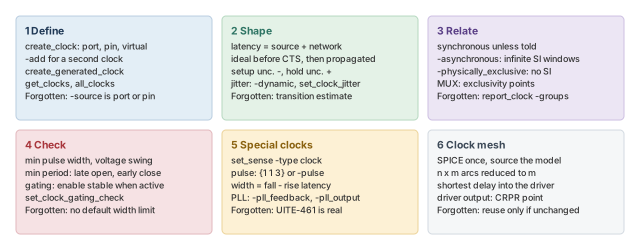
Where the next chapter goes, and why
You can now describe every clock in a design, give it realistic latency and margin, and tell the tool which clocks meet. However, a correct clock is only half of a timing check. The other half is the path that data takes between two clock edges.
The Timing Paths and Exceptions chapter covers those paths. It explains startpoints, endpoints and path groups, including the groups create_clock makes. It also covers exceptions such as false paths and multicycle paths. Thus, the clock relationships you set here become the base that every exception changes.