Why this chapter matters in a real project
PrimeTime checks every path with one simple rule. Data launched on one clock edge must be captured on the next clock edge at the endpoint. For most paths this rule is right. For some paths it is wrong.
For example, a slow divider may be designed to take two clock cycles. A test-only register may never talk to the functional logic. With the default rule, the tool reports these paths as violations. Thus, you either waste days "fixing" paths that work, or you learn to ignore reports. Both are dangerous.
A timing exception tells the tool that a path does not follow the default rule. Exceptions are powerful, and that is the risk. One wrong false path can hide a real violation until silicon comes back. A careless wildcard, a pattern such as * that matches many names, can also slow every run. This chapter shows how to set exceptions precisely, check what the tool accepted, and clean them up.
Prerequisites
- Working With Design Data: reading and linking a design, and finding objects with
get_cells,get_pins,get_portsandget_clocks. - Constraining the Design: input delay and output delay on ports.
- Clocks:
create_clock, periods and waveforms, and clock groups. - You should know what setup and hold mean for a flip-flop.
- You do not need delay calculation details, variation or case analysis yet. Later chapters cover them.
In this chapter, times are in nanoseconds (ns) unless said otherwise.
Learning objectives
- Explain what a timing path is and name its valid startpoints and endpoints.
- Predict which path group a path belongs to, and create your own groups.
- Run
report_timingwith the options that control the number, type and detail of paths. - Specify paths with
-from,-throughand-to, including edge-specific and clock-based forms. - Predict the default setup and hold relationships for one clock and for two different clocks.
- Apply false paths, maximum and minimum delays, multicycle paths and path margins correctly.
- Choose the most efficient way to express an exception.
- Resolve conflicting exceptions with the precedence rules.
- Find ignored exceptions with
report_exceptionsandreport_timing -exceptions, and fix them. - Remove exceptions with
reset_path, and save and restore timing path collections.
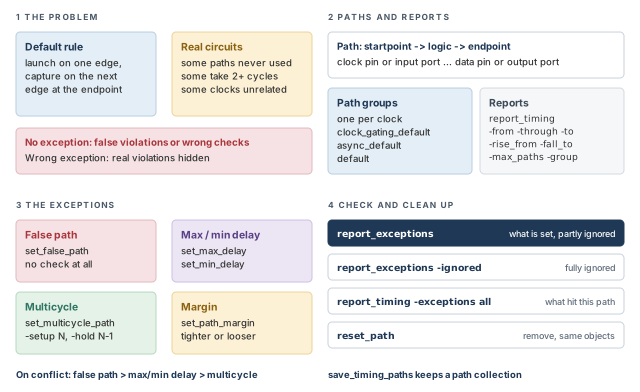
Figure 1 is a map of the whole chapter. Come back to it whenever you lose your place.
1 The beginner's mental model
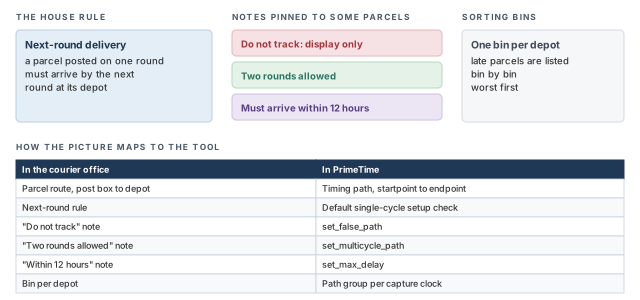
Think of a courier office with one house rule. A parcel posted on one collection round must reach its depot by the next round. Every parcel is checked against this rule, and late ones are listed.
Some parcels carry a note:
- "Do not track: this is a display item."
- "Two rounds allowed: this one is heavy."
- "Must arrive within 12 hours, whatever the rounds."
Late parcels are also sorted into bins, one bin per depot. Figure 2 shows this picture and maps each piece to its PrimeTime name.
- A courier checks each parcel once. PrimeTime checks two things on each path: setup (not too late) and hold (not too early). An exception can change both.
- A note sits on one parcel. An exception is written for a set of paths. A loose description can catch far more paths than you meant.
- Two notes on one parcel would confuse a clerk. The tool has strict rules for which exception wins, covered later in this chapter.
Now the engineering model
In engineering terms, the chapter has four parts:
- Paths. A timing path runs from a startpoint, through combinational logic, to an endpoint. The tool sorts paths into path groups.
- Reports.
report_timingshows the worst paths. Options such as-from,-throughand-topick which paths you see. - Exceptions.
set_false_path,set_max_delay,set_min_delay,set_multicycle_pathandset_path_marginchange how chosen paths are checked. - Checks.
report_exceptionsandreport_timing -exceptionsshow what the tool really applied.reset_pathremoves exceptions.
2 Timing paths and path groups
2.1 What a timing path is
A timing path is a point-to-point route through the design. It has three parts:
- A startpoint: a register clock pin or an input port. A register here means a flip-flop or latch.
- Combinational logic in between: gates and nets, but no registers.
- An endpoint: a register data input pin or an output port.
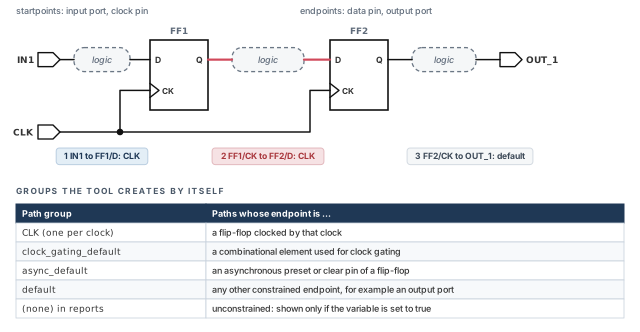
For example, in Figure 3 the path from FF1/CK through some logic to FF2/D is one timing path. Data leaves FF1 on a clock edge and must reach FF2/D before the next one.
2.2 Path groups the tool creates for you
The tool organizes paths into path groups. Grouping changes how reports are produced. For example, report_timing -group reports the worst path in each listed group.
Each time you create a clock with create_clock, the tool creates a path group with the same name. A path goes into that group when its endpoint is a flip-flop clocked by that clock. The tool also creates three more groups by itself:
- clock_gating_default — paths that end on combinational elements used for clock gating. Clock gating means a gate that switches a clock on and off.
- async_default — paths that end on asynchronous preset or clear inputs of flip-flops.
- default — constrained paths that fit no other group. For example, a path that ends on an output port.
Figure 3 shows three paths and their groups, with the full list underneath.
In Design Compiler, each path group can carry a weight, also called a cost function. A higher weight makes the synthesis tool work harder on that group. You can assign weights in PrimeTime too, but PrimeTime does not use them.
2.3 Your own path groups
You can create user-defined path groups with group_path. The same command moves chosen paths into a named group. For example, you might want all paths to an output bus reported on their own.
pt_shell> group_path -name out1bus -to [get_ports OUT_1*]   ;# OUT_1* paths to out1bus
pt_shell> report_path_group                                 ;# list the path groups
Three more facts:
report_path_groupshows the current set of path groups.remove_path_groupremoves a group. Its paths then go back to the default group.group_pathis not compatible with hierarchical model extraction. That is the step that builds a timing model of a block for use at a higher level.
2.4 Unconstrained paths
An unconstrained path is a path the tool has no requirement for. For example, an input port with no input delay has no launch time. Unconstrained paths belong to no path group, and they are not reported by default.
To see them, set the timing_report_unconstrained_paths variable to true. report_timing then shows them in a group called (none).
pt_shell> set timing_report_unconstrained_paths true ;# report them tooLook at unconstrained paths at least once on every new block. A missing input delay or clock leaves paths unchecked, and nothing is shown as a violation.
3 Reading path timing reports
3.1 What a report shows
A path timing report gives detailed timing for chosen paths. You use it to focus on a violation and find its cause. The report can show:
- the gate levels in the path;
- the incremental delay of each gate level;
- the running sum of the path delay;
- the slack of the path;
- the source and destination clock name, latency and uncertainty;
- on-chip variation (OCV) with clock reconvergence pessimism removed.
Latency is the delay of the clock from its source to a flop. Uncertainty is extra margin for clock jitter and skew. The Clocks chapter covers both.
Slack is the required time minus the arrival time. Negative slack is a violation. OCV means small speed differences across one chip. Clock reconvergence pessimism is false pessimism on the clock path shared by launch and capture. That shared part gets two different delays. The Variation chapter covers both.
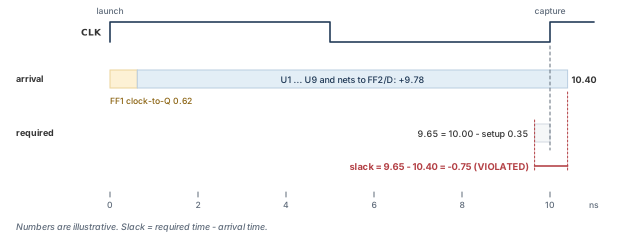
The report below shows one setup path. Figure 4 then draws the same numbers as a timeline.
Startpoint: FF1 (rising edge-triggered flip-flop clocked by CLK)
Endpoint: FF2 (rising edge-triggered flip-flop clocked by CLK)
Path Group: CLK
Path Type: max
Point Incr Path
---------------------------------------------------------
clock CLK (rise edge) 0.00 0.00
clock network delay (ideal) 0.00 0.00
FF1/CK (DFFX1) 0.00 0.00 r
FF1/Q (DFFX1) 0.62 0.62 f
U1/Y (NAND2X1) 0.38 1.00 r
...
U9/Y (INVX1) 0.21 10.35 f
FF2/D (DFFX1) 0.05 10.40 f
data arrival time 10.40
clock CLK (rise edge) 10.00 10.00
clock network delay (ideal) 0.00 10.00
FF2/CK (DFFX1) 10.00 r
library setup time -0.35 9.65
data required time 9.65
---------------------------------------------------------
data required time 9.65
data arrival time -10.40
---------------------------------------------------------
slack (VIOLATED) -0.75Read it in three blocks:
- Arrival. Start at the launch edge and add each delay. The "Incr" column is each step; the "Path" column is the running sum.
- Required. Start at the capture edge and subtract the setup time of the capture flop.
- Slack. Required minus arrival. Here 9.65 − 10.40 = −0.75.
The letters r and f show whether the signal rises or falls at that point.
3.2 The default report and its options
With no options, report_timing reports the single path with the worst setup slack among all path groups. It is the same as this command:
pt_shell> report_timing -path_type full -delay_type max -max_paths 1 ;# worst setupHere -delay_type max means a maximum-delay check, which is a setup check. -path_type full shows every point along the path. Options of report_timing control four things:
- the number of paths;
- the types of paths;
- the amount of detail;
- the startpoints, endpoints and intermediate points along the path.
The table below lists the options used in this chapter.
| Option | What it does |
|---|---|
-max_paths N |
Reports up to N paths. Above 1, only paths with negative slack are reported. |
-slack_lesser_than value |
Includes paths with slack below the value, so positive-slack paths can appear |
-group list |
Reports the worst path in each listed path group |
-transition_time, -capacitance |
Adds transition time and capacitance columns |
-from, -through, -to (and rise/fall forms) |
Selects paths by their points; covered in the next section |
-nworst N |
Reports up to N paths to each endpoint; the latch examples use a large N to list every matching path |
-exceptions dominant / overridden / all |
Adds the exceptions that affect the path; covered later |
3.3 Reporting several paths
pt_shell> report_timing -max_paths 4                       ;# four worst setup paths
pt_shell> report_timing -slack_lesser_than 100 -max_paths 40   ;# positive slack too
pt_shell> report_timing -group [get_path_groups *]         ;# worst path in every group
pt_shell> report_timing -transition_time -capacitance      ;# add Trans and Cap columns
The -transition_time and -capacitance options add two columns. Transition time is how long a signal takes to rise or fall. Capacitance is the load each driver sees. They help you spot a weak driver with a heavy load.
A beginner runs report_timing -max_paths 40 on a clean block and sees nothing. With -max_paths above 1, only negative-slack paths are reported. Add -slack_lesser_than with a large value to see the near-critical paths too.
3.4 How a single delay is calculated
Sometimes you need to know why one cell or net has its delay. The report_delay_calculation command shows the detailed calculation:
- from the input to the output of a cell; or
- from the driver to a load on a net.
What you see depends on the delay model in use. Many library vendors treat cell delay details as private. So the command shows cell delay details only if the vendor enabled this with the library_features attribute in Library Compiler. The Delay Calculation chapter goes deeper.
-max_paths above 1 hides positive slack.4 Specifying timing paths
4.1 -from and -to
report_timing, the exception commands and several other commands share one way to describe paths. The simplest form names a startpoint with -from and an endpoint with -to.
pt_shell> report_timing -from PORTA -to PORTZ               ;# input port to output
pt_shell> set_false_path -from FFB1/CP -to FFB2/D           ;# clock pin to data pin
pt_shell> set_max_delay -from REGA -to REGB 12              ;# register to register
pt_shell> set_multicycle_path -setup 2 -from FF4 -to FF5    ;# register to register
A sequential cell is a flip-flop or latch. A primary port is a port of the top-level design.
Each object in -from can be:
- a clock;
- a primary input port;
- a sequential cell;
- a clock input pin of a sequential cell;
- a data pin of a level-sensitive latch;
- a pin that has an input delay set.
Each object in -to can be:
- a clock;
- a primary output port;
- a sequential cell;
- a data input pin of a sequential cell;
- a pin that has an output delay set.
If you name a clock, all registers and primary ports related to that clock are used. For -from, that means the registers and inputs it launches. For -to, it means the registers and outputs it captures. If you name a cell, the command applies to one path startpoint, or one endpoint, on that cell.
4.2 -through, and the clock form
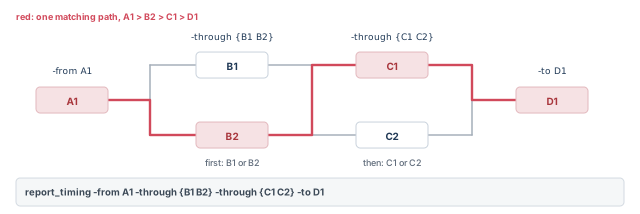
The -through option names a point in the middle of the path. With several -through options, order matters:
-through B1 -through C1means: pass through B1, then through C1.- A list inside one option means "any of these". So
-through {B1 B2}means B1 or B2.
pt_shell> report_timing -from A1 -through B1 -through C1 -to D1   ;# B1, then C1
pt_shell> report_timing -from A1 -through {B1 B2} \
            -through {C1 C2} -to D1   ;# B1 or B2, then C1 or C2
There is also a special form. The startpoint or endpoint goes into -through, and a clock goes into -from or -to.
pt_shell> report_timing -from [get_clocks CLK] -through $startpoint  ;# CLK launches
pt_shell> report_timing -through $endpoint -to [get_clocks CLK]      ;# CLK captures
This works with every valid startpoint and endpoint type. Examples are input ports, output ports, flip-flop clock and data pins, and clock-gating check pins. However, it needs more computation, especially in large designs. It is better to use -from and -to whenever they can say what you mean.
Figure 5 draws the second ordered command above as a picture.
4.3 Rising and falling edges
Each option has rise and fall forms: -rise_from, -fall_from, -rise_to, -fall_to, -rise_through and -fall_through. They restrict the command to rising or falling edges only.
When the object is a clock, the edge has a special meaning:
-rise_from clockor-fall_from clockpicks paths by the clock edge that launches data at the startpoint.-rise_to clockor-fall_to clockpicks paths by the clock edge that captures data at the endpoint.- The edge is the edge of the source clock. The tool follows any inversions along the clock path.
- Whether the data itself rises or falls does not matter.
For example, -rise_to CLK matches a rising-edge flop with no inversion on its clock path. It also matches a falling-edge flop that sees an inverted clock. Both capture on the rising edge of the source clock.
4.4 Worked edges: four flop pairs
Figure 6 has four paths. FF1, FF2, FF5 and FF6 are rising-edge flops. FF3, FF4, FF7 and FF8 are falling-edge flops. FF1 to FF4 see the clock directly. FF5 to FF8 see an inverted clock.
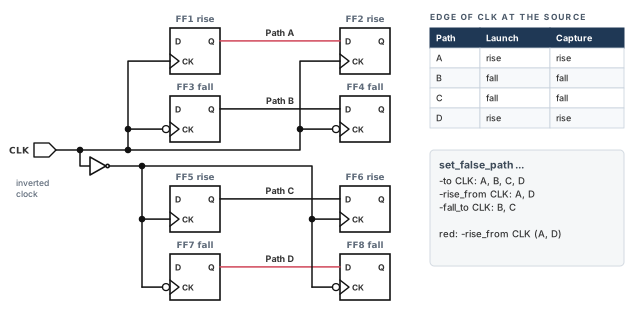
Now apply three false paths, one at a time:
pt_shell> set_false_path -to [get_clocks CLK]        ;# A, B, C and D are false
pt_shell> set_false_path -rise_from [get_clocks CLK] ;# A and D are false
pt_shell> set_false_path -fall_to [get_clocks CLK] ;# B and C are false-to CLKmatches all four paths, because CLK captures at every endpoint.-rise_from CLKmatches paths launched by the rising edge of CLK: Path A and Path D.-fall_to CLKmatches paths captured by the falling edge of CLK: Path B and Path C.
4.5 Worked edges: a latch in the middle
A level-sensitive latch passes data while its gate input G is active. It opens on one clock edge and closes on the other. Figure 7 shows the circuit used for the next four examples.
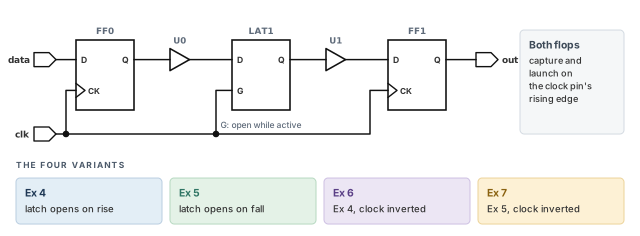
In each example, -nworst 100 lets the report list every matching path. The paths are written as from → to.
| Variant | Command | Paths reported |
|---|---|---|
| Ex 4: latch opens on rise, closes on fall | -rise_from clk |
data → FF0, FF0 → LAT1, LAT1/D → FF1, LAT1/G → FF1, FF1 → out |
| Ex 4 | -fall_to clk |
FF0 → LAT1 |
| Ex 5: latch opens on fall, closes on rise | -fall_from clk |
LAT1/D → FF1, LAT1/G → FF1 |
| Ex 5 | -rise_to clk |
data → FF0, FF0 → LAT1, LAT1 → FF1, FF1 → out |
| Ex 6: Ex 4 with the clock inverted | -fall_from clk |
FF0 → LAT1, LAT1/D → FF1, LAT1/G → FF1, FF1 → out |
| Ex 6 | -rise_to clk |
FF0 → LAT1, FF1 → out |
| Ex 7: Ex 5 with the clock inverted | -rise_from clk |
data → FF0, LAT1/G → FF1 |
| Ex 7 | -fall_to clk |
data → FF0, FF0 → LAT1, LAT1/D → FF1, LAT1/G → FF1 |
In the table, clk stands for [get_clocks clk]. So the first row is report_timing -rise_from [get_clocks clk] -nworst 100. Two patterns help you read the table:
- In these examples, a path that ends at the latch, FF0 → LAT1, is captured when the latch closes. In Ex 4 it closes on the falling edge, so
-fall_tofinds it. - A path that starts at the latch gate, LAT1/G → FF1, is launched when the latch opens. In Ex 4 it opens on the rising edge, so
-rise_fromfinds it.
When the clock is inverted, the source clock edges swap. That is why Ex 6 and Ex 7 mostly use the opposite edges from Ex 4 and Ex 5.
Before you write an edge-specific exception, run the same options with report_timing first. The report shows exactly which paths the options catch. Only then copy them into the exception.
4.6 Worked edges: two clocks at one flop
In Figure 8, a multiplexer selects clk1 or clk2 for FF1. So paths into FF1/D can be captured by either clock.
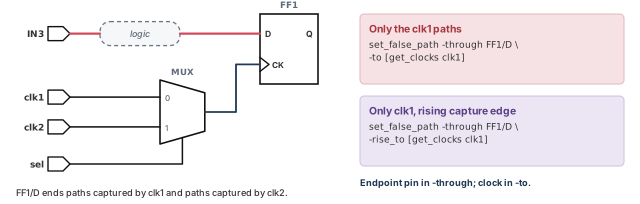
Suppose you want a false path that ends at FF1/D, but only for clk1. A plain -to FF1/D would catch both clocks. Instead, put the pin in -through and the clock in -to:
pt_shell> set_false_path -through FF1/D -to [get_clocks clk1]      ;# clk1 only
pt_shell> set_false_path -through FF1/D -rise_to [get_clocks clk1] ;# clk1 rise only
The second command goes one step further. It only covers paths captured on the rising edge of clk1.
4.7 Invalid startpoints and endpoints in reports
A broad object list can include pins that are not valid startpoints or endpoints. For example, -from [get_pins FF/*] includes input, output and asynchronous pins of FF.
The timing_report_always_use_valid_start_end_points variable controls how three commands treat them: report_timing, report_bottleneck and get_timing_paths. It applies to -from, -rise_from and -fall_from, and to -to, -rise_to and -fall_to.
false(the default). The list means all pins within the scope of the listed objects. Invalid startpoints and endpoints are treated as through points, and the path search goes on. This is easy to write but wastes runtime on useless searching.true. Each reporting command ignores invalid startpoints and invalid endpoints.
Whatever the setting, it is better to list only valid points. Put input ports and register clock pins in -from. Put output ports and register data pins in -to. The search is then fast and the meaning is clear.
-from, -through and -to describe paths for reports and exceptions alike. With a clock as the object, rise and fall mean the launch or capture edge of the source clock.5 The default: single-cycle timing
5.1 Why you must know the default first
By default, the tool assumes that data launched at a startpoint is captured by the very next clock edge at the endpoint. This is called single-cycle timing. For paths that do not work this way, you set an exception. Otherwise, the analysis does not match the real circuit.
To decide whether you need an exception, you must know what the default check is. Then you compare it with how the design really works.
5.2 One clock
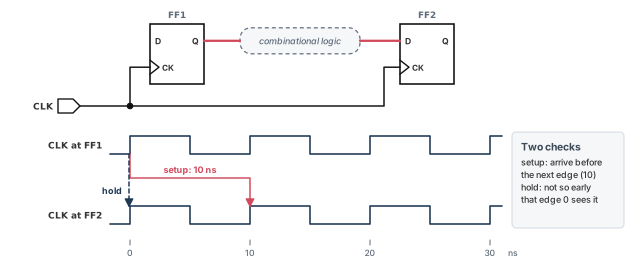
Figure 9 shows two rising-edge flops on the same 10 ns clock.
The tool makes two checks:
- Setup. Data launched from FF1 at time 0 must reach
FF2/Din time for the capture edge at time 10. If it takes too long, it is a setup violation. - Hold. The same data must not arrive so soon that FF2 captures it at the edge at time 0. If it arrives too soon, it is a hold violation.
These checks include everything relevant. That means the combinational cell delays, the net delays and the setup and hold times of the flops from the logic library.
5.3 Two different clocks: setup
The rule gets more interesting when the launch and capture flops use different clocks. Let us consider two clocks:
pt_shell> create_clock -period 10 -waveform {0 5} CLK1    ;# rises at 0, 10, 20 ...
pt_shell> create_clock -period 25 -waveform {5 12.5} CLK2 ;# rises at 5, 30 ...
By default, the tool treats the two clocks as synchronous: they keep a fixed phase relationship. To find the setup check, it does three things:
- It looks at a full repeating cycle. That is the least common multiple of the two periods, here 50 ns.
- For each capture edge at the endpoint, it picks the nearest launch edge before it.
- It uses the tightest of these pairs.
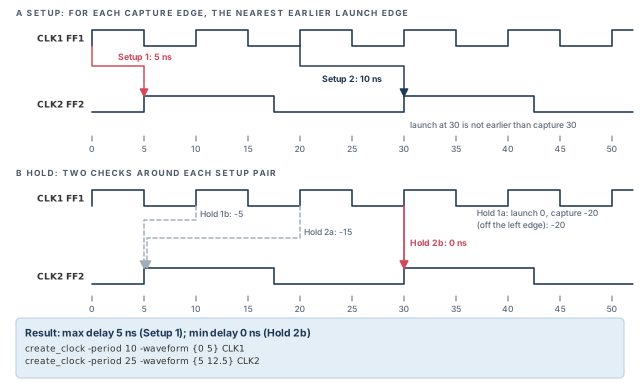
Panel A of Figure 10 shows the result. CLK2 captures at 5 and at 30.
- For capture at 5, the nearest earlier launch is 0. This is Setup 1, 5 ns long.
- For capture at 30, the nearest earlier launch is 20. This is Setup 2, 10 ns long. The CLK1 edge at 30 is not earlier than the capture, so it is not used.
Setup 1 allows less time, so it is the most restrictive. The maximum allowed path delay is 5 ns.
5.4 Two different clocks: hold
Hold checks are built from the setup pairs. The tool looks at every valid setup pair, not just the tightest one. For each pair, it makes two hold checks:
- Check a. Data from the setup launch edge must not be captured by the previous capture edge.
- Check b. Data from the next launch edge must not be captured by the setup capture edge.
For Setup 2 (launch 20, capture 30):
- Hold 2a: launch 20 against the previous capture at 5.
- Hold 2b: the next launch at 30 against the capture at 30.
The tool does the same for Setup 1. The most restrictive hold check is the one where capture comes latest relative to launch. Here that is Hold 2b, with capture minus launch equal to 0. So the minimum allowed path delay is 0 ns.
A hold check says the data must not arrive before the capture edge plus the hold time. The later the capture edge is relative to launch, the longer the data must take. Thus, the latest capture gives the strictest minimum delay.
If the two clocks are not really synchronous, this analysis is wrong. For example, they may never be active together, or they may be fully asynchronous. Then you must tell the tool, using one of several methods covered in this chapter and in Clocks. Otherwise, it spends time checking and reporting violations that do not exist.
5.5 More clock pairs
Figure 11 shows two more pairs, worked the same way.
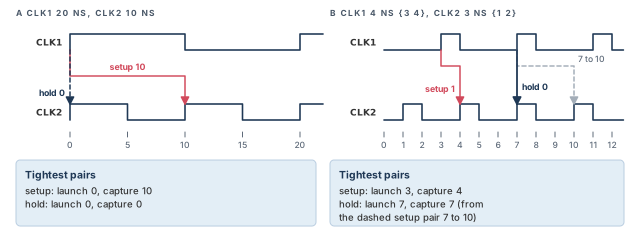
- Panel A. CLK1 has a 20 ns period and CLK2 has 10 ns. The tightest setup is launch 0 to capture 10. The tightest hold is launch 0 to capture 0.
- Panel B. CLK1 is
-period 4 -waveform {3 4}and CLK2 is-period 3 -waveform {1 2}. The tightest setup is launch 3 to capture 4, only 1 ns. The tightest hold is launch 7 to capture 7. It comes from the setup pair launch 7 to capture 10.
6 Timing exceptions: an overview
6.1 The kinds of exception
When a path should not follow the single-cycle rule, you set a timing exception. The table below lists the main kinds.
| Exception | Command | What it does |
|---|---|---|
| False path | set_false_path |
Removes the timing constraints from the path, so it is not checked |
| Maximum and minimum delay | set_max_delay, set_min_delay |
Replace the default setup and hold constraints with your own time values |
| Multicycle path | set_multicycle_path |
Sets the number of clock cycles the data may take from start to end |
A path margin, set with set_path_margin, is also an exception. It has its own section later.
Each command can cover one path or a group of related paths. A clock domain is the set of flops on one clock. For example, a command can cover all paths from one clock domain to another. It can also cover all paths through one point. You describe the paths with the options from the previous section.
When you give a startpoint and endpoint, make sure they form a valid path:
- A startpoint must be a register clock pin or an input port.
- An endpoint must be a register data input pin or an output port.
Three more points come up again and again:
report_exceptionslists the exceptions applied to the design.reset_pathrestores the default constraints on a path.- The tool can also record the source file and line number of each exception. A later section shows how.
7 False paths
7.1 Declaring a false path
A false path is a logic path that exists but should not be timed. For example, a path may join two multiplexed blocks that are never selected at the same time. The wires exist, but the data never really travels that way.
pt_shell> set_false_path -from [get_pins FFB1/CP] \
            -to [get_pins FFB2/D]   ;# do not check FFB1 to FFB2
Declaring a false path removes all timing constraints from it. The tool still calculates the path delay. But it never reports the path as an error, no matter how long or short the delay is.
7.2 False path or disabled timing?
A false path is a point-to-point exception: it covers paths between points. The set_disable_timing command is different. It disables timing analysis for a pin, cell or port. The affected objects are removed from timing analysis altogether.
If all paths through a pin are false, disabling the pin is more efficient:
pt_shell> set_disable_timing [get_pins pin_name]          ;# preferred: removes the pin
pt_shell> set_false_path -through [get_pins pin_name]     ;# works, but costs more
7.3 Asynchronous clock domains
Another kind of false path runs between flops on two clocks that are asynchronous to each other. Such clocks have no fixed phase relationship, so a setup or hold check between them means nothing. To make all paths between the two domains false, use two commands, one per direction:
pt_shell> set_false_path -from [get_clocks ck1] \
            -to [get_clocks ck2]   ;# ck1 to ck2
pt_shell> set_false_path -from [get_clocks ck2] \
            -to [get_clocks ck1]   ;# ck2 to ck1
For efficiency, name each clock with get_clocks, not with get_pins on its source pin.
An alternative is set_clock_groups. It stops the tool from timing paths launched by one clock and captured by another. The effect is the same as false paths between the clocks. However, it is not a timing exception, so report_exceptions does not list it. The Clocks chapter covers clock groups.
A beginner writes only -from ck1 -to ck2 and forgets the reverse direction. The paths from ck2 to ck1 are still timed, and they can show violations that do not exist. Always write both directions, or use set_clock_groups.
8 Maximum and minimum path delays
8.1 Setting your own limits
By default, the tool works out the maximum and minimum path delay from the clock edges. set_max_delay and set_min_delay replace these with your own values.
pt_shell> set_max_delay 12.0 -from [get_cells REGA] -to [get_cells REGB]  ;# at most 12
pt_shell> set_min_delay 2.0 -from [get_cells REGA] -to [get_cells REGB]   ;# at least 2
With these exceptions, the tool ignores the clock relationships between the registers.
- Maximum. A violation is reported if the path delay exceeds 12 time units minus the setup requirement of the endpoint register.
- Minimum. A violation is reported if the path delay is less than 2 time units plus the hold requirement of the endpoint register.
You can also make the value apply only to rising edges, or only to falling edges, at the endpoint.
8.2 Valid points matter even more here
With these two commands, choose a valid startpoint in -from (or a similar option) and a valid endpoint in -to. If you give an invalid point, the tool does not ignore it. Instead:
- it performs the timing check exactly as you specified;
- it ignores the remaining valid portion of the timing path;
- it issues a UITE-217 warning.
If the invalid point is on a clock path, it is worse. The clock stops propagating forward from that point, for all timing paths. Thus, one wrong pin can change the clocking of many flops.
Only do this when you really mean to override the paths the tool checks. Otherwise, read every UITE-217 warning.
8.3 Probe endpoints
Sometimes you want a maximum-delay check to end at an internal pin, without changing other paths. The -probe option does this. It makes the pin an endpoint only for this one exception.
pt_shell> set_max_delay 4.5 -to I_TOP/MEM/U133/Z -probe ;# endpoint for this onlyInformation: Forcing pin 'I_TOP/MEM/U133/Z' to be a timing endpoint only
for this probe-type timing exception. Existing timing paths are not
affected. (UITE-618)8.4 Cell names expand to pins
If you give a sequential cell in -from, the command is expanded to each clock input pin of the cell. A sequential cell in -to is expanded to each data input pin. You can see the pin-by-pin exceptions with report_exceptions or write_sdc.
Some other tools, such as IC Compiler II, keep the exception at the cell level instead. So when exceptions overlap, different tools can resolve them in different ways.
When the same constraints feed PrimeTime and an implementation tool, prefer pin-level -from and -to objects for overlapping exceptions. Both tools then see the same paths, and correlation problems are easier to rule out.
9 Multicycle paths
9.1 When data needs more than one cycle
Some logic is slow by design. For example, a block may compute over two clock cycles while the capture flop is enabled only every second cycle. The single-cycle default would flag this path as a violation.
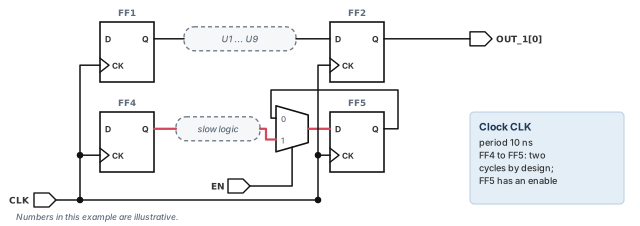
The worked example at the end of this chapter has such a path, from FF4 through slow logic to FF5. To describe it, use set_multicycle_path. The tool then builds the setup or hold check from the number of cycles you give.
pt_shell> set_multicycle_path -setup 2 \
            -from [get_cells FF4] -to [get_cells FF5]   ;# capture on the 2nd edge
Now the second capture edge after launch, not the first, ends the path.
Why not use set_max_delay with a fixed value instead? It is better to use set_multicycle_path, because it follows the clock. If the clock period changes, the multicycle check changes with it. A fixed maximum delay would have to be edited by hand.
9.2 Fixing the hold check
Changing the setup check also changes the hold check. Remember that every hold check is built from a valid setup pair. The tool still checks that data from the setup launch edge is not captured by the previous capture edge. With a 2-cycle setup, that previous edge is now one full cycle after launch.
Panel 2 of Figure 12 shows the result. The hold check is now 10 ns long. That is probably wrong for the design. If FF4 does not need to hold its data beyond the first clock edge, add a second exception:
pt_shell> set_multicycle_path -setup 2 \
            -from [get_cells FF4] -to [get_cells FF5]   ;# setup: 2nd edge
pt_shell> set_multicycle_path -hold 1 \
            -from [get_cells FF4] -to [get_cells FF5]   ;# hold: back by one cycle
The -hold 1 option moves the hold capture edge back by one clock cycle. You could set an explicit hold time with set_min_delay instead. However, a second set_multicycle_path is better, because it follows the clock period like the first.
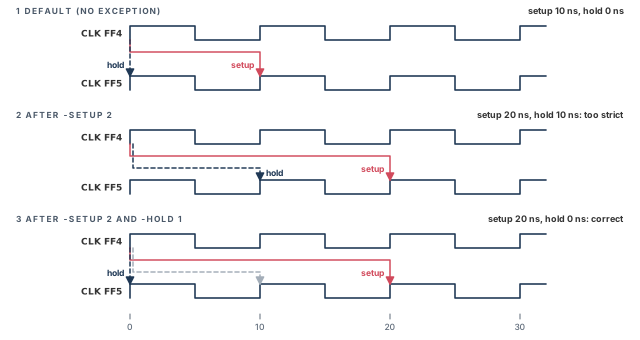
A beginner adds -setup 2 and stops. The setup violation goes away, but a large hold violation appears on the same path. A real path rarely takes a full extra cycle even at its fastest, so the hold check fails. Write -setup N and -hold N-1 as a pair, unless the design really needs something else.
9.3 What -setup and -hold mean
The tool reads the two options differently:
-setupvalue: the number of clock cycles for the path. With no exception, it is 1.-holdvalue: the number of clock cycles to move the hold capture edge backward. The move starts from its default position, which depends on the valid setup pair. With no exception, it is 0.
Figure 13 shows a path that is given five cycles.
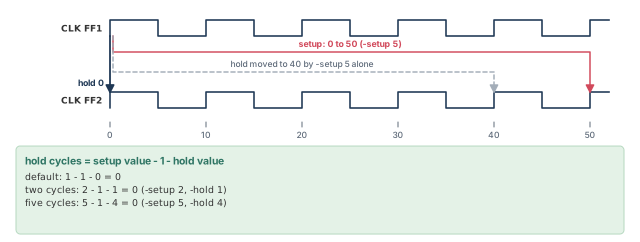
pt_shell> create_clock -period 10 -waveform {0 5} CLK1   ;# a 10 ns clock
pt_shell> set_multicycle_path -setup 5 \
            -from [get_cells FF1] -to [get_cells FF2]   ;# setup: 0 to 50
pt_shell> set_multicycle_path -hold 4 \
            -from [get_cells FF1] -to [get_cells FF2]   ;# hold: back to 0
Without exceptions, the setup check runs from 0 to 10 and hold from 0 to 0. With -setup 5, setup runs from 0 to 50. This alone moves hold to the prior capture edge, at 40. The -hold 4 option moves that edge back four cycles, to 0.
In short, the tool finds the number of hold cycles like this:
(hold cycles) = (setup value) − 1 − (hold value)
- Default: 1 − 1 − 0 = 0.
- Two-cycle example: 2 − 1 − 1 = 0.
- Five-cycle example: 5 − 1 − 4 = 0.
9.4 Edge and clock choices
Two more choices are available:
- You can make a multicycle exception apply only to rising edges, or only to falling edges, at the path endpoint.
- If the startpoint and endpoint use different clocks, you can choose which of the two clocks is used to count the cycles.
-hold, so that hold cycles = setup − 1 − hold = 0.10 Path margins
Sometimes you want a check a little tighter or a little looser than normal. The set_path_margin command adds a fixed amount to any timing check.
pt_shell> set_path_margin -setup 1.2 -to I_BL/reg30a/D ;# setup 1.2 units tighterThis makes every setup check that arrives at I_BL/reg30a/D more restrictive by 1.2 time units. The reported setup slack is 1.2 lower, that is, more negative. In report_timing, the margin shows up as a "path margin" line in the "data required time" calculation.
- A positive margin makes the check tighter, for every type of timing path.
- A negative margin makes the check looser.
A path margin is a timing exception, like set_max_delay or set_multicycle_path. However, it adds to them. The margin applies on top of any minimum delay, maximum delay or multicycle exception on the same path.
Teams often add a positive setup margin on paths that will change late, such as paths into a hard macro. The margin keeps some slack in reserve. Because it shows as its own line in the report, reviewers can see it clearly.
11 Specifying exceptions efficiently
11.1 One problem, many ways to write it
The same set of paths can often be described in many ways. Some ways cost far more runtime than others. Let us consider Figure 14. There are three 16-bit registers, each made of 16 flip-flops and each on its own clock. REG2 is used only for test. So during normal operation, all paths from REG2 to REG3 are false.
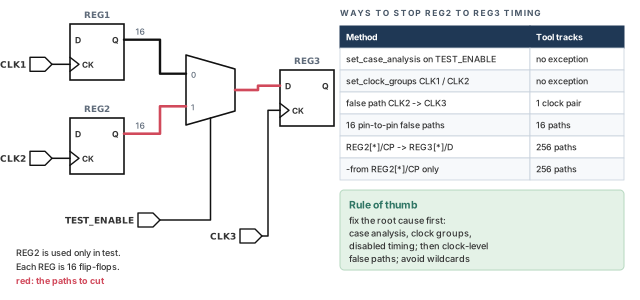
The options are:
Method 1 — case analysis. Tell the tool that TEST_ENABLE is 0. The Case and Mode Analysis chapter covers this.
Method 2 — exclusive clocks. Declare that CLK1 and CLK2 are exclusive. The Clocks chapter covers this.
Method 3 — a clock-level false path. The tool only tracks the two clock domains, not registers, pins or nets.
pt_shell> set_false_path \
            -from [get_clocks CLK2] -to [get_clocks CLK3]   ;# one clock pair
Method 4 — sixteen individual false paths. Less efficient: the tool tracks 16 separate exceptions.
pt_shell> set_false_path -from [get_pins REG2[0]/CP] \
            -to [get_pins REG3[0]/D]   ;# bit 0
pt_shell> set_false_path -from [get_pins REG2[1]/CP] \
            -to [get_pins REG3[1]/D]   ;# bit 1, and so on to bit 15
Method 5 — all pins to all pins. Even less efficient: every clock pin of REG2 to every data pin of REG3, 16 × 16 = 256 paths.
pt_shell> set_false_path -from [get_pins REG2[*]/CP] \
            -to [get_pins REG3[*]/D]   ;# 256 paths tracked
Method 6 — all paths from REG2. Similar cost: all paths from each clock pin of REG2, again 256 paths.
pt_shell> set_false_path -from [get_pins REG2[*]/CP] ;# 256 paths tracked11.2 The rule behind the example
Look for the root cause that makes the exception necessary. Then find the simplest way to control the analysis of those paths. Before reaching for false paths, consider:
- case analysis, with
set_case_analysis; - an exclusive relationship between clocks, with
set_clock_groups; - disabling part of the design, with
set_disable_timing.
These can be more efficient than set_false_path. If you must use false paths, avoid covering many paths with -through, with wildcards, or by listing paths one at a time.
12 Exception order of precedence
12.1 Rules apply per path
Two exception commands can disagree about one path. The tool then picks one, using rules based on the exception types and on how the paths were specified.
The rules work on each path, not on each command. Let us consider:
pt_shell> set_max_delay -from A 5.1   ;# all paths from A
pt_shell> set_false_path -to B        ;# all paths to B
A false path beats a maximum delay. So paths from A to B are false. However, the maximum delay still applies to paths from A that do not end at B.
12.2 Priority by exception type
Some pairs of exceptions do not conflict, so both can apply to the same path:
- two
set_false_pathsettings; - a
set_min_delayand aset_max_delaysetting; - a
set_multicycle_path -setupand a-holdsetting.
When exceptions do conflict, the order from highest to lowest is:
set_false_pathset_max_delayandset_min_delayset_multicycle_path
For example, if a path is declared false and also given a maximum delay, the false path wins. The maximum delay is ignored. You can list ignored exceptions with report_exceptions -ignored.
12.3 Priority by path specification
When the same type of exception is applied with different path descriptions, the more specific one wins. Pins and ports are more specific than clocks. For example:
pt_shell> set_max_delay 12 -from [get_clocks CLK1]                     ;# all from CLK1
pt_shell> set_max_delay 15 -from [get_clocks CLK1] -to [get_clocks CLK2] ;# to CLK2
The first command covers all paths from CLK1. The second is more specific, so it wins for paths from CLK1 to CLK2. The other paths from CLK1 keep the first value of 12.
The path options rank like this, from highest to lowest:
-from pin,-rise_from pin,-fall_from pin-to pin,-rise_to pin,-fall_to pin-through,-rise_through,-fall_through-from clock,-rise_from clock,-fall_from clock-to clock,-rise_to clock,-fall_to clock
To compare two commands, walk down the list from the top:
- A command with a
-from pinform beats one without it. - If that does not decide, a command with a
-to pinform beats one without it. - Carry on down the list until one command wins.
Figure 15 shows both kinds of priority. Panel B lists common combinations in order.
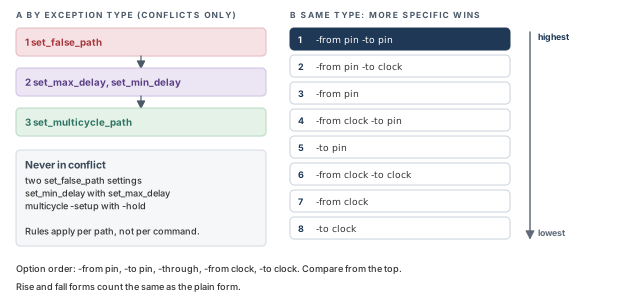
When you cannot predict the winner, do not guess. Run report_timing -exceptions all on the path. It shows the exception that won and the ones it overrode, as a later section explains.
13 Reporting and checking exceptions
13.1 report_exceptions
report_exceptions lists the timing exceptions you have set. You can narrow it with the same path options used to create them, such as -from, -to, -through, -rise_from and -fall_to.
This command causes a full timing update, which means the tool recalculates all delays and checks. So run it only after all timing assertions are in place, when you are ready for the report.
Exceptions can be partly or fully ignored. For example, a broad command can be partly overridden by another command that covers a subset of its paths.
- For a partly ignored command,
report_exceptionsshows the reason some part is ignored. - A fully ignored command is not listed by default. Use
report_exceptions -ignoredto list it.
13.2 A worked example of ignored exceptions
Figure 16 has input ports A and B and output ports C and D. Three exceptions are set on it.
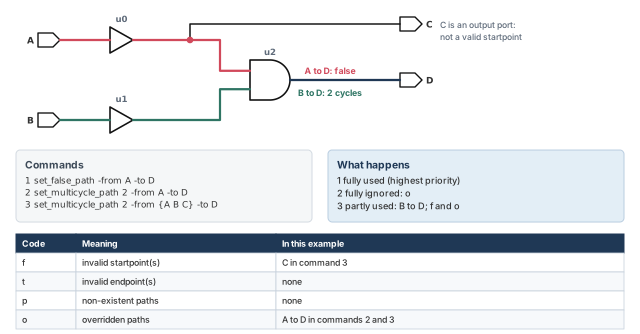
pt_shell> set_false_path -from A -to D                    ;# 1: false path
pt_shell> set_multicycle_path 2 -from A -to D             ;# 2: overridden by 1
pt_shell> set_multicycle_path 2 -from {A B C} -to D       ;# 3: partly valid
pt_shell> report_exceptions                               ;# fully or partly valid
pt_shell> report_exceptions -ignored ;# fully ignored only- Command 1 has the highest priority, so it is fully enforced.
- Command 2 is fully ignored, because the false path overrides it. It appears only with
-ignored, and the codeogives the reason. - Command 3 is partly valid, so it appears in the normal report. A to D is overridden (
o). B to D is valid and is enforced. C to D is invalid, because C is not a valid startpoint (f).
The two reports below show these outcomes. The first lists commands 1 and 3; the second lists command 2.
Reasons:
f - invalid startpoint(s)
t - invalid endpoint(s)
p - non-existent paths
o - overridden paths

From         To      Setup      Hold       Ignored
--------------------------------------------------
A            D       FALSE      FALSE
{ A B C }    D       2          *          f,o

From         To      Setup      Hold       Ignored
--------------------------------------------------
A            D       2          *          o
13.3 Exceptions on one path: report_timing -exceptions
report_exceptions is organized by command. Often you need the opposite view: which exceptions affect this path? The -exceptions option of report_timing gives it. It can show:
- the exceptions that apply to the path;
- the exceptions overridden by higher-priority ones;
- unconstrained-path debugging, with the unconstrained startpoint and endpoint;
- the timing path attributes that hold the unconstrained reasons.
pt_shell> report_timing -exceptions dominant     ;# the exception that won
pt_shell> report_timing -exceptions overridden   ;# the exceptions that lost
pt_shell> report_timing -exceptions all          ;# both, plus unconstrained reasons
To see why a path is unconstrained, first set timing_report_unconstrained_paths to true. This applies to report_timing -exceptions all and to get_timing_paths.
Let us consider two conflicting exceptions through one pin:
pt_shell> set_multicycle_path -through U7/Y -setup 2   ;# loses
pt_shell> set_max_delay -through U7/Y 1 ;# wins: higher priorityThe dominant exceptions are:
From Through To Setup Hold
-------------------------------------------------------------------
* U7/Y * max=1
The overridden exceptions are:
From Through To Setup Hold
-------------------------------------------------------------------
* U7/Y * cycles=2 *With -exceptions dominant, you get the first section. With -exceptions overridden, you get the second. With -exceptions all, you get both.
You can also build a collection with get_timing_paths. A collection is a set of objects, here timing paths, held by the tool. You can pass it to report_timing. This is useful for custom reports and scripts:
report_timing -from A -through B -to C -exceptions all   ;# direct form
set x [get_timing_paths -from A -through B -to C]        ;# collect the paths
report_timing $x -exceptions all                         ;# report the collection
13.4 Unconstrained reasons as attributes
Paths from get_timing_paths carry attributes that explain why a path is unconstrained. The table below lists them.
| Attribute | Value | Meaning |
|---|---|---|
dominant_exception |
false_path |
A false path, so not checked |
min_delay, max_delay |
A minimum or maximum delay exception | |
multicycle_path |
A multicycle exception | |
endpoint_unconstrained_reason |
no_capture_clock |
No clock captures data at the endpoint |
dangling_end_point |
Ends at a dangling point | |
fanin_of_disabled |
Endpoint is in the fanin of a disabled arc or component | |
startpoint_unconstrained_reason |
no_launch_clock |
No clock launches data at the startpoint |
dangling_start_point |
Starts at a dangling point | |
fanout_of_disabled |
Startpoint is in the fanout of a disabled arc or component |
Some terms in the table need a word:
- A dangling point is a floating point with no timing constraint data. The path is broken there by a disabled timing component.
- A timing arc is a pin-to-pin timing relationship inside a cell. Fanin is the logic that drives a point; fanout is the logic it drives.
- In the two "disabled" cases, the internal pin may have no constraints. It may also connect to a black box, or have unconnected pins. A black box is a cell with no timing model.
The report always covers the same three kinds of information as these attributes. They are the dominant exception, the startpoint unconstrained reason and the endpoint unconstrained reason. A kind with no information is left empty. In the -exceptions all output below, the dominant exception has its own section. The overridden exceptions follow in a second section. The startpoint and endpoint reasons share one table, with a column for each.
The attributes behave differently. Each one is present on a path only if there is information for it. This makes filtering easy:
filter_collection $paths {defined(dominant_exception)}     ;# paths with an exception
filter_collection $paths {undefined(dominant_exception)} ;# paths with none****************************************
Report : timing
-path_type full_clock_expanded
...
(Path is unconstrained)
The dominant exceptions are:
From To Setup Hold
------------------------------------------------------
cfg_ff/CP st_ff/D FALSE FALSE
The overridden exceptions are:
From To Setup Hold
------------------------------------------------------
cfg_ff/CP st_ff/D cycles=3 cycles=0
The unconstrained reasons (except for false path) are:
Reason Startpoint Endpoint
------------------------------------------------------
no_launch_clock cfg_ff/CP -13.5 Tracking the source file and line
On a big block, exceptions come from many scripts. When one is wrong, you want to know which file and line set it. The tool can record this for some constraints. Files reach the tool through the source or read_sdc commands, or the -f command-line option.
To turn it on, set the sdc_save_source_file_information variable to true. Its default is false.
There is a catch. You can change this variable only before any exception has been entered. So set it in the setup file, or in pt_shell before the first exception. If an exception already exists, you get an error and the value stays the same:
pt_shell> echo $sdc_save_source_file_information     ;# show the value
false
pt_shell> set_max_delay -to port1 0.7                ;# first exception
pt_shell> set sdc_save_source_file_information true  ;# too late now
Error: can't set "sdc_save_source_file_information":
        Use error_info for more info. (CMD-013)
pt_shell> echo $sdc_save_source_file_information     ;# unchanged
false
Location tracking covers four commands: set_false_path, set_multicycle_path, set_max_delay and set_min_delay. You see the locations in report_exceptions and in report_timing -exceptions. Three rules apply:
- Commands typed at the prompt have no location.
- For commands inside control structures, such as
ifandforeach, the line of the closing bracket is reported. - For commands inside a procedure, the line that calls the procedure is reported.
From      To          Setup      Hold    Ignored
-----------------------------------------------------------------
a[1]      lar5_ff1/D  cycles=3   *       [ location = multi.tcl:17 ]
a[2]      lar5_ff2/D  cycles=4   *       [ location = multi.tcl:18 ]
data[16] lr16_ff/D FALSE FALSE [ location = scripts/false_path.tcl:11 ]The dominant exceptions are:
From To Setup Hold Ignored
------------------------------------------------------------
a[1] lar5_ff1/D cycles=3 cycles=0 [ location = multi.tcl:17 ]
The overridden exceptions are:
NonePut set sdc_save_source_file_information true in the setup file of every project. It is easy to turn on early, and it cannot be turned on late.
13.6 Checking ignored exceptions
An ignored exception is one you specified but the tool did not accept. There are four reasons:
- Invalid startpoint or endpoint. The startpoint must be a register clock pin or an input port. The endpoint must be a register data input pin or an output port.
- Unconstrained path. For example, the startpoint is an input port with no input delay. Or the capture flop is not clocked by a defined clock.
- Invalid path. The path is cut by
set_disable_timing, constant propagation, loop breaking or case analysis. Constant propagation spreads fixed logic values through the design. Loop breaking cuts combinational loops so they can be timed. - Lower priority. Another exception on the same path has higher priority.
Use report_exceptions for fully and partly valid exceptions, and report_exceptions -ignored for fully ignored ones. It is a good habit to read both, to confirm every exception is written correctly.
If ignored exceptions show up, find the cause. Then fix the path description or remove the command. Large numbers of ignored exceptions increase memory use and runtime.
If the cause is not clear, read the codes in the "Ignored" column and compare them with the list above. Two more commands help:
pt_shell> all_fanout -from point_a -to point_b      ;# is there a logical path?
pt_shell> report_timing -from point_a -to point_b ;# after a timing updatereport_exceptions shows what you set and what was partly ignored. -ignored shows what was thrown away. report_timing -exceptions all shows what hit one path.14 Removing exceptions
14.1 reset_path
To remove exceptions set with set_false_path, set_max_delay, set_min_delay or set_multicycle_path, use reset_path. Narrow its scope with options such as -from, -to, -through, -rise_from or -fall_to.
The path description and the objects must match those used to set the exception. Otherwise, reset_path has no effect. Both resets below do nothing:
pt_shell> set_false_path -from [get_clocks CLK]      ;# set on the clock
pt_shell> reset_path -from [get_pins ff1/CP]          ;# no effect; ff1 is on CLK
pt_shell> set_false_path -through [get_pins {d/Z g/Z}] ;# set on d/Z and g/Z
pt_shell> reset_path -through [get_pins a/Z]          ;# no effect: a fans out to d
In each case, the paths might be covered by the exception. However, the object in reset_path is not the object used to set it, so nothing is reset.
A beginner sets a false path on a clock and later resets it on one flop pin. The report still shows the path as false. Reset with the same option and the same object that set the exception.
14.2 Replacing exceptions in one step
To clear every exception on some paths before setting a new one, add -reset_path to the exception command:
pt_shell> set_false_path -through [get_pins d/Z] -reset_path ;# clear, then setThis first removes all exceptions already applied to paths through d/Z. Then it applies the false path to them.
14.3 Removing everything
reset_design removes all user-specified clocks, path groups, exceptions and attributes. Attributes set with set_user_attribute are kept. Use it with care, because it also removes the clocks.
reset_path only works with the same objects that set the exception. -reset_path clears and sets in one step.15 Saving and restoring timing path collections
Generating a large path collection can take a long time. You can save a collection to a disk directory and restore it in a new session. This is much faster than running get_timing_paths again.
pt_shell> set my_paths [get_timing_paths -nworst 20 -max_paths 500]   ;# collect paths
pt_shell> save_timing_paths $my_paths -output paths1               ;# write to paths1/
save_timing_paths needs a timing path collection and the name of a directory to store it in.
pt_shell> set my_paths [restore_timing_paths paths1]   ;# read the collection back
pt_shell> report_timing $my_paths                      ;# report it as usual
Give restore_timing_paths the directory where the collection was stored. The design, the constraints and the PrimeTime version must all be the same as when the collection was saved. Path collections can also be explored in the graphical interface.
Save the worst few hundred paths at the end of a signoff run. A colleague can then restore them in minutes and start debugging, without waiting for a full path search.
16 Worked example: two-cycle path cleanup on block top
Let us work on a small block named top, shown in Figure 17. It has one clock, CLK, with a 10 ns period. FF1 drives FF2 through gates U1 to U9. FF2 drives the output OUT_1[0]. FF4 drives FF5 through slow logic, and FF5 has an enable input EN. By design, the FF4 to FF5 path has two cycles.
The goal is to add the right exceptions, check them and save the worst paths. The exceptions live in a file named exceptions.tcl.
Step 1 — Turn on tracking before any exception
pt_shell> set sdc_save_source_file_information true   ;# record file and line
pt_shell> set timing_report_unconstrained_paths true   ;# show unconstrained paths
Check: no exception has been entered yet, so the first command gives no CMD-013 error.
Step 2 — Group the output paths
pt_shell> group_path -name out1bus -to [get_ports OUT_1*]   ;# outputs in own group
pt_shell> report_path_group                                  ;# list the groups
Check: the list includes CLK and out1bus.
Step 3 — Take a baseline report
pt_shell> report_timing -group [get_path_groups *] ;# one path per group Startpoint: FF4 (rising edge-triggered flip-flop clocked by CLK)
Endpoint: FF5 (rising edge-triggered flip-flop clocked by CLK)
Path Group: CLK
...
data arrival time 16.20
clock CLK (rise edge) 10.00 10.00
library setup time -0.30 9.70
data required time 9.70
...
slack (VIOLATED) -6.50Check: the only large violation is FF4 to FF5. It is checked as a single-cycle path, which is not how the design works.
Step 4 — Read the exceptions
The file was partly copied from an older block. Line 4 is a leftover false path that nobody noticed.
# exceptions.tcl
set_multicycle_path -setup 2 -from [get_cells FF4] -to [get_cells FF5]   ;# line 2
set_multicycle_path -hold 1 -from [get_cells FF4] -to [get_cells FF5]    ;# line 3
set_false_path -from [get_cells FF4] -to [get_cells FF5] ;# line 4: oldpt_shell> source exceptions.tcl ;# file and line are recorded for each exceptionStep 5 — Check what the tool accepted
pt_shell> report_exceptions           ;# fully or partly valid
pt_shell> report_exceptions -ignored ;# fully ignoredFrom To Setup Hold Ignored
--------------------------------------------------------------------
FF4/CK FF5/D FALSE FALSE [ location = exceptions.tcl:4 ]
From To Setup Hold Ignored
--------------------------------------------------------------------
FF4/CK FF5/D cycles=2 * o [ location = exceptions.tcl:2 ]
FF4/CK FF5/D * cycles=1 o [ location = exceptions.tcl:3 ]Check: the cells are expanded to pins, FF4/CK and FF5/D. Both multicycle lines are fully ignored with code o. The false path on line 4 overrides them. Thus, the path is not timed at all, and a real violation could hide here.
Step 6 — Fix the file and re-apply
Delete line 4 from exceptions.tcl. Then remove the old exceptions, using the same objects that set them, and read the file again.
pt_shell> reset_path -from [get_cells FF4] -to [get_cells FF5]  ;# same objects
pt_shell> source exceptions.tcl                                 ;# lines 2 and 3 only
pt_shell> report_exceptions -ignored                             ;# expect nothing
Check: report_exceptions -ignored lists nothing. report_exceptions now shows the setup and hold multicycle settings.
Step 7 — Confirm the result on the path
pt_shell> report_timing -exceptions all -from FF4 -to FF5 ;# timing plus exceptions ...
data arrival time 16.20
clock CLK (rise edge) 20.00 20.00
library setup time -0.30 19.70
data required time 19.70
...
slack (MET) 3.50
The dominant exceptions are:
From To Setup Hold Ignored
--------------------------------------------------------------------
FF4/CK FF5/D cycles=2 * [ location = exceptions.tcl:2 ]
FF4/CK FF5/D * cycles=1 [ location = exceptions.tcl:3 ]
The overridden exceptions are:
NoneCheck: the capture edge is now at 20 ns, and the slack is positive. In the hold report for this path, the capture edge should be at 0 ns, not 10 ns.
Step 8 — Save the worst paths
pt_shell> set my_paths [get_timing_paths -nworst 20 -max_paths 500]   ;# collect
pt_shell> save_timing_paths $my_paths -output top_paths               ;# save to disk
Check: a colleague can run restore_timing_paths top_paths with the same design, constraints and tool version.
17 Common mistakes and how to catch them
| Symptom | Likely cause | Fix |
|---|---|---|
report_timing -max_paths 40 shows few or no paths |
Above 1, only negative-slack paths are reported | Add -slack_lesser_than with a large value |
| A two-cycle path now has a large hold violation | -setup 2 was set without -hold 1 |
Add set_multicycle_path -hold 1 with the same path options |
| Paths between two asynchronous clocks still violate in one direction | Only one set_false_path direction was written |
Add the reverse direction, or use set_clock_groups |
| An exception has no effect | It is overridden, or its start or end point is invalid | Run report_exceptions -ignored and read the code |
Many flops lose their clock after a set_max_delay |
An invalid point on a clock path stops clock propagation | Read the UITE-217 warning; use a valid startpoint and endpoint |
reset_path does not remove a false path |
The object differs from the one used to set it | Reset with the same option and object, or use -reset_path |
Setting sdc_save_source_file_information gives CMD-013 |
An exception was already entered | Set the variable in the setup file, before any exception |
| Runtime grows after adding exceptions | Wildcards, long -through lists or many ignored exceptions |
Use clock-level exceptions or fix the root cause; remove ignored ones |
A clock-group "false path" is missing from report_exceptions |
set_clock_groups is not a timing exception |
Check clock groups with the clock reports instead |
| Paths with no input delay never appear in reports | Unconstrained paths are hidden by default | Set timing_report_unconstrained_paths to true |
18 Interview preparation
Start at a register clock pin or input port; end at a register data pin or output port.
- Between them there is only combinational logic.
- A pin with an input or output delay set can also act as a startpoint or endpoint.
It is decided by the endpoint: a flop clocked by a clock puts the path in that clock's group.
- Clock-gating endpoints go to
clock_gating_default. - Asynchronous preset and clear pins go to
async_default. - Other constrained paths go to
default; unconstrained paths go to none.
set_disable_timing?A false path removes the timing constraints between points; disabled timing removes the objects from timing analysis.
- With a false path, the delay is still calculated but never reported as a violation.
- If all paths through a pin are false, disabling the pin is more efficient.
report_timing -max_paths 10 sometimes show fewer than 10 paths?With -max_paths above 1, only paths with negative slack are reported.
- Add
-slack_lesser_thanto include positive-slack paths.
set_multicycle_path -setup 2 on a path. What happens to hold, and how do you fix it?The hold check moves forward by one cycle, which is usually too strict, so you add -hold 1.
- Hold checks are built from the setup pair; the previous capture edge is now one cycle after launch.
- Hold cycles = setup − 1 − hold = 2 − 1 − 1 = 0.
set_multicycle_path to set_max_delay for a slow path?A multicycle path follows the clock period, while a maximum delay is a fixed number.
- If the clock period changes, the multicycle check changes with it.
- A maximum delay also ignores the clock relationships.
5 ns: launch at 0, capture at 5.
- The tool checks a 50 ns window, the least common multiple.
- The other pair, launch 20 to capture 30, allows 10 ns, so it is looser.
The false path, because false paths have the highest priority.
- Order: false path, then max and min delay, then multicycle.
- The ignored maximum delay can be seen with
report_exceptions -ignored.
FF1/D only for one of two clocks that reach FF1. How?Put the pin in -through and the clock in -to: set_false_path -through FF1/D -to [get_clocks clk1].
- A plain
-to FF1/Dwould cover both clocks. -rise_towould narrow it further to the rising capture edge.
set_max_delay commands overlap: one is -from a clock, the other is -from the same clock -to another clock. Which wins?The second, because it is more specific; the first still applies to the other paths.
- It has a
-to clockform that the first lacks, so it ranks higher. - The rules are applied path by path.
set_max_delay an invalid startpoint on a clock path?The check is done exactly as written, and the clock stops propagating forward from that point for all paths.
- The tool issues a UITE-217 warning.
- The remaining valid portion of the timing path is ignored.
Set timing_report_unconstrained_paths to true and run report_timing -exceptions all, or read the path attributes.
startpoint_unconstrained_reasoncan beno_launch_clock,dangling_start_pointorfanout_of_disabled.endpoint_unconstrained_reasoncan beno_capture_clock,dangling_end_pointorfanin_of_disabled.dominant_exceptionshows a false path or other exception.
sdc_save_source_file_information not be set halfway through a script?It can only be changed before any exception has been entered; after that, the tool gives a CMD-013 error.
- Set it in the setup file.
- Typed commands get no location; loops report the closing bracket line, procedures the calling line.
Fix the root cause with case analysis or clock groups; failing that, use one clock-to-clock false path.
- Sixteen pin-to-pin false paths make the tool track 16 paths.
- Wildcards on both ends make it track 256 paths.
19 Chapter close
Compact glossary
| Term | Meaning |
|---|---|
| Timing path | A route from a startpoint, through combinational logic, to an endpoint |
| Startpoint | A register clock pin or an input port |
| Endpoint | A register data input pin or an output port |
| Path group | A set of paths reported together: one per clock, plus three built-in groups |
| Unconstrained path | A path with no timing requirement; in group (none) when reported |
| Slack | Required time minus arrival time; negative means a violation |
| Single-cycle timing | The default: capture on the next clock edge after launch |
| Setup check | Data must arrive before the capture edge, minus the setup time |
| Hold check | Data must not arrive so early that the wrong edge captures it |
| Timing exception | A command that changes how chosen paths are checked |
| False path | A path that exists but is not checked |
| Asynchronous clocks | Clocks with no fixed phase relationship |
| Maximum / minimum delay | A fixed upper or lower delay limit that ignores the clocks |
| Probe exception | A maximum delay to an internal pin that does not affect other paths |
| Multicycle path | A path allowed more than one clock cycle |
| Path margin | An amount that tightens (positive) or loosens (negative) a check |
| Dominant exception | The exception that wins on a path |
| Ignored exception | An exception the tool did not accept, fully or partly |
| Level-sensitive latch | A storage element that passes data while its gate is active |
Timing paths and exceptions on one page
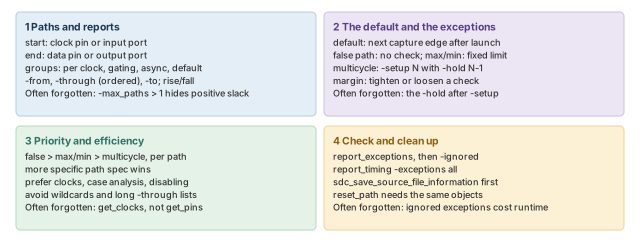
Figure 18 is the summary to redraw from memory.
Where the next chapter goes, and why
You can now describe any path, predict its default checks and change them. However, every delay so far assumed one fixed set of conditions.
Real chips run at different voltages and temperatures, which change delays. The Operating Conditions chapter shows how to describe them to the tool.