Why this chapter matters in a real project
A logic library gives each cell delay at one set of conditions. Real silicon does not stay at one set of conditions. A slow wafer or a low supply voltage usually makes every gate slower. A fast wafer or a high voltage usually makes every gate faster. Temperature shifts the delays too.
If you time the chip at only one condition, you miss failures at the others. For example, setup is usually worst when the chip is slow. Hold is usually worst when the chip is fast. A chip that passes at one corner can still fail in the field at another.
There is a second problem. Even inside one chip, at one moment, two identical buffers do not have exactly the same delay. The tool models this on-chip variation with derating. Derating adds safety, but it also adds pessimism. Some of that pessimism is false, and the tool can remove it. If you do not understand both sides, you either ship a risky chip or chase violations that are not real.
Prerequisites
- Working With Design Data: reading and linking a design, logic libraries, and the link path.
- Constraining the Design: input and output delays, and drive and load at ports.
- Clocks: clock latency, ideal and propagated clocks, and clock uncertainty.
- Timing Paths and Exceptions: launch and capture clock paths, data paths, setup and hold checks.
- You do not need to know how the tool calculates a single cell delay. That is the topic of Delay Calculation.
- You do not need statistical analysis. Advanced and parametric variation modes are covered in Variation.
In this chapter, times are in nanoseconds (ns) unless said otherwise. A few small examples use plain time units.
Learning objectives
- Explain what an operating condition holds and how the tool uses it to scale library delays.
- Describe the three interconnect tree types and when the tool uses them.
- Set, create, report and remove operating conditions with the right commands.
- Compare single operating condition mode with on-chip variation (OCV) mode for setup and hold.
- Calculate a setup and a hold check by hand from minimum and maximum delays.
- Apply
set_timing_deratewith the right scope, and predict which setting wins in a conflict. - Derate negative delays and cell timing checks correctly.
- Explain clock reconvergence pessimism and calculate it at the common point.
- Read CRPR in timing, pulse width and
report_crprreports, and tune its variables. - Explain how CRPR applies to crosstalk, dynamic clock arrivals and transparent latches.
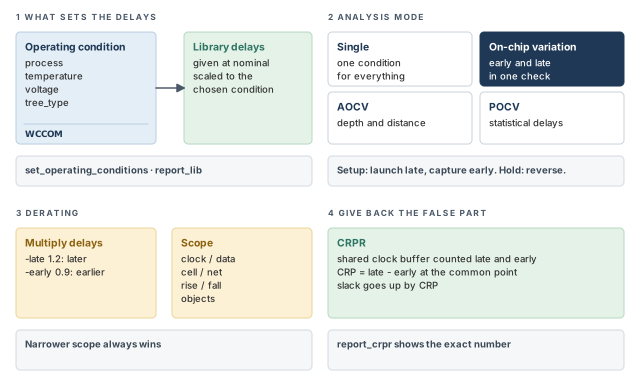
Figure 1 is a map of the whole chapter. Come back to it whenever you lose your place.
1 The beginner's mental model
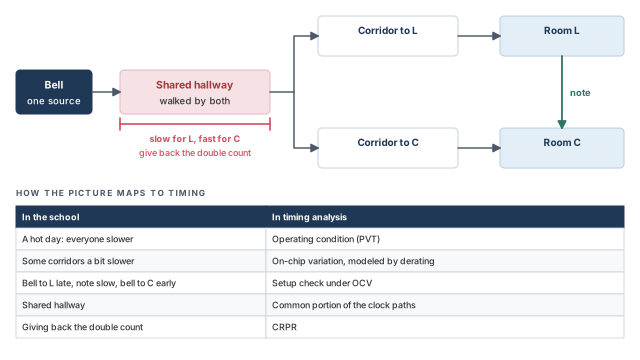
Picture a school with one bell. The bell sound travels down a shared hallway. Then it splits into two corridors: one to room L and one to room C. When room L hears the bell, a student carries a note to room C. The note must reach room C before room C hears the next bell.
On a hot day, everyone walks slower. That is like an operating condition: one setting that shifts every delay together. Even on one day, some corridors are a little slower than others. That is like on-chip variation.
A cautious planner checks the worst case. She assumes the bell reaches room L late, the note walks slowly, and the next bell reaches room C early. However, she has now counted the shared hallway as both slow and fast. The hallway cannot be both at once, so she gives back that double count. Figure 2 shows this picture and maps each piece to its timing name.
- Walking speed is a guess. Cell delays at each condition come from the logic library, which is measured and characterized data.
- In the school, "slower" is a feeling. In the tool, derating is an exact multiplier, such as 0.9 or 1.2.
- The two bells are different events. On a chip, the launch and capture edges are also different edges. Thus, giving back the double count is only safe when the shared cells really behave the same for both. Crosstalk can break this, as you will see later.
Now the engineering model
In engineering terms, the chapter has four ideas:
- Operating conditions. A named set of process, temperature and voltage values from the library. The tool scales cell delays to that set.
- Analysis mode. Either one condition for the whole design, or on-chip variation, where early and late delays mix on one check.
- Derating. A multiplier that makes late delays later and early delays earlier, to model variation.
- Clock reconvergence pessimism removal (CRPR). The tool finds the shared clock segment and adds back the false difference.
2 Operating conditions
2.1 What an operating condition holds
Chips behave differently under different conditions. The three main sources are often called PVT: process, voltage and temperature. Process means variation in how the wafer was made. The logic library defines nominal values for these and gives delay data at those values.
A set of operating conditions holds four values, shown in Table 1.
| Value | What it means | Typical effect |
|---|---|---|
| Process derating factor | Scaling of device parameters due to manufacturing variation | A process number below nominal usually gives smaller delays |
| Ambient temperature | The chip temperature; depends on air temperature, power, package and cooling | It changes device delays |
| Supply voltage | The voltage feeding the cells | A higher voltage usually gives smaller delays |
| Interconnect model type | An RC tree shape used to estimate wire delay before layout | It changes estimated net delays |
The delay of each timing arc is given at the nominal process, temperature and voltage. If your conditions differ, the tool applies scaling factors. Many libraries scale process, temperature and voltage linearly.
Some libraries hold scaled cell data instead. These are exact delay tables or coefficients for specific conditions. This is very accurate for cells whose delay does not scale linearly.
What if you never set operating conditions? The tool uses the default set in the main library, if the library has one. Otherwise, it uses the nominal values of the main library.
2.2 Interconnect model types
Before layout, the tool has no real wire data. It cannot read annotated net delays or parasitics, because none exist yet. So it estimates each net from an RC tree, a simple model of wire resistance (R) and capacitance (C).
The shape of the tree matters. Two nets can have the same total R and C, but different pin-to-pin delays. Each library's operating conditions name the shape with a tree_type value:
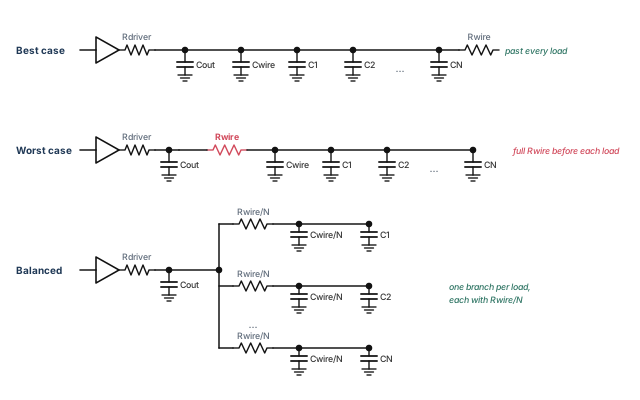
best_case_tree— the loads sit right at the driver. In other words, the wire resistance adds no delay to any load.worst_case_tree— all of the wire resistance sits between the driver and every load.balanced_tree— the wire is split evenly, with one branch of R/N and C/N per load, for N loads.
Figure 3 shows the three shapes for a net with N loads.
You cannot change the tree types inside PrimeTime. They come from the library. If a library does not define a tree type, the tool uses balanced_tree.
Here is how a library might define three sets of conditions:
operating_conditions(BEST) {
    process     : 1.1;
    temperature : 11.0;
    voltage     : 4.6;
    tree_type   : "best_case_tree";
}
operating_conditions(TYPICAL) {
    process     : 1.3;
    temperature : 31.0;
    voltage     : 4.6;
    tree_type   : "balanced_tree";
}
operating_conditions(WORST) {
    process     : 1.7;
    temperature : 55.0;
    voltage     : 4.2;
    tree_type   : "worst_case_tree";
}
Notice that WORST has a higher process number and a lower voltage than BEST. Each of these usually pushes delays up. It also runs hotter, and temperature changes device delays too.
2.3 Setting operating conditions
The set_operating_conditions command chooses the conditions for analysis. The name you give must be defined in a named library, or in a library in the link path.
First, find out what the library offers. The report_lib command lists the operating conditions defined in a logic library.
pt_shell> report_lib tech_lib   ;# list what tech_lib defines, including conditions
pt_shell> set_operating_conditions WCCOM -library tech_lib   ;# one condition from tech_lib
pt_shell> set_operating_conditions -analysis_type on_chip_variation \
            -min BCCOM -max WCCOM   ;# best case for min delays, worst case for max
The second form names no library. So the tool searches all libraries in the link path for BCCOM and WCCOM. These are typical condition names. WCCOM means worst-case commercial, and BCCOM is the matching best-case name.
2.4 Creating operating conditions
A logic library holds a fixed set of conditions. Sometimes you need one that is not there. The create_operating_conditions command adds a new set to a library in memory.
pt_shell> create_operating_conditions -name WC_CUSTOM \
            -library tech_lib -process 1.2 \
            -temperature 30.0 -voltage 2.8 \
            -tree_type worst_case_tree   ;# new condition WC_CUSTOM in tech_lib
pt_shell> set_operating_conditions WC_CUSTOM -library tech_lib   ;# use it
The new condition lasts only for the current session. You cannot write it to a library .db file.
A beginner creates a custom condition and expects to find it in the library next week. It is not there. Keep the create_operating_conditions line in your run script, because the library file never changes.
2.5 Reporting, removing and resetting
Table 2 lists the commands that report or undo operating condition settings.
| Command | What it does |
|---|---|
report_design |
Lists the operating condition settings for the design |
remove_operating_conditions |
Removes operating conditions from the current design |
reset_design |
Resets operating conditions to the default, and removes all user data such as clocks, input delays and output delays |
reset_design does much more than reset the conditions. It also removes your clocks and port delays. Use remove_operating_conditions when you only want to clear the conditions.
report_lib, choose with set_operating_conditions, add with create_operating_conditions, and check with report_design.3 Operating condition analysis modes
3.1 Early and late arrival
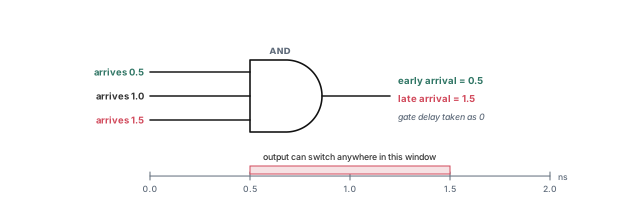
Before the modes, we need two words. When several signals meet at a gate, the output can switch at different times. The early arrival is the earliest possible time. The late arrival is the latest possible time.
Figure 4 shows an AND gate with three inputs arriving at 0.5, 1.0 and 1.5 ns. Assume the gate delay is zero. The early arrival at the output is 0.5 ns, and the late arrival is 1.5 ns.
Thus, in minimum-maximum analysis the tool tracks two values: a minimum (early) and a maximum (late). A setup check needs the late data. A hold check needs the early data.
3.2 The four modes
The tool offers four ways to apply conditions in an analysis:
- Single operating condition mode. One set of delay parameters for the whole design, from one PVT point.
- On-chip variation (OCV) mode. A conservative analysis, where minimum and maximum delays apply to different paths at the same time.
- Advanced on-chip variation (AOCV) mode. Derating factors depend on the logic depth of a path and the physical distance it covers.
- Parametric on-chip variation (POCV) mode. Delays, required times and slacks are statistical distributions, not single numbers.
This chapter focuses on the first two. AOCV and POCV are covered in Variation.
3.3 Which delay each path uses
A setup or hold check has three parts. The launch clock path runs from the clock source to the launching register. The data path runs from that register to the capturing register. The capture clock path runs from the clock source to the capturing register.
In OCV mode, each part takes whichever extreme makes the check hardest to pass:
- Setup: maximum delays on the launch clock path and the data path, and minimum delays on the capture clock path.
- Hold: minimum delays on the launch clock path and the data path, and maximum delays on the capture clock path.
Figure 5 shows this choice for both modes.
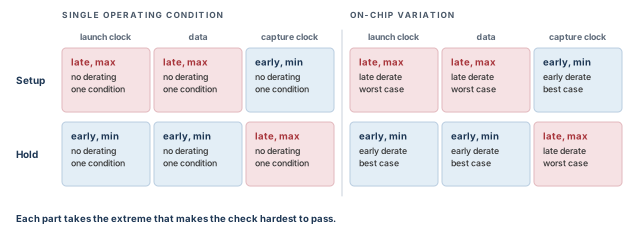
Table 3 gives the full detail.
| Mode | Check | Launch clock path | Data path | Capture clock path |
|---|---|---|---|---|
| Single | Setup | Late clock, max delay, single condition, no derating | Max delay, single condition, no derating | Early clock, min delay, single condition, no derating |
| Single | Hold | Early clock, min delay, single condition, no derating | Min delay, single condition, no derating | Late clock, max delay, single condition, no derating |
| OCV | Setup | Late clock, max delay, late derating, worst-case condition | Max delay, late derating, worst-case condition | Early clock, min delay, early derating, best-case condition |
| OCV | Hold | Early clock, min delay, early derating, best-case condition | Min delay, early derating, best-case condition | Late clock, max delay, late derating, worst-case condition |
4 Minimum and maximum delay calculations
4.1 Single mode needs several runs
By default, the tool analyzes one set of conditions at a time. This is single operating condition mode. To cover several conditions, you run the analysis several times.
Typically, you need at least two runs to be safe:
- Best case, with a minimum path report, for hold checks.
- Worst case, with a maximum path report, for setup checks.
4.2 OCV mode mixes early and late in one run
In OCV mode, the tool lets minimum and maximum delays apply to different paths at the same time. This is conservative, because real chips do vary from place to place.
However, there is a catch. Often the launch and capture clock paths share a segment, such as the first clock buffer. In OCV mode, that one segment can be given two different delays at once. This makes the result pessimistic. The tool can correct it, as the CRPR section explains later.
4.3 Which values have a minimum and a maximum
A wire load model is a table that estimates net R and C from the number of fanouts. A minimum-maximum analysis uses separate minimum and maximum values for these design parameters:
- input and output external delays;
- delays annotated from Standard Delay Format (SDF) files;
- port wire load models and port fanout numbers;
- net capacitance and net resistance;
- net wire load models;
- clock latency and clock transition time;
- input port driving cells.
For example, to calculate a maximum delay, the tool uses the longest path and the worst-case conditions. It also uses the latest clock edge, the maximum cell delays and the longest transition times.
4.4 Turning on minimum-maximum analysis
You can run minimum-maximum analysis with one library that has both conditions, or with two libraries. The two-library method has its own section later.
There are two ways to turn the analysis on:
pt_shell> set_operating_conditions -analysis_type on_chip_variation \
            -min BCCOM -max WCCOM   ;# min and max conditions from the library
pt_shell> read_sdf -analysis_type on_chip_variation my_design.sdf   ;# min and max from SDF
The second command reads both the minimum and maximum delay values from the SDF file. SDF back-annotation itself is covered in Back-Annotation.
4.5 Where minimum and maximum delays come from
Each timing arc can carry a minimum and a maximum delay. These can come from SDF files, or the tool can calculate them.
From SDF files, you can use:
- the minimum and maximum from one SDF triplet, which is three values written as
(a:b:c); - two SDF files;
- either of these, with extra multipliers on the maximum and minimum values.
From the tool's own calculation, you can use:
- one operating condition, with derating factors to model variation;
- two operating conditions, best case and worst case, to model the possible OCV;
- either of these, with derating factors on the minimum and maximum values;
- separate derating factors for cells and for nets;
- separate derating factors for different timing checks, such as setup and hold.
Table 4 shows how SDF triplet data feeds each mode. In each case, the tool picks one value of the triplet for each role.
| Mode | Role in the check | One SDF file | Two SDF files |
|---|---|---|---|
| Single | Setup: max data, at the operating condition | one triplet value | — |
| Single | Setup: min capture clock, at the operating condition | one triplet value | — |
| Single | Hold: min data, at the operating condition | one triplet value | — |
| Single | Hold: max capture clock, at the operating condition | one triplet value | — |
| OCV | Setup: max data at worst case | one triplet value | from the first file |
| OCV | Setup: min capture clock at best case | one triplet value | from the second file |
| OCV | Hold: min data at best case | one triplet value | from the first file |
| OCV | Hold: max capture clock at worst case | one triplet value | from the second file |
5 Setup and hold checks by hand
5.1 The example design
Let us work through real numbers. Our small design top has two flip-flops, FF1 and FF2. Clock CLK passes through buffer CT1, then splits. Buffer CT3 drives FF1/CK, and buffer CT2 drives FF2/CK.
- clock_path1 is the launch clock path:
CLKtoFF1/CK, throughCT1andCT3. - clock_path2 is the capture clock path:
CLKtoFF2/CK, throughCT1andCT2. - The data path runs from
FF1/CKthroughFF1/Qand some logic toFF2/D.
The logic has several routes, so the data path has a longest value (data_path_max) and a shortest value (data_path_min).
The setup check at FF2 uses the maximum delay of clock_path1, data_path_max, and the minimum delay of clock_path2. The hold check at FF2 uses the minimum delay of clock_path1, data_path_min, and the maximum delay of clock_path2.
To keep it simple, net delays are ignored here. The data path numbers include the clock-to-Q delay of FF1, the time from its clock pin to its Q output.
5.2 Setup check at worst-case conditions
Figure 6 shows the cell delays at worst-case conditions. The data path is 3.8 for the longest route and 2.0 for the shortest.
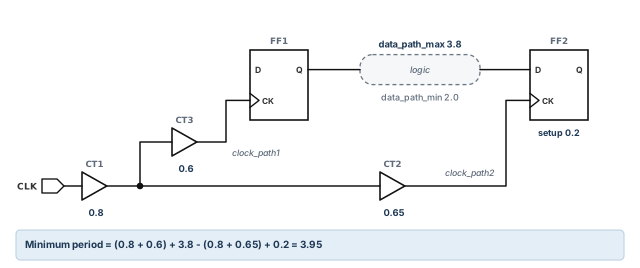
The setup rule is clock_path1 + data_path_max - clock_path2 + setup <= clock period. With the numbers:
- clock_path1 = 0.8 + 0.6 = 1.4
- data_path_max = 3.8
- clock_path2 = 0.8 + 0.65 = 1.45
- setup = 0.2
So the clock period must be at least 1.4 + 3.8 - 1.45 + 0.2 = 3.95.
5.3 Hold check at best-case conditions
At best-case conditions, every cell is faster. The values are in Table 5.
| Item | Delay |
|---|---|
| CT1 | 0.5 |
| CT3 (launch branch) | 0.3 |
| CT2 (capture branch) | 0.35 |
| Data path, longest / shortest | 3.1 / 1.6 |
| FF2 hold requirement | 0.1 |
The hold rule is clock_path1 + data_path_min - clock_path2 - hold >= 0. With the numbers:
- clock_path1 = 0.5 + 0.3 = 0.8
- data_path_min = 1.6
- clock_path2 = 0.5 + 0.35 = 0.85
- hold = 0.1
So 0.8 + 1.6 - 0.85 - 0.1 = 1.45. This is greater than 0, so there is no hold violation.
5.4 Adding on-chip variation
Now let us add variation. Suppose each delay can be anywhere from 80 percent to 100 percent of its worst-case value. Each cell then has two numbers: a minimum at 80 percent and a maximum at 100 percent. Figure 7 shows them.
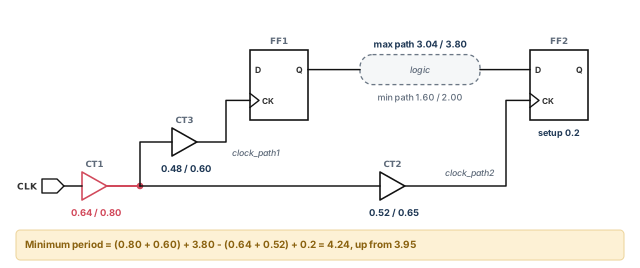
Now the setup check uses:
- clock_path1 = 0.80 + 0.60 = 1.40 (at 100 percent)
- data_path_max = 3.80 (at 100 percent)
- clock_path2 = 0.64 + 0.52 = 1.16 (at 80 percent)
- setup = 0.2
The clock period must now be at least 1.40 + 3.80 - 1.16 + 0.2 = 4.24. That is 0.29 more than the single-condition result.
On-chip variation acts on the clock latencies. So you only need it on the clock when you use propagated clock latency. With ideal clock latency, you can model OCV by raising the clock uncertainty with set_clock_uncertainty.
Early in a project, clocks are often ideal. Teams then add a little extra setup uncertainty to stand in for OCV. After clock tree synthesis, they switch to propagated clocks and real derating.
6 Specifying the analysis mode
6.1 Single operating condition analysis
For single mode, set one condition and report the matching path type. Use the best case with minimum paths for hold:
pt_shell> set_operating_conditions BEST   ;# every delay at BEST
pt_shell> report_timing -delay_type min    ;# report the shortest paths (hold)
Use the worst case with maximum paths for setup:
pt_shell> set_operating_conditions WORST   ;# every delay at WORST
pt_shell> report_timing -delay_type max     ;# report the longest paths (setup)
In each run, every path and the check value come from the same condition. In the BEST run, the hold check is reported at BEST. In the WORST run, the setup check is reported at WORST.
6.2 On-chip variation analysis
For OCV, set both conditions in one command. Then report both path types.
pt_shell> set_operating_conditions \
            -analysis_type on_chip_variation \
            -min MIN -max MAX   ;# early delays at MIN, late delays at MAX
pt_shell> report_timing -delay_type min   ;# hold paths
pt_shell> report_timing -delay_type max   ;# setup paths
For the hold report, the launch clock and data path are early at MIN, and the capture clock is late at MAX. For the setup report, the launch clock and data path are late at MAX, and the capture clock is early at MIN.
6.3 Three ways to describe variation
The next three scripts show common ways to set up OCV.
Example 1 — OCV up to 20 percent below the worst case. Use one condition and an early derating factor.
pt_shell> set_operating_conditions -analysis_type \
            on_chip_variation WCCOM   ;# OCV mode at worst-case commercial
pt_shell> set_timing_derate -early 0.8   ;# early delays at 80 percent
pt_shell> report_timing                  ;# report the timing
Example 2 — OCV between two predefined conditions. The early delays come from WCCOM_scaled, and the late delays from WCCOM.
pt_shell> set_operating_conditions -analysis_type \
            on_chip_variation -min WCCOM_scaled -max WCCOM   ;# early and late
pt_shell> report_timing   ;# report the timing
Example 3 — OCV around SDF values, with separate cell, net and check factors. Here, cell delays vary from 10 percent below to 5 percent above the SDF values. Net delays vary from 4 percent below to 2 percent above. Setup checks grow by 10 percent, and hold checks shrink by 20 percent.
pt_shell> set_timing_derate -cell_delay -early 0.90   ;# cells: 10 percent faster
pt_shell> set_timing_derate -cell_delay -late 1.05    ;# cells: 5 percent slower
pt_shell> set_timing_derate -net_delay -early 0.96    ;# nets: 4 percent faster
pt_shell> set_timing_derate -net_delay -late 1.02     ;# nets: 2 percent slower
pt_shell> set_timing_derate -cell_check -early 0.80   ;# hold checks: 20 percent less
pt_shell> set_timing_derate -cell_check -late 1.10 ;# setup checks: 10 percent moreWrite the intended percentages as comments next to each derate line, as above. Reviewers can then check the numbers against the project's signoff rules at a glance.
7 Using two libraries for analysis
Sometimes the best-case and worst-case data live in two separate libraries. The set_min_library command tells the tool to use two logic libraries at the same time. One library is for maximum delay analysis. The other is for minimum delay analysis.
The two libraries might differ in:
- best-case and worst-case operating conditions;
- optimistic and pessimistic wire load models;
- minimum and maximum timing delays.
The command creates a minimum/maximum link between the two libraries. Only the maximum library should be in the link path.
How does the tool pick the data for each cell? Figure 8 shows the lookup:
- It finds the library cell in the maximum library.
- It then looks for a match in the minimum library.
- A match needs the same cell name, the same pins and the same timing arcs.
- If a match exists, the tool uses its timing for minimum analysis. Otherwise, it uses the maximum library for both.
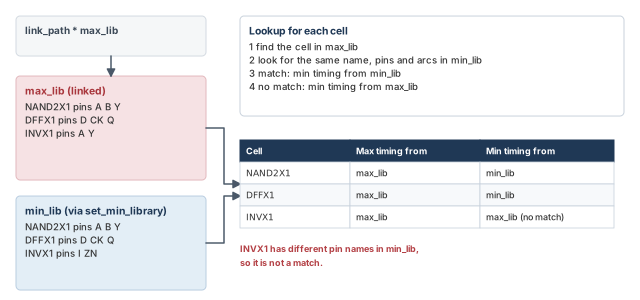
A beginner puts both libraries in the link path. The rule is different: only the maximum library belongs there. The minimum library is reached through the set_min_library link.
8 Derating timing delays
8.1 What derating does
Derating multiplies calculated delays by a factor you choose. It changes the delays and slacks shown by report_timing and other reports. The set_timing_derate command sets the factor.
pt_shell> set_timing_derate -early 0.9   ;# early (shortest-path) delays 10 percent less
pt_shell> set_timing_derate -late 1.2    ;# late (longest-path) delays 20 percent more
The first command shortens all early cell and net delays by 10 percent. An example is the data path of a hold check. The second lengthens all late cell and net delays by 20 percent. An example is the data path of a setup check. Both make the analysis more conservative.
Using set_timing_derate also switches the tool to OCV mode, if it is not already there. The effect is the same as set_operating_conditions -analysis_type on_chip_variation.
In OCV mode, early and late adjustments apply at the same time. For a setup check, the launch clock and data path get late derating, and the capture clock gets early derating. For a hold check, it is the opposite.
Rules for the command:
- You must give
-earlyor-late. To set both, use two commands. - You must give a factor, which is a floating-point number.
- For a more conservative result, use a factor below 1.0 for early, or above 1.0 for late.
8.2 Seeing the derating
The report_timing_derate command shows the factors you have set. The -derate option of report_timing adds a column with the factor used on each delay.
pt_shell> report_timing -derate ;# show the factor used on each delay Path Type: max
Point Derate Incr Path
---------------------------------------------------------
clock CLK (rise edge) 0.000 0.000
clock network delay (propagated) 1.680 1.680
FF1/CK (DFFX1) 0.000 1.680 r
FF1/Q (DFFX1) 1.200 0.480 2.160 r
U1/A (NAND2X1) 1.200 0.010 2.170 r
U1/Y (NAND2X1) 1.200 0.220 2.390 f
...The Derate column shows the late factor, 1.2, on each data path delay.
To cancel all derating, use reset_timing_derate.
8.3 Limiting the scope of derating
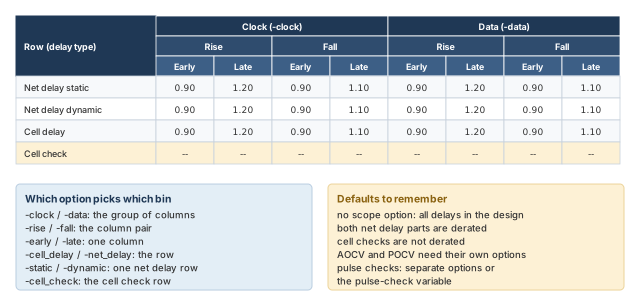
By default, a derate factor applies to all early or all late paths in the whole design. You can narrow it with the options in Table 6.
| Option | What gets derated |
|---|---|
-clock / -data |
Only clock paths, or only data paths |
-cell_delay / -net_delay |
Only cell delays, or only net delays |
-rise / -fall |
Only delays that end with a rising, or a falling, transition |
| object list | Only the given nets, cell instances or library cells; use get_nets, get_cells or get_lib_cells |
-net_delay with -static or -dynamic |
Only the static part, or only the dynamic part, of net delay; both are derated by default |
-cell_check |
Cell timing check values instead of delays; not derated by default |
-aocvm_guardband, -pocvm_guardband, -pocvm_coefficient_scale_factor |
Derating for AOCV or POCV analysis; by default the command affects only ordinary delays |
Two terms need a word:
- The static part of a net delay is the delay without crosstalk. The dynamic part is the change caused by crosstalk, also called delta delay. Crosstalk is coupling from a nearby switching wire.
- With
-cell_check, early derating applies to cell hold and removal requirements. Late derating applies to cell setup and recovery requirements.
The report_timing_derate command lists every setting in one table.
pt_shell> report_timing_derate -significant_digits 2 ;# all settings, 2 decimals ---- Clock ---- ---- Data -----
Rise Fall Rise Fall
Early Late Early Late Early Late Early Late
------------------------------------------------------------------
design: top
Net delay static 0.90 1.20 0.90 1.10 0.90 1.20 0.90 1.10
Net delay dynamic 0.90 1.20 0.90 1.10 0.90 1.20 0.90 1.10
Cell delay 0.90 1.20 0.90 1.10 0.90 1.20 0.90 1.10
Cell check -- -- -- -- -- -- -- --
net: n3
Net delay static 0.90 1.30 0.90 1.30 0.90 1.30 0.90 1.30
Net delay dynamic 0.90 1.30 0.90 1.30 0.90 1.30 0.90 1.30Here the design-wide late factor is 1.2 for rise and 1.1 for fall. Net n3 has its own late factor of 1.3.
Figure 9 shows how the scope options map onto the columns and rows of that table.
8.4 Derating on nets and hierarchical cells
A leaf cell is a single library cell instance. A hierarchical cell is a block that holds other cells. When you derate a net or a leaf cell, the tool picks the derating type from the object:
- A net gets net derating. It applies to the whole net, even where the net crosses into a lower level of hierarchy.
- A leaf cell gets cell derating.
A hierarchical cell is different. You must state the type with -net_delay, -cell_delay, both, or -cell_check.
8.5 Derating pulse width and period checks
A minimum pulse width check makes sure a clock pulse stays high, or low, long enough. A minimum period check makes sure the clock period is long enough for a cell. There are two ways to derate these constraints.
Way 1 — reuse the cell check factors. Set timing_use_constraint_derates_for_pulse_checks to true. The tool then applies the factors set with -cell_check and -late.
Way 2 — give separate factors. Use the -min_pulse_width and -min_period options. In this case, leave the variable at false, which is its default.
set_timing_derate -min_pulse_width rise 1.2   ;# min pulse width derating
set_timing_derate -min_period fall 1.1        ;# min period derating
report_timing_derate -min_pulse_width         ;# show the pulse width factors
report_timing_derate -min_period              ;# show the period factors
report_min_pulse_width                        ;# report the pulse width checks
report_min_period                             ;# report the period checks
reset_timing_derate -min_pulse_width          ;# remove the pulse width factors
reset_timing_derate -min_period               ;# remove the period factors
This works with POCV analysis too. Combine these options with -pocvm_guardband and -pocvm_coefficient_scale_factor.
8.6 When derating settings conflict
A new set_timing_derate command replaces any earlier value on the same scope. When settings overlap in scope, the narrower scope wins.
set_timing_derate -late -cell_delay 1.4 [get_cells U2*]             ;# cell instances
set_timing_derate -late -cell_delay 1.3 [get_lib_cells libAZ/ND*]   ;# library cells
set_timing_derate -late -cell_delay 1.2                             ;# all cell delays
set_timing_derate -late 1.1                                         ;# all cells and nets
Here the earlier commands are narrower, so they keep priority. Thus:
- a cell whose name starts with
U2gets 1.4, even if it is also anNDlibrary cell; - other
NDcells get 1.3; - all other cells get 1.2;
- nets get 1.1.
A beginner adds a design-wide set_timing_derate -late 1.1 at the end and expects it to override everything. It does not. Narrower settings still win. Check the result with report_timing_derate.
8.7 Derating negative delays
Delays can be negative in some unusual cases. Suppose a cell's input changes slowly, its output changes fast, and the cell is quick. Then the output can cross its 50 percent point before the input does. The measured delay is negative. Crosstalk can also cause a negative change in net delay.
The general rule is:
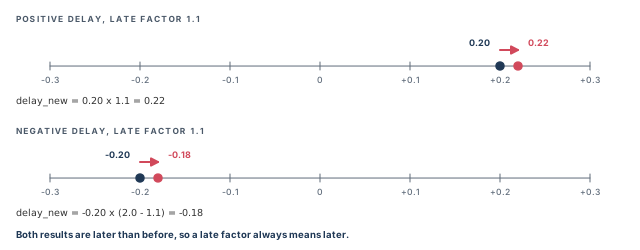
delay_new = old_delay + (derating_factor - 1.0) * abs(old_delay)
For a positive delay, this is simply delay_new = old_delay * derating_factor.
For a negative delay, it becomes delay_new = old_delay * (2.0 - derating_factor).
Figure 10 shows why. A late factor must make every delay later, even a negative one.
When both parts of a net delay are derated, the tool derates the static and dynamic parts separately. Then it adds them. Thus, a negative delta delay is derated correctly before it is added to a positive static delay.
-cell_check is off by default, and negative delays are handled so that late always means later.9 Clock reconvergence pessimism removal
9.1 What clock reconvergence pessimism is
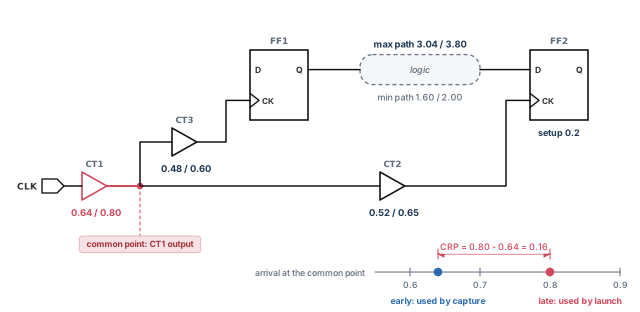
Look again at Figure 7. Buffer CT1 is on both clock paths. For the setup check, it was counted at 0.80 for launch and 0.64 for capture. But it is one physical buffer. Its process, voltage and temperature cannot be slow and fast at the same time.
Clock reconvergence pessimism is this error. It occurs when two clock paths share a segment. The shared part gets a minimum delay on one path and a maximum delay on the other. It happens whenever launch and capture paths use different delays, most often in OCV analysis.
Clock reconvergence pessimism removal (CRPR) is the automatic fix. CRPR is on by default.
Key terms:
- The common portion is the shared clock segment. Here it is just
CT1. - The common point is the last cell output in the shared segment. Here it is the output of
CT1. - The clock reconvergence pessimism (CRP) is the latest arrival minus the earliest arrival at the common point. Here it is 0.80 - 0.64 = 0.16.
Figure 11 shows the common point and the 0.16 that CRPR adds back.
The same thing happens, in the opposite direction, for the hold check at FF2.
9.2 Why CRPR is safe to leave on
CRPR only removes pessimism. So it can only increase the reported slack. Thus, if a design has no violations with CRPR off, it also has none with CRPR on.
You can turn CRPR off to save runtime and memory. The cost is accuracy: you see more pessimism. To turn it off, set timing_remove_clock_reconvergence_pessimism to false before timing analysis. Any change to this variable causes a full timing update.
pt_shell> set_app_var timing_remove_clock_reconvergence_pessimism false ;# CRPR offThe tool performs CRPR at the same time as regular timing analysis. It is not a separate step.
Keep CRPR on for every run that you will make decisions from. Turning it off can create false violations. These lead to wasted ECOs (engineering change orders, late fixes to the design).
9.3 Reconvergent logic in the clock network
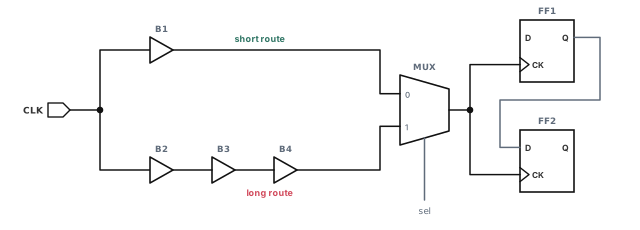
CRPR is not only for OCV. Figure 12 shows a clock that splits into two routes and meets again at a multiplexer (MUX). Only one MUX input is active at a time. However, one check could use the short route for one clock path and the long route for the other. That is also clock reconvergence pessimism, even without OCV.
9.4 CRPR in timing reports
The adjustment appears in detailed reports from report_timing, report_constraint, report_analysis_coverage and report_bottleneck. Here is a setup report for our design with a 6 ns clock.
Startpoint: FF1 (rising edge-triggered flip-flop clocked by CLK)
Endpoint: FF2 (rising edge-triggered flip-flop clocked by CLK)
Path Group: CLK
Path Type: max
Point Incr Path
--------------------------------------------------------
clock CLK (rise edge) 0.00 0.00
clock network delay (propagated) 1.40 1.40
FF1/CK (DFFX1) 0.00 1.40 r
FF1/Q (DFFX1) 0.60 2.00 f
U1/Y (NAND2X1) 3.20 5.20 f
data arrival time 5.20
clock CLK (rise edge) 6.00 6.00
clock network delay (propagated) 1.16 7.16
clock reconvergence pessimism 0.16 7.32
clock uncertainty 0.00 7.32
FF2/CK (DFFX1) 7.32 r
library setup time -0.20 7.12
data required time 7.12
--------------------------------------------------------
data required time 7.12
data arrival time -5.20
--------------------------------------------------------
slack (MET) 1.92Read the capture side. The capture clock arrives at 7.16. CRPR adds 0.16, which moves the required time later. Without that line, the slack would be 1.76.
9.5 Minimum pulse width checking with CRPR
The report_constraint command checks minimum pulse width in two places:
- in clock networks, as set with
set_min_pulse_width; - at cell inputs, as given in the logic library.
CRPR makes this check more accurate. Let us see why with the circuit in Figure 13. An external clock source drives port CLK. Then buffers CT1 and CT2 drive the clock pin of FF1.
For a level-high pulse, the tool uses the maximum delay for the rising edge. It uses the minimum delay for the falling edge. This gives the narrowest possible high pulse. For a level-low pulse, it is the reverse.
The delays, as minimum / maximum, are:
- source latency: rise and fall -1.3 / 1.4;
CT1: rise and fall 1.0 / 1.0;CT2: rise 0.80 / 1.80, fall 0.85 / 2.03.
Without CRPR, the narrowest pulse is very small and fails the flop's pulse width rule. But this assumes the rising edge is at its slowest while the falling edge is at its fastest. Real rise and fall delays are at least partly correlated. For example, if the source rise delay is -1.3, the fall delay is probably near -1.3, not +1.4.
With CRPR on, the tool adds slack back:
crp = min[(Mr - mr), (Mf - mf)]
Here Mr and mr are the cumulative maximum and minimum rise delays. Mf and mf are the cumulative maximum and minimum fall delays.
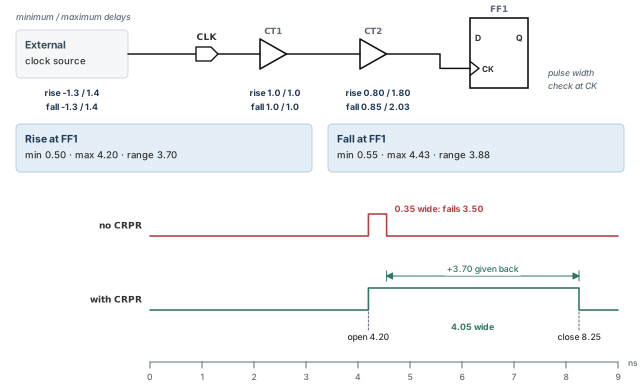
The calculation:
- rise: minimum = -1.3 + 1.0 + 0.80 = 0.50; maximum = 1.4 + 1.0 + 1.80 = 4.20; range = 3.70.
- fall: minimum = -1.3 + 1.0 + 0.85 = 0.55; maximum = 1.4 + 1.0 + 2.03 = 4.43; range = 3.88.
- CRP = the smaller range = 3.70.
The pulse width check uses the maximum rise, 4.20, and the minimum fall, 0.55. You could set up this analysis with a script like this:
set_operating_conditions -analysis_type on_chip_variation   ;# OCV mode
create_clock -period 8 CLK                                   ;# 8 ns clock on port CLK
set_propagated_clock [all_clocks]                            ;# use real clock delays
set_clock_latency -source -early -1.3 CLK                    ;# early source latency
set_clock_latency -source -late 1.4 CLK                      ;# late source latency
set_annotated_delay -cell -from CT1/A -to CT1/Z 1            ;# CT1: 1.0 both ways
set_annotated_delay -cell -from CT2/A -to CT2/Z -min -rise 0.8    ;# CT2 min rise
set_annotated_delay -cell -from CT2/A -to CT2/Z -max -rise 1.8    ;# CT2 max rise
set_annotated_delay -cell -from CT2/A -to CT2/Z -min -fall 0.85   ;# CT2 min fall
set_annotated_delay -cell -from CT2/A -to CT2/Z -max -fall 2.03   ;# CT2 max fall
With CRPR on, the report_constraint path report looks like this:
  Point                                    Incr       Path
  ----------------------------------------------------------
  clock CLK (rise edge)                    0.00       0.00
  clock network delay (propagated)         4.20       4.20 r
  FF1/CK                                   0.00       4.20 r
  open edge arrival time                              4.20

  clock CLK (fall edge)                    4.00       4.00
  clock network delay (propagated)         0.55       4.55 f
  FF1/CK                                   0.00       4.55 f
  clock reconvergence pessimism            3.70       8.25
  close edge arrival time                             8.25
  ----------------------------------------------------------
  required pulse width (high)                         3.50
  actual pulse width                                  4.05
  ----------------------------------------------------------
  slack                                               0.55
The open edge (rise) arrives at 4.20. The close edge (fall) is at 4.00 + 0.55 + 3.70 = 8.25. So the pulse is 8.25 - 4.20 = 4.05 wide, against 3.50 required.
10 Fine control of CRPR
10.1 Different transitions at the common point
Sometimes the launch path needs a rising edge at the common point, but the capture path needs a falling edge. The timing_clock_reconvergence_pessimism variable controls what the tool does then:
normal(the default): the tool takes the latest topological common point, even if the transitions differ there.same_transition: the tool takes the latest common point where the transitions are also the same.
Figure 14 shows an example. A divide-by-2 flop sits on the shared clock path. Each rising CLK edge makes its output rise or fall. So after that flop, the launch path needs a rise and the capture path needs a fall.
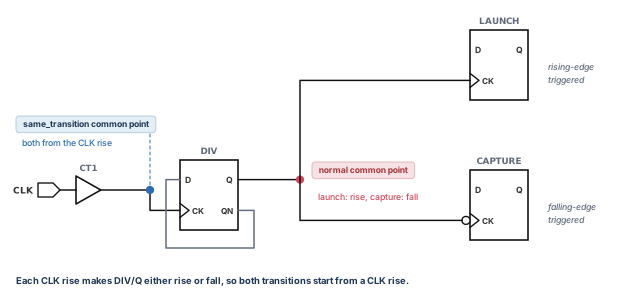
Which should you use?
normalis right when the rising and falling arrival times are highly correlated.same_transitiongives a safe answer when they are not. It may be pessimistic.
pt_shell> set_app_var timing_clock_reconvergence_pessimism same_transition ;# safer10.2 Derating CRP for different transitions
There is a middle path. You keep the normal common point, but you give back only part of the CRP when the transitions differ. Set timing_crpr_different_transition_derate:
pt_shell> set_app_var timing_crpr_different_transition_derate 0.90 ;# keep 90 percentWhen the transitions differ at the common point, the CRP is reduced to 90 percent before it is added to the slack. This is more conservative than the default, which adds back 100 percent. It still lets you use the later common point, so more pessimism is removed than with same_transition.
In POCV analysis, CRP has a nominal part and a variation part. To derate both, set two variables:
pt_shell> set_app_var timing_crpr_different_transition_derate 0.90             ;# nominal
pt_shell> set_app_var timing_crpr_different_transition_variation_derate 0.90   ;# variation
Table 7 sums up these two variables.
| Variable | Default | Meaning of the default |
|---|---|---|
timing_crpr_different_transition_derate |
1.0 | The nominal CRP is not derated |
timing_crpr_different_transition_variation_derate |
0.0 | For mixed transitions, the CRP variation is fully derated, that is, set to zero |
Thus, by default, when the launch and capture transitions differ at the common point, random variation does not add to pessimism removal. This is a safe approach for such mixed edge types, for example in a minimum pulse width check.
Both variables have no effect in two cases:
- when the launch and capture transitions are the same at the common point;
- when
timing_clock_reconvergence_pessimismis set tosame_transition.
10.3 The CRPR merging threshold
To save runtime, the tool merges neighboring points in a path when their CRP values differ by very little. The timing_crpr_threshold_ps variable sets that threshold in picoseconds (ps). The default is 5, so points within 5 ps are merged.
For a good balance, set it to half the stage delay of a typical clock-network gate. The stage delay is the gate delay plus its net delay.
- During design, a larger value gives faster analysis.
- For signoff, a smaller value gives better accuracy.
pt_shell> set_app_var timing_crpr_threshold_ps 10 ;# merge points within 10 psMany teams use a larger threshold in daily runs and a smaller one for the final signoff run. The setting goes in the shared setup script, so every engineer gets the same CRP numbers.
10.4 Reporting CRPR calculations
The report_crpr command shows how the CRP between two register clock pins or ports was calculated. You give the launch and capture clock pins, the clock and the check type.
pt_shell> report_crpr -from [get_pins FF1/CK] \
            -to [get_pins FF2/CK] \
            -from_clock CLK -setup   ;# CRP between FF1 and FF2 for setup
The report shows:
- the location of the common node;
- the launch and capture edge types, rising or falling;
- the four arrival times at the common point: early and late, rise and fall;
- the CRP values for rise and for fall;
- the values actually used for opening-edge and closing-edge pessimism removal;
- the values for both static and dynamic conditions, and which one was used.
The CRP from report_crpr can differ slightly from the one in report_timing. This is because report_timing merges points using timing_crpr_threshold_ps. When they differ, trust report_crpr, because it does not merge points.
report_crpr when you need the exact number.11 CRPR with crosstalk, dynamic arrivals and latches
11.1 CRPR and crosstalk
Crosstalk analysis with PrimeTime SI (signal integrity) adds delta delays to nets. A delta delay on the shared clock segment is pessimistic only for a zero-cycle check. That is a check where the same clock edge launches and captures the data.
For other checks, the launch and capture edges are different edges. Crosstalk can hit them differently, so the change is not pessimistic. Thus, CRPR removes crosstalk delay on the common segment only for zero-cycle checks. In a zero-cycle check, the aggressor, the nearby switching wire, affects launch and capture in the same way at the same time.
CRPR can apply to crosstalk delays in cases like these:
- a standard hold check;
- a hold check on a register whose Q-bar (inverted) output drives its D input, as in a divide-by-2 clock circuit;
- a hold check with crosstalk feedback from coupling between the Q-bar output and the D input of a register;
- a hold check on a multicycle path set to zero, where one edge launches and captures with designed-in skew;
- certain setup checks that involve transparent latches.
11.2 CRPR with dynamic clock arrivals
A similar case happens with dynamic annotations in the clock network. These include dynamic clock latency, set with set_clock_latency, and dynamic rail voltage, set with set_voltage. They produce dynamic clock arrivals.
CRPR treats them like crosstalk delays. It uses dynamic clock arrivals for zero-cycle paths only. For all other paths, it uses only the static part of the clock arrival, which gives more accurate results.
pt_shell> set_clock_latency -early -source 2.5 \
            -dynamic -0.5 [get_clocks CLK]   ;# early: 3.0 static, -0.5 dynamic
pt_shell> set_clock_latency -source -late 5.5 \
            -dynamic 0.5 [get_clocks CLK]    ;# late: 5.0 static, +0.5 dynamic
The first command gives a total early latency of 2.5: 3.0 static plus -0.5 dynamic. The second gives a total late latency of 5.5: 5.0 static plus 0.5 dynamic. Thus:
- the static CRP is 5.0 - 3.0 = 2.0, used for most paths;
- the dynamic CRP is 5.5 - 2.5 = 3.0, used for zero-cycle paths.
11.3 Transparent latch edges
A transparent latch passes data while its enable is open, and holds it when the enable closes. For a path ending at a latch, the tool calculates two CRP values at the common node. One is for rising edges and one for falling edges. The opening edge and the closing edge are each shifted by their own value.
Time borrowing means data arriving after the latch opens uses some of the next cycle's time. In practice:
- The opening-edge value changes the slack of paths that do not borrow time. It also reduces the time borrowed by paths that do borrow.
- The closing-edge value increases the maximum time borrowing allowed at the latch. It also reduces the violation of a path that fails setup.
To see how these two values were calculated, use report_crpr.
12 Clock OCV pessimism in crosstalk windows
12.1 The problem
Crosstalk needs timing overlap. An aggressor is the switching wire. The victim is the wire being disturbed. The aggressor can only change the victim's delay if their arrival windows overlap. An arrival window is the range of times a signal can switch.
By default, CRPR runs only after the final slack is calculated. It does not run while the tool builds the crosstalk arrival windows. So if the aggressor and victim are clocked through a shared segment, their windows include the derating spread of that segment. The windows become wider than they should be. They may then overlap, and the tool reports crosstalk that cannot happen.
Figure 15 shows an example. FF1 drives the aggressor and FF2 drives the victim. Both are clocked from the same common point.
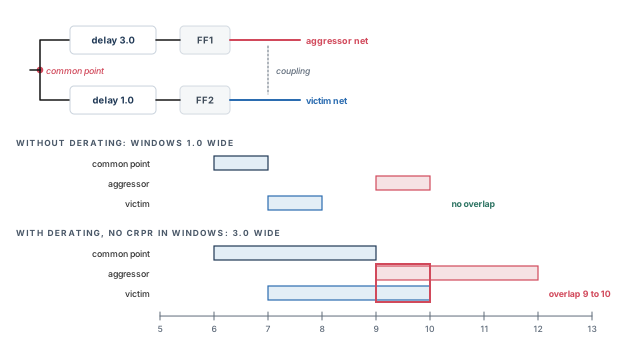
- Without derating, the common point arrives between 6 and 7, a window 1.0 wide. The paths add 3.0 and 1.0. So the aggressor switches between 9 and 10, and the victim between 7 and 8. No overlap, so no crosstalk.
- With derating, the common point has an early arrival of 6 and a late arrival of 9, a window 3.0 wide. The same path delays give windows of 9 to 12 and 7 to 10, both 3.0 wide. They overlap from 9 to 10.
12.2 The fix
To remove this pessimism, set pba_enable_xtalk_delay_ocv_pessimism_reduction to true. Its default is false. With it on, and with CRPR enabled, PrimeTime SI applies CRPR while it calculates the aggressor and victim windows. This happens during path-based analysis, which recalculates each reported path in detail.
pt_shell> set_app_var timing_remove_clock_reconvergence_pessimism true   ;# CRPR on
pt_shell> set_app_var pba_enable_xtalk_delay_ocv_pessimism_reduction true   ;# windows too
Path-based analysis runs when you use the -pba_mode option of get_timing_paths or report_timing. The windows are more accurate, at the cost of some extra runtime.
Turn this on when a few paths fail only because of crosstalk on clocked aggressors. It costs runtime, so use it where the extra accuracy pays off.
13 Worked example: OCV setup check with CRPR
Let us run the OCV setup analysis on our design top from start to finish. Figure 16 shows the design with its worst-case delays. Early delays are 80 percent of these. The clock period is 6 ns.
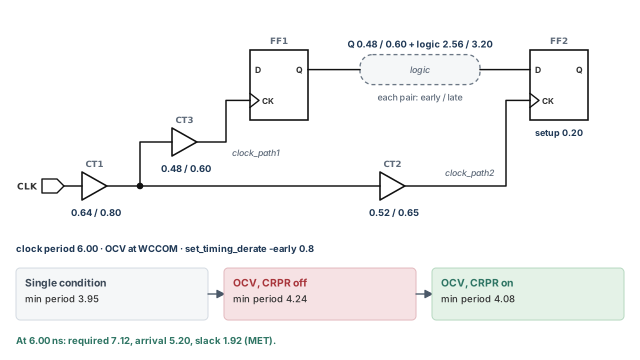
Step 1 — Check which conditions the library offers
pt_shell> report_lib tech_lib ;# look for WCCOM among the operating conditionsCheck: WCCOM is listed. If it is not, set_operating_conditions will fail.
Step 2 — Set OCV mode at worst case
pt_shell> set_operating_conditions -analysis_type \
            on_chip_variation WCCOM   ;# OCV mode, all delays at WCCOM
pt_shell> report_design   ;# confirm the operating condition settings
Check: the operating condition settings in report_design name WCCOM.
Step 3 — Add the early derate
pt_shell> set_timing_derate -early 0.8   ;# early cell and net delays at 80 percent
pt_shell> report_timing_derate           ;# confirm the factor
Check: the Early columns show 0.80 and the Late columns are unchanged. Cell check still shows --.
Step 4 — Confirm CRPR is on
pt_shell> set_app_var timing_remove_clock_reconvergence_pessimism true ;# CRPR onCheck: true is already the default. Setting it in the script makes the choice visible to reviewers.
Step 5 — Report the setup path
pt_shell> report_timing -delay_type max ;# FF1 to FF2 setup pathThe report is the one in the CRPR section above. Check these numbers against the hand calculation:
- launch clock = 0.80 + 0.60 = 1.40;
- data arrival = 1.40 + 0.60 + 3.20 = 5.20;
- capture clock = 6.00 + 0.64 + 0.52 = 7.16;
- CRP = 0.80 - 0.64 = 0.16, so the clock is 7.32;
- required = 7.32 - 0.20 = 7.12;
- slack = 7.12 - 5.20 = 1.92.
The minimum clock period is 6.00 - 1.92 = 4.08. That sits between the single-condition 3.95 and the OCV-without-CRPR 4.24.
Step 6 — Look at the CRP calculation itself
pt_shell> report_crpr -from [get_pins FF1/CK] \
            -to [get_pins FF2/CK] \
            -from_clock CLK -setup   ;# common node and CRP values
Check: the common node is the output of CT1. Both edges are rising, and the CRP is 0.16.
Step 7 — Check hold in the same run
pt_shell> report_timing -delay_type min ;# FF1 to FF2 hold pathCheck: for hold, the launch clock and data path are now early, and the capture clock is late. CRPR again adds back the CT1 difference.
14 Common mistakes and how to catch them
| Symptom | Likely cause | Fix |
|---|---|---|
set_operating_conditions cannot find the name |
The condition is not in the named library or in any link path library | List the conditions with report_lib, then name the right library |
| Hold looks clean but fails on silicon | Only the worst case was run in single mode | Also run the best case, or use OCV mode |
| Clocks and port delays vanished | reset_design was used to clear conditions |
Use remove_operating_conditions instead |
| A design-wide derate seems to be ignored | A narrower setting on cells or library cells wins | Check with report_timing_derate; change the narrow setting |
| Setup and hold requirements unchanged after derating | Cell checks are not derated by default | Add -cell_check -late or -cell_check -early |
| Hierarchical cell derating has no effect | The type was not stated for a hierarchical cell | Add -cell_delay, -net_delay or -cell_check |
| Many false setup violations in OCV mode | CRPR was turned off | Turn CRPR back on by setting its variable to true |
CRP in report_timing differs from report_crpr |
Points are merged within timing_crpr_threshold_ps |
Trust report_crpr; lower the threshold for signoff |
| Unexpected crosstalk on clocked nets in path-based runs | Arrival windows include the derating spread of the common clock path | Turn on CRPR for crosstalk windows, as shown above |
15 Interview preparation
A named set of process, temperature and voltage values, plus a wire tree type, used to scale library delays.
- Library delays are given at nominal values.
- The tool scales them, or uses exact tables if the library has them.
- If none is set, the library default or the nominal values are used.
Setup fails when data is slow, and hold fails when data is fast.
- The worst case gives the longest delays.
- The best case gives the shortest delays.
- In single mode, this needs at least two runs.
set_timing_derate -late 1.2 do?It makes every late (longest-path) cell and net delay 20 percent larger.
- It also puts the tool into OCV mode.
- Early delays need a separate
-earlycommand.
Single mode uses one condition and no derating; OCV mode uses worst case for launch and best case for capture.
- Both modes use late launch and early capture for setup.
- OCV adds late and early derating in the same check.
- OCV is more conservative.
4.24, from 1.40 + 3.80 - 1.16 + 0.2.
- If the shared buffer is 0.80 late and 0.64 early, CRP is 0.16.
- With CRPR, the minimum period becomes 4.08.
It is the false difference from counting a shared clock segment as both late and early, measured at the common point.
- It equals the late minus the early arrival at the common point.
- The common point is the last cell output shared by both clock paths.
- CRPR adds this amount back to the slack.
No. It only removes pessimism, so it can only increase slack.
- A design clean without CRPR is clean with it.
- Turning it off saves runtime and memory but can add false violations.
[get_cells U2*] at 1.4 and one design-wide at 1.1. Which wins on U25?1.4, because the narrower scope has priority, whatever the order.
- A new command on the same scope replaces the old one.
- Check with
report_timing_derate.
Use set_timing_derate -cell_check, with -late for setup and recovery and -early for hold and removal.
- Cell checks are not derated by default.
By old_delay * (2.0 - 1.1), so -0.20 becomes -0.18, which is later.
- The general rule adds
(factor - 1.0) * abs(old_delay). - Static and dynamic net parts are derated separately, then added.
Only then does one clock edge drive both launch and capture, so the aggressor affects both the same way.
- A standard hold check is the usual case.
- For other checks, the two edges may see different crosstalk.
timing_clock_reconvergence_pessimism same_transition change?The common point must have matching launch and capture transitions, so it may be earlier and remove less pessimism.
normalis the default and suits highly correlated rise and fall times.timing_crpr_different_transition_derateis a middle path.
report_crpr and report_timing show slightly different CRP?report_timing merges nearby points within timing_crpr_threshold_ps, which is 5 ps by default; report_crpr does not.
- The
report_crprvalue is the more accurate one.
Set pba_enable_xtalk_delay_ocv_pessimism_reduction to true and run path-based analysis with CRPR on.
- CRPR is then applied to the arrival windows themselves.
- It costs extra runtime.
16 Chapter close
Compact glossary
| Term | Meaning |
|---|---|
| PVT | Process, voltage and temperature: the main causes of delay change |
| Operating condition | A named PVT set plus a tree type, used to scale delays |
| Tree type | The RC tree shape used for wire estimates before layout |
| Single operating condition mode | One condition for the whole design |
| On-chip variation (OCV) | Delay differences between places on one chip at one time |
| AOCV | Advanced OCV: derating by logic depth and distance |
| POCV | Parametric OCV: delays and slacks as statistical distributions |
| Early / late arrival | The earliest and latest time a signal can switch |
| SDF triplet | Three delay values in one SDF entry, written (a:b:c) |
| Derating | Multiplying delays by a factor to model variation |
| Cell check derating | Derating setup, hold, recovery and removal values |
| Static / dynamic net delay | Net delay without crosstalk / the change caused by crosstalk |
| Common portion | The clock segment shared by launch and capture paths |
| Common point | The last cell output in the common portion |
| CRP | Clock reconvergence pessimism: late minus early arrival at the common point |
| CRPR | Clock reconvergence pessimism removal: adding CRP back to slack |
| Zero-cycle check | A check where one clock edge launches and captures |
| Arrival window | The range of times a signal can switch |
| Path-based analysis | Detailed recalculation of each reported path |
Operating conditions on one page
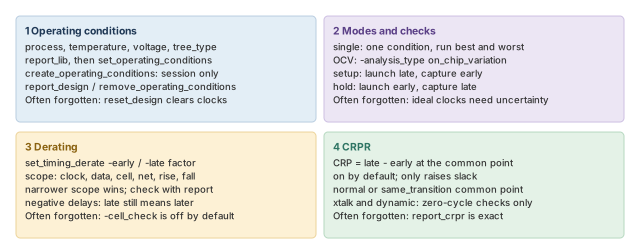
Figure 17 is the summary to redraw from memory.
Where the next chapter goes, and why
You now know how conditions, variation and derating shape every delay in a check. However, we have treated each cell delay as a number that simply appears. We have not asked how the tool actually computes it from input transitions, loads and wires.
The Delay Calculation chapter opens that box. It covers how cell and net delays are computed, and how library data is scaled between voltage and temperature points. Thus, the numbers you derated here gain a clear origin there.