Why this chapter matters in a real project
Every number in a timing report starts as a stage delay. A stage is one driving cell, the wires it drives and the input pins at the end of those wires. If the delay of each stage is wrong, the slack at the end of the path is wrong too.
Real circuits are analog. A SPICE simulation solves the transistor circuit directly and gives the true answer. However, it is far too slow for millions of stages. So the tool uses small models of the driver, the wires and the receivers. A good model gives almost the same delay and slew as SPICE, at a tiny fraction of the cost.
The choice of model matters. An old-style model can miss effects that matter at small geometries, such as the Miller effect or a long waveform tail. Thus, a path can pass in the tool and fail in silicon. A model used outside its library tables is also a risk. Its numbers can hide real violations or create false ones that waste engineering change order (ECO) effort.
This chapter also covers situations that break the simple picture. Examples include a clock mesh with a thousand drivers and a NAND gate whose inputs all switch together. Another is a cell running at a voltage no library was built for.
Prerequisites
- Working With Design Data: reading and linking a design, logic libraries,
link_pathand attributes. - Constraining the Design and Clocks: clocks, input delays and design rule constraints such as maximum capacitance.
- Timing Paths and Exceptions: setup and hold checks, and how a path is built from stages.
- Operating Conditions: process, voltage and temperature corners, and timing derates.
- You do not need to know transistor-level circuit theory. Each electrical idea is explained when it first appears.
In this chapter, times are in nanoseconds (ns) and capacitances in picofarads (pF) unless said otherwise.
Learning objectives
- Describe a stage and the three models the tool uses to compute its delay and slew.
- Explain how trip points define delay and slew, and predict which thresholds the tool uses.
- Compare the NLDM and CCS driver and receiver models, and choose a mode with the model variables.
- Read a
report_delay_calculationreport for a cell arc and for a net arc. - Resolve RC-011 extrapolation warnings and explain how pin capacitance is reported with CCS data.
- Define scaling library groups, including exact-match, best-match and multirail groups, and scale derates by voltage.
- Turn on waveform propagation and state the library data it needs.
- Explain fast multidrive mode and parallel driver reduction, and when each applies.
- Set up multi-input switching analysis for hold checks in all three modes.
- Run a unit delay analysis for flow testing.
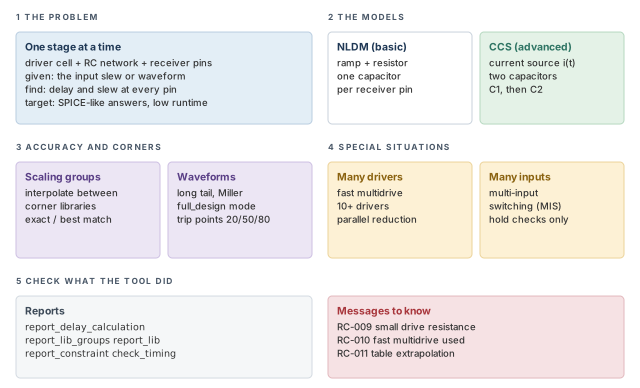
Figure 1 is a map of the whole chapter. Come back to it whenever you lose your place.
1 The beginner's mental model
Think of a pump that pushes water through pipes into several buckets. The pump is not perfectly strong. Narrow pipes resist the flow, and the pipe walls hold some water as they fill. We want to know when each bucket reaches its halfway mark. That moment is the "arrival" of the signal.
We could model every drop of water. However, that is slow. Instead, we describe the pump with a simple curve. We shrink the pipe network to a few equivalent parts, and treat each bucket as a known size. Figure 2 maps this picture to the tool.
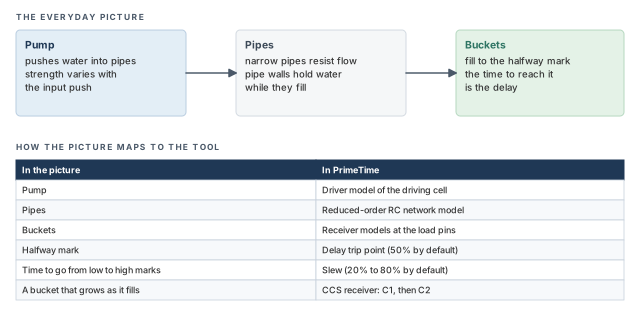
- A real pump pushes the same way every time. A driver cell does not. Its strength depends on the input slew, the load and the voltage. So the tool builds a separate model for each timing arc and each edge.
- Buckets have a fixed size. Receiver pins do not. Their input capacitance changes during the transition, which is why CCS uses two values.
- In the picture, every bucket fills smoothly. Real waveforms can have long tails and bumps. When they do, the 50% time alone does not describe the signal well.
Now the engineering model
In engineering terms, the tool does this for every stage:
- Take the input. The input slew or input waveform at the driver input is known from the previous stage.
- Model the driver. A driver model reproduces how the driving cell responds to any RC load.
- Model the wires. A reduced-order network model replaces the full annotated RC (resistor-capacitor) network with a small one that responds almost the same way.
- Model the receivers. A receiver model represents the input capacitance of each load pin.
- Solve and measure. The tool computes the waveform at the driver output and at each receiver input. It then measures delay and slew at the trip points.
Slew is the transition time of a signal: how long it takes to rise or fall. A trip point is a voltage level used to measure delay or slew, such as 50% of the supply.
2 Stages, models and trip points
2.1 What a stage is
Let us consider a buffer, U1, that drives three receivers: U2, U3 and U4. After layout, the wire from U1/Z is a network of resistors and capacitors. These are its parasitics: the resistance and capacitance of the metal. The Back-Annotation chapter explains how they are read in.
The stage is U1, its RC network and the three receiver input pins. The goal is the response at the driver output and at each load pin, given the input slew or waveform at U1/A. The tool must find it with the least runtime that still gives accurate results.
Figure 3 shows the real stage and the three models that replace it.
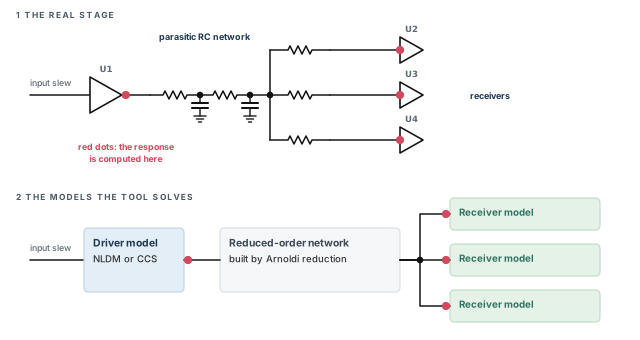
The three models are:
- Driver model. It reproduces how the transistors inside the driving cell respond to an arbitrary RC network, for a given input slew.
- Reduced-order network model. It is a simplified version of the full annotated network, with nearly the same response. The tool builds it with the Arnoldi reduction method, a standard mathematical way to shrink a large RC network.
- Receiver model. It represents the input capacitance of a cell input pin. This capacitance depends on the rise or fall transition, the slew at the pin and the receiver's output load. It also depends on the state of the cell, and on voltage and temperature.
An ideal set of models gives exactly the same delays and slews as SPICE. That holds at the driver output and at each receiver input.
2.2 Choosing the driver and receiver models
Two variables choose the model family for RC delay calculation:
rc_driver_model_modesets the driver model.rc_receiver_model_modesets the receiver model.
Each takes one of two values:
| Value | What RC delay calculation uses |
|---|---|
basic |
The nonlinear delay model (NLDM) in the cell libraries |
advanced (default) |
The Composite Current Source (CCS) timing model, if the libraries contain CCS data; otherwise NLDM |
pt_shell> set_app_var rc_driver_model_mode advanced     ;# CCS driver if any
pt_shell> set_app_var rc_receiver_model_mode advanced   ;# CCS receiver if any
The CCS model has several advantages over NLDM:
- It solves the problem behind the RC-009 warning, which appears when the drive resistance is much smaller than the network impedance.
- It handles the Miller effect better.
- It handles dynamic IR drop and multivoltage analysis better. Dynamic IR drop is a short dip in supply voltage while many cells switch.
The next two sections explain both model families.
Leave both variables at advanced unless you have a clear reason. With CCS libraries you get the better models, and without them the tool falls back to NLDM on its own.
2.3 Trip points: where delay and slew are measured
A waveform is a curve, but a report needs one number. Characterization trip points are the thresholds used to turn the curve into a number. They are also called waveform measurement thresholds. They change both delays and transition times.
With the default trip points:
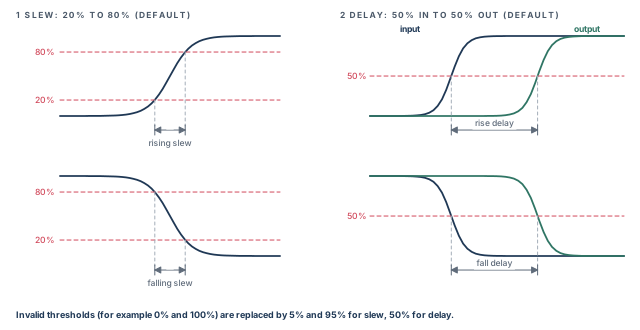
- Slew is the time a signal takes to go from 20% to 80% of the rail voltage, or from 80% to 20%.
- Cell delay is the time from the input reaching 50% of the rail voltage to the output reaching 50%.
For example, say the input crosses 50% at 1.00 ns and the output crosses 50% at 1.06 ns. The cell delay is 0.06 ns. Figure 4 shows both measurements.
The tool decides which thresholds to use in this order:
- Library pin thresholds. If thresholds are defined on specific library pins, those are used. They override library-level thresholds of the same name.
- Library-level thresholds. If no pin thresholds exist, the library-level thresholds are used.
- Main library thresholds. If neither exists, the thresholds of the main library are used. The main library is the first library in the link path.
- Defaults. If none are defined, the tool uses 20% and 80% for slew and 50% for delay.
- Invalid values. If the thresholds found are not valid, such as 0% and 100%, the tool uses 5% and 95% for slew. Delay then uses 50%.
Two commands show what is in effect:
pt_shell> report_lib lib1   ;# thresholds defined in a library
pt_shell> report_delay_calculation -thresholds \
-from U1/A -to U1/Z ;# thresholds used for one arcA beginner compares a slew in a PrimeTime report with a slew from a SPICE run measured at 10% and 90%. The numbers disagree, and time is lost hunting a "bug". Always measure SPICE at the same trip points the library uses.
3 Nonlinear delay models (NLDM)
3.1 The NLDM driver: a ramp behind a resistor
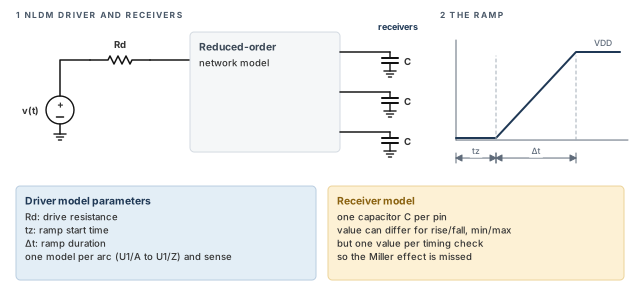
The nonlinear delay model (NLDM) is the earlier, established way to model the driver and receivers of a stage. Its driver model is a Thevenin model: a voltage source in series with a resistor.
- The voltage source is a linear ramp,
v(t). - The resistor,
Rd, smooths the ramp. Thus, the output waveform gets a curved shape similar to a real driver feeding an RC network.
The driver model has three parameters, shown in Figure 5:
- Rd — the drive resistance;
- tz — the time the ramp starts;
- Δt — the ramp duration.
The tool picks the parameter values to match the output waveforms as closely as possible. It builds a different driver model for each timing arc, such as U1/A to U1/Z. It also builds one for each sense, such as a rising edge.
3.2 The RC-009 warning
The resistor only smooths the ramp when it is large enough. Sometimes the drive resistance is much smaller than the impedance of the network to ground. The smoothing effect then shrinks, and RC delay calculation can lose accuracy.
When this happens, the tool adjusts the drive resistance to improve accuracy. It also issues an RC-009 warning. The CCS driver model does not have this problem, which is one reason it is preferred.
3.3 The NLDM receiver: one capacitor
The NLDM receiver model is a capacitor that stands for the input load of the receiver pin. Different values can apply to different conditions, such as:
- rising and falling transitions;
- minimum and maximum timing analysis.
However, a single value applies to a given timing check. So NLDM cannot model the Miller effect accurately.
The Miller effect is the change in effective capacitance between transistor terminals when the voltage across them changes. For a receiver pin, it means the input capacitance is different early and late in the transition.
4 Composite Current Source (CCS) timing models
4.1 The CCS driver and the C1C2 receiver
As process nodes shrank, a new modeling approach was needed for deep submicron effects. Composite Current Source (CCS) timing models fill that need.
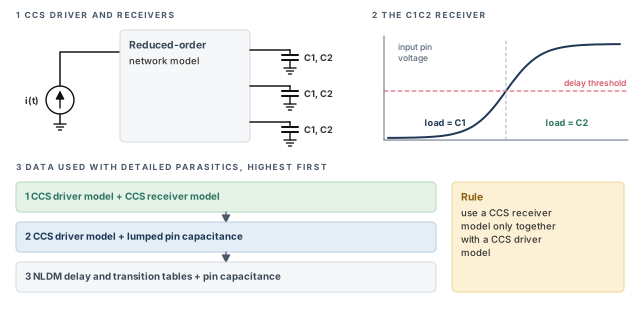
The CCS driver model is a time-varying current source, i(t). It describes how much current the driver pushes at each moment. Its main advantage is that it handles high-impedance nets and other nonmonotonic behavior accurately. A nonmonotonic waveform is one that does not move in one direction only; it can bump or dip.
The CCS receiver model uses two capacitances instead of one lumped value:
- C1 is the load until the input waveform reaches the delay threshold.
- C2 is the load after the threshold is reached. The tool switches to it during the transition.
This "C1C2" model approximates loading much better when the Miller effect is present. Figure 6 shows both models and the data the tool prefers.
4.2 Conditional pin-based receiver models
Sometimes the input capacitance of a pin depends on the other input signals. Libraries describe this with conditional pin-based models: pin capacitance values for different input signal states.
If the library has conditional pin-based receiver models, the tool considers all receiver models. It then picks the worst among the enabled pin-based and arc-based receiver models. Arc-based means the model is attached to a timing arc rather than to the pin as a whole.
4.3 Which library data is used
CCS timing analysis needs detailed parasitics, meaning a full RC network for each net. With detailed parasitics, the tool uses library data in this order, highest precedence first:
- CCS timing driver and receiver models, if both are available.
- The CCS timing driver model, if available, with lumped pin capacitance for the receiving cells.
- NLDM delay and transition tables, with pin capacitance for the receiving cells.
A CCS receiver model is used only together with a CCS driver model. This is why the list has no "NLDM driver with CCS receiver" entry.
4.4 Checking which models were used
After a timing update, report_delay_calculation shows how one arc was computed. You can name the arc in two ways:
-fromand-towith the pins of a cell or a net;-of_objectswith a timing arc.
pt_shell> update_timing   ;# compute all delays first
pt_shell> report_delay_calculation -from U1/A -to U1/Z   ;# the cell arc of U1
pt_shell> report_delay_calculation -from [get_pins U1/Z] \
            -to [get_pins U2/A]   ;# the net arc to U2/A
pt_shell> report_delay_calculation \
            -of_objects [get_timing_arcs -from U1/A -to U1/Z]   ;# same arc, by object
For a cell arc, look for the line "Advanced driver-modeling used". It confirms that the CCS driver model was used.
pt_shell> report_delay_calculation -from U1/A -to U1/Z
...
arc sense: positive_unate
arc type: cell
Calculation Rise    Rise   Fall   Fall   Slew   Rail
Thresholds: Delay   Slew   Delay  Slew   Derate Voltage Temp.
-------------------------------------------------------------
   from-pin 50      30->70 50     70->30 0.400  1.000   125.0
     to-pin 50      30->70 50     70->30 0.400  1.000   125.0
RC network on pin 'U1/Z' :
-------------------------------------------------------------
Number of elements = 6 Capacitances + 5 Resistances
Total capacitance  = 0.012400 pF
Total resistance   = 0.021500 Kohm
Advanced driver-modeling used for rise and fall.
                          Rise        Fall
-------------------------------------------------------------
Input transition time  = 0.100000    0.100000 (in library unit)
Effective capacitance  = 0.007100    0.007400 (in pF)
Output transition time = 0.052000    0.048000 (in library unit)
Cell delay             = 0.049800    0.051000 (in library unit)
Read the report from top to bottom:
- Calculation thresholds. The trip points for this arc. Here the library measures slew from 30% to 70%. The same table also lists the slew derate, rail voltage and temperature used.
- RC network. The size of the annotated network on
U1/Z, with total capacitance and resistance. - Modeling line. Which driver model was used.
- Effective capacitance. The single load value that gives the same delay as the real RC network. In this example it is smaller than the total capacitance.
- Output transition and cell delay. The final answers, for rise and for fall.
For a net arc, look for "Advanced receiver-modeling used" and the two receiver capacitances.
pt_shell> report_delay_calculation -from [get_pins U1/Z] -to [get_pins U2/A]
...
From pin: U1/Z
To pin:   U2/A
Main Library Units: 1ns 1pF 1kOhm
arc sense: unate
arc type:  net
...
Advanced receiver-modeling used for rise and fall.
Advanced Receiver Model
                                 Rise       Fall
-------------------------------------------------------------
Receiver model capacitance 1 = 0.002100   0.002010 (in library unit)
Receiver model capacitance 2 = 0.002450   0.002300 (in library unit)
                                 Rise       Fall
-------------------------------------------------------------
Net delay                = 0.000900   0.001000 (in library unit)
Transition time          = 0.052600   0.048300 (in library unit)
From_pin transition time = 0.052000   0.048000 (in library unit)
To_pin transition time   = 0.052600   0.048300 (in library unit)
Net slew degradation     = 0.000600   0.000300 (in library unit)
Net slew degradation is how much the slew grows along the wire. It is the to-pin transition minus the from-pin transition.
When a path looks suspicious, run report_delay_calculation on its worst stage first. In a few lines you learn the models, the thresholds, the load and the input slew. That is usually enough to tell a real problem from a setup mistake.
4.5 Pin capacitance reporting with CCS
The C1 and C2 values are the input capacitances before and after the delay trip point. Typically, both depend on the input slew and the output load. So C1 or C2 can be larger than the library pin capacitance derived from the CCS receiver models.
By default, the tool uses CCS receiver model data for the pin capacitance it reports on load pins. It also uses CCS receiver models when checking maximum capacitance violations. Thus, every load extrapolation that RC-011 reports can also appear in report_constraint.
With this behavior, the total capacitance of a net is:
- the wire capacitance, plus
- for each load pin, the larger of its C1 and C2.
For example, take a wire of 0.0100 pF and one load pin. The pin has C1 = 0.0021 pF and C2 = 0.0025 pF. The reported total is 0.0100 + 0.0025 = 0.0125 pF.
These commands report pin capacitance this way:
report_attributereport_constraint -min_capacitanceand-max_capacitancereport_delay_calculationreport_netreport_timing -capacitance
These attributes also follow it:
total_ccs_capacitance_max_falltotal_ccs_capacitance_max_risetotal_ccs_capacitance_min_falltotal_ccs_capacitance_min_rise
The report_capacitance_use_ccs_receiver_model variable controls this behavior. Its default is true. When you set it to false, the tool reports the older library-derived lumped pin capacitances instead.
Capacitance reports can differ between PrimeTime, IC Compiler and Design Compiler. In PrimePower, report_delay_calculation and report_power_calculation can also show different capacitance values.
report_delay_calculation, and remember that reported pin capacitance uses C1 and C2 by default.5 Library limits and the RC-011 warning
5.1 Keeping design rule limits inside the library tables
Library delay data lives in tables. Each table is indexed by input slew and output load. A table index is one of the slew or load values at which the cell was characterized. Outside the index range, the tool must extrapolate, which means guess beyond the measured data.
Design rule limits should keep the design inside the tables. Two library pin attributes matter:
max_transition, normally on input and output pins of library cells;max_capacitance, normally on output pins of library cells.
The rules for setting them are below. For both attributes, use the lowest maximum index across the NLDM and CCS tables as the reference. Include both arc-based and pin-based tables.
| Attribute | Should not exceed | Tables to compare | Arcs to compare |
|---|---|---|---|
max_transition on an input pin |
The maximum slew index | NLDM, CCS driver, CCS receiver_capacitance2 |
Rising and falling arcs from that input pin |
max_capacitance on an output pin |
The maximum load index | NLDM, CCS driver, CCS receiver_capacitance1 and receiver_capacitance2 |
Rising and falling arcs to that output pin |
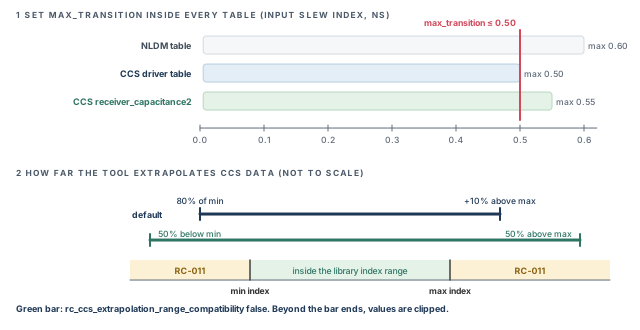
Figure 7 shows a worked case for max_transition. The NLDM table goes up to 0.60 ns and the CCS driver table to 0.50 ns. The receiver table goes up to 0.55 ns. Thus, max_transition should be at most 0.50 ns.
5.2 What RC-011 means and how to fix it
Large extrapolations can make results inaccurate. So the tool issues RC-011 when it calculates an RC delay with a slew or load that is:
- Smaller than the minimum library index. Fix it by adding a small first slew or load index in the library.
- Larger than the maximum library index. If your libraries follow the guidelines above, fix the
max_transitionandmax_capacitanceviolations thatreport_constraintreports.
To make sure report_constraint shows every max_capacitance violation behind an RC-011, keep report_capacitance_use_ccs_receiver_model set to true.
If the libraries do not follow the guidelines, treat every RC-011 as important. The design rule limits do not protect you, so you must fix the design rule constraints yourself to clear these warnings.
5.3 How far the tool extrapolates
By default, the tool clips CCS extrapolation at two points:
- 10% above the maximum library index;
- 80% of the minimum library index.
Clipping here means the tool does not extrapolate past these points. To widen the range, set one variable:
pt_shell> set_app_var rc_ccs_extrapolation_range_compatibility false ;# widerThe tool then clips at 50% above the maximum index and 50% below the minimum index. This reduces the number of RC-011 messages. Panel 2 of Figure 7 compares the two ranges.
A beginner widens the extrapolation range to make RC-011 disappear and calls the job done. The warnings are gone, but the slews and loads are still outside the tables. Fix the design rule violations first, because they are the real cause.
max_transition and max_capacitance inside the lowest table limit. RC-011 points to extrapolation; fix it with library indexes or design rule fixes, not by hiding it.6 Cross-library voltage and temperature scaling
6.1 Why scale between libraries
Libraries are built at a few corners, such as 0.9 V, 1.0 V and 1.1 V. A real cell might run at 0.97 V. Cross-library scaling lets the tool interpolate between corner libraries. Thus, you can analyze timing, noise and power at voltages and temperatures that no single library covers.
Data that can be scaled includes:
- CCS timing driver and receiver models;
- CCS noise data;
- timing and design rule constraints;
- power data used in PrimePower;
- NLDM delay and slew data.
Scaling reduces the number of libraries needed for multivoltage designs. So it also reduces library characterization effort.
6.2 Defining a scaling library group
A scaling library group is a set of libraries the tool uses to scale library data. All libraries in a group model the same cells, but at different operating conditions. You define one with define_scaling_lib_group.
pt_shell> set_app_var link_path {* lib_0.9V.db}   ;# link against one corner
pt_shell> # ...read and link the design here...
pt_shell> define_scaling_lib_group \
            {lib_0.9V.db lib_1.0V.db lib_1.1V.db}   ;# scale across three corners
Rules for groups:
- The tool must be able to find each library: already in memory, or in the search path.
- You can run the command before or after linking. Running it before linking handles mismatched timing arcs across the libraries better.
- There is no limit on the number of libraries in a group.
- You can define several groups to cover different parts of the design. However, each library can belong to only one group.
A fusion library is one container that holds several logic libraries. When you link against one, all its logic libraries are loaded at link time. So they are available for a group defined after linking:
pt_shell> set_app_var link_path {* fusion_lib:lib_0.9V.db}   ;# one file in it
pt_shell> # ...read and link the design here...
pt_shell> define_scaling_lib_group \
            {lib_0.9V.db lib_1.0V.db lib_1.1V.db}   ;# all three were loaded at link
Two commands show the result:
report_lib_groupslists the defined scaling library groups.report_delay_calculationshows point-to-point delay calculation, including the libraries used for scaling.
6.3 Exact-match and best-match groups
Sometimes you do not want interpolation. Two options change how a cell finds its library. Figure 8 compares all three behaviors for one cell at 0.97 V.
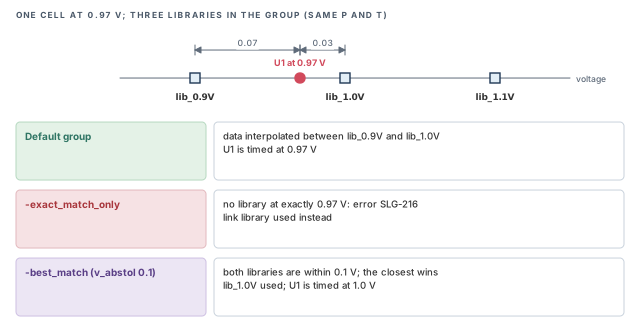
Exact-match-only groups. A leaf cell is a cell instance that is not hierarchical. A leaf cell's operating conditions must exactly match one library in the group. No scaling is done.
pt_shell> define_scaling_lib_group -exact_match_only \
            {lib_0.9V.db lib_1.0V.db lib_1.1V.db}   ;# no interpolation
If a cell has no exact match at timing update, delay calculation uses the link library. The tool also reports an error:
Error: An unexpected exact-match has been detected for the cell
timing (slow/BUFX1) U1 in max calculation. (SLG-216)
Best-match groups. A leaf cell's conditions must match a library within thresholds for process (P), voltage (V) and temperature (T). If several libraries are within the thresholds, the closest wins. The distance is the root-sum-square of the normalized P, V and T differences.
pt_shell> # these threshold values are the tool defaults
pt_shell> define_scaling_lib_group -best_match \
            {lib_0.9V.db lib_1.0V.db lib_1.1V.db} \
            -p_abstol 0.1 \
            -v_abstol 0.1 \
            -t_abstol 20   ;# P, V and T thresholds
If no library is within the thresholds, a fallback library is used. The timing_use_link_library_on_best_match_failure variable decides which one. By default, the tool falls back to the link library.
Once a library is chosen, its voltage becomes the cell voltage for delay calculation. This holds whether the library matched or was a fallback. The tool warns about each fallback:
Warning: Detect best-match failure for the cell timing (slow/BUFX1) U1
in max calculation, using link library. (SLG-333)
Warning: Detect best-match failure for the cell timing (slow/BUFX1) U1
in max calculation, using best-match library. (SLG-332)
For both group kinds, check_timing can also list the cells with no matching library.
Run check_timing after you define exact-match or best-match groups. It is better to see unmatched cells in a list than to find them one SLG message at a time.
6.4 Scaling for multirail level shifter cells
A level shifter is a cell that passes a signal between two power domains. It has two supply rails, so it is a multirail cell. Its delay depends on both rail voltages and on temperature.
By default, multirail scaling is on for timing, noise and power analysis. The tool applies it automatically when a group has enough libraries for the number of rails. Figure 9 shows why level shifters need more libraries than ordinary cells.
To set up multirail scaling:
- Define groups for each scaling situation. For example, one group for regular one-rail cells and another for two-rail level shifters.
- Separate the cells into libraries by dimension. Put cells that scale in different dimensions into different libraries and groups. With the on-the-grid formation, two-rail level shifters need at least eight libraries for voltage and temperature scaling. One-rail cells can share one library per corner, and need only four libraries.
- Set the instance conditions. Use
set_voltage,set_rail_voltage,set_operating_conditionsandset_temperature. - Report the groups. Use
report_lib_groups.
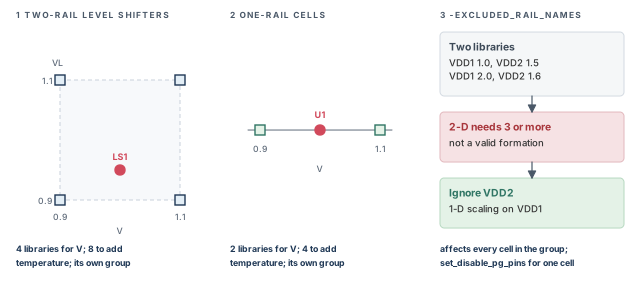
pt_shell> define_scaling_lib_group \
            {std_lib_0.9V.db \
             std_lib_1.1V.db}               ;# one-rail cells
pt_shell> define_scaling_lib_group \
            {LS_lib_0.9V_0.9V.db \
             LS_lib_0.9V_1.1V.db \
             LS_lib_1.1V_0.9V.db \
             LS_lib_1.1V_1.1V.db}           ;# two-rail level shifters
pt_shell> report_lib_groups -scaling \
-show {voltage temp process} ;# check the groupsGroup Library Temperature Voltage Process
--------------------------------------------------------------------------
Group 1
std_lib_0.9V 125.00 0.90 1.00
std_lib_1.1V 125.00 1.10 1.00
Group 2
LS_lib_0.9V_0.9V 125.00 { V:0.90 VL:0.90 } 1.00
LS_lib_0.9V_1.1V 125.00 { V:0.90 VL:1.10 } 1.00
LS_lib_1.1V_0.9V 125.00 { V:1.10 VL:0.90 } 1.00
LS_lib_1.1V_1.1V 125.00 { V:1.10 VL:1.10 } 1.00Check that each level shifter library shows a voltage for both of its rails, V and VL.
6.5 Excluding rails from multirail groups
Sometimes one rail blocks a valid group. The -excluded_rail_names option of define_scaling_lib_group tells voltage scaling to ignore named library rails. Those rails are ignored when the group formation is checked and when scaling is calculated. Thus, N-dimensional scaling drops to fewer dimensions.
It helps in two flows:
- True scaling flows, to remove a rail that prevents a valid formation.
- Exact-match flows, to remove a rail that does not match the cell instances.
For example, a 2-D group needs at least three libraries. Three is the smallest valid 2-D formation. The four-library grid in Figure 9 is the on-the-grid formation. It puts one library at each corner, so it uses more than the minimum.
With only two libraries, no 2-D group is possible. You can still build a 1-D group by ignoring VDD2:
define_scaling_lib_group { \
    slow__VDD1_1.0__VDD2_1.5.db \
    slow__VDD1_2.0__VDD2_1.6.db \
  } \
  -excluded_rail_names {VDD2}   ;# scale on VDD1 only
Use this option with care, because it turns off consistency checks and scaling algorithms that normally apply. It also affects every cell in the group's libraries. To exclude rails for specific library cells only, use set_disable_pg_pins instead.
6.6 Scaling timing derates by voltage
The set_timing_derate command sets early or late timing adjustments on different object scopes. The Operating Conditions chapter covers it. In a voltage scaling flow, you can derate the same library cell in each library of a group. The tool can then compute a scaled derate for each cell instance from its voltage.
define_scaling_lib_group {lib_0.9V.db lib_1.0V.db lib_1.1V.db}   ;# the group
set_timing_derate -late [get_lib_cell lib_0.9V/INV1] 1.15   ;# 15% at 0.9 V
set_timing_derate -late [get_lib_cell lib_1.0V/INV1] 1.10   ;# 10% at 1.0 V
set_timing_derate -late [get_lib_cell lib_1.1V/INV1] 1.07   ;# 7% at 1.1 V
Both derate scaling and interpolation are off by default. Two variables turn them on:
pt_shell> set_app_var \
            timing_enable_derate_scaling_for_library_cells_compatibility \
            false   ;# turn on derate scaling
pt_shell> set_app_var \
            timing_enable_derate_scaling_interpolation_for_library_cells \
            true    ;# interpolate the derates
The first turns on voltage scaling of derates. The second, set for best results, computes fully scaled (interpolated) values. With both set:
- Scaling applies to
set_timing_deratederates and to table-based derates read withread_ocvm. - If a cell's voltage exactly matches a scaling library, that library's derate is used.
- If it does not match exactly, an interpolated derate from nearby libraries is used. For example, an
INV1at 1.05 V gets a value between 1.10 and 1.07. - If a cell has several rails, the worst-case derate from nearby libraries is used, without interpolation.
Set the derate on the same library cell in every scaling library. Otherwise, some voltages have "missing" derates. When a scaled derate cannot be computed for this reason, the tool uses the next setting in the scope order. That order is the link library derate, then the hierarchical cell, then the global derate.
A beginner derates INV1 only in the 0.9 V library. A scaled derate cannot then be computed at other voltages. The tool falls back to the next derate in the scope order, such as a global one. The late margin then changes silently. Derate the cell in every library of the group.
7 Waveform propagation
At 16 nm and smaller geometries, waveform effects can become significant. Two common ones are:
- the long tail effect, where a signal approaches its final value slowly;
- the receiver Miller effect, described in the NLDM section.
When real waveforms differ a lot from the waveforms used in library characterization, ignoring these effects makes delay calculation inaccurate. Figure 10 shows a waveform with a long tail next to a library-like ramp.
Advanced waveform propagation improves accuracy when waveforms are distorted. It uses CCS timing and CCS noise models together during delay calculation. It supports both graph-based analysis, the normal analysis of all paths, and path-based analysis, which recalculates selected paths more exactly.
The libraries must contain:
- NLDM data;
- CCS timing models;
- CCS noise models;
- the normalized driver waveform.
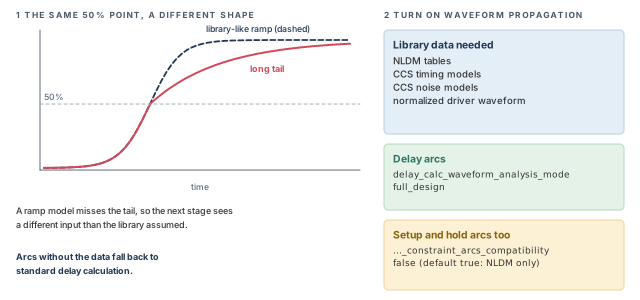
To turn it on, set one variable:
pt_shell> set_app_var delay_calc_waveform_analysis_mode \
            full_design   ;# propagate real waveform shapes
Waveform propagation improves every arc that has the required library data. Arcs without the data get standard delay calculation.
Setup and hold constraint arcs are the library arcs that give setup and hold times. By default, they still use only NLDM lookup tables, because a compatibility variable defaults to true. To use waveform propagation for them too, set it to false:
pt_shell> set_app_var \
            delay_calc_waveform_analysis_constraint_arcs_compatibility \
false ;# include setup and hold arcs8 Many drivers on one net
8.1 Fast multidrive delay analysis
A multidriven net is a net with more than one driver. Clock meshes are the classic example. With annotated parasitics, RC delay calculation can take a long time for massively multidriven nets. The main cost is computing the trip times for delay and slew at every load pin.
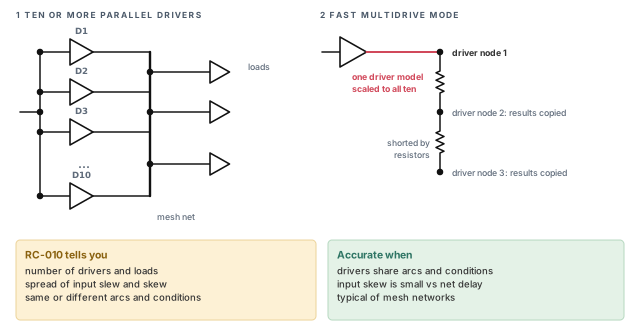
When the drivers are homogeneous, the tool can use a fast multidrive mode. Homogeneous means the drivers have similar input skews, slews and operating conditions. In this mode, the tool:
- shorts all the driver nodes together with a network of resistors;
- uses a single driver model at the first driver node for all waveform calculations;
- scales that driver's strength up to equal the whole set of drivers;
- copies the results to every other driver: delay, slew, driver model parameters and effective capacitance.
The mode starts on its own. Up to nine drivers are handled normally. Ten or more parallel drivers invoke fast multidrive mode. Figure 11 shows the idea.
When the tool uses this mode, it issues an RC-010 warning. The message reports:
- the number of drivers and loads;
- the spread of input slews and input skews;
- whether the driver library timing arcs and operating conditions match.
Use this information to judge accuracy. Accuracy is best when the drivers share the same library arcs, the same context and the same network impedance. Context here means operating conditions, input slew and input skew. Mesh networks often meet these conditions.
Differences in conditions or input slews cause small differences in output delay and slew. Input skew differences should be small compared to the delays through the network. For higher accuracy, calculate the delays and slews with an external tool and annotate them onto the network. The Back-Annotation chapter explains how to reduce Standard Delay Format (SDF) data for clock mesh and spine networks.
8.2 Parallel driver reduction
Clocks drive many loads, so they are buffered to give enough drive strength and keep clock skew low. A large clock network can use many drivers in parallel. They are often arranged as a mesh or a spine across the chip.
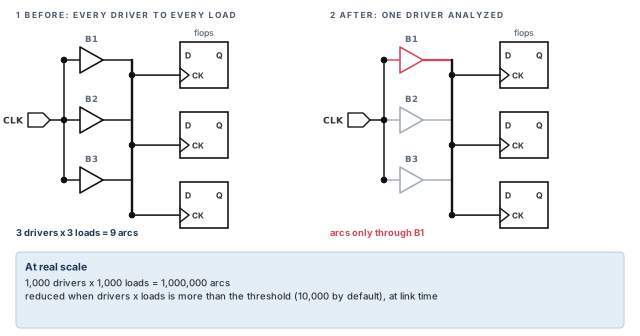
Now count the arcs. With 1,000 drivers in parallel driving 1,000 loads, the tool must track one million timing arcs between them. That uses a lot of CPU time and memory.
Parallel driver reduction cuts this down. The tool picks one driver in a parallel network and analyzes the timing arcs through that driver only. Figure 12 shows a small case.
To turn it on, set the variable before linking:
pt_shell> set_app_var timing_reduce_multi_drive_net_arcs true   ;# off by default
pt_shell> set_app_var timing_reduce_multi_drive_net_arcs_threshold 1000 ;# trigger
pt_shell> link_design   ;# reduction happens here
During linking, the tool looks for nets with multiple drivers. The threshold variable sets the minimum number of arcs that triggers a reduction. Its default is 10,000. So by default, a net is reduced when drivers multiplied by loads is more than 10,000. In typical designs, only clock networks reach that size.
The tool reduces a net only when all of these are true:
- The number of driver-load combinations is more than the threshold.
- The drivers are nonsequential library cells: not flip-flops, not latches and not hierarchical.
- All drivers are instances of the same library cell.
- All drivers connect to the same input and output nets.
To expand a reduced network back, or to use a different threshold, you must relink the design.
A beginner changes the threshold variable after linking and expects a different result. Nothing changes, because reduction happens at link time. Set both variables before link_design, or relink.
8.3 Working with reduced drivers
After layout, detailed parasitics are available. However, they cannot be annotated on a reduced network. For accurate results, use this approach:
- Simulate the clock network with an external simulator such as SPICE.
- Annotate the clock latency values and transition times on the clock pins of the sequential cells.
- Let the tool treat the reduced network as ideal, with zero delay.
This gives reasonably accurate results and is very efficient. The clock network is simulated once, even across many timing runs.
Other effects to know:
- Reading SDF. If you annotate with
read_sdf, annotations on reduced timing arcs are ignored. The tool issues a PTE-048 message when this happens. - Writing SDF. With
write_sdf, no interconnect delays are written for the reduced network. - ECO changes. Reduction affects only the timing arcs analyzed, not the netlist. So
write_changesoutput is not affected.
pt_shell> suppress_message PTE-048 ;# expected on reduced arcs9 Multi-input switching analysis
9.1 Why simultaneous switching changes delay
Library tools characterize a gate by switching one input at a time. However, several inputs can switch at once, and then the delay is different. Multi-input switching (MIS) analysis accounts for this. It requires a PrimeTime-ADV license.
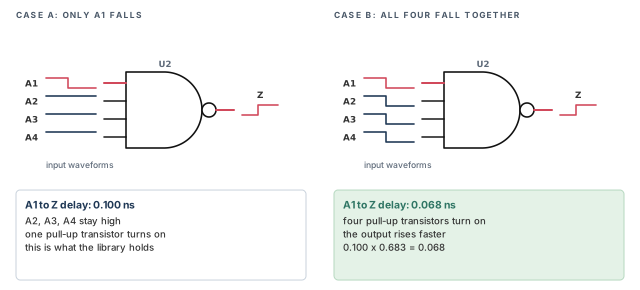
Let us consider a 4-input NAND gate whose output rises. There are two ways it can happen:
- Case A. Only A1 falls; A2, A3 and A4 stay high. One pull-up transistor turns on.
- Case B. All four inputs fall at the same time. Four pull-up transistors turn on in parallel.
Case B pulls the output up faster, so its delay is shorter. Figure 13 shows both cases with illustrative numbers.
The library contains only the single-input delay. Simultaneous switching does happen, for example in memory decoders. If such a NAND gate is on a data path, the hold check uses a delay that is too long. So the hold check is optimistic: it may pass when the real circuit fails.
The opposite case is the falling output. Then simultaneous switching makes the delay longer, which affects setup. However, setup-critical paths are usually long, with many gates, so one slightly slower gate barely matters. Hold-critical paths are usually short, so a small speed-up can matter a lot. For this reason, MIS analysis applies only to minimum-delay (hold) checks.
9.2 The three analysis modes
MIS analysis has three modes:
| Mode | Where the factor comes from | License |
|---|---|---|
lib_cell |
Coefficients you set on library cells with set_multi_input_switching_coefficient |
PrimeTime-ADV |
lib_arc |
Coefficients on individual library timing arcs, from the library or a script | PrimeTime-ADV-PLUS |
advanced |
Estimated by the tool from library data and actual slew, arrival, load and waveforms | PrimeTime-ADV-PLUS |
The lib_cell mode uses a delay-scaling coefficient on a library cell. The coefficient multiplies the library delay when inputs switch together.
pt_shell> set_multi_input_switching_coefficient \
            [get_lib_cell lib1/NAND4gx] -rise -delay 0.683   ;# delay down to 0.683x
To find the right factor for each cell and output transition, simulate it with HSPICE or another simulator. Measure the real delay when all inputs switch together.
The lib_arc mode puts coefficients on individual library timing arcs. It allows more detail, including which pins must switch together. The next section shows the library syntax.
The advanced mode estimates the MIS effect automatically. It uses library data together with the actual pin slew, arrival, load and waveform. No user coefficients are needed, but the library must have:
- CCS timing models;
- arc-based CCS noise models;
- all
whenconditions characterized.
A when condition is a library statement that says which side-input states an arc applies to. The advanced mode supports these library cell types:
| AND | OR | NAND | NOR | AO | AOI | OA | OAI |
|---|---|---|---|---|---|---|---|
| AND2 | OR2 | NAND2 | NOR2 | AO211 | AOI211 | OA211 | OAI211 |
| AND3 | OR3 | NAND3 | NOR3 | AO21 | AOI21 | OA21 | OAI21 |
| AND4 | OR4 | NAND4 | NOR4 | AO22 | AOI22 | OA22 | OAI22 |
| AO31 | AOI31 | OA31 | OAI31 |
An output pin of a multi-output cell qualifies when both are true:
- its logic function and library data qualify;
- its logic function shares no input pins with other output pins.
For cells that do not qualify, use user-defined coefficients with the lib_cell or lib_arc mode.
9.3 Defining library timing arc coefficients
The lib_arc mode reads four attributes on library cell timing arcs:
mis_factor_riseandmis_factor_fall— the delay-scaling coefficients;mis_pin_set_riseandmis_pin_set_fall— the pins that must all switch for the full coefficient to apply.
These are not standard Liberty attributes. Liberty is the text format of logic libraries. So the library must declare them as user attributes at the top:
library(mis_arc_based_lib) {
  define(mis_factor_rise, timing, float);
  define(mis_factor_fall, timing, float);
  define(mis_pin_set_rise, timing, string);
  define(mis_pin_set_fall, timing, string);
Then each timing() group can set them:
cell("NAND2X1") {
  pin(ZN) {
    direction : output;
    function : "!A | !B";
    timing() {
      related_pin : A;
      timing_sense : negative_unate;
      ...
      mis_factor_rise : 0.55;
      mis_pin_set_rise : "A B";
    }
    timing() {
      related_pin : B;
      timing_sense : negative_unate;
      ...
      mis_factor_rise : 0.45;
      mis_pin_set_rise : "A B";
    }
A timing() group can also carry when and sdf_cond conditions next to the MIS attributes. Thus, each conditional arc can get its own factor and pin set.
The factor applies in full when all pins in the pin set switch. If fewer pins switch, the tool computes an intermediate factor, as the arrival window section explains.
One arc can have both rise and fall MIS attributes, with different pin sets. For example, take an AO22 gate, Z = (A1 AND A2) OR (B1 AND B2). Consider the A1-to-Z arc under the condition A2 = 1, B1 = 0, B2 = 0:
when : "A2 & !B1 & !B2"; /* A2==1, B1==0, B2==0 */
mis_pin_set_rise : "A1 B1 B2";
mis_pin_set_fall : "A1 A2";- For a rising output, A1 rises while B1 and B2 also rise; A2 stays at 1.
- For a falling output, A1 and A2 both fall; B1 and B2 stay at 0.
An arc can also have several pin sets. Separate them with +. For example, the falling A1-to-Z arc of an AO22 can be influenced by side pins of either AND gate also switching:
when : "A2 & B1 & B2"; /* A2==1, B1==1, B2==1 */
mis_pin_set_fall : "A1 A2 + A1 B1 B2";
Here, pin set 1 is A1 and A2 falling together. Pin set 2 is A1, B1 and B2 falling together. When all pins of any set switch together, the full coefficient applies.
The tool assumes, to be safe, that a when condition can describe side-pin values either before or after the transition. How MIS effects are assigned to conditional arcs depends on the library characterization tool.
Importing the attributes into PrimeTime
The tool keeps these attributes in memory only if they are declared as imported user attributes before the library is loaded:
define_user_attribute \
  -type float -class lib_timing_arc -import mis_factor_rise    ;# rise factor
define_user_attribute \
  -type float -class lib_timing_arc -import mis_factor_fall    ;# fall factor
define_user_attribute \
  -type string -class lib_timing_arc -import mis_pin_set_rise  ;# rise pin set
define_user_attribute \
  -type string -class lib_timing_arc -import mis_pin_set_fall  ;# fall pin set
Setting the attributes from a script
If your library does not contain the attributes, set them in a Tcl script. The script first runs the four define_user_attribute -import commands above. It then sets values on library timing arcs with set_user_attribute and get_lib_timing_arcs:
# include the four define_user_attribute commands here
# apply per-library-arc coefficient values
set_user_attribute \
  [get_lib_timing_arcs -from NAND2/a -to NAND2/ZN] \
  mis_factor_rise 0.35        ;# rising ZN from pin a
set_user_attribute \
  [get_lib_timing_arcs -from NAND2/a -to NAND2/ZN] \
  mis_pin_set_rise {a b}      ;# full factor when a and b switch
set_user_attribute \
  [get_lib_timing_arcs -from NAND2/b -to NAND2/ZN] \
  mis_factor_fall 0.40        ;# falling ZN from pin b
set_user_attribute \
  [get_lib_timing_arcs -from NAND2/b -to NAND2/ZN] \
  mis_pin_set_fall {a b}      ;# full factor when a and b switch
For complex cells, use the -filter option of get_lib_timing_arcs to select arcs by sense, by when condition or by other attributes.
9.4 Configuring MIS analysis
Configuration takes five steps.
Step 1 — Turn the feature on.
pt_shell> set_app_var si_enable_multi_input_switching_analysis true ;# MIS onStep 2 — Choose the modes, in order. The si_multi_input_switching_analysis_mode variable lists the modes to use, highest precedence first. Valid values are lib_cell, lib_arc and advanced. A mode missing from the list is not used.
pt_shell> set_app_var si_multi_input_switching_analysis_mode \
            {advanced lib_arc lib_cell}   ;# prefer advanced where possible
Step 3 — For lib_cell mode, set and report coefficients.
pt_shell> set_multi_input_switching_coefficient \
            [get_lib_cell lib1/NAND4gx] -rise -delay 0.683   ;# lib cell coefficient
pt_shell> report_multi_input_switching_coefficient   ;# optional: show them
Step 4 — For lib_arc mode, load the attributes at the right time. There are two cases:
- The library holds the attributes. Declare the user attributes before the libraries load. Libraries load at
link_design. - A script holds the attributes. Source the script after the libraries load.
set_app_var link_path {* lib_with_MIS.db}   ;# library with MIS attributes
define_user_attribute \
  -type float -class lib_timing_arc -import mis_factor_rise    ;# rise factor
define_user_attribute \
  -type float -class lib_timing_arc -import mis_factor_fall    ;# fall factor
define_user_attribute \
  -type string -class lib_timing_arc -import mis_pin_set_rise  ;# rise pin set
define_user_attribute \
  -type string -class lib_timing_arc -import mis_pin_set_fall  ;# fall pin set
read_verilog top.v                          ;# read the netlist
link_design top ;# libraries (and attributes) are loaded hereset_app_var link_path {* lib_with_MIS.db} ;# the library
read_verilog top.v ;# read the netlist
link_design top ;# libraries are loaded here
source lib_arc_coefficients.tcl ;# then apply the coefficientsStep 5 — For advanced mode, check which cells qualify.
pt_shell> report_multi_input_switching_lib_cells ;# optional: list themA beginner puts the define_user_attribute -import commands after link_design. The library is already loaded, so the MIS attributes were dropped. Declare them before the library loads, or set them from a script after linking.
9.5 A complete lib_cell example
This script runs MIS analysis in lib_cell mode:
set search_path {. my_lib.db}              ;# where to look
set link_path {my_lib.db}                  ;# what to link against
read_verilog design.v                      ;# read the netlist
link_design                                ;# link it
read_parasitics design.spef                ;# detailed parasitics
source design.sdc                          ;# constraints
# Enable multi-input switching analysis
set_app_var si_enable_multi_input_switching_analysis true   ;# MIS on
# Use the lib_cell analysis mode
set_app_var si_multi_input_switching_analysis_mode {lib_cell}   ;# one mode
# Specify delay change factors for library cells
set_multi_input_switching_coefficient \
  [get_lib_cell lib1/NAND4gx] -rise -delay 0.683   ;# rising output factor
# Report multi-input switching delay factors applied
report_multi_input_switching_coefficient   ;# list the factors
update_timing -full                        ;# recompute all timing
report_timing -delay_type min -input_pins  ;# hold paths
report_delay_calculation -min -from Inst1/A -to Inst1/Z   ;# one MIS arc
Here is what the tool does. It looks for rising outputs on every instance of NAND4gx where several inputs can switch together. In those cases, it multiplies the library delay by a factor between 0.683 and 1.0. The factor depends on how many inputs can switch. The result is a shorter minimum delay.
For example, a library delay of 0.100 ns becomes 0.068 ns when the full factor applies.
9.6 Arrival window overlap checking
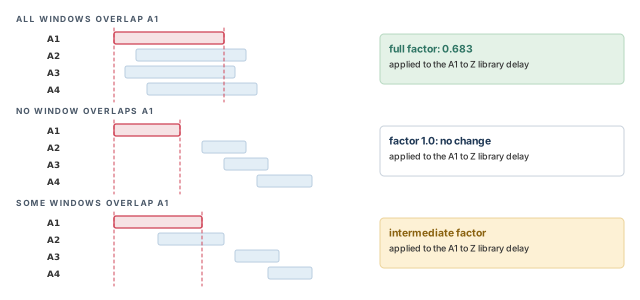
By default, MIS analysis looks at arrival windows. An arrival window is the time range in which a signal can switch at a pin. For a transition on one input, the tool checks whether the other inputs' windows overlap it. Figure 14 shows three cases.
For the delay from A1 to Z:
- All other windows overlap A1. The full multi-input factor applies to the library delay.
- No window overlaps A1. A factor of 1.0 applies, so the delay is unchanged.
- Some overlap and some do not. An intermediate factor applies, computed with an inverse proportional model.
You can turn off the window check. The tool then applies the full factor whenever several inputs can switch in the same clock cycle. This is more pessimistic, but it saves runtime.
pt_shell> set_app_var si_enable_multi_input_switching_analysis true   ;# MIS on
pt_shell> set_app_var \
            si_enable_multi_input_switching_timing_window_filter false   ;# no windows
9.7 Including or excluding cells
The set_multi_input_switching_analysis command limits MIS analysis to chosen cells, or keeps chosen cells out.
set_multi_input_switching_analysis
  [-exclude_only]                   # exclude these objects; allow all others
  [-include_only]                   # include only these objects
  [-reset]                          # reset an earlier setting
  [-analysis_mode one-of-string]    # lib_cell, lib_arc or advanced
object_list # leaf cells or library cellsobject_listcan hold leaf cells or library cells.-include_onlyincludes only the listed objects in MIS analysis.-exclude_onlyexcludes the listed objects and allows all others.-analysis_moderestricts the setting to the named analysis mode.
9.8 Scaling the advanced MIS factors
The set_advanced_multi_input_switching_factor command scales the coefficients the tool computes in advanced mode.
set_advanced_multi_input_switching_factor
-scale_factor scale_factor # range 0 to 1
[-all] # apply to the entire design
[-reset] # reset an earlier setting
[-inverse] # apply the factor the inverse way
[object_list] # library cells to scaleBy default, the scale factor relaxes the speed-up. It multiplies the speed-up value:
- 1 keeps the tool-computed speed-up as it is.
- 0 removes the speed-up entirely, so the original non-MIS cell delay returns.
- Values in between keep part of the speed-up. For example, 0.7 keeps 70% of it.
set_advanced_multi_input_switching_factor -scale_factor 1     ;# keep MIS delay
set_advanced_multi_input_switching_factor -scale_factor 0.7   ;# keep 70% of speed-up
set_advanced_multi_input_switching_factor -scale_factor 0     ;# non-MIS delay
With -inverse, the factor strengthens the speed-up. It multiplies the MIS-adjusted cell delay directly:
set_advanced_multi_input_switching_factor -scale_factor 1 -inverse     ;# no change
set_advanced_multi_input_switching_factor -scale_factor 0.7 -inverse   ;# delay x 0.7
set_advanced_multi_input_switching_factor -scale_factor 0 -inverse     ;# delay = 0
Let us put numbers on it. Say the non-MIS delay is 0.100 ns and the advanced MIS delay is 0.080 ns. The speed-up is 0.020 ns.
- Without
-inverse, a factor of 0.7 keeps 0.014 ns of speed-up. The delay becomes 0.086 ns. - With
-inverse, a factor of 0.7 multiplies 0.080 ns. The delay becomes 0.056 ns.
The command applies to the listed objects, or to the whole design with -all.
On new libraries, you can start advanced MIS with a scale factor below 1. Raise it once SPICE correlation confirms the speed-ups. This keeps early hold fixing from chasing effects that are not yet trusted.
10 Unit delay analysis
During flow testing and constraint checks, you usually care about warnings and errors, not timing numbers. For this, the tool has a unit delay mode. It sets a delay of 1.0 library unit for:
- every cell delay;
- every net delay;
- every pin transition;
- every coupled-net delta delay and delta transition.
A delta delay is the extra delay caused by crosstalk from a neighboring net. The Signal Integrity Analysis chapter covers it.
This mode improves runtime. It has no effect on memory use.
pt_shell> set_app_var timing_enable_unit_delay true ;# all delays = 1.0When you use unit delay, also turn off these features:
- clock reconvergence pessimism removal (CRPR);
- signal integrity (SI) analysis;
- advanced and parametric on-chip variation (AOCVM and POCVM);
- advanced latch analysis.
pt_shell> set_app_var timing_remove_clock_reconvergence_pessimism false ;# CRPR off
pt_shell> set_app_var si_enable_analysis false                ;# SI off
pt_shell> set_app_var timing_aocvm_enable_analysis false      ;# AOCVM off
pt_shell> set_app_var timing_pocvm_enable_analysis false      ;# POCVM off
pt_shell> set_app_var timing_enable_through_paths false       ;# latch analysis off
The Variation chapter explains AOCVM and POCVM.
Point Incr Path
----------------------------------------------------------
clock CLK (rise edge) 0.0 0.0
clock network delay (propagated) 1.0 1.0
FF1/CK (DFFX1) 0.0 1.0 r
FF1/Q (DFFX1) 1.0 2.0 r
U1/A (BUFX2) 1.0 3.0 r
U1/Z (BUFX2) 1.0 4.0 r
U2/A1 (NAND4gx) 1.0 5.0 r
U2/Z (NAND4gx) 1.0 6.0 f
FF2/D (DFFX1) 1.0 7.0 f
data arrival time 7.0
clock CLK (rise edge) 10.0 10.0
clock network delay (propagated) 1.0 11.0
FF2/CK (DFFX1) 11.0 r
library setup time -1.0 10.0
data required time 10.0
----------------------------------------------------------
slack (MET) 3.0Every cell and every net adds exactly 1.0. The numbers mean nothing for silicon, but the run is fast. Thus, you can see quickly whether the script, constraints and messages are clean.
Use unit delay on the first run of a new script or a new netlist drop. Fix every warning there, then switch to real delay calculation. It is cheaper to debug a script when each run takes minutes, not hours.
11 Worked example: checking delay calculation on a hold-critical path
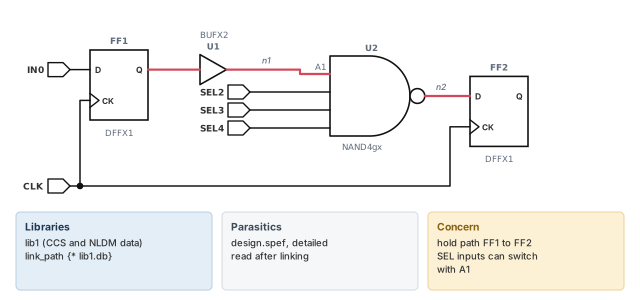
Let us check the delay calculation on a small block named top. Figure 15 shows its logic. Flop FF1 drives buffer U1, which drives input A1 of the 4-input NAND U2. The NAND output goes to flop FF2. Inputs A2 to A4 of U2 come from ports SEL2 to SEL4.
Step 1 — Read, link and annotate
pt_shell> set_app_var search_path ". ./libs"   ;# where the files live
pt_shell> set_app_var link_path {* lib1.db}     ;# lib1 has NLDM and CCS data
pt_shell> read_verilog top.v                    ;# the netlist
pt_shell> link_design top                       ;# resolve the cells
pt_shell> read_parasitics design.spef   ;# detailed parasitics, needed for CCS
pt_shell> source top.sdc                        ;# clocks and constraints
Check: the parasitics read with no errors. Without detailed parasitics, CCS timing analysis is not used.
Step 2 — Confirm the model mode
pt_shell> set_app_var rc_driver_model_mode advanced   ;# CCS driver when available
pt_shell> set_app_var rc_receiver_model_mode advanced   ;# CCS receiver if any
pt_shell> update_timing                                 ;# compute all delays
Check: watch the log for RC-009 and RC-011 warnings on these nets.
Step 3 — Inspect the cell arc of U1
pt_shell> report_delay_calculation -from U1/A -to U1/Z ;# the cell arcCheck: the report says "Advanced driver-modeling used for rise and fall". The fall cell delay is 0.051 ns, as in the illustrative report in the CCS section. If the report shows NLDM instead, lib1 may lack CCS data for BUFX2.
Step 4 — Inspect the net arc to U2
pt_shell> report_delay_calculation -from [get_pins U1/Z] \
            -to [get_pins U2/A1]   ;# the net arc on n1
Check: the report says "Advanced receiver-modeling used", and it shows two receiver capacitances for U2/A1.
Step 5 — Check thresholds and limits
pt_shell> report_delay_calculation -thresholds \
            -from U2/A1 -to U2/Z   ;# trip points used
pt_shell> report_constraint -max_capacitance   ;# load limit violations
Check: the thresholds match what your SPICE checks use. A max_capacitance violation on a net can explain an RC-011 there; fix it before trusting the delay.
Step 6 — Add MIS analysis for the hold path
The SEL inputs can switch in the same cycle as A1. So the real U2 delay on a rising output can be shorter than the library value.
pt_shell> set_app_var si_enable_multi_input_switching_analysis true   ;# MIS on
pt_shell> set_app_var si_multi_input_switching_analysis_mode \
            {lib_cell}   ;# coefficient mode
pt_shell> set_multi_input_switching_coefficient \
            [get_lib_cell lib1/NAND4gx] -rise -delay 0.683   ;# from SPICE
pt_shell> report_multi_input_switching_coefficient   ;# confirm the factor
pt_shell> update_timing -full   ;# recompute everything
pt_shell> report_timing -delay_type min -input_pins ;# the hold pathPoint Incr Path
----------------------------------------------------------
clock CLK (rise edge) 0.000 0.000
FF1/CK (DFFX1) 0.000 0.000 r
FF1/Q (DFFX1) 0.080 0.080 f
U1/A (BUFX2) 0.002 0.082 f
U1/Z (BUFX2) 0.051 0.133 f
U2/A1 (NAND4gx) 0.001 0.134 f
U2/Z (NAND4gx) 0.068 0.202 r
FF2/D (DFFX1) 0.001 0.203 r
data arrival time 0.203
clock CLK (rise edge) 0.000 0.000
FF2/CK (DFFX1) 0.000 r
library hold time 0.215 0.215
data required time 0.215
----------------------------------------------------------
data required time 0.215
data arrival time -0.203
----------------------------------------------------------
slack (VIOLATED) -0.012Check: before MIS, the U2/Z increment was 0.100 ns and the arrival was 0.235 ns. The hold slack was +0.020 ns. With the full factor, 0.100 × 0.683 = 0.068 ns, and the slack becomes −0.012 ns. A real hold violation was hidden.
Step 7 — Confirm the U2 arc in detail
pt_shell> report_delay_calculation -min -from U2/A1 -to U2/Z ;# min delay of U2Check: the minimum delay matches the 0.068 ns in the path. If the factor is closer to 1.0, the SEL arrival windows overlap A1 only partly, or not at all. That is expected behavior, not an error.
12 Common mistakes and how to catch them
| Symptom | Likely cause | Fix |
|---|---|---|
| Many RC-011 warnings | Slews or loads outside the library tables | Fix max_transition and max_capacitance violations; add small first indexes for the low side |
| RC-011 counts dropped, results did not improve | rc_ccs_extrapolation_range_compatibility was set to false to hide them |
Fix the design rule violations instead |
| Report shows NLDM where CCS was expected | No CCS data, no detailed parasitics, or mode set to basic |
Check the library, read detailed parasitics, set both modes to advanced |
| Slews disagree with SPICE | Different trip points | Use report_delay_calculation -thresholds and match SPICE to them |
| A cell is timed at the link library voltage | No exact or best match in its scaling group | Read SLG-216, SLG-333 or SLG-332; run check_timing; add libraries or relax thresholds |
| Derates change unexpectedly near some voltages | Derate set in only one scaling library | Set it on the same cell in every library of the group |
| Level shifters are not scaled | Not enough libraries for the rails, or shared group with one-rail cells | Give level shifters their own group with a full grid |
| RC-010 appears on a clock mesh net | Ten or more parallel drivers started fast multidrive mode | Check RC-010 for mismatched arcs, conditions or wide skew spreads; annotate external results if needed |
| SDF annotations on the clock mesh are ignored, with PTE-048 | Parallel driver reduction is on | Annotate latency and transition on clock pins; suppress PTE-048 |
MIS has no effect in lib_arc mode |
Attributes declared after the library loaded | Run define_user_attribute -import before link_design |
13 Interview preparation
A driving cell, the RC network at its output, and the input pins it drives.
- The tool computes the response at the driver output and at each load pin.
- It uses a driver model, a reduced-order network model and receiver models.
Slew is measured from 20% to 80% of the rail voltage; delay from 50% at the input to 50% at the output.
- Library pin thresholds come first, then library-level, then the main library.
- Invalid values fall back to 5% and 95% for slew.
NLDM uses a voltage ramp behind a resistor; CCS uses a time-varying current source.
- CCS handles high-impedance nets and nonmonotonic waveforms better.
- CCS avoids the RC-009 problem of a very small drive resistance.
Because input capacitance changes during the transition; C1 applies before the delay threshold and C2 after it.
- This captures the Miller effect.
- NLDM uses one value per timing check, so it cannot.
Run report_delay_calculation on the arc and look for "Advanced driver-modeling used" or "Advanced receiver-modeling used".
- Use
-fromand-to, or-of_objectswith a timing arc. - CCS needs detailed parasitics and CCS data in the library.
Find whether the slew or load is below the minimum or above the maximum library index, and fix the cause.
- Below minimum: add a small first index in the library.
- Above maximum: fix
max_transitionandmax_capacitanceviolations fromreport_constraint. - Widening the extrapolation range only hides the warnings.
max_transition be set on a library input pin?No higher than the lowest maximum slew index among the NLDM, CCS driver and CCS receiver_capacitance2 tables.
- Look at rising and falling arcs from that pin.
- Include arc-based and pin-based tables.
Exact-match needs an exact condition match; best-match accepts the closest library within P, V and T thresholds.
- Neither interpolates.
- No exact match gives SLG-216 and the link library.
- In best-match, the chosen library's voltage becomes the cell voltage.
When a net has ten or more parallel drivers; the tool then issues RC-010.
- One scaled driver model at the first node does the work.
- Results are copied to the other drivers.
- Accuracy is best with matched arcs, conditions and small input skew.
Drivers times loads exceeds the threshold, and the drivers are identical nonsequential cells on the same input and output nets.
- The default threshold is 10,000.
- Reduction happens at link time; relink to change it.
- SDF on reduced arcs is ignored with PTE-048.
Because simultaneous switching mainly matters on short hold paths, where a small speed-up can cause a violation.
- On a rising NAND output, the true delay is shorter, so hold is optimistic.
- The slower falling case barely affects long setup paths.
lib_arc mode, the MIS factors have no effect. What is the likely cause?The user attributes were not declared with define_user_attribute -import before the library was loaded.
- Libraries load at
link_design. - If the attributes come from a script instead, source it after linking.
set_advanced_multi_input_switching_factor -scale_factor 0.7 do, with and without -inverse?Without it, 70% of the computed speed-up is kept; with it, the MIS-adjusted delay is multiplied by 0.7.
- A factor of 0 without
-inverserestores the non-MIS delay. - A factor of 0 with
-inversemakes the delay zero.
For flow testing and constraint checks; also turn off CRPR, SI, AOCVM, POCVM and advanced latch analysis.
- Every delay and transition becomes 1.0 library unit.
- Runtime improves; memory does not change.
14 Chapter close
Compact glossary
| Term | Meaning |
|---|---|
| Stage | A driving cell, its RC network and the load pins it drives |
| Slew | The transition time of a signal, between two trip points |
| Trip point | A voltage threshold used to measure delay or slew |
| Main library | The first library in the link path |
| Driver model | A model of how the driving cell responds to any RC load |
| Reduced-order network model | A small RC network that responds like the full one; built by Arnoldi reduction |
| Receiver model | A model of the input capacitance of a load pin |
| NLDM | Nonlinear delay model: a ramp behind a resistor, and one capacitor per receiver |
| CCS | Composite Current Source: a current-source driver and a C1C2 receiver |
| C1, C2 | CCS receiver capacitances before and after the delay threshold |
| Miller effect | The change in effective capacitance as the voltage across transistor terminals changes |
| Effective capacitance | The single load that gives the same delay as the real RC network |
| RC-009 | Warning: drive resistance much smaller than network impedance |
| RC-010 | Warning: fast multidrive mode was used |
| RC-011 | Warning: CCS data extrapolated outside the library index range |
| Scaling library group | Libraries of the same cells at different conditions, used for interpolation |
| Exact-match / best-match group | Groups that pick one library instead of interpolating |
| Multirail cell | A cell with more than one supply rail, such as a level shifter |
| Waveform propagation | Delay calculation that carries real waveform shapes between stages |
| Fast multidrive mode | One scaled driver model for ten or more parallel drivers |
| Parallel driver reduction | Analyzing arcs through only one of many identical parallel drivers |
| MIS | Multi-input switching: delay change when several inputs switch together |
| Arrival window | The time range in which a signal can switch at a pin |
| Unit delay | A mode where every delay and transition is 1.0 library unit |
Delay calculation on one page
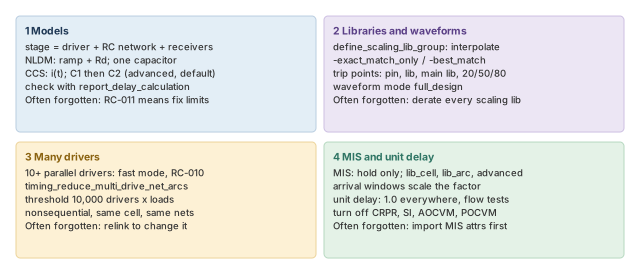
Figure 16 is the summary to redraw from memory.
Where the next chapter goes, and why
You now know how the tool turns a driver, a wire and its loads into a delay and a slew. However, every stage here depended on the RC network of the wire. So far, we have assumed that network was already in memory.
The Back-Annotation chapter explains how it gets there. It covers reading detailed parasitics and SDF delays, checking that every net is annotated, and reducing SDF for clock meshes. Thus, the models from this chapter get the real wire data they need.