Why this chapter matters in a real project
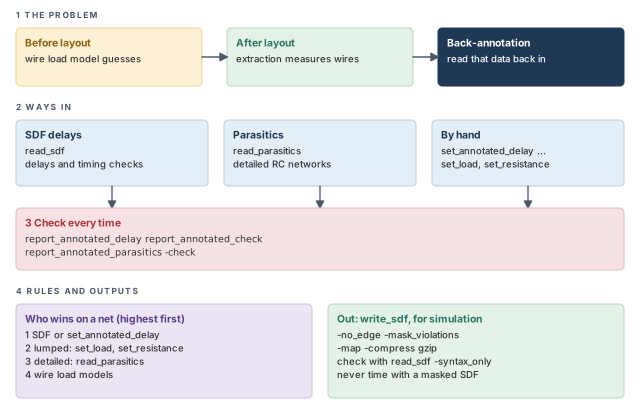
Before layout, the tool can only guess wire delays. It uses a wire load model, a table that estimates a net's resistance and capacitance from its fanout. After placement and routing, the real wires exist. An extraction tool measures them and writes files with their resistance and capacitance.
Back-annotation means reading that external data back into the tool for timing. The data can be ready-made delays or the raw resistance and capacitance of each net. Thus, after each physical design step, the timing reflects the real layout instead of a guess.
Getting this wrong is costly and quiet. If one file fails to annotate a few hundred nets, those nets fall back to estimates. The report still looks clean, but some violations are missing. You find out in silicon, or in a late ECO. ECO means engineering change order, a small late fix to the netlist.
Prerequisites
- Working With Design Data: reading and linking a design, and finding objects with the "get" commands.
- Operating Conditions: wire load models, and the idea of minimum and maximum conditions.
- Delay Calculation: cell delay, net delay, slew and effective capacitance.
- You do not need crosstalk analysis or multi-mode setups yet. Later chapters cover them.
In this chapter, times are in nanoseconds (ns) unless said otherwise. Some short examples use plain "units", meaning the time unit of the library.
Learning objectives
- Explain what back-annotation is and why it replaces wire load estimates after layout.
- Read SDF files with
read_sdf, including subdesign files, load delay choices and minimum and maximum files. - Predict how conditional SDF delays are annotated, with and without conditions in the library.
- Check annotation with
report_annotated_delay,report_annotated_checkandreport_annotated_parasitics. - Set delays, timing checks, transitions, capacitance and resistance by hand, and remove them again.
- Write SDF for simulation with
write_sdf, and choose options for edges, clock meshes, VITAL, masking and mapping. - Read detailed parasitics with
read_parasitics, including multiple files, location changes, multicorner data and scaling. - Complete partly annotated nets, and explain the risks of doing so.
- Rank the four sources of net data by precedence.
- Query resistors and capacitors with the Parasitic Explorer.
Figure 1 is a map of the whole chapter. Come back to it whenever you lose your place.
1 The beginner's mental model
Think of planning a road trip. Before the roads are built, you guess travel time from distance with a rule of thumb: "one minute per kilometer". After the roads are built, a surveyor sends you better data in one of two forms.
- Form 1: travel times. "Road A takes 12 minutes." You just use the number.
- Form 2: road details. Length, slope and lanes of every stretch. You work out the time yourself.
You may also scribble a note on one road: "this one is 3 km". Figure 2 shows the three kinds of data and maps each to its PrimeTime name.
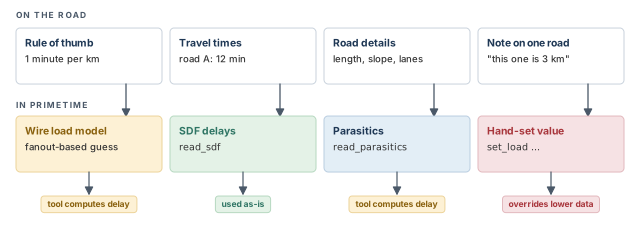
- SDF delays are not measured. Another delay calculator computed them. If it used different rules, the numbers can disagree with PrimeTime's own.
- Road details are not just used as-is. The tool runs its full delay calculation on them, with real slews and effective capacitance.
- A surveyor's report covers all roads. Back-annotated files often miss some nets. The tool then quietly falls back to the rule of thumb for those nets.
- Every name must match exactly. A road called "A1" in the report is useless if your map calls it "A_1".
Now the engineering model
In engineering terms, there are four sources of data for a net:
- Annotated delays. Ready-made cell and net delays, usually from a Standard Delay Format (SDF) file, or set with
set_annotated_delay. - Lumped resistance and capacitance. One resistance and one capacitance value per net, set with
set_resistanceandset_load. - Detailed parasitics. The full resistor and capacitor network of each net, read with
read_parasitics. - Wire load models. Estimates from the logic library, or set with
set_wire_load_model.
Parasitics are the unwanted resistance and capacitance of real wires. When sources overlap on one net, the higher item in this list wins. A later section explains this order in detail.
If you have no SDF file, you can still give the tool real data. A script of capacitance and resistance annotation commands does the job.
2 Reading SDF delays
2.1 What an SDF file holds
An SDF file is a text file of delays. It lists, for each cell instance, its pin-to-pin delays and its timing checks. It also lists net delays from a driver pin to a load pin. A floor planner, a router or another delay calculator can write it.
Here is a tiny piece of SDF. It gives the rise and fall delay from pin A to pin Z of instance U1.
(INSTANCE U1)
(DELAY
  (ABSOLUTE
    (IOPATH A Z (0.21) (0.54))
  )
)
IOPATH means an input-to-output path through a cell. The first value in brackets is the rise delay. The second is the fall delay.
PrimeTime supports SDF versions 1.0 through 2.1, and a subset of version 3.0. Table 1 lists what is and is not supported.
| Group | Constructs |
|---|---|
| Not supported | PATHPULSE, GLOBALPATHPULSE, NETDELAY, CORRELATION, PATHCONSTRAINT, SUM, DIFF, SKEWCONSTRAINT |
| Supported from version 3.0 | RETAIN, RECREM, REMOVAL, CONDELSE |
| Everything else | Supported |
2.2 Reading a file with read_sdf
The read_sdf command reads pin-to-pin leaf cell and net timing from an SDF file. It accepts versions 1.0, 1.1, 2.0, 2.1 and 3.0. It then annotates the current design. A leaf cell is a cell with no hierarchy below it, such as a gate or a flop.
Instance names in the design must match the names in the SDF file. Otherwise, pins are not found and their delays are lost. For example, if the SDF came from a design with VHDL naming rules, your design must use them too. VHDL is a hardware description language, like Verilog.
pt_shell> read_sdf adder.sdf ;# annotate the current design from adder.sdfAfter reading, the tool reports:
- the number of errors, such as pins not found in the design;
- the number of annotated delays and timing checks;
- each unsupported construct found, with how often it appears;
- the process, temperature and voltage values in the file.
You can then list the annotated delays and checks with report_annotated_delay and report_annotated_check. A later section shows both reports.
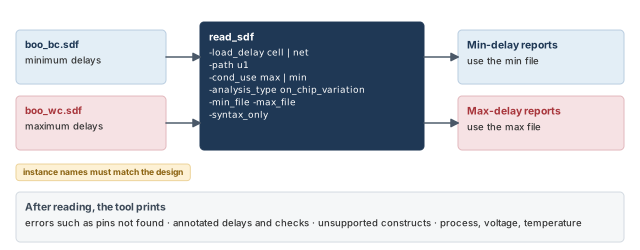
Figure 3 shows the read path and the options this section covers.
Reading minimum and maximum delays
An SDF value can hold three numbers: minimum, typical and maximum. With the -analysis_type on_chip_variation option, the tool reads both the minimum and the maximum values.
- Reports of minimum delay use the delays annotated for the minimum condition.
- Reports of maximum delay use the delays annotated for the maximum condition.
pt_shell> read_sdf -analysis_type on_chip_variation boo.sdf   ;# min and max from one file
pt_shell> read_sdf -analysis_type on_chip_variation \
            -min_file boo_bc.sdf -max_file boo_wc.sdf   ;# min and max from two files
The second form fits when the delays were computed twice, once for a best case and once for a worst case.
Reading a file made for one subdesign
Sometimes the SDF covers only one block instance, not the whole chip. The -path option tells the tool which instance the file belongs to.
pt_shell> current_design MY_DESIGN   ;# the top level we annotate
pt_shell> read_sdf -load_delay net -path u1 mult16_u1.sdf   ;# file for instance u1 only
Here u1 is an instance of design MULT16. The file also puts the load delay in the net delays, hence -load_delay net. One limit applies: the net delays to the ports of the subdesign cannot be used to annotate the current design.
read_sdf needs exact name matches. Read its summary every time, because errors there mean lost delays.2.3 Load delay: part of the cell or part of the net
Let us consider a gate driving a long wire. Some of the gate's delay is caused by the load capacitance it must charge. This part is called the load delay, also known as extra source gate delay.
Delay calculators disagree on where to put it:
- Some count it in the cell delay.
- Others count it in the net delay.
Figure 4 shows the same total delay split both ways. The tool must know which split the file uses, so that it reads the values the way they were meant.
By default, read_sdf assumes the load delay is included in the cell delay. If your file puts it in the net delay, use -load_delay net.
pt_shell> read_sdf -load_delay cell adder.sdf   ;# load delay is inside cell delays
pt_shell> read_sdf -load_delay net  adder.sdf   ;# load delay is inside net delays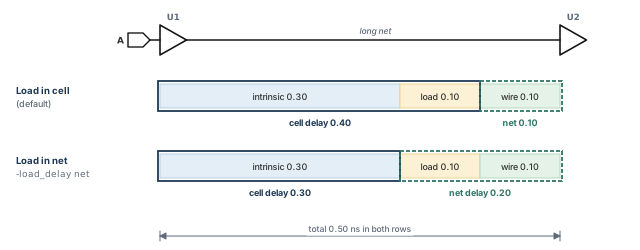
A beginner reads an SDF written by another tool without asking how it counts load delay. The totals look plausible, so nobody notices. Ask the team that wrote the file, and set -load_delay to match. A wrong choice means the cell and net delays are not read the way the writer meant them.
2.4 Conditional delays
Some cells have state-dependent delays. The delay from one input depends on the value of another input. Let us consider a two-input XOR gate U1, with inputs A and B and output Z.
- When B = 0, Z follows A. This is a noninverting arc.
- When B = 1, Z is the inverse of A. This is an inverting arc.
The SDF file can give a different delay for each case with the COND keyword:
(INSTANCE U1)
(DELAY
  (ABSOLUTE
    (COND B (IOPATH A Z (0.21) (0.54) ) )
    (COND ~B (IOPATH A Z (0.27) (0.34) ) )
  )
)
COND B means "when B is 1". COND ~B means "when B is 0". How the tool uses these depends on the logic library.
- The library has conditional arcs. Each arc in the library carries a condition string with the
sdf_condconstruct. Every conditional delay in the SDF is annotated to the matching arc. The two strings must match exactly. - The library has no conditional arcs. There is no
sdf_condin the library. The tool cannot tell which arc a condition belongs to. It annotates the maximum or minimum of all the conditional delays to every arc. Choose which with-cond_use maxor-cond_use min.
Figure 5 shows both results for our XOR gate.
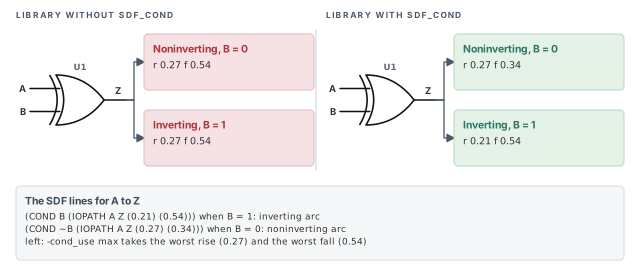
Look at the left panel closely. The worst rise (0.27) comes from one SDF line and the worst fall (0.54) from the other. Thus, both arcs get a pessimistic pair that no single condition produces. If your library has state-dependent delays, a library with conditional arcs gives more accurate annotation.
pt_shell> read_sdf -cond_use max boo.sdf ;# annotate the worst of the conditional delaysSelecting one conditional arc
The tool uses the SDF condition only to find the right arc. It does not use it to switch arcs during analysis. To analyze one condition, set a constant on the controlling pin with case analysis. The Case and Mode Analysis chapter covers this command in depth.
pt_shell> set_case_analysis 0 [get_pins U1/B] ;# B is 0, so the noninverting arc is usedA constant can also reach the pin in other ways. It can come from a tie-high or tie-low cell. It can also come from a case analysis on another pin, propagated through the logic.
A plain IOPATH line annotates all arcs between two pins. A COND IOPATH line takes precedence over a plain IOPATH line for the same pins. This holds even when the plain line comes later in the file.
sdf_cond strings. Otherwise, every arc gets the worst (or best) value.2.5 Timing checks from SDF
A timing check is a rule at a sequential pin, such as setup or hold at a flop. SDF can carry check values too. Table 2 lists the SDF constructs the tool uses to annotate checks.
| Check | SDF construct |
|---|---|
| Setup and hold | SETUP, HOLD, SETUPHOLD |
| Recovery | RECOVERY |
| Removal | REMOVAL |
| Minimum pulse width | WIDTH |
| Minimum period | PERIOD |
| Maximum skew | SKEW |
| No change | NOCHANGE |
3 Checking SDF annotation
3.1 Why check at all
SDF files are often 100 MB or larger. A small name mismatch can leave many arcs unannotated. Thus, it is good practice to verify that every net has a delay, and every check has a value where one applies.
3.2 Annotated and nonannotated delays
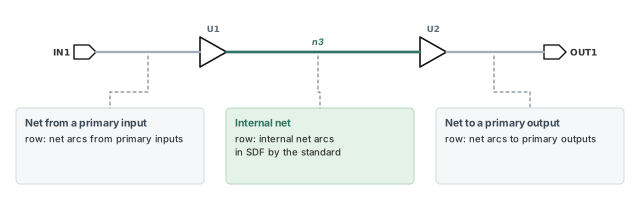
The tool checks cell delays and net delays separately. For net delays, it sorts nets into three kinds, shown in Figure 6:
- nets connected to primary input ports;
- nets connected to primary output ports;
- internal nets, not connected to any primary port.
The split matters because the SDF standard annotates only internal nets. So a missing port net is not always an error in the file.
The report_annotated_delay command counts annotated and nonannotated delay arcs.
pt_shell> report_annotated_delay ;# annotated vs not annotated, by arc type | | | NOT |
Delay type | Total | Annotated | Annotated |
-----------------------------+----------+-----------+-----------+
cell arcs | 16 | 14 | 2 |
cell arcs (unconnected) | 5 | 5 | 0 |
internal net arcs | 3 | 3 | 0 |
net arcs from primary inputs | 11 | 11 | 0 |
net arcs to primary outputs | 4 | 4 | 0 |
-----------------------------+----------+-----------+-----------+
| 39 | 37 | 2 |Here two cell arcs are not annotated. Those two arcs will use the tool's own delay calculation.
3.3 Annotated and nonannotated timing checks
The report_annotated_check command counts the annotated timing checks on all cell arcs in the design.
                               |Total     |Annotated |NOT Annot.|
-------------------------------+----------+----------+----------|
cell setup arcs                |   2368   |   2368   |    0     |
cell hold arcs                 |   2368   |   2368   |    0     |
cell recovery arcs             |    676   |    676   |    0     |
cell removal arcs              |      0   |      0   |    0     |
cell min pulse width arc       |    135   |    135   |    0     |
cell min period arcs           |    822   |    822   |    0     |
cell max skew arcs             |    716   |    716   |    0     |
cell nochange arcs             |      0   |      0   |    0     |
-------------------------------+----------+----------+----------|
| 7085 | 7085 | 0 |Put both reports right after read_sdf in every script, and compare the "NOT Annotated" column across runs. A sudden jump usually points to a netlist and SDF mismatch, not a real timing change.
3.4 Faster timing updates when nearly everything is annotated
Normally, the tool computes the slew at each point of a path. Slew is the time a signal takes to switch, also called transition time. It uses the input slew and the load, then passes the result forward.
When SDF already gives the delay of an arc, that slew work is mostly wasted. The timing_use_zero_slew_for_annotated_arcs variable controls this. Its default is auto. It is meant for designs where all or almost all arcs, such as 95% or more, have SDF delays. Figure 7 shows how it works.
- For each arc fully annotated by
read_sdforset_annotated_delay, the tool skips delay and slew calculation. It sets a slew of zero on the load pin of that arc. - For an arc that is not annotated, the tool estimates delay and output slew from the best available input slew.
- For a block of arcs that are not annotated, the tool passes the worst slew through the whole block.
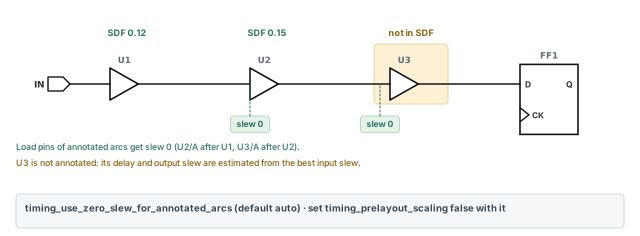
The gain is a much faster timing update. The cost is lower slew accuracy. That is an acceptable trade when SDF already fixes nearly every delay.
When you use this feature, it is recommended to set timing_prelayout_scaling to false. This turns off prelayout slew scaling.
pt_shell> set_app_var timing_use_zero_slew_for_annotated_arcs auto   ;# the default
pt_shell> set_app_var timing_prelayout_scaling false ;# recommended with this feature4 Annotating delays, checks and transitions by hand
4.1 When to set values by hand
Sometimes you want to change a few values to test an idea. For example: "What if this net were 0.2 ns slower?" The set_annotated_* commands make a limited number of such changes. They are for debugging, not for annotating a whole design.
4.2 Cell and net delays
The set_annotated_delay command sets one delay.
- Cell delay: from an input pin of a cell to an output pin of the same cell. Use
-cell. - Net delay: from a cell output pin to a cell input pin. Use
-net. -riseor-falllimits the value to one edge.-load_delay cellor-load_delay netsays where the load delay sits, as in the earlier section.
pt_shell> set_annotated_delay -cell -load_delay cell 20 \
            -from U1/U2/U3/A -to U1/U2/U3/Z   ;# cell delay 20, load delay included
pt_shell> set_annotated_delay -net -rise 1.4 -load_delay \
            cell -from U1/Z -to U2/A   ;# rise net delay 1.4, load delay not included
pt_shell> set_annotated_delay -net -rise 12.3 -load_delay \
            net -from U1/Z -to U2/A   ;# rise net delay 12.3, load delay included
Look at the last two commands. With -load_delay cell, the load delay belongs to the cell, so the net value excludes it. With -load_delay net, the net value includes it.
You can also pick an arc by its object, which helps when two pins share several arcs. This example sets a fall cell delay of 21.2 on the enable arc of three-state cell U8.
pt_shell> set_annotated_delay -cell -fall -of_objects \
            [get_timing_arcs -from U8/EN -to U8/Z \
            -filter sense==enable_low] 21.2   ;# the enable arc of U8 only
To list annotated delays, use report_annotated_delay. To remove them, use remove_annotated_delay or reset_design.
4.3 Timing checks
The set_annotated_check command sets a setup, hold, recovery, removal or no-change value between two pins. This example sets a setup time of 2.1 from clock pin CP to data pin D of flop u1/ff12.
pt_shell> set_annotated_check -setup 2.1 -from u1/ff12/CP \
-to u1/ff12/D ;# setup of 2.1 at u1/ff12- To list annotated checks, use
report_annotated_check. - To see the effect on one instance, use
report_timing. - To remove them, use
remove_annotated_checkorreset_design.
4.4 Transition times
The set_annotated_transition command sets the transition time (slew) on any pin. It takes -rise and -fall values.
pt_shell> set_annotated_transition -rise 0.5 [get_pins U1/U2/U3/A]   ;# rising slew 0.5
pt_shell> set_annotated_transition -fall 0.7 [get_pins U1/U2/U3/A]   ;# falling slew 0.7
To remove them, use remove_annotated_transition.
Keep hand-set values in a separate, clearly named script. A hand-set delay sits at the top of the precedence order. So a forgotten one silently beats your real SDF or parasitics.
5 Writing SDF files
5.1 Why write SDF
Other tools may need the delays PrimeTime has. A typical user is gate-level simulation, which runs the netlist with real delays. The write_sdf command writes SDF in version 1.0, 2.1 or 3.0. The default is version 2.1.
pt_shell> write_sdf -version 2.1 -input_port_nets mydesign.sdf ;# write version 2.1 SDFThe example also adds the -input_port_nets option.
If you write SDF with some other utility, make sure every annotation is stated explicitly wherever the SDF version allows it.
5.2 Constructs in the written file
Table 3 lists what write_sdf uses and what it never uses.
| Group | Constructs |
|---|---|
| Header | DELAYFILE, SDFVERSION, DESIGN, DATE, VENDOR, PROGRAM, VERSION, DIVIDER, VOLTAGE, PROCESS, TEMPERATURE, TIMESCALE |
| Cells | CELL, CELLTYPE, INSTANCE |
| Delays and checks | ABSOLUTE, COND, CONDELSE, COSETUP, DELAY, HOLD, INTERCONNECT, IOPATH, NOCHANGE, PERIOD, RECOVERY, RECREM, RETAIN, SETUP, SETUPHOLD, SKEW, TIMINGCHECK, WIDTH |
| Edges | posedge and negedge identifiers |
| Version 3.0 only | CONDELSE, RETAIN, RECREM, REMOVAL |
| Never used | INCREMENT, CORRELATION, PATHPULSE, GLOBALPATHPULSE, PORT, DEVICE, SUM, DIFF, SKEWCONSTRAINT, PATHCONSTRAINT |
The PORT construct does appear when you turn on SDF reduction for clock meshes. A later section covers it.
5.3 Delay triplets
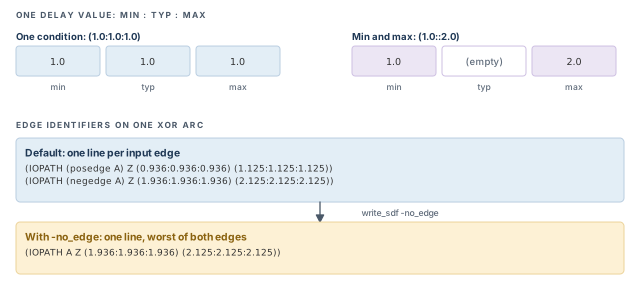
Each SDF delay value is a triplet: minimum, typical and maximum, separated by colons. What the tool writes depends on the operating conditions, as Figure 8 shows.
- One operating condition: three identical values, such as
(1.0:1.0:1.0). - Minimum and maximum conditions: only two values, such as
(1.0::2.0). The typical slot is left empty and is not used.
The written delays cover six transitions. They are 0 to 1, 1 to 0, 0 to Z, Z to 1, 1 to Z and Z to 0. Here Z is the high-impedance state of a three-state output.
5.4 Edge identifiers and -no_edge
An edge identifier says which input edge an arc belongs to: posedge (rising) or negedge (falling). The tool uses edge identifiers for timing checks and cell delays. It also uses conditions when the library gives edge identifiers with sdf_cond.
For a combinational cell, the tool writes posedge and negedge lines for one arc when both of these hold:
- the rising-edge delay differs from the falling-edge delay; and
- the input net transition differs between rise and fall on the arc's input pin.
So one timing arc can produce two IOPATH lines. This is common for multiplexers and XOR cells.
(IOPATH (posedge A) Z (0.936:0.936:0.936) (1.125:1.125:1.125))
(IOPATH (negedge A) Z (1.936:1.936:1.936) (2.125:2.125:2.125))
Other SDF writers may write only one set of triplets for both edges. PrimeTime writes both, for the highest accuracy. However, some logic simulators cannot handle edge identifiers on combinational and sequential arcs. They expect one arc only. For them, use -no_edge.
pt_shell> write_sdf -no_edge mydesign.sdf ;# one line per arc, worst of both edgesWith -no_edge, the tool writes one arc with the worst-case triplets of the rising and falling transitions. The simulation delays may therefore be pessimistic.
-no_edge only for a simulator that needs it, and expect some pessimism.5.5 Reducing SDF for clock mesh and spine networks
A clock mesh is a clock network where many drivers feed a shared grid of wires. A spine is a similar structure built around a main trunk. Such networks have a huge number of nets, so the SDF can become unreasonably large.
The tool can shrink the file. It combines SDF values that differ by a negligible amount. It then uses the SDF 3.0 PORT construct to stand for the combined nets. Four variables control this, as Table 4 shows.
| Variable | Type | Meaning | Default |
|---|---|---|---|
sdf_enable_port_construct |
Boolean | When true, allows PORT lines in written SDF |
false |
sdf_enable_port_construct_threshold |
Float, ps | Absolute delay difference below which PORT is used |
1 ps |
sdf_align_multi_drive_cell_arcs |
Boolean | When true, unifies small differences between drivers of a mesh or spine |
false |
sdf_align_multi_drive_cell_arcs_threshold |
Float, ps | Absolute delay difference below which multidrive arcs are aligned | 1 ps |
Why align drivers at all? Small differences between drivers of one mesh net can cause simulation failures.
The PORT construct
An INTERCONNECT line gives the delay of one driver-to-load connection. A PORT line gives one delay for a load pin, whatever drives it.
Let us consider four parallel buffers A to D driving four parallel buffers W to Z. Every driver connects to every load, so there are 16 connections. Figure 9 shows the network and both ways to write it.
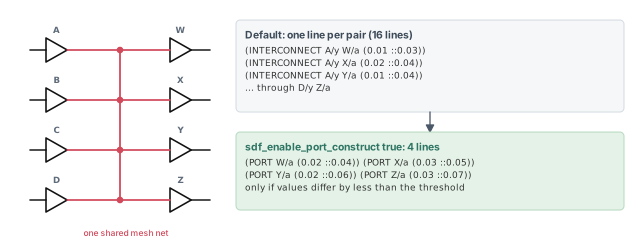
Without PORT (the default), the file holds lines like these:
(INTERCONNECT A/y W/a (0.01 ::0.03))
(INTERCONNECT A/y X/a (0.02 ::0.04))
(INTERCONNECT B/y W/a (0.01 ::0.03))
...
The list goes on until all 16 connections are written.
With sdf_enable_port_construct set to true, and the differences within the threshold, the file shrinks:
(PORT W/a (0.02 ::0.04))
(PORT X/a (0.03 ::0.05))
(PORT Y/a (0.02 ::0.06))
(PORT Z/a (0.03 ::0.07))
Four PORT lines replace 16 INTERCONNECT lines. Two rules apply:
PORTis used for all parallel nets within the threshold, except nets driven by three-state buffers.sdf_enable_port_construct_thresholdsets the largest allowed absolute difference between the combined values.
Normalizing multidriven arcs for simulation
Now let us look at the drivers themselves. Buffer B0 drives three buffers B1, B2 and B3. All three drive one net to the clock pin of flop FF1. Figure 10 shows this network.
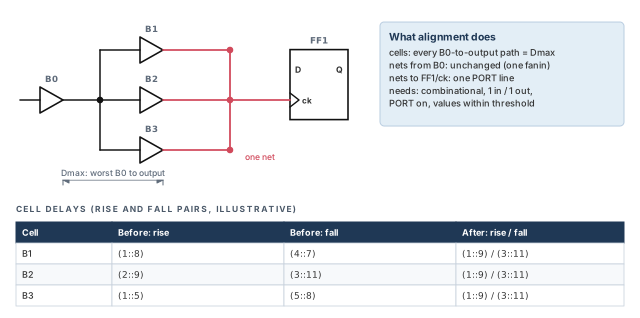
Normalizing means using one worst-case delay value to represent several drivers. The tool aligns the cell arcs when all of these hold:
sdf_align_multi_drive_cell_arcsistrue;- the delay values are within
sdf_align_multi_drive_cell_arcs_threshold; - the cells in the clock network are combinational, not sequential;
- each cell has one input and one output.
The tool also needs sdf_enable_port_construct set to true for this. If the common net is driven by three-state buffers, it does not align cell delays.
Here is how the adjustment works in our network:
- Cell delays. The tool finds the worst delay from B0 to the outputs of B1, B2 and B3. Call it Dmax. It adjusts each cell so every path from B0 equals Dmax. Here "worst" means the most pessimistic values. That is the smallest minimum delay and the largest maximum delay.
- Net delays. The nets from B0 to B1, B2 and B3 are unchanged, because each of those cells has only one fanin net. The nets to
FF1/ckbecome onePORTline, if the PORT setting is on and the delays are within its threshold. - Several arcs per cell. The worst cell arc stands for the cell delay.
In this example, the nets from B0 all have the same delay. So the three buffers end up with the same cell delays.
# before: three net lines and three different cell delays
(INTERCONNECT B1/z FF1/ck (0.01 ::0.04))
(INTERCONNECT B2/z FF1/ck (0.03 ::0.05))
(INTERCONNECT B3/z FF1/ck (0.02 ::0.04))
B1 cell delay: rise (1::8)  fall (4::7)
B2 cell delay: rise (2::9)  fall (3::11)
B3 cell delay: rise (1::5)  fall (5::8)
# after: one PORT line and identical cell delays
(PORT FF1/ck (0.03 ::0.05))
B1 cell delay: rise (1::9)  fall (3::11)
B2 cell delay: rise (1::9)  fall (3::11)
B3 cell delay: rise (1::9)  fall (3::11)
Check the "after" values against the rule. The rise pair (1::9) takes the smallest minimum (1) and the largest maximum (9). The fall pair (3::11) does the same.
Do not read an aligned SDF back into PrimeTime for timing. The alignment makes it pessimistic on purpose. It is for simulation only.
5.6 VITAL compliant SDF and negative values
VITAL is a standard for timing in VHDL gate-level simulation. To write SDF that is VITAL compliant, use this command:
pt_shell> write_sdf -no_edge_merging -exclude {"no_condelse"} \
            file.sdf   ;# VITAL compliant output
Some simulators cannot handle negative delays. The -no_negative_values option sets negative values to zero. It takes one or more of three values:
timing_checks— zeroes negative setup, hold, recovery or removal values.cell_delays— zeroes negative cell delays, such asIOPATHand port lines.net_delays— zeroes negative net delays, such asINTERCONNECTlines.
pt_shell> write_sdf -no_edge_merging -no_negative_values \
            {timing_checks net_delays} -exclude {"no_condelse"} \
            file.sdf   ;# zero negative checks and net delays
5.7 Compressed SDF
SDF files are large. The -compress option writes a gzip file directly.
pt_shell> write_sdf -compress gzip 1.sdf.gz ;# compressed output5.8 SDF without setup or hold violations
In the middle of a project, timing may still have violations. Yet the simulation team needs an SDF now. A violation in simulation usually makes a flop go unknown, and the test run fails. The -mask_violations option writes an SDF that hides these violations. Its values are setup, hold and both.
pt_shell> write_sdf \
            -significant_digits 5 \
            -mask_violations both \
masked.sdf ;# hide setup and hold violationsAdjusting SDF to mask 16 setup violations.
Adjusting SDF to mask 131 hold violations.How does it work? The tool adjusts the delay of the last timing arc driving each violating endpoint.
- For a hold violation, it adds delay.
- For a setup violation, it subtracts delay.
You might need a higher -significant_digits value. Otherwise, rounding can leave slight violations behind.
A masked SDF hides real problems. Name the file clearly, such as masked.sdf, and never use it for sign-off or to judge timing. The masked violations still need real fixes.
write_sdf options adapt one set of delays to many simulators. Each option trades accuracy for compatibility, so pick only what the simulator needs.6 Writing a mapped SDF file
6.1 What SDF mapping is for
Sometimes you want a different SDF layout for some cells. For example, you may want to change the SDF written for one flip-flop. SDF mapping lets you control the exact text written for each library cell.
You write an SDF map file. It holds a format string per library cell, with numbered placeholders. You then apply it with the -map option. Figure 11 shows the flow.
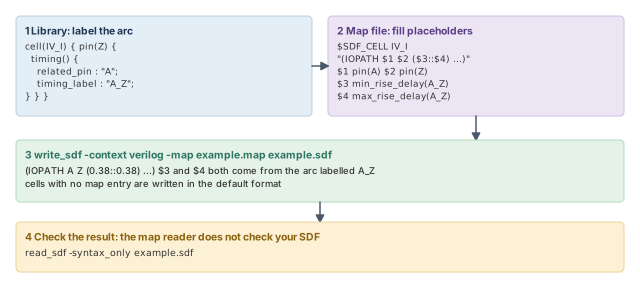
6.2 Labeling arcs in the library
To read the delay of an arc in a map file, the arc needs a name. The timing_label attribute, placed in the timing group of the library, gives it one. Labels supply values for these SDF constructs: IOPATH, SETUP, HOLD, SETUPHOLD, RECOVERY, REMOVAL, RECREM, NOCHANGE and WIDTH.
cell(IV_I) {
  pin(Z) {
    direction : output;
    function : "A'";
    timing() {
      related_pin : "A";
      timing_label : "A_Z";
      ...
    }
  }
}
6.3 Minimum pulse width and minimum period
Pulse width checks need labels too. There are two ways to give them.
- Method 1. Put a
min_pulse_widthgroup inside the pin group. In it,timing_label_mpw_highrefers to theconstraint_highattribute.timing_label_mpw_lowrefers to theconstraint_lowattribute. - Method 2. Use the
min_pulse_width_highandmin_pulse_width_lowattributes in the pin group. Then puttiming_label_mpw_highandtiming_label_mpw_lowin the same pin group to point at them.
To read these values in the map file, use these functions:
min_rise_delay(label_high)returns themin_pulse_width_highvalue.max_rise_delay(label_high)returns the same value.min_fall_delay(label_low)returns themin_pulse_width_lowvalue.max_fall_delay(label_low)returns the same value.
The minimum period is simpler. Put a min_period attribute in the pin section. The function min_period(pin_name) takes the pin name and returns that value.
6.4 Using the map file
The command form is:
write_sdf [-context verilog | vhdl] [-map map_file] output_sdf_filept_shell> write_sdf -context verilog -map example.map example.sdf ;# apply the mapThe -context option affects only names written with the bus() function. Cells that have no entry in the map file are written in the default write_sdf format.
6.5 The map file language
Notation
The syntax below uses these marks:
item?— the item is optional (zero or one time).item*— the item can appear any number of times, including zero.item+— the item appears one or more times.- KEYWORDS and VARIABLES are shown in capitals for easy reading. Both are case-insensitive.
Comments
A line whose first non-blank character is # is a comment, and is ignored. Quoted strings can span several lines. However, a comment cannot sit inside a quoted string.
Variables
Table 5 lists the value types the map language uses.
| Variable | Meaning |
|---|---|
SDFMAP_DNUMBER |
A nonnegative integer, such as +12, 23 or 0 |
SDFMAP_FUNCTION |
A function name, from Table 6 |
SDFMAP_IDENTIFIER |
A case-sensitive object name: letters, digits, _ and the escape character \. Escape any other character. No white space with the hierarchy divider / |
SDFMAP_MAP |
A placeholder: a positive integer after $, such as $3 or $10 |
SDFMAP_NUMBER |
A nonnegative real number, such as 0, 3.4, .7 or 2.4e-2 |
SDFMAP_QSTRING |
Any legal SDF characters and spaces, including tabs and new lines, optionally in double quotes |
SDFMAP_RNUMBER |
A positive, zero or negative real number, such as -3.4 or 3.4e4 |
SDFMAP_TSVALUE |
A real number followed by a unit |
Functions
Table 6 lists the functions a placeholder can use. "Label" means a timing_label value.
| Function | Returns | What it gives |
|---|---|---|
Natural logarithm (one float argument), exp(float), sqrt(float) |
Float | Basic math |
max(float, float), min(float, float) |
Float | Larger or smaller of two values |
bus(string) |
String | The name with bus delimiters changed to match write_sdf: %s[%d] for -context verilog, %s(%d) for -context vhdl |
pin(string) |
String | The string, unchanged |
min_rise_delay(label), max_rise_delay(label) |
Float | Minimum or maximum rise delay of the labeled arc |
min_fall_delay(label), max_fall_delay(label) |
Float | Minimum or maximum fall delay of the labeled arc |
min_rise_delay_bus(label, from_pin, to_pin) and the max_, _fall_ forms |
Float | The same, for one bit of a bus arc |
min_rise_retain_delay(label, from_pin, to_pin) and the max_, _fall_ forms |
Float | The same, for a retain arc |
min_period(pin) |
Float | Minimum period of that pin of the current cell |
Syntax
A map file is a header followed by one or more cell maps.
mapping_file  ::= map_header cell_map+
map_header    ::= sdf_version sdf_map_name? hierarchy_divider? bus_delimiter?
sdf_version   ::= $SDF_VERSION SDFMAP_QSTRING
sdf_map_name  ::= $SDF_MAP_NAME SDFMAP_QSTRING
hierarchy_divider ::= $SDF_HIERARCHY_DIVIDER SDFMAP_HCHAR
bus_delimiter ::= $SDF_BUSBIT SDFMAP_QSTRING
cell_map      ::= $SDF_CELL cell_name format_string var_map $SDF_CELL_END
cell_name     ::= SDFMAP_QSTRING
format_string ::= SDFMAP_QSTRING
var_map       ::= var_map_line+
var_map_line  ::= SDFMAP_MAP expression
expression    ::= expression binary_operator expression
               |  unary_operator expression
               |  expression ? expression : expression
               |  ( expression )  |  function_call  |  SDFMAP_NUMBER
function_call ::= SDFMAP_FUNCTION ( func_args? )
func_args     ::= func_arg  |  func_args , func_args
func_arg      ::= SDFMAP_IDENTIFIER  |  expression
binary_operator ::= + - * / & | > < =
unary_operator  ::= ! -
Each cell map has a quoted format string with placeholders. After it, one line per placeholder says how to fill it. Here is a small map for the inverter labeled earlier.
# map for the inverter IV_I
$SDF_VERSION "OVI 2.1"
$SDF_BUSBIT "[]"
$SDF_CELL IV_I
"(DELAY
   (ABSOLUTE
     (IOPATH $1 $2 ($3::$4) ($5::$6))
   )
)"
$1 pin(A)
$2 pin(Z)
$3 min_rise_delay(A_Z)
$4 max_rise_delay(A_Z)
$5 min_fall_delay(A_Z)
$6 max_fall_delay(A_Z)
$SDF_CELL_END
A flop map works the same way. It adds TIMINGCHECK lines such as SETUP, HOLD, WIDTH, RECOVERY and PERIOD. Each value comes from a labeled check arc, a pulse width label or min_period(CP). A three-state buffer map adds the enable and disable arcs, each with its own label.
6.6 Assumptions and checking the result
The map reader assumes the format string is valid SDF. It does not parse the string or look for your errors. It only fills the placeholders and prints the result. Thus, check the mapped file by reading it back with -syntax_only.
pt_shell> read_sdf -syntax_only mapped.sdf ;# syntax check only, no annotation6.7 Bus names and bus arcs
The bus(string) function rewrites bus delimiters. The map header's $SDF_BUSBIT line says which delimiters the map file uses. For example:
$SDF_BUSBIT "<>"
...
$23 bus(output_bus<5>)
With write_sdf -context verilog, the name is written as output_bus[5]. Three more rules apply:
- If a name has several sets of delimiters, only the last set is replaced.
- If no bus delimiters are specified, names are printed unchanged.
- When one
write_sdfrun reads several map files, the tool assumes all headers share the same SDF version and bus delimiters.
A library pin can be a bus. One timing group then defines one arc per bit. For example, an 11-bit bus A with one setup group to CK has 11 setup arcs. Only one label is written, so every bit's arc gets the same label, such as tas. To reach one bit, use the _bus forms of the delay functions:
max_rise_delay_bus(tas, CK, A[5])   # max rise delay
min_rise_delay_bus(tas, CK, A[5])   # min rise delay
max_fall_delay_bus(tas, CK, A[5])   # max fall delay
min_fall_delay_bus(tas, CK, A[5])   # min fall delay
Bus arcs between two buses work the same way. Let us consider an 8-bit input bus In and an 8-bit output bus Q. The library labels their arcs In_to_Q. To print the arc from In[6] to Q[6], the map uses this format string and lines:
(IOPATH $1 $2 ($3::$4) ($5::$6))
$1 bus(In[6])
$2 bus(Q[6])
$3 min_rise_delay_bus(In_to_Q, In[6], Q[6])
$4 max_rise_delay_bus(In_to_Q, In[6], Q[6])
$5 min_fall_delay_bus(In_to_Q, In[6], Q[6])
$6 max_fall_delay_bus(In_to_Q, In[6], Q[6])
The written line then looks like (IOPATH In[6] Q[6] (1.8::4.3) (1.8::4.0)). Avoid using a bus arc in the plain (non-bus) delay functions.
6.8 Limits of SDF mapping
- You cannot use wildcard characters.
- You cannot write a format for one instance. A format belongs to a library cell, and applies to every instance of it.
- Cells without a format in the map file are written in the default
write_sdfformat.
-syntax_only.7 Lumped resistance and capacitance
7.1 One R and one C per net
Even with every delay in SDF, you may want parasitics too. Design rule checks such as maximum transition and maximum capacitance need net loads. The simplest form is lumped data: one resistance and one capacitance (RC) per net. Figure 12 compares it with detailed data.
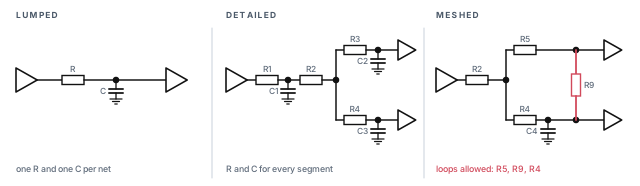
Two commands set lumped values:
set_loadsets capacitance.set_resistancesets resistance.
Both temporarily override the wire load model or detailed parasitics of that net. Removing the value with remove_capacitance or remove_resistance returns the net to its earlier data.
You can set the two values separately. For example, read detailed parasitics, then override only the capacitance with set_load. The tool still uses the detailed data to compute the net resistance.
7.2 Setting net capacitance
The set_load command sets capacitance on ports and nets. If the current design is hierarchical, link it first with link_design.
- By default, the total net capacitance is the sum of all pin, port and wire capacitance on the net.
- A value you set replaces the tool's own estimate.
- For nets in lower levels, give the full name, such as
BLOCK1/BLOCK2/NET_NAME. - With
-wire_load, the value on a port counts as wire capacitance, not pin or port capacitance.
pt_shell> set_load 0.05 [get_nets BLOCK1/BLOCK2/n7]   ;# lumped cap on a lower-level net
pt_shell> report_net BLOCK1/BLOCK2/n7   ;# check the net's capacitance
To view capacitance on ports, use report_port. To view it on nets, use report_net.
7.3 Setting net resistance
The set_resistance command sets net resistance. The value replaces the tool's own estimate. It also works on lower-level nets named like BLOCK1/BLOCK2/NET_NAME.
pt_shell> set_resistance 12 [get_nets BLOCK1/BLOCK2/n7]   ;# lumped resistance
pt_shell> report_net BLOCK1/BLOCK2/n7   ;# view the resistance
pt_shell> remove_resistance [get_nets BLOCK1/BLOCK2/n7]   ;# back to earlier data
To remove resistance from the whole design, use reset_design.
8 Detailed parasitics
8.1 What detailed parasitics give you
Detailed parasitics describe each physical segment of a routed net as resistors and capacitors. This is very accurate. It also takes more time than lumped data, because the RC network can be complex.
From this network, the tool computes at each subnode of the net:
- the effective capacitance (Ceffective), the load the driver really "feels";
- the slew;
- the delay.
The detailed network also supports meshes, shown on the right of Figure 12. Use detailed data for nets with critical timing, such as clock trees. It matters most in deep submicron designs, where net delays are large compared with cell delays.
8.2 Reading parasitic files
The read_parasitics command reads parasitic files in these formats:
- Galaxy Parasitic Database (GPD);
- Standard Parasitic Exchange Format (SPEF);
- Detailed Standard Parasitic Format (DSPF);
- Reduced Standard Parasitic Format (RSPF), IEEE 1481-1999;
- Milkyway (PARA).
SPEF and RSPF are text files, and they can be compressed with gzip. Naming the format is optional, because the reader detects the file type.
pt_shell> read_parasitics top.spef.gz ;# format is detected from the fileNet and pin names must match between the design and the file. For example, a file built with VHDL naming needs a design with VHDL naming.
Pin capacitance and coupling
By default, the tool assumes SPEF capacitance values do not include pin capacitance. It takes pin capacitance from the logic libraries, and ignores any pin capacitance in the SPEF.
Coupling capacitance is capacitance between two neighboring nets. In the SPEF it must be symmetric: the value from net A to B must equal B to A. To check this, read the design, then use -syntax_only with -keep_capacitive_coupling. The tool warns about any asymmetric coupling. Fix the SPEF before going on.
pt_shell> read_parasitics -syntax_only -keep_capacitive_coupling top.spef ;# check onlyWhat the capacitance reports show
The detailed networks are used to compute effective capacitance during delay calculation. However, most reports, such as report_timing and report_net, show the lumped capacitance, called Ctotal. Ctotal is the sum of all capacitances of the net in the SPEF, plus the pin capacitance.
Parasitic files are huge and slow to read. Keep them on a local disk, not across the network. Have enough memory to avoid disk swap. Compress SPEF with gzip, because a smaller file often reads faster overall.
8.3 Reading several parasitic files
Big chips are often extracted in pieces: one file per block, plus one for the top level. Hierarchical parasitics for each instance are read separately and stitched to the top-level parasitics. Here is the recommended flow:
read_parasitics A.spef -path [all_instances -hierarchy BLKA]   ;# all BLKA instances
read_parasitics B.spef   ;# block B
read_parasitics C.spef   ;# block C
read_parasitics D.spef   ;# block D
read_parasitics chip_file_name   ;# top-level interconnect
report_annotated_parasitics -check   ;# check the whole design once
The -path option takes a list of instances. All instances of the same block design are annotated together. This can greatly reduce runtime and memory.
Where stitching is allowed
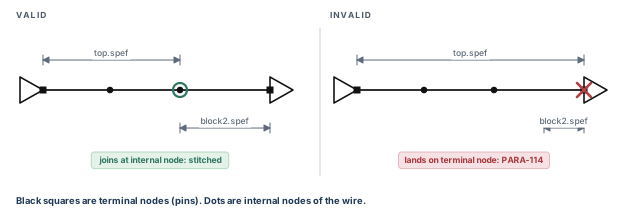
A later file can add to a net only at nonterminal nodes. A terminal node is an end of the net at a pin or port. A nonterminal node is an internal point of the wire. Figure 13 shows both cases.
- A second annotation at a nonterminal node is valid. The tool stitches it in.
- A second annotation at a terminal node is invalid. The tool ignores it and issues a PARA-114 error.
8.4 Moving, rotating and flipping parasitic data
By default, read_parasitics takes the location and orientation of macros from the GPD or SPEF file, if the file has them. You can also apply your own location transformations:
read_parasitics
-x_offset x_offset_in_nm
-y_offset y_offset_in_nm
-rotation rotate_none | rotate_90 | rotate_180 | rotate_270
-axis_flip flip_x | flip_y | flip_both | flip_noneOffsets are in nanometers. Figure 14 shows the two single flips. flip_x flips the data across the x-axis. flip_y flips it across the y-axis.
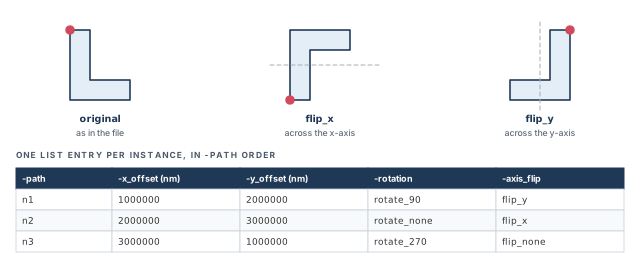
For several instances, give each option as a list. Each list entry applies to the matching instance in -path.
read_parasitics \
  -path { n1 n2 n3 } \
  -x_offset { 1000000 2000000 3000000 } \
  -y_offset { 2000000 3000000 1000000 } \
  -rotation { rotate_90 rotate_none rotate_270 } \
  -axis_flip {flip_y flip_x flip_none}   ;# one entry per instance
Here instance n1 moves 1,000,000 nm in x and 2,000,000 nm in y. It is rotated 90 degrees and flipped across the y-axis. Instance n2 moves 2,000,000 nm in x and 3,000,000 nm in y. It has no rotation and a flip across the x-axis. Instance n3 moves 3,000,000 nm in x and 1,000,000 nm in y. It is rotated 270 degrees and not flipped.
8.5 Ports with several physical pins
One logical port can have several physical shapes. For example, a wire may reach the block edge at two places. Such a port has multiple physical pins in the parasitics file.
In the StarRC extraction tool, this is turned on with the extraction option MULTI_PHYSICAL_PINS_PREFIX: YES, plus some other options. To read such SPEF or GPD data, set this variable first:
pt_shell> set_app_var parasitics_enable_multiple_physical_pins true ;# before readingIn the file, the extra pins carry a SNPS_EEQ prefix, meaning "electrically equivalent":
*D_NET in 4.0
*CONN
*P in                I *C 0 0
*P SNPS_EEQ_in_1     I *C 0 0
Some files also start with a mapping table from port name to equivalent pin names, as comment lines:
// start_MPIN_table
// TOP in SNPS_EEQ_irr_0
// BLKA in SNPS_EEQ_irr10 SNPS_EEQ_irr20
// end_MPIN_table
The tool maps all equivalent pins to the same logical port. When several files are stitched, these pins connect correctly. When parasitics are written out again, the pin data is kept. This covers write_parasitics and HyperScale block models, which are compact models of a block. However, the feature does not work in the incremental SPEF flow, read_parasitics -eco.
8.6 Multicorner parasitic data
A parasitic corner is one set of extraction conditions, such as worst capacitance at 125 °C. StarRC can extract several corners at once and store them as multicorner GPD. It is turned on with SIMULTANEOUS_MULTI_CORNER: YES.
To annotate one corner from multicorner GPD, name the corner first, then read:
pt_shell> set_app_var parasitic_corner_name CWORST110   ;# the corner to use
pt_shell> read_parasitics -format gpd \
-keep_capacitive_coupling multicorner_GPD_dir ;# read that corner 0 error(s)
Format is GPD
Annotated corner(s) : CWORST110
Annotated nets : ...8.7 Checking the annotated nets
By default, read_parasitics checks the nets it annotates for incomplete networks. It then runs report_annotated_parasitics -check for you.
In a multi-file flow, also run report_annotated_parasitics -check yourself after the last read. The explicit report covers all nets, not just the nets of the last command. Thus, you confirm the whole design in one place. This is why the recommended flow above ends with it.
Some messages have a default limit each time a command runs. This applies to read_parasitics, report_annotated_parasitics -check, read_sdf and any update_timing, implicit or explicit. A summary goes to the log file and is printed at the end of the session.
sh_message_limitsets the default limit.sh_limited_messagessets which messages are limited.
A beginner sees only a few warnings and assumes that is all. The rest were cut by the message limit. Read the end-of-session summary to see the true counts.
8.8 Scaling parasitic values
Foundries may give scaling factors for variation. Rather than extract again, you can scale the values you have. The scale_parasitics command multiplies resistors, ground capacitors and cross-coupling capacitors by factors. It works for SPEF, GPD, DSPF and RSPF data.
- Delay calculation uses the scaled values.
write_parasiticswrites the scaled values.
Global and net-specific scaling
Without a list of nets, the command scales the whole design. This triggers a full timing update. Set all three factors in one command, so you pay for only one update.
pt_shell> scale_parasitics \
            -resistance_factor 1.10 \
            -ground_capacitance_factor 1.10 \
            -coupling_capacitance_factor 1.25   ;# all nets, one update
With a list of nets, only those nets are scaled. This usually triggers only an incremental timing update.
pt_shell> scale_parasitics [get_nets n2] \
            -ground_capacitance_factor 1.3 \
            -resistance_factor 1.22   ;# net n2 only
pt_shell> report_annotated_parasitics -list_annotated n2   ;# inspect the change
The rules of scaling
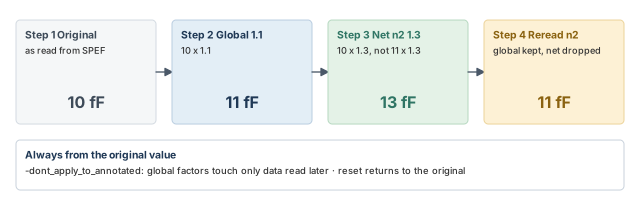
Figure 15 shows the rules with numbers. They all follow one idea: scaling always starts from the original values.
- If you scale the whole design and then one net, the net factor applies to the original value. It does not multiply the global one.
- Running
scale_parasiticsagain scales the original values, not the previous result. - If you read parasitics again for scaled nets, global factors still apply. Net-specific factors are dropped.
- With
-dont_apply_to_annotated, global factors apply only to parasitics read later. Data already read is untouched.
Scaling one physical block
A foundry may give different factors for one block. Link the top level, here named Chip. Then move into the block, scale its nets and move back:
current_instance A   ;# move into block A
set gnets [get_nets *]   ;# collection of nets for block A
scale_parasitics -ground_capacitance_factor 1.1 \
  -resistance_factor 1.1 -coupling_capacitance_factor 1.1 $gnets   ;# scale block A
current_instance Chip   ;# back to the top
# proceed with the analysis
Check the result with report_annotated_parasitics -list_annotated.
Reporting and resetting scaling
pt_shell> scale_parasitics -coupling_capacitance_factor 1.1   ;# global
pt_shell> scale_parasitics -coupling_capacitance_factor 1.3 [get_nets n2]   ;# net n2
pt_shell> report_scale_parasitics   ;# show global and net factors
pt_shell> reset_scale_parasitics [get_nets n2] ;# back to the original valuesGlobal factors:
Coupling factor : 1.100000
Net Cap factor Res factor Coupling factor
------------------------------------------------------------------
n2 1.300000reset_scale_parasitics works on all scaled nets or on a list. It returns values to the originals, not to an earlier scaled state.
8.9 Reading parasitics for an incremental update
After an ECO, only a few nets change. The tool can do an incremental update: it retimes only what changed. How many nets can change without a full update depends on the design size.
pt_shell> read_parasitics full_chip.spef   ;# annotate most or all nets
pt_shell> report_timing                    ;# timing before the ECO
pt_shell> read_parasitics eco.spef         ;# override a few nets
pt_shell> report_timing                    ;# timing after the ECO
8.10 Limitations of parasitic files
The tool supports the Open Verilog International (OVI) SPEF format. Table 7 lists what it ignores or does not support.
| Format | Limitation |
|---|---|
| RSPF/DSPF | SPICE inductors (Lxxx) and lines (Txxx) are allowed but ignored |
| RSPF/DSPF | Physical coordinates of pins and instances are ignored |
| RSPF/DSPF | The BUSBIT construct is not supported |
| RSPF/DSPF | Instances in the SPICE (circuit simulator netlist) section are ignored and not checked against the design |
| RSPF/DSPF | Resistors to ground are ignored, with a warning |
| RSPF/DSPF | Capacitors must go to ground; node-to-node coupling capacitors are ignored, with a warning |
| SPEF | Inductors are ignored |
| SPEF | Poles and residue descriptions on reduced nets are not supported |
| SPEF | Resistors to ground are ignored, with a warning |
| SPEF | Cross-coupling capacitors are split to ground, unless PrimeTime SI is used with crosstalk analysis on |
9 Incomplete annotated parasitics
9.1 What "incomplete" means
A net is incomplete when its parasitic data is missing some segments. The tool cannot compute effective capacitance for such a net. Instead, it falls back to wire load models for that net's delay.
The tool can complete such a net under these conditions:
- The nets with an RC network must come from a SPEF file.
- Every missing segment must lie between two pins. These can be boundary pins or leaf pins.
Figure 16 shows a net with a missing segment, completed with one RC pair. In the figure, the missing part feeds two loads, so it is completed with a fanout of two.
9.2 Completing the net
Two ways complete the missing parts:
- the
complete_net_parasiticscommand; - the
-complete_withoption ofread_parasitics.
Both take -complete_with zero or -complete_with wlm. The tool fills several pin-to-pin segments with a single RC pair.
- With
wlm, the RES and CAP values come from a wire load model. - With
zero, RES and CAP are zero. - In both cases, the resistance from the net to the loads is 0 ohms.
pt_shell> read_verilog design.v   ;# read the netlist
pt_shell> read_parasitics incomplete_parasitics.spef   ;# partial parasitics
pt_shell> complete_net_parasitics -complete_with wlm   ;# fill gaps from a wire load model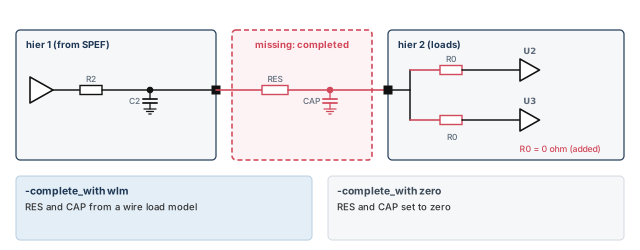
To see what changed, compare the rc_network attribute of a net before and after completion.
9.3 Which wire load model fills the gap
With wlm, the tool picks the wire load model like this:
- The wire load mode comes from the top level. If none exists, the default from the main library is used.
- If the mode is
enclosed, the model of the hierarchy that encloses the missing segment is used. - If the mode is
top, the top-level model is used. - If the enclosing hierarchy has no model, the tool walks up through each parent until it reaches the top.
- If that still finds nothing, the default model of the main library is used.
- If no model can be found at all, zero resistance and capacitance are used.
9.4 The risks of completion
Completion cannot be undone. So if you read several parasitic files, use -complete_with only on the very last read_parasitics. Otherwise, the tool completes nets before all the data is in.
To cancel all read_parasitics and complete_net_parasitics work, use remove_annotated_parasitics.
Use completion only when this holds: the important part of the net's delay is already in the detailed data. The tool then fills only the small, less significant rest.
Do not use complete_net_parasitics to hide a parasitic file with errors. The completed values are guesses. Fix the SPEF file by hand, or extract again, and read it once more.
10 Who wins: the order of precedence
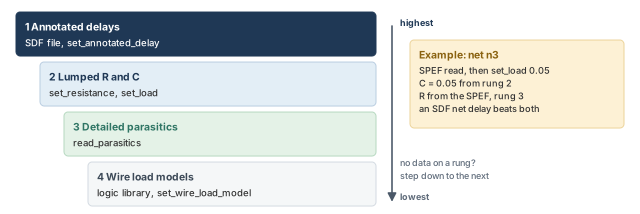
Now we can rank the sources. When several kinds of data exist for one net, the tool uses this order, highest first. Figure 17 shows it as a ladder.
- Annotated delays, from SDF or
set_annotated_delay. - Lumped resistance and capacitance, from
set_resistanceandset_load. - Detailed parasitics, from
read_parasitics. - Wire load models, from the logic library or
set_wire_load_model.
For example, consider net n3. It has detailed parasitics from SPEF. You then run set_load 0.05 on it. Now the capacitance is 0.05, because lumped values outrank detailed ones. The resistance still comes from the SPEF, since you set no lumped resistance. If an SDF also gives the net delay of n3, that delay wins over both.
11 Reporting and removing annotations
11.1 Reporting annotated parasitics
Parasitic files can be 100 MB or larger. To verify that the tool annotated all cell drivers, run report_annotated_parasitics. Add -check to also verify that every RC network is complete.
                  |         |         |   RC    |   Not   |
    Pin type      |  Total  |  RC pi  | network |Annotated|
------------------+---------+---------+---------+---------+
internal net drive|   23649 |       0 |   23649 |       0 |
------------------+---------+---------+---------+---------+
design input port |      34 |       0 |      34 |       0 |
------------------+---------+---------+---------+---------+
                  |   23683 |       0 |   23683 |       0 |
The rows count the drivers of internal nets and the design input ports. An RC pi is a reduced model of a net with one resistor and two capacitors. The "Not Annotated" column should be zero. Any other number means some nets are timed with estimates.
11.2 Removing annotations
Table 8 lists the commands that remove each kind of annotation.
| To remove | Use |
|---|---|
| Delays | remove_annotated_delay |
| Checks | remove_annotated_check |
| Transitions | remove_annotated_transition |
| Parasitics | remove_annotated_parasitics |
| All annotations | reset_design |
To remove all constraints and annotations but keep the parasitic data, use reset_design -keep_parasitics. This saves you from reading large files again.
pt_shell> reset_design -keep_parasitics ;# clear constraints, keep parasitics12 The GPD Parasitic Explorer
12.1 What it does
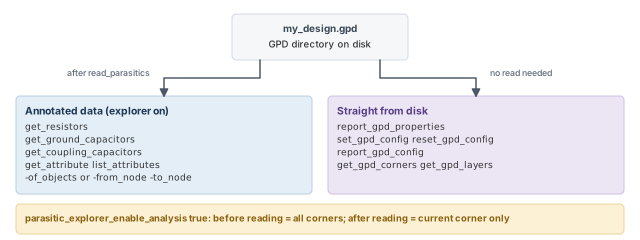
The Parasitic Explorer lets you look inside GPD parasitic data, resistor by resistor. You can query the parasitics annotated by read_parasitics. You can also query GPD data on disk that is not read in yet. Figure 18 shows the two groups of commands.
The element commands are:
get_resistors— a collection of parasitic resistors from one or more nets.get_ground_capacitors— a collection of ground capacitors from one or more nets.get_coupling_capacitors— a collection of coupling capacitors from one or more net pairs.
You can also query element attributes, such as resistance, capacitance, subnode name, layer name, layer number and physical location.
12.2 Turning it on
Set parasitic_explorer_enable_analysis to true. Its default is false.
pt_shell> set_app_var parasitic_explorer_enable_analysis true   ;# turn on
pt_shell> read_parasitics -format gpd my_design_dir.gpd \
            -keep_capacitive_coupling   ;# read GPD data
The timing of this setting matters:
- Set it before reading GPD, and the tool reads all parasitic corners. You can query every corner.
- Set it after reading, and the feature still works. However, you can query only the current parasitic corner.
12.3 Resistor and capacitor collections
The three get_* commands have options to:
- name the net or nets to search;
- give a path from one node to another;
- name the parasitic corner or corners;
- filter by a condition, such as an attribute value test.
get_resistors -of_objects [get_nets {net_rx*}] -parasitic_corners vhi85c   ;# by net, corner
get_ground_capacitors -from_node U235/z -to_node n121:4   ;# between two nodes
get_coupling_capacitors -of_objects n2 -filter "capacitance_max > 0.5e-3"   ;# filtered
You must give either -of_objects or both -from_node and -to_node.
-of_objectstakes one or more nets.-from_nodeand-to_nodetake pins, ports or internal nodes. An internal node is writtennet_name:index_number, such asn121:4.
Each command prints its collection like query_objects. By default, at most 100 objects are shown. Change this with collection_result_display_limit.
To read one attribute, use get_attribute. To list all attributes of a class, use list_attributes.
pt_shell> get_attribute -class resistor [get_resistors -of_objects n2] resistance   ;# values
pt_shell> list_attributes -application -class resistor   ;# what can be queried
12.4 Querying GPD data on disk
These commands read a GPD directory directly, even before it is annotated:
report_gpd_properties— reports properties such as completeness, which data types exist, and counts of nets, cells and ports.set_gpd_config— sets which parasitic corners to read and the thresholds for filtering coupling capacitors.report_gpd_config— reports the settings for reading the GPD data.reset_gpd_config— undoesset_gpd_config.get_gpd_corners— lists the parasitic corner names in the directory.get_gpd_layers— lists the layer names in the directory.
pt_shell> report_gpd_properties -gpd MyDesignA.gpd   ;# summary of the data
pt_shell> report_gpd_properties -layers -gpd MyDesignA.gpd   ;# layer table
pt_shell> report_gpd_properties -parasitic_corners -gpd MyDesignA.gpd   ;# corners
pt_shell> get_gpd_corners -gpd my_design1.gpd   ;# corner names only
pt_shell> get_gpd_layers -gpd my_design1.gpd ;# layer names onlyGPD Summary:
Properties Value
------------------------------------------------------------
design_name MyDesignA
program_name StarRC
number_of_nets 288930
number_of_cells 234730
...
pt_shell> get_gpd_corners -gpd my_design1.gpd
CWORST110 TYP25 CBEST0Changing how GPD is read
Default read settings live in a GPD configuration file. StarRC writes it with its StarXtract -set_gpd_config command. The set_gpd_config command overrides some of these settings for read_parasitics -format gpd. This example sets an absolute and a relative threshold for filtering coupling capacitors:
pt_shell> set_gpd_config -gpd my_design1.gpd \
            -absolute_coupling_threshold 3.0e-3 \
            -relative_coupling_threshold 0.03   ;# drop small couplings when reading
pt_shell> report_gpd_config -gpd my_design1.gpd   ;# show the settings
pt_shell> report_gpd_config -gpd my_design1.gpd -include_starrc_options   ;# plus StarRC
pt_shell> reset_gpd_config -gpd my_design1.gpd   ;# undo set_gpd_config
With -include_starrc_options, the report adds the options set during extraction. A StarRC column marks each row Y or N.
12.5 The explorer without a netlist
You can explore GPD parasitics with no Verilog netlist and no logic library. The tool builds the connectivity from the GPD data itself.
set_app_var parasitic_explorer_enable_analysis true   ;# turn on, no netlist read
read_parasitics -format gpd my_gpd   ;# prepares the read only
current_design TOP   ;# links and reads the GPD data now
Note the order. read_parasitics only prepares the read. The data is read when current_design TOP links the design. After that, use get_resistors, get_ground_capacitors, report_gpd_config and the rest.
The no-netlist flow is a light way to inspect one suspicious net. For example, you can check its layers and largest coupling capacitors without loading the full design.
13 Worked example: annotate a routed block and hand off SDF
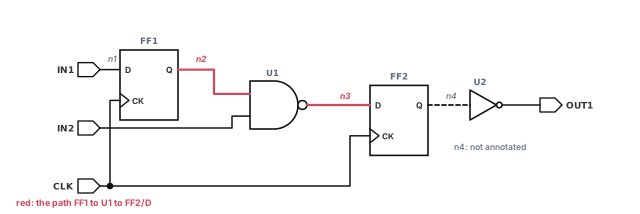
Let us annotate a small routed block named top. Figure 19 shows it. Flops FF1 and FF2 share clock CLK. Gate U1 is a NAND2 and U2 is an inverter. Extraction produced top.spef.gz. The simulation team wants an SDF file.
Step 1 — Read and link the design
pt_shell> read_verilog top.v   ;# load the netlist
pt_shell> link_design top      ;# resolve cells against the libraries
Check: linking reports no unresolved references. Parasitics cannot attach to unlinked cells.
Step 2 — Read the parasitics
pt_shell> read_parasitics top.spef.gz ;# SPEF, gzip, format detected 0 error(s)
Format is SPEF
Annotated nets : ...
...Check: zero errors. Then go straight to the coverage check, because zero errors does not mean every net is covered.
Step 3 — Check the whole design
pt_shell> report_annotated_parasitics -check ;# every driver, every RC network | | | RC | Not |
Pin type | Total | RC pi | network |Annotated|
------------------+---------+---------+---------+---------+
internal net drive| 4 | 0 | 3 | 1 |
------------------+---------+---------+---------+---------+
design input port | 3 | 0 | 3 | 0 |
------------------+---------+---------+---------+---------+
| 7 | 0 | 6 | 1 |Check: one internal net driver is not annotated. Here it is FF2/Q, the driver of U2's input net n4. So that net would be timed with a wire load model. Ask for the extraction to be fixed, and reread. Completion is only for small gaps on nets that are mostly annotated.
Step 4 — Inspect the critical path
pt_shell> report_timing -to FF2/D   ;# the FF1 to U1 to FF2 path
pt_shell> report_net n2             ;# Ctotal and resistance of net n2
Check: the net capacitance in the report is Ctotal, the SPEF total plus pin capacitance.
Step 5 — A quick what-if on one net
The foundry suggests 10% more coupling on critical nets. Try it on n2 only, then undo it.
pt_shell> scale_parasitics -coupling_capacitance_factor 1.1 [get_nets n2]   ;# n2 only
pt_shell> report_scale_parasitics   ;# confirm the factor
pt_shell> report_timing -to FF2/D   ;# incremental update, new slack
pt_shell> reset_scale_parasitics [get_nets n2]   ;# back to the original values
Check: report_scale_parasitics shows 1.1 only on n2, with no global factor.
Step 6 — Write SDF for simulation
The simulator is old and cannot handle edge identifiers. Hold is still failing on one path, but the regression must run tonight.
pt_shell> write_sdf -version 2.1 -no_edge -mask_violations hold \
            top_masked.sdf   ;# one arc per pin pair, hold masked
Check: the log reports how many hold violations were masked. Tell the simulation team this file hides them.
Step 7 — Check the written file
pt_shell> read_sdf -syntax_only top_masked.sdf ;# no annotation, syntax onlyCheck: zero errors. The file is ready to hand off.
14 Common mistakes and how to catch them
| Symptom | Likely cause | Fix |
|---|---|---|
read_sdf reports many pins not found |
Instance names in the SDF do not match the design, such as VHDL against Verilog naming | Regenerate the SDF from the same netlist and naming rules |
| Cell and net delays do not match what the SDF writer meant | Wrong -load_delay choice |
Ask how the SDF counts load delay, and set -load_delay to match |
| Both arcs of an XOR show the same worst delays | The library has no sdf_cond, so conditions cannot be mapped |
Use a library with conditional arcs, or accept the pessimism |
| Some nets use wire load estimates after reading SPEF | Unannotated or incomplete nets | Run report_annotated_parasitics -check after all reads; fix the extraction |
| A block file seems ignored, with PARA-114 | The second annotation landed on a terminal node | Fix where the block and top files meet; stitch only at internal nodes |
| Results change after a scaling run | A forgotten scale_parasitics factor |
Run report_scale_parasitics; reset with reset_scale_parasitics |
| A net's capacitance ignores the SPEF | A leftover set_load outranks detailed parasitics |
Remove it with remove_capacitance or reset_design |
| Completed nets are wrong after reading more files | -complete_with used before the last read |
Remove with remove_annotated_parasitics, then reread with completion last |
| Only a few warnings appear for a bad file | The message limit cut the rest | Read the end-of-session summary; check sh_message_limit |
| Timing from a read-back SDF is pessimistic, or hides violations | The SDF was aligned or masked for simulation | Never time with simulation SDF; use the original data |
15 Interview preparation
Reading delays or parasitic resistance and capacitance from external files into the timing tool.
- After layout, it replaces wire load estimates with data from the real wires.
- The two main forms are SDF delays and parasitic files such as SPEF.
SDF holds ready-made delays and checks; SPEF holds resistance and capacitance, from which the tool computes delays.
- With SDF, the tool skips its own delay calculation for annotated arcs.
- With SPEF, the tool computes effective capacitance, slew and delay itself.
Run report_annotated_delay and report_annotated_check, and look at the "NOT Annotated" column.
- Also read the
read_sdfsummary for errors such as pins not found. - Remember that SDF covers only internal nets by the standard.
SDF or annotated delays, then lumped RC, then detailed parasitics, then wire load models.
- The highest source with data wins for that net.
- A forgotten
set_loadcan silently override SPEF.
-load_delay matter?Load delay is the part of a cell's delay caused by its load. Tools disagree on whether it belongs to the cell or the net.
read_sdfassumes cell by default.- A wrong choice means the tool reads the cell and net values differently from how they were written.
COND delays for an XOR gate, but the library has no sdf_cond. What happens?The tool cannot map conditions to arcs, so it annotates the max or min of all conditional delays to every arc.
- Choose with
-cond_use maxor-cond_use min. - The result is pessimistic: worst rise and worst fall may come from different conditions.
Once at the end with report_annotated_parasitics -check, because it checks the whole design.
- The automatic check after each read covers only that read's nets.
- Use
-pathto annotate all instances of one block together.
A later parasitic file tried to annotate a terminal node, so the tool ignored that annotation.
- Stitching is allowed only at nonterminal, internal nodes.
- Check where the block and top-level extractions meet.
1.3 on the original value, not 1.1 times 1.3.
- Every
scale_parasiticscommand works from the original values. - A reread keeps global factors and drops net factors.
complete_net_parasitics appropriate, and what are its risks?Only when most of a net's delay is already in detailed data and the gaps lie between pins.
- It cannot be undone except by
remove_annotated_parasitics. - Use
-complete_withonly on the lastread_parasitics. - Never use it to cover a file with errors.
write_sdf -mask_violations hide a hold violation?It adds delay to the last timing arc driving the violating endpoint; for setup it subtracts delay.
- Raise
-significant_digitsif rounding leaves small violations. - The file is for simulation only, never for sign-off.
sdf_align_multi_drive_cell_arcs, and why not read the result back?It unifies small driver differences on a clock mesh to avoid simulation failures, but makes the SDF pessimistic.
- It needs combinational one-input, one-output cells and
sdf_enable_port_construct. - Three-state drivers are not aligned.
timing_use_zero_slew_for_annotated_arcs do, and when does it help?For fully annotated arcs, it skips delay and slew work and sets zero slew on the load pin, cutting runtime.
- It suits designs with almost all arcs SDF-annotated, such as 95% or more.
- Set
timing_prelayout_scalingtofalsewith it.
16 Chapter close
Compact glossary
| Term | Meaning |
|---|---|
| Back-annotation | Reading delays or parasitics from external files into the tool |
| Wire load model | A fanout-based estimate of net R and C, used before layout |
| SDF | Standard Delay Format: a text file of cell delays, net delays and timing checks |
| IOPATH | An SDF input-to-output cell delay |
| INTERCONNECT | An SDF net delay from a driver pin to a load pin |
| PORT (SDF) | One SDF delay for a load pin, used to shrink mesh SDF |
| Delay triplet | Minimum, typical and maximum values, such as (1.0::2.0) |
| Load delay | The part of a cell delay caused by its load; also extra source gate delay |
| Conditional delay | An SDF delay that applies only under a COND expression |
sdf_cond |
Library construct that ties an arc to an SDF condition string |
| Edge identifier | posedge or negedge on an SDF arc |
| Parasitics | The resistance and capacitance of real wires |
| Lumped RC | One resistance and one capacitance per net |
| Detailed parasitics | A resistor and capacitor network for each net segment |
| SPEF | Standard Parasitic Exchange Format, the common parasitic text file |
| GPD | Galaxy Parasitic Database, a directory-based parasitic format |
| Ctotal | Total net capacitance from the file plus pin capacitance |
| Effective capacitance | The load the driver really feels through the RC network |
| Coupling capacitance | Capacitance between two neighboring nets |
| Stitching | Joining a later parasitic file to a net at an internal node |
| Terminal node | An end of a net at a pin or port |
| Parasitic corner | One set of extraction conditions in a multicorner file |
| Net completion | Filling missing net segments with zero or wire load values |
| Masked SDF | SDF adjusted so setup or hold violations do not show in simulation |
| Parasitic Explorer | Commands to query parasitic resistors and capacitors as objects |
Back-annotation on one page
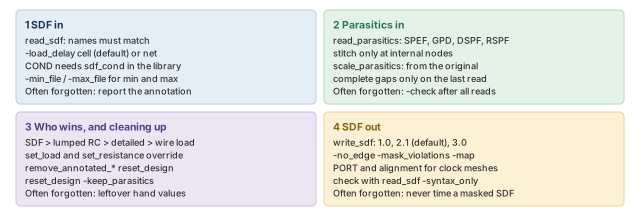
Figure 20 is the summary to redraw from memory.
Where the next chapter goes, and why
You can now load real delays and parasitics and confirm that every net has them. You also saw one place where the tool needs a fixed logic value: choosing a conditional arc with set_case_analysis.
The Case and Mode Analysis chapter takes that idea much further. It shows how constants and modes switch off logic that is not active, such as test paths in functional mode. Thus, the accurate delays from this chapter get applied only to the paths that really matter.