Why this chapter matters in a real project
A real chip does many jobs. It runs in functional mode most of the time. It also has a test mode, where the flops form long scan chains. A RAM inside it reads in one cycle and writes in another. Each job uses a different set of timing paths.
If the tool times every path at once, it mixes these jobs together. For example, it times a functional path through a test multiplexer that is never selected in functional mode. Thus, you get false violations: failures on paths that can never be active together. Engineers then waste days fixing problems that do not exist.
The opposite mistake is just as costly. If you tie off a pin that is really live, the tool stops timing every path behind it. Those paths could hold real violations. The report looks clean, and the silicon fails.
This chapter teaches the two tools for telling PrimeTime which job the chip is doing. Case analysis fixes logic values on pins. Mode analysis selects operating modes in cells and in the design. A third topic, mode merging, folds many modes into a few, so you run fewer timing jobs.
Prerequisites
- Working With Design Data: reading, linking and finding pins, ports and cells.
- Constraining the Design: what constraints are and how they are applied.
- Clocks: clocks and clock-gating cells.
- Timing Paths and Exceptions: timing arcs, startpoints, endpoints and false paths.
- Operating Conditions: helpful for the idea of corners in the mode merging section.
- You do not need to know signal integrity in depth. Crosstalk appears once, with a short explanation.
- You do not need to know distributed multi-scenario analysis. The mode merging section explains the idea it needs.
Learning objectives
- Explain how a case value propagates forward and why it never propagates backward.
- Predict, for a simple gate, whether a constant on one input reaches the output.
- Set and remove case values with
set_case_analysisandremove_case_analysis, and choose between 0, 1, static, rising and falling. - Apply the four conflict rules to decide which case value wins.
- Control propagation through sequential cells, clock-gating cells and netlist tie cells with the right variables and commands.
- Use case analysis to evaluate conditional arcs and to switch off a scan chain.
- Read
report_case_analysis,report_disable_timingand the constant propagation log file to trace a disabled arc. - Select cell modes directly, through design modes and through case analysis, and know which method wins.
- Read
report_modeand tell what selected each mode. - Describe the mode merging flow and the conflict types it reports.
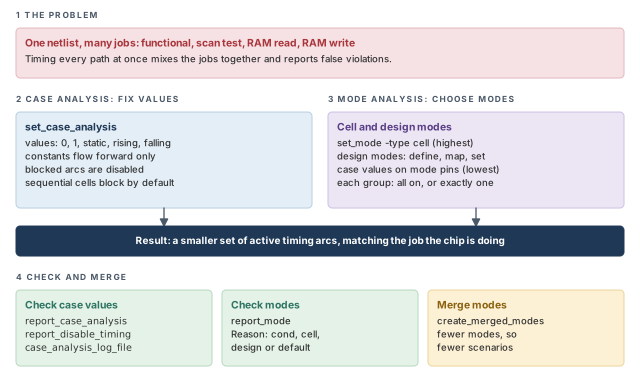
Figure 1 is a map of the whole chapter. Come back to it whenever you lose your place.
1 The beginner's mental model
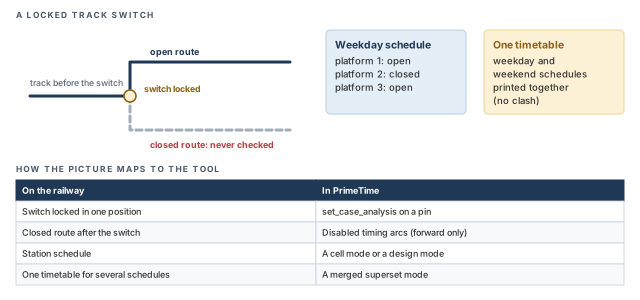
Think of a railway network with many track switches. A train can reach a station by several routes. Now the operator locks one switch in a fixed position. Every route through the other branch of that switch is now closed. No train can use it, so nobody needs to check its timetable.
A station can also run on a schedule, such as "weekday" or "weekend". Each schedule opens some platforms and closes others. Finally, the head office may print one combined timetable for several schedules that never clash. Figure 2 shows this picture and maps each piece to its PrimeTime name.
- A locked switch closes one branch. A case value can do much more. It flows on through gates and can fix values deep in the design.
- A constant on one gate input does not always fix the output. It depends on the gate type, as you will see with the AND gate examples.
- A closed route still exists on the map. In the tool, a disabled arc is simply not timed. If you locked the wrong switch, nothing warns you.
Now the engineering model
In engineering terms, there are three ideas:
- Case analysis. You put a logic constant or a single transition on a port or pin. The tool propagates it forward and disables the timing arcs it blocks.
- Mode analysis. Some library cells and timing models have named modes, such as read and write. You choose a mode, and the tool times only the arcs of that mode.
- Mode merging. You give the tool many modes. It builds a few superset modes that cover them, so fewer scenarios need to run.
A timing arc is a pin-to-pin timing relationship inside a cell, such as A to Z in a gate. A disabled arc is an arc the tool does not time.
2 Case analysis basics
2.1 What a case value does
Case analysis runs timing with logic constants or logic transitions placed on ports or pins. Its goal is to limit the signals that propagate through the design.
There are two kinds of case value:
- A logic constant (0 or 1). The tool propagates the constant forward through the design. It disables the paths that the constant blocks.
- A logic transition (rising or falling). The tool considers only that transition at the pin. Thus, some paths drop out because the other transition is never analyzed.
Case analysis never propagates backward. A constant on a gate output says nothing about its inputs.
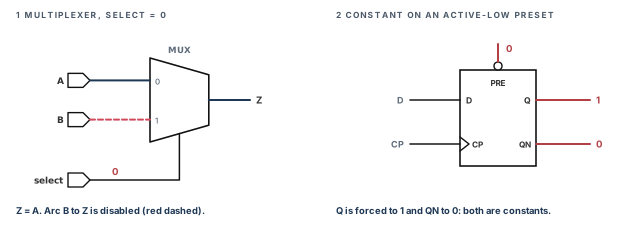
Let us consider a 2-to-1 multiplexer with inputs A and B, select pin select and output Z. When select is 1, Z follows B. When select is 0, Z follows A. Panel 1 of Figure 3 shows what happens with select at 0. Data from B can never reach Z. So the tool disables the timing arc from B to Z.
Panel 2 shows a flip-flop. Suppose a constant reaches its asynchronous preset or clear pin. A preset pin forces Q to 1, and a clear pin forces Q to 0. Then the cell outputs also become constants. In the figure, an active-low preset at 0 makes Q equal 1 and QN equal 0.
2.2 Constants and controlling values
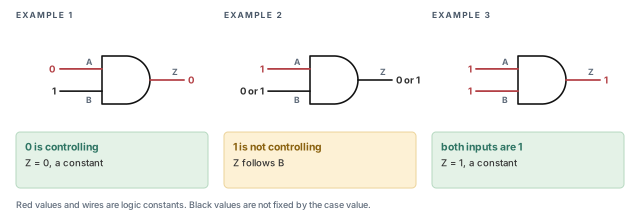
A controlling value is an input value that decides a gate's output alone. For an AND gate, 0 is controlling, because 0 AND anything is 0. For an OR gate, 1 is controlling.
The rule is simple:
- If a constant sits on an input and it is the controlling value, the output becomes constant. That constant then propagates on.
- If it is not the controlling value, the output is not fixed by it. The output still depends on the other inputs.
Figure 4 shows three AND gates with inputs A and B and output Z.
- Example 1. A is 0. The output Z is 0, whatever the value on B.
- Example 2. A is 1. This is not a controlling value. So the constant does not propagate to Z.
- Example 3. A and B are both 1. The output Z is 1, and that constant propagates on.
Before you set a case value, sketch the first few gates after the pin. Ask at each gate: "is this the controlling value?" It takes a minute. It tells you how far the constant will reach.
2.3 Setting case values
The set_case_analysis command sets a case value on pins or ports. You can give one of these values:
| Value | Meaning |
|---|---|
0 |
Constant logic 0 |
1 |
Constant logic 1 |
static |
Constant 0 or 1, with no transitions at all |
rising |
Only a rising transition is considered |
falling |
Only a falling transition is considered |
pt_shell> set_case_analysis 0 [get_ports test]        ;# test port is held at logic 0
pt_shell> set_case_analysis rising [get_ports RESET]  ;# consider only a rising RESET
Why would you use static? Crosstalk is the effect of a switching net on a nearby net through coupling capacitance. The switching net is the aggressor. The affected net is the victim. A net set to static cannot switch. Thus, it cannot act as an aggressor, and its delay cannot change as a victim. The Signal Integrity Analysis chapter covers crosstalk in full.
Why would you use rising or falling? They limit the transitions the tool considers. For example, rising on RESET keeps only a rising transition there. Paths that need a falling RESET drop out of the analysis.
Power analysis with PrimePower ignores the rising and falling case values.
You can also use case analysis together with mode analysis. For example, a RAM block may be in read mode. An internal select pin is then a constant, so you can tell the tool so:
pt_shell> set_case_analysis 1 U1/U2/select_read ;# RAM is in read mode: select_read is 12.4 Removing case values
The remove_case_analysis command removes case values from the pins or ports you name.
pt_shell> remove_case_analysis test ;# test is no longer held at a constantA beginner sets test to 0 for one experiment and forgets it. The next analysis in the same session runs with test logic still switched off. Every test path is missed. Run report_case_analysis before any signoff report, because it lists every value still in force.
2.5 When case values conflict
Two case values can meet on the same pin. For example, you set a pin to 1, but a constant from the netlist drives it to 0. The tool resolves such conflicts with four rules:
- A
set_case_analysisvalue beats a built-in constant value, such as a tie in the Verilog netlist. - A newer
set_case_analysisvalue beats an older one on the same port or pin. - A value set directly on a port or pin beats a conflicting value propagated to it.
- When propagated values conflict, logic 0 wins first, then static, then logic 1.
For example, suppose a pin receives a propagated 1 from one source and a propagated 0 from another. Rule 4 says the pin takes the value 0.
2.6 Variables that control propagation
Four variables change how the tool handles case values and constants. Some constants are built into the netlist itself. For example, a pin may be tied to logic high or low, often through a tie cell. A tie cell is a netlist cell that drives a fixed high or low. These are called logic constants from the netlist.
| Variable | What it controls |
|---|---|
case_analysis_sequential_propagation |
Propagation of constants through sequential cells |
case_analysis_propagate_through_icg |
Propagation of constants through integrated clock-gating cells |
disable_case_analysis |
Turns off propagation of both your case values and netlist constants; it overrides the next variable |
disable_case_analysis_ti_hi_lo |
Turns off propagation of logic constants from the netlist only |
An integrated clock-gating cell (ICG) is a library cell that switches a clock on and off with an enable signal.
Setting disable_case_analysis to true suppresses every logic constant. This includes your case values and pins tied high or low. One use is writing scripts that Design Compiler, the synthesis tool, can synthesize correctly.
pt_shell> set_app_var disable_case_analysis true ;# ignore all case values and tie constantsTurning on disable_case_analysis for a quick check and leaving it on is a costly slip. All test and mode constants vanish. The tool then times every mixed functional and test path, and the report fills with false violations.
3 Case analysis on sequential cells and library models
3.1 Propagating through sequential cells
By default, the tool does not propagate case values through sequential cells. A constant on a flop's D pin stops there. Its Q pin is not treated as constant.
You can override this default in two ways.
Way 1 — all sequential cells. Set case_analysis_sequential_propagation to always.
pt_shell> set_app_var case_analysis_sequential_propagation always ;# all flops and latchesWay 2 — chosen cells only. Keep the variable at never, which is the default. Then name the cells or library cells.
pt_shell> set_app_var case_analysis_sequential_propagation never   ;# the default
pt_shell> set_case_sequential_propagation [get_cells FF1]   ;# only FF1 passes constants
pt_shell> report_case_analysis -sequential_propagation      ;# list the enabled cells
pt_shell> get_attribute [get_cells FF1] is_case_sequential_propagation   ;# true if enabled
The command accepts a list of cells or library cells. You can verify the result in two ways:
- run
report_case_analysis -sequential_propagation; - query the
is_case_sequential_propagationattribute. It returnstruefor cells and library cells enabled for propagation.
To switch propagation off again for chosen cells, use remove_case_sequential_propagation.
pt_shell> remove_case_sequential_propagation [get_cells FF1] ;# FF1 stops passing constantsFigure 5 compares the default with propagation enabled on FF1.
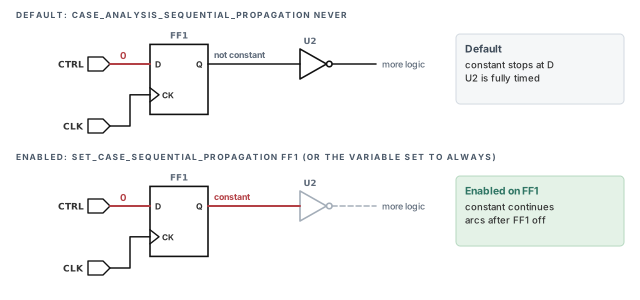
Prefer Way 2 when only a few register-held controls matter, such as a mode register. It is better than always, because you can see in a report exactly which cells pass constants.
always, or open chosen cells with set_case_sequential_propagation.3.2 Evaluating conditional arcs
Some cells come with a Liberty model. Liberty is a modeling language for timing. Here it describes large blocks, such as a RAM, that have no gate-level netlist. A Liberty arc can carry a condition: a Boolean expression on the cell's pins.
The tool evaluates each condition with the case values it knows. If the design does not meet the condition, the arc is disabled. Note one limit: a condition can never enable an arc that case analysis has already disabled.
Let us consider the block in Figure 6. It has three arcs:
- a delay arc from A to X, with the condition
COND(C&&C1), which means "C and C1"; - a setup arc from CLK to B, with the condition
COND(C||C1), which means "C or C1"; - an arc from CLK to Y, with no condition.
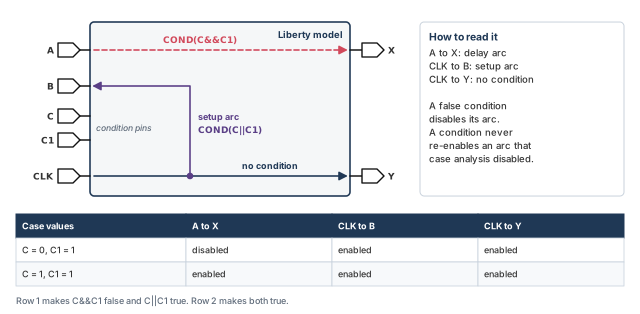
Now set C to 0 and C1 to 1. The expression C AND C1 is false, so the arc from A to X is disabled.
pt_shell> set_case_analysis 0 C   ;# C is 0
pt_shell> set_case_analysis 1 C1  ;# C1 is 1: C&&C1 is false, so A to X is disabled
To enable both the A-to-X arc and the CLK-to-B setup arc, set both pins to 1:
pt_shell> set_case_analysis 1 {C C1} ;# C&&C1 and C||C1 are both true3.3 Switching off a scan chain
A scan chain links flops in a long shift register for manufacturing test. Each scan flop has a test input TI and a test enable TE. When TE is 1, the flop loads from TI instead of D.
In functional analysis, scan paths are not used. You can switch off the whole chain with case analysis. Figure 7 shows a chain from port SCAN_IN to port SCAN_OUT, through four flops.
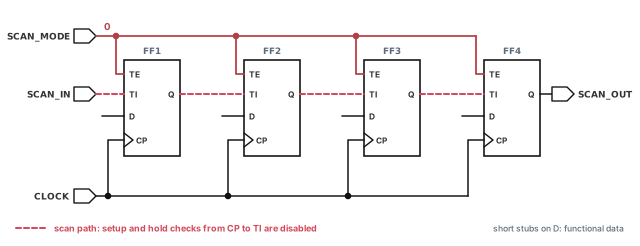
pt_shell> set_case_analysis 0 [get_ports SCAN_MODE] ;# test enable is 0 on every TE pinThe tool propagates the 0 to the TE pin of each scan flop. Then sequential case analysis on FF1, FF2, FF3 and FF4 disables the setup and hold arcs from CP to TI. Setup and hold arcs are the timing checks at a flop input against its clock.
Most teams keep a small file of case values for each mode, such as func_case.tcl and scan_shift_case.tcl. Each run sources exactly one. It is better than typing values by hand, because a review can compare the files line by line.
4 Checking and debugging case analysis
4.1 The basic report
The report_case_analysis command, with no options, lists the case values set on pins and ports.
pt_shell> report_case_analysis ;# list every case value in force****************************************
Report : case_analysis
...
****************************************
Pin name Case analysis value
----------------------------------------------------
test_port 0
U1/U2/core/WR 14.2 The detailed report
Sometimes you need to know why a pin has a value. Add -from or -to with a list of pins or ports. This runs constraint consistency checking, a deeper check of how constraints and values interact. It needs a PrimeTime SI (signal integrity) license.
pt_shell> report_case_analysis -to y/Z ;# trace the source of the value on y/ZProperties Value Pin/Port
---------------------------------------------------
from user case 1 y/Z
Case fanin report:
Verbose Source Trace for pin/port y/Z:
Path number: 1
Path Ref # Value Properties Pin/Port
---------------------------------------------------
1 F()=A B & C & y/Z
2 1 y/A
3 1 y/B
4 1 y/C
Path number: 2
Path Ref # Value Properties Pin/Port
---------------------------------------------------
1 y/A
1 user case P
...Read it from the top:
- The first table says that
y/Zholds 1, derived from user case values. - Path 1 shows the cell function,
A B & C &. This is written operator last; it means A AND B AND C. All three inputs are 1. - The
Path Ref #column points to the path that explains each input. Path 2 explainsy/A. - Path 2 shows that
y/Agot its 1 from a user case value on portP. Paths 3 and 4 tracey/BtoTandy/CtoLin the same way.
You can also view the same trace in the GUI (graphical user interface). Choose Constraints > View Case Debugging Results. A separate window shows the case propagation details.
For the widest set of case analysis features, run the standalone constraint consistency shell. The Constraint Consistency chapter covers it.
4.3 Tracing a disabled arc
When the tool propagates constants, it disables timing arcs at the boundary of the region the constant reaches. To find out why an arc is disabled, use two things:
- The log file. Set the
case_analysis_log_filevariable to a file name. The tool then writes the nets and pins that propagate constants. - The disabled-arc report. Run
report_disable_timingto list the arcs disabled after constant propagation.
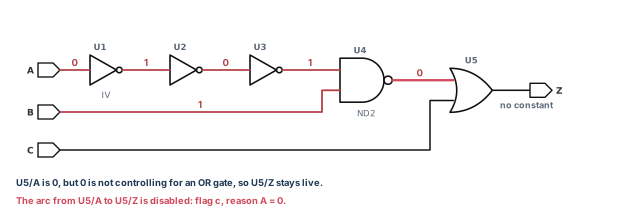
Let us consider Figure 8. Port A is 0 and port B is 1. U1 is an inverter, so U1/Z is 1. The values then alternate through U2 and U3, so U4/A is 1. U4 is a NAND gate with both inputs at 1, so U4/Z is 0. That 0 reaches U5/A. Suppose U5 is an OR gate; 0 is not its controlling value. So no constant reaches U5/Z. The tool disables the arc from U5/A to U5/Z, because U5/A can never switch.
pt_shell> set_case_analysis 0 [get_ports A]   ;# port A is 0
pt_shell> set_case_analysis 1 [get_ports B]   ;# port B is 1
pt_shell> set_app_var case_analysis_log_file my_design_cnst.log   ;# log the propagation
pt_shell> report_disable_timing ;# list the disabled arcsCell or Port From To Flag Reason
-------------------------------------------------
U5 A Z c A = 0Here the flag is c. The reason column shows the constant that caused the arc to be disabled.
When a path you expected is missing from a timing report, run report_disable_timing first. Then search the log file for the pin where the constant stopped. Together they answer "who switched this off?" in minutes.
The log file shows the propagation level by level. Each level has two parts: propagation along nets, then propagation through cells.
Report : case_analysis propagation
...
1.1 Forward propagation on NET pins (level 1)
-----------------------------------------------
  Propagating logic constant '0' from pin 'A' on net 'A':
    > pin 'U1/A' is at logic '0'
  Propagation of logic constant '1' from pin 'B' on net 'B':
    > pin 'U4/B' is at logic '1'

1.2 Forward propagation through CELLS (level 1)
-------------------------------------------------
  Cell 'U1' (libcell 'IV') :
    input pin U1/A is at logic '0'
    > output pin 'U1/Z' is at logic '1'
...
4.2 Forward propagation through CELLS (level 4)
-------------------------------------------------
  Cell 'U4' (libcell 'ND2') :
    input pin U4/A is at logic '1'
    input pin U4/B is at logic '1'
    > output pin 'U4/Z' is at logic '0'

5.1 Forward propagation on NET pins (level 5)
-----------------------------------------------
  Propagating logic constant '0' from pin 'U4/Z' on net 'w4':
    > pin 'U5/A' is at logic '0'

5.2 Forward propagation through CELLS (level 5)
-------------------------------------------------

6. End of Logic Constant Propagation
Notice that level 5.2 is empty. The constant reached U5/A but went no further. That matches the disabled arc in the report.
report_disable_timing says which arcs are off. The constant propagation log says how the constant got there.5 Mode analysis
5.1 Modes, mode groups and the default
Library cells and timing models can define operating modes. A RAM cell, for example, can have a read mode and a write mode. Each mode owns a set of timing arcs. When a mode is active, the tool analyzes its arcs. When a mode is inactive, its arcs are not analyzed. With no mode settings at all, every mode is active and every arc is analyzed.
There are two types of mode:
- Cell modes are defined inside a timing model or library cell, such as read and write for a RAM.
- Design modes are modes you create at the design level, such as normal and test. You map each design mode to cell modes in chosen instances, or to a set of paths.
When a design mode is active, the cell modes mapped to it are activated, and the paths mapped to it are enabled. When it is inactive, because another design mode was selected, its cell modes become inactive. Its paths are set to false paths. A false path is a path the tool does not time.
Modes are organized into mode groups. A group has only two possible states:
- all modes enabled, which is the default; or
- one mode enabled and all other modes in the group disabled.
Often there is only one mode group. However, a library cell can have several. Each instance of the cell gets all the cell's mode groups and modes.
Figure 9 shows a RAM with two groups. Read and write form one group. Latched and transparent form another. The groups are independent. Selecting read makes write inactive, whatever the latched and transparent setting. Selecting latched makes transparent inactive, whatever the read and write setting.
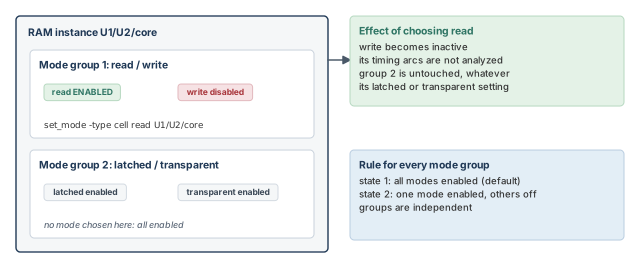
5.2 Three ways to set a cell mode
You can set a cell mode in three ways. They are listed from highest to lowest precedence:
- Directly on cell instances, with
set_mode -type cell. - Indirectly through design modes, with
define_design_mode_group,map_design_modeandset_mode -type design. - Through case analysis, when the library defines modes by conditions on pins.
Thus, a mode set directly on an instance wins over a design mode or a case value.
5.3 Setting a mode directly on an instance
By default, all cell modes are enabled in every cell instance. You can enable one mode and disable the others in its group. When a mode is disabled, all arcs mapped to it are disabled.
pt_shell> set_mode -type cell READ U1/U2/core   ;# enable READ, disable others in its group
pt_shell> reset_mode U1/U2/core                 ;# cancel: all modes active again
5.4 Design modes: create, map, set
Design modes let you change many cells and paths with one command. Figure 10 shows the flow.
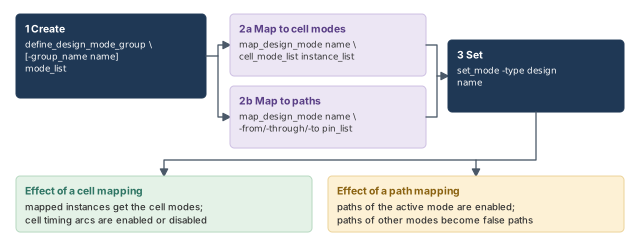
The flow has three steps:
- Create. Use
define_design_mode_groupto create a group of design modes for the current design. Run it more than once to create more groups. - Map. Use
map_design_modeto say what each design mode does. You can map it to cell modes in instances, or to paths. - Set. Use
set_mode -type designto make one design mode active. The other design modes in the same group become inactive.
define_design_mode_group [-group_name name] mode_list
map_design_mode design_mode_name cell_mode_list instance_list
map_design_mode design_mode_name [-from pin_list] [-through pin_list] [-to pin_list]
set_mode -type design design_mode_name5.5 Mapping a design mode to cell modes
Mapping means saying what a design mode does. With the first form, activating the design mode applies a cell mode to named instances.
pt_shell> map_design_mode execute read_ram U1/U2/core ;# execute selects read_ramAfter this mapping, setting the execute design mode makes it active. The read_ram cell mode is applied to U1/U2/core. The other design modes in the same group as execute become inactive. Those design modes return to their default state.
Note that only the named instance is affected. Another instance of the same RAM model, such as U1/U3/core, keeps all its modes.
5.6 Mapping a design mode to paths
With the second form, a design mode is mapped to a set of paths. Activating that design mode enables those paths. Paths mapped to the other design modes in the same group are set to false paths, so they leave the analysis.
Figure 11 shows a read path and a write path that meet at multiplexer U1.
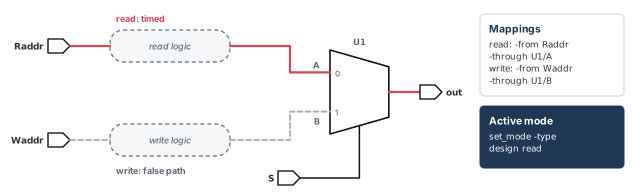
pt_shell> map_design_mode read  -from Raddr -through U1/A   ;# read owns the read logic
pt_shell> map_design_mode write -from Waddr -through U1/B   ;# write owns the write logic
5.7 Unmapping a design mode
To cancel or change a mapping, use remove_design_mode. Removing a mapping reverses its effects. Cell modes it set are undone, and false paths it created are removed.
5.8 Selecting modes with case analysis
Some library cells define conditional modes. A mode is selected by the logic values at the cell inputs. For example, a logic 0 on a RAM's read_write pin could select read mode.
When you set the controlling value on that pin with case analysis, the cell enters the matching mode. The same happens when a case value propagates to the pin.
Figure 12 shows a RAM whose read_write pin selects the mode. Its Liberty model links each mode to a condition:
cell(RAM) {
  mode_definition(read_write) {
    mode_value(read) {
      when : "!read_write";
      sdf_cond : "read_write == 0";
    }
    mode_value(write) {
      when : "read_write";
      sdf_cond : "read_write == 1";
    }
  }
...
}
The when line gives the condition in Liberty form. The sdf_cond line states the same condition for SDF. SDF (Standard Delay Format) is the file format for annotated delays.
# Use one of these two lines in a run, not both.
pt_shell> set_case_analysis 0 [get_ports read_write]   ;# select read mode
pt_shell> set_case_analysis 1 [get_ports read_write]   ;# select write mode
Setting or propagating a value to read_write selects one mode and disables the other. Only the active mode's arcs are timed. If no mode in a group is selected, by case analysis or any other method, all modes in the group are enabled. The default mode is also enabled when no mode is selected.
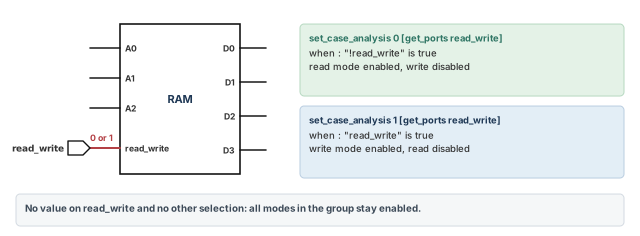
A beginner selects read mode with a case value, then wonders why report_mode shows write as enabled. The cause is a direct set_mode -type cell left on that instance. Direct cell settings have the highest precedence, so they beat case analysis.
5.9 Reporting modes
The report_mode command reports the cell and design modes that are defined or set.
pt_shell> report_mode ;# show every mode, its status and what set itCell Mode(Group) Status Condition Reason
--------------------------------------------------------------------
Core (LIB_CORE) read(rw) disabled (A==1) cond
oen-on(rw) ENABLED (A==0) cond
write(rw) disabled (B==1) cond
Core2 (LIB_CORE) read(rw) disabled (A==1) cell
oen-on(rw) ENABLED (A==0) cell
write(rw) disabled (B==1) cell
Core3 (LIB_CORE) read(rw) disabled (A==1) design - dm1
oen-on(rw) ENABLED (A==0) design - dm1
write(rw) disabled (B==1) design - dm1
Core4 (LIB_CORE) read(rw) disabled (A==1) default
...How to read the columns:
- Cell gives the instance and, in brackets, its library cell.
- Mode(Group) gives the mode and, in brackets, its mode group.
- Status is
ENABLEDordisabled. - Condition is the condition defined for the mode in the library.
- Reason says what selected the mode. Here,
condis a pin condition,cellis a direct cell setting, anddesign - dm1is design modedm1. The valuedefaultmeans the default state applies.
Save report_mode and report_case_analysis with every signoff run. When two runs disagree, comparing these two small files often finds the cause at once.
6 Mode merging for scenario reduction
6.1 Why merge modes
A corner is one set of conditions, such as process, voltage and temperature. A scenario is one mode analyzed at one corner. So the number of scenarios is the number of modes multiplied by the number of corners. For example, 7 modes at 3 corners give 21 scenarios. Each scenario is a separate timing run. Figure 13 shows how mode merging cuts that number.
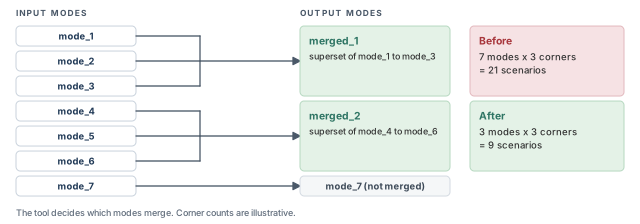
Mode merging reduces the number of modes. The constraint consistency mode merging feature does three things:
- It decides which input modes can be merged.
- It merges the timing constraints of those input modes.
- It writes a superset output mode, which contains the constraints of all its input modes.
In the figure, there are seven input modes. Modes 1, 2 and 3 become merged_1. Modes 4, 5 and 6 become merged_2. Mode 7 cannot be merged, so it stays on its own. Thus, 7 modes become 3. At 3 corners, 21 scenarios become 9.
6.2 Running mode merging
The flow has five steps:
- Start the tool in multi-scenario mode.
- Optionally, set the cores, processes or hosts for distributed mode merging.
- Create a scenario for each mode and corner.
- Run mode merging.
- Check the merged constraints and the analysis report in the
merged_constraintsdirectory.
% pt_shell -multi_scenarioset_host_options -max_cores numCores \
-num_processes numProcesses \
-submit_command submitCommand [host_name]pt_shell> create_scenario -mode func -corner ss_cold ;# func at corner ss_cold
pt_shell> create_scenario -mode scan -corner ss_cold ;# scan at corner ss_cold
pt_shell> create_merged_modes ;# merge the modesThe mode and corner names above are illustrative. In a real flow, you create one scenario for every valid mode and corner pair.
Mode merging takes corners into account. A merged mode is valid for a corner only if its input modes are valid for that corner. The valid corners are given by the snps_corner_name host variable of DMSA. DMSA is distributed multi-scenario analysis, where one master process runs many scenarios on several machines.
A merged mode is a new set of constraints. Some teams use it without reading the report. Always check the merged constraints and the analysis report first. A wrong merged constraint affects every scenario that uses it.
6.3 Debugging merge conflicts
Two modes may not merge cleanly. For example, they may define a clock differently. To debug such conflicts visually, add -interactive:
pt_shell> create_merged_modes -interactive ;# test-only analysis; constraints are not mergedThis runs a test-only analysis. It does not actually merge the constraints. When the analysis completes successfully, the tool opens the MergeModeConflict Browser in the GUI. The browser shows details, schematics, debugging help and fixing suggestions for six conflict types:
- Clock-clock
- Clock-data
- Exception
- Group path
- Reconvergence
- Value
-interactive to study conflicts before merging.7 Worked example: set up functional read mode for block top
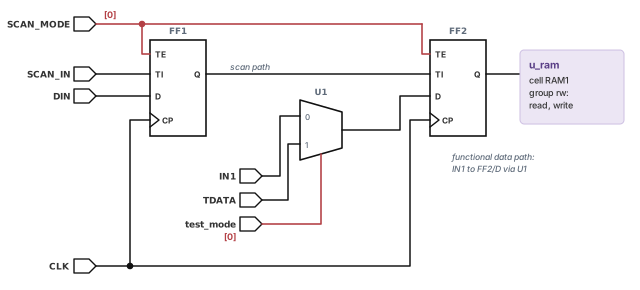
Let us work on a small block named top. Figure 14, placed after Step 2, shows its logic. It has two scan flops, FF1 and FF2, on clock CLK. A multiplexer U1 chooses the data for FF2/D. When test_mode is 0, U1 passes IN1; when it is 1, it passes TDATA. The RAM instance u_ram uses library cell RAM1. RAM1 has one mode group with modes read and write.
The goal is to time the block in functional read mode. We switch off scan, switch off the test multiplexer input, and select read in the RAM. Then we prove what was switched off.
Step 1 — Look at the starting point
pt_shell> report_case_analysis   ;# expect an empty list
pt_shell> report_mode            ;# expect no mode selected yet
Check: no case values exist yet, and every mode of u_ram is enabled. If a value already exists, find which script set it before going on.
Step 2 — Turn on the constant propagation log
pt_shell> set_app_var case_analysis_log_file top_cnst.log ;# write the propagation logCheck: the variable holds the file name. The log is written as constants propagate.
Step 3 — Switch off scan and the test input
pt_shell> set_case_analysis 0 [get_ports SCAN_MODE]   ;# TE is 0 on FF1 and FF2
pt_shell> set_case_analysis 0 [get_ports test_mode]   ;# U1 passes IN1, not TDATA
Check: report_case_analysis now lists both ports with value 0.
Pin name                         Case analysis value
----------------------------------------------------
SCAN_MODE                        0
test_mode                        0
Step 4 — Select read mode in the RAM with a design mode
pt_shell> define_design_mode_group -group_name ram_dm {rd wr}   ;# two design modes
pt_shell> map_design_mode rd read u_ram    ;# rd selects cell mode read in u_ram
pt_shell> map_design_mode wr write u_ram   ;# wr selects cell mode write in u_ram
pt_shell> set_mode -type design rd         ;# rd is active, wr is inactive
Check: report_mode shows read enabled and write disabled, with the reason design - rd.
Cell               Mode(Group)   Status     Condition   Reason
--------------------------------------------------------------------
u_ram (RAM1)       read(rw)      ENABLED    (RW==0)     design - rd
                   write(rw)     disabled   (RW==1)     design - rd
Step 5 — Prove what was switched off
pt_shell> report_disable_timing ;# arcs disabled by the case valuesCell or Port From To Flag Reason
-------------------------------------------------
U1 S Z c S = 0
...Check: the arc from the select pin S of U1 is disabled, because S is constant. As in the earlier multiplexer, the arc from the TDATA input to the output is also switched off. Search top_cnst.log for FF1/TE and FF2/TE. Both should be at logic 0. If a TE pin is missing, the scan enable net has a break or a tie that you did not expect.
Step 6 — Switch to write mode and compare
pt_shell> set_mode -type design wr   ;# wr is active, rd is inactive
pt_shell> report_mode                ;# write ENABLED, read disabled
Check: the RAM now shows write enabled. The case values from Step 3 are unchanged, because modes and case values are separate settings.
When you finish, remove the case values so that a later analysis starts clean:
pt_shell> remove_case_analysis [get_ports {SCAN_MODE test_mode}] ;# back to no case values8 Common mistakes and how to catch them
| Symptom | Likely cause | Fix |
|---|---|---|
| Many violations through test logic | No functional case values | Set SCAN_MODE and test controls to 0 |
| An expected path is missing | A constant disabled an arc | report_disable_timing, then read the log |
| A constant stops at a flop | Flops block constants by default | set_case_sequential_propagation |
| A tie-high pin is ignored | A disable_case_analysis* variable is on |
Turn the variable off and rerun |
| Your case value loses | A newer value, or a direct value over a propagated one | Apply the four rules; report_case_analysis -to |
| A conditional arc stays off | Case analysis disabled it first | Remove the constant that disabled it |
| A mode pin value is ignored | A cell or design mode has higher precedence | Read the Reason column of report_mode |
| Paths turn into false paths | Another design mode in the group is active | Check the active mode; remove_design_mode |
| A merged mode is used at a bad corner | An input mode is not valid there | Check snps_corner_name and the merge report |
9 Interview preparation
It is timing analysis with logic constants or single transitions set on ports or pins, to limit which signals propagate.
- Constants propagate forward and disable the arcs they block.
- Rising or falling values keep only one transition at the pin.
- Nothing propagates backward.
The output follows input A, so the arc from input B to the output is disabled.
- Paths through B are no longer timed.
- Paths through A are timed as usual.
No. 1 is not the controlling value of an AND gate, so the output still follows input B.
- A constant 0 on A would make the output 0.
- Both inputs at 1 would make the output 1.
static case value mean?Constant 0 or 1 with no transitions, so the net cannot be a crosstalk aggressor or a victim with changed delay.
- Use it when the exact value does not matter but the net never switches.
Static wins. Among propagated values, 0 has the highest priority, then static, then 1.
- A value set directly on the pin would beat both.
- A
set_case_analysisvalue also beats a constant built into the netlist.
Not by default. The tool does not propagate case values through sequential cells.
- Set
case_analysis_sequential_propagationtoalwaysfor all cells. - Or keep it at
neverand name cells withset_case_sequential_propagation. - Verify with
report_case_analysis -sequential_propagationoris_case_sequential_propagation.
Set the scan mode port to 0 with set_case_analysis, so every TE pin is 0.
- Sequential case analysis on the scan flops then disables the setup and hold arcs from CP to TI.
Run report_disable_timing to find the disabled arc, then read the constant propagation log.
- Set
case_analysis_log_filebefore the constants propagate. - The log shows each net and cell level by level.
report_case_analysis -totraces where a pin's value came from.
A cell mode is defined in a library cell or model; a design mode is created by you at the design level.
- A design mode is mapped to cell modes in instances, or to paths.
- Setting a design mode makes the other design modes in its group inactive.
A direct set_mode -type cell wins, then a design mode, then case analysis.
report_modeshows the winner in the Reason column: cell, design or cond.reset_modecancels a direct selection on an instance.
They are set to false paths, so they leave the timing analysis.
- Paths mapped to the active design mode are enabled.
remove_design_modereverses the cell mode settings and false paths of a mapping.
A condition can never enable an arc that case analysis has already disabled.
- Conditions only switch arcs off when they are false.
- Find and remove the constant that disabled the arc.
It merges compatible modes into superset modes to reduce scenarios; you check the report in the merged_constraints directory.
- Run
create_merged_modesafter creating scenarios in multi-scenario mode. -interactiveruns a test-only analysis and opens the conflict browser.- A merged mode is valid only at corners where its input modes are valid.
10 Chapter close
Compact glossary
| Term | Meaning |
|---|---|
| Case analysis | Timing with constants or single transitions set on ports or pins |
| Case value | The value given to set_case_analysis: 0, 1, static, rising or falling |
| Controlling value | An input value that fixes a gate's output alone, such as 0 for AND |
| Disabled arc | A timing arc the tool does not time |
| Static | Constant 0 or 1 with no transitions; no crosstalk switching |
| Tie cell | A netlist cell that drives a fixed high or low |
| Sequential propagation | Passing constants through flops or latches; off by default |
| Conditional arc | A library arc that is enabled only when its condition is true |
| Scan chain | Flops linked through TI pins for test; switched off with TE at 0 |
| Constant propagation log | File named by case_analysis_log_file that traces each constant |
| Cell mode | A mode defined in a library cell or model, such as read |
| Design mode | A mode you create at the design level, such as normal or test |
| Mode group | A set of modes where all are enabled, or exactly one |
| Conditional mode | A cell mode selected by logic values on cell pins |
| Corner | One set of operating conditions, such as process, voltage and temperature |
| Scenario | One mode analyzed at one corner |
| Mode merging | Folding compatible modes into fewer superset modes, each holding its input modes' constraints |
Case and mode analysis on one page
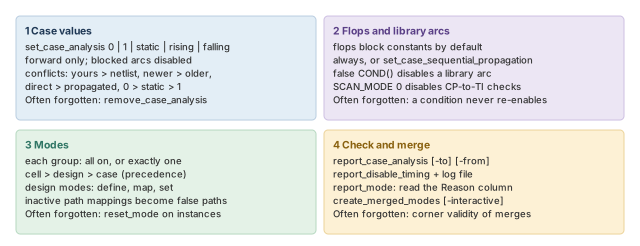
Figure 15 is the summary to redraw from memory.
Where the next chapter goes, and why
You can now tell the tool which job the chip is doing. Each mode, with its case values, gives one clean set of paths. However, each path is still timed with one fixed delay per arc at a corner.
Real silicon is not that uniform. Transistors on the same die differ slightly, and so do their delays. The Variation chapter shows how the tool models these differences. Thus, the paths you selected here get timed with margins that match the real chip.