Chapter overview
In Getting Started with Tempus we launched the tool and reached the tempus> prompt. The session is still empty. Before any timing number means anything, the tool must hold four inputs – libraries, netlist, constraints and parasitics – linked into one database.
This step is called design import. It looks simple, just a handful of read commands. However, the order of those commands matters. A wrong order can fail loudly or, worse, load a design that is only partly correct.
Let us consider a common case. A designer reads the DEF file before the netlist. The DEF refers to instances that do not exist yet, so the read fails or matches nothing. That one is easy to spot. A missing library cell or a skipped check is much harder to spot. The import finishes, the reports print, and the numbers are quietly wrong.
This chapter shows how to avoid both kinds of problem. We first list what the tool needs. Then we read libraries, load the design in a safe order, check it, and save it for later runs.
Learning objectives
- List the required and optional inputs for a timing run, and the command that reads each one.
- Explain what it means that the database is MMMC-configured by default.
- Read libraries with
read_lib, and choose between its-min,-max,-cdb,-lefand-pgvoptions. - Load a non-MMMC design, with and without physical data, in the correct order.
- Load an MMMC design for a logical, a LEF/DEF and an OA database.
- Explain what
set_top_moduledoes and why the netlist must link cleanly. - Recognize the
default_emulate_*names in a non-MMMC report. - Run
check_design,check_libraryandcheck_timingat the right moments. - Save a session with
save_designand restore it withread_design.
Chapter roadmap
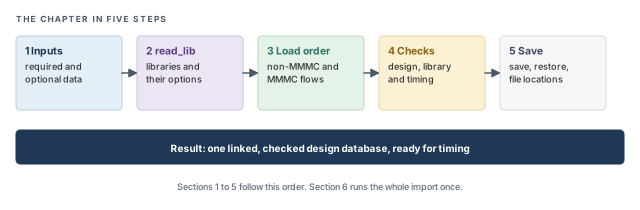
The chapter moves from what the tool needs, to how to load it, to how to keep it. Figure 1 shows the order. Come back to it whenever you lose your place.
Key commands
Table 1 lists the commands in this chapter, grouped by section. Each one is explained where it is first needed.
| Section | Command | What it does |
|---|---|---|
| 1 Inputs | set_design_mode -process |
Sets process-node defaults; runs first |
| 1 Inputs | read_verilog, read_sdc |
Read the netlist and the constraints |
| 1 Inputs | read_spef, read_parasitics |
Read parasitics (SPEF, or SPEF plus an RC database) |
| 1 Inputs | read_sdf |
Read annotated delays that override delay calculation |
| 1 Inputs | read_def, read_design -physical_data |
Add physical data |
| 2 Libraries | read_lib |
Read timing, noise and physical libraries |
| 3 Load order | set_top_module |
Link the netlist and check consistency |
| 3 Load order | read_view_definition |
Load the MMMC view setup from a Tcl file |
| 3 Load order | read_lib -oaRef |
Bring in physical references for an OA database |
| 4 Checks | check_design, check_library, check_timing |
Sanity-check the imported data |
| 5 Save | save_design, read_design |
Save a session and restore it later |
| 5 Save | auto_file_dir, auto_file_prefix |
Redirect and name auto-generated files |
1 What the tool needs to import
1.1 The concept
The tool times a design database. This is one linked structure that holds every cell, net, library model, constraint and wire parasitic. Every report in this series is read from it.
A useful picture is a workshop. The netlist is the wiring diagram. The libraries are the catalog that says how fast each part is. The constraints are the job sheet that says how fast the whole machine must run. The parasitics describe the real wires between the parts. Only when all four sit on one bench can anyone answer "is it fast enough?"
The database can be one of two kinds:
- Logical – built from the netlist, libraries, constraints and parasitics alone. This is typically enough for timing reports that need no layout information.
- Physical – the same, plus physical data. This can come from LEF and DEF files, from an Innovus database, or from an OpenAccess (OA) database.
Why would a timing run need physical data at all? Some analyses use the size or layout of the chip. For example, AOCV can look up derates by chip or core size, taken from physical data. Analysis Modes, CPPR and AOCV shows this case.
1.2 MMMC-configured by default
By default, the database is MMMC-configured. MMMC stands for multi-mode multi-corner. A corner is a set of process, voltage and temperature conditions, such as "slow silicon, 0.9 V, 125 °C". A mode is a set of constraints, such as "functional" or "test". One corner plus one mode is called an analysis view. Strictly, the corner of a view is a delay corner, which also includes an RC corner for the wires. Multi-Mode Multi-Corner Analysis builds on this.
An MMMC-configured database is ready to hold several views, even when you load only one. Thus, the tool always thinks in views. When you load a single corner without naming any views, the tool still builds one view for you. We look at that view in Section 3.
1.3 Required and optional inputs
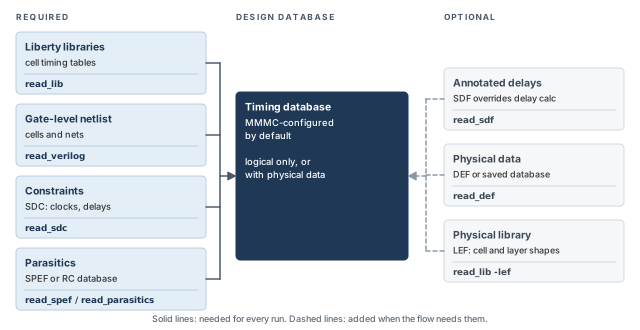
Table 2 lists the four inputs that every run needs, and the inputs that some flows add.
| Input | Required? | Command | Notes |
|---|---|---|---|
| Liberty timing libraries | Yes | read_lib |
Cell delays, slews and timing checks |
| Gate-level netlist | Yes | read_verilog |
Cells and the nets between them |
| Constraints (SDC) | Yes | read_sdc |
Clocks, port delays, exceptions |
| Parasitics | Yes | read_spef or read_parasitics |
read_parasitics reads SPEF plus an RC database, including a pre-built one |
| Annotated delays (SDF) | No | read_sdf |
Annotated delays override the tool's delay calculation |
| Physical data | No | read_def, or read_design -physical_data |
Placement and routing information |
| Physical libraries (LEF) | No | read_lib -lef |
Cell and layer shapes for physical flows |
Let us look at what each required input brings, and what goes wrong without it:
- Libraries give each cell its delay, output slew and timing checks such as setup and hold. Without the right library, a cell has no timing model at all.
- The netlist says which cells exist and how they connect. A stale netlist gives correct numbers for the wrong design.
- Constraints define clocks, input and output delays and exceptions. Without a clock, no register-to-register path is checked.
- Parasitics give the resistance and capacitance of every net. Without them, wire delay and the load seen by each driver are wrong.
For parasitics there are two commands. read_spef reads a SPEF (standard parasitic exchange format) file. read_parasitics reads SPEF plus an RC database, and it can also read a pre-built RC database. Both lead to the same result: every net gets its wire resistance and capacitance.
Figure 2 shows the same inputs as a picture. On the left are the required inputs; on the right, the optional ones.
1.4 Why SDF needs special care
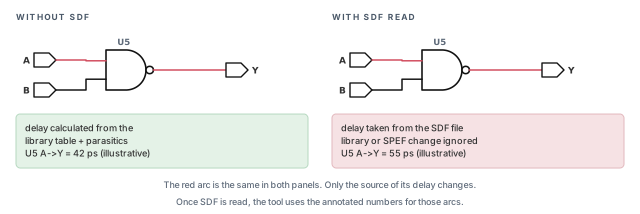
SDF (standard delay format) is a file of delay numbers computed somewhere else. When the tool reads it with read_sdf, the annotated delays override its own delay calculation for those arcs. Figure 3 shows the difference on one gate.
In the left panel, the tool computes the A-to-Y delay from the library table and the parasitics. In the right panel, the same arc simply takes the number from the SDF file. Thus, any later change to the library or the parasitics has no effect on that arc.
A beginner reads an old SDF file "just in case". From that moment, those arcs use the SDF numbers, not the tool's own delay calculation. The engineer then updates the SPEF and wonders why nothing moves. Read SDF only when the flow truly calls for annotated delays. Base Delay Calculation shows the effect in more detail.
1.5 Setting the process node first
Many import scripts begin with one more line, before any library is read:
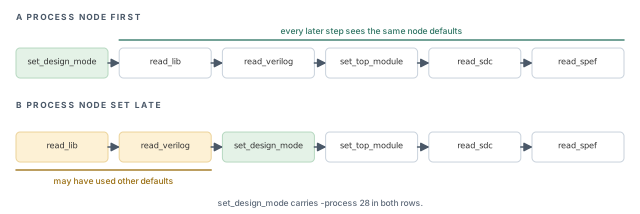
tempus> set_design_mode -process 28 ;# node defaults for a 28 nm designThe -process value names the technology node, here 28 nm. The tool then picks default settings that suit that node. It belongs at the very top, so every later step sees the same defaults. If it comes later, part of the setup may already have used other defaults. Base Delay Calculation returns to this setting.
Figure 4 compares the two placements in a short script. In row A, the node is set first, so every read runs with the same defaults. In row B, the libraries and netlist were already read before the node was set.
2 Reading libraries with read_lib
2.1 The concept
read_lib is the command for every kind of library: timing, noise and physical. Its plain form reads Liberty (.lib) files. Options tell the tool how to use other files.
Why one command for so many kinds? Because all of them describe cells. A Liberty file says how fast a cell is. A noise file says how the cell reacts to coupling noise. A LEF file says what the cell looks like physically. The tool attaches all three to the same cell name.
2.2 Command breakdown
The general form is:
read_lib lib_files
    [-min lib_files]
    [-max lib_files]
    [-cdb noise_lib_list]
    [-lef lef_files]
    [-pgv pgv_list]
Let us go through each part. Figure 5, after the list, maps each kind of file to the way it is read.
lib_files– the Liberty timing libraries. Without-minor-max, these are used for every check, early and late. This is the usual case for a single-corner run.-minand-max– separate library groups for early (min) and late (max) analysis. In best-case/worst-case analysis, setup uses the max group and hold uses the min group. If you omit them, the same libraries serve both. Mixing them up swaps fast and slow data, so hold and setup are both checked against the wrong numbers. Analysis Modes, CPPR and AOCV shows when the tool picks each group.-cdb– noise libraries in cdB format, used for signal-integrity analysis. Noise data can also come inside the Liberty files, as CCS-N or ECSM-SI. Without any noise data, crosstalk and glitch analysis have nothing to work with. Signal Integrity Delay Analysis builds on this.-lef– physical LEF files. They describe cell and layer shapes for physical flows. They must be read before the netlist. A pure logical run does not need them.-pgv– a list of PGV library files. Basic timing import does not need it. Confirm its exact use withhelp read_libbefore you add it to a script.
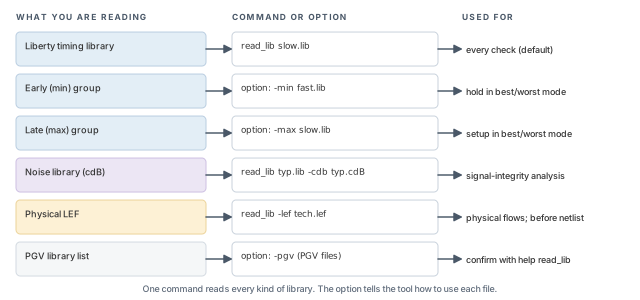
The following lines show the three most common forms.
tempus> read_lib -lef tech.lef cells.lef    ;# physical libraries, before the netlist
tempus> read_lib slow.lib                   ;# Liberty timing library
tempus> read_lib typ.lib -cdb typ.cdB       ;# timing library plus noise data
The third line attaches the noise data in typ.cdB to the cells of typ.lib. Both files should describe the same cells. Otherwise, the noise data has nothing to attach to.
It is better to keep one read_lib line per purpose: LEF, timing, noise. The reason is debugging. When a cell is missing, you can see at once which kind of library failed to provide it.
A beginner lists a fast and a slow library in one plain read_lib. The hope is that the tool will use each where it fits. Without -min and -max, the tool has no way to know which file is early and which is late. Name the groups explicitly.
3 Loading the design in the right order
3.1 Why order matters
Each read command adds to what is already in the database. Later steps refer to objects created by earlier ones. Thus, a step that runs too early points at things that do not exist yet.
Let us think about the dependencies in plain words:
- The netlist names cells, so the cell definitions should already be there when it is linked.
- The link step ties each instance to its library cell. It needs both the netlist and the libraries.
- Constraints name clocks, ports and pins. These typically exist only after the design is linked.
- Parasitics describe nets of the linked design.
- DEF describes the placement of instances, using cells and layers from LEF. It needs the LEF, the netlist and the libraries.
3.2 Non-MMMC import with physical data
Let us start with the simplest complete flow: one corner, plus LEF and DEF. Figure 6 shows the seven steps in order.
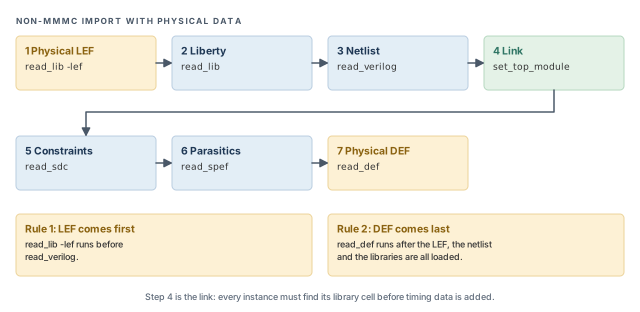
The same flow as a script:
tempus> read_lib -lef tech.lef cells.lef   ;# 1 physical libraries first
tempus> read_lib slow.lib                  ;# 2 timing library
tempus> read_verilog top.v                 ;# 3 gate-level netlist
tempus> set_top_module top                 ;# 4 link and consistency check
tempus> read_sdc top.sdc                   ;# 5 constraints
tempus> read_spef top.spef.gz              ;# 6 parasitics
tempus> read_def top.def                   ;# 7 physical data, last
For a logical-only run, drop steps 1 and 7. The other five steps stay in the same order. Note that the SPEF file can be read compressed, as top.spef.gz shows.
3.3 Linking with set_top_module
A netlist only names cells, such as NAND2X1. It does not say how fast they are. Linking is the step that ties each instance to its library model.
set_top_module does this job. It names the top module, links every instance to a library cell, and checks that the netlist and libraries agree. For example, an instance of a cell that no loaded library defines cannot link. Figure 7 shows a small example.
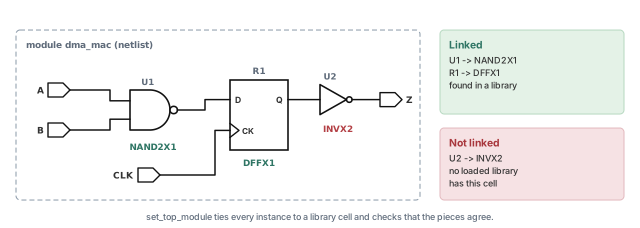
set_top_module. Every later read assumes it succeeded.In Figure 7, U1 links to NAND2X1 and R1 links to DFFX1. However, U2 refers to INVX2, which no loaded library contains. The path from R1 through U2 to port Z then has no timing model for U2. The usual fix is to add the missing library to the read_lib list and import again.
A beginner ignores warnings at set_top_module and moves on. An unlinked cell has no timing model, so paths through it cannot be timed correctly. Fix every link problem before reading constraints.
3.4 MMMC import
In an MMMC flow, you describe the analysis views in a Tcl file. read_view_definition loads that file. The file names:
- the library sets – which Liberty files belong to each corner,
- the RC corners – which parasitic conditions apply,
- the delay corners – a library set paired with an RC corner,
- the constraint modes – which SDC files make up each mode,
- the analysis views – a delay corner paired with a constraint mode.
Multi-Mode Multi-Corner Analysis teaches how to write this file. Here we only need the load order, which changes slightly. Table 3 shows the three database kinds.
| Database | Load order |
|---|---|
| Logical | read_view_definition, read_verilog, set_top_module |
| LEF/DEF | read_lib -lef first, then the logical order, then read_def last |
| OpenAccess | Physical references come in with read_lib -oaRef; confirm its arguments with help read_lib |
Figure 8 shows the same three cases as lanes. The logical core is identical in each lane. Only the physical steps, shown in amber, are added around it.
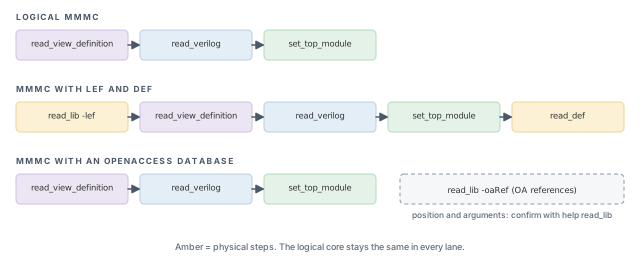
-oaRef, because its position and arguments should be confirmed with help read_lib.tempus> read_lib -lef tech.lef cells.lef ;# physical libraries first
tempus> read_view_definition viewDefinition.tcl ;# libs, corners, modes, views
tempus> read_verilog top.v ;# netlist
tempus> set_top_module top ;# link and check
tempus> read_def top.def ;# physical data, lastNotice what is missing. There is no plain read_lib for timing and no read_sdc. In MMMC, the timing libraries and constraints are named inside the view file, per library set and per constraint mode. Parasitics are read after the views exist, one file per RC corner. Both are covered in Multi-Mode Multi-Corner Analysis.
3.5 What non-MMMC looks like inside the tool
In a non-MMMC flow, read_lib takes the place of read_view_definition. However, the database is still MMMC-configured. Thus, the tool wraps your single corner in MMMC objects with fixed names. Figure 9 compares the two flows.
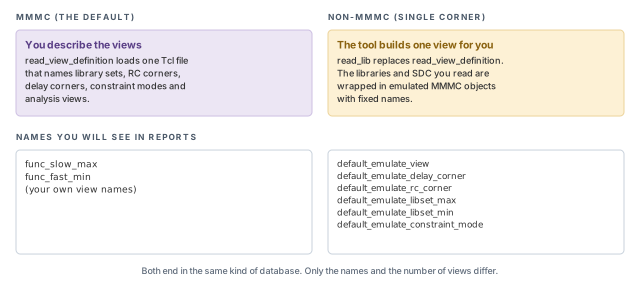
default_emulate_* names on the right appear in reports of every non-MMMC run.The six names, and the MMMC object each one stands for, are:
default_emulate_view– the single analysis view.default_emulate_delay_corner– its delay corner.default_emulate_rc_corner– its RC corner.default_emulate_libset_max– the late (max) library set.default_emulate_libset_min– the early (min) library set.default_emulate_constraint_mode– the constraint mode built from your SDC.
These names are not an error. When you see default_emulate_view in a report, it simply tells you the run was loaded without a view definition file.
3.6 The order rules in one place
The two rules from Figure 6 carry most of the risk:
read_lib -lefcomes before the netlist. Physical libraries must exist beforeread_verilog.read_defcomes after the LEF, the netlist and the libraries. DEF refers to all three.
Why does DEF care about the netlist? A DEF file places components by instance name, such as U1 and R1. Each name must match an instance that the linked netlist already holds. Figure 10 shows this match.
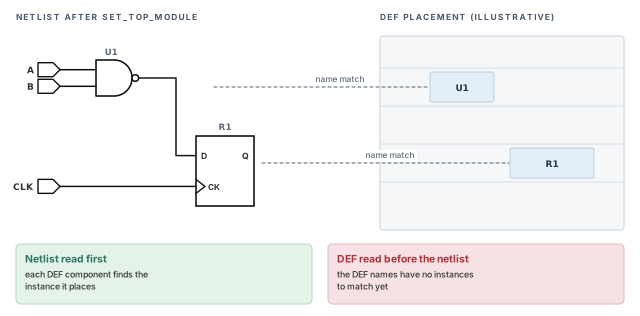
U1 and R1 have nothing to match, so the placement cannot attach to the design.The link step sits between them. set_top_module must run after the netlist and libraries, and before constraints and parasitics.
4 Checking the import
4.1 Why it matters
A design can load without errors and still be wrong. A library can miss a cell. A constraint can point at a renamed pin. A clock can reach no flop. None of these stops the import, yet each one changes the results.
Let us consider one case. The netlist team renames a port from clk_in to clk_core. The old SDC still creates a clock on clk_in. The import completes, but no clock reaches the flops. Every register path is now unconstrained, and the setup report looks perfect. Only a check reveals the gap.
4.2 Command breakdown
The tool provides three checks. Each one looks at a different part of the database:
check_design– checks the design data itself, such as the netlist after linking. Typical findings are unlinked or inconsistent objects.check_library– checks the loaded libraries. Typical findings are missing or incomplete library data for cells in use.check_timing– checks the timing setup, such as constraints that do not reach their targets. Typical findings are unclocked flops or unconstrained endpoints.
Figure 11 lays the three checks side by side. Each column shows what the check looks at and one typical finding.
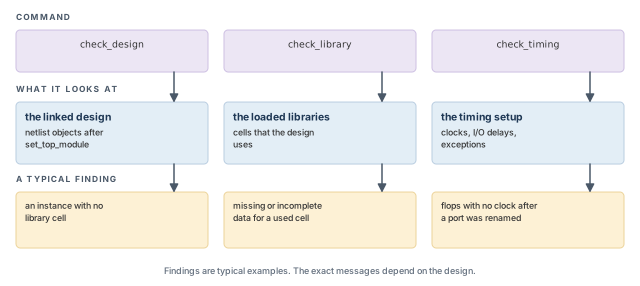
check_design looks at the linked design, check_library at the libraries, and check_timing at the timing setup.What to notice: The renamed-port case above shows up only in the third column, through check_timing.tempus> check_design ;# design data after linking
tempus> check_library ;# loaded libraries
tempus> check_timing ;# constraints and timing setupThe exact messages each check prints depend on the design. Read every message, and either fix it or write down why it is safe.
4.3 When to run them
Run all three after import, and again after each major data change. A major change means a new SPEF, a new SDC, a new netlist or new libraries. Figure 12 shows this loop.
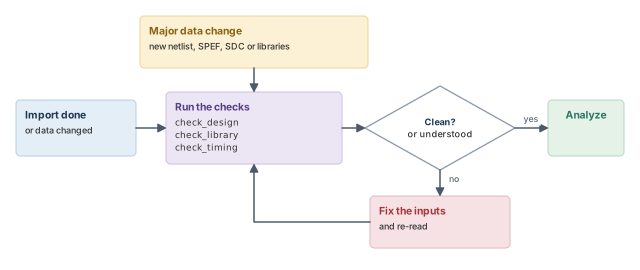
Save the three check reports with the run. When a later run behaves differently, comparing old and new check reports often points straight to the cause.
5 Saving, restoring and file housekeeping
5.1 Saving and restoring a session
A large import can take a long time. Thus, it is wasteful to repeat it for every report. save_design writes the whole session to disk. read_design brings it back in a new session.
The forms are:
save_design session_name
read_design session_name top_cell [-physical_data]session_name– the saved session on disk. Pick a name that says what it holds, such as the block and the data drop.top_cell– the top design to restore. It is required, so a restore always names both the session and the top cell.-physical_data– also restores the physical data. Leave it out when the run only needs logical timing.
For an OA database, add -cellview: save_design -cellview to save, and read_design -physical_data -cellview to restore.
Figure 13 shows the flow across two sessions.
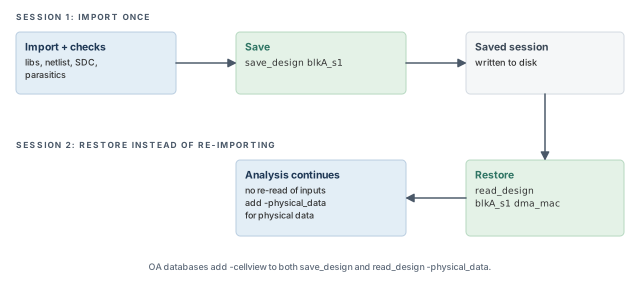
read_design needs both the session name and the top cell.tempus> save_design blkA_s1 ;# session 1: save after checks
tempus> read_design blkA_s1 dma_mac -physical_data ;# session 2: restore with physical dataA saved session is a snapshot. If the netlist, SDC, SPEF or libraries change, the snapshot is out of date. In that case, import again from the new files and save a new session.
It is better to save only after the three checks are clean. A saved session that holds a bad import repeats the same problem in every run that restores it.
5.2 Redirecting auto-generated files
The tool writes some files on its own during import and analysis. Two settings control them:
auto_file_dir– the folder for auto-generated files.auto_file_prefix– a prefix added to their names.
These matter most when several runs share one directory. Without them, parallel runs can overwrite each other's files. With a separate folder or prefix per run, each run keeps its own files.
Figure 14 shows both cases. In the upper half, two runs write a file with the same name into one folder. The second run overwrites the first. In the lower half, each run has its own auto_file_dir, and both sets of files survive.
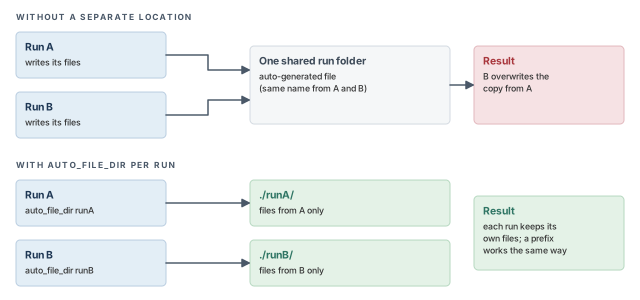
auto_file_prefix per run solves the same problem by giving the files different names.5.3 Where temporary files go
Import also writes temporary files. The TMPDIR rules from Getting Started with Tempus apply here:
- Set
TMPDIRbefore launch, to a large local scratch disk. The default is/tmp. - If the folder is not writable, the tool silently falls back to
/tmp. If the disk has no space, the tool does not launch. - Each session uses its own subfolder and deletes it at the end, even after a crash.
- The same rules apply to distributed runs.
6 Worked example: importing a block with physical data
Let us import a block named dma_mac, check it, and save it. The assumptions are stated as comments where they are used.
The task. You must time dma_mac at one slow corner, with placement data. Later runs should restart from a saved session.
Step 1 – set defaults and read libraries
# Assuming a 28 nm design and one slow corner (non-MMMC)
tempus> set_design_mode -process 28        ;# node defaults, first line
tempus> set_global auto_file_dir ./dma_auto ;# keep auto files per run
tempus> read_lib -lef tech.lef cells.lef   ;# physical libraries before the netlist
tempus> read_lib slow.lib                  ;# timing library
The process node goes first, so every later step uses the same defaults. The auto-file folder comes next, before the tool writes anything. LEF is read before the netlist, as rule 1 demands.
Step 2 – read and link the netlist
tempus> read_verilog dma_mac.v             ;# netlist
tempus> set_top_module dma_mac             ;# link; read every warning
This is the moment to stop and read the log. Every instance should link to a library cell. If any cell is missing, add its library and start again from Step 1.
Step 3 – constraints, parasitics and placement
tempus> read_sdc constraints.sdc           ;# clocks and port delays
tempus> read_spef dma_mac.spef.gz          ;# parasitics
tempus> read_def dma_mac.def               ;# physical data, last
The constraints and parasitics now attach to the linked design. DEF comes last, as rule 2 demands.
Step 4 – check, then save
tempus> check_design                       ;# design data
tempus> check_library                      ;# libraries
tempus> check_timing                       ;# constraints
tempus> save_design dma_s1                 ;# save only after clean checks
Look for three things in the check output: unlinked cells, missing library data, and unclocked or unconstrained endpoints. Save only when each message is fixed or understood.
Step 5 – restore in a later session
tempus> read_design dma_s1 dma_mac -physical_data ;# replaces the reads of steps 1 to 3One line now replaces all the read commands of the import. Because this run is non-MMMC, reports will name the view default_emulate_view. That is expected.
The set_global form in Step 1 is one way to set a global. Confirm the exact form with help auto_file_dir in your installation.
7 Common mistakes and how to catch them
Table 4 gathers the mistakes from this chapter, with the symptom you would see first.
| Symptom | Likely cause | Fix |
|---|---|---|
| DEF read fails or matches nothing | read_def run before LEF, netlist or libraries |
Move read_def to the end |
| Physical-data errors or warnings during the load | read_lib -lef run after read_verilog |
Read LEF first |
| Paths through some cells look wrong or untimed | Cells not linked at set_top_module |
Fix the library list; read every link warning |
| Delays do not change after a library or SPEF update | An SDF file is overriding delay calculation | Remove read_sdf unless the flow needs it |
| Hold and setup both look odd at a best/worst run | -min and -max library groups swapped or missing |
Name the early and late groups explicitly |
Reports show default_emulate_view unexpectedly |
No view definition file was read | Use read_view_definition for an MMMC run |
| Clean setup report, but no clock reaches the flops | Constraint points at a renamed port; checks skipped | Run check_timing after every SDC or netlist change |
| Restored session still has an old problem | Session saved before the checks were clean | Fix, re-check, then save again |
| Parallel runs overwrite each other's files | No auto_file_dir per run |
Set auto_file_dir and auto_file_prefix |
8 Interview preparation
Liberty libraries, the netlist, the constraints and the parasitics.
- They are read with
read_lib,read_verilog,read_sdcandread_spef(orread_parasitics). - Libraries give cell timing, the netlist gives connectivity, SDC gives the clocks and limits, SPEF gives wire R and C.
- Missing any one of them makes the timing numbers meaningless.
set_top_module do?It names the top module, links the netlist to the libraries and checks consistency.
- It runs after the netlist and libraries, and before constraints and parasitics.
- An instance whose cell is in no loaded library cannot link and has no timing model.
read_lib -lef come before read_verilog?In a physical flow, the cell and layer shapes from LEF must exist before the netlist refers to them.
- LEF describes the cells and layers that the netlist and DEF refer to.
- Reading LEF later breaks the required order, so physical data cannot attach correctly.
read_def read last?DEF refers to the LEF, the netlist and the libraries, so all three must already be loaded.
- DEF places instances that only exist after the netlist is read.
- Read too early, it fails or matches nothing.
The annotated delays override the tool's own delay calculation for those arcs.
- Later library or SPEF changes no longer affect the annotated arcs.
- Read it only when the flow needs annotated delays.
read_spef and read_parasitics?read_spef reads SPEF; read_parasitics reads SPEF plus an RC database, including a pre-built one.
- Both give every net its wire resistance and capacitance.
default_emulate_view in a report. What does it mean?The run was loaded without a view definition, so the tool built one emulated MMMC view.
- The database is MMMC-configured by default, even for a single corner.
- Five more names follow the same pattern, for the delay corner, RC corner, max and min library sets and the constraint mode.
read_lib in an MMMC import?read_view_definition, which loads the library sets, corners, modes and views from one Tcl file.
read_lib -lefis still used for physical libraries in a LEF/DEF flow.- Constraints come from the constraint modes in the same file.
check_design, check_library and check_timing?After import, and again after every major data change such as new SPEF, SDC, netlist or libraries.
- A design can import without errors and still be wrong, for example with an unclocked flop.
- Saving check reports makes later differences easy to trace.
With read_design session top_cell -physical_data.
- The session name and the top cell are both required.
- For OA, add
-cellviewto both save and restore.
-min and -max options of read_lib do?They load separate library groups for early (min) and late (max) analysis.
- In best-case/worst-case analysis, setup uses the max group and hold uses the min group.
- Without them, the same libraries serve both early and late checks.
Chapter recap
Key takeaways
- Every run needs libraries, a netlist, constraints and parasitics. SDF, LEF and DEF are optional.
- SDF delays override the tool's delay calculation for the annotated arcs.
- The database is MMMC-configured by default. Non-MMMC runs get
default_emulate_*objects. - Order:
set_design_mode -process, LEF, libraries, netlist,set_top_module, constraints, parasitics, DEF. - In MMMC,
read_view_definitionreplaces the plain timingread_lib, and the view file names the constraints. - Run
check_design,check_libraryandcheck_timingafter import and every major change. - Save with
save_designafter clean checks; restore withread_design.
Command recap
| Command | Purpose |
|---|---|
set_design_mode -process |
Process-node defaults, first line |
read_lib (-min, -max, -cdb, -lef, -pgv) |
Timing, noise and physical libraries |
read_lib -oaRef |
Physical references for an OA database |
read_verilog, read_sdc |
Netlist and constraints |
read_spef, read_parasitics |
Parasitics |
read_sdf |
Annotated delays that override delay calculation |
read_def, read_design -physical_data |
Physical data |
set_top_module |
Link and consistency check |
read_view_definition |
MMMC view setup |
check_design, check_library, check_timing |
Sanity checks |
save_design, read_design (-cellview for OA) |
Save and restore a session |
auto_file_dir, auto_file_prefix |
Location and prefix of auto-generated files |
Compact glossary
| Term | Meaning |
|---|---|
| Design database | The linked structure of cells, nets, libraries, constraints and parasitics |
| Linking | Tying each netlist instance to its library cell |
| Corner | One set of process, voltage and temperature conditions; a delay corner also adds an RC corner |
| Mode | One set of constraints, such as functional or test |
| Analysis view | One corner plus one mode |
| MMMC | Multi-mode multi-corner: several analysis views in one database |
| View definition | A Tcl file naming library sets, corners, modes and views |
| Emulated view | The single view the tool builds for a non-MMMC run |
| SDF | Standard delay format: delays annotated from outside the tool |
| SPEF | Standard parasitic exchange format: wire R and C |
| LEF / DEF | Physical library and physical design data files |
| OA | OpenAccess, a design database format |
Practical perspective
On a real project, the import script is shared by many runs and many engineers. A wrong order or a skipped check repeats everywhere. Thus, it pays to keep one reviewed import script and check it once per data drop. Every other run then restores the saved session, which saves time and keeps all runs on identical data.
What comes next
The database is now complete and checked. In Base Delay Calculation, we see how library tables and wire parasitics become the delay of each cell and net.