Chapter overview
Large chips are built from blocks. Each block team wants to close timing on its own, in a small and fast run. A block run loads only the block netlist, so it finishes in a fraction of the full-chip time. However, a block on its own does not know what drives its inputs or when its clocks arrive. Those facts live at the top level.
Let us consider a block input port. In the block SDC, a designer guessed an input delay of 0.30 ns. At the top level, the real arrival is 0.62 ns. The block run passes with the guess, and the chip fails when it is timed at the top. The block team then reopens work that it believed was finished.
Hierarchical timing context closes this gap. The top-level run writes the real environment at every block port into a file. The block run reads that file and times the block as if it were still inside the chip. Thus, the block team keeps its small, fast run, but with real numbers at the boundary.
This chapter shows how to write and read the context, and how the tool matches top clocks to block clocks. It then covers blocks placed several times, several views and modes, and the checks that prove a context was read correctly. It ends with the limits of the method.
Learning objectives
- Describe what a timing context carries and when to use single-instance or multi-instance context.
- Run the two-session flow: write the context at the top and read it at the block.
- Predict which block constraints the context overrides, and which false paths are honored.
- Map top clocks to block clocks automatically and by hand, and read the mapping messages.
- Choose between one-to-one and port-based clock mapping, and explain the pessimism trade-off.
- Read context for blocks used several times, and for several views and modes.
- Inspect, report and compare context data, and write block constraints from it.
- State the limits of context-based block signoff and how to work within them.
Chapter roadmap
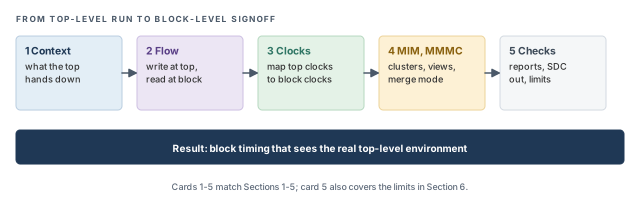
The chapter moves in five steps, from what the top hands down to the checks at the block. Figure 1 shows the order. Come back to it whenever you lose your place.
Key commands
Table 1 lists the commands and settings covered in this chapter, grouped by section. Do not try to memorize them now. Each one is explained when it is first needed.
| Section | Command or setting | What it does |
|---|---|---|
| 2 Flow | write_timing_context |
Write the context of a module from the top-level run |
| 2 Flow | read_timing_context |
Read a context into the block run |
| 3 Clocks | set_timing_context_clock_mapping |
Map one top clock to one block clock by hand |
| 3 Clocks | timing_context_port_based_clock_mapping |
Choose one-to-one or port-based clock mapping |
| 3 Clocks | The continue-on-mismatch variable (full name in Section 3.2) | Continue instead of aborting on an unmapped top clock |
| 3 Clocks | report_timing_context_clock_mapping |
Report how clocks were mapped |
| 4 MIM and views | read_timing_context -instances, -merge, -view_map_file |
Read context for chosen instances, or for several views |
| 4 MIM and views | set_timing_context_view_mapping |
Pair a top view with a block view in merge mode |
| 4 MIM and views | set_si_mode -update_glitch_mode |
Pass glitch data through the context |
| 5 Checks | get_property ... context_data |
Query the context stored on a port |
| 5 Checks | report_timing_context_data, compare_timing_context |
Report and compare context values |
| 5 Checks | write_timing_context -with_constraints |
Write block SDC files from the context |
1 What a timing context carries
1.1 The concept
Think of a block team as a sub-contractor building one room of a house. The room must fit the doors, pipes and wiring that the main builder runs up to its walls. If the sub-contractor guesses where the pipes enter, the room may not connect. A context is the main builder's measured drawing of every wall opening.
In timing terms, a timing context is a snapshot of the top-level timing environment at the boundary of one block. The top-level run computes it, because only the top knows what drives each port. The block run uses it in place of guessed boundary constraints.
The context is described as top-down. Values are computed at the top and pushed down into the block. The block never changes them; it only reads them.
1.2 What the context contains
Let us consider Figure 2. The block u_blk has a data input A, a data output Z and a clock port CLK. At the top, FF1 launches data through some logic into A. A buffer drives the clock into CLK.
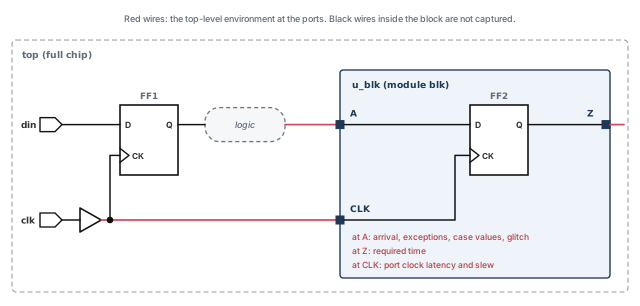
The context holds the following data for the block ports:
- Arrival times at block inputs. This is when data from the top really reaches a port such as
A. - Required times at block outputs. This is when data must leave a port such as
Zso the top-level path still meets timing. - Port clock latency and slew – how late each clock reaches the port, and how sharp its edge is there.
- Exceptions – false paths and similar constraints that cross the boundary.
- Case values – constants set at the top, for example a test-mode pin tied to 0, that reach the block.
- Glitch data, when it is requested (Section 4.4).
Each item replaces something the block designer would otherwise guess. For example, the port clock latency replaces a guessed set_clock_latency on CLK. The arrival at A replaces a guessed input delay.
1.3 Single-instance and multi-instance modules
A module used once in the chip is a single-instance module (SIM). A module placed several times is a multi-instance module (MIM). For example, a CPU core placed four times is a MIM with four instances.
The difference matters because each instance can see a different environment. One core may sit near the clock root, and another far from it. However, all four share one netlist and one block run. Section 4.1 explains how the tool combines several environments into one context.
Hierarchical context needs the Tempus XL license. Getting Started with Tempus explains the license products.
1.4 Why it matters
Without context, every block team writes its own boundary constraints. These are guesses until the top-level run exists. A guess can fail in two directions:
- Too lenient – the guess is earlier than reality. The block looks clean, and real violations appear only at the top.
- Too tight – the guess is later than reality. The block team fixes paths that were never failing, which wastes area, power and schedule.
Figure 3 puts numbers on the first case. The same 0.45 ns path inside the block passes with the guessed arrival and fails with the real one.
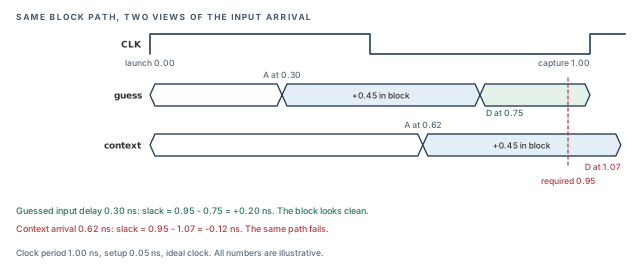
Let us check the numbers by hand. The clock period is 1.00 ns and the setup time is 0.05 ns. Thus, data must reach FF2 by 0.95 ns.
- With the guess: 0.30 + 0.45 = 0.75 ns. The slack is 0.95 − 0.75 = +0.20 ns.
- With the context: 0.62 + 0.45 = 1.07 ns. The slack is 0.95 − 1.07 = −0.12 ns.
Thus, context replaces the guesses with numbers from the real chip. The block team finds the problem in its own run, while the fix is still cheap.
2 The two-session flow
2.1 How it works
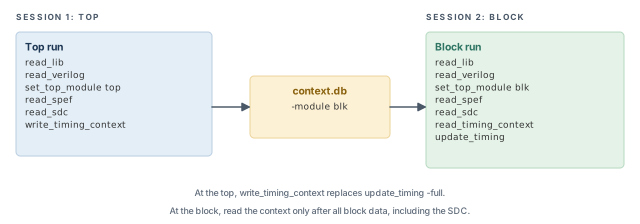
The flow uses two separate sessions, as Figure 4 shows. The top run writes the context. The block run reads it. The context file is the only link between them, so the two runs can happen on different days and machines.
The steps are:
- Top session – load the full chip: libraries, netlist, parasitics and top SDC.
- Write – run
write_timing_contextfor the module you want, for exampleblk. - Block session – load only the block: libraries, block netlist, block parasitics and block SDC.
- Read – run
read_timing_contextafter all block data. - Time – run
update_timing, then report as usual.
tempus> read_lib slow.lib                            ;# libraries
tempus> read_verilog top.v                           ;# full-chip netlist
tempus> set_top_module top                           ;# link the top
tempus> read_spef top.spef.gz                        ;# top parasitics
tempus> read_sdc top.sdc                             ;# top constraints
tempus> write_timing_context context.db -module blk ;# context of module blktempus> read_lib slow.lib ;# libraries
tempus> read_verilog blk.v ;# block netlist
tempus> set_top_module blk ;# link the block
tempus> read_spef blk.spef.gz ;# block parasitics
tempus> read_sdc blk.sdc ;# block constraints
tempus> read_timing_context context.db ;# read after ALL block data
tempus> update_timing ;# time the block with context2.2 Command breakdown
write_timing_context runs in the top session.
- The first argument is the output file, here
context.db. The block team needs only this file. -modulenames the module whose ports are captured. Use the module name,blk, not the instance nameu_blk.- At the top,
write_timing_contextreplacesupdate_timing -full. In other words, you do not need a separate full timing update before it. - Later sections add
-include_text_format(Section 5.2) and-with_constraints(Section 5.3).
read_timing_context runs in the block session.
- The argument is the context file written at the top.
- Read it after all block collateral, including the SDC. Then run
update_timing. - Later sections add
-clock_mapping_file,-instances,-mergeand-view_map_file.
Reading the context before the block SDC is a common slip. The context must come after all block data, including the SDC. Otherwise later port constraints fight with it, and the tool ignores them, as the next subsection shows.
2.3 What the context overrides
Once read, the context overrides the port constraints in the block SDC. For example, the block SDC may set an input delay of 0.30 ns on A. After the context is read, the tool uses the context arrival of 0.62 ns instead.
The one exception is port clocks. The context does not override clocks defined on block ports. Thus, the top SDC and the block SDC must agree. Assume the block SDC defines BCLK with a 1.00 ns period. If the top clock has a 1.20 ns period, the block run times its paths against the wrong period.
If a port constraint is applied after the context is read, the tool ignores it and issues TCLCMD-1541. This protects the context from accidental edits. For example, a script that sources an extra set_input_delay after the read has no effect, and the log shows TCLCMD-1541.
Figure 5 follows one port through a block session, step by step. Read it left to right, as the script runs.
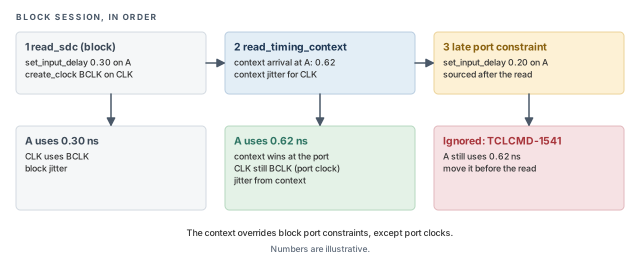
Clock jitter follows its own rule. For port clocks, the jitter in the context overrides the jitter in the block SDC. Thus, the block sees the jitter the top sees, even when the block SDC carries an older value.
Search every block log for TCLCMD-1541. Each hit is a constraint someone expected to work, and it did not. It is better to move that constraint before read_timing_context, or to drop it.
2.4 Which false paths survive
False paths that touch the block boundary need care. Some forms pass through the context, and some are ignored. Two terms help here:
- An interface pin is a pin inside the block that sits on a path to or from a block port.
- An internal pin is any other pin inside the block, on a register-to-register path.
Figure 6 places these pins on a small design, with every rule beside it. Tables 2 and 3 then repeat the rules in text form.
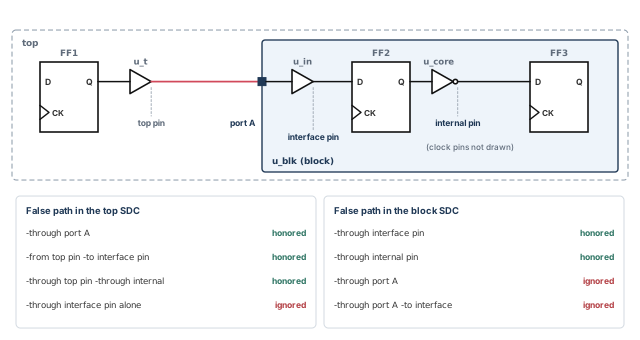
Table 2 lists the rules for false paths written in the top SDC.
| Form in the top SDC | Result |
|---|---|
set_false_path -through <block port> |
Honored |
set_false_path -from <top pin> -to <block interface pin> |
Honored |
set_false_path -through <top pin> -through <block internal pin> |
Honored |
set_false_path -through <interface path pin> alone |
Ignored |
Let us read the table with an example. The top SDC marks a test path as false through the block port u_blk/TEST_IN. That is the first form, so the block run also treats it as false. However, a top false path given only as -through an interface pin, with no other point, is ignored. The block run then times that path.
Table 3 lists the rules for false paths written in the block SDC.
| Form in the block SDC | Result |
|---|---|
set_false_path -through <interface pin or internal pin> |
Honored |
set_false_path -through <block port> |
Ignored |
set_false_path -through <block port> -to <interface pin> |
Ignored |
At the block, false paths through pins inside the block work. False paths that name a block port do not. A simple way to remember it: at the block, the context owns the ports.
After the block run, check that each boundary false path you rely on behaves as expected in the reports. It is better to rewrite an ignored form into a supported form than to assume it worked.
3 Mapping top clocks to block clocks
3.1 The concept
The top and the block usually name their clocks differently. The top may call a clock TCLK, while the block SDC calls the same clock BCLK. Both names describe one physical clock net entering port CLK.
The context carries values per top clock, such as the latency of TCLK at CLK. The block run times paths per block clock. Before the context can be used, each top clock that reaches the block must be matched to a block clock. This is called clock mapping.
3.2 How automatic mapping works
By default, the tool maps clocks on its own. Figure 7 shows the five outcomes you will meet.
- Mapped – the top clock matches a block clock. The tool reports TA-1022.
- Generated clock – generated clocks are mapped by name only. If the names differ, they do not map. Verify them after
update_timing. - Unmapped top clock – a top clock reaches the block but finds no block clock. The tool reports TA-1023 and aborts with TA-1024.
- Unmapped block port – a block clock port receives no mapped top clock. The tool reports TA-1025.
- Unmapped block virtual clock – a virtual clock in the block SDC has no top clock. The tool reports TA-1041.
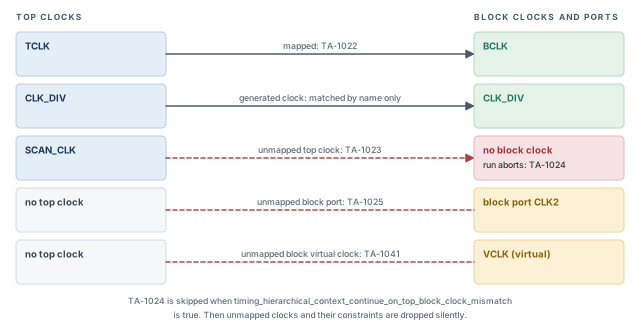
The abort on TA-1024 is deliberate. A top clock without a block clock means some paths would have no clock to time against. Stopping is safer than continuing silently.
To continue past an unmapped top clock, set this variable:
tempus> set timing_hierarchical_context_continue_on_top_block_clock_mismatch \
true ;# continue instead of abortingWith this variable set, the run continues, but unmapped clocks and their constraints are dropped silently. The block report can look clean while paths on those clocks were never timed. Always review the mapping report when you use it.
3.3 Mapping clocks by hand
When the automatic match is wrong or missing, map clocks yourself. Put set_timing_context_clock_mapping commands in a file, and read that file with the context:
# Map top clock TCLK to block clock BCLK in view func_ss
set_timing_context_clock_mapping -top_clock TCLK -block_clock BCLK -view func_ss
# Also map TCLK2 to BCLK; -add keeps the first mapping
set_timing_context_clock_mapping -top_clock TCLK2 -block_clock BCLK -view func_ss -addtempus> read_timing_context context.db -clock_mapping_file clkMap.txt ;# user mapping winsEach option has one job:
-top_clock– the clock name as the top SDC defines it.-block_clock– the clock name as the block SDC defines it.-view– the analysis view this pairing applies to. A pairing can differ between views, for example functional and test.-add– keeps earlier pairings for the same block clock. Without it, a new pairing replaces the old one.-clock_mapping_file– the option ofread_timing_contextthat reads the file.
The rules for user mapping are short but important:
- User mapping wins over the automatic match. If the top and block waveforms differ, the block waveform is used.
- Repeated mapping for the same block clock overrides the earlier one. Add
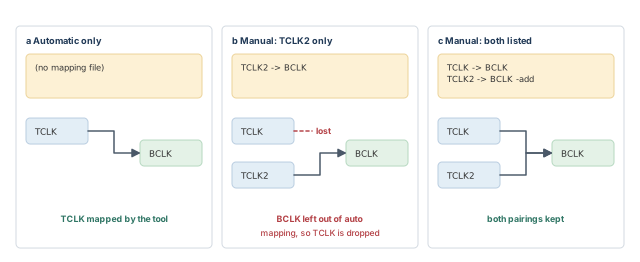
-addto keep both. - Manual excludes automatic – a block clock you map by hand is left out of automatic mapping. Thus, list every mapping that block clock needs.
Let us see why the last rule matters. Assume the tool would map TCLK to BCLK on its own. You then add a manual pairing of TCLK2 to BCLK. Now BCLK is excluded from automatic mapping, so TCLK is no longer paired. You must add the TCLK line yourself. Figure 8 shows the three situations side by side.
3.4 One-to-one or port-based mapping
The variable timing_context_port_based_clock_mapping decides how many top clocks may share one block clock. Figure 9 compares its two settings.
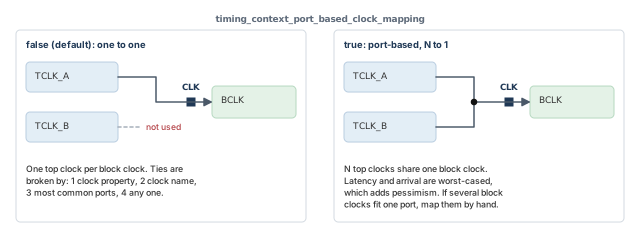
With false (the default), mapping is one top clock to one block clock. When several top clocks could fit, the tool breaks the tie in this order:
- The clock property.
- The clock name.
- The clock that reaches the most common ports.
- Any one of them.
With one-to-one mapping, the losing top clock is not used for that block clock. That is fine when the top clocks are equivalent. It is risky when they differ, because the paths of the losing clock are not represented.
With true, mapping is port-based. Several top clocks can map to one block clock (N-to-1). One top clock can also map to several block clocks (1-to-N). For N top clocks on one block clock, latency and arrival are worst-cased.
Let us consider two top clocks reaching CLK, with latencies 0.40 ns and 0.55 ns. With port-based mapping, the block clock carries the worst-case value from both. Thus, every path is covered, but some paths are timed more pessimistically than either clock alone.
If several block clocks can match on the same port, the tool cannot decide alone. Map them by hand.
3.5 Mapping reports and messages
The tool writes two reports, timing_context_clock_mapping.rpt and timing_context_clock_mapping_data.rpt. Both follow the auto_file_dir and auto_file_prefix settings from Getting Started with Tempus. You can also print the mapping on demand:
tempus> report_timing_context_clock_mapping              ;# text report
tempus> report_timing_context_clock_mapping -format csv  ;# CSV, port-based mapping only
The CSV form works only with port-based mapping. It is handy for scripts that check every port in a spreadsheet or a parser. Table 4 collects the messages from this section.
| Message | Meaning | What to do |
|---|---|---|
| TA-1022 | Top clock mapped | Confirm the pairing is the one you expect |
| TA-1023 | Top clock not mapped | Add a pairing, or fix the clock names |
| TA-1024 | Run aborted because of an unmapped top clock | Fix every TA-1023 first |
| TA-1025 | Block port not mapped | Check which top clock should reach that port |
| TA-1041 | Block virtual clock not mapped | Confirm the virtual clock is really unused at the top |
The mapping data also marks how each port is used, with the letters C, I, O, R and E. Run help report_timing_context_clock_mapping to confirm what each letter stands for in your installation.
4 Multi-instance modules and multiple views
4.1 Multi-instance modules
Let us consider a module blk placed three times, as A1, A2 and A3. Each instance sees a different clock latency at port CLK. However, the block is closed once, as one netlist. Thus, one context must cover several instances.
The tool solves this with clusters. Instances fall into the same cluster when they have the same:
- port clocks,
- polarity,
- constants, and
- top clock constraints.
Within a cluster, latency, transition and load are worst-cased. Figure 10 shows three instances and the clusters they form.
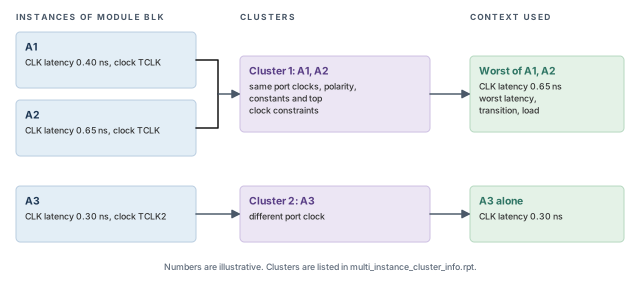
Let us read the figure. A1 has a CLK latency of 0.40 ns and A2 has 0.65 ns. Both use TCLK, so they share a cluster. The context for that cluster uses 0.65 ns, the worse of the two. A3 uses TCLK2, so it forms its own cluster.
The clusters are listed in multi_instance_cluster_info.rpt. To read the context for chosen instances, name them:
tempus> read_timing_context context.db -instances {A1 A2} ;# one clusterIf you omit -instances, all instances are read, and they must form one cluster. The tool raises an error in two cases:
- The listed instances belong to different clusters. For example,
-instances {A1 A3}mixes clusters 1 and 2. - An instance's module is not the module given to
-modulewhen the context was written.
For nested hierarchy, give the full instance path from the top in -instance or -instances. For example, an instance inside a subsystem is named with the subsystem path first. Figure 11 shows a small case.
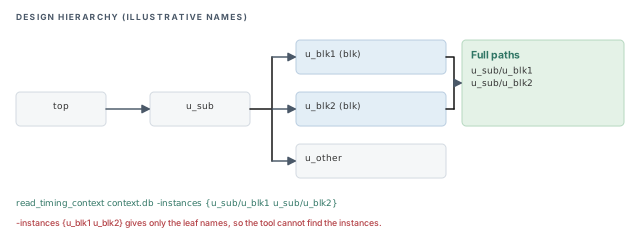
Read multi_instance_cluster_info.rpt before planning block runs. Since one read covers one cluster, a MIM typically needs one block run per cluster.
4.2 Multiple views
In a multi-mode multi-corner run, write_timing_context covers all active views. Multi-Mode Multi-Corner Analysis explains views and active views.
The block run needs a context for every one of its active views. If a block view has no context, its boundary is unknown. Read the contexts together with read_timing_context -merge. Top and block views are paired in one of two ways:
- By name – a top view and a block view with the same name are paired automatically.
- By a view map file – given with
-view_map_file, when the names differ.
4.3 Merge mode: folding top modes into one block view
Sometimes the top runs functional and test modes as separate views, but the block team runs one view. Merge mode folds both top contexts into that one block view. It needs timing_context_port_based_clock_mapping set to true. Figure 12 shows the setup.
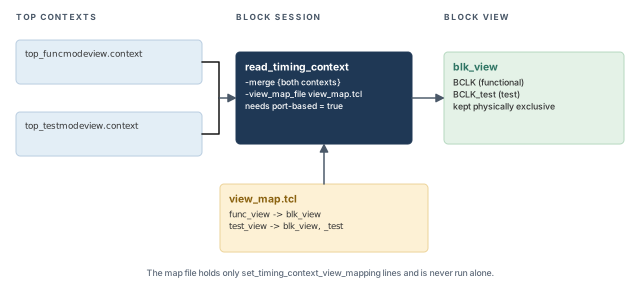
# Functional top view feeds the block view
set_timing_context_view_mapping -top_view func_view -block_view blk_view
# Test top view feeds the same block view; its clocks get the suffix _test
set_timing_context_view_mapping -top_view test_view -block_view blk_view \
-block_clock_suffix "_test"tempus> set timing_context_port_based_clock_mapping true ;# required for merge mode
tempus> read_timing_context -merge {top_testmodeview.context top_funcmodeview.context} \
-view_map_file view_map.tcl ;# fold both modes into blk_viewThe options work as follows:
-merge– takes the list of top context files to fold together.-view_map_file– names the file that holds the view pairings.-top_viewand-block_view– pair one top view with one block view.-block_clock_suffix– adds a suffix to the block clock names that come from that top view. Here, test clocks appear asBCLK_test.
Two rules apply here:
set_timing_context_view_mappingis used only inside the view map file. It is never run on its own.- In the block SDC, keep the functional and test clocks physically exclusive. Otherwise the tool may time paths between two modes that never run together, which creates false violations.
4.4 Passing glitch data
Glitch results can travel through the context too. Set set_si_mode -update_glitch_mode to none, medium or high. The value none passes no glitch data. Confirm what medium and high include with help set_si_mode.
The order matters:
- At the top, set the mode before
write_timing_context. - At the block, set the same mode before
read_timing_context. - At the top, reset the mode to
nonebefore the nextupdate_timing.
Figure 13 puts the three steps on two time lines, one per session.
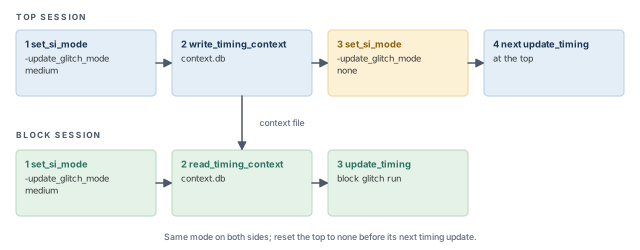
tempus> set_si_mode -update_glitch_mode medium   ;# top: before write_timing_context
tempus> set_si_mode -update_glitch_mode medium   ;# block: before read_timing_context
tempus> set_si_mode -update_glitch_mode none     ;# top: reset before next update_timing
Glitch, Overshoot and Undershoot explains the glitch analysis itself.
5 Inspecting, comparing and exporting context
A context read can succeed and still be wrong. A clock may be unmapped, or a port constraint may be ignored. Figure 14 shows a short checking routine to run after every read.
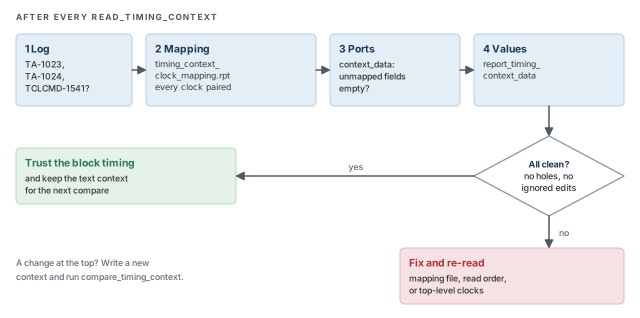
5.1 Querying a port
With port-based mapping, each port carries a context_data property. Query it with get_property:
tempus> get_property [get_ports A] context_data ;# context of port AThe property has these fields:
top_instance– the top-level instance the context came from.top_view– the top view that produced the data.mapped_top_clocks,unmapped_top_clocks,all_top_clocks– the top clocks at the port, split by mapping status.mapped_block_clocks,unmapped_block_clocks,all_block_clocks– the same split for block clocks.
The field meanings above follow their names; confirm details with help get_property if needed. The unmapped fields are the quickest way to find a clock hole on one port. An empty unmapped_top_clocks field is what you want to see.
5.2 Reporting and comparing values
To print context values, use report_timing_context_data. The -type option selects one or more of these:
latency– the clock latency carried to the port.incr_delay– the incremental delay values carried to the port.uncertainty– the clock uncertainty carried to the port.
The -port option limits the report to one port.
tempus> report_timing_context_data -type {latency incr_delay uncertainty} -port A ;# port ATo compare two contexts, for example before and after a top-level change, use compare_timing_context. It needs contexts written with write_timing_context -include_text_format. A context written without that option cannot be compared later.
Write every context with -include_text_format. When a block result changes after a top-level update, comparing old and new contexts shows at once which boundary values moved.
5.3 Writing block constraints from the context
Sometimes a team wants plain SDC files for the block, built from the real top environment. write_timing_context -with_constraints writes them. The output is <dir>/<module>/<module>.<mode>.sdc, one file per mode. It also writes path-adjust, path-group and timing-derate SDC files. Figure 15 sums up what it produces.
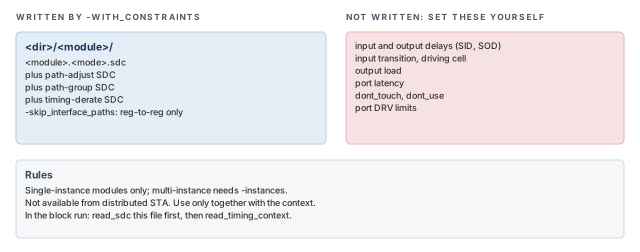
The rules are:
- It works for single-instance modules. A multi-instance module needs
-instances. - It cannot be used from distributed STA.
- Use the files only together with the context. In the block run,
read_sdcthe written file beforeread_timing_context. - The files omit input and output delays (SID and SOD –
set_input_delayandset_output_delay), input transition, driving cell and load. - They also omit port latency,
dont_touch,dont_useand port DRV limits. -skip_interface_pathswrites constraints for register-to-register paths only.
The omitted items are mostly boundary values that the context supplies, plus implementation settings such as dont_touch and dont_use. Thus, the written SDC is a companion to the context, never a replacement for it.
context_data, report_timing_context_data and compare_timing_context to see what the block received. Written SDC files never replace the context itself.6 Limits of context-based signoff
Context is powerful, but it is not a full-chip run. The block run sees the boundary as fixed numbers, while the real chip keeps changing. Keep these three limits in mind.
- IO-path PBA is partial. Path-based analysis (PBA) of interface paths is only partial in a context run. Typically, the part of the path outside the block is not visible to the block run. Path-Based and Robustness Analysis explains PBA.
- Interface ECOs break the context. If a fix changes an interface cell, the top-level numbers no longer match. For example, a larger input cell adds load to the top-level driver, which the context did not see. Mark the interface
dont_touchduring block fixing. - MIM timing windows are pessimistic. For multi-instance modules, timing windows are the union across instances. A wider window means more crosstalk overlap is assumed.
Figure 16 shows the second limit in numbers. The block team upsizes the input cell behind port A. The top driver now sees more load, but the context still carries the old arrival.
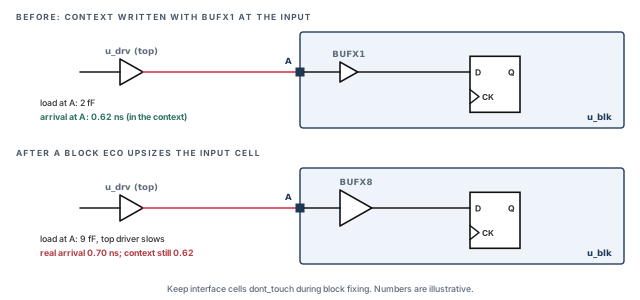
A beginner fixes a violation by upsizing a cell on an interface path, then signs off with the old context. The context described the old cell's load. It is better to keep interface cells dont_touch and send interface issues back to the top.
Thus, context-based signoff works best as a loop. Close the block against the context, return to the top run, write a new context, and compare.
7 Worked example: a block with functional and test modes
The task. Module blk is used once, as u_blk. The top runs a functional view and a test view. The block team runs one view, blk_view. Glitch data must pass through. The top clock TCLK must map to block clock BCLK.
Let us plan before typing. One block view and two top views means merge mode. Merge mode needs port-based mapping. Different clock names need a manual mapping file. Glitch data needs the glitch mode set on both sides.
Step 1 – top run, functional view
# Assuming the design data for the functional view is already loaded
tempus> set_si_mode -update_glitch_mode medium   ;# pass glitch data
tempus> write_timing_context top_funcmodeview.context -module blk \
    -include_text_format                         ;# write context, text form too
tempus> set_si_mode -update_glitch_mode none     ;# reset before next update
The text format is written now so that later contexts can be compared with this one. The test view is written the same way, as top_testmodeview.context.
Step 2 – prepare the mapping files
# Functional and test top views both feed blk_view
set_timing_context_view_mapping -top_view func_view -block_view blk_view
set_timing_context_view_mapping -top_view test_view -block_view blk_view \
-block_clock_suffix "_test"# Top and block names differ, so map them by hand
set_timing_context_clock_mapping -top_clock TCLK -block_clock BCLK -view blk_viewThe suffix keeps the test copy of the clock separate as BCLK_test. Thus, the block SDC typically defines BCLK_test and makes it physically exclusive with BCLK.
Step 3 – block run
tempus> read_lib slow.lib                                   ;# libraries
tempus> read_verilog blk.v                                  ;# block netlist
tempus> set_top_module blk                                  ;# link
tempus> read_spef blk.spef.gz                               ;# parasitics
tempus> read_sdc blk.sdc                                    ;# func and test clocks exclusive
tempus> set timing_context_port_based_clock_mapping true    ;# needed for merge mode
tempus> set_si_mode -update_glitch_mode medium              ;# read glitch data
tempus> read_timing_context -merge {top_testmodeview.context top_funcmodeview.context} \
    -view_map_file view_map.tcl -clock_mapping_file clkMap.txt   ;# both modes
tempus> update_timing                                       ;# time with context
tempus> report_timing_context_clock_mapping                 ;# check every clock
Notice the order. All block data comes first, then the two settings, then the read, then update_timing.
Step 4 – verify before trusting the result
Follow the routine in Figure 14:
- The log has no TA-1023, TA-1024 or TCLCMD-1541.
- The mapping report shows
TCLKonBCLK. get_property [get_ports A] context_datashows an emptyunmapped_top_clocksfield.- The block SDC defines
BCLKandBCLK_testas physically exclusive.
Only then read the timing reports. If any check fails, fix the mapping file or the read order and read the context again.
Combining -merge, -view_map_file and -clock_mapping_file in one command is shown for brevity. Confirm with help read_timing_context that your installation accepts them together. The -view value in clkMap.txt is shown as the block view; confirm the expected view name with help set_timing_context_clock_mapping.
8 Common mistakes and how to catch them
Table 5 gathers the mistakes from this chapter. Each row gives the symptom you would see first.
| Symptom | Likely cause | Fix |
|---|---|---|
| Block port constraint has no effect, TCLCMD-1541 | Port constraint applied after the context | Apply all block constraints before read_timing_context |
| Run aborts with TA-1024 | A top clock reaching the block has no block clock | Add a mapping in the clock mapping file |
| Clean block report, paths missing | Continue variable set; unmapped clocks dropped silently | Review the mapping reports; fix every TA-1023 |
| Generated clock timed wrongly | Generated clocks map by name only | Use the same name, then verify after update_timing |
| Manual mapping loses an earlier pairing | Repeated mapping overrides without -add |
Use -add, and list every mapping for that clock |
| A clock that mapped before is now unmapped | Manual mapping excluded that block clock from automatic mapping | List every pairing for that block clock by hand |
| Extra pessimism on shared ports | Port-based mapping worst-cases N top clocks | Accept it, or map clocks by hand |
| Error reading MIM context | Instances from different clusters, or wrong module | Check multi_instance_cluster_info.rpt |
| Merge mode fails or mixes modes | Port-based mapping off, or modes not exclusive | Set the variable to true; make clocks physically exclusive |
| Top false path not applied at the block | Ignored form, such as -through an interface pin alone |
Rewrite it in an honored form |
| Glitch results look stale at top | Glitch mode not reset to none |
Reset before the next update_timing |
compare_timing_context cannot compare |
Context written without -include_text_format |
Rewrite the context with that option |
| Context no longer matches after fixes | Interface cell changed | Keep the interface dont_touch |
9 Interview preparation
It is the top-level timing environment at a block's ports, written by the top run and read by the block run.
- It carries arrivals, required times, port clock latency and slew, exceptions, case values and glitch data.
- It replaces guessed boundary constraints with measured values.
- The block keeps a small, fast run while seeing real boundary numbers.
A SIM is a module used once; a MIM is a module placed several times.
- Each MIM instance can see a different environment, but all share one netlist.
- MIM context groups instances into clusters and worst-cases latency, transition and load.
- Instances in different clusters cannot be read together.
Libraries, netlist, top module, parasitics and SDC first; the context last; then update_timing.
- A port constraint applied after the context is ignored with TCLCMD-1541.
- Reading the context early lets later SDC lines fight with it.
- At the top,
write_timing_contextitself replacesupdate_timing -full.
No. It overrides port constraints except port clocks.
- Port clocks keep the block SDC definition, so top and block SDC must agree.
- For port clocks, context jitter does override block SDC jitter.
- A mismatch in clock period means the block times its paths against the wrong period.
The tool reports TA-1023 and aborts with TA-1024.
- The continue variable avoids the abort.
- However, it drops the clock and its constraints silently.
- The safe fix is a mapping, not the variable.
timing_context_port_based_clock_mapping to true?When several top clocks must map to one block clock, or for merge mode.
- One-to-one mapping keeps only one top clock per block clock, chosen by a tie-break order.
- N-to-1 mapping worst-cases latency and arrival, which adds pessimism.
- If several block clocks fit one port, map them by hand.
A block clock mapped by hand is excluded from automatic mapping.
- Its earlier automatic pairing is lost.
- List every pairing for that block clock, using
-addfor the extra ones.
By name only.
- If the top and block names differ, a generated clock does not map automatically.
- Verify generated clocks after
update_timing.
-through <block port>, -from <top pin> -to <block interface pin> and -through <top pin> -through <block internal pin> are honored.
-through <interface path pin>alone is ignored.- At the block, false paths through block ports are ignored; those through interface or internal pins work.
- Ignored forms leave the path timed, which can create false violations.
Use merge mode: read_timing_context -merge with a view map file and -block_clock_suffix.
- Port-based mapping must be true.
set_timing_context_view_mappinglives only inside the view map file.- Keep functional and test clocks physically exclusive in the block SDC.
write_timing_context -with_constraints leave out?SID and SOD, input transition, driving cell, load, port latency, dont_touch, dont_use and port DRV.
- The files are used only with the context, and read before it.
- It works for single-instance modules; a MIM needs
-instances. - It cannot be used from distributed STA.
dont_touch during block ECO?Because changing them invalidates the context, which described the old interface.
- A new interface cell changes load and delay seen by the top-level path.
- IO-path PBA is also only partial, so interface issues are best fixed at the top.
Chapter recap
Key takeaways
- A context carries the top-level environment into block ports, so the block run is not built on guesses.
- Write the context at the top, read it last at the block, then run
update_timing. - The context overrides block port constraints, except port clocks. Late port constraints are ignored with TCLCMD-1541.
- Every top clock reaching the block must map to a block clock. Review the mapping report every time.
- MIM context is worst-cased per cluster. Multi-view blocks need every active view, and merge mode needs port-based mapping.
- Interface ECOs, partial IO-path PBA and MIM timing windows are the main limits.
Command recap
| Command or setting | Purpose |
|---|---|
write_timing_context -module, -include_text_format, -with_constraints, -skip_interface_paths |
Write context, text form, or block SDC files |
read_timing_context -clock_mapping_file, -instances, -merge, -view_map_file |
Read context with mapping, instances or views |
set_timing_context_clock_mapping -top_clock -block_clock -view -add |
Map clocks by hand |
set_timing_context_view_mapping -top_view -block_view -block_clock_suffix |
Pair views in merge mode |
timing_context_port_based_clock_mapping |
One-to-one or port-based mapping |
| The continue-on-mismatch variable (Section 3.2) | Continue on unmapped top clocks |
report_timing_context_clock_mapping -format csv |
Report clock mapping |
get_property [get_ports A] context_data |
Query the context on a port |
report_timing_context_data -type -port |
Report latency, incremental delay, uncertainty |
compare_timing_context |
Compare two contexts |
set_si_mode -update_glitch_mode |
Pass glitch data |
Compact glossary
| Term | Meaning |
|---|---|
| Timing context | Top-level timing environment at a block's ports |
| Top-down | Computed at the top and pushed into the block |
| SIM | Single-instance module: placed once |
| MIM | Multi-instance module: placed several times |
| Cluster | MIM instances with the same port clocks, polarity, constants and top clock constraints |
| Clock mapping | Matching each top clock to a block clock |
| Port-based mapping | Mapping that allows N-to-1 and 1-to-N clock pairs |
| Merge mode | Folding several top views into one block view |
| Interface pin | A block pin on a path to or from a block port |
| Internal pin | A block pin on a register-to-register path |
Practical perspective
On a real project, context runs repeat every time the top changes. Thus, the habits matter more than the commands. Read the context last, read the mapping report every time, and compare new contexts with old ones. A block that closes against a stale or half-mapped context is a block that fails at the top.
What comes next
So far, every path has been timed with worst-case graph-based numbers. In the next chapter, Path-Based and Robustness Analysis, we retime chosen paths more exactly. We also measure how robust the design is.